



Summarize this blog post with:


In this article, you’ll learn how to find every backlink pointing to your competitors, figure out which ones you can realistically replicate, and use proven tactics to get those same links pointing to your site. You’ll also learn how to extend this analysis to AI search—where citations, not just backlinks, determine who gets recommended by ChatGPT, Perplexity, and Google AI Mode.
Table of Contents
Why Competitor Backlink Analysis Matters
Backlinks remain one of the strongest ranking signals in Google’s algorithm. But building them from scratch, with no direction, is slow and often wasteful.
Competitor backlink analysis solves this problem. Instead of guessing which sites might link to you, you study where your competitors already earned links—and reverse-engineer their success.
Here’s what it gives you:
-
Proven link sources. If a site linked to your competitor, they’re clearly open to linking to content in your space. You’re not cold-pitching into the void.
-
Tactic validation. If a competitor earned 50 links from guest posts and only 3 from infographics, you know where to focus your effort.
-
Gap identification. Link Intersect tools show you sites that link to multiple competitors but not to you. These are your lowest-hanging fruit.
-
Content direction. The pages attracting the most backlinks tell you what formats, topics, and angles resonate with linkers in your niche.
And here’s the part most guides miss: backlinks don’t just affect traditional search rankings anymore. The pages that rank high in Google are the same pages AI engines like ChatGPT and Perplexity tend to cite in their answers. So when you improve your backlink profile, you’re also improving your chances of being referenced in AI search results.
That means competitor backlink analysis now pulls double duty—it feeds both your SEO strategy and your AI visibility.
How to Find Your Competitors’ Backlinks
Before you can replicate or steal anyone’s backlinks, you need to see them. Here’s how.
Step 1: Identify Your Real Competitors
Your SEO competitors aren’t always the same as your business competitors. A local plumber competing for “emergency plumber in Austin” is up against other local plumbing companies in Google—not national plumbing supply chains.
The easiest way to find your SEO competitors is to search for your target keywords and note which sites consistently show up on page one. Do this for 5–10 of your most important keywords and you’ll see patterns emerge.
![[Screenshot: Google SERP showing top-ranking results for a target keyword, with competitor domains highlighted]](https://www.datocms-assets.com/164164/1774872304-blobid1.png?auto=format,compress&w=1248&fit=max)
You can also use a tool to automate this. Enter your website into a competitor analysis tool, navigate to the organic competitors report, and you’ll see a list of domains that rank for the same keywords as you.
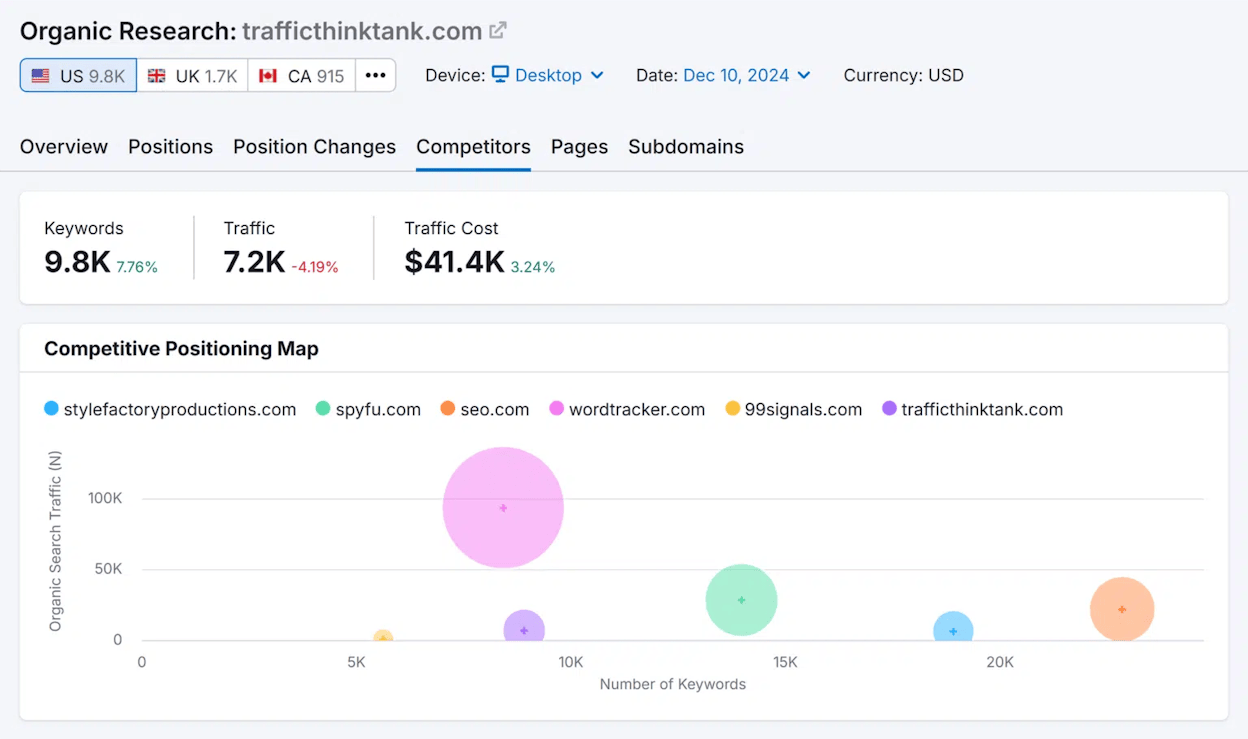
This report sorts competitors by keyword overlap, so the sites at the top share the most ranking keywords with you. These are the ones worth analyzing first.
Step 2: Use a Backlink Analysis Tool
You need an SEO tool with backlink data to pull this off. Here are two ways to do it:
Free method (limited data)
Several free backlink checker tools let you see a competitor’s top backlinks without paying for a subscription. You’ll typically get the top 100 backlinks, the total number of referring domains, and basic metrics like domain authority.
To use one, enter your competitor’s domain or URL into the tool and hit search.
![[Screenshot: Free backlink checker tool showing top backlinks, referring domains count, and domain authority for a competitor URL]](https://www.datocms-assets.com/164164/1774872316-blobid3.png?auto=format,compress&w=1248&fit=max)
This is enough to get a directional sense of where their links come from. But for serious analysis, you’ll need the full picture.
Paid method (all backlinks)
With a paid SEO tool, enter your competitor’s domain into the site explorer feature and go to the Backlinks report. You’ll see every backlink pointing to their site—sometimes tens of thousands of them.
![[Screenshot: SEO tool’s Backlinks report showing all backlinks with columns for referring page, anchor text, domain rating, and traffic]](https://www.datocms-assets.com/164164/1774872321-blobid4.png?auto=format,compress&w=1248&fit=max)
Use the filters to narrow down the list. For example, you can filter for:
-
Dofollow links only (these pass the most SEO value)
-
Links from pages with traffic (a sign the linking page is legitimate)
-
Links from specific languages (if you only operate in certain markets)
-
One link per domain (to avoid seeing hundreds of links from the same site)
![[Screenshot: Filter options in a Backlinks report showing dofollow, traffic, language, and “one link per domain” toggles]](https://www.datocms-assets.com/164164/1774872323-blobid5.png?auto=format,compress&w=1248&fit=max)
This filtered view is far more actionable than the raw list. You’re looking at the links that actually move the needle.
Step 3: Find Backlinks Linking to Competitors but Not You
The single most valuable report for competitor backlink analysis is a Link Intersect (sometimes called a “Backlink Gap” report). This shows you domains that link to one or more of your competitors but don’t link to you.
Here’s how to run one:
-
Enter your domain into the tool
-
Add 3–5 competitor domains in the comparison fields
-
Set the search mode to “domain” (or “URL” if comparing specific pages)
-
Run the report
![[Screenshot: Link Intersect tool setup with one target domain and four competitor domains entered, search mode set to “domain”]](https://www.datocms-assets.com/164164/1774872327-blobid6.png?auto=format,compress&w=1248&fit=max)
The report will show a list of referring domains sorted by how many of your competitors they link to. A site that links to 4 out of 5 of your competitors—but not to you—is a strong prospect.
![[Screenshot: Link Intersect results showing referring domains with check marks indicating which competitors they link to, sorted by intersect count]](https://www.datocms-assets.com/164164/1774872330-blobid7.png?auto=format,compress&w=1248&fit=max)
This is where you’ll find the most actionable opportunities. Sites linking to multiple competitors in your space have already demonstrated interest in your topic. They just don’t know about you yet.
How to Replicate Your Competitors’ Backlinks
Finding backlinks is the easy part. The real work starts when you try to get them for yourself.
It’s impossible to replicate every backlink your competitors have. Some come from personal relationships, one-time events, or circumstances you can’t recreate. But you can often replicate a meaningful subset.
Here are three approaches, in order of difficulty.
1. Find and Copy Their Replicable Links
Some backlinks are straightforward to replicate. You just need to identify them and take action.
Find Competitors’ Directory Links
Directory links aren’t the most powerful backlinks, but they’re among the easiest to get. And for local businesses, they can help with local SEO and Google Map Pack rankings.
The fastest way to find them is through the Link Intersect report (from the previous section). Run the report with your homepage against a few competitors’ homepages, set all search modes to “URL,” and look for results that resemble directories.
![[Screenshot: Link Intersect results with directory-style referring domains highlighted—sites like yelp.com, yellowpages.com, or industry-specific directories]](https://www.datocms-assets.com/164164/1774872333-blobid8.png?auto=format,compress&w=1248&fit=max)
Signs that a referring domain is a directory:
-
The domain name contains words like “directory,” “listings,” “yellow,” or “finder”
-
The referring page URL contains “/listing/” or “/profile/”
-
Multiple competitors are listed on the same page
If you’re not sure, click through to the referring page. Directories have a distinct look—business listings with names, addresses, phone numbers, and links.
![[Screenshot: Example directory listing page showing a business profile with name, address, website link, and other listed businesses on the same page]](https://www.datocms-assets.com/164164/1774872335-blobid9.png?auto=format,compress&w=1248&fit=max)
Replicating these links is usually as simple as creating a profile on the directory and adding your business information. Some directories charge a fee—only pay if the directory is likely to send you actual customers, not just for the link.
Tip: Use Analyze AI’s free broken link checker to verify your directory listings aren’t pointing to dead URLs. Broken directory links are wasted opportunities.
Find Listicles Where Competitors Are Mentioned (but Not You)
If your competitors show up in “best tools,” “top services,” or “alternatives to X” listicles, you can often get added to those same lists.
The best opportunities are listicles that mention multiple competitors. If a post lists the “10 best project management tools” and includes three of your competitors, the author clearly covers your niche and may be open to adding you.
Here’s how to find them:
-
Go to a content discovery tool
-
Search for "competitor 1" "competitor 2" "competitor 3" -"your brand name"
-
Filter for pages with organic traffic (so the link has lasting value)
![[Screenshot: Content discovery tool showing search results for competitor mentions, filtered by organic traffic, with listicle-style titles visible]](https://www.datocms-assets.com/164164/1774872338-blobid10.png?auto=format,compress&w=1248&fit=max)
You can also use Google search operators to find these manually:
"best [your category]" + "competitor 1" + "competitor 2" -"your brand"
![[Screenshot: Google search results showing listicle posts that mention multiple competitors in the title and description]](https://www.datocms-assets.com/164164/1774872342-blobid11.png?auto=format,compress&w=1248&fit=max)
Once you’ve found relevant listicles, reach out to the author. Don’t ask them to add you outright—instead, ask if they’ve tried your product or service. If they haven’t, offer a free trial or demo. The inclusion usually follows naturally.
Here’s a template that works:
Hey [Name],
I noticed your list of the best [category] tools—great roundup. I saw you included [Competitor A] and [Competitor B] but didn’t see [Your Brand] on there.
Have you had a chance to try us? If not, I’d be happy to set you up with a free account so you can evaluate it yourself.
Either way, no pressure—just wanted to make sure we were on your radar.
[Your Name]
This approach works because it’s low-pressure. You’re not demanding inclusion. You’re opening a door.
Find Competitors’ Links from Interviews and Podcasts
In some industries, podcasts and interviews are a significant source of backlinks. If your competitor’s founder or CMO has been on 20 podcasts, each one likely linked back to their website in the show notes.
Here’s how to check:
-
Enter the personal website or social media profile URL of your competitor’s most visible person into a backlink tool
-
Go to the Backlinks report
-
Filter for referring page URLs containing “podcast,” “episode,” or “interview”
![[Screenshot: Backlinks report filtered for URLs containing “podcast” or “interview,” showing results with podcast show notes linking back to the competitor]](https://www.datocms-assets.com/164164/1774872345-blobid12.png?auto=format,compress&w=1248&fit=max)
If you find a cluster of podcast or interview links, that tactic is clearly working in your space. Pitch the same shows—and look for new ones using podcast directories like Listen Notes or Podchaser.
Find Competitors’ Guest Posts
Guest posting remains one of the most popular link building tactics. If your competitors are actively guest posting, you’ll want to know which sites they’re publishing on so you can pitch those same sites.
Guest posts can be hard to spot in a backlinks report because they look like regular editorial links. But there’s a shortcut:
-
Go to a content discovery tool
-
Search for a topic relevant to your niche + author:"name of competitor's writer"
-
Filter for one page per domain
![[Screenshot: Content discovery tool showing results filtered by author name, with guest post titles on various domains visible]](https://www.datocms-assets.com/164164/1774872348-blobid13.png?auto=format,compress&w=1248&fit=max)
Most of the results will be guest posts by that person on external websites. You now have a list of sites that accept guest content in your space. Pitch them with your own original angle.
2. Find and Copy the Tactics Working for Them
Beyond replicating specific links, you want to identify the broader tactics your competitors use successfully—and apply those tactics more broadly.
Check for Links from Journalist Requests (HARO and Similar Platforms)
Bloggers and journalists use services like Help A Reporter Out (HARO), Connectively, and Qwoted to source expert quotes for their articles. When they quote someone, they usually link back to that person’s website.
Here’s how to check if your competitors are building links this way:
-
Enter a competitor’s homepage in a backlink tool
-
Set the search mode to “Exact URL”
-
Go to the Backlinks report
-
Look for links where the anchor text contains a person’s name or a short quote
![[Screenshot: Backlinks report showing links with anchor text containing expert quotes, names, and attribution—typical signs of HARO-sourced links]](https://www.datocms-assets.com/164164/1774872350-blobid14.png?auto=format,compress&w=1248&fit=max)
If you see the same person’s name appearing as the anchor text across multiple links from different media sites, your competitor is almost certainly responding to journalist requests. And it’s working.
To do this yourself:
-
Sign up for HARO, Connectively, or Qwoted
-
Set up email alerts for your industry keywords
-
Respond to relevant requests with a concise, quotable expert take
-
Include your name, title, and website URL
The key to success is speed. Journalists often get dozens of responses and tend to use the first good ones that come in. Respond within 2–3 hours of receiving the request.
Check for Passively Earned Links from Linkable Points
Linkable points are specific facts, statistics, frameworks, or coined terms that other writers naturally reference and link to. Even if your competitors aren’t deliberately building links this way, they may be earning them passively.
Here’s how to check:
-
Enter one of your competitor’s top-ranking pages into a backlink tool
-
Go to the Anchors report
-
Look for anchors relating to specific numbers, statistics, or named frameworks
![[Screenshot: Anchors report showing anchor text distribution for a competitor page, with data-related and framework-related anchors highlighted]](https://www.datocms-assets.com/164164/1774872356-blobid15.png?auto=format,compress&w=1248&fit=max)
For example, if a competitor’s guide to email marketing has earned backlinks with anchors like “average email open rate” or “the 3-2-1 email framework,” those are linkable points. Other writers are citing these specific pieces of information.
You can use this insight in two ways:
-
Include your own linkable points. When creating content on the same topic, add original data, coin a framework, or compile statistics that other writers will want to reference.
-
Create a dedicated statistics page. Curated statistics posts attract links naturally because writers constantly need data to support their claims.
This is a long-term play. The links come in slowly at first, then compound over time as your page climbs the rankings and more writers discover it.
3. Find Links You Can Loot from Competitors
Sometimes your competitors have links they no longer deserve. If you can offer linkers a better alternative, you can redirect those links to yourself.
Broken Link Building
Broken link building is one of the most reliable link building tactics. The concept is simple: find a dead page on a competitor’s site (or any site in your niche) that still has backlinks pointing to it, create your own resource on the same topic, and ask linkers to swap the dead link for yours.
Here’s how to find broken pages with backlinks on a specific competitor’s site:
-
Enter the competitor’s domain into a backlink tool
-
Go to the “Best by links” report
-
Add a “404 not found” HTTP code filter
![[Screenshot: “Best by links” report filtered for 404 errors, showing dead pages sorted by number of referring domains]](https://www.datocms-assets.com/164164/1774872357-blobid16.png?auto=format,compress&w=1248&fit=max)
You’ll see a list of dead pages on their site, sorted by how many domains link to them. The pages at the top are your best opportunities.
If you don’t have a specific competitor in mind, you can search more broadly:
-
Go to a content discovery tool
-
Search for a topic relevant to your site
-
Filter for broken pages only
-
Set a minimum referring domains threshold (10+ is a good starting point)
![[Screenshot: Content discovery tool showing broken pages about a topic, filtered by minimum referring domains, with page titles and link counts visible]](https://www.datocms-assets.com/164164/1774872365-blobid17.jpg?auto=format,compress&w=1248&fit=max)
Once you’ve found a promising dead page:
-
Check the Wayback Machine (archive.org) to see what the page used to be about
-
Audit the quality of its backlinks using the Backlinks report—are the linking sites legitimate, or mostly spam?
-
Create a replacement resource on the same topic (make it better than the original)
-
Reach out to linkers and let them know the page they’re linking to is dead, and suggest your resource as a replacement
You can use Analyze AI’s free broken link checker to quickly verify that a competitor’s pages are actually returning 404 errors before you invest time in outreach.
Here’s an outreach template for broken link building:
Hey [Name],
I was reading your article on [topic] and noticed that the link to [dead page topic] in [section of their article] is broken—it leads to a 404 page.
I recently published a guide on the same topic: [your URL]. Happy to share it if you’d like to swap out the dead link.
Either way, thought you’d want to know about the broken link.
[Your Name]
301 Redirect Link Building
This tactic is similar to broken link building, but instead of dead pages, you look for irrelevant redirects.
Here’s how it works: Sometimes a competitor deletes a page and sets up a 301 redirect to a completely unrelated page on their site. The backlinks still technically “work” (they don’t return a 404), but the linking sites are now pointing their readers to irrelevant content.
To find these:
-
Enter a competitor’s domain into a backlink tool
-
Go to the “Best by links” report
-
Add a “3XX redirect” HTTP code filter
![[Screenshot: “Best by links” report filtered for 3XX redirects, showing redirected pages with referring domain counts]](https://www.datocms-assets.com/164164/1774872366-blobid18.png?auto=format,compress&w=1248&fit=max)
Then check where each redirected page leads. If a page about “email marketing best practices” now redirects to the site’s homepage or a completely different topic, that’s an opportunity.
The outreach pitch is the same as broken link building—let linkers know they’re linking to something that no longer matches what they originally intended, and offer your content as a replacement.
Run a Full Competitor Link Audit
Some of the best link opportunities don’t fit neatly into a named tactic. Finding them requires you to manually review a competitor’s backlink profile and spot weaknesses.
Here’s an example of what this looks like in practice:
Say you want to build links to your guide on content strategy. You check the backlinks pointing to the top-ranking pages for that keyword and notice that one competitor’s page has earned links from dozens of domains.
![[Screenshot: SERP overview for a target keyword showing top-ranking pages and their referring domain counts]](https://www.datocms-assets.com/164164/1774872371-blobid19.png?auto=format,compress&w=1248&fit=max)
When you dig into the Backlinks report for that competing page, you spot a few interesting things:
-
Outdated information. Several links reference statistics from 2019. If you have more current data, you can pitch linkers on updating their reference.
-
Inaccurate claims. A linking site is citing a claim from the competitor’s post that is misleading or outright wrong. You can reach out, explain the issue, and suggest your more accurate resource.
-
Thin content getting links. The competitor’s page is short and surface-level, yet it has links. This tells you that demand for this topic is high—and a deeper, more authoritative piece could steal those links over time.
This kind of analysis takes practice. But even one unique pitch angle can unlock dozens of link opportunities.
Extending Competitor Analysis to AI Search
Everything above focuses on traditional backlinks—the foundation of SEO. But search is evolving. AI engines like ChatGPT, Perplexity, Claude, and Google AI Mode now answer millions of queries directly, and they cite sources in their responses.
Here’s the key insight: the pages that earn backlinks and rank well in Google are disproportionately cited by AI engines. This means your competitor backlink analysis is already improving your AI visibility. But you can go further by analyzing competitor performance in AI search directly.
How AI Citations Differ from Backlinks
In traditional SEO, a backlink is a hyperlink from one website to another. In AI search, a citation is when an AI engine references your page as a source in its generated answer.
The key differences:
|
Factor |
Traditional Backlinks |
AI Search Citations |
|---|---|---|
|
Who decides |
Human website owners and editors |
AI models (ChatGPT, Perplexity, etc.) |
|
What triggers it |
Editorial judgment, relationships, outreach |
Content relevance, authority, freshness, structure |
|
Where it appears |
On the linking website |
Inside AI-generated answers |
|
How to track it |
Backlink analysis tools |
AI search analytics tools like Analyze AI |
|
Permanence |
Relatively stable once earned |
Can change with every prompt and model update |
Because AI citations are dynamic, you need to monitor them continuously—not just check once and move on.
How to Analyze Competitor Citations in AI Search
Traditional SEO tools don’t track AI citations. To see where competitors show up in AI-generated answers, you need an AI search analytics platform.
Here’s how to do it with Analyze AI:
Step 1: Set up competitor tracking.
In Analyze AI, go to the Competitors tab and add the brands you want to monitor. The platform will automatically track how often each competitor appears in AI responses across your industry prompts.
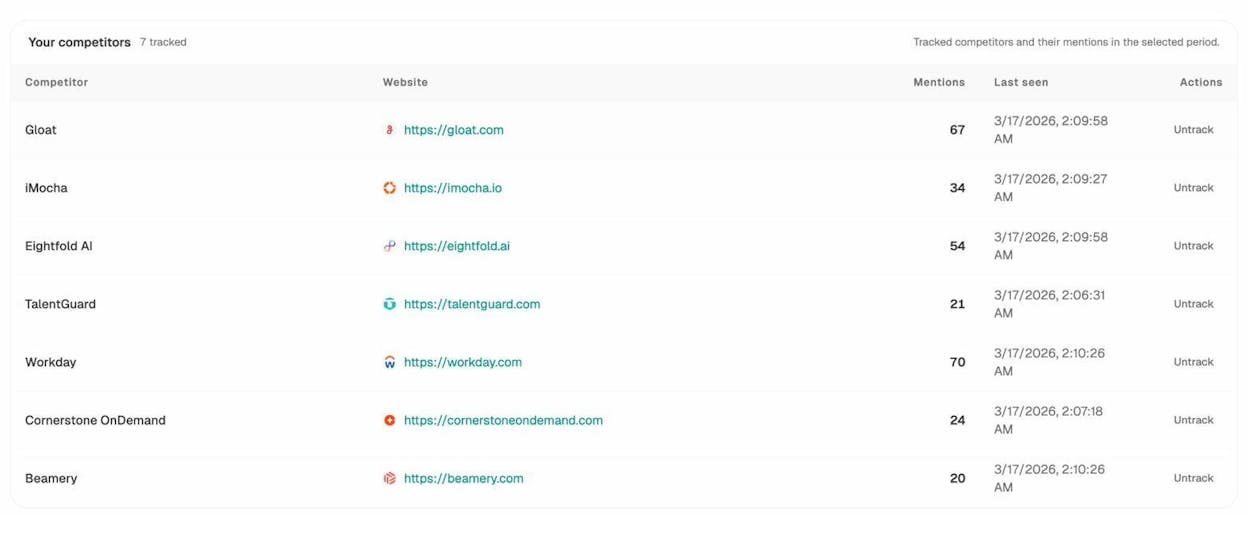
You’ll see which competitors get mentioned most frequently by AI engines, how their mention counts trend over time, and which specific prompts trigger their appearances.
Step 2: Identify prompts where competitors win and you don’t.
Navigate to the Prompts tab to see visibility, sentiment, and position data for every tracked prompt. Look for prompts where competitors appear but your brand doesn’t—these are your citation gaps.
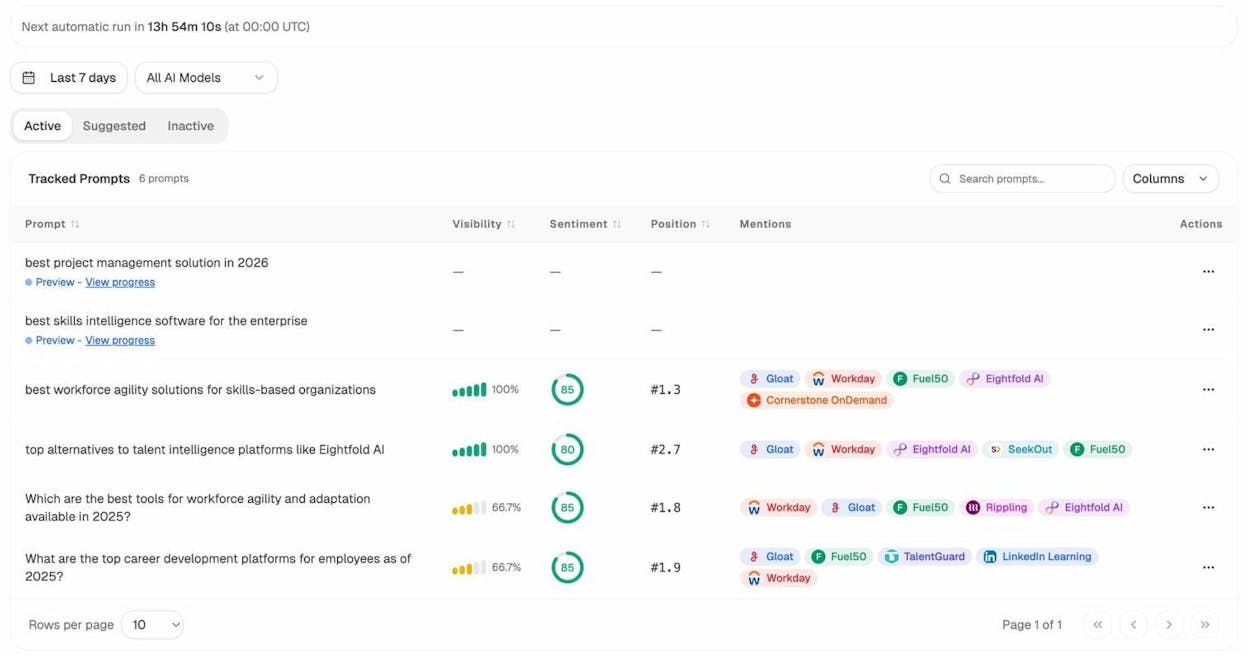
This is the AI equivalent of a Link Intersect report. Instead of finding sites that link to competitors but not you, you’re finding prompts where AI engines recommend competitors but not you.
Step 3: See which sources AI engines rely on.
Go to the Sources tab to see the domains and URLs that AI engines cite most frequently in your space. This reveals two things: (1) which competitor pages are driving their AI visibility, and (2) which third-party sources you should aim to get cited on.
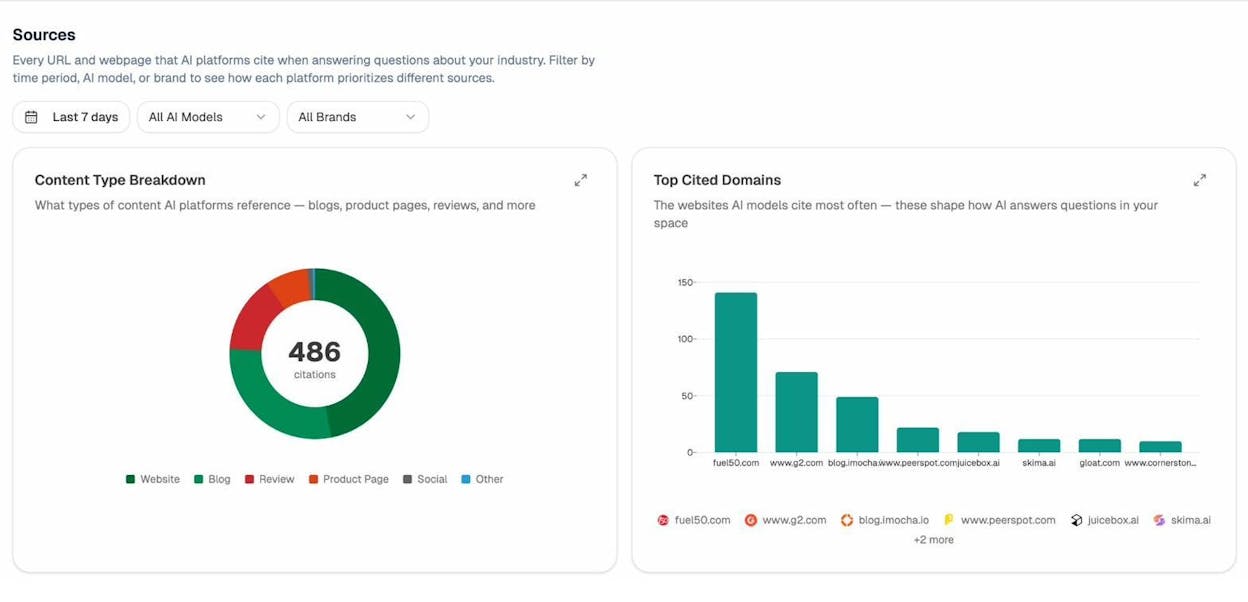
If you see a competitor’s blog post being cited 15 times across AI responses, that page is doing something right. Study it. Look at its structure, depth, and the specific claims it makes. Then create something better on your own site.
Step 4: Track AI referral traffic to validate impact.
The ultimate test of AI visibility is whether it drives actual traffic. Connect your Google Analytics to Analyze AI and go to the AI Traffic Analytics tab to see how many visitors arrive from AI platforms, which pages they land on, and which engines send the most traffic.
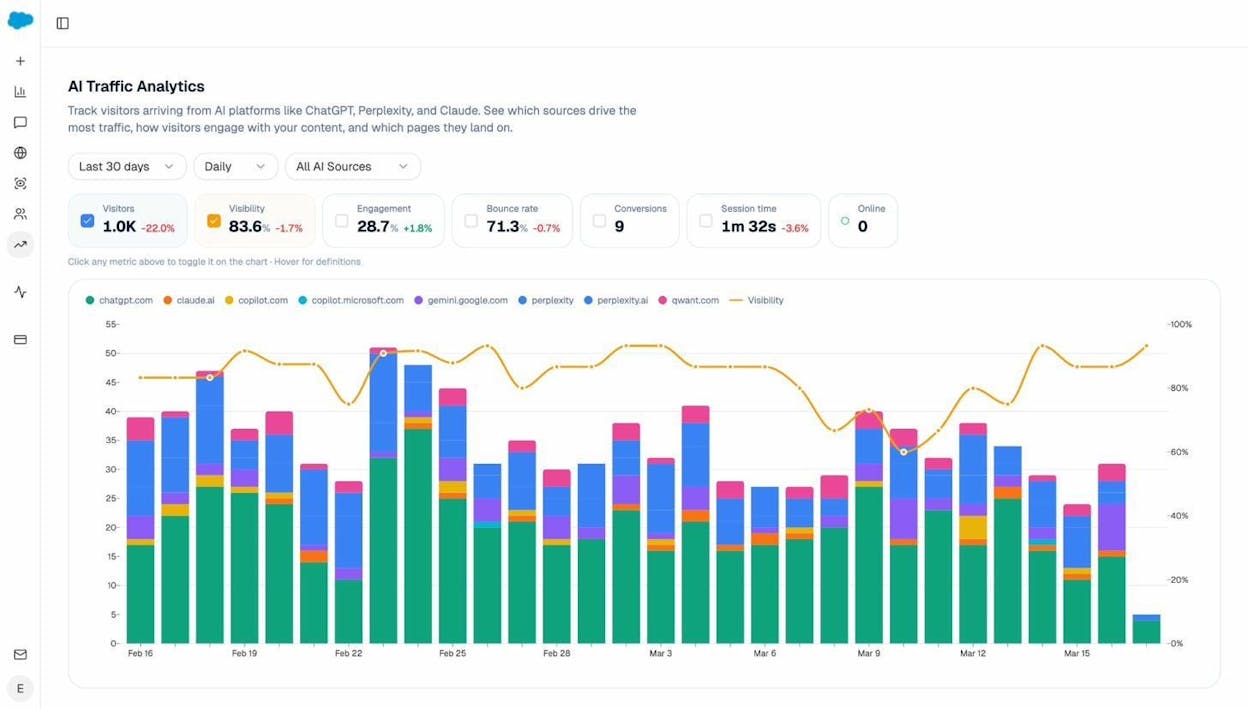
This closes the loop. You’re not just tracking mentions—you’re measuring whether AI search actually sends people to your site. If a competitor is getting significant AI referral traffic and you’re not, you have a clear priority.
Practical Steps to Improve AI Citations
Based on what you learn from your AI competitor analysis, here are concrete actions you can take:
-
Create the most comprehensive, well-structured page for your target prompts. AI engines favor pages that directly and thoroughly answer the types of questions people ask. Look at the prompts where competitors win and make sure your content covers those topics completely.
-
Earn citations from the sources AI engines trust. If G2, Wikipedia, or specific industry publications keep showing up in the Sources tab, get your brand mentioned on those sites. This is where traditional link building and AI search overlap—earning a mention on a high-authority site helps with both.
-
Keep content fresh. AI engines tend to cite recent, updated content. If your competitor’s cited page was last updated in 2023 and you publish a 2026 version, you have an advantage.
-
Use clear structure and markup. Schema markup, descriptive headings, and well-organized content make it easier for AI models to extract and cite specific information from your pages.
-
Monitor weekly. AI citations change faster than backlinks. Set up weekly email reports in Analyze AI to catch shifts early.
How to Prioritize Which Backlinks to Pursue
After running all the analyses above, you’ll have a long list of potential backlink opportunities. You can’t pursue all of them at once, so you need a way to prioritize.
Here’s a simple framework based on two factors: effort required and expected impact.
|
Priority |
Effort |
Impact |
Examples |
|---|---|---|---|
|
Do first |
Low |
High |
Directory links competitors have, listicle inclusions, easy broken link replacements |
|
Do next |
Medium |
High |
Guest posts on sites that accepted competitors, HARO responses, podcast pitches |
|
Do later |
High |
High |
Original research that attracts passive links, comprehensive resource pages, data-driven content |
|
Skip |
High |
Low |
Links from low-authority sites, nofollow-only directories, irrelevant industry sites |
Within each priority tier, sort by domain authority of the linking site. A dofollow link from a DR 70 site is worth far more than one from a DR 15 site—so prioritize accordingly.
Also consider relevance. A link from a lower-authority site in your exact niche can be more valuable than a link from a high-authority site in an unrelated space. Google’s algorithms factor in topical relevance, not just raw authority.
You can use Analyze AI’s free website authority checker to quickly check the authority of any potential linking domain before deciding whether to pursue it.
Outreach Tips That Get Results
Finding link opportunities is half the battle. Getting site owners to actually link to you is the other half. Here are a few principles that separate effective outreach from the kind that gets ignored.
Lead with value, not asks. Don’t open your email with “Can you link to my site?” Instead, open with something useful—a broken link you found on their site, a factual error you noticed, or a resource that would help their readers.
Personalize beyond the name. Generic outreach gets generic results (which is usually no response at all). Reference something specific about the recipient’s content. Show that you actually read their article.
Keep it short. Your outreach email should be 4–6 sentences. Nobody reads a five-paragraph pitch from a stranger.
Follow up once. A single follow-up 5–7 days later can double your response rate. More than that and you’re just annoying people.
Don’t beg or bribe. Offering to pay for links violates Google’s guidelines and can result in a penalty. And groveling doesn’t work either. Position your request as a mutually beneficial exchange, not a favor.
Here’s a versatile template you can adapt:
Subject: Quick note about your [topic] article
Hey [Name],
I was reading your post on [topic]—really liked your point about [specific detail].
I noticed [the specific opportunity: a broken link, a missing resource, an outdated stat, a gap in a listicle].
I recently published [your content] which covers [what makes it relevant]. Thought it might be a useful addition for your readers.
Happy to share more details if you’re interested.
[Your Name]
Final Thoughts
Finding your competitors’ backlinks is the easy part—any backlink tool will show you the full list. The real skill is knowing which ones are worth pursuing and having a system to go after them.
Start with the low-effort wins: directory links, listicle inclusions, and broken link building. Then graduate to higher-effort tactics like guest posting, journalist outreach, and creating linkable content assets.
And don’t stop at traditional backlinks. AI search is an emerging organic channel that sits alongside SEO, not against it. The same content quality and authority that earns backlinks also drives AI citations. Track both, and you’ll build a visibility moat that compounds across every channel.

Ernest

Ibrahim


