



Summarize this blog post with:


In this article, you’ll learn how to run a content audit that actually improves performance—not one that just dumps data into a spreadsheet and collects dust. You’ll get a step-by-step process for evaluating every page on your site, a decision framework for what to keep, update, merge, or delete, and a template to organize the entire thing. You’ll also learn how to extend your audit beyond traditional SEO metrics to include AI search visibility—because in 2026, your content is being evaluated by LLMs just as much as by Google’s crawlers.
Table of Contents
What Is a Content Audit?
A content audit is a structured review of your website’s content to figure out what’s working, what’s not, and what to do about it. It answers a simple question: is your content actually serving your business goals?
That sounds basic. But most teams never do this rigorously. They publish content, check traffic a few weeks later, and move on. The result is a blog full of pages that don’t rank, don’t convert, and actively dilute the quality signals search engines (and AI models) use to evaluate your site.
A proper content audit forces you to look at every page through the lens of performance data—organic traffic, backlinks, conversions, keyword rankings—and make a clear decision: improve it, consolidate it, or remove it.
Here’s what a content audit helps you do:
Identify your winners and losers. Most blogs follow a power law. A handful of articles drive the bulk of traffic, links, and leads. The rest contribute little. An audit surfaces these outliers so you can double down on what works and stop investing in what doesn’t.
Fix content decay before it compounds. Organic traffic to older posts naturally declines over time as competitors publish better content, search intent shifts, and information goes stale. An audit catches decaying pages early, when a targeted refresh can reverse the slide.
Eliminate cannibalization and redundancy. When you’ve published hundreds of articles, overlap is inevitable. Multiple pages targeting the same keyword confuse search engines and split your authority. An audit identifies these conflicts so you can consolidate.
Improve site quality signals. Both Google and AI search engines evaluate your site holistically. A large volume of thin, outdated, or low-quality pages drags down the perceived authority of your entire domain. Pruning weak content raises the floor.
Discover AI search gaps. Traditional audits focus on Google rankings. But if your content isn’t being cited by ChatGPT, Perplexity, Claude, or Gemini, you’re invisible to a growing share of how people find information. A modern content audit should evaluate visibility across both channels.
Content Audit vs. SEO Audit: What’s the Difference?
These terms get used interchangeably, but they’re different tools designed for different jobs.
An SEO audit focuses on technical performance: crawlability, indexation, page speed, schema markup, broken links, and site architecture. It’s about whether search engines can access and understand your pages. It doesn’t evaluate whether your content is any good. (Need one? See our roundup of the best SEO audit tools.)
A content audit evaluates the substance of your pages. It looks at traffic trends, keyword coverage, content quality, topical relevance, business value, backlink strength, and competitive positioning. It incorporates SEO data, but also considers factors like conversion rates, user engagement, and whether content aligns with your current messaging.
Think of it this way: an SEO audit tells you if the plumbing works. A content audit tells you if people actually want to drink the water.
|
SEO Audit |
Content Audit |
|
|---|---|---|
|
Focus |
Technical infrastructure |
Content performance and quality |
|
Evaluates |
Crawlability, indexation, site speed, schema |
Traffic, rankings, engagement, conversions, content gaps |
|
Outcome |
Fix technical issues |
Strategic decisions: update, consolidate, prune, or create |
|
Frequency |
Quarterly or after major site changes |
Every 6–12 months for the full blog, ongoing for key pages |
|
Tools |
Screaming Frog, Google Search Console, PageSpeed Insights |
GA4, keyword tools, Google Search Console, Analyze AI |
For most teams, the right approach is to run an SEO audit first to fix structural problems, then layer a content audit on top to make strategic decisions about individual pages.
When Should You Do a Content Audit?
Not every site needs a content audit right now. Here are the situations where one pays off most:
Your blog has 50+ published articles. Below this threshold, you can usually keep track of what’s working by scanning your analytics dashboard. Above it, patterns become harder to spot manually.
Traffic is flat or declining despite consistent publishing. This is the classic symptom of content decay outpacing content creation. New posts generate traffic, but older posts are losing it at a faster rate. An audit reveals which posts are dragging you down.
You’ve been publishing for 12+ months without a formal review. After a year, even the best content strategies accumulate dead weight: outdated statistics, deprecated product features, keyword targets that no longer match search intent.
You’ve recently rebranded or shifted product positioning. If your messaging has changed but your content hasn’t, your blog is telling a different story than your homepage. An audit aligns old content with new reality.
You want to expand into AI search visibility. If you’re starting to take answer engine optimization seriously, an audit is the right place to start. It helps you identify which existing pages are already getting cited by LLMs, which have the potential to be cited, and where the gaps are.
How to Do a Content Audit (Step-by-Step Process)
Every content audit follows the same basic logic: gather your pages, collect performance data, evaluate each page against a set of criteria, and assign an action. The difference between a useful audit and a waste of time is how thorough and structured that evaluation process is.
Here’s the process we recommend, broken into three phases: setup, evaluation, and action.
Phase 1: Set Up Your Content Audit
Step 1: Export All Your URLs
Start by creating a complete list of every indexable page on your site. You need the raw URL inventory before you can evaluate anything.
If you use a site crawler like Screaming Frog: Crawl your site and export all internal HTML URLs that return a 200 status code. This gives you a clean list without redirects, 404s, or non-HTML files.
![[Screenshot: Exporting internal HTML URLs from Screaming Frog with filters set to HTML, status code 200]](https://www.datocms-assets.com/164164/1774443863-blobid0.jpg?auto=format,compress&w=1248&fit=max)
If you don’t have a crawler: You can pull a list of pages from your XML sitemap. Most CMS platforms (WordPress, Webflow, etc.) auto-generate one at yoursite.com/sitemap.xml. Copy the URLs into a spreadsheet.
If you use Google Search Console: Go to Performance > Search results, set the date range to the last 6 months, and export the pages tab. This gives you every page that received at least one impression in organic search.
![[Screenshot: Google Search Console Performance report with Pages tab selected, showing clicks, impressions, CTR, and position columns]](https://www.datocms-assets.com/164164/1774443862-blobid1.png?auto=format,compress&w=1248&fit=max)
Paste all URLs into your content audit spreadsheet. If you don’t have a template yet, create one with these columns: URL, Title, Organic Traffic (last 6 months), Backlinks (referring domains), Target Keyword, Traffic Trend (up/flat/down), AI Referral Sessions, and Action.
Step 2: Pull Performance Data for Each Page
Raw URLs alone tell you nothing. You need performance data to make informed decisions. At minimum, collect these metrics for every page:
Organic traffic (last 6 months). Pull this from Google Search Console or GA4. This is your ground truth for how much organic search traffic each page actually receives. Third-party estimates from tools like SEMrush are useful proxies but can be off by 30–50%. For a quick check without logging into multiple tools, Analyze AI’s free Website Traffic Checker gives you estimated organic traffic, total ranked keywords, and traffic value for any URL.
![[Screenshot: GA4 Pages and screens report filtered to /blog/ path, showing sessions by page sorted descending]](https://www.datocms-assets.com/164164/1774443872-blobid2.jpg?auto=format,compress&w=1248&fit=max)
![[Screenshot: Analyze AI’s free Website Traffic Checker showing estimated traffic, ranked keywords, and traffic value for a sample URL]](https://www.datocms-assets.com/164164/1774443872-blobid3.png?auto=format,compress&w=1248&fit=max)
Referring domains (backlinks). Check how many unique websites link to each page. Pages with backlinks have accumulated authority that you don’t want to throw away carelessly. You can get a quick domain-level picture with Analyze AI’s free Website Authority Checker, which shows estimated organic traffic, ranked keywords, and top-10 positions for any domain.
![[Screenshot: Analyze AI’s free Website Authority Checker showing domain authority metrics for a sample domain]](https://www.datocms-assets.com/164164/1774443878-blobid4.png?auto=format,compress&w=1248&fit=max)
Target keyword and current ranking position. For each page, note the primary keyword it targets and where it currently ranks. If you’re not sure what keyword a page targets, check which keyword sends the most traffic in Google Search Console’s Pages filter. You can also use Analyze AI’s free Keyword Rank Checker to see every keyword a specific URL ranks for, along with positions, search volumes, and estimated traffic per keyword—without needing a paid subscription.
![[Screenshot: Analyze AI’s free Keyword Rank Checker showing keywords a URL ranks for with positions and search volumes]](https://www.datocms-assets.com/164164/1774443885-blobid5.png?auto=format,compress&w=1248&fit=max)
Traffic trend. Is traffic to this page growing, flat, or declining? Compare the last 3 months to the previous 3 months in Google Search Console. Declining pages are candidates for a refresh. Growing pages should be left alone or reinforced.
Pro tip: If you have thousands of pages, don’t try to audit everything at once. Apply the 80/20 rule: sort your pages by organic traffic (descending) and audit the top 20% first. These pages drive the bulk of your results, and improvements here will have the biggest impact.
Step 3: Add AI Search Visibility Data
This is where a modern content audit goes beyond what most guides teach.
Traditional content audits only look at Google performance. But if you’re not measuring how your content performs in AI search engines—ChatGPT, Perplexity, Claude, Gemini, Copilot—you’re working with incomplete data. As we explain in our manifesto, GEO isn’t a replacement for SEO—it’s the next transformation of it. Search is expanding from ten blue links to multi-modal, prompt-shaped answers. Both channels deserve measurement.
Here’s how to layer AI search data into your audit:
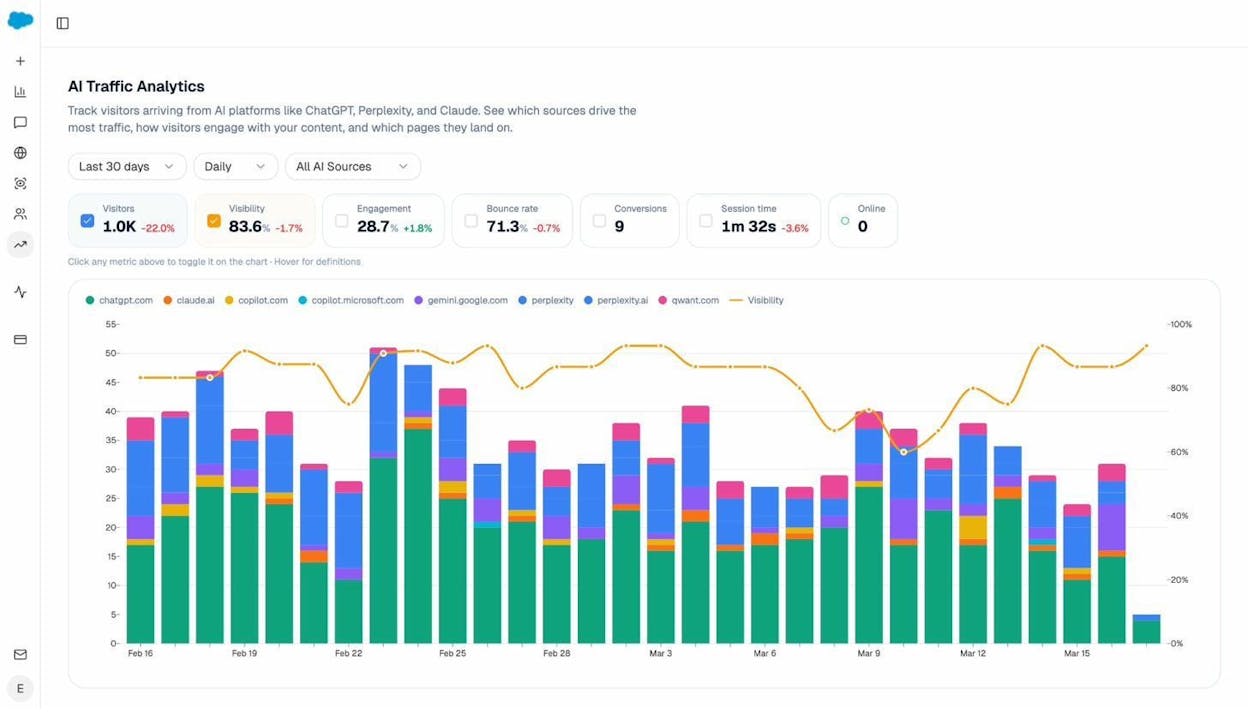
Check which pages receive AI referral traffic. Connect your GA4 to Analyze AI and navigate to the AI Traffic Analytics dashboard. This shows you total sessions from AI search engines, broken down by source (ChatGPT, Claude, Perplexity, Copilot, Gemini, and more). You’ll see exactly which AI engines send traffic to your site and how that trend moves over time.
Identify which landing pages AI engines send traffic to. In Analyze AI, go to the Landing Pages report under AI Traffic Analytics. This shows you the specific pages on your site that receive visits from AI-powered search engines, matched with which AI referrers sent traffic, how many sessions each page received, its engagement and bounce metrics, and how many AI citations it earned.
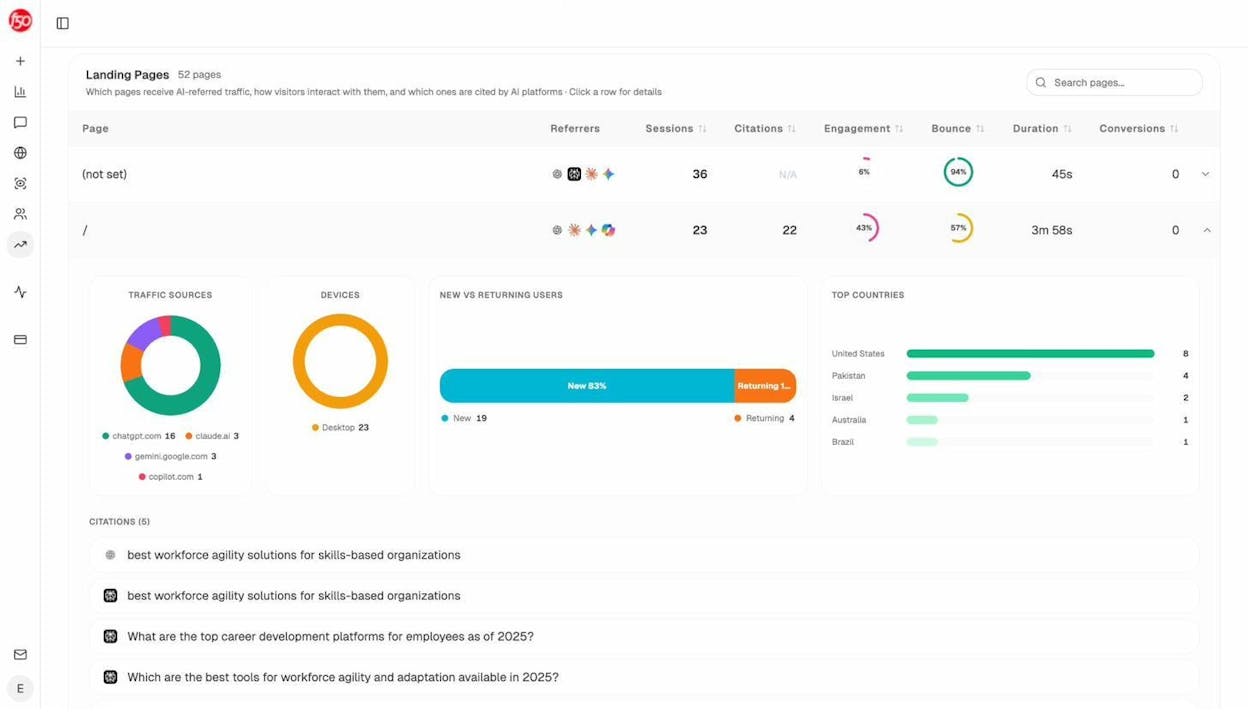
Add a column to your audit spreadsheet called “AI Referral Sessions” and populate it with this data. Pages that already receive AI search traffic are high-priority candidates for optimization—they’re already being cited by LLMs, and a targeted improvement could multiply that traffic.
Check citation visibility for your key topics. Use Analyze AI’s prompt-level analytics to see whether your brand and content are being mentioned in AI-generated answers for your target topics. This tells you which topics you’re visible for, which you’re invisible for, and which competitors are winning instead.
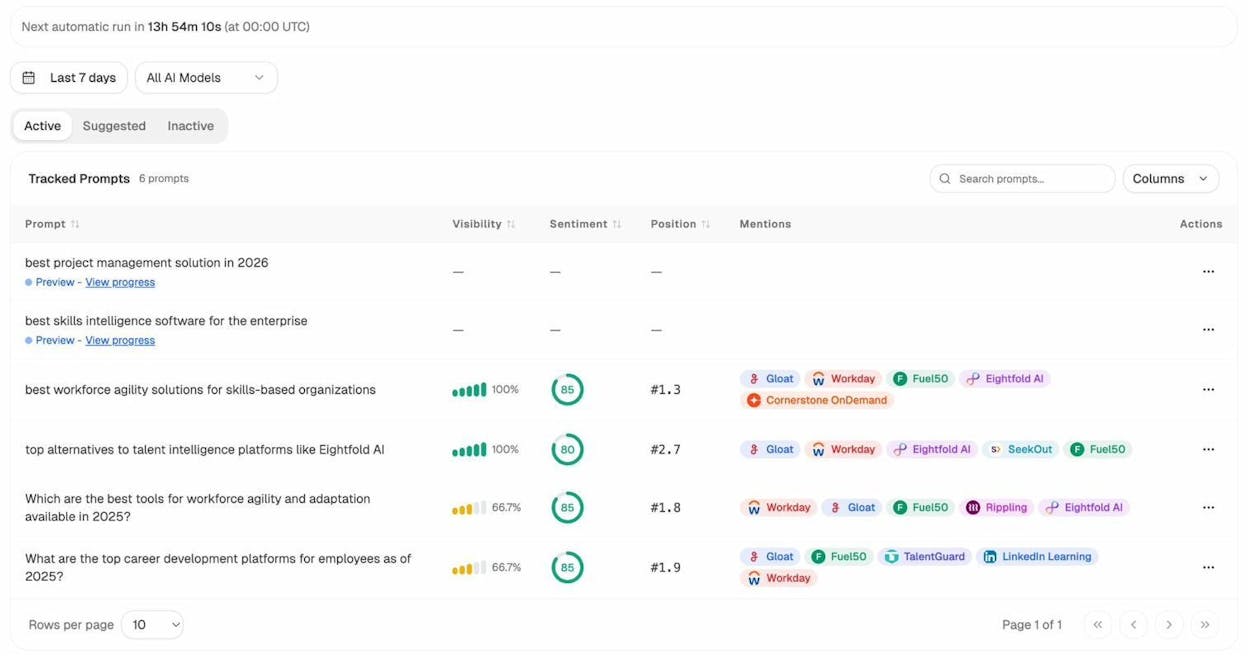
This data turns your content audit from a Google-only exercise into a full-spectrum visibility assessment. It also reveals a new category of “underperforming” content: pages that rank well on Google but never get cited by AI engines.
Phase 2: Evaluate Each Page
With your data collected, it’s time to evaluate each page and decide what to do with it. Walk through these questions for every URL in your audit spreadsheet. Each question narrows down the correct action.
Does the page get organic traffic?
Open Google Search Console, filter by the page URL under the Performance > Search results report, and check how many clicks it received in the last 3–6 months.
![[Screenshot: Google Search Console filtered to a specific page URL showing clicks over time]](https://www.datocms-assets.com/164164/1774443899-blobid9.png?auto=format,compress&w=1248&fit=max)
If you don’t have Search Console set up (you should—it’s free), plug the URL into Analyze AI’s free Website Traffic Checker for an estimate.
A page that gets zero organic traffic after 6+ months is a red flag. It doesn’t automatically mean the page should be deleted, but it does mean something is wrong—and the rest of the evaluation will help you figure out what.
Does the page get traffic from other sources?
Organic search isn’t the only way a page can be valuable. Check GA4 (Reports > Engagement > Pages and screens) to see if the page receives traffic from direct visits, social media, email, paid ads, or referrals.
![[Screenshot: GA4 traffic acquisition for a specific page showing breakdown by channel]](https://www.datocms-assets.com/164164/1774443900-blobid10.png?auto=format,compress&w=1248&fit=max)
A page with zero organic traffic but steady direct or referral traffic is serving a purpose. Don’t flag it for deletion just because it doesn’t rank.
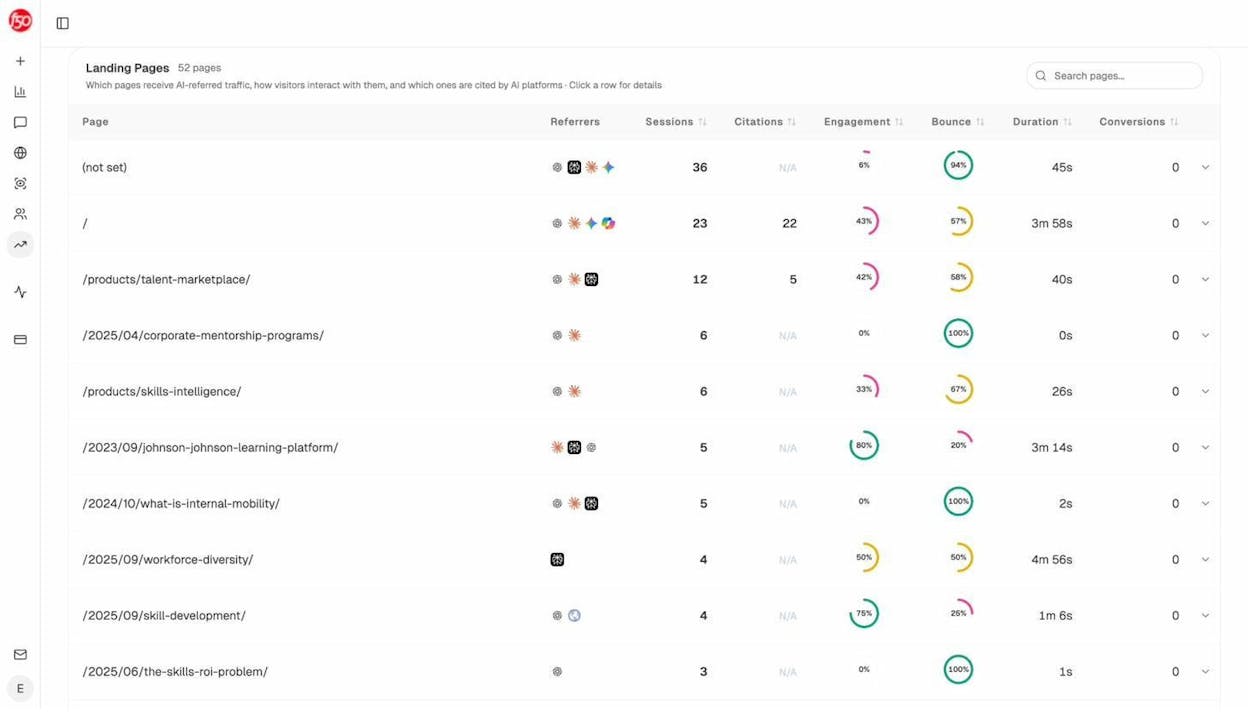
Also check whether the page gets AI referral traffic using the method described in Step 3. A page might get little Google traffic but significant visits from ChatGPT or Perplexity—meaning its value is shifting to a new channel. The Landing Pages view in Analyze AI makes this easy to spot at a glance.
Is the page crawlable and indexable?
If a page gets no traffic, the first technical question to answer is whether Google can actually see it. Use the URL Inspection Tool in Google Search Console to check:
-
Crawl allowed? Should be “Yes.”
-
Indexing allowed? Should be “Yes.”
-
User-declared canonical: Should be the page’s own URL or empty.
![[Screenshot: Google Search Console URL Inspection tool showing Page indexing details with Crawl allowed, Indexing allowed, and canonical status]](https://www.datocms-assets.com/164164/1774443906-blobid12.png?auto=format,compress&w=1248&fit=max)
If crawling is blocked by robots.txt, or if the page has a noindex tag or a canonical pointing elsewhere, Google won’t index it. Fix the technical issue before evaluating the page’s content quality.
While you’re here, run the page through Analyze AI’s free Broken Link Checker to catch dead outbound links, SEO issues, and page health problems in one pass. Broken links hurt user experience and signal neglect to both search engines and the AI models that crawl your pages.
![[Screenshot: Analyze AI’s free Broken Link Checker results showing broken links found, SEO issues, and page health score for a sample URL]](https://www.datocms-assets.com/164164/1774443911-blobid13.png?auto=format,compress&w=1248&fit=max)
Has the page had enough time to perform?
Pages rarely rank within the first few months of publication. If a page has been live for less than 6 months, it may just need more time.
That said, “give it more time” shouldn’t be a permanent excuse. If a page is 6–12 months old and still has zero traffic, it’s likely a content or competition problem—not a timing one.
Is the page targeting the right keyword?
This is where many audits go wrong. Teams create content for a keyword, but the page either doesn’t clearly target the keyword (no mention in the title, H1, or first paragraph), targets a keyword with zero search volume, or targets a keyword that doesn’t match the page’s actual search intent.
Check Google Search Console to see which queries actually drive impressions to the page. If the queries don’t match what you intended, the page may need to be re-optimized for a different keyword—or the content may need to be restructured to match the intent Google associates with that keyword.
![[Screenshot: Google Search Console Queries report filtered to a specific page, showing the actual search terms driving impressions]](https://www.datocms-assets.com/164164/1774443912-blobid14.jpg?auto=format,compress&w=1248&fit=max)
Before re-optimizing, verify that the new target keyword is actually winnable. Analyze AI’s free Keyword Difficulty Checker scores any keyword from 0–100 based on how competitive the SERP is, along with search volume and CPC data. If the difficulty is far above your domain’s authority, you may need to target a less competitive variant.
To see exactly who you’d be competing against, run the keyword through Analyze AI’s free SERP Checker. It shows the top 10 organic results with titles, URLs, and domains—so you can quickly assess whether the current SERP is dominated by huge authority sites or whether there’s room for you to rank.
![[Screenshot: Analyze AI’s free SERP Checker showing top 10 results for a keyword with titles, URLs, and domain names]](https://www.datocms-assets.com/164164/1774443920-blobid15.png?auto=format,compress&w=1248&fit=max)
If you need to find a better keyword altogether, use Analyze AI’s free Keyword Generator to discover related keyword ideas with search volume, keyword difficulty, and CPC data. This is especially useful when the original target was either too competitive or too low-volume.
![[Screenshot: Analyze AI’s free Keyword Generator showing related keyword suggestions with search volume, difficulty, and CPC columns]](https://www.datocms-assets.com/164164/1774443919-blobid16.png?auto=format,compress&w=1248&fit=max)
Is another page on your site competing for the same keyword?
Keyword cannibalization happens when two or more pages on your site target the same keyword and Google can’t decide which to rank. The result is often that neither page ranks well.
To check, search site:yourdomain.com "target keyword" in Google. If multiple pages show up, you may have a cannibalization issue.
For a more precise check, use the Organic keywords report in your preferred SEO tool and filter for “Multiple URLs only” plus the keyword in question. If the keyword appears, multiple pages are competing.
![[Screenshot: Organic keywords report filtered for “Multiple URLs only” showing two pages ranking for the same keyword]](https://www.datocms-assets.com/164164/1774443927-blobid17.png?auto=format,compress&w=1248&fit=max)
What to do about cannibalization: If the pages cover substantially different angles (e.g., a “what is X” page and a “how to do X” page), they can usually coexist. If they cover the same ground, consolidate them: merge the weaker page’s content into the stronger one and redirect the weaker URL.
Could the page get more organic traffic?
Just because a page ranks doesn’t mean it’s reached its potential. To check, plug the page’s target keyword into a keyword research tool and look at the Traffic Potential metric—the estimated traffic the top-ranking page gets from all keywords it ranks for. This gives you a ceiling for what’s possible.
Compare that number to your page’s actual traffic. If there’s a big gap, there’s room to grow.
Common reasons a page underperforms its traffic potential: thin content that doesn’t cover the topic well enough, a weaker backlink profile than competitors, poor on-page optimization, or outdated information that’s causing rankings to slip.
Is your content better than the competition?
This is the most subjective question in the audit, but it’s also the most important. Pull up the top 3–5 results for your target keyword and honestly compare your page to them. Ask:
Does your page cover the topic as thoroughly? Check if competitors cover subtopics that you’ve missed. A content gap analysis is useful here: plug your URL and a few competitor URLs into a competitive analysis tool and look for keywords they rank for that you don’t. Each missing keyword likely represents a subtopic you should add. (For a structured approach, see our SEO competitor analysis guide.)
Does your page offer anything unique? Original data, proprietary frameworks, real examples from your own experience, expert quotes, downloadable resources—these are the things that separate a page from the dozens of others covering the same topic. If your page reads like a summary of everyone else’s content, it won’t earn top rankings or AI citations.
Is the content up to date? Check for outdated statistics, deprecated tool instructions, broken links, and stale examples. Content freshness is a ranking factor for many queries, and AI models heavily favor recent sources.
Is the page well-optimized for on-page SEO?
Run through the basics: Does it have a compelling title tag that includes the target keyword? Is the meta description written to earn clicks? Is the URL clean and descriptive? Are images compressed and alt-tagged? Is there proper heading hierarchy (one H1, logical H2/H3 structure)?
For a detailed breakdown of on-page best practices, reference our guide on how to use keywords in SEO.
These are table-stakes optimizations. They won’t single-handedly earn top rankings, but missing them creates friction that holds pages back.
Is the page well internally linked?
Internal links pass authority between pages on your site and help search engines understand your site structure. A page with few or no internal links pointing to it is harder to discover and rank.
To check for internal linking opportunities:
-
Search your site for mentions of the page’s topic that aren’t currently linked. In Google, search site:yourdomain.com "topic keyword" and look for pages that mention the topic but don’t link to your audited page.
-
If you use a site audit tool, the Internal Link Opportunities feature automates this by scanning your entire site for keyword mentions that could become internal links.
![[Screenshot: Internal link opportunities showing suggested links with source page, keyword context, and target page]](https://www.datocms-assets.com/164164/1774443932-blobid18.png?auto=format,compress&w=1248&fit=max)
Also check the reverse: does your audited page link out to other relevant pages on your site? Internal linking should go both ways.
Does the page have a strong backlink profile?
Backlinks remain one of the strongest ranking signals. If your page has significantly fewer referring domains than competing pages, that gap may be what’s holding you back.
To compare, plug your page URL and 2–3 competing URLs into an SEO tool’s backlink comparison. Compare referring domains and domain authority scores.
For a faster domain-level check, use Analyze AI’s free Website Authority Checker. It shows estimated organic traffic, total ranked keywords, and top-10 positions for any domain—so you can quickly gauge whether your site’s overall authority is in the same ballpark as the pages outranking you. If there’s a massive authority gap at the domain level, you’ll need more than on-page improvements to close it. You may need a focused link building campaign.
![[Screenshot: Analyze AI’s free Website Authority Checker showing domain authority metrics including organic traffic, ranked keywords, and top-10 positions]](https://www.datocms-assets.com/164164/1774443936-blobid19.png?auto=format,compress&w=1248&fit=max)
Are there broken pages with backlinks you could redirect?
Old pages that you’ve deleted may still have backlinks pointing to them. Those links are going to waste. If any deleted page covered a topic related to a page you’re auditing, redirect the old URL to capture that link equity.
To find these opportunities: in your SEO tool, go to the Best by links report, filter for pages with a 404 status code and at least one referring domain. Each relevant redirect is a small but free boost.
![[Screenshot: Best by links report filtered for 404 pages with referring domains]](https://www.datocms-assets.com/164164/1774443942-blobid20.png?auto=format,compress&w=1248&fit=max)
Is the page visible in AI search?
This is the question that most content audit guides skip entirely—and it’s increasingly one of the most important.
A page can rank on page 1 of Google and still be completely absent from AI-generated answers. Conversely, a page with modest Google rankings might be heavily cited by LLMs because it contains structured, authoritative, original content that models find easy to reference.
Here’s how to check whether a page (or the topic it covers) is visible in AI search using Analyze AI:
Step 1: Check if your brand appears for the topic. Look at your tracked prompts related to the page’s topic. The prompt-level analytics dashboard shows whether your brand is mentioned, your visibility percentage, sentiment score, and which competitors appear alongside you.
Step 2: Check the citations. Navigate to the Sources dashboard to see which URLs and domains are being cited by AI models when they answer prompts in your space. This shows content type breakdown (blog, website, review, product page), total citation counts, and the top cited domains—so you can see whether your URLs are showing up or competitors are dominating the citations.
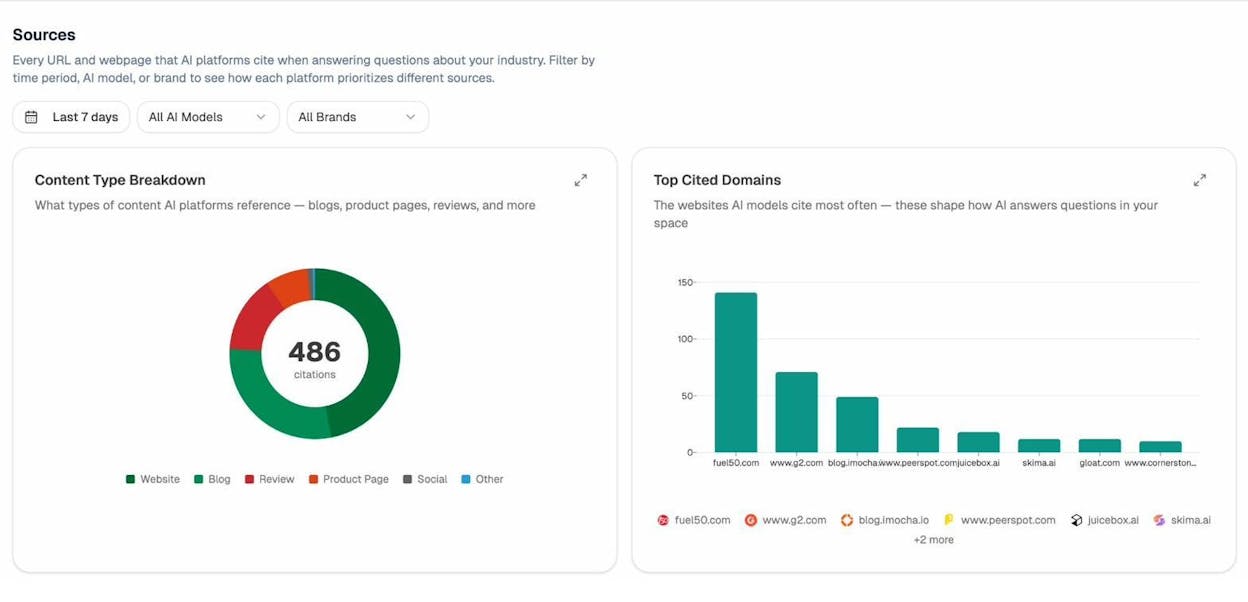
Step 3: Look for opportunities. In Analyze AI’s Competitors view, you can see every competitor being mentioned in AI answers for your topic clusters—along with how many mentions they’ve received and which ones you’re tracking versus which are new suggestions.
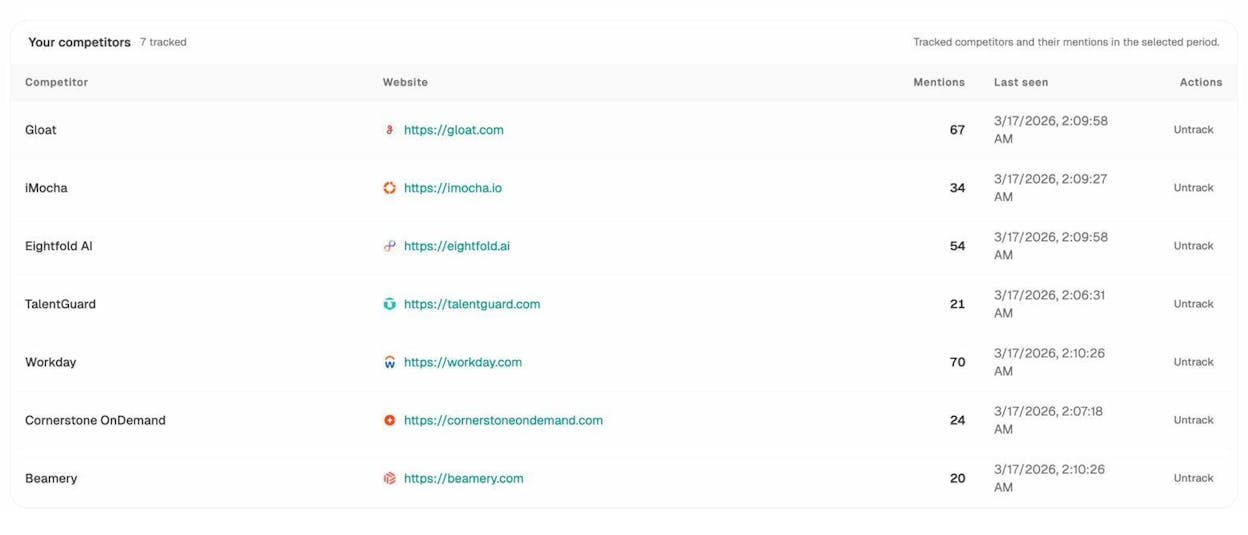
Add a column to your audit spreadsheet for “AI Search Visibility” and note whether each page’s topic is visible (cited), partially visible, or invisible in AI-generated answers. Pages that are invisible despite covering relevant topics are high-priority candidates for improvement using answer engine optimization best practices.
Could the page get more conversions?
If a page already gets solid traffic, ask whether it’s earning its keep for the business. Can you add a relevant call-to-action? Can you better demonstrate your product within the content? Could you add a lead magnet, a free tool, or a demo CTA?
Even small tweaks to conversion elements on high-traffic pages can meaningfully move pipeline. A page that gets 5,000 visits per month with a 0.5% conversion rate generates 25 leads. Improving that rate to 1% doubles your leads without any additional traffic.
Phase 3: Assign Actions
Once you’ve evaluated each page, assign one of these actions in your spreadsheet:
|
Action |
When to Use It |
What It Involves |
|---|---|---|
|
Keep |
Page performs well, content is current, no issues found |
No changes needed. Monitor in next audit. |
|
Update/Refresh |
Page has traffic potential but content is outdated, thin, or missing subtopics |
Rewrite outdated sections, add missing information, update screenshots, refresh statistics. |
|
Consolidate |
Two or more pages compete for the same keyword |
Merge content from weaker pages into the strongest one, redirect merged URLs. |
|
Re-optimize |
Page targets the wrong keyword or misses on-page basics |
Adjust title tag, restructure headings, re-align content with search intent. |
|
Optimize for AI search |
Page ranks on Google but is invisible to AI engines |
Add structured data, improve content depth, include authoritative citations, and build topical authority. |
|
Build links |
Content is strong but backlink profile is weaker than competitors |
Run an outreach campaign targeting the specific page. |
|
Prune |
Page has no traffic, no backlinks, no business value, and no AI visibility |
Remove the page or noindex it. Redirect if it has any referring domains. |
Important: Never bulk-delete content without checking backlinks first. Even a zero-traffic page with referring domains has value. Redirect it to a relevant page instead of deleting it outright.
How to Extend Your Content Audit to AI Search
The evaluation questions above touch on AI search visibility, but here’s a more structured approach for teams that want to go deeper.
Traditional SEO content audits measure how Google sees your content. An AI search content audit measures how large language models see your content. Both matter—because GEO isn’t replacing SEO—it’s the next transformation of it. Quality still governs visibility. Authority still comes from depth, originality, structure, and usefulness. What changes is where that quality must be legible—to crawlers, to models, and to the people asking better questions.
Step 1: Set Up AI Search Tracking
Before you can audit AI visibility, you need data. In Analyze AI:
-
Connect your GA4 account to pull real AI referral traffic data. This lets you see exactly how many sessions come from ChatGPT, Perplexity, Claude, Copilot, Gemini, and other AI engines.
-
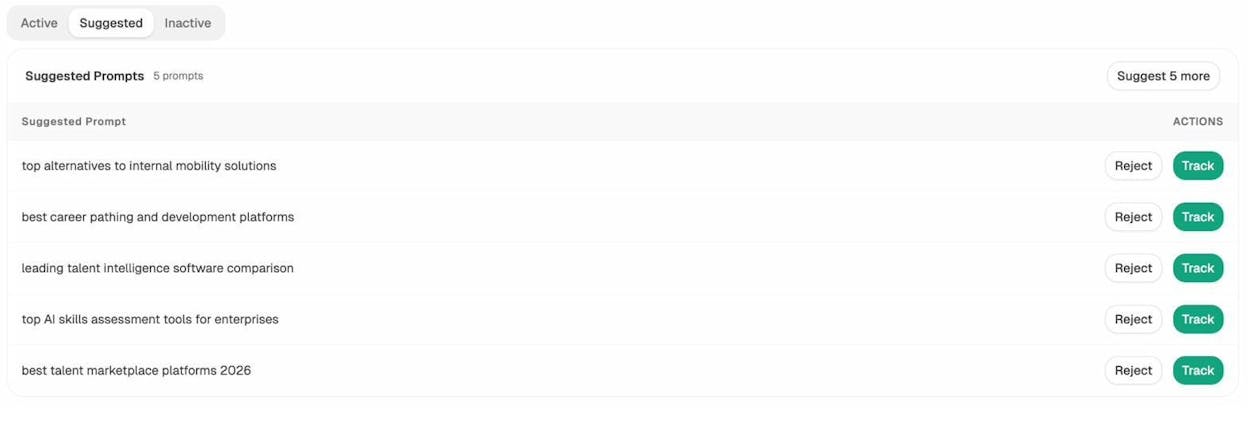
Add your key topics as tracked prompts. For each major topic your content covers, add the prompts that potential customers would type into an AI search engine. Analyze AI’s prompt suggestion feature recommends relevant prompts based on your topic clusters—just click “Track” to start monitoring them automatically.
-
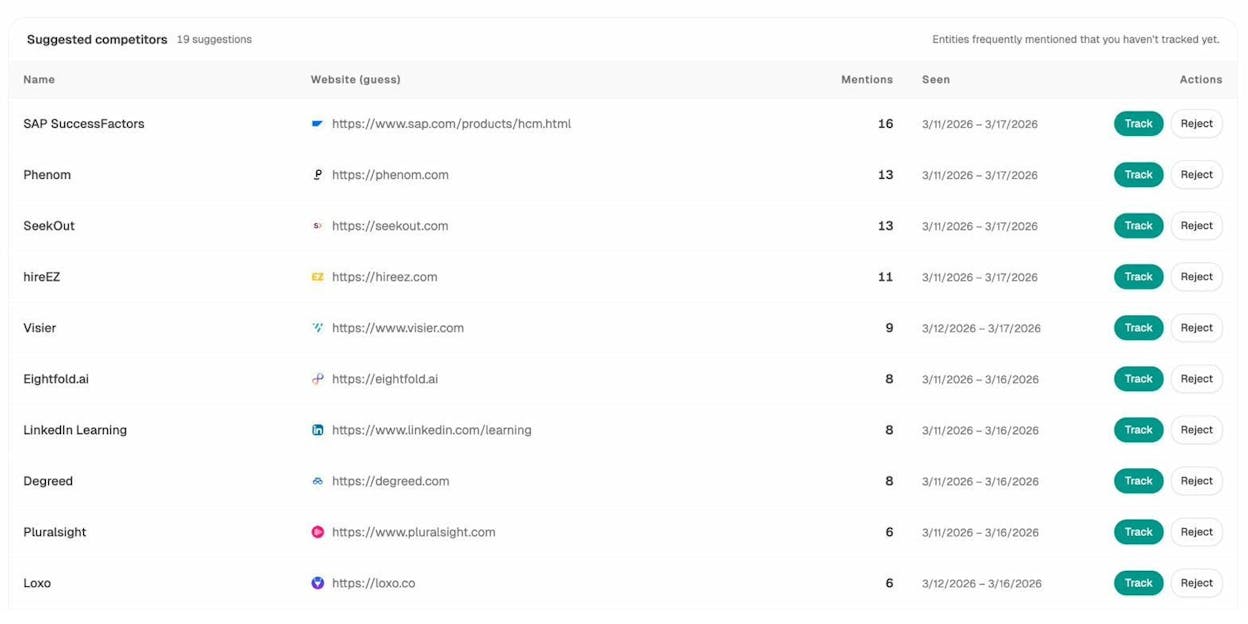
Add your competitors. Set up the competitors you want to track so you can see where they appear in AI answers and you don’t. Analyze AI also suggests competitors based on entities frequently mentioned in your space that you haven’t tracked yet.
Step 2: Identify AI Search Winners and Losers
Once tracking is running (give it at least 7 days of data), pull these reports:
AI Traffic Analytics. This shows which of your pages actually receive traffic from AI engines, along with engagement, bounce rate, session duration, and conversions. Pages here are already working in AI search—protect and optimize them further.
Prompt Visibility Report. For each tracked prompt, see your visibility percentage, sentiment, and position. High visibility + positive sentiment = winning. Low visibility or negative sentiment = needs work.
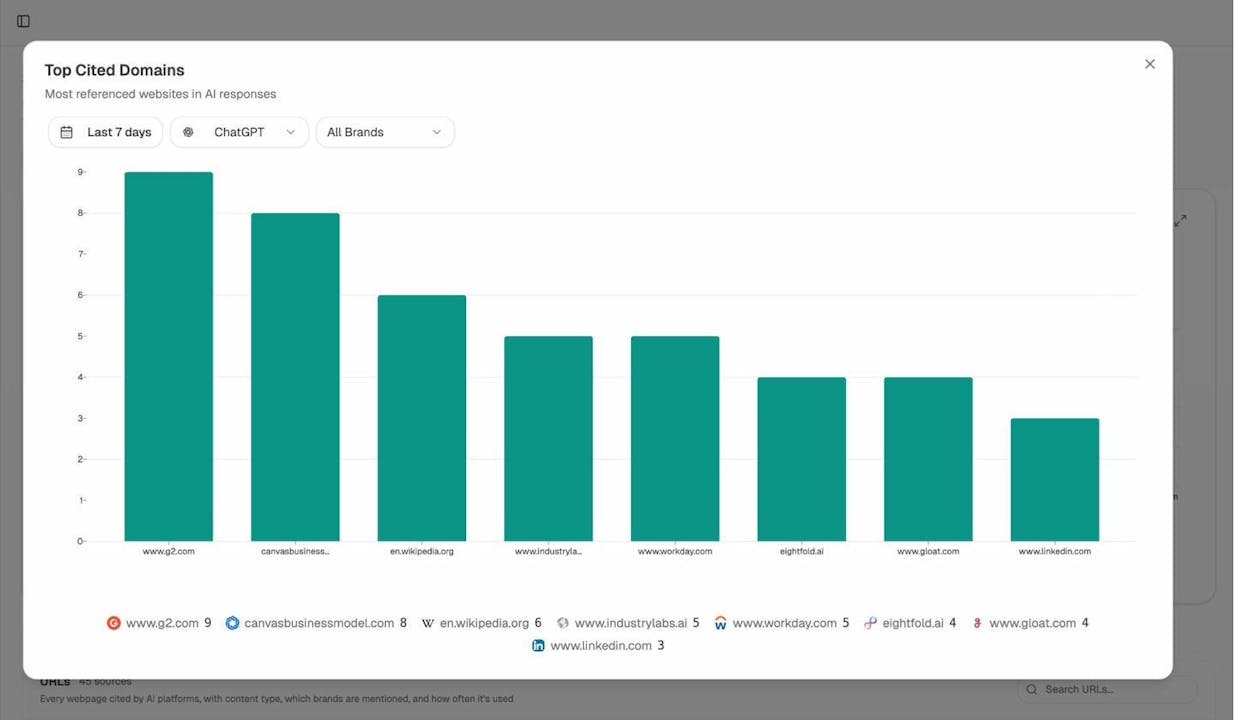
Top Cited Domains. The Sources dashboard reveals which domains AI models cite most often in your industry. If competitor domains dominate the chart and yours is absent, you have a clear direction for your content improvements.
Step 3: Cross-Reference with Your SEO Audit Data
The most valuable insights come from combining traditional SEO data with AI search data. Look for these patterns:
High Google traffic, low AI visibility. These pages rank well in traditional search but aren’t getting cited by LLMs. They may need structural improvements (clearer headings, more definitive statements, better-organized information) to become citable by AI models.
Low Google traffic, high AI visibility. These pages may have niche but high-value audiences reaching them through AI search. Consider investing more in these topics, as AI search traffic often converts at higher rates than broad organic traffic.
High AI visibility for competitors, zero for you. These are your biggest opportunities. Create or significantly improve content for these topics, focusing on the qualities that earn AI citations: depth, originality, authoritative sourcing, and clear structure. (For tactical guidance, see our guide on how to outrank competitors in AI search.)
Pages cited by AI but declining in Google. Interesting edge case. The page’s content may be solid enough for LLMs to reference, but outdated enough that Google is dropping it. A refresh could boost both channels simultaneously.
Step 4: Optimize Content for AI Citability
For pages flagged as “optimize for AI search” in your audit, focus on these improvements:
Structure content with clear, definitive answers. LLMs extract concise answers from source content. Pages with clear definitions, direct how-to steps, and well-structured sections are more likely to be cited.
Include original data and unique insights. Models prioritize sources that add information not available elsewhere. Proprietary research, first-party data, expert commentary, and original case studies make your content more citable.
Keep content fresh. AI models heavily weight recency. Update statistics, refresh examples, and keep publication dates current.
Build topical authority. LLMs tend to cite domains they associate with expertise in a given topic. Publishing a cluster of high-quality content around a topic—rather than a single article—builds the domain-level authority that earns consistent citations. Read more about this in our SEO content strategy guide.
Earn citations from authoritative third-party sources. When authoritative websites cite your content, AI models are more likely to treat your domain as a trusted source. This is the AI search equivalent of link building. Our research on how LLMs cite sources found that domains with strong third-party citation patterns consistently earn higher AI visibility.
Consider an LLM.txt file. An LLM.txt file helps AI models understand what your site is about and which pages are most important. It’s a small technical step that can meaningfully improve how LLMs index and reference your content.
Content Audit Tools You’ll Need
You don’t need every tool on this list to run a content audit. But the more data sources you use, the more complete your picture will be.
|
Tool |
What It Does |
Free or Paid |
|---|---|---|
|
Real organic traffic, keyword rankings, indexation status |
Free |
|
|
Page-level traffic, traffic sources, engagement metrics, conversions |
Free |
|
|
Site crawler for exporting URLs, finding technical issues at scale |
Free (up to 500 URLs) |
|
|
AI referral traffic, prompt-level visibility, citation analysis, competitive opportunities |
Paid |
|
|
Find keyword ideas with search volume, difficulty, and CPC |
Free |
|
|
Score any keyword 0–100 for ranking difficulty |
Free |
|
|
See every keyword a URL ranks for with positions and traffic |
Free |
|
|
Estimated organic/paid traffic, total keywords, traffic value |
Free |
|
|
Domain authority, organic traffic, ranked keywords, top-10 positions |
Free |
|
|
See who ranks in the top 10 for any keyword |
Free |
|
|
Find broken links, SEO issues, and page health problems |
Free |
|
|
See how Google AI Overviews affect your keywords |
Free |
|
|
Google Sheets / Excel |
Organizing and filtering your audit data |
Free |
|
Core Web Vitals and page performance |
Free |
Auditing content beyond Google? If your content lives on YouTube, Amazon, or targets Bing traffic, Analyze AI also offers free keyword tools for each platform: a YouTube Keyword Tool, an Amazon Keyword Tool, and a Bing Keyword Tool. These help you check whether your content targets the right terms on each platform—especially useful for ecommerce brands or companies with active video content strategies.
For a first-time content audit, the minimum viable toolset is: Google Search Console + GA4 + a spreadsheet. Layer in Analyze AI’s free tools (Keyword Rank Checker, Website Traffic Checker, Website Authority Checker, and Broken Link Checker) to cover keyword, traffic, and backlink data at no cost. Add Analyze AI’s paid platform to extend the audit into AI search visibility. And if you need more advanced SEO tools, explore our roundup of the best SEO reporting tools.
Content Audit Checklist
Use this checklist to make sure you don’t skip any critical steps. Work through it for each page in your audit, or use it as a quality check after running through the full evaluation process above.
Setup:
-
☐ Export all indexable URLs from your site
-
☐ Pull organic traffic data from Google Search Console (last 6 months)
-
☐ Pull engagement and conversion data from GA4
-
☐ Pull backlink data (referring domains) from your SEO tool or Website Authority Checker
-
☐ Pull AI referral traffic data from Analyze AI
-
☐ Note the target keyword for each page
-
☐ Calculate traffic trend (growing, flat, or declining) for each page
Per-Page Evaluation:
-
☐ Does the page get organic traffic?
-
☐ Does it get traffic from other sources (including AI referrals)?
-
☐ Is it crawlable and indexable?
-
☐ Has it had at least 6 months to perform?
-
☐ Is it targeting the right keyword?
-
☐ Is another page cannibalizing its keyword?
-
☐ Could it get more traffic based on keyword traffic potential?
-
☐ Is the content better than competing pages?
-
☐ Is it well-optimized for on-page SEO?
-
☐ Is it well internally linked?
-
☐ Is its backlink profile competitive?
-
☐ Are there broken pages with links that could be redirected?
-
☐ Is the page visible in AI search?
-
☐ Could the page convert better?
Actions:
-
☐ Assign an action to every page: keep, update, consolidate, re-optimize, optimize for AI, build links, or prune
-
☐ Prioritize actions by impact (start with high-traffic and high-potential pages)
-
☐ Set deadlines and assign owners for each action
-
☐ Schedule a follow-up review in 3 months to measure results
Common Content Audit Mistakes to Avoid
Collecting too much data without a clear goal. A spreadsheet with 30 columns of metrics for 500 pages will paralyze you. Start with a focused question—“why is our organic traffic declining?”—and choose data points that answer it. You can always add more detail later.
Auditing every page with equal depth. Not all pages deserve the same level of analysis. Spend the most time on pages with the highest traffic, highest business value, or highest potential. Skim the rest.
Deleting pages without checking backlinks. A page with zero traffic but 15 referring domains still has value. Redirect it to a related page instead of deleting it outright. You’ll preserve the link equity.
Ignoring AI search visibility. In 2026, auditing only Google performance gives you an incomplete picture. A page that’s invisible to LLMs is missing a growing traffic source. Tools like Analyze AI make it easy to add this dimension without doubling your workload.
Doing the audit but not executing the actions. The audit itself doesn’t improve anything. The value comes from actually refreshing outdated content, merging redundant pages, building missing internal links, and optimizing for AI citations. Build execution into your editorial calendar and assign specific owners.
Running the audit once and never revisiting. Content performance changes constantly. New competitors publish, search intent shifts, AI model behaviors evolve. Plan to audit your highest-priority pages quarterly and your full blog annually.
FAQs
What is a content audit?
A content audit is a structured review of your website’s content where you evaluate every page’s performance—organic traffic, backlinks, rankings, engagement, conversions, and AI search visibility—to decide whether to keep it as-is, update it, consolidate it with another page, or remove it entirely. The goal is to maximize the return on content you’ve already created.
How long does a content audit take?
It depends on how many pages you’re auditing and how deep you go. For a blog with 100 pages, expect 2–4 days of focused work. For a site with 500+ pages, you’ll likely need 1–2 weeks. The setup (exporting URLs and pulling data) takes a few hours. The evaluation is where the time goes.
How often should I do a content audit?
Audit your full blog once or twice a year. For your top-performing pages (the 20% that drive 80% of results), run a lighter check every quarter to catch traffic decay early.
Should I audit all my pages or just blog posts?
Audit everything that’s indexed and meant to attract organic traffic: blog posts, landing pages, resource pages, documentation, and feature pages. Exclude pages that exist for functional reasons regardless of traffic (terms of service, privacy policy, login pages).
Can a content audit help with AI search performance?
Yes. By adding AI referral traffic data and prompt-level visibility data to your audit (using a tool like Analyze AI), you can identify which pages are being cited by LLMs, which aren’t, and what to change. Content that’s well-structured, authoritative, and frequently updated tends to perform well in both traditional and AI search.
What’s the biggest mistake people make with content audits?
Running the audit but never acting on the findings. The spreadsheet isn’t the deliverable—the improvements are. Assign every action item to a person with a deadline, and build content refreshes into your ongoing editorial calendar.
Do I need expensive tools to run a content audit?
No. The minimum viable toolset is free: Google Search Console, GA4, and a spreadsheet. Analyze AI offers free tools for keyword research, rank checking, traffic estimation, authority checking, broken link detection, SERP analysis, and keyword difficulty scoring that cover many of the data points you’d otherwise need a paid SEO tool for. The paid platform adds AI search visibility tracking, which is increasingly essential but optional for a first audit.

Ernest

Ibrahim


