



Summarize this blog post with:


Keyword research boils down to three tasks:
-
Find keyword ideas that real people are searching for.
-
Check their ranking difficulty so you don’t waste time on keywords you can’t win.
-
Assess traffic potential to make sure the effort is worth it.
Most free tools handle one of these tasks well. A few handle two. None handle all three perfectly. That’s why the best approach combines several tools—each playing to its strength.
Here’s the complete list, followed by a deep walkthrough of each.
Table of Contents
The best free keyword research tools at a glance
|
Tool |
Best for |
Cost |
|---|---|---|
|
Finding keyword ideas with volume and difficulty |
Free |
|
|
Finding related keywords you’d never think of |
Free (Google Ads account required) |
|
|
Discovering question-based keywords |
Free (limited daily searches) |
|
|
Brainstorming seed keywords |
Free |
|
|
Finding declining keywords and quick wins |
Free |
|
|
Spotting breakout and trending keywords |
Free |
|
|
Estimating a keyword’s true traffic potential |
Free |
|
|
Gauging how hard it is to rank in the top 10 |
Free |
|
|
Finding keywords you already rank for |
Free |
|
|
Understanding search intent |
Free |
|
|
Finding keywords on non-Google platforms |
Free |
|
|
Checking domain strength before targeting a keyword |
Free |
1. Analyze AI Keyword Generator
Best for: Finding keyword ideas with search volume and keyword difficulty scores.
Analyze AI’s Keyword Generator gives you keyword ideas from a seed term. Enter a broad topic, select your target country, and hit search.
![[Screenshot: Analyze AI Keyword Generator interface showing a seed keyword entered with country selector and results loading]](https://www.datocms-assets.com/164164/1774897127-blobid1.png?auto=format,compress&w=1248&fit=max)
For example, type in “project management” and you’ll get a list of keyword ideas along with their estimated monthly search volumes and keyword difficulty (KD) scores. Each keyword shows whether it’s Easy, Medium, or Hard to rank for—so you can quickly filter for realistic opportunities.
[Screenshot: Keyword Generator results showing a list of keywords with search volume and KD scores]
This is useful at the very start of keyword research when you need a batch of ideas to evaluate. But the real power comes when you take a broad idea from the results and feed it back into the generator to go narrower.
Say the generator returns “project management software” as a high-volume keyword. That’s competitive. So you feed “project management software” back in and get longer-tail variations like “project management software for small teams” or “free project management software for freelancers.” These longer queries are typically easier to rank for and attract more targeted visitors.
![[Screenshot: Keyword Generator showing narrower results after re-entering a more specific seed keyword]](https://www.datocms-assets.com/164164/1774897141-blobid2.png?auto=format,compress&w=1248&fit=max)
Pro tip: Combine the Keyword Generator with the Keyword Difficulty Checker
The generator gives you ideas and rough difficulty levels. But if you want a more detailed breakdown for a specific keyword—including an estimate of how many backlinks you’ll need to rank—paste it into the Keyword Difficulty Checker. This two-step workflow helps you move from a big list of possibilities to a short list of realistic targets.
2. Google Keyword Planner
Best for: Discovering related keywords that don’t contain your original seed.
Google Keyword Planner was built for advertisers running Google Ads. But it’s one of the most underrated free tools for SEO keyword research, because it surfaces keyword ideas that other tools often miss.
The reason: Keyword Planner suggests terms based on semantic relevance, not just string matching. So when you enter “crypto” as your seed, it doesn’t just show you variations of that word. It returns ideas like “cold wallet,” “hardware wallet,” and “decentralized finance”—none of which contain “crypto” but are clearly related.
![[Screenshot: Google Keyword Planner showing keyword ideas for “crypto” with unrelated-looking but semantically relevant results like “cold wallet”]](https://www.datocms-assets.com/164164/1774897141-blobid3.png?auto=format,compress&w=1248&fit=max)
In one test, Keyword Planner returned 1,184 keyword ideas for “crypto.” Of those, 522 didn’t contain the seed keyword at all. That’s almost half the results being ideas you might never find in a traditional keyword tool.
The downside: Keyword Planner only shows search volume ranges (like “1K–10K”) unless you’re actively running ads. But that’s easy to work around. Copy your best ideas and paste them into Analyze AI’s Keyword Generator for a more precise estimate.
![[Screenshot: Google Keyword Planner search volume ranges displayed next to keyword ideas]](https://www.datocms-assets.com/164164/1774897146-blobid4.png?auto=format,compress&w=1248&fit=max)
Pro tip: Use a seed website instead of a seed keyword
Most people enter a keyword into Keyword Planner. But you can also enter a competitor’s URL. Keyword Planner will analyze the page and suggest keywords based on its content.
For example, enter a competitor’s pricing page and you’ll get hyper-specific terms tied to their product category—terms you’d likely miss with traditional seed-based research.
![[Screenshot: Google Keyword Planner with a URL entered instead of a keyword, showing niche-specific results]](https://www.datocms-assets.com/164164/1774897151-blobid5.png?auto=format,compress&w=1248&fit=max)
3. AnswerThePublic
Best for: Finding question-based keywords people are actively searching for.
AnswerThePublic pulls autocomplete suggestions from search engines and organizes them into visual maps. It groups results into questions (who, what, when, where, why, how), prepositions (for, with, without, near), comparisons (vs, or, and), and alphabetical expansions.
Enter a topic like “email marketing,” and you’ll get hundreds of keyword ideas organized by type.
![[Screenshot: AnswerThePublic results page for “email marketing” showing the visual wheel of question-based keyword ideas]](https://www.datocms-assets.com/164164/1774897151-blobid6.png?auto=format,compress&w=1248&fit=max)
Question keywords are especially useful because they map directly to search intent. When someone searches “how to segment an email list,” you know exactly what kind of content they need: a step-by-step tutorial. That makes it easier to create content that matches what the searcher wants—which is the single biggest factor in ranking.
The limitation is that AnswerThePublic doesn’t show search volumes. The color-coded circles (green, yellow, red) give a rough signal of relative popularity, but they’re not precise enough to make decisions on their own.
Pro tip: Use AnswerThePublic for content clusters, not just individual keywords
Instead of treating each question as a standalone keyword, group related questions together. For example, “what is email segmentation,” “how to segment an email list,” and “email segmentation examples” can all be covered in a single comprehensive guide. This approach lets you rank for multiple keywords with one piece of content instead of spreading yourself thin across a dozen short posts.
For search volume estimates, copy the questions that look promising and paste them into Analyze AI’s Keyword Generator. The first result will usually match the keyword you entered, and you’ll see its approximate monthly search volume.
This kind of keyword grouping is also the foundation of keyword clustering—a strategy worth learning if you’re building out content at scale.
4. ChatGPT
Best for: Brainstorming seed keywords you’d never think of on your own.
ChatGPT isn’t a keyword research tool in the traditional sense. It doesn’t have a keyword database, and it can’t give you search volumes. But it’s one of the best tools for the very first step of keyword research: finding seed keywords.
Seed keywords are the broad starting points you plug into real keyword tools. Most people start with the obvious ones. If you sell running shoes, you’ll think of “running shoes.” But you probably won’t think of “pronation,” “gait analysis,” “zero drop,” or “stack height”—all terms that a niche audience actively searches for.
Here’s the prompt that works best: Don’t ask ChatGPT for “keyword ideas.” Ask it for “a list of terms related to [your topic].” This small change produces much better results because it focuses on concepts rather than search queries.
![[Screenshot: ChatGPT prompt “give me a list of terms related to running shoes” with a list of seed keyword ideas returned]](https://www.datocms-assets.com/164164/1774897157-blobid7.png?auto=format,compress&w=1248&fit=max)
Once you have a list, plug each seed into the Analyze AI Keyword Generator or Google Keyword Planner. You’ll often discover keyword clusters you would have missed entirely.
For example, plugging the seed “stack height” into a keyword generator might reveal that thousands of people search for the stack height of specific shoe models every month. Unless you’re deeply embedded in the running community, you’d never stumble onto that angle.
![[Screenshot: Keyword Generator results for the seed “stack height” showing niche keyword ideas with search volumes]](https://www.datocms-assets.com/164164/1774897159-blobid8.png?auto=format,compress&w=1248&fit=max)
Pro tip: Use ChatGPT to find seed keywords for niche industries
This approach is especially powerful for niche B2B topics where the jargon is specialized. Ask ChatGPT something like: “Give me a list of technical terms a supply chain manager would use when evaluating warehouse management systems.” You’ll get a list of domain-specific seeds that no generic keyword tool would surface.
You can then run those seeds through keyword tools to find the actual search queries people type, complete with volume data.
5. Google Search Console
Best for: Finding keywords where you’re already ranking—and spotting performance declines.
Google Search Console (GSC) is the only tool that shows your actual search performance data straight from Google. Go to the Search Results report to see every query that triggered an impression for your site, along with clicks, impressions, average position, and click-through rate (CTR).
![[Screenshot: Google Search Console Search Results report showing a table of queries with clicks, impressions, CTR, and position columns]](https://www.datocms-assets.com/164164/1774897166-blobid9.png?auto=format,compress&w=1248&fit=max)
There are two specific ways to use GSC for keyword research that most people overlook.
Find quick-win keywords (page-two rankings)
Filter for keywords where your average position is between 11 and 20. These are keywords where you’re already on page two of Google. Since almost nobody clicks past page one, even a small ranking improvement—say from position 12 to position 8—can dramatically increase traffic.
![[Screenshot: Google Search Console filtered to show queries with average position 11-20, revealing page-two keyword opportunities]](https://www.datocms-assets.com/164164/1774897169-blobid10.png?auto=format,compress&w=1248&fit=max)
Look through this list and ask: could I improve this page’s content, add internal links, or build a few backlinks to push it to page one? Often, the answer is yes—and the payoff is fast because you already have a head start.
Find declining keywords that need a content refresh
Compare the last three months to the same period a year ago. Sort by “Clicks Difference” (descending) to see which keywords have lost the most traffic.
![[Screenshot: Google Search Console with a year-over-year comparison showing declining queries sorted by click difference]](https://www.datocms-assets.com/164164/1774897171-blobid11.png?auto=format,compress&w=1248&fit=max)
If a keyword shows a big drop, it usually means one of two things: your content is outdated and competitors have published fresher versions, or Google’s algorithm has shifted what it prioritizes for that query. Either way, the fix is often the same: update the content with current information, improve its depth, and republish it.
This strategy of refreshing existing content is one of the highest-ROI activities in SEO. You already did the hard work of creating the page and earning backlinks. A content refresh lets you capitalize on that existing investment.
Pro tip: Don’t ignore seasonality when comparing periods
Always compare year-over-year in GSC, not month-over-month. Traffic naturally dips during holidays (December, for example) and spikes during certain seasons depending on your industry. If you compare Q4 to Q3, you might mistake a seasonal dip for a real decline and waste time “fixing” pages that don’t need fixing.
6. Google Trends
Best for: Spotting emerging topics and breakout keywords before they appear in traditional tools.
Google Trends doesn’t show absolute search volume. Instead, it shows the relative popularity of a search term over time, scored from 0 to 100. This makes it uniquely useful for two things: spotting rising topics early, and comparing the popularity of two or more keywords.
![[Screenshot: Google Trends showing a search interest graph for “AI content” with a sharp upward trend over the past 2 years]](https://www.datocms-assets.com/164164/1774897176-blobid12.png?auto=format,compress&w=1248&fit=max)
Search for a broad topic in your niche, then scroll down to the “Related queries” section. This is where the gold is. Google Trends labels queries as “Rising” (significant growth) or “Breakout” (massive growth from a low baseline).
![[Screenshot: Google Trends “Related queries” section showing rising and breakout queries related to “AI content”]](https://www.datocms-assets.com/164164/1774897177-blobid13.png?auto=format,compress&w=1248&fit=max)
Breakout queries are especially valuable because they represent brand-new search demand. These keywords often have little to no competition because nobody has written about them yet. If you can create a solid piece of content on a breakout topic quickly, you can dominate that keyword before bigger competitors notice it.
There’s often a lag of weeks or months before trending keywords appear in traditional keyword databases. Google Trends lets you get ahead of that curve.
Pro tip: Use Google Trends to validate keyword ideas before you invest in content
Before committing to a keyword, check its trend line. A keyword might have decent search volume today, but if its trend is steadily declining, you’ll get less and less traffic over time. Conversely, a keyword with modest volume but a rising trend might be worth more in six months than a high-volume keyword that’s peaked.
You can also use Google Trends to settle debates between similar keyword variations. For example, do people search for “remote jobs” or “work from home jobs” more? Google Trends gives you a clear answer by showing both on the same chart.
![[Screenshot: Google Trends comparison view showing two keyword variations plotted on the same graph]](https://www.datocms-assets.com/164164/1774897181-blobid14.jpg?auto=format,compress&w=1248&fit=max)
7. Analyze AI SERP Checker
Best for: Understanding a keyword’s real traffic potential beyond its raw search volume.
Search volume tells you how many people type a keyword into Google each month. But it doesn’t tell you how much traffic you’ll actually get by ranking for it. That’s because the pages that rank for any given keyword also rank for dozens (sometimes hundreds) of other related keywords—and get traffic from all of them.
Analyze AI’s SERP Checker shows the top-ranking pages for a keyword along with their estimated total organic traffic. This gives you a much more accurate picture of what’s achievable.
![[Screenshot: Analyze AI SERP Checker showing top-ranking pages for a keyword with their estimated organic traffic]](https://www.datocms-assets.com/164164/1774897182-blobid15.png?auto=format,compress&w=1248&fit=max)
For example, a keyword like “best CRM for small business” might show a search volume of 500. But if the top-ranking pages get 3,000–5,000 monthly visits, the real traffic potential is 6–10x higher than the search volume alone suggests. That changes how you prioritize it.
This also works in reverse. Some keywords have impressive search volumes but low traffic potential. A keyword like “what time is it” has massive search volume, but Google answers it directly in the SERP—so almost nobody clicks through to a result. SERP Checker helps you spot these traps before you waste time creating content for them.
Given that Google has expanded AI Overviews and other SERP features that reduce click-through rates, checking actual traffic potential has become more important than ever.
Pro tip: Compare traffic potential across keyword alternatives
When you’re deciding between two keywords to target with a single piece of content, plug both into the SERP Checker. The keyword with higher traffic to the top-ranking pages is usually the better primary target—even if its raw search volume is lower.
8. Analyze AI Keyword Difficulty Checker
Best for: Estimating how hard it will be to rank in the top 10 for a given keyword.
Analyze AI’s Keyword Difficulty Checker gives a keyword a difficulty score from 0 to 100. A high score means the top-ranking pages have strong backlink profiles, and you’ll need significant link-building effort to compete. A low score means the competition is weaker, and a well-crafted page could rank without much off-page work.
![[Screenshot: Analyze AI Keyword Difficulty Checker showing a KD score for a keyword with the estimated number of backlinks needed to rank]](https://www.datocms-assets.com/164164/1774897186-blobid16.png?auto=format,compress&w=1248&fit=max)
For example, “CRM” might score 95—nearly impossible for a new site. But “CRM for real estate agents” might score 15—very achievable with a focused, well-written page and a handful of backlinks.
This matters because one of the most common mistakes in keyword research is targeting keywords that are too competitive. You can write the best content in the world, but if every page on page one has thousands of backlinks from authoritative domains, your page won’t rank without a comparable link profile.
A practical approach: when you’re starting out (or working with a site that doesn’t have strong authority yet), filter for keywords with a KD below 30. As your site grows and earns more backlinks, gradually move up to harder keywords.
That said, keyword difficulty is only one factor. A keyword with a KD of 50 might still be worth pursuing if it has strong business potential—meaning it directly relates to your product or service and attracts buyers, not just browsers.
Pro tip: Check the estimate below the KD score
The Keyword Difficulty Checker also shows roughly how many websites you’d need backlinks from to reach the top 10. This gives you a concrete goal to aim for in your link-building efforts rather than a vague “you need more links.”
9. Analyze AI Keyword Rank Checker
Best for: Finding the keywords your website already ranks for—without needing Google Search Console.
Analyze AI’s Keyword Rank Checker lets you check where a URL or domain ranks for specific keywords in Google. This is useful in two scenarios.
First, you can check your own rankings. Plug in your domain and a target keyword to see your current position. Do this regularly for your most important keywords to catch ranking drops early—before they turn into traffic drops.
![[Screenshot: Analyze AI Keyword Rank Checker showing a domain’s ranking position for a specific keyword]](https://www.datocms-assets.com/164164/1774897193-blobid17.png?auto=format,compress&w=1248&fit=max)
Second, you can check your competitors’ rankings. Enter a competitor’s URL and a keyword you’re considering targeting. If they rank in the top 3, you know you’re going up against strong competition. If they rank on page two, there might be an opening.
This is especially useful when combined with the Website Authority Checker. If a competitor ranks on page one but their domain authority is similar to yours, that’s a strong signal that you can compete. If their authority is significantly higher, you’ll need a different strategy—like targeting a longer-tail variation of the keyword.
Pro tip: Monitor your core keywords monthly
Create a spreadsheet of your 20–30 most important keywords and check their rankings monthly using the Keyword Rank Checker. This low-effort habit helps you catch problems before they snowball. If you see a keyword dropping from position 5 to position 9, you can update the content proactively instead of waiting until traffic craters.
For a broader view of how keyword tracking tools compare, see our guide on keyword tracking tools.
10. Google Gemini
Best for: Understanding what searchers actually want when they type a keyword—also known as search intent.
Ranking for a keyword is impossible if your content doesn’t match what the searcher is looking for. If someone searches “air purifier” and Google shows a listicle of the best air purifiers, publishing a product page won’t work. You need a listicle.
This is where Google Gemini comes in. Because Gemini can access Google search results, you can ask it to analyze the top-ranking pages for any keyword and summarize the search intent.
Here’s the prompt:
Run a Google search for “[your keyword]” and pull the titles of the top 10 results. Based on these, summarize the search intent of the user in 2-3 sentences.
![[Screenshot: Google Gemini response analyzing search intent for a keyword, showing a summary of what searchers are looking for]](https://www.datocms-assets.com/164164/1774897196-blobid18.png?auto=format,compress&w=1248&fit=max)
For “air purifier,” Gemini might tell you that searchers are looking for comparison guides and expert reviews, not product pages. That single insight saves you from creating the wrong type of content entirely.
You can take this a step further. After identifying the intent, ask Gemini:
Visit those results and give me the top 5–10 features or subtopics they cover.
![[Screenshot: Google Gemini response listing the top features mentioned across top-ranking results for the target keyword]](https://www.datocms-assets.com/164164/1774897205-blobid19.png?auto=format,compress&w=1248&fit=max)
This gives you a ready-made outline for your content. Instead of guessing what to include, you know exactly what the current top-ranking pages cover—and you can make sure your page covers everything they do, plus more.
Pro tip: Use Gemini to spot content gaps
After Gemini tells you what the top results cover, ask one more question: “What important aspects of [topic] are NOT covered by these results?” The answers point you toward information gaps—angles you can cover that your competitors haven’t. This is one of the fastest ways to create content with genuine information gain that stands out.
11. Analyze AI Bing, YouTube, and Amazon Keyword Tools
Best for: Finding keywords on platforms beyond Google.
Google dominates search, but it’s not the only place people search. YouTube is the second-largest search engine. Amazon is where product searches begin for millions of shoppers. And Bing still commands a meaningful share of desktop search, especially in corporate environments where Microsoft Edge is the default browser.
Analyze AI offers free keyword tools for each of these platforms:
-
Bing Keyword Tool: Find what people search for on Bing. Particularly useful for B2B companies whose audience skews toward corporate environments.
-
YouTube Keyword Tool: Discover what people search for on YouTube. Essential if you’re planning video content and want to match topics to actual demand.
-
Amazon Keyword Tool: See what shoppers search for on Amazon. Invaluable for ecommerce brands optimizing product listings.
![[Screenshot: Analyze AI YouTube Keyword Tool showing keyword results for a video content topic]](https://www.datocms-assets.com/164164/1774897205-blobid20.png?auto=format,compress&w=1248&fit=max)
These tools work the same way as the main Keyword Generator—enter a seed keyword and get a list of platform-specific ideas. But the results are often very different from what you’d find in a Google-focused tool, because user intent varies by platform.
For example, someone searching “how to set up a standing desk” on Google probably wants a blog post or guide. Someone searching the same thing on YouTube wants a video walkthrough. And someone searching it on Amazon wants to buy a standing desk—right now. Understanding these differences shapes what content you create and where you publish it.
Pro tip: Use platform-specific keywords to inform your Google content too
If a keyword is popular on YouTube but has low competition on Google, that’s a signal of demand you can capture with a blog post. Create a written tutorial for Google and a video for YouTube, and you cover both audiences.
For more on matching keywords to the right types of content, see our guide on keyword types.
12. Analyze AI Website Authority Checker
Best for: Quickly checking whether your site has a realistic chance of competing for a keyword.
Before you commit to targeting a keyword, it’s worth checking how your site’s authority stacks up against the pages already ranking. Analyze AI’s Website Authority Checker gives you a domain authority score that reflects the overall strength of a site’s backlink profile.
![[Screenshot: Analyze AI Website Authority Checker showing a domain authority score and backlink profile summary]](https://www.datocms-assets.com/164164/1774897211-blobid21.png?auto=format,compress&w=1248&fit=max)
Here’s how to use it practically: after identifying a promising keyword, check the domain authority of the top 3–5 ranking pages. If they all have authority scores of 80+ and your site is at 25, that keyword is probably out of reach right now. But if some of the top-ranking pages have authority similar to yours (or lower), you have a realistic shot at competing.
This check takes 30 seconds and can save you weeks of wasted effort. Combine it with the Keyword Difficulty Checker for a complete picture of whether a keyword is worth pursuing.
How to extend keyword research to AI search
Traditional keyword research focuses on Google. But a growing share of your audience now gets answers from AI search engines—ChatGPT, Perplexity, Google AI Mode, Claude, and Copilot. And the way people search in these tools is fundamentally different.
In Google, people type short queries: “best CRM software.” In AI search, people type full questions and prompts: “What’s the best CRM for a 10-person sales team that integrates with Slack and costs under $50 per user per month?”
This means the keywords your audience uses in AI search aren’t the same ones they type into Google. And the way AI engines decide which brands to mention in their answers isn’t based on traditional ranking factors like backlinks. It’s based on how often your brand is cited across the web, how well your content matches the prompt, and whether AI models have been trained on your content.
Here’s the key insight: AI search doesn’t replace keyword research—it adds a new layer to it. You still need to rank in Google. But you also need to understand which prompts trigger mentions of your brand (or your competitors) in AI answers—and optimize for those too.
How to research “keywords” for AI search using Analyze AI
Analyze AI is built specifically for this. While it’s not a traditional keyword research tool, it lets you do the AI search equivalent of keyword research: tracking which prompts your brand appears in, which competitors show up alongside you, and where you’re missing from conversations you should be part of.
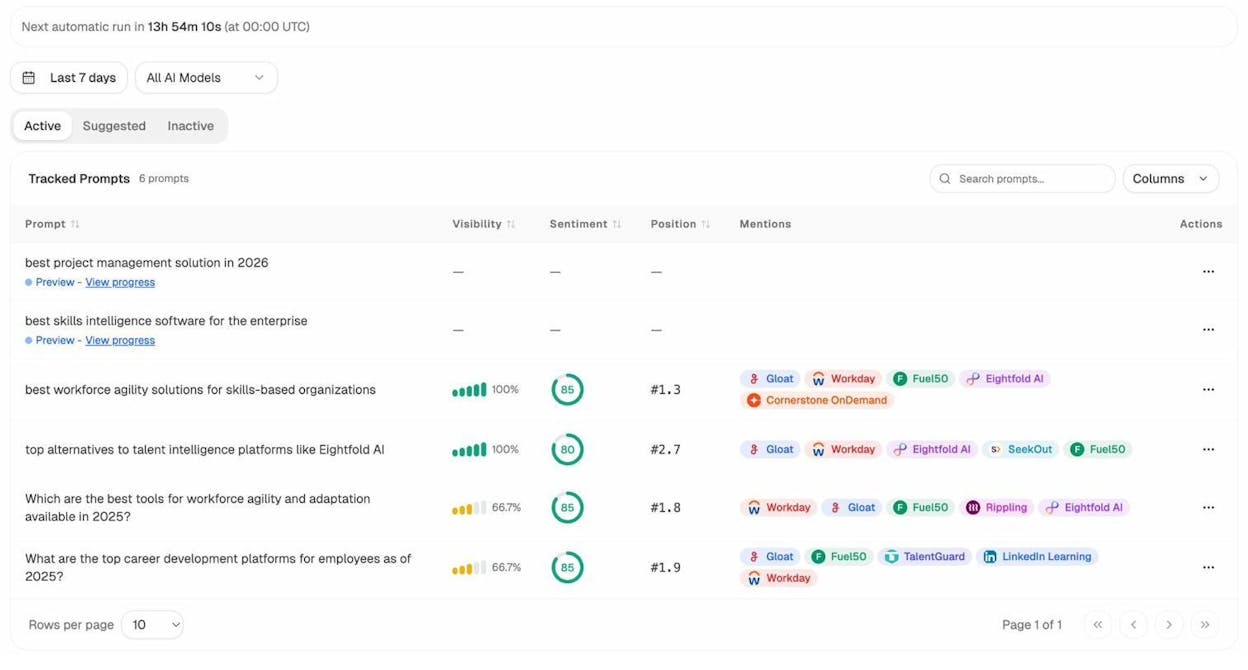
Step 1: Track the prompts that matter to your business
In Analyze AI, you can set up tracked prompts—the AI-search equivalent of tracked keywords. These are the questions your potential customers ask AI engines. For example, a project management tool might track prompts like “best project management software for remote teams” or “top alternatives to Asana.”
Analyze AI runs these prompts daily across ChatGPT, Perplexity, Gemini, Claude, and Copilot, then reports whether your brand appeared in the response, your position, and the sentiment of how you were mentioned.
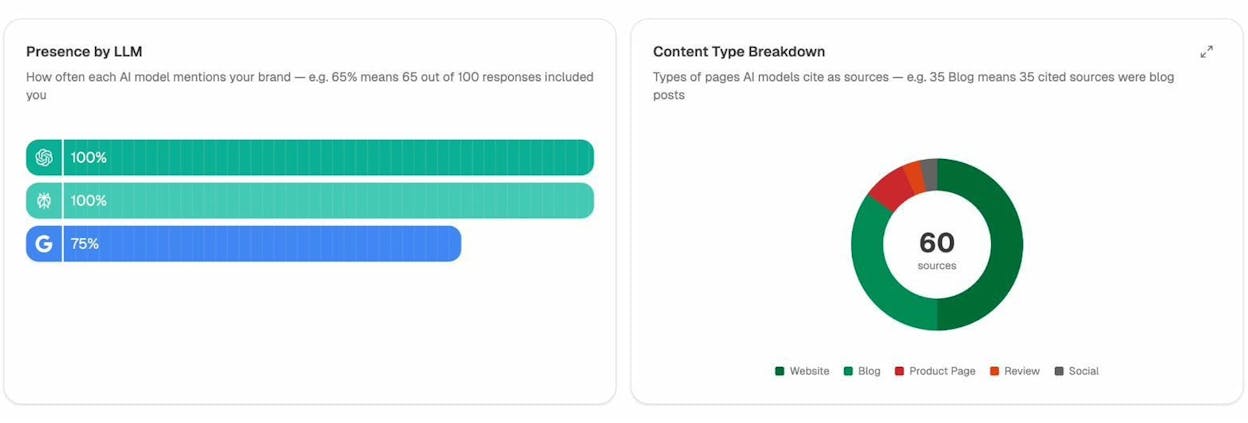
Step 2: Discover prompts you should be tracking but aren’t
Analyze AI suggests new prompts based on your industry and competitive landscape. These are prompts where your competitors are showing up but you aren’t—the AI search equivalent of a keyword gap analysis.
Step 3: See which competitors win the prompts you care about
The Competitors view shows which brands appear most often across your tracked prompts, how their visibility compares to yours, and where they’re gaining or losing ground.
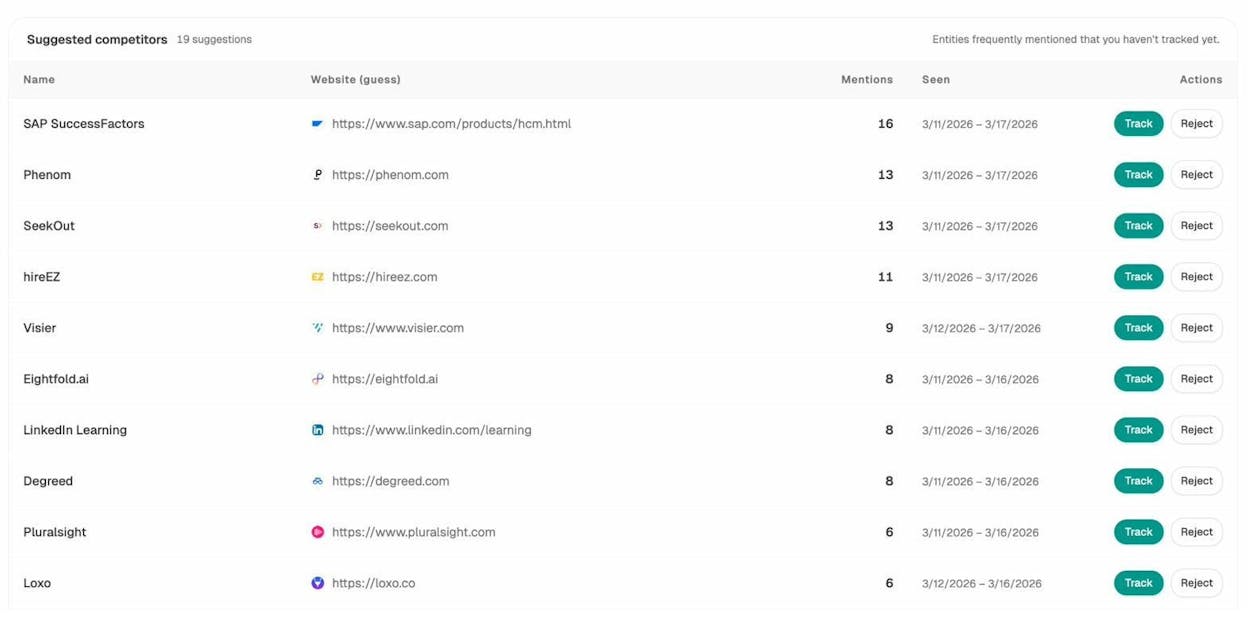
This is the AI search version of a competitor analysis. Instead of checking who ranks for your target keywords in Google, you check who gets mentioned when prospects ask AI engines about your category.
Step 4: Identify which pages AI engines actually send traffic to
Traditional keyword research tells you which pages rank in Google. Analyze AI’s AI Traffic Analytics tells you which pages get traffic from AI search engines—and which AI engines send it.
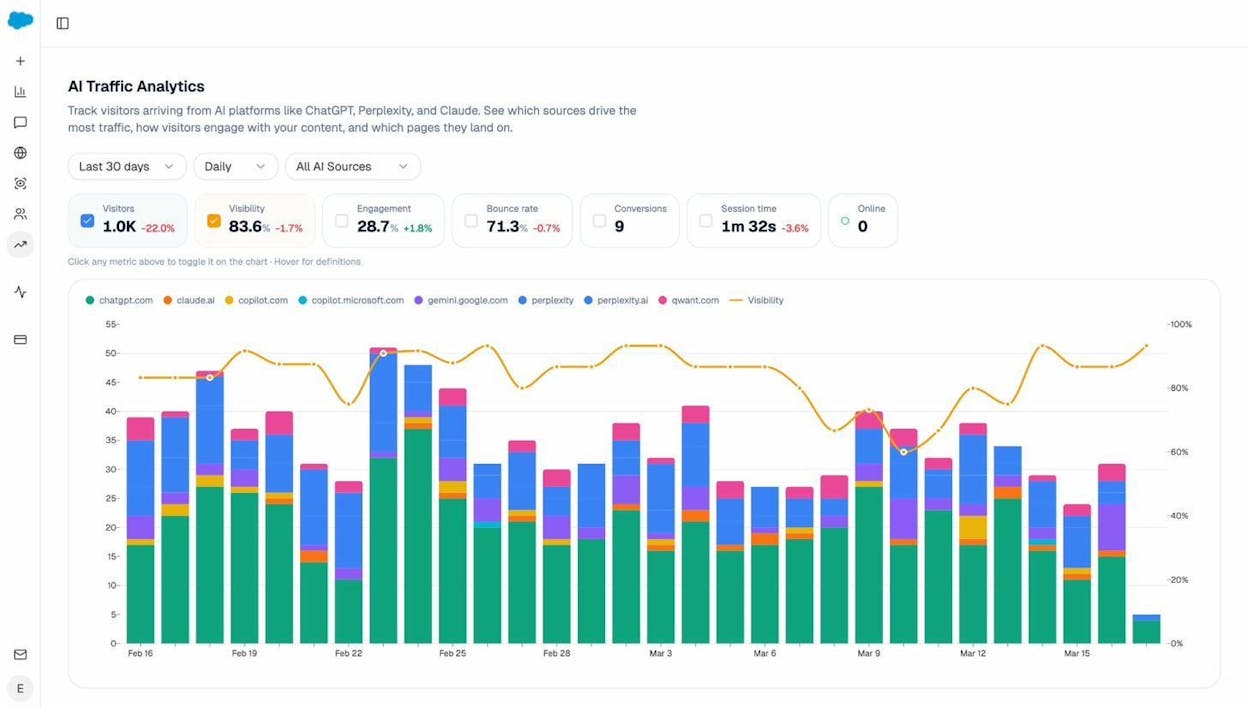
This is critical for identifying content patterns that work in AI search. If your “comparison guide” pages consistently get AI traffic but your “what is X” pages don’t, that tells you which content formats AI engines prefer to cite. You can then double down on what works.
Step 5: Audit the sources AI engines rely on
Analyze AI’s Sources view shows which domains AI models cite most frequently in your space. This reveals the sources you need to either get cited by (for authority) or outperform (for direct citations).
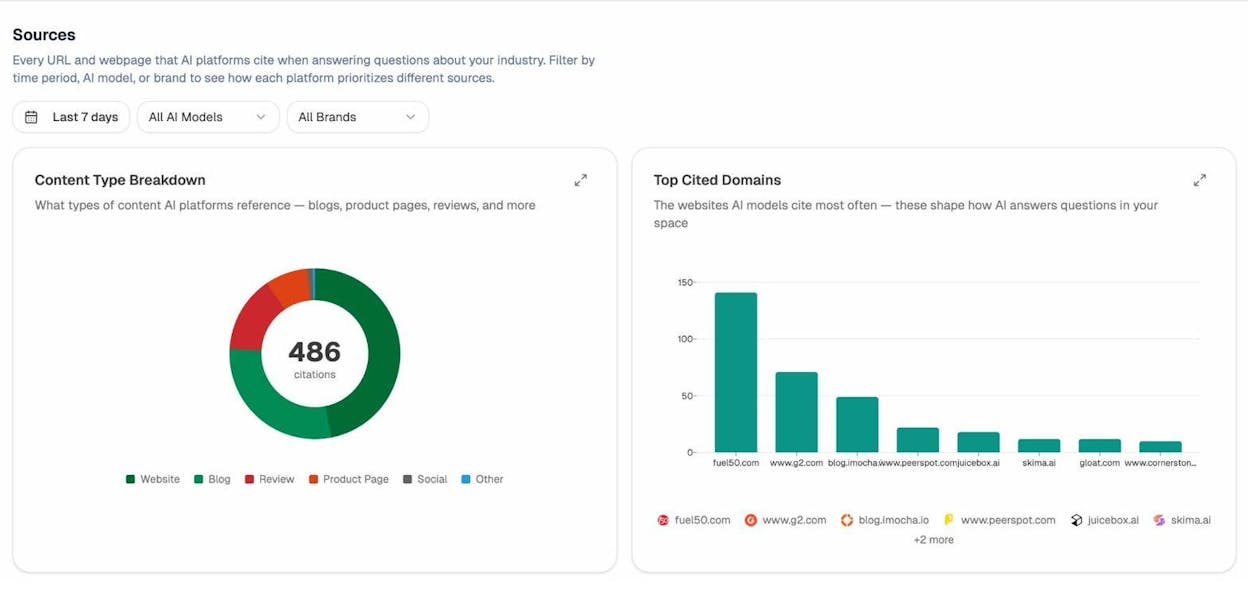
Think of this as the AI search equivalent of backlink research. In traditional SEO, you study who links to your competitors to inform your link-building strategy. In AI search, you study which sources AI models cite to understand what you need to get referenced in or create as content.
For a deeper look at how to approach this, see our guide on answer engine optimization.
Free vs. paid keyword research tools: when to upgrade
Free keyword research tools are enough to find solid keyword ideas, especially when you’re starting out. You can combine the tools on this list to cover ideation, difficulty assessment, search intent analysis, and competitive research without spending anything.
But free tools have real limitations that start to pinch as your site grows:
Fewer keyword ideas. Free tools typically show 100–200 ideas per seed keyword. Paid tools return tens of thousands, with advanced filters to narrow down the best ones instantly.
No batch processing. Free tools handle one keyword at a time. Paid tools let you analyze hundreds of keywords simultaneously, filter by difficulty, volume, and traffic potential, and export the results.
Limited competitive data. Free tools give you surface-level information about competitors. Paid tools show you every keyword a competitor ranks for, every backlink they’ve earned, and every content gap between your site and theirs.
No workflow integration. With paid tools, you can build keyword lists, assign them to content projects, track rankings over time, and measure results—all in one place. Free tools require you to cobble together spreadsheets and manual processes.
The tipping point usually comes when your time becomes more valuable than the tool’s cost. If you’re spending two hours manually checking keywords one by one when a paid tool could do the same work in five minutes, the paid tool pays for itself quickly.
For AI search specifically, the same logic applies. You can manually check whether your brand appears in AI responses by typing prompts into ChatGPT, Perplexity, and other engines one at a time. But at scale, a tool like Analyze AI automates this across engines, tracks changes daily, and ties AI visibility to actual traffic and conversions—data you can’t get manually.
Wrapping up: a practical keyword research workflow
Here’s how to put all of these tools together into a workflow you can use right now:
-
Brainstorm seeds using ChatGPT. Ask for terms related to your topic to get non-obvious starting points.
-
Expand seeds into keyword ideas using the Analyze AI Keyword Generator and Google Keyword Planner. Look for ideas with decent volume and manageable difficulty.
-
Find questions your audience asks using AnswerThePublic. Group related questions into content clusters.
-
Check difficulty using the Analyze AI Keyword Difficulty Checker. Filter out keywords that are too competitive for your site’s authority.
-
Verify traffic potential using the Analyze AI SERP Checker. Make sure the top-ranking pages actually get meaningful traffic.
-
Understand intent using Google Gemini. Make sure you know what type of content the keyword requires before you start writing.
-
Find quick wins using Google Search Console. Prioritize keywords where you’re already on page two—these are the fastest path to more traffic.
-
Monitor trends using Google Trends. Spot breakout topics before competitors do.
-
Extend to AI search using Analyze AI. Track which prompts mention your brand across AI engines, identify competitor gaps, and measure AI referral traffic.
This workflow gives you a complete picture—from traditional SEO keyword research to AI search visibility—using entirely free tools. Start with the first three steps, and layer in the rest as you build momentum.
For a complete breakdown of how to build a keyword strategy from scratch, read our guide on SEO keywords. And for more on expanding into AI search, explore our resources on how to rank on ChatGPT and how to rank on Perplexity.

Ernest

Ibrahim


