



Summarize this blog post with:


In this article, you’ll learn a clear, repeatable process for writing URLs that work for both Google and AI search engines like ChatGPT, Perplexity, and Gemini. You’ll walk away with a step-by-step method for crafting slugs from scratch, a checklist of best practices for the rest of the URL, and a way to audit which existing URL patterns on your site actually earn citations and clicks from AI platforms.
Table of Contents
The anatomy of a URL
Before you can write a good URL, you need to know what you’re looking at.
A URL has six main parts.
![[Screenshot: Clean diagram of a URL labeling each part. Protocol (https://), subdomain (blog.), root domain (tryanalyze), top-level domain (.ai), subfolder (/free-tools/), and slug (keyword-generator). Use a real example like https://www.tryanalyze.ai/free-tools/keyword-generator-tool]](https://www.datocms-assets.com/164164/1777805451-blobid1.png?auto=format,compress&w=1248&fit=max)
The slug is the part you’ll spend the most time on. It’s the last segment of the URL and the one you choose every time you publish a new page. Most of this article focuses there. Then we’ll cover the rest.
Why URLs matter for both SEO and AI search
Google has been clear for years that simple, descriptive URLs help users and crawlers understand a page. The slug is a small but real ranking signal, and it’s the part of the URL that appears most often in shared links, citations, and search snippets.
AI search engines treat URLs the same way, with one extra wrinkle. When ChatGPT, Perplexity, or Gemini answer a question, they often display the full URL of the source they cite. A clean, descriptive URL helps users decide whether to click through. A messy URL full of parameters and IDs gets ignored, even when the page itself is high quality.
There’s also a deeper reason. AI engines build their answers using retrieval-augmented generation, which pulls chunks of text from indexed pages and stitches them into an answer. The URL is one of the signals these systems use to judge whether a page is relevant to a query. A URL like /seo-friendly-urls/ gives the model a stronger relevance signal than /2024/05/post-id-4827/.
This is the foundation of the Analyze AI manifesto. SEO is not dead. AI search is another organic channel that rewards the same fundamentals (clear, useful, well-structured content) and punishes the same shortcuts. URLs are one of the cleanest examples.
So let’s get them right.
How to create an SEO-friendly URL slug
There’s no point rewriting URLs you’ve already published. Redirects can clean up the broken links, but you risk losing rankings, breaking internal anchor text, and burning hours of cleanup time. Focus this process on new pages.
If you’ve already done keyword research, skip to step 3. If you haven’t, follow each step in order.
Step 1: Start with your page title
Most page titles already contain the words your URL needs. They’re written for humans, they include the topic, and they usually include the target keyword.
For this walkthrough, we’ll use a real Analyze AI post titled How to Rank on ChatGPT (Based on 65,000 Citation Data). We’ll start there and trim it down.
Step 2: Strip out the noise
Three things never belong in a slug.
First, special characters. Backslashes, brackets, commas, semicolons, and quotation marks are unsafe characters that make URLs harder to parse and harder for crawlers to follow. Google’s official URL structure guidance recommends keeping URLs to letters, numbers, and hyphens.
Second, numbers tied to a count or a year. The number 65,000 in our example is going to be wrong as soon as we update the citation dataset. Same with 2024, 2025, or Top 10. Numbers in titles are easy to update because the title is a property of the page. Numbers in URLs require redirects every time the count changes, and forgetting to update them creates ugly mismatches in search results.
Third, fluff. Phrases like the perfect, complete guide to, everything you need to know, and (in 2026) add length without meaning.
After stripping, our title becomes:
how to rank on chatgpt
Step 3: Boil it down to your target keyword (for both Google and AI)
Most titles, once stripped, are close to the keyword. Sometimes they’re already there. Sometimes they need one more pass.
For traditional SEO, you want the exact keyword that has the most search volume and matches the intent of your page. The fastest way to find it is to search Google for your draft slug, look at the top three ranking pages, and note the language they use in their title and URL. Free tools like the keyword rank checker, the SERP checker, and the keyword difficulty checker all help you confirm you’ve picked the strongest variant.
![[Screenshot: Google SERP for “how to rank on chatgpt” showing the top three results with similar URL slugs like /how-to-rank-on-chatgpt/]](https://www.datocms-assets.com/164164/1777805458-blobid2.png?auto=format,compress&w=1248&fit=max)
For AI search, the equivalent is finding the exact prompt people use when they ask ChatGPT, Perplexity, or Gemini about your topic. AI prompts are usually longer than search queries. A Google search might be rank on ChatGPT. An AI prompt is more like how do I get my brand mentioned on ChatGPT. You’re not optimizing your slug for the full prompt, but you do want the head term (the part that appears in most prompts) to live inside your URL.
Open Analyze AI’s Prompt Discovery to see the actual prompts people use in your space.
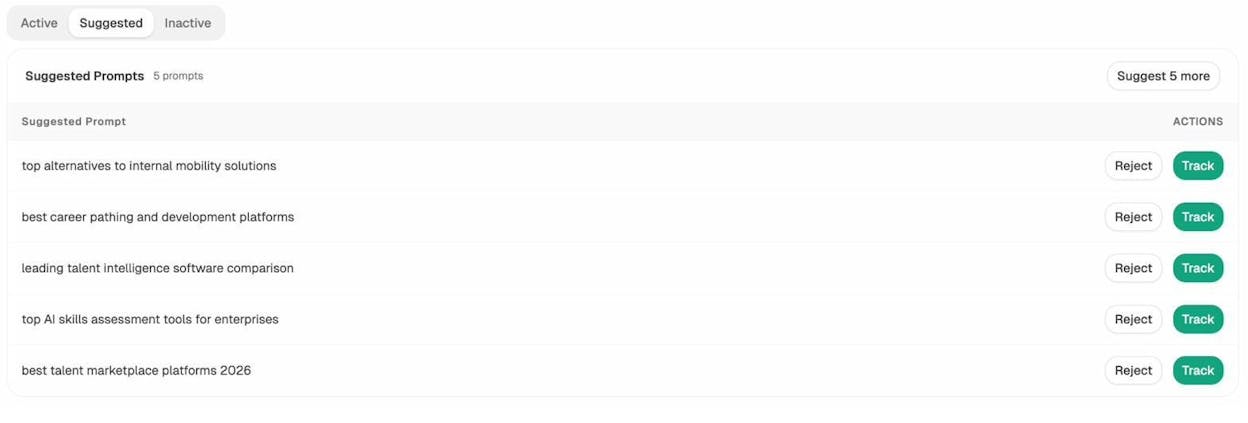
Suggested Prompts in Analyze AI
These are real prompts pulled from AI conversations in your industry. Look for the noun phrase that recurs across most prompts, then use that as your URL anchor.
For our example, both Google and AI converge on the same head term:
rank on chatgpt
That’s your slug candidate.
Step 4: Add a modifier if your slug is too generic
A two-word slug like rank chatgpt is short, but it’s also generic. If your topic competes with thousands of pages on the same head term, add one modifier that narrows the meaning without bloating the URL.
Modifiers usually fall into one of four buckets.
-
A method (how to)
-
An audience (for ecommerce)
-
A medium (guide, tips, examples)
-
A platform (on chatgpt, for perplexity)
There’s no rule for how many modifiers to add. Use as few as needed for the URL to make sense as a phrase. If you read the slug out loud and it sounds like a sentence fragment a human would say, you’re done.
For our example:
how-to-rank-on-chatgpt
That reads naturally, contains the head term, and tells anyone glancing at the URL exactly what’s on the page.
Step 5: Lowercase and hyphenate
Two final mechanical steps.
Lowercase everything. Most servers treat upper- and lowercase URLs as separate pages, which can create duplicate content issues and split your link equity. Lowercase URLs avoid that entirely. WordPress, Webflow, and most modern CMSs lowercase slugs by default, so you usually don’t need to think about it.
Replace spaces with hyphens. Browsers will rewrite spaces as %20, which looks broken in shared links and citations. Google has officially recommended hyphens over underscores for years.
Final slug:
how-to-rank-on-chatgpt
That’s exactly the slug we use for the actual published post.
Best practices for the rest of the URL
The slug is the part you’ll handle most often. Everything before it (the protocol, domain, and subfolder structure) is set up once and rarely changes. Get these right at the start.
Use HTTPS
HTTPS encrypts the connection between your visitor and your server. Google has used it as a ranking signal since 2014, and most modern browsers flag HTTP pages as not secure. Ship HTTPS on day one. There’s no upside to delaying it.
Use subfolders, not subdomains
A subdomain (blog.example.com) sits to the left of your root domain. A subfolder (example.com/blog/) sits to the right.
Google has stated that it treats both equally. In practice, many SEOs see traffic increases when they move content from a subdomain to a subfolder, likely because Google sometimes treats subdomains as separate sites and splits link equity between them.
The safer default is a subfolder. Use a subdomain only when there’s a real technical reason (a different CMS, a different team, a separate codebase).
Pick a memorable, brandable domain
If you’re still choosing a domain, pick something short, memorable, and easy to spell. Don’t waste effort hunting for an exact-match keyword domain. Google’s John Mueller has been clear that having keywords in your domain doesn’t automatically rank you for them.
Stick to .com if you can get it. Country code TLDs like .co.uk or .de work well for geo-targeted businesses. Avoid TLDs like .biz, .info, and .xyz, which are associated with spam and make link building harder.
Use subfolders to show hierarchy
Subfolders communicate where a page sits in your site structure. Compare these two URLs.
example.com/airpods.html
example.com/store/earbuds/apple/airpods.html
The first tells you nothing. The second tells you it’s a product page, in the earbuds category, made by Apple. That’s useful for users, useful for crawlers, and useful for AI engines that use URL structure as a signal of topical authority.
Don’t worry about how many subfolders you stack. Google has confirmed that depth doesn’t hurt rankings. What matters is that the page is reachable through internal links from somewhere shallow on your site. If you’re not sure how your site is linked, run a quick audit using internal linking best practices.
Avoid keyword repetition
Repeating a word across subfolders looks spammy and adds nothing.
Avoid example.com/men/mens-shoes/mens-sneakers/. Use example.com/men/shoes/sneakers/ instead. The hierarchy still communicates the same information without the noise.
Avoid dates in URLs
Many CMSs (especially WordPress) include the publish date in the URL by default. This creates two problems.
First, when you update an article, the URL still shows the original publish date, so AI engines and search snippets display contradictory dates next to your title. Second, dated URLs feel stale and reduce click-through, even when the content is current.
If you’re setting up a new site, change your permalink settings to /postname/ before you publish anything. If your existing site already uses dated URLs, leave them alone. The risk of redirects breaking internal links and rankings is higher than the upside.
![[Screenshot: WordPress permalink settings page with the /postname/ (Post name) option selected]](https://www.datocms-assets.com/164164/1777805466-blobid4.png?auto=format,compress&w=1248&fit=max)
Avoid URL parameters on indexable pages
Parameters appear after a ? in a URL (example.com/products?color=blue). They’re useful for filters and tracking, but they create duplicate content when the same page loads at multiple URLs.
If your CMS generates parameter URLs you can’t control, use canonical tags to tell crawlers which version is the master. For your site as a whole, run a broken link check periodically to catch redirect chains and parameter URLs that have leaked into your indexed pages.
Quick reference
Use this as a cheat sheet next time you’re naming a URL.
|
Issue |
Avoid |
Use |
|---|---|---|
|
Special characters |
/post:title?id=4827 |
/post-title |
|
Numbers in slug |
/top-10-seo-tools-for-2024 |
/seo-tools |
|
Date in URL |
/2024/05/post-title |
/post-title |
|
Keyword repetition |
/men/mens-shoes/mens-sneakers |
/men/shoes/sneakers |
|
Uppercase letters |
/Post-Title |
/post-title |
|
Underscores |
/post_title |
/post-title |
|
Filler words |
/the-complete-guide-to-everything |
/complete-guide |
How to audit your URLs for AI search performance
This is where most SEO articles stop. But knowing how to write a clean URL doesn’t tell you which URL patterns actually earn citations and traffic from AI engines on your specific site.
That’s the gap Analyze AI fills.
Find the URL patterns that earn AI traffic
Inside Analyze AI’s AI Traffic Analytics, the Landing Pages report shows every URL on your site that’s received traffic from ChatGPT, Perplexity, Claude, Gemini, or Copilot. It also shows which pages are being directly cited in AI conversations, broken down by sessions, citation count, engagement, and bounce rate.
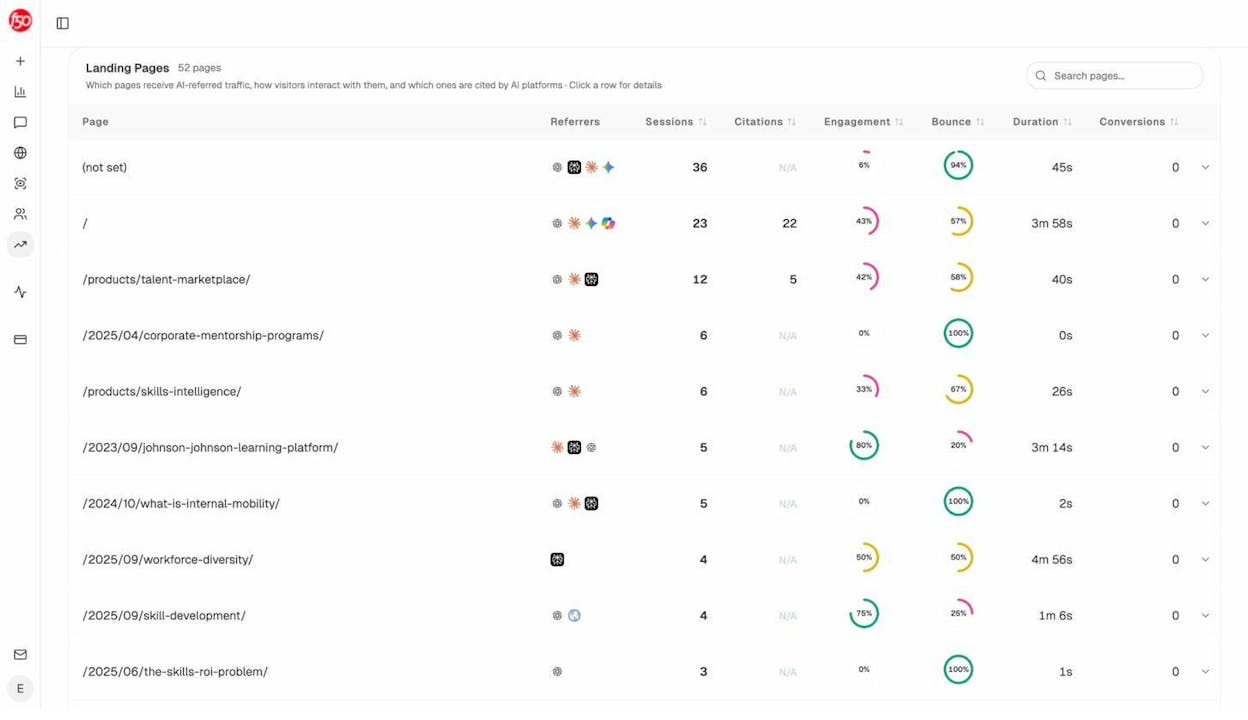
Notice the URL patterns in the screenshot. Pages with clean, descriptive slugs (/products/talent-marketplace/, /products/skills-intelligence/) consistently look healthier than pages with date-prefixed URLs (/2025/04/corporate-mentorship-programs/, /2024/10/what-is-internal-mobility/) on engagement and bounce rate. That’s not a coincidence. Cleaner URLs correlate with more deliberate content, and AI engines tend to cite that content more often.
Sort the report by citations. The pages at the top are your AI search winners. Audit their URL structures, content patterns, and internal linking. Then apply what works to the next batch of pages you publish.
Study the URL patterns your competitors win with
Open the Competitor Intelligence report to see which competitor URLs are being cited in AI answers about your category.
![[Screenshot: Competitor Intelligence report showing competitor URLs cited in AI answers, with citation counts and the prompts that triggered each citation]](https://www.datocms-assets.com/164164/1777805475-blobid6.png?auto=format,compress&w=1248&fit=max)
You’ll usually see two patterns. One is short, head-term slugs from category pages and pillar guides. The other is long-tail, question-style slugs from comparison and “best of” content. Both work. Pick the pattern that matches the page type you’re publishing and the prompt you’re trying to win.
See what AI is citing in your industry
The Sources report shows every URL that AI platforms cite when answering questions in your space, along with the top-cited domains.
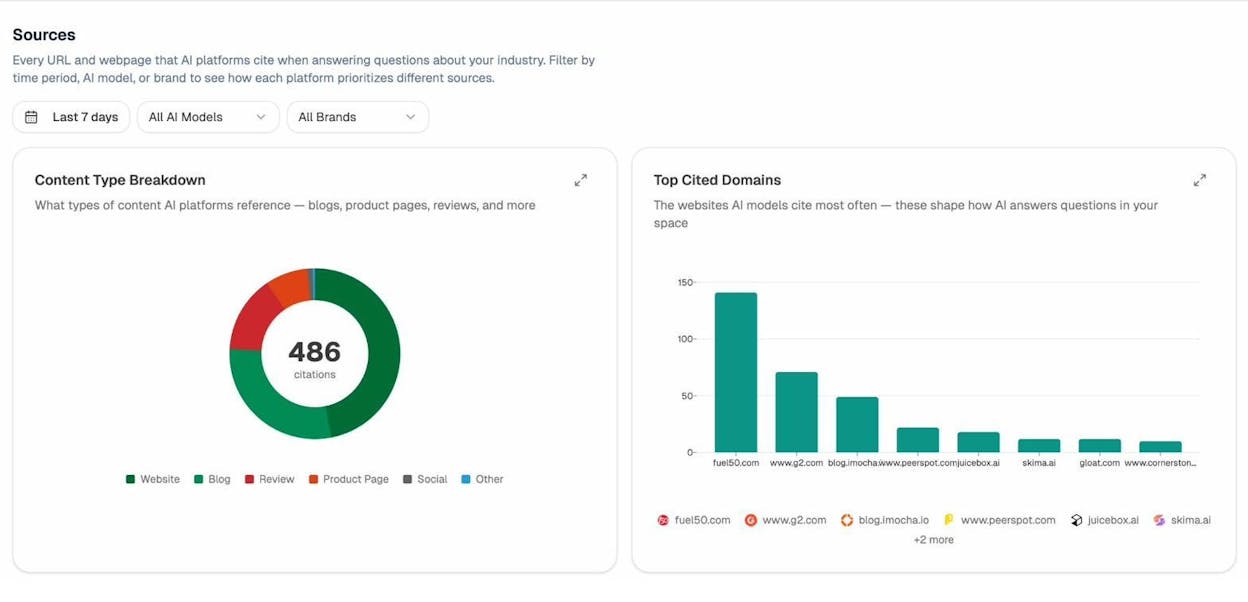
Sources report showing top cited domains in AI answers
This is your competitor URL inventory. Click into any cited URL to see its slug, its structure, and the prompts that triggered the citation. Use it to spot URL conventions that work in your industry, and to find gaps where no competitor has published the right URL yet. Then write the page and ship the URL.
Final thoughts
Clean URLs are not the highest-leverage move you can make in SEO or AI search. Content quality, intent match, and internal linking matter more.
But URLs are one of the few things that compound silently for years if you get them right, and cost real time to fix if you don’t. Build the habit once. Apply the steps above to every new page. Then use Analyze AI to confirm the patterns are working in both Google and AI engines.
That’s how you stay visible in both channels at once.

Ernest

Ibrahim


