



Summarize this blog post with:


In this article, you’ll learn the nine most common hreflang issues found across hundreds of thousands of multilingual websites, why each one breaks your international SEO, and exactly how to detect and fix it. You’ll also see how the same hreflang signals shape which localized version of your page gets cited in AI search across ChatGPT, Perplexity, Gemini, and Google’s AI Mode.
A study of 374,756 domains using hreflang found that 67% of them have at least one issue. A separate Search Engine Land analysis of international sites found that 31% had conflicting hreflang directives and 16% were missing self-referencing tags. The pattern is consistent across studies. Most websites running hreflang are running it wrong.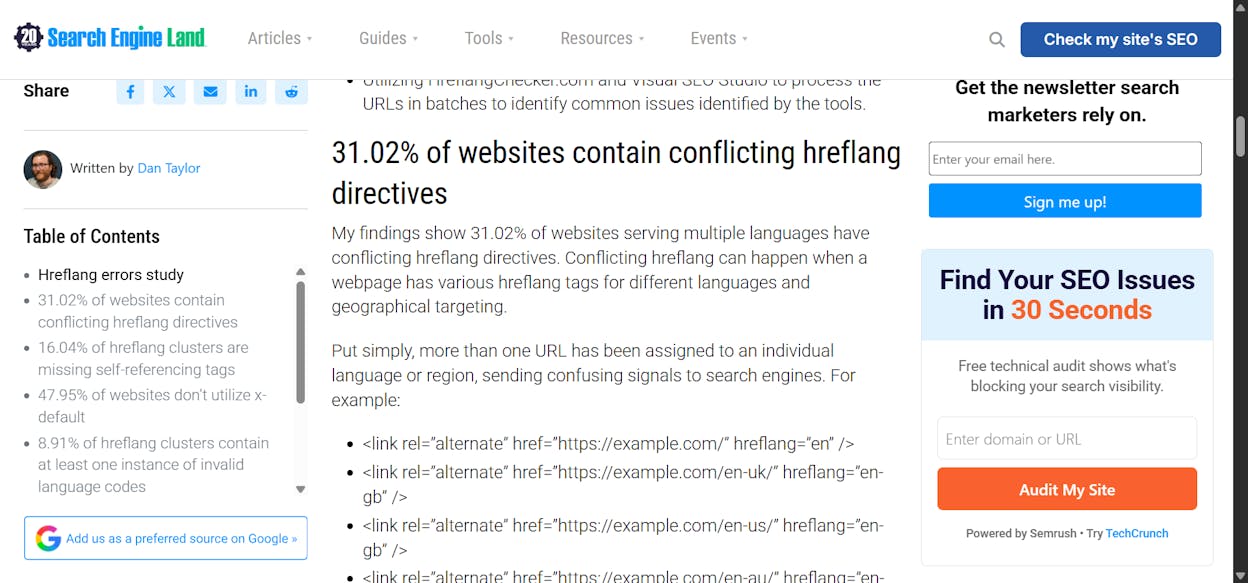
That matters more than ever. Hreflang is one of the strongest signals search engines use to decide which language and country version of a page to surface. When it is broken, you ship beautiful translations and watch the wrong page rank in the wrong market. AI search engines pull from those same indexes, so the URL cited in a French answer might be your English page.
Below are the nine issues, ranked by how often they appear, and a step-by-step fix for each. The frequencies come from the largest publicly available hreflang study to date.
|
# |
Issue |
Frequency |
|---|---|---|
|
1 |
Pages missing x-default |
56.3% |
|
2 |
Pages missing self-referencing hreflang tags |
18.0% |
|
3 |
Hreflang tags pointing to redirected or broken pages |
16.9% |
|
4 |
Pages missing reciprocal tags |
15.3% |
|
5 |
Hreflang tags pointing to non-canonical URLs |
8.0% |
|
6 |
Incorrect hreflang values |
4.6% |
|
7 |
Inconsistent HTML language attributes |
3.2% |
|
8 |
More than one page referenced for the same language |
2.5% |
|
9 |
Same page referenced for more than one language |
2.5% |
Table of Contents
1. 56.3% of domains have pages missing x-default
The x-default annotation tells search engines which page to serve when a user’s language and region don’t match any of your localized versions. Think of it as the fallback for every visitor outside your declared markets.
Hreflang works on a most-specific-match basis. A page tagged for fr-CA wins for a French speaker in Canada. A page tagged for fr wins for a French speaker in Belgium. When neither matches, x-default is what gets shown.
Here is what a complete cluster with x-default looks like.
<link rel="alternate" hreflang="en" href="https://example.com/" />
<link rel="alternate" hreflang="fr" href="https://example.com/fr/" />
<link rel="alternate" hreflang="es" href="https://example.com/es/" />
<link rel="alternate" hreflang="x-default" href="https://example.com/" />
Google’s official documentation lists x-default as recommended, not required. Skipping it costs you whenever a user falls outside your defined locales. They get whichever localized page Google guesses is closest, and that guess is often wrong.
How to detect it. Crawl your site with Screaming Frog and open the Hreflang tab. Filter for “Missing X-Default” to surface every cluster without a fallback.
![[Screenshot description: Screaming Frog Hreflang tab with filter set to “Missing X-Default” showing a list of affected URLs.]](https://www.datocms-assets.com/164164/1777770549-blobid2.jpg?auto=format,compress&w=1248&fit=max)
You can cross-check inside Google Search Console under the legacy International Targeting report.
How to fix it. Pick one URL to act as your global default. For most sites, that is the English homepage or a language-picker landing page. Add an x-default annotation to every page in your hreflang cluster pointing to that URL.
One nuance worth flagging. Never use x-default for a localized page, since that defeats its purpose. Use it for a neutral page or a redirect handler that detects user location and routes them server-side.
2. 18% of domains have pages missing self-referencing hreflang tags
A self-referencing hreflang tag is one where the page declares itself as part of the cluster. The English page lists an hreflang="en" annotation pointing to its own URL alongside annotations for every other language version.
This sounds redundant until you see what happens without it. When you copy the cluster to other pages, at least one of the connections breaks. That single break can invalidate the entire cluster.
A correct cluster has every page referencing every page in the group, including itself. Here is the pattern.
<!-- On https://example.com/ -->
<link rel="alternate" hreflang="en" href="https://example.com/" />
<link rel="alternate" hreflang="fr" href="https://example.com/fr/" />
<link rel="alternate" hreflang="x-default" href="https://example.com/" />
<!-- On https://example.com/fr/ -->
<link rel="alternate" hreflang="en" href="https://example.com/" />
<link rel="alternate" hreflang="fr" href="https://example.com/fr/" />
<link rel="alternate" hreflang="x-default" href="https://example.com/" />
How to detect it. Run a crawl with any technical SEO auditor and look for “Missing self-referencing hreflang.” Most modern systems handle this automatically, so the issue often comes from manual edits or partial rollouts.
How to fix it. Add the self-reference to every page. If you are on a CMS with a hreflang plugin, the plugin probably handles this for you, but verify with a sample crawl after changes ship.
For a deeper look at how technical SEO foundations affect organic performance, our guide on the 4 pillars of an effective SEO strategy for AI search covers the role of crawl, index, and signal consistency.
3. 16.9% of domains have hreflang tags pointing to redirected or broken pages
If your hreflang tag links to a URL that 404s or redirects, search engines cannot establish the cluster. The pair breaks. Pages can no longer swap properly in the search results.
This is where it gets expensive. A user in Germany searches for your product, Google should serve your de-DE page, but the German URL in your hreflang cluster redirects to a 301 chain. Google falls back to the English page.
The same thing happens with AI search. Broken or redirected URLs get filtered out of the indexes that ChatGPT, Perplexity, and Gemini pull from. If your German page is broken in hreflang, AI engines may cite your English page in a German answer instead.
How to detect it. Run a crawl with Screaming Frog or a similar tool and export the Hreflang tab. Check the response code column for any URL that returns 3xx or 4xx.
![[Screenshot description: Screaming Frog hreflang export showing response codes 301 and 404 next to specific URLs.]](https://www.datocms-assets.com/164164/1777770552-blobid3.jpg?auto=format,compress&w=1248&fit=max)
For a quick check on a small site, our free broken link checker flags URLs that return errors. Combine that with a manual review of your sitemap to catch hreflang values that point to dead pages.
How to fix it. Update each hreflang annotation to point to the live, final-destination URL. If the page no longer exists, decide whether to recreate it or remove it from the cluster. For URLs that have legitimately moved, update both the hreflang annotation and any internal links pointing at the old path.
The one exception is the approved homepage redirect setup, where a 302 dynamically routes users based on detected language. That setup is documented and works.
4. 15.3% of domains have pages missing reciprocal tags
Hreflang tags work in pairs. If page A points to page B, page B must point back to page A. Without that handshake, search engines ignore the relationship and may pick either version arbitrarily.
![[Screenshot description: Diagram showing a four-page hreflang cluster (en, fr, es, de) with arrows indicating reciprocal pairs. One arrow is broken with a red X, illustrating a missing return tag.]](https://www.datocms-assets.com/164164/1777770554-blobid4.png?auto=format,compress&w=1248&fit=max)
This issue gets amplified when you have multiple versions of the same language. An en-US page and an en-CA page both targeting English speakers can end up swapping incorrectly if the reciprocal links are broken. A buyer in Canada lands on the United States pricing page.
How to detect it. Use Screaming Frog’s “Non-reciprocal” filter under the Hreflang tab. The crawler walks every cluster and flags pages where a return tag is missing.
You can also run a command-line crawl for large sites. The Search Engine Land hreflang guide shows how to use Screaming Frog’s CLI to programmatically validate clusters and fail builds when reciprocal pairs break.
How to fix it. Audit each cluster end-to-end. For every annotation on page A, confirm the target page references page A back. Most issues show up when a new locale launches and not every existing page gets updated.
If you maintain hreflang in a sitemap rather than the page head, validate the sitemap against the rendered HTML. Mismatches between the two are the most common source of this issue.
5. 8% of domains have hreflang tags pointing to non-canonical URLs
Hreflang and canonical tags are different signals, but Google reads them together. The hreflang attribute should always point to the canonical version of each localized page. If it points to a URL that itself canonicalizes elsewhere, Google has to choose, and the result is unpredictable.
In practice, hreflang often wins this conflict, which means a page you wanted to consolidate stays in the index. Other times the canonical wins, and the localized page disappears from search.
<!-- WRONG: hreflang points to non-canonical URL -->
<link rel="canonical" href="https://example.com/products/blue-shoes" />
<link rel="alternate" hreflang="fr" href="https://example.com/fr/products/blue-shoes?ref=footer" />
<!-- RIGHT: hreflang points to canonical URL -->
<link rel="canonical" href="https://example.com/products/blue-shoes" />
<link rel="alternate" hreflang="fr" href="https://example.com/fr/products/blue-shoes" />
How to detect it. In Screaming Frog, compare the hreflang URL column against the canonical URL column for each page. Any page where they disagree is a candidate for review.
How to fix it. Strip query parameters, tracking codes, and session identifiers from your hreflang values. Make every URL in the cluster match its own canonical exactly.
For e-commerce sites managing thousands of variants, this is one of the highest-impact fixes you can make. Our ecommerce SEO guide covers the full canonical hygiene checklist.
6. 4.6% of domains have pages with incorrect hreflang values
Hreflang requires two-letter language codes (ISO 639-1) and two-letter country codes (ISO 3166-1 alpha-2). Most invalid values come from a small set of recurring mistakes.
Here is a cheat sheet for the most common code errors and what to use instead.
|
Wrong code |
Why it is wrong |
Correct code |
|---|---|---|
|
en-uk |
“uk” is not a valid country code |
en-gb |
|
la |
Latin America is a region, not a country or language |
es-419 (with caveat) or country-specific codes |
|
cn |
Country code used as language |
zh for Chinese |
|
eng |
Three-letter codes are not supported |
en |
|
pt-br (capitalized) |
Case is fine, but verify region matches |
pt-BR is also accepted |
A few oddities worth knowing. The code uk is technically reserved for Ukrainian, not the United Kingdom, but Google has historically tolerated en-uk as a synonym for en-gb. Do not rely on that. Use en-gb to be safe.
How to detect it. Use Google Search Console’s International Targeting report to see which codes Google parsed and which it flagged as unknown. For a faster local check, our SERP checker lets you verify which page actually ranks for a target query in a given country, which is the practical proof your hreflang values are working.
How to fix it. Replace every invalid value with the standard ISO code. Run a regex search across your codebase or sitemap for the most common mistakes and replace them in one pass.
7. 3.2% of domains have pages with inconsistent HTML language attributes
Every HTML page has a lang attribute on the <html> tag. Hreflang has its own language declaration. When the two disagree, you are telling search engines two different stories about what language the page is in.
<!-- The HTML says English but hreflang says French. Pick one. -->
<html lang="en">
...
<link rel="alternate" hreflang="fr" href="https://example.com/fr/" />
This is usually a templating bug. A French page inherits the default lang="en" attribute from the layout, but the hreflang annotation correctly identifies it as French. Search engines see the contradiction and may discount the signal.
The same conflict confuses AI engines, which lean on the lang attribute when they classify content for retrieval. A French page tagged lang="en" is more likely to surface in English answers, even if your hreflang setup is otherwise perfect.
How to detect it. Crawl your site and compare the lang attribute against the hreflang declaration for each URL. Any mismatch is a bug.
How to fix it. Update your templates so the lang attribute is set per-locale, not site-wide. For headless setups, make this a build-time check that fails the deploy when the two values disagree.
8. 2.5% of domains have more than one page referenced for the same language
For each unique language or language-country combination, you should have exactly one URL. If two different pages both claim to be the English version, Google has to pick one, and the loser disappears.
<!-- WRONG: two URLs both claim to be the English version -->
<link rel="alternate" hreflang="en" href="https://example.com/" />
<link rel="alternate" hreflang="en" href="https://example.com/landing/" />
This issue often shows up as a mismatch between the page head and the XML sitemap. The head declares one URL for English, the sitemap declares another, and Google reads both. The fix lives wherever the two diverged.
How to detect it. A modern crawler reads hreflang from the head, the HTTP header, and sitemaps. Run an audit that covers all three locations and flag any cluster with duplicate language values.
How to fix it. Decide which URL is the real English version, update everywhere that disagrees, and remove the duplicate. If you legitimately have two English pages targeting different countries, use country-specific codes (en-us and en-ca) so the cluster has one URL per locale.
9. 2.5% of domains have the same page referenced for more than one language
This is the inverse problem. One URL appears in hreflang annotations for two different languages. For example, the same page is declared as both English and Spanish.
<!-- WRONG: same URL claimed for English and Spanish -->
<link rel="alternate" hreflang="en" href="https://example.com/products" />
<link rel="alternate" hreflang="es" href="https://example.com/products" />
A page cannot be in two languages at once. One of these annotations is wrong, and the cluster needs cleanup.
How to detect it. Same crawl as above. Look for any URL that appears under two different hreflang values within the same cluster.
How to fix it. Decide which language the page actually serves and remove the incorrect annotation. If you intended to have separate English and Spanish versions, you have a bigger problem, the Spanish version does not exist yet and needs to be built.
How to monitor hreflang issues across SEO and AI search
Fixing these issues once is not enough. Hreflang breaks every time you launch a new locale, redirect old URLs, or restructure templates. The teams that get international SEO right treat hreflang like infrastructure, not a one-off fix.
Here is a monitoring stack that catches issues across both traditional search and AI search.
Run a technical audit every four to eight weeks. Use Screaming Frog, Sitebulb, or any crawler that supports hreflang reporting across head, header, and sitemaps. Track the same issue counts over time so regressions show up early. Our roundup of the best SEO audit tools covers the options.
Watch Google Search Console’s International Targeting report. This is the closest thing you have to Google’s own validation. The report shows which annotations Google recognized and which it flagged. Check it weekly during locale launches and monthly after.
Track which localized URLs get cited in AI search. This is where most teams have a blind spot. Hreflang tells Google which page to rank, but AI engines like ChatGPT and Perplexity make their own decisions about which URL to cite, and those decisions follow upstream from how clean your hreflang signals are.
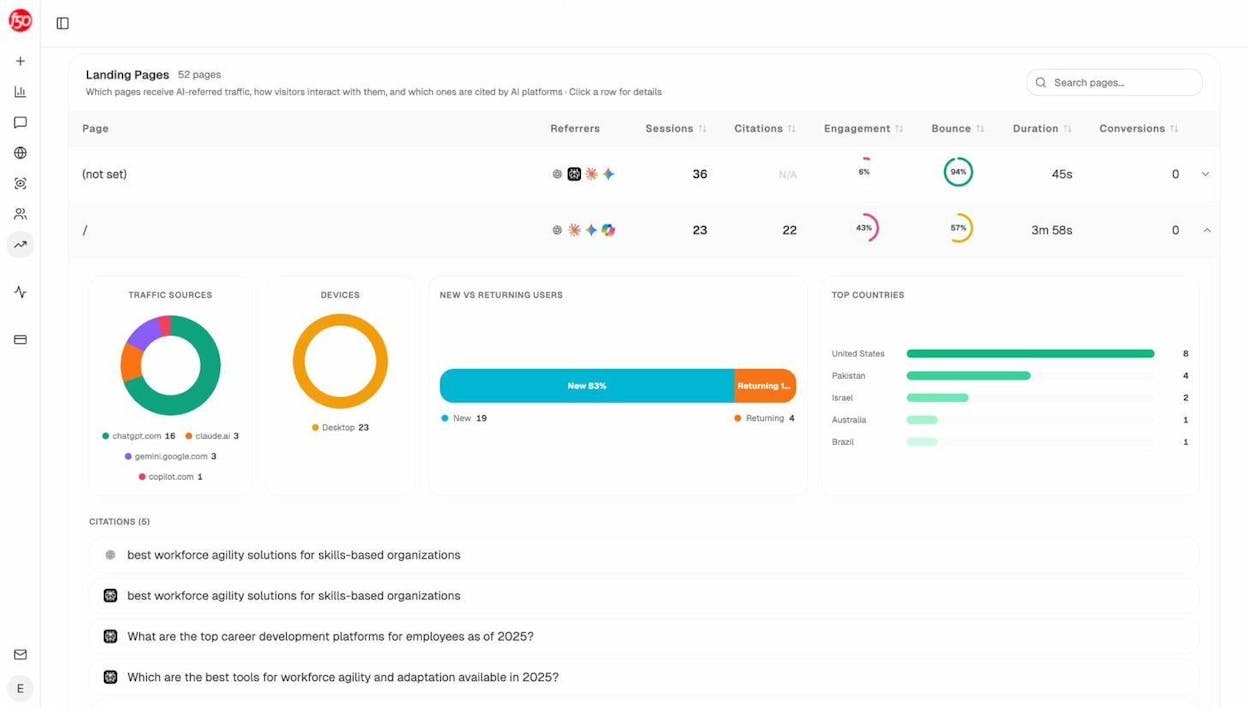
In Analyze AI, the AI traffic analytics report shows which of your pages received AI-driven sessions and which countries those sessions came from. If your French landing page is getting English-speaking US traffic from ChatGPT, that is a signal your hreflang or language targeting is sending the wrong page upstream.
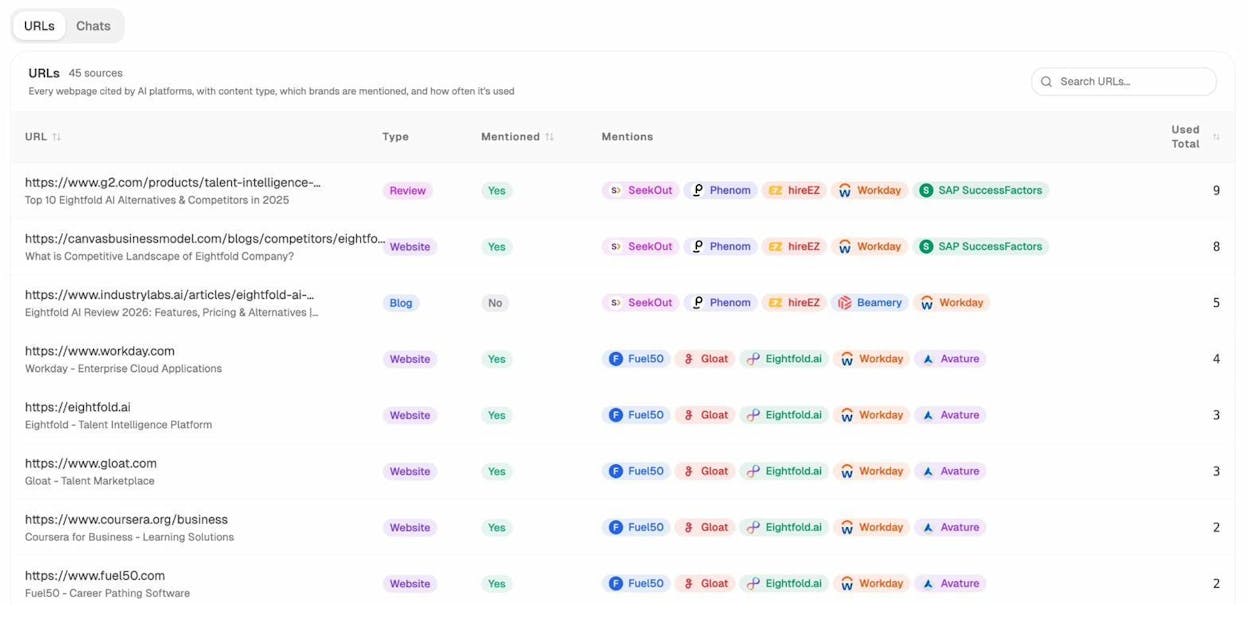
The citation analytics view goes deeper. It lists every URL AI engines cite for prompts in your space. If you run a German site and see your /en/ URLs cited for German prompts, the cluster has a problem. If you see your German URLs cited for German prompts, your hreflang is doing what it should.
For ongoing tracking, the AI visibility tracking feature lets you set prompts in different languages and watch which localized URLs surface over time. That gives you a leading indicator before issues show up in revenue.
This is what we mean when we say AI search is an additional organic channel, not a replacement. Search engine visibility and AI visibility share the same technical foundation. When hreflang breaks, both channels suffer. When it works, both compound.
Final thoughts
Hreflang is hard to get right. It can break in dozens of ways, and most of those breaks are silent. Pages keep ranking, sessions keep coming, and the only signal that something is wrong is a slow underperformance in markets you thought you had covered.
The teams that win internationally treat hreflang as a system that needs maintenance. They run regular crawls, validate signals across sitemap and head and HTTP header, and watch how AI engines cite their localized URLs over time.
If you want a checklist to start with, focus on the top three issues from the data. Add x-default to every cluster. Make sure every page references itself. Confirm that every URL in your cluster is live and canonical. That alone closes most of the gap between the sites that get hreflang right and the 67% that do not.

Ernest

Ibrahim


