



Summarize this blog post with:


In this article, you’ll learn how to submit your website to every search engine that matters in 2026, including Google, Bing, Yandex, Naver, Baidu, and the new generation of AI search engines like ChatGPT, Perplexity, and Gemini. You’ll also learn how to verify your site is indexed, how to fix the most common indexing errors, and what to do once you’re in the index so you actually get traffic.
We’ll keep this practical. Every step has a screenshot and a clear action.
Table of Contents
Do you really need to submit your website?
Probably not. But it’s free, it takes ten minutes, and it gives you tools you’d otherwise miss out on.
Google and Bing find most websites on their own through crawling. Their bots follow links from pages they already know about, find new URLs, fetch them, and add the useful ones to their index. If anyone has linked to your site from a page Google already crawls, you’ll likely show up in the index without lifting a finger.
So why bother submitting?
Three reasons:
-
Speed. A new site with few backlinks can wait weeks before crawlers stumble onto it. Submitting your sitemap shortcuts that.
-
Diagnostics. Google Search Console and Bing Webmaster Tools tell you which pages are indexed, which were rejected, and why. You can’t optimize what you can’t see.
-
Coverage of your AI footprint. AI search engines like ChatGPT and Perplexity rely heavily on traditional search indexes to retrieve answers. If you’re not indexed in Google and Bing, you’re invisible to AI search too. Submitting is the first link in a chain that ends with your brand being mentioned in AI answers.
That last reason wasn’t on the table five years ago. It is now, and we’ll come back to it.
Find your sitemap before you submit
Google and Bing both retired their old “submit a URL” tools in 2018. The modern way to submit a website is to submit your XML sitemap, which is a single file that lists every page you want crawled.
Most sitemaps live at one of these URLs:
-
yourwebsite.com/sitemap.xml
-
yourwebsite.com/sitemap_index.xml
-
yourwebsite.com/wp-sitemap.xml (default for WordPress 5.5+)
![[Screenshot of an example XML sitemap opened in a browser]](https://www.datocms-assets.com/164164/1778269606-blobid1.png?auto=format,compress&w=1248&fit=max)
If neither URL loads, open yourwebsite.com/robots.txt. Most sites declare their sitemap location at the bottom of that file with a line like Sitemap: https://yourwebsite.com/sitemap.xml.
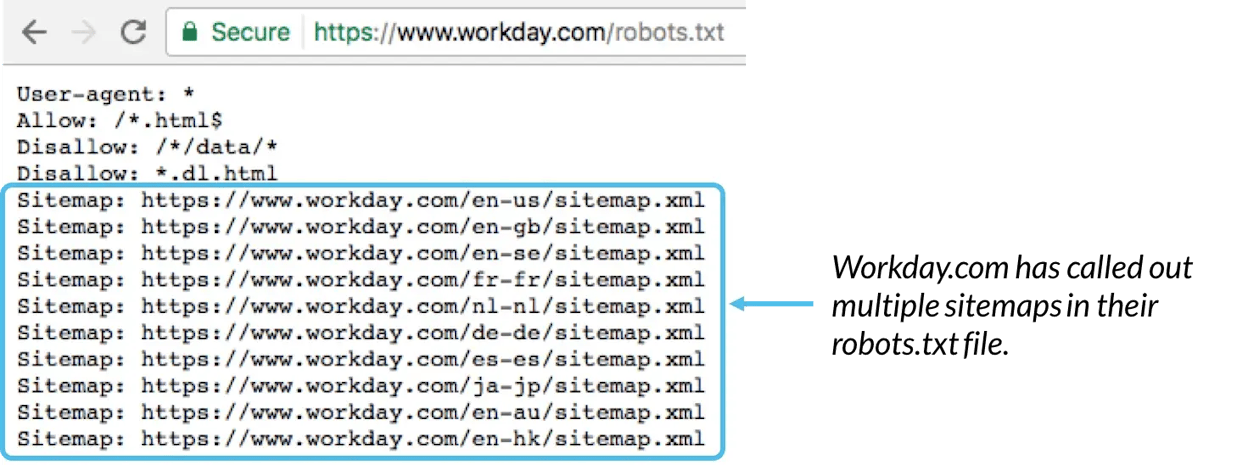
If you still can’t find one, you don’t have a sitemap yet. Generate one with your CMS plugin (Yoast, Rank Math, and Squirrly all do this for WordPress) or a free generator like XML-Sitemaps.com before you go further.
Two quick rules:
-
Only list URLs you want indexed. Pulling 404s, redirects, and noindex pages into your sitemap wastes crawl budget and confuses Google.
-
Keep it under 50 MB and 50,000 URLs per file. Larger sites should split into multiple sitemaps and reference them in a sitemap index file.
How to submit your website to Google
Sign in to Google Search Console. If you haven’t added your property yet, do that first using the Domain or URL prefix option, then verify ownership through DNS, an HTML file, or your Google Analytics tag.
Once you’re inside your property, click Sitemaps in the left sidebar. Paste the path to your sitemap (just the part after your domain, like sitemap.xml) and click Submit.
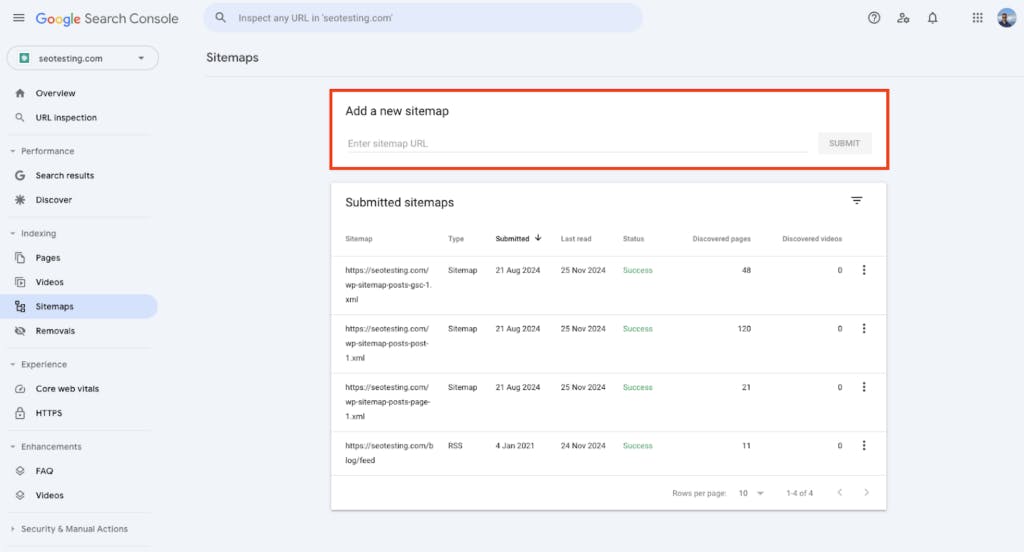
Google will return one of three statuses:
|
Status |
What it means |
What to do |
|---|---|---|
|
Success |
Sitemap was fetched and parsed |
Nothing. Wait for Google to crawl the URLs. |
|
Has errors |
Some URLs in the sitemap couldn’t be processed |
Click into the report to see which ones. Usually a malformed URL or a noindex tag. |
|
Couldn’t fetch |
Google couldn’t reach the file at all |
Check the URL is correct, the file is publicly accessible, and your robots.txt isn’t blocking it. |
If you have multiple sitemaps (for blog posts, product pages, and category pages, for example), submit each one separately or submit your sitemap index file, which references them all.
Submitting a single URL to Google
Sitemaps are for full-site coverage. For one specific page (say, a new article you just published), use the URL Inspection tool at the top of Search Console.
Paste the full URL into the bar at the top of the screen. Google will check whether it’s already in the index.
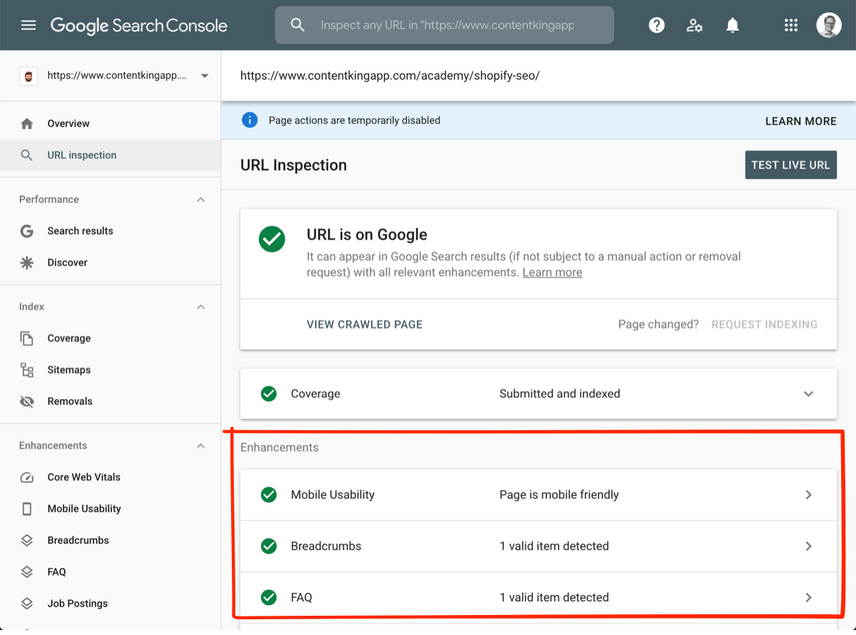
If you see URL is not on Google, click Request Indexing. Google will queue the page for a priority crawl. This usually works within a few hours for new pages, though there’s no guarantee of indexing.
If you see URL is on Google, you’re done. Only re-request indexing after meaningful updates to the page, since spamming the request queue does nothing.
Use IndexNow for instant submission
There’s a faster option that the Ahrefs guide doesn’t cover. IndexNow is an open protocol launched by Microsoft and Yandex in 2021 that lets you ping search engines the moment a URL changes, instead of waiting for them to crawl you. Bing, Yandex, Naver, Seznam, and DuckDuckGo all support it natively.
You enable it once with an API key on your domain, then your CMS pings the IndexNow endpoint whenever a URL is published, updated, or deleted. WordPress plugins like Rank Math and Yoast handle this automatically. Static site generators can ping the endpoint with a single curl command in your build pipeline.
Google does not officially support IndexNow yet, but every other major engine does, which means a single integration covers most of the non-Google web in real time.
How to submit your website to Bing
Sign in to Bing Webmaster Tools. If you already have a Google Search Console property, use the Import from GSC option. Bing will pull your verified site, your sitemaps, and your owners over in two clicks.
Otherwise, add your site manually, verify ownership the same way you did for Google, then click Sitemaps in the left sidebar. Paste your sitemap URL (this time the full URL, including the domain) and submit.
![[Screenshot of Bing Webmaster Tools Sitemaps page]](https://www.datocms-assets.com/164164/1778269623-blobid5.png?auto=format,compress&w=1248&fit=max)
Bing’s URL Inspection tool works the same way as Google’s. For single URLs, paste, inspect, and request indexing if needed.
Yahoo, DuckDuckGo, Ecosia, and Brave Search
You don’t need to submit separately to any of these.
Yahoo’s results are powered by Bing. DuckDuckGo blends Bing results with its own crawler and over 400 other sources, including Wikipedia. Ecosia uses Bing too. Brave Search is one of the few exceptions and runs its own independent index, but it discovers sites organically and doesn’t accept manual submissions.
Submit to Bing once and you’ve covered roughly 30% of global desktop search outside of Google.
How to submit your website to Yandex
If your audience includes Russian-speaking users, Yandex is unavoidable. It holds around 65% of the Russian search market.
Sign in to Yandex Webmaster, add your site, and verify with a meta tag, an HTML file, or DNS. Once verified, go to Indexing in the left menu, click Sitemap files, and add your sitemap URL.
![[Screenshot of Yandex Webmaster sitemap submission interface]](https://www.datocms-assets.com/164164/1778269630-blobid6.png?auto=format,compress&w=1248&fit=max)
Yandex Webmaster also gives you a recrawl tool (“Reindex pages”) for individual URLs, similar to Google’s URL Inspection. You get a small daily quota.
How to submit your website to Naver
Naver dominates South Korea with around 60% of search traffic. If your business sells into Korea, you need to be in Naver’s index.
Sign up for Naver Search Advisor, verify your site, then submit your sitemap under Request > Sitemap Submission.
Naver’s crawler is more conservative than Google or Bing. Submitting a sitemap and a hreflang tag for Korean (ko-KR) is a baseline requirement, and you should expect indexing to take longer than on Western engines.
How to submit your website to Baidu
Baidu holds about 50% of Chinese search and is the only engine that matters if you’re targeting mainland China.
The submission process is more involved than Google’s. You need a real-name-verified Baidu account, your site has to load reliably from inside China (a CDN with Chinese presence helps), and submission happens through Baidu Webmaster Tools.
For a full walkthrough, this guide from Dragon Metrics covers the verification and sitemap steps in English. Don’t bother with Baidu unless your business has a real China play, since meaningful Baidu indexing usually requires a Chinese-language site, an ICP license, and a domestic hosting setup.
How to “submit” your website to AI search engines
You can’t submit your website to ChatGPT, Perplexity, Gemini, or Claude. None of them have a “submit URL” form. But that doesn’t mean you have no influence over whether they cite you.
The brands showing up in AI answers got there through three mechanisms, and you can engineer for all three.
1. Be in Google and Bing first
AI engines retrieve answers by running real-time searches against traditional indexes. ChatGPT search uses Bing. Perplexity uses Google and Bing. Gemini uses Google. If you’re not indexed there, you’re invisible everywhere downstream. Submitting your sitemap to Google and Bing is the first prerequisite for AI visibility, not a separate goal.
2. Make sure AI crawlers can fetch your pages
AI engines also run their own crawlers (GPTBot, PerplexityBot, ClaudeBot, Google-Extended) that index your content for training and retrieval-augmented answers. Check your robots.txt to confirm these aren’t blocked unless you’ve made an active decision to opt out.
If you want to give AI crawlers an explicit summary of your key content, add an llms.txt file at your root. It’s a small Markdown file that lists your key pages with short descriptions. The format is voluntary and not yet widely respected, but it costs nothing to add and gives compliant crawlers a clean entry point.
3. Build the citation graph
This is where most teams stop short. AI engines weight the same signals search engines do (links, brand mentions on trusted publications, structured data) but they also pull from forums, comparison pages, and review sites that don’t carry traditional SEO weight. Getting cited on G2, Reddit, Wikipedia, and trade publications matters more for AI visibility than for blue-link rankings.
This is the part of the job that doesn’t show up in Google Search Console. It shows up in Analyze AI.
When you connect your domain to Analyze AI, the platform runs continuous queries against ChatGPT, Perplexity, Gemini, Copilot, and Claude using prompts your buyers actually use. You see whether you’re being mentioned, what your share of voice looks like against competitors, and which sources the AI engines are pulling from to construct their answers.
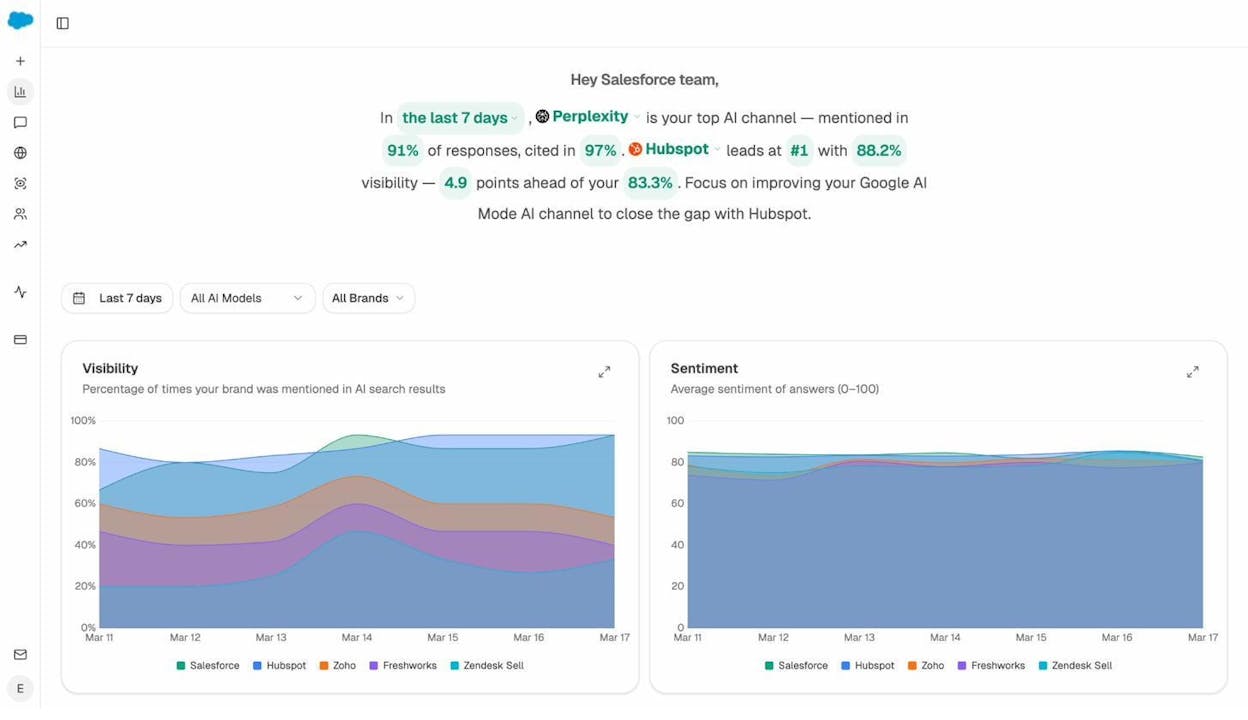
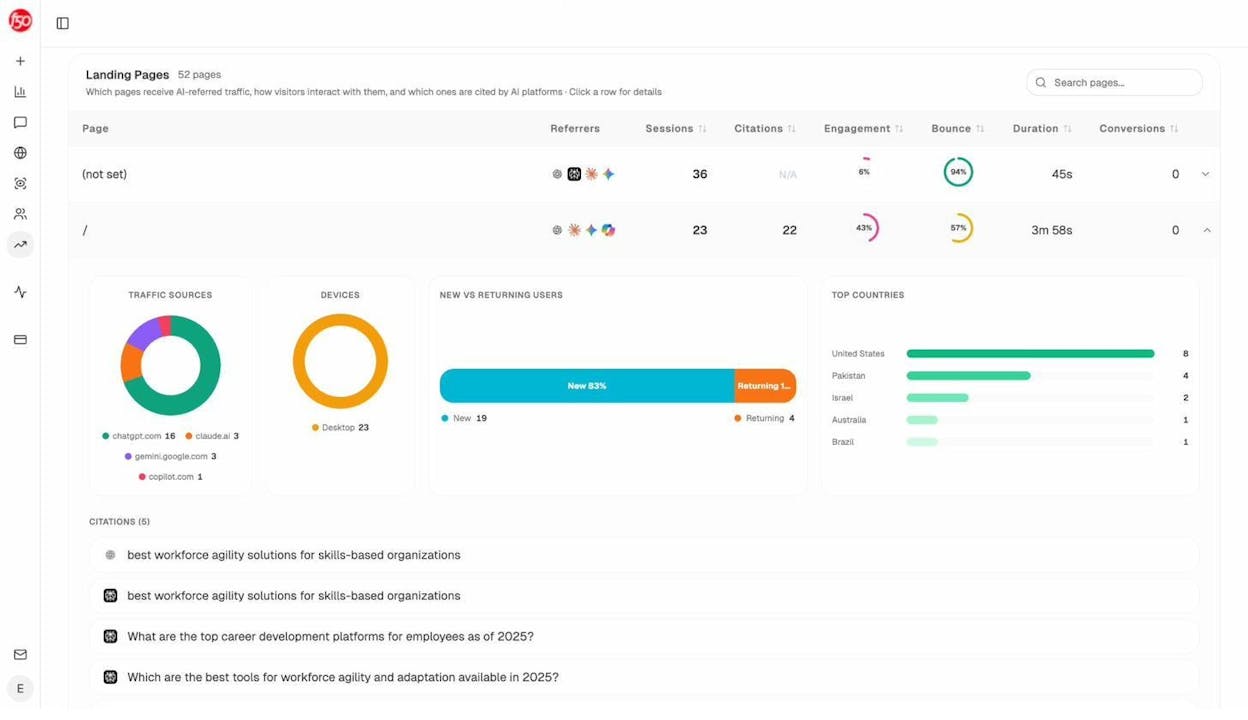
You also see which of your pages are getting AI-referred traffic, which is the closest thing to “indexed in AI” you can measure today. If a page shows up in this list, it means an AI engine surfaced it in an answer and a real user clicked through.
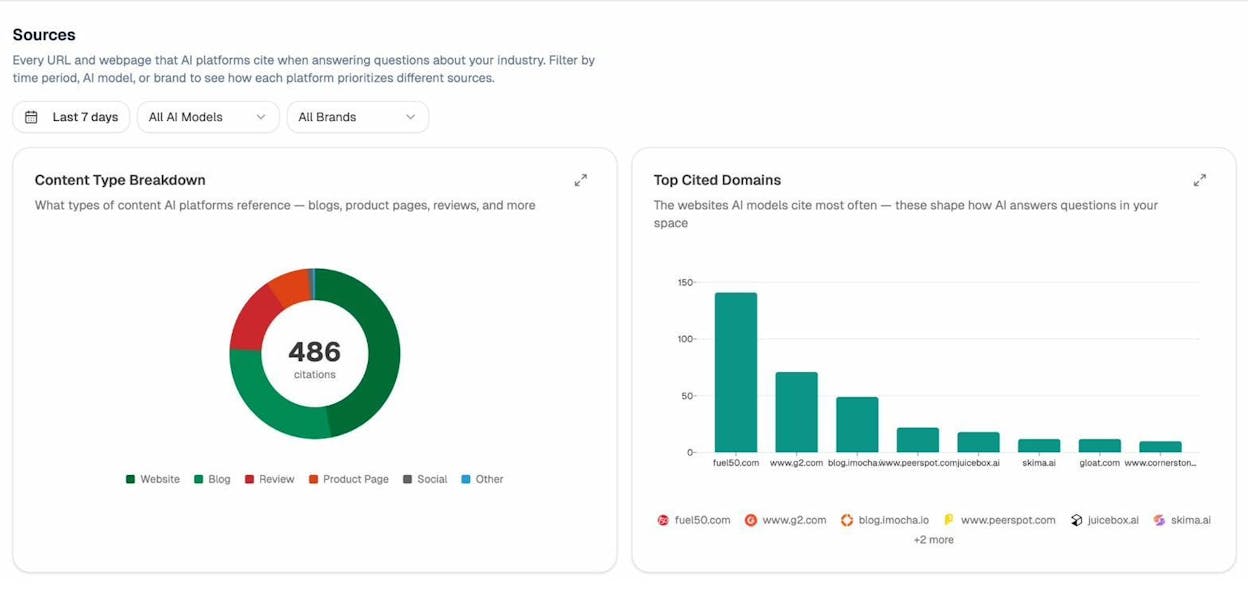
The Sources view tells you which third-party domains the AI engines cite most often when answering questions in your category. Those are your link-building targets, not the generic DA-50 blogs an SEO tool would surface.
If you’re new to AI search and want to understand the underlying mechanics first, our guide to generative engine optimization walks through how LLMs actually pick their citations.
How to check if your website is indexed
Skip the site:yourwebsite.com Google search trick. It’s noisy and inaccurate. Use the official tools instead.
For Google, open the Pages report in Google Search Console (it replaced the old “Coverage” report in 2022). The top of the page shows two numbers: how many of your URLs are indexed and how many aren’t. Click View data about indexed pages to see the full list.
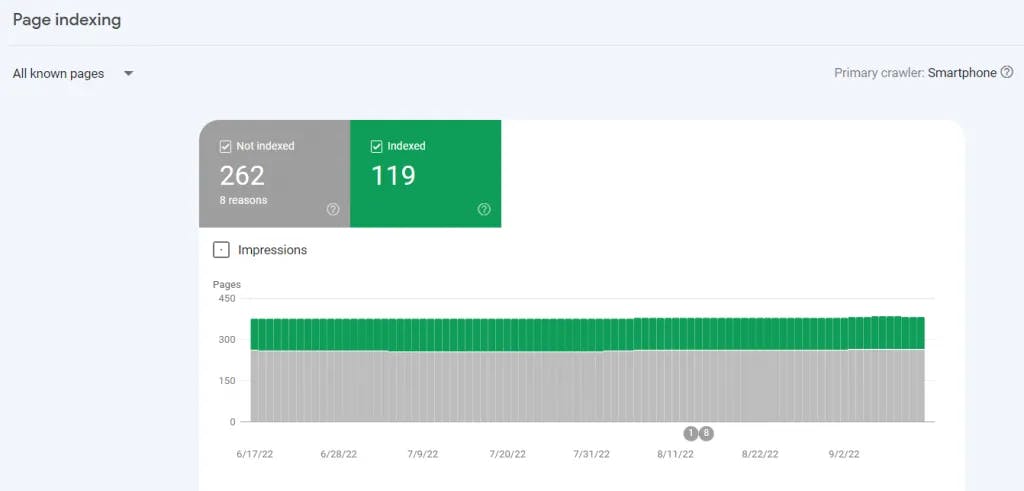
For a single URL, paste it into the URL Inspection bar at the top of Search Console. The status will be either URL is on Google or URL is not on Google, with reasons.
For Bing, the equivalent is Site Explorer under the URL & Sitemaps menu in Bing Webmaster Tools. Filter by indexed URLs to see what made it in.
For AI search engines, there’s no native indexing report, because there’s no real index in the same sense. Instead, what you’re checking is whether an AI engine surfaces your URLs when answering relevant questions. You can do this manually by typing your target prompts into ChatGPT, Perplexity, and Gemini and looking at their citations, or you can automate it with an AI search rank tracking tool that runs the queries on a schedule.
In Analyze AI, the Prompts view shows every tracked prompt, your visibility share for each one, and which of your URLs the AI engine cited.
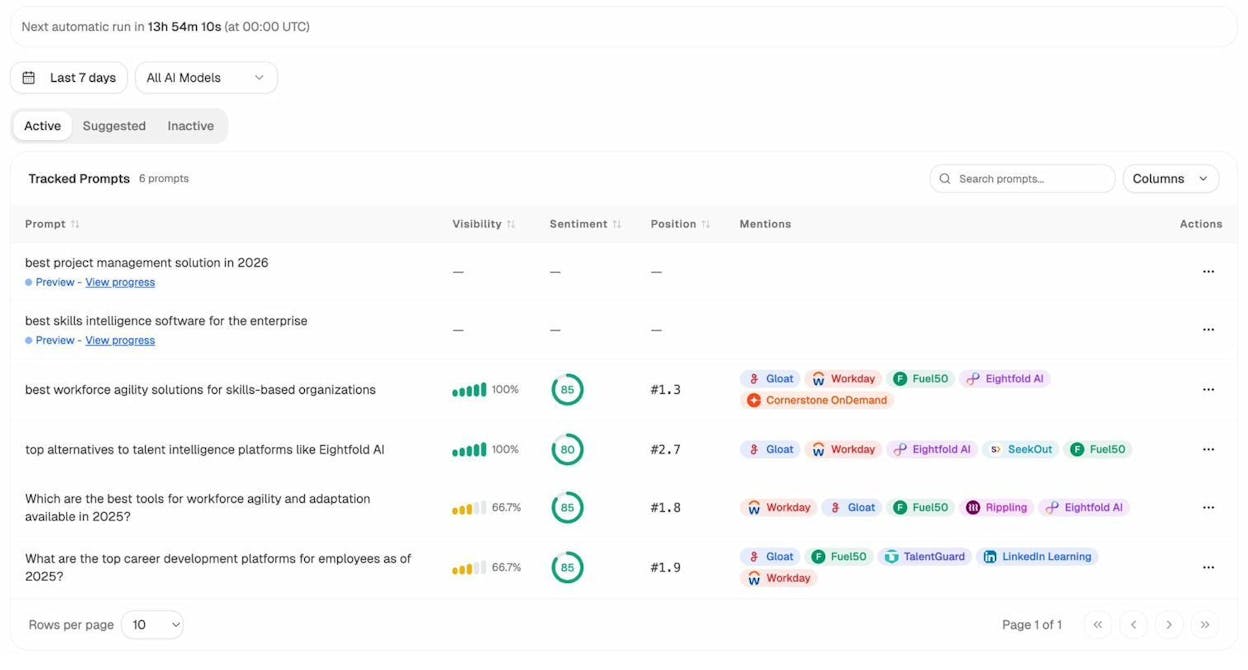
If your URL is being cited, you’re “indexed” for that prompt. If it’s not, you have an actionable gap.
How to fix common indexing issues
If a page isn’t indexed in Google, paste it into URL Inspection. The status reason tells you which bucket the problem falls into. Here are the issues you’ll see most often and how to fix each one.
Excluded by ‘noindex’ tag. Google found a <meta name="robots" content="noindex"> tag in your page’s head. Remove it if the page should be indexed. Some CMSes set this automatically on draft posts or category pages, so check your CMS settings if you didn’t add it deliberately.
Blocked by robots.txt. Your robots.txt file is telling Googlebot not to crawl this page. Open the file at yourwebsite.com/robots.txt, find the rule blocking the URL, and remove it. Search Console also has a robots.txt tester you can use to debug specific URLs.
Soft 404. Google fetched the page successfully but decided it looks like a “not found” page (often because it’s nearly empty or has a “no results” message). Bulk it up with real content or add a proper 404 status code if it really is missing.
Crawled, currently not indexed. Google crawled the page and chose not to index it. This usually means the page is thin, duplicates content elsewhere on your site, or doesn’t add anything to what’s already indexed. Improve it or consolidate it with a stronger version.
Discovered, currently not indexed. Google knows about the URL (usually from your sitemap or an internal link) but hasn’t crawled it yet. Add internal links from high-authority pages, request indexing manually, and make sure your site loads quickly. Crawl budget issues are common on large sites.
Duplicate without user-selected canonical. Google believes another page on your site is a better version. Add a rel="canonical" tag pointing to your preferred URL, or merge the duplicates.
Page with redirect. The URL redirects to another page, so Google indexes the destination instead. This is usually fine. If you don’t want the redirect, remove it.
For a deeper dive on how to spot and fix indexing problems at scale, our guide to the four pillars of an effective SEO strategy covers indexability as part of a broader technical foundation.
What to do after your site is indexed
Submitting your sitemap gets your pages into the database. It doesn’t get you traffic. Here’s the short list of what actually moves the needle once you’re indexed.
Track your rankings. Use a free keyword rank checker to confirm your pages are ranking for the keywords they’re targeting. If you’re indexed but not ranking, the issue is keyword competitiveness, not visibility.
Audit your backlinks. Pages with no inbound links rarely rank, even when indexed. A backlink checker tells you who’s linking to you and which pages need more authority.
Fix your broken links. Pages full of 404s lose crawl budget and trust. Run a broken link checker on your site and clean up anything dead before Google deindexes the host page.
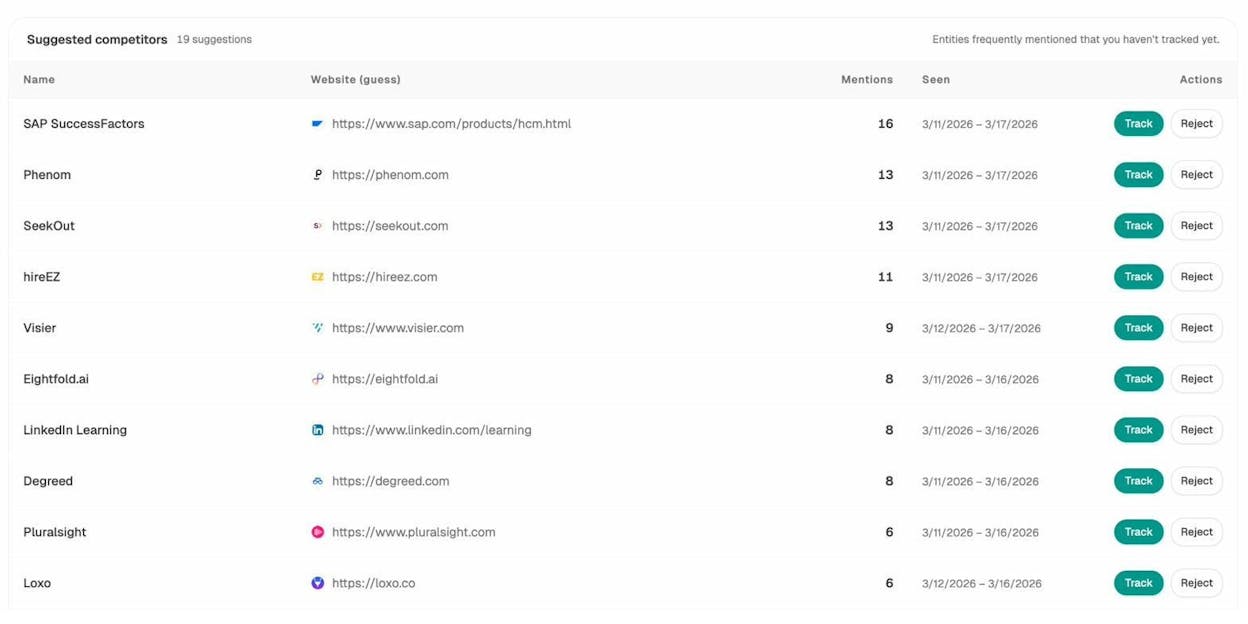
Watch your AI visibility. Once you’re indexed in Google and Bing, the next layer is whether AI engines are citing you. Set up tracking for your top 20 buyer prompts in Analyze AI and check weekly which prompts cite you, which cite your competitors, and which cite neither (those are open opportunities).
Refresh existing content. Indexed pages aren’t fixed in place. Republishing content with updated information often does more for rankings than publishing new pages. The trick is making real changes, not just bumping the date.
Final thoughts
Submitting your sitemap to Google and Bing takes about ten minutes and unlocks the diagnostic tools you’ll rely on for years. Repeat the process for Yandex, Naver, or Baidu only if those markets matter to your business. Skip Yahoo, DuckDuckGo, and Brave entirely, since they either inherit your Bing submission or don’t accept manual submissions.
The newer layer is AI search. You can’t submit a URL to ChatGPT, but you can engineer for citations the same way you engineer for rankings. Start with traditional indexing, make sure AI crawlers can fetch your pages, and monitor your visibility on the prompts your buyers actually use.
That’s the full playbook. Submit, verify, fix, monitor. The teams that compound traffic from both search and AI search are the ones that treat both as part of one system, not two.

Ernest

Ibrahim


