



Summarize this blog post with:


In this article, you’ll learn the eight YouTube keyword tools worth using in 2026, what each one does well, where each falls short, and how to combine them into a single research workflow that surfaces ranking opportunities. You’ll also see how to extend that workflow into AI search, because YouTube videos increasingly show up inside Google AI Overviews, Perplexity answers, and ChatGPT responses, and the brands that plan for both win twice from the same upload.
Table of Contents
The 8 best YouTube keyword tools at a glance
|
# |
Tool |
Best for |
Free tier? |
Paid plans start at |
|---|---|---|---|---|
|
1 |
TubeBuddy |
In-YouTube SERP overlays and tag research |
Yes |
~$5/mo |
|
2 |
vidIQ |
Trending topic and competitor channel analysis |
Yes |
~$10/mo |
|
3 |
Morning Fame |
Guided keyword + title workflow per video |
30-day trial |
~$5/mo |
|
4 |
Analyze AI YouTube Keyword Tool |
Volume, difficulty, and CPC for YouTube terms |
Yes, unlimited |
Free |
|
5 |
Google Trends |
Seasonality and rising YouTube queries |
Yes |
Free |
|
6 |
YouTube Autosuggest |
Long-tail seed ideas straight from YouTube |
Yes |
Free |
|
7 |
KeywordTool.io |
Bulk autosuggest scraping with question filters |
Yes (limited) |
~$89/mo |
|
8 |
Ahrefs Keywords Explorer |
Cross-platform keyword databases at scale |
No |
~$129/mo |
Now let’s go through each one.
1. TubeBuddy
![[Screenshot: TubeBuddy homepage showing the Chrome extension in action on a YouTube search results page]](https://www.datocms-assets.com/164164/1777919652-blobid1.png?auto=format,compress&w=1248&fit=max)
TubeBuddy is a freemium browser extension that injects extra data directly into the YouTube interface. Once installed, you’ll see a sidebar on every search results page, every video page, and inside YouTube Studio.
The most useful piece is the Search Explorer overlay on the search results page. It shows an estimated global search volume, a competition rating, and an overall keyword score out of 100, based on the ratio of search demand to ranking difficulty.
![[Screenshot: TubeBuddy Search Explorer overlay on a YouTube search results page, with the Score, Volume, and Competition figures visible]](https://www.datocms-assets.com/164164/1777919659-blobid2.png?auto=format,compress&w=1248&fit=max)
A word of caution. TubeBuddy doesn’t publish the formula behind its competition score, and its volume estimates are often inflated. Treat the numbers as a directional signal. Compare scores across a shortlist rather than fixating on the absolute volume of any one keyword.
On video pages you get the Videolytics overlay, which surfaces the publisher’s social shares, channel video count, and the full list of video tags. The tag data is the standout. Build a tags shortlist from several top-ranking videos with a couple of clicks, then paste the deduped list straight into your own video on upload.
![[Screenshot: TubeBuddy Videolytics panel on a video page, with tag list and “add to tags list” button visible]](https://www.datocms-assets.com/164164/1777919660-blobid3.png?auto=format,compress&w=1248&fit=max)
TubeBuddy also includes a YouTube rank tracker, which closes the loop on whether the keyword you picked actually ranked.
Best for: Creators who want a permanent overlay inside YouTube and care about tag research. Watch out for: Inflated search volume numbers and a free tier that limits how many related searches you can see.
2. vidIQ
![[Screenshot: vidIQ homepage showing the Chrome extension and dashboard]](https://www.datocms-assets.com/164164/1777919666-blobid4.png?auto=format,compress&w=1248&fit=max)
vidIQ is the other major freemium browser extension for YouTube research. The feature overlap with TubeBuddy is heavy. You get search volume, competition, an overall score, related queries, and tags from the top-ranking videos right inside the YouTube SERP. For most everyday research, the choice between the two comes down to interface preference.
![[Screenshot: vidIQ search overlay on a YouTube search results page]](https://www.datocms-assets.com/164164/1777919666-blobid5.png?auto=format,compress&w=1248&fit=max)
Two things make vidIQ worth a separate look.
The first is one-click tag export to CSV from any video page, without adding tags to a list first. If you’re researching a batch of competing videos and want a flat file of every tag, vidIQ is faster.
The second is the Trending tab on a competitor’s channel page. It ranks that channel’s videos by view velocity, the average views per hour. New uploads get most of their algorithmic push in the first 48 hours. After that, only videos with strong watch time get pushed to Browse and Suggested feeds. So when you see an old video on a competitor’s channel still pulling thousands of views per hour, that topic has durable demand.
![[Screenshot: vidIQ Trending tab on a competitor’s channel page, showing videos sorted by view velocity]](https://www.datocms-assets.com/164164/1777919671-blobid6.png?auto=format,compress&w=1248&fit=max)
That’s more useful than a search volume estimate, because it tells you a topic is being actively recommended by the YouTube algorithm right now.
Best for: Competitor channel teardowns and trending topic spotting. Watch out for: The free tier shows only a handful of videos in the Trending tab.
3. Morning Fame
![[Screenshot: Morning Fame dashboard showing a guided keyword research workflow]](https://www.datocms-assets.com/164164/1777919672-blobid7.png?auto=format,compress&w=1248&fit=max)
Morning Fame is an invite-only YouTube tool that takes a different angle. Instead of giving you raw data and asking you to figure out what to do with it, it walks you through a four-step workflow each time you plan a new video.
You start with a seed topic or a video URL that inspired you. Morning Fame then pulls keyword ideas from related videos and splits them into two buckets, one for larger channels and one for smaller channels.
![[Screenshot: Morning Fame keyword ideas split into “good for larger channels” and “good for smaller channels”]](https://www.datocms-assets.com/164164/1777919677-blobid8.png?auto=format,compress&w=1248&fit=max)
Pick a keyword and the tool gives you a Ranking Opportunity score plus grades based on your subscriber count, view count, and engagement. The grades are directional. The real value is the structured workflow itself: pick a keyword first, write a title second, write a description third, add tags last.
If you tend to upload videos and bolt SEO on at the end, Morning Fame is worth using purely for the discipline.
Best for: Creators who want a guided per-video workflow, not a database to mine. Watch out for: It is invite-only. Search “morning fame invite code” if you can’t find one through their site.
4. Analyze AI YouTube Keyword Tool
![[Screenshot: Analyze AI YouTube Keyword Tool interface with seed term input and results table]](https://www.datocms-assets.com/164164/1777919678-blobid9.png?auto=format,compress&w=1248&fit=max)
The Analyze AI YouTube Keyword Tool is a free, no-signup tool that returns a list of YouTube keyword ideas with monthly search volume, keyword difficulty (KD) score, and CPC. You enter a seed term, pick a country, and get a sortable results table.
![[Screenshot: Analyze AI YouTube Keyword Tool results showing a list of keywords with Volume, KD, and CPC columns]](https://www.datocms-assets.com/164164/1777919683-blobid10.png?auto=format,compress&w=1248&fit=max)
A few things make it useful as a daily driver.
First, it’s free and unlimited. You can run as many searches as you want without an account, which matters when you’re brainstorming dozens of seed terms in a research sprint.
Second, the keyword difficulty score is calibrated for YouTube specifically, not borrowed from Google search data. Each result is labeled Easy, Medium, or Hard, so you can shortlist keywords you can realistically rank for given your channel’s authority.
Third, CPC is included alongside volume. CPC is a useful proxy for commercial intent, even on YouTube. A “best CRM software” search has high CPC because it’s a buying-stage query, and a video that ranks for it tends to convert better than a top-of-funnel tutorial. If you’re using YouTube to drive product demos or affiliate revenue, sort the results by CPC, not just volume.
Use the tool early in research to build a candidate list, then validate the most promising keywords on the YouTube SERP itself with TubeBuddy or vidIQ. If you also need broader research for blog content that supports your videos, the Analyze AI Keyword Generator covers Google search the same way.
Best for: Free, unlimited YouTube keyword data with realistic difficulty scores. Watch out for: No browser overlay. You research in the Analyze AI tab, then act on YouTube.
5. Google Trends
![[Screenshot: Google Trends interface with “YouTube search” selected from the source dropdown]](https://www.datocms-assets.com/164164/1777919684-blobid11.png?auto=format,compress&w=1248&fit=max)
Google Trends is free and most people forget that it has a YouTube-specific filter. From the dropdown next to your search query, switch the source from “Google Web Search” to “YouTube Search” and the chart switches to YouTube data only.
![[Screenshot: Google Trends comparison of two YouTube search terms over a 3-year window with seasonal spikes visible]](https://www.datocms-assets.com/164164/1777919689-blobid12.png?auto=format,compress&w=1248&fit=max)
Trends is best at three things keyword tools can’t do.
The first is seasonality. Search “apple watch” with YouTube as the source and look at a three-year window, and you’ll see a spike every December, because people get an Apple Watch for Christmas and head to YouTube to learn how to use it. That tells you exactly when to publish a “how to use your new Apple Watch” tutorial.
The second is relative popularity. If you have two video ideas and can only make one, Trends tells you which gets more YouTube searches right now.
![[Screenshot: Google Trends comparing two YouTube search terms with one clearly trending higher than the other]](https://www.datocms-assets.com/164164/1777919690-blobid13.png?auto=format,compress&w=1248&fit=max)
The third is rising queries. The Related Queries panel surfaces terms that have seen unusual recent growth on YouTube. These are early-stage trend signals, often for topics no keyword database has caught up to yet.
![[Screenshot: Google Trends Related Queries panel with the “Rising” filter selected]](https://www.datocms-assets.com/164164/1777919696-blobid14.png?auto=format,compress&w=1248&fit=max)
Trends doesn’t show absolute search volumes, only relative interest on a 0–100 scale. Pair it with a tool that does, and use Trends to time and prioritize the work.
Best for: Timing video launches, comparing two ideas, and spotting rising topics. Watch out for: No absolute search volumes. Use it as a directional layer.
6. YouTube Autosuggest
![[Screenshot: YouTube search bar showing autosuggest dropdown for a seed term like “vegetarian”]](https://www.datocms-assets.com/164164/1777919696-blobid15.png?auto=format,compress&w=1248&fit=max)
The YouTube search bar itself is the most underused keyword tool on this list. Type any seed term and the autosuggest dropdown shows queries real people have searched, ranked by recency and frequency.
A few tactical moves to get more out of it:
-
Underscore wildcard. Type your seed term, then a space, then an underscore, then another word. YouTube treats the underscore as a fill-in-the-blank and returns suggestions for the gap. So vegetarian _ recipe returns ideas like vegetarian curry recipe, vegetarian pasta recipe, and vegetarian protein recipe.
![[Screenshot: YouTube autosuggest using the underscore wildcard between two terms]](https://www.datocms-assets.com/164164/1777919702-blobid16.jpg?auto=format,compress&w=1248&fit=max)
-
Alphabet expansion. Type your seed, then a single letter from a to z. So vegetarian a, vegetarian b, and so on. Each letter returns a different set of long-tail suggestions.
-
Question stems. Start with question words like how to, what is, why do, can I. These surface high-intent informational queries that map cleanly to tutorial videos.
The downside is what it doesn’t tell you. There’s no search volume, no difficulty, no relative popularity between the suggestions. Copy the most promising ideas into the Analyze AI YouTube Keyword Tool or Google Trends to validate them.
Best for: Free, real-time long-tail seed ideas straight from the source. Watch out for: Zero metrics. It’s a starting point, not a decision tool.
7. KeywordTool.io
![[Screenshot: KeywordTool.io YouTube interface with results tabs for Keyword Suggestions, Questions, Prepositions, and Hashtags]](https://www.datocms-assets.com/164164/1777919702-blobid17.png?auto=format,compress&w=1248&fit=max)
KeywordTool.io is YouTube Autosuggest at scale. It scrapes the autosuggest results for your seed term, then prepends and appends the seed with letters, numbers, and prepositions, and scrapes those too. You end up with a few hundred long-tail variations from one input.
The results land in four tabs:
-
Keyword Suggestions for all autosuggest results minus questions
-
Questions for autosuggest results phrased as questions
-
Prepositions for results containing prepositions like for, with, vs
-
Hashtags for autosuggest results that include hashtags
You can apply negative keywords to filter unwanted terms, and export the full list to CSV.
![[Screenshot: KeywordTool.io Questions tab showing dozens of question-format keywords for a single seed term]](https://www.datocms-assets.com/164164/1777919708-blobid18.png?auto=format,compress&w=1248&fit=max)
The free version doesn’t show search volumes. Even the paid version typically caps out around 2,000 suggestions per seed. The smarter move is to run KeywordTool.io for breadth, then bulk-paste the shortlist into the Analyze AI YouTube Keyword Tool for free volume and difficulty data.
Best for: Bulk long-tail and question discovery from a single seed. Watch out for: Search volumes locked behind a paid plan that’s expensive relative to its feature set.
8. Ahrefs Keywords Explorer
![[Screenshot: Ahrefs Keywords Explorer YouTube database results for a sample query]](https://www.datocms-assets.com/164164/1777919708-blobid19.png?auto=format,compress&w=1248&fit=max)
Ahrefs Keywords Explorer runs on a database of hundreds of millions of YouTube keywords. Search any term, switch the database to YouTube, and get global and country-level search volume, clicks, click percentage, and a long list of related keyword reports including phrase match, having same terms, newly discovered, and questions.
The most useful metric is clicks, not volume. Two queries can have similar search volume but very different click-through behavior. A “how to tie a tie” search converts almost every searcher into a click on a video, because video is the natural format. A “weather today” search rarely produces a video click, because the answer appears at the top of the page. Looking at clicks alongside volume tells you which keywords actually send views to videos that rank.
![[Screenshot: Ahrefs Keywords Explorer showing two keywords with similar search volume but very different click numbers]](https://www.datocms-assets.com/164164/1777919714-blobid20.png?auto=format,compress&w=1248&fit=max)
Keywords Explorer also lets you paste in up to 10,000 keywords at a time and pull metrics on the entire batch.
Best for: Database-scale YouTube keyword research with clicks data. Watch out for: Pricing. Keywords Explorer is paid only.
How to also win in AI search with the same video research
YouTube videos increasingly show up outside YouTube. Google AI Overviews now embed YouTube videos directly when the answer is best delivered visually. ChatGPT, Perplexity, and Claude pull video transcripts and link to them as citations in their answers. A “how to deploy a Next.js app” answer in ChatGPT often includes a YouTube tutorial alongside the written explanation.
This means the keyword research above gets you discovered on YouTube, but the same videos can also be cited by AI assistants. The way to plan for both is to know which YouTube-style queries people are asking AI engines, and which of your videos are already getting cited.
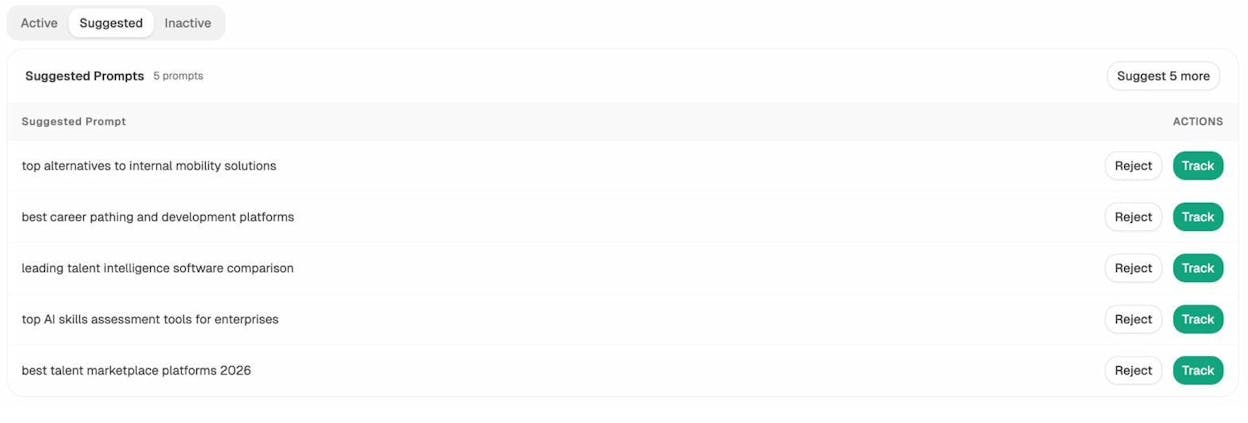
Step 1: Find the AI search queries that match your video topics. Open the Prompt Discovery feature in Analyze AI to see suggested prompts being asked about your category, then bring the most relevant ones into your tracked list. Many of these read exactly like YouTube searches, like “best CRM for startups” or “how to set up a sales pipeline”. Each one is a video idea that maps onto AI search demand at the same time.
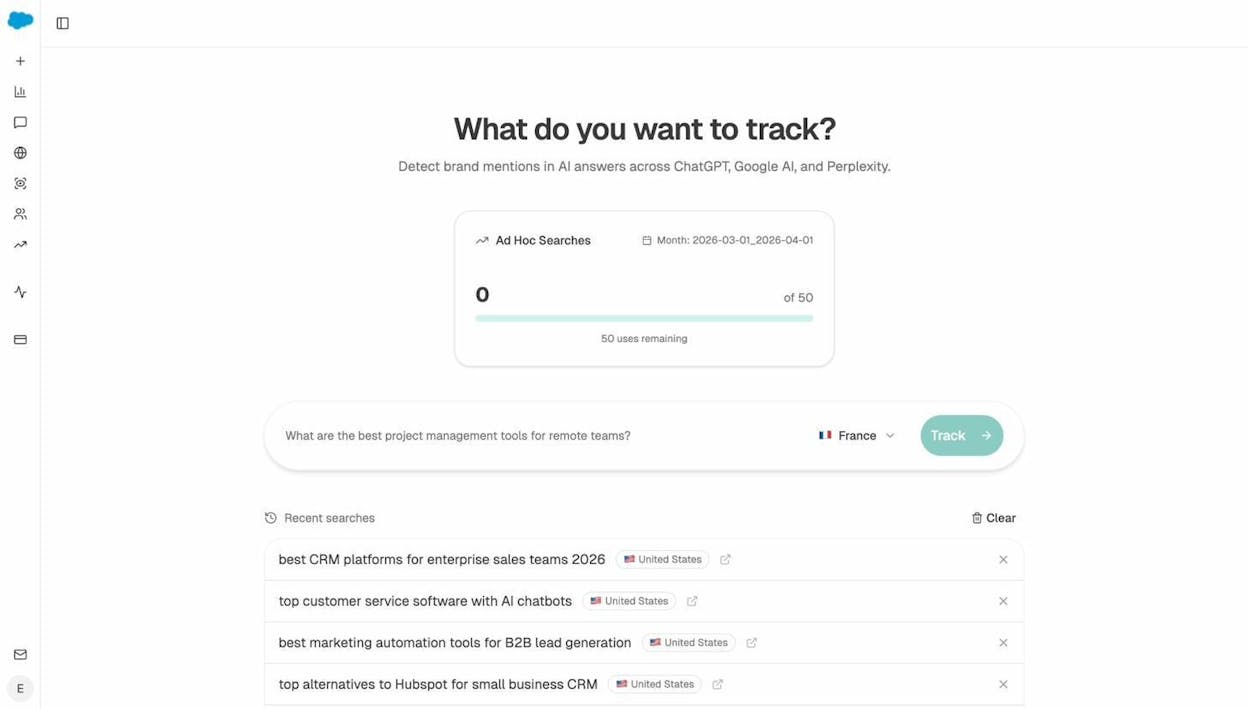
Step 2: Watch for ad hoc validation. Before committing to a video, run the prompt through Ad Hoc Searches to see live what ChatGPT, Gemini, and Perplexity currently return. If their answers already cite YouTube videos, video is the format AI engines reach for on this topic, and publishing a better one is worth the effort.
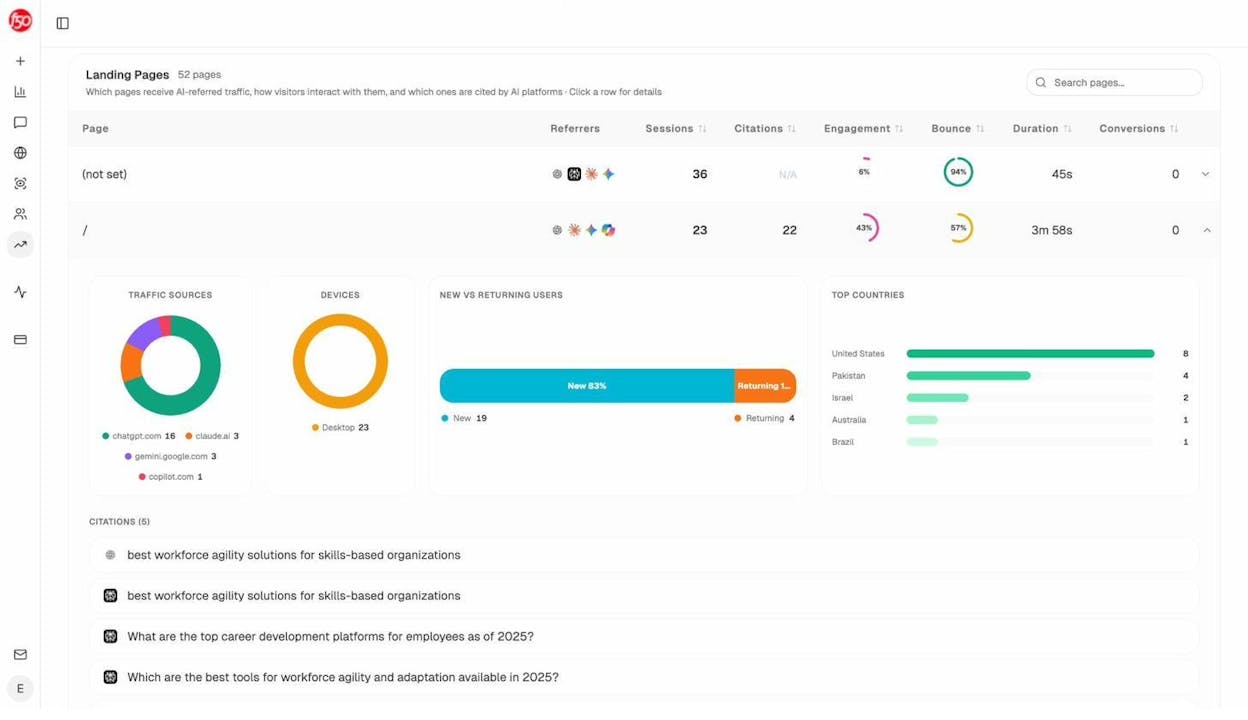
Step 3: See which of your existing pages already pull AI traffic. AI Traffic Analytics shows the landing pages on your site receiving traffic from ChatGPT, Perplexity, Claude, and other AI sources, including which prompts cited them. If a blog post is being cited for a topic, a companion YouTube video on the same topic is the highest-leverage thing you can publish next.
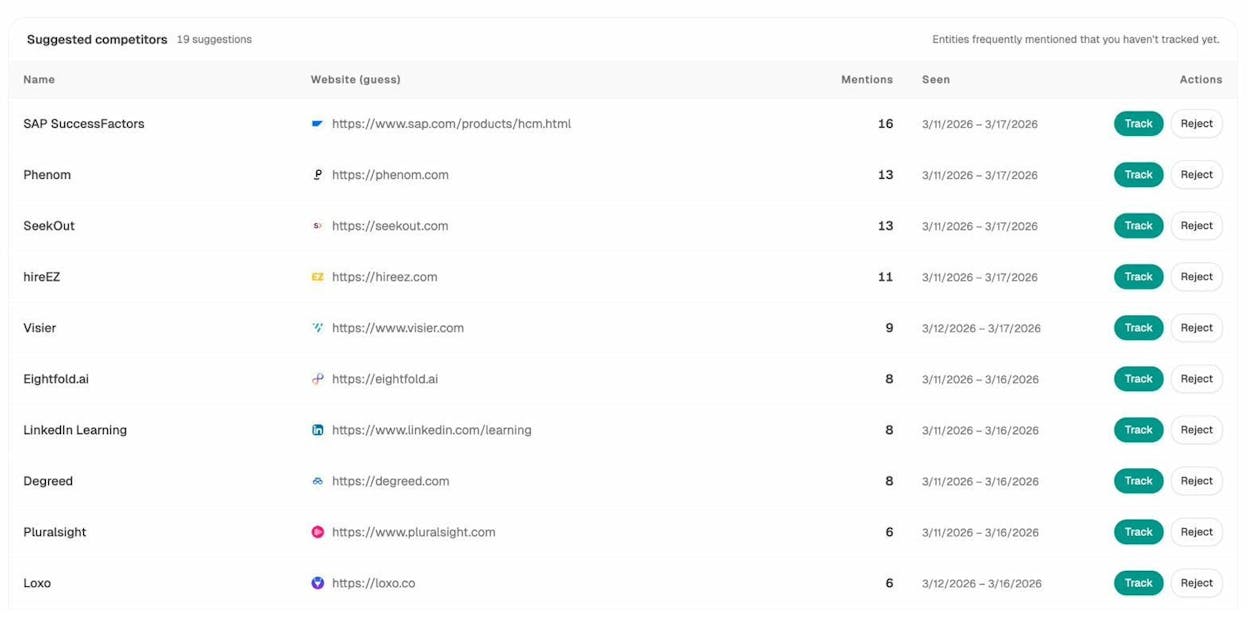
Step 4: Watch which competitors get cited. Competitor Intelligence surfaces brands frequently mentioned in AI answers in your category. If a competitor’s YouTube channel is being cited for a query you also rank for on YouTube, that’s a competitor video to plan to outrank with a deeper version of the same topic.
The point is not to replace YouTube keyword research. It’s to add a second filter on top of it. A video built from a strong YouTube keyword that also matches a real AI search query gets discovered twice from one upload.
For more, the Analyze AI guide on AI keyword research using free chatbot tools covers the AI side in depth, and the 22 keyword types to know for SEO and AI search post breaks down which query types matter for which surfaces.
Final thoughts
No single YouTube keyword tool is enough on its own. The workflow that produces ranking videos uses three layers.
The first layer is idea generation. YouTube Autosuggest, KeywordTool.io, and Google Trends give you the raw seed pool, fast and free.
The second layer is validation. The Analyze AI YouTube Keyword Tool, TubeBuddy, vidIQ, and Ahrefs Keywords Explorer turn the seed pool into a shortlist by adding volume and difficulty data so you can pick keywords you can realistically rank for.
The third layer is execution and tracking. Morning Fame and TubeBuddy help you pick titles and tags. Analyze AI extends the same shortlist into AI search, so the videos you publish work harder than the keyword they were originally built for.
Pick two tools from each layer and you have everything you need. For a broader keyword toolkit beyond YouTube, the Analyze AI roundup of 9 keyword research tools to try covers Google search.

Ernest

Ibrahim


