



Summarize this blog post with:


In this article, you’ll learn how to set up Google Search Console, verify your site, submit a sitemap, and turn the data inside it into ranking improvements you can ship this week. You’ll also learn how to extend the same playbook to AI search, because the underlying job (figure out where you show up, where you don’t, and why) is now a two-channel problem.
Table of Contents
What is Google Search Console?
Google Search Console (formerly Google Webmaster Tools) is a free product from Google that shows how your site performs in Google Search. Inside it, you see the queries you rank for, the pages that earn impressions, your average position, your click-through rate (CTR), and the technical health of how Google crawls and indexes your pages.
It is the only first-party data source you have on your Google traffic. Tools like Analyze AI and other free SEO tools estimate this data from third-party crawlers. Google Search Console reports it from inside Google. That matters when you decide whether a page deserves a rewrite or a redirect.
How to set up Google Search Console
Sign in to Google Search Console with your Google account. You’ll see a welcome screen with two property options.
![[Screenshot of the Google Search Console welcome screen showing “Domain” and “URL prefix” property options side by side]](https://www.datocms-assets.com/164164/1778175566-blobid1.png?auto=format,compress&w=1248&fit=max)
Pick Domain if you want a single property to cover every protocol, every subdomain, and every path on your site. This is right for almost everyone. Pick URL prefix only if you want to track a specific section like domain.com/blog/ separately. Type your domain or prefix without http:// or https:// and click Continue.
Verifying ownership
For a Domain property, Google asks you to add a TXT record to your DNS. The verification screen has a dropdown of common registrars (GoDaddy, Cloudflare, Namecheap, IONOS). Pick yours and follow the prompts. If your registrar isn’t listed, choose Any DNS provider, copy the TXT record, and paste it into your DNS settings.
![[Screenshot of DNS settings panel with a new TXT record being added, showing the record value field highlighted]](https://www.datocms-assets.com/164164/1778175572-blobid2.png?auto=format,compress&w=1248&fit=max)
Save the record, return to Google Search Console, and click Verify. DNS changes can take minutes to hours to propagate. For a URL prefix property, the same DNS method works, or use GA4 / Google Tag Manager if already installed. Expect one to three days for full data to populate.
How to submit a sitemap to Google Search Console
A sitemap is an XML file listing every important URL on your site. It tells Google what to crawl and how to prioritize it. Without one, Google still finds your pages, but slower and with more guesswork.
To submit yours, click Sitemaps in the left menu, paste the URL of your XML sitemap (usually yourdomain.com/sitemap.xml), and click Submit.
![[Screenshot of the Sitemaps section in Google Search Console with a sitemap URL entered in the input field and the Submit button visible]](https://www.datocms-assets.com/164164/1778175573-blobid3.png?auto=format,compress&w=1248&fit=max)
Most CMS platforms generate a sitemap automatically (WordPress through Yoast or Rank Math, Webflow, Shopify, Squarespace, and Wix all create them by default). After submitting, Google Search Console shows the status, the date of last read, and the number of discovered URLs. Check this report monthly.
How to add users to Google Search Console
Go to Settings → Users and permissions → Add user, type the email, and pick a role. Owners can do everything. Full users can see all data and trigger actions like requesting indexing. Restricted users can view most reports but cannot make changes. For agencies and contractors, Restricted is usually right. For internal SEO leads, Full is right. Owner stays with one or two people on your team.
How to use Google Search Console to improve your SEO
This is where most guides start losing the plot. They walk you through every report, dump screenshots, and never tell you what to do.
What follows is a tighter list. Six workflows that consistently produce ranking gains, ordered from highest to lowest leverage. For each one, we’ve also added how to do the same thing for AI search using Analyze AI, because in 2026 your buyers are asking the same questions to ChatGPT, Perplexity, Gemini, and Copilot that they used to type into Google.
1. Improve rankings for underperforming keywords
An “underperforming” keyword is one where you already rank, but not in position 1 or 2. The CTR math is unforgiving. Position 1 in Google gets roughly 27% of clicks. Position 8 gets around 1.8%. Closing that gap on a single keyword can multiply traffic to a page by 10x without any new content.
To find these, open the Search Results report. Toggle on Average CTR and Average position so all four metrics are visible.
![[Screenshot of Google Search Console Search Results report with all four metric toggles (Clicks, Impressions, CTR, Position) switched on, highlighted at the top]](https://www.datocms-assets.com/164164/1778175578-blobid4.png?auto=format,compress&w=1248&fit=max)
Scroll to the Queries tab. Click + New and add a filter for Position “greater than 8.1.” Sort by Position descending so the lowest-ranking queries with real impressions float to the top.
You’re looking for queries with three traits. Meaningful impressions (at least a few hundred per quarter), a non-zero CTR, and a topic that matches a page on your site.
Click any promising query, then switch to the Pages tab to see which URL is ranking. Open it and audit it. Does it match the search intent? Is the H1 aligned with the query? Is the keyword used naturally in the title, intro, and key headings? Does it have internal links from related posts? Most underperforming pages are missing one or two of those four. Fix them, request reindexing, and wait two to four weeks.
Before you commit, search the keyword and look at who outranks you. If everyone above you is on a much stronger domain or has 10x your backlinks, that page won’t move into position 1. Use our free keyword difficulty checker and SERP checker to do this in 30 seconds before you spend three hours on a rewrite.
The same workflow for AI search
In AI search, the equivalent of a “query you almost rank for” is a prompt where competitors get cited but you don’t. There is no position 1 or 2 in a ChatGPT response. There is “mentioned” and “not mentioned.” Your job is to find the prompts where you are close to the conversation but not in it.
Inside Analyze AI, the prompt discovery view surfaces prompts where your tracked competitors get cited and your brand does not.
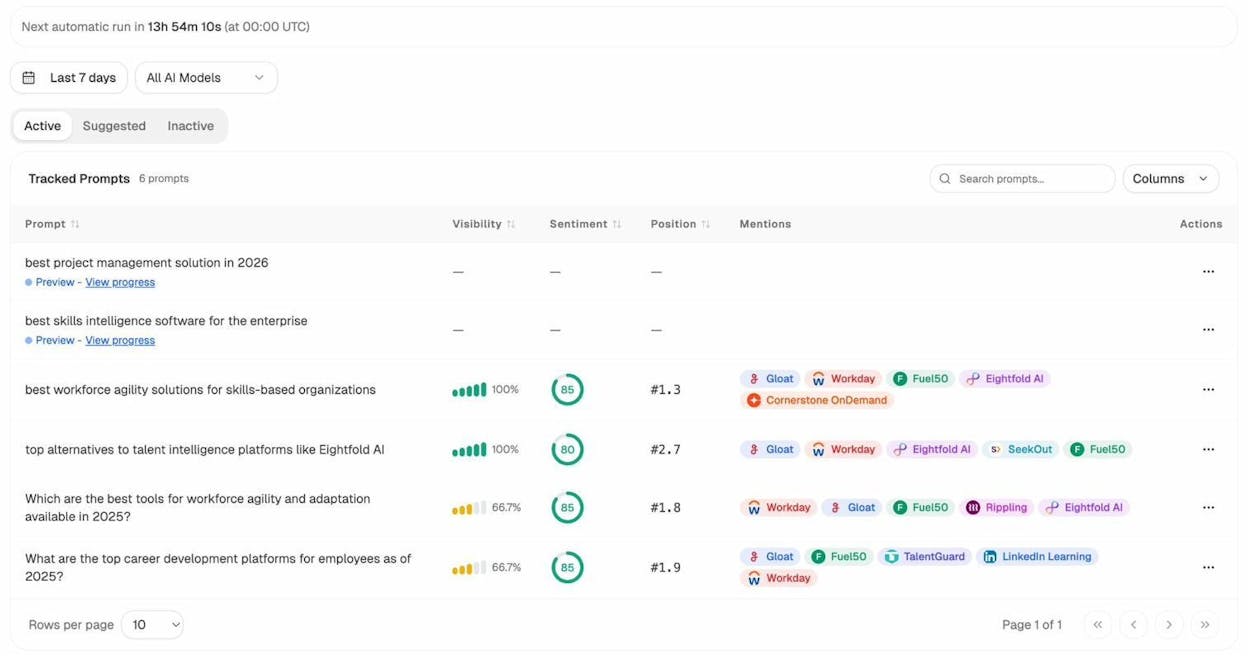
Each row is a prompt that real buyers ask. Each competitor tag is a brand AI cites in the answer. Read the prompt, click into the AI response to see what content the model pulled from, and either build a better version or improve the page you already have. Same principle as filtering by position 8 to 20 in Google Search Console. Different surface.
2. Optimize pages with high rankings but low CTR
The first workflow finds queries where rankings are too low. This one finds queries where rankings are good but CTR is below average.
Some pages rank in position 2 and earn 18% CTR. Some rank in position 2 and earn 4%. The difference is almost always a SERP problem. AI Overviews are eating clicks. A featured snippet above you answered the question. Ads pushed you below the fold. Your title tag is weaker than the one in position 3.
To find these, go back to the Search Results report. Filter for Position “less than 3.1.” Sort by CTR ascending. The queries at the top rank in the top 3 but get poor CTR despite high impressions.
![[Screenshot of the Queries tab filtered to Position less than 3.1 and sorted by CTR ascending, with the top results highlighted to show low CTR and high impressions]](https://www.datocms-assets.com/164164/1778175584-blobid6.png?auto=format,compress&w=1248&fit=max)
Click into the worst offenders and Google the query yourself. If you see an AI Overview, a featured snippet you’re not winning, a video carousel, or “People also ask” boxes, you have your answer. The play depends on what you find.
|
What you see in the SERP |
What to do |
|---|---|
|
AI Overview present |
Restructure your intro to give a clean, declarative one-paragraph answer at the top. AI Overviews lift content that answers fast. |
|
Featured snippet held by a competitor |
Mirror their format (paragraph, list, table). Add the missing context that makes yours more complete. |
|
“People also ask” eating real estate |
Add an FAQ section that answers the most common PAA questions for that query. |
|
Ads above the fold |
Commercial-intent signal. Either accept the ceiling, or write a stronger title and meta description. |
Sidenote. AI Overviews now appear on roughly one in five Google SERPs. For informational keywords, the share is closer to one in three. Treat low CTR on a top-3 ranking as a SERP feature problem until proven otherwise.
The same workflow for AI search
The parallel is “prompts where you are mentioned, but with low visibility or weak sentiment.” Visibility is how often your brand appears across multiple runs. Sentiment is whether the model says good or bad things about you when it does mention you.
Analyze AI’s prompt tracking view shows visibility, sentiment, position, and which competitors are mentioned alongside you. A prompt with 66.7% visibility and a sentiment score of 70 is the AI equivalent of a “rank 2, CTR 4%” page in Google Search Console. The brand is technically there, but losing the message war inside the answer. The fix is content-based. Update the source pages AI is pulling from so the language describing your product is sharper, more specific, and easier for the model to lift.
3. Fix sitemap errors and indexing issues
Pages that aren’t indexed cannot rank. Most websites have at least a handful stuck in “Discovered, not indexed” or “Crawled, not indexed” without anyone knowing.
In the Sitemaps report, click into your submitted sitemap and open See page indexing. You’ll see four buckets, errors, warnings, valid URLs, and excluded URLs.
![[Screenshot of the Page indexing report inside Google Search Console showing the four status categories with a sitemap selected]](https://www.datocms-assets.com/164164/1778175585-blobid7.png?auto=format,compress&w=1248&fit=max)
Errors are the priority. They mean Google tried to index a page and could not. Common reasons include server errors (5xx), redirect loops, noindex tags on pages that should be indexed, and 404s on URLs that should still exist.
Excluded URLs are usually fine but worth scanning. If you see “Duplicate, submitted URL not selected as canonical,” check that the canonical tag points to the right URL. If you see “Submitted URL marked noindex,” remove the tag if the page is meant to rank.
To verify a fix, paste the URL into URL Inspection at the top of Google Search Console, click Test live URL, then Request indexing. Also run our broken link checker on your top 10 pages. Internal 404s waste crawl budget and Google Search Console only flags them inconsistently.
4. Learn which content earns backlinks (and which earns AI citations)
Backlinks remain a strong ranking signal. The correlation between referring domains and organic traffic is one of the most consistent findings in SEO research.
To find what content already earns links, open the Links report and click More under Top linked pages in the External links section.
![[Screenshot of the Links report in Google Search Console showing Top linked pages sorted by linking sites in descending order]](https://www.datocms-assets.com/164164/1778175590-blobid8.png?auto=format,compress&w=1248&fit=max)
Sort by Linking sites descending. Look at the top 10 and find the pattern. Original research? Free tools? Definitions? Curated lists? The shape of your top-linked content tells you what content type your industry rewards with links. Make more of that. If your top 10 is dominated by data studies, your next big bet is a data study, not another how-to post.
The AI search equivalent
In AI search, citations are the new backlinks. They are how AI engines vouch for a source. Tracking which of your pages get cited (and what content type those pages are) tells you what to scale.
Analyze AI’s citation analytics view groups your AI-cited pages by content type. You see whether your blog posts, product pages, comparison pages, or homepage are doing the heavy lifting.
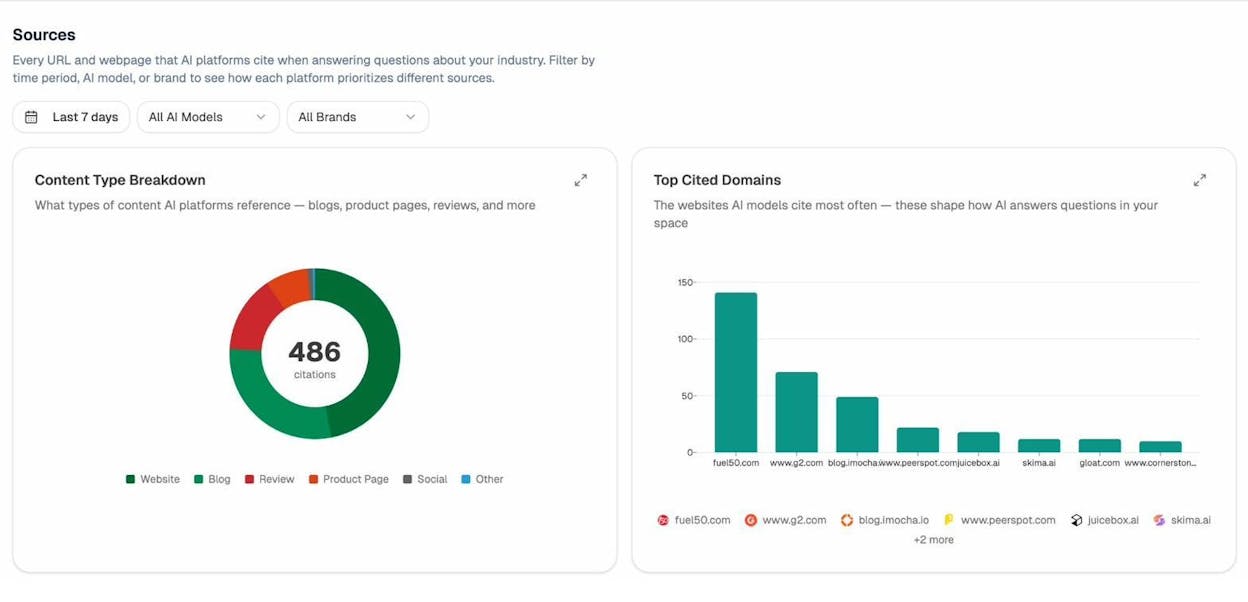
The breakdown often surprises teams. We’ve seen B2B brands assume their blog drives AI visibility, then discover that 60% of their citations come from product and comparison pages. That single insight reshapes the next content roadmap.
You can also see which third-party domains AI cites most often in your industry. Those are your highest-value placement targets. If G2, Capterra, and an industry blog show up as top cited domains, getting your brand listed and reviewed there beats another blog post on your own site. Google Search Console cannot answer this question.
5. Find pages that need internal links or pruning
Internal links pass authority to the pages you want to rank. Pages with very few internal links are usually one of two things. Either forgotten posts that should be deleted, or valuable pages your site is silently underweighting.
In the Links report, click More under Top linked pages in the Internal links section. Sort by Internal links ascending.
![[Screenshot of the Internal links report in Google Search Console sorted by internal link count ascending, showing pages with the fewest internal links at the top]](https://www.datocms-assets.com/164164/1778175596-blobid10.jpg?auto=format,compress&w=1248&fit=max)
Ask two questions for each. First, does it get any organic traffic? Filter the Search Results report by that URL. If clicks over the last 6 months are zero or near-zero, the page is a candidate for deletion or a 301 redirect to a stronger page on the same topic.
Second, does it deserve to rank? If yes, add internal links from related, high-authority pages. The fastest way to find them is a Google search for site:yourdomain.com "your target keyword". Every result is a candidate page where you can add a contextual link. For a deeper walkthrough, see our guide on internal linking for SEO.
6. Update pages that are losing organic traffic
Most pages do not get traffic forever. They peak, plateau, then decline. The decline is usually slow enough that you don’t notice until you’ve lost 40 or 50 percent.
To catch it early, go to Search Results and click the date filter. Switch to Compare and pick “Last 6 months vs previous period.” Toggle Impressions off so the report focuses on clicks.
![[Screenshot of the Search Results report with date comparison set to last 6 months versus previous period, with only Clicks toggled on]](https://www.datocms-assets.com/164164/1778175597-blobid11.png?auto=format,compress&w=1248&fit=max)
Click the Pages tab and sort by Difference ascending. The pages losing the most traffic are at the top.
For each one, click into the URL, switch to the Queries tab, and sort by Difference ascending. Now you can see which queries used to send traffic and no longer do. The next move depends on the pattern.
|
Pattern in the queries |
What it means |
What to do |
|---|---|---|
|
Same queries, lower position |
Content quality issue |
Update with fresh data, examples, and remove anything aged badly |
|
Different queries trending up, old ones gone |
Search intent has shifted |
Rewrite for the new intent, or build a separate page |
|
Queries gone entirely with no replacements |
Demand has dropped |
Updating won’t help. Use our website traffic checker to confirm before investing |
After updating, request reindexing through URL Inspection. Most refreshed pages take three to six weeks to recover lost positions.
Catching the same decline in AI search
In AI search, pages don’t lose “rankings.” They lose citations. A page cited 40 times last month and 10 times this month is bleeding AI visibility, even if its Google traffic looks fine.
Analyze AI’s AI traffic analytics shows which of your pages still get visits from ChatGPT, Perplexity, Gemini, and Copilot, and whether that number is trending up or down.
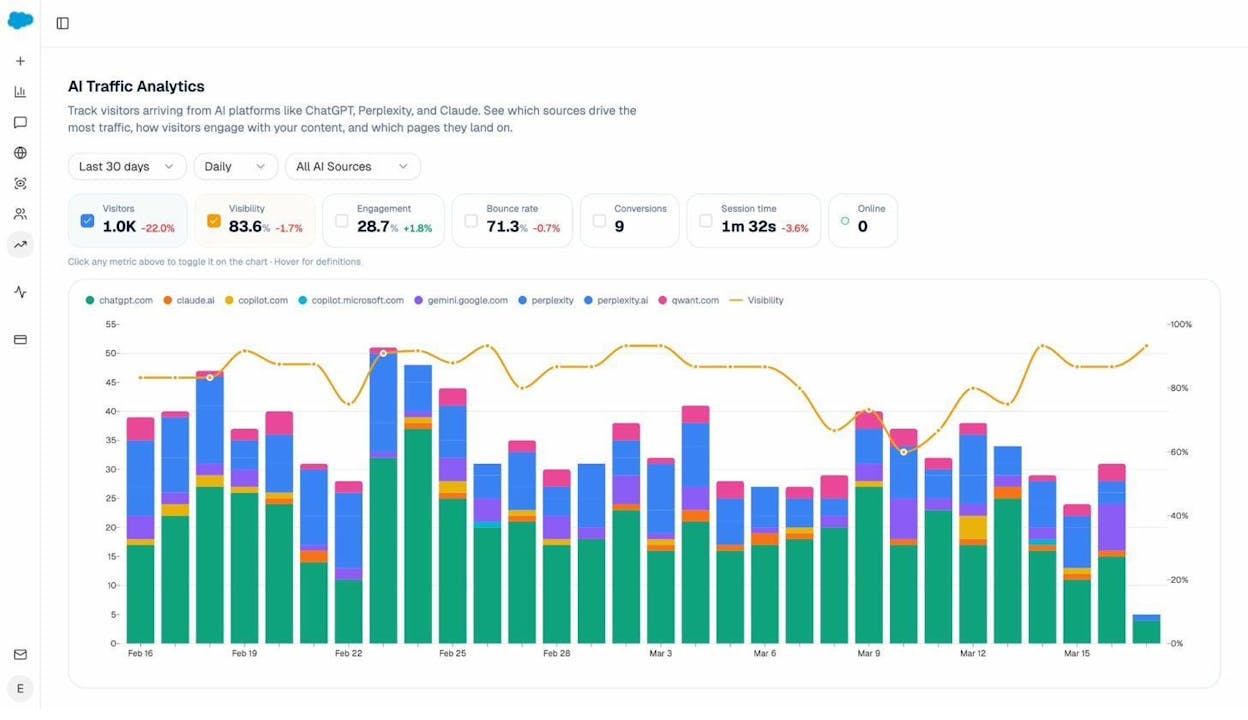
Pair that with the landing pages report (which shows engagement, bounce rate, and citations per page) and you can see which pages are still pulling weight in AI answers and which are quietly losing ground. The refresh play is the same. Update the page, sharpen the language AI is most likely to lift, and rebuild authority around it.
Why Google Search Console alone isn’t enough in 2026
Google Search Console is the foundation. It will not change. The reports above are how the best SEOs have used the tool for a decade and they will keep working.
What’s changed is the second channel. People still search Google. They also now ask ChatGPT, Perplexity, Gemini, and Copilot. The same buyer who used to type “best CRM for small business” into Google now types it into ChatGPT and reads the answer without ever clicking a result. Google Search Console cannot see that conversation.
A complete picture of organic performance now needs two tools. Google Search Console for traditional search, and an AI search analytics tool like Analyze AI for everything happening inside AI assistants. The job is the same on both sides. Find where you show up. Find where you almost show up. Fix the gap.
This is the position we take in our manifesto. SEO is not dead. It is one of two organic channels you now have to track and improve. Pretending AI search is replacing SEO is wrong. Pretending it doesn’t matter is also wrong. The teams that win in 2026 run both playbooks side by side.
For a deeper read, see our breakdown of GEO vs SEO and our guide on answer engine optimization.
What to do this week
Pick two workflows. If you’ve never seriously used Google Search Console, start with workflow 1 (improve underperforming keywords) and workflow 6 (update pages losing traffic). Together they cover the highest-leverage moves on a typical site.
If you’ve used Google Search Console for years and your rankings have plateaued, the gap is probably AI search. Track your top 10 buyer-intent prompts inside an AI visibility tool, then run the citation analytics workflow on your existing content. The pages already cited are your foundation. The prompts where competitors get cited and you don’t are your roadmap.
Either way, treat search as a two-channel problem. Use first-party data on both sides. Fix one workflow at a time. Compound from there.

Ernest

Ibrahim


