



Summarize this blog post with:


In this article, you’ll learn what headless SEO is, how it differs from traditional CMS-based SEO, and the specific best practices you need to follow to make your headless setup rank in both Google and AI search engines like ChatGPT, Perplexity, and Gemini.
You’ll also learn how content modeling—the core concept behind headless architecture—creates a structural advantage for distributing optimized content across channels. And you’ll walk away with eight actionable best practices you can brief to your developers and apply to your content workflow today.
Let’s start with the basics.
Table of Contents
Traditional CMS vs. Headless CMS
In a traditional CMS like WordPress, your content, code, and design are all bundled together. You write a blog post inside a visual editor, add images where you want them to appear, and what you see is what your visitors get. The upside is simplicity. The downside is that your content is locked to that one layout, on that one website.
Think of it like a frozen pizza. All the ingredients are baked in. You can reheat it and slice it differently, but you can’t pull the cheese off and use it in a salad.
![[Screenshot: Visual drag-and-drop traditional CMS editor like WordPress Gutenberg, showing a blog post being composed with images and text blocks]](https://www.datocms-assets.com/164164/1776445581-blobid1.png?auto=format,compress&w=1248&fit=max)
A headless CMS works differently. It separates your content from the presentation layer entirely. Instead of writing inside a page layout, you enter content into structured fields—title, body, author, category, featured image—and those fields get stored as raw data. An API then delivers that data to whatever front-end you want: a website, a mobile app, a smartwatch, a digital kiosk.
![[Screenshot: Example of a headless CMS interface like Contentful or Strapi, showing structured content fields without any visual layout]](https://www.datocms-assets.com/164164/1776445588-blobid2.png?auto=format,compress&w=1248&fit=max)
This separation is what makes the system “headless.” The CMS has no “head” (no built-in front-end). It only manages content. A separate application handles how that content looks and behaves on each device or channel.
The practical result is that you can create content once and distribute it everywhere—your website, your mobile app, your in-store displays, your email templates—without recreating or reformatting anything. For large organizations managing content across dozens of touchpoints, this is a significant operational advantage.
What Is Headless SEO?
Headless SEO is the practice of optimizing content within a headless CMS so that it meets search engine optimization best practices and gives your pages the best chance of ranking.
The core principles of SEO don’t change just because you’re using a headless architecture. You still need relevant keywords, quality content, fast page speeds, proper internal linking, and clean technical foundations. What changes is how you implement those things.
In a traditional CMS, an SEO plugin like Yoast handles much of your technical setup automatically—sitemaps, canonical tags, meta descriptions, schema markup. In a headless CMS, none of that exists out of the box. Every SEO element has to be deliberately planned, built, and maintained by your development team.
If the tagline for a headless CMS is “create content once, distribute it everywhere,” the tagline for headless SEO is “plan everything, or nothing works.”
How Is Headless SEO Different from Regular SEO?
The differences fall into three main areas: control, separation, and content structure.
1. You get total control—and total responsibility
With a traditional CMS, SEO plugins handle a lot of the technical work for you. Sitemaps generate automatically. Canonical tags get added by default. URL structures follow predictable patterns.
With a headless CMS, you control every single element. Want a custom URL structure optimized for your keyword strategy? You can build it. Want to dynamically generate schema markup based on content type? You can do that too.
But the flip side is that nothing happens unless you explicitly build it. Forget to add canonical tag logic to your front-end, and you could end up with duplicate content across every page. Forget to generate an XML sitemap, and search engines won’t efficiently discover your content.
This means your SEO team needs to work closely with developers. Vague requests like “make it SEO-friendly” won’t cut it. You need to write specific technical briefs: “Generate an XML sitemap that updates daily and only includes indexable, canonical URLs returning a 200 status code.”
2. You optimize content, code, and design separately
In WordPress, when you publish a blog post, the content, the technical setup, and the visual design all deploy together. One update can break everything if something goes wrong.
In a headless setup, these three layers are independent:
-
Content optimization happens in the CMS through structured content models. Writers work with fields and attributes, not page layouts.
-
Technical optimization happens in the code layer. Developers manage sitemaps, canonical tags, redirects, and page speed without touching content.
-
Design optimization happens in the front-end presentation layer. Designers can create device-specific experiences without affecting content or technical SEO.
This separation means your content team can publish new articles without risking a site-wide page speed regression. Your dev team can deploy technical updates without halting the editorial calendar. And your design team can redesign the mobile experience without breaking any of the above.
The trade-off is coordination. All three teams need to be aligned on how SEO requirements flow through each layer.
3. You build content models instead of pages
This is the most fundamental difference, and the one that most traditional SEOs struggle with.
In WordPress, you optimize pages. You write a title tag, add a meta description, structure your headings, and publish.
In a headless CMS, you build content models. A content model is a structured blueprint that defines every type of content your site uses and the attributes each type needs.
For example, if you run a SaaS company, your content model might include:
|
Content Type |
Attributes |
|---|---|
|
Blog Post |
Title, slug, author, publish date, body, category, featured image, meta title, meta description |
|
Product Page |
Product name, tagline, features list, pricing tier, CTA, schema type |
|
Help Article |
Title, category, body, related articles, last updated |
|
Team Member |
Name, role, bio, headshot, LinkedIn URL |
Each content type gets its own set of fields. When a writer creates a new blog post, they fill in the fields for that content type. The front-end code then takes those fields and renders them into a full webpage, complete with the correct HTML structure, heading tags, schema markup, and meta data.
The powerful part is that you can create relationships between content types. A blog post can reference a team member (the author). A product page can reference help articles (related resources). These references are dynamic—if you update a team member’s bio in one place, it updates everywhere that person appears.
For SEO, this means you can attach an “SEO metadata” content type to any other content type. Blog posts, product pages, and help articles can all pull from the same SEO fields without duplicating logic. And you can choose not to load SEO metadata on channels where it doesn’t matter, like a mobile app.
How content structure affects AI search visibility
Here’s something the original headless SEO conversation misses entirely: content structure directly impacts how AI search engines process and cite your content.
AI models like ChatGPT, Perplexity, and Gemini don’t just crawl your pages the way Google does. They parse, chunk, and interpret your content to generate answers. When your content is cleanly structured with clear fields, consistent schema, and well-defined relationships between content types, AI models can more reliably extract and attribute information to your brand.
This is why headless architecture can be an advantage for AI search visibility. The same structured content models that make your data clean for APIs also make your content easier for LLMs to parse and cite.
You can track whether this is actually working using Analyze AI. The Sources dashboard shows you exactly which of your URLs get cited by AI platforms—and which content types drive the most citations.
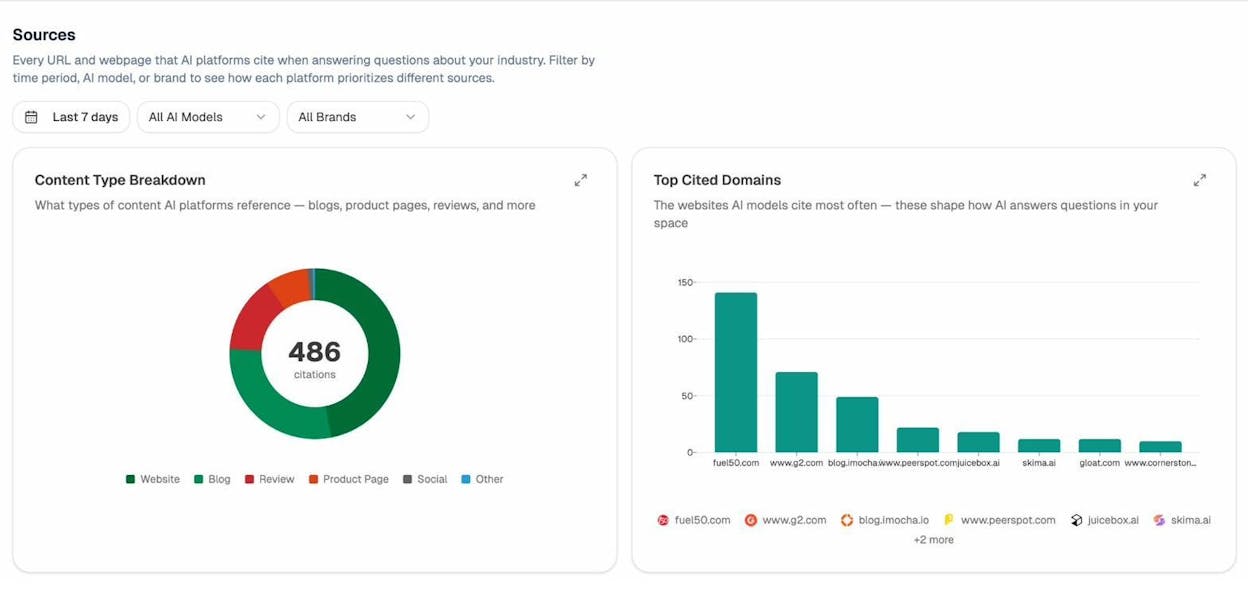
If you notice that your blog posts get cited frequently but your product pages don’t, that’s a signal to revisit the content structure on those product pages. Maybe the content model for product pages is missing fields that would make the content more parseable—like a plain-text product description or a structured FAQ.
Benefits of Using a Headless CMS
The advantages go beyond developer convenience. Here are the ones that matter most for marketing and SEO teams.
Multi-channel content distribution. Publish once and deliver content to your website, mobile app, email templates, in-app messaging, and more—without reformatting. For large brands managing content across dozens of touchpoints, this eliminates significant duplicated effort.
Faster site performance. Because the front-end is decoupled from the CMS, you can build it with modern frameworks like Next.js, Nuxt, or Astro that produce fast, lightweight pages. This directly improves Core Web Vitals—a Google ranking signal—and user experience.
Independent team workflows. Content teams publish without waiting on developers. Dev teams ship updates without freezing the editorial calendar. This removes one of the most common bottlenecks in enterprise content operations.
Scalable localization. Content models make it straightforward to add locale-specific fields (translated titles, region-specific pricing, local phone numbers) without duplicating entire pages. For international SEO, this is a major structural advantage.
Consistent content governance. Content models enforce structure. Writers can’t accidentally skip the meta description field or publish without a featured image if the model requires those fields. This built-in validation prevents the kind of SEO errors that plague large WordPress sites.
Future-proofing for new channels. When a new device or platform emerges—VR headsets, smart displays, conversational interfaces—a headless CMS can distribute content to it through an API. You don’t have to rebuild your content infrastructure from scratch.
Disadvantages of Using a Headless CMS
Headless systems aren’t right for everyone. The trade-offs are real and worth considering carefully.
High development cost. There’s no pre-built theme or drag-and-drop builder. Every part of your front-end has to be custom-built, which means a higher upfront investment in development resources.
Greater technical complexity. Non-technical team members can’t easily make changes to how content is displayed. Any front-end adjustment requires developer involvement, which can slow down small teams.
No built-in SEO features. Traditional CMS platforms come with SEO plugins, sitemap generators, and canonical tag management. In a headless setup, all of these need to be built manually. If your dev team isn’t well-briefed on SEO requirements, critical elements can be missed.
Preview limitations. Because content is separated from presentation, editors can’t always see exactly how their content will look on the live site. Some headless CMS platforms offer preview features, but they rarely match the WYSIWYG experience of WordPress.
Overkill for simple sites. If you’re running a small business blog or a basic marketing site, the complexity of a headless CMS almost certainly isn’t worth it. WordPress or a similar traditional CMS will serve you better with far less effort.
|
Factor |
Traditional CMS (WordPress) |
Headless CMS |
|---|---|---|
|
Setup complexity |
Low—install and go |
High—requires custom development |
|
SEO out of the box |
Strong (plugins handle most of it) |
None (everything custom-built) |
|
Content distribution |
Single website |
Multi-channel (website, app, IoT, etc.) |
|
Page speed potential |
Moderate (plugin bloat is common) |
High (lightweight custom front-end) |
|
Team independence |
Low (content and code are coupled) |
High (content, code, and design are separate) |
|
Best for |
Small-to-mid businesses, bloggers |
Enterprise, multi-channel, high-traffic |
8 Headless SEO Best Practices
The following best practices apply to any headless CMS setup. They follow the same foundational SEO rules you’d apply anywhere, but the implementation details are specific to headless architecture.
1. Brief your developers on technical SEO requirements
This is the single most important step. In a headless CMS, your developers are your SEO infrastructure. Every technical SEO element they miss is an element that simply won’t exist on your site.
Don’t hand your dev team a vague list of SEO recommendations. Write detailed technical specifications for every element. Here’s what a good brief looks like versus a bad one:
|
Bad Brief |
Good Brief |
|---|---|
|
“Add a sitemap” |
“Generate an XML sitemap that updates daily, only includes indexable pages with canonical self-referencing URLs and 200 status codes, and is registered in robots.txt” |
|
“Make URLs SEO-friendly” |
“Use lowercase slugs derived from the page title, with hyphens separating words, no special characters, no trailing slashes, and a maximum depth of 3 folders” |
|
“Add schema markup” |
“Implement JSON-LD for Article schema on all blog posts, Product schema on product pages, and Organization schema site-wide. Schema must pull dynamically from the content model fields” |
|
“Handle redirects” |
“Build a redirect manager that supports 301 and 302 redirects, accepts CSV uploads for bulk redirects, and logs redirect chains” |
![[Screenshot: Example of a technical SEO requirements document or spreadsheet with detailed specifications for a dev team]](https://www.datocms-assets.com/164164/1776445594-blobid4.png?auto=format,compress&w=1248&fit=max)
The more specific you are, the fewer back-and-forth cycles you’ll need. And fewer back-and-forth cycles means your SEO setup gets implemented faster and with fewer mistakes.
Once your dev team implements these requirements, you need to monitor them. Run regular SEO audits using a crawling tool to catch regressions early—broken canonical tags, orphaned pages, missing meta tags, and other issues that can creep in with code deployments.
![[Screenshot: SEO audit tool dashboard showing a list of technical issues found on a headless site, like missing meta descriptions, broken canonicals, or missing hreflang tags]](https://www.datocms-assets.com/164164/1776445594-blobid5.png?auto=format,compress&w=1248&fit=max)
2. Use keyword research to shape your content models
Most teams design their content models around what seems logical from a CMS architecture perspective. That’s a mistake. Your content models should be shaped by keyword research data, because that data tells you what your audience actually cares about.
Here’s a practical example. Let’s say you run a vacation rental platform. Before designing your content model, you’d do keyword research and discover that people search for rentals using very specific attributes:
-
“pet-friendly cabin near lake tahoe”
-
“3 bedroom beach house with pool”
-
“affordable ski lodge for 8 people”
-
“romantic getaway cabin with hot tub”
Each of these searches reveals an attribute that matters to your audience: pet policy, number of bedrooms, amenities (pool, hot tub), location, capacity, price range, and trip type (romantic, family, group).
These attributes should become fields in your property listing content model:
|
Field |
Type |
Example |
|---|---|---|
|
Property name |
Text |
“Lakeside Retreat” |
|
Location |
Reference (linked to Location content type) |
Lake Tahoe, CA |
|
Bedrooms |
Number |
3 |
|
Capacity |
Number |
8 |
|
Amenities |
Multi-select |
Pool, Hot tub, Fireplace, WiFi |
|
Pet policy |
Boolean |
Yes |
|
Price per night |
Number |
$250 |
|
Trip type |
Multi-select |
Romantic, Family, Group |
![[Screenshot: Keyword research tool showing long-tail vacation rental keywords with search volume and difficulty metrics]](https://www.datocms-assets.com/164164/1776445600-blobid6.png?auto=format,compress&w=1248&fit=max)
Now, when your front-end generates pages dynamically from this model, it can create optimized landing pages for every combination that has search demand: “pet-friendly cabins near Lake Tahoe,” “3-bedroom beach houses with pools,” and so on. Each page pulls its content directly from the structured fields in your content model.
This is far more powerful than manually creating individual pages in WordPress and trying to optimize each one by hand.
You can use Analyze AI’s Keyword Generator to find these attribute-based keywords, and the Keyword Difficulty Checker to prioritize the ones with realistic ranking potential.
Use AI search data to uncover attributes you’d miss
Traditional keyword research shows you what people type into Google. But AI search is changing how people describe what they want. In ChatGPT and Perplexity, users ask longer, more conversational questions: “What’s the best pet-friendly cabin near Lake Tahoe that sleeps 6 and has a hot tub?”
These conversational queries often reveal attributes that don’t appear in traditional keyword tools. To find them, you can use Analyze AI to track the prompts people use in AI search engines around your topic area.
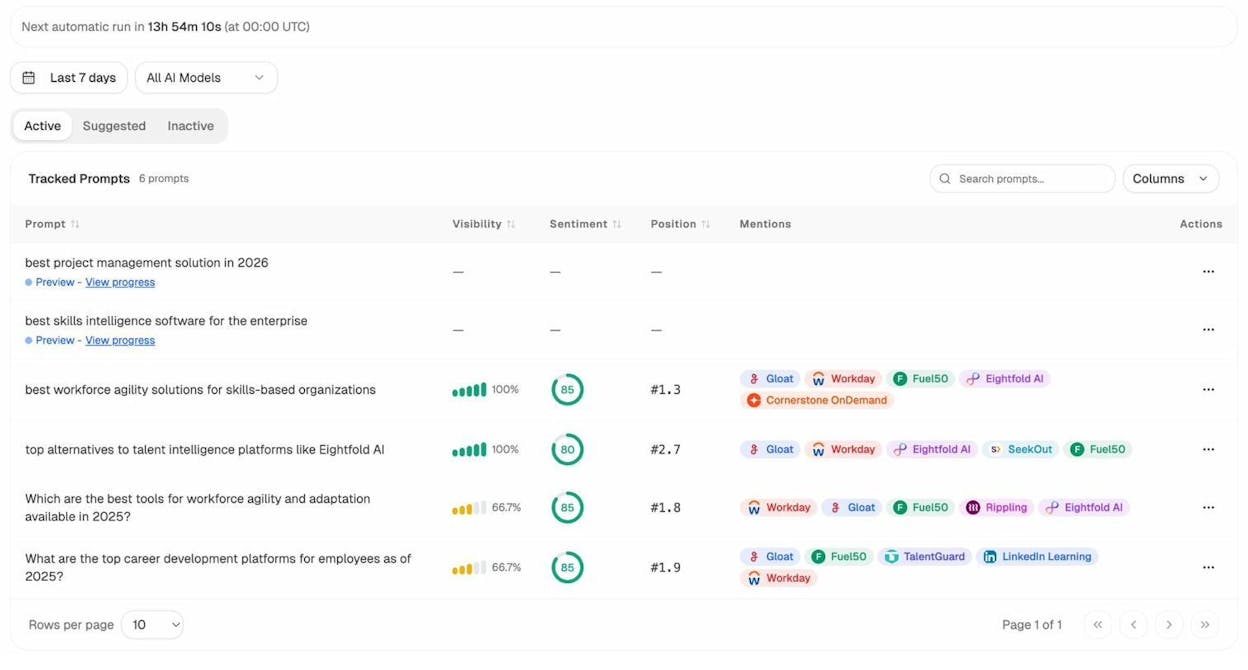
The Suggested Prompts tab surfaces prompts that AI models associate with your industry but that you aren’t yet tracking. These prompts often contain attribute language you should build into your content models.
For instance, if you see AI prompts mentioning “wheelchair accessible vacation rentals” frequently, that’s a signal to add an accessibility field to your property listing content model—even if “wheelchair accessible rental” doesn’t have significant Google search volume yet.
3. Plan your taxonomy structure before you build
Taxonomies—tags, categories, and other classification systems—organize your content so it can be filtered, grouped, and surfaced dynamically. In a headless CMS, your taxonomy structure is even more critical than in WordPress, because it controls how content appears across multiple channels.
There are two common types of taxonomies in a headless CMS:
Front-end taxonomies are visible to users. They create browsable category pages, filter options, and navigation paths. These need to be optimized for SEO keywords because they generate indexable pages.
Back-end taxonomies are used internally by the CMS and API to organize content. They might categorize content by file type (video, text, image), target device (mobile, desktop, VR), or workflow status (draft, review, published). These don’t generate pages but they control how content gets distributed across channels.
Plan both types before you start building. Here’s an example taxonomy plan for a real estate site:
|
Taxonomy Type |
Examples |
Purpose |
|---|---|---|
|
Location (front-end) |
New York, Los Angeles, Chicago |
Generates city-level landing pages |
|
Property type (front-end) |
Apartment, House, Condo, Commercial |
Generates category pages |
|
Intent (front-end) |
Buy, Rent, Sell |
Creates intent-based navigation |
|
Price range (front-end) |
Under $500K, $500K-$1M, $1M+ |
Powers filtered search results |
|
Content format (back-end) |
Blog, Listing, Video tour, Virtual tour |
Controls which API endpoint serves content |
|
Target device (back-end) |
Desktop, Mobile, Smart display |
Determines which fields are included in API response |
A common mistake is creating taxonomies reactively—adding new tags and categories as content gets published. This leads to inconsistency, duplication, and messy URL structures. Plan your taxonomy tree upfront, document it, and enforce it through validation rules in your CMS.
4. Add dedicated fields for SEO and schema markup
In a traditional CMS, your SEO plugin automatically generates schema markup based on your content. In a headless CMS, schema has to be deliberately built into your content models and generated by your front-end code.
The best approach is to create a reusable “SEO metadata” content type that can be attached to any other content type as a reference. This keeps your SEO fields consistent across all content types without duplicating configuration.
Here’s what that SEO metadata content type might include:
|
Field |
Description |
|---|---|
|
Meta title |
Overrides the default page title for search results |
|
Meta description |
Custom description for search result snippets |
|
Canonical URL |
Self-referencing by default, with override option |
|
Robots directive |
Index/noindex, follow/nofollow |
|
Open Graph image |
Image used when shared on social media |
|
Schema type |
Dropdown: Article, Product, FAQ, HowTo, etc. |
|
Custom schema JSON |
Free-text field for manually entering schema markup |
![[Screenshot: Headless CMS content editor showing an SEO metadata reference attached to a blog post content type, with fields for meta title, description, schema type, and canonical URL]](https://www.datocms-assets.com/164164/1776445606-blobid8.png?auto=format,compress&w=1248&fit=max)
For schema markup specifically, the advantage of headless architecture is that your content models can map directly to schema properties. If your “Team Member” content type has fields for name, role, bio, and headshot, those fields can automatically generate Person schema without anyone writing JSON-LD by hand.
Ask your developers to build this schema generation into the front-end rendering logic. Every time a page loads, the front-end should assemble the correct schema based on the content type and its fields, then inject it as a JSON-LD script in the page header.
Why structured data matters for AI search
Structured data doesn’t just help Google display rich results. It also helps AI models understand the entities on your site and how they relate to each other.
When ChatGPT or Perplexity crawl your site, cleanly structured schema tells them: “This page is about a Product called X, made by Organization Y, with these Features and this Price.” That structured context makes it more likely your content gets accurately cited in AI-generated answers.
You can verify whether your structured content is actually being cited by AI engines using Analyze AI. The Sources dashboard breaks down citations by content type—showing whether AI models are pulling from your blogs, product pages, reviews, or other content types.
If you see that certain content types are never cited, it might mean their schema is malformed, their content is too thin, or their structure isn’t parseable enough for AI models.
5. Enforce heading hierarchy through your content model
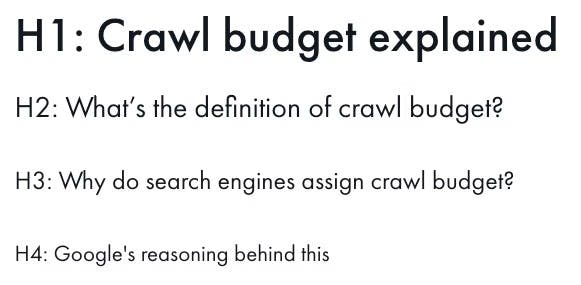
Heading hierarchy—the relationship between H1, H2, H3, and subsequent sub-headings—matters for both SEO and accessibility. In a traditional CMS, a writer can see the heading structure visually as they write. In a headless CMS, the visual structure only exists on the front-end, which the writer may never see.
This creates a common problem: designers assign heading tags based on visual appearance rather than content hierarchy. A sidebar widget might get an H2 because the designer wants it to look like a section header, even though it’s not part of the main content.
To prevent this, enforce heading hierarchy through your content model and front-end rendering logic:
-
Reserve H1 for the page title field. The front-end should automatically render the title field as an H1. No other field should ever produce an H1.
-
Default body headings to H2 and H3. If your rich text editor allows heading selection, limit it to H2-H4. This prevents writers from accidentally using H1 inside the body.
-
Separate navigational elements from content headings. Sidebar titles, footer headings, and widget labels should use styled <p> or <span> tags, not heading tags. Brief your designers explicitly on this.
-
Validate heading order in your build process. Add a front-end test that flags pages with skipped heading levels (e.g., H1 followed by H3 with no H2) before they go live.
6. Use content references for internal links
Internal links are one of the most important ranking factors, and one of the easiest things to get wrong at scale. In a traditional CMS, internal links are hardcoded URLs embedded in content. When a URL changes, every internal link pointing to it breaks.
In a headless CMS, you can solve this by using references instead of URLs. A reference is a dynamic connection between two pieces of content in the CMS. When you link from Blog Post A to Blog Post B, you don’t paste a URL—you select Blog Post B from a list. The CMS stores this as a relationship, and the front-end resolves it to the correct URL at render time.
The benefit is that if Blog Post B’s URL changes—say, you restructure your URL paths or merge two categories—every reference to it updates automatically. No broken links. No manual cleanup. No lost link equity.
Here’s how to implement reference-based internal links:
-
Add a “Related Content” reference field to your content models. This lets editors link to related articles, products, or resources directly from the CMS.
-
Build link resolution into your front-end. When the front-end encounters a content reference, it should look up the current URL for that content and render a standard <a> tag.
-
Add automatic contextual linking. Configure your front-end to automatically link relevant terms in the body text to matching content in your CMS. For example, if “keyword research” appears in a blog post and you have a content entry for “Keyword Research Guide,” the system can auto-link it.
-
Run regular audits. Even with references, broken links can appear if content gets deleted without its references being updated. Use a broken link checker to catch these.
7. Handle JavaScript rendering correctly
Many headless front-ends are built with JavaScript frameworks like React, Next.js, Vue, or Angular. These frameworks can create serious SEO problems if rendering isn’t handled correctly.
The core issue is that search engine crawlers have limited ability to execute JavaScript. If your pages rely on client-side JavaScript to render content, Googlebot might see an empty page—or a partially loaded one—instead of your full content.
There are three rendering strategies, and your choice directly affects SEO:
Client-side rendering (CSR) is where the browser downloads a minimal HTML shell and JavaScript builds the page in the user’s browser. This is the worst option for SEO. Googlebot can render JavaScript, but it does so in a deferred queue that adds significant delays to indexing. Other search engines (Bing, Yandex) and AI crawlers may not render JavaScript at all.
Server-side rendering (SSR) is where the server generates the full HTML for each page on every request. The browser receives a complete page. This is the safest option for SEO because crawlers always see the full content.
Static site generation (SSG) is where pages are pre-built as static HTML files during the build process. This gives the speed advantages of static files with full SEO compatibility. The trade-off is that content updates require a rebuild, though incremental builds in modern frameworks make this fast.
|
Rendering Method |
SEO Safety |
Speed |
Dynamic Content |
|---|---|---|---|
|
Client-side (CSR) |
Poor—crawlers may see empty pages |
Fast after initial load |
Excellent |
|
Server-side (SSR) |
Excellent—full HTML on every request |
Moderate |
Excellent |
|
Static generation (SSG) |
Excellent—pre-built HTML |
Fastest |
Requires rebuild |
|
Hybrid (ISR) |
Excellent—combines SSG with on-demand revalidation |
Fast |
Good |
For most headless SEO setups, server-side rendering or a hybrid approach (ISR—Incremental Static Regeneration) gives you the best combination of SEO safety, performance, and content freshness. Next.js and Nuxt both support these strategies natively.
How to test your rendering: Open your page in Chrome, right-click, select “View Page Source.” If you see your content in the raw HTML, crawlers can see it too. If you only see a <div id="root"></div> and a bunch of JavaScript files, your content is client-side rendered and at risk of SEO problems.
![[Screenshot: Chrome “View Page Source” comparison—left side shows SSR with full HTML content visible, right side shows CSR with empty div and script tags]](https://www.datocms-assets.com/164164/1776445612-blobid10.jpg?auto=format,compress&w=1248&fit=max)
8. Optimize for AI crawlers alongside traditional search
This is where headless SEO in 2026 diverges from the conventional playbook. Google is no longer the only search engine that matters. AI platforms like ChatGPT, Perplexity, Claude, and Gemini are increasingly how people discover information. And these AI engines have their own crawlers, their own parsing logic, and their own criteria for which content gets cited.
Here’s what you need to do to ensure your headless CMS is optimized for both traditional search and AI search:
Check your robots.txt for AI crawlers. Some organizations block AI crawlers (GPTBot, ClaudeBot, PerplexityBot) without realizing it. If you want AI search visibility, make sure these user agents are allowed to crawl your site. You can audit this with Analyze AI’s Website Authority Checker.
Add an llms.txt file. This is a plain-text file (similar to robots.txt) that helps AI models understand the structure and purpose of your site. You can generate one using Analyze AI’s LLM.txt Generator or check our guide on LLM.txt generator tools.
Serve clean, readable HTML. AI crawlers don’t always render JavaScript. The SSR and SSG recommendations from the previous section are even more critical for AI visibility. If your content isn’t in the initial HTML response, AI crawlers won’t see it.
Use descriptive, unique headings. AI models use heading structure to understand topic hierarchy and extract relevant answers. Generic headings like “Overview” or “Benefits” are less useful than specific ones like “Why headless CMS architecture improves multi-channel content delivery.”
Include entity-rich content. AI models parse content for entities—people, organizations, products, concepts—and the relationships between them. Clean schema markup, structured data, and well-defined content models all help AI models extract entities accurately.
Track your AI search visibility
Once your headless CMS is optimized for AI crawlers, you need to track whether it’s actually working. Analyze AI lets you monitor your brand’s visibility across ChatGPT, Perplexity, Claude, Gemini, and Copilot from a single dashboard.
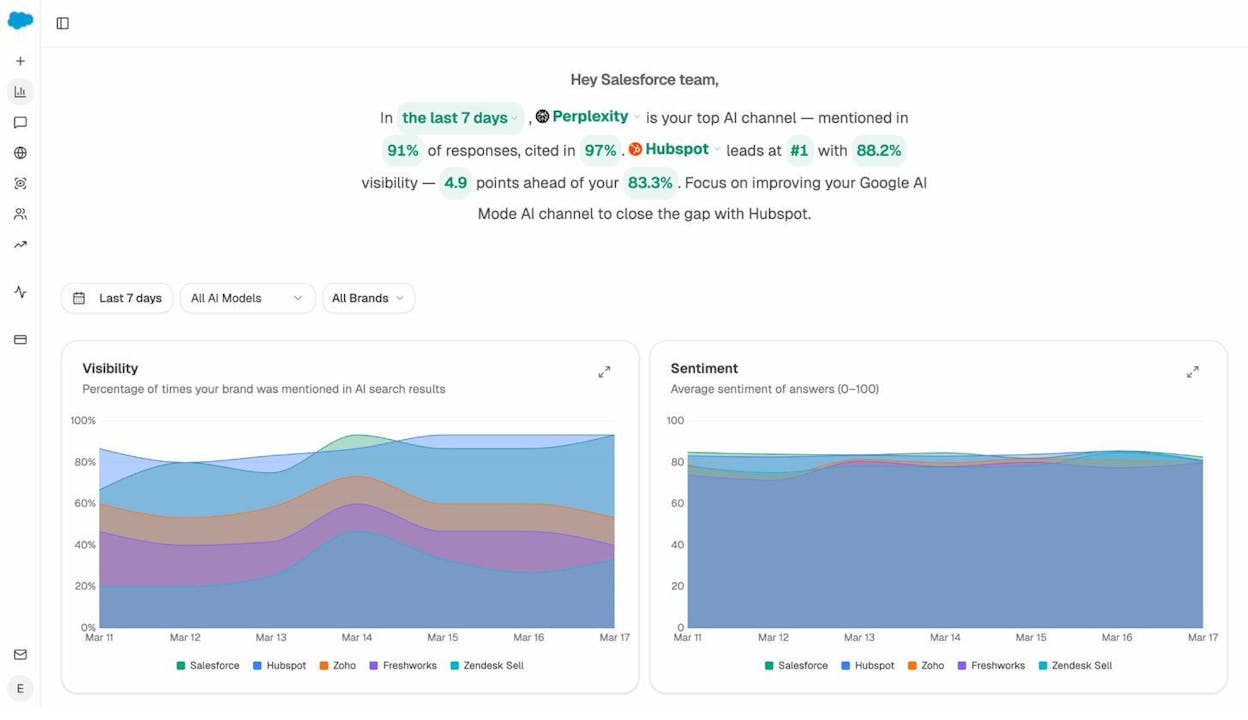
The Overview dashboard gives you a high-level view of how often your brand gets mentioned in AI responses, which AI platform mentions you most, and how your visibility compares to competitors.
If you want to go deeper, the AI Traffic Analytics dashboard shows you exactly which pages on your site receive traffic from AI platforms—and how visitors from AI search behave compared to visitors from Google.
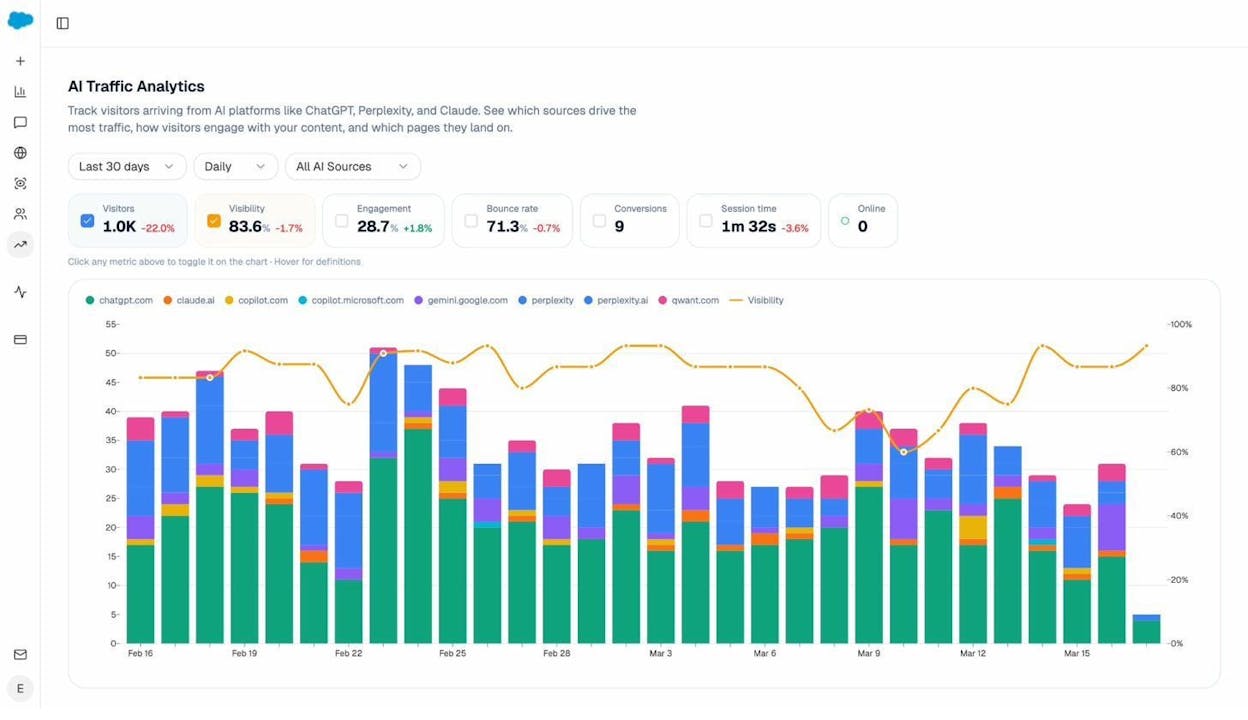
This data helps you identify patterns. If certain page types (blog posts, comparison pages, guides) consistently drive AI traffic, you can double down on those formats in your content model. If AI visitors have high engagement but low conversion, you might need to adjust the CTA strategy for AI-sourced traffic.
You can also use the Competitors dashboard to see which brands in your space are getting mentioned most frequently in AI responses—and identify the specific prompts where they appear and you don’t.
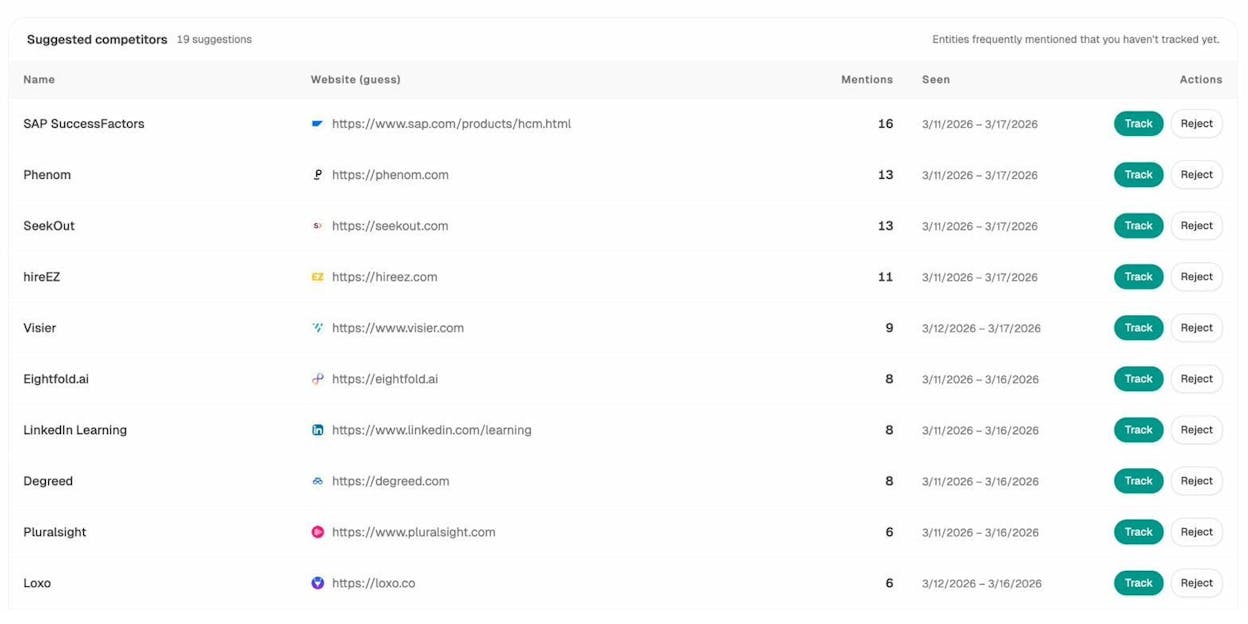
These competitor gaps are opportunities. If a competitor gets cited for a topic you also cover, analyze what makes their content more AI-friendly. Often, it comes down to structure: cleaner schema, more specific headings, or content that directly answers the question an AI model is trying to resolve.
Popular Headless CMS Platforms for SEO
If you’re evaluating headless CMS options, here’s a comparison of the most widely adopted platforms and how they handle SEO-critical features:
|
Platform |
Built-in SEO Fields |
Custom Schema Support |
Preview Capability |
API Type |
Best For |
|---|---|---|---|---|---|
|
Contentful |
Partial (requires custom setup) |
Yes, through content models |
Yes (with front-end integration) |
REST + GraphQL |
Enterprise, multi-brand |
|
Strapi |
Yes (with SEO plugin) |
Yes |
Yes (built-in) |
REST + GraphQL |
Mid-market, open-source preference |
|
Sanity |
Partial (customizable) |
Yes |
Yes (real-time preview) |
GROQ + GraphQL |
Developer-heavy teams |
|
Prismic |
Yes (built-in SEO fields) |
Limited |
Yes (slice machine) |
REST + GraphQL |
Marketing teams, easier learning curve |
|
Hygraph |
Yes |
Yes |
Yes |
GraphQL-native |
Content-heavy, API-first |
|
WordPress (headless mode) |
Yes (full plugin ecosystem) |
Yes |
Limited in headless mode |
REST + WPGraphQL |
Teams migrating from WordPress |
None of these platforms handle all SEO requirements out of the box in headless mode. You’ll still need to build sitemap generation, canonical tag logic, redirect management, and rendering optimization into your front-end, regardless of which CMS you choose.
How to Audit Your Headless SEO Setup
Once your headless CMS and front-end are live, run through this checklist to make sure nothing has been missed:
Crawling and indexing: - XML sitemap generates automatically and only includes indexable, canonical URLs - Robots.txt is properly configured (not blocking critical pages or CSS/JS files) - All important pages return 200 status codes - Canonical tags are self-referencing on all indexable pages - AI crawlers (GPTBot, ClaudeBot, PerplexityBot) are not blocked
On-page SEO: - Every page has a unique meta title and meta description - H1 is reserved for the page title and appears only once per page - Heading hierarchy follows logical order (H1 → H2 → H3) - Images have descriptive alt text - Internal links use references (not hardcoded URLs)
Technical performance: - Pages are server-side rendered or statically generated (not client-side only) - Core Web Vitals pass on mobile and desktop - Page load time is under 3 seconds - No render-blocking JavaScript prevents content from appearing in initial HTML
Structured data: - JSON-LD schema markup is present on all content pages - Schema types match content types (Article for blog posts, Product for products, etc.) - Schema is generated dynamically from content model fields - No schema validation errors in Google’s Rich Results Test
AI search readiness: - llms.txt file is present and accurate - Content structure uses entity-rich, descriptive language - Headings are specific (not generic) - Analyze AI is connected to track citation and visibility data
You can use the SERP Checker and Keyword Rank Checker to monitor how your pages perform in traditional search after launch, and Analyze AI to track your AI search presence over time.
Final Thoughts
Headless SEO follows the same principles as traditional SEO. The difference is in the implementation. Every element that WordPress handles automatically—sitemaps, canonical tags, schema, heading hierarchy, redirects—has to be deliberately built into a headless setup.
That’s more work upfront, but it gives you more control, better performance, and the ability to distribute optimized content across every channel your audience uses.
The most important thing you can do is invest in clear communication between your SEO team and your developers. Write detailed briefs. Run regular audits. Monitor performance in both traditional search and AI search. And treat your content models as living systems that evolve alongside your keyword strategy and audience behavior.
If your organization needs multi-channel content delivery, total control over technical SEO, and the flexibility to optimize for both Google and AI search engines, headless SEO is worth the investment.
Start by auditing your current setup with Analyze AI to understand where you stand in both traditional and AI search. From there, you’ll have the data you need to prioritize your next moves.

Ernest

Ibrahim


