



Summarize this blog post with:


In this article, you’ll learn what keyword grouping is, four practical methods to group keywords (with screenshots), how to extend the same logic to prompts in AI search, and what to do with your groups once you have them so they actually move rankings, citations, and pipeline.
Table of Contents
What is keyword grouping?
Keyword grouping is the process of organizing a long list of keyword ideas into smaller, related sets so each set can map to a single page or content cluster.
A raw export from a keyword tool can return tens of thousands of ideas. On its own, that list is noise. Group those keywords correctly and the noise becomes a content plan, with each group telling you what page to write, what subtopics to include, and how it connects to the rest of your site.
People often confuse keyword grouping with keyword clustering. The two are related but not identical. Clustering is usually based on SERP overlap (which keywords return the same top-10 results) and is mostly automated. Grouping is broader. It can be based on parent topic, modifier, intent, or semantic similarity, and it is often partly manual.
If you want a deeper take on the algorithmic approach, read our guide on keyword clustering. The methods below complement it.
Why keyword grouping matters
Without grouping, three things tend to happen in a content program.
You write the same article twice in slightly different words. Two pages target overlapping intent, you cannibalize yourself, and Google has to pick one. Often it picks neither.
You miss obvious clusters. You write a piece on “best dog food” and never realize there is clear demand for “best dog food for allergies,” “best grain-free dog food,” and “best dog food brands.” Each of those is a separate article and likely an easier ranking win.
You can’t prioritize. Without groups, you’re staring at 3,000 keyword ideas. With groups, you’re staring at 40 topic buckets ranked by total search volume, difficulty, and business fit.
Grouping turns a keyword export into an editorial calendar. It also makes internal linking obvious because every keyword in a group naturally points to every other.
Four ways to group keywords (and when to use each)
These four methods cover almost every real situation. Most teams end up using two or three together.
1. Group by parent topic
Use this when you have a broad seed keyword and want to see the subtopics inside it.
A parent topic is the broadest keyword that a piece of content could rank for. So if 200 keywords all share the same parent topic, that parent topic represents a single content opportunity.
Most paid keyword tools have a parent-topic filter (Ahrefs calls it “Group by Parent Topic”). Open Keywords Explorer, run a search for your seed keyword (let’s say “espresso”), open the Matching Terms report, and toggle the grouping to Parent Topic.
![[Screenshot: Ahrefs Keywords Explorer showing the “Group by Parent Topic” toggle on the espresso seed keyword, with the sidebar listing parent topics like espresso machine, espresso martini, and dalgona coffee with their total search volumes]](https://www.datocms-assets.com/164164/1777676302-blobid1.png?auto=format,compress&w=1248&fit=max)
A quick scan of the sidebar tells you what people care about under “espresso.” You’ll typically see a mix of product categories (espresso machines, brand searches like breville and delonghi), recipe-style queries (espresso martini, dalgona coffee), and informational queries (what is espresso, espresso vs coffee).
Click any parent topic to drill into it. The subtopics inside that drill-down become the H2s of the article you write for that parent.
![[Screenshot: Drill-down view showing keywords nested under the dalgona coffee parent topic, with intent and search volume per keyword]](https://www.datocms-assets.com/164164/1777676312-blobid2.png?auto=format,compress&w=1248&fit=max)
If you don’t have a paid tool, our free Keyword Generator Tool and Google Trends will get you most of the way for a single seed.
When to use it: brand-new topics, broad seeds, content audits where you want to see which big buckets you’re missing.
2. Group by terms
Use this when one of your target keywords has high difficulty and you need to find a less competitive angle inside it.
Grouping by terms slices your keyword list by the modifier that appears most often. If you searched “best dog food,” the term groups will look like “allergies,” “puppies,” “seniors,” “small breeds,” “grain-free,” “wet,” and “dry.”
![[Screenshot: “Group by Terms” view in Ahrefs Keywords Explorer with the seed keyword “best dog food,” sidebar showing modifier terms with associated volume]](https://www.datocms-assets.com/164164/1777676312-blobid3.jpg?auto=format,compress&w=1248&fit=max)
Each modifier is a different audience. “Best dog food for allergies” serves a person whose dog has skin issues. “Best dog food for puppies” serves a new owner. The intent is sharper, the keyword difficulty drops, and the page tends to convert better because the audience is more specific.
This is the same principle behind targeting SEO keywords by buyer pain. Head terms feel attractive. The terms underneath them often produce more revenue because the buyer’s problem is concrete.
To estimate how hard a term group will be before you commit to writing, run the head keyword through our Keyword Difficulty Checker, then run two or three of the modifier variants. The delta tells you how much easier the side angle really is.
When to use it: any keyword above 40-50 KD that you want to attack from the side instead of head-on.
3. Group by search intent
Use this when you have a mixed list of keywords and need to decide what kind of page each one deserves.
Search intent falls into four common buckets.
-
Informational (“what is keyword grouping”)
-
Commercial investigation (“best keyword research tools”)
-
Transactional (“buy ahrefs subscription”)
-
Navigational (“ahrefs login”)
A keyword with informational intent should not get a product page, and a transactional keyword should not get a 3,000-word guide. Mixing them is the most common reason a page never ranks.
To group by intent quickly, export your keyword list to a sheet, then add a column called Intent. Open the SERP for the top five keywords in each candidate group. If the SERP is dominated by listicles and how-to articles, the intent is informational. If it’s dominated by category pages and reviews, the intent is commercial. If you can’t tell at a glance, the SERP is mixed and you have a decision to make about which intent to serve.
![[Screenshot: Google SERP for “best dog food for allergies” showing listicles and review-style results, indicating commercial investigation intent]](https://www.datocms-assets.com/164164/1777676318-blobid4.png?auto=format,compress&w=1248&fit=max)
You can also use our free SERP Checker to pull the top results without leaving the browser tab.
When to use it: every time. Intent grouping is the layer that prevents wasted articles. For a fuller breakdown of how intent maps to keyword formats, see our guide on keyword types.
4. Group manually by semantic similarity
Use this when the algorithmic groups feel wrong or when you’re working in a niche the tools don’t understand well.
Sometimes a tool will put “running shoes” and “shoes for runners” in different groups because they show different SERPs. To a human, they’re the same article. The reverse also happens. A tool will lump “yoga mat” and “thick yoga mat for beginners with knee pain” into one bucket. They’re related but they are two different articles.
Manual grouping is straightforward. Export the list to a sheet, sort by volume, and walk down the list creating columns or tags as you go. You’re asking one question per row. Does this keyword belong on the same page as anything I’ve already grouped, or does it need its own page?
![[Screenshot: Google Sheets view of a keyword list with a “Group” column being filled in manually, sorted by search volume]](https://www.datocms-assets.com/164164/1777676318-blobid5.png?auto=format,compress&w=1248&fit=max)
A useful rule of thumb. If the answer requires you to write a different paragraph to cover it, it deserves a different page.
When to use it: niche topics, B2B with a small total addressable market, and any time the auto-grouping feels off. The same logic helps you assign secondary keywords to the right primary article.
How to group prompts for AI search
The four methods above were built for keywords, which is what people type into Google. AI search runs on prompts, which are longer, more conversational, and often phrased as a full question. The principle is the same. The mechanics are different.
A few things change when you move from keywords to prompts.
First, there is no Keywords Explorer for prompts. The catalog of “what people ask ChatGPT” doesn’t exist as a public dataset, because every conversation is private. You build the list yourself by deriving it from your category, your customers, and your competitors.
Second, you’re not optimizing for one query at a time. You’re optimizing for a cluster of related prompts that all share a theme, because AI engines paraphrase. Someone asking “what is the best CRM for a small sales team” and “top CRMs for SMB sales” are functionally the same prompt.
Third, the goal is to be cited in the answer, not to rank in the blue links. So your “group” is a cluster of prompts where you want your brand to appear consistently.
Here is how Analyze AI handles prompt grouping in practice.
Start with suggested prompts. Connect your domain and Analyze AI generates a starter set of prompts your buyers are likely asking, organized around your category. You don’t have to brainstorm from scratch.
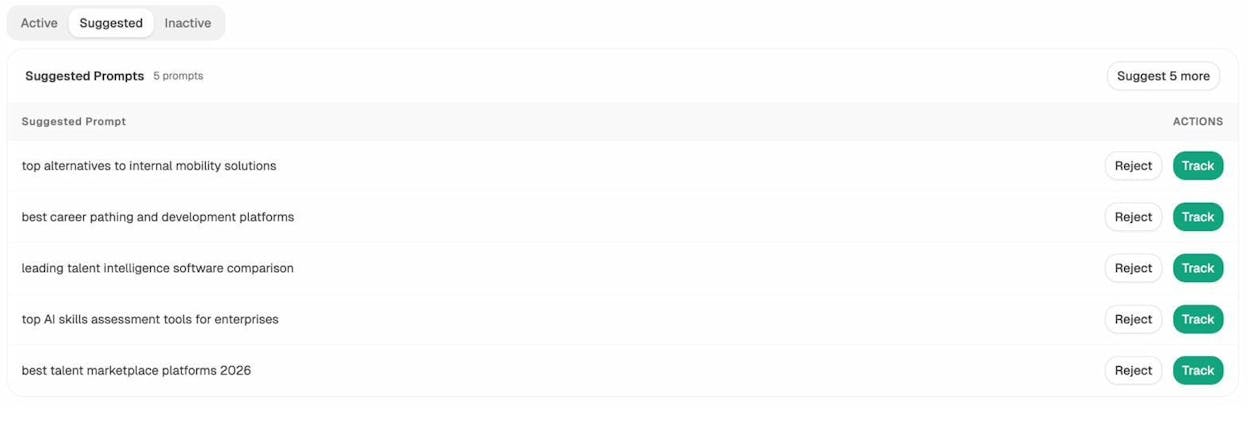
You can track each suggestion individually, or use it as a seed for a larger cluster.
Discover prompt territory you’re missing. Open Prompt Discovery. This is the equivalent of “Group by Parent Topic” for AI search. It scans the prompt space around your category and surfaces sub-territories. You see which clusters your brand is already cited in, which clusters competitors win, and which ones nobody has claimed yet.
Test prompt variants on demand. When you suspect a cluster of related prompts is hot, run them through ad hoc searches before committing to ongoing tracking. You enter the prompt, choose the country, and Analyze AI fetches answers from ChatGPT, Google AI Mode, and Perplexity.
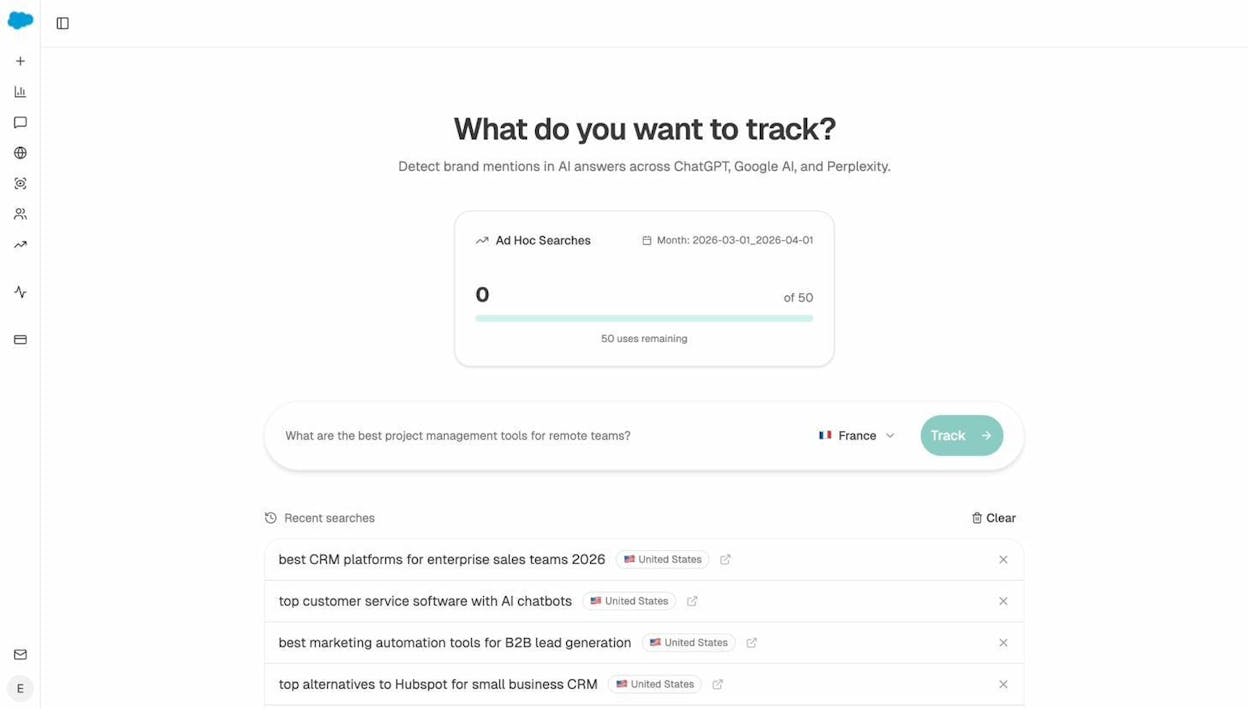
This is the prompt equivalent of pasting a keyword into Keywords Explorer just to check the SERP. You’re sanity-checking a hypothesis before adding it to the tracked list.
Track each prompt cluster over time. Once you’re confident in a cluster, move the prompts to active tracking. You will see visibility, sentiment, position, and which competitors get mentioned alongside you for each prompt.
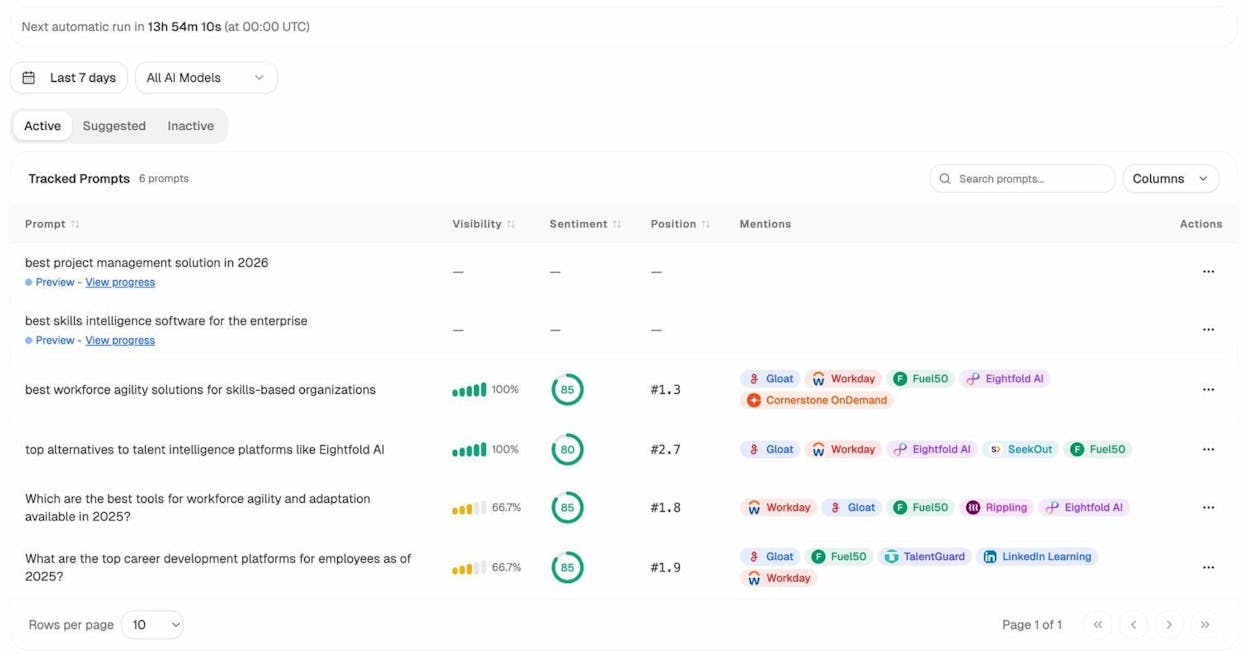
The columns let you treat the cluster like a rank-tracker view, but for AI engines instead of Google. For more on the prompt-research workflow, see our walkthrough on AI keyword research.
Find new prompt clusters by reverse-engineering competitors. Open Competitor Intelligence. Analyze AI suggests competitors based on who is cited alongside you and who shows up in your category that you haven’t tracked. Each suggested competitor is a doorway to a new prompt cluster, because the prompts they win are prompts you should consider.
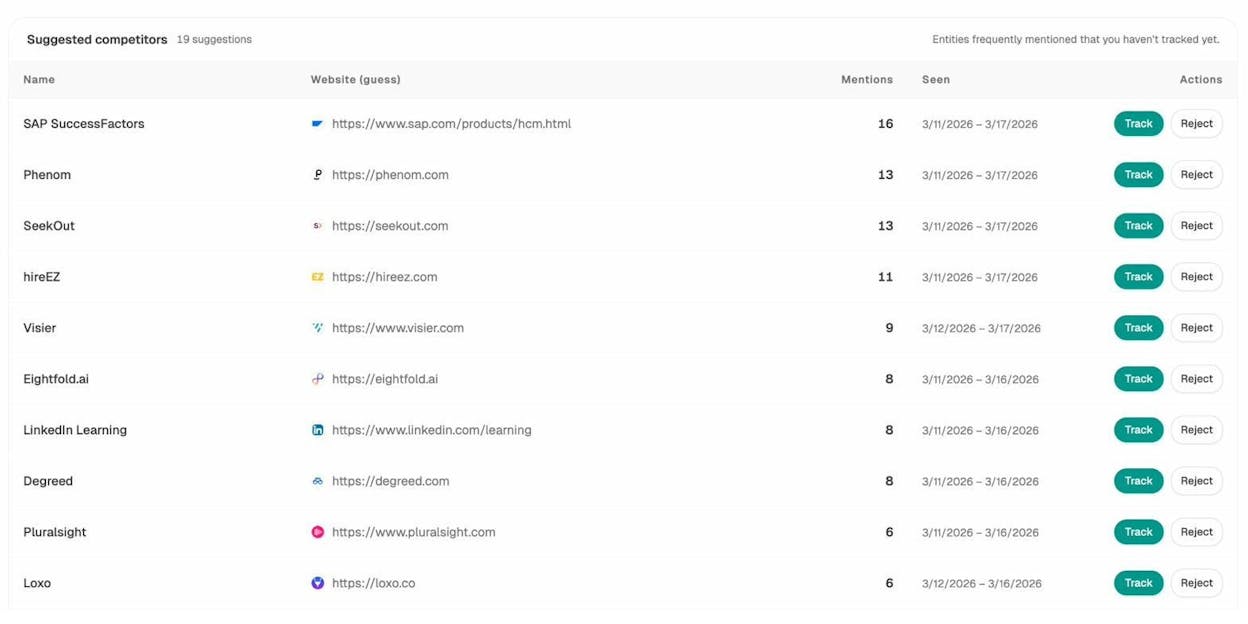
This is the AI search version of the “see what your competitors rank for” trick from traditional keyword research. The unit changes from keyword to prompt. The play is the same.
What to do with your keyword (and prompt) groups
Grouping is the input. The output is what makes it worth doing. Here are the four moves that actually drive results.
Build content clusters
Each parent-topic group becomes a hub-and-spoke cluster. The parent gets a long pillar page that covers the topic at a high level. Each subtopic gets its own focused article. They link to each other and they link back to the pillar. We’ve broken this approach down in our guide on the 4 pillars of an effective SEO strategy for AI search.
For prompt groups, the equivalent is to make sure every page in the cluster has a clean, extractable summary at the top so AI engines can pull from it. You’re optimizing each page to answer the prompt cleanly enough that an LLM can quote a sentence.
Spot cannibalization
Run a search inside Google with site:yourdomain.com [target keyword] for each group. If multiple URLs come back for the same keyword group, you’re cannibalizing. Either consolidate the pages, or assign each one to a different keyword group with a clear primary keyword.
![[Screenshot: Google search using the site: operator showing two URLs from the same domain ranking for the same query, indicating cannibalization]](https://www.datocms-assets.com/164164/1777676336-blobid10.png?auto=format,compress&w=1248&fit=max)
Plan internal links
Once your groups are mapped to URLs, every keyword in a group becomes a candidate anchor text from somewhere else on the site. You no longer have to guess where a link should go. Open the group, look at the URL it maps to, and link from any page that mentions a keyword in that group.
To find which of your existing pages already mention the keywords in a group, run a site:yourdomain.com "keyword phrase" search and link from those pages first. The lift is usually quick because the pages already have authority.
Prioritize topics by business value
Score each group on three dimensions.
|
Dimension |
Where to find it |
Why it matters |
|---|---|---|
|
Total volume |
Sum of search volume across the group |
Caps the upside |
|
Average difficulty |
Predicts effort |
|
|
Distance from sale |
Manual judgment plus a SERP review |
Predicts revenue per visitor |
Multiply expected traffic by an estimated conversion rate per group and you have a prioritized list. The top of that list is where you start.
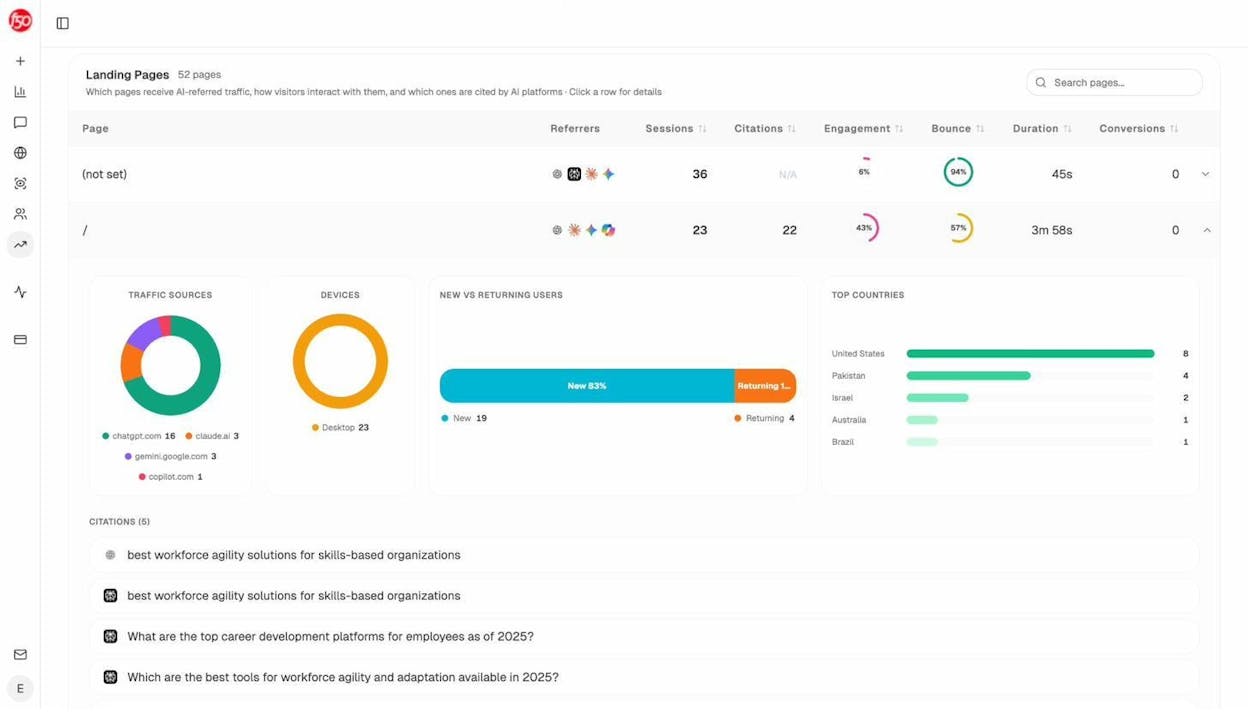
For AI search, the equivalent prioritization is total prompt volume in your category, your current visibility on each cluster, and which clusters touch buyers in evaluation mode (the “best X” and “X vs Y” prompts that lead to demos). Once you’re publishing against those clusters, AI Traffic Analytics shows which landing pages actually convert visits from ChatGPT, Perplexity, and Gemini, so you know which clusters to double down on.
Common mistakes when grouping keywords
A few patterns show up over and over. Avoid these.
Grouping before checking intent. A group that mixes informational and transactional keywords cannot be served by one page. Always intent-check the group before assigning it a URL.
Letting volume drive everything. A group with 50,000 monthly searches and 90 KD will not rank for a year. A group with 800 searches and 12 KD that maps directly to your product will earn revenue in a quarter. Group by opportunity, not just by volume.
Treating prompt clusters like keyword clusters. Prompts are longer and more semantic. A 5-keyword cluster might collapse into a 2-prompt cluster because LLMs paraphrase. Don’t over-segment.
Never revisiting groups. Search behavior shifts. New modifiers appear. Run the grouping exercise on your priority topics every quarter so the editorial calendar reflects what people are actually searching now.
Take the first action
Pick one broad keyword that matters to your business. Pull the keyword ideas. Group them by parent topic, then by terms, then by intent. You’ll walk away with a small editorial backlog, a sharper sense of which articles are worth writing, and a list of internal links that should already be in your existing content.
Then run the same exercise on the prompt side. Open Analyze AI, accept the suggested prompts that fit your category, run a few ad hoc searches to test new clusters, and watch which ones your brand starts winning.
The work compounds. Every group you build today is a content plan, a link map, and a visibility scoreboard you can come back to next quarter.

Ernest

Ibrahim


