



Summarize this blog post with:


Keyword mapping is the process of grouping keywords into topics and assigning each topic to a specific page on your site. The result is a spreadsheet (your “keyword map”) that tells you three things: what new pages to create, what existing pages to optimize, and which keywords each page should target.
Without a keyword map, most sites end up with duplicate pages competing for the same keyword, important topics with no coverage at all, and content that ranks for nothing because it tries to target everything.
A keyword map fixes all of that. It gives your content strategy a backbone.
In this article, you’ll learn what keyword mapping is, why it matters for both SEO and AI search visibility, and how to build a keyword map from scratch using a step-by-step process. You’ll also get a free template you can copy and start using today.
Table of Contents
1. Find Keywords Worth Mapping
Before you can map keywords, you need a list of them. If you already have a keyword list from previous research, skip ahead to step two. If not, start here.
Open a keyword research tool and enter a few broad seed terms that describe your business. These are the topics your customers care about, stated in the simplest language possible.
For example, if you run an online store that sells coffee equipment, your seeds might be: coffee, espresso, cappuccino, french press, and percolator. If you sell project management software, your seeds might be: project management, task tracking, team collaboration, and Gantt chart.
![[Screenshot: Entering seed keywords into a keyword research tool like Google Keyword Planner or a third-party keyword explorer. Show the input field with multiple seeds entered.]](https://www.datocms-assets.com/164164/1777120528-blobid1.png?auto=format,compress&w=1248&fit=max)
From your seed terms, generate a full list of keyword ideas. Most tools have a “Matching Terms” or “Related Keywords” report that shows every keyword in their database containing one or more of your seeds. For a broad niche like coffee, this can easily return millions of keywords.
![[Screenshot: A keyword research tool’s Matching Terms report showing thousands of keyword results from seed terms, with columns for volume, KD, and CPC.]](https://www.datocms-assets.com/164164/1777120536-blobid2.png?auto=format,compress&w=1248&fit=max)
That raw list is too big to work with directly. Use filters to narrow it down to keywords that match your goals.
Here are the most useful filters:
-
Search volume. Set a minimum (e.g., 100 monthly searches) to exclude keywords nobody searches for.
-
Keyword Difficulty (KD). If you are a smaller or newer site, filter for low KD scores (under 30) to find keywords where the top-ranking pages have few backlinks.
-
Low Domain Rating (DR) in the top results. If sites with low authority are already ranking in the top five, you do not need to be a massive brand to compete.
-
Cost per click (CPC). Keywords with a high CPC often signal commercial intent, meaning the traffic has real business value.
![[Screenshot: Applying keyword filters in a keyword research tool — filtering by KD under 30, volume above 100, and showing the filtered results list.]](https://www.datocms-assets.com/164164/1777120536-blobid3.png?auto=format,compress&w=1248&fit=max)
After filtering, you should have a manageable list of keyword ideas — anywhere from a few hundred to a few thousand, depending on your niche.
Quick ways to find more keyword ideas:
-
Google Autocomplete. Start typing your seed term in Google’s search bar and note the suggestions that appear. These are real queries people search for.
![[Screenshot: Google Autocomplete suggestions for a seed keyword like “keyword mapping”.]](https://www.datocms-assets.com/164164/1777120547-blobid4.png?auto=format,compress&w=1248&fit=max)
-
People Also Ask. Search for a keyword in Google and expand the People Also Ask boxes. Each question is a potential keyword or subtopic.
-
Competitor analysis. Use a keyword research tool to see which keywords your competitors rank for that you do not. This often surfaces high-value topics you have overlooked. See our guide on SEO competitor analysis for the full process.
-
Free keyword generators. If you do not have a paid tool, use Analyze AI’s free Keyword Generator to get keyword ideas from any seed term, or the Keyword Difficulty Checker to assess how hard each keyword would be to rank for.
Export your full keyword list to a spreadsheet. You will need it for the next step.
Find Keyword Opportunities in AI Search Too
Keyword research has traditionally been about Google. But people are also searching in ChatGPT, Perplexity, Claude, and Gemini — and the queries they type into AI search engines are often different from what they type into Google.
AI search queries tend to be longer, more conversational, and more specific. Someone who searches Google for “best CRM software” might ask Perplexity “what’s the best CRM for a 10-person sales team that integrates with Slack.”
This means your keyword map should account for the kinds of prompts your audience is typing into AI engines, not just traditional short-tail keywords.
Analyze AI helps you discover these prompts automatically. In the Prompts dashboard, you will find two tabs that are useful here:
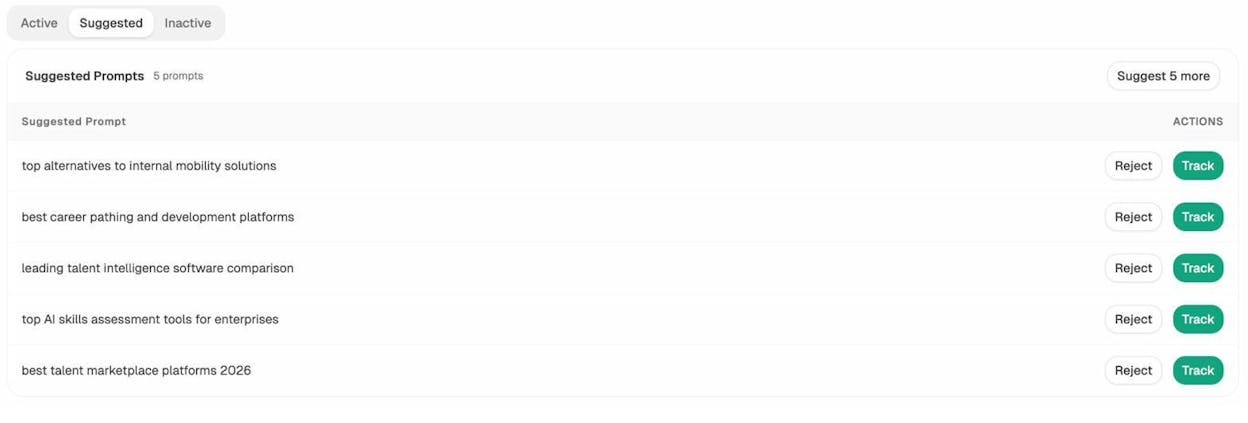
Suggested Prompts — Analyze AI generates prompt suggestions based on your industry and competitors. These are queries real users are likely asking AI search engines about your space. You can click “Track” to start monitoring your visibility for each one, or “Reject” to dismiss irrelevant suggestions.
Tracked Prompts — Once you are tracking prompts, this tab shows your visibility, sentiment, position, and which competitors are mentioned alongside you for each prompt. This is the AI search equivalent of rank tracking.
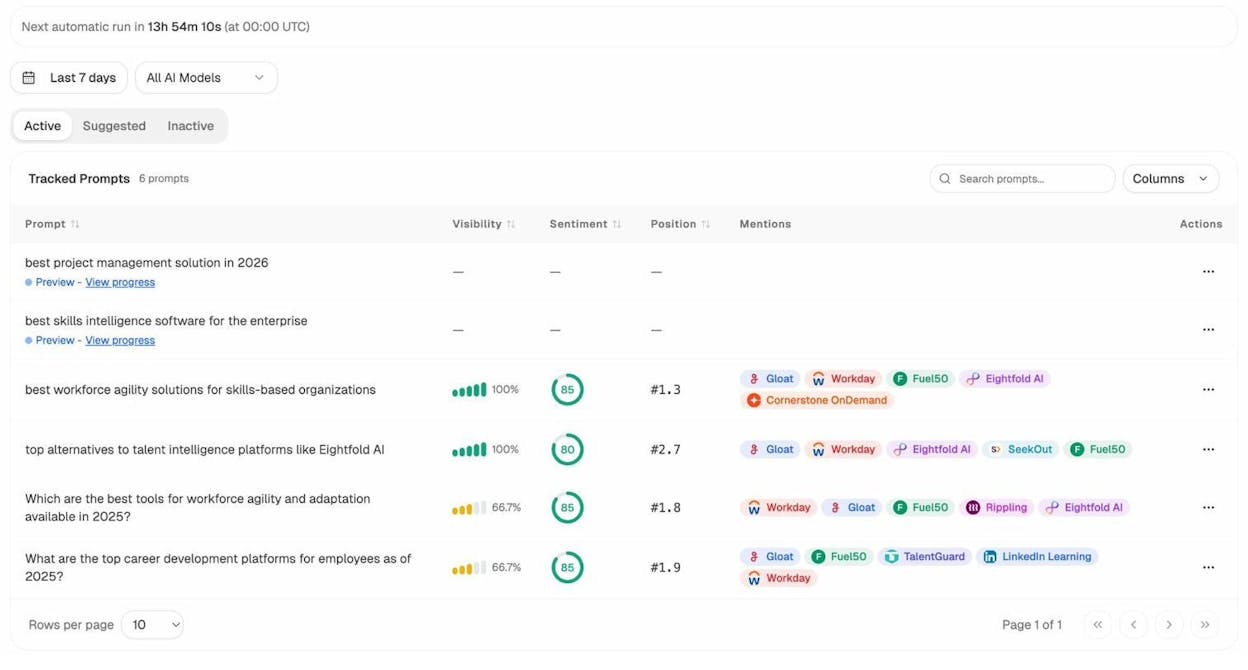
Add any relevant AI prompts to your keyword map alongside your traditional keywords. They will come in handy when you get to step five (setting actions), because a topic where you are invisible in AI search is one that needs attention — even if you already rank well on Google.
2. Group Your Keywords Into Topic Clusters
If you try to create a separate page for every individual keyword on your list, you will end up with hundreds of thin, overlapping pages that cannibalize each other. That is the opposite of what you want.
Instead, group keywords that share the same or similar search intent into clusters. Each cluster becomes one topic, and each topic maps to one page.
Here is why this works: Google already groups keywords this way. If you search for “best coffee for cold brew,” “best coffee beans for cold brew,” and “cold brew coffee beans,” you will see almost identical search results. Google treats them as the same topic. So should you.
The process of grouping keywords by shared intent is called keyword clustering.
How to Cluster Keywords
There are three ways to do this, from manual to fully automated.
Manual clustering. Sort your keyword list alphabetically or by a common modifier (e.g., “best,” “how to,” “vs”). Scan for keywords that clearly mean the same thing, and group them together in your spreadsheet. This works for small lists (under 200 keywords) but gets painful fast.
![[Screenshot: A spreadsheet with keywords manually color-coded or grouped into clusters — e.g., all “cold brew” keywords highlighted in one color, all “French press” keywords in another.]](https://www.datocms-assets.com/164164/1777120559-blobid7.jpg?auto=format,compress&w=1248&fit=max)
SERP-based clustering. Search each keyword in Google and compare the results. If two keywords return mostly the same top-10 pages, they share intent and belong in the same cluster. This is more accurate than guessing, but it is time-consuming to do by hand.
Tool-based clustering. Most modern SEO tools can cluster keywords automatically by analyzing SERP overlap. Look for a “Clusters by Parent Topic” or “Keyword Clustering” feature. The tool groups your keywords into clusters based on which ones share top-ranking pages.
![[Screenshot: A keyword clustering feature in an SEO tool showing keyword clusters grouped by parent topic, with cluster size and total volume displayed.]](https://www.datocms-assets.com/164164/1777120562-blobid8.png?auto=format,compress&w=1248&fit=max)
For example, a cluster for “best coffee for cold brew” might contain 40+ keywords — including “best cold brew coffee beans,” “best coffee beans for cold brew,” and “cold brew coffee beans.” All of those keywords can be targeted on a single page.
What Makes a Good Cluster
A good cluster has three qualities:
-
Shared intent. The keywords in the cluster should all be answered by the same type of content. If one keyword needs a how-to guide and another needs a product comparison, they belong in separate clusters.
-
Reasonable size. A cluster with two keywords is probably too small to justify its own page. A cluster with 200 keywords might need to be split into sub-clusters.
-
Clear parent topic. Every cluster should have one primary keyword that best represents the topic. This becomes the keyword you track and optimize for. The rest become secondary keywords (more on that in step four).
For a deeper breakdown of keyword types and how intent affects clustering, see our guide on keyword types for SEO and AI search.
3. Map Each Topic to a URL
Now that you have a list of topic clusters, it is time to assign each one to a page on your site.
Open your keyword map template and record each topic cluster on its own row. For each topic, note the following:
|
Column |
What to enter |
|---|---|
|
Parent Topic (Primary Keyword) |
The main keyword that represents the cluster |
|
Keyword Difficulty (KD) |
How competitive the keyword is |
|
Traffic Potential (TP) |
Estimated monthly traffic to the top-ranking page for this keyword |
|
URL |
The page on your site that targets this topic (leave blank if none exists) |
![[Screenshot: A keyword mapping spreadsheet template with columns filled in for several topics — some with URLs, some left blank to indicate new pages needed.]](https://www.datocms-assets.com/164164/1777120564-blobid9.png?auto=format,compress&w=1248&fit=max)
How to Decide Which Topics to Map
Not every topic cluster deserves a page. Prioritize topics with both traffic potential and business potential.
Traffic potential tells you whether ranking for this topic would actually send visitors to your site. Check the estimated traffic to the current number-one page for the parent topic. If the top-ranking page gets zero traffic, the topic probably is not worth pursuing regardless of how easy it looks.
Business potential tells you whether those visitors would become customers. This depends on what your business does and what the searcher wants.
For example, if you sell coffee equipment and the topic is “best coffee maker,” the business potential is high — people searching this want product recommendations, and you can recommend products you sell. But if you are a coffee roaster, the business potential for “best coffee maker” is low, because you do not sell coffee makers.
Score each topic on a simple 0–3 scale:
|
Score |
Meaning |
|---|---|
|
3 |
Your product is essential to the topic — it is a natural fit |
|
2 |
Your product is relevant and can be mentioned, but it is not the focus |
|
1 |
Your product is tangentially related at best |
|
0 |
No connection to your product |
Focus your efforts on topics scoring 2 or 3. Topics scoring 0 or 1 can wait until you have covered the high-value ones.
Check Whether You Already Have a Page for Each Topic
Before you mark a topic as “Create,” check if you already have a page that covers it. The fastest way is to run this Google search for each topic:
site:yourwebsite.com [parent topic keyword]
If a relevant result shows up, add that URL to your keyword map. If nothing relevant appears, leave the URL column blank — that topic needs a new page.
![[Screenshot: A site: search in Google showing results for a specific topic, demonstrating how to check whether a page already exists for a given keyword cluster.]](https://www.datocms-assets.com/164164/1777120571-blobid10.png?auto=format,compress&w=1248&fit=max)
You can also use Analyze AI’s free Keyword Rank Checker to quickly see if any of your pages currently rank for the topic’s primary keyword.
4. Pick Secondary Keywords for Each Topic
Secondary keywords are subtopics within a cluster that add depth to your content without justifying their own standalone page.
They serve two purposes. First, they help you understand what searchers actually want. Second, they give your content additional ranking opportunities for related queries.
For a deep dive, read our full guide on secondary keywords.
How to Identify Good Secondary Keywords
Look through each topic cluster and find keywords that meet two criteria:
-
They reveal a specific angle or sub-question that your page should address. For example, within a “best coffee grinder” cluster, the keyword “best value coffee grinder” tells you that searchers care about price — so your page should include budget-friendly options.
-
They do not get enough traffic to justify a standalone page. If a keyword within your cluster has its own set of unique top-ranking pages that get significant traffic, it probably deserves its own page and its own row in your keyword map.
Here is a simple decision framework:
Does the keyword have unique top-ranking pages that get meaningful traffic?
-
Yes → Give it its own row in your keyword map. It is a separate topic.
-
No → Add it as a secondary keyword under the parent topic.
![[Screenshot: A keyword cluster expanded to show individual keywords, with one highlighted as a good secondary keyword (low volume, no unique ranking pages) and another highlighted as better suited for a standalone page (high volume, unique ranking pages getting traffic).]](https://www.datocms-assets.com/164164/1777120572-blobid11.png?auto=format,compress&w=1248&fit=max)
Add your secondary keywords to a dedicated column in your keyword map template. You will reference these when you write or optimize each page.
How Secondary Keywords Shape Content
Secondary keywords are not just metadata. They directly influence what your page should cover.
For example, if your parent topic is “best coffee grinder” and your secondary keywords include “best value coffee grinder,” “best coffee grinder under 200,” and “best manual coffee grinder,” your page should include sections on budget options, a price breakdown, and at least one manual grinder recommendation.
Without these secondary keywords, you might write a page that only covers high-end electric grinders — and miss a large chunk of what searchers actually want.
5. Set an Action for Each Topic
Your keyword map is a plan, and every plan needs actions. For each topic in your map, choose one of three actions:
|
Action |
When to use it |
|---|---|
|
Create |
You do not have a page about this topic yet |
|
Optimize |
You have a page, but it could rank higher or cover the topic better |
|
No action |
You have a page that already ranks well and covers the topic thoroughly |
![[Screenshot: A keyword mapping spreadsheet with the “Action” column filled in, showing a mix of “Create,” “Optimize,” and “No action” entries.]](https://www.datocms-assets.com/164164/1777120576-blobid12.png?auto=format,compress&w=1248&fit=max)
How to Decide Between “Optimize” and “No Action”
If you have an existing page for a topic, check its current rankings for the primary and secondary keywords. You can do this in any rank tracking tool, or quickly with Analyze AI’s free SERP Checker.
If the page ranks in the top five for all its primary and secondary keywords, choose “No action.” It is already doing its job.
If the page ranks outside the top five for one or more keywords, choose “Optimize.” Then figure out why it is underperforming.
Common reasons a page needs optimization:
-
Missing subtopics. The page does not address what some secondary keywords are asking for. For example, if the keyword “best ground coffee for cold brew” is a secondary keyword and your page only lists whole bean options, you need to add ground options.
-
Weak internal linking. The page does not have enough internal links pointing to it from other relevant pages on your site. Internal links pass authority and help search engines understand what a page is about.
-
Thin content. The page exists but does not go deep enough. It might cover the topic at a surface level while competitors have comprehensive guides.
-
Outdated information. The page was published years ago and has not been updated. Stale content loses rankings over time.
![[Screenshot: A rank tracking report showing a page’s rankings for its primary and secondary keywords, with some ranking in the top 5 and others ranking lower — highlighting which subtopics need optimization.]](https://www.datocms-assets.com/164164/1777120579-blobid13.png?auto=format,compress&w=1248&fit=max)
Check Your AI Search Visibility for Each Topic Too
Here is where most keyword mapping guides stop. But there is a growing channel that your keyword map should also account for: AI search.
When someone asks ChatGPT, Perplexity, or Gemini a question about your industry, does your brand get mentioned? If not, that is a visibility gap — and your keyword map is the right place to flag it.
For each topic in your map, check your AI search visibility using Analyze AI. Here is how:
Step 1: Check the Prompts dashboard. Look at your tracked prompts and see if any relate to the topics in your keyword map. If your visibility is low or your competitors are getting mentioned instead of you, that topic needs attention.
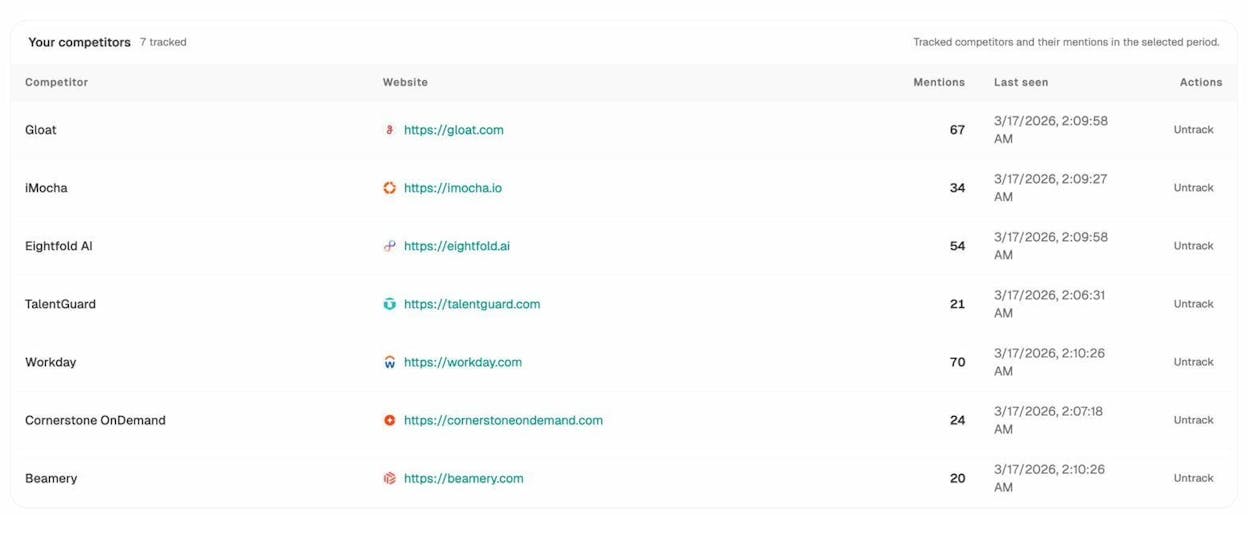
Step 2: Check the Competitors dashboard. See which competitors get mentioned alongside you for each prompt. If a competitor appears in AI responses for a topic where you are invisible, add a note to your keyword map.
Step 3: Check the AI Traffic Analytics report. See which of your pages are already receiving traffic from AI search engines. Look at the Landing Pages tab to see which pages AI engines are sending visitors to — and which ones they are ignoring.
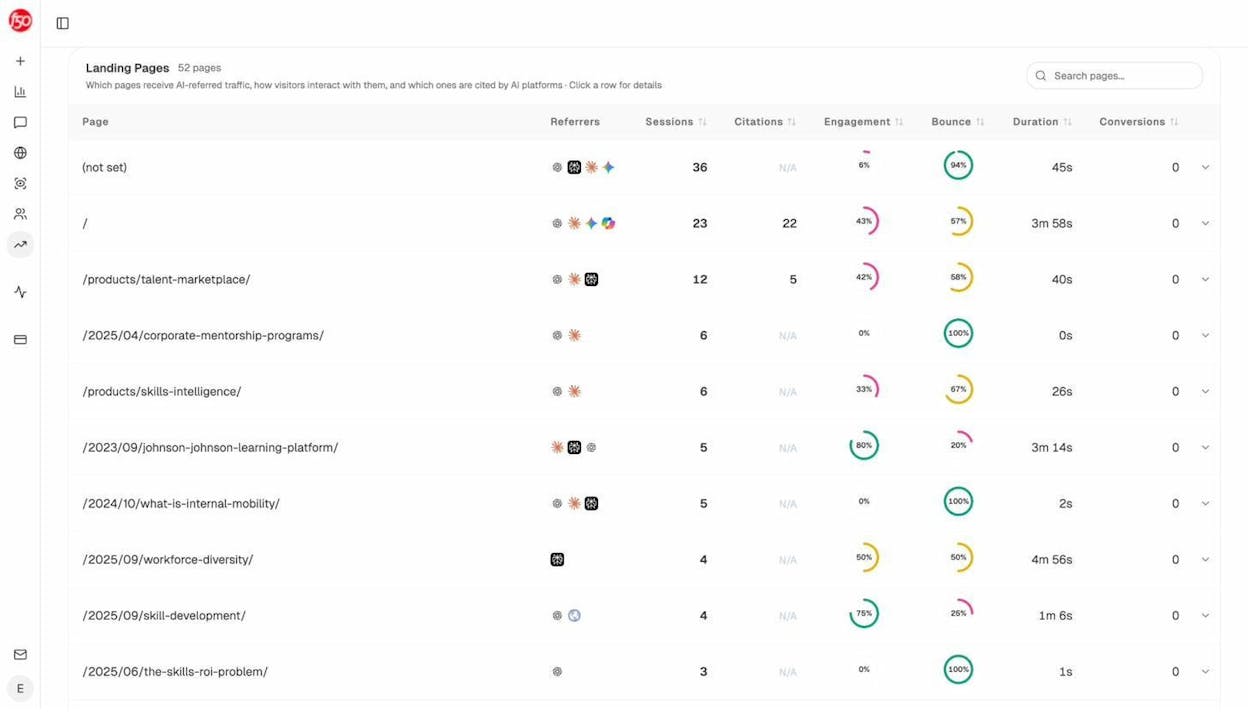
Add a column to your keyword map for “AI Search Action.” Use the same Create / Optimize / No Action framework. A topic might rank well on Google but be completely invisible in AI search — or vice versa. Your map should capture both.
6. Prioritize and Assign Each Topic
Your keyword map is now a list of topics with actions. But if you have 50 or 100 topics, you cannot do everything at once. You need to prioritize.
How to Prioritize
Sort your keyword map by a combination of these factors:
-
Business potential score (highest first). Topics where your product is a natural fit should come before topics where the connection is weak.
-
Action type. “Optimize” actions often deliver faster results than “Create” actions, because the page already exists and may already have some authority.
-
Traffic potential (highest first). All else being equal, go after topics with more traffic potential first.
-
Keyword Difficulty (lowest first). Low-competition topics give you quicker wins, which builds momentum.
A practical order is: optimize high-business-potential topics first, then create new pages for high-business-potential topics, then move down to lower-priority topics.
Assign Owners
If you work with a team or freelancers, assign each topic to a person. Add an “Assignee” column to your keyword map. In Google Sheets, you can type @ followed by someone’s name to notify them directly.
![[Screenshot: A keyword mapping spreadsheet with an “Assignee” column, showing different team members assigned to different topics.]](https://www.datocms-assets.com/164164/1777120594-blobid16.png?auto=format,compress&w=1248&fit=max)
Each assignee should receive clear instructions: the parent topic, secondary keywords, the action (create or optimize), and any notes about what specifically needs to be addressed.
7. Common Keyword Mapping Mistakes
These are the errors that quietly undermine even well-built keyword maps.
Mapping One Keyword Per Page Instead of One Topic Per Page
This is the most common mistake. If you create separate pages for “best coffee for cold brew” and “best coffee beans for cold brew,” you will have two pages competing with each other for the same search results. Google will not rank both. It will pick one — and often picks neither.
Always cluster first, then map topics to pages. One topic, one page.
Ignoring Search Intent
Not all keywords with similar words share the same intent. “Coffee grinder” could mean someone wants to buy one, learn how they work, or find repair instructions. If you lump informational and commercial keywords into the same cluster, your page will try to serve both intents and will end up serving neither well.
Before finalizing a cluster, check the top-ranking pages for the parent keyword. Are they product pages, blog posts, comparison guides, or how-to tutorials? Your page should match the dominant format.
Mapping Keywords You Cannot Realistically Rank For
A keyword with a KD of 90 and top results dominated by Wikipedia, Amazon, and government sites is not a realistic target for a small business blog. Map it if you want, but do not prioritize it.
Focus your energy on keywords where your site has a legitimate shot at reaching the top five within the next six to twelve months.
Never Updating the Map
A keyword map is not a one-time exercise. Search intent shifts, competitors publish new content, your site grows, and new keywords emerge. Review and update your keyword map every quarter at minimum.
When you update, look for:
-
Topics where your rankings have dropped (may need re-optimization)
-
New keyword clusters that have emerged in your niche
-
Topics where competitors have overtaken you
-
AI search gaps where your visibility has changed
8. Use Your Keyword Map to Guide AI Search Strategy
SEO is not dead. But it is evolving. AI search is becoming a second organic channel — one that operates alongside Google, not as a replacement for it.
Your keyword map already covers what topics to create content for and how to optimize for Google. Here is how to extend it to cover AI search visibility without starting from scratch.
Find Where Your Competitors Win in AI Search and You Do Not
In Analyze AI, the Competitors dashboard shows you which brands get mentioned in AI responses for your industry. The Suggested Competitors tab surfaces entities that AI models frequently mention but you have not started tracking yet.
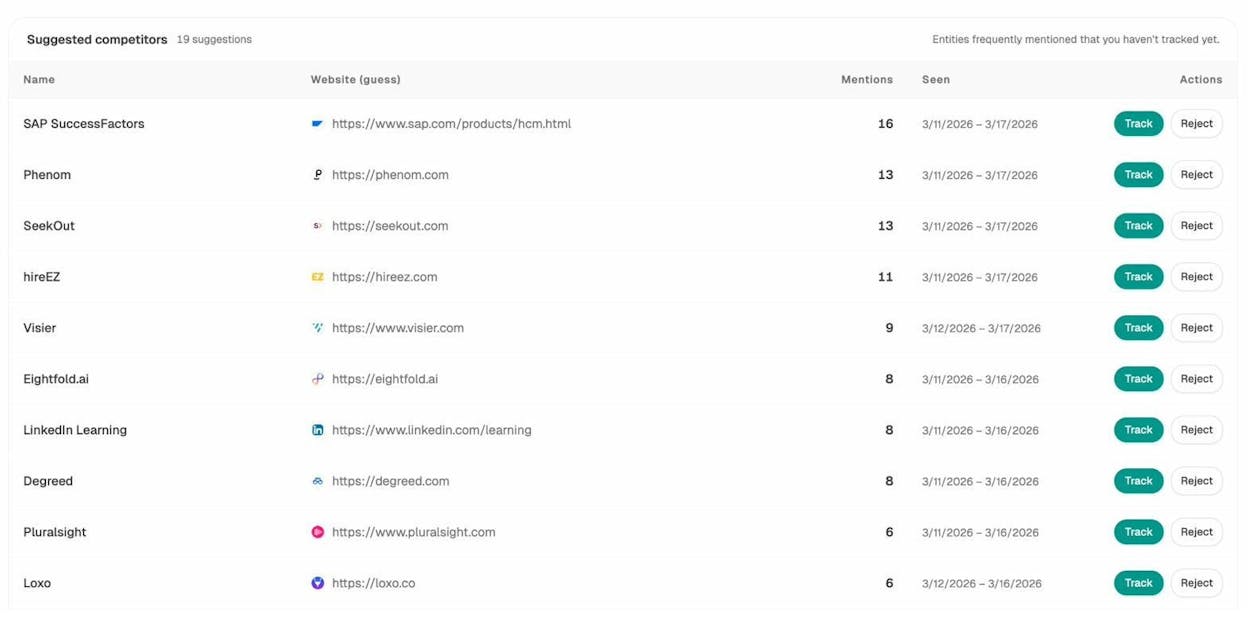
Cross-reference this with your keyword map. If a competitor gets mentioned for a topic you have mapped but you do not, that is a gap worth closing.
Track Which Content Types AI Models Cite
The Sources dashboard in Analyze AI shows you what types of content AI models cite when answering questions in your space — blog posts, product pages, review sites, or something else.
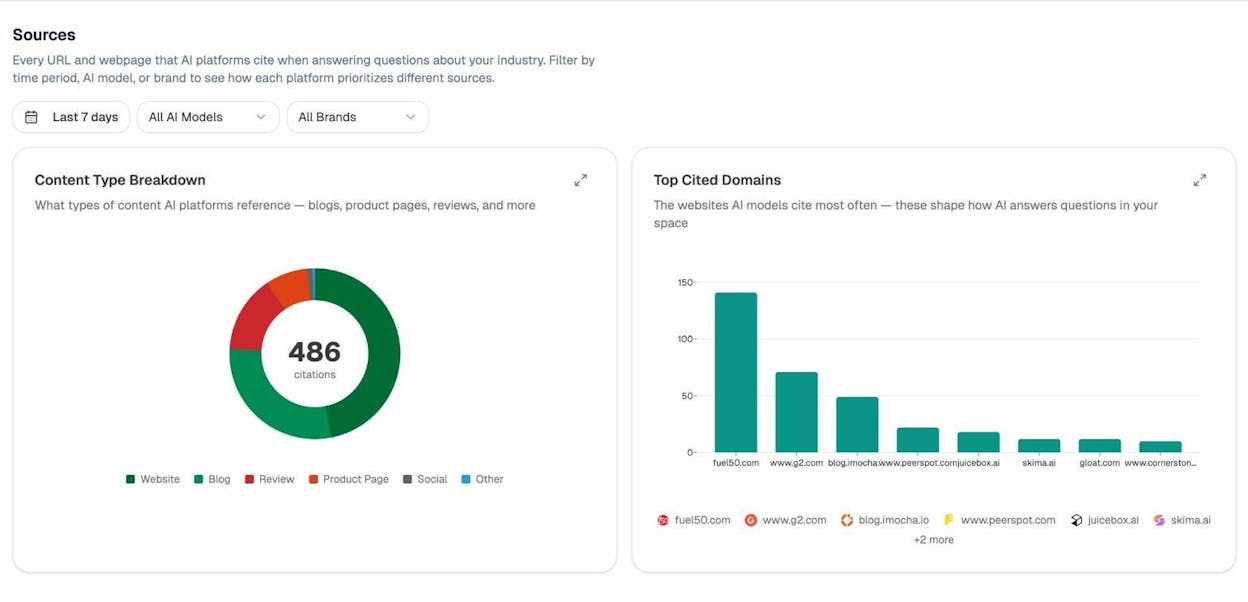
If AI engines are heavily citing blog posts in your industry, your keyword map should prioritize blog content creation over product page optimization. If they are citing third-party review sites, you may need an off-site content strategy alongside your on-site keyword map.
Identify Pages That Already Receive AI Traffic
The AI Traffic Analytics report in Analyze AI shows you which of your landing pages are receiving visits from ChatGPT, Perplexity, Claude, Gemini, and other AI platforms.
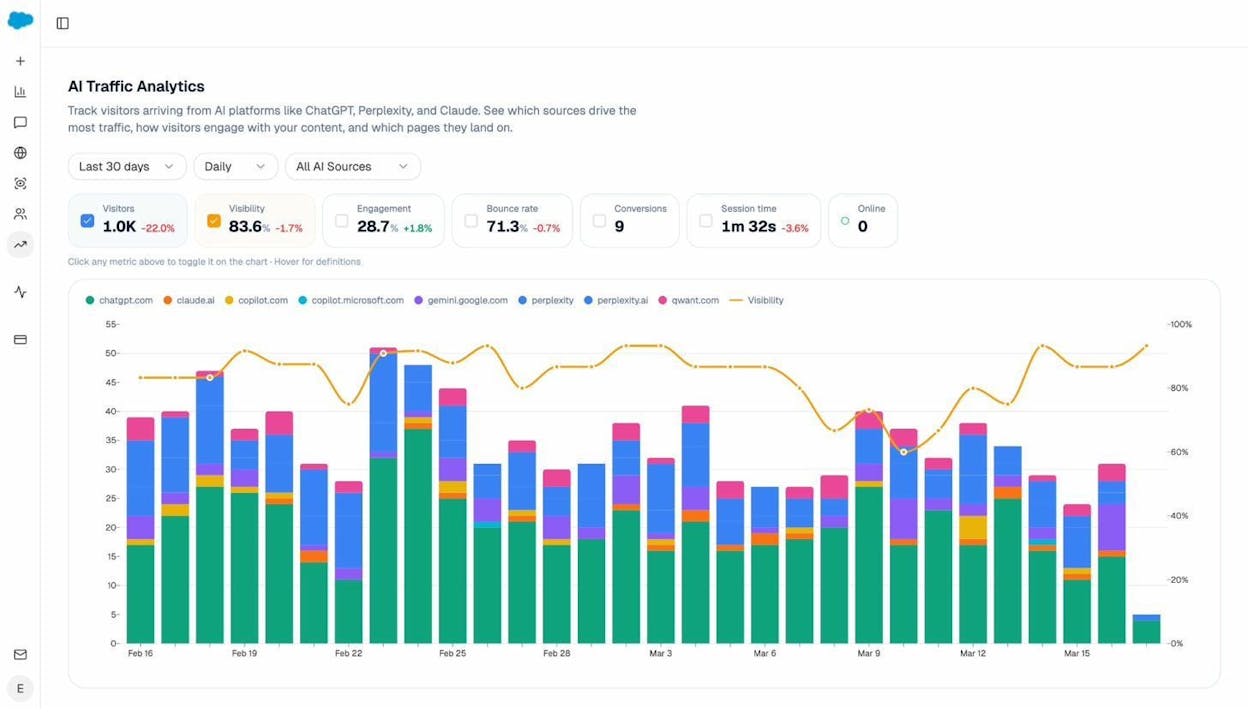
Look for patterns. If certain types of pages — long-form guides, comparison posts, or data-driven articles — consistently receive more AI traffic, prioritize creating more content in that format. Your keyword map tells you what to write about. Your AI traffic data tells you how to structure it.
Monitor Your Overall AI Visibility
The Overview dashboard in Analyze AI gives you a bird’s eye view of your brand’s visibility, sentiment, and competitive position across all AI models.
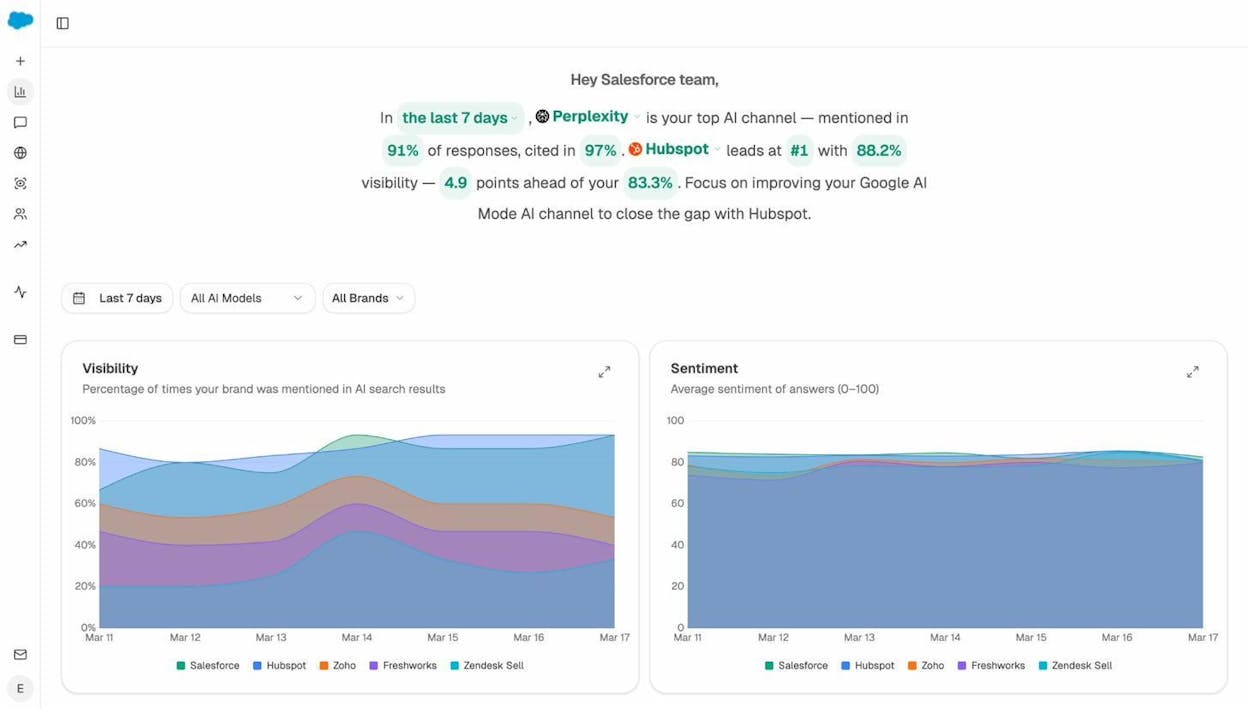
Use this as a quarterly check alongside your keyword map review. If your visibility is trending down while competitors are trending up, your keyword map priorities should shift to address the gap.
9. Track Results After Taking Action
A keyword map is only valuable if you act on it and measure what happens.
Track SEO Performance
After creating or optimizing pages based on your keyword map, monitor their organic search performance. Use your preferred rank tracking tool or Analyze AI’s free Keyword Rank Checker to check rankings for each topic’s primary and secondary keywords.
Give new pages at least 30 to 90 days before expecting meaningful ranking changes. Optimized pages often show movement faster — sometimes within a week or two.
Track AI Search Performance
In Analyze AI, monitor how your visibility changes for the prompts you are tracking. Over time, as you publish and optimize content based on your keyword map, you should see your mention rate and position improve across AI models.
The Weekly Email digests from Analyze AI make this easy — you will get a summary of how your visibility, sentiment, and competitive positioning have changed each week without needing to log in.
What Good Results Look Like
After three to six months of consistent execution on your keyword map, you should see:
-
Organic traffic increasing for the pages you created and optimized
-
Rankings improving for primary and secondary keywords
-
Fewer keyword cannibalization issues (because each topic has one clear target page)
-
Increased AI search visibility for the prompts you are tracking
-
Clearer competitive gaps that inform your next round of keyword mapping
If you are not seeing these results, revisit your map. Check whether the topics you prioritized were realistic given your site’s current authority, whether the content you created matches search intent, and whether you have enough internal links connecting your content.
Free Keyword Mapping Template
Download a copy of our keyword mapping template to get started. It includes columns for parent topic, secondary keywords, KD, traffic potential, business potential score, existing URL, action (Create / Optimize / No Action), AI search action, assignee, and status.
[Link to free Google Sheets template]
The template works as a living document. Update it as you publish new content, as rankings change, and as new keyword opportunities emerge.
Final Thoughts
Keyword mapping is not glamorous work. It is a spreadsheet exercise. But it is one of the few SEO activities that compounds over time — every topic you map and act on makes the next topic easier to prioritize, the next page easier to interlink, and the next content decision clearer.
And now that AI search is growing as a second organic channel, your keyword map doubles as the foundation for your AI search strategy. The same topics that deserve pages for Google also deserve visibility in ChatGPT, Perplexity, and Gemini. The work is the same. The surface area is just bigger.
Start with the template. Find your keywords. Cluster them. Map them. Act on them. Then measure what happens.

Ernest

Ibrahim


