



Summarize this blog post with:


In this article, you’ll learn nine practical ways to boost your business’s local search rankings. You’ll get step-by-step instructions for claiming your Google Business Profile, doing local keyword research, optimizing landing pages, building citations and links, earning reviews, and getting featured on local list posts. You’ll also learn how to track your brand’s visibility in AI search engines, which are becoming a growing source of local discovery for businesses of all sizes.
Table of Contents
1. Claim and optimize your Google Business Profile
Your Google Business Profile (GBP) is a free listing that controls how your business appears in Google Maps and the local map pack. Claiming it takes five minutes. Optimizing it well can take an afternoon. That afternoon is one of the highest-leverage things you can do for local SEO.
Here is how to claim your profile:
-
Click Manage now
-
Sign in to your Google Account
-
Search for your business name
-
Select the correct business from the results
-
Click Manage now and follow the verification steps
![[Screenshot of Google Business Profile Manager showing the search and claim flow]](https://www.datocms-assets.com/164164/1777112448-blobid1.jpg?auto=format,compress&w=1248&fit=max)
If your business does not show up in search results, you will see an option to add it manually. Even if it does show up, Google may ask you to verify your business details before you gain full control.
Once you have claimed your profile, focus on five optimizations that matter most.
Choose the right business type. Google classifies businesses into three categories: storefront, service-area, and hybrid. A hairdresser or cafe that only serves customers at a physical address should set their address and leave the service area field empty. A plumber or mobile hairdresser that visits customers should clear the address and set service areas instead. A business that does both should add the address and set service areas.
Pick the most accurate business category. Google offers hundreds of categories, and some are very similar (for example, “accountant” versus “chartered accountant”). Take a few minutes to browse the full list and choose the one that best matches your primary service. You can add secondary categories too, but the primary category carries the most weight in rankings.
Add accurate business hours. This includes regular hours, holiday hours, and special hours. If a potential customer sees that you might be closed, they will call your competitor instead. Update these every time your hours change.
Upload high-quality photos. Google has reported that businesses with photos receive 42% more requests for driving directions and 35% more website clicks. Add photos of your storefront, interior, products, team, and any before-and-after work you do. Update them regularly so customers see a business that looks active and current.
![[Screenshot of a well-optimized Google Business Profile with photos, hours, and category set]](https://www.datocms-assets.com/164164/1777112460-blobid2.png?auto=format,compress&w=1248&fit=max)
Add your website URL. It sounds obvious, but a surprising number of business owners skip this. Your GBP should link directly to your website so that searchers can learn more and convert.
Why your Google Business Profile matters for AI search too
AI search engines like ChatGPT, Perplexity, and Gemini pull from a variety of structured sources when answering local queries. Your Google Business Profile is one of the most important ones because it provides verified, structured data about your business name, address, phone number, categories, hours, and reviews.
When someone asks ChatGPT “what’s the best Italian restaurant near downtown Denver,” the AI model draws from sources that include review platforms, local directories, and Google’s own business data. A complete, accurate GBP gives AI models more structured information to work with, which increases the chance that your business shows up in AI-generated local recommendations.
This is not a separate optimization. It is the same work you do for Google, paying dividends across a growing number of discovery channels.
2. Do local keyword research
Knowing how local customers search for what you offer is the foundation of every other tactic in this guide. If you know your industry well, you probably already know the obvious terms. But obvious terms are just the starting point.
For example, if you are a plumber in London, you already know people search for “plumber in london” and “plumber near me.” But people also search by specific service: “boiler repair,” “drain unblocking,” “bathroom fitting,” and “emergency callout.” By focusing only on the broad term, you miss the queries where buying intent is highest.
Here is a simple process to expand your local keyword list:
Step 1: Brainstorm your services and products. Write down every service you offer, every product you sell, and every problem you solve. Do not filter at this stage. Just list everything.
Step 2: Use a keyword research tool to expand each service. Plug your services into a keyword research tool like Analyze AI’s free keyword generator or Google’s Keyword Planner. You will find variations and related terms you did not think of.
![[Screenshot of Analyze AI’s keyword generator tool showing results for “boiler repair” with related terms and search volumes]](https://www.datocms-assets.com/164164/1777112466-blobid3.png?auto=format,compress&w=1248&fit=max)
For example, if you enter “boiler repair” and “drain unblocking,” you might find that people also search for “gas boiler repair near me,” “emergency boiler repair,” “boiler repair same day,” and “blocked drain cost.” Each of these represents a different searcher with a specific need you can address.
Step 3: Check keyword difficulty before targeting. Not all keywords are worth pursuing. A term with high search volume but extreme competition might not be realistic for a small local business. Use a keyword difficulty checker to gauge how hard it will be to rank for each term.
![[Screenshot of Analyze AI’s keyword difficulty checker showing difficulty scores for local plumbing keywords]](https://www.datocms-assets.com/164164/1777112470-blobid4.png?auto=format,compress&w=1248&fit=max)
Step 4: Group keywords by service or topic. Once you have your expanded list, group keywords by service category. “Boiler repair,” “gas boiler repair near me,” and “emergency boiler repair” all belong to one group. “Drain unblocking,” “blocked drain cost,” and “drain cleaning service” belong to another. Each group will map to a dedicated landing page (more on that in the next section).
Note that most keyword research tools show national search volumes, not local ones. That is fine for this purpose. What you are looking for is the different ways people search for your services, not the exact local volume. People search using the same language whether they are in Manchester or London.
Recommended reading: SEO Keywords: How to Find and Use Them to Rank Higher
Find the prompts people use to discover local businesses in AI search
Traditional keyword research captures how people search on Google. But a growing number of people are now asking AI search engines for local recommendations. The way they phrase these queries is different from how they type into Google.
On Google, someone might type “best plumber london.” On ChatGPT or Perplexity, they are more likely to ask “who is the most reliable plumber in south London for an emergency boiler repair?” These are longer, more conversational, and more specific. Understanding these prompts gives you insight into what information AI models need to recommend your business.
You can use Analyze AI’s AI Search Explorer to run ad hoc searches across ChatGPT, Gemini, and Perplexity and see which businesses show up for local queries in your space. Type in a prompt like “best [your service] in [your city]” and see who the AI recommends and why.
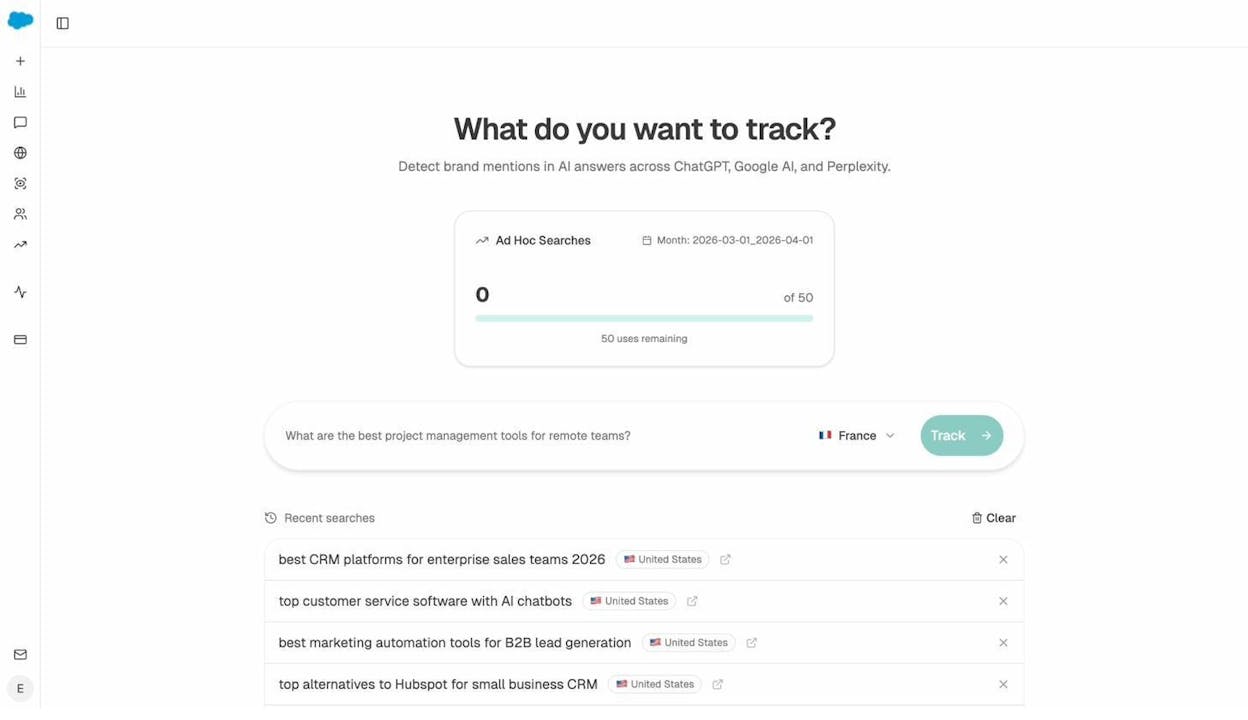
This is not a replacement for traditional keyword research. It is an additional layer that shows you how AI models frame your industry and which competitors they favor when people ask conversational questions about local services.
3. Optimize local landing pages
If your keyword research reveals that people search for specific services you offer, you need dedicated landing pages for each one. A plumber should not rely on a single “Services” page to rank for “boiler repair,” “drain cleaning,” and “bathroom fitting.” Each service deserves its own page.
The question is: how do you get those pages to rank?
What not to do: keyword stuffing
Keyword stuffing means repeating your target keyword as many times as possible on a page. You still see this on many local business websites. It looks something like this:
![[Screenshot of a local business page with obvious keyword stuffing, repeating “plumber in london” unnaturally throughout the copy]](https://www.datocms-assets.com/164164/1777112479-blobid6.jpg?auto=format,compress&w=1248&fit=max)
This does not help SEO. Google’s algorithms are smart enough to understand synonyms and context. Stuffing keywords makes your copy unnatural, which turns off potential customers even if it somehow helped rankings (it does not).
What to do instead: cover the information searchers actually want
The right approach is to include the information that matters to someone searching for your service. Much of this is common sense. Someone searching for “boiler repair” wants to know your pricing, response time, service area, and the types of boilers you work on.
But even if you know your industry well, you can miss important details. Here is a method to figure out what information to include on your landing pages:
Step 1: Search Google for your service + location. For example, “boiler repair london.”
![[Screenshot of Google search results for “boiler repair london” showing local results with SEO toolbar data]](https://www.datocms-assets.com/164164/1777112481-blobid7.png?auto=format,compress&w=1248&fit=max)
Step 2: Find a competitor’s service page that ranks for a good number of keywords. Look for a page from another local business (not a directory) that ranks for dozens or hundreds of keywords. If you use a tool with a browser extension, you can see this data right in the search results.
Step 3: Check what keywords that page ranks for. Use a tool like Analyze AI’s free SERP checker to see which terms that page appears for. Filter for top 10 rankings to focus on the most relevant ones.
![[Screenshot of SERP checker showing keywords a competitor’s boiler repair page ranks for]](https://www.datocms-assets.com/164164/1777112489-blobid8.png?auto=format,compress&w=1248&fit=max)
Step 4: Look for patterns in those keywords. The keywords a competitor’s page ranks for often reveal information that searchers expect to find. For example, if a boiler repair page ranks for “fixed price boiler repairs,” “emergency boiler repair,” “same day boiler repair,” and “electric boiler repair,” that tells you searchers want to know about pricing structure (fixed vs. hourly), urgency options (same day and emergency), and boiler types (electric, gas, oil).
Include all of this information on your landing page. Do not just mention it in passing. Dedicate a paragraph or section to each topic. Add a pricing table if it makes sense. Include a clear call-to-action for emergency requests if you offer them.
Optimize your landing pages for AI search too
AI search engines prefer pages with clear, well-structured information over pages with vague or generic content. When ChatGPT or Perplexity answers a query like “who does emergency boiler repair in London,” they look for pages that explicitly state the service, the location, and the key details a searcher would need.
Here is what this means in practice for your local landing pages:
Use clear headings that match natural questions. Instead of a heading like “Our Services,” use “Emergency Boiler Repair in South London.” This makes it easier for both Google and AI models to understand what your page is about.
Include structured data (schema markup). LocalBusiness schema tells search engines and AI models exactly what your business does, where it is located, what hours you operate, and what services you offer. This is especially valuable because AI models rely heavily on structured data when compiling answers. Add Service schema for each individual service page too.
State facts, not fluff. AI models are better at extracting factual statements than interpreting marketing language. “We respond to emergency callouts within 60 minutes across all London postcodes” is more useful to an AI model than “We pride ourselves on fast response times.” The first sentence contains specific, citable information. The second does not.
Recommended reading: How to Use Keywords in SEO: 14 Practical Tips
4. Get local citations and links
Local citations are mentions of your business’s name, address, and phone number (NAP) on other websites. They help search engines verify that your business exists and operates where you say it does. They also help customers find you on platforms beyond Google.
Citations come in two forms: structured (business listings on directories like Yelp, Bing Places, and Apple Maps) and unstructured (mentions in blog posts, news articles, and other web content).
Start with the major data aggregators
If you are in the U.S., the fastest way to spread accurate citations is through the three main data aggregators:
|
Aggregator |
Why It Matters |
|---|---|
|
Feeds data to hundreds of directories and apps |
|
|
Powers listings on major search engines and GPS devices |
|
|
Supplies location data to Apple Maps, Uber, and thousands of apps |
These aggregators distribute your business information to hundreds of smaller directories automatically. Getting your NAP right on these three platforms can generate dozens of consistent citations without additional work.
Claim listings on major platforms
Beyond aggregators, manually claim your business on these platforms:
|
Platform |
Notes |
|---|---|
|
Second largest search engine. You can import from Google Business Profile. |
|
|
Default maps app for iPhone users. Critical for mobile discovery. |
|
|
Many people use Facebook to search for local businesses. |
|
|
Dominant review platform for restaurants, home services, and healthcare. |
|
|
Still carries authority for local search. |
Find industry-specific citation opportunities
After the major platforms, focus on directories specific to your industry or location. A dentist should be listed on Healthgrades, Zocdoc, and the American Dental Association directory. A restaurant should be on TripAdvisor, OpenTable, and local food blogs.
The easiest way to find these opportunities is to look at where your competitors are listed. Use a backlink analysis tool to compare your site against two or three local competitors. Any directory that links to multiple competitors but not to you is an opportunity.
![[Screenshot of a link intersect tool showing directories that link to competitors but not to the target business]](https://www.datocms-assets.com/164164/1777112500-blobid9.png?auto=format,compress&w=1248&fit=max)
Getting listed on these directories is usually free. You sign up, enter your business details, and verify your listing. The key is to make sure your name, address, and phone number are exactly the same across every platform. Even small inconsistencies (like “St.” on one listing and “Street” on another) can confuse search engines and weaken the signal.
Citations matter for AI search too
AI search engines pull from many of the same sources that traditional SEO relies on. When Perplexity answers “what are the best dentists in Austin,” it often cites review platforms like Yelp, Healthgrades, and Google Reviews. The more consistent and widespread your business information is across these platforms, the more likely AI models are to include you in their answers.
Think of citations not just as ranking signals for Google, but as a web of references that make your business easier for any system (human or AI) to verify and trust.
Recommended reading: Off-Page SEO: 11 Strategies That Work
5. Reclaim lost links
Backlinks are one of Google’s most important ranking factors, and they are hard to earn. So it makes no sense to let the links you already have go to waste. This happens more often than you might think, usually when you redesign your site, change URL structures, or delete old pages without setting up redirects.
Here is how to find and fix lost links:
Step 1: Find broken pages on your site that have backlinks. Use a backlink analysis tool to look at the pages on your site that return 404 errors but still have links pointing to them. You can also use Analyze AI’s free broken link checker to scan your site for broken URLs.
![[Screenshot of Analyze AI’s broken link checker showing 404 pages on a local business website]](https://www.datocms-assets.com/164164/1777112504-blobid10.png?auto=format,compress&w=1248&fit=max)
Step 2: Check if those pages have moved to a new URL. Often, broken links happen because a page moved during a site redesign. The content still exists, just at a different URL. For example, a plumber might have moved their “drain cleaning” page from /services/drain-cleaning to /drain-cleaning-services without setting up a redirect.
Step 3: Set up 301 redirects. Redirect the old URL to the new one. If the page no longer exists at all, redirect it to the most relevant page on your site. A 301 redirect tells search engines that the page has permanently moved, and it passes the link equity from the old URL to the new one.
This is a quick win. A single afternoon of redirect cleanup can recover months or years of lost link building effort.
Step 4: Check for broken external links on your site. While you are at it, scan your site for outgoing links that point to pages that no longer exist. Broken external links create a poor user experience and can signal to search engines that your site is not well maintained. Use the broken link checker to find and fix these too.
Recommended reading: The 9 Best Backlink Building Tools
6. Get more reviews
Reviews are one of the most powerful ranking factors for local SEO, especially for the map pack. BrightLocal’s Local Consumer Survey consistently finds that the majority of consumers read online reviews before choosing a local business, and Google has confirmed that high-quality, positive reviews improve business visibility.
But reviews do more than help you rank. They build trust. A business with 200 reviews and a 4.7-star average will win clicks over a competitor with 12 reviews and a 4.9 average. Volume and recency matter as much as the rating itself.
How to get more reviews without breaking Google’s rules
Google’s terms of service prohibit offering incentives in exchange for reviews. You cannot offer discounts, freebies, or entries into a prize draw for leaving a review. But there are plenty of legitimate ways to increase your review count.
Ask at the right moment. The best time to ask for a review is immediately after delivering a great experience. If you are a contractor, ask when the customer is admiring the finished work. If you run a restaurant, ask when the table compliments the meal. Timing matters because people are most willing to leave a review when the positive experience is still fresh.
Make it easy. Google Business Profile includes a “Share review form” button that generates a direct link to your review form. Share this link in follow-up emails, text messages, or printed cards. The fewer clicks it takes, the more reviews you will get.
![[Screenshot of Google Business Profile Manager showing the “Share review form” button and the generated review link]](https://www.datocms-assets.com/164164/1777112507-blobid11.png?auto=format,compress&w=1248&fit=max)
Send follow-up messages with photos or results. One effective approach is to send customers before-and-after photos or a summary of the work you completed, along with a review link. The photos make it easier for them to write a detailed review because they do not have to rely on memory alone. This approach works especially well for home services, auto detailing, landscaping, and any business where the results are visual.
Respond to every review. Responding to reviews (both positive and negative) shows potential customers that you care about feedback. It also signals to Google that your business is active and engaged. Keep responses professional and specific. Thank the reviewer for something they mentioned, or address the issue they raised with a clear explanation of what you did to resolve it.
Reviews influence AI search recommendations too
When AI search engines recommend local businesses, they often factor in review data from Google, Yelp, and other platforms. A business with a strong review profile across multiple platforms is more likely to be cited in AI-generated answers about “best [service] in [city]” queries.
AI models also read the content of reviews, not just the ratings. Reviews that mention specific services, outcomes, or experiences give AI models more context to work with. A review that says “they fixed our gas boiler the same day we called, and the price was exactly what they quoted” provides more useful information than one that says “great service.”
This means that encouraging detailed, specific reviews has a double benefit. It helps with traditional local SEO rankings and gives AI models better information to cite when recommending your business.
7. Get featured on local list posts
“Best of” lists exist for nearly every type of local business. Best coffee shops in Portland. Best family dentists in Dallas. Best wedding venues in the Cotswolds. These lists often rank on the first page of Google for high-intent queries like “best [business type] in [city].”
Getting your business featured on these lists drives customers in two ways. First, people who read the list may visit your business directly. Second, the link from the list post to your website improves your backlink profile, which helps your site rank higher across all your target keywords.
How to find relevant lists to pitch
Step 1: Search Google for “best [your business type] [your city].” Look at the results. You will see a mix of directories (Yelp, TripAdvisor) and editorial blog posts or news articles. Focus on the blog posts and articles.
![[Screenshot of Google search results for “best boutique hotels london” showing a mix of directories and blog posts with traffic data visible]](https://www.datocms-assets.com/164164/1777112513-blobid12.png?auto=format,compress&w=1248&fit=max)
Step 2: Identify posts where you are not featured. If you find a relevant “best of” list where your business is not mentioned, that is an opportunity. Prioritize lists from sites with real traffic, because a feature on a high-traffic list will drive more referrals and carry more SEO weight.
Step 3: Find the author or editor’s contact information. Most blog posts list the author’s name. A quick LinkedIn or Twitter search usually surfaces their contact details. Many publications also have a general editorial email address.
Step 4: Reach out with a compelling pitch. Keep the email short and specific. Introduce yourself and your business, mention the specific list you found, and explain why your business would be a good addition. If you can offer something (a free trial, a complimentary visit, product samples) to help them evaluate your business, mention that.
Here is an example:
Hi Sarah,
I’m the owner of Brightside Coffee, a specialty coffee shop in East Austin. I came across your list of the best coffee shops in Austin and noticed we were not included.
We opened eight months ago and have built a strong following for our single-origin pour-overs and housemade pastries. We have a 4.8-star rating on Google with over 300 reviews.
If you are open to it, I would love to have you stop by for a coffee on us so you can see if we are a good fit for your list. No pressure at all.
Here is a look at what we do: [link to Instagram or website]
This works because it is specific, low-pressure, and gives the writer an easy way to evaluate your business.
AI search is creating a new type of “best of” list
When someone asks ChatGPT or Perplexity “what are the best coffee shops in East Austin,” the AI generates its own list based on the sources it trusts. This is essentially an AI-curated “best of” list, and it is happening millions of times a day.
The businesses that show up in these AI-generated lists tend to be the ones with strong review profiles, consistent citations across directories, and mentions in editorial content like blog posts and news articles. Every tip in this guide feeds into whether AI models include your business in their recommendations.
This is why getting featured on traditional “best of” lists has a compounding effect. The more editorial mentions your business has across the web, the more likely AI models are to reference your business when answering local queries.
8. Keep your site healthy
A technically healthy website is the foundation everything else in this guide relies on. If Google cannot efficiently crawl, understand, and index your pages, none of your other optimizations will matter. The same applies to AI search engines, which rely on crawlable, well-structured websites to gather the information they use in their answers.
Here are the most important technical issues to watch for:
Broken pages (404 errors). Every broken page is a dead end for users and search engine crawlers. Fix or redirect them.
Missing or empty title tags. Title tags tell Google (and AI models) what each page is about. A page without a title tag is a missed opportunity to rank.
Slow page load speed. Google uses page speed as a ranking factor, and slow pages frustrate users. For local businesses, this is especially important on mobile, because most local searches happen on phones.
Missing internal links. Pages without internal links pointing to them are harder for search engines to discover and crawl. Make sure every important page on your site is linked from at least one other page. Read more about this in our guide to internal linking for SEO.
Duplicate content. If you serve multiple locations, do not copy and paste the same content across location pages and just swap out the city name. Google treats this as thin or duplicate content. Each location page should have unique content that addresses the specific needs and characteristics of that area.
No HTTPS. If your site still runs on HTTP, switch to HTTPS. Google has used HTTPS as a ranking signal since 2014, and browsers now show security warnings on HTTP sites that can scare away potential customers.
You can use Google Search Console (free) to monitor many of these issues. For a more detailed audit, tools like Analyze AI’s free website traffic checker and website authority checker can give you a snapshot of your site’s overall health and authority.
![[Screenshot of Google Search Console showing a coverage report with errors and valid pages for a local business site]](https://www.datocms-assets.com/164164/1777112518-blobid13.png?auto=format,compress&w=1248&fit=max)
Technical health affects AI search visibility
AI search engines use web crawlers to index the content they reference in their answers. If your site is slow, broken, or poorly structured, AI crawlers face the same problems Google’s crawlers do. The result is that your content may not make it into the AI model’s knowledge base at all.
One emerging best practice is to add an llms.txt file to your site. Similar to robots.txt, this file tells AI crawlers which pages are most important and how your content is structured. It is still early days for this standard, but forward-thinking businesses are already implementing it. You can generate one for free using an LLMs.txt generator tool.
Recommended reading: 4 Pillars of an Effective SEO Strategy for AI Search
9. Track your visibility in AI search
Everything above focuses on making your business more visible in Google and on traditional search platforms. But search is changing. A growing number of people are discovering local businesses through AI-powered tools like ChatGPT, Perplexity, Gemini, and Microsoft Copilot.
This is not a threat to traditional SEO. It is an additional organic channel. The same fundamentals that help you rank in Google (clear content, strong reviews, consistent citations, a healthy website) also help you show up in AI search results. But there is one critical difference: you cannot see your AI search performance in Google Search Console or Google Analytics. You need different tools.
Why AI search matters for local businesses
Consider how local discovery is shifting. Instead of typing “plumber near me” into Google and clicking through ten blue links, a growing number of people are asking ChatGPT “who is the best plumber near me for an emergency boiler repair?” The AI returns a direct answer with specific recommendations, often citing review platforms, business websites, and directory listings as sources.
If your business is not showing up in these AI-generated recommendations, you are missing a channel that is growing every month. And unlike Google, where you can see your rankings in Search Console, AI search is a black box unless you use a tool built for it.
How to track your local AI visibility with Analyze AI
Analyze AI is an AI search analytics platform that tracks how AI engines represent your brand across ChatGPT, Perplexity, Gemini, Copilot, and other AI search tools. Here is how a local business can use it:
Step 1: Set up your project and add local prompts. Create a project in Analyze AI and add the prompts that matter for your business. For a plumber in London, that might include “best plumber in London,” “emergency boiler repair London,” and “who do you recommend for bathroom fitting in south London.”
Analyze AI also suggests prompts based on your industry and competitors, so you do not have to guess which ones to track.
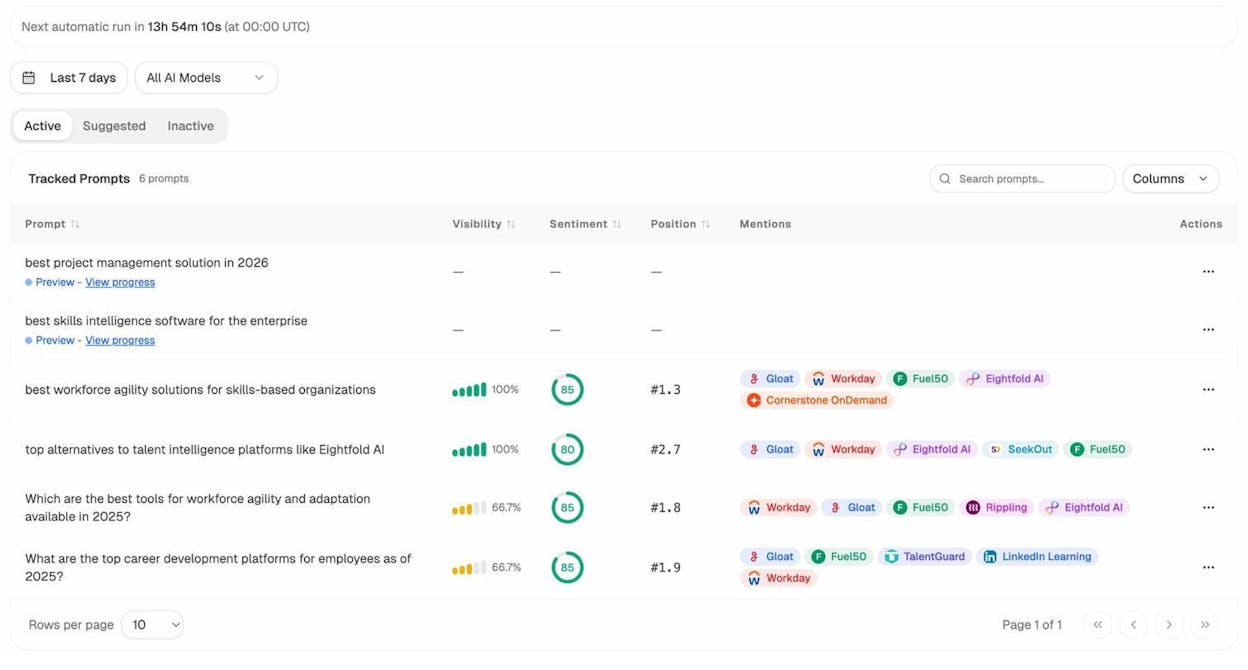
Analyze AI Prompt Tracking showing tracked prompts with visibility, sentiment, and position data
Step 2: See who AI engines recommend instead of you. The Competitor Intelligence dashboard shows which businesses AI search engines recommend alongside or instead of yours. This tells you exactly who you are competing with in AI search, and it is often different from your Google search competitors.
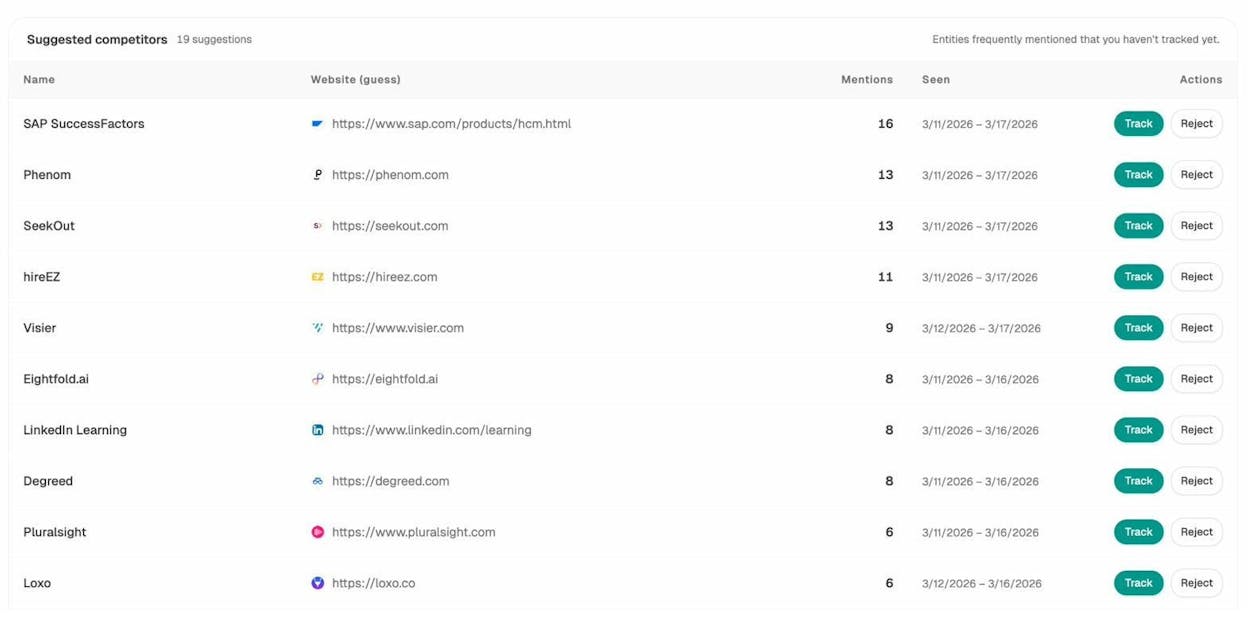
Analyze AI Competitor Intelligence showing suggested competitors and their mention frequency
Step 3: Track the sources AI engines cite. Citation Analytics shows you every URL and domain that AI platforms cite when answering questions in your space. If you see that Perplexity consistently cites Yelp and Google Reviews when recommending plumbers, you know exactly where to invest your review-building efforts.
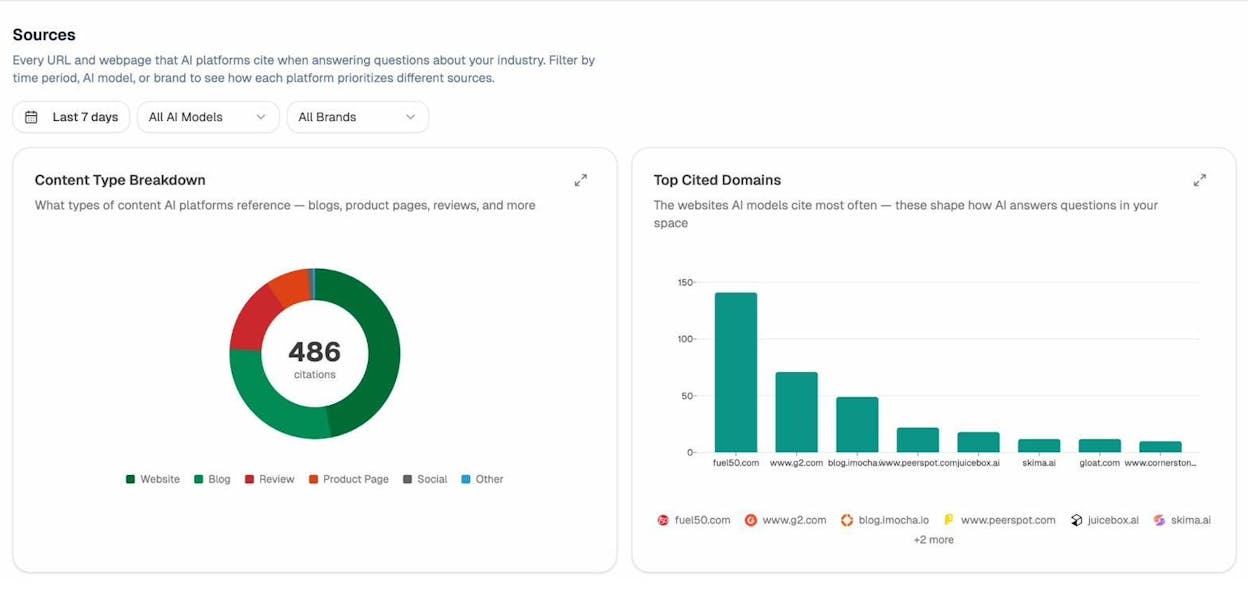
Analyze AI Sources dashboard showing content type breakdown and top cited domains
Step 4: Measure actual AI search traffic. If you connect your Google Analytics 4 account, AI Traffic Analytics shows you how many visitors come to your site from AI search engines, which pages they land on, and how they engage. This closes the loop from visibility to actual business results.
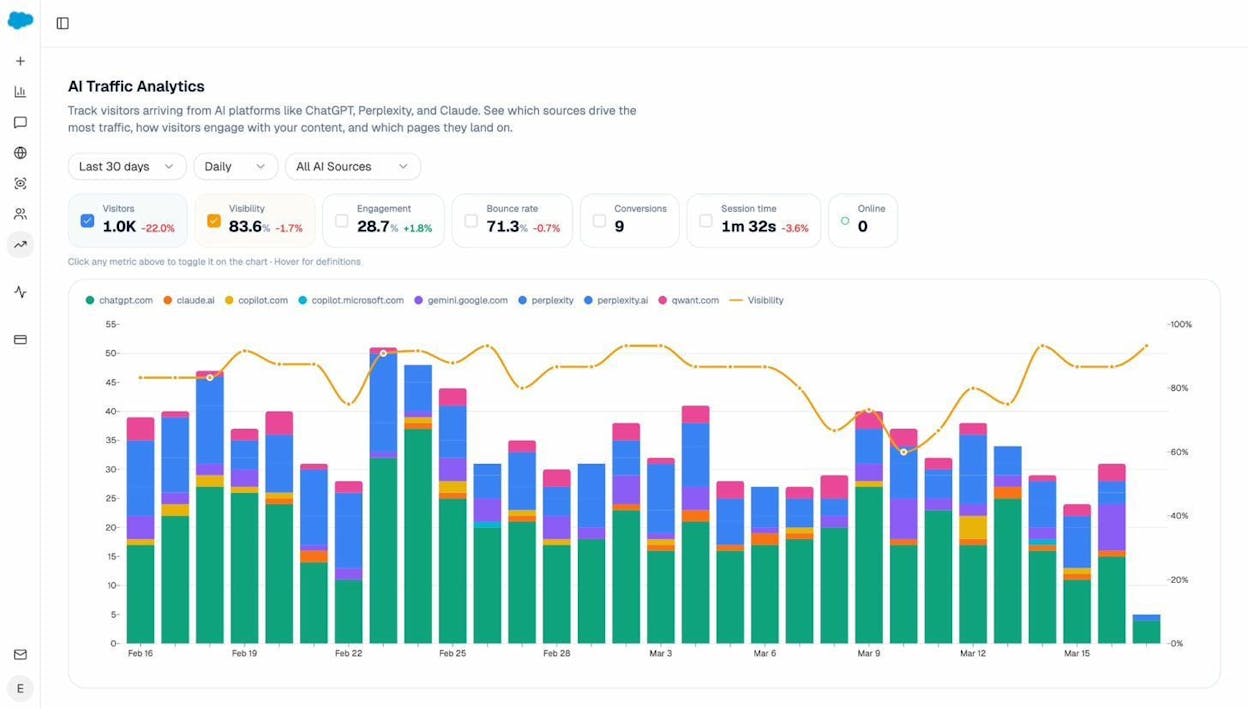
Analyze AI Traffic Analytics dashboard showing visitors, engagement, and bounce rate from AI sources
You can see exactly which AI engine sent each visitor, which landing pages receive the most AI traffic, and whether those visitors convert. For a local business, this data is invaluable because it tells you whether your AI search presence is actually driving phone calls, form submissions, or appointment bookings.
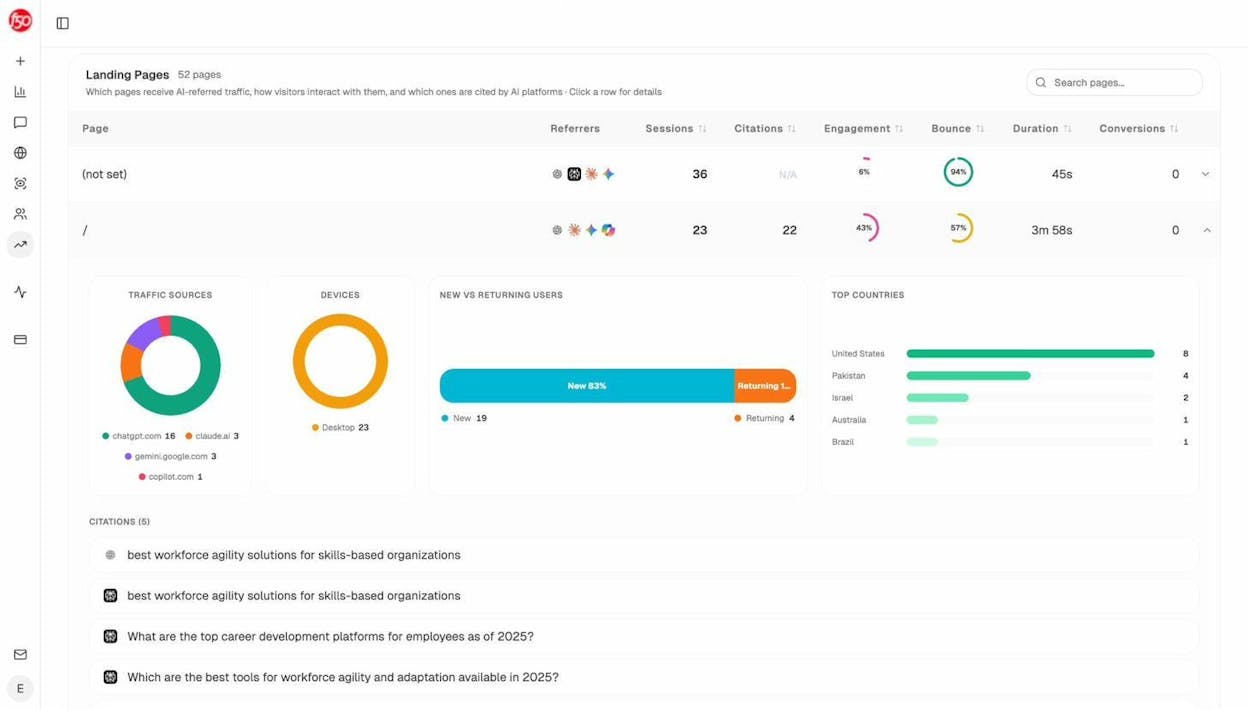
Analyze AI Traffic Analytics landing pages view showing per-page sessions, citations, and engagement from AI sources
Step 5: Get weekly updates without logging in. Analyze AI sends weekly email digests with your key AI visibility changes, competitor shifts, and priority actions. You do not need to check the dashboard every day. The digest tells you when something important changes, like a competitor overtaking you on a key prompt or a shift in AI sentiment about your business.
The local businesses winning in AI search are the same ones winning in SEO
This is the important thing to understand. AI search optimization is not a new discipline that requires throwing out everything you know about SEO. The businesses that show up in AI recommendations are the ones with accurate Google Business Profiles, strong review profiles, consistent citations, well-optimized landing pages, and healthy websites.
The only thing that changes is the measurement. Traditional SEO has Google Search Console. AI search has tools like Analyze AI. Both channels reward the same underlying work.
Recommended reading: How to Rank on ChatGPT (Based on 65,000 Citation Data)
Final thoughts
Local SEO is not complicated in principle. Claim your Google Business Profile, do keyword research, build targeted landing pages, earn citations and links, get reviews, pitch local lists, and keep your site healthy. These are the fundamentals, and they work.
What is changing is where people discover local businesses. Google is still dominant, but AI search engines are growing fast. The good news is that optimizing for both channels is mostly the same work. Clear, factual, well-structured content wins in Google and in AI search. Strong reviews help you rank in the map pack and get recommended by ChatGPT. Consistent citations build trust with Google’s algorithm and with AI models that verify information across multiple sources.
The businesses that will win local search over the next few years are the ones that treat AI search as an additional organic channel rather than ignoring it or panicking about it. Start with the fundamentals above, and add AI search tracking so you can see where you stand and where to improve.
Want to learn more? Read our guide on how to outrank competitors in AI search.

Ernest

Ibrahim


