



Summarize this blog post with:


A Pew Research Center analysis published in May 2024 found that 25% of all webpages that existed at any point between 2013 and 2023 are no longer accessible. Of pages from 2013, 38% have vanished entirely.
These are not obscure corners of the internet. Pew found that 23% of news webpages contain at least one broken link. So do 21% of government webpages. And 54% of Wikipedia pages have at least one dead reference link. Even the U.S. Supreme Court is affected, with roughly half of the URLs cited in its opinions no longer pointing to the original material.
If you rely on inbound links for SEO authority, outbound links for user trust, or citations for AI search visibility, link rot is silently eroding your work.
In this article, you’ll learn what link rot is, how bad it really is based on multiple large-scale studies, the exact reasons links die, how dead links hurt both your SEO and your AI search visibility, and a step-by-step process for finding, fixing, and preventing broken links across your entire web presence.
Table of Contents
What Is Link Rot?
Link rot is when a hyperlink stops pointing to its intended destination. The link is dead. Click it, and you get a 404 error, a timeout, a domain parking page, or some other dead end.
Link rot happens for straightforward reasons. Pages get deleted. Domains expire. Sites migrate to new URL structures without proper redirects. Content management systems change. Companies rebrand, merge, or shut down. The web is constantly moving, and links are static pointers to locations that may no longer exist.
There is a related problem called content drift. This is when the URL still works, but the page no longer contains the content that was originally linked to. The link technically functions, but it no longer delivers what the reader expected. Both weaken trust, but link rot creates the more visible failure.
Research on link half-life, the point at which half of links on a given page stop working, varies by study. A 2015 Weblock study of over 180,000 links in academic publications found a half-life of about 14 years. A widely cited 2012 study of social media links found that 30% were dead within just two years. The variance depends heavily on the type of content and the platform hosting it.
The bottom line is that link rot is not a fringe problem. It is a structural feature of the web. Every link you build, earn, or place will eventually face it.
How Bad Is Link Rot? The Data From Three Major Studies
The most comprehensive data on link rot comes from three studies. Together, they paint a clear picture of the scale.
The Ahrefs Study: 66.5% of Backlinks Are Dead
Ahrefs has been crawling the web since 2010. For this study, they analyzed link data from January 2013 onward across 2,062,173 domains. The findings are severe.
|
Finding |
Percentage |
|---|---|
|
Links that have rotted since 2013 |
66.5% |
|
Links with temporary errors (status unknown) |
6.45% |
|
Links with other SEO-blocking issues |
1.55% |
|
Total links considered lost |
74.5% |
The distribution of link rot across domains is not uniform. Small sites with few backlinks show less rot. But among sites with more than 10 live links, the rot rates climb dramatically. Larger sites tend to lose a significant majority of their links over time.
![[Screenshot: Ahrefs histogram showing link rot percentage distribution across domains]](https://www.datocms-assets.com/164164/1777454264-blobid1.png?auto=format,compress&w=1248&fit=max)
The Pew Research Center Study: 25% of All Webpages Gone
Pew’s 2024 analysis collected a random sample of nearly one million webpages from the Common Crawl web repository across each year from 2013 to 2023. They then checked whether those pages were still accessible.
|
Year of original crawl |
Percentage inaccessible in 2023 |
|---|---|
|
2013 |
38% |
|
2017 |
~27% |
|
2021 |
~20% |
|
2023 |
8% |
Even pages from 2023, less than a year old at the time of testing, had an 8% failure rate. For older content, the decay is steep and consistent.
Pew also examined the links on existing webpages across specific categories.
|
Category |
Pages with at least one broken link |
|---|---|
|
Wikipedia reference sections |
54% |
|
News webpages |
23% |
|
Government webpages |
21% |
City government pages had the worst rates among government sites. And news sites with high traffic were just as likely to have broken links as smaller outlets.
The Harvard Law Review Study: 70% of Legal Citations Broken
A 2014 study published in the Harvard Law Review examined link rot in legal citations specifically. The findings were even worse than the general web. 70% of URLs within legal journals and 50% of URLs cited in U.S. Supreme Court decisions no longer contained the originally cited material.
This study led to the creation of Perma.cc, a service that creates permanent archived copies of cited web sources.
What These Studies Tell Us Together
The pattern is consistent across every study and every category of content. The web decays. Links rot. And the rate of decay is faster than most people assume.
If you have a five-year-old website with 100 backlinks, the data suggests that somewhere between 50 and 70 of those links are no longer passing value. That is not a minor maintenance issue. That is a structural threat to your organic visibility.
Why Links Die: The 8 Most Common Reasons
Not all link deaths are equal. The Ahrefs study broke down the reasons links are classified as lost, and each reason has different implications for what you can do about it.
1. The Linking Page Was Dropped From the Index (47.7%)
This is the single biggest cause of link loss. Nearly half of all lost links come from pages that are no longer in the search index at all. The page might have been removed by the site owner, the domain might have expired, or the page might have become uncrawlable.
![[Screenshot: Ahrefs interface showing a “Dropped” link status example]](https://www.datocms-assets.com/164164/1777454269-blobid2.png?auto=format,compress&w=1248&fit=max)
When a domain dies entirely, every link from that domain dies with it. This is especially common with smaller blogs, personal websites, and startups that shut down.
2. The Link Was Removed From the Page (34.2%)
The page still exists, but your link is gone. This happens for several reasons. The site owner may have updated their content and removed or replaced your link during a refresh. Company policies may have changed. A competitor may have convinced them to link elsewhere instead.
![[Screenshot: Ahrefs interface showing a “Link removed” status example]](https://www.datocms-assets.com/164164/1777454270-blobid3.png?auto=format,compress&w=1248&fit=max)
This is the most preventable form of link loss because the page is still live. The site owner made an active choice to remove your link.
3. Crawl Errors (6.45%)
When a crawler tries to access a page and gets an error, the timeout, server error, or connection failure, the link goes into this bucket. Some of these links still exist. The server might have been temporarily down. Others are permanently gone.
The Ahrefs study intentionally excluded crawl errors from their 66.5% link rot total because of this ambiguity. But they still count as lost for SEO purposes.
4. The Linking Page Was Redirected (5.99%)
The page containing your link got redirected somewhere else, usually during a website migration. The redirect target may not include your link. Even if the content moved intact, redirect chains can dilute or break the link value.
This is common when companies rebrand, change CMS platforms, or restructure their URL architecture.
5. The Linking Page Returns a 404 (4.11%)
The page was deleted outright. No redirect, no archive, just gone. The content and your link disappeared with it.
Pages occasionally come back from the dead. They might be restored from a backup or redirected later. But until that happens, the link value is zero.
6. The Linking Page Changed Its Canonical URL (0.82%)
The page still exists, but its canonical tag now points to a different URL. This might happen when a site migrates from HTTP to HTTPS, standardizes trailing slashes, or consolidates duplicate pages.
This is usually not a problem for the content itself. The link has technically just shifted locations. But depending on how search engines handle the canonical change, the link may temporarily lose value.
7. The Linking Page Is Marked “Noindex” (0.73%)
The page is still live and your link is still there. But the page has a noindex tag, which means search engines will not count links from it.
This happens when site owners add noindex tags to pages they do not want in search results but have not actually removed. The link exists but passes no SEO value.
8. Broken Redirect Chains (< 0.1%)
This is a small but frustrating category. The link originally went through a redirect chain, like Site A pointing to Site C which redirected to your Site B. If any link in that chain breaks, the connection to your site is severed.
This is hard to detect and harder to fix because the break can happen at any point in the chain.
How Link Rot Hurts Your SEO
Link rot creates three distinct SEO problems that compound over time.
Lost link equity. Every dead backlink is link equity that no longer reaches your pages. If 66.5% of your links have rotted, that is 66.5% of your earned authority that has evaporated. For competitive keywords, this gap between your current link profile and your historical one can be the difference between page one and page two.
Wasted crawl budget. When Googlebot encounters broken internal links on your site, it spends crawl budget following dead ends. On large sites with thousands of pages, this can meaningfully reduce how often your important pages get crawled and indexed. Use the Analyze AI free Broken Link Checker to audit your site for these issues.
Damaged user experience. A visitor who clicks a link and hits a 404 page is less likely to stay on your site, less likely to trust your content, and less likely to convert. High bounce rates on pages with broken links can signal to search engines that your content is not delivering what users expect.
The SEO damage from link rot is slow and cumulative. You will not see a sudden drop in rankings. Instead, you will see a gradual erosion of authority as your competitors continue building fresh links while your old ones decay.
How Link Rot Affects AI Search Visibility
Here is where link rot gets interesting for anyone paying attention to AI search.
AI answer engines like ChatGPT, Perplexity, Gemini, and Copilot do not just link to sources. They cite them. When an AI engine recommends a resource and includes a URL, that citation is a direct visibility signal. It tells the user exactly where to go for more information.
But AI models are trained on web data that includes dead links. And the models themselves can fabricate citations entirely. A 2026 study published in Nature found that nearly 20% of references generated by LLMs were fabricated. Another study in arxiv found a persistent 17% rate of unresolvable citations in AI-generated survey papers.
Link rot compounds this problem in two ways.
First, when AI models cite your content and the URL is dead, the user clicks through to nothing. You had the visibility. You had the recommendation. But the broken link destroyed the conversion opportunity. This is the AI search equivalent of ranking #1 on Google but having a 404 page.
Second, when the sources that AI models rely on for their training data contain broken links, the models lose access to the context that made those sources authoritative. If your best content is cited by pages that have since rotted, the chain of authority that led AI models to trust you weakens over time.
This matters because AI search is growing as a traffic channel. In Analyze AI’s AI Traffic Analytics, you can see exactly how many visitors arrive from ChatGPT, Perplexity, Gemini, and other AI engines, which landing pages they reach, and how they engage.
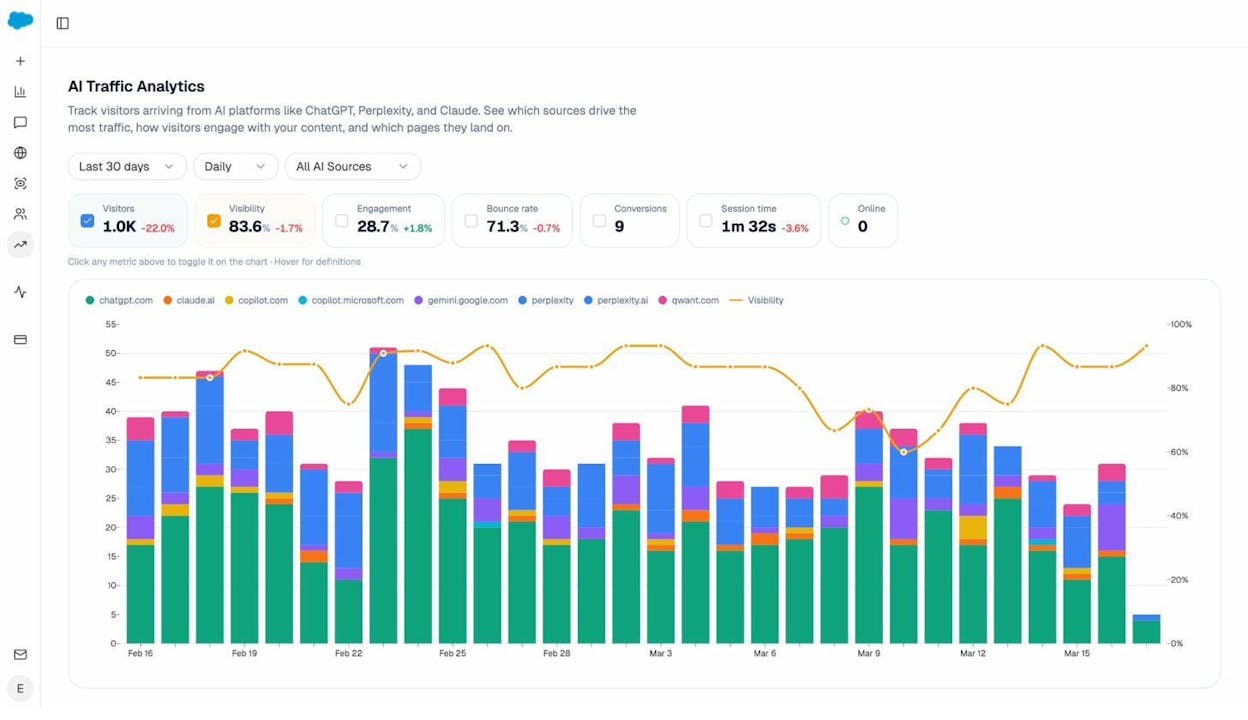
If you are seeing AI referral traffic to specific pages, those pages need to be bulletproof. No broken internal links. No dead outbound links. No 404s on URLs that AI engines might be citing.
You can also use the Analyze AI Landing Pages view to see which specific pages receive AI-referred traffic, how visitors interact with them, and which AI prompts drove the citations.
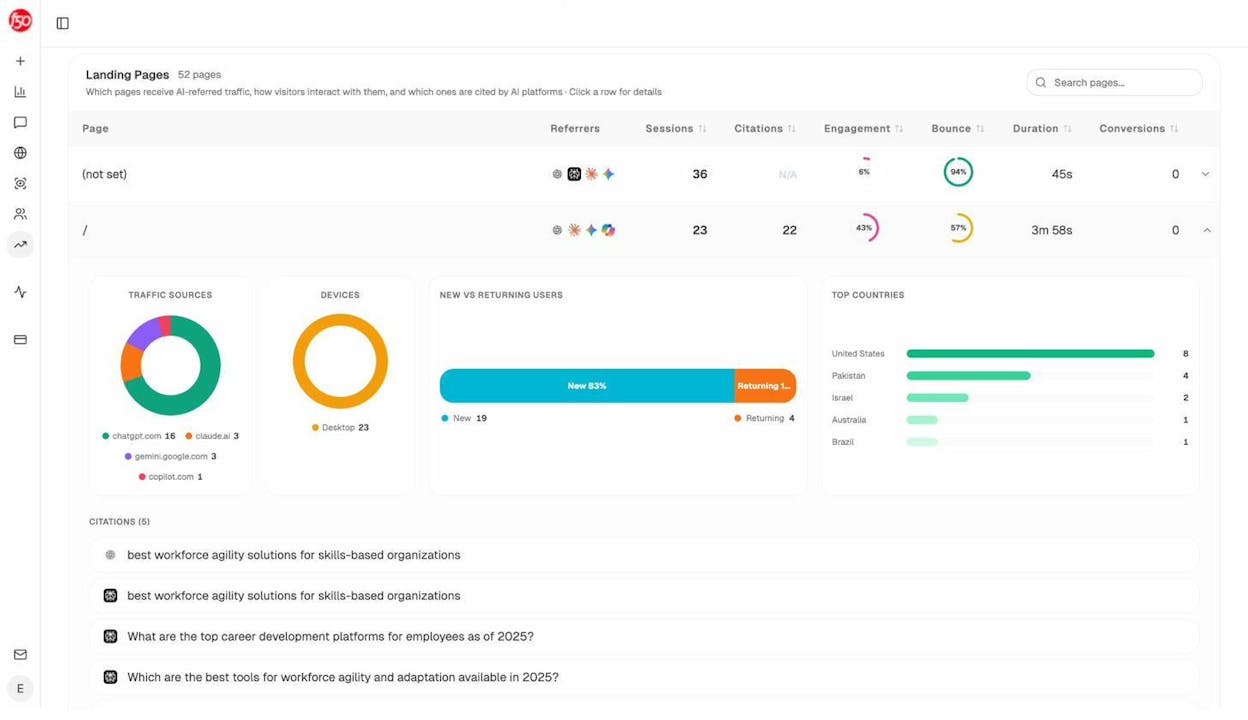
This data tells you exactly which pages to audit first. If a page is getting significant AI referral traffic and has broken links, you are actively losing conversions from a growing channel.
How to Find Broken Links on Your Website
Finding broken links is the first step toward fixing them. There are several approaches, and the right one depends on the size of your site.
Use a Free Broken Link Checker
For a quick audit, run your domain through the Analyze AI Broken Link Checker. It will crawl your site and identify links that return 4xx or 5xx status codes.
![[Screenshot: Analyze AI Broken Link Checker tool results showing broken links found on a sample domain]](https://www.datocms-assets.com/164164/1777454279-blobid6.png?auto=format,compress&w=1248&fit=max)
This is the fastest way to get a snapshot of your broken link situation without installing anything or signing up for a paid tool.
Use Google Search Console
Google Search Console’s Coverage report shows you URLs on your site that return 4xx errors. This is free, accurate, and directly from Google’s perspective.
Here is how to check it:
-
Open Google Search Console and select your property
-
Go to Pages (formerly Coverage)
-
Look at the “Not indexed” section
-
Filter for “Not found (404)” errors
![[Screenshot: Google Search Console showing 404 errors in the Pages report]](https://www.datocms-assets.com/164164/1777454280-blobid7.png?auto=format,compress&w=1248&fit=max)
The limitation of Search Console is that it only shows pages Google has tried to crawl. It will not catch every broken link on your site, especially on pages that Google does not visit frequently.
Use a Desktop Crawler
For a thorough audit of a large site, use a desktop crawler like Screaming Frog. It will crawl every page on your site and map every link, internal and external, along with its status code.
Here is a step-by-step process:
-
Open Screaming Frog and enter your domain URL
-
Start the crawl and let it complete
-
Go to the Response Codes tab
-
Filter for Client Error (4xx) to see broken internal links
-
Go to the Bulk Export menu and export “All Outlinks” to check external links
![[Screenshot: Screaming Frog crawler showing broken link results filtered by 4xx status codes]](https://www.datocms-assets.com/164164/1777454283-blobid8.png?auto=format,compress&w=1248&fit=max)
The free version of Screaming Frog crawls up to 500 URLs. For larger sites, you will need the paid license.
Check External Links Too
Most broken link audits focus on internal links. But your outbound links matter for user experience and credibility.
A page that links to five external resources, three of which are dead, signals to both users and AI models that the content is outdated. If AI engines are citing your page as a source, broken outbound links can undermine the authority that earned you that citation.
To check external links, you need to enable external link checking in your crawler. In Screaming Frog, go to Configuration > Spider > Advanced and check “Check External Links.”
How to Fix Broken Links (Step by Step)
Once you have your list of broken links, prioritize them based on impact.
Step 1: Fix Internal Broken Links First
Internal broken links are the easiest to fix because you control both sides.
For each broken internal link, you have three options. Update the link to point to the correct current URL. Set up a 301 redirect from the old URL to the new one. Remove the link entirely if the content no longer exists.
The redirect approach is usually best because it fixes the broken link everywhere it appears on your site with a single change.
Step 2: Redirect Your 404 Pages That Have Backlinks
This is where link rot recovery gets exciting. If pages on your site return 404 errors but still have backlinks pointing to them, you are leaving link equity on the table.
Here is how to find these opportunities. Go to a backlink checker tool and pull up your domain. Look at the “Best by links” or equivalent report and filter for pages that return a 404 status code. Sort by the number of referring domains.
Each of those referring domains is a backlink that currently points to a dead page on your site. Set up a 301 redirect from each 404 URL to the most relevant live page, and you instantly reclaim that link equity.
This is, quite literally, the fastest link building you can do. No outreach. No content creation. Just one redirect.
Step 3: Fix or Replace Broken Outbound Links
Go through each broken external link and find a suitable replacement. Look for an updated version of the same resource, a similar resource from a different source, or an archived version on the Internet Archive’s Wayback Machine.
If no replacement exists, remove the link. A dead link is worse than no link.
Step 4: Set Up Monitoring
Fixing broken links once is not enough. New links break all the time. Set up a recurring crawl, monthly for most sites, quarterly at minimum, to catch new breaks before they accumulate.
You can also use the Analyze AI Website Audit tool to get a broader view of your site’s health, including link issues alongside content and AI visibility factors.
How to Reclaim Lost Backlinks
Beyond fixing your own broken links, you can actively reclaim backlinks that you have lost.
Find Your Lost Backlinks
Use a backlink monitoring tool to pull up your domain’s backlink history. Filter for links with a “Lost” status. Sort by the authority of the referring domain to prioritize high-value opportunities.
![[Screenshot: Backlink tool showing lost backlinks filtered by status with domain authority column visible]](https://www.datocms-assets.com/164164/1777454284-blobid9.png?auto=format,compress&w=1248&fit=max)
Common reasons you will see for lost links include pages being removed or redirected on the linking site, your link being replaced during a content update, or the linking domain going offline entirely.
Reach Out to Site Owners
For links lost because your link was removed during a content refresh, or because the linking page was redirected and your link dropped in the process, direct outreach can work.
Write a short, specific email. Mention the exact page and the link that was previously there. Explain why the link is still relevant. If the linking site updated their content, offer an updated resource on your end that fits their new angle.
Do not send bulk templates. Personalized outreach converts at a much higher rate than generic emails.
Track the Results
A case study from Moz showed that their team analyzed lost backlinks and found they had lost 74 backlinks worth roughly $320 each over three years, a total value of nearly $24,000. Through targeted outreach, they reclaimed 31 of those backlinks in 30 days, recovering about $10,000 in link value.
Link reclamation is one of the highest-ROI activities in SEO because the links already existed. You are not building from scratch. You are recovering what was already yours.
How to Use Broken Link Building to Your Advantage
Link rot is not just a problem to fix. It is an opportunity to exploit.
Broken link building is a proven link building tactic that turns other people’s link rot into your backlinks. The process is straightforward.
Step 1: Find Broken Resource Pages in Your Niche
Look for resource pages, round-up posts, and curated lists in your industry that link to content that no longer exists. You can find these by searching for terms like “[your topic] resources” or “[your topic] useful links” and then checking for dead links on those pages.
![[Screenshot: Google search results for “[topic] resources” pages that could contain broken outbound links]](https://www.datocms-assets.com/164164/1777454288-blobid10.png?auto=format,compress&w=1248&fit=max)
Step 2: Create a Replacement Resource
If a dead link pointed to a guide about keyword research strategies, create a better guide about keyword research strategies. Your replacement content needs to be at least as good as whatever the dead link originally pointed to.
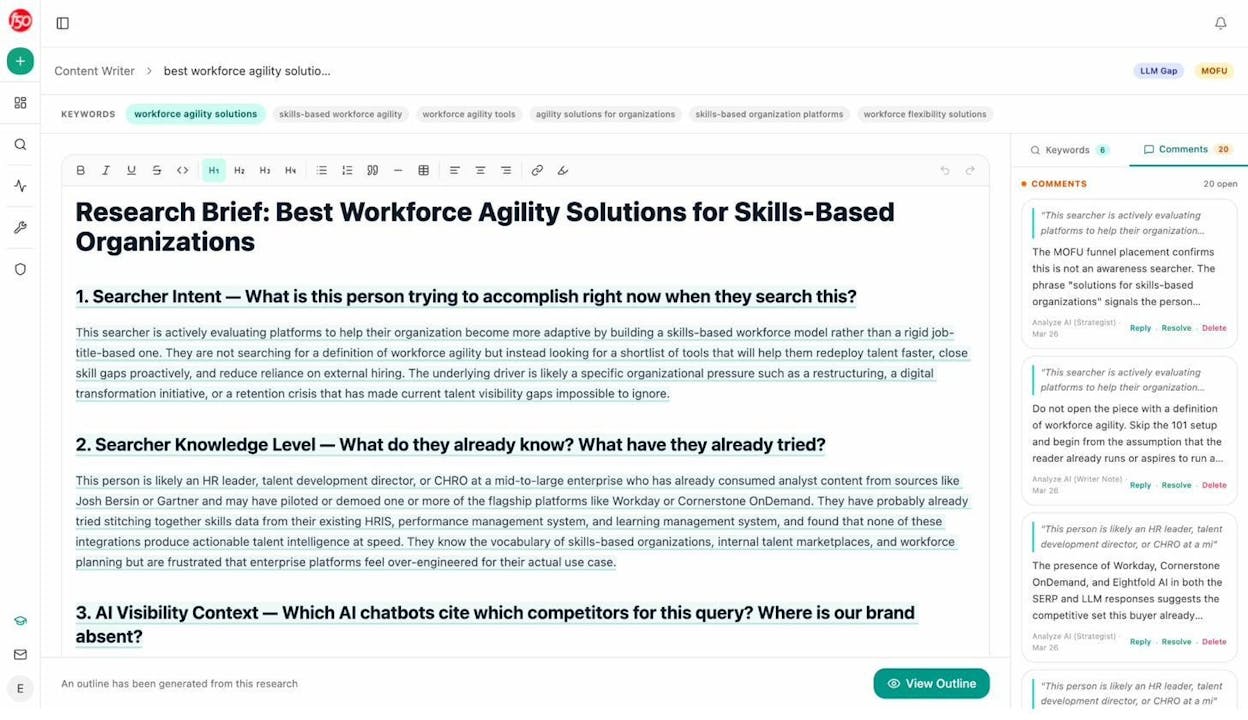
Use the Analyze AI Content Writer to research the topic, identify gaps in existing content, and draft a resource that fills the void left by the dead page. The Content Writer pulls in competitor analysis and AI visibility data so your replacement content is optimized for both search engines and AI answer engines from the start.
Step 3: Reach Out to the Linking Site
Email the site owner or webmaster. Let them know that one of their links is broken, that it creates a poor experience for their visitors, and that you have a resource that can replace it.
This approach works because you are solving their problem, not just asking for a link. The site owner benefits from fixing their broken link, and you benefit from earning the backlink.
How to Prevent Link Rot Proactively
Fixing broken links is reactive. Preventing them is better. Here are specific strategies that reduce link rot on your site over time.
Use Clean, Permanent URL Structures
Decide on a URL structure and stick with it. Avoid date-based URLs like /2024/03/post-title/ because they become awkward to redirect after a content refresh. Use flat, descriptive slugs like /post-title/ instead.
If you must change a URL, always set up a 301 redirect from the old URL to the new one. Never just delete a page that has inbound links.
Avoid Linking to Fragile Sources
When choosing external sources to link to, prefer stable, institutional sources over personal blogs and startup pages. Government sites (.gov), academic institutions (.edu), and major publications are less likely to disappear than a personal blog or a startup’s marketing site.
That said, no source is permanent. Even Supreme Court URLs rot. But you can reduce your risk by choosing sources with longer track records.
Use the Internet Archive as a Fallback
When you link to a resource that you suspect might not last, save a copy on the Internet Archive’s Wayback Machine at the time you publish. If the original source dies, you can update your link to point to the archived version.
Some publishers have started using Perma.cc for this purpose, especially for legal and academic citations.
Audit Your Links on a Schedule
Build a broken link audit into your content maintenance calendar. Quarterly is a reasonable cadence for most sites. For sites with thousands of pages and heavy outbound linking, monthly is better.
Pair your link audit with a broader SEO content strategy review to catch not just broken links but also outdated content, thin pages, and new ranking opportunities.
How to Monitor Link Health in AI Search
Traditional SEO tools show you broken links from a search crawler’s perspective. But if AI engines are citing your content, you need to monitor link health from an AI search perspective too.
Track Which Pages AI Engines Cite
Analyze AI’s Citation Analytics shows you every URL and domain that AI engines cite in your space. You can see which of your pages are being cited, which competitor pages are being cited instead, and which content types, like blogs, docs, or product pages, AI models prefer to reference.
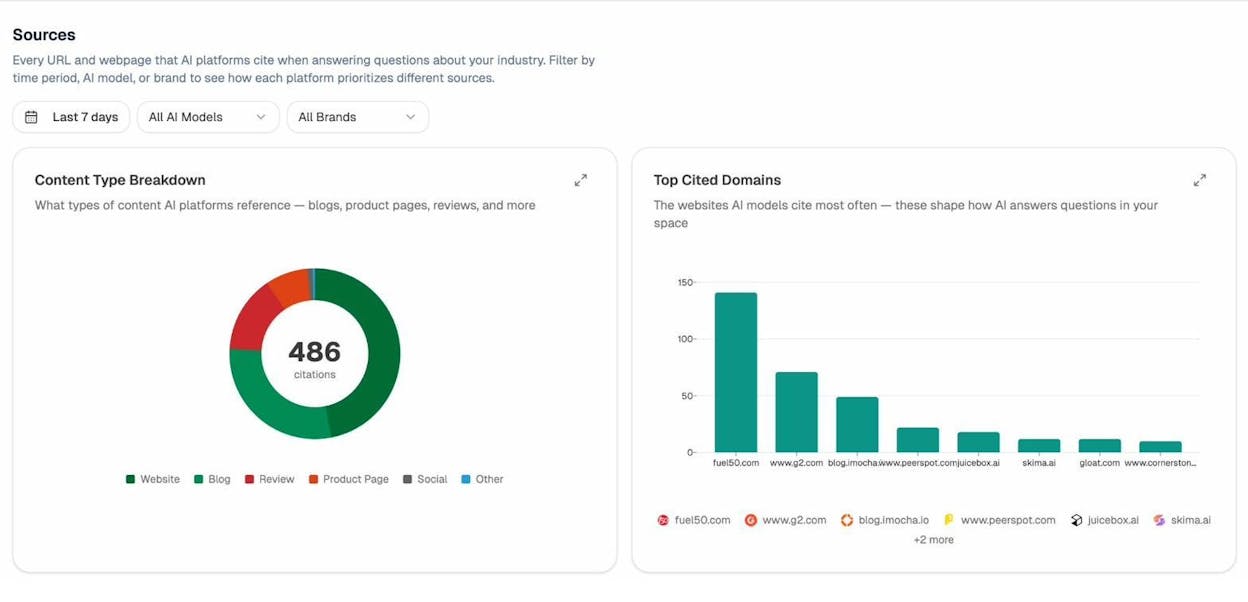
If you notice that AI engines are citing a specific page on your site, that page needs to be in perfect health. No broken internal links. No dead outbound links. Fresh, accurate content. Because if someone follows that AI citation and lands on a page full of dead links and outdated information, you have lost a conversion from a channel that is growing every month.
Monitor Your Competitors’ Link Health Too
Here is an angle most people miss. If your competitors have significant link rot, their pages become less authoritative over time, both to Google and to AI models. This creates an opening for you.
Use Analyze AI’s Competitor Intelligence to see which competitors are getting mentioned across AI engines. Then check whether those competitor pages are well-maintained or deteriorating.
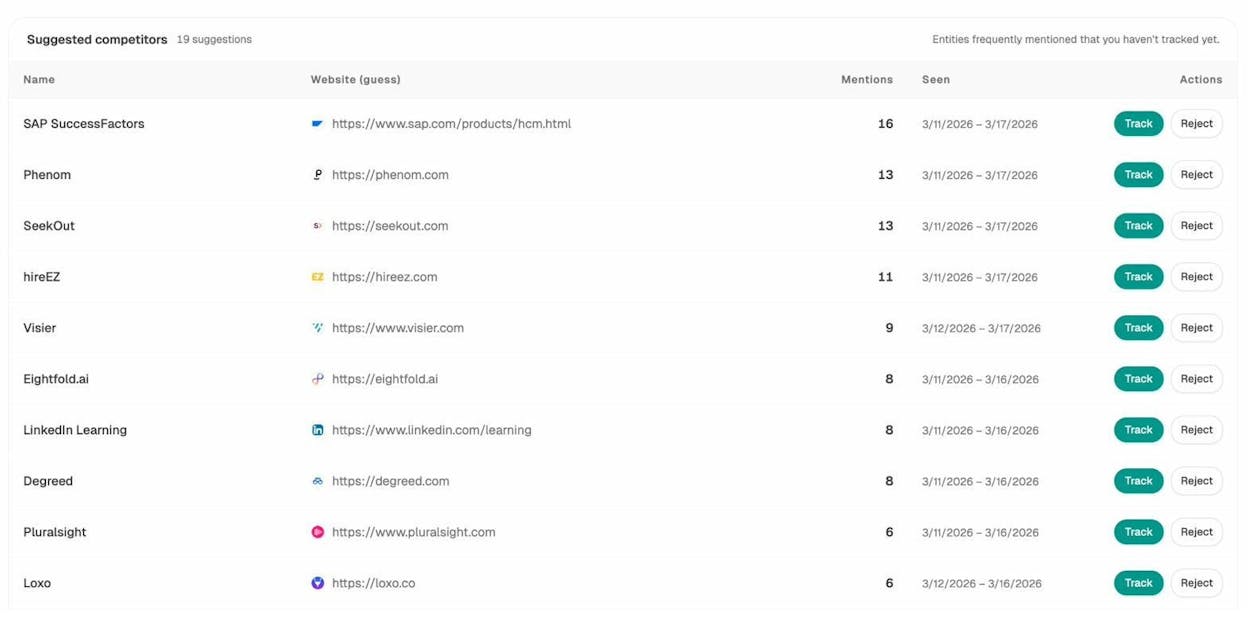
If a competitor’s frequently-cited page has broken links or outdated content, you can create a better version of that resource and position it to replace the competitor as the AI engine’s preferred citation.
Watch for Content Drift in AI Answers
Content drift, where a page’s content changes enough that it no longer matches what the AI model expected, is the AI search version of link rot. The URL works, but the substance has shifted.
Use Analyze AI’s Prompt Tracking to monitor how AI engines answer key prompts over time. If your brand suddenly drops from an AI answer where it previously appeared, content drift on a cited source might be the cause.
Combine this with AI Sentiment Monitoring to catch shifts in how AI engines frame your brand. If a key source rots or drifts, the narrative AI builds around your brand can change without you realizing it.
Final Thoughts
Link rot is not a bug in the internet. It is a feature. The web is a living system. Pages are created, moved, updated, and deleted constantly. Links are static references to moving targets.
The data is clear. Two-thirds of links die within a decade. A quarter of all webpages from the past decade are already gone. And this problem extends beyond traditional search into AI search, where citations link to sources that may no longer exist.
The companies that treat link maintenance as an ongoing operational task, not a one-time cleanup, will compound their organic visibility over time. The ones that ignore it will watch their authority quietly erode, in Google’s index and in AI answers alike.
SEO is not dead. But links are, at a rate of about 66.5%. And now that AI search adds another layer where citations and sources matter, keeping your links alive has never been more important.
Start with an audit. Use the Analyze AI Broken Link Checker to find your dead links. Redirect your 404 pages that have backlinks. Fix your outbound links. And set up monitoring so you catch new breaks before they pile up.
The web decays. Your site does not have to.

Ernest

Ibrahim


