



Summarize this blog post with:


Having a Wikipedia page about your company is one of the most powerful brand assets you can build. Google any well-known brand and you’ll see a Knowledge Panel on the right side of the search results. Most of the information inside that panel comes directly from Wikipedia and Wikidata.
![[Screenshot of a Google Knowledge Panel for a well-known brand, showing information pulled from Wikipedia]](https://www.datocms-assets.com/164164/1777325094-blobid1.png?auto=format,compress&w=1248&fit=max)
But here’s what many marketers miss. Wikipedia doesn’t just feed Google’s Knowledge Panel. It’s one of the primary training sources for large language models like ChatGPT, Gemini, Claude, and Perplexity. When someone asks an AI search engine about your company, the model draws heavily from your Wikipedia page to form its answer. If you don’t have one, the AI fills in the gaps with whatever fragmented information it can find. Sometimes it gets your brand wrong entirely.
That makes a Wikipedia page a dual-channel asset. It improves your visibility in traditional search results through Google’s Knowledge Graph. And it shapes how AI search engines describe, recommend, and position your brand.
The catch is that creating a Wikipedia page is difficult. Wikipedia has strict notability requirements, a complex editorial process, and a volunteer community that aggressively removes pages that don’t meet its standards.
In this article, you’ll learn how to create a Wikipedia page for your brand from scratch. You’ll walk through each step of the process, from checking whether your company qualifies to submitting, surviving the review, and monitoring the page long-term. You’ll also learn why a Wikipedia page now matters more than ever for how AI search engines represent your brand, and how to track that impact after your page goes live.
Table of Contents
1. Check your notability
The most common reason Wikipedia pages fail the review process is lack of notability. And the harsh reality is that your brand is almost certainly less notable than you think.
Consider this. Ahrefs is one of the most popular SEO toolsets in the world. Nearly every SEO professional has mentioned it at some point. Their two biggest competitors already had Wikipedia pages. Yet when Ahrefs submitted their first Wikipedia article, it was declined.
![[Screenshot of a Wikipedia submission declined notice, showing rejection for notability concerns]](https://www.datocms-assets.com/164164/1777325103-blobid2.png?auto=format,compress&w=1248&fit=max)
Even after eventually getting their page approved, it was flagged and deleted two weeks later due to source quality concerns and perceived bias against the SEO industry.
If a company as well-known as Ahrefs struggles to pass Wikipedia’s notability bar, you should expect the same challenge for your brand.
What notability means for Wikipedia
Wikipedia’s notability criteria for companies state that an organization is generally considered notable if it has been the subject of significant coverage in reliable, independent secondary sources. Every word in that definition carries weight.
Here’s what each criterion means in practice:
Reliable means the source has established editorial credibility. This includes most journalistic outlets, academic sources, and books from reputable publishers. It also includes industry-leading publications with proper editorial processes. User-generated content, sponsored posts, and pay-for-play articles don’t count, even if they appear on sites like Forbes or Entrepreneur.
Independent means the source has no financial or organizational relationship with your brand. This is where many companies get tripped up. Customer testimonials, case studies, and sponsored reviews all fail the independence test. Wikipedia even considers your own customers as related to your business.
Secondary means the source must include the author’s own analysis, evaluation, or interpretation. Original research papers, SEC filings, and press releases are considered primary sources and don’t count.
Significant coverage means more than a passing mention. The Wikipedia consensus generally requires at least two paragraphs dedicated to your company within the source. A full article about your company is the strongest form of coverage.
Many brands have “As seen in” logos on their homepage showing Forbes, TechCrunch, or The Wall Street Journal. These logos are misleading because much of that coverage is either a brief mention, sponsored content, or user-generated. None of those qualify.
How to quickly estimate your notability
Before investing time in the full Wikipedia page creation process, run through these three checks.
Check 1: Your company isn’t “run-of-the-mill.” Wikipedia uses this term to describe companies that don’t stand out from others in their space. Local businesses are the most common example, but the definition can stretch further than you’d expect. Your company needs something that genuinely differentiates it from competitors in a way that independent sources have noticed and covered.
Check 2: You have significant coverage in reliable and independent sources. If your brand has been featured in a dedicated article on a major news site like The New York Times, The Wall Street Journal, The Guardian, or a well-established trade publication, you’re in a strong position. If the best coverage you can find is passing mentions or sponsored articles, you likely don’t qualify yet.
Check 3: Your brand has “red links” on Wikipedia. A red link on Wikipedia means another article mentions your brand but there’s no corresponding Wikipedia page for it yet. You can find these by searching Google with the operator site:wikipedia.org "your brand name". Red links suggest that the Wikipedia community itself recognizes your brand as something that should have a page.
![[Screenshot of a Google search using the site:wikipedia.org operator to find brand mentions]](https://www.datocms-assets.com/164164/1777325108-blobid3.png?auto=format,compress&w=1248&fit=max)
Keep in mind that Wikipedia operates in different languages as separate entities. Red links on the French or German Wikipedia don’t help with your English Wikipedia page.
2. Find sources to establish notability
Most companies won’t have an obvious all-star source or red links to start with. You’ll need to build your source list methodically. Work through these three methods in order, because they’re ranked by efficiency.
A. Check your referring domains for non-trivial coverage
Your backlink profile is the fastest way to find sources that might qualify. Open a backlink analysis tool and look at your referring domains report. Sort by domain authority or popularity and scan for well-known news sites, magazines, and industry publications.
When you find a promising domain, click through to see the actual page that links to you. Check whether your brand gets at least two paragraphs of dedicated coverage, not just a passing mention or a link in a list.
If the coverage looks like this, where your brand appears as one item in a long list with no meaningful discussion, it won’t work.
If the coverage looks more like a dedicated section or entire article about your company, that’s the kind of source you need.
You can use Analyze AI’s free website authority checker to quickly assess the domain authority of potential source websites before you invest time evaluating the content.
B. Dig into books and journals
If your company operates in an industry where professionals write books or academic papers, these can be strong sources. Search Google Books for your brand name to find any books that mention your company and see the context in the preview.
![[Screenshot of Google Books search results showing a brand name mention with surrounding context]](https://www.datocms-assets.com/164164/1777325109-blobid4.png?auto=format,compress&w=1248&fit=max)
For academic journals, JSTOR is the most trusted directory and is recommended by Wikipedia itself. Be aware that many academic papers in fields like marketing and technology are far removed from real-world practice. Some journals are also classified as predatory journals that Wikipedia considers unreliable.
Stick with JSTOR and major academic databases. Don’t waste time digging through obscure journals that Wikipedia editors will immediately dismiss.
C. Check brand mentions for unlinked coverage
If you’re close to meeting the notability threshold but need one more strong source, search for unlinked brand mentions. These are articles that discuss your brand without linking back to your website, so they wouldn’t appear in your backlink profile.
You can find these using Google search operators. Combine site: with major publication domains and your brand name in quotes to find mentions across specific outlets.
This process is time-consuming when done manually. A backlink analysis tool with a content explorer feature can speed this up significantly. Search for your brand name, exclude your own domain, filter for high-authority sites, and look for pages that mention you but don’t link to you.
What to do if you don’t meet the notability guidelines
If you can’t find enough qualifying sources, don’t force a submission. Wikipedia records the number of times a submission has been declined, and a history of rejections makes future approvals harder.
Instead, focus on building your notability over time.
Step up your PR and media coverage. Getting featured in major publications is one of the hardest marketing tasks, but it’s the most direct path to Wikipedia notability. Focus on creating newsworthy content, original research, and data studies that journalists want to cover. Actively pursue press opportunities and build relationships with reporters in your space.
Not all media coverage is equal for Wikipedia purposes. An article about an infographic you created will mention your brand, but the focus will be on the content, not the company itself. You need coverage where your company is the subject.
Try Wikipedia in other languages. If your business has roots in a non-English speaking country, you’ll likely have more coverage in local media. The notability threshold scales with the number of speakers of that language. Getting a Wikipedia page in your local language first can be significantly easier than the English Wikipedia.
How to check your brand’s notability in AI search
Here’s something most Wikipedia guides leave out. Before you build your Wikipedia page, it’s worth understanding how AI search engines currently represent your brand. If AI models are already mentioning your company with inaccurate or incomplete information, a Wikipedia page becomes even more urgent because it gives models a verified source to draw from.
With a tool like Analyze AI, you can track your brand’s visibility across ChatGPT, Perplexity, Gemini, Claude, and Copilot. You can see whether these models mention you at all, what they say about you, and how you compare to competitors.
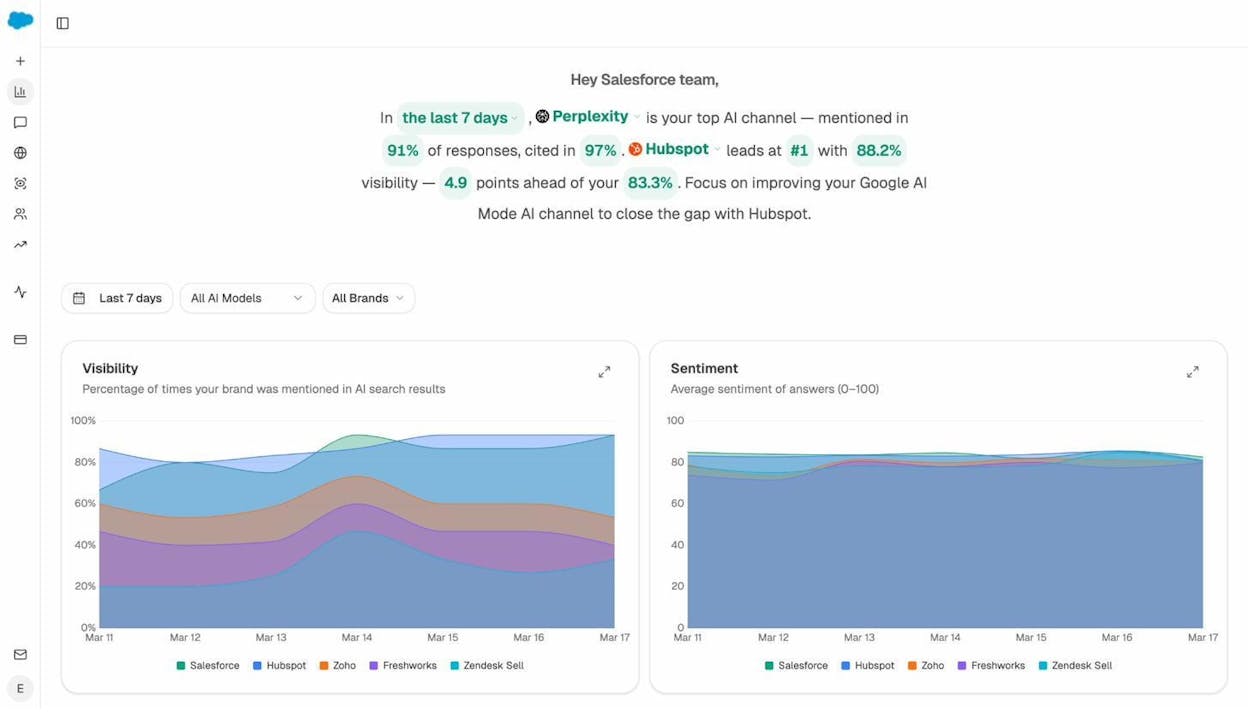
This context is valuable for two reasons. First, it tells you how urgently you need a Wikipedia page. If AI models are already getting your brand wrong, or if competitors have Wikipedia pages and you don’t, your brand narrative in AI search is being shaped by incomplete data. Second, it gives you a baseline measurement so you can track the impact of your Wikipedia page after it goes live.
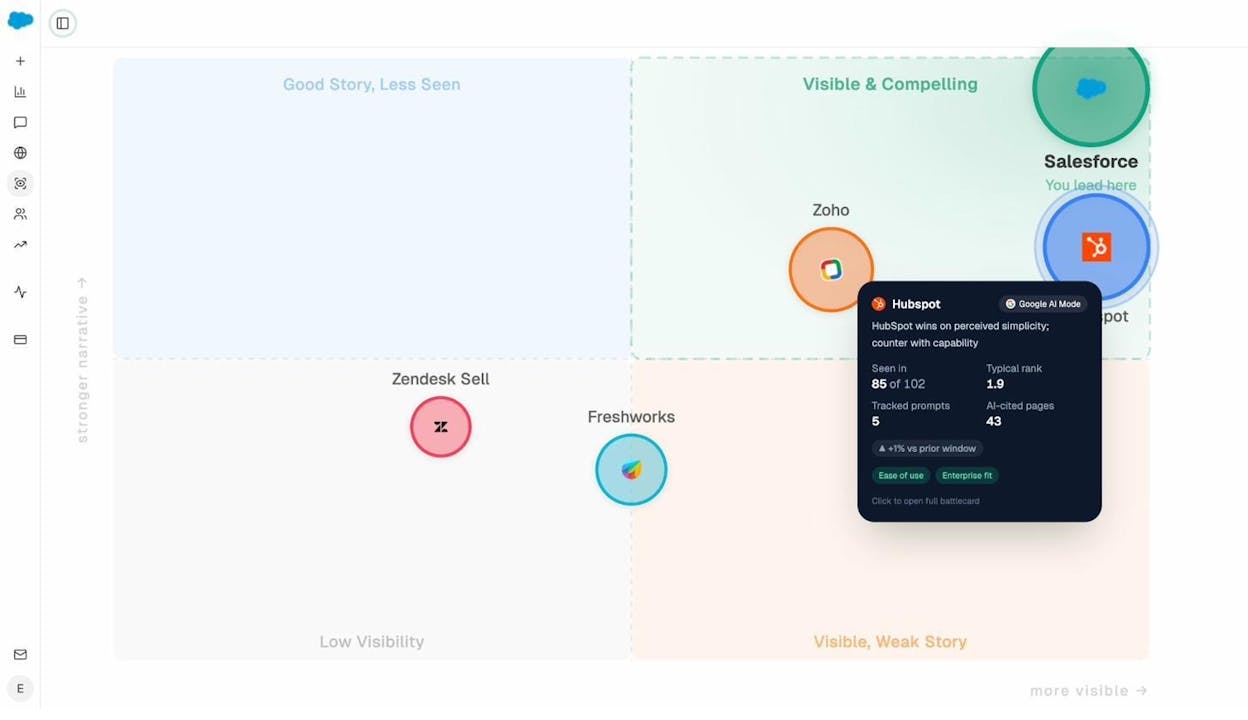
You can also use Analyze AI’s Perception Map to see how your brand stacks up against competitors in terms of AI visibility and narrative strength. Companies in the “Visible & Compelling” quadrant tend to be the ones with strong Wikipedia pages and well-established media footprints.
3. Create a user page
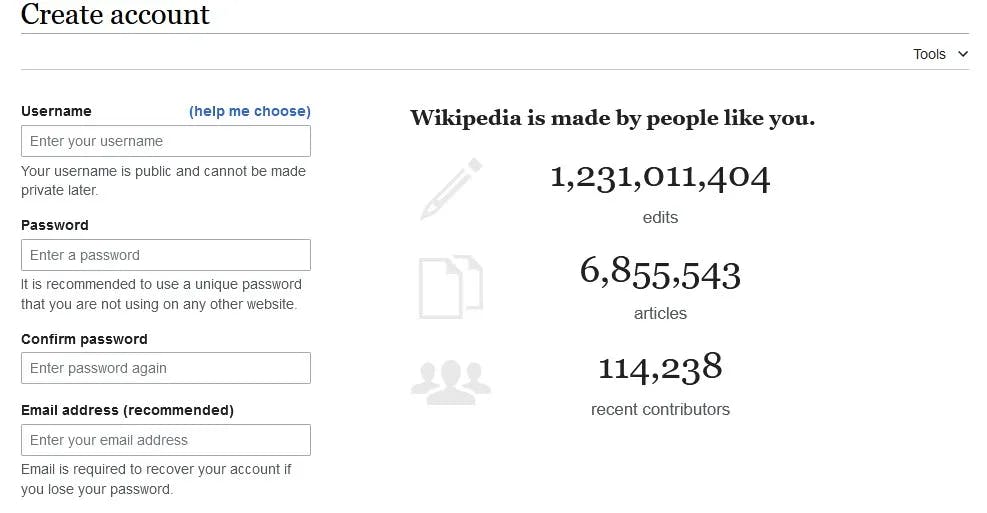
Wikipedia is a community-driven project. The only way to be taken seriously is to have an account with a history of genuine contributions. Signing up and creating a user page is a necessary step.
Here’s the critical part many people skip. You need to disclose your conflict of interest (COI). Creating or editing content about your own company is discouraged on Wikipedia, and while submitting a draft of your company’s page isn’t prohibited, you must let editors know you have a COI.
The primary place to disclose your COI is on your user page. Use one of Wikipedia’s COI templates and fill in the name of your employer.
This might feel counterintuitive. You’re telling Wikipedia reviewers upfront that you have a bias. But transparency is exactly what the community respects. Accounts that try to hide their affiliation are flagged as suspicious and face much harsher scrutiny.
4. Build your reputation
Before you submit your company’s page, invest time contributing to other Wikipedia articles. This accomplishes two things.
First, it builds your account reputation. Wikipedia editors can see your entire edit history. An account with zero contributions that suddenly submits a company page screams “single-purpose account,” which is a red flag that invites extra scrutiny.
Second, it teaches you how Wikipedia’s content management system works. The Wikipedia editor has a learning curve. You’ll learn how to format text, insert citations, add templates, and navigate talk pages. By the time you submit your company page, you’ll be fluent in the process.
Here’s how to approach this.
Start small. Fix typos, update outdated statistics, add missing citations, or expand stub articles in topics you genuinely know about. Focus on articles unrelated to your company or industry to show you’re not a single-purpose account.
Aim for at least 10-15 meaningful edits across different articles before submitting your company page. This isn’t a hard requirement, but it’s a practical threshold that demonstrates genuine community engagement.
Track your edit history. Every edit you make is logged with your username. Build a history that shows thoughtful contributions, not just minor formatting tweaks.
There’s also a technical consideration. Wikipedia has a concept called “autoconfirmed” status. An account becomes autoconfirmed after at least 10 edits and 4 days of account age. Autoconfirmed users can move articles, edit semi-protected pages, and create new articles without going through the formal Articles for Creation (AfC) review queue. For most company pages, you’ll still want to use the AfC process, but autoconfirmed status gives you more flexibility.
5. Create an outline
This is where most people make a mistake. They approach the outline like a typical blog post or marketing piece. That approach fails on Wikipedia.
Your outline must be built around your citation sources, not around the story you want to tell. If you can’t cite a claim, don’t include it.
Here’s the process.
Step 1: List your verified sources. Go through the sources you collected in step 2 and identify the specific claims, facts, and details each source supports.
Step 2: Group claims into logical sections. Wikipedia company pages typically follow a standard structure. Here’s a framework that works for most companies:
|
Section |
What to Include |
Source Type Needed |
|---|---|---|
|
Lead / Introduction |
Summary of what the company does and why it’s notable |
Reliable secondary sources |
|
History |
Founding, key milestones, funding rounds, acquisitions |
News coverage, SEC filings (as supplementary), books |
|
Products / Services |
Description of main offerings |
Trade publications, reviews, industry analysis |
|
Reception |
Industry awards, media coverage, notable criticisms |
Independent reviews, news articles |
|
Technology |
Technical innovations, patents, unique methodology |
Academic papers, technical press coverage |
|
See also / References |
Related companies, technologies, categories |
N/A |
Step 3: Prioritize depth over breadth. Three in-depth sources are stronger than twenty mediocre ones. When editors review your page, they click through citations. If the first few sources they check are weak, they’ll assume the rest are too and decline the submission. Put your strongest sources behind the most important claims.
Step 4: Study existing pages in your space. Look at competitor pages or pages of well-established companies in your industry. Note the sections they include, the types of sources they cite, and the level of detail they provide. Take inspiration from their structure, but don’t copy their content.
6. Draft your page
Wikipedia articles are nothing like blog posts, marketing pages, or press releases. The tone, structure, and intent are fundamentally different. You need to internalize five principles before you write a single word.
Simplicity. Use short, clear sentences. Avoid jargon unless it’s necessary and widely understood. Wikipedia’s audience is the general public, not industry insiders.
Neutral tone. Your job is to convey facts, not feelings. Every sentence should read like it was written by someone with no stake in the company’s success or failure.
Objectivity. This is where most branded Wikipedia submissions fail. Strip out every word that sounds like marketing copy. “Leading,” “innovative,” “best-in-class,” and “revolutionary” will get your page flagged for advertising instantly. Replace value judgments with verifiable facts.
Verifiability. Every factual claim must be backed by a citation. If you can’t cite it, delete it.
Originality. Don’t copy text from your sources. Read the source, understand the fact, then write it in your own words. Wikipedia editors check for close paraphrasing and will flag it.
Here’s a practical test for objectivity. Read each sentence and ask yourself: “Would a competitor be comfortable with this sentence appearing on their own Wikipedia page?” If the answer is no, the sentence isn’t neutral enough.
Common drafting mistakes to avoid
Using marketing language. “Trusted by thousands of companies worldwide” is marketing copy. “The company reported 10,000 business customers as of 2024, according to TechCrunch” is a verifiable, neutral fact.
Including uncitable claims. “The company is known for its exceptional customer support” can’t be cited to an independent source. Cut it.
Writing too much about products. Editors will interpret detailed product descriptions as advertising. Keep product sections factual and brief. Focus on what makes the product notable (patents, awards, independent recognition), not what makes it good.
Drafting outside Wikipedia. You don’t need to draft in a separate document. Wikipedia has a Sandbox where you can write and preview your article in Wikipedia’s own CMS. This also lets you practice formatting and citation syntax in the actual editing environment.
7. Format, cite, and categorize
If you followed step 4 and built your reputation through edits, you should already be comfortable with Wikipedia’s CMS. Here are the specific elements you need to get right for a company page.
The infobox template
Every company page should include an infobox. This is the structured data box that appears in the top right corner of the page, showing key facts like founding date, headquarters, CEO, industry, and website.
Find it under Insert → Template → Infobox company in the Wikipedia editor.
![[Screenshot of the Wikipedia editor showing the Infobox company template with fields filled in]](https://www.datocms-assets.com/164164/1777325121-blobid8.png?auto=format,compress&w=1248&fit=max)
Fill in only the fields you can verify. Leaving a field blank is always better than guessing.
Citations
Wikipedia makes citing easy. The editor generates citations from a URL or a book’s ISBN. Enter the URL, and Wikipedia will auto-populate the citation with the article title, author, publication, and date.
![[Screenshot of the Wikipedia citation generator showing auto-populated citation fields from a URL]](https://www.datocms-assets.com/164164/1777325125-blobid9.jpg?auto=format,compress&w=1248&fit=max)
Double-check every auto-generated citation. The system frequently gets details wrong, especially the author name and publication date. An inaccurate citation is worse than a missing one because it signals carelessness to reviewers.
Categories
Categories connect your page to Wikipedia’s organizational structure. Add them after your page gets approved, not during the drafting stage. Category links should be disabled in drafts to avoid indexing issues.
To add categories, enable HotCat in your Wikipedia preferences under Preferences → Gadgets → Editing → HotCat. Then use the categorization template at the bottom of your page.
![[Screenshot of Wikipedia’s HotCat category adding interface with relevant categories selected]](https://www.datocms-assets.com/164164/1777325126-blobid10.png?auto=format,compress&w=1248&fit=max)
Look at the categories used by competitor pages for guidance. Common categories for technology companies include things like “Software companies,” “Companies based in [city],” “Companies established in [year],” and industry-specific categories.
8. Prepare to submit for review
Before you submit, do one final quality check.
Review current deletion discussions. Go to the Articles for Deletion (AfD) page and read through active discussions about company pages. Pay attention to the arguments editors make about source quality, notability thresholds, and advertising language. This gives you a preview of the lens reviewers will apply to your page.
Stress-test your sources. For each citation, ask yourself: Is this source reliable by Wikipedia standards? Is it independent of my company? Does it provide significant (not trivial) coverage? If any source is questionable, either strengthen it with a better alternative or remove the claim it supports.
Read through the whole article one more time. Check for any sentence that could be interpreted as promotional. When in doubt, rephrase it or remove it.
When you’re ready, go through the Articles for Creation (AfC) process. This process walks you through everything step by step, including disclosing your COI before you begin.
![[Screenshot of the Wikipedia Articles for Creation submission form with COI disclosure option selected]](https://www.datocms-assets.com/164164/1777325131-blobid11.png?auto=format,compress&w=1248&fit=max)
There are additional places to disclose your COI beyond your user page. Add a note in the comments when you submit, and post a COI disclosure on the article’s talk page. Redundant disclosure shows good faith.
You can also speed up the review process by adding a WikiProject tag to your talk page. Go to the WikiProject directory and find the project most relevant to your industry. For a marketing technology company, that might be {{WikiProject Marketing & Advertising}}. This categorizes your draft for the editors who are most qualified to review it.
9. Adjust and cooperate
The review process can take anywhere from a few hours to several weeks. If your first submission gets declined, don’t panic. Many legitimate pages are declined on the first attempt.
Here are the most common reasons for rejection and how to fix them.
Declined for notability. This means the reviewer didn’t find your sources convincing enough. The fix is to replace weaker sources with stronger ones and make sure your best sources are cited prominently, not buried among mediocre ones. A common mistake is diluting strong sources with too many weak ones. If the reviewer has to click through 20 citations and the first five are thin, they may not reach the strong ones at the bottom.
Declined for advertising language. Go through every sentence and eliminate anything that sounds promotional. Replace subjective claims with cited facts. “Industry-leading analytics platform” becomes “The company’s analytics platform was reviewed by [Publication] in [Year].”
Declined for source quality. Some industries face extra scrutiny on Wikipedia. SEO and marketing companies, for example, often face bias from editors who consider the entire industry promotional by nature. If you’re in one of these industries, your sources need to be from publications outside your industry, such as mainstream news outlets or academic sources.
How to engage with editors
When reviewers leave comments or questions, respond promptly and professionally. Thank them for their feedback, address their concerns with specific changes, and avoid arguing. Even if you disagree with their assessment, arguing rarely helps.
Keep in mind that Wikipedia reviewers are volunteers. They aren’t paid, and they review dozens of submissions. The more cooperative and responsive you are, the more likely they are to give your page the attention it needs.
One important thing to avoid: don’t point to competitor pages as evidence that your page should be approved. This argument frequently backfires. When Ahrefs’ supporters used the existence of other SEO tool pages as evidence for keeping Ahrefs’ page, the response was that editors initiated deletion discussions for all of those other SEO pages too.
10. Monitor your entries and brand perception
Getting your page approved is only half the battle. Wikipedia pages are living documents that anyone can edit. Some pages attract vandalism, competitors adding negative information, or well-meaning editors making inaccurate changes.
Set up Wikipedia monitoring
When you submit your article or publish changes, check the “Watch this page” box. This will notify you whenever someone edits the page.
![[Screenshot of the Wikipedia publish page with the “Watch this page” checkbox highlighted]](https://www.datocms-assets.com/164164/1777325132-blobid12.png?auto=format,compress&w=1248&fit=max)
Only revert changes that are factually wrong or unsupported by sources. If someone adds negative but verifiable information about your company, leave it. Trying to remove verified criticism will get your page flagged for COI editing and could lead to your account being blocked.
Monitor how your Wikipedia page affects AI search
This is where the traditional Wikipedia guide stops. But your Wikipedia page doesn’t just live on Wikipedia. It feeds directly into how AI search engines describe your brand.
After your page goes live, the large language models behind ChatGPT, Perplexity, Gemini, and Claude will eventually incorporate that information into their responses. But this doesn’t happen instantly, and it doesn’t happen uniformly across all engines. Some models update their knowledge more frequently than others.
This is where tracking becomes critical. You need to monitor whether AI engines are actually using your Wikipedia page as a source, and whether the information they present is accurate.
With Analyze AI’s Citation Analytics, you can see which URLs and domains AI engines cite when answering questions about your industry. After your Wikipedia page goes live, you should start seeing en.wikipedia.org appear as a cited source in responses about your brand.
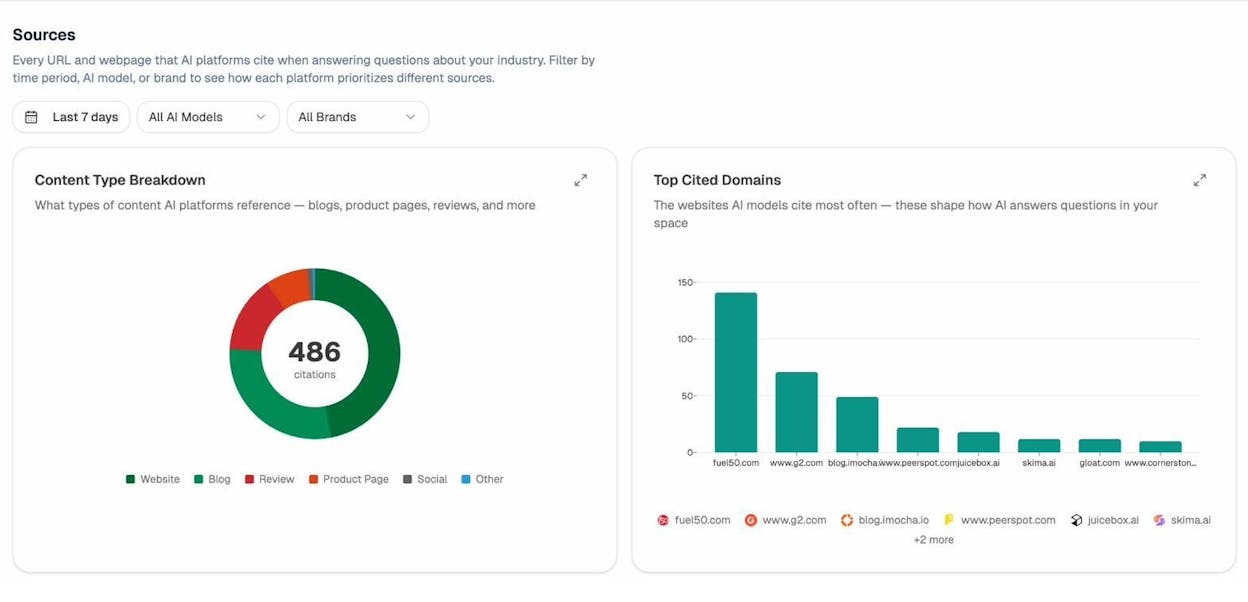
If Wikipedia doesn’t show up as a cited source for prompts related to your brand, that’s a signal that either the AI models haven’t updated their knowledge yet or that other sources are still dominating the narrative.
You can also use Analyze AI’s Prompt Tracking to monitor specific prompts related to your brand and see your visibility, sentiment, and ranking position across different AI engines.
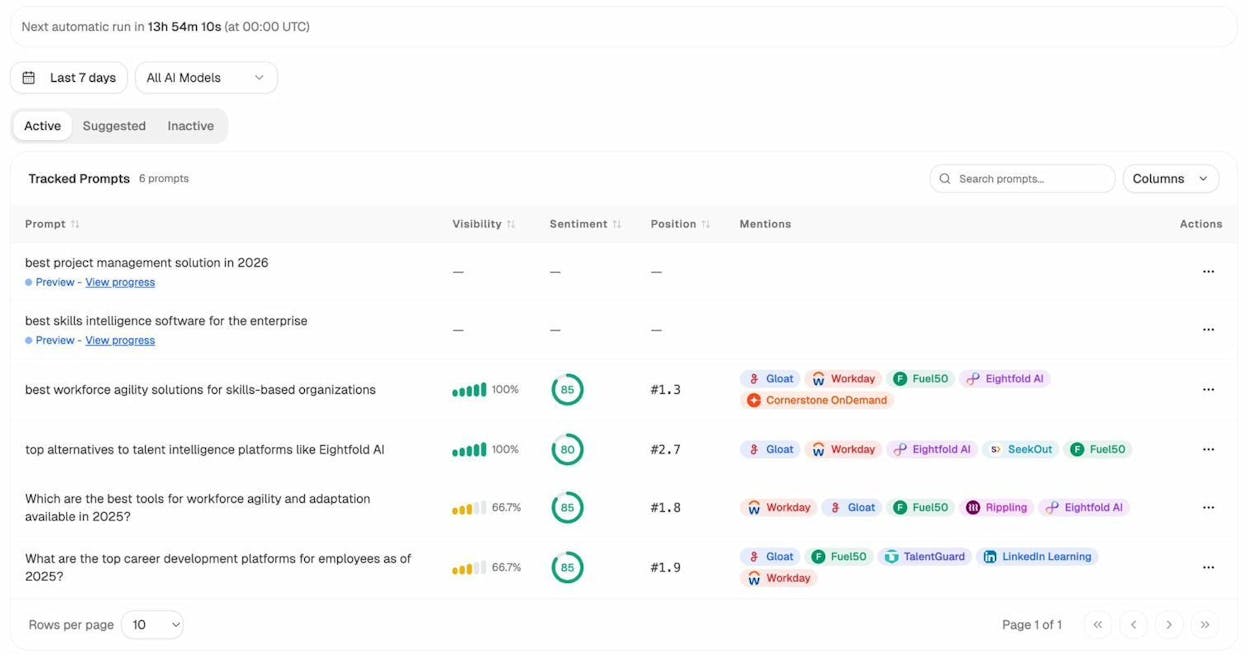
For example, if you track a prompt like “best [your category] tools,” you can see whether your brand appears in the AI-generated answer, what position it holds, and which competitors are mentioned alongside you. This data tells you whether your Wikipedia page and broader content strategy are actually translating into AI search visibility.
Track AI-driven traffic to your website
One of the most tangible results of a Wikipedia page is the indirect traffic it can generate through AI search. When AI engines cite your Wikipedia page or mention your brand in their responses, some of those users will visit your website directly.
Analyze AI’s AI Traffic Analytics lets you track visitors arriving from AI platforms like ChatGPT, Perplexity, Gemini, and Claude. You can see which AI sources drive the most traffic, which pages visitors land on, and how engaged those visitors are.
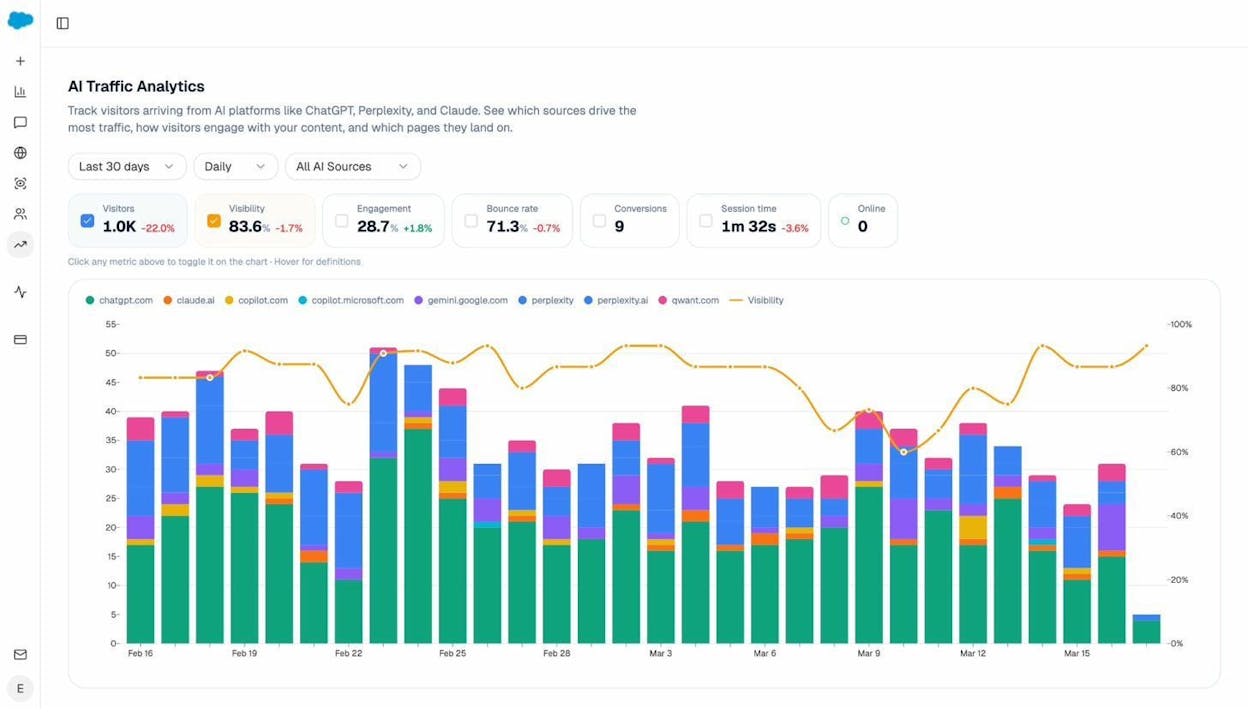
This gives you a concrete way to measure the ROI of your Wikipedia page beyond just “we have a Wikipedia page now.” If you see AI traffic increasing to your brand pages after your Wikipedia page goes live, that’s direct evidence that the page is working as a brand asset.
You can also use the AI Traffic Analytics data to identify which of your website pages perform well in AI search. Pages that receive consistent AI traffic are pages that AI models trust and reference. Double down on the content patterns that work. If your product comparison pages or technical documentation get the most AI traffic, create more content in that format.
Why your Wikipedia page matters more now than ever
Most guides about creating a Wikipedia page focus exclusively on the SEO benefits. And those benefits are real. Wikipedia has near-perfect domain authority and consistently ranks in the top organic results for brand-name searches. A Wikipedia page populates your Google Knowledge Panel and feeds structured data to the Knowledge Graph.
But the bigger story in 2026 is what happens beyond Google. AI search engines are becoming a significant source of brand discovery, and Wikipedia is one of the primary knowledge sources they draw from.
Here’s the practical reality. When someone asks ChatGPT “What is [your company]?” or asks Perplexity “What are the best [your category] tools?”, the model assembles its answer from a mix of sources. Wikipedia is near the top of that source hierarchy because of its editorial standards, neutrality, and comprehensive coverage.
Companies without Wikipedia pages are at a disadvantage in AI search. The AI doesn’t skip them entirely, but it has to piece together information from scattered, potentially unreliable sources. This leads to incomplete answers, inaccurate descriptions, and sometimes no mention at all.
A verified, well-maintained Wikipedia page gives AI models a single, authoritative source of truth about your company. That source shapes the AI’s understanding of who you are, what you do, and why you matter.
This doesn’t mean SEO is dead. It means SEO is evolving. A Wikipedia page is now an asset that serves both traditional search and AI search simultaneously. The companies that invest in building their Wikipedia presence now will have a structural advantage as AI search continues to grow.
If you want to track how your brand currently appears in AI search, see where competitors outperform you, and measure the impact of initiatives like a Wikipedia page, Analyze AI gives you that visibility across all major AI engines in one dashboard.
Common mistakes that get Wikipedia pages deleted
Even after your page is approved, it can be deleted at any time if it violates Wikipedia’s policies. Here are the most common mistakes that lead to deletions, and how to avoid each one.
Promotional tone creep. After approval, some companies gradually add marketing language to their page through small edits. Each edit seems harmless, but the cumulative effect turns the page promotional. Wikipedia editors notice this pattern and will nominate the page for deletion.
Source degradation. Sources go offline. Links break. Paywalls go up. If your page’s citations become unverifiable over time, editors may question the page’s notability. Periodically check that all your citations are still accessible.
You can use the Analyze AI free broken link checker to scan for dead links on your Wikipedia citations and fix them before editors flag them.
Removing negative information. If a reliable source publishes negative coverage of your company and someone adds it to your Wikipedia page, do not remove it. Wikipedia requires a neutral point of view, which means presenting all verified perspectives, including unfavorable ones. Removing negative information is one of the fastest ways to get your page flagged and your editing account blocked.
Using paid editing services without disclosure. Paid Wikipedia editing services exist, and some are legitimate. But if you use one, the edits must be disclosed. Undisclosed paid editing violates Wikipedia’s terms of use and can result in account bans and page deletion.
Sock puppet accounts. Creating multiple Wikipedia accounts to edit your own page or to argue in deletion discussions is called sock puppetry. Wikipedia actively detects this behavior through IP tracking and behavioral analysis. Getting caught results in permanent bans for all associated accounts.
Final thoughts
Creating a Wikipedia page for your brand is a long-term investment, not a quick win. The process requires genuine notability, careful source curation, patient community engagement, and ongoing monitoring.
Here’s a summary of the key takeaways.
Your brand needs to genuinely qualify. No amount of clever writing or strategic source selection can substitute for real notability. If your company hasn’t been covered meaningfully by independent, reliable sources, focus on building that coverage first through PR, original research, and genuine industry contributions.
Transparency wins. Disclosing your conflict of interest and engaging honestly with the Wikipedia community is the approach that works long-term. Attempts to game the system, whether through undisclosed paid editing, sock puppet accounts, or hidden COIs, almost always backfire.
A Wikipedia page is now a dual-channel brand asset. It improves your presence in traditional Google search through the Knowledge Panel and Knowledge Graph. And it shapes how AI search engines like ChatGPT, Perplexity, Gemini, and Claude describe and recommend your brand. Companies that build and maintain their Wikipedia pages today are investing in both channels simultaneously.
Monitor the results. After your page goes live, use a tool like Analyze AI to track whether AI search engines are citing your Wikipedia page, how your brand narrative changes across AI engines, and whether AI-driven traffic to your website increases. This turns your Wikipedia page from a “set it and forget it” asset into a measurable component of your brand tracking strategy.

Ernest

Ibrahim


