



Summarize this blog post with:


In this article, you’ll learn how many keywords a single page can realistically rank for in Google, what factors help a page rank for more keywords, and how to apply those findings to your own SEO content strategy. We’ll walk through data from a study of over 3 million search queries, show you how to research the keyword potential of any topic before you write, and explain why the same principles now apply to AI search engines like ChatGPT and Perplexity.
Table of Contents
How Many Keywords Do The Top-Ranking Pages Also Rank For?
Most SEOs focus on one keyword per page. But in practice, a single well-optimized page can rank in the top 10 for hundreds of related search queries.
To understand the scale of this, researchers at Ahrefs studied 3 million random search queries and examined how many additional keywords each top-20 page ranked for. The results were clear.
The average page ranking #1 in Google also ranks in the top 10 for nearly 1,000 other keywords. The median is lower (around 400) because a small number of pages rank for an extremely large number of keywords, which pulls the average up. But even at the median, that is 400 additional search queries sending traffic to a single page.
![[Screenshot of Ahrefs study chart showing average number of “also rank for” keywords by position]](https://www.datocms-assets.com/164164/1777316685-blobid1.png?auto=format,compress&w=1248&fit=max)
Pages that rank lower tend to rank for fewer keywords. A page at position #10 ranks for significantly fewer additional terms than a page at position #1. This makes sense. Pages that rank higher are typically better at satisfying search intent, which makes Google more willing to show them for related queries.
The study also separated results by search volume, looking at all keywords, keywords with 1,000+ monthly searches, and keywords with 10,000+ monthly searches. The pattern was the same in every group, but more pronounced for high-volume keywords. Pages ranking #1 for a keyword with 10,000+ searches per month also ranked for even more additional keywords than pages ranking #1 for lower-volume terms.
The takeaway is straightforward. When you rank well for one keyword, you almost always rank for many related keywords at the same time. The question is how to make this work in your favor.
Why Does One Page Rank For Hundreds of Keywords?
Before diving into the actionable parts, it helps to understand why Google shows one page for many different search queries.
The short answer is that people search for the same topic using different words. Someone looking for information about email marketing tools might type “best email marketing software,” “top email platforms for small business,” “email marketing tools comparison,” or “what email tool should I use.” These are all different search queries, but they share the same intent.
Google understands this. Its algorithms identify that these queries are asking for the same thing, so it shows similar (or identical) results for all of them.
This means the number of keywords a page ranks for is largely determined by the topic it covers, not by how many keywords you stuff into the page. A topic that people search for in many different ways will naturally generate more keyword variations. A topic that people search for in only one or two ways will generate fewer.
Here is a simplified way to think about it:
|
Factor |
More keywords per page |
Fewer keywords per page |
|---|---|---|
|
Topic breadth |
Broad topics with many subtopics |
Narrow, specific topics |
|
Search demand |
High-volume topics people search in many ways |
Low-volume niche topics |
|
Content depth |
Comprehensive pages covering multiple angles |
Thin pages covering one angle |
|
Backlink profile |
Strong backlink profile |
Weak or no backlinks |
|
Domain authority |
High-authority domain |
New or low-authority domain |
This table gives you a framework. But the real question is: how do you use this to plan your content? We will cover that in detail below.
How Many High-Volume Keywords Can One Page Rank For?
Ranking for hundreds of long-tail keywords with one page is common. But what about high-volume keywords? Can a single page rank #1 for multiple keywords that each get thousands of searches per month?
The Ahrefs study looked at this question by taking all pages that ranked #1 for a keyword with 10,000+ monthly searches and checking how many other 10,000+ keywords those pages also ranked #1 for. They did the same for keywords with 1,000+ monthly searches.
![[Screenshot of Ahrefs pie chart showing distribution of pages ranking for multiple high-volume keywords]](https://www.datocms-assets.com/164164/1777316693-blobid2.png?auto=format,compress&w=1248&fit=max)
The results:
-
1,000+ search volume keywords. Around 30% of pages that ranked #1 for one 1,000+ keyword also ranked #1 for at least one additional 1,000+ keyword. Some ranked #1 for three or more.
-
10,000+ search volume keywords. This was much rarer. The vast majority of pages that ranked #1 for one 10,000+ keyword did not rank #1 for any other 10,000+ keyword.
The practical implication: ranking for two or three mid-volume keywords (1,000+ searches each) with a single page is realistic and fairly common. Ranking for multiple ultra-high-volume keywords (10,000+) with one page is rare and usually only happens for major brands or highly authoritative domains.
For most content teams, this means your page should target one primary keyword and a cluster of related mid-volume keywords. Do not try to force one page to rank for unrelated high-volume keywords. That almost never works.
The Outliers: Pages That Rank for Thousands of Keywords
Looking at the extreme cases is useful because it shows what is possible at the upper limit.
In the Ahrefs study, the pages that ranked for the most keywords were dominated by a few categories: YouTube-related tools (video downloaders and converters), Google’s own properties (google.com, translate.google.com, gmail), and major brand homepages (facebook.com, youtube.com).
The top page in the dataset ranked in the top 100 for over 192,000 keywords across all countries.
These outliers share a few traits. They are either extremely high-authority domains, tools that serve a massive and universally searched need, or both. For the average business, these numbers are not realistic. But they illustrate the principle: the right topic at the right authority level can generate an enormous number of keyword rankings from a single page.
More relevant for most businesses are the outliers in the “hundreds to low thousands” range. These are typically comprehensive blog posts or resource pages on popular topics, published on domains with moderate to strong authority.
How Can You Rank for More Keywords with Your Page?
This is the practical section. If you want each page you publish to rank for as many relevant keywords as possible, here is what to do.
Step 1: Choose Topics with High Keyword Diversity
Not all topics are equal. Some topics naturally have hundreds of search variations. Others have very few.
Before committing to a topic, check how many keyword variations exist. The easiest way is to look at the top-ranking pages for your target keyword and see how many other keywords they rank for.
Here is how to do this:
-
Go to a keyword research tool like Ahrefs Keywords Explorer or the Analyze AI Keyword Generator.
-
Enter your target keyword.
-
Look at the SERP overview to see the top-ranking pages.
-
Check the “Keywords” column to see how many keywords each top-ranking page ranks for.
-
Check the “Traffic” column to see how much total organic traffic each page receives.
![[Screenshot of a keyword research tool showing SERP overview with keywords and traffic columns for each ranking page]](https://www.datocms-assets.com/164164/1777316706-blobid3.png?auto=format,compress&w=1248&fit=max)
If the top-ranking pages for your keyword each rank for 200+ keywords and get significant traffic from those additional rankings, that topic has high keyword diversity. If the top-ranking pages only rank for 20-30 keywords, the topic has low keyword diversity.
You can also use the Analyze AI Keyword Difficulty Checker to gauge how competitive a keyword is before deciding to go after it.
Example. The keyword “I’m sorry flowers” has only 250 monthly searches. That looks low. But the top-ranking pages for that keyword also rank for 50+ related keywords like “apology flowers,” “forgiveness bouquet,” and “sorry flower delivery.” Together, those keywords bring each page around 100 targeted visitors per month. If you only looked at the primary keyword’s search volume, you would skip this topic. But by checking the traffic potential of the top-ranking pages, you see the real opportunity.
![[Screenshot showing keyword “I’m sorry flowers” with low volume but high traffic potential from related keywords]](https://www.datocms-assets.com/164164/1777316712-blobid4.png?auto=format,compress&w=1248&fit=max)
This is why traffic potential matters more than individual keyword search volume. Always check how the top-ranking pages actually perform, not just the search volume of your target keyword.
Step 2: Research and Include Semantic Keywords
Once you pick a topic, your next job is to make sure your content covers the semantic landscape of that topic.
Semantic keywords are terms and phrases that are closely related to your primary keyword. They are not exact synonyms. They are concepts that naturally come up when discussing the topic.
For a page about “email marketing tools,” semantic keywords might include “automation workflows,” “drip campaigns,” “email deliverability,” “A/B testing subject lines,” “subscriber segmentation,” and “CAN-SPAM compliance.”
You do not need to force these terms into your content. If your content genuinely covers the topic in depth, most semantic keywords will appear naturally. But it helps to do research upfront so you do not miss important subtopics that searchers expect to see covered.
Here is a practical approach to finding semantic keywords:
-
Check “People Also Ask” on Google. Search your keyword and note the related questions. These reveal what other aspects of the topic searchers care about. Learn more about this in our guide to People Also Ask optimization.
![[Screenshot of Google “People Also Ask” results for a keyword showing related questions]](https://www.datocms-assets.com/164164/1777316723-blobid5.png?auto=format,compress&w=1248&fit=max)
-
Look at the subheadings of top-ranking pages. Open the top 5 results for your keyword. Note every H2 and H3 heading. These headings represent the subtopics that Google already rewards.
![[Screenshot of a top-ranking page with H2/H3 headings highlighted showing subtopic coverage]](https://www.datocms-assets.com/164164/1777316723-blobid6.png?auto=format,compress&w=1248&fit=max)
-
Use a keyword generator tool. Tools like the Analyze AI Keyword Generator can surface related keywords and long-tail variations you might not think of on your own.
-
Check Google’s related searches. Scroll to the bottom of the SERP. The “related searches” section shows additional queries Google associates with your topic.
-
Review your existing keyword clusters. If you already have a keyword strategy in place, check whether your target keyword fits into a broader cluster of related terms. If it does, make sure your page addresses the entire cluster, not just the primary keyword.
The goal is not to create a list of keywords to sprinkle into your content. The goal is to understand the full scope of the topic so you can write the most comprehensive and useful page on the subject.
Step 3: Write Longer, More Comprehensive Content
The Ahrefs study found a clear correlation between content length and the number of keywords a page ranks for. Longer content tends to rank for more keywords than shorter content.
![[Screenshot of Ahrefs chart showing content length vs. number of keywords ranked for]](https://www.datocms-assets.com/164164/1777316734-blobid7.jpg?auto=format,compress&w=1248&fit=max)
This is not surprising. Longer content naturally covers more subtopics, uses more semantic variations, and answers more of the questions that searchers have about a topic.
But there is an important nuance. Longer does not mean padded. The correlation is between content that is longer because it is more comprehensive, not content that is longer because it is filled with filler.
Here is the practical rule: your content should be as long as the topic requires, and no longer. If you can cover a topic thoroughly in 1,500 words, do that. If the topic requires 4,000 words to cover properly, write 4,000 words.
The way to determine the right length is to look at the top-ranking pages for your keyword. If the top 5 results are all 3,000+ words, your content probably needs to be at least that long to cover the topic with the same depth. If the top results are all 800-word pages, a 3,000-word article would likely be over-engineered for that topic.
Also consider the search intent. Informational queries (“how to do keyword research”) tend to reward longer, more detailed content. Transactional queries (“buy running shoes”) tend to reward shorter, more focused pages.
Step 4: Build Backlinks to Your Page
The Ahrefs study found a strong correlation between a page’s backlink profile and the number of keywords it ranks for. Pages with more backlinks (measured by URL Rating) ranked for significantly more keywords than pages with fewer backlinks.
![[Screenshot of Ahrefs chart showing URL Rating vs. number of “also rank for” keywords]](https://www.datocms-assets.com/164164/1777316743-blobid8.png?auto=format,compress&w=1248&fit=max)
This makes sense from Google’s perspective. Backlinks are a signal of trust and authority. A page that many other sites link to is more likely to be a high-quality, comprehensive resource. Google rewards that by showing it for a wider range of related queries.
For practical link building advice:
-
Create linkable assets. Data studies (like the one this article is based on), original research, comprehensive guides, and free tools tend to attract links naturally.
-
Promote your content. Do not just publish and wait. Reach out to people who have linked to similar content and let them know about your resource. Our guide on off-page SEO strategies covers this in detail.
-
Fix broken links. Use a broken link checker to find broken links on relevant sites that point to content similar to yours. Reach out and suggest your page as a replacement.
-
Internal linking. Beyond external backlinks, strong internal linking helps Google discover and rank your pages for more keywords. Link from your high-authority pages to newer content that needs a boost.
A note on correlation vs. causation: the study shows that pages with more backlinks tend to rank for more keywords. It does not prove that backlinks cause more keyword rankings. It is likely that the relationship works in both directions. Pages that rank for many keywords get more exposure, which leads to more backlinks, which helps them rank for even more keywords. This creates a compounding effect.
Step 5: Match Search Intent Precisely
This is something the original Ahrefs study did not cover in depth, but it matters.
Google does not just match keywords to pages. It matches intent to pages. If your page perfectly matches the intent behind a query, Google will show it for that query and for many related queries that share the same intent.
There are four main types of search intent:
|
Intent type |
What the searcher wants |
Example keywords |
|---|---|---|
|
Informational |
Learn something |
“how to do keyword research,” “what is SEO” |
|
Commercial investigation |
Compare options before buying |
“best CRM software,” “Mailchimp vs ConvertKit” |
|
Transactional |
Buy or take action |
“buy noise-canceling headphones,” “sign up Slack” |
|
Navigational |
Find a specific website |
“Gmail login,” “Ahrefs pricing” |
To rank for the maximum number of keywords, your page needs to match the dominant intent for your target keyword. If the top results for your keyword are all comparison posts, do not publish a how-to guide. If the top results are all product pages, do not publish a blog post.
Check the SERP before writing. Open each of the top 5 results and note the content type, format, and angle. Your page should align with the pattern you see. You can use a SERP checker to quickly pull up the top results for any keyword.
How Unique Are the “Also Rank For” Keywords?
One of the more interesting findings from the study was about how similar the “also rank for” keywords are to each other.
The researchers looked at how many words the related keywords shared with each other. For example, if a page ranks for “best email marketing software” and “best email marketing tools,” those queries share three common words (“best,” “email,” “marketing”).
The result: the vast majority of “also rank for” keywords share at least one word with each other. The number of truly unique keywords (queries with zero common words) was extremely small.
This reinforces an important point. Ranking for many keywords is primarily about choosing a topic that people search for in many different ways using similar words, not about trying to target multiple different topics on one page.
In other words: topical depth beats topical breadth. A page that goes deep on “email marketing tools” will naturally rank for hundreds of variations of that topic. A page that tries to cover “email marketing tools” and “social media scheduling” and “SEO software” on the same page will struggle to rank for any of them.
This is the same principle behind keyword clustering. Group related keywords together, assign them to a single page, and cover that cluster comprehensively.
How to Find Which Keywords Your Page Already Ranks For
If you have existing content, it is worth checking how many keywords each page already ranks for. This tells you two things: which pages are performing well (and deserve more investment) and which pages are underperforming (and might benefit from optimization).
Here are three ways to check:
Method 1: Google Search Console
Google Search Console shows you every query that triggered impressions for your pages. Go to the Performance report, filter by page, and look at the Queries tab. This gives you the complete list of keywords Google associates with that page.
![[Screenshot of Google Search Console Performance report filtered by a specific page showing all ranking queries]](https://www.datocms-assets.com/164164/1777316743-blobid9.png?auto=format,compress&w=1248&fit=max)
The limitation of Search Console is that it only shows data for the last 16 months and does not show position history over long periods.
Method 2: Third-Party SEO Tools
Tools like Ahrefs Site Explorer, Semrush, or keyword rank checkers let you enter any URL and see all the keywords it ranks for, along with position, search volume, and estimated traffic for each keyword.
![[Screenshot of a keyword rank checker showing all keywords a specific URL ranks for with position and traffic data]](https://www.datocms-assets.com/164164/1777316751-blobid10.png?auto=format,compress&w=1248&fit=max)
This is useful for competitive research, too. Enter a competitor’s URL to see all the keywords they rank for and identify gaps in your own content.
Method 3: Check Your Website for Keyword Opportunities
Use a tool like the Analyze AI website keyword search to scan your entire site and find which keywords your pages are associated with. This is helpful for finding pages that rank on page 2 or 3 for keywords, where a content refresh could push them into the top 10 and unlock significantly more traffic.
For more on finding untapped keyword opportunities, see our guide on how to find new keywords.
How This Applies to AI Search Engines
Everything above covers how Google ranks pages for multiple keywords. But there is now a second organic channel that follows similar principles: AI search engines like ChatGPT, Perplexity, Gemini, and Copilot.
When someone asks an AI chatbot “what are the best project management tools for remote teams,” that question is functionally a search query. And just like Google, AI engines pull their answers from web content, citing the sources they trust most.
Here is where it gets interesting for content teams. The same content that ranks well in Google for many keywords also tends to get cited by AI search engines. Comprehensive, well-structured, authoritative content is exactly what AI models look for when generating answers.
But there are important differences between traditional SEO keyword rankings and AI search visibility.
|
Traditional SEO (Google) |
AI Search (ChatGPT, Perplexity, etc.) |
|
|---|---|---|
|
What you rank for |
Keywords (search queries) |
Prompts (natural language questions) |
|
How rankings work |
Position 1-10 on a results page |
Mentioned or not mentioned in an answer |
|
What drives visibility |
Backlinks, content quality, technical SEO |
Content quality, citations, entity coverage |
|
How to track |
Google Search Console, rank trackers |
AI visibility tracking tools |
|
Traffic attribution |
Organic search in Google Analytics |
AI referral traffic in AI Traffic Analytics |
The concept of “ranking for many keywords with one page” has a direct parallel in AI search. A comprehensive, high-quality page about “email marketing tools” will not only rank for hundreds of Google keywords. It will also get cited when people ask AI chatbots questions like “what’s the best email tool for small businesses,” “compare Mailchimp and ConvertKit,” or “which email platform has the best automation.”
How to Check Your AI Search Visibility
If you want to see whether your content is showing up in AI answers, and which prompts trigger mentions of your brand, you need a tool designed for this.
Analyze AI lets you track your brand’s visibility across ChatGPT, Perplexity, Gemini, Copilot, and other AI engines. You can see which prompts mention your brand, what position you appear in, and how your visibility compares to competitors.
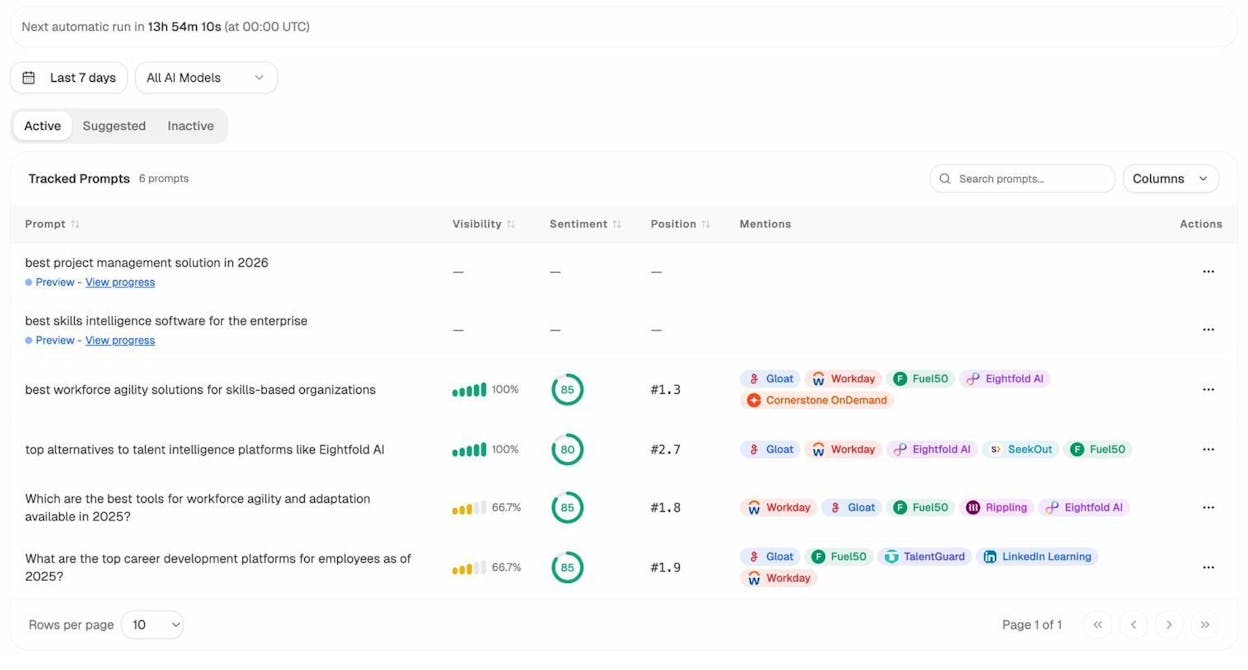
The Prompt Tracking dashboard works like a rank tracker for AI search. You add the prompts you want to monitor (or use the suggested prompts that Analyze AI’s Prompt Discovery feature generates), and the system checks daily whether your brand appears in each AI engine’s response.
This is the AI search equivalent of checking how many keywords your page ranks for. Instead of keywords, you are tracking prompts. Instead of position 1-10, you are tracking whether you are mentioned, and where you appear relative to competitors.
How to See Which Pages Get AI Traffic
Just like you can use Google Search Console to see which pages get organic search traffic, you can use Analyze AI’s AI Traffic Analytics to see which pages receive visitors from AI search engines.
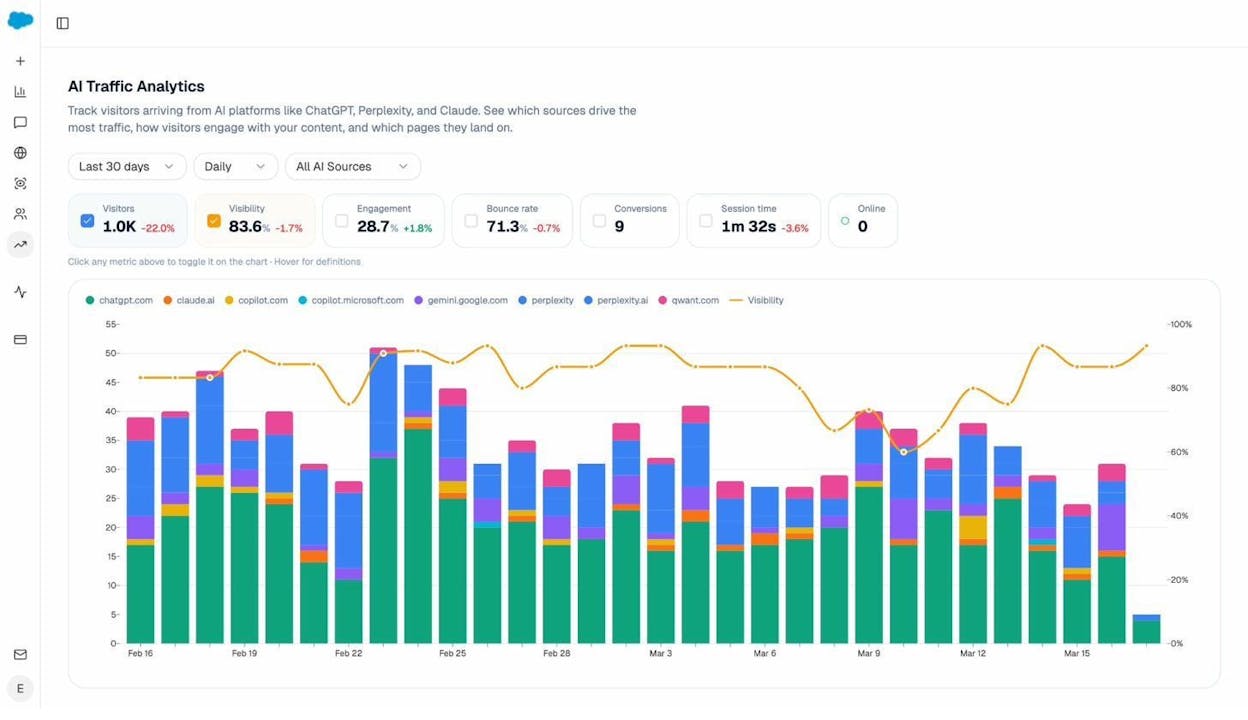
This dashboard connects to your Google Analytics and shows you exactly how many visitors come from each AI engine, which pages they land on, and how they engage with your content. You can break down the data by source (ChatGPT vs. Perplexity vs. Gemini), by page, and by time period.
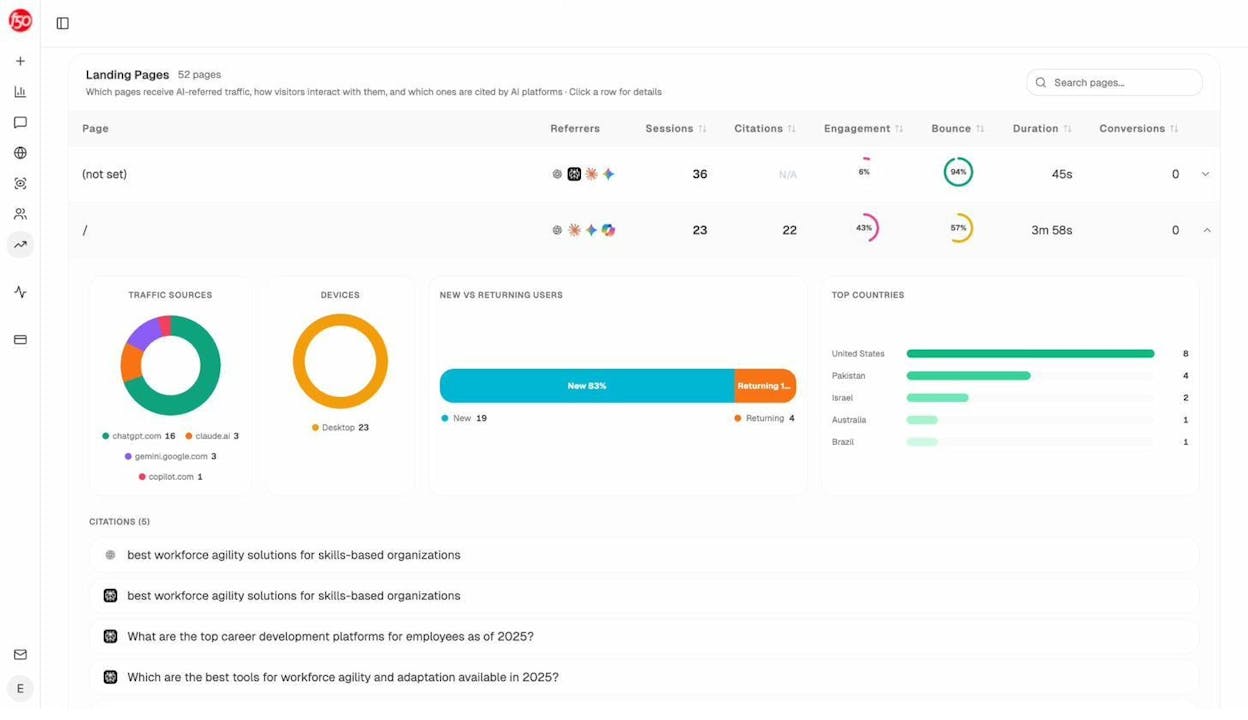
The Landing Pages report is where you can identify patterns. If certain types of pages consistently receive AI traffic (for example, comparison posts or comprehensive guides), that tells you what content format AI engines prefer in your space. You can then double down on creating more content in that format.
This is the same logic as looking at which pages rank for the most keywords in Google and creating more content like those top performers.
How to Find Where Competitors Beat You in AI Search
In traditional SEO, you check which keywords competitors rank for that you do not. In AI search, the equivalent is checking which prompts mention competitors but not your brand.
Analyze AI’s Competitor Intelligence feature shows you exactly this. It identifies the competitors that AI engines mention alongside your brand, tracks how frequently each competitor appears, and highlights the prompts where competitors get mentioned and you do not.
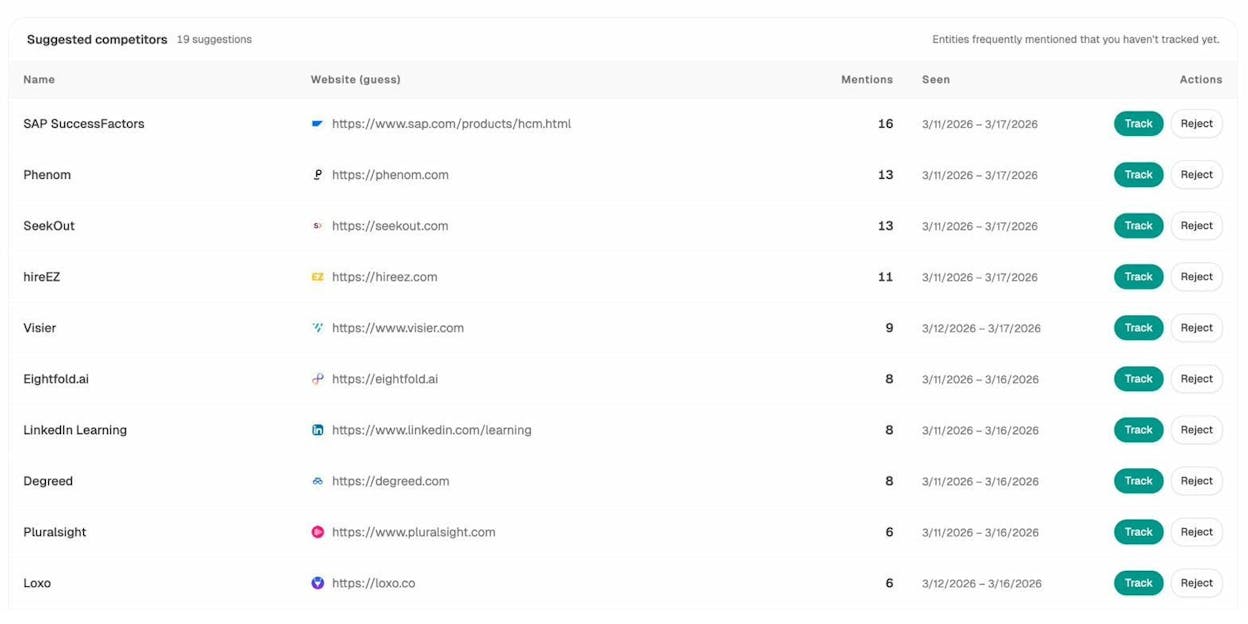
This is directly actionable. If a competitor gets cited for a prompt like “best CRM for small businesses” and you do not, you know exactly what content to create or improve to close that gap.
How to Understand What Sources AI Engines Trust
In Google SEO, backlinks signal trust. In AI search, citations play a similar role. AI engines cite specific URLs and domains when generating answers, and the domains that get cited most often have the most influence over AI responses.
Analyze AI’s Citation Analytics feature shows you which domains and URLs AI engines cite most frequently in your industry, and what types of content (blogs, product pages, reviews, docs) get cited most.
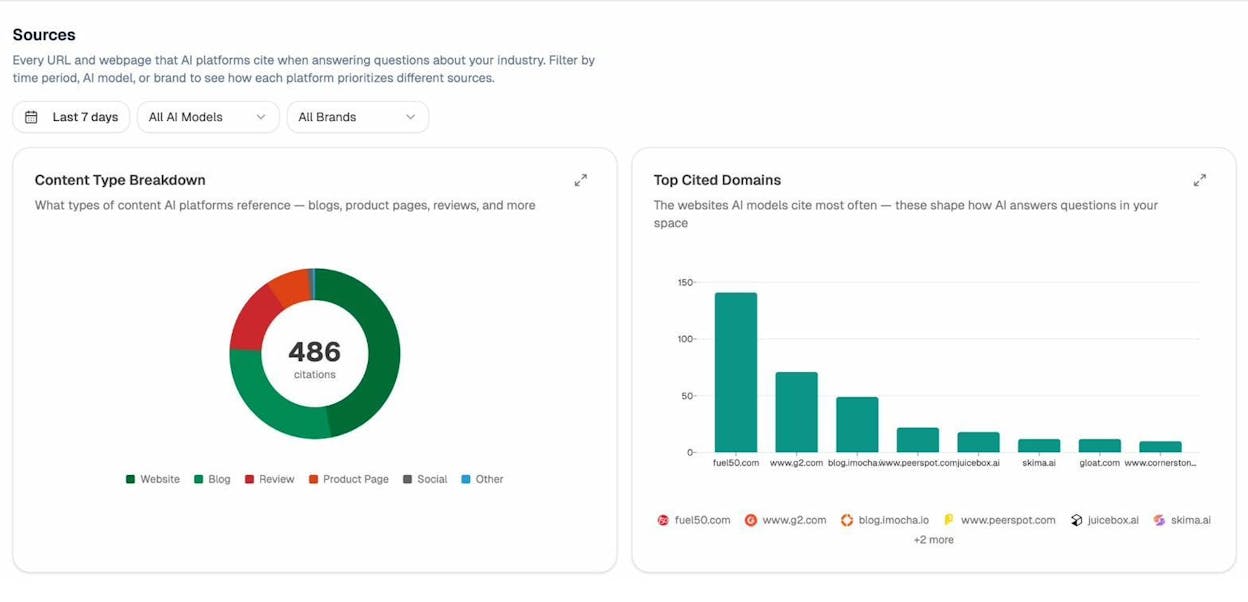
If you see that blog posts account for 42% of citations in your space but your brand only has product pages, that is a clear signal to invest in blog content. If review sites dominate citations, you should focus on getting listed and well-reviewed on those platforms.
This data helps you understand the AI search equivalent of a backlink profile and make strategic decisions about where to invest.
Key Takeaways
Here is what you should take away from this study and how to act on it:
-
A single page can rank for hundreds of keywords. The average #1 page ranks in the top 10 for nearly 1,000 additional keywords. Do not obsess over one keyword per page.
-
Topic selection is the biggest factor. Choose topics that people search for in many different ways. Check the traffic potential of top-ranking pages before writing.
-
Comprehensive content wins. Longer, more detailed content ranks for more keywords. But length alone is not the goal. Depth and thoroughness are.
-
Backlinks amplify everything. Pages with stronger backlink profiles rank for more keywords. Invest in building links to your most important content.
-
Match search intent. Pages that precisely match the intent behind a query rank for more variations of that query. Study the SERP before you write.
-
The same principles apply to AI search. Comprehensive, authoritative, well-structured content also gets cited by AI search engines. Track your AI visibility alongside your Google rankings to get the full picture of your organic performance.
-
AI search is not replacing SEO. It is adding to it. Google search is not going away. AI search is an additional organic channel where the same content that performs well in Google also tends to perform well. The smartest teams track both channels and let data drive their content decisions.

Ernest

Ibrahim


