



Summarize this blog post with:


In this article, you’ll learn what seed keywords are, why they matter more than most guides let on, and seven practical methods to find them. You’ll also learn how to use your seed list to unlock keyword ideas for both traditional search engines and AI search platforms like ChatGPT, Perplexity, and Gemini.
Table of Contents
What Are Seed Keywords?
Seed keywords are the short, broad words and phrases you feed into a keyword research tool to generate a much larger list of keyword ideas. They are the starting point of every keyword research process.
If you sell project management software, your seed keywords might be “project management,” “task management,” “team collaboration,” “Gantt chart,” and “Kanban board.”
Drop those five seeds into a keyword research tool and you will get back thousands of related terms. Long-tail variations, question-based queries, comparison terms, and dozens of subtopics you never thought of.
![[Screenshot: Entering seed keywords into a keyword research tool like Ahrefs Keywords Explorer, showing millions of keyword ideas generated from a handful of seeds]](https://www.datocms-assets.com/164164/1777322980-blobid1.jpg?auto=format,compress&w=1248&fit=max)
The important thing to understand is that seed keywords are not the keywords you try to rank for. They are the raw material you use to find the keywords worth ranking for.
The better your seeds, the more useful the output. Which brings up an obvious question.
Why Seed Keywords Matter in the Keyword Research Process
Most keyword research guides gloss over seed keywords. They tell you to “think of words related to your business” and move on. That is a mistake.
Here is why.
The quality of your keyword list depends on the quality of your inputs.
If you start with a single seed keyword like “mountain bike,” a tool might return 264,000 keyword ideas. That sounds like a lot. But if you expand your seed list to include “mountain biking,” “MTB,” “hardtail,” and “mountain bicycle,” the same tool returns over 519,000 keywords. That is nearly double the output from just five more seeds.
![[Screenshot: Keyword tool showing ~264K results for one seed vs ~519K results for a developed seed list]](https://www.datocms-assets.com/164164/1777322990-blobid2.png?auto=format,compress&w=1248&fit=max)
The difference matters because the additional keywords are not just more of the same. They include terms that the single seed would have missed entirely. Industry jargon, brand names, product categories, and alternate phrasings that real people actually search for.
This matters even more when you realize that keyword clustering and topic mapping depend on having a comprehensive list to start with. Miss a seed and you miss an entire cluster of content opportunities.
Quick Example
Let’s say you run a SaaS company that sells CRM software.
If your only seed keyword is “CRM,” you will get plenty of results. But you will miss terms like “sales pipeline,” “contact management,” “deal tracking,” and “customer database.” Each of those is a seed that opens up a completely different set of keyword opportunities.
|
Seed keyword |
Example keyword ideas it unlocks |
|---|---|
|
CRM |
best CRM software, CRM for small business, free CRM tools |
|
sales pipeline |
how to build a sales pipeline, sales pipeline stages, pipeline management tools |
|
contact management |
contact management app, best contact management software, contact database |
|
deal tracking |
deal tracking spreadsheet, deal tracking software, how to track deals |
|
customer database |
customer database template, customer database software, how to build a customer database |
Five seeds. Five completely different clusters of keyword ideas. And each cluster maps to a different stage of the buyer journey.
That is why seed keywords deserve more attention than a throwaway line in a keyword research tutorial.
How to Find Seed Keywords (7 Methods)
A lot of keyword research guides offer vague advice for finding seeds. “Think about your product.” “Look at competitors.” These are fine starting points, but they lack detail.
The seven methods below are specific and actionable. You can go from zero to a full seed list using just two or three of them.
1. Brainstorm Variations and Synonyms of Your Target Keyword
Start with the obvious. Write down every variation, synonym, and alternate phrasing of your main topic.
This matters because of how keyword research tools work. If you enter “email marketing” into a keyword tool, you will not see results for “email campaigns” or “newsletter software” unless those exact phrases are in the tool’s database as related terms. And many tools only show results that contain your exact seed.
Here is a simple process.
Step 1: Write the most obvious version of your keyword. For example, “email marketing.”
Step 2: List the plural, singular, and verb forms. “Email marketer,” “email marketing tools,” “email marketing software.”
Step 3: Think of synonyms. “Newsletter,” “email campaigns,” “email automation,” “drip campaigns.”
Step 4: Add industry-specific jargon. “ESP” (email service provider), “autoresponder,” “broadcast emails.”
Step 5: Check a thesaurus or a keyword tool’s “Also talk about” or “Related terms” report. These reports show terms that the top-ranking pages frequently mention alongside your seed. They are excellent for surfacing industry terms you may have forgotten.
![[Screenshot: A keyword tool’s “Related terms” or “Also talk about” report showing related industry terms for a given seed keyword]](https://www.datocms-assets.com/164164/1777322991-blobid3.png?auto=format,compress&w=1248&fit=max)
Step 6: Check Wikipedia. Go to the Wikipedia page most closely related to your topic. Scan the page for terms, categories, and subtopics. Wikipedia is organized by topic experts, so its structure often reveals seeds that brainstorming misses.
![[Screenshot: A Wikipedia page for a broad topic, with related terms and categories highlighted]](https://www.datocms-assets.com/164164/1777322996-blobid4.png?auto=format,compress&w=1248&fit=max)
If you sell mountain bikes, this process might give you seeds like “mountain bike,” “mountain biking,” “MTB,” “mountain bicycle,” “hardtail,” “full suspension,” “trail bike,” and “enduro bike.”
That is a much stronger starting point than a single keyword.
2. Reverse Engineer Your Competitors’ Keywords
If brainstorming runs dry, look at what your competitors already rank for. They have already done keyword research. You are just borrowing their output.
Here is how to do it.
Step 1: Identify a competitor. Pick a website that targets the same audience as you. If you sell CRM software, pick another CRM vendor’s blog. Not a news site. Not an aggregator. A direct competitor.
Step 2: Enter their URL into a keyword research tool’s Site Explorer (or equivalent). Navigate to the “Organic keywords” report.
![[Screenshot: A keyword tool’s Organic Keywords report for a competitor domain, showing the keywords they rank for along with search volume and ranking position]](https://www.datocms-assets.com/164164/1777322997-blobid5.png?auto=format,compress&w=1248&fit=max)
Step 3: Look for broad, high-level terms. These are your potential seeds. Filter by word count (one or two words) and sort by search volume to surface the broadest terms first.
Step 4: Exclude terms you already have. If you already have “CRM” as a seed, filter it out. You are looking for seeds you have not thought of yet.
For example, if you are researching the topic “beards” and you look at a competitor like Beardbrand, you might find unexpected terms like “mutton chops” or “goatee styles.” Those are seeds that would never come up during a brainstorming session unless you are a beard expert.
Step 5: Check the “Top pages” report too. This shows which pages drive the most traffic for your competitor. The target keywords for those pages are often excellent seeds.
The beauty of this method is that you can repeat it. When you run out of competitors, use a keyword tool’s “Competing domains” report to find more sites in the same space, then reverse engineer those too.
How to Find “Seed Prompts” for AI Search
The same logic applies to AI search. If your competitors show up when people ask ChatGPT or Perplexity for recommendations in your space, the prompts they appear for are worth knowing.
In Analyze AI, you can track which competitors get mentioned across AI engines and on which prompts. The Competitors dashboard shows suggested competitors based on how often they appear in AI answers alongside your brand.
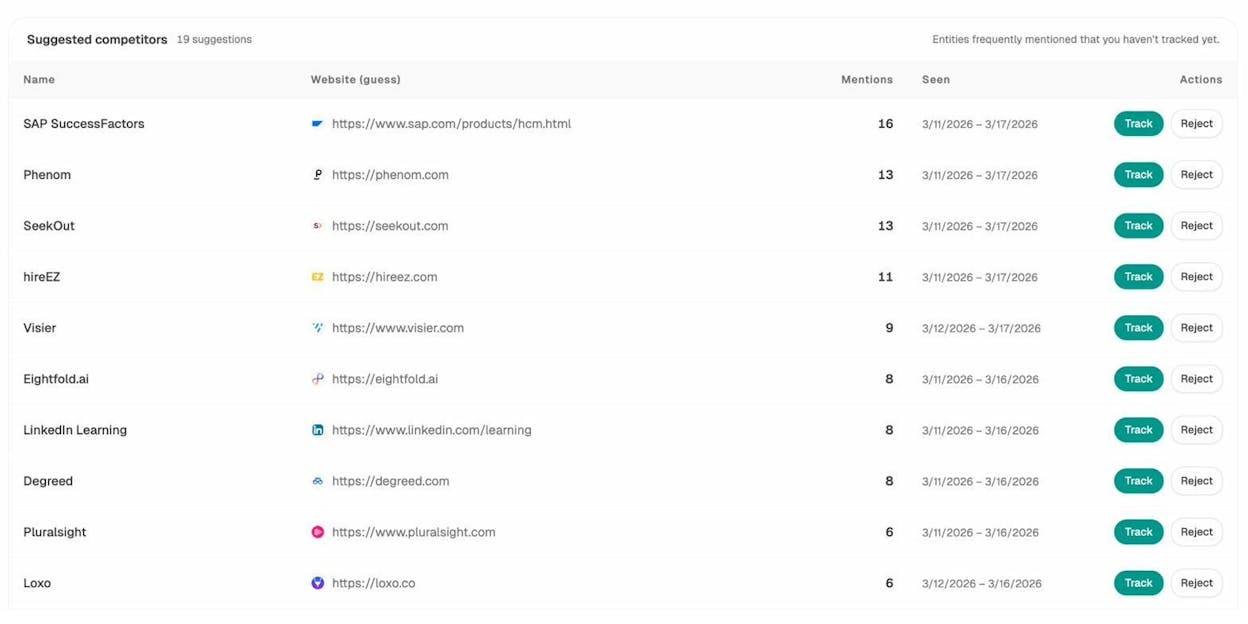
These suggested competitors are brands that AI models frequently mention in your space. If a competitor keeps getting cited for a topic you have not covered, that topic is a seed worth investigating.
You can also go deeper. The tracked competitors view shows exactly how many mentions each rival gets and when they were last seen in AI answers.
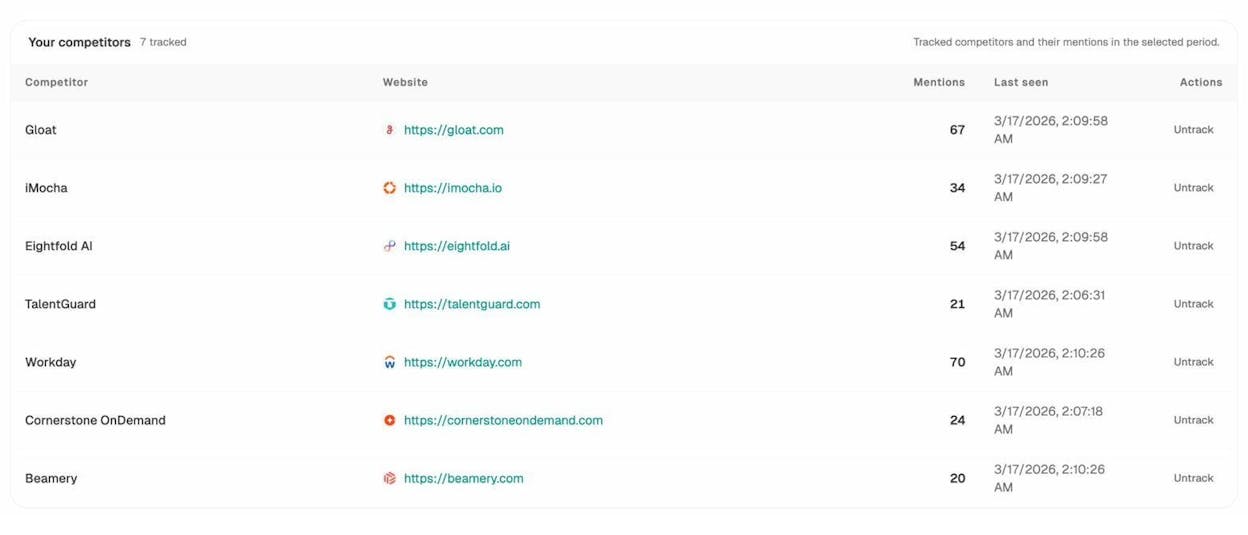
This tells you which competitors are gaining ground in AI search and gives you a clear list of prompts to reverse engineer. If Gloat gets 67 mentions and you get 20, the gap is in the prompts where Gloat appears and you do not. Those prompts contain the seed topics you should be building content around.
3. Mine the SERPs for Recurring Terms
Google’s search results pages are full of keyword data hiding in plain sight. If you want seed keywords for a topic, search for it and study what comes back.
Here are the specific places to look.
People Also Ask (PAA) Boxes
People Also Ask boxes show questions related to your search query. These questions often contain terms that make excellent seeds.
For example, searching “mountain bike” might surface PAA questions about “trail bikes,” “hardtail vs full suspension,” and “gravel bikes.” Each of those bolded terms is a potential seed.
![[Screenshot: Google People Also Ask box for a broad keyword, with recurring terms highlighted]](https://www.datocms-assets.com/164164/1777323008-blobid8.png?auto=format,compress&w=1248&fit=max)
The trick is not to just read the questions. Look for recurring nouns and phrases across multiple PAA results. Those recurring terms are the seeds Google associates most strongly with your topic.
Related Searches
Scroll to the bottom of Google’s results page. The “Related searches” section shows alternate queries people use when searching for your topic.
![[Screenshot: Google Related Searches section at the bottom of a SERP]](https://www.datocms-assets.com/164164/1777323010-blobid9.png?auto=format,compress&w=1248&fit=max)
These related searches often include brand names, product categories, and subtopics that make strong seeds. For some queries, Google even shows a row of related brands with images. Those brand names can be seeds too.
Page Titles and Meta Descriptions
The title tags of the top-ranking pages almost always contain the target keyword. But they also contain related terms.
Scan the top 10 titles for words that keep appearing. If three out of ten titles mention “beginner,” that is a modifier worth noting. If two titles reference “2026,” that is a signal about search intent.
![[Screenshot: Google SERP showing title tags with various keyword variations highlighted]](https://www.datocms-assets.com/164164/1777323014-blobid10.png?auto=format,compress&w=1248&fit=max)
Go one step further. Click into the top-ranking pages and scan their subheadings. H2s and H3s are packed with related terms that the content creator identified during their own keyword research. You are essentially reading their seed list in reverse.
AI Search Results Are SERPs Too
Here is something most seed keyword guides miss entirely. AI search engines like ChatGPT, Perplexity, and Gemini also return structured answers that contain recurring terms, brand names, and subtopics.
When someone asks Perplexity “what is the best project management tool for startups,” the answer mentions specific brands, features, and categories. Those are seeds.
In Analyze AI, you can run an ad hoc prompt search across multiple AI engines at once to see what terms, brands, and sources keep coming up.
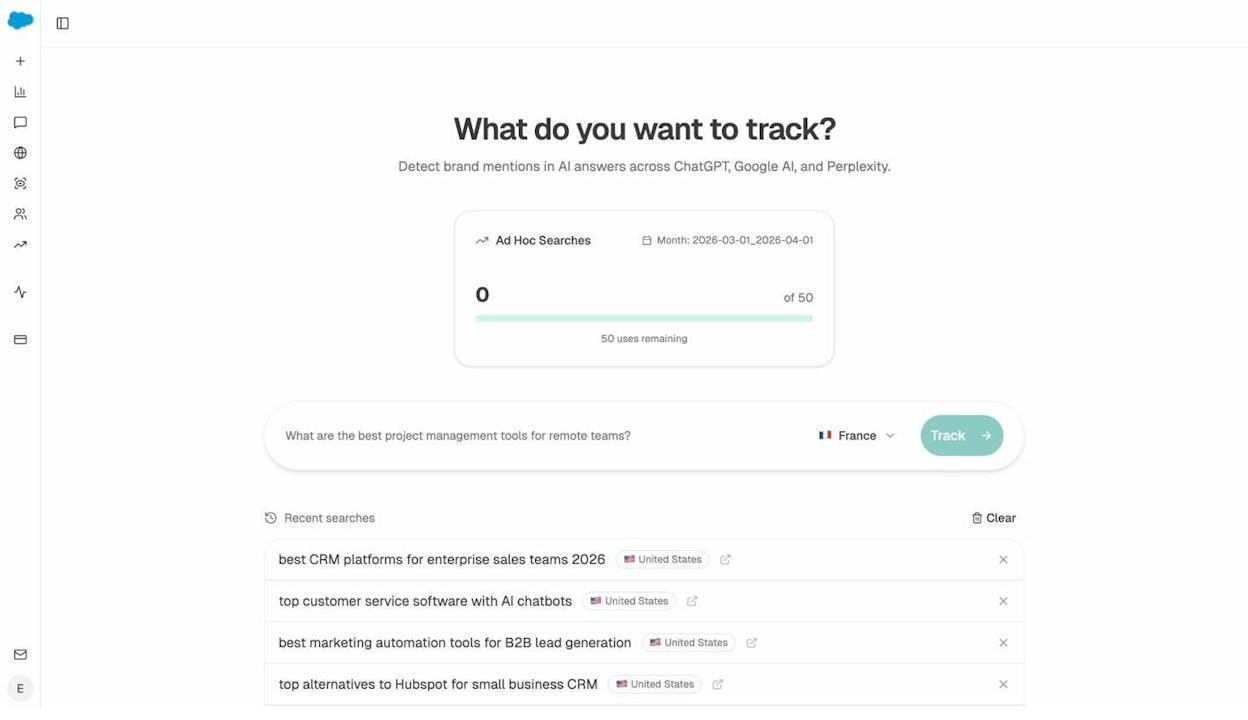
Type in a broad prompt related to your niche. Review the results across ChatGPT, Gemini, and Perplexity. Note which brands, products, and categories each engine mentions. Those recurring entities are seed keywords you will not find on Google’s SERP.
4. Review Communities and Forums
Your audience talks about your topic in their own language. That language is full of seed keywords waiting to be collected.
Here are the places to look.
Reddit is one of the best sources for seed keywords because its subreddits are organized by topic and its users speak in natural, unoptimized language.
Step 1: Search Reddit for your broad topic. For example, searching “BBQ” returns subreddits like r/BBQ, r/smoking, r/grilling, and r/pelletgrills.
![[Screenshot: Reddit search results showing relevant subreddits for a topic like BBQ]](https://www.datocms-assets.com/164164/1777323019-blobid12.png?auto=format,compress&w=1248&fit=max)
Step 2: Browse the top posts. Look for recurring terms in post titles, comments, and flair tags. Terms like “brisket,” “reverse sear,” “offset smoker,” and “charcoal vs pellet” are all potential seeds.
Step 3: Drop the subreddit URL into a keyword tool. Use Site Explorer to pull the organic keywords the subreddit ranks for. Reddit pages rank for a surprising number of keywords, and those rankings reveal exactly which terms the community uses most.
![[Screenshot: Keyword tool showing organic keywords for a subreddit URL]](https://www.datocms-assets.com/164164/1777323024-blobid13.jpg?auto=format,compress&w=1248&fit=max)
Niche Forums
Even though forums have declined in popularity, older forums still rank for thousands of keywords. And those keywords reflect the real language your audience uses.
To find niche forums, search Google using the operator intitle:forum [your keyword] or inurl:forum [your keyword].
![[Screenshot: Google search results for “intitle:forum” + keyword showing niche forums]](https://www.datocms-assets.com/164164/1777323024-blobid14.png?auto=format,compress&w=1248&fit=max)
Once you find a relevant forum, drop its URL into a keyword tool and review the organic keywords report. You will often find highly specific terms that never appear in traditional keyword research.
Quora
Quora questions are phrased the way real people think about problems. Search your topic on Quora and look for recurring terms in both the questions and the top answers.
5. List Products, Services, and Brands in Your Niche
Brand names and product names are a category of seed keyword that most people overlook. But they can unlock massive volumes of keyword ideas.
Here is why. If you are writing about coffee, the seed “coffee” gives you generic terms. But adding brand seeds like “Nespresso,” “Keurig,” “Chemex,” and “AeroPress” opens up entirely new keyword clusters. People search for “[brand] vs [brand],” “[brand] review,” “best [brand] pods,” and dozens of other branded queries.
Here is how to find product and brand seeds.
List posts. Search Google for [your seed keyword] + “brands” or [your seed keyword] + “best” and note the brand names that appear in listicles.
![[Screenshot: Google search results for “[topic] brands” showing listicle results with brand names]](https://www.datocms-assets.com/164164/1777323030-blobid15.png?auto=format,compress&w=1248&fit=max)
E-commerce sites. Go to Amazon or a niche-specific store and browse the category pages. The brand filters on the left sidebar are a ready-made seed list.

Affiliate posts. Search “best” [your keyword] and look at affiliate roundup posts. Affiliates research products thoroughly, so their lists tend to be comprehensive.
Once you have a list of brand names, enter them as seeds into a keyword research tool and check the Matching terms report. A set of 15 to 20 brand seeds can generate tens of thousands of keyword ideas.
|
Seed source |
Example brands found |
Keyword ideas generated |
|---|---|---|
|
Amazon brand filters |
Nespresso, Keurig, Breville, De’Longhi |
~18,000 |
|
Affiliate roundup posts |
Chemex, AeroPress, Fellow, Hario |
~12,000 |
|
Google “[topic] brands” |
Lavazza, Illy, Stumptown, Blue Bottle |
~9,000 |
6. Explore Website Navigation Menus
Navigation menus and category pages are structured by product experts. They represent the way an industry organizes itself, and that organization is full of seed keyword opportunities.
This method works especially well for e-commerce research, but it applies to any industry with well-organized websites.
Step 1: Go to a major website in your niche. For bodybuilding supplements, visit a large retailer like Bodybuilding.com. For outdoor gear, try REI.
Step 2: Open the main navigation menu. The top-level categories are your broadest seeds. The subcategories underneath them are more specific seeds.
![[Screenshot: An e-commerce website’s expanded navigation menu showing categories and subcategories]](https://www.datocms-assets.com/164164/1777323039-blobid17.jpg?auto=format,compress&w=1248&fit=max)
For example, a supplement retailer’s menu might include categories like “Whey Protein,” “Casein,” “Plant Protein,” “Mass Gainers,” and “Protein Bars.” Each of those is a seed keyword.
Step 3: Check top-level category pages too. Sometimes the navigation menu is sparse, but the category pages list out product types in a grid format. Those grids are essentially a visual seed list.
![[Screenshot: An e-commerce category page showing product types in a grid format]](https://www.datocms-assets.com/164164/1777323041-blobid18.png?auto=format,compress&w=1248&fit=max)
This method is fast and reliable. A single website’s navigation can give you 20 to 30 seeds in under five minutes.
7. Pull Terms from Google Search Console
If you already have a website with some traffic, Google Search Console (GSC) is one of the best places to find seed keywords you did not know you had.
Here is how.
Step 1: Open GSC and go to Performance > Search results.
Step 2: Select the Queries tab.
Step 3: Sort by impressions (not clicks).
![[Screenshot: Google Search Console Performance report showing queries sorted by impressions]](https://www.datocms-assets.com/164164/1777323047-blobid19.png?auto=format,compress&w=1248&fit=max)
Sorting by impressions surfaces the broadest terms your site appears for, even if you are not getting clicks yet. These broad terms are often excellent seeds.
Step 4: Look for terms you are not actively targeting. If your site ranks for “workflow automation” but you have never written a dedicated piece about it, that is a seed worth adding to your research list.
Step 5: Factor these seeds into your keyword plan. Enter them into a keyword research tool to see what related terms exist and whether there are content opportunities worth pursuing.
Pro tip: You can also use tools that connect to your GSC data and show all known keywords, not just the top 1,000 that GSC displays by default. These tools surface even more potential seeds hiding in your long-tail data.
The AI Search Equivalent of Google Search Console
Google Search Console tells you which queries bring traffic from Google. But it tells you nothing about AI search.
If you want to know which pages on your site receive traffic from ChatGPT, Perplexity, Gemini, and other AI engines, you need a different tool.
Analyze AI’s AI Traffic Analytics connects to your GA4 data and shows exactly which landing pages receive AI-referred visits, which engines send the traffic, and how those visitors behave.
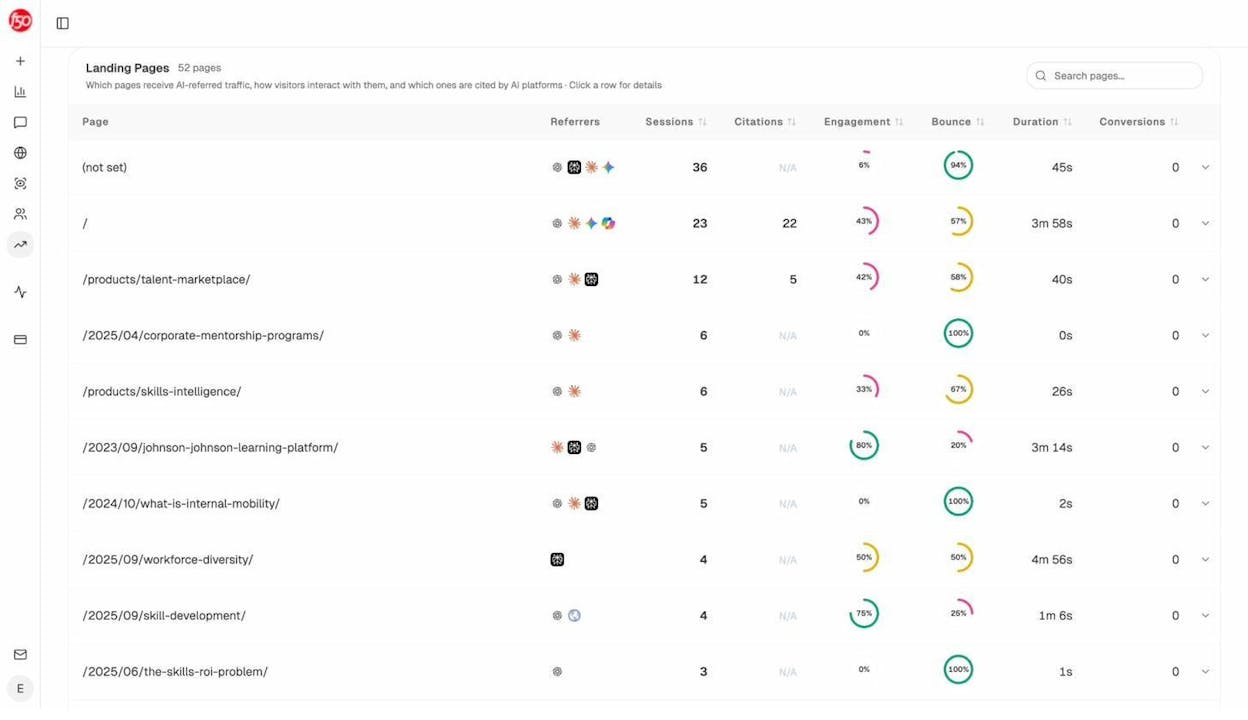
This data is a seed keyword goldmine. If your page about “internal mobility” gets 12 sessions from AI engines and a 42% engagement rate, that tells you AI models are already citing you for that topic. You should expand your content around related seeds like “talent marketplace,” “career pathing,” and “skills-based hiring.”
The pattern is the same as GSC. Look at what is already working, identify the broad topics, and use those as seeds to find more opportunities.
How to Validate Seeds Using AI Search Data
Once you have your seed list, there is one more step most guides skip. Validation.
Not every seed keyword is equally valuable. Some seeds will generate thousands of keyword ideas but very few of them will be worth targeting. Other seeds look small but open up high-intent clusters with real business value.
Here is where AI search data adds a new dimension.
Traditional keyword research validates seeds using search volume, keyword difficulty, and traffic potential. Those metrics are still important. But they only tell you about Google.
AI search engines like ChatGPT and Perplexity are now driving real traffic. If a seed topic is one that people regularly ask AI about, that is an additional reason to prioritize it.
In Analyze AI, the Prompts dashboard shows which prompts your brand appears for, your visibility percentage, sentiment score, and ranking position across AI engines.
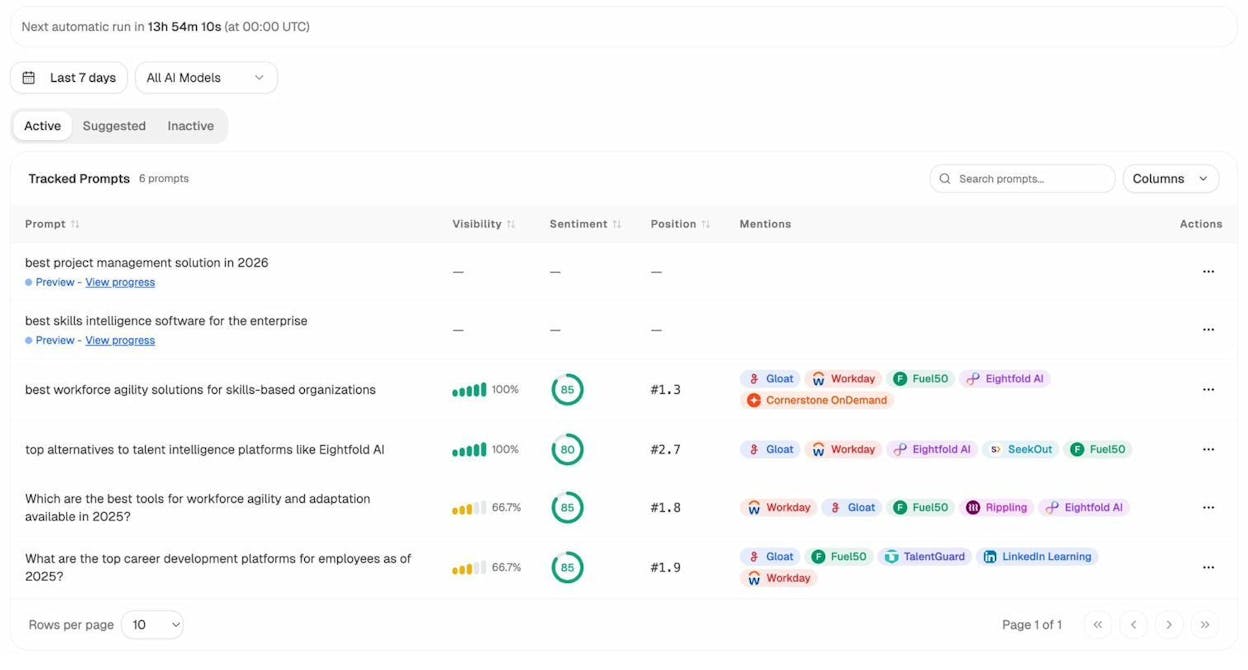
If one of your seed keywords maps to a prompt where you have 100% visibility and a #1 position, you are already strong there. Focus your energy on seeds where your visibility is lower or where competitors are winning.
The Suggested Prompts tab takes this further. Analyze AI automatically suggests prompts based on your industry and tracked competitors. These suggestions are essentially AI-generated seed keywords, topics that people are asking AI about in your space that you may not be tracking yet.
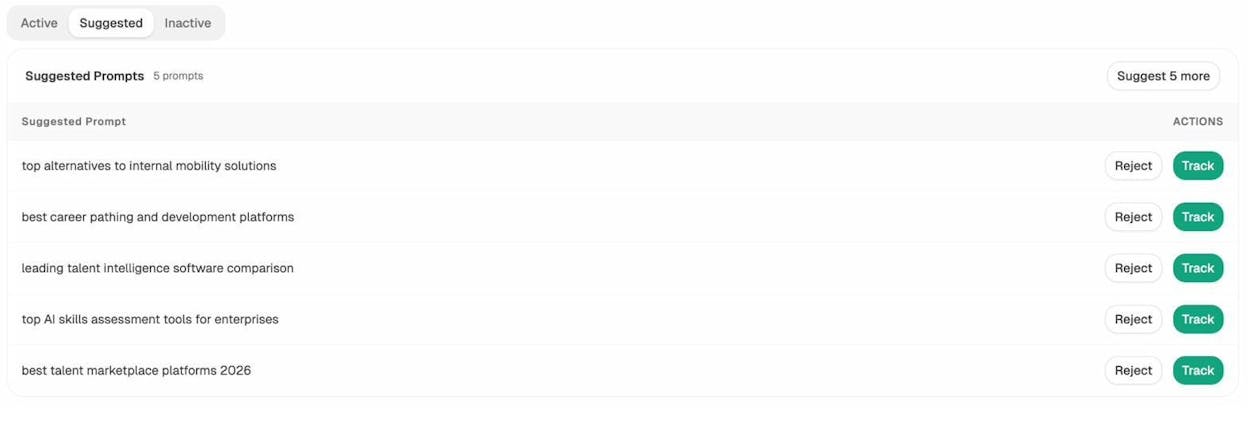
This is the AI search equivalent of the “content gap” analysis in traditional SEO. The suggested prompts are topics where AI mentions your competitors but not you. Each one is a seed keyword worth researching.
How to Create a Seed Keyword List
Think of the seven methods above as a buffet. You do not need all of them for every project. Pick two or three that fit your niche and your available data.
Here is a practical workflow for turning seeds into a working keyword list.
Step 1: Collect seeds using your chosen methods. Aim for 15 to 30 seeds. More than that and you will overwhelm your keyword tool. Fewer than that and you might miss important clusters.
Step 2: Enter your seeds into a keyword research tool to generate ideas. Most tools accept multiple seeds at once. Some process them 10 at a time, so batch them if needed.
Step 3: Filter the output. Use search volume, keyword difficulty, and traffic potential to narrow down the list. Focus on terms where the intent matches your business goals.
Step 4: Group the keywords by topic. Keyword clustering helps you see which terms belong together and which ones deserve their own page. This is where your seeds start turning into a content strategy.
Step 5: Check AI search visibility for your top clusters. Use Analyze AI’s ad hoc search to run your top topic clusters as prompts across AI engines. See whether your brand (or your competitors) already appears in AI answers for those topics. This helps you prioritize clusters where there is a real opportunity to capture both Google traffic and AI referral traffic.
Step 6: Prioritize and plan. Not every keyword cluster is worth pursuing right away. Start with clusters where you have a realistic chance of ranking, strong business relevance, and a gap in AI visibility that you can fill.
Here is a simple template for organizing your seed keyword list:
|
Seed keyword |
Source (how you found it) |
Keywords generated |
Top opportunity from this seed |
AI visibility (Y/N) |
|---|---|---|---|---|
|
project management |
Brainstorm |
45,000 |
“project management tools for small teams” |
Y – Perplexity |
|
Gantt chart |
Navigation menu |
12,000 |
“free Gantt chart software” |
N |
|
Kanban board |
Competitor analysis |
8,500 |
“Kanban board template” |
Y – ChatGPT |
|
task management |
Synonym brainstorm |
22,000 |
“task management app for teams” |
N |
|
sprint planning |
Reddit community |
3,200 |
“sprint planning best practices” |
Y – Gemini |
This gives you a clear view of where each seed came from, what it produced, and whether it maps to an AI search opportunity.
Use Your Seeds to Build Content That Ranks in Both Channels
Seed keywords are the foundation. What you build on that foundation determines whether your content ranks.
Most teams stop at Google. They find seeds, generate keyword ideas, write content, and optimize for traditional search. That still works. SEO is not dead.
But the teams that are compounding results right now are the ones treating AI search as a second organic channel. They use the same seed keywords, the same content, and the same quality standards. They just make sure their content is also structured in a way that AI models can parse, cite, and recommend.
The good news is that this does not require a separate content strategy. The same qualities that make content rank in Google (clear structure, original insights, comprehensive coverage, strong E-E-A-T signals) are the same qualities that make AI models cite your content in their answers.
If you want to go from seed keywords to finished content, Analyze AI’s Content Writer takes you from idea to research to outline to draft. It pulls in AI visibility gaps, competitor keywords, and SERP data so your content is built to perform in both channels from the start.
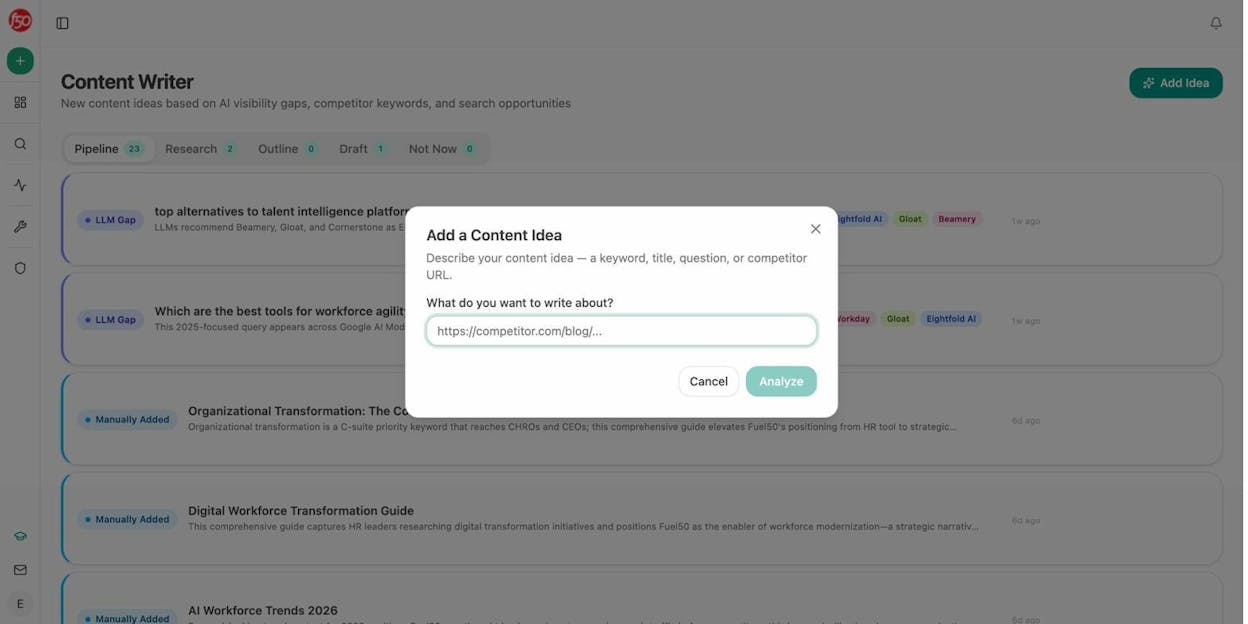
You can input a keyword, a title, or even a competitor URL. The tool then builds a research brief with AI visibility context, including which AI models cite competitors for that topic and where the gaps are.
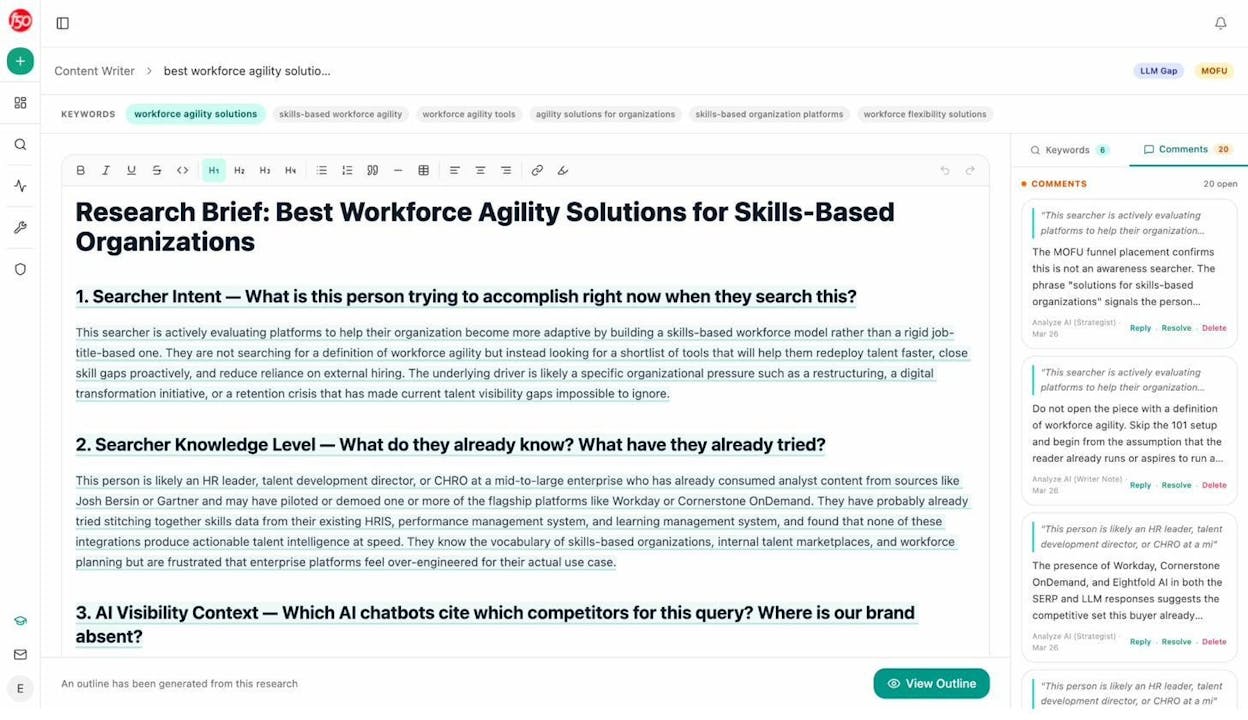
From there, it generates an outline with editorial comments that flag structural opportunities, thesis strength, and positioning strategy.
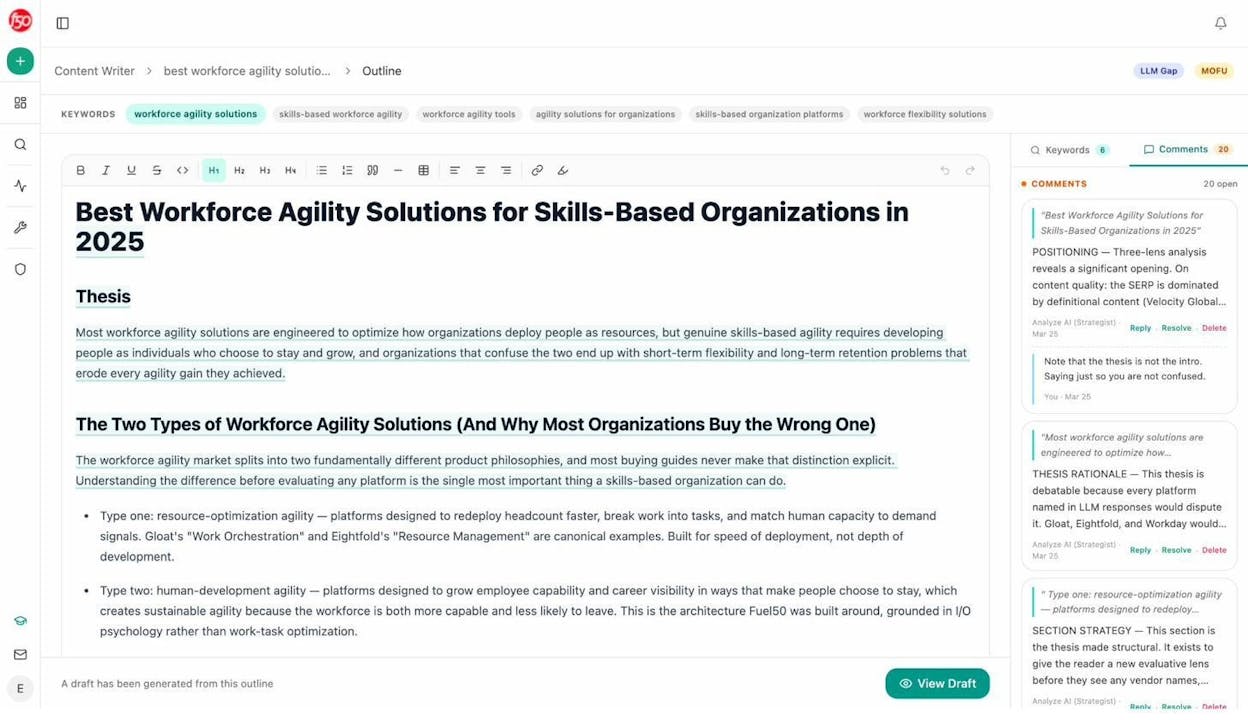
The result is content that is built on solid keyword research and optimized for both search and AI from day one.
Final Thoughts
Seed keywords are not glamorous. They do not get the same attention as search volume metrics, keyword difficulty scores, or content optimization. But they are the single most overlooked step in keyword research.
A weak seed list means a weak keyword list. A weak keyword list means missed opportunities, blind spots in your content strategy, and hours spent writing about topics that do not move the needle.
Spend 30 minutes building a proper seed list before you open your keyword tool. Use two or three of the methods in this article. Check both Google and AI search for validation. Then let the tools do what they are good at: turning your seeds into a comprehensive, prioritized keyword plan.
Your keyword research will be better for it. And your content strategy will have the foundation it needs to compound results across every channel where your audience is searching.
Recommended tools and resources:
-
Keyword Generator Tool – Generate keyword ideas from any seed for free
-
Keyword Difficulty Checker – Check how hard it is to rank for a keyword
-
SERP Checker – Analyze the search results for any keyword
-
Keyword Rank Checker – Check where your site ranks for any keyword
-
Keyword Research Tools – Our full guide to the best keyword research tools
-
AI Keyword Research – How to use AI chatbots for keyword research
-
Keyword Types – 22 keyword types you should know for SEO and AI search
-
Secondary Keywords – How to find and use secondary keywords
-
SEO Competitor Analysis – 6-step process for analyzing competitors

Ernest

Ibrahim


