



Summarize this blog post with:


In this article, you’ll learn what marketing AI agents are, why they matter more than basic automation, and 15 specific agents you can build to handle the repetitive work across SEO, content, AI search visibility, and GTM operations. Each example includes the workflow logic so you can build and deploy it yourself.
Table of Contents
What Are Marketing AI Agents?
A marketing AI agent is a workflow that takes in data, reasons through it with an LLM, and executes a task on your behalf. Unlike a static automation that follows a fixed “if this, then that” sequence, an agent can make decisions. It can look at your GA4 data, pull keyword research, compare it with competitor rankings, and write a recommendation. All without you touching a dashboard.
The difference between an agent and a basic Zapier-style automation is judgment. An automation moves data between apps. An agent reads data, interprets it, and acts on the interpretation. That is why marketing teams are shifting from automation tools to agent builders that let you wire together LLMs, data sources, and output destinations in a single visual workflow.
The practical result is that the repetitive work eating 10 to 20 hours per week across a marketing team can run on a schedule or trigger. The work gets done before anyone opens a laptop Monday morning.
What Makes a Good Marketing AI Agent
Not all agents are created equal. A useful marketing agent has three things.
Access to real data. An agent that prompts an LLM with no context is just ChatGPT with extra steps. The agent needs to pull from your actual analytics (GA4, Google Search Console), your SEO tools (DataForSEO, Semrush), your CRM (HubSpot), and your content management system (WordPress, Notion, Contentful). The more real data the agent can access, the more relevant its output becomes.
A clear trigger. Should the agent run on a schedule? Fire when a webhook hits? Run on-demand? This matters because the whole point is removing the human from the loop for recurring work. A content refresh agent that you have to remember to run every Tuesday defeats the purpose. Set it on a cron and forget about it.
An output destination. The agent’s work needs to land somewhere useful. A Slack message. A Notion page. A WordPress draft. An email to leadership. If the output sits in a dashboard nobody checks, the agent failed.
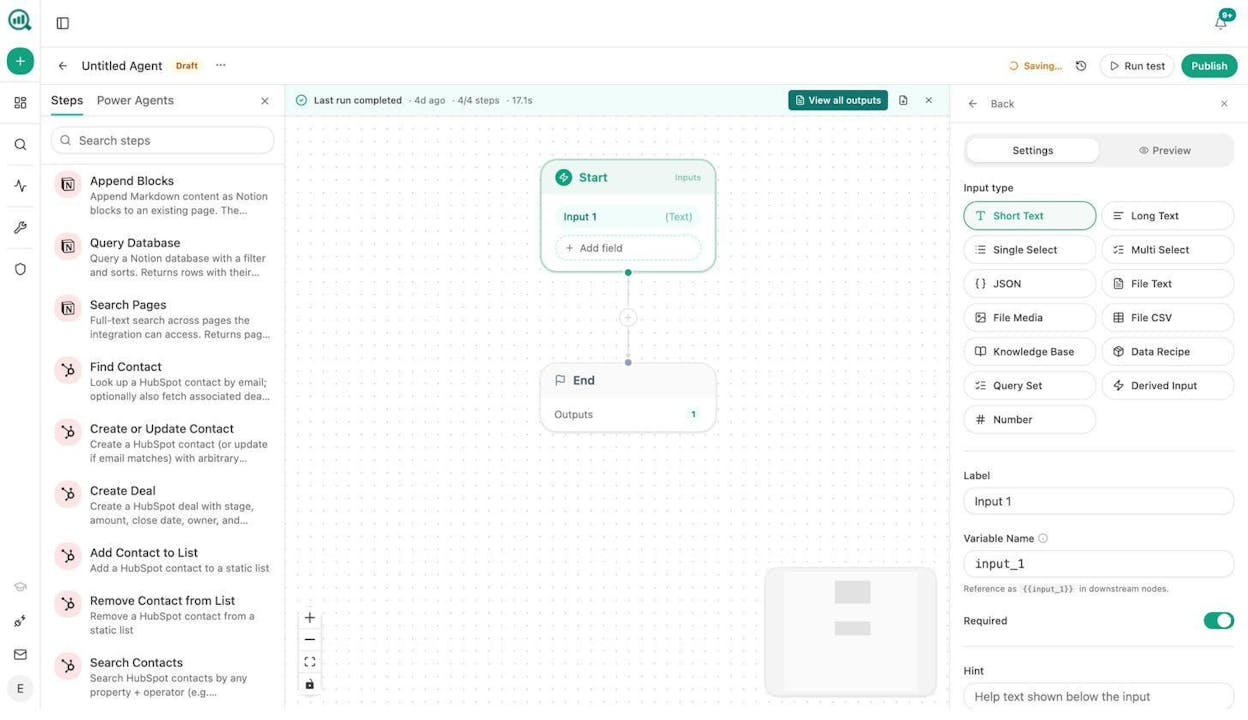
In Analyze AI’s Agent Builder, these three components map directly to 180+ nodes across 16 categories, 34 pre-built data recipes, and 3 trigger modes (manual, scheduled, webhook). You pick a trigger, wire the nodes, and the agent runs.
15 Marketing AI Agent Examples You Can Build
Here are 15 marketing AI agents organized by function. Each one can be built in Analyze AI using the Agent Builder, and each one handles work that currently sits on someone’s plate.
SEO and Content Agents
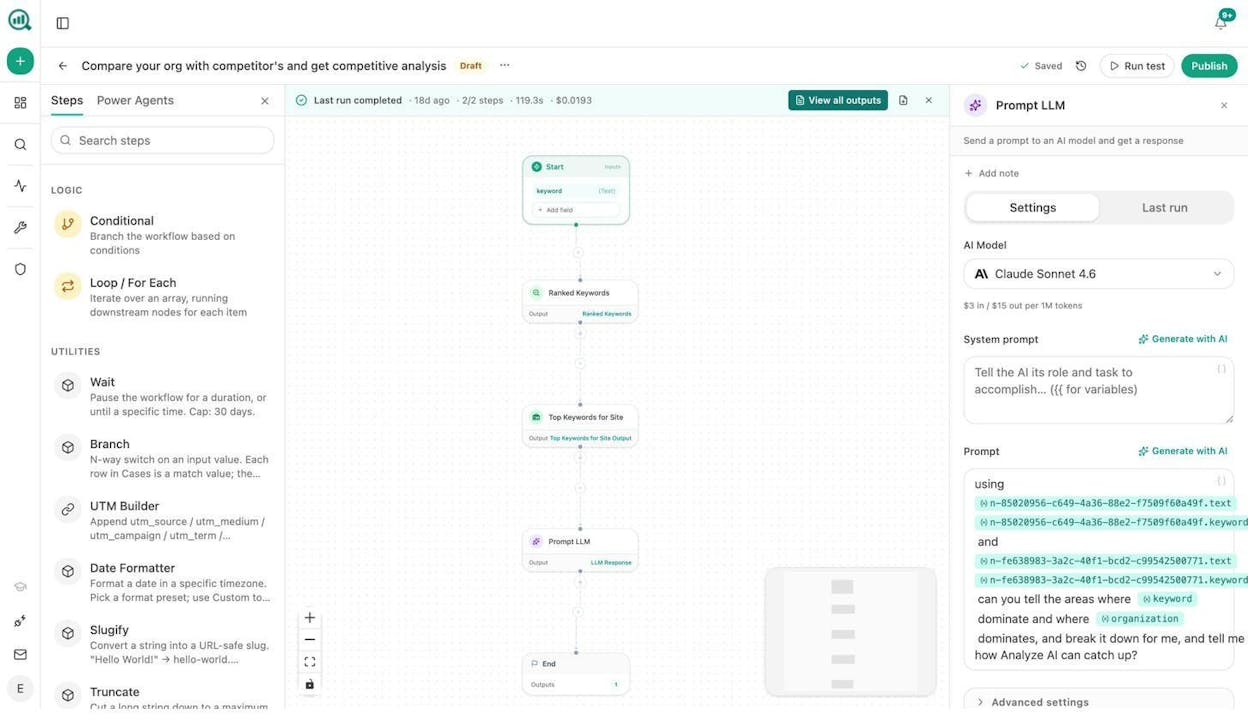
1. Competitive SEO Analyzer
What it does: Pulls your ranked keywords from Google Search Console and DataForSEO, compares them against competitor domains, and generates a gap analysis showing where competitors outrank you and where you have opportunities.
How the workflow runs: Start node takes a competitor domain as input. The Ranked Keywords node pulls your keyword portfolio. The Competitor Domains node pulls theirs. A Prompt LLM node compares both sets and outputs a prioritized list of gaps and opportunities. Export the output as a DOCX or push it to Notion.
Why it matters: Most teams run competitive analysis quarterly at best because the manual version takes a full day. This agent runs it weekly on a schedule. You stop guessing where competitors are eating your traffic and start seeing it in real time. And because Analyze AI includes AI visibility data alongside traditional SEO metrics, the same agent can show you where competitors outrank you in AI search engines like ChatGPT, Perplexity, and Gemini.
2. Content Audit and Optimizer Agent
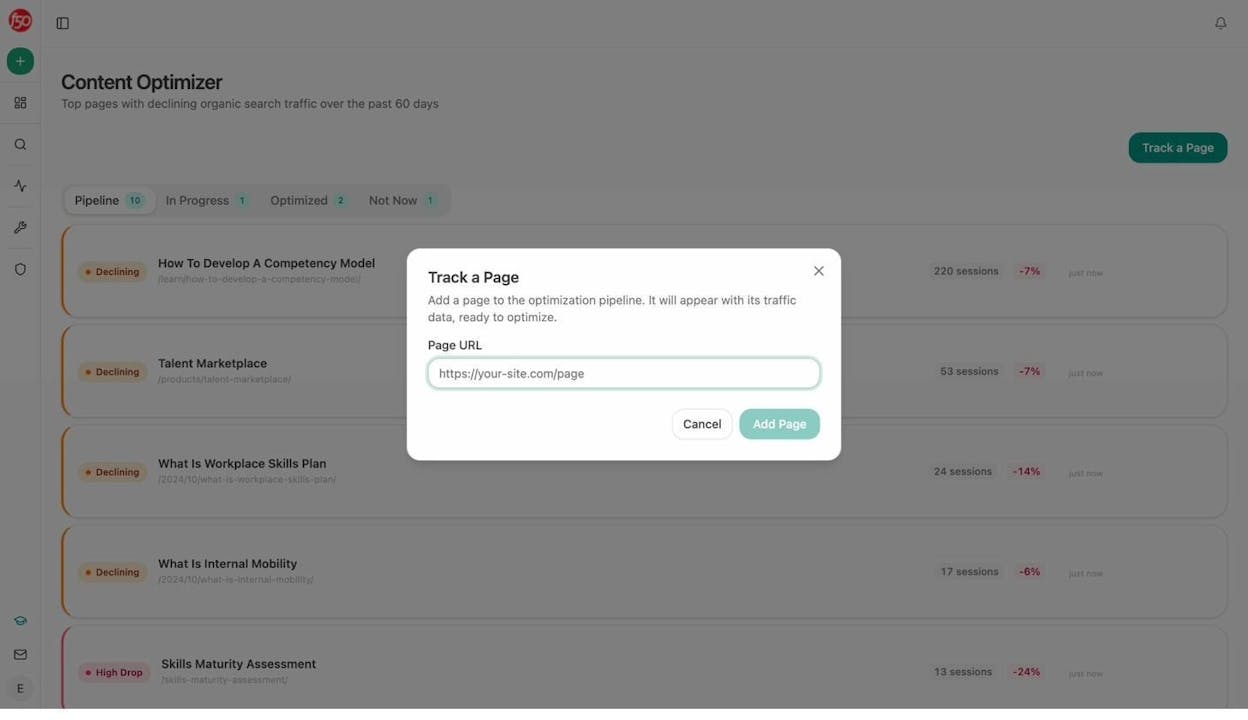
What it does: Identifies your pages with declining organic traffic, audits each one for SEO and AI engine optimization readiness, and generates optimization recommendations with line-by-line suggestions.
How the workflow runs: Schedule trigger (weekly). The agent pulls the declining-pages data recipe from GA4, loops through each URL, runs the AEO Content Scorecard node, and sends the results to Slack with severity tags (high drop, moderate decline). Pages scoring below 80 get flagged for rewrite.
Why it matters: Content decay is silent. Pages that drove traffic six months ago slowly lose rankings while nobody notices. This agent catches the decline before it compounds. The Content Optimizer in Analyze AI scores pages for structure, freshness, claim density, and proof integration, so you fix the right things.
3. Brief-to-Publish Content Writer
What it does: Takes a content idea or keyword and runs it through research, outline, draft, and quality gate in a single pipeline. If the draft scores above your threshold, it publishes directly to WordPress. If not, it sends the draft to Slack with the gaps highlighted.
How the workflow runs: Webhook trigger (fires when a brief moves to “approved” in Notion). The Generate Research node pulls SERP data and competitor content. Generate Outline structures the piece. Generate Full Draft writes it with your Brand Vault tone and style injected. The AEO Content Scorecard gates quality. WordPress Create Post handles publishing.
Why it matters: Writing content is not the bottleneck. The bottleneck is the five hours of research, outlining, and formatting that surround the writing. This agent compresses that pipeline into minutes. And because Analyze AI’s Content Writer uses AI visibility gaps and competitor analysis at every step, your content is built to perform in both traditional search and AI search from the start.
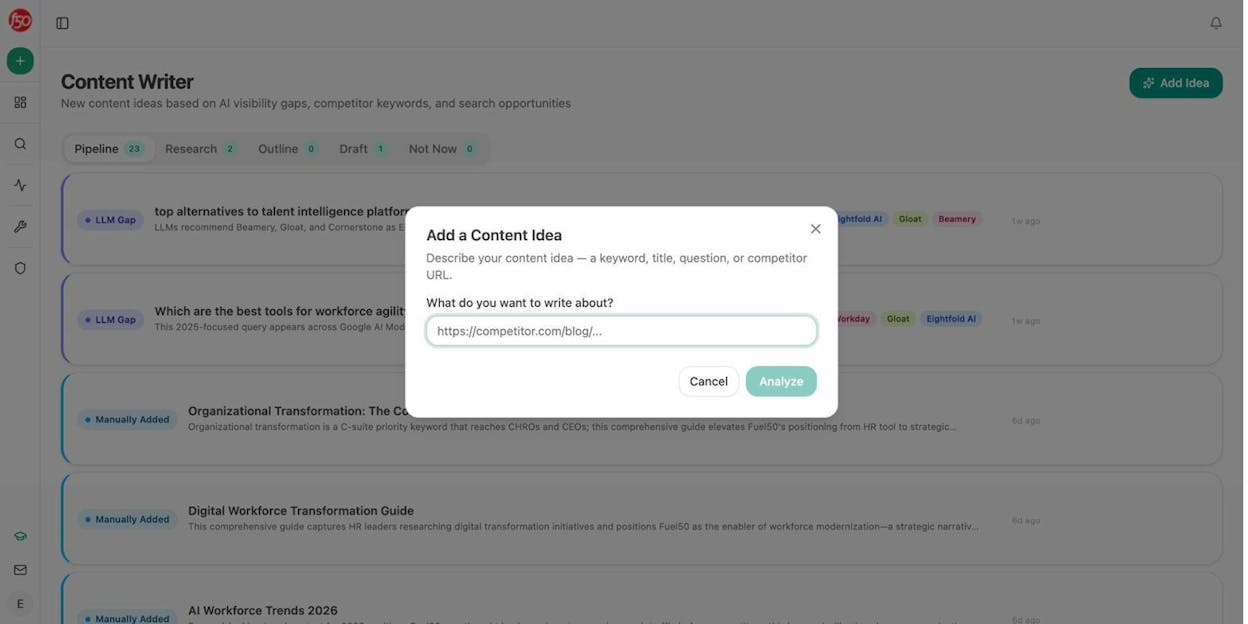
4. Keyword Research at Scale
What it does: Takes a seed keyword or domain and returns a full keyword research dump with search volumes, difficulty scores, and keyword ideas, all pushed to a spreadsheet or Analyze AI Sheets for sorting and prioritization.
How the workflow runs: Start node takes a seed keyword. The DataForSEO Keyword Ideas node expands it. Get Search Volumes adds volume data. Keyword Difficulty scores each term. A Prompt LLM node clusters the keywords by intent (informational, commercial, transactional). Export to CSV or Excel.
Why it matters: Manual keyword research means toggling between tools, copying data into spreadsheets, and spending hours on categorization. This agent does the full cycle in one run. You can also pair it with Analyze AI’s AI keyword research data to find prompts that AI engines are already answering, so you write content that ranks in both Google and AI search results.
5. Internal Linking Maintenance Agent
What it does: Crawls your sitemap, cross-references each page with its top keywords from Google Search Console, and suggests three internal links per page based on topical relevance.
How the workflow runs: Schedule trigger (weekly). The Get Sitemap node pulls your pages. A Loop node iterates through each URL. The GSC Top Keywords for Page node pulls keyword context. The Prompt LLM node generates internal link suggestions based on keyword overlap. Output goes to Notion or a spreadsheet.
Why it matters: Internal linking is one of the highest-leverage SEO activities, and one of the most neglected because it is tedious. This agent eliminates the tedium. For more on the strategy behind it, see this guide on internal linking tips for SEO.
AI Search Visibility Agents
6. AI Visibility Monitor
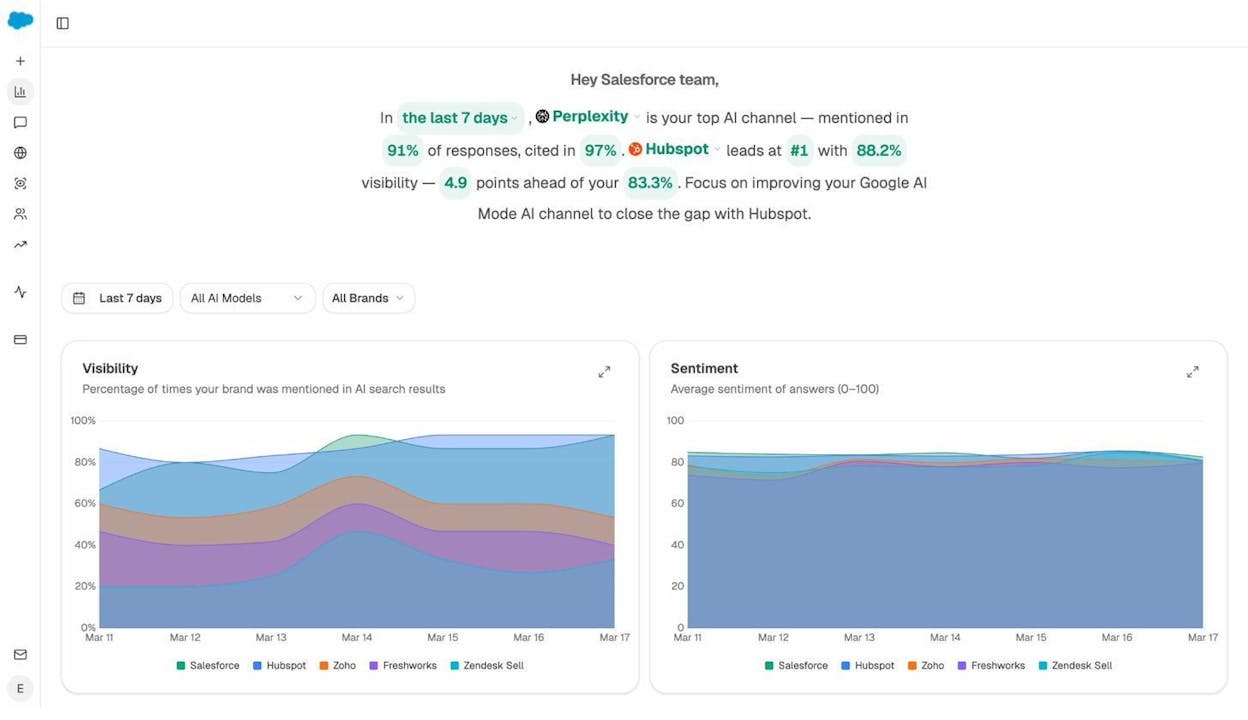
What it does: Tracks your brand’s visibility score across ChatGPT, Perplexity, Gemini, Copilot, and Claude on a daily basis. Flags drops, surfaces sentiment shifts, and sends a digest every morning.
How the workflow runs: Schedule trigger (daily, 8am). The Visibility Score node pulls your brand’s percentage across AI engines. The sentiment-alerts data recipe checks for negative portrayal. The visibility-losers recipe flags prompts where you dropped. A Prompt LLM node compiles a summary. Slack delivers the digest.
Why it matters: AI search is a new organic channel, not a replacement for SEO. But if you are not tracking your presence in AI answers, you are blind to a growing source of traffic. Analyze AI’s AI Visibility Tracking shows your position, sentiment, and share of voice across every major AI engine, and this agent turns that data into a daily briefing.
7. Citation Tracker and Decay Alert
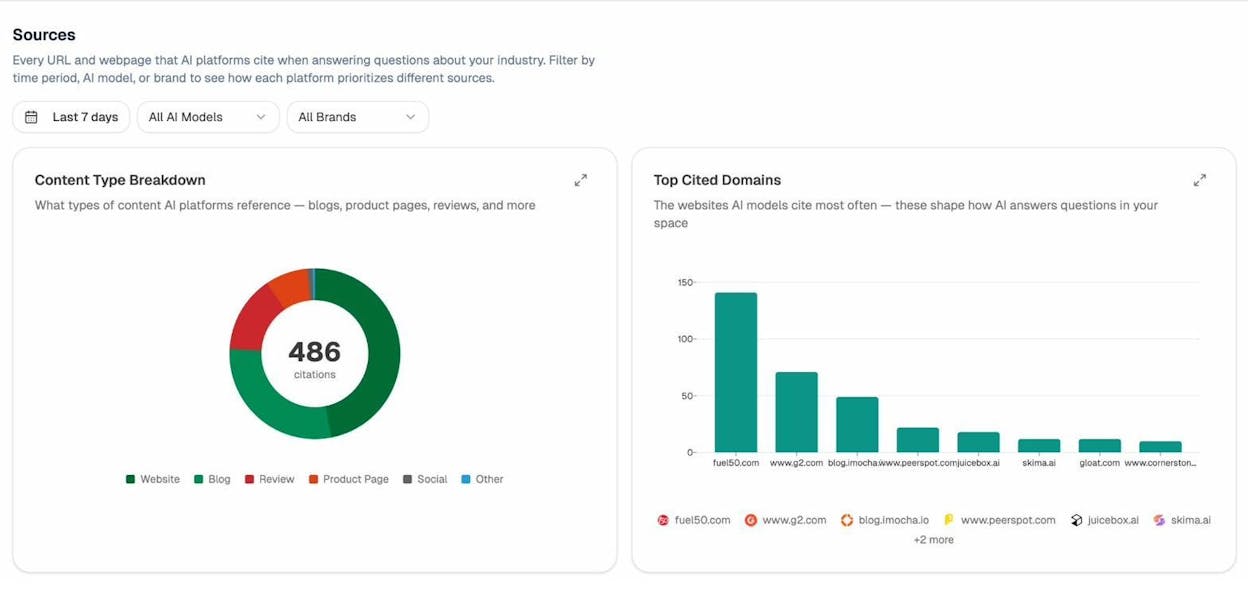
What it does: Monitors which of your pages AI engines cite in their answers. Alerts you when a previously cited page stops getting picked up.
How the workflow runs: Schedule trigger (daily). The citation-decay-alert data recipe compares citation counts over time. When a page loses citations faster than its traffic drops, the agent fires a Slack alert with the page URL and the prompts that stopped citing it.
Why it matters: AI engines choose which sources to cite based on content quality, freshness, and entity coverage. When citations drop, it is an early signal that your content needs updating before traffic follows. Analyze AI’s Citation Analytics tracks every cited URL and domain so you can see exactly which pages are earning (or losing) mentions.
8. Competitor Intelligence in AI Search
What it does: Shows you exactly which prompts competitors win and your brand does not. Identifies the sources AI engines rely on in your category and flags gaps you can fill.
How the workflow runs: Schedule trigger (Monday). The competitor-gaps data recipe pulls prompts where competitors appear and you do not. The competitor-sources recipe shows URLs that cite competitors but never you. A Prompt LLM node prioritizes the gaps by traffic potential and generates a content brief for each one.
Why it matters: In traditional SEO, you can check competitor rankings with a keyword tool. In AI search, the equivalent is checking which prompts name your competitors and skip you. This agent surfaces those blind spots weekly. See the AI visibility guide for the full framework.
Social Media and Creative Agents
9. Social Media Content Generator
What it does: Takes your top-performing blog posts and repurposes them into platform-specific social media posts for X, LinkedIn, and Instagram.
How the workflow runs: Start node takes a blog URL. The Web Page Scrape node extracts the content. A Prompt LLM node (with Brand Vault tone injected) generates three platform-specific drafts. The Social Media Image node creates a visual for each. Output goes to a Google Doc or Notion page for review.
Why it matters: Repurposing content for social is repetitive, and most teams either skip it or do it inconsistently. This agent makes it automatic while keeping every post on-brand.
10. Blog Featured Image and Infographic Generator
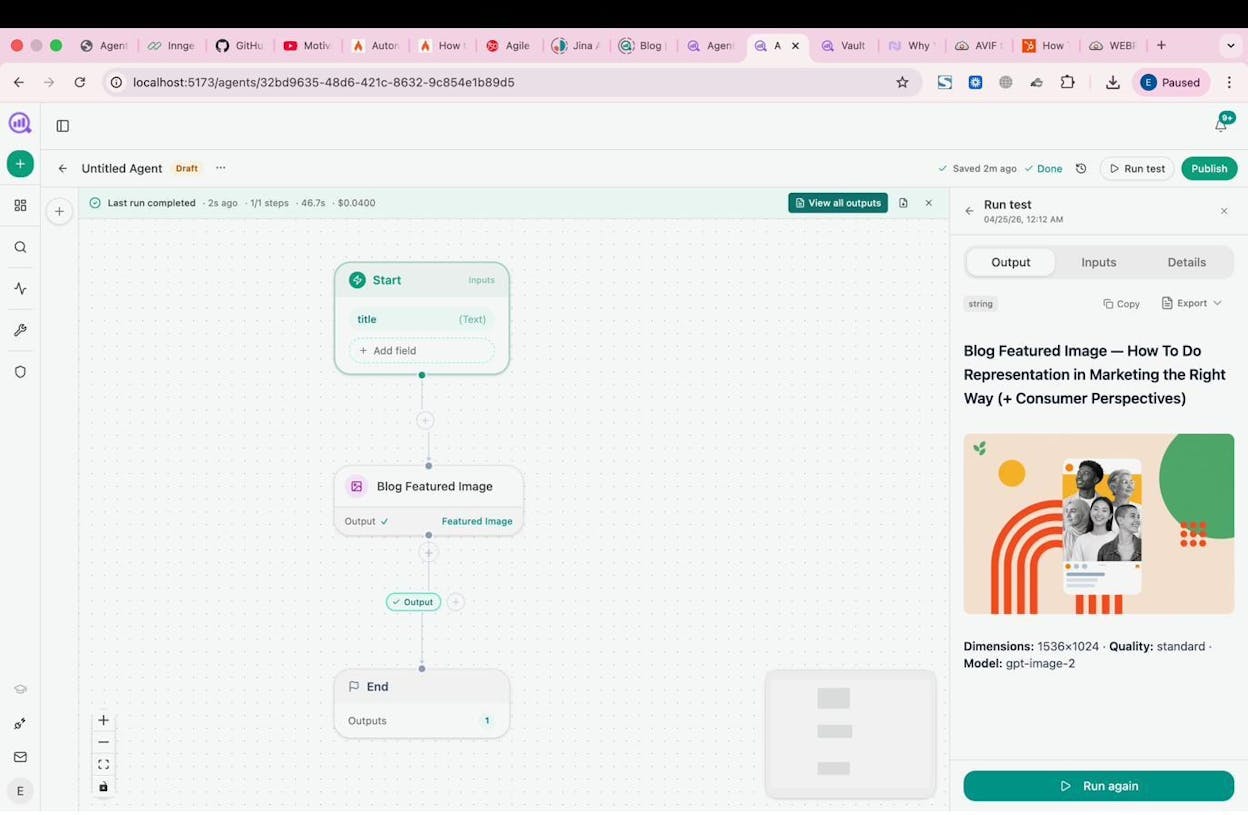
What it does: Generates brand-consistent featured images and infographics for blog posts using Analyze AI’s image creation nodes.
How the workflow runs: Start node takes a blog title. The Blog Featured Image node generates a hero image. The Infographic Generator node creates a data visualization if the post includes statistics. Both are brand-kit-aware, meaning they use your colors, fonts, and visual style automatically.
Why it matters: Design bottlenecks slow down publishing. If your content team waits two days for a designer to create a featured image, you lose momentum. This agent removes the wait.
11. YouTube Video to Blog Post Converter
What it does: Pulls the transcript from a YouTube video, structures it into a blog outline, and drafts a full article optimized for SEO and AI search.
How the workflow runs: Start node takes a YouTube URL. The YouTube Transcript node extracts captions. Generate Outline structures it. Generate Full Draft writes the piece with Brand Vault context. The AEO Content Scorecard checks quality before publishing.
Why it matters: Video content is a massive untapped source for written content. This agent converts your video library into search-optimized blog posts, doubling the surface area of every video you publish.
GTM and Operations Agents
12. Cross-Channel Data Analyst
What it does: Pulls data from GA4, Google Search Console, HubSpot, and your AI visibility dashboard, then generates a plain-language summary of what happened this week across all channels.
How the workflow runs: Schedule trigger (Friday 4pm). The GA4 AI Traffic Overview node pulls traffic data. GSC Top Pages pulls search performance. HubSpot Search Contacts pulls pipeline data. The exec-one-pager data recipe assembles an executive summary. A Prompt LLM node synthesizes everything into a one-page report. Export to DOCX and email it to leadership.
Why it matters: Marketing leaders spend hours assembling weekly reports from multiple dashboards. This agent does the assembly and writes the narrative. When leadership asks “how are we doing,” the answer is already in their inbox.
13. Lead Enrichment and Outreach Agent
What it does: Takes an inbound lead from a form submission, enriches the contact with company data and website audit results, then drafts a personalized outreach email.
How the workflow runs: Webhook trigger (Typeform, Tally, or HubSpot form fill). Hunter Email Verifier validates the email. DataForSEO Domain Overview and Lighthouse Audit pull prospect data. A Prompt LLM node drafts a personalized email. HubSpot Upsert Contact updates the CRM. The draft goes to Slack for sales review.
Why it matters: The gap between a lead filling out a form and a rep responding is where deals die. This agent compresses that gap from hours to seconds with a fully enriched lead and draft email waiting.
14. Customer Case Study Generator
What it does: When a deal closes in HubSpot, this agent researches the customer, pulls deal notes, and drafts a case study in your brand voice.
How the workflow runs: Webhook trigger (HubSpot deal moves to “Closed Won”). The agent researches the customer via web search and DataForSEO. It pulls HubSpot Notes for context. Generate Article writes a case study using Brand Vault tone. The draft goes to Notion for legal review.
Why it matters: Case studies drive pipeline, but getting them written takes months. This agent compresses the first-draft cycle from weeks to minutes.
15. Weekly Executive Report
What it does: Assembles a board-grade intelligence report every Monday morning that covers AI visibility trends, competitor movements, traffic performance, and content pipeline status.
How the workflow runs: Schedule trigger (Monday 7am). The exec-one-pager recipe provides the intelligence summary. The share-of-voice recipe adds AI visibility data. GA4 and GSC nodes pull traffic metrics. A Prompt LLM node writes the narrative in executive language. Export to DOCX and email to the leadership distribution list.
Why it matters: This agent replaces the Monday morning scramble where an analyst pulls data from five dashboards and a content lead writes a summary by noon. The report is in inboxes before coffee. Analyze AI’s Weekly Email Digests also offer a built-in version of this pattern if you want a simpler starting point.
How to Build Your First Marketing AI Agent
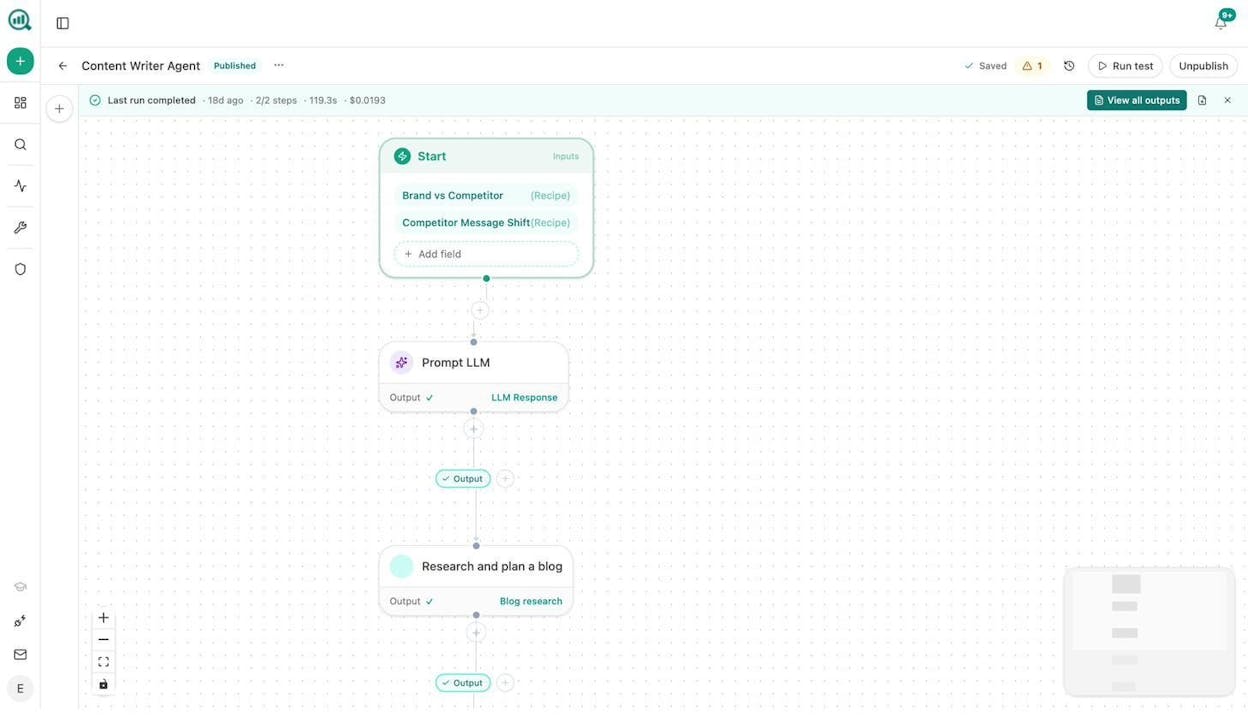
Building your first agent does not require code. Here is the process in Analyze AI.
Step 1: Choose a trigger. Decide if the agent should run manually, on a schedule (daily, weekly, monthly), or via webhook (when an event fires from HubSpot, Typeform, or any API).
Step 2: Define your inputs. Add start-node inputs using any of the 13 input types, including short text, long text, number, file upload, data recipe, query set, and Brand Vault injection. For scheduled agents, use data recipes so the agent runs without any human input at all.
Step 3: Wire your nodes. Drag nodes from the left panel and connect them. Pull data with SEO research nodes (DataForSEO, Semrush, GSC). Process it with Prompt LLM nodes. Route logic with Conditional and Loop nodes. Output to Slack, WordPress, Notion, HubSpot, or export nodes.
Step 4: Test and publish. Click Run Test to see the output. Tweak the prompt or node configuration. When it works, click Publish. The agent is live.
Start With One Agent, Then Stack
You do not need to build all 15 at once. Start with the agent that solves your most painful recurring task. For most teams, that is either the content refresh agent or the competitive SEO analyzer.
The compounding effect is real. One agent saves a few hours per week. Five agents running on schedule save 20+ hours. At that point, your team spends time on strategy and creative work instead of report generation and data entry.
Analyze AI offers a free trial so you can build and test agents without commitment. The platform includes all 180+ nodes, 34 data recipes, and integrations with GA4, GSC, Semrush, DataForSEO, HubSpot, WordPress, Notion, and every major LLM. You start building in minutes.

Ernest

Ibrahim


