



Summarize this blog post with:


In this article, you’ll learn how to optimize your content for the right keywords so it ranks on Google and gets cited by AI search engines like ChatGPT, Perplexity, and Gemini. You’ll walk through three steps: choosing the right keyword, aligning with search intent, and applying on-page SEO best practices. Each step includes practical instructions you can follow immediately, whether you’re creating new content or improving pages that already exist. And because AI search is now a second organic channel, you’ll also learn how to track and improve your visibility in AI answers — without abandoning SEO.
Table of Contents
What Is Keyword Optimization?
Keyword optimization is the process of making a webpage more relevant to a specific search query. It involves choosing the right keyword, matching the content to what searchers expect, and placing signals throughout the page so that Google (and AI search engines) can understand what the page is about.
This is different from keyword research. Keyword research is about finding keywords worth targeting. Keyword optimization is what happens after — the work of aligning your content with the keyword you’ve chosen.
Think of it as translation. You already have something valuable to say. Keyword optimization makes sure both search engines and searchers can find it and recognize it as the answer they need.
Why Keyword Optimization Still Matters in 2026
Some marketers hear “AI search” and assume traditional SEO is dead. It isn’t. Google still processes billions of searches daily. And even AI search engines rely on high-quality, well-structured content to generate answers and citations.
The brands that show up in AI answers are the same ones with clear, original, and well-optimized content. The difference now is that your content has to work for AI models too — not just Google. As we say in our manifesto: the most helpful content wins, regardless of which engine serves it.
Keyword optimization is the foundation for both channels. Do it well, and your content works everywhere.
Step 1. Make Sure You’re Optimizing for the Right Keyword
Before you spend hours refining a page, confirm that the keyword is worth the effort. A perfectly optimized page for a keyword nobody searches — or one you can’t realistically rank for — is wasted work.
Here are five things to evaluate before you start optimizing.
Search Traffic Potential
Search volume alone can be misleading. Some high-volume keywords generate few clicks because Google answers the query directly on the SERP (through featured snippets or AI Overviews). Other low-volume keywords send far more traffic than you’d expect because the top-ranking page also ranks for hundreds of related terms.
A better approach is to look at how much traffic the current top-ranking pages actually receive. In most SEO tools, you can find a “Traffic Potential” or similar metric that sums up estimated traffic from all keywords a top-ranking page ranks for. This tells you what’s realistically available if you win the position.
![[Screenshot: Open your SEO tool’s keyword explorer, type your target keyword, and look at the Traffic Potential metric next to the search volume. Notice how they often differ significantly.]](https://www.datocms-assets.com/164164/1777050176-blobid1.png?auto=format,compress&w=1248&fit=max)
For example, a keyword with 500 monthly searches might have a traffic potential of 5,000 — because the page ranking #1 for that keyword also ranks for 200 related queries. That’s the number that actually matters.
You can also use Analyze AI’s free Keyword Generator to discover keyword variations and their search volumes before deciding which term to target.
Business Value
Not all traffic is equal. A keyword that brings 10,000 visitors who have no interest in your product is less valuable than one that brings 500 visitors ready to buy.
Before optimizing, ask: if someone searches this keyword and lands on my page, what’s the practical outcome? Can I show them how my product solves their problem? Or is this purely informational traffic with no connection to revenue?
One useful framework is to score each keyword on a business potential scale:
|
Score |
Description |
Example |
|---|---|---|
|
3 |
Your product is an irreplaceable solution to the problem |
“AI search analytics tools” |
|
2 |
Your product helps, but isn’t essential |
“how to track brand visibility” |
|
1 |
Your product is loosely relevant |
“content marketing strategy” |
|
0 |
No connection to your product |
“history of search engines” |
Prioritize keywords that score 2 or 3. You can still create content for lower-scoring keywords — they build topical authority and brand awareness — but your optimization energy should go to the ones that connect to pipeline.
Keyword Difficulty
Some keywords are significantly harder to rank for than others. The primary factor is backlinks: how many unique domains link to the pages currently ranking in the top 10.
Most SEO tools provide a Keyword Difficulty (KD) score on a scale of 0 to 100. Use the Analyze AI Keyword Difficulty Checker to quickly assess any keyword’s competitiveness.
![[Screenshot: Enter your target keyword in a keyword difficulty checker tool. Look at the KD score and the number of referring domains for each top-10 result.]](https://www.datocms-assets.com/164164/1777050186-blobid2.png?auto=format,compress&w=1248&fit=max)
If your site is relatively new or doesn’t have a strong backlink profile, focus on keywords with a KD below 20–30. You’ll build momentum faster by ranking for less competitive terms, and that authority compounds over time.
Other factors to consider beyond KD include your site’s topical relevance (does Google already associate your domain with this topic?) and domain authority.
Search Intent
Search intent is the reason behind the query. Google — and increasingly, AI search engines — rank content that matches what the searcher actually wants.
There are four broad types of intent:
|
Intent Type |
What the Searcher Wants |
Content That Ranks |
|---|---|---|
|
Informational |
Learn something |
Blog posts, guides, tutorials |
|
Commercial |
Compare options before buying |
Reviews, comparisons, listicles |
|
Transactional |
Buy or take action |
Product pages, pricing pages |
|
Navigational |
Find a specific website |
Brand pages, homepages |
The fastest way to identify intent is to Google your keyword and look at the top 10 results. If all 10 are blog posts, you need a blog post. If they’re product pages, a blog post won’t compete.
We’ll go deeper on intent in Step 2.
Your Expertise and E-E-A-T
Google’s E-E-A-T guidelines (Experience, Expertise, Authoritativeness, and Trustworthiness) signal that who creates the content matters as much as the content itself.
This is especially important for YMYL (Your Money or Your Life) topics like health, finance, and legal advice. But it applies broadly: Google wants to show content from sources that have demonstrated knowledge on the topic.
What this means in practice:
-
Assign content to authors who have genuine expertise in the subject
-
Include author bios with relevant credentials
-
Link to authoritative external sources that support your claims
-
Keep content updated — outdated information erodes trust
-
Show evidence of first-hand experience where possible
If you’re entering a niche where you have no track record, consider starting with lower-competition keywords and building your site’s topical authority gradually.
Step 2. Align Your Content with Search Intent
You’ve confirmed your keyword is worth targeting. Now you need to figure out exactly what kind of content searchers expect — and deliver it.
This step involves analyzing what Google already ranks for your keyword and reverse-engineering the pattern. The framework is called the “three Cs of search intent.”
Content Type
Content type is the broad format Google prefers for a query. It’s usually one of these:
-
Blog post or article — educational or informational content
-
Product page — a specific product or service offering
-
Category page — a collection of products or articles
-
Landing page — a conversion-focused page
To identify the dominant content type, Google your keyword and look at the top 5 results. If four out of five are blog posts, you need a blog post. If they’re category pages from ecommerce sites, that’s what Google considers the best match.
![[Screenshot: Google your target keyword and examine the top 5 organic results. Note whether they’re blog posts, product pages, category pages, or something else.]](https://www.datocms-assets.com/164164/1777050197-blobid3.png?auto=format,compress&w=1248&fit=max)
For “keyword optimization,” the entire first page is articles and guides. So to compete, you need an article — which is exactly what you’re reading now.
Content Format
Content format goes one level deeper. Within “blog post,” there are subtypes:
-
How-to guide
-
Step-by-step tutorial
-
Listicle (e.g., “10 best…”)
-
Comparison post
-
Definition / “what is” article
-
Opinion or editorial
For “keyword optimization,” the top results are step-by-step guides. So a listicle or opinion piece would be a poor fit — the format needs to match.
Look at the titles and structures of top-ranking pages. If most use numbered steps, your article should too. If most lead with a definition, start there.
Content Angle
Content angle is the unique hook that makes a page stand out in the SERPs. It’s what makes a searcher pick your result over the nine others on the page.
Common angles include:
-
Freshness (“2026 Guide”)
-
Speed (“In 5 Minutes”)
-
Simplicity (“For Beginners”)
-
Comprehensiveness (“The Complete Guide”)
-
Authority (“Based on 65,000 Citations Data”)
Study the titles and meta descriptions of top-ranking pages to identify which angles resonate for your keyword. Then decide if you’ll match the dominant angle or differentiate with a stronger one.
For instance, Analyze AI’s blog post on how to rank on ChatGPT uses the angle “Based on 65,000 Citation Data” — a data-driven credibility signal that none of the competitors matched.
How AI Search Engines Handle Intent Differently
Here’s something most keyword optimization guides skip: AI search engines interpret intent differently than Google.
When someone asks ChatGPT “what’s the best CRM for small businesses,” they’re not browsing a list of ten blue links. They’re getting a direct answer — a curated recommendation with reasoning. The AI engine pulls from its training data and cited sources to construct a narrative.
This means your content needs to do more than match search intent for Google. It also needs to be structured in a way that AI engines can extract, cite, and reference.
What works for AI intent alignment:
-
Clear, direct answers near the top of each section. AI engines prefer content that leads with the conclusion, then supports it with evidence.
-
Entity-rich content that mentions specific brands, tools, people, and data points. AI models rely on named entities to connect information.
-
Structured comparisons in tables or organized lists. When AI answers comparison queries, it pulls from content that has already done the comparing.
-
Original data and research. AI engines heavily favor primary sources over content that repackages existing information.
With Analyze AI, you can check exactly how AI engines currently answer the prompts in your space. The Prompts dashboard shows your visibility, position, and sentiment across ChatGPT, Perplexity, Gemini, and Copilot for every tracked prompt.
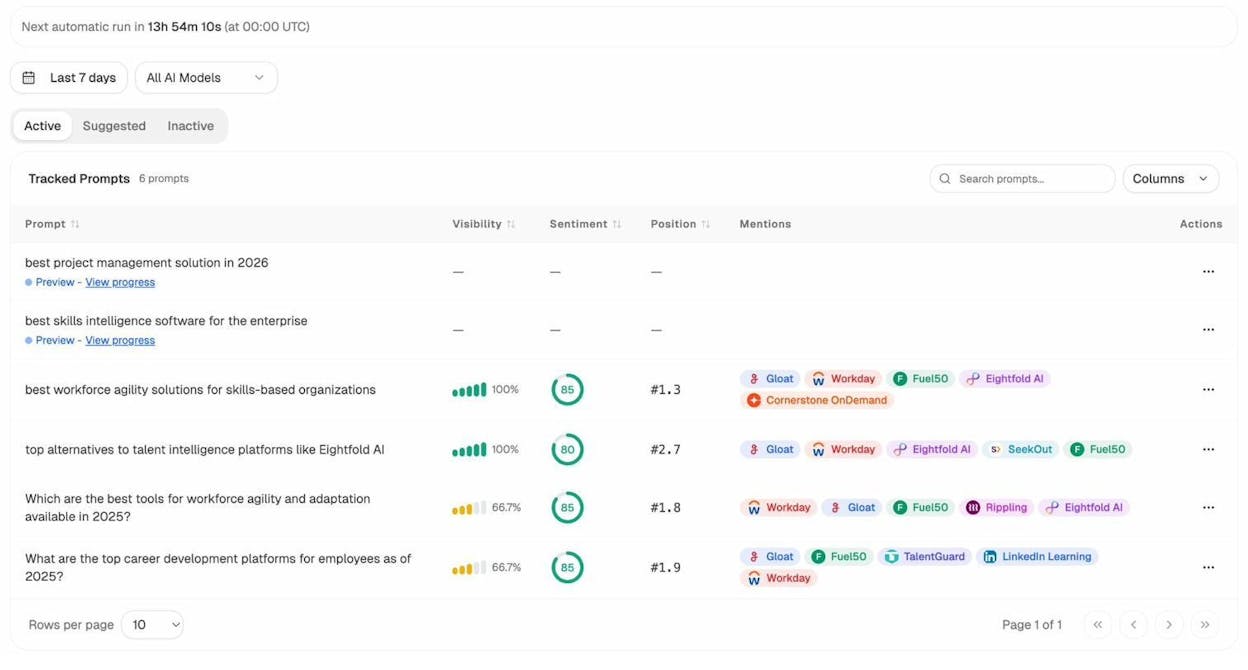
This lets you see whether AI engines associate your brand with the topics you’re optimizing for — or whether competitors own those answers entirely.
Step 3. Follow On-Page SEO Best Practices
You’ve picked your keyword and mapped out the intent. Now it’s time to optimize the page itself — the on-page elements that help Google and AI engines understand, index, and rank your content.
Cover the Subtopics Searchers Expect
Your page should answer the main query, but it also needs to address the related subtopics searchers care about. If every top-ranking page for “keyword optimization” covers search intent, on-page SEO, and content gaps — and yours doesn’t — you’re leaving a hole that Google will notice.
Here’s how to find those subtopics:
-
Search your keyword on Google and open the top 5 results.
-
List the H2 and H3 headings from each page. Look for patterns — topics that appear in 3 or more results are likely essential.
-
Check the “People Also Ask” box in Google’s results. These questions reveal related subtopics that searchers want answered.
-
Use an SEO tool’s Content Gap feature. Enter the URLs of top-ranking pages and find the keywords they all rank for. These shared keywords indicate subtopics you should cover.
![[Screenshot: Open the Content Gap tool in your SEO platform. Paste the URLs of the top 3 ranking pages for your keyword. Leave the last field blank. Click “Show keywords.”]](https://www.datocms-assets.com/164164/1777050209-blobid5.png?auto=format,compress&w=1248&fit=max)
A critical note: covering subtopics doesn’t mean stuffing your content with keywords. It means addressing the topics that genuinely help the reader. If every competitor covers “meta descriptions” in their keyword optimization guide, it’s because readers need that information — not because the keyword needs to appear 47 times.
The old ideas of LSI keywords and TF-IDF keyword density are myths. You don’t need to sprinkle semantically related terms at some calculated frequency. You need to write comprehensively about the topic, and the right language will follow naturally.
Optimize Your Page Title
Your title tag is the most visible on-page signal. It appears in Google’s search results, in browser tabs, and in social shares. Both searchers and search engines use it to understand what your page is about.
Three rules for title tags:
-
Include your target keyword. Google can rank pages without the exact keyword in the title, but including it remains the strongest relevance signal. Place it near the beginning when possible.
-
Make it compelling to click. Your title competes with nine other results on the page. Use a specific angle, a number, or a benefit statement that makes the searcher choose yours.
-
Keep it the right length. Titles that are too long get truncated. Aim for 50–60 characters. Use a SERP preview tool to check how it’ll display before publishing.
![[Screenshot: Use a SERP snippet simulator tool to preview your title tag and meta description at different character lengths. Check both desktop and mobile views.]](https://www.datocms-assets.com/164164/1777050209-blobid6.png?auto=format,compress&w=1248&fit=max)
Good: “How to Do Keyword Optimization for SEO and AI Search (2026)”
Bad: “Keyword Optimization – The Ultimate Complete Definitive Expert Guide to SEO Keyword Optimization in 2026 and Beyond”
Match Your H1 with the Title Tag
Your H1 tag is the visible heading at the top of your page. It should align closely with your title tag — similar enough that searchers landing on your page from Google immediately confirm they’re in the right place.
The H1 and title tag can differ slightly. The title tag might include a parenthetical like “(2026 Guide)” for click appeal, while the H1 stays cleaner. But both should contain the target keyword.
One page, one H1. That’s the rule.
Write a Meta Description That Earns the Click
Meta descriptions don’t directly affect rankings. But they affect click-through rate, which affects traffic — the thing rankings are supposed to deliver.
Think of your meta description as a mini sales pitch. In 150–160 characters, you need to:
-
Tell the searcher what they’ll get from the page
-
Differentiate from the other results on the page
-
Use natural language (avoid keyword stuffing)
Study the meta descriptions on search ads for your keyword. Advertisers spend real money testing that copy — you can learn from what works.
![[Screenshot: Google your target keyword and review the meta descriptions of both organic results and paid ads. Note which ones make you want to click and why.]](https://www.datocms-assets.com/164164/1777050217-blobid7.png?auto=format,compress&w=1248&fit=max)
Keep in mind that Google sometimes rewrites your meta description with content it considers more relevant to the specific query. Write a strong one anyway — it’s still your best bet for controlling how your page appears in search.
Use Subheadings (H2–H6) to Create Structure
Subheadings do two things: they make your content skimmable for readers, and they give search engines a clear hierarchy of your page’s topics.
When a reader lands on your page, they scan the subheadings first to decide if the content is worth their time. If your subheadings are vague (“More Information,” “Other Things to Consider”), readers leave. If they’re specific (“How to Check Keyword Difficulty,” “Why Search Volume Alone Is Misleading”), readers stay.
For search engines, subheadings confirm what each section covers. Google uses heading structure as one of many signals to understand page content.
Rules for subheadings:
-
Use one H1 for the page title
-
Use H2s for major sections
-
Use H3s for subsections within H2s
-
Don’t skip levels (H2 → H4 without H3)
-
Include relevant keywords naturally — not forcefully
Create Clean, Descriptive URLs
Your URL should be short, descriptive, and human-readable.
Do this: /keyword-optimization/
Not this: /how-to-do-keyword-optimization-for-seo-the-complete-ultimate-guide-2026/
Include your target keyword in the URL. Drop filler words. Keep it under 5–6 words when possible.
Google shows URLs in search results. While they don’t always display the full path, a clean URL builds trust and signals relevance. Use the Analyze AI SERP Checker to see how your URL appears alongside competitors.
Optimize Images
Images aren’t just visual decoration. They help search engines understand your page, and they can drive traffic through Google Image Search.
Three things to get right with every image:
-
Use descriptive filenames. Rename IMG_4927.jpg to keyword-difficulty-checker-results.jpg before uploading.
-
Write useful alt text. Alt text should describe what the image shows in plain language. It helps screen readers, and Google uses it to understand images. Keep it under 125 characters.
-
Place images near relevant text. An image of a SERP analysis tool should sit next to the section that discusses SERP analysis — not at the bottom of the page.
![[Screenshot: Example of a well-named image file and descriptive alt text in your CMS. Show the alt text field filled in with a specific description.]](https://www.datocms-assets.com/164164/1777050221-blobid8.png?auto=format,compress&w=1248&fit=max)
Make Your Content Easy to Read
Google wants to serve content that most people can understand and use. If your writing is dense, jargon-heavy, and stuffed with complex sentences, you’re making it harder for both readers and search engines.
What easy-to-read content looks like:
-
Short sentences and paragraphs. Online readers scan — they don’t read every word. Break walls of text into digestible chunks.
-
Simple language. Use the simplest word that conveys your meaning. “Use” instead of “utilize.” “Start” instead of “commence.” If a 14-year-old couldn’t understand your sentence, rewrite it.
-
Formatting that supports scanning. Bold key phrases. Use tables for comparisons. Use numbered lists for sequential steps.
-
Original images and examples. Real screenshots, real data, and real examples make content more credible and more useful than stock photos.
Link to Internal and External Resources
Links serve two purposes in keyword optimization: they help Google understand context, and they guide readers to related information.
Internal links connect your page to other relevant pages on your site. They pass link equity, help Google discover and index content, and keep readers engaged.
When optimizing a page, look for natural opportunities to link to related content on your site. If you mention keyword research, link to your keyword research guide. If you discuss content optimization, link to your content strategy article.
Use the Analyze AI sitemap to find all internal link opportunities. You can also use our Broken Link Checker to ensure none of your existing internal links are broken.
External links to authoritative sources strengthen your content’s credibility. Link to primary research, official documentation, and respected industry sources. Don’t worry about “link juice leaking” — that’s an outdated concern. Linking to good sources makes your content more useful, and Google rewards that.
Optimize for Featured Snippets
Featured snippets are the boxed answers that appear at the top of some Google search results. Winning a featured snippet can dramatically increase your click-through rate — even if you’re not the #1 organic result.
To optimize for featured snippets:
-
Identify if your keyword triggers a featured snippet. Google it and check. You can also use SEO tools to filter keywords by SERP features.
-
Answer the main question directly in 2–3 sentences near the top of the relevant section.
-
Structure your content clearly. Use numbered lists for “how-to” queries, tables for comparisons, and short paragraphs for definition queries.
-
Use the exact question as a subheading. If the keyword is “what is keyword optimization,” make that an H2 and answer it immediately beneath.
![[Screenshot: Google a keyword that triggers a featured snippet. Note the format — is it a paragraph, list, or table? Match that format in your own content.]](https://www.datocms-assets.com/164164/1777050228-blobid9.png?auto=format,compress&w=1248&fit=max)
Add Schema Markup for Rich Results
Rich results are visually enhanced search listings that include extra information like ratings, FAQs, or how-to steps. They don’t directly boost rankings, but they make your result more eye-catching and can improve click-through rates.
To qualify for rich results:
-
Check which schema types apply to your content (Article, FAQ, HowTo, etc.)
-
Add the structured data markup to your page
-
Test it using Google’s Rich Results Test
-
Monitor results in Google Search Console
For blog posts, Article and FAQPage schema are the most common types. If your content includes a step-by-step process, HowTo schema is worth adding.
How to Optimize Your Content for AI Search
Everything above applies to Google. But here’s the reality in 2026: a growing share of your potential audience is asking ChatGPT, Perplexity, and Gemini instead of — or in addition to — Google.
If your content doesn’t show up when someone asks an AI engine about your topic, you’re invisible to an entire channel of organic traffic. AI search is not replacing SEO — it’s adding a second stage on which your content needs to perform.
Here’s how to extend your keyword optimization to cover AI search.
Track How AI Engines Answer Your Target Prompts
Before you can optimize for AI search, you need to know what’s actually happening. Which brands do AI engines recommend when someone asks about your topic? Are you mentioned? Are you cited? What sources do the models reference?
In Analyze AI, you can track specific prompts across ChatGPT, Perplexity, Gemini, and Copilot. For each prompt, you’ll see your visibility score, your position, the sentiment of your mention, and which competitors appear alongside you.
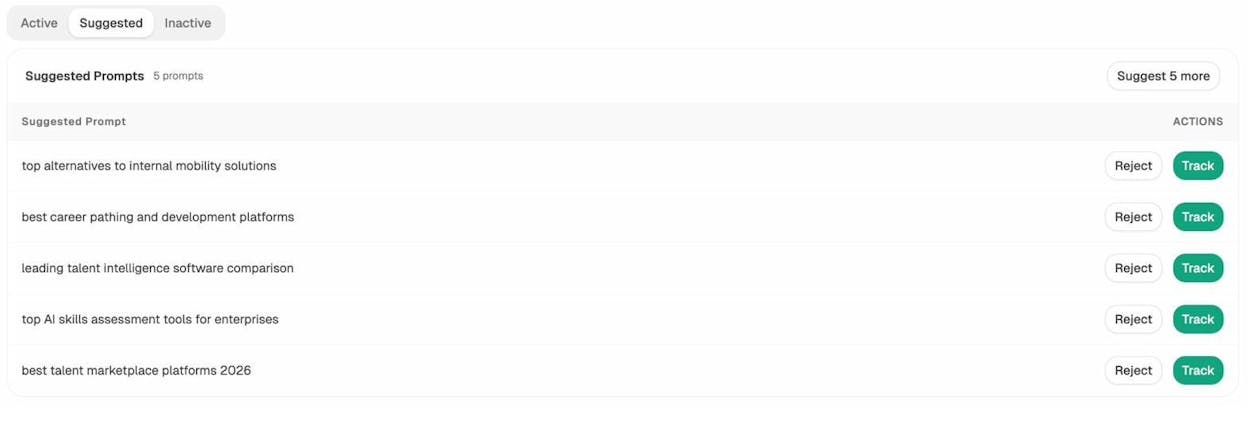
Start by entering the prompts that map directly to your target keywords. If you’re optimizing for “keyword optimization,” track prompts like “how to optimize keywords for SEO,” “best keyword optimization tools,” and “what is keyword optimization.”
You can also use the Ad Hoc Search feature to run one-off queries across AI engines without setting up full tracking — useful for validating ideas quickly.
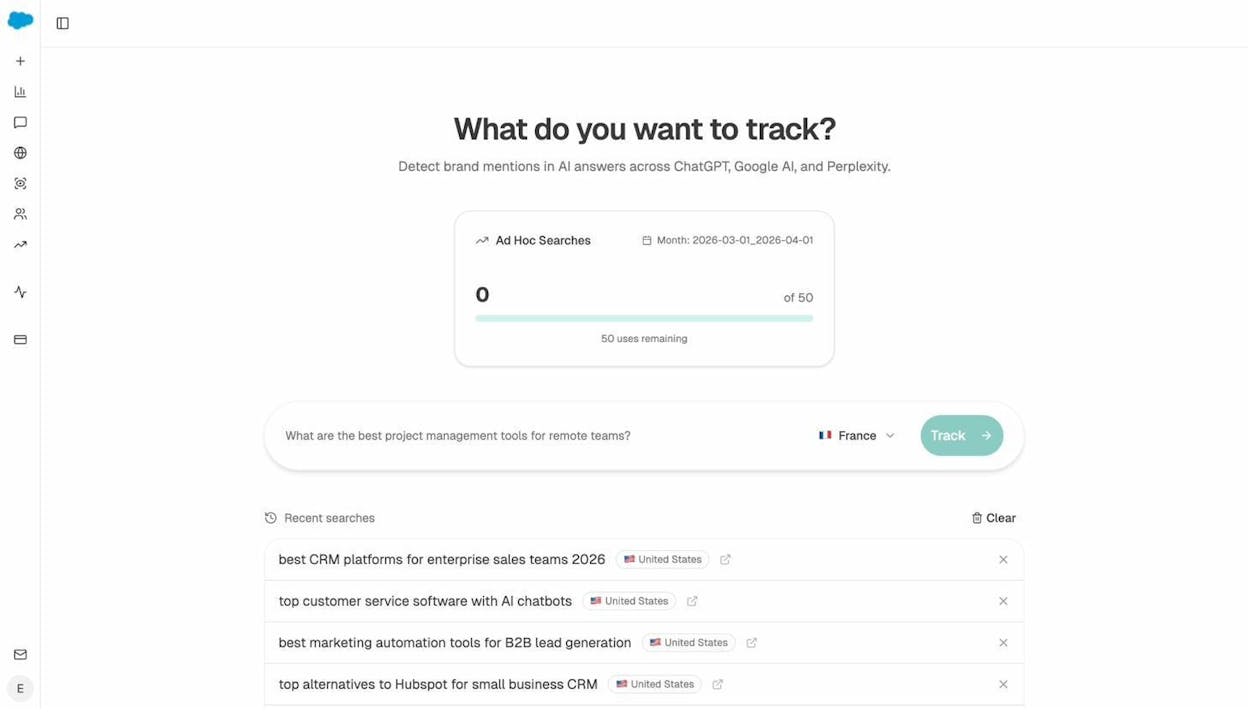
Identify Where Competitors Win (and You Don’t)
The Competitors view in Analyze AI shows which brands appear most frequently in AI answers for your tracked prompts — and how often they outrank you.
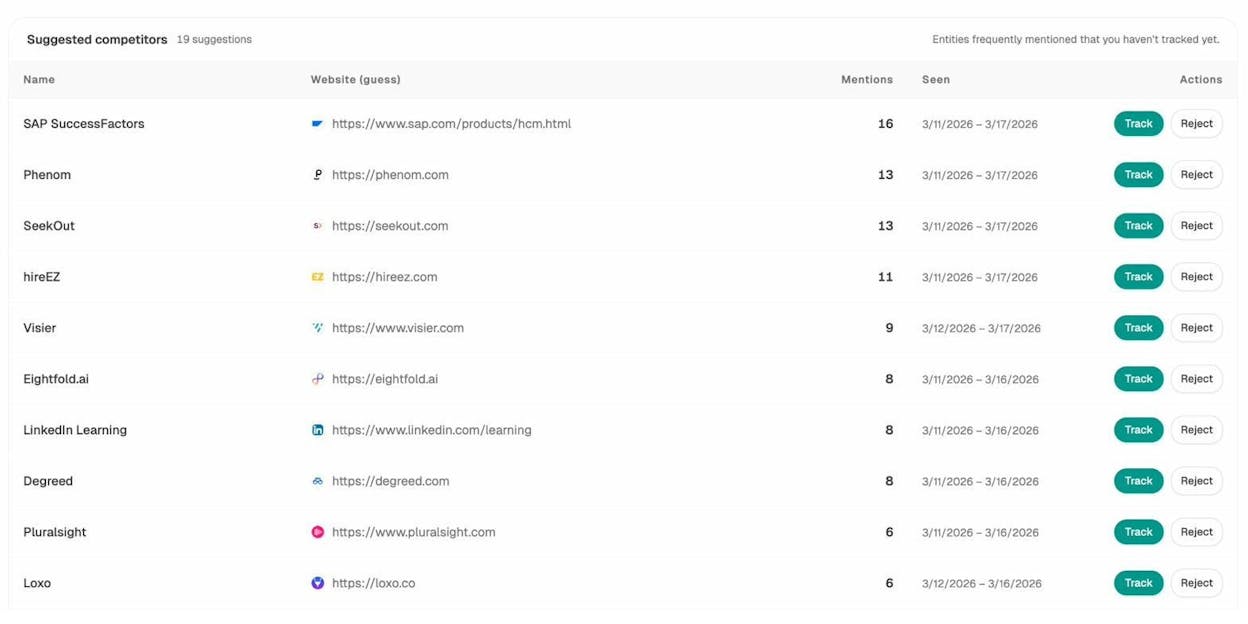
This is the AI search equivalent of a SERP competitor analysis. If a competitor appears in 80% of relevant AI answers and you appear in 20%, you know exactly where the gap is.
Use this data to prioritize which prompts to optimize for first. Focus on the prompts where competitors dominate and your brand is absent — those represent the biggest opportunities.
Win the Sources AI Engines Trust
AI engines don’t just generate answers from thin air. They cite sources — and the Sources dashboard in Analyze AI shows you exactly which URLs and domains get cited most frequently in your space.
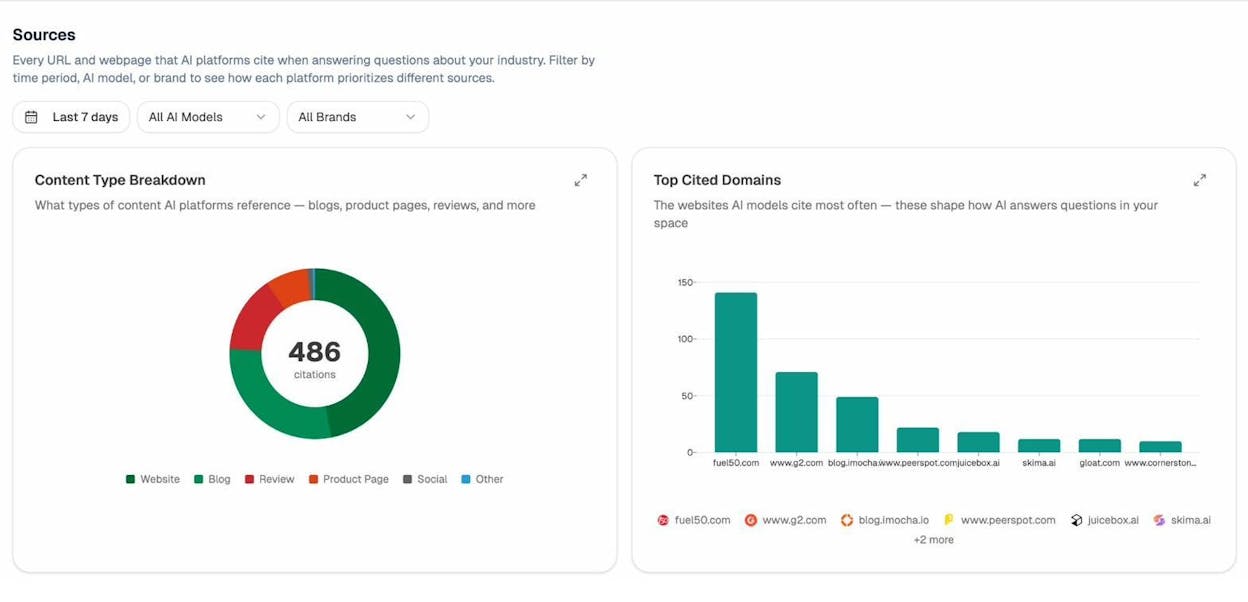
This is critical for keyword optimization. If AI engines consistently cite G2 reviews, Wikipedia, and your competitor’s blog for a given topic — but never your site — your content needs to earn that citation.
Here’s how:
-
Check which content types get cited. Blogs? Product pages? Review sites? Create the type of content that AI engines prefer to cite in your industry.
-
Analyze the top cited domains. If review platforms dominate, invest in your presence there. If competitor blogs dominate, create better content on the same topics.
-
Look for uncited gaps. Topics where no strong source exists are your best opportunities. Create the definitive resource, and AI engines will find it.
Use AI Traffic Data to Double Down on What Works
If you connect Google Analytics (GA4) to Analyze AI, you get the full picture: which pages on your site receive traffic from AI engines, and how that traffic behaves.
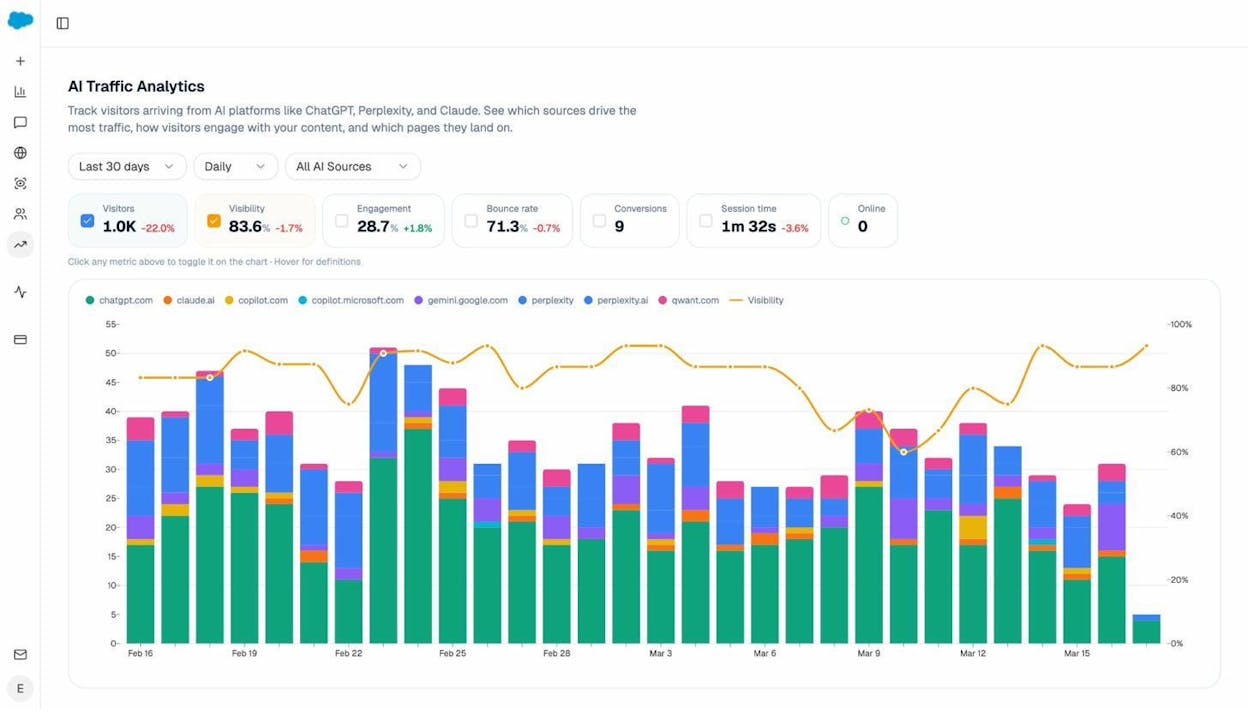
The Landing Pages report shows you exactly which pages get AI-referred traffic, from which engines, and how those visitors engage.
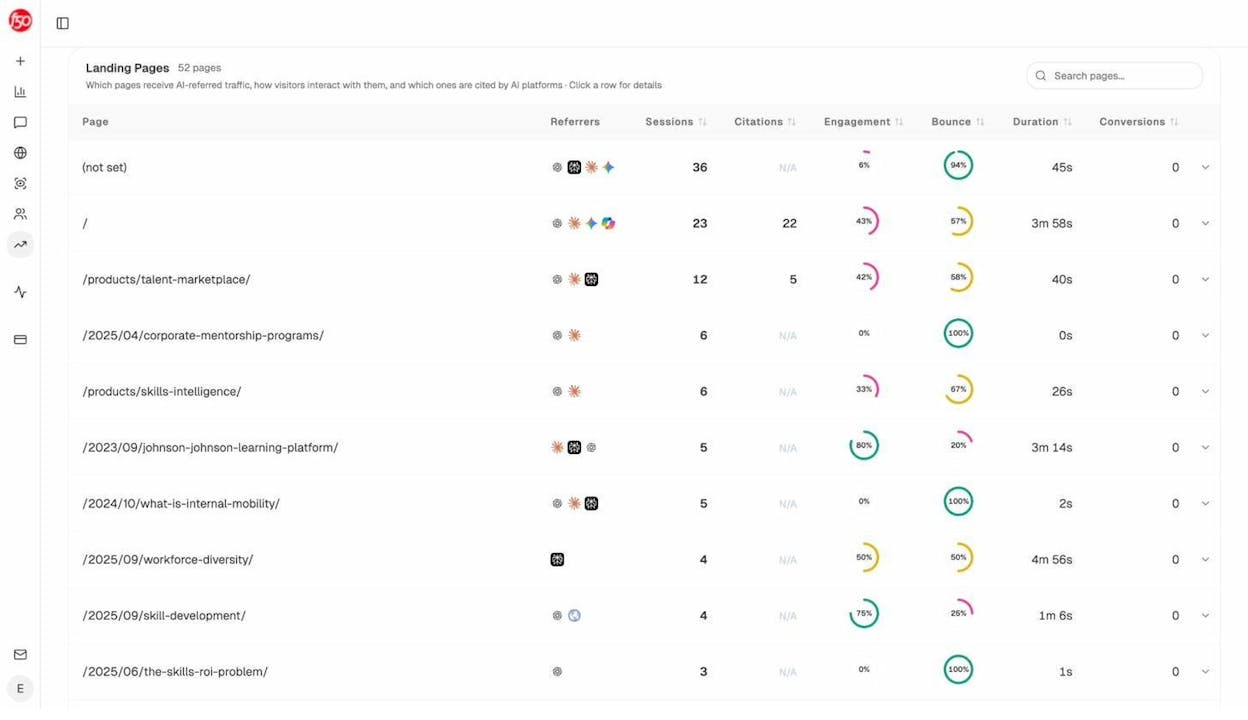
This is gold for keyword optimization. If a specific page is already getting AI traffic, optimize it further. Add more structure, improve the depth, and track how your visibility changes over time. Patterns will emerge — certain content formats, page structures, and topic depths consistently perform better in AI search. Once you spot those patterns, apply them to every new page you create.
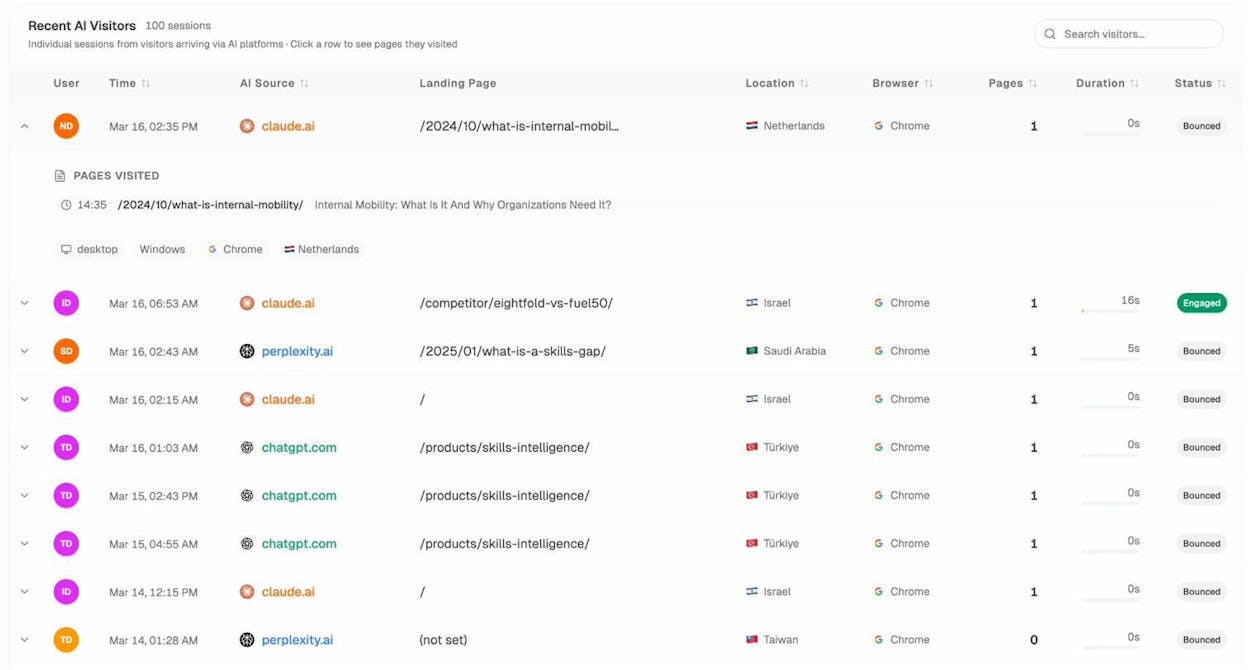
You can even drill into individual visitor sessions to see which AI engine sent the traffic and which page they landed on.
Understand How AI Frames Your Brand
Keyword optimization isn’t just about whether you appear — it’s about what AI says when it mentions you. The Perception Map in Analyze AI shows how AI engines describe your brand: what strengths they highlight, what weaknesses they mention, and what narrative they construct.
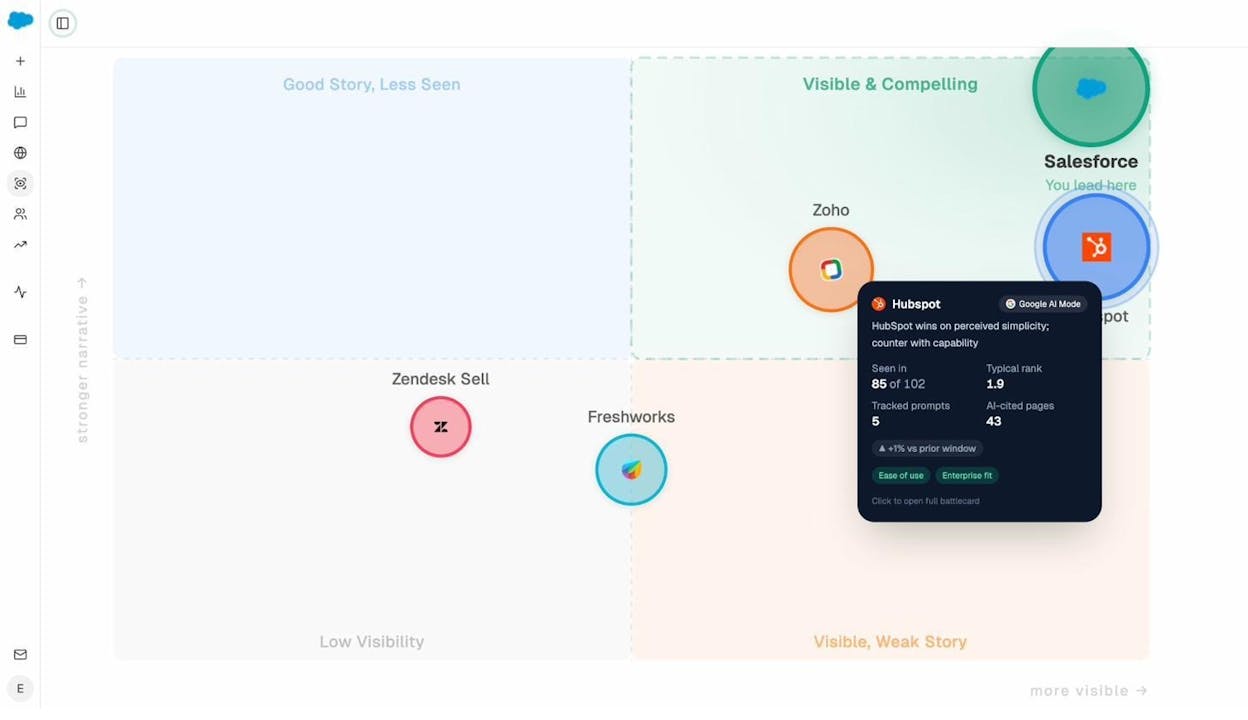
If AI engines associate your brand with “expensive” or “limited features,” that perception shapes buying decisions — even if it’s inaccurate. Use this data to create content that directly addresses negative perceptions and reinforces your actual strengths.
Use Analyze AI’s Content Writer for AI-Optimized Content
When you create new content, Analyze AI’s Content Writer helps you build articles that are designed to get cited by AI engines from the start. It shows you which competitors AI engines cite for your target topic, identifies content gaps, and provides editorial comments during the research and outline stages.
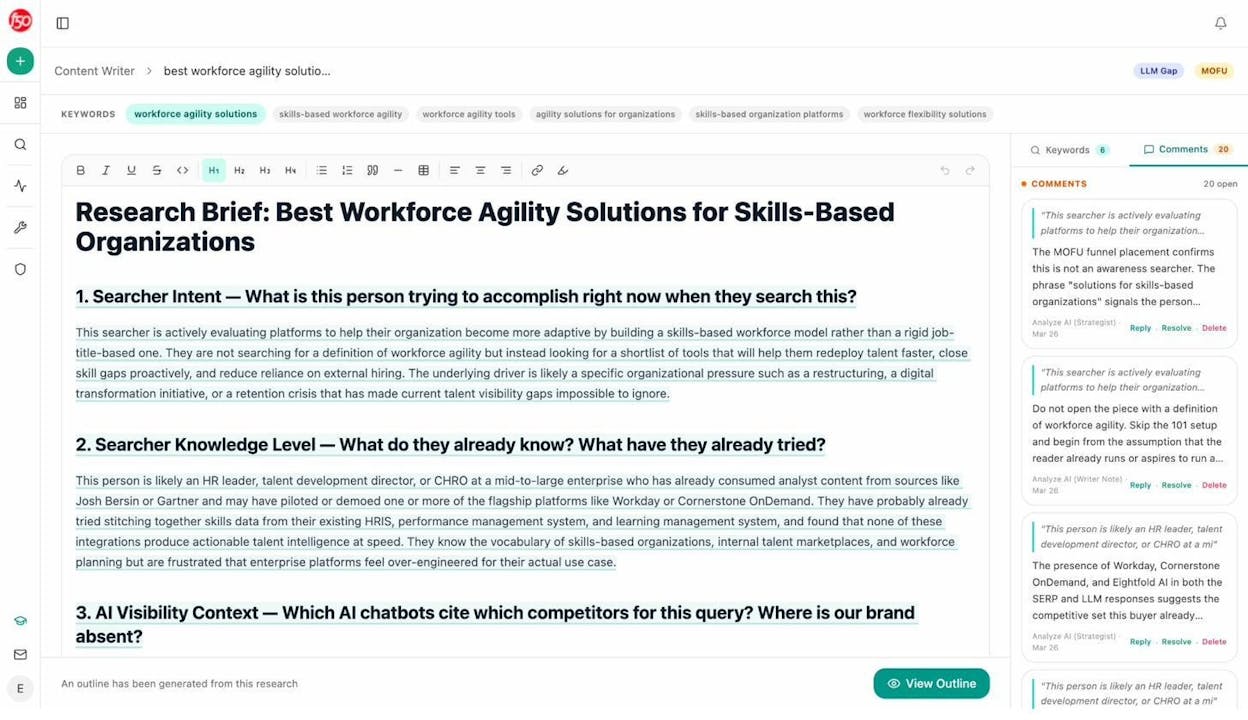
Analyze AI Content Writer showing research brief with searcher intent analysis and AI visibility context
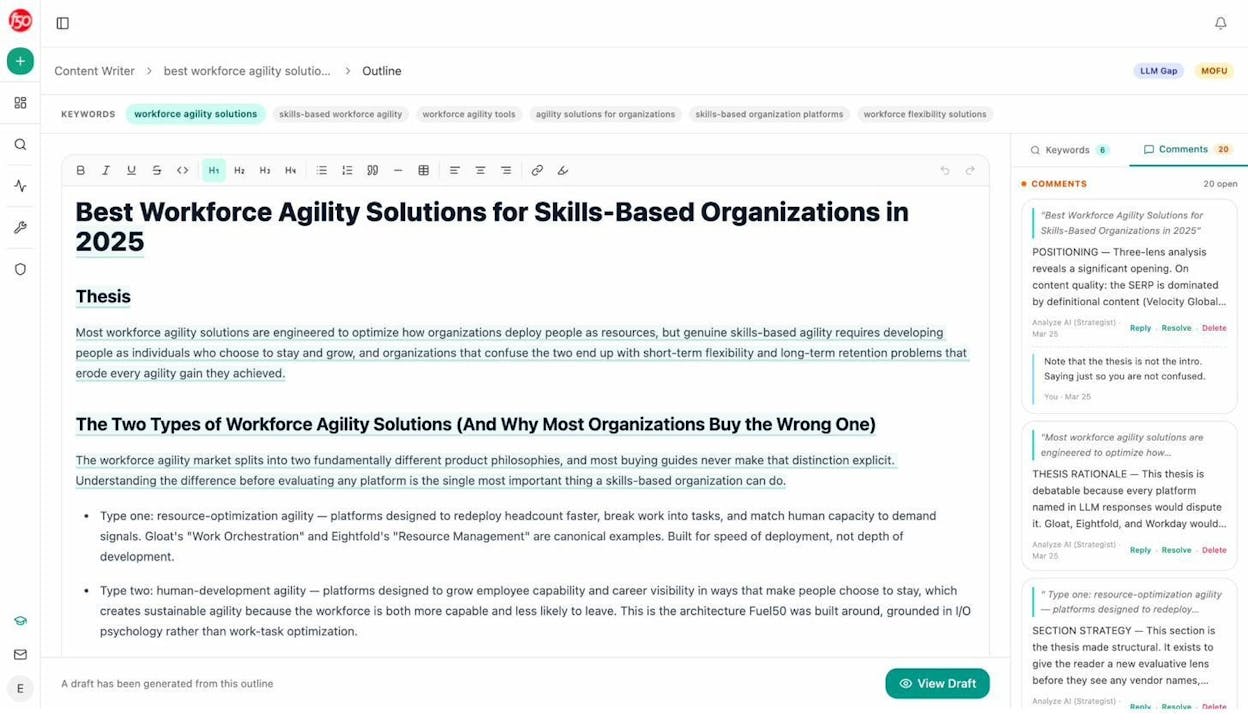
Analyze AI Content Writer showing outline with thesis, section strategy, and editorial comments
For existing content, the Content Optimizer identifies pages with declining traffic and surfaces specific optimization opportunities based on content gaps.
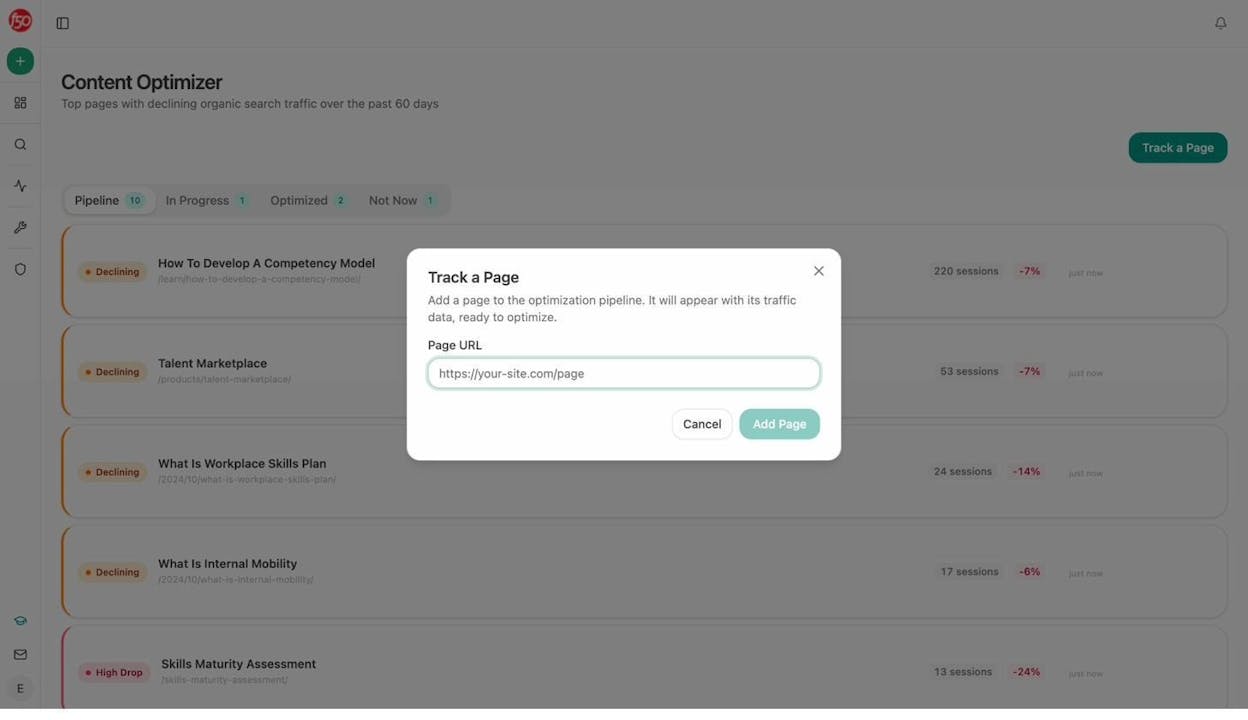
Analyze AI Content Optimizer showing pipeline of pages with declining traffic, ready for optimization
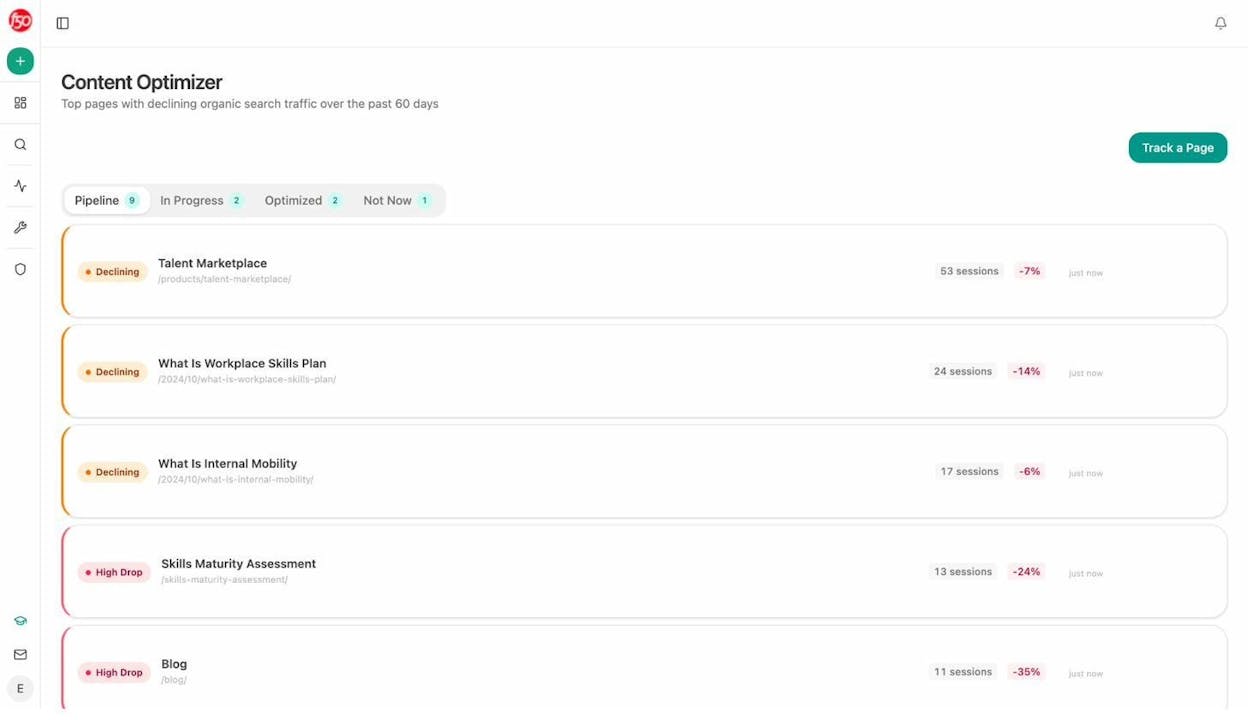
Analyze AI Content Optimizer showing specific optimization ideas based on content gaps
Monitor Changes with Weekly Email Digests
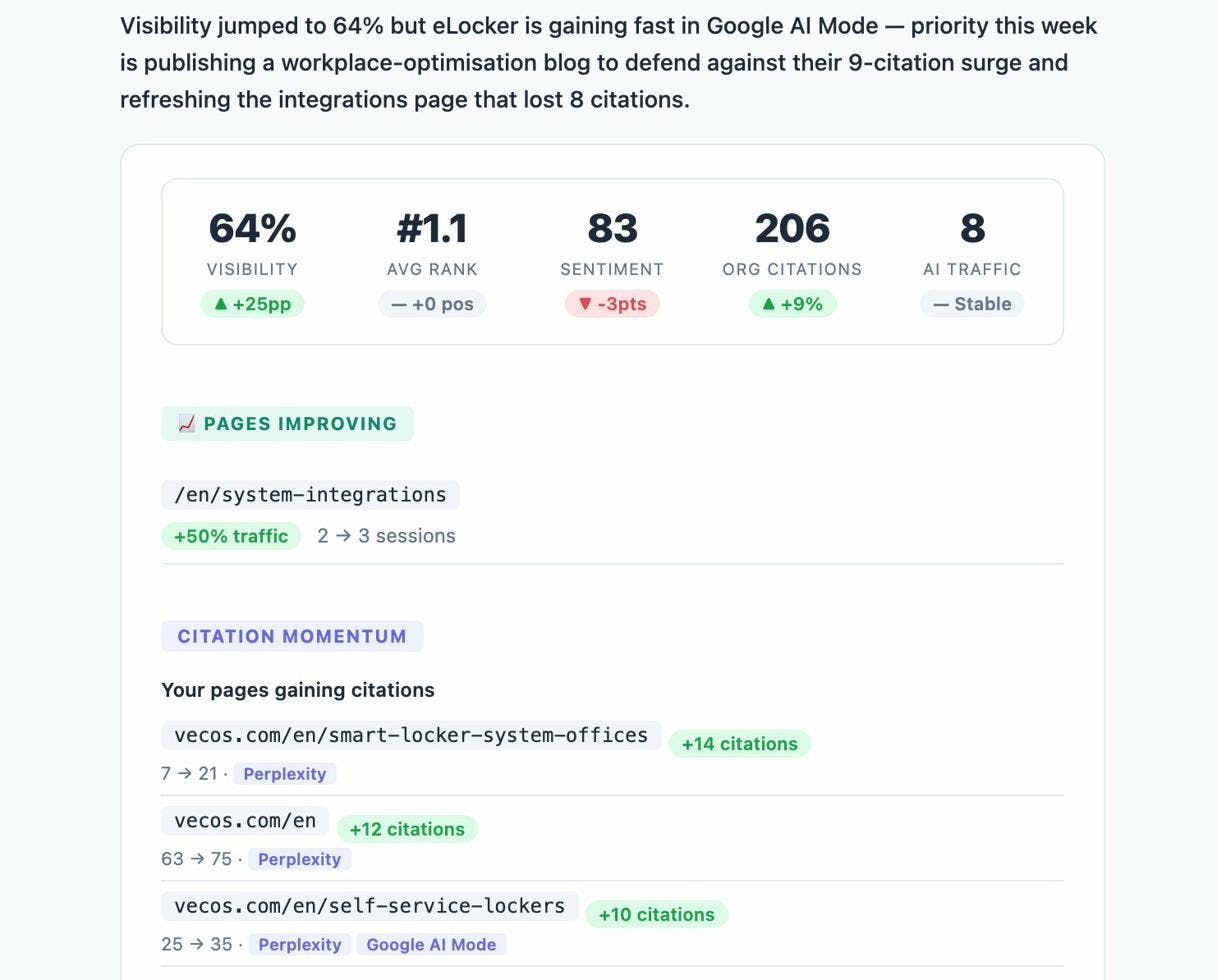
Keyword optimization isn’t a one-time task. Rankings shift. AI answers change. New competitors emerge. Analyze AI sends weekly email digests that summarize your visibility changes, citation shifts, and competitor movements — so you know when to act without logging in every day.
Keyword Optimization Checklist
Here’s a quick reference you can use every time you optimize a page:
|
Step |
Action |
Done? |
|---|---|---|
|
1 |
Verify the keyword has real traffic potential |
☐ |
|
2 |
Confirm the keyword has business value (score 2–3) |
☐ |
|
3 |
Check keyword difficulty matches your site’s authority |
☐ |
|
4 |
Analyze search intent (type, format, angle) |
☐ |
|
5 |
Identify subtopics from top-ranking pages |
☐ |
|
6 |
Include target keyword in title tag |
☐ |
|
7 |
Match H1 with title tag |
☐ |
|
8 |
Write a compelling meta description (150–160 chars) |
☐ |
|
9 |
Use descriptive subheadings (H2–H6) |
☐ |
|
10 |
Create a clean, keyword-rich URL |
☐ |
|
11 |
Optimize image filenames and alt text |
☐ |
|
12 |
Add internal links to relevant pages |
☐ |
|
13 |
Link to authoritative external sources |
☐ |
|
14 |
Optimize for featured snippets (if applicable) |
☐ |
|
15 |
Add schema markup for rich results |
☐ |
|
16 |
Track target prompts in AI search engines |
☐ |
|
17 |
Review AI citation sources and close gaps |
☐ |
|
18 |
Monitor AI traffic to identify what works |
☐ |
What to Do After You Publish
Optimization doesn’t stop when you hit publish. Here’s your post-publication playbook:
For Google:
-
Build links to your content. Backlinks remain one of the strongest ranking signals. Create content worth linking to, then actively promote it through guest posts, partnerships, and digital PR. Use the link building tools that fit your strategy.
-
Monitor your rankings. Use a rank tracking tool to watch how your page moves over time. Don’t check manually on Google — personalized results make manual checks unreliable. The Analyze AI Keyword Rank Checker can give you a quick snapshot.
-
Update your content regularly. If rankings drop or competitors publish better content, refresh your page. Add new sections, update data, improve examples. Content that stays current outperforms content that ages.
For AI search:
-
Track your prompt visibility using Analyze AI. Set up the prompts that match your target keywords and monitor your position, visibility, and sentiment over time.
-
Analyze citation patterns. Check which of your pages get cited by AI engines and which don’t. Find the common traits of pages that perform well and apply those patterns to underperforming pages.
-
Watch for competitor shifts. AI answers change frequently. A competitor that starts publishing authoritative content on your topic can displace you quickly. Weekly email digests from Analyze AI help you stay ahead of these shifts.
The brands that win long-term are the ones that treat keyword optimization as an ongoing process — not a one-time task. Every page you publish should be monitored, measured, and improved across both Google and AI search.
That’s how you compound visibility in 2026.

Ernest

Ibrahim


