



Summarize this blog post with:


In this article, you’ll learn what topic clusters are, why they matter for both SEO and AI search, and how to build one from scratch using free tools and a repeatable process. You’ll also see real examples of topic clusters working in the wild, and walk away with a step-by-step method you can apply to any niche, even one you know nothing about.
Table of Contents
What Are Topic Clusters?
A topic cluster is a group of interlinked pages about a specific subject.
The concept is simple. You create one central page focused on a broad topic (often called a “pillar page”). Then you create several supporting pages, each covering a related subtopic in more detail. Finally, you link all of these pages together with internal links.
That’s it. Three components:
-
A pillar page that covers a broad topic at a high level.
-
Cluster pages that dive deeper into individual subtopics.
-
Internal links connecting the pillar and cluster pages to each other.
If you’ve heard terms like “content hubs,” “pillar pages,” or “hub and spoke,” they all describe the same thing. SEOs love inventing new names for existing concepts. Whatever you call it, the underlying idea is identical: topically grouped pages designed to cover a subject and rank.
![[Screenshot: A simple visual diagram showing a pillar page in the center with cluster pages branching off and linking back to it, similar to HubSpot’s topic cluster graphic]](https://www.datocms-assets.com/164164/1777314499-blobid1.png?auto=format,compress&w=1248&fit=max)
The most common visualization comes from HubSpot, which popularized the concept. A pillar page sits at the center. Cluster pages surround it. Arrows connect them. It looks clean on a slide deck, and it works even better in practice.
Why Topic Clusters Matter for SEO
Topic clusters help search engines understand the structure and depth of your website. When Google crawls a well-organized cluster, it can see that you’ve covered a subject thoroughly, not just published a single isolated article and moved on.
Google has never explicitly told anyone to build topic clusters. The closest official guidance comes from their Webmaster Guidelines, which recommend designing your site with a clear conceptual page hierarchy. That’s open to interpretation. But the framework works because it aligns with how Google already evaluates content.
Here’s why topic clusters are effective for SEO:
They build topical authority. When your site has 15 well-written, interlinked articles about “email marketing,” Google has a lot more evidence that you know the subject than if you published a single post. This depth of coverage signals expertise, which matters for E-E-A-T and rankings.
They create natural internal links. One of the biggest challenges in SEO is building relevant internal links. With topic clusters, the linking happens naturally because every page in the cluster is related. You don’t have to force connections between unrelated articles.
They make your site easier to crawl. A well-linked cluster gives Google a clear path through your content. Crawlers can follow the links from pillar to cluster pages and discover all your content without hitting dead ends.
They improve user experience. Visitors who land on one page in your cluster can easily find related content. A reader interested in “email marketing automation” can click through to “email marketing for beginners” or “best email marketing tools.” This keeps people on your site longer and signals engagement to search engines.
Why Topic Clusters Also Matter for AI Search
Here’s something most guides on topic clusters miss entirely. The same principles that make topic clusters effective for Google also apply to AI search engines like ChatGPT, Perplexity, Gemini, and Copilot.
AI models don’t just crawl individual pages. They synthesize information across your entire site to form an understanding of what your brand knows about a given topic. When a user asks ChatGPT “what is the best email marketing software?” the model draws on patterns across multiple pages and sources.
If your site covers email marketing with a deep, interlinked cluster of content, AI models have more evidence to cite you as an authority. If you’ve published one thin article, they’ll likely skip you in favor of a competitor with more comprehensive coverage.
This isn’t speculation. Research on how to rank on ChatGPT and how to rank on Perplexity shows that the brands getting cited most often are the ones with thorough, well-structured content across a topic. AI models reward the same thing Google rewards: depth, clarity, and comprehensiveness.
The takeaway is straightforward. Building topic clusters doesn’t just improve your Google rankings. It also increases the chances that AI search engines will reference your brand when users ask questions in your space. You’re investing in one strategy that compounds across two channels.
Three Examples of Topic Clusters in the Wild
Before you build your own cluster, it helps to see what different formats look like in practice. Below are three examples across different niches, each using a slightly different approach.
All three share the same core ingredients: a page focused on a high-level topic, related subtopics that go deeper, and internal links connecting everything.
Example 1: Podia’s Guide to Selling an Online Course
![[Screenshot: Podia’s online course guide landing page, showing the title and main page layout]](https://www.datocms-assets.com/164164/1777314530-blobid2.png?auto=format,compress&w=1248&fit=max)
-
Topic: Online courses
-
Pillar page: “How to create, sell, and profit from an online course”
-
URL: podia.com/how-to-create-sell-profitable-online-course
-
Cluster size: 8 pages
This is the classic topic cluster format. One pillar page links out to eight chapter-style subpages. Think of it as a long-form guide broken into digestible pieces. Each chapter focuses on a specific stage of the process, like “choosing a topic,” “building a curriculum,” or “pricing your course.”
![[Screenshot: Podia’s cluster structure, showing the 8 chapter links on the pillar page with descriptions for each]](https://www.datocms-assets.com/164164/1777314539-blobid3.png?auto=format,compress&w=1248&fit=max)
This format works well for how-to topics where the user journey follows a clear sequence. Readers start at the beginning and work through each step.
Example 2: Wine Folly’s Beginner’s Guide to Wine
![[Screenshot: Wine Folly’s wine basics landing page showing the visual overview]](https://www.datocms-assets.com/164164/1777314551-blobid4.png?auto=format,compress&w=1248&fit=max)
-
Topic: Wine
-
Pillar page: “Wine Basics — A Beginner’s Guide to Drinking Wine”
-
URL: winefolly.com/wine-basics-beginners-guide/
-
Cluster size: 40+ pages
Unlike Podia’s sequential chapters, Wine Folly groups its cluster pages by subtopic category. The pillar page acts as a directory, organizing dozens of supporting articles under headings like “Wine Types,” “How to Taste Wine,” and “Food Pairing.”
![[Screenshot: Wine Folly’s pillar page showing subtopic groupings with supporting article links and imagery]](https://www.datocms-assets.com/164164/1777314555-blobid5.png?auto=format,compress&w=1248&fit=max)
This format makes sense when the topic is broad and the reader might want to jump to any section, not read from start to finish. It’s closer to an encyclopedia than a step-by-step guide.
Example 3: Muscle and Strength’s Workout Database
![[Screenshot: Muscle and Strength’s workout routines page showing the visual database layout with category filters]](https://www.datocms-assets.com/164164/1777314566-blobid6.jpg?auto=format,compress&w=1248&fit=max)
-
Topic: Workouts
-
Pillar page: “Workout Routines Database: 1000+ Free Workout Plans”
-
URL: muscleandstrength.com/workout-routines
-
Cluster size: 700+ pages
This is a massive cluster built as a filterable database. Each workout program gets its own page, and the pillar page acts as a visual directory sorted by category (workouts for men, workouts for women, chest workouts, etc.).
![[Screenshot: Muscle and Strength’s category sections showing labeled workout groups with visual previews]](https://www.datocms-assets.com/164164/1777314577-blobid7.png?auto=format,compress&w=1248&fit=max)
The database format works for topics with hundreds of variations where users need to browse and filter. It’s the most resource-intensive approach, but it can generate significant organic traffic when each page targets a distinct keyword.
The point here isn’t that one format is better than another. The right format depends on your topic, your audience, and how much content you can realistically produce.
|
Format |
Best For |
Cluster Size |
Example |
|---|---|---|---|
|
Sequential chapters |
How-to processes, tutorials |
5–15 pages |
Podia |
|
Subtopic directory |
Broad educational topics |
20–50+ pages |
Wine Folly |
|
Filterable database |
Large product/resource collections |
100+ pages |
Muscle and Strength |
How to Build a Topic Cluster (Step-by-Step)
Most guides on topic clusters give you vague advice like “choose a topic” and “create supporting content.” This section walks you through the actual process, tool by tool, so you can go from zero to a planned-out cluster in about 10 minutes.
A caveat before we start: this method gets you a solid working plan quickly. If you’re building a cluster for a critical business topic, you’ll want to supplement this with deeper research. But for getting started or exploring a new niche, this approach is efficient and repeatable.
Step 1. Choose a Topic to Build Your Cluster Around
You need a topic before you can build anything around it. The topic you choose needs to hit a balance: specific enough to focus on a single concept, but broad enough to generate multiple subtopics.
Here are three criteria for picking a good cluster topic:
It should satisfy informational search intent. You want people searching for this topic to be looking for information, not ready to buy. “Project management software” is informational. “Buy Monday.com annual plan” is transactional. Topic clusters work best for informational content.
It should have search traffic potential. Check that people are actually searching for this topic. You don’t need massive volume, but there should be enough interest to justify the effort. Use Analyze AI’s Keyword Generator or any keyword research tool to get a quick read on volume.
![[Screenshot: Analyze AI’s free Keyword Generator tool showing search results for a broad topic with volume data, keyword difficulty, and related keyword suggestions]](https://www.datocms-assets.com/164164/1777314582-blobid8.png?auto=format,compress&w=1248&fit=max)
It should be broad enough to generate subtopics. If your topic is too narrow, you won’t have enough related keywords to build a cluster. “Personal injury lawyer” can spawn dozens of subtopics. “Personal injury lawyer for prisoners” probably can’t.
Here’s a practical test: if you can think of at least five questions someone might ask about the topic, it’s broad enough for a cluster.
If you’re struggling for ideas, start with a seed keyword related to your niche. Drop it into a keyword research tool and look at the related terms. Pick something that sits in the middle of the specificity spectrum.
For example, “lawyer” is too broad. “Personal injury lawyer for prisoners” is too narrow. “Personal injury lawyer” is the sweet spot.
![[Screenshot: A keyword research tool overview report for a broad seed keyword like “personal injury lawyer” showing keyword ideas, question-based keywords, and search volumes]](https://www.datocms-assets.com/164164/1777314588-blobid9.png?auto=format,compress&w=1248&fit=max)
Step 2. Map Subtopics Using Wikipedia
This is where the process gets interesting. Wikipedia is the ultimate topic cluster. Every article fully covers a subject, interlinks between related subtopics, and organizes information in a logical hierarchy. Sound familiar?
You can use Wikipedia as a free subtopic mapping tool. Here’s how:
Find the Wikipedia page for your topic. Search for your chosen topic on Wikipedia. If there’s a dedicated page, you’re in good shape. If there isn’t, try a broader or slightly different term.
Look at the internal links. Every Wikipedia article links to related pages. These linked pages are subtopics. Scan the article body and look for bolded or linked terms that could become cluster pages on your own site.
![[Screenshot: A Wikipedia article page for a topic like “personal injury lawyer” with internal links highlighted, showing how linked terms represent potential subtopics]](https://www.datocms-assets.com/164164/1777314593-blobid10.png?auto=format,compress&w=1248&fit=max)
Check the table of contents. Wikipedia’s table of contents shows you how the topic breaks down into sections. These sections often map directly to subtopics you’d want to cover in your cluster.
Run the Wikipedia URL through a keyword tool (optional). If you want data-backed subtopics, paste the Wikipedia page URL into a tool like Ahrefs’ Site Explorer and check which keywords the page ranks for. Focus on informational keywords. These are topics with proven search demand.
This method works because Wikipedia has already done the hard work of defining what a comprehensive treatment of the topic looks like. You’re borrowing their structure, not their content.
Step 3. Expand Your Subtopic List
Wikipedia gives you a strong starting point. But depending on your topic, you might need more subtopics to build a thorough cluster.
Here are three methods for expanding your list:
Method A: Use an entity extraction tool.
TextRazor is a free tool that identifies the most important topics and entities on any page. Copy the text from your Wikipedia article, paste it into TextRazor, and hit “Analyze.”
![[Screenshot: TextRazor’s analysis results showing extracted topics and entities from a Wikipedia page, with relevance scores]](https://www.datocms-assets.com/164164/1777314597-blobid11.png?auto=format,compress&w=1248&fit=max)
You’ll get a list of topics, entities, and related concepts. Clean up the output (remove numbers, generic terms like “business” or “people”), and you’ll have additional seed keywords for your research.
Method B: Use “People Also Ask” on Google.
Search for your main topic on Google and expand the “People Also Ask” box. Each question represents something real users want to know about your topic. These questions often make excellent cluster page topics.
![[Screenshot: Google’s “People Also Ask” section for a topic, showing expandable questions that represent real user queries]](https://www.datocms-assets.com/164164/1777314615-blobid12.png?auto=format,compress&w=1248&fit=max)
Click on a few to expand them. Google will load more questions based on what you click. You can easily generate 15-20 question-based subtopics this way.
Method C: Check what AI search engines are being asked.
This is where things get interesting for AI search. People don’t just search for topics on Google. They ask questions to ChatGPT, Perplexity, and Gemini too. And the questions they ask AI tend to be longer, more conversational, and more specific than Google searches.
You can use Analyze AI’s Prompt Discovery feature to see suggested prompts based on your tracked topic. These are real queries people are asking AI models in your space, and they reveal subtopics that traditional keyword tools might miss entirely.
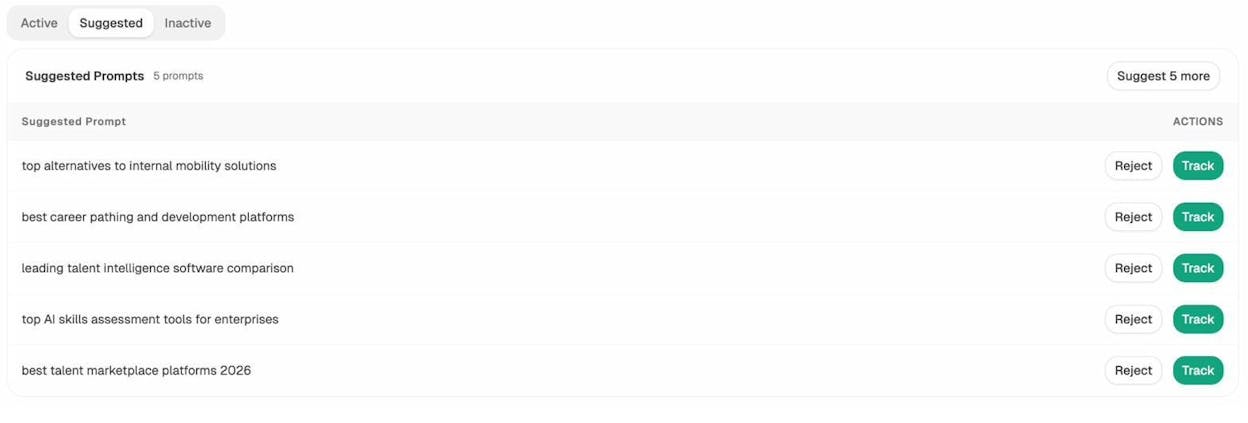
Analyze AI’s Suggested Prompts tab showing AI-generated prompt suggestions for a tracked topic with Track and Reject actions
For example, if your cluster topic is “CRM software,” traditional keyword research might surface “best CRM for small business.” But Analyze AI’s prompt suggestions might also reveal queries like “best CRM platforms for enterprise sales teams 2026” or “top alternatives to Hubspot for small business CRM,” which represent subtopics worth covering.
These AI-native queries are increasingly important because they show you what people are actually asking AI engines. If you create content that answers these questions well, you increase your chances of being cited across both Google and AI search.
Step 4. Validate Subtopics with Search Intent
By now you should have a healthy list of subtopics. But before you start creating content, you need to check whether similar subtopics can be combined into a single page or need separate pages.
The goal here is to avoid keyword cannibalization. If two subtopics have the same search intent (meaning Google shows similar results for both), you should cover them on one page. If the intent is different, they need separate pages.
Here’s how to check:
Search both terms on Google. If the top results for “types of torts” and “what is a tort” are mostly the same pages, those terms share intent. Cover them together. If the results are completely different, create separate cluster pages.
![[Screenshot: Side-by-side Google search results for two similar queries showing significant SERP overlap, indicating shared search intent]](https://www.datocms-assets.com/164164/1777314624-blobid14.png?auto=format,compress&w=1248&fit=max)
Use a SERP comparison tool. Analyze AI’s SERP Checker lets you compare search results for multiple keywords quickly without manually Googling each one.
Check keyword modifiers. Keywords with modifiers like “best,” “how to,” “vs,” and “examples” usually have different intents. “Email marketing” (informational), “best email marketing software” (commercial), and “how to start email marketing” (instructional) are three separate pages.
After this validation, you should have a clean list of subtopics, each mapped to a planned cluster page with no redundancy.
Step 5. Plan Your Cluster Architecture
Now you know your topic, your subtopics, and which pages you need. The next step is deciding how to structure it all.
Start by choosing a format for your pillar page. Based on the examples earlier, your three main options are:
The overview guide. A comprehensive article that covers the topic at a high level and links to cluster pages for deeper dives. This is the most common format and works for most niches.
The resource directory. A curated list or directory page that organizes cluster pages by category. This works well for broad topics with many subtopics, like Wine Folly’s wine guide.
The database. A filterable, searchable collection of pages. This works for topics with hundreds of variations, like workout routines or recipe collections.
For most brands building their first cluster, the overview guide is the safest bet. It’s the easiest to create, the most flexible, and it works for both SEO and AI search.
Once you’ve chosen a format, map out the relationship between your pillar page and cluster pages. A simple spreadsheet works:
|
Page |
Type |
Target Keyword |
Search Intent |
Notes |
|---|---|---|---|---|
|
Complete Guide to Email Marketing |
Pillar |
email marketing |
Informational |
Broad overview, links to all cluster pages |
|
How to Build an Email List |
Cluster |
how to build email list |
Instructional |
Step-by-step tutorial |
|
Best Email Marketing Software |
Cluster |
best email marketing software |
Commercial |
Comparison/listicle |
|
Email Marketing Automation Guide |
Cluster |
email marketing automation |
Informational |
Deep dive on automation |
|
Email Marketing Metrics to Track |
Cluster |
email marketing metrics |
Informational |
Data-focused guide |
|
Email Marketing for Beginners |
Cluster |
email marketing for beginners |
Informational |
Entry-level overview |
This mapping becomes your content production plan. It tells you what to write, what keyword to target, and how each page fits into the cluster.
Step 6. Build Your Internal Linking Strategy
Internal linking is what turns a collection of related articles into an actual topic cluster. Without links, you just have standalone pages.
Here are the internal linking principles that make clusters effective:
Every cluster page should link back to the pillar page. This tells search engines that the pillar page is the main hub for this topic. Use descriptive anchor text that includes the pillar page’s target keyword.
The pillar page should link to every cluster page. This distributes link equity across the cluster and helps search engines discover all your content.
Cluster pages should link to each other where relevant. If your “email marketing automation” page mentions building an email list, link to your “how to build an email list” page. These cross-links strengthen the topical relationships within the cluster.
Use descriptive anchor text. Instead of “click here” or “this article,” use anchor text that describes what the linked page is about. “Learn more about email marketing metrics” is better than “learn more here.”
A good rule of thumb is that each cluster page should have at least 2-3 internal links: one to the pillar page, one from the pillar page, and one to a related cluster page.
Step 7. Identify AI Search Gaps Your Competitors Are Missing
This is the step most topic cluster guides skip entirely, and it’s where you can gain a real edge.
Traditional keyword research tells you what people search on Google. But it doesn’t tell you what AI models recommend when someone asks a question in your space. If a competitor shows up in ChatGPT’s responses for “best CRM software” and you don’t, that’s a visibility gap no keyword tool will surface.
Here’s how to use Analyze AI to find those gaps and build them into your cluster:
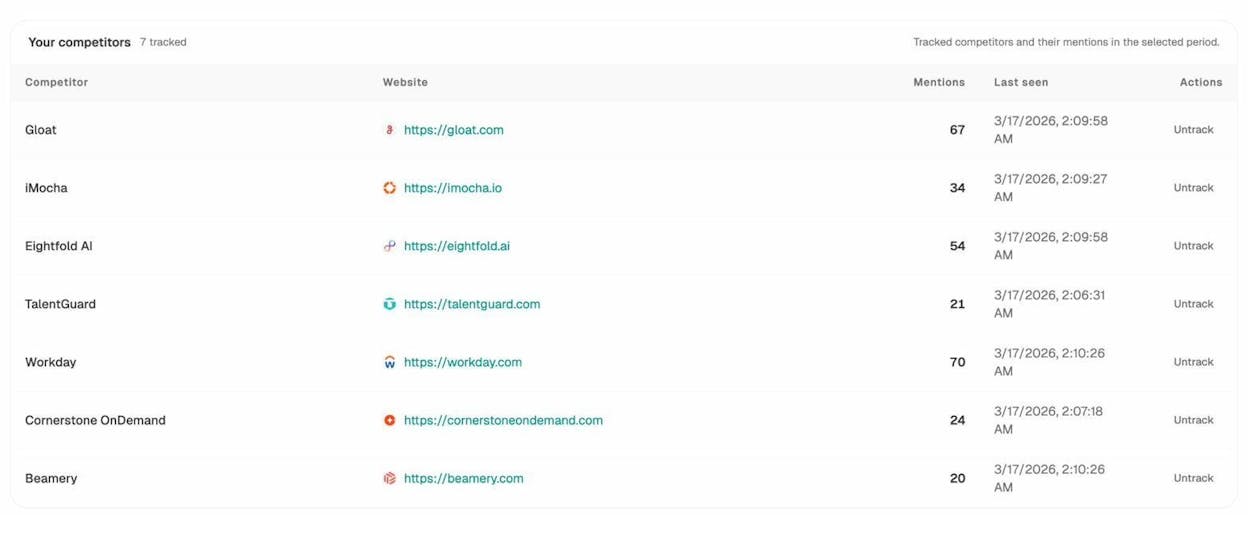
Check which competitors AI models cite for your topic. In Analyze AI’s Competitors dashboard, you can see which brands get mentioned most often across AI engines for your tracked prompts. If a competitor appears in AI responses for subtopics you haven’t covered, those subtopics should go on your cluster roadmap.
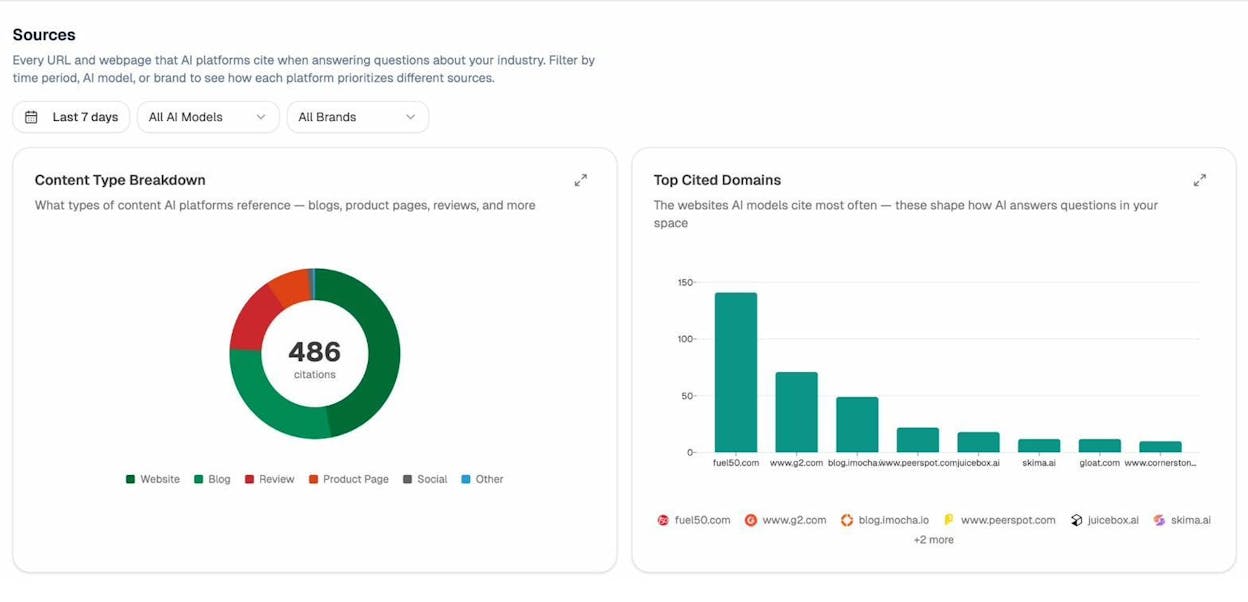
Find the sources AI models trust. The Sources dashboard shows you every URL and domain that AI platforms cite when answering questions about your industry. If AI engines keep citing a specific competitor’s blog post on a subtopic, that’s a signal you need a competing page in your cluster.
Run ad hoc prompt searches. Before committing to a new cluster page, test the subtopic in Analyze AI’s AI Search Explorer. Type in the question a user might ask, and see which brands currently show up across ChatGPT, Perplexity, and Gemini. This tells you exactly who you’re competing against in AI search, not just Google.
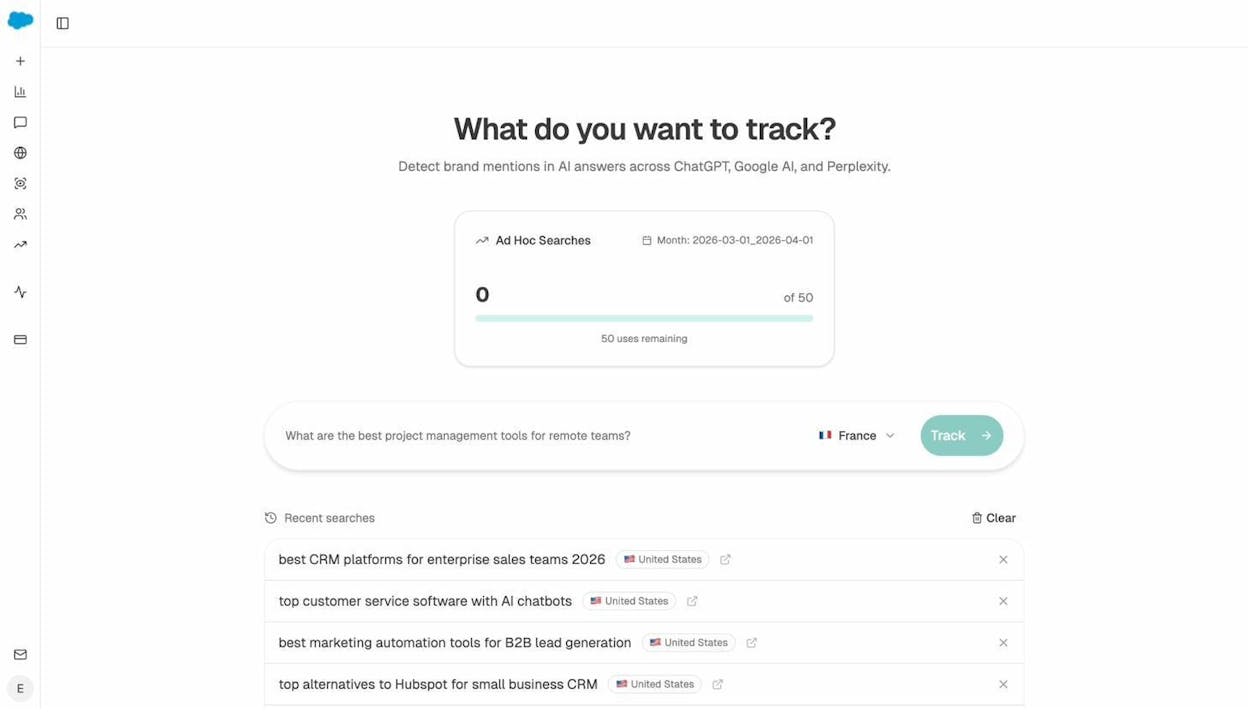
Use prompt tracking to monitor your cluster topics. Once your cluster is live, set up prompt tracking for the key questions each cluster page should answer. This lets you monitor whether AI models are recommending your content over time.
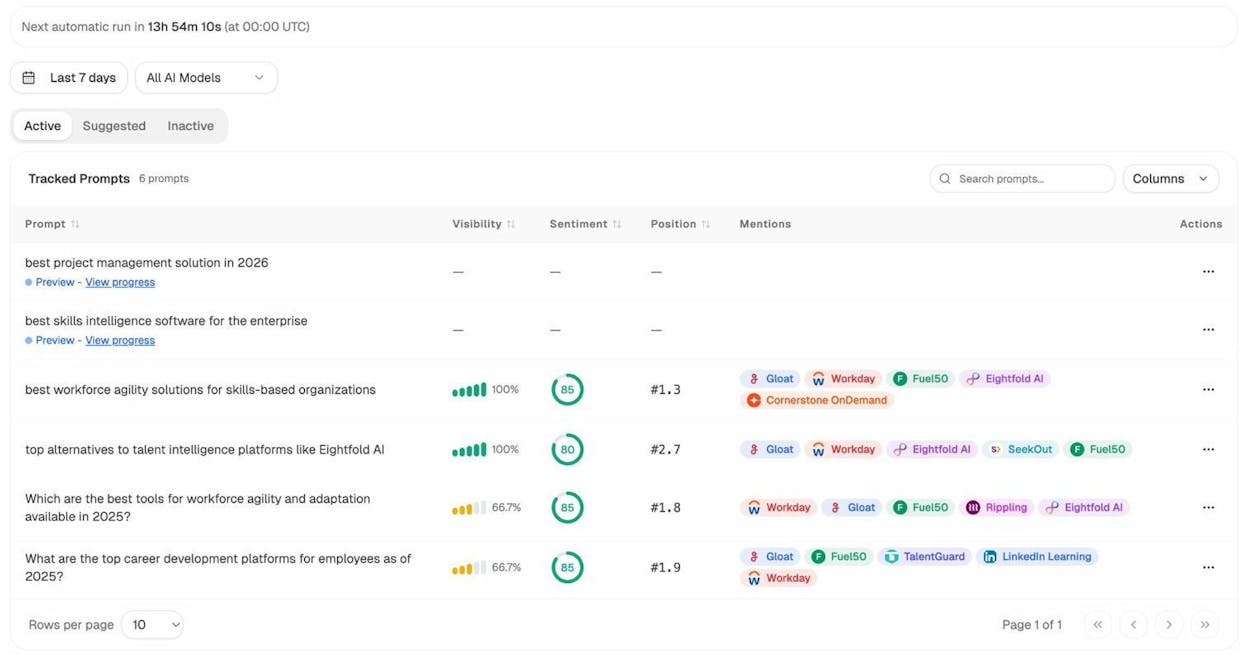
The combination of traditional keyword research and AI visibility analysis gives you a more complete picture of where the content opportunities are. You’re not just building for Google. You’re building for every place your audience looks for answers.
How to Write Content for Your Topic Cluster
Planning a cluster is one thing. Writing content that actually performs is another. Here are a few principles that apply to both your pillar page and cluster pages:
Lead with the answer. Every page in your cluster should give the reader what they came for as quickly as possible. Don’t bury the useful information below three paragraphs of background context. Put the most important information at the top of each section.
Make it comprehensive but not bloated. Cover the topic fully, but don’t pad your word count with filler. Every sentence should either teach the reader something new or move them toward the next logical step. If a paragraph doesn’t add value, cut it.
Use examples and evidence. General advice is forgettable. Specific examples stick. Instead of saying “topic clusters help with rankings,” show a real example of a site that saw traffic growth after implementing one.
Structure for skimmers. Use clear headings, short paragraphs, and visual breaks. Most readers scan before they read, so make it easy for them to find the section they need.
Optimize for AI search too. AI models favor content that is well-structured, uses clear language, and covers a topic comprehensively. This means using proper heading hierarchy, defining key terms, and answering questions directly. These are the same things that make content good for humans, which is the point.
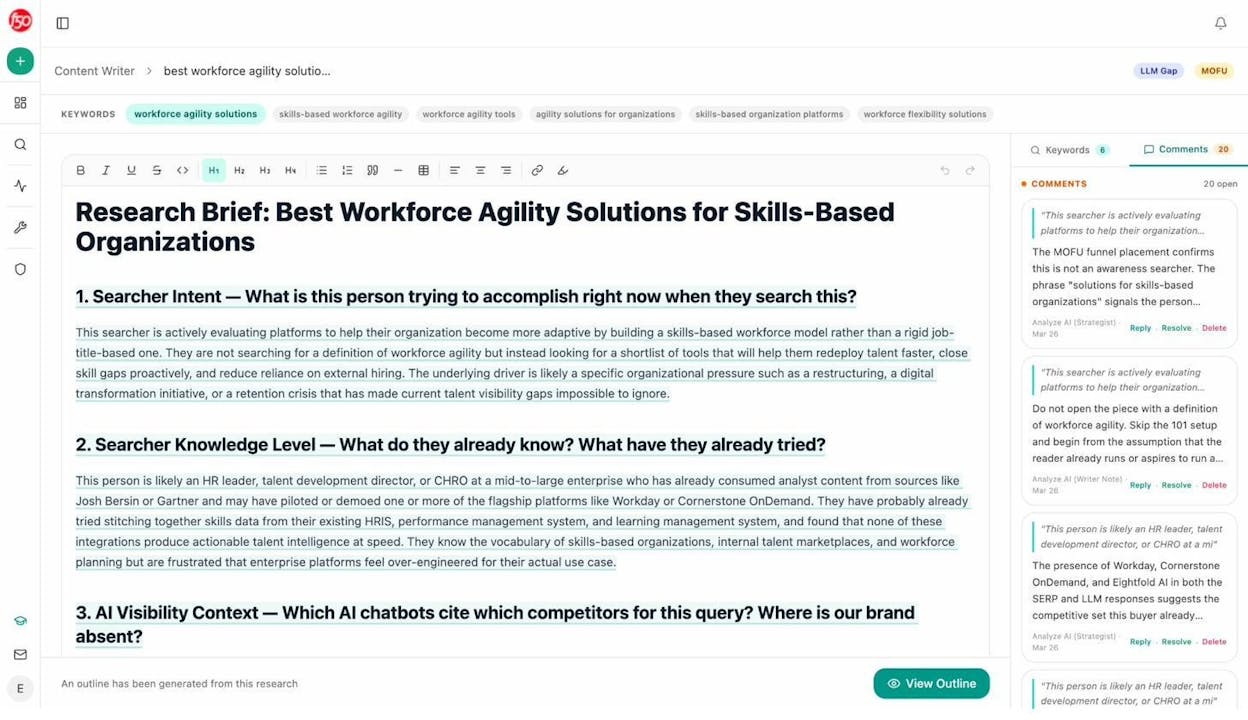
If you want to streamline the writing process, Analyze AI’s Content Writer helps you go from idea to research to outline to draft. It pulls in competitor keywords, LLM gap analysis, and editorial comments so you can write each cluster page with data backing every section.
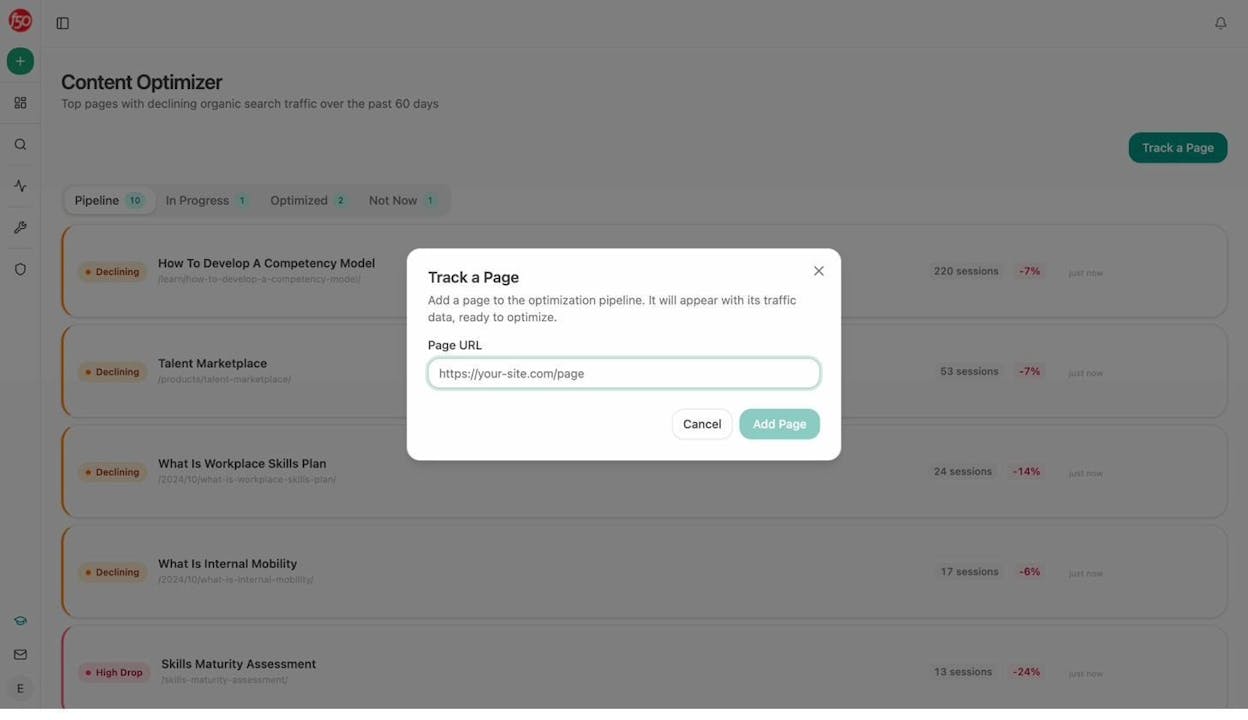
For existing cluster pages that aren’t performing, the Content Optimizer fetches your live page, scores it on argument quality and clarity, and generates specific suggestions to improve visibility in both search engines and AI answers.
How to Monitor Your Topic Cluster’s Performance
Building the cluster is the beginning, not the end. You need to track how it performs and iterate over time.
Traditional SEO metrics to watch
Organic traffic per page. Are your cluster pages getting traffic from Google? Use Google Search Console or your analytics tool to check. If a cluster page has been live for three months and gets zero organic visits, something needs to change.
Keyword rankings. Track the target keyword for each page in your cluster. Are you ranking on page one? Moving up or down? Use Analyze AI’s Keyword Rank Checker for quick checks.
Internal link equity. Make sure your internal links are working. Use Analyze AI’s Broken Link Checker to catch any dead links within your cluster.
AI search metrics to watch
AI visibility. Are AI models mentioning your brand when users ask questions about your cluster topic? Analyze AI’s AI Visibility Tracking shows you exactly where you appear (and don’t) across ChatGPT, Perplexity, Gemini, and Copilot.
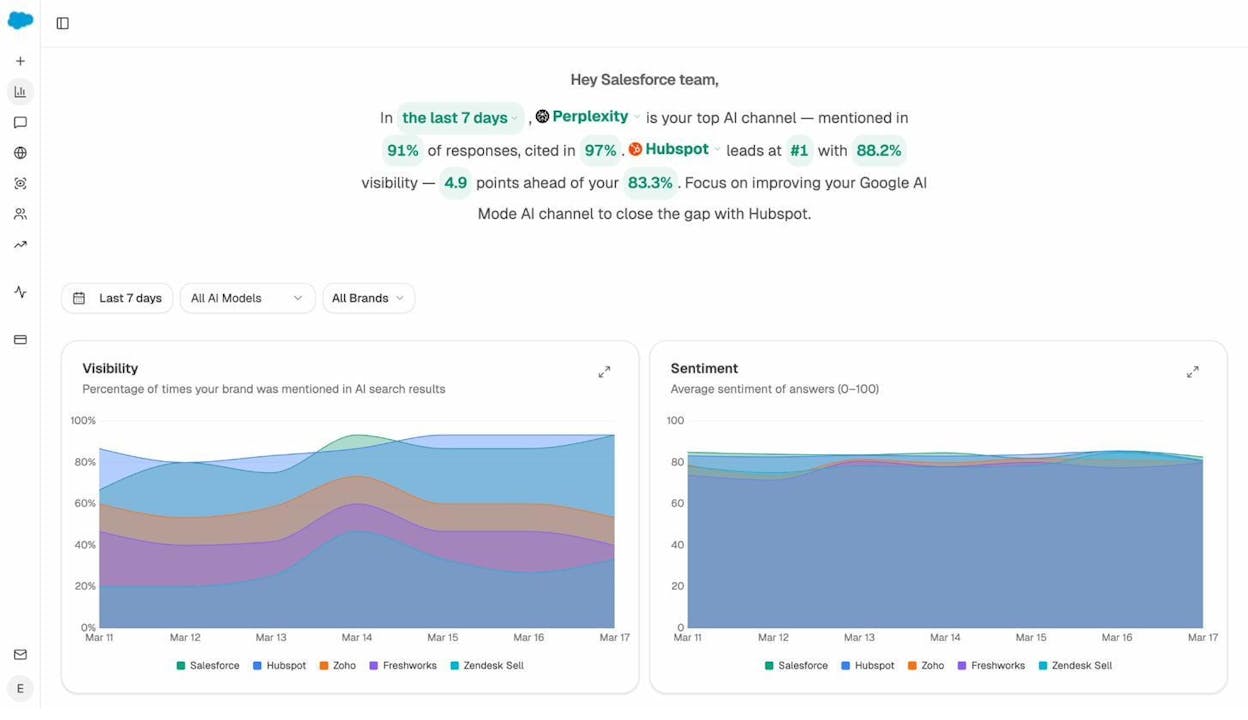
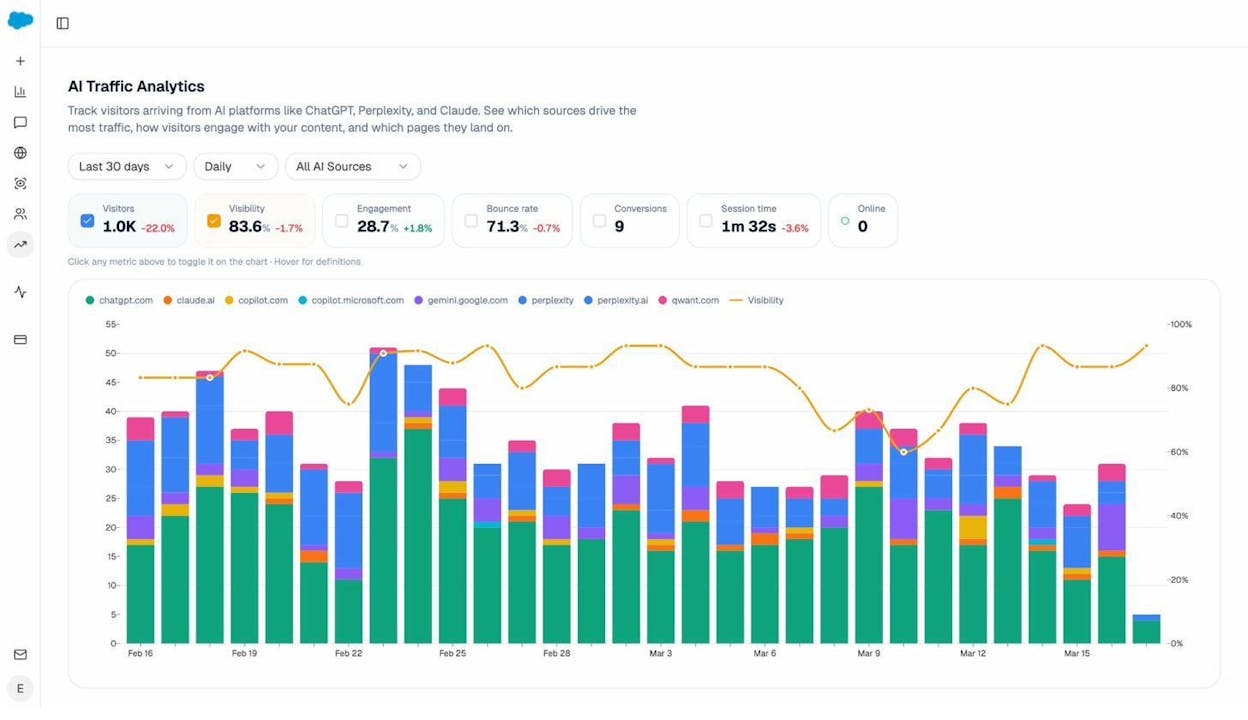
AI traffic. How many visitors are coming to your cluster pages from AI search engines? The AI Traffic Analytics dashboard breaks down sessions by AI source and shows which landing pages receive the most AI-referred visits.
Landing page performance. Drill into the Landing Pages view to see which specific cluster pages receive AI-referred traffic, how visitors engage with them, and which AI prompts led to citations.
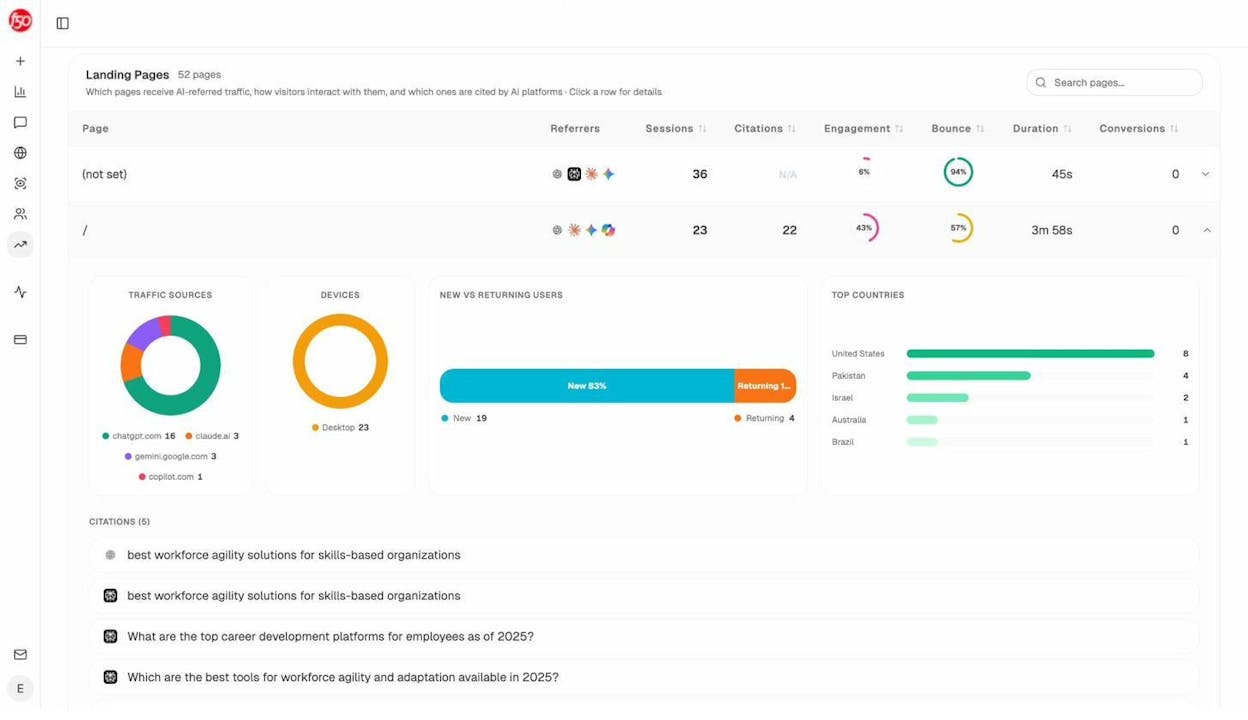
Citation patterns. Check which of your cluster pages AI models actually cite as sources. If one page gets cited frequently while others are ignored, study what the cited page does differently and apply those patterns across the cluster.
Monitoring both channels gives you a complete picture. A cluster page might rank well on Google but get zero AI citations, or vice versa. Each channel tells you something different about how well your content serves users.
Topic Cluster FAQs
Are “topic clusters,” “content hubs,” and “pillar pages” the same thing?
Essentially, yes. All three terms describe the same concept: a structured collection of interlinked content organized around a specific topic. Some people use “pillar page” to refer specifically to the central page, while “topic cluster” describes the entire structure. But functionally, they mean the same thing.
How many pages should a topic cluster have?
There’s no magic number. Some clusters have 5 pages. Others have 500. The right size depends on how broad your topic is and how many subtopics have genuine search demand.
A useful rule: create enough pages to cover the topic fully, but not so many that you create keyword cannibalization problems. If two pages in your cluster compete for the same keyword, you’ve gone too far. Consolidate them.
Do I need to create all cluster pages at once?
No. In fact, it’s better to publish in stages. Start with the pillar page and your three to five highest-priority cluster pages. Then add more pages over time as you create content and identify new subtopics.
This phased approach also lets you measure what’s working before investing in lower-priority pages.
Should my pillar page be long or short?
It depends on the topic. The pillar page should be long enough to give a useful overview but short enough that readers aren’t overwhelmed. Most effective pillar pages fall between 2,000 and 4,000 words.
The goal isn’t word count. It’s coverage. Your pillar page should answer the core question a reader has about the topic, then direct them to cluster pages for deeper information.
Can I build topic clusters for commercial topics?
Absolutely. While topic clusters are most commonly associated with informational content, they also work for commercial and comparison keywords. A “best project management tools” pillar page could link to individual review pages, comparison pages (Tool A vs. Tool B), and feature-specific guides.
The key is that the cluster pages should serve different intents rather than competing with each other.
How do topic clusters affect AI search visibility?
AI models assess your authority on a topic based on the breadth and depth of your content. A single article about “email marketing” is a data point. A cluster of 15 interlinked articles covering every subtopic is a signal that your site is a credible source on the topic.
This is especially true for AI search engines like Perplexity, which explicitly cite sources. Having more cluster pages means more URLs that could potentially get cited.
How long does it take to see results from a topic cluster?
For SEO, expect 3-6 months for Google to crawl, index, and rank your cluster pages. Results depend on competition, domain authority, and content quality.
For AI search, results can appear faster. AI models update their training data and web crawling more frequently than Google’s ranking algorithm. Some brands see AI citations within weeks of publishing comprehensive content on a topic.
What tools do I need to build a topic cluster?
At minimum, you need a keyword research tool (even a free one like Analyze AI’s Keyword Generator), Wikipedia (free), and a spreadsheet for planning. For AI search insights, Analyze AI adds visibility data from ChatGPT, Perplexity, Gemini, and Copilot so you can build clusters that perform across both channels.
Final Thoughts
Topic clusters are not a new concept. And they’re not complicated. At their core, they’re just a disciplined way of organizing your content around a topic so that search engines and AI models can see the depth of your expertise.
The process comes down to choosing a topic, mapping subtopics, validating search intent, planning your architecture, linking everything together, and monitoring performance. You can do the research in 10 minutes. The writing takes longer. But the framework is simple.
What’s changed is the landscape. SEO isn’t dead, but it is evolving. AI search engines are now a real channel where your audience looks for answers. The good news is that topic clusters work for both. The same depth of coverage that helps you rank on Google also makes AI models more likely to cite your brand.
Build the cluster. Write the content. Monitor both channels. Compound what works.

Ernest

Ibrahim


