



Summarize this blog post with:


In this article, you’ll learn what SEO potential is, how to calculate it for new and existing content, how to model different ranking scenarios to set realistic traffic goals, and how to extend the same thinking to AI search. You’ll also get a free prompt-based calculator you can use with ChatGPT, Gemini, or Claude to automate the entire estimation process.
Table of Contents
What Is SEO Potential?
SEO potential is an estimate of how much organic search traffic your website could generate if you ranked well for a given set of keywords. It answers a simple question: how big is the opportunity?
This estimate matters because it turns vague ambition into concrete numbers. Instead of saying “we want more organic traffic,” you can say “there are roughly 45,000 monthly visits available across these 200 topics, and we can realistically capture 12,000 of them within the next 12 months.”
That kind of specificity changes how you plan content, allocate budget, and report progress to stakeholders.
SEO potential is not the same as search volume. A keyword with 10,000 monthly searches will not send 10,000 visitors to your site. Your actual traffic depends on where you rank, how many clicks that position receives, and whether Google shows features like AI Overviews or featured snippets that reduce click-through rates.
This is why calculating SEO potential requires modeling, not just adding up search volumes.
Why Estimating SEO Potential Matters
There are four specific situations where estimating SEO potential pays off.
Building a business case for SEO investment. If you are pitching SEO to leadership or a client, abstract promises do not work. A concrete traffic estimate tied to revenue projections gives decision-makers something to evaluate. For example, if your average conversion rate from organic traffic is 2% and your average deal size is $5,000, then 10,000 additional monthly visits translates to roughly $1M in annual pipeline. That is a conversation worth having.
Prioritizing which keywords to target first. Not all keywords deserve equal effort. A keyword with high traffic potential and low difficulty is a better starting point than one with high volume but fierce competition. SEO potential analysis helps you find the keywords that offer the best return on effort.
Setting realistic timelines and goals. SEO takes time, and expectations need to match reality. Estimating potential across difficulty buckets shows you what is achievable in the short term (easy keywords) versus what requires sustained effort over 12 to 18 months (hard keywords).
Comparing the opportunity cost of SEO vs. paid channels. If you estimate 15,000 monthly organic visits from a set of keywords, you can calculate what those same clicks would cost through Google Ads. This comparison helps justify the upfront investment in content and link building.
How to Estimate Your SEO Potential (Step by Step)
The method is straightforward. You take a set of target keywords, group them by topic, assign difficulty levels, model different ranking scenarios with click-through rate benchmarks, and calculate estimated monthly traffic for each scenario.
Here is how to do it from scratch.
Step 1: Build Your Seed Keyword List
Start by brainstorming the core topics your audience searches for. You can do this manually by listing the problems your product solves, the questions your sales team hears most often, and the topics your competitors write about.
Then expand your list using a keyword research tool. Plug your seed terms into a keyword generator to find related keywords, long-tail variations, and questions people actually search for.
![[Screenshot: Analyze AI Keyword Generator tool showing keyword suggestions for a seed term]](https://www.datocms-assets.com/164164/1777316031-blobid1.png?auto=format,compress&w=1248&fit=max)
You want to end up with a list of 50 to 500 keywords depending on the size of your market. Do not worry about filtering yet. The goal here is breadth.
Other ways to find seed keywords:
-
Google Autocomplete. Type your core topic into Google and note the suggestions that appear. These are real queries people search for.
![[Screenshot: Google Autocomplete showing suggestions for a seed keyword]](https://www.datocms-assets.com/164164/1777316043-blobid2.png?auto=format,compress&w=1248&fit=max)
-
Google Search Console. If you already have a site, export the queries driving impressions from GSC. Even queries where you rank on page two or three represent untapped potential.
![[Screenshot: Google Search Console Performance report filtered by queries]](https://www.datocms-assets.com/164164/1777316050-blobid3.png?auto=format,compress&w=1248&fit=max)
-
Competitor analysis. Use a tool like Ahrefs or Semrush to export the keywords your competitors rank for. This shows you the topics that already drive traffic in your niche.
![[Screenshot: Ahrefs Site Explorer showing organic keywords for a competitor domain]](https://www.datocms-assets.com/164164/1777316052-blobid4.png?auto=format,compress&w=1248&fit=max)
-
Reddit and forums. Browse the communities where your audience hangs out. The questions people ask repeatedly are keyword opportunities hiding in plain sight.
-
Your own sales and support teams. The questions prospects ask before buying and the problems customers report after buying are two of the best sources of keyword ideas that tools cannot surface.
Step 2: Group Keywords by Parent Topic
Individual keywords can be misleading. The keyword “what is SEO” and the keyword “SEO definition” do not need separate pages. They belong to the same topic and will be served by the same piece of content.
Grouping keywords by parent topic gives you a more accurate picture of how many pieces of content you actually need, and how much traffic each piece could realistically attract.
In Ahrefs, this is called “Clusters by Parent Topic.” The tool identifies the top-ranking page for each keyword and groups keywords that share the same top-ranking page into a single cluster. Each cluster represents one content opportunity.
To do this:
-
Enter your seed keywords into a Keywords Explorer tool.
-
Go to the Matching Terms report.
-
Switch to the “Clusters by Parent Topic” view.
-
Export the results as CSV.
![[Screenshot: Ahrefs Keywords Explorer showing Clusters by Parent Topic view with columns for parent topic, keyword difficulty, and traffic potential]](https://www.datocms-assets.com/164164/1777316065-blobid5.png?auto=format,compress&w=1248&fit=max)
If you do not have access to a paid keyword tool, you can do this manually. Search each keyword on Google and look at the top three results. If the same page ranks for multiple keywords on your list, those keywords belong to the same topic cluster.
This step is important because it prevents you from overestimating your opportunity. Without clustering, you might count 300 keywords as 300 separate opportunities when they really represent 80 content pieces.
Step 3: Assess Keyword Difficulty
Not all keywords are equally competitive. A keyword like “CRM software” is dominated by pages with thousands of backlinks from high-authority domains. A keyword like “best CRM for landscaping businesses” has far less competition.
Most keyword research tools provide a difficulty score on a 0-100 scale. The score typically reflects how many referring domains the top-ranking pages have.
For estimating SEO potential, it helps to sort your keywords into difficulty buckets:
|
Difficulty Bucket |
Score Range |
What It Means |
|---|---|---|
|
Easy |
0-10 |
Few backlinks needed. New or low-authority sites can rank relatively quickly. |
|
Medium |
11-30 |
Some backlinks and solid content required. Achievable within 3-6 months for most sites. |
|
Hard |
31-70 |
Significant link building and high-quality content needed. Expect 6-12 months. |
|
Super Hard |
71-100 |
Dominated by high-authority sites. Requires sustained effort over 12+ months. |
You can check the difficulty of individual keywords using a free keyword difficulty checker.
These buckets matter because they determine your timeline. The “easy” bucket shows the traffic you can capture in the near term. The “hard” and “super hard” buckets represent long-term potential that requires patience and consistent effort.
Step 4: Model Ranking Scenarios With CTR Benchmarks
Here is where the math comes in. For each keyword, you need to estimate where you might rank and how many clicks that position will receive.
Click-through rates by position vary depending on the study, but a widely used set of benchmarks looks like this:
|
Position |
Estimated CTR |
|---|---|
|
#1 |
30% |
|
#2 |
15% |
|
#3 |
10% |
|
#4-10 |
5% (average) |
|
Not ranked |
0% |
These are rough averages. Actual CTRs depend on the SERP layout, the presence of ads, featured snippets, and AI Overviews. But for estimation purposes, they are good enough to separate realistic expectations from wishful thinking.
Next, model three scenarios to create a range of outcomes:
Optimistic scenario. You assume your content performs well and many of your pages land in top positions. For example: 30% of keywords rank #1, 25% rank #2, 20% rank #3, 15% rank #4-10, and 10% do not rank.
Realistic scenario. A more conservative distribution: 20% at #1, 20% at #2, 30% at #3, 30% at #4-10, and 20% unranked.
Pessimistic scenario. You assume tough competition and slower progress: 10% at #1, 10% at #2, 20% at #3, 60% at #4-10, and 20% unranked.
Step 5: Calculate Estimated Traffic
For each keyword cluster, multiply the traffic potential by the CTR for each position, weighted by the percentage of keywords you expect to land in that position.
Here is the formula for a single scenario:
Estimated Traffic = Traffic Potential × (% at Rank 1 × 0.30 + % at Rank 2 × 0.15 + % at Rank 3 × 0.10 + % at Rank 4-10 × 0.05)
Do this for each difficulty bucket and each scenario. Then sum the results.
The output is a table that looks something like this:
|
Difficulty |
Keywords |
Traffic Potential |
Optimistic |
Realistic |
Pessimistic |
|---|---|---|---|---|---|
|
Easy (0-10) |
45 |
28,500 |
5,415 |
3,990 |
2,280 |
|
Medium (11-30) |
72 |
41,200 |
7,828 |
5,768 |
3,296 |
|
Hard (31-70) |
58 |
35,800 |
6,802 |
5,012 |
2,864 |
|
Super Hard (71-100) |
25 |
22,400 |
4,256 |
3,136 |
1,792 |
|
Total |
200 |
127,900 |
24,301 |
17,906 |
10,232 |
This table tells a clear story. In the realistic scenario, there are roughly 18,000 monthly visits available. The easy keywords alone could deliver about 4,000 of those visits in the near term with relatively modest effort.
You can visualize this data as a stacked bar chart to make it easier to present to stakeholders. Each bar represents a scenario (optimistic, realistic, pessimistic), and the segments show how much each difficulty bucket contributes.
![[Screenshot: Example stacked bar chart showing estimated traffic by scenario and difficulty bucket]](https://www.datocms-assets.com/164164/1777316075-blobid6.jpg?auto=format,compress&w=1248&fit=max)
How to Estimate SEO Potential for Existing Content
The method above works for new keyword opportunities. But what about the content you have already published?
If your site already ranks for keywords, you can estimate how much additional traffic you could gain by improving those rankings.
Here is how:
-
Export your tracked keywords. If you use a keyword tracking tool, export the keywords you are already monitoring. If not, pull your queries from Google Search Console.
-
Identify keywords ranking on page two or at the bottom of page one. These are your biggest opportunities. A keyword ranking at position #11 is one spot away from page one, where the traffic jumps dramatically.
-
Run the same estimation process. Plug these keywords into a keyword tool to get traffic potential and difficulty data, then model the scenarios.
![[Screenshot: Google Search Console Performance report filtered to show keywords ranking in positions 8-20 with high impressions]](https://www.datocms-assets.com/164164/1777316082-blobid7.png?auto=format,compress&w=1248&fit=max)
The difference here is that you are not starting from zero. You already have content that Google considers relevant for these queries. Improving existing content is almost always faster and cheaper than creating new content from scratch.
What to look for in existing content:
-
Pages ranking #4-10 for high-volume keywords. These pages are already on page one but not capturing significant clicks. Small improvements in content quality, internal linking, or backlinks could push them into the top three where CTRs jump from 5% to 10-30%.
-
Pages ranking #11-20 for medium-difficulty keywords. These are close to breaking onto page one. A content refresh, better keyword targeting, or a handful of new backlinks could make the difference.
-
Pages with high impressions but low click-through rates. This often indicates a title tag or meta description problem. Rewriting these can increase clicks without changing your rankings.
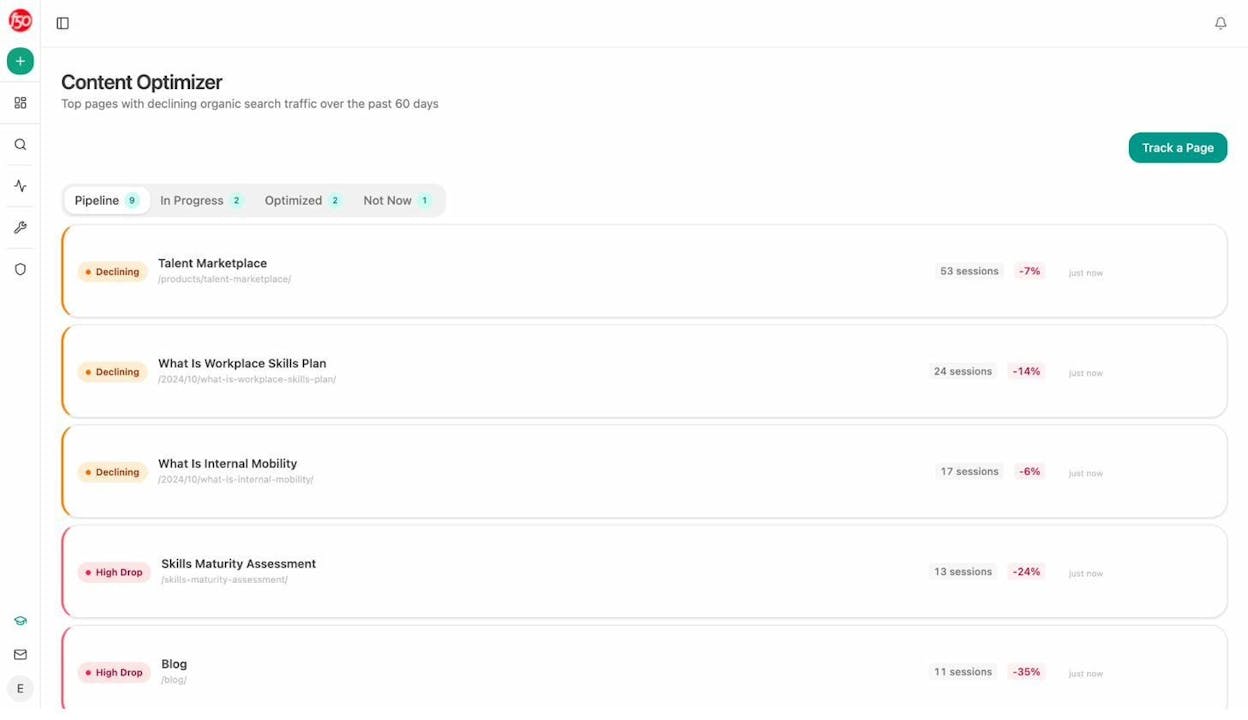
For a structured approach to finding and fixing underperforming content, you can use a content optimization tool that surfaces declining pages and provides specific recommendations for improvement.
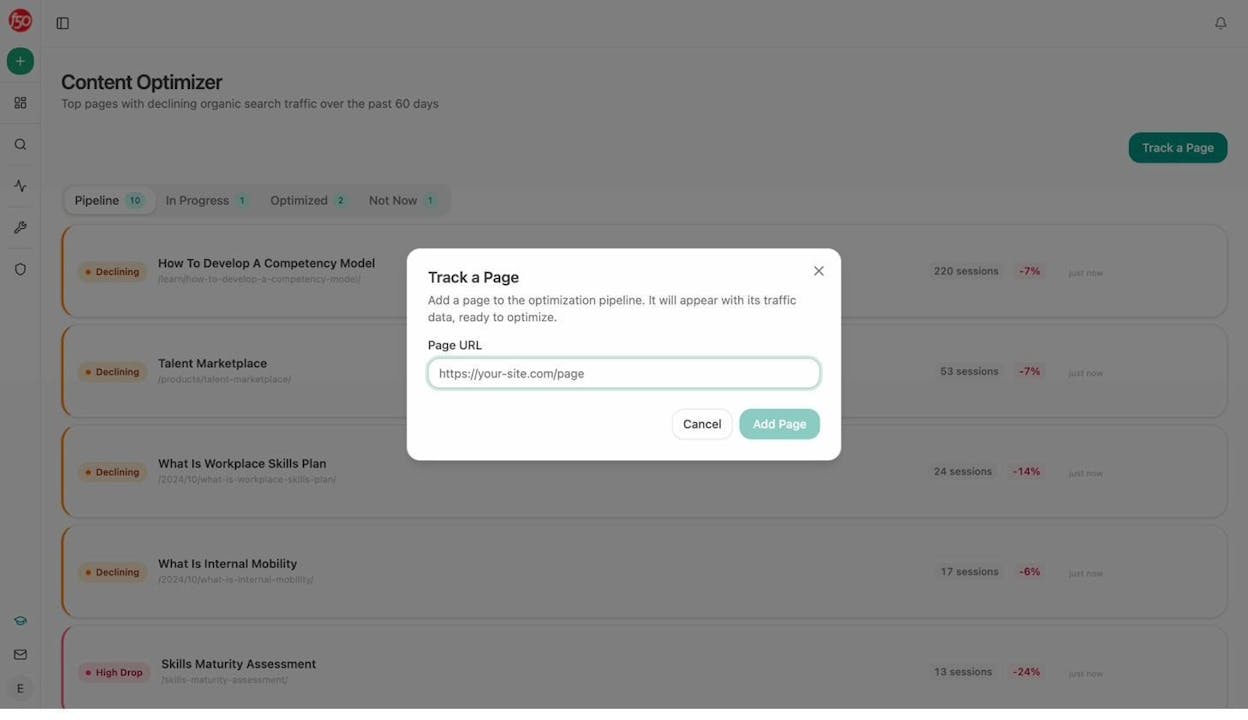
Analyze AI Content Optimizer showing pages with declining traffic and optimization pipeline
The Content Optimizer in Analyze AI automatically identifies your top pages with declining organic search traffic over the past 60 days. Each page shows its current session count and the percentage decline, so you can prioritize what to fix first.
How to Estimate SEO Potential From Competitor Keywords
One of the fastest ways to estimate your SEO potential is to look at what already works for your competitors.
If a competitor drives 50,000 monthly organic visits from a set of keywords you are not targeting, that is a concrete, validated opportunity. The demand is proven. The only question is whether you can create better content.
Here is how to do it:
-
Pick two or three direct competitors. Choose competitors who target the same audience and sell similar products.
-
Export their organic keywords. Use a tool like Ahrefs Site Explorer or Semrush to pull their ranking keywords. Filter to keep keywords with at least 100 monthly searches and rankings in the top 20 to focus on meaningful opportunities.
-
Remove their branded keywords. You cannot rank for “CompetitorName pricing” or “CompetitorName reviews” (usually), so strip those out.
-
Find the gaps. Look for keywords where your competitors rank but you do not. These content gaps represent the clearest opportunities for growth.
-
Run the estimation. Take the filtered keyword list, group by parent topic, assign difficulty buckets, and model scenarios using the same method described above.
![[Screenshot: Ahrefs Content Gap tool showing keywords that competitors rank for but the target site does not]](https://www.datocms-assets.com/164164/1777316093-blobid9.png?auto=format,compress&w=1248&fit=max)
This approach is especially useful when building a business case for SEO because you can point to real traffic numbers. Instead of projecting from hypothetical scenarios, you are saying “our competitor gets X visits from these keywords, and here is our plan to capture a share of that traffic.”
For a deeper walkthrough of this process, see our guide on SEO competitor analysis.
Go Beyond Google: Estimating Your AI Search Potential
Everything above focuses on traditional search engines. But here is what most guides on SEO potential miss: organic traffic no longer comes only from Google.
AI search engines like ChatGPT, Perplexity, Gemini, and Copilot are sending real, measurable traffic to websites. According to data from multiple sources, AI referral traffic is growing month over month for many brands. And unlike Google, where you compete for 10 blue links, AI search often recommends just two to five brands in a response.
This does not mean SEO is dead. It means there is a second organic channel you should be measuring alongside Google. Ignoring it is like estimating your total addressable market but leaving out an entire segment.
What AI Search Potential Looks Like
AI search potential is the measure of how much traffic and visibility you could gain from AI-powered answer engines. It includes two components:
-
AI visibility. How often your brand gets mentioned or cited when someone asks an AI engine a question relevant to your space. Think of this as the AI equivalent of ranking on page one.
-
AI referral traffic. The actual visits to your website that come from links in AI-generated answers. This is measurable in your analytics, just like organic search traffic from Google.
The key difference from SEO potential is that AI search does not have keyword-level volume data the way Google does. You cannot look up “how many people ask ChatGPT about CRM software each month” in the same way you can check Google search volume.
But you can measure and estimate AI search potential in other ways.
How to Measure AI Search Potential With Analyze AI
Analyze AI is built specifically for this. It tracks your brand’s visibility, citations, and traffic across multiple AI engines and gives you the data to estimate and grow your AI search potential.
Here is how to use it:
1. Track your AI visibility across engines.
The Overview dashboard shows your brand’s visibility percentage, sentiment, and competitive position across all tracked AI engines. This is your baseline.
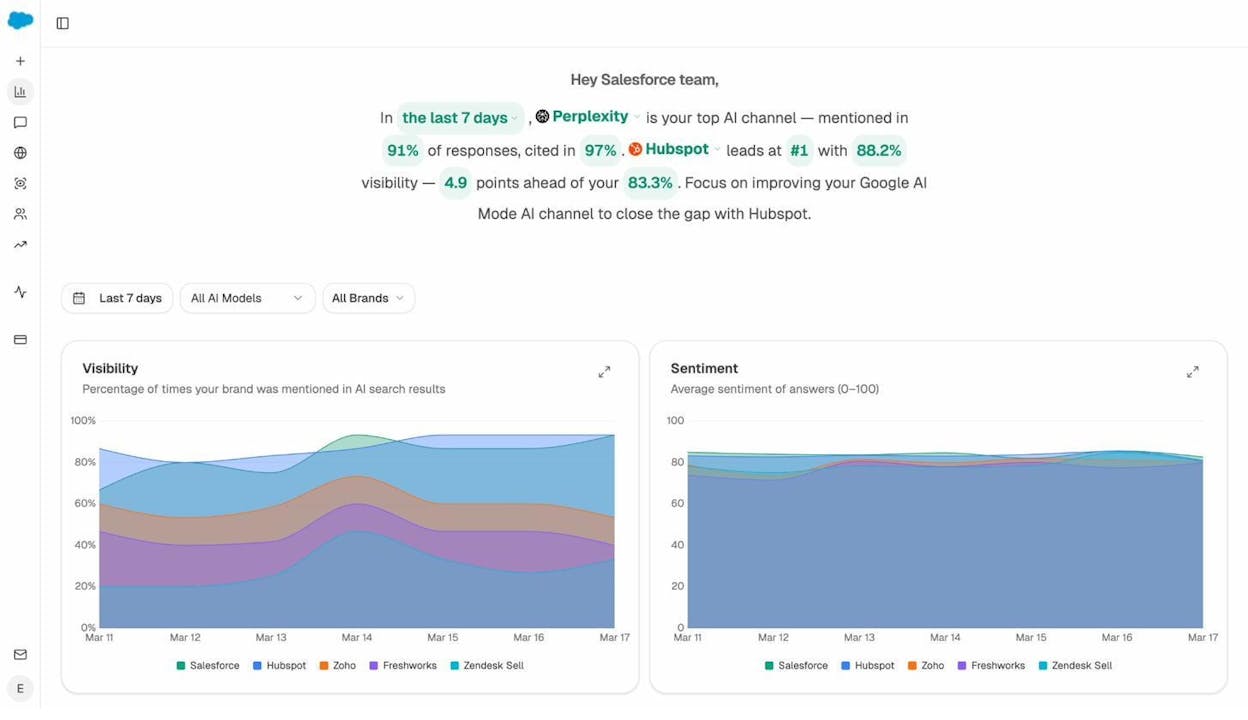
In this example, the brand has 83.3% visibility across AI engines, with Perplexity as the top channel. The dashboard also shows which competitor leads and by how much, giving you a clear target to aim for.
2. See which prompts drive visibility (and where you are missing).
The Prompts dashboard shows every tracked prompt alongside your visibility score, sentiment rating, ranking position, and which competitors appear in the response.
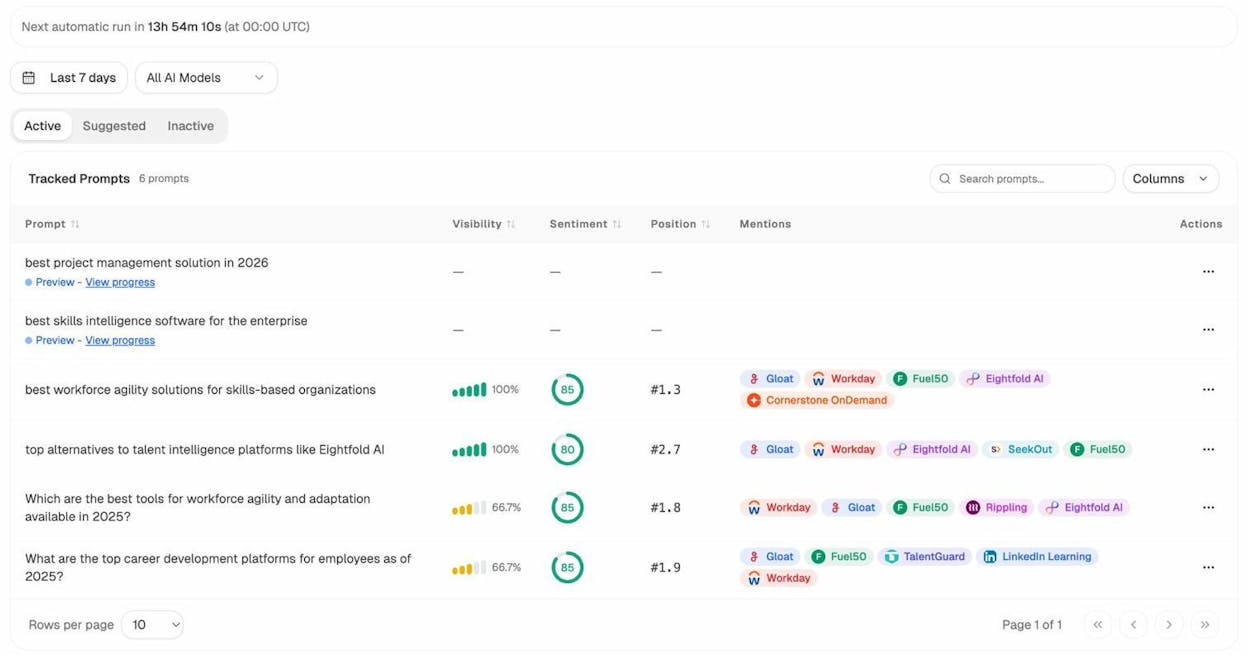
This is the AI search equivalent of a keyword ranking report. You can see where you rank #1, where you show up at #3, and where you do not appear at all. The prompts where you are absent represent your biggest AI search potential.
3. Discover new prompt opportunities.
Analyze AI suggests prompts based on your industry and competitive landscape. These are prompts your audience is likely asking that you are not yet tracking.
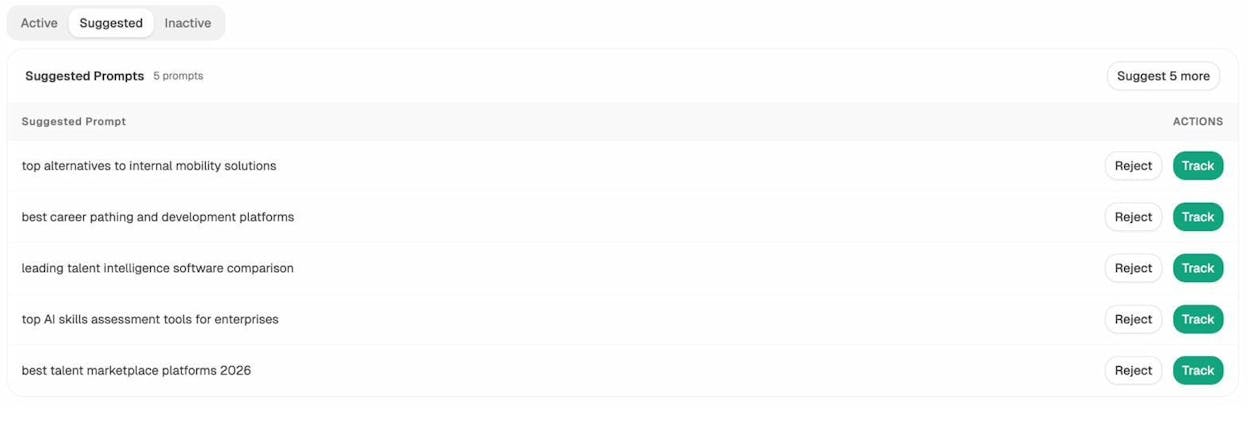
Think of suggested prompts like discovering new keywords. Each one is a potential AI search opportunity. You can add them to your tracking with one click.
You can also run ad hoc prompt searches to test any prompt across ChatGPT, Gemini, and Perplexity before committing to tracking it.
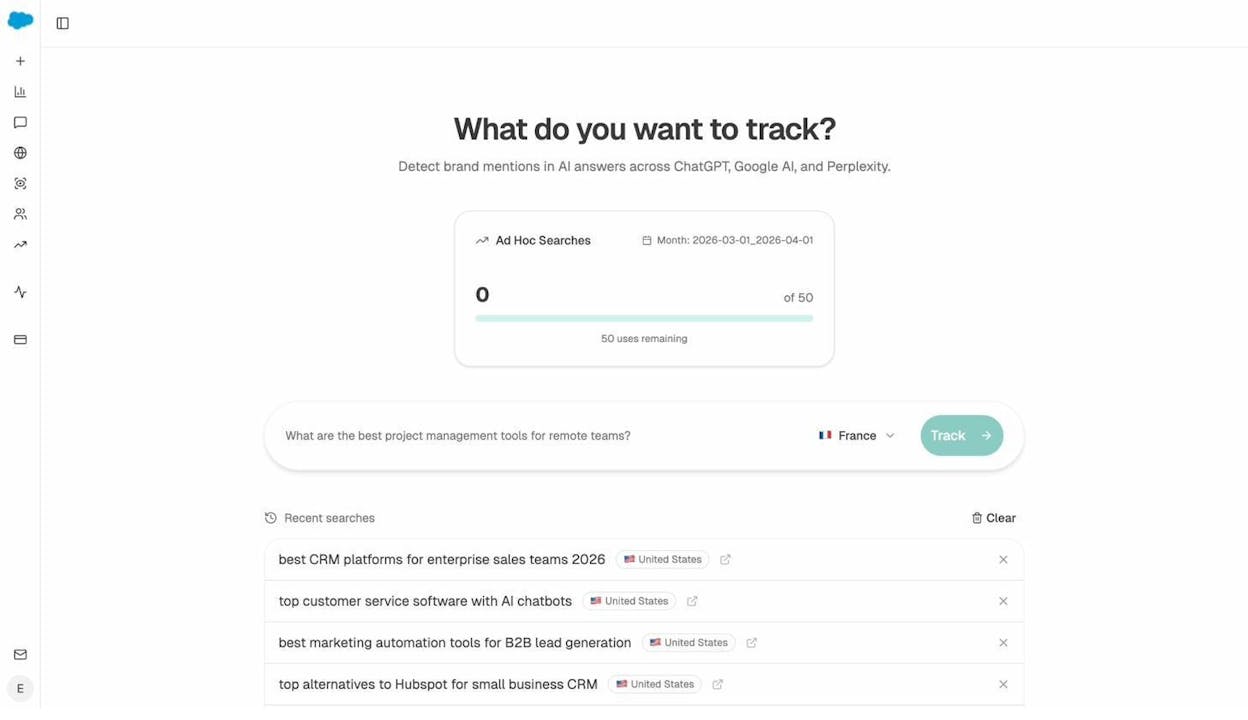
4. Measure actual AI referral traffic.
The AI Traffic Analytics dashboard connects to your GA4 data and shows exactly how many visitors come from each AI engine, which pages they land on, and how they engage.
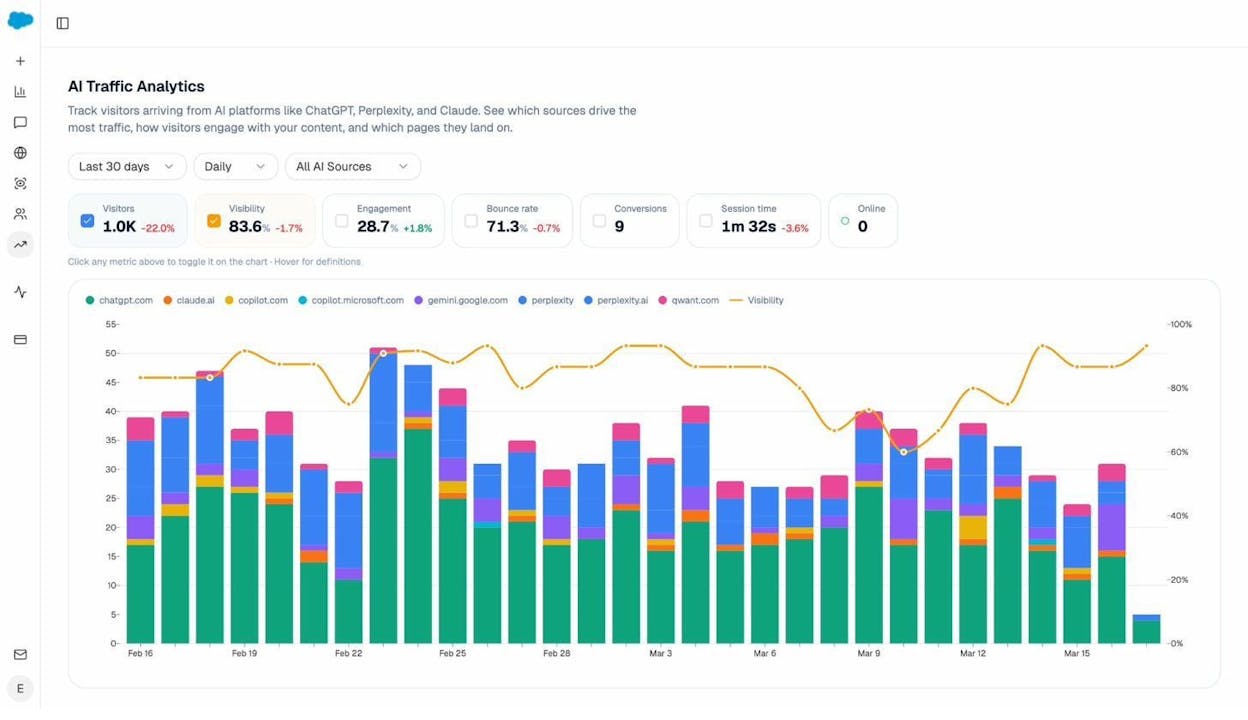
This is where AI search potential becomes concrete. You can see which AI engines drive the most traffic, which pages receive the most AI referrals, and whether those visitors convert.
5. Drill into your top-performing landing pages.
The Landing Pages view within AI Traffic Analytics shows which specific pages receive AI-referred traffic, along with sessions, citations, engagement, bounce rate, and conversions for each page.
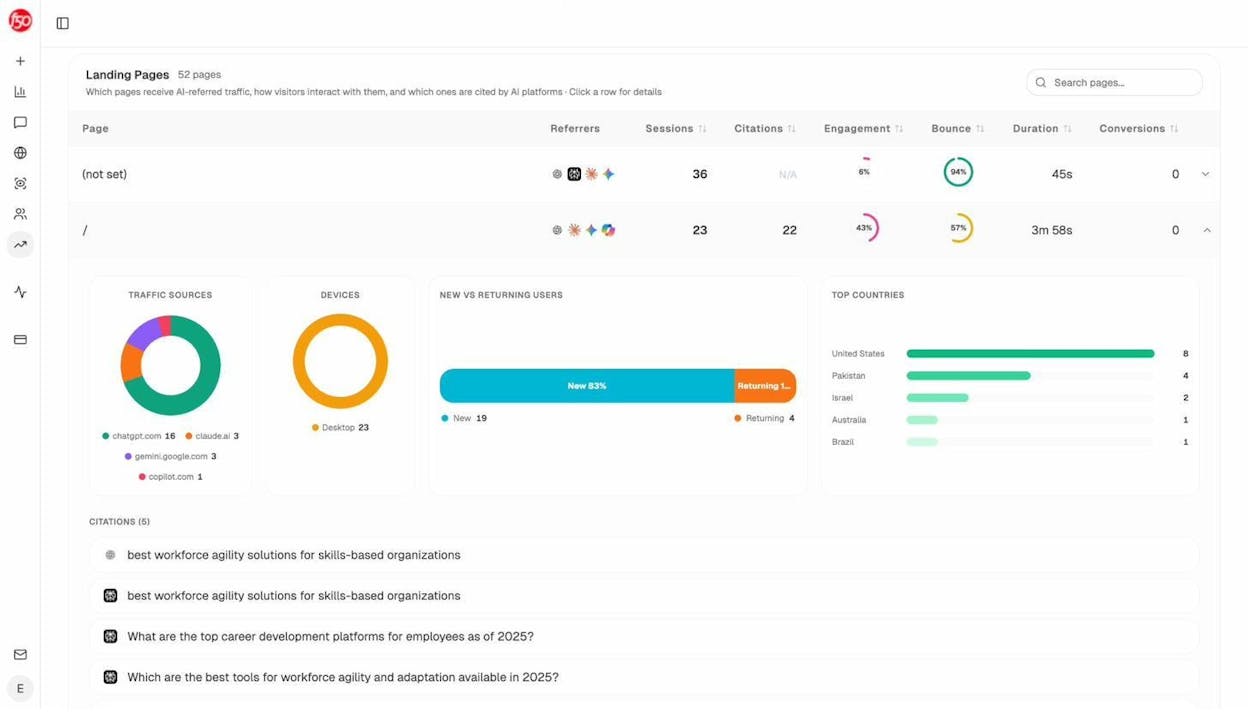
This data reveals patterns. If your comparison pages and “best X” guides consistently attract AI traffic, that tells you what content formats AI engines prefer in your space. You can then create more content in those formats to capture additional AI search potential.
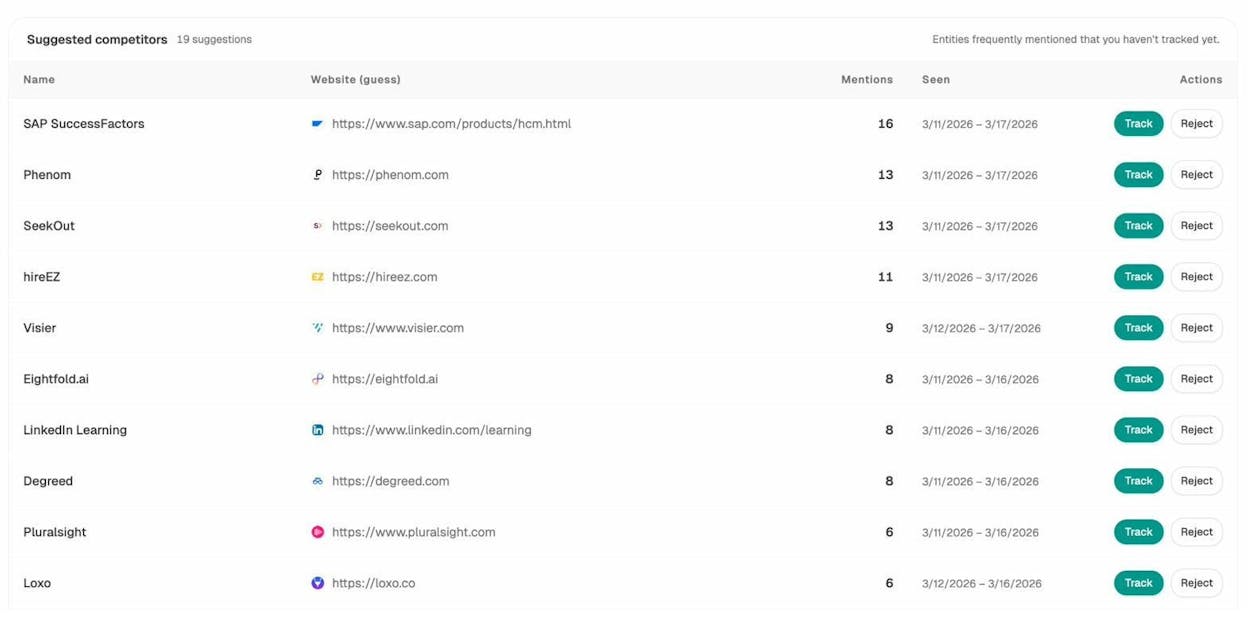
6. Identify which competitors win in AI search.
The Competitors dashboard shows every competitor that AI engines mention alongside your brand, how often they appear, and when they were last seen.
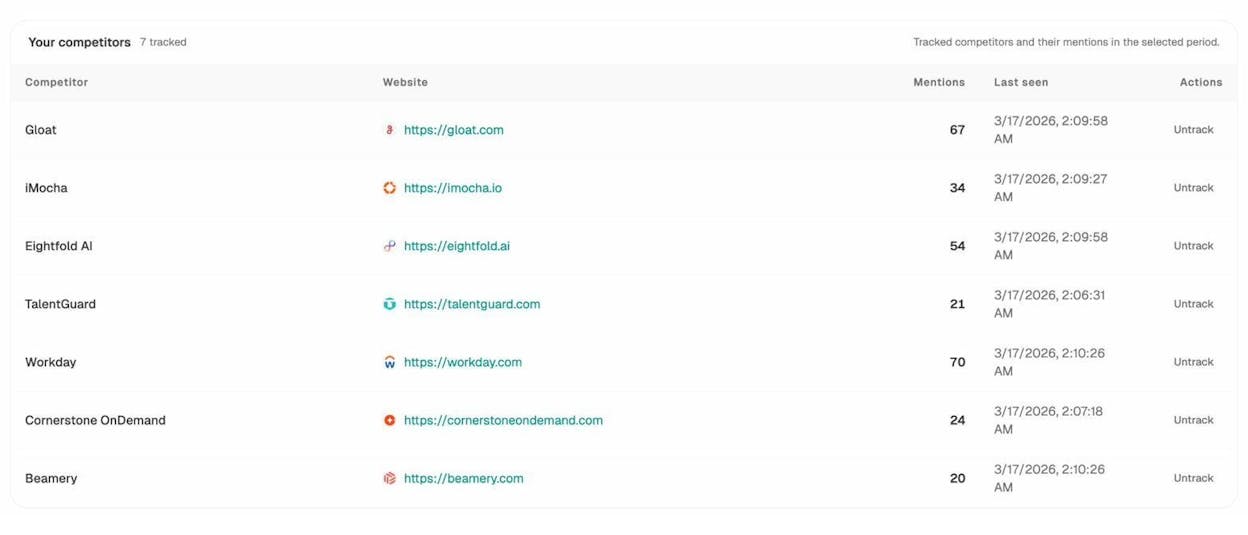
Analyze AI also suggests competitors you may not have considered. These are entities that AI engines frequently mention in your space but that you have not started tracking yet.
7. Understand which sources AI engines trust.
The Sources dashboard reveals every URL and domain that AI engines cite when answering questions in your industry. It also breaks down citations by content type (blogs, product pages, reviews, social media).
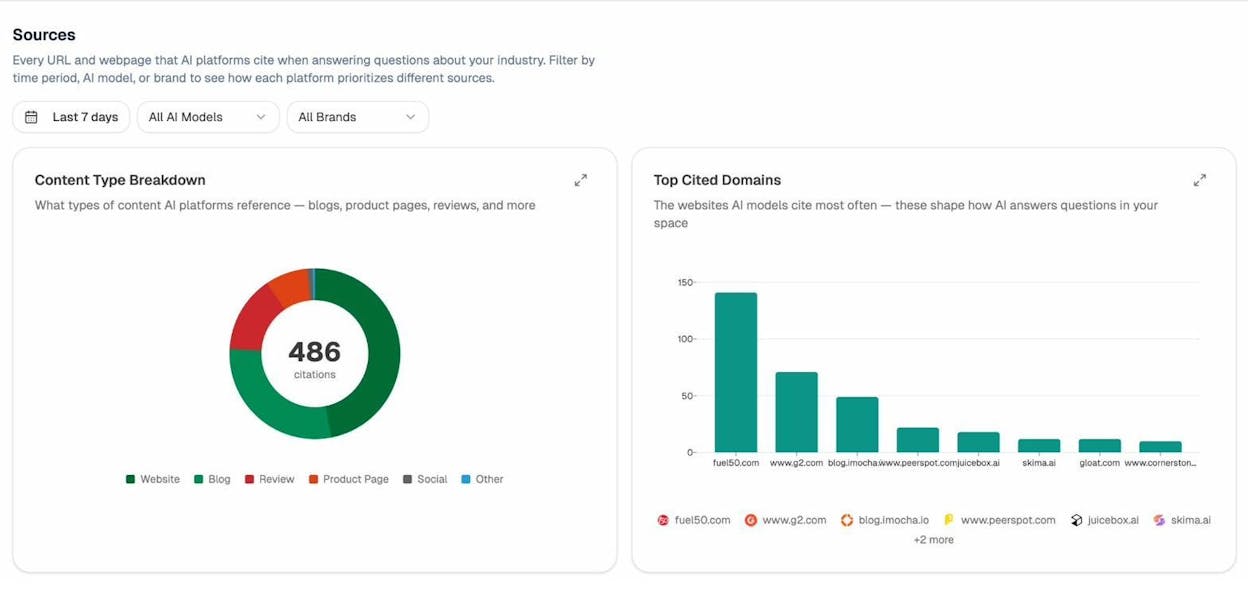
This is one of the most actionable views for growing AI search potential. If AI engines in your space cite G2 reviews and blog posts more than product pages, then earning reviews on G2 and publishing more in-depth blog content will increase your chances of being cited.
Putting It All Together: Your Total Organic Potential
Your total organic potential is the sum of your SEO potential (traffic from Google and traditional search engines) plus your AI search potential (traffic and visibility from AI answer engines).
Neither channel replaces the other. They compound. A page that ranks #1 on Google and gets cited by ChatGPT and Perplexity captures traffic from multiple sources. The content work you do for SEO (creating thorough, well-structured, original content) is the same work that earns AI citations.
This is why we believe at Analyze AI that AI search is an additional organic channel, not a replacement for SEO. The brands that measure and optimize for both will have a compounding advantage over those that treat them as separate, competing strategies.
How to Achieve Your SEO Potential
Estimating potential is the first step. Achieving it requires execution across three pillars.
Create Content That Deserves to Rank
Ranking on Google requires content that genuinely answers the searcher’s question better than every other result on the page. This means:
-
Covering the topic thoroughly. Use the “what else would someone need to know?” test. If a reader finishes your article and still has unanswered questions, your content is not complete enough.
-
Including original insights. Data, case studies, expert quotes, and proprietary research are the elements that separate content that ranks from content that gets lost in the noise. Generic advice that could have been written by anyone will not cut it.
-
Structuring for readability. Use clear headings, short paragraphs, and visual breaks. People scan before they read. If your content looks like a wall of text, most visitors will leave before finding the answer they came for.
-
Matching search intent. If people searching for “SEO potential” want a calculator and method, give them that. If they want a conceptual explainer, write that. Check the top-ranking pages to understand what Google believes the intent is for each keyword.
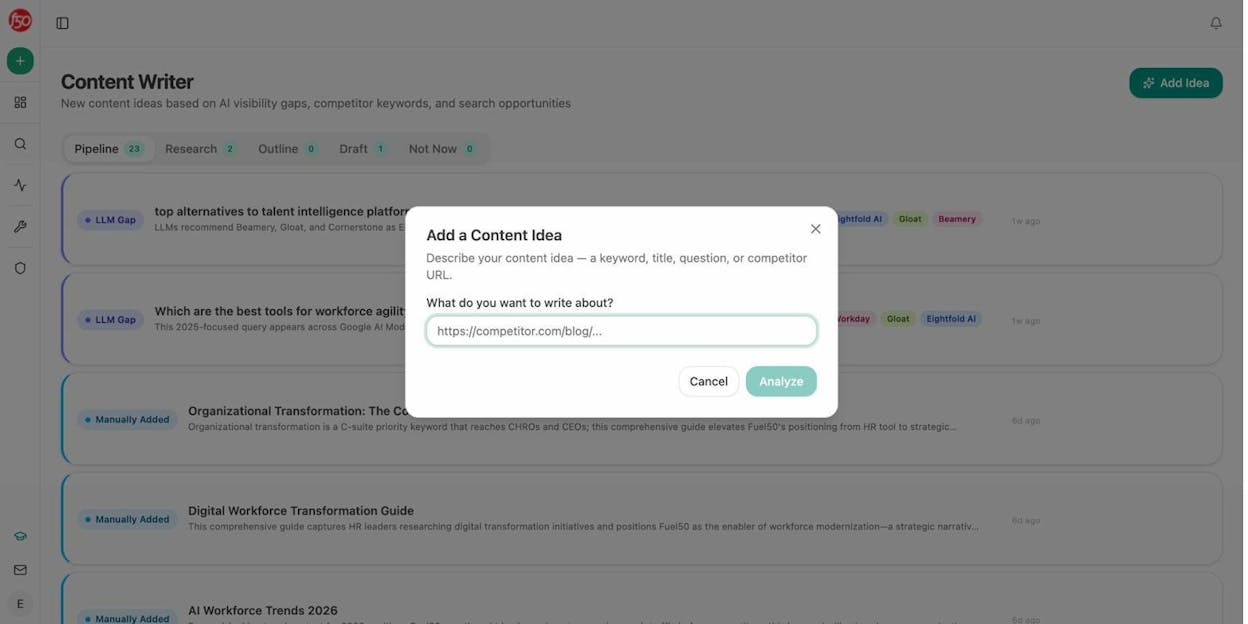
The Analyze AI Content Writer can help you build content from idea to draft with AI visibility gaps and competitor analysis built into each step.
Build Links Strategically
Backlinks remain one of the strongest ranking factors. The more high-quality links pointing to your content, the higher your chances of moving from a pessimistic scenario toward an optimistic one.
Focus on earning links rather than building them through manipulative tactics. The best approaches include creating original research that journalists and bloggers want to cite, writing comprehensive guides that become reference resources in your industry, and building genuine relationships with other creators in your space.
For a list of tools that can help with this process, see our guide on link building tools.
Get the Technical Foundation Right
No amount of great content will rank if search engines cannot crawl and index your site properly. Make sure your site loads fast, works well on mobile, has a clean URL structure, uses proper internal linking, and does not have technical issues blocking crawlers.
You can catch broken links and other crawl issues using a free broken link checker.
Achieve Your AI Search Potential Too
The same content that ranks well in Google tends to get cited by AI engines. But there are a few additional steps you can take to maximize your AI search visibility:
-
Earn citations on the sources AI trusts. Use the Analyze AI Sources dashboard to see which domains and content types AI engines cite most in your space. Then focus on earning mentions, reviews, and backlinks from those specific sources.
-
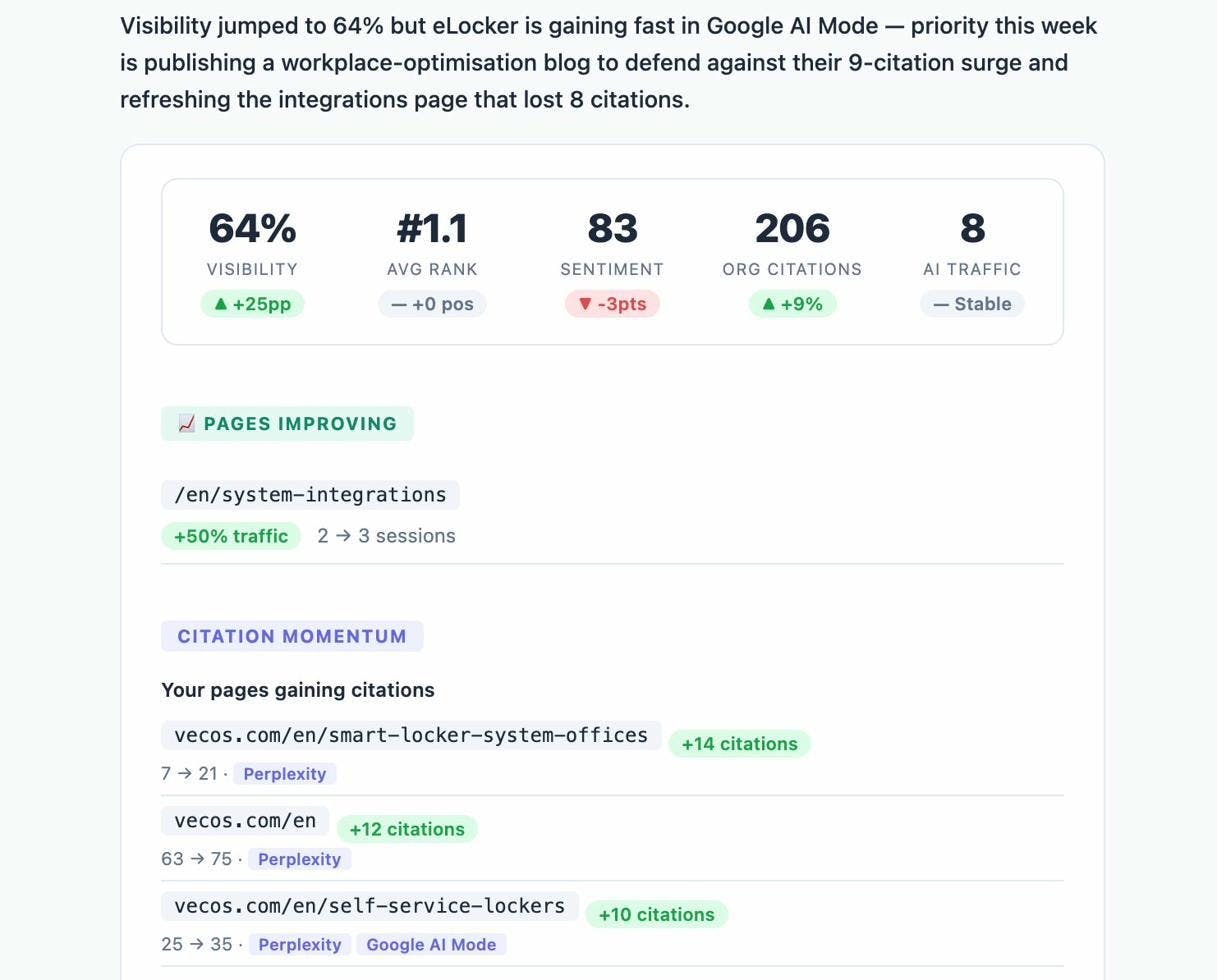
Track your AI visibility weekly. Set up weekly email digests in Analyze AI to get a summary of your visibility changes, competitor movements, and new opportunities delivered to your inbox every Monday.
-
Optimize existing content for AI citation. Use the Content Optimizer to find content that is declining in search traffic and improve it with specific, AI-informed recommendations.
-
Monitor your brand sentiment in AI responses. AI engines do not just mention your brand. They describe it. The Perception Map in Analyze AI shows exactly how AI engines frame your brand, including whether the sentiment is positive, neutral, or negative. If AI engines associate your brand with a negative narrative (like “expensive” or “limited integrations”), you can address that with targeted content.
-
Double down on content formats that work. If your AI Traffic Analytics data shows that comparison guides and “best X” lists drive the most AI referrals, create more content in those formats. AI engines have clear preferences for the types of content they cite, and those preferences vary by industry.
Free SEO Potential Calculator (Prompt Included)
You can automate the entire SEO potential estimation process using the prompt below. It works with ChatGPT, Gemini, or Claude.
Here is how to use it:
-
Export your keyword data from a keyword research tool. You need columns for parent topic (or keyword), traffic potential (or search volume), global traffic potential (optional), and keyword difficulty.
-
Copy the prompt below into your preferred AI assistant.
-
Upload your CSV file when prompted.
-
The AI will create a spreadsheet with traffic estimations across all three scenarios and generate stacked bar charts you can download and share.
The prompt:
Generate an SEO Potential Report
Create a file listing Parent Topics with columns for:
Difficulty: Categorized into four buckets: Easy (0-10), Medium (11-30), Hard (31-70), and Super Hard (71-100).
Traffic potential and Global traffic potential: Based on user-provided columns.
Estimated Traffic: Calculated for three ranking models:
Optimistic: 30% of keywords rank #1, 25% at #2, 20% at #3, 15% in positions 4-10, and 10% unranked.
Realistic: 20% at #1, 20% at #2, 30% at #3, 30% in positions 4-10, and 20% unranked.
Pessimistic: 10% at #1, 10% at #2, 20% at #3, 60% in positions 4-10, and 20% unranked.
CTR Assumptions:
Rank 1 = 30%, Rank 2 = 15%, Rank 3 = 10%, Ranks 4-10 = 5%, Unranked = 0%.
For each difficulty bucket, calculate:
Total keyword count.
Total traffic potential and Global traffic potential.
Estimated traffic for each ranking model.
Clean Data:
Remove any rows with an "Uncategorized" difficulty bucket.
Exclude rows where all values for traffic and potential traffic are zero.
Provide a summary row labeled "Sum", aggregating totals for traffic potential, global traffic potential, and estimated traffic across all buckets.
Visualizations: Create two stacked bar charts:
1. Estimated Traffic Potential: Each bar represents total Estimated Traffic Potential for a ranking model (Optimistic, Realistic, Pessimistic). Stack the bar by difficulty bucket (Easy, Medium, Hard, Super Hard). Place the pessimistic scenario at the bottom.
2. Estimated Global Traffic Potential: Each bar represents total Estimated Global Traffic Potential for a ranking model. Stack by difficulty bucket with the pessimistic scenario at the bottom.
Column Mapping: If the exact column names cannot be found, ask the user to confirm which columns to use for Parent topic, Traffic potential, Global traffic potential, and Difficulty.
Tip: If you do not have access to a paid keyword tool, you can generate a starting keyword list using the free Keyword Generator from Analyze AI, then manually assess difficulty using the Keyword Difficulty Checker and check current rankings with the SERP Checker.
Key Takeaways
SEO potential gives you a number where you previously had a guess. It turns keyword research into a business case, helps you prioritize which content to create first, and sets expectations for what SEO can realistically deliver over time.
But do not stop at Google. AI search is growing as a referral channel, and the brands that measure their AI search potential alongside their SEO potential will have a clearer picture of their total organic opportunity.
The work is largely the same. Create thorough, original content. Earn links from trusted sources. Structure your pages so both search engines and AI models can understand them. Then measure both channels and double down on what works.
To get started with measuring your AI search potential, try Analyze AI and see where your brand appears (and where it does not) across every major AI engine.

Ernest

Ibrahim


