



Summarize this blog post with:


In this article, you’ll learn what bad links are, why they still matter for both Google rankings and AI search visibility, and the eight specific types of bad links you should never build. You’ll also learn how to spot each type in your backlink profile, when to actually take action (and when to leave them alone), and how link quality now influences whether AI engines like ChatGPT, Perplexity, and Gemini cite your content.
Table of Contents
What Are Bad Links?
Bad links are backlinks that violate Google’s spam policies. Google defines link spam as any link intended to manipulate search rankings. In practice, bad links fall into two categories: links that are spammy and completely useless, and links that can actively damage your site.
The distinction matters. A spammy forum profile link from a random web 2.0 site is a waste of time, but it probably won’t hurt you. A network of paid links from a private blog network, on the other hand, can trigger a manual action and wipe out your organic traffic overnight.
Here is a quick summary of the eight types covered in this article:
|
Type |
Risk Level |
Most Common Source |
Can It Trigger a Penalty? |
|---|---|---|---|
|
Private Blog Networks (PBNs) |
High |
Purchased link packages |
Yes |
|
Paid links |
High |
“Dear sir” outreach, link vendors |
Yes |
|
Hacked links |
Very high |
Compromised websites |
Yes (plus legal risk) |
|
Hidden links |
Very high |
Shady agencies with site access |
Yes |
|
Excessive link exchanges |
Medium |
Reciprocal link schemes |
Yes, if excessive |
|
Automated link building |
High |
Fiverr-style “foundation links” |
Yes |
|
Forum and comment spam |
Low-medium |
Bots, manual spammers |
Usually discounted |
|
Low-quality directories |
Low |
Bulk directory submission services |
Rarely, but useless |
Why Bad Links Are a Problem
Bad links can trigger a Google penalty. When that happens, you face a significant drop in rankings and organic traffic. In the worst case, Google can remove your site from search results entirely.
But even when Google does not penalize you, bad links waste your time and money. Many of them have zero positive impact on rankings or traffic. Every hour you spend acquiring a worthless link is an hour you could have spent building a genuinely valuable one.
Bad links and AI search: a new dimension
Here is something most articles on bad links miss entirely: link quality now affects more than just Google rankings.
AI search engines like ChatGPT, Perplexity, Claude, Gemini, and Copilot rely heavily on the sources they cite. When these models generate answers, they pull from content they consider authoritative and trustworthy. That assessment is influenced by the same trust signals Google uses, including your backlink profile.
If your site is associated with spammy link practices, it is less likely to be cited by AI engines. And if you are not being cited, you are invisible in a rapidly growing channel. According to our own data at Analyze AI, AI referral traffic is growing month-over-month for many brands, and the sites that show up most in AI answers tend to be the same ones with clean, high-authority backlink profiles.
This is not a reason to panic. It is a reason to be intentional about the links you build, because the payoff now compounds across both traditional search and AI search.
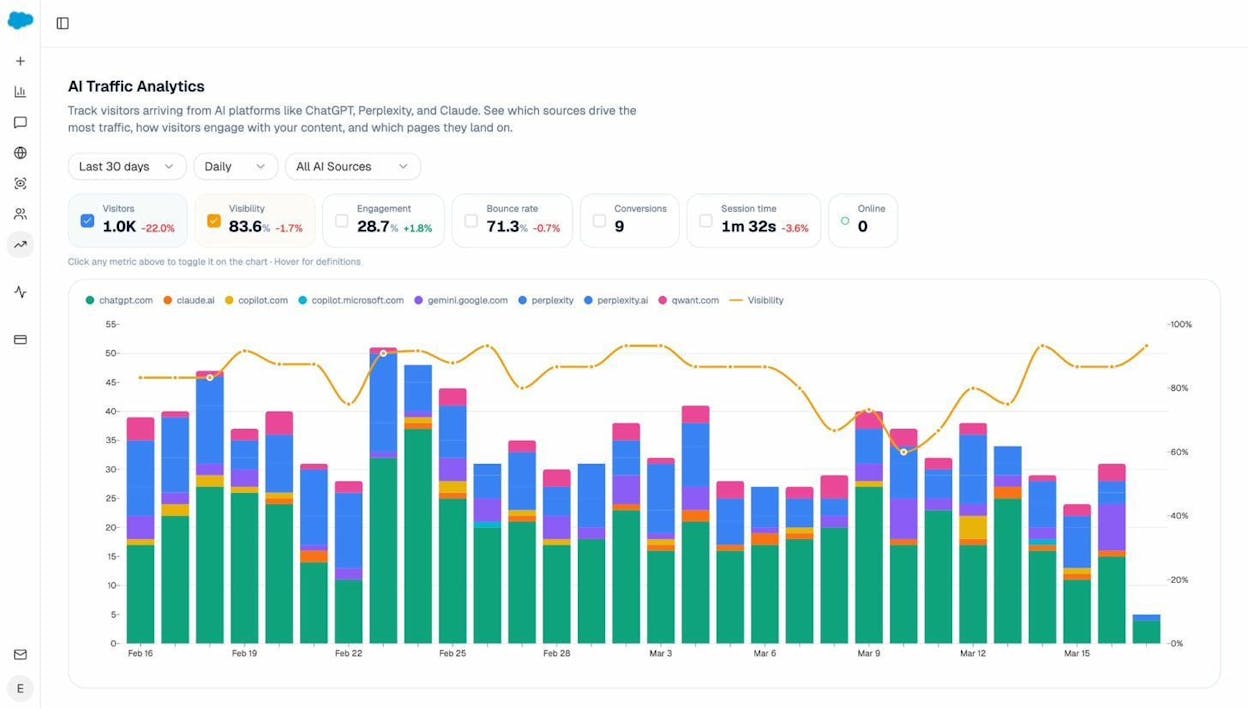
Analyze AI’s AI Traffic Analytics dashboard lets you track exactly how much traffic AI engines send to your site, broken down by engine and over time. Sites with clean backlink profiles and strong authority signals tend to appear here more frequently.
When to Take Action on Bad Links
Google has consistently said it is very good at identifying and discounting spam links algorithmically. You do not need to panic about every low-quality link pointing to your site.
Google’s disavow tool allows you to tell Google to ignore specific links. But this tool can be damaging if you use it carelessly. If you disavow links that are actually helping you rank, you can lose traffic. Just because a link looks spammy to you does not mean Google treats it as harmful.
![[Screenshot: Google’s disavow tool warning message stating that this is an advanced feature and should only be used with caution]](https://www.datocms-assets.com/164164/1776984193-blobid2.png?auto=format,compress&w=1248&fit=max)
There are only two situations where you should actively worry about bad links:
You have received a manual action. If Google Search Console shows a manual action for unnatural links, you need to audit your backlink profile and disavow the problematic ones.
You know the site has a history of shady link building. If you recently purchased a domain or took over SEO for a new client, and you know (or strongly suspect) the previous owner used manipulative link building tactics, you need to clean house.
Outside of these situations, your energy is better spent building good links than hunting down bad ones. Use a tool like the Analyze AI Website Authority Checker to get a quick read on your domain’s overall authority, and focus your efforts on building links that actually move the needle.
8 Types of Bad Links to Avoid
Now let’s walk through each type of bad link, why it is harmful, and how to check whether your site has any.
1. Private Blog Networks (PBNs)
A private blog network is a collection of websites owned by a single person or entity, linked together to manipulate search engine rankings. The owner creates multiple sites, fills them with content, and uses them to pass link equity to a target site. The goal is to make it look like the target site has earned links from multiple independent sources.
![[Screenshot: Diagram showing how PBNs work — a central “money site” with arrows coming from multiple satellite sites, all owned by the same person]](https://www.datocms-assets.com/164164/1776984199-blobid3.png?auto=format,compress&w=1248&fit=max)
Why you should avoid PBNs
If Google does not catch you, PBNs can move the needle. The problem is that building an undetectable PBN is extremely difficult unless you are an experienced spammer.
A sophisticated PBN needs to look and act like a real website. That means genuine content, regular posting schedules, different ownership records, separate hosting providers, and unique IP addresses. If you are going to put in that much effort, you would get a better return by investing that time in legitimate link building.
When Google does detect a PBN, the penalties are severe. Every site in the network can be deindexed, and every site receiving links from it can be hit with a manual action.
How to check if you have PBN links
PBNs can be tricky to detect, but they leave footprints. The biggest giveaway is multiple referring domains sharing the same IP address.
![[Screenshot: A backlink analysis tool’s “Referring IPs” report, showing multiple domains linking from the same IP address]](https://www.datocms-assets.com/164164/1776984200-blobid4.png?auto=format,compress&w=1248&fit=max)
Having multiple sites on the same IP alone does not confirm a PBN — they could simply share a hosting provider like Cloudflare. But if those sites also have:
-
Little to no organic traffic
-
Thin or duplicated content
-
Links to each other in a pattern
-
Default themes or generic site designs
-
No real audience or social presence
Then you are likely looking at a PBN.
PBNs and AI search visibility
Here is an angle most people miss: AI search engines do not use PBN links as trust signals. Models like ChatGPT and Perplexity rely on citations from genuinely authoritative sources. If the only sites linking to you are thin PBN properties, AI models will not see those as reasons to cite your content.
In Analyze AI, you can use the Sources dashboard to see which domains AI engines actually cite when answering questions in your industry. If the domains citing your competitors are high-authority publications, research sites, and industry blogs — and your referring domains are PBN-style properties — the gap becomes obvious.
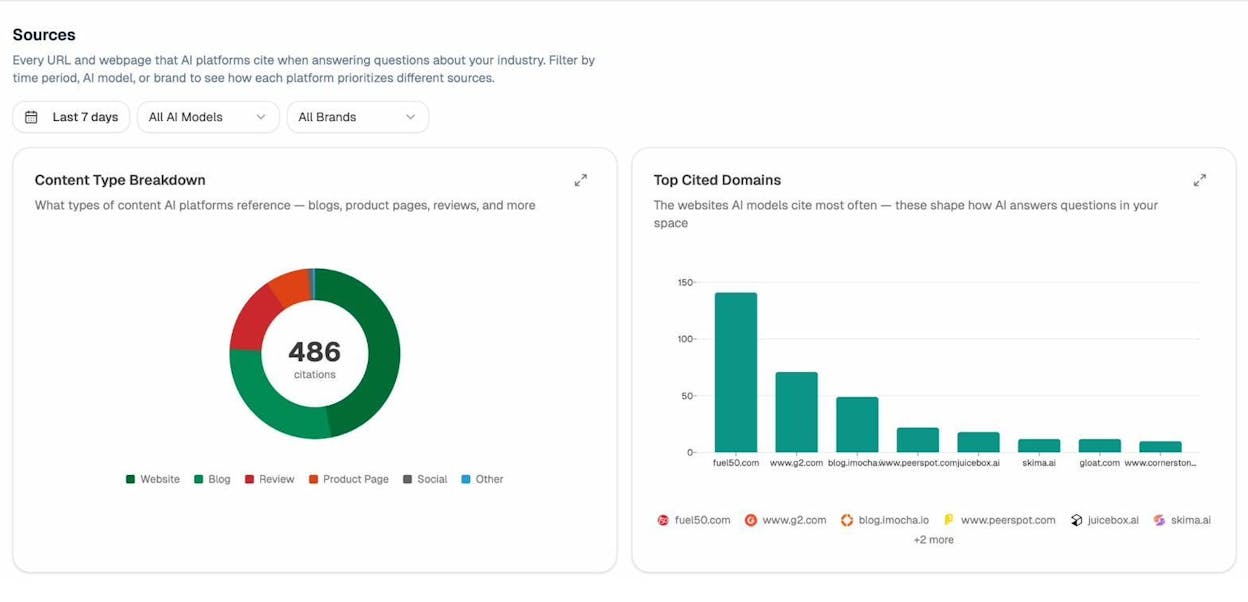
The Sources dashboard in Analyze AI shows which websites AI engines cite most in your space. If your competitors are getting cited by high-authority domains and you are not, it is a signal to invest in genuine link building rather than shortcuts.
2. Paid Links
Paid links are exactly what they sound like: you pay money (or exchange goods, services, or anything of value) in return for a link. Google’s spam policies are clear that buying or selling links for ranking purposes is a violation.
That said, Google acknowledges that buying and selling links is a normal part of web commerce. Sponsored posts, advertising, and paid partnerships are fine — as long as those links use a rel="nofollow" or rel="sponsored" attribute so they do not pass PageRank.
The problem starts when you pay for links specifically to boost rankings, with dofollow attributes, from sites that sell links to anyone who will pay.
![[Screenshot: An example outreach email from a “dear sir” link building service offering guest posts for a fee]](https://www.datocms-assets.com/164164/1776984214-blobid6.jpg?auto=format,compress&w=1248&fit=max)
Why you should avoid paid links
Sites that sell links typically sell them to everyone. That makes the site an obvious link farm, completely dilutes any link equity, and creates a clear footprint that Google can detect.
The links you get from these vendors are usually placed on low-quality pages alongside dozens of other paid links. The content is generic, the sites have no real audience, and the anchor text is often exact match keywords — which is a dead giveaway.
At best, these links do nothing. At worst, they trigger a penalty.
How to check if you have paid links
Paid links often stand out because of their anchor text. Most paid links use exact match keyword anchors, because the buyer is paying specifically to rank for that term.
![[Screenshot: A backlink analysis tool showing referring domains with exact-match keyword anchor text from low-quality sites]](https://www.datocms-assets.com/164164/1776984220-blobid7.png?auto=format,compress&w=1248&fit=max)
Not every exact match anchor is a paid link. But if you see a pattern of exact match anchors from sites with low domain authority, minimal traffic, and irrelevant content, those are strong indicators.
Use the Analyze AI Website Authority Checker to quickly assess the authority of suspicious referring domains. If a site selling you links has no authority itself, the link is worthless.
3. Hacked Links
Hacked links involve someone gaining unauthorized access to a website and inserting links into existing pages. Because the link is placed within existing content, it is often harder for the website owner to detect.
This is not just a spam policy violation. It is a violation of Google’s general spam policies under hacked content, and it is illegal in many countries. In the United States, the Computer Fraud and Abuse Act makes unauthorized access to computer systems a federal crime.
![[Screenshot: Google’s hacked content policy page highlighting that hacked content violates Google’s spam policies]](https://www.datocms-assets.com/164164/1776984231-blobid8.jpg?auto=format,compress&w=1248&fit=max)
Why you should avoid hacked links
Beyond the legal risk, hacked links can destroy your business. If the owner of the hacked website reports you to Google, your site can receive a manual action. They can also report you to your hosting provider and domain registrar, potentially getting your site taken down entirely.
There have been documented cases where website owners paid link building agencies for “guest posting” services, only to discover later that the links were placed by hacking into sites without permission. When the hacked site discovered the intrusion, both sites faced consequences.
How to check if you have hacked links
There is no reliable automated way to detect whether a link pointing to your site was placed legitimately. The best defense is being proactive:
-
Handle link building yourself or use a reputable agency with a verifiable track record
-
Review the referring pages of new backlinks periodically
-
If a link appears on a page where the context makes no sense for your industry, investigate further
![[Screenshot: A backlink analysis tool’s new backlinks report showing recently acquired links with their referring pages]](https://www.datocms-assets.com/164164/1776984241-blobid9.png?auto=format,compress&w=1248&fit=max)
4. Hidden Links
Hidden links are links that exist in a page’s code but are invisible to visitors. They are placed using techniques like:
-
White text on a white background
-
Text hidden behind images using CSS
-
Text positioned off-screen with CSS
-
Font size or opacity set to zero
-
Linking a single character (like a hyphen) that is nearly impossible to see
![[Screenshot: Browser inspect element view revealing hidden links in a website’s footer — white text on white background with dozens of keyword-rich anchor texts]](https://www.datocms-assets.com/164164/1776984249-blobid10.png?auto=format,compress&w=1248&fit=max)
These fall under Google’s spam policies for hidden text and links and are completely unethical.
Why you should avoid hidden links
Hidden links can be placed without either the website owner or the person receiving the link knowing about them. In some cases, a link building agency that previously had access to a client’s site has inserted hidden links to all of their other clients’ websites, essentially turning the client’s site into a PBN without their knowledge.
If Google detects hidden links on your site — whether you put them there or someone else did — your site can be penalized.
How to check if you have hidden links
Hidden links leave a specific footprint in backlink reports. Look for links with very specific keyword-rich anchor text, surrounded by other random specific anchors, coming from pages with no topical relevance to your site.
For example, if you run a real estate business and you see a link with the anchor “we buy houses” coming from a page about Japanese history, surrounded by anchors for “white label SEO” and “insurance quotes,” that is a strong indicator of hidden links.
![[Screenshot: A backlink report showing suspicious anchor text patterns — keyword-rich anchors from completely irrelevant referring pages]](https://www.datocms-assets.com/164164/1776984251-blobid11.png?auto=format,compress&w=1248&fit=max)
Click through to the referring page. If you cannot see any external links on the page itself but a backlink tool reports 50+ outgoing links, hidden links are almost certainly present.
![[Screenshot: An SEO toolbar or browser extension showing 50+ outgoing links on a page that appears to have no visible external links]](https://www.datocms-assets.com/164164/1776984262-blobid12.png?auto=format,compress&w=1248&fit=max)
5. Excessive Link Exchanges
Link exchanges (also called reciprocal linking) happen when two sites agree to link to each other. Some level of reciprocal linking is natural and happens on the web all the time. Two sites in the same niche will naturally reference each other’s content.
Google’s guidelines do not ban reciprocal links outright. What they flag is “excessive link exchanges” and “partner pages exclusively for the sake of cross-linking.”
![[Screenshot: Data showing the prevalence of reciprocal links across the web — a bar chart showing that most sites have some level of reciprocal linking]](https://www.datocms-assets.com/164164/1776984270-blobid13.png?auto=format,compress&w=1248&fit=max)
Why you should avoid excessive link exchanges
The key word is “excessive.” Having a handful of sites that link to you and that you link to is completely normal. But if you are actively contacting hundreds of sites and proposing “you link to me, I’ll link to you” arrangements, that is a pattern Google can detect.
The more sophisticated version of this is using intermediaries: Site A links to Site B, Site B links to Site C, and Site C links back to Site A. Google’s algorithms are designed to detect these patterns too.
How to check if you have excessive reciprocal links
Export your referring domains list and your outgoing links from a backlink analysis tool. Compare the two lists in a spreadsheet and look for domains that appear in both. A tool like Google Sheets with a duplicate-detection add-on can make this quick.
![[Screenshot: A referring domains export being compared with an outgoing links export in Google Sheets, with duplicates highlighted]](https://www.datocms-assets.com/164164/1776984273-blobid14.png?auto=format,compress&w=1248&fit=max)
Having five or ten reciprocal links is normal. Having 30 or 40 reciprocal links with a single domain is a red flag.
6. Automated Link Building
Automated link building uses software to build large numbers of links to your site with minimal effort. These tools typically create tiered link structures: Tier 1 links point directly to your site, Tier 2 links point to the Tier 1 sites, and Tier 3 links point to the Tier 2 sites.
![[Screenshot: Diagram showing tiered link building — Tier 1 links to your site, Tier 2 links to Tier 1 sites, Tier 3 links to Tier 2 sites]](https://www.datocms-assets.com/164164/1776984277-blobid15.png?auto=format,compress&w=1248&fit=max)
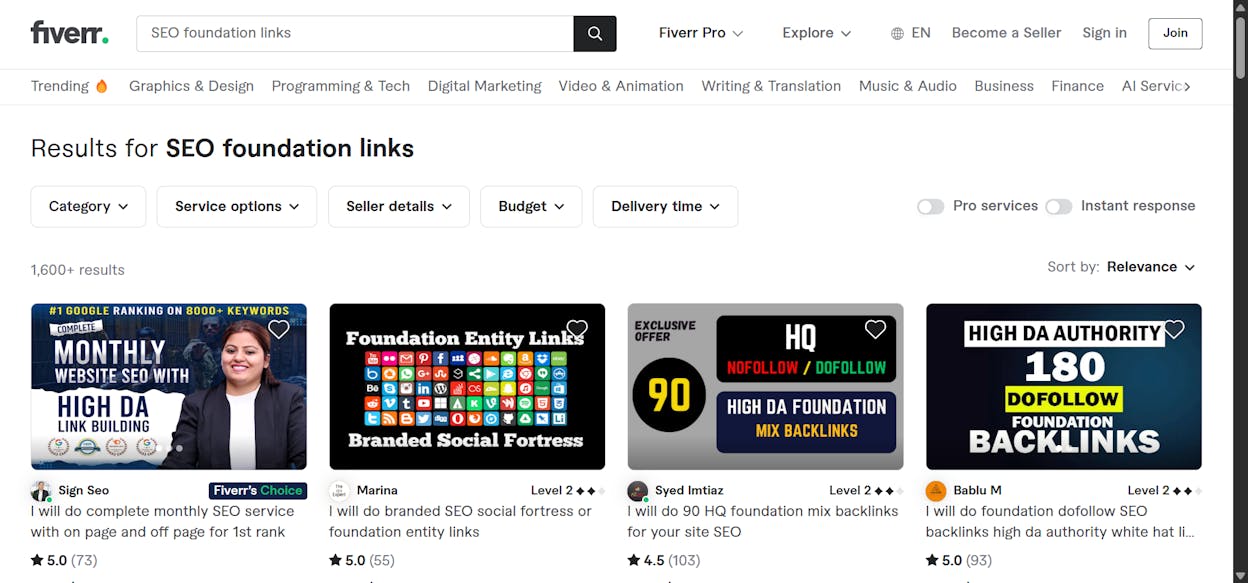
Most of these automated links come from low-quality web 2.0 blog platforms, article directories, and social bookmarking sites. They are often sold as cheap services on freelance platforms, packaged as “foundation links” or “link pyramids.”
Why you should avoid automated links
These links do nothing for your site. They are clearly defined under Google’s link spam policy, and if detected, they can land you with a penalty.
The services offering automated link building are especially risky because you have no control over where the links are placed or what they look like. You are handing your site’s reputation to a $5 Fiverr gig.
How to check if you have automated links
Automated links are usually easy to spot. Look for a large number of referring domains with nearly identical page titles, similar anchor text, and linking from the same types of platforms (Blogspot, WordPress.com, Tumblr, etc.).
![[Screenshot: A backlink report showing dozens of referring domains with identical or nearly identical titles and anchors, all from web 2.0 platforms]](https://www.datocms-assets.com/164164/1776984284-blobid17.png?auto=format,compress&w=1248&fit=max)
These links are not worth removing or disavowing. Google almost certainly ignores them already. The key is to avoid acquiring them in the first place.
7. Forum and Comment Spam
Forum spamming is when someone posts links in forum threads purely for SEO purposes. Comment spam is when someone (or a bot) leaves irrelevant comments on blog posts with a link attached.
There are two ways people spam forums: creating multiple profiles with links in the bio, or inserting links directly into forum posts — either in the post body or in a signature.
![[Screenshot: An example of how links should legitimately be used in forums — a helpful answer that references a relevant resource]](https://www.datocms-assets.com/164164/1776984303-blobid18.png?auto=format,compress&w=1248&fit=max)
The only legitimate use of links in forums is when you are genuinely participating in a discussion and the link adds value to the conversation.
Comment spam, on the other hand, is almost always automated. If you run a WordPress site, you have probably seen it firsthand.
![[Screenshot: A WordPress comment moderation queue showing multiple spam comments with links from different users]](https://www.datocms-assets.com/164164/1776984306-blobid19.png?auto=format,compress&w=1248&fit=max)
These comment spam blasts rely on the fact that many sites allow comments to be posted without moderation, or simply fail to catch spam comments. The result is the same spammy comment appearing across dozens or hundreds of sites — a clear footprint for Google to detect.
![[Screenshot: The same spam comment appearing on multiple different websites — identical text, identical links]](https://www.datocms-assets.com/164164/1776984314-blobid20.jpg?auto=format,compress&w=1248&fit=max)
Why you should avoid forum and comment spam
Both practices violate Google’s quality guidelines and can lead to a penalty when done at scale. They also damage your brand’s reputation. If potential customers encounter your links in spam comments, it does not exactly build trust.
How to check if you have any
Honestly, do not waste your time checking for these. If you have links from comment spam, Google has almost certainly discounted them already. Focus your energy on not acquiring them in the first place.
8. Low-Quality Directories
Creating profiles on reputable directory sites like Crunchbase, G2, or your industry’s main association directories is a legitimate way to build an online presence. These directories have editorial standards, real audiences, and genuine authority.
The problem is when you submit your site to hundreds of low-quality directories in bulk. This was a common SEO tactic 15 years ago, and some services still offer it today.
![[Screenshot: A service offering bulk directory submissions to hundreds of directories for a low price]](https://www.datocms-assets.com/164164/1776984318-blobid21.png?auto=format,compress&w=1248&fit=max)
Why you should avoid low-quality directories
Bulk directory submission has not worked in over a decade. The directories these services use have no authority, no audience, and no editorial standards. At best, the links are useless. At worst, they create a pattern that Google associates with spam.
Stick to well-known, industry-relevant directories and skip the rest.
How to check if you have any
You can spot directory links quickly in any backlink checker. The title of the referring page will usually include your business name, and the linking domain will be an obvious low-quality directory site.
Use the Analyze AI Broken Link Checker to check if any of these directory listings have resulted in broken links — many low-quality directories shut down over time, leaving behind dead links that clutter your backlink profile.
How Bad Links Affect Your Visibility in AI Search
Everything above applies to traditional Google SEO. But search is evolving. AI engines now represent a growing organic channel, and link quality influences how AI models perceive your brand.
Here is why this matters: AI search engines like ChatGPT, Perplexity, Claude, Gemini, and Copilot do not just regurgitate web results. They synthesize information from sources they trust. The signals that determine which sources get cited overlap significantly with the signals Google uses, including domain authority, content quality, topical relevance, and yes — backlink profile quality.
A site with a clean, authoritative backlink profile is more likely to be cited in AI answers than a site with a spammy one. This is not speculation. It follows directly from how these models select and prioritize sources.
How to check your AI search visibility
If you want to see whether AI engines are citing your content (and which competitors they are citing instead), Analyze AI gives you a direct view.
The Sources dashboard shows you every URL and webpage that AI platforms cite when answering questions about your industry. You can filter by time period, AI model, or brand to see how each platform prioritizes different sources.
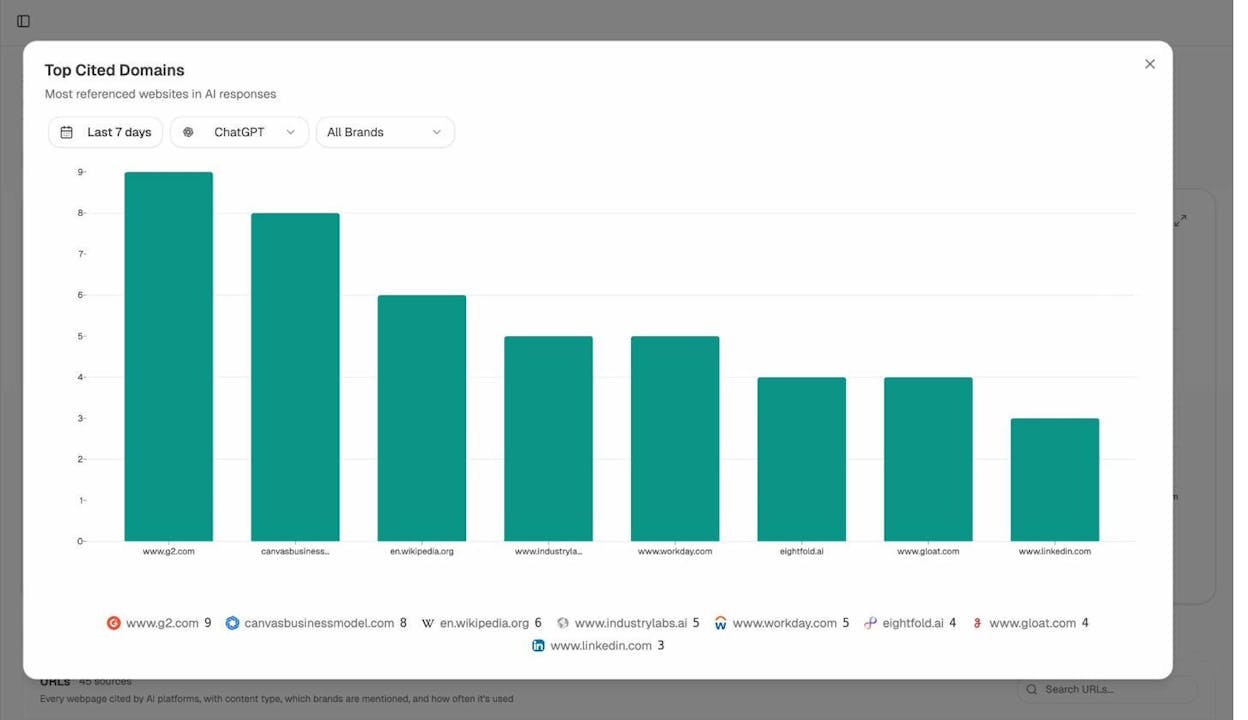
In the Sources view, you can see the specific URLs AI models cite, which model cited them, and whether your brand was mentioned in the response. This tells you exactly which sources are winning in AI search and where your content gaps are.
The Competitors view surfaces entities that frequently appear alongside your brand in AI answers. If your competitors are consistently cited and you are not, it is a clear signal that you need to strengthen your content authority — and that starts with a clean backlink profile.
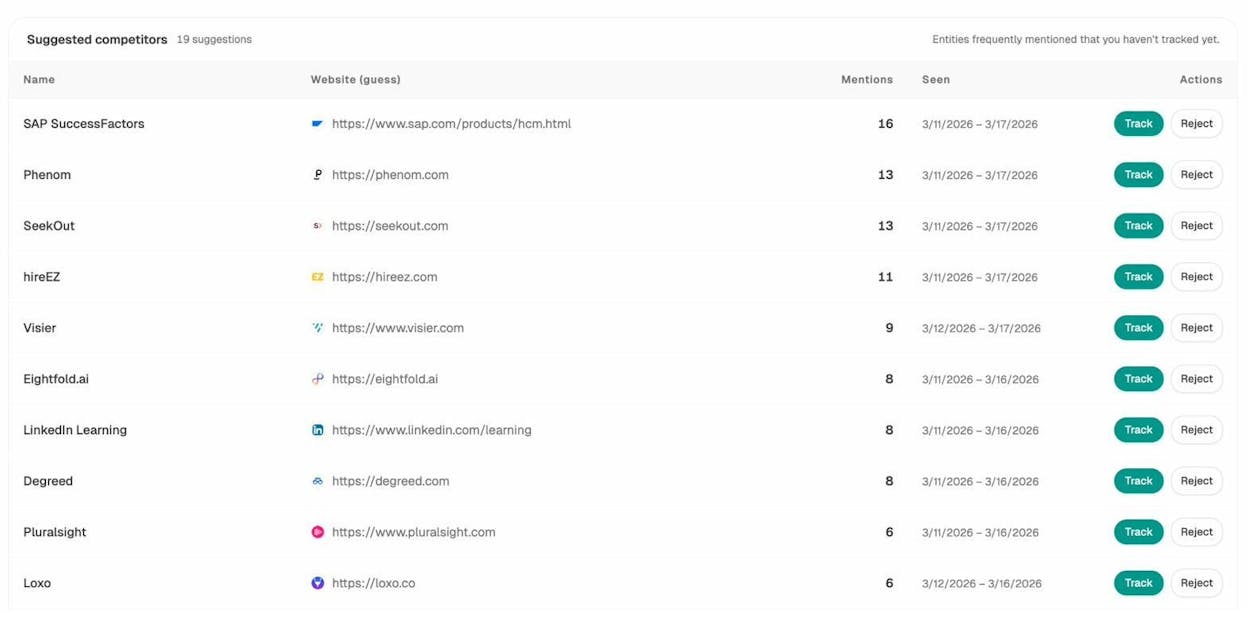
The Competitors dashboard in Analyze AI shows which brands AI engines mention most frequently in your space. You can track them to monitor visibility share, sentiment, and movement over time.
And if you want to track the specific prompts where your brand does or does not appear, the Prompts dashboard lets you monitor visibility, sentiment, and position across all major AI models.
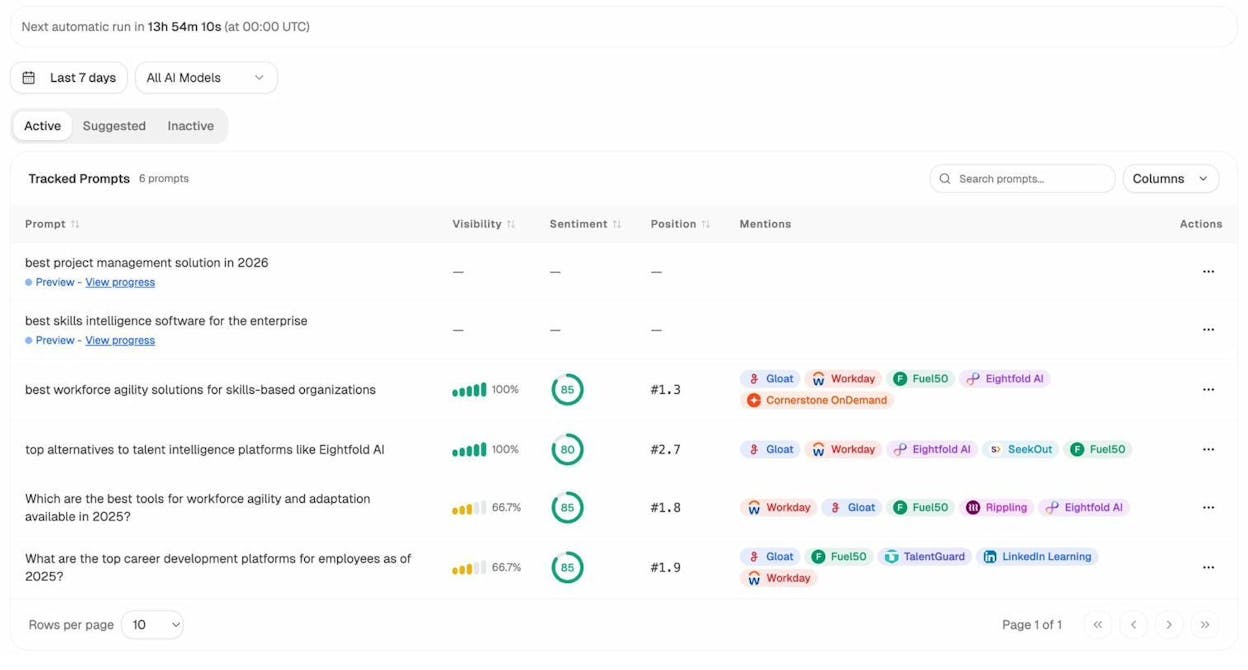
Track specific prompts to see your visibility percentage, sentiment score, and position ranking. You can also see which competitors appear alongside you in each response.
The connection between link quality and AI citations
The relationship works like this: AI models are trained on web data and use retrieval systems that prioritize authoritative sources. The same factors that make a source authoritative in Google’s eyes — quality backlinks, original content, topical expertise, strong E-E-A-T signals — also make it more likely to be selected by AI engines.
This means building high-quality backlinks is not just an SEO play. It is an AI search optimization play. And avoiding bad links is not just about dodging a Google penalty. It is about maintaining the kind of authority profile that gets you cited across every search channel, traditional and AI alike.
You can learn more about how AI engines decide which sources to cite in our guide on how to rank on ChatGPT and how to rank on Perplexity.
How to Build Good Links Instead
Knowing what to avoid is only half the equation. Here is a quick overview of link building approaches that actually work and are safe for both SEO and AI search:
Digital PR. Create newsworthy content, data studies, or original research that journalists and bloggers want to reference. These links come from high-authority publications and carry real weight with both Google and AI models.
Guest posting on legitimate sites. Contributing genuine, expert content to reputable publications in your niche is one of the oldest and most effective link building methods. The key is quality over quantity — one link from a respected industry site is worth more than 100 links from random blogs.
Creating linkable assets. Develop content so useful that people link to it naturally. This includes original data, comprehensive guides, free tools, and interactive resources. Our free SEO tools are an example of this approach — they provide genuine value to users and attract links organically.
Unlinked brand mentions. Find places where people mention your brand without linking to you, and reach out to request a link. This is low-hanging fruit because the site has already demonstrated interest in your brand.
Broken link building. Find broken links on other sites that point to content similar to yours, then reach out and suggest your content as a replacement. Use the Analyze AI Broken Link Checker to find broken link opportunities.
HARO and journalist queries. Respond to journalist queries on platforms like HARO, Connectively, and similar services. When your quotes are published, you earn links from news sites and industry publications.
Each of these methods builds the kind of authoritative backlink profile that strengthens your visibility in both traditional search and AI search.
How to Monitor Your Link Profile Over Time
Building good links and avoiding bad ones is not a one-time task. It is an ongoing practice.
For traditional SEO monitoring, regularly review your backlink profile using tools like the Analyze AI Website Authority Checker and SERP Checker. Look for sudden spikes in new referring domains (which could indicate a negative SEO attack) and patterns of low-quality links.
For AI search monitoring, use Analyze AI’s platform to track:
-
Which AI engines cite your content and how that changes over time
-
Which competitors are cited in prompts where you are absent
-
Which sources AI engines rely on most in your industry
-
Your AI referral traffic through the AI Traffic Analytics dashboard
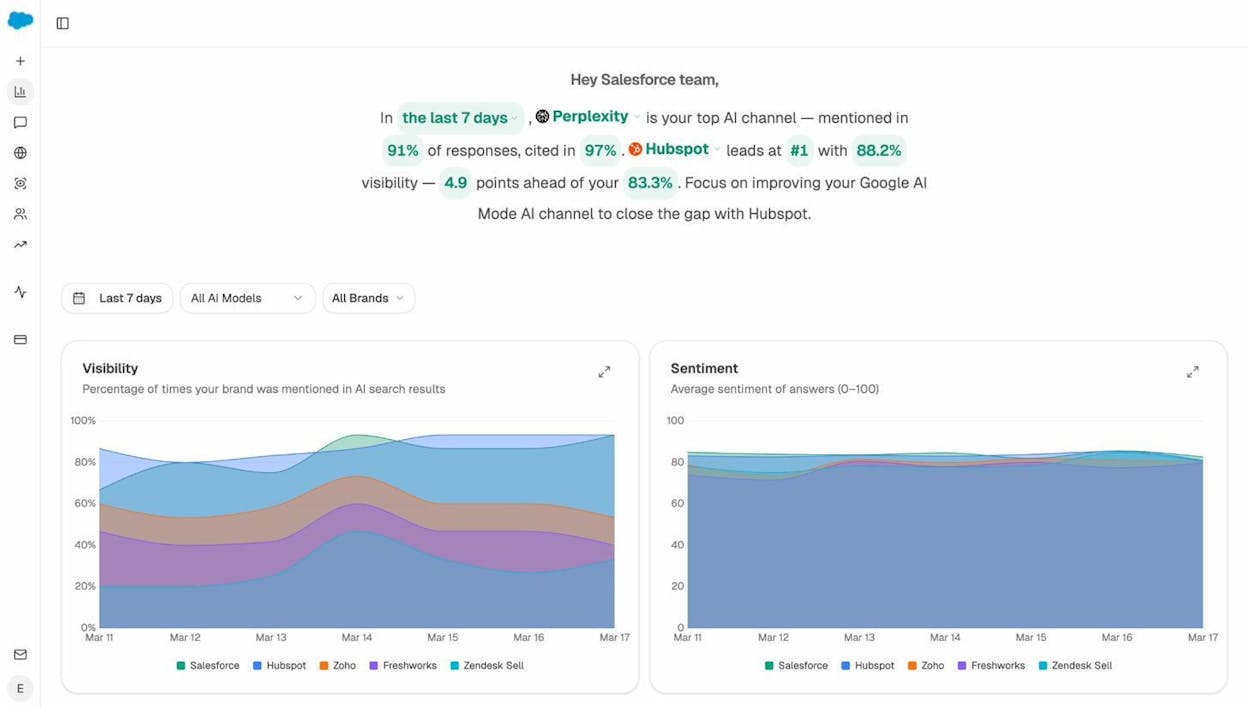
The Overview dashboard in Analyze AI gives you a high-level snapshot of your AI search visibility, top-performing AI channel, leading competitor, and actionable recommendations to close visibility gaps.
This combination of traditional backlink monitoring and AI search monitoring gives you a complete picture of your link profile’s impact across every search channel.
Final Thoughts
A healthy backlink profile with high-quality links remains one of the most important factors in SEO. That has not changed. What has changed is that link quality now compounds across a broader set of channels.
The core advice is simple: do not build bad links. If you have received a manual action, perform a link audit and use the disavow tool carefully. If you have not, focus your energy on building good links rather than hunting down bad ones.
And as AI search becomes a larger share of how people discover information, the sites that win will be the ones with genuinely authoritative backlink profiles — not the ones that took shortcuts.
SEO is not dying. It is evolving. And the brands that treat AI search as a complementary organic channel alongside traditional SEO will be the ones that compound their visibility over time.
If you want to see where your brand stands in AI search today, try Analyze AI to track your visibility, monitor competitors, and tie AI search presence to real traffic and conversions.
Further reading:

Ernest

Ibrahim


