



Summarize this blog post with:


In this article, you’ll learn what title tags are, why they still matter for rankings and clicks, and how to write them step by step. You’ll also learn how to audit your existing title tags, fix the most common mistakes, and make sure your pages show up well in both Google’s search results and AI-generated answers.
Table of Contents
What Is a Title Tag?
A title tag is a piece of HTML code that defines the title of a webpage. It lives in the <head> section of your page’s HTML and looks like this:
<title>How to Start a Podcast: A Step-by-Step Guide</title>
This one line of code shows up in three places:
Google search results. The title tag is typically what Google displays as the blue clickable headline in search results. (We say “typically” because Google sometimes rewrites it. More on that later.)
![[Screenshot: Google SERP showing a title tag as the blue clickable link for a search result]](https://www.datocms-assets.com/164164/1776977903-blobid1.png?auto=format,compress&w=1248&fit=max)
Browser tabs. When someone has multiple tabs open, the title tag is what helps them identify your page.
![[Screenshot: Browser tab showing a truncated title tag]](https://www.datocms-assets.com/164164/1776977923-blobid2.png?auto=format,compress&w=1248&fit=max)
Social media shares. When someone shares your URL on Twitter, LinkedIn, or Facebook, the title tag becomes the default headline unless you’ve set separate Open Graph tags.
![[Screenshot: Social media card showing the title tag as the headline]](https://www.datocms-assets.com/164164/1776977927-blobid3.png?auto=format,compress&w=1248&fit=max)
That’s the “what.” Now here’s the “why.”
Why Title Tags Matter for SEO
Title tags matter for two reasons: rankings and clicks.
They’re a confirmed ranking factor. Google’s John Mueller confirmed in 2021 that title tags are still a ranking signal. It’s a small one compared to factors like backlinks and content relevance, but it’s one of the easiest to control. Ignoring it means leaving free ranking power on the table.
They directly affect your click-through rate. Even if you rank in position one, a weak title tag means fewer people will click. Your title tag is your first impression in search results. It’s a one-line pitch that tells searchers whether your page has what they need. A clear, specific, benefit-driven title will always outperform a vague or generic one.
Here’s the math that makes this concrete: if your page gets 10,000 impressions per month and has a 3% CTR, that’s 300 clicks. Improve the title tag and bump CTR to 5%, and you get 500 clicks. Same ranking, 67% more traffic.
And there’s a compounding effect. Higher CTR sends positive engagement signals back to Google, which can reinforce (or even improve) your rankings over time. Google’s own documentation on search result titles makes it clear that well-written title tags help both users and search engines understand page content.
Why Title Tags Also Matter for AI Search
Here’s something most guides skip entirely: title tags influence how AI search engines understand and reference your content.
When tools like ChatGPT, Perplexity, Claude, Gemini, and Microsoft Copilot pull information from the web, they rely on a page’s structure to determine what it’s about and whether to cite it. The title tag is one of the first structural signals these models encounter. A clear, descriptive title tag makes it easier for AI models to categorize your content, match it to user prompts, and cite it in their responses.
This doesn’t mean you need to write different title tags for AI search. A title tag that’s clear and specific for Google will also be clear and specific for AI models. But it does mean that sloppy or missing title tags create a double penalty: you lose visibility in both traditional search and AI-generated answers.
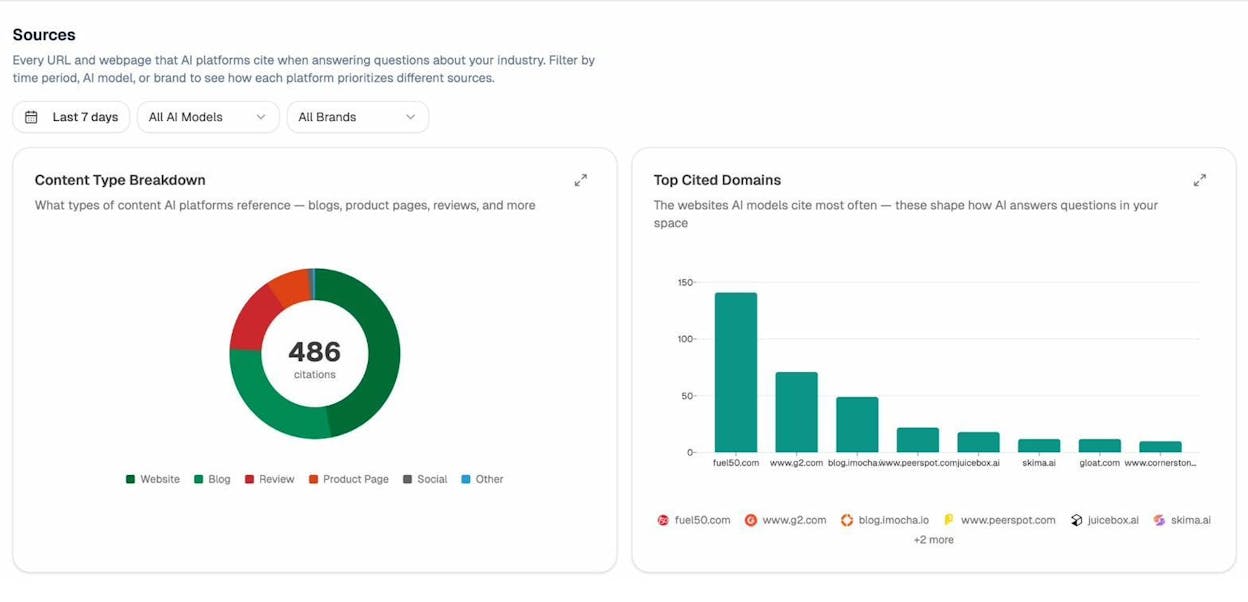
If you want to track whether AI engines are actually citing your pages (and which titles are performing), a tool like Analyze AI lets you see which of your URLs get referenced across ChatGPT, Perplexity, Claude, and others. You can check how the title and content are being interpreted in the Sources dashboard, which shows every URL that AI platforms cite when answering questions in your industry.
How to Write the Perfect Title Tag for SEO (Step by Step)
Before you start, you need to know your target keyword. If you haven’t done keyword research yet, do that first. Once you have your keyword, follow these steps.
Step 1: Make Sure You’re Targeting the Best Keyword
You’ll want your target keyword in your title tag. But before you write anything, double-check that you’re targeting the best version of that keyword.
Here’s what I mean. Let’s say you wrote a guide and want to target “best smart doorbell.” Before committing to that phrase, check whether a closely related keyword gets more search volume. In many cases, a synonym or variation of your keyword sends significantly more traffic.
To check this, Google your target keyword and look at the top-ranking page. Then plug that page into a keyword research tool to see which keyword actually sends the most traffic to that page.
![[Screenshot: Using a keyword research tool to check which keyword sends the most traffic to a top-ranking page. In this example, “best video doorbell” has significantly more searches than “best smart doorbell.”]](https://www.datocms-assets.com/164164/1776977940-blobid5.png?auto=format,compress&w=1248&fit=max)
In our example, “best video doorbell” has roughly 19,000 monthly searches compared to just 1,500 for “best smart doorbell.” They mean the same thing, but targeting the higher-volume variation gives you more upside.
You can also use Analyze AI’s free Keyword Generator to quickly surface related keyword variations and check their volumes before deciding.
Here’s our working title so far:
8 Best Video Doorbells
Step 2: Find Secondary Keywords to Include
Different people search for the same thing using different words. You can capture more of that traffic by naturally including popular secondary terms in your title tag.
To find these terms, look at the keywords sending the most traffic to the current top-ranking page for your target keyword. You can do this using any SERP checker or keyword tool.
![[Screenshot: A keyword tool showing that the top-ranking page for “best video doorbell” also ranks for many keywords containing the word “camera”]](https://www.datocms-assets.com/164164/1776977944-blobid6.png?auto=format,compress&w=1248&fit=max)
In our example, the top-ranking page gets a lot of traffic from keywords that mention “camera.” That’s something we can naturally incorporate:
8 Best Video Doorbell Cameras
The key word here is “naturally.” Only add secondary keywords if they pass three tests:
-
Does it make grammatical sense?
-
Does it read smoothly?
-
Does it preserve the original meaning?
If you answer yes to all three, add it. If forcing the word in makes your title awkward, leave it out. A readable title will always outperform a keyword-stuffed one.
Step 3: Make Your Title Clickable (The ABC Formula)
Keywords get you ranked. Clickability gets you traffic. The ABC formula is a simple framework for writing title tags that attract clicks:
|
Element |
What It Does |
Example |
|---|---|---|
|
Adjective |
Describes the content type or quality |
Best, Complete, Free, Ultimate, Simple |
|
Benefit |
Tells the reader what they’ll get |
“To Keep You Safe,” “That Actually Work” |
|
Confidence Booster |
Gives the reader a reason to trust your content |
“2026,” “Tested,” “Based on Data,” “From Experts” |
Don’t pick these at random. Look at what the current top-ranking results are doing. They give you a window into what searchers care about.
In our example, the working title already has an adjective (“Best”). For the benefit, we can look at what competing titles emphasize:
![[Screenshot: Google SERP for “best video doorbell cameras” showing multiple results with benefits like “to protect your home” and confidence boosters like “tested” and the current year]](https://www.datocms-assets.com/164164/1776977950-blobid7.png?auto=format,compress&w=1248&fit=max)
A benefit like “To Keep You Safe” makes the value clear. A confidence booster like “2026 (Tried & Tested)” tells the reader the list is current and credible.
Here’s our updated title:
8 Best Video Doorbell Cameras to Keep You Safe in 2026 (Tried & Tested)
Step 4: Check Your Title Tag Length
Google truncates title tags that are too long. When that happens, your carefully crafted benefit or confidence booster gets cut off, and all the reader sees is an ellipsis.
Most SEO guides say to keep title tags under 60 characters. That’s a reasonable rule of thumb, but it’s not exactly how Google works. Google actually measures title tag display width in pixels, not characters. The cutoff is roughly 600 pixels.
Why does this matter? Because characters have different widths. A title full of narrow letters like “i” and “l” can be longer than 60 characters and still display fine. A title with lots of wide letters like “W” and “M” might get cut at 55 characters.
For a quick check, paste your title into any free pixel-width checker online. If it’s under 580 pixels, you’re safe. If it’s over 600 pixels, shorten it.
![[Screenshot: A pixel width tool showing the example title tag at 580 pixels, under the 600-pixel threshold]](https://www.datocms-assets.com/164164/1776977954-blobid8.jpg?auto=format,compress&w=1248&fit=max)
If your title is too long, start by trimming the least important element. Usually, that’s the confidence booster. Try rewording it to be shorter, or drop it entirely if the title still makes sense without it.
|
Title Version |
Characters |
Status |
|---|---|---|
|
8 Best Video Doorbell Cameras to Keep You Safe in 2026 (Tried & Tested) |
72 |
Too long |
|
8 Best Video Doorbell Cameras to Keep You Safe (2026) |
53 |
Good |
|
Best Video Doorbell Cameras to Keep You Safe in 2026 |
52 |
Good |
Step 5: Check What AI Search Engines Show for Your Keyword
This is a step that most title tag guides skip, but it’s increasingly important as AI search grows.
Ask ChatGPT, Perplexity, or Google AI Mode a question related to your target keyword. See what pages they cite. Look at how those pages are referenced. You’ll notice that AI models tend to cite pages with clear, descriptive titles that match the searcher’s intent.
If the top-cited pages all have a specific pattern in their titles (like including the year, or a specific benefit), that’s a signal worth paying attention to.
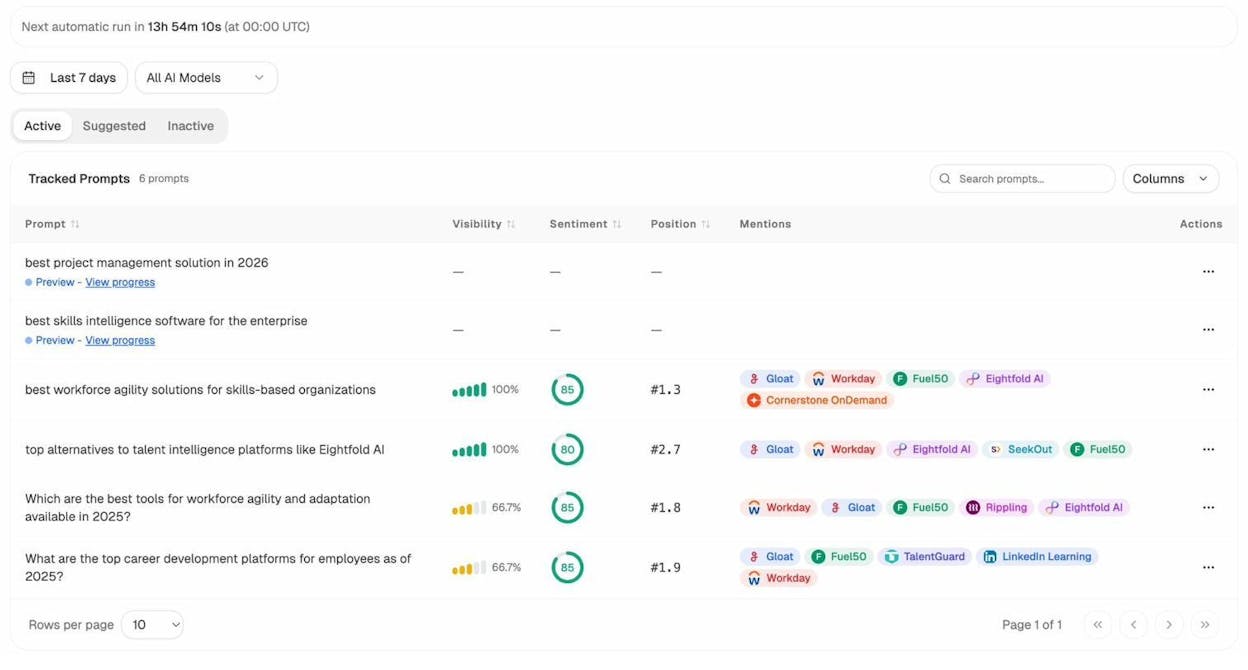
With Analyze AI, you can track which prompts mention your brand and which sources get cited. If you’re already tracking prompts related to your content topics, you can see whether your pages are showing up in AI responses or if competitors are getting cited instead.
The goal isn’t to write a separate title for AI search. The goal is to make sure your title is clear and specific enough that both Google and AI models understand exactly what your page is about.
Best Practices for Title Tag Optimization
The five steps above will get you a strong title tag. These best practices will help you refine and maintain your title tags over time.
Front-Load Your Primary Keyword
Put your target keyword as close to the beginning of your title tag as possible. There are two reasons for this.
First, Google gives slightly more weight to words that appear early in the title tag. This has been a consistent finding in SEO testing and correlation studies, though the effect is small.
Second, and more importantly, searchers scan results quickly. They read from left to right. If your keyword is at the beginning, they immediately see that your page is relevant. If it’s buried at the end, they might skip right past your result.
Compare these two titles:
-
❌ “The Complete 2026 Guide to Video Doorbells: Best Cameras Reviewed”
-
✅ “Best Video Doorbell Cameras: 8 Picks for 2026 (Tested)”
Both contain the same information, but the second one puts the most important keyword phrase first.
Use Consistent Title Tag Formatting
Formatting might seem minor, but consistency across your site makes your brand look professional and helps readers set expectations.
Pick a format and stick with it. The most common patterns are:
-
Primary Keyword: Secondary Detail | Brand Name (e.g., “Best Video Doorbells: 8 Top Picks for 2026 | TechReview”)
-
Primary Keyword - Secondary Detail (e.g., “Best Video Doorbells - 8 Top Picks for 2026”)
-
Primary Keyword (Modifier) (e.g., “Best Video Doorbells (2026 Guide)”)
Use title case or sentence case consistently across your site. Don’t mix them. And be deliberate about whether you include your brand name. For pages where you’re targeting competitive keywords, every character counts. For brand-building pages, appending your brand name at the end (separated by a pipe | or dash -) helps build recognition in the SERPs.
Don’t Confuse Your Title Tag with Your H1
Your title tag and your H1 heading are two different things. The title tag appears in search results and browser tabs. The H1 appears on the actual page.
They can (and often should) be different. Your title tag is optimized for search results: it needs to be concise, keyword-rich, and clickable within a limited character count. Your H1 can be longer, more descriptive, and more conversational because it doesn’t have the same pixel-width constraint.
For example:
-
Title tag: “Best Video Doorbell Cameras (2026)”
-
H1: “The 8 Best Video Doorbell Cameras to Keep Your Home Safe in 2026, Tested and Reviewed”
Most CMS platforms (WordPress, Webflow, Shopify) let you set these separately. If yours doesn’t, your title tag and H1 will be the same. In that case, optimize for the title tag since it has a bigger impact on both rankings and clicks.
Use Power Words Strategically
Power words are emotionally charged terms that trigger clicks. Used well, they make title tags more compelling without adding unnecessary length.
Here are the most effective categories:
|
Category |
Words |
Best Used For |
|---|---|---|
|
Urgency |
Now, Today, Quick, Fast, Instant |
Time-sensitive content, deals |
|
Trust |
Proven, Tested, Expert, Official, Verified |
Reviews, comparisons, guides |
|
Curiosity |
Surprising, Hidden, Unknown, Secret, Little-Known |
Lists, data studies, exposés |
|
Value |
Free, Bonus, Essential, Complete, Ultimate |
Resources, tools, comprehensive guides |
|
Simplicity |
Easy, Simple, Step-by-Step, Beginner, Quick |
How-to content, tutorials |
The key is to use one or two power words per title, not three or four. Overloading your title with emotional triggers makes it look like clickbait, which hurts trust and can trigger Google’s helpful content system to devalue your page.
Review and Refresh Title Tags After Publication
Your title tag isn’t a set-it-and-forget-it element. Revisit your titles regularly, especially for pages that:
-
Rank on page one but have a low CTR compared to their position
-
Have experienced a traffic drop
-
Target keywords where the search intent has shifted
Traffic drops on previously strong pages often signal that search intent has changed. If the SERP used to be dominated by how-to guides and now shows tool roundups, your title (and content) needs to reflect that shift.
You can find these opportunities in Google Search Console. Look at pages with high impressions but low CTR. Those are the pages where a better title tag can make the biggest difference.
Prioritize Pixel Width Over Character Count
We touched on this in Step 4, but it’s worth emphasizing: Google measures title display by pixel width, not character count. The cutoff is approximately 600 pixels.
This means a title with 58 characters could still get truncated if it’s full of wide characters (like “W” and “M”). And a title with 65 characters might display just fine if it uses narrower characters.
For practical purposes, staying under 580 pixels gives you a comfortable buffer. Use a free pixel-width checker tool to verify your titles before publishing.
Prioritize Your Opportunity Pages
Not all pages benefit equally from title tag optimization. Focus your effort where it’ll move the needle most.
The highest-value targets are pages that rank in positions 4-10. These pages already have enough authority and relevance to rank on page one, but they’re not yet in the top three positions where most clicks happen. A stronger title tag can boost CTR enough to push them up.
Use Google Search Console or a rank checking tool to find these pages. Sort by impressions (high to low), then filter for positions 4-10. These are your biggest opportunities.
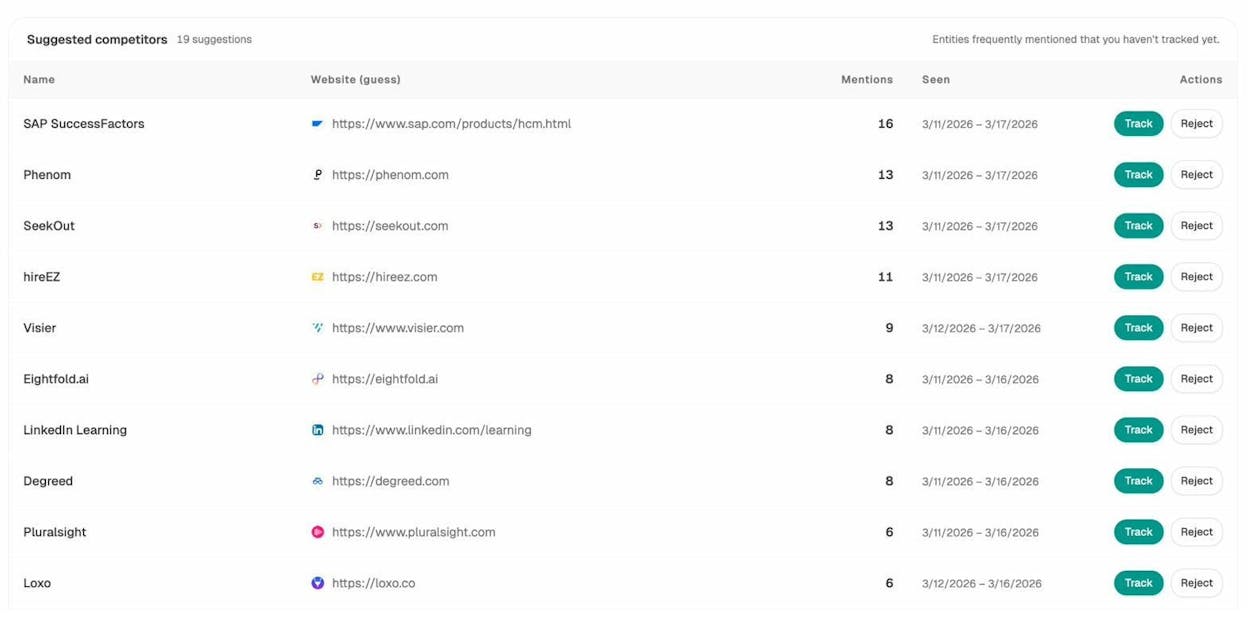
For AI search, Analyze AI can help you find a similar kind of opportunity. In the Competitors dashboard, you can see which prompts your competitors show up for but you don’t. Pages tied to those prompts are also worth reviewing and optimizing.
Common Title Tag Mistakes (and How to Fix Them)
Most websites have title tag issues on at least some of their pages. Here are the most common problems, roughly ordered by how frequently they occur, along with how to fix each one.
Mismatched Title Tags and SERP Titles
Google rewrites title tags more often than you might expect. In some studies, Google has been found to rewrite over 60% of title tags.
When Google rewrites your title, it pulls alternative text from your H1, anchor text from links pointing to your page, or other on-page content. Sometimes the rewrite is better than what you had. Often, it’s worse.
Google is more likely to rewrite your title tag when:
-
It’s too long and Google truncates it
-
It doesn’t match the page’s actual content
-
It’s keyword-stuffed or reads unnaturally
-
It doesn’t align with the dominant search intent for the query
-
It uses a different topic focus than what the page is actually about
To reduce the chances of a rewrite, make sure your title tag accurately describes your page content, includes relevant keywords naturally, and is under 600 pixels wide. Match the language and framing of your title to the content on the page.
To check which of your pages have mismatched titles, use an SEO audit tool to crawl your site and compare your title tags against what Google actually displays.
![[Screenshot: An SEO audit tool showing pages where the title tag and the Google SERP title don’t match, with the percentage of pages affected]](https://www.datocms-assets.com/164164/1776977968-blobid11.png?auto=format,compress&w=1248&fit=max)
Title Tags That Are Too Long
Title tags longer than 600 pixels get truncated in search results. Google replaces the cut-off portion with an ellipsis (…), which means your benefit statement or confidence booster might never be seen.
This is one of the most common issues. Studies of large site crawls suggest it affects more than 60% of websites.
How to fix it: Audit your site for title tags over 60 characters (a rough proxy for pixel width). Rewrite any that are too long. Prioritize getting your keyword and primary benefit into the first 50 characters so the most important parts are always visible.
Title Tags That Are Too Short
A title tag under 30 characters is usually too short to be descriptive. Short titles miss the opportunity to include secondary keywords, benefits, or confidence boosters. They can also increase the chance that Google rewrites your title with something from elsewhere on the page.
How to fix it: If your title tag is just your brand name, a product name, or a single phrase, expand it. Add a benefit, a keyword variation, or a descriptor that helps searchers understand what the page offers.
Missing or Empty Title Tags
A page without a title tag forces Google to generate a SERP title on its own. Google will pull from headings, anchor text, or page content, and the result is almost never as good as a title you write yourself.
How to fix it: Run a site crawl to identify pages with missing or empty title tags. Prioritize pages that receive organic traffic or that you want to rank. Write unique, descriptive titles for each.
Duplicate Title Tags
When multiple pages on your site have the same title tag, Google can’t tell them apart in search results. This confuses both users and search engines, and it makes it harder for any individual page to rank.
Duplicate titles are common on sites with auto-generated pages (like filter or sort variations on ecommerce sites) or on blogs where similar content was published without checking for overlap.
How to fix it: Run a crawl to find duplicate title tags. For important pages, write unique titles. For pages that shouldn’t be indexed (like filter variations), consider using canonical tags or noindex directives to consolidate signals.
Multiple Title Tags on One Page
Some pages end up with more than one <title> element in their HTML, usually due to a CMS plugin conflict or a theme issue. When this happens, Google combines them or picks one, and the result is rarely clean.
How to fix it: View your page’s source code (right-click > “View Page Source”) and search for <title>. If you find more than one, track down which plugin or template is adding the extra tag and remove it.
Clickbait Titles
A title that promises something the content doesn’t deliver is clickbait. Searchers click, realize the page doesn’t match what was promised, and bounce. High bounce rates and low dwell time signal to Google that your content isn’t satisfying the query.
Google’s helpful content system generates a sitewide signal. This means clickbait titles on even a few pages can drag down the rankings of your entire site.
How to fix it: Make sure every title tag accurately reflects the content on the page. If your title says “10 Proven Ways,” the content should have 10 specific, proven methods. If it says “Free,” the resource should actually be free.
Keyword-Stuffed Titles
Keyword stuffing is the practice of cramming multiple keyword variations into a title tag to try to rank for all of them at once. It looks like this:
“Best Video Doorbell | Top Video Doorbells | Buy Video Doorbell Camera”
This doesn’t work. Google’s spam policies explicitly list keyword stuffing as a violation. At best, Google will rewrite your title. At worst, it can trigger a manual action that tanks your rankings site-wide.
How to fix it: Use one primary keyword and, if natural, one secondary keyword. That’s it. Focus the rest of your title on being clear and compelling for human readers.
Title Tag Templates for Different Page Types
Not every page needs a custom, hand-crafted title tag. For sites with hundreds or thousands of pages, templates are the practical solution.
Blog Posts and Articles
Blog posts and articles should always have custom title tags. These are your highest-value SEO pages, and a unique, optimized title can make the difference between ranking in position three and position eight.
Use the five-step process outlined earlier in this guide for each post.
Product Pages
For product pages, use a template like:
Product Name | Category | Brand
Example: “AirPods Pro 2 | Wireless Earbuds | Apple”
This keeps every product page unique (because product names differ) while including category keywords and brand recognition.
Category Pages
For category or collection pages:
Category: Key Modifier | Brand
Example: “Wireless Earbuds: Best Sellers Under $100 | TechStore”
Location Pages
For multi-location businesses:
Service in Location | Brand
Example: “Car Rental in Denver, CO | Enterprise”
Landing Pages
For marketing or campaign landing pages, prioritize the primary value proposition over keyword optimization:
Primary Benefit + Action | Brand
Example: “Track Your AI Search Visibility in Minutes | Analyze AI”
Most CMS platforms (WordPress, Shopify, Webflow) let you set title tag templates using variables like {product_name}, {category}, and {brand}. Set up templates for your scalable page types, then manually optimize the title tags for your highest-traffic pages.
Give High-Performing Pages Custom Treatment
If a page with a templated title starts ranking well and driving significant traffic, it’s worth replacing the template with a custom title. A tailored title can improve CTR and push a page from a good position to a great one.
To find these pages, check Google Search Console for your highest-impression pages. Any page getting thousands of impressions with a generic templated title is a candidate for a custom rewrite.
How to Audit Your Title Tags at Scale
If your site has more than a few dozen pages, you need a systematic way to find and fix title tag issues. Here’s how.
Step 1: Crawl Your Site
Use a site crawler (Screaming Frog, Sitebulb, or a similar tool) to extract all your title tags. Export the data to a spreadsheet so you can filter and sort.
![[Screenshot: A site crawler showing exported title tags with columns for URL, title tag, character count, and pixel width]](https://www.datocms-assets.com/164164/1776977969-blobid12.png?auto=format,compress&w=1248&fit=max)
Step 2: Flag Issues
Filter your spreadsheet for:
-
Too long: Over 60 characters or 600 pixels
-
Too short: Under 30 characters
-
Duplicates: Same title on multiple URLs
-
Missing: Empty or null title tags
-
Keyword missing: Target keyword not included in the title
Step 3: Prioritize by Impact
Not all pages are equal. Sort the flagged pages by organic traffic (or impressions) from Google Search Console. Fix the highest-traffic pages first.
Step 4: Rewrite and Publish
Rewrite the flagged titles using the five-step process from this guide. Update them in your CMS and track performance over the following 2-4 weeks.
Step 5: Monitor for Google Rewrites
After updating your titles, check whether Google uses your new version or rewrites it. You can do this manually by searching for your page and comparing the SERP title to your title tag, or by running another crawl after Google has re-indexed the page.
If Google rewrites your updated title, it usually means there’s still a mismatch between the title and the page content, or the title doesn’t align with the dominant search intent. Revisit the page, adjust the title, and try again.
Auditing Your Title Tags for AI Search Visibility
Beyond the standard SEO audit, it’s worth checking whether the pages you care about are showing up in AI search results. If you’ve optimized a title tag for a key page and that page still isn’t getting cited by AI models, the issue might not be the title alone. It could be the content structure, the sources that AI models prefer, or the way your page is structured for citation.
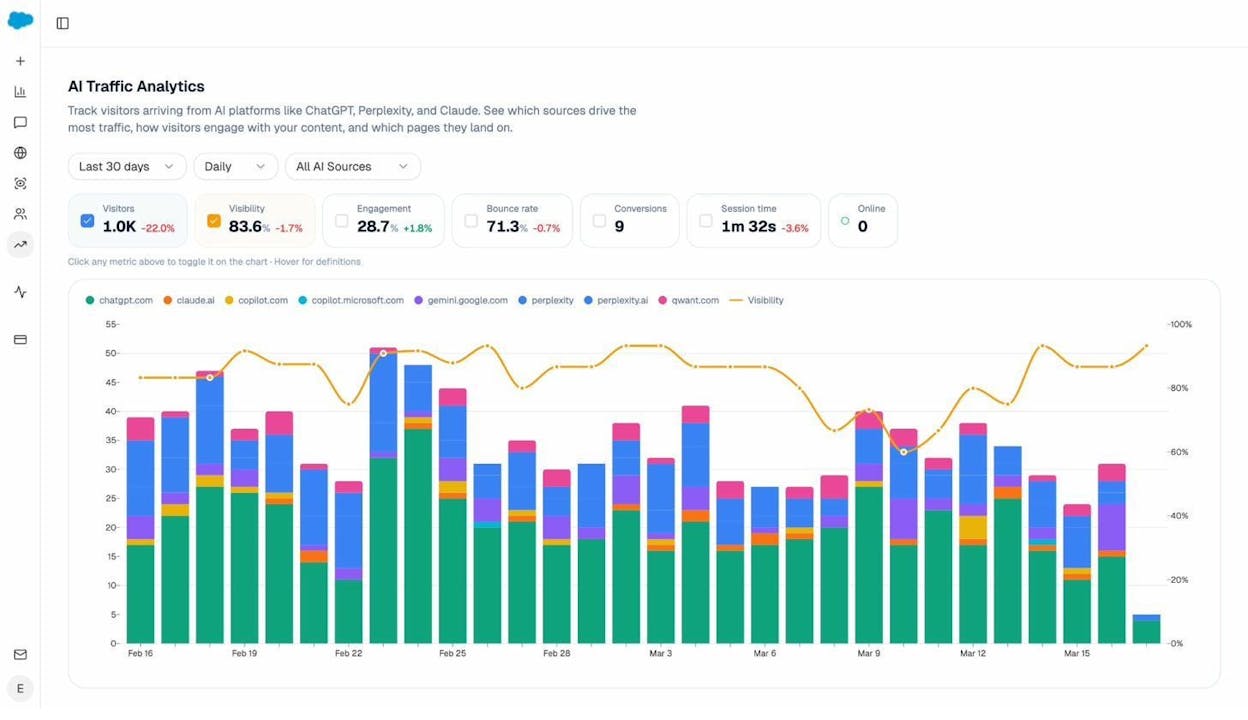
In Analyze AI, the AI Traffic Analytics dashboard shows exactly which AI engines are sending traffic to your site, which pages they’re sending it to, and how that traffic is trending over time. This helps you connect the dots between on-page optimizations (like title tag improvements) and actual AI-driven visits.
You can also use the Prompts dashboard to see which prompts are triggering citations to your pages and which prompts your competitors are winning. If a competitor’s page with a better title and structure is getting cited for a prompt you should own, that’s a clear optimization signal.
Why You Should Still Optimize Title Tags (Even if Google Rewrites Them)
It’s tempting to think that if Google is going to rewrite your title tag anyway, there’s no point in optimizing it. That logic doesn’t hold up for three reasons.
Google prefers your version when it’s good enough. Google rewrites titles when it thinks it can do better. If your title is clear, accurate, and matches the search intent, Google is more likely to use it as-is. The better your title, the less Google intervenes.
Your title tag affects more than just Google. Your title tag appears in browser tabs, social media shares, bookmarks, and browser history. It’s also the version of your title that gets embedded in your page’s HTML. Even if Google shows a different version in search results, your title tag is what other platforms and tools use.
AI models use your title tag for context. As we covered earlier, AI search engines reference your page’s HTML structure when deciding whether to cite your content. A clear title tag that matches your page content gives AI models better context for understanding what your page is about. This is especially relevant as AI search continues to grow as a traffic source.
You can influence brand perception in AI responses. When AI models cite your page, the title often appears alongside the citation. A title that includes your brand name helps build brand recognition across AI responses. Over time, as AI search becomes a larger share of organic traffic, this brand visibility compounds.
How to Set Title Tags in Popular CMS Platforms
If you’re not sure how to actually change your title tags, here’s a quick reference for the most common platforms.
WordPress
If you’re using an SEO plugin (Yoast, Rank Math, or All in One SEO), you’ll see a field labeled “SEO Title” or “Title Tag” when editing any post or page. Enter your optimized title there.
![[Screenshot: WordPress editor showing the Yoast SEO plugin’s title tag field below the content editor]](https://www.datocms-assets.com/164164/1776977984-blobid14.png?auto=format,compress&w=1248&fit=max)
If you’re not using a plugin, WordPress defaults to using your post title as the title tag. In that case, your H1 and title tag will be the same. Installing an SEO plugin is the easiest way to separate them.
Shopify
In Shopify, go to any product, collection, or page editor. Scroll to the bottom and click “Edit website SEO.” You’ll see a “Page title” field where you can enter your custom title tag.
![[Screenshot: Shopify product editor showing the “Edit website SEO” section with the page title field]](https://www.datocms-assets.com/164164/1776977989-blobid15.png?auto=format,compress&w=1248&fit=max)
Webflow
In Webflow, select any page in the Pages panel, then open the SEO settings tab. Enter your title in the “Title Tag” field.
![[Screenshot: Webflow page settings showing the Title Tag field in the SEO tab]](https://www.datocms-assets.com/164164/1776977997-blobid16.png?auto=format,compress&w=1248&fit=max)
Custom HTML
If you’re working with raw HTML, your title tag goes in the <head> section:
<!DOCTYPE html>
<html>
<head>
<title>Your Optimized Title Tag Goes Here</title>
</head>
<body>
<!-- Page content -->
</body>
</html>
Make sure there’s only one <title> element per page. Multiple title elements cause rendering issues and give Google conflicting signals.
Title Tags and Structured Data: How They Work Together
Title tags don’t exist in isolation. They work alongside other on-page elements to help search engines (and AI models) understand your content. One of the most important of these elements is structured data (also called schema markup).
Structured data is code you add to your page to explicitly tell search engines what your content is about. For articles, you can use the Article or BlogPosting schema type. For products, use Product. For FAQs, use FAQPage.
Here’s how title tags and structured data reinforce each other:
-
Your title tag tells Google and AI models what the page is about at a glance.
-
Your structured data provides additional context: the author, the date published, the article type, the product price, or the FAQ questions.
-
Together, they create a richer signal that helps both traditional search and AI models understand, categorize, and cite your content.
For example, a page with the title tag “Best Video Doorbell Cameras (2026)” and Article schema that includes the headline, datePublished, and author fields gives search engines more confidence in what the page covers and how current it is.
If you’re focused on getting your content cited by AI search engines, combining clear title tags with proper structured data gives you an advantage. AI models use these structural signals to decide which pages are authoritative and worth referencing. This is part of a broader content optimization strategy that goes beyond just writing good content.
Title Tags and Meta Descriptions: How They Work Together
Your title tag and meta description are a team. The title tag gets the click, and the meta description supports it.
Think of it this way: the title tag is the headline, and the meta description is the subheadline. Together, they form the entirety of your listing in search results. If your title tag promises something specific, your meta description should deliver more detail on that promise.
For example:
-
Title tag: “8 Best Video Doorbell Cameras to Keep You Safe (2026)”
-
Meta description: “We tested 27 video doorbells over 6 months. These 8 stood out for video quality, night vision, battery life, and smart home integration.”
The title tag hooks the reader. The meta description closes the click.
A common mistake is to optimize the title tag and leave the meta description as an auto-generated snippet from the page content. Auto-generated snippets are rarely as compelling as a deliberately written one.
Final Thoughts
Title tags are one of the smallest changes you can make to a page, but they have an outsized effect on both rankings and traffic. A well-written title tag improves your visibility in Google, increases your click-through rate, and helps AI search engines understand and cite your content.
Here’s a quick checklist to use every time you write or review a title tag:
-
☐ Target keyword is included and front-loaded
-
☐ Secondary keyword is included (if natural)
-
☐ Title includes a benefit or confidence booster
-
☐ Length is under 60 characters / 580 pixels
-
☐ Title accurately reflects the page content
-
☐ Title is unique (no duplicates on your site)
-
☐ Format is consistent with the rest of your site
If you want to take your SEO content strategy further, check out our complete guide. And if you want to see how your pages are performing in both traditional search and AI-generated answers, Analyze AI can show you exactly which pages AI engines are citing, which competitors are outranking you, and where to focus your optimization efforts.

Ernest

Ibrahim


