Analyze AI - AI Search Analytics Platform

28 AWESOME Content Marketing Tools

Written by

Ernest Bogore

Ernest Bogore

CEO

Reviewed by

Ibrahim Litinine

Ibrahim Litinine

Content Marketing Expert

28 AWESOME Content Marketing Tools

The other day, Kevin, a CMO and nice friend of mine who has been leading marketing teams for more than a decade, told me, “Most marketers don’t have a tool problem, they have too many tools problems.” 

That line hit hard because it explained why smart teams feel so overloaded and still feel behind.

Every week a new “game-changing” content platform launches. Your stack gets bigger, but your calendar still slips, briefs still stall, and attribution still feels like guesswork. You keep paying for tools that sounded great in demos but never quite show up in your actual numbers.

The pain shows up in quiet, annoying ways:

  • You spend more time copy-pasting between tools than building content that ships.

  • Reports look impressive, yet no one can say which tools actually moved pipeline.

  • Your team argues over “favorites” instead of working from a shared, proven stack.

We wanted to cut through that noise. So we reviewed and analyzed dozens of content tools, then kept only the ones that do something very specific for outcomes: build or ship content faster, improve rankings, sharpen conversion rates, or give you better visibility into what works.

Table of Contents

TL;DR

ToolBest ForCore StrengthMain WeaknessWhy It Matters for Content Marketing
AnalyzeAI search visibility & attributionConnects AI answers to real traffic & revenueRequires GA4 + enough AI trafficShows which prompts; engines; and citations actually drive business outcomes
HubSpot CMS / Marketing HubAll-in-one content + CRM operationsUnified CRM; automation; analyticsCost + complexity at scaleAligns content; pipeline; and attribution in one system
SemrushSEO & content researchDeep keyword; SERP; and competitor intelligencePricing grows fastHelps teams plan content using real search and market data
AhrefsBacklink & competitive SEOIndustry-leading backlink + keyword dataHigh pricing for small teamsGuides content decisions with clean; accurate SEO intel
BuzzSumoContent ideas & trend discoveryFinds high-performing topics & creatorsExpensive for small teamsSupports data-driven ideation and competitive benchmarking
FraseFast outlines & SEO briefsAI briefs + SERP analysis + scoringOutput can feel genericSpeeds up long-form SEO content creation
SurferSEOOn-page optimization at scaleReal-time SERP-guided editorCan push keyword-stuffingEnsures content is aligned with ranking patterns
ClearscopeClean; semantic optimizationSimple grading + term coveragePremium costImproves content quality without bloated interfaces
MarketMuseLarge content libraries & strategyTopic modeling + content inventorySteep learning curveHelps plan authority-building content at scale
JasperBrand-consistent AI writingBrand voice + workflowsStill needs human editingHelps teams scale multi-channel content with consistency
GrammarlyPolished; error-free writingReal-time corrections + toneMay misinterpret nuanceImproves clarity and professionalism across channels
AnywordConversion-focused copyPredictive performance scoringBest features behind high tiersOptimizes ads & copy variations before spending budget
CanvaFast visual creationTemplates + AI design toolsRisk of generic visualsSpeeds up graphic production with consistent branding
WordPress.orgFully customizable content hubsOpen-source flexibilityRequires maintenanceSupports scalable; SEO-friendly publishing workflows
NotionContent operations + AI workflowsCustom databases + docs + automationEasy to overbuild systemsKeeps calendars; briefs; SOPs; and docs unified
AirtableVisual content operationsMulti-view database + automationsComplex bases get heavyHelps teams manage assets; calendars; and approvals
TrelloSimple content workflowsVisual Kanban + AI InboxNot built for complex PMHelps teams track content stages easily
BufferLightweight social schedulingClean UI + AI captioningLimited analyticsMakes publishing consistent and easy for small teams
HootsuiteEnterprise social managementStrong analytics + collaborationExpensive + steep learningEnables structured; large-scale social operations
MailchimpSMB email marketingTemplates + automationsPrice scales with list sizeHelps launch and automate campaigns quickly
Kit (ConvertKit)Creator email + monetizationSimple automations + built-in commerceNot for enterprise workflowsHelps creators nurture and monetize audiences
UnbounceHigh-converting landing pagesAI routing + A/B tests + CRO toolsPricing + template rigidityImproves conversion rates for paid campaigns
GA4Event-based analytics & funnelsCross-platform tracking + ML insightsLearning curveShows how users engage with content across journeys
HotjarBehavior insights (UX + content)Heatmaps + recordings + surveysPerformance impact if misconfiguredReveals how users interact with content visually
OptimizelyEnterprise experimentationA/B/MVT + feature flagsHigh cost + technical setupValidates which content or UX changes increase conversions
ZapierNo-code automation across tools8;000+ integrations + AI agentsCosts rise with usageAutomates repetitive publishing + reporting tasks
Make (Integromat)Complex visual workflowsBranching logic + real-time flowsLearning curveOrchestrates advanced content pipelines visually
Canva Grow / Analytics (optional grouping)Creative performance insightsBranding + collaboration + analyticsRequires paid tiersHelps maintain visual consistency + track creative output

Analyze AI: The best content marketing tool for tracking AI search visibility and real business impact

Plenty of people now say that SEO is dead and that GEO is the only channel content marketers should care about, especially as AI search becomes more visible in dashboards and headlines.

At Analyze AI, we see the landscape differently: SEO is not dead, it has evolved, and the teams that keep winning are the ones that treat content marketing as the core engine behind both SEO and GEO. 

Search visibility in this new environment still comes from depth, clarity, originality, and usefulness in your content, whether the “reader” is a human, a crawler, or an AI model assembling an answer.

Analyze AI supports this evolution by showing how your content performs across AI search—not just whether it was mentioned, but whether it actually drives qualified engagement. 

The platform connects AI visibility to real business outcomes by tracking which answer engines send sessions to your site (Discover), which pages those visitors land on, what actions they take, and how much revenue they influence (Monitor). You see prompt-level performance across ChatGPT, Perplexity, Claude, Copilot, and Gemini, along with conversion rates, assisted revenue, and ROI by referrer.

Analyze AI then helps you improve where it matters most, highlighting which prompts you should reinforce and which narratives shape your category (Improve), while continuously monitoring how your brand’s positioning and sentiment evolve across the AI landscape (Govern). 

Instead of chasing hype cycles, your content team strengthens what has always compounded: high-quality content, technical clarity, and a strategy tied to meaningful results. With Analyze AI, SEO and GEO work together—not in competition, but as extensions of the same craft.

Key Analyze AI features

  • See actual AI referral traffic by engine and track trends that reveal where visibility grows and where it stalls.

  • See the pages that receive that traffic with the originating model, the landing path, and the conversions those visits drive.

  • Track prompt-level visibility and sentiment across major LLMs to understand how models talk about your brand and competitors.

  • Audit model citations and sources to identify which domains shape answers and where your own coverage must improve.

  • Surface opportunities and competitive gaps that prioritize actions by potential impact, not vanity metrics.

Here are in more details how Analyze AI works:

See actual traffic from AI engines, not just mentions

content marketing software

Analyze AI attributes every session from answer engines to its specific source—Perplexity, Claude, ChatGPT, Copilot, or Gemini. You see session volume by engine, trends over six months, and what percentage of your total traffic comes from AI referrers. When ChatGPT sends 248 sessions but Perplexity sends 142, you know exactly where to focus optimization work.

best content tools

Know which pages convert AI traffic and optimize where revenue moves

content planning tools

Most tools stop at "your brand was mentioned." Analyze AI shows you the complete journey from AI answer to landing page to conversion, so you optimize pages that drive revenue instead of chasing visibility that goes nowhere.

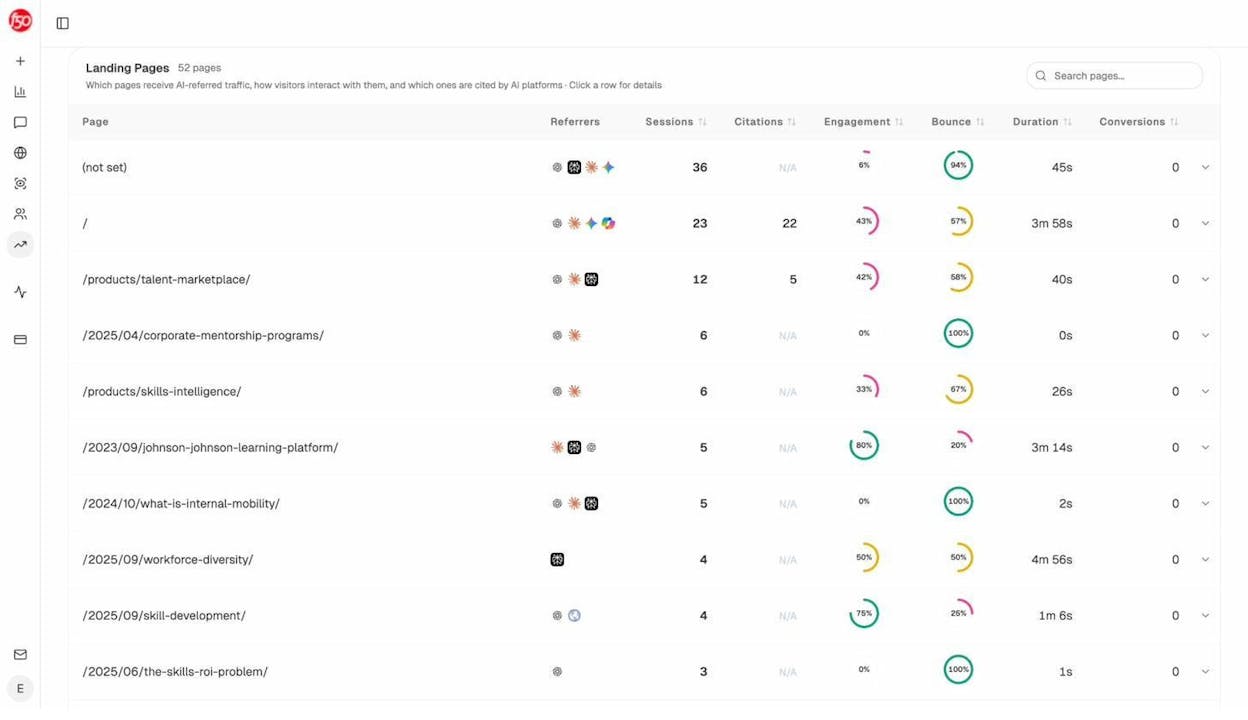
The platform shows which landing pages receive AI referrals, which engine sent each session, and what conversion events those visits trigger. 

For instance, when your product comparison page gets 50 sessions from Perplexity and converts 12% to trials, while an old blog post gets 40 sessions from ChatGPT with zero conversions, you know exactly what to strengthen and what to deprioritize.

Track the exact prompts buyers use and see where you're winning or losing

marketing automation platforms

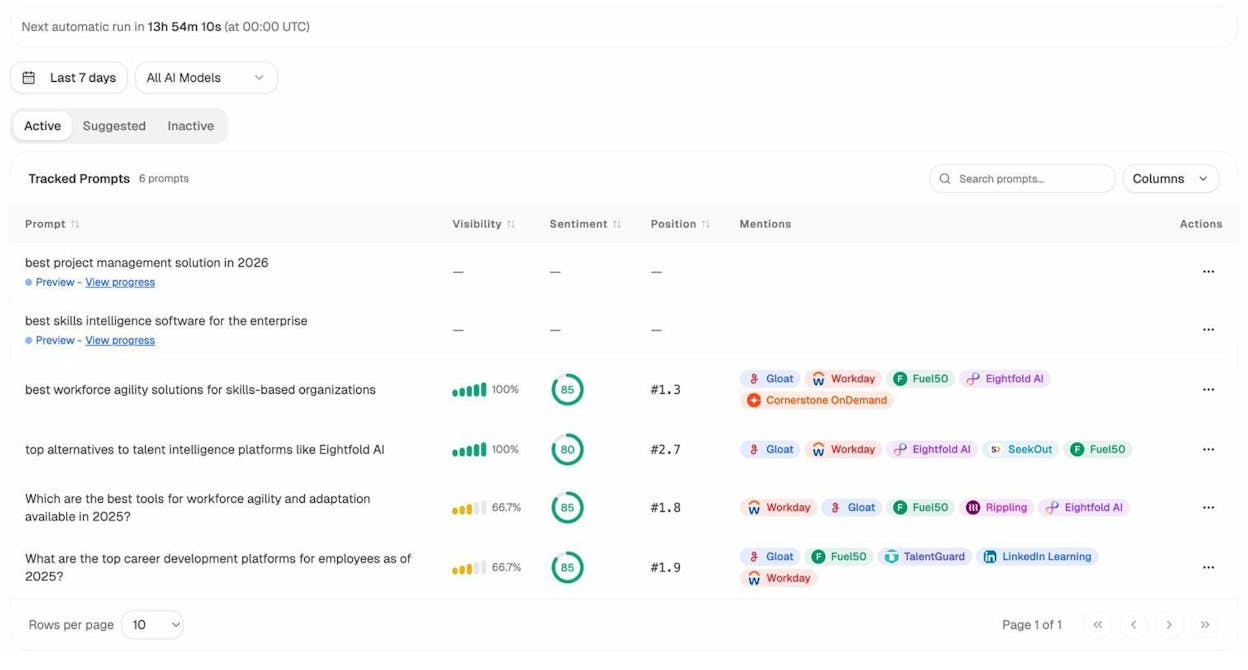
Analyze AI monitors specific prompts across all major LLMs—"best Salesforce alternatives for medium businesses," "top customer service software for mid-sized companies in 2026," "marketing automation tools for e-commerce sites." 

content creation software

For each prompt, you see your brand's visibility percentage, position relative to competitors, and sentiment score.

You can also see which competitors appear alongside you, how your position changes daily, and whether sentiment is improving or declining.

digital marketing tools

Don’t know which prompts to track? No worries. Analyze AI has a prompt suggestion feature that suggests the actual bottom of the funnel prompts you should keep your eyes on.

Audit which sources models trust and build authority where it matters

content strategy tools

Analyze AI reveals exactly which domains and URLs models cite when answering questions in your category. 

You can see, for instance, that Creatio gets mentioned because Salesforce.com's comparison pages rank consistently, or that IssueTrack appears because three specific review sites cite them repeatedly.

SEO content tools

Analyze AI shows usage count per source, which models reference each domain, and when those citations first appeared.

content analytics platforms

Citation visibility matters because it shows you where to invest. Instead of generic link building, you target the specific sources that shape AI answers in your category. You strengthen relationships with domains that models already trust, create content that fills gaps in their coverage, and track whether your citation frequency increases after each initiative.

Prioritize opportunities and close competitive gaps

content distribution tools

Analyze AI surfaces opportunities based on omissions, weak coverage, rising prompts, and unfavorable sentiment, then pairs each with recommended actions that reflect likely impact and required effort. 

For instance, you can run a weekly triage that selects a small set of moves—reinforce a page that nearly wins an important prompt, publish a focused explainer to address a negative narrative, or execute a targeted citation plan for a stubborn head term. 

AspectAdvantageWeaknessWhy it matters for content marketing
AI visibilityTracks presence across major LLM platformsLess value for teams with low AI trafficShows where your brand appears in AI search
AttributionConnects AI answers to traffic and revenueRequires GA4 or similar setupProves which prompts actually drive business outcomes
Competitive intelBenchmarks your AI share-of-voiceNewer analytics categoryHelps identify gaps and opportunities in AI content strategy

Best use cases

  • Teams wanting to measure AI search visibility and tie it to actual conversions

  • Marketers optimizing content for AI engines and prompt-based discovery

  • Brands needing competitive intelligence across AI-generated answers

Bottom line

A dedicated AI search analytics platform that connects LLM visibility to real traffic and revenue—ideal for teams treating AI search as a true acquisition channel.

HubSpot Marketing / Content Hub: best content marketing tool for managing everything in one place

Key HubSpot standout features

  • Unified CRM and marketing database

  • Drag-and-drop blog, page, and landing page builders

  • AI writing and content remix tools

  • Visual automation builder

  • Built-in analytics and attribution

HubSpot gives content teams one place to plan, create, publish, and measure content while every action ties back to the same CRM record. This helps teams see which pages and campaigns drive qualified leads, not just traffic, because all engagement flows into one timeline. The setup also reduces tool switching since writers, marketers, and sales teams share the same data and workflow.

content scheduling tools

Scaling brings tighter limits around cost and complexity. Pricing rises with contacts and automation needs, which pressures smaller teams. Templates can feel rigid without developer help, and deeper workflows require a thoughtful setup to stay clean. These hurdles do not reduce HubSpot’s value but they do mean the system works best for teams ready to use most of its features.

Pricing: Higher tiers become expensive once automation and larger contact lists enter the mix.

AspectAdvantageWeaknessWhy it matters for content marketing
ScopeAll-in-one platformCan be heavy for small teamsKeeps content; CRM; and campaigns aligned
CreationEasy builders + AI helpLimited deep customizationSpeeds up content output
AutomationStrong workflowsComplex for beginnersTurns engagement into follow-up actions
AnalyticsBuilt-in attributionAdvanced reports on higher tiersShows which content drives leads

Best use cases

  • Teams needing one hub for content, CRM, and email

  • B2B teams linking content to qualified pipeline

  • Marketers needing true attribution for content

Bottom line:

Great for teams that want content, automation, and CRM working together in one system.

Semrush: best content marketing tool for deep SEO research and competitive insights

Key Semrush standout features

  • Keyword research, clustering, and intent analysis

  • Competitive tracking across domains, keywords, and SERP visibility

  • Site audits with technical, on-page, and performance checks

  • Content briefs and optimization guidance

  • Rank tracking and backlink monitoring

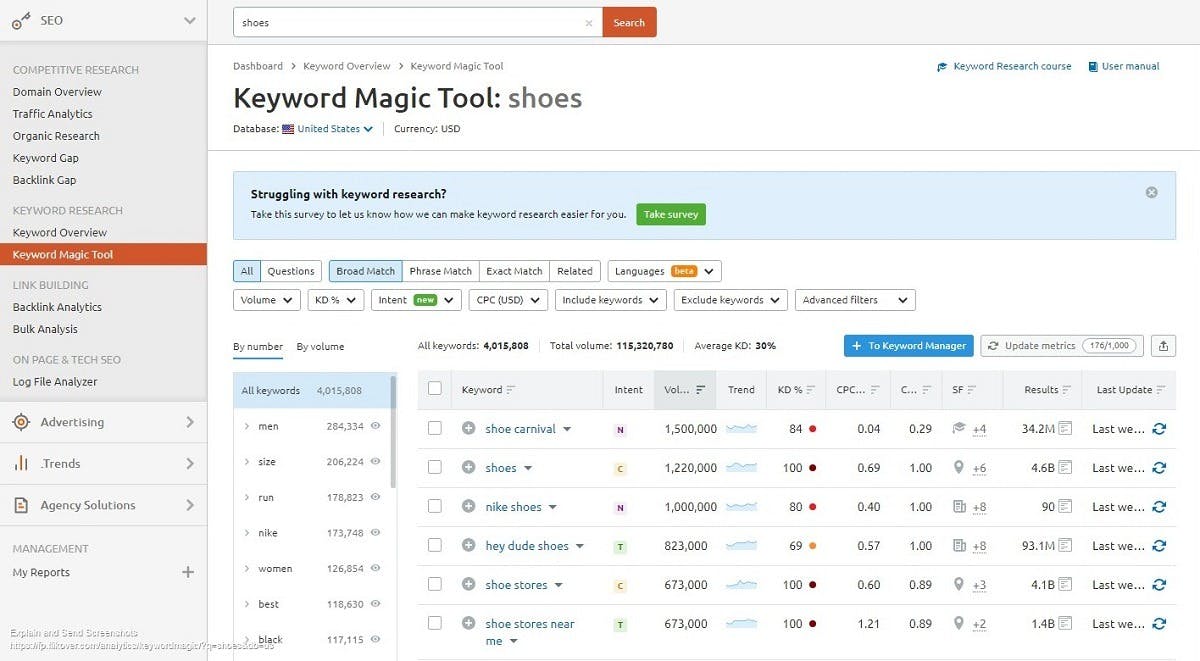
Semrush brings the full SEO and content research workflow into one place, which helps teams understand what their audience searches for and how competitors win those searches. The tool maps topics, clusters, and keyword intent, giving writers a clearer plan for what to produce and how to structure it. This makes content more strategic because each topic comes from search data rather than guesswork.

content calendar software

Growth exposes how Semrush reduces tool switching across research, audits, and measurement. Instead of juggling multiple dashboards, teams can move from keyword discovery to competitor checks to content briefs without changing platforms. This tighter workflow supports faster planning, stronger insights, and clearer patterns across entire markets.

Pricing: Costs increase quickly with more projects, keywords, and users, especially for growing teams.

AspectAdvantageWeaknessWhy it matters for content marketing
ScopeAll-in-one SEO + content research suitePricing grows fast with usageHelps teams base content plans on real search and competitor data
Research toolsStrong keyword; intent; and gap analysisLarge interface can feel complexImproves how teams choose topics that drive traffic
Audits & trackingTechnical audits and rank trackingTakes time to learn workflowsEnsures content stays optimized and competitive

Best use cases

  • Teams needing a full SEO and content planning system

  • Marketers wanting deep keyword and competitor insights

  • Companies building content at scale and tracking rankings closely

Bottom line

Ideal for teams that want search-driven content planning backed by deep competitor and keyword data.

Key Ahrefs standout features

  • Site Explorer for backlink and competitor analysis

  • Keyword Explorer for intent and search opportunity

  • Rank Tracker for monitoring performance over time

  • Content Explorer for finding top-performing content

  • Site Audit for technical and on-page improvements

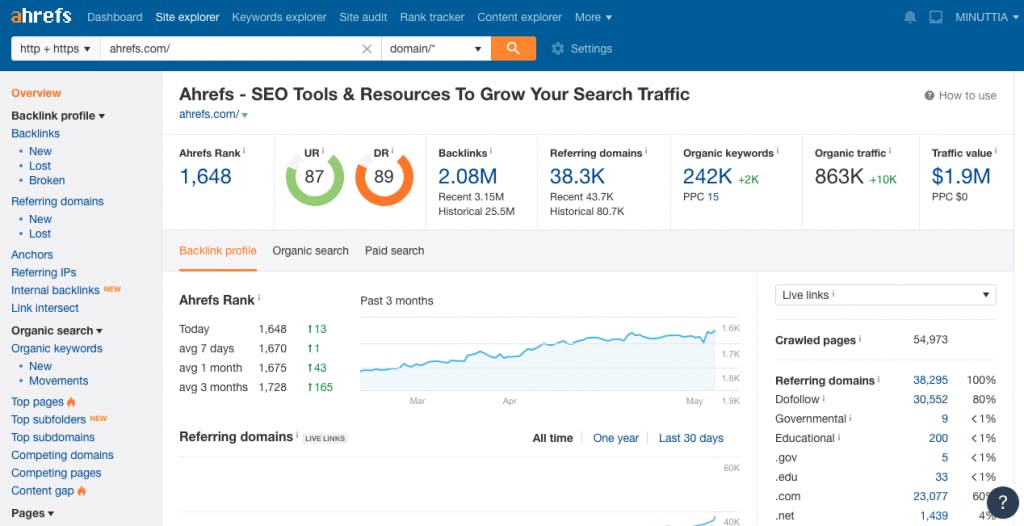
Ahrefs helps teams see how search engines view their site by revealing backlink strength, keyword gaps, and competitor tactics in one place. This visibility supports content teams that want to create pages with a clear path to ranking because every idea is backed by real search and competitor data. The platform also shows which content types perform well in a niche, which gives writers and strategists a more confident starting point.

marketing workflow tools

As usage grows, the tool highlights how much value comes from its precise data and wide link index. Moving across keyword research, rank tracking, and content analysis feels consistent, which removes noise for marketers who want sharper insight without extra dashboards. These strengths make Ahrefs a strong fit for teams that rely on search performance as a core growth channel.

Pricing: Higher tiers become expensive for small teams that need more credits, tracked keywords, or projects.

AspectAdvantageWeaknessWhy it matters for content marketing
Data qualityStrong backlink and keyword databasePricing is high for small teamsSupports accurate topic planning and competitive research
UX & reportingClear dashboards and simple navigationLimited to SEO use casesHelps marketers track ranking impact of new content
Tool scopeDeep SEO suiteNo support for email or campaign workflowsRequires pairing with other tools for full content operations

Best use cases

  • Teams needing accurate backlink and competitor intelligence

  • Writers planning topics based on real search opportunities

  • Companies tracking rankings closely to guide content strategy

Bottom line

Great for teams that want clean SEO data and strong competitor insight to guide content decisions.

Key BuzzSumo standout features

  • Content discovery across billions of articles and posts

  • Trend tracking and real-time topic monitoring

  • Competitive benchmarking and engagement analysis

  • Influencer identification and outreach insights

  • Alerts for mentions, topics, and fast-rising trends

BuzzSumo helps content teams discover what works before they start creating, which removes guesswork from planning. It scans top-performing articles, videos, and social posts and shows which topics, formats, and angles earn the highest engagement in any niche. This clarity helps writers and strategists shape ideas that follow real audience behavior instead of instinct alone.

AI content tools

As teams scale, the platform becomes a reliable way to spot trends early and understand which creators or influencers drive reach in a market. Moving from content discovery to competitor checks to influencer research happens in one workflow, which keeps planning focused. BuzzSumo stays centered on intelligence rather than creation, so it works best as the brain of the ideation process while other tools handle production.

Pricing: Higher plans can feel expensive, especially for teams wanting deeper historical data.

AspectAdvantageWeaknessWhy it matters for content marketing
DiscoveryFinds top-engagement topics fastCostly for small teamsHelps teams plan content based on proven interest
InfluenceStrong influencer and trend insightsNo creation toolsSupports smarter outreach and idea amplification
BenchmarkingEasy view of competitor formatsLimited to research use casesGuides content direction with real performance signals

Best use cases

  • Teams needing fast insight into top-performing topics

  • Marketers planning content around audience trends

  • Brands researching influencers and competitive angles

Bottom line

Ideal for teams that want data-driven content ideas shaped by real engagement and market trends.

Frase: best content marketing tool for fast research and SEO-ready content outlines

Key Frase standout features

  • AI-generated outlines and briefs based on top-ranking pages

  • Real-time content scoring with on-page SEO guidance

  • SERP analysis for topics, headings, and keyword gaps

  • AI drafting tools inside the same editor

  • Question and topic research pulled from live search results

Frase helps teams remove the slowest part of content creation: deep SERP research. It scans the top pages for a keyword and turns that information into structured outlines, topic lists, and content briefs, which gives writers a clear roadmap before drafting. This helps teams match search intent faster and build articles that fit what users and search engines expect.

blogging tools

As you work inside the editor, research, drafting, and optimization stay in one place, which reduces tool switching and keeps the writing flow simple. The content score updates in real time, so teams can see gaps, weak sections, or missed topics without running manual checks. This blend of research and writing makes Frase a strong fit for teams that produce long-form SEO content regularly.

Pricing: Base plans have tight usage caps, and most teams need the Pro add-on for steady production.

AspectAdvantageWeaknessWhy it matters for content marketing
ResearchFast insight into topics and SERP gapsOutput can feel genericHelps teams build outlines that match search intent
WorkflowDrafting + optimization in one editorHigher limits require upgradesSpeeds up long-form production and reduces tool switching
GuidanceReal-time content scoringAI needs strong human editingSupports consistent on-page SEO across articles

Best use cases

  • Teams producing research-heavy, SEO-focused articles

  • Writers who want structured briefs before drafting

  • Content teams aiming to speed up long-form production

Bottom line

Ideal for teams that want faster research and structured SEO content workflows in one editor.

SurferSEO: best content marketing tool for scaling on-page SEO with clear SERP guidance

Key SurferSEO standout features

  • Real-time content editor with keyword and structure suggestions

  • SERP analysis for competitive insights

  • Content planner for clustering and topic organization

  • Optimization scoring for drafts and published pages

  • Audit tools for improving existing content

SurferSEO helps teams create content that aligns with what already succeeds in search by breaking down top-ranking pages into clear recommendations. Writers see which terms, headers, and structural elements appear across the SERP, which makes it easier to shape articles that match search intent. This reduces guesswork and brings more consistency to how teams approach on-page SEO.

editorial planning tools

As teams expand, Surfer’s planner, content briefs, and optimization rules help maintain quality across a larger content library. Moving from planning to drafting to auditing stays inside one workflow, which supports faster production cycles. The scoring system also gives editors a simple way to check whether content covers the right elements before publishing.

Pricing: Costs rise quickly with higher usage, and no free plan is available.

AspectAdvantageWeaknessWhy it matters for content marketing
SERP guidanceClear keyword and structure insightsCan push keyword-heavy writingHelps teams match search intent accurately
WorkflowShared briefs and optimization rulesCosts grow with more creditsKeeps content consistent across growing teams
AuditsImproves old articles with clear fixesLimited outside SEO tasksSupports ongoing content updates for ranking gains

Best use cases

  • Teams producing SEO-driven articles at scale

  • Writers needing real-time guidance while drafting

  • Companies updating or optimizing large content libraries

Bottom line

Strong choice for teams that want predictable, SERP-aligned content with consistent on-page optimization.

Clearscope: best content marketing tool for clean, high-quality SEO content optimization

Key Clearscope standout features

  • Content grading with semantic term coverage

  • Keyword discovery and topic suggestions

  • Integrations with Google Docs and WordPress

  • Reports that compare drafts to top-ranking pages

  • Content inventory dashboards for tracking performance over time

Clearscope helps teams create content that aligns with what readers and search engines expect by highlighting the terms, questions, and topics that top pages cover. It focuses on clarity, relevance, and semantic depth rather than technical SEO, which makes it a strong choice for writers who want guidance without complexity. The content grade updates as you write, giving simple direction that helps drafts become more complete and useful.

social media content tools

As teams scale content production, Clearscope offers a consistent framework that keeps quality steady across writers and editors. The minimal interface keeps the workflow focused, and the integrations allow teams to optimize content where they already work. Because the platform stays tightly specialized, it avoids clutter and remains easy to adopt even for people who are new to SEO tools.

Pricing: Higher cost makes it better suited for agencies or teams rather than solo creators.

AspectAdvantageWeaknessWhy it matters for content marketing
FocusClear; semantic optimization guidanceNot a full SEO suiteHelps teams improve content quality without heavy tools
Ease of useSimple UI and fast onboardingHigher pricing than rivalsMakes optimization easier for writers and editors
WorkflowIntegrates with Docs and WordPressNeeds other tools for technical SEOFits smoothly into existing content pipelines

Best use cases

  • Teams wanting easy, reliable on-page optimization

  • Writers who want semantic guidance without complexity

  • Agencies producing large volumes of SEO content

Bottom line

Great for teams that want clean, simple, high-quality content optimization without an overloaded feature set.

MarketMuse: best content marketing tool for large content libraries and strategic planning

Key MarketMuse standout features

  • AI topic modeling for clusters, briefs, and content plans

  • Competitive gap analysis and opportunity scoring

  • Personalized content roadmaps based on site authority

  • Optimization scoring for new and existing pages

  • Inventory dashboards for large libraries

MarketMuse helps teams plan content with a deeper strategy by analyzing entire content libraries instead of single pages. It shows which topics you already own, where gaps exist, and which pieces can rank with small improvements. This strategic view helps teams publish content that strengthens topical authority rather than chasing random keywords.

marketing collaboration tools

As content programs grow, MarketMuse becomes valuable for managing large inventories because it centralizes insights about what to update, what to create next, and how each topic fits into broader clusters. The platform’s AI-generated briefs and roadmaps also help teams keep structure, linking, and depth consistent across many writers and pages.

Pricing: Higher than most SEO tools, especially for small teams or low-volume publishers.

AspectAdvantageWeaknessWhy it matters for content marketing
StrategyDeep topic modeling and cluster insightsSteep learning curveHelps teams plan content with long-term authority in mind
InventoryClear view of gaps and update needsOverkill for light publishingSupports large sites with many pages to maintain
WorkflowStrong AI briefs and roadmapsPremium pricingKeeps teams aligned on structure and depth across content

Best use cases

  • Teams managing large, complex content libraries

  • Brands building topical authority in competitive niches

  • Content operations that need clear, strategic publishing plans

Bottom line

A strong choice for teams that need deep, AI-driven strategy to guide large-scale content planning and updates.

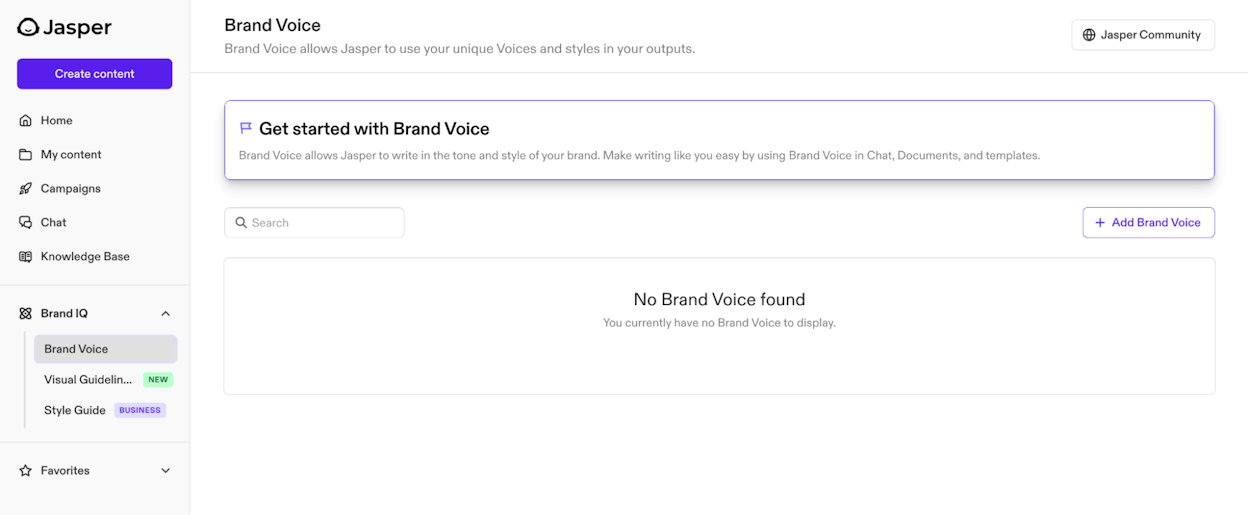
Jasper: best content marketing tool for brand-consistent, multi-channel AI content production

Key Jasper standout features

  • Brand-voice training for consistent tone across all content

  • Multi-channel templates for blogs, ads, emails, scripts, and social posts

  • Workflows and collaboration tools for campaigns and team approval

  • Multi-language support for global content needs

  • Integrations such as Chrome extension, Surfer SEO, API access, and custom AI apps

Jasper helps marketing teams create content that stays true to their brand voice while supporting campaigns across many channels. It trains on your guidelines or content samples, then applies that voice to drafts, briefs, ads, emails, and long-form content, which helps teams scale production without losing tone consistency. Templates and workflows also bring structure to content creation, ensuring teams move from brief to final draft with fewer gaps.

content optimization tools

As teams grow, Jasper becomes useful for collaboration because workspaces, roles, and multi-step workflows keep campaigns organized. Writers can draft inside a familiar editor, and managers can review or update brand settings to keep messaging aligned. This focus on marketing operations, rather than generic chat prompts, makes Jasper a tool built for ongoing campaigns rather than one-off writing tasks.

Pricing: More expensive than general AI tools, especially when multiple users or advanced workflows are needed.

AspectAdvantageWeaknessWhy it matters for content marketing
Brand voiceConsistent tone across all channelsStill needs human refinementSupports unified messaging across teams
WorkflowBuilt for campaigns; not chatsCan feel complex at firstHelps teams manage multi-step content production
CollaborationWorkspaces; roles; and approvalsHigher cost for teamsMakes scaling content easier for agencies and marketing teams

Best use cases

  • Teams needing brand-consistent content across many channels

  • Agencies running structured workflows and approvals

  • Companies producing content in multiple languages

Bottom line

Ideal for marketing teams that want structured, brand-aligned AI content workflows rather than generic chat-style writing.

Grammarly: best content marketing tool for clean, polished, and consistent writing across every platform

Key Grammarly standout features

  • Real-time grammar, spelling, and punctuation correction

  • Tone adjustment suggestions for clearer communication

  • Full-paragraph rewrites and clarity-focused edits

  • Works across browser extensions, desktop apps, and Google Docs

  • Integrated into the Superhuman Suite for proactive assistance across 100+ apps

Grammarly helps writers and marketers produce clear, polished content by offering instant corrections and tone suggestions wherever they write. It improves readability and consistency by spotting grammar issues, unclear phrasing, or mismatched tone before content reaches an editor or audience. These real-time edits reduce friction in the writing process and support teams producing email campaigns, website copy, and social messages at speed.

inbound marketing tools

As Grammarly expands into the Superhuman ecosystem, it now offers deeper workflow support, stepping beyond corrections into proactive recommendations across many apps. This helps teams maintain writing quality in fast-moving environments like Slack, email, and browser-based tools. Writers still need to review and shape the output because AI corrections can miss subtle style choices or unique brand tones, but the assistant remains strong for everyday clarity.

Pricing: Costs increase with advanced features, especially inside the wider Superhuman Suite.

Best use cases

  • Teams needing consistent, error-free content across channels

  • Writers wanting clarity and tone support in real time

  • Marketers producing high volumes of email, social copy, or web content

Bottom line

A reliable assistant for producing clear, polished content across platforms, with growing power through the Superhuman ecosystem.

Anyword: best content marketing tool for data-driven, conversion-focused copy

Key Anyword standout features

  • Predictive performance scores that rate copy before launch

  • Audience targeting to tailor messages by demographics and behavior

  • Multi-channel templates for ads, emails, landing pages, and social posts

  • Brand-voice tools and copy intelligence for consistent messaging

  • Multilingual support for global campaigns

Anyword helps marketers create copy that boosts conversions by predicting how well messages will perform before publishing. The platform analyzes billions of data points from real marketing assets and gives each variation a performance score, which helps teams choose the version most likely to drive clicks, signups, or sales. This replaces guesswork with data and gives campaigns a clearer path to success.

B2B content marketing tools

As teams scale, Anyword supports performance-driven workflows with audience targeting, brand voice templates, and channel-specific optimization. These tools help refine messaging for each segment while keeping tone consistent across campaigns. Writers still need to shape the AI output because predictive suggestions can feel generic at times, but the tool offers strong direction for ads and short-form marketing content.

Pricing: Predictive scoring and advanced analytics sit behind higher-tier plans, which can feel costly for smaller teams.

AspectAdvantageWeaknessWhy it matters for content marketing
PerformancePredictive scoring for message successKey features locked to high tiersHelps teams choose higher-converting copy
TargetingTailors copy to audience segmentsCan still sound genericSupports more relevant; personalized messaging
WorkflowBuilt for ads and campaign contentHigher cost than basic toolsImproves efficiency for performance-focused marketers

Best use cases

  • Teams running paid ads or conversion-focused campaigns

  • Marketers optimizing copy variations before spending budget

  • Brands needing audience-specific messaging at scale

Bottom line

Ideal for marketers who want data-driven guidance to create stronger, higher-converting copy across channels.

Canva: best content marketing tool for fast, collaborative, and AI-assisted visual creation

Key Canva standout features

  • Drag-and-drop editor for graphics, videos, presentations, and documents

  • Creative Operating System integrating design, collaboration, brand control, and analytics

  • AI tools like Ask Canva, Magic Video, and layout generation

  • Marketing workflows and performance tracking through Canva Grow

  • Team collaboration features and Brand Kits for unified visual identity

Canva helps marketers and non-designers create professional visuals quickly through an intuitive editor supported by thousands of templates. The platform makes it easy to build social posts, presentations, videos, and documents without advanced design skills, while AI assists with layouts, campaigns, and creative variations. This speeds up content production and reduces reliance on external design teams for everyday marketing assets.

marketing productivity tools

As Canva expands into a full Creative Operating System, it supports more of the marketing workflow—from ideation and design to publishing and performance insights. Team workspaces, brand kits, and real-time editing help maintain consistency across campaigns, while marketing analytics let teams refine creative decisions. Canva remains easy to adopt, though teams still need customization to avoid generic visuals and unlock a true brand identity.

Pricing: Most advanced branding, collaboration, and analytics features live behind Pro or Team plans.

AspectAdvantageWeaknessWhy it matters for content marketing
AccessibilityEasy drag-and-drop creationRisk of generic visualsEnables fast production even without design skills
Templates & AILarge template library + AI toolsHeavy template use reduces uniquenessHelps teams scale creative output quickly
CollaborationBrand kits + team workflowsBest tools behind paid tiersKeeps multi-channel content visually consistent

Best use cases

  • Teams producing social graphics, ads, presentations, or short-form videos at scale

  • Brands needing fast, consistent visual assets across channels

  • Marketers wanting AI-assisted design without complex software

Bottom line

A powerful, easy-to-use design platform that speeds up visual creation and supports brand consistency, especially when teams customize beyond default templates.

WordPress.org: best content marketing tool for full-control publishing and scalable content hubs

Key WordPress.org standout features

  • Open-source, self-hosted CMS with full customization

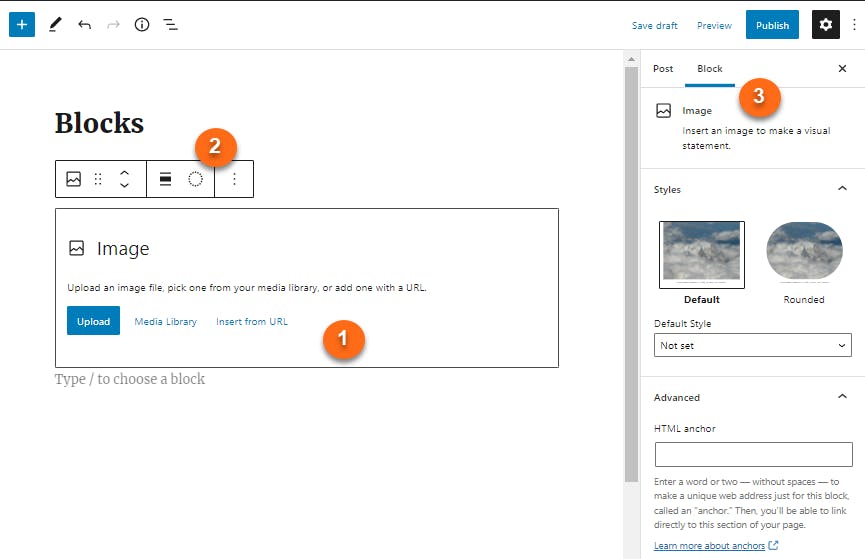
  • Block editor for blogs, pages, multimedia, and dynamic content

  • Thousands of plugins and themes for SEO, e-commerce, analytics, forms, and more

  • Highly flexible architecture suitable for small blogs to enterprise websites

  • Massive global community, documentation, and long-term ecosystem support

WordPress.org gives marketers complete control over how they build, publish, and scale their content. Because it’s open-source and self-hosted, teams can customize every part of the experience—from design and structure to SEO, monetization, and integrations. The block editor makes it simple to create pages and blog posts, while plugins extend the CMS into memberships, e-commerce stores, landing pages, and advanced content hubs.

content performance tracking

As sites grow, WordPress remains adaptable, supported by thousands of developers and a vast ecosystem of themes and plugins. This flexibility makes it possible to build anything from a personal blog to a global brand website. But the same freedom also introduces responsibility: hosting, security, and maintenance fall on the site owner, which requires ongoing attention or a managed hosting provider.

Pricing: The core CMS is free, but hosting, premium themes, plugins, and maintenance can add costs depending on needs.

AspectAdvantageWeaknessWhy it matters for content marketing
FlexibilityBuild any site with plugins + themesCan suffer from plugin bloatSupports unique content workflows and custom structures
OwnershipFull control over hosting + codeRequires manual maintenanceGives marketers long-term independence and scalability
SEO + ecosystemSEO-friendly structure + huge plugin librarySecurity risks if outdatedEnables tailored SEO strategies and growth at any stage

Best use cases

  • Marketers building scalable blogs, content hubs, or branded sites

  • Teams wanting full ownership of their site and SEO stack

  • Businesses needing deep customization for content workflows

Bottom line

A powerful, flexible CMS that gives marketers complete control—ideal for building content-rich sites that can grow without platform limits.

Notion: best content marketing tool for unified planning, documentation, and AI-assisted workflows

Key Notion standout features

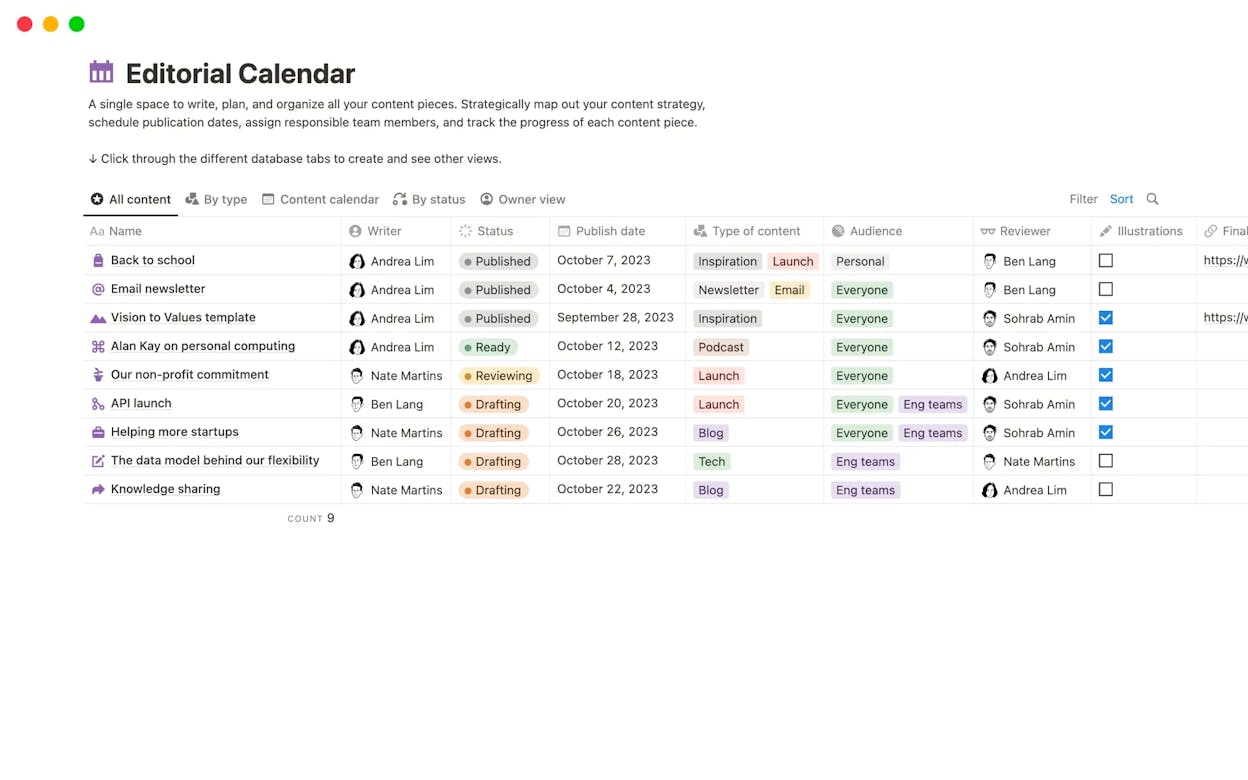
  • Unified workspace combining docs, wikis, databases, calendars, and project boards

  • Built-in AI and Notion Agents for writing, summarizing, researching, and automating tasks

  • Customizable project management tools for workflows, timelines, and content calendars

  • Notion Mail and cross-app search for integrating email, Slack, Drive, and more

  • Highly flexible structure suitable for team collaboration and knowledge management

Notion gives content teams a single workspace where planning, documentation, and execution stay connected. Pages, databases, and task boards can be shaped into editorial calendars, content briefs, SOPs, dashboards, and knowledge bases—all without switching platforms. This flexibility makes it easy to build a tailored content system that fits how a team works rather than forcing a preset template or rigid structure.

campaign management tools

The addition of Notion AI and Notion Agents expands the platform beyond organization into active content creation and automation. Agents can draft briefs, summarize research, populate databases, and interact with email workflows, reducing repetitive tasks and speeding up production cycles. These features strengthen collaboration, but the openness of the system can also lead teams to over-engineer workflows or face performance issues as databases grow.

Pricing: Core features are affordable, but advanced AI and team capabilities add cost depending on workspace size.

AspectAdvantageWeaknessWhy it matters for content marketing
FlexibilityBuild custom workflows docs and databasesEasy to over-engineer systemsSupports unique content processes and team structures
CollaborationShared pages comments and AI-assisted tasksPerformance issues at scaleKeeps teams aligned across briefs calendars and docs
AI & automationDrafting summarizing workflow automationLearning curve for new usersSpeeds up research planning and content creation

Best use cases

  • Teams managing content calendars, briefs, and knowledge bases in one centralized system

  • Marketers wanting AI support for research, summarization, and task automation

  • Organizations needing customizable workflows that evolve with their processes

Bottom line

A flexible all-in-one workspace that streamlines planning, collaboration, and AI-assisted content operations when used with thoughtful structure.


Airtable: best content marketing tool for flexible, visual, and collaborative content operations

Key Airtable standout features

  • Spreadsheet-style databases with customizable fields and linked tables

  • Multiple views (grid, Kanban, calendar, gallery, timeline, list) for visualizing the same data

  • Collaboration tools with shared views, permissions, comments, and real-time updates

  • Automations and integrations with Slack, Salesforce, Jira, and more—plus emerging AI workflow builders

  • Templates for content calendars, asset libraries, editorial tracking, and campaign roadmaps

Airtable gives content teams a flexible system for managing calendars, assets, and workflows using a database that feels like a spreadsheet but behaves like a customizable app. Teams can link content ideas to briefs, assets, deadlines, approvals, and performance data across different views, which helps maintain clarity even as projects scale. Calendar and Kanban views make it easy to track production cycles, while linked tables keep teams aligned on dependencies.

content ROI tools

As operations grow more complex, Airtable’s collaboration tools, automations, and integrations help streamline cross-team coordination. Workflows can notify stakeholders, move tasks automatically, and sync information between tools. The platform’s flexibility is a major strength, but it also requires thoughtful design—overly complex bases can slow performance or confuse new users, and costs rise with team size and automation needs.

Pricing: Advanced features, automations, and higher record limits require paid plans, making large or active workspaces more expensive over time.

Aspect,Advantage,Weakness,Why it matters for content marketing

Flexibility,Spreadsheet + database hybrid with many views,Risk of over-engineering bases,Supports custom content calendars and structured workflows Collaboration,Shared views comments and permissions,Pricing grows with users,Helps teams coordinate across content production stages Automation,Integrations + workflow automation,Some advanced tools feel limited,Reduces manual work and speeds up multi-team execution

Best use cases

  • Teams managing content calendars, assets, and approvals in a centralized hub

  • Multi-stakeholder campaigns requiring transparency across teams

  • Marketers needing a flexible system that adapts to evolving workflows

Bottom line

A powerful, visual, and customizable workspace for content operations—best when teams design structures thoughtfully to avoid unnecessary complexity.

Trello: best content marketing tool for simple, visual, and collaborative workflow management

Key Trello standout features

  • Kanban boards with draggable cards that move through workflow stages

  • AI-powered Inbox for capturing tasks from email, Slack, and other sources

  • Planner and calendar views for time blocking and task scheduling

  • Power-Ups and integrations with Slack, Jira, Teams, Google Drive, and more

  • Built-in automation (“Butler”) and templates for editorial, marketing, and sprint workflows

Trello gives marketing and editorial teams an easy way to visualize content workflows with simple boards and cards. Each stage of production—idea, draft, edit, publish—becomes a list, and tasks flow naturally across the board as work progresses. This makes Trello especially helpful for content teams who want clear, shared visibility without complex setup or training. The straightforward layout encourages collaboration, quick updates, and fast adoption for new team members.

content research tools

Recent updates strengthen Trello’s usefulness for day-to-day productivity. The AI-driven Inbox collects tasks from channels like email and Slack, reducing scattered responsibilities, while Planner and calendar views allow users to block time and organize workloads more intentionally. Automation tools and Power-Ups add useful functionality, though many advanced features sit outside Trello’s core design, making it more of a lightweight project manager than a comprehensive system.

Pricing: Core features are free or low-cost, but Power-Ups, advanced collaboration, and automations often require paid plans.

AspectAdvantageWeaknessWhy it matters for content marketing
UsabilitySimple visual Kanban boardsNot built for complex PM needsHelps teams track content stages at a glance
FlexibilityEasy setup with templates + drag-and-drop flowAdvanced features require add-onsSupports evolving content pipelines without complexity
Productivity toolsAI Inbox + Planner views streamline tasksLimited analytics + resource toolsReduces chaos and keeps content teams aligned

Best use cases

  • Editorial and content teams running kanban-style workflows

  • Marketing teams needing simple tracking for campaigns and tasks

  • Small to medium teams wanting fast setup without heavy PM software

Bottom line

A lightweight, visual project tool perfect for straightforward content workflows, with new AI features that enhance personal and team productivity.

Buffer: best content marketing tool for simple, fast, and reliable social scheduling

Key Buffer standout features

  • Post scheduling across Instagram, LinkedIn, Facebook, X/Twitter, Pinterest, and more

  • AI assistant for caption writing, content repurposing, and idea generation

  • Basic analytics for engagement, reach, and audience trends

  • Integrations with multiple social platforms and third-party tools

  • Team roles and approval workflows on paid plans

Buffer helps social media teams plan, publish, and repurpose content from one clean and intuitive dashboard. Its simple scheduling interface makes it easy to organize posts ahead of time and maintain consistent publishing across channels without jumping between apps. The built-in AI assistant supports caption writing and post ideas, giving creators a faster way to refine messages and adapt content for different platforms.

content brainstorming tools

Because Buffer focuses on simplicity, it appeals to individuals and small teams who want dependable scheduling without the complexity of enterprise tools. The free tier offers enough features to get started, and paid plans remain affordable. However, analytics remain basic, and the platform lacks deep social listening, campaign insights, or robust workflow governance—features that larger teams may require.

Pricing: Affordable entry point with a generous free tier, but multi-account or multi-team setups become more expensive.

AspectAdvantageWeaknessWhy it matters for content marketing
UsabilityClean and intuitive scheduling interfaceLimited analytics depthMakes planning social content fast and distraction-free
RepurposingAI supports captioning and content reuseNot suited for complex workflowsHelps teams publish consistently across channels
AffordabilityFree and low-cost plans availablePricing scales with more channelsIdeal for small teams or creators managing a few profiles

Best use cases

  • Individuals and small teams scheduling posts across multiple channels

  • Creators repurposing content quickly using AI support

  • Marketers needing a simple social publishing tool without heavy overhead

Bottom line

A clean, easy scheduling platform perfect for simple social workflows—great for small teams, but light on advanced analytics and enterprise features.

Hootsuite: best content marketing tool for enterprise-level social management and analytics

Key Hootsuite standout features

  • Centralized scheduling and publishing across all major social platforms

  • OwlyGPT AI assistant for real-time trend insights, captions, and content ideas

  • Advanced analytics, campaign reporting, social listening, and monitoring

  • Team collaboration tools with roles, permissions, approvals, and shared inboxes

  • Integrations with Canva, Google Drive, CRM systems, and 100+ external tools

Hootsuite helps larger teams manage complex social media operations from one unified dashboard. Scheduling posts across multiple channels is streamlined, and detailed reporting helps teams evaluate campaign performance with accuracy. OwlyGPT adds real-time intelligence by analyzing social conversations and suggesting ideas, captions, and trends, giving marketers a stronger sense of what to publish and when.

content idea generator tools

Because Hootsuite is built for enterprises, it excels in collaboration, governance, and analytics. Role-based permissions, content approvals, and shared multi-channel inboxes help reduce workflow chaos. Bulk scheduling and deep integrations support teams managing many profiles at scale. However, its depth brings complexity—making onboarding slower—and the platform is priced for larger organizations rather than small teams.

Pricing: Higher than lightweight tools, with premium features aimed at mid-size and enterprise teams.

AspectAdvantageWeaknessWhy it matters for content marketing
AnalyticsStrong and detailed reporting toolsExpensive for small teamsHelps optimize campaigns with deeper performance insights
CollaborationAdvanced roles approvals and shared workflowsSteeper learning curveSupports larger teams with structured processes
AI supportOwlyGPT trend and content insightsInterface can feel heavyEnhances ideation and timing with real-time social intelligence

Mailchimp: best content marketing tool for accessible, template-rich email campaigns and automation

Key Mailchimp standout features

  • Email campaign creation, scheduling, and automation sequences

  • Audience segmentation by behavior, demographics, and engagement

  • 100+ customizable templates with a drag-and-drop builder

  • Analytics, A/B testing, and performance dashboards

  • Lead capture forms, pop-ups, landing pages, and simple funnel tools

Mailchimp gives small-to-medium teams an easy way to design and automate email campaigns without needing technical skills. Its template library and drag-and-drop builder help marketers produce branded emails quickly, while automation flows support onboarding, nurture sequences, and promotional campaigns. Segmentation tools also allow teams to target subscribers more effectively and improve campaign relevance.

copywriting tools

As teams grow, Mailchimp’s analytics and testing tools help refine subject lines, content, and audience targeting. Integrations with e-commerce platforms, CRMs, and content systems make it flexible enough for many marketing stacks. However, scaling comes with trade-offs: the interface becomes more complex, billing can feel confusing or expensive as list sizes grow, and support is limited unless you upgrade to higher tiers.

Pricing: Costs increase with subscriber volume and access to advanced automation or support, which can frustrate growing teams.

AspectAdvantageWeaknessWhy it matters for content marketing
Templates & automationEasy-to-use templates and strong automationUX grows cluttered as features expandSpeeds up email creation and supports consistent nurturing
SegmentationDetailed targeting and analyticsPricing tied to list sizeHelps teams send relevant content that drives engagement
IntegrationsWorks with major CMS CRM and e-commerce toolsSupport limited on lower tiersFits smoothly into common digital marketing stacks

Best use cases

  • Small to mid-sized teams launching automated email sequences

  • Marketers wanting fast setup, templates, and simple segmentation

  • Businesses needing an accessible email tool with broad integration support

Bottom line

A user-friendly, feature-rich email platform perfect for SMBs—though costs and complexity rise as your audience grows.

Kit: best content marketing tool for creators who want simple email automation and built-in monetization

Key Kit standout features

  • Email broadcasts and visual automation builder for drip sequences

  • Landing pages and signup forms for list growth

  • Built-in commerce for digital products, paid newsletters, and tips

  • Creator-centric features like tagging, segmentation, and the Creator Network

  • Audience analytics for engagement and growth insights

Kit gives creators a straightforward way to grow, nurture, and monetize their audience without complex marketing tech. Its visual automation builder makes it easy to design email sequences, and tagging-based segmentation keeps subscriber organization flexible. Landing pages and opt-in forms help capture leads, while built-in commerce tools allow creators to sell digital products or subscriptions directly inside the platform.

marketing reporting tools

As creators scale, Kit’s tagging system, automation workflows, and monetization paths help streamline audience management and revenue generation. Everything—from newsletters to paid offerings—lives in one ecosystem designed specifically for individuals, bloggers, course creators, and small creator businesses. However, costs rise as subscriber lists grow, and the platform’s creator-focused approach doesn’t offer the deeper CRM features or enterprise tooling needed by larger teams.

Pricing: Increases with subscriber count, and advanced features require higher-tier plans.

AspectAdvantageWeaknessWhy it matters for content marketing
Creator focusDesigned for bloggers authors and solo creatorsNot built for enterprise teamsSupports audience-first businesses with simple workflows
AutomationsEasy visual sequence builderSome features locked to higher tiersHelps creators nurture leads without technical setup
MonetizationBuilt-in digital product and paid newsletter toolsPricing scales with audience growthEnables creators to earn directly from their content

Best use cases

  • Bloggers, course creators, and authors building email-driven businesses

  • Creators who want simple automation and direct monetization tools

  • Solo entrepreneurs managing newsletters and audience growth

Bottom line

A creator-friendly platform that simplifies email automation and digital product sales, best for individuals growing and monetizing their audience.

Unbounce: best content marketing tool for fast, conversion-focused landing pages with AI optimization

Key Unbounce standout features

  • Drag-and-drop landing page builder with 100+ templates

  • Smart Traffic AI that routes visitors to the variant most likely to convert

  • Smart Copy for AI-assisted landing page and ad copy

  • Built-in A/B testing and CRO tools for experiments and performance insights

  • Pop-ups, sticky bars, and dynamic text replacement for higher lead capture

Unbounce helps marketers build and optimize landing pages without relying on developers, making it easy to move from campaign idea to launch in minutes. Its drag-and-drop builder supports quick iteration, while Smart Copy generates AI-assisted messaging to speed up draft creation. The platform focuses entirely on conversion performance, offering tight control over layouts, forms, and targeting tools so teams can turn traffic into leads efficiently.

engagement analytics tools

As campaigns scale, Unbounce’s Smart Traffic uses machine learning to route visitors to the page variant most likely to convert, improving results faster than traditional A/B testing. Marketers can test multiple variants, add pop-ups or sticky bars, and integrate with CRMs and marketing automation tools. The platform does have limitations—template sections are less modular than some competitors, Classic Builder restricts pages to one form, and pricing can be steep for smaller teams.

Pricing: Higher-tier plans unlock Smart Traffic and advanced CRO features, making the platform more expensive for small businesses.

AspectAdvantageWeaknessWhy it matters for content marketing
Conversion toolsAI routing plus A/B testing plus CRO featuresTemplate modularity is limitedHelps maximize ROI on paid traffic and lead generation
Ease of useFast drag-and-drop page creationSome builder limits such as one form in ClassicLets marketers launch campaigns without developer support
AI supportSmart Copy plus Smart Traffic optimizationHigher costs for advanced AI featuresImproves copy quality and conversion rates at scale

Best use cases

  • Marketers running paid campaigns needing fast, high-converting landing pages

  • Teams testing multiple page variants with AI-driven optimization

  • Businesses wanting built-in pop-ups, sticky bars, and CRO tools in one platform

Bottom line

A fast, conversion-focused landing page builder with powerful AI optimization—best for teams running paid campaigns and lead-gen funnels.

Google Analytics 4 (GA4): best content marketing tool for modern, event-based user insights

Key GA4 standout features

  • Event-based tracking for clicks, scrolls, purchases, and form submissions

  • Cross-platform analytics across websites and mobile apps

  • Predictive metrics powered by machine learning

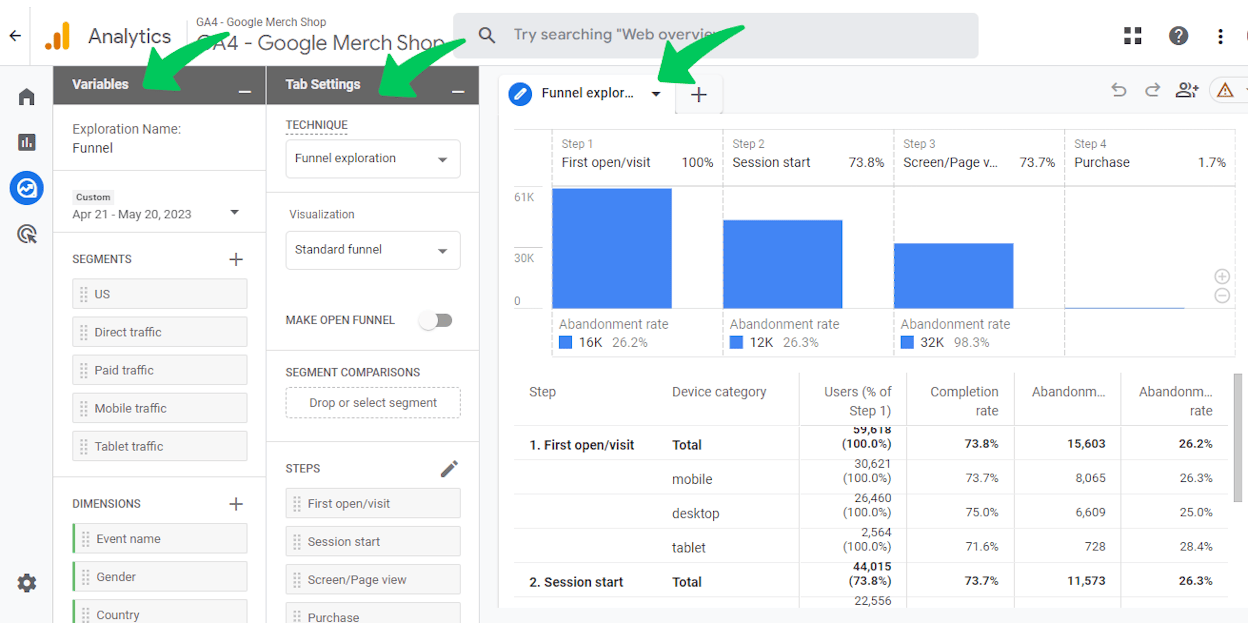
  • Flexible reports for funnel, path, and segment analysis

  • Free BigQuery export for advanced data modeling

Google Analytics 4 helps marketers understand how users move through a website or app by tracking interactions as events instead of sessions. This structure gives teams clearer insight into behavior patterns, allowing them to analyze funnels, engagement, and conversion paths with more detail than before. GA4 also uses machine learning to estimate churn, purchase probability, and potential revenue, giving marketers predictive signals without needing extra tools.

lead generation content tools

As analytics needs grow, GA4’s cross-device tracking and BigQuery export provide deeper visibility into the full journey. The platform does require patience—its interface differs from Universal Analytics, setup can feel technical, and some reports include sampling. Teams often need time to learn the event model and build a reporting setup that fits their goals.

Pricing: GA4 is free, with advanced analysis available through BigQuery at additional cloud-storage costs.

AspectAdvantageWeaknessWhy it matters for content marketing
Tracking modelGranular event-based insightsSetup can feel technicalHelps understand how users interact with each piece of content
Journey analysisUnified view across devicesLearning curve transitioning from UAReveals which content drives engagement across channels
Predictive insightsML-driven churn and purchase signalsSome reports may use samplingHelps prioritize content and campaigns based on intent

Best use cases

  • Teams analyzing multi-device user journeys to optimize content funnels

  • Marketers needing predictive insights to guide content and campaign priorities

  • Businesses wanting deeper, customizable reporting without paying for enterprise analytics

Bottom line

A powerful, free analytics platform that gives marketers deeper, event-driven insights—though it requires thoughtful setup and a learning curve to unlock its full value.

Hotjar: best content marketing tool for visual, behavior-driven user insights

Key Hotjar standout features

  • Heatmaps that show where users click, scroll, and focus

  • Session recordings to observe real navigation patterns

  • Funnels to identify drop-off points across key journeys

  • On-site surveys and polls for direct user feedback

  • Unified dashboard combining behavior analytics and qualitative insights

Hotjar helps marketers understand how users interact with a page by showing what they click, how far they scroll, and where they get stuck. Heatmaps and session recordings reveal friction points that traditional analytics miss, while on-site surveys capture the reasons behind user actions. This mix of behavioral and qualitative data gives teams a clear view of how content layouts, CTAs, headlines, and page structures influence engagement.

enterprise content platforms

As optimization efforts scale, Hotjar’s funnels and recordings help pinpoint exactly where users drop off and why. The tool is powerful but comes with trade-offs—session recordings may load slowly, scripts can impact performance on high-traffic sites, and manual setup may feel technical for non-technical teams. Careful configuration is essential to balance insights with site speed.

Pricing: Higher-tier plans unlock more session recordings, advanced heatmaps, and greater data retention.

AspectAdvantageWeaknessWhy it matters for content marketing
Behavior insightsHeatmaps and recordings reveal real user actionsRecording load can be slowHelps optimize layout CTAs and content flow
Funnel analysisConnects drop-offs to exact user behaviorRequires careful setupShows where content loses visitors
Feedback toolsSurveys capture user intent and sentimentCan affect page performance on heavy useHelps refine messaging based on real feedback

Best use cases

  • Teams diagnosing drop-offs on key landing pages or blog conversion paths

  • Marketers optimizing content layouts, CTAs, or reading flow

  • UX teams running qualitative research to understand friction points

Bottom line

A visual analytics tool that reveals real user behavior and intent—essential for optimizing content performance and fixing friction points.

Optimizely: best content marketing tool for enterprise-grade experimentation and controlled feature rollouts

Key Optimizely standout features

  • A/B and multivariate testing for web, mobile, and product experiences

  • Feature flags for safe launches, toggles, and progressive rollouts

  • Personalization tools driven by advanced audience targeting

  • Full-stack experimentation across frontend, backend, and multi-platform setups

  • Integrations and SDKs for embedding tests into development workflows

Optimizely helps teams test and refine digital experiences with a powerful experimentation engine that supports A/B and multivariate tests across websites, apps, and backend systems. Feature flags let developers launch and roll back features safely, while personalization tools allow marketers to tailor experiences to specific audiences. This gives organizations precise control over how content, layouts, and features impact user engagement and conversions.

marketer tech stack tools

As teams scale experimentation, Optimizely’s full-stack capabilities and CI/CD integrations help unify developers and marketers around data-driven workflows. The platform does require technical expertise, and pricing is geared toward enterprise buyers. Smaller teams may find the setup demanding, especially without dedicated engineering support.

Pricing: Enterprise-tier pricing; costs increase significantly for advanced experimentation and personalization features.

AspectAdvantageWeaknessWhy it matters for content marketing
ExperimentationDeep A/B and multivariate testingComplex setup for non-technical teamsShows which content versions drive higher conversions
Feature rolloutSafe launches with feature flagsEnterprise-heavy workflowsAllows controlled testing of content-driven features
PersonalizationTargeted experiences for segmentsHigh cost for advanced useHelps deliver tailored messages to specific audiences

Best use cases

  • Enterprise teams running large-scale A/B tests across web and product experiences

  • Marketers and developers collaborating on controlled feature rollouts

  • Organizations needing deep personalization and multi-platform testing

Bottom line

A powerful experimentation platform built for enterprise teams running complex tests—ideal when precision, scale, and controlled rollouts matter most.

Zapier: best content marketing tool for no-code automation and cross-app workflow orchestration

Key Zapier standout features

  • 8,000+ app integrations across CRM, CMS, email, analytics, and productivity tools

  • No-code automations built on simple “trigger → action” logic

  • AI orchestration and AI Agents for intelligent, multi-step workflows

  • Multi-step automations for routing data and tasks across tools

  • Visual builder with templates and AI copilots for fast setup

Zapier helps teams automate tasks across their entire stack by connecting thousands of apps without writing code. Simple triggers and actions make it easy to automate repetitive steps like publishing content, updating CRMs, notifying teams, or syncing data. As workflows grow, Zapier supports complex sequences that bring AI into the process, allowing teams to route information, make decisions, and move content through multiple tools automatically.

marketing stack software

As automation expands, Zapier becomes the backbone that stitches together CMS platforms, analytics tools, social tools, and email systems. Its power comes with trade-offs—large volumes of tasks can become costly, advanced workflows require careful logic design, and Zapier is not a replacement for core systems like CRMs or help desks. It works best as the automation layer above your existing stack, not instead of it.

Pricing: Costs increase with task volume, multi-step workflows, and AI usage.

AspectAdvantageWeaknessWhy it matters for content marketing
App ecosystemIntegrates with 8000+ toolsCan’t replace core systems
AutomationMulti-step no-code workflowsCan get costly at scaleRemoves manual tasks in publishing and reporting
AI orchestrationAI Agents plus logic routingRequires planning for complex flowsEnables smarter automated content operations

Best use cases

  • Teams automating content publishing, notifications, and asset routing

  • Marketers connecting multiple tools into one coordinated workflow

  • Businesses adding AI-powered decision-making to repetitive tasks

Bottom line

A powerful automation layer that connects your entire content stack—best for teams wanting no-code workflows and AI-driven orchestration across tools.

Make (Integromat): best content marketing tool for complex, visual no-code automations

Key Make standout features

  • Visual drag-and-drop workflow builder with real-time data paths

  • Multi-step automations with branching logic, conditional paths, and loops

  • Real-time execution, scheduling, and detailed scenario monitoring

  • AI orchestration and agent integrations for intelligent workflows

  • Large app library connecting CRM, CMS, email, analytics, and more

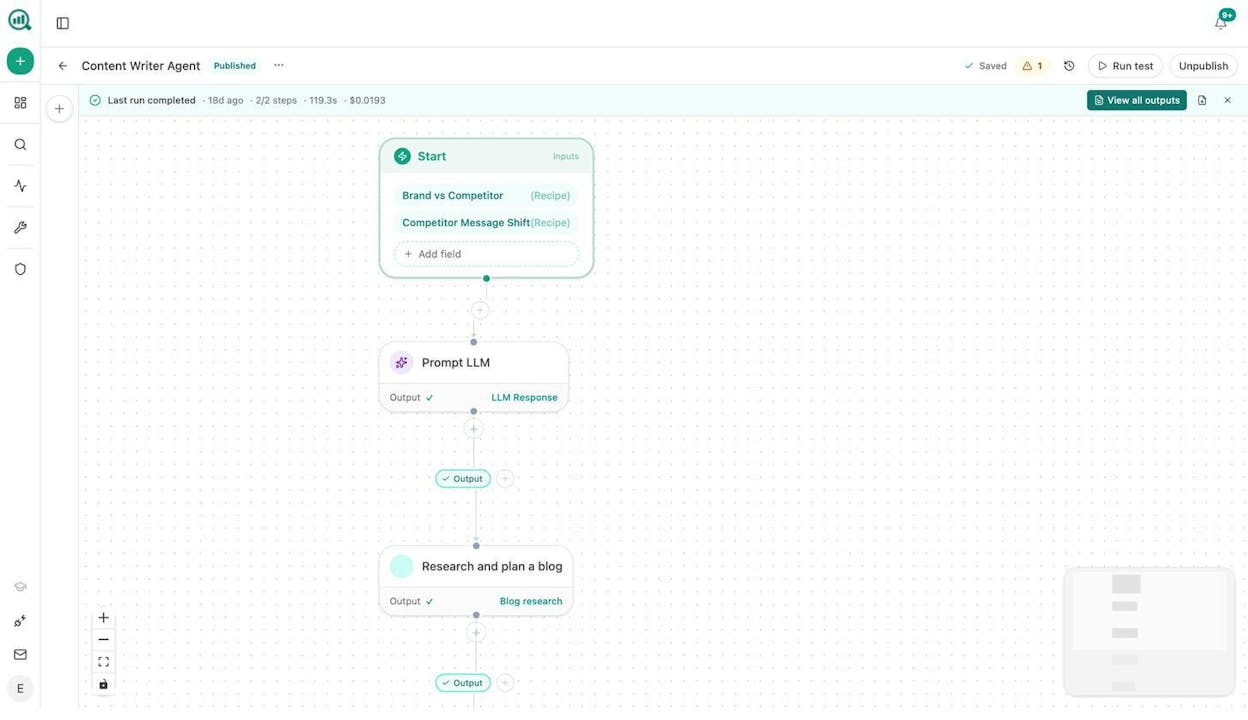
Make helps teams design workflows visually through a flow-chart-style builder that shows how data moves between apps in real time. Its structure supports branching logic, multi-step workflows, conditional paths, and error handling, giving users far more control than simple “trigger → action” tools. This allows marketers and operations teams to automate complex sequences across content systems, analytics tools, CMS platforms, and AI models without writing code.

creative workflow platforms

As workflows become more advanced, Make’s flexibility shines—users can create parallel paths, retry logic, or multi-branch automations tailored to unique business processes. The trade-off is complexity: Make has a steeper learning curve, debugging can take time, and the platform can feel overwhelming for simple tasks. It delivers the most value when teams need rich, visual orchestration rather than basic automation.

Pricing: Offers a generous free tier, with paid plans scaling based on operations, scenario complexity, and team usage.

AspectAdvantageWeaknessWhy it matters for content marketing
Workflow designVisual and detailed automationsSteeper learning curveHelps orchestrate complex publishing and content operations
FlexibilityBranching logic plus loops plus error handlingDebugging can be trickySupports advanced multi-step content pipelines
IntegrationsLarge app library and AI supportOverkill for simple tasksConnects content analytics and CMS tools in one workflow

Best use cases

  • Teams needing complex, multi-branch workflows across content, CRM, and analytics tools

  • Marketers orchestrating automated publishing, tagging, or reporting pipelines

  • Organizations that want visual, AI-enabled automation across multiple platforms

Bottom line

A powerful visual automation platform built for complex, multi-step workflows—ideal when teams need advanced logic and orchestration across many tools.

Tie AI visibility toqualified demand.

Measure the prompts and engines that drive real traffic, conversions, and revenue.

Covers ChatGPT, Perplexity, Claude, Copilot, Gemini

Similar Content You Might Want To Read

Discover more insights and perspectives on related topics

© 2026 Analyze AI. All rights reserved.