7 Top Google Analytics Alternatives (Free & Paid)
Written by
Ernest Bogore
CEO
Reviewed by
Ibrahim Litinine
Content Marketing Expert

Google Analytics helps you understand how people find and use your website. It shows where visitors come from, which pages they view, and how they move across your site, so you can see what attracts them and what keeps them engaged.
GA4 expands this view with cross-platform tracking, predictive insights, and integrations with Google Ads and BigQuery, which means you can connect your marketing activity with on-site behaviour.
But even with all these features, many teams still struggle because GA4 feels complex, relies on sampled data, and surfaces insights in ways that don’t always support real decision-making.
Among other things:
GA4 feels so confusing compared to Universal Analytics
With GA4, it is hard to get clear, actionable data without hours of setup
Google Analytics 4 shows so much information yet makes it difficult to understand what actually drives results
If those sound familiar, you’re in the right place. In this guide, we’ll break down seven Google Analytics alternatives and show how each one tackles the limitations that teams run into with GA4. You’ll see what each tool does well, where it offers a simpler path to insight, and how it helps you get clarity without the friction that often comes with GA. By the end, you’ll have a clear view of which option fits your needs and what tradeoffs to expect before you switch.
Table of Contents
TL;DR
| Tool | Best for | What it does better than GA4 | Main trade-offs / limits | Replace GA4? |
|---|---|---|---|---|
| Analyze | AI-search-visibility and AI referral tracking | Connects AI answer engines (ChatGPT; Perplexity; Claude; Copilot; Gemini) to sessions; landing pages; conversions and revenue; prompt-level visibility; sentiment and citation audits; shows which engines/prompts actually drive high-intent traffic | Focused on AI-search only (not all channels); needs clean tracking and prompt configuration; full value appears once you have meaningful AI traffic; AI benchmarks still evolving | No – usually paired with GA4 for non-AI traffic and general analytics |
| Matomo | Full data control and privacy-sensitive analytics | You own raw data; self-host or cloud; strong privacy controls; deep web analytics with plugins (heatmaps; session replay; A/B tests; form analytics) and flexible custom dimensions | Self-hosting adds server; security and maintenance work; even cloud needs skilled setup; costs grow as you add paid plugins; heavier UI for non-technical users | Yes; can fully replace GA4 if you have resources to manage it |
| Plausible Analytics | Simple; privacy-friendly traffic reporting | Minimal one-page dashboard with only core metrics; ultra-light; cookie-less script; easy goals and scroll-depth; Search Console integration; strong GDPR-friendly model | Limited advanced funnels; paths and segmentation; no heatmaps or session replay; fewer integrations; cloud pricing scales with traffic; self-hosting adds tech overhead | Often can replace GA4 for small sites and blogs; larger teams may pair it with other tools for deeper analysis |
| Fathom Analytics | Fast; simple; privacy-first reporting | One clean dashboard; real-time metrics and quick filters; cookie-less tracking; very fast; copy-paste setup; multi-domain support; open-source Lite option | Shallow segmentation and attribution; limited journey analysis and integrations; costs rise with pageviews; Lite version is basic and self-hosted | Can replace GA4 when you only need core metrics and privacy; advanced teams often keep another tool |
| Simple Analytics | Privacy-first simplicity with plain-language insights | No IPs or user IDs; cookie-less tracking; custom-domain script to bypass blockers; built-in AI assistant for natural-language questions; solid exports/API/warehouse options | No user-level journeys; deep funnels or advanced attribution; fewer filters and some UI gaps; paid-only model; may need complementary tools for complex questions | Can replace GA4 for privacy-driven; simple reporting; complex products may add another analytics layer |
| Mixpanel | Product analytics and user-behaviour insight | Event-level funnels; flows; cohorts and retention; real-time user-level data; powerful no-SQL exploration; long data retention; strong warehouse and SDK ecosystem | Requires careful event schema and instrumentation; steeper learning curve; event-volume pricing can get expensive; weaker marketing/acquisition reporting | Usually complements GA4 (or another traffic tool) rather than replacing it |
| Woopra | Full customer-journey and lifecycle analytics | Maps entire customer journey across marketing; product and support; strong cohorts/retention and real-time streams; built-in automation (emails; Slack; workflows); deep CRM/support/email integrations | Higher setup complexity (events; journeys; integrations); free plan is limited; usage-based pricing can grow quickly; smaller ecosystem and fewer templates/tutorials | Often used alongside GA4 or as a central journey hub while other tools handle basic traffic |
Analyze: best Google Analytics alternative for AI-search-visibility tracking

Key Analyze standout features
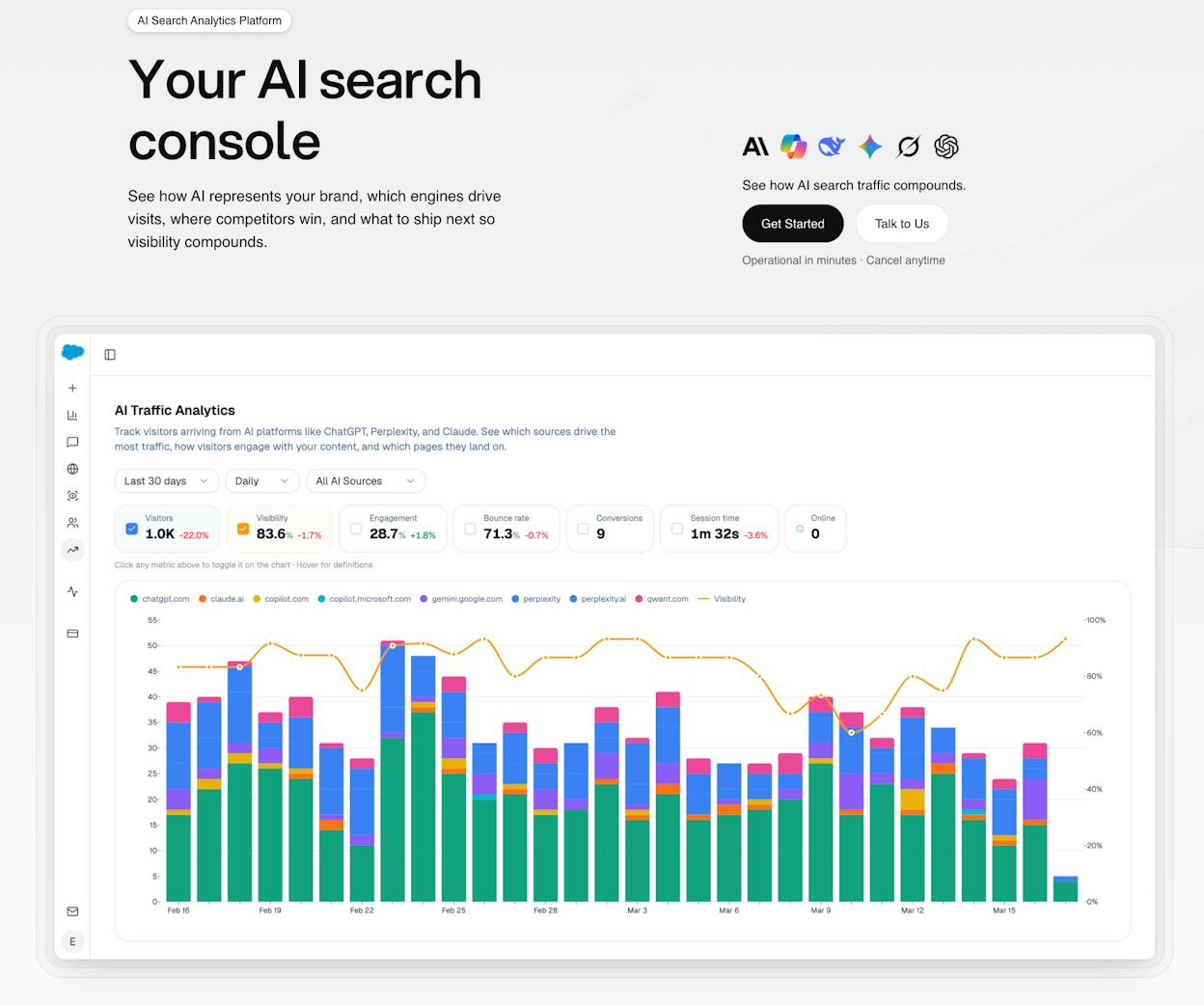
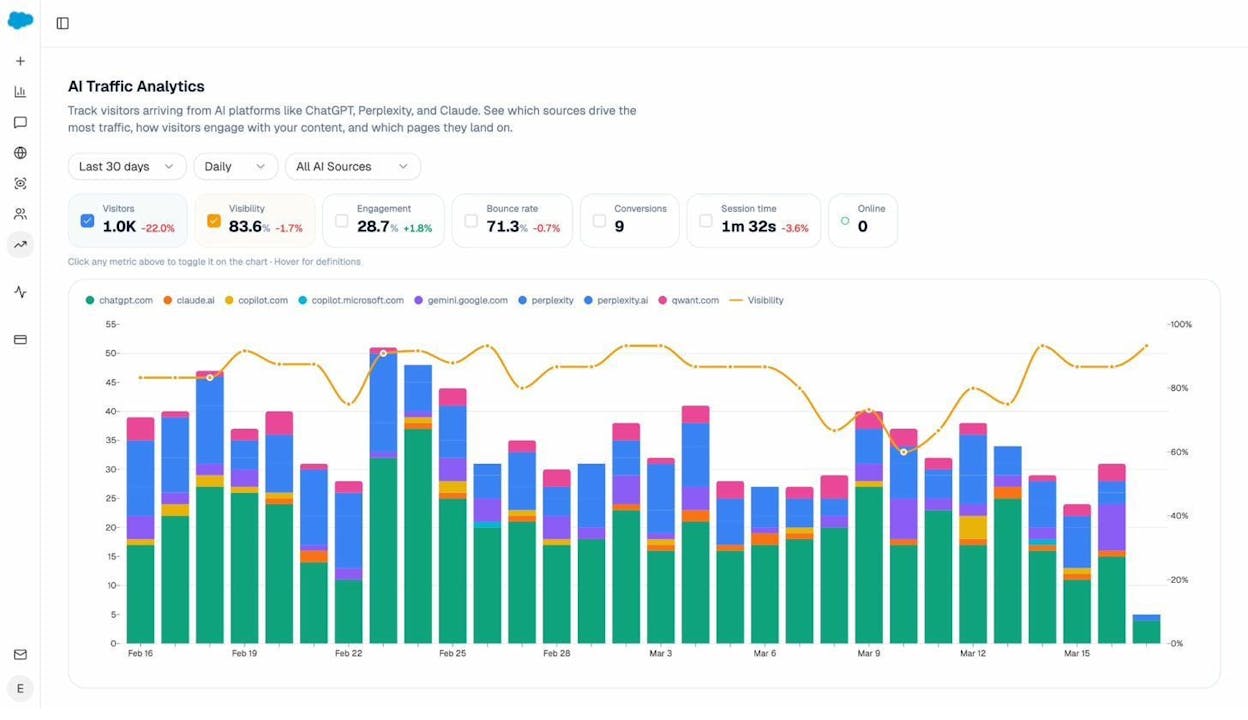
Tracks AI-referral traffic by engine (ChatGPT, Perplexity, Claude, Copilot, Gemini) and connects each visit to sessions, conversions and revenue
Shows landing pages and engine source so you can optimize the pages that convert instead of chasing visibility that doesn’t move the business
Tracks prompt-level visibility and sentiment across major LLMs to show how models rank your brand and how you compare against competitors
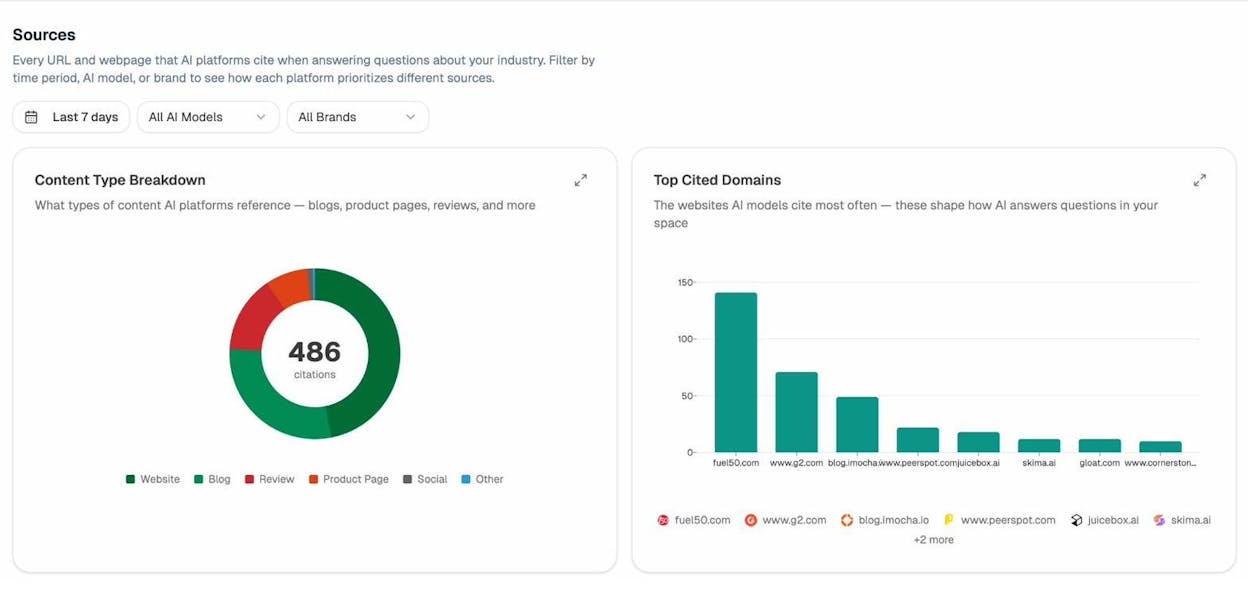
Audits citation sources used by LLMs so you can see which domains influence answers and where to focus content and authority building
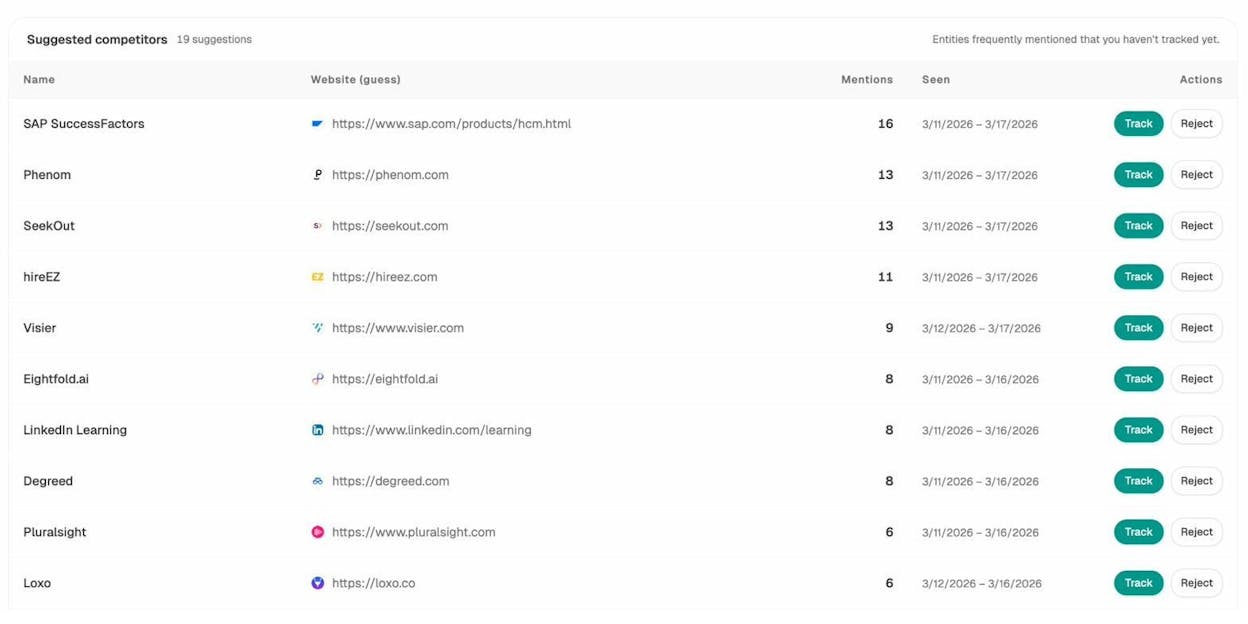
Surfaces opportunities based on visibility gaps, weak sentiment, missed prompts and high-impact pages rather than vanity metrics

Analyze helps teams understand how AI answer engines influence real business results, because it reveals what happens after a model mentions your brand.
Most tools stop at visibility and sentiment which leaves teams guessing whether AI mentions actually drive value, but Analyze goes further by linking AI answers to real sessions, landing pages, conversions and revenue.

This view helps you understand which engines send meaningful traffic and which prompts drive users who take action. When you see that ChatGPT sends low-intent traffic while Perplexity sends high-converting visits, you gain clarity on where to focus optimization efforts.
The platform becomes especially powerful when you want to own the buying conversation inside AI models. With Analyze you can monitor the prompts that matter, see how sentiment shifts, and track position changes every day across multiple LLMs. The citation audit reveals which domains shape AI answers in your category, so you know exactly where to build authority and which sources to strengthen.

This unified view makes AI-search optimization feel less like guesswork and more like a measurable channel where content, citations and prompt-level improvements directly influence traffic and conversions.
| Area | Analyze | Google Analytics (GA4) |
|---|---|---|
| Data scope | AI-engine referrals; prompt visibility; citations | Traffic; sessions; events; user behaviour |
| Attribution | AI answer → session → landing page → conversion | Session → page → event → conversion |
| Engine coverage | ChatGPT; Perplexity; Claude; Copilot; Gemini | Organic; paid; social; app; web |
| Analysis depth | Prompt analysis; sentiment; source audits; engine splits | Funnels; acquisition; engagement; retention |
| Setup complexity | Requires engine tracking and prompt configuration | Standard GA setup with events |
| Best use case | Teams optimising AI-search for growth and revenue | Teams measuring broad web and app traffic |
These strengths come with trade-offs that teams should consider before treating Analyze as a full analytics replacement. Because the platform focuses on AI-search behavior, it does not track all traffic sources or marketing channels in the way GA4 does, so most teams will still keep GA4 or another analytics tool for a complete view of overall traffic.

Analyze also depends on clean attribution, which means your tracking, prompt selection and referrer configuration must be well structured to avoid gaps in data.
Scale also matters. If your brand does not yet receive meaningful AI-engine traffic, the platform’s full value may only emerge later as AI-driven discovery becomes a larger part of your acquisition mix. And because AI-search is still evolving, benchmarks and norms shift often, which means teams should interpret trends with context rather than treat them as absolute truths.

In summary, Analyze is the strongest alternative to Google Analytics when your goal is to understand, improve and monetise AI-search visibility. It reveals which models send traffic, which prompts generate intent, which pages convert and which citations shape market perception. For organisations that treat AI answer engines as a serious acquisition channel, Analyze offers visibility and attribution clarity that traditional analytics tools cannot match.
Matomo: best Google Analytics alternative for full data control

Key Matomo standout features
Open-source analytics platform you can self-host or run in the cloud
Standard web analytics for traffic, events, goals, funnels, and ecommerce
Custom dashboards, user segments, multi-site reporting, and custom dimensions
Built-in tag manager with campaign tracking and roll-up reports
Strong privacy tools such as IP masking, cookieless tracking, and consent features
Large add-on marketplace for heatmaps, session replay, form analytics, and A/B tests
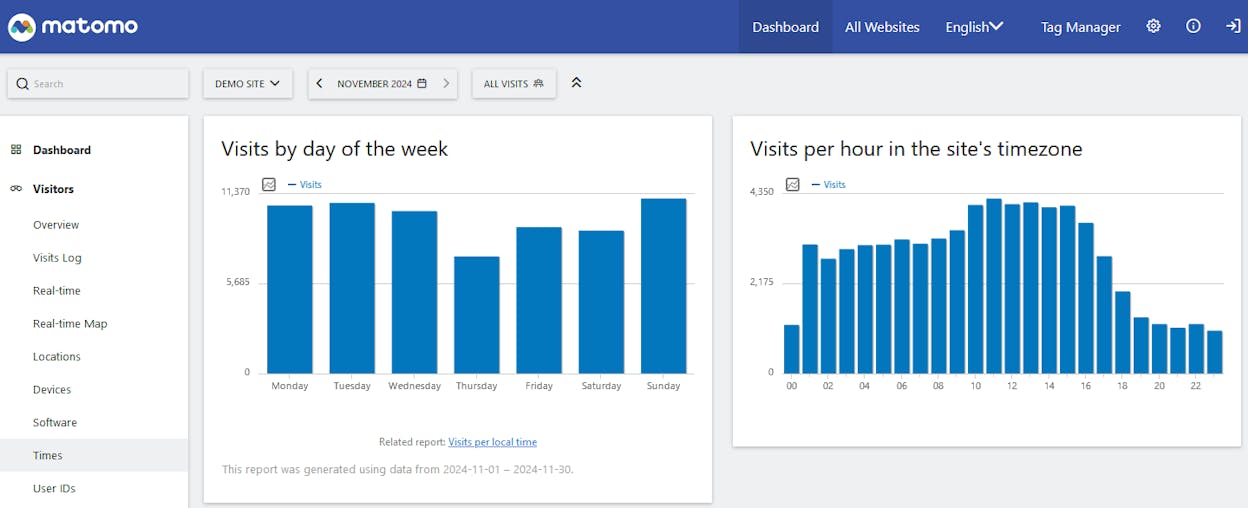
Matomo fits teams that feel stuck between two bad choices, where Google Analytics feels complex and most simple tools feel too thin for real analysis. With Matomo you keep every data point on your own server or inside Matomo’s cloud, which means you can decide how long you keep data, who can see it, and which laws apply to it. This level of control helps when you work in a space like healthcare, government, education, or finance where rules around tracking can be strict and audits can be real.

Another big strength sits in how deep the reporting can go without forcing you into Google’s way of naming and grouping everything. You can track goals, funnels, and ecommerce in a way that matches your own customer journey, not just a standard setup wizard. Custom dimensions, custom variables, and the plugin system let you build an analytics stack that grows with your site, so you can start with basic traffic reports and later add heatmaps, A/B tests, and form reports without moving to a new platform.
Here is a quick comparison against Google Analytics to make this clearer.
| Area | Matomo | Google Analytics (GA4) |
|---|---|---|
| Data ownership | You own and control all raw data | Google stores and controls the raw data |
| Hosting | Self-hosted or Matomo cloud | Fully hosted by Google |
| Privacy focus | Strong privacy; easy to align with strict rules | Privacy tools exist but sit inside a bigger ad system |
| Pricing model | Free core; paid cloud and paid add-ons | Free standard; paid GA360 for high limits |
| Feature depth | Very deep with plugins and advanced reports | Very deep especially for ads and attribution |
| Ease of use | Powerful yet heavier and less friendly at first | Mixed experience with a steep GA4 learning curve |
These strengths come with real trade-offs that you should understand before you commit your team to Matomo. When you self-host, you become the owner of the servers, upgrades, backups, and security, which means you need either in-house tech skills or a partner who can watch the setup over time. Even when you choose Matomo’s own cloud plan, you still need someone who can plan tracking events, set up goals, link ecommerce, and keep the configuration clean as your site changes. This is not a quick plug-and-play script if you want to use its full power.

Cost can also rise faster than many teams expect once you layer real world needs on top of the free core. The open-source base feels free and flexible, yet many of the features that help you replace Google Analytics completely, such as advanced reporting, heatmaps, and session replay, live inside paid plugins or higher cloud tiers that add up over time. The interface also feels more dense than tools like Plausible or Fathom, which means non-technical marketers can take longer to feel at home and may stay in a small set of default reports while the rest of the platform sits unused.
Plausible Analytics: best Google Analytics alternative for simplicity and privacy

Key Plausible standout features
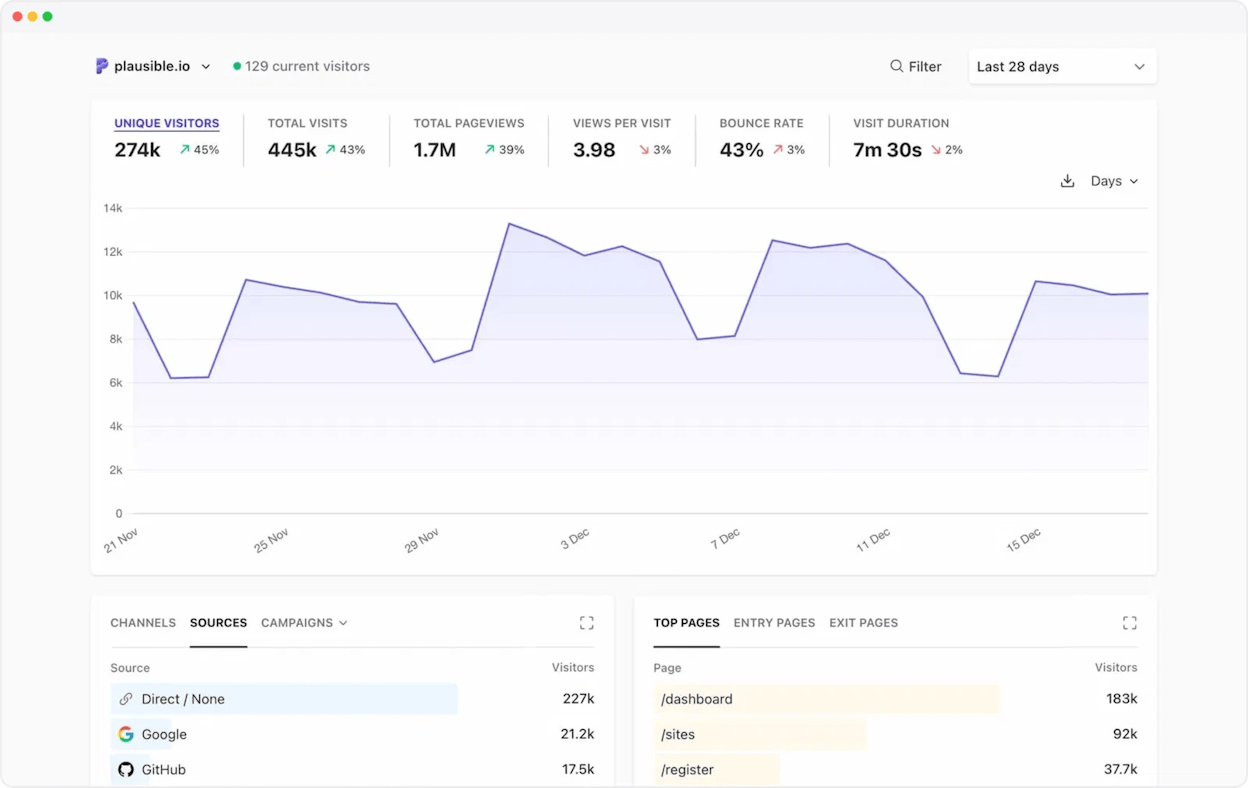
Minimalist one-page dashboard that shows pageviews, visitors, sources, top pages and conversions
Ultra-light tracking script that loads fast and keeps site performance strong
Automatic scroll-depth tracking with simple goal setup that does not require code
Direct Search Console integration that brings organic queries and conversions into one clear view
Privacy-by-design tracking that uses no cookies, no personal identifiers and full GDPR/CCPA/PECR compliance
Plausible helps teams who feel tired of analytics tools that hide basic answers behind confusing menus because it focuses only on the metrics that most site owners check every day. The dashboard loads fast, shows the numbers that matter and helps people understand their traffic without training or guesswork, which gives them confidence and speed when they check performance. The tracking script is tiny and does not slow down your site, which keeps your pages fast for users and helps reduce data loss from blockers that often stop heavy analytics tags. This makes Plausible work very well for content sites, blogs, small businesses and agencies that want clarity but do not want a full enterprise system.

The platform also gives strong value when privacy is important because it avoids cookies and personal identifiers, which means you do not need to show large consent banners or manage complex setup steps. It supports EU data hosting and uses a transparent data model that many teams trust when privacy laws get strict. The Search Console integration helps you view organic performance and conversions in one place, which saves time because you do not need to jump between tools. If you work with clients or teams who want a clean read on traffic every morning, Plausible makes that easy through its simple design and open-source option for developers who prefer self-hosting.
Here is a direct comparison that shows how Plausible and Google Analytics differ in real use:
| Area | Plausible Analytics | Google Analytics (GA4) |
|---|---|---|
| Data ownership | You keep full control of all analytics data | Google collects; stores and controls raw data |
| Tracking method | No cookies and no personal identifiers | Uses cookies and personal data elements depending on setup |
| Interface simplicity | One clear page with core metrics only | Many menus and deep layers that require training |
| Script weight | Very light script that keeps sites fast | Heavy script that slows loading and gets blocked often |
| Attribution depth | Basic attribution with simple conversion goals | Complex models with channel paths and multi-step analysis |
| Advanced features | Limited advanced tools like heatmaps or replays | Large set of reports; funnels; ads integrations and more |
| Pricing model | Paid cloud plans that scale with traffic | Free standard version plus paid GA360 for large teams |
These strengths come with real trade-offs that matter when your analytics needs grow because Plausible keeps things simple on purpose and does not include advanced user paths or multi-step funnels. This design helps small teams move faster but can limit what you learn when you need deeper insight about how visitors act across many pages or channels. You will not find fancy features like session replay, heatmaps or form-level tracking in the core tool, and the integration list stays shorter than what bigger platforms offer, which means you may add other tools if you want feature depth.

The pricing model also needs attention because the cloud plan grows with traffic, and this can feel heavy once your site reaches high pageview levels. The self-hosted version removes that cost but adds technical work because you must manage servers and updates in a reliable way. These factors mean Plausible fits best when your team values simple daily clarity and strong privacy more than complex analysis or enterprise workflows, yet you should plan ahead if your site is growing fast or if your reporting needs may change.
Fathom Analytics: best Google Analytics alternative for simplicity and privacy

Key Fathom standout features
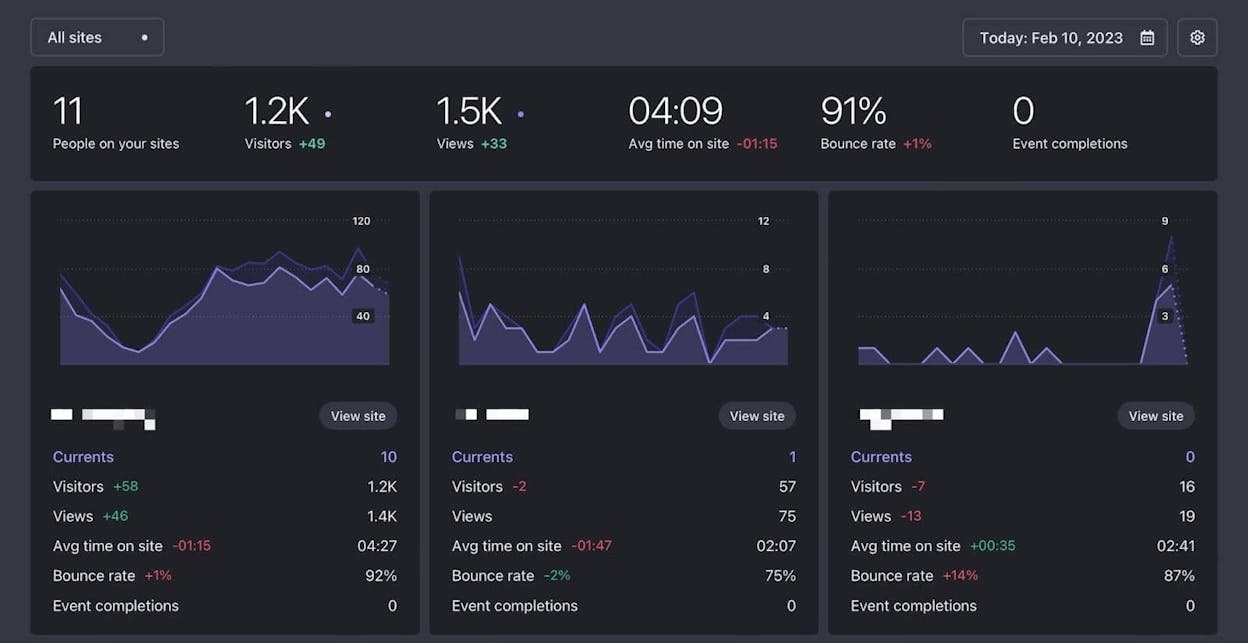
One-page dashboard that shows pageviews, unique visitors, referrers, top content and event goals
Cookie-less tracking that supports GDPR compliance and protects visitor privacy
Very fast setup with a single script snippet that starts tracking right away
“Fathom Lite” open-source version for teams that prefer a self-hosted option
Real-time metrics with instant filters, easy exports and totals across multiple domains
Fathom Analytics helps teams who feel overwhelmed by complex analytics tools, because it keeps everything simple and easy to read. The dashboard shows the main numbers in one clean view, and every metric loads fast without the heavy layers of navigation that slow people down in Google Analytics. This saves time for teams that want to check traffic, top pages or referrers each day without hunting for the right report. The setup also takes only a moment because you paste one script and the platform begins tracking, which makes Fathom useful for creators, agencies and small teams who need a reliable tool that does not add more work. The privacy-first design removes the need for cookie banners and reduces legal pressure, which gives teams more freedom to track visitors safely and keep sites fast.

The tool also fits teams that want only the core numbers rather than the full depth that larger analytics suites push by default. Real-time data, quick filters, simple event goals and clean exports make it easy to answer basic performance questions without long training sessions. Fathom keeps things light by focusing on speed and clarity, which matters when you support clients or teammates who want data but do not want to learn complex systems. Because the founders built the product as a direct alternative to Google Analytics, the platform avoids feature creep and stays focused on the simple KPIs that matter most.
| Area | Fathom Analytics | Google Analytics (GA4) |
|---|---|---|
| Data ownership | Controlled by Fathom or by you with Lite | Google stores and controls the raw data |
| Tracking method | Cookie-less with strong privacy protection | Often uses cookies and personal identifiers |
| Interface simplicity | One clear dashboard with key metrics | Complex interface with many layers and hidden menus |
| Script weight | Light script that loads fast | Heavy script that slows sites and gets blocked often |
| Attribution depth | Basic goals and events | Advanced attribution with multi-touch paths |
| Advanced features | Limited segmentation and fewer integrations | Large set of reports; funnels and advertising insights |
| Pricing model | Paid plans with simple tiers | Free standard plan plus paid GA360 for large organisations |
These strengths come with trade-offs that matter once your analytics needs grow. Because Fathom focuses on essential metrics, it does not include deep segmentation, complex attribution models or detailed journey analysis, which means teams that study multi-step funnels or product behaviour may run into limits fast. The platform also offers fewer integrations than larger competitors, so you may need extra tools if you plan to connect analytics data with many systems or run advanced workflows.

The pricing model can also shift as your traffic grows because the plan cost rises when pageviews increase, and this may feel heavy for teams with large or fast-growing sites. The self-hosted Fathom Lite version removes that cost but gives you far fewer features and requires your own server setup, which adds technical work. These trade-offs mean Fathom works best when your team values speed, privacy and clarity more than detailed analysis or enterprise complexity, and it remains strongest for sites that want clean daily insights without unnecessary noise.
Simple Analytics: best Google Analytics alternative for privacy-first simplicity

Key Simple Analytics standout features
Clean interface focused on top pages, referrers, countries, devices and simple event tracking
No IP addresses or user IDs stored, with aggregate-only metrics for full privacy compliance
Custom-domain script option that helps bypass certain ad-blockers and improves tracking accuracy
Built-in AI assistant that lets you ask questions in plain language and generate charts from chat
Export options and integrations such as API access, warehouse exports and raw or aggregated data flows
Simple Analytics works well for teams that want clear traffic insights without the complexity or heavy setup that comes with larger analytics tools. The platform removes cookies, hides IP addresses and avoids personal identifiers, which makes compliance with privacy laws much easier and helps teams avoid consent banners that slow the user experience. The dashboard focuses on the key metrics that nearly every website needs, and the custom-domain script path improves accuracy because fewer blockers stop the tracker. The AI assistant also helps non-technical users explore data by asking simple questions, which saves time and lowers the barrier to understanding site performance.

This focus on simplicity creates a tool that feels light but still delivers practical value. You can see which pages perform well, which countries send the most traffic and which devices visitors use, and you can track simple events without building large setups. If you work with small businesses, content creators or clients who care about privacy, Simple Analytics provides enough insight to make smart decisions while keeping visitor trust intact. The ability to export data through APIs or warehouse links ensures that teams can run deeper analysis outside the tool when needed, which adds flexibility without adding noise.
| Area | Simple Analytics | Google Analytics (GA4) |
|---|---|---|
| Data ownership | Fully controlled with no personal identifiers | Google stores and processes raw user-level data |
| Tracking method | No cookies and no IP storage | Cookie-based and event-level tracking with identifiers |
| Interface simplicity | Clean dashboard with essential metrics | Complex structure with many reports and hidden layers |
| Script weight | Light script with custom-domain option | Heavy script that slows sites and gets blocked often |
| Attribution depth | Basic events with simple conversions | Multi-touch attribution and advanced models |
| Advanced features | Limited journey and funnel insight | Wide set of behavioural and advertising reports |
| Pricing model | Paid-only with affordable entry tiers | Free standard plan plus expensive GA360 for large teams |
These strengths create a smooth experience, yet they also bring limits that matter as your analytics needs grow. The privacy-first design means the platform does not support user-level journeys, deep funnels, detailed attribution or long behaviour paths, which can make it harder to answer complex product or marketing questions. If your team needs to follow users through many steps or measure advanced actions, you may reach the ceiling of what Simple Analytics can deliver. Some users also report small UI issues or missing filters, which shows the platform avoids complexity even when it could add more control.

Pricing also plays a role because the platform uses a paid-only model with no full free tier, although the entry prices stay low for most sites. As your traffic grows or you want to send data to more systems, you may pair Simple Analytics with another tool or upgrade your plan. The tool works best when your site needs fast, ethical analytics without deep data engineering, and it remains a strong option for teams that value privacy, clarity and speed more than advanced reporting or enterprise detail.
Mixpanel: best Google Analytics alternative for product- and user-behavior insight

Key Mixpanel standout features
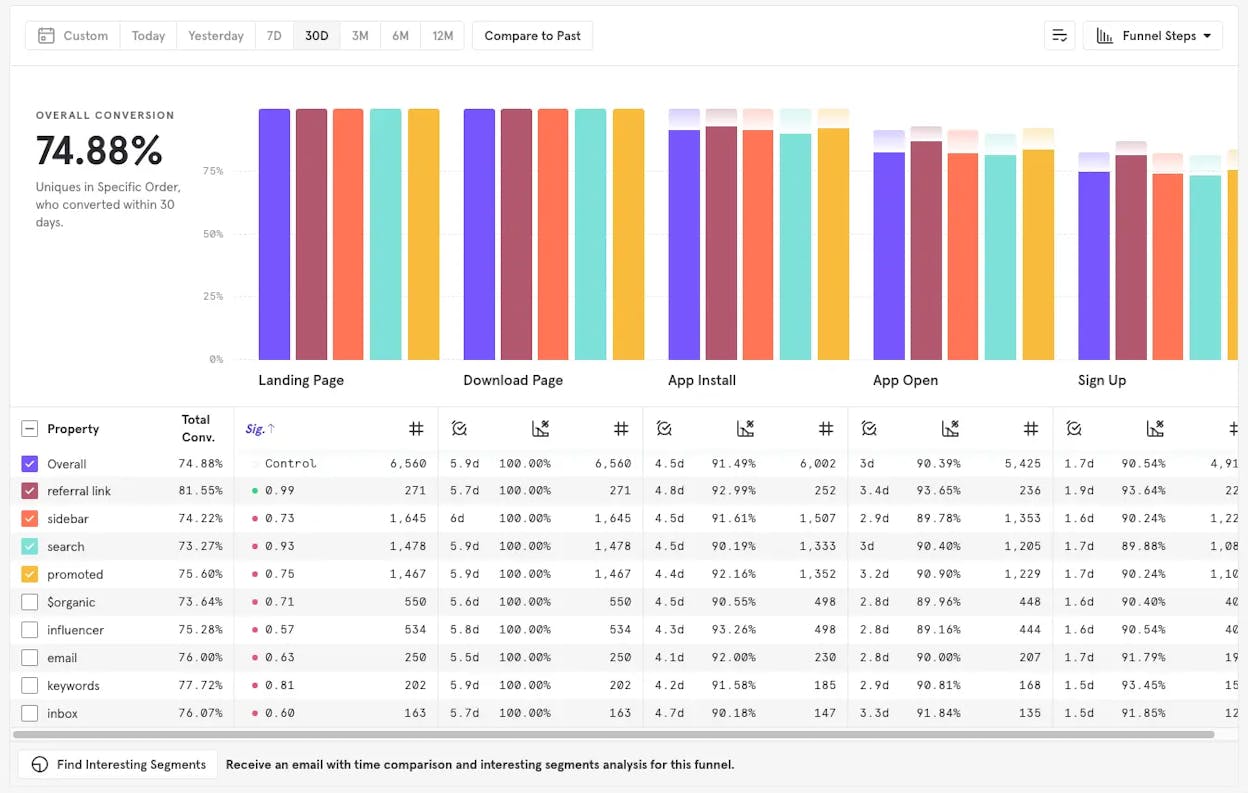
Event-based tracking with powerful funnels, retention/cohort analysis and user-flows
Real-time, user-level analytics that update quickly and support rich exploration
No-SQL exploration tools so non-analysts can query data without writing SQL
Long raw-event retention (often up to 5 years) so you can study long-term trends
Deep integrations with data warehouses (e.g., BigQuery, Redshift, Snowflake) and other analytics tools
Mixpanel excels when your business goes beyond “how many pageviews did we get today” and moves to “how did users behave, churn, or retain over time.” It gives product, growth and engineering teams a unified view of user interactions across web and mobile, enabling you to track button clicks, feature adoption, drop-off points and retention funnels in real time. Because it supports deep segmentation, you can isolate cohorts (for example free users vs paying ones) and chart their paths, which allows you to spot friction or opportunities with precision. In short, Mixpanel is designed for understanding what users do in your product or app, not just what pages they view.

For teams building SaaS products, mobile apps, or complex digital services, Mixpanel brings a level of insight that traditional traffic analytics struggle to deliver. If your goal is to move beyond acquisition into activation, retention and growth, then Mixpanel offers tools to model those behaviours, layer in experimentation and glean actionable insights. The long-event retention and warehouse integrations mean you’re not limited to snapshot data — you can look back, compare cohorts over years, and tie behavior to long-term value.
| Area | Mixpanel | Google Analytics (GA4) |
|---|---|---|
| Primary focus | User behaviour; events; product usage | Web traffic; page views; marketing attribution |
| Analysis scope | Funnels; flows; cohorts; retention curves | Acquisition; sessions; user engagement and ads performance |
| Setup complexity | Requires event schema design and instrumentation | Out-of-the-box simpler traffic tracking |
| Integration with data | Strong warehouse and SDK support | Good marketing/ads integration but less product-depth |
| Cost model | Free tier then event-volume based paid plans | Free standard; enterprise tier for large scale usage |
| Best use case | SaaS apps; mobile products; detailed behaviour tracking | Content sites; marketing analytics; traffic measurement |
With all that power, however, come practical trade-offs you need to weigh before choosing Mixpanel. Because the tool is built for deep behaviour insights, you’ll need thoughtful event-design, tagging discipline and planning to get full value. If you treat it like a plug-in tracker, you’ll likely under-utilise it. The complexity of setup means the learning curve is steeper and non-technical users may struggle without support. Additionally, event volumes grow fast in apps or high-traffic services, and the costs can scale up rapidly if you define too many events or retain everything indefinitely. Many teams report that they needed to pair Mixpanel with a simpler traffic analytics tool because Mixpanel’s acquisition and marketing-channel reporting is less robust than dedicated tools.

In summary, Mixpanel is a top tier alternative to Google Analytics for organisations ready to invest in behavioral analytics and product insight. But if your focus is purely traffic and page views with minimal instrumentation, the complexity and cost may not justify its depth. For teams with growth, retention, feature-adoption or product-expansion objectives, Mixpanel offers the analytical horsepower to go from data to action.
Woopra: best Google Analytics alternative for full customer-journey insight

Key Woopra standout features
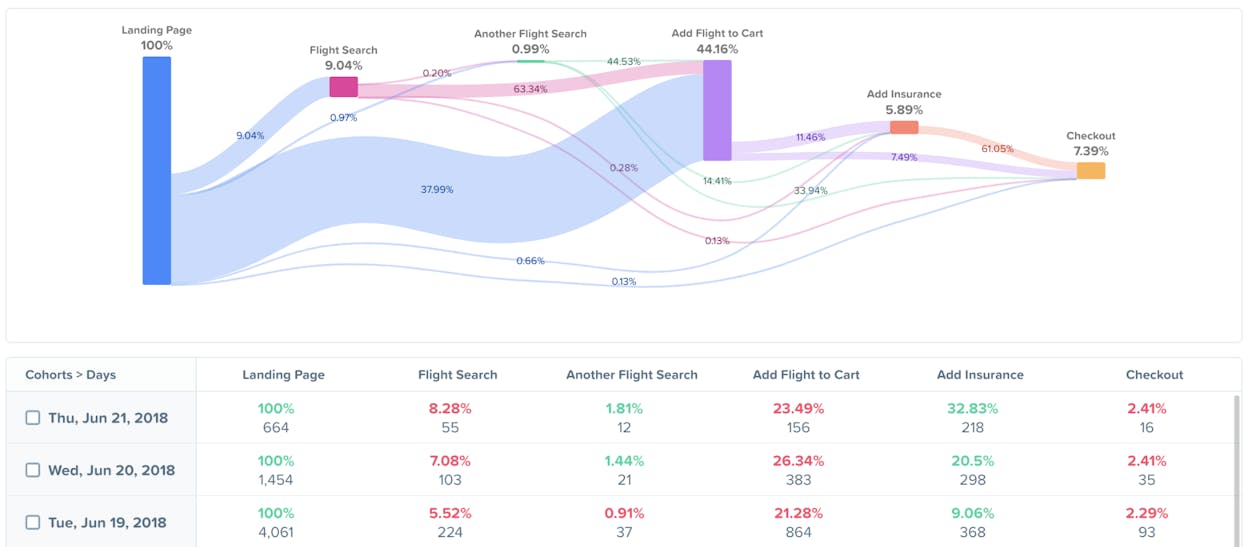
End-to-end customer journey tracking that maps how users move from acquisition through product usage and into long-term retention
Real-time event stream with segmentation so you can track actions as they happen and slice by attributes in seconds
Journey, cohort and retention reports that help you study behaviour over time and across user groups
Automation triggers that send emails, Slack messages or workflow actions when users complete or skip important steps
Integrations with CRM, email, support and other tools that combine multi-touch data into one system
Woopra helps teams that want to see the full customer story instead of isolated analytics metrics, because it connects marketing, product, support and lifecycle actions into one clear view. The platform tracks how users move through each stage, starting from their first touchpoint and continuing through activation, engagement and retention, which shows you where the customer experience works and where it breaks. This helps companies that manage complex journeys across many channels, since they can see which actions lead to growth and which actions lead to churn. The real-time stream also lets your team react as behaviour happens, which is useful when a customer hits a blocker and needs support or when a product action should trigger a targeted message.

The platform becomes even more valuable when you want to understand the difference between what users say and what they actually do, because Woopra lets you connect data from your CRM, email tools and support systems. This unified feed helps marketing, product and support teams work from the same source of truth and removes the guesswork that happens when every department runs separate tools. The automation system also saves time because you can set workflows that react to actions automatically and guide users through their next step without manual work. These strengths make Woopra a strong choice for companies that depend on customer retention and need journey insight that goes deeper than pageviews.
| Area | Woopra | Google Analytics (GA4) |
|---|---|---|
| Data scope | Full customer journey across marketing; product; support | Web analytics focused mainly on traffic and engagement |
| Behaviour depth | Journeys; cohorts; retention; real-time actions | Basic funnels and event reporting |
| Automation | Built-in triggers for emails; Slack and workflows | No native behavioural automation |
| Integrations | Strong CRM; support and lifecycle integrations | Strong ad and marketing integrations |
| Setup complexity | Higher; requires journey and event design | Lower for basic traffic tracking |
| Pricing model | Free plan plus usage-based paid tiers | Free standard plan plus GA360 for advanced needs |
| Best use case | SaaS; lifecycle-driven teams; customer retention focus | Content sites; marketing teams; traffic analysis |
These strengths come with trade-offs that should be understood before you invest in Woopra. The platform is more complex than simple analytics tools because it requires careful event design, journey definition and integrations with your CRM, email tool and support system. If your team does not plan to use journey analytics or automation, some of this power may go unused. The free plan offers a good test bed, yet it comes with tight action limits, and the paid tiers can rise in cost as your user actions increase, especially if your product sends many events each day.

Another important factor is ecosystem size, since Woopra does not have the same market reach as Google Analytics or Mixpanel. This means you may find fewer third-party tutorials, community templates or prebuilt integrations. These limits do not reduce the tool’s power, but they do affect how quickly teams learn and troubleshoot. Woopra works best when you want to understand the entire lifecycle of your customers, take action at the right moment and unify many touchpoints into one system, and it becomes most valuable when your customer journey spans multiple channels and your team cares deeply about retention and engagement.
Tie AI visibility toqualified demand.
Measure the prompts and engines that drive real traffic, conversions, and revenue.
Similar Content You Might Want To Read
Discover more insights and perspectives on related topics

6 Best Ad Intelligence Software to Outsmart the Competition

How Kylian AI Used Analyze to Drive 1k+/m Visits From AI SEO

50 Generative Engine Optimization Statistics That Matter in 2026

The 5 Best AI SEO Tools in 2025 (We Tested Them All — The Results Might Surprise You)

The Top 7 Alternatives to Peec AI for AI Search Visibility