



Summarize this blog post with:


Competitor keyword research is the fastest form of keyword research you can do. Someone else has already tested what topics convert in your market. Your job is to read the scoreboard and decide which plays to copy, which to skip, and which gaps to walk through.
In this article, you’ll learn how to find every keyword your competitors rank for in Google, how to spot the ones worth chasing, and how to turn that list into pages, refreshes, and ads that move traffic. You will also see how to extend the same idea to AI search, so you know which prompts your competitors win inside ChatGPT, Perplexity, Gemini, and Copilot, and which of their pages quietly pull AI traffic today.
Table of Contents
What competitor keywords are (and why most people misuse them)
Competitor keywords are the search terms your rivals already rank for in Google or pay for in Google Ads. Some send real traffic. Some send wasted clicks. Some only matter because the rival is bidding defensively on their own brand.
The mistake is treating any list of competitor keywords as a to-do list. A keyword that works for a domain with a thirty-thousand-page site and a ten-year link profile may be unreachable for you this quarter. A high-volume term may be informational fluff that never converts. The goal is not to copy the list. The goal is to find the small subset of keywords where your competitor has proven demand exists and where you have a real chance to rank or earn an AI mention.
This matters more in 2026 than it did in 2022. Google still drives the majority of organic clicks, but a growing share of buying research now starts in an AI assistant. Your competitors are winning visibility in two places, and you need to find the gaps in both.
Step 1: Pick the right competitors before you pick any keywords
Most people skip this step and pay for it later. They plug in the obvious brand name, export ten thousand keywords, and drown.
You have three competitor types to identify, and they are not the same.
The first is your direct product competitor. They sell something close to what you sell, to the same buyer. You probably already know them.
The second is your search competitor. They rank for the keywords you want, even if their product looks nothing like yours. A media site, a marketplace, an aggregator, or a content-heavy SaaS in an adjacent category often falls here. They are the ones standing in front of your traffic.
The third is your AI search competitor. They get cited or recommended inside AI answers about your category, even if their organic SEO looks weak. Some of these brands are off the SEO radar but show up in every other ChatGPT answer in your space. Ignore them and you will lose mindshare you cannot see in Google Search Console.
To find search competitors quickly, run a free SERP check on three or four of your most important head terms and write down every domain that appears on page one more than once. Those are the sites Google trusts on your topic.
To find AI search competitors, you need to look at who AI engines actually mention when buyers ask about your category. Inside Analyze AI, the Competitors module surfaces brands that keep getting named in your space, including ones you have not added yourself.
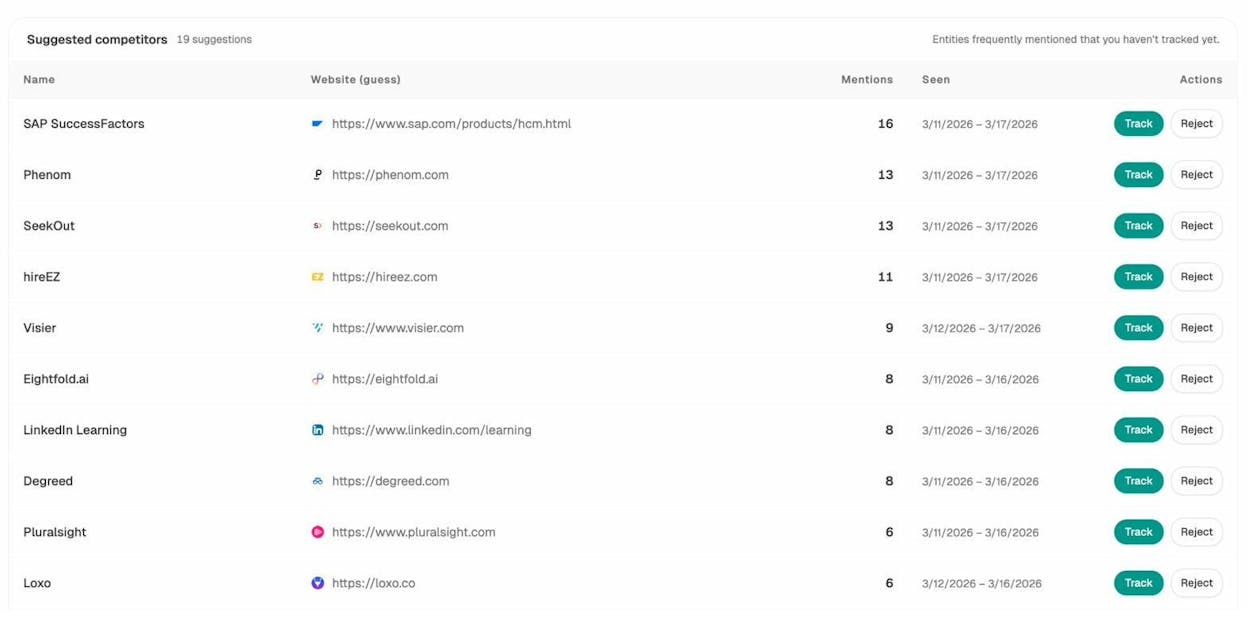
This is the list a buyer sees when they ask an AI assistant about your category. If a brand is here and not on your tracked-competitor list, you are flying blind on a real rival. Hit Track and they get added to every comparison view in the product. To see how the competitors you have already added stack up by raw mention count, you can check the tracked-competitor view next to it.
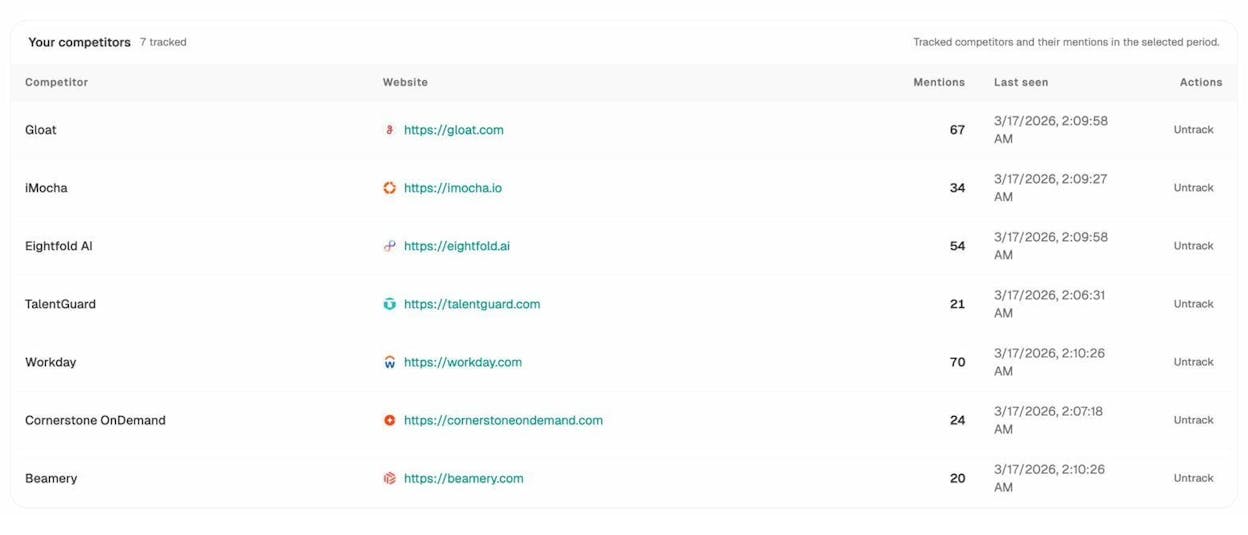
If you want a deeper walkthrough, read our SEO competitor analysis guide once you finish this article.
You should end this step with a working list of three to five competitors. Three is usually enough. More than five is noise.
Step 2: Pull every keyword your competitor ranks for
This is the foundation report. It answers a simple question. What is sending this site traffic from Google right now?
There is no way to do this without a tool that maintains a keyword database, because Google does not publish what other sites rank for. Ahrefs, Semrush, and a few others maintain these databases. The mechanics are very similar across them, so use whichever you already pay for.
Open your tool’s site explorer, paste the competitor’s domain, and open the Organic keywords report.
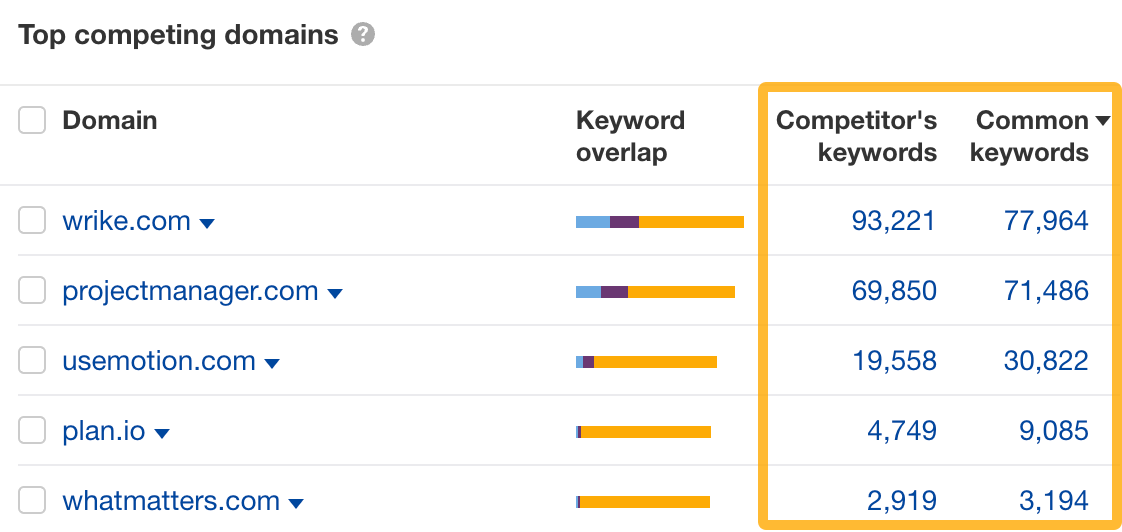
The report defaults to sorting by traffic, which is what you want. The keywords at the top are the ones doing real work for the competitor.
You will immediately notice that the very top of the list is dominated by the competitor’s own brand name and brand variations. You cannot rank for those. Filter them out by adding a Keyword does not contain rule and listing the brand plus common misspellings.
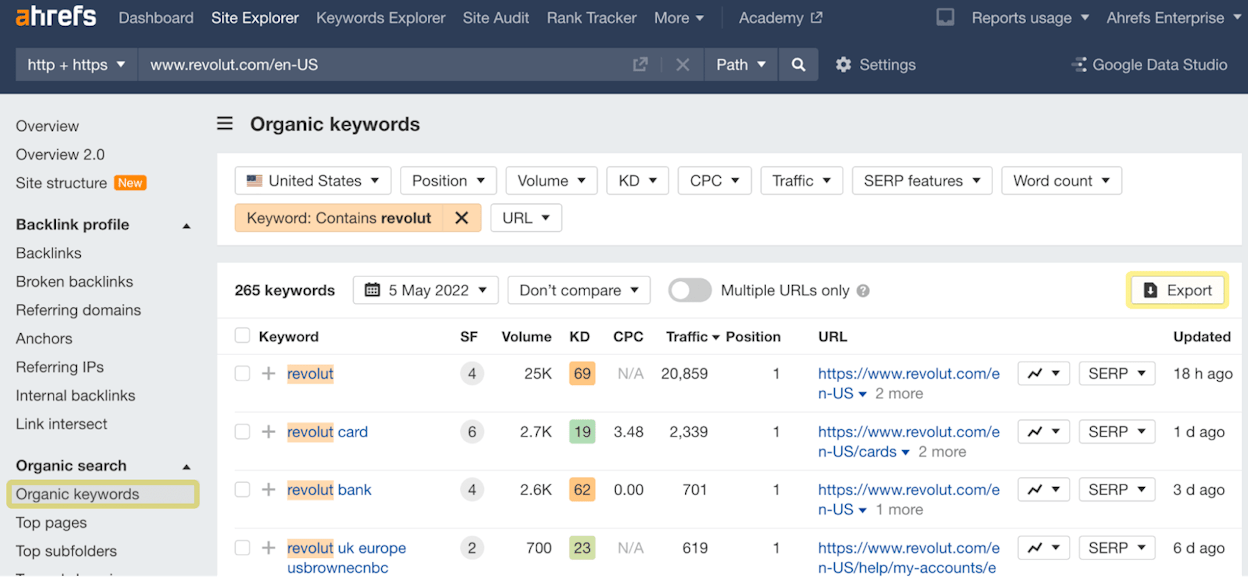
Now you are looking at the non-branded keywords driving traffic to your competitor. This is where the opportunities live.
If you are a smaller site competing with an established one, add two more filters on top. Set Volume to a minimum of around 200 and Keyword Difficulty to a maximum of around 20. Adjust based on your domain authority. The point is to find the band of keywords where there is real demand and the SERP is not locked up by giants. We have a free keyword difficulty checker that you can use to spot-check any term that comes out of this list.
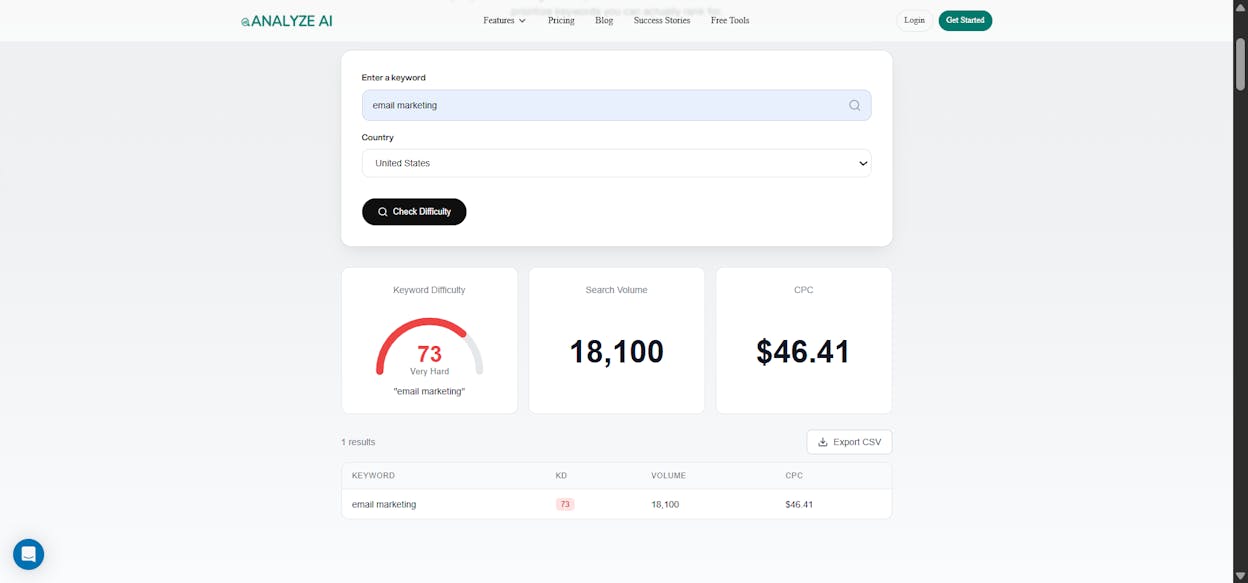
Repeat this for each competitor on your list. Export each report as a CSV. You will combine them in step four.
Step 3: Find the keywords your competitors rank for that you don’t
This is the content gap report and it is the single most useful view in any SEO tool. It tells you exactly where you are losing.
Open the competitive analysis or content gap module in your tool. Put your domain in the field labeled something like This target doesn’t rank for. Put your competitor in But these competitors do.
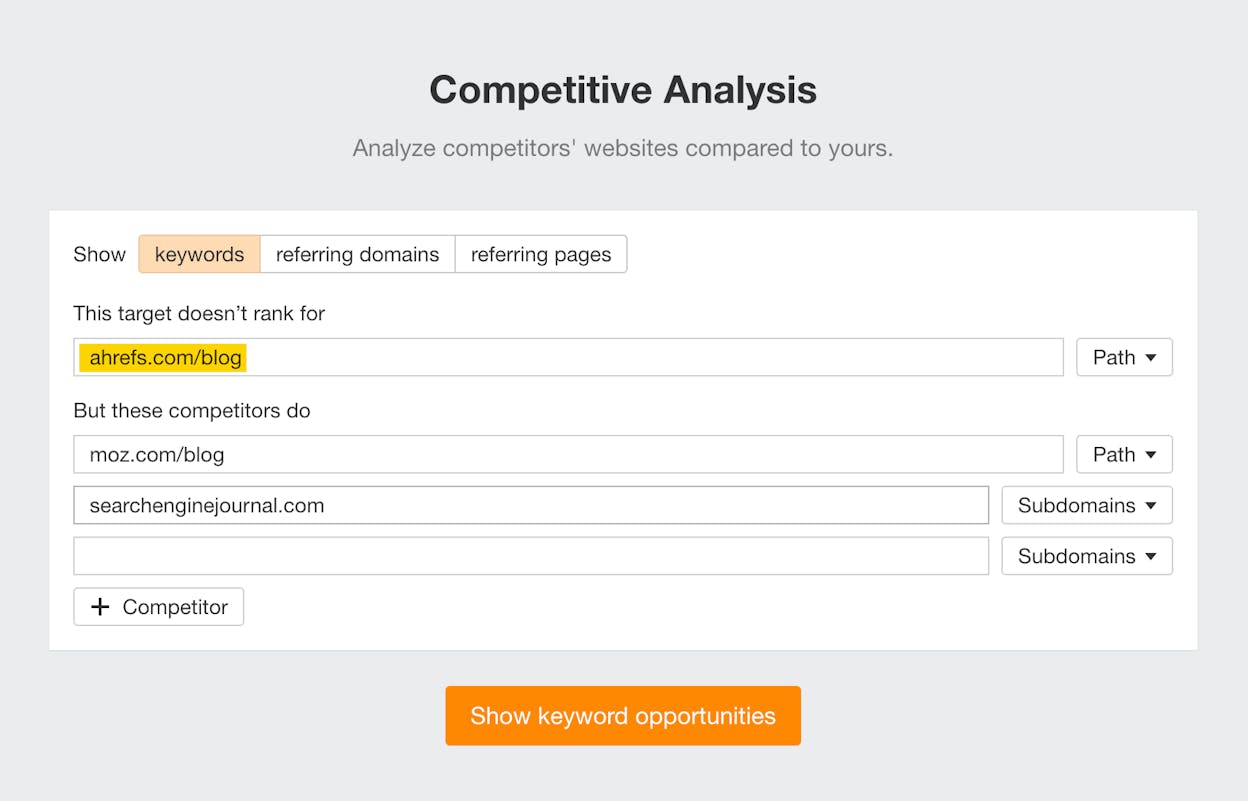
Click through and you will get a list of every keyword the competitor ranks for that you do not. This is your most actionable list.
![[Screenshot of the content gap results table sorted by volume]](https://www.datocms-assets.com/164164/1778513629-blobid7.png?auto=format,compress&w=1248&fit=max)
Add Volume and KD filters here too. Then take it one step further. Add a second and third competitor. The keywords that all of them rank for and you do not are the ones your category considers table stakes. If three of your competitors all rank for “marketing automation pricing,” that is not optional. That is a hole in your map.
![[Screenshot of the content gap report with three competitors and the all-three filter applied]](https://www.datocms-assets.com/164164/1778513633-blobid8.png?auto=format,compress&w=1248&fit=max)
Once you have this combined list, sort by traffic potential or by volume, and start tagging by intent. Use a simple three-bucket model.
-
Bottom of funnel. “Best [category] tools,” “[competitor] alternative,” “[product] pricing,” “[product] vs [product].” These convert. Do these first.
-
Middle of funnel. “How to do [job your product helps with].” These attract qualified readers who can be converted with a strong product mention.
-
Top of funnel. “What is [concept].” These build authority and AI citations but rarely convert directly.
Most teams start at the top because volume looks impressive. They burn six months building traffic that does not pay them back. Start at the bottom. Move up only when the bottom is covered.
Step 4: Find your competitors’ paid keywords
Paid keywords are a shortcut to finding what actually makes money in your category. If a competitor is spending real budget on a term month after month, the unit economics work. You should pay attention.
Pull this from the same site explorer. Switch from the Organic keywords report to the Paid keywords report.
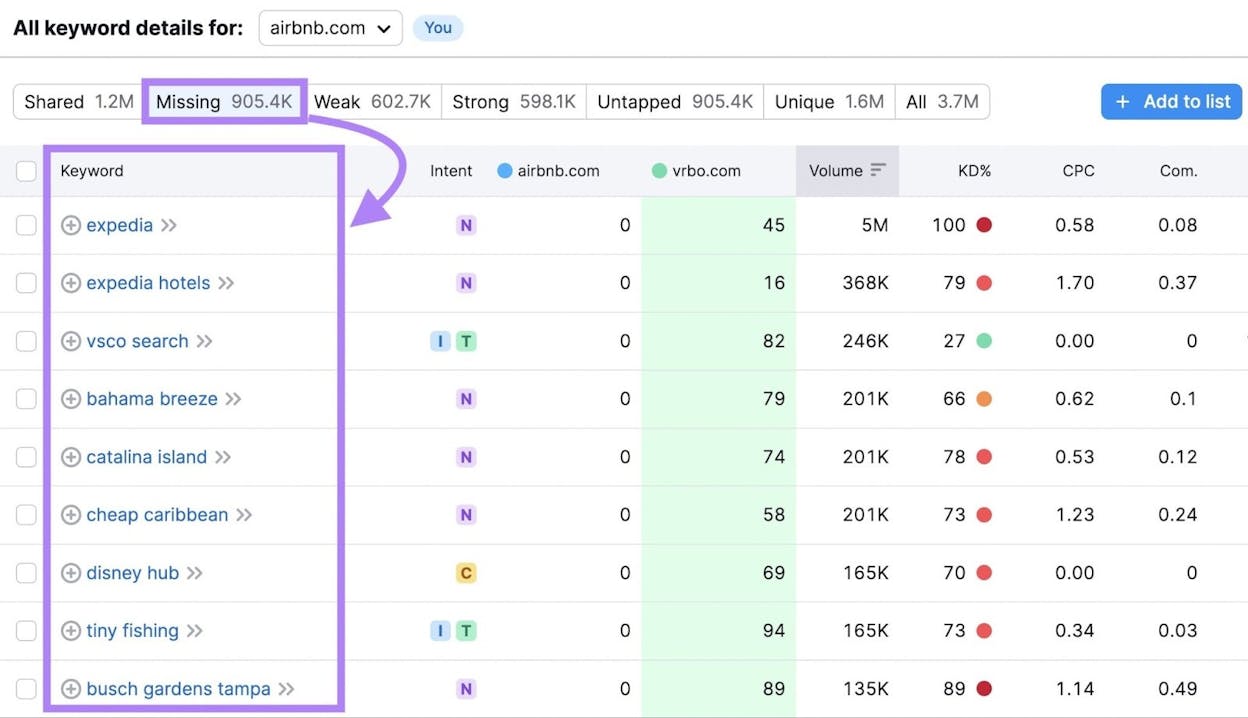
Read the list with two questions in mind. Which of these terms could you target organically, since organic traffic is free? And which of them are worth bidding on yourself, because the intent is so commercial that even a paid click pays for itself?
When a paid keyword catches your eye, hover over the magnifying glass icon to see the actual ad copy. Then check the destination URL. The landing page your competitor is sending paid traffic to is a tiny gift. They have probably tested half a dozen versions to get to that one. Read it carefully. The headline and the first two scrolls of that page often reveal the angle that converts in your category.
Step 5: Find the prompts your competitors win in AI search
Here is where most competitor keyword guides stop, and where you start losing visibility you cannot see in any traditional SEO tool.
When a buyer asks ChatGPT “what is the best CRM for a 50-person sales team,” that is a search. There is no SERP. There is one answer, and a small set of brands inside it. If your competitor is named in that answer and you are not, you have lost the search before the buyer ever reaches Google.
The keyword equivalent in AI search is the prompt. Prompts are the questions buyers actually type into AI assistants. You need a list of the prompts that matter in your space, and you need to know who is winning each one.
You can do an ad hoc check on any single prompt with the AI Search Explorer. Just type the question and run it.
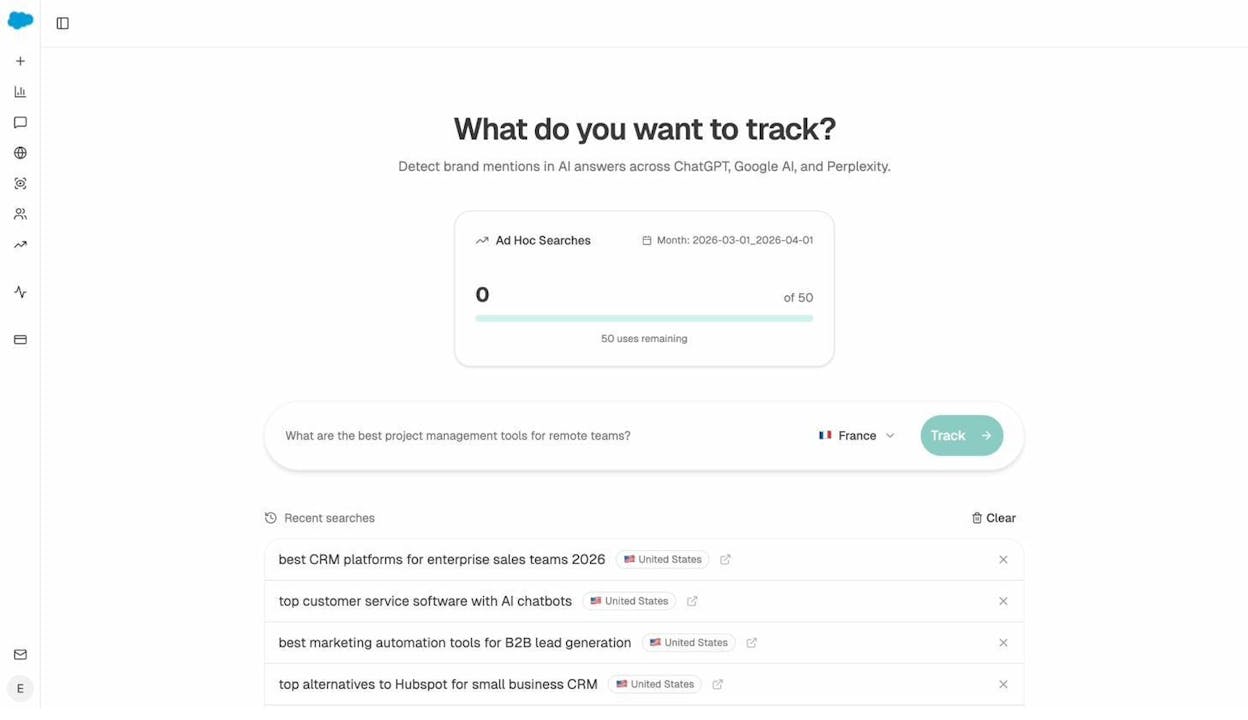
That is fine for a one-off look. For ongoing tracking you want a list of prompts that get re-run automatically so you can see trends.
Inside the Prompt Tracking module, you build a list of prompts that matter for your category, and Analyze AI runs them across ChatGPT, Perplexity, Gemini, and Copilot at a regular cadence. Each row shows your visibility on that prompt, which competitors are mentioned, and your average position in the answer.
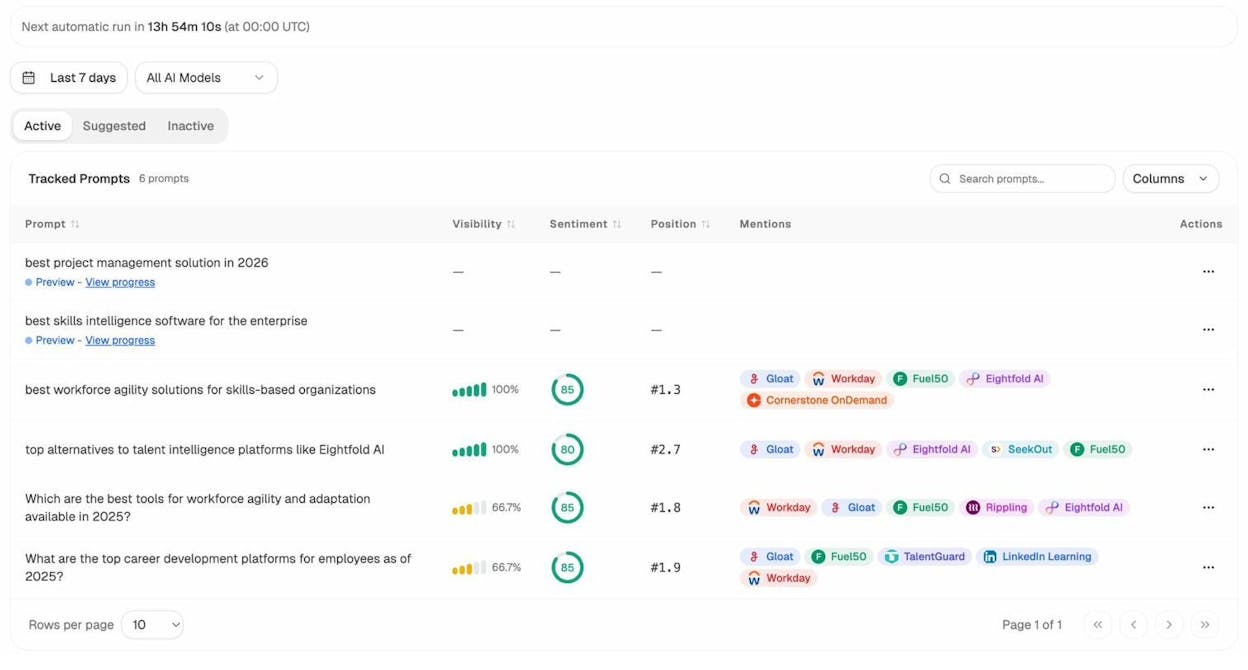
Read this view the same way you read an organic keywords report. The prompts where you have zero visibility and a competitor has 100% visibility are gaps. The prompts where everyone is mentioned are table stakes. The prompts where only one or two brands appear are the ones to win.
If you do not know what to track yet, the Prompt Discovery feature suggests prompts based on the questions buyers in your space are actually asking AI assistants.
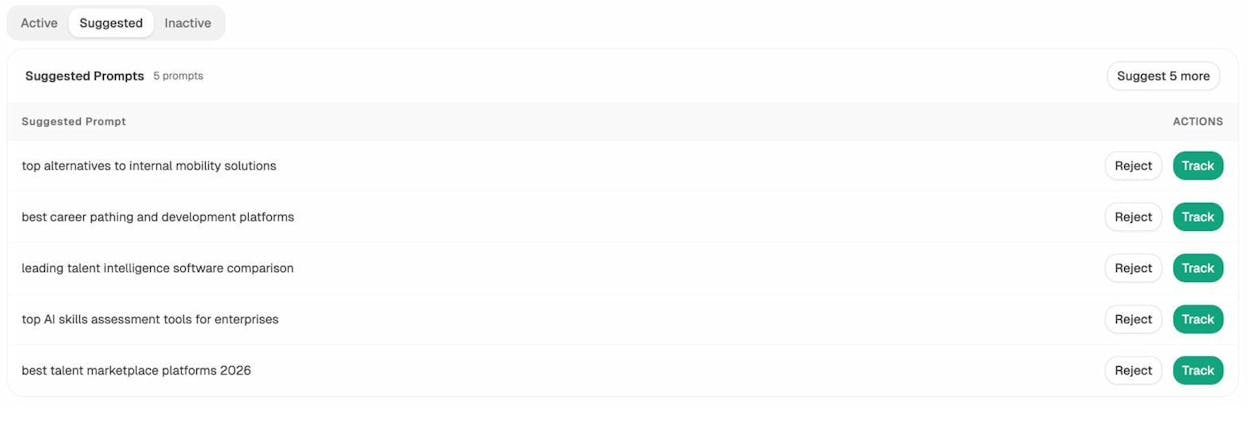
Suggested prompts are the AI search equivalent of long-tail keyword discovery in keyword research tools. Most of them are ones you would never have thought of, because no human at your company is searching for “top alternatives to [your category]” several times a week. AI users are.
The other view to read here is Sources. Every time an AI engine answers a question in your category, it cites a few URLs. The top cited domains tell you which sites the model trusts on your topic.
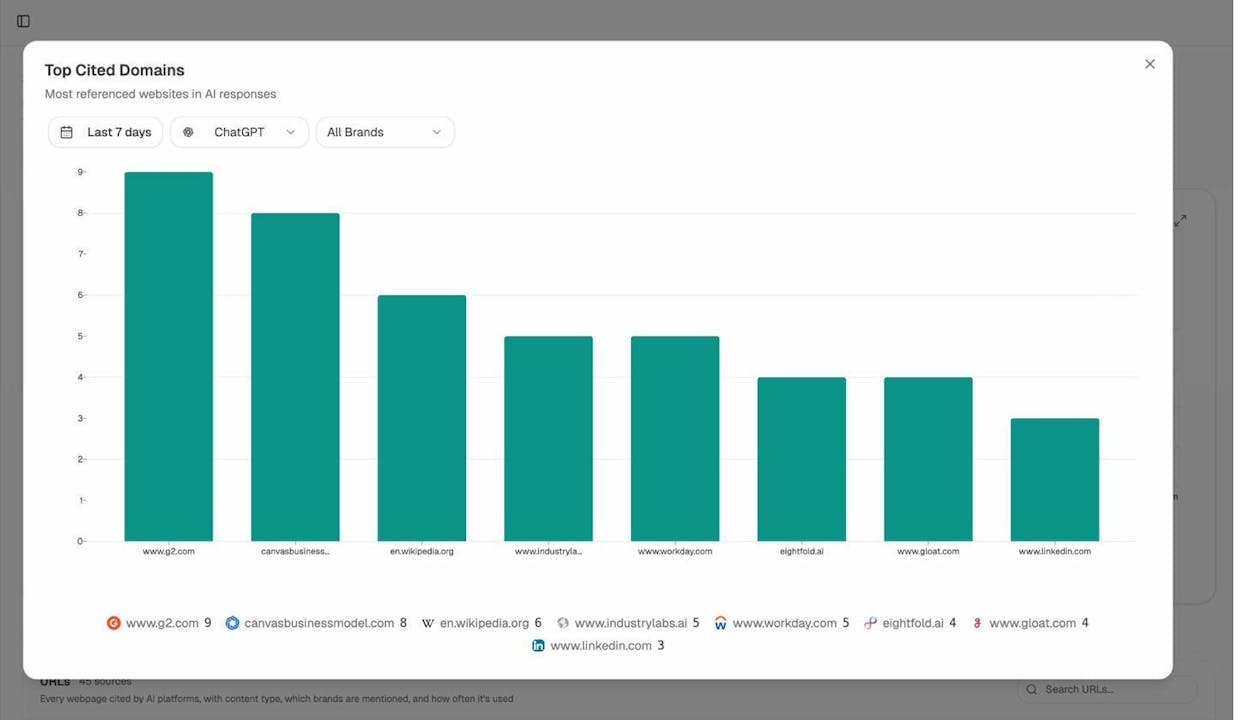
If a domain shows up in your top cited list and you have never heard of them, they are a search competitor you missed. If your competitor’s blog is cited fifty times and yours is cited five, you know where to spend your next quarter of content effort.
Step 6: Find the pages already pulling AI traffic for your competitors (and yourself)
Pages cited by AI engines often start sending real traffic. Visitors click the citation, land on the page, and convert at higher rates than typical Google traffic, because they have already been pre-qualified by the AI’s answer.
The AI Traffic Analytics view shows which of your own pages get that traffic, where it comes from, and how those visitors behave.
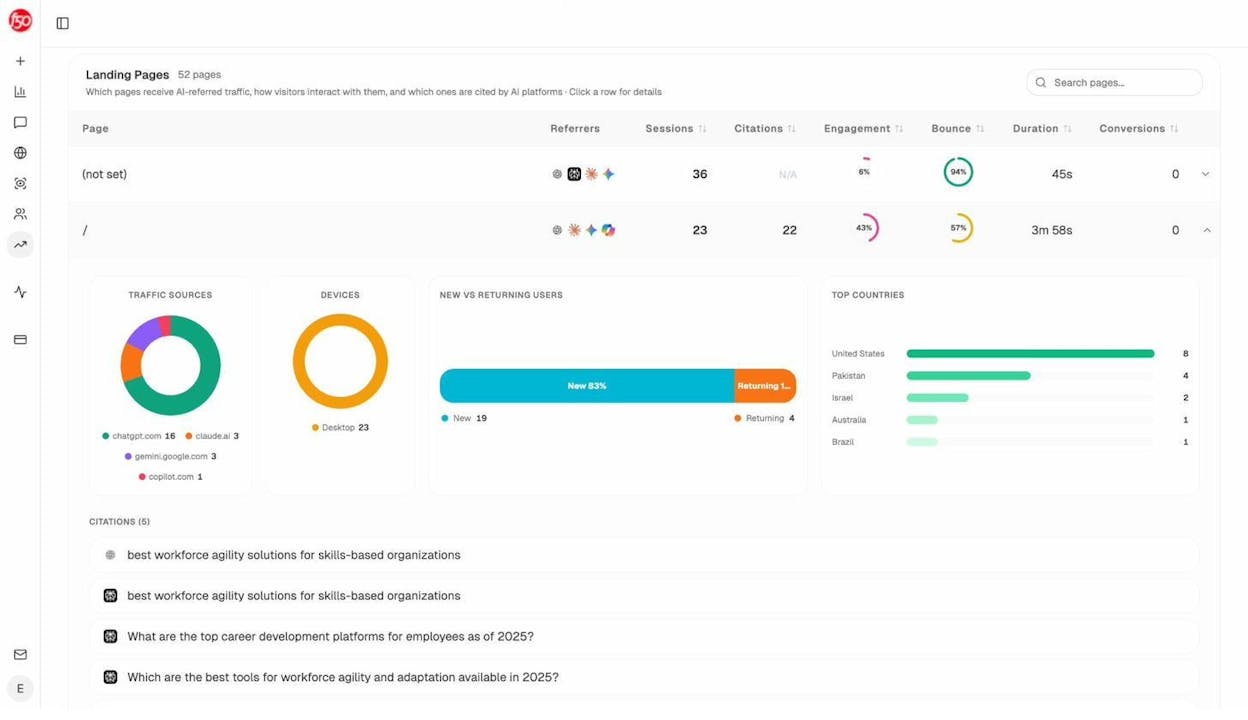
Read this with one question in mind. What do my pages that pull AI traffic have in common? It is almost always one of three patterns. They answer a clear, narrow question. They include lists or comparisons that an AI can easily extract. They cite original data or research. Once you find the pattern in your top performers, you can replicate it deliberately on the keywords from your content gap analysis.
You can apply the same lens to your competitors by watching which of their pages keep getting cited in your tracked prompts. The Sources view links each citation back to the URL it came from. Open the URLs that get cited the most. These are the pages doing the heavy lifting in AI for your category. Reverse-engineer their structure, their angle, and their depth, then publish your own version with more information gain than they have.
How to use the competitor keywords you found
You have organic keywords, paid keywords, prompts, and a list of pages that perform. Now you have to do something with them. There are four moves.
1. Cluster the keywords, then build pages for each cluster
Do not create one page per keyword. Most lists from a content gap report contain many keywords that mean the same thing. “Press release template,” “press release example,” and “press release format” are the same intent in three different phrasings. One well-built page should rank for all of them.
The fast way to do this is to export the keyword list, paste it into your tool’s keyword clustering view, and group by parent topic. Each cluster becomes one page brief. The volume across the cluster, not the volume of any single term, tells you how big the opportunity is.
2. Refresh existing pages to fill the subtopics you are missing
Some clusters in your gap report match topics you have already written about. You do not need a new page. You need to add the subtopics you missed.
This is where the Content Optimizer is built to help. It looks at one of your existing pages, compares it against what is already winning in both Google and AI search for that topic, and shows the specific subtopics, questions, and angles you are missing.
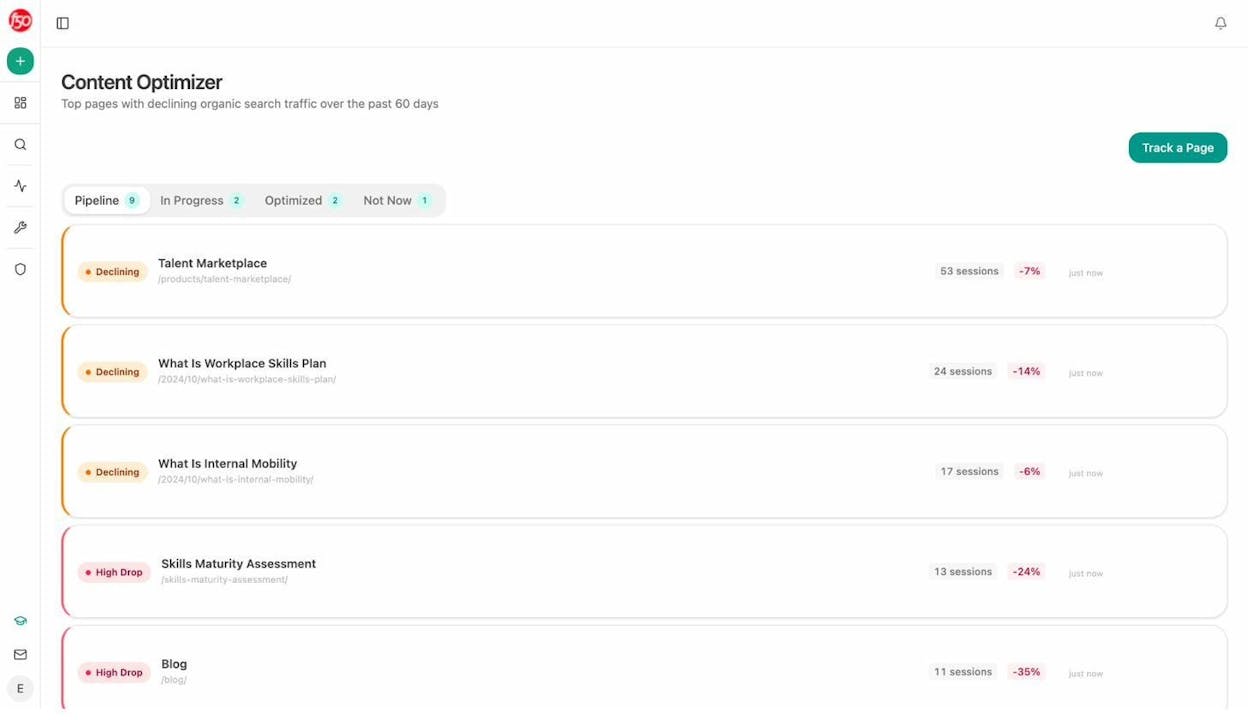
The output is a list of concrete additions. New sections, FAQ questions, definitions, examples. You hand the brief to your editor or writer and they ship the update. This is usually two to three times faster than commissioning a new piece, and Google and AI engines both reward updated content that improves on the previous version. We covered the broader case in our SEO content strategy guide.
3. Bid on the small set of paid keywords that pay back
Take the paid keyword list from step four. Strike out anything that is not a clear bottom-of-funnel term. What you have left is a short list of “best [category],” “[competitor] alternative,” and product-name terms.
Estimate the conversion rate from your highest-intent landing pages. Estimate your average customer value. If a click costs less than the conversion-weighted value of a click, the term clears the bar.
You can use the ad copy you saw in step four as a starting point. Do not copy it. Read it for the angle, then write something tighter.
4. Build the prompt and content pairing for AI search
The AI search equivalent of “create a page targeting this keyword” is “create content that the AI will use to answer this prompt.”
For each high-priority prompt you are losing, ask three questions.
What kind of source does the AI cite when it answers this? Sometimes it cites listicles. Sometimes review sites. Sometimes original research. Sometimes a documentation page. Match the format.
Where does the AI’s current answer fall short? You have the actual answer text in front of you in the prompt tracking view. Read it. Find the gap. Then publish a piece that fills it specifically.
Which of the cited pages can you reasonably out-publish? Some are Wikipedia. You will not beat Wikipedia. Many are blog posts on domains no stronger than yours. Those are reachable.
Done well, the same article that closes a content gap in Google can also close a prompt gap in AI. The buyer journey is one. The optimization is two.
A short prioritization framework you can run on Monday
If your gap report has 4,000 keywords on it, you will not start. So do this.
|
Tier |
What to look for |
What to do this month |
|---|---|---|
|
1 |
Bottom-of-funnel keywords your competitors rank for and you don’t, with KD ≤ 25 |
Build pages, one per cluster, with a clear product mention woven in |
|
2 |
AI search prompts where competitors are mentioned and you are not, especially “best” and “alternative” prompts |
Publish or refresh one piece per prompt designed to be cited |
|
3 |
Existing pages of yours that already pull AI traffic |
Run the Content Optimizer, ship the gaps, and double down on the format that worked |
|
4 |
Paid keywords with strong commercial intent that fit your unit economics |
Test in Google Ads, mirror to a dedicated landing page |
Tier 1 funds the program. Tier 2 future-proofs it. Tier 3 compounds. Tier 4 is the cash register. Run them in that order.
A note on what does not work
Two patterns will burn time. The first is exporting a thousand keywords from a competitor and trying to rank for all of them. You will not. Pick fifteen, ship fifteen pages, see what works, and iterate.
The second is treating AI search as a separate channel that needs its own strategy and its own budget. The same content investment, structured well, can earn citations in AI engines and rankings in Google. Splitting them creates two thin programs instead of one strong one. SEO is not dead. It is now one of two organic surfaces, and a smart competitor keyword process serves both.
The teams that win the next two years are the ones who stop arguing about SEO versus GEO and systematically close the gaps in both. The keywords your competitors already rank for are the cheapest, fastest place to start.

Ernest

Ibrahim


