



Summarize this blog post with:


In this article, you’ll learn how to check where your website ranks in Google for any keyword, how to surface every keyword your site already ranks for, and how to track whether your brand is showing up in AI search engines like ChatGPT, Perplexity, Google’s AI Overviews, and Microsoft Copilot. We’ll walk through 5 tools, explain when to use each, and give you a workflow you can run this week.
A quick note before we start. The Google search box on your laptop is not a reliable rank checker. Google personalizes results by your location, browsing history, language, device, and account activity. Even an incognito window only removes some of that signal, not all of it. So when you type your keyword and see your page in position 3, the next person searching from a different city might see it in position 11. To check rankings accurately, you need tools that strip personalization out and pull a neutral SERP.
Table of Contents
Tool 1: Analyze AI’s free Keyword Rank Checker
Use this when you want to spot-check one keyword in under 30 seconds and don’t want to log into anything.
Open Analyze AI’s free Keyword Rank Checker, enter your target keyword, paste your domain, choose your country, and click Check rankings.
![[Screenshot of the Analyze AI Keyword Rank Checker input screen with keyword, domain, and country fields]](https://www.datocms-assets.com/164164/1778510889-blobid1.png?auto=format,compress&w=1248&fit=max)
You’ll see your current ranking position for that keyword, the top 10 results around it, and basic SEO metrics for each result (estimated traffic, backlinks, domain authority).
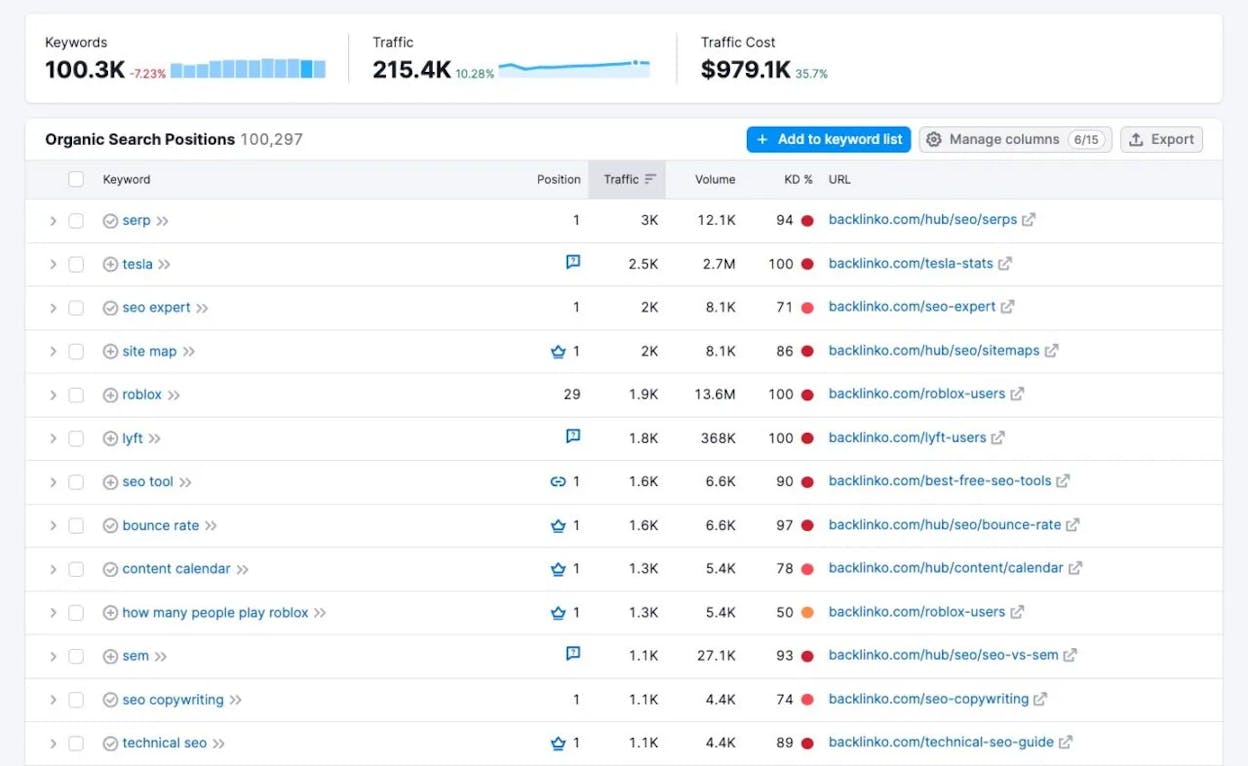
This is a quick way to answer “where am I right now?” for one keyword. The trade-off is that it’s a one-shot check. It doesn’t store history, doesn’t show how your position has changed, and only takes one keyword at a time. Use it for spot checks, competitor checks, and the moment you publish a new page and want to see if it’s indexed.
If you also want to spot-check rankings on other engines, Analyze AI has free tools for Bing keywords, Amazon keywords, and YouTube keywords, plus a SERP Checker and a Keyword Difficulty Checker you can pair with it.
Tool 2: Google Search Console
Use this when you want to see every keyword your site already ranks for, with data straight from Google.
Set up Google Search Console (GSC), verify your domain, and open the Search results report under Performance.
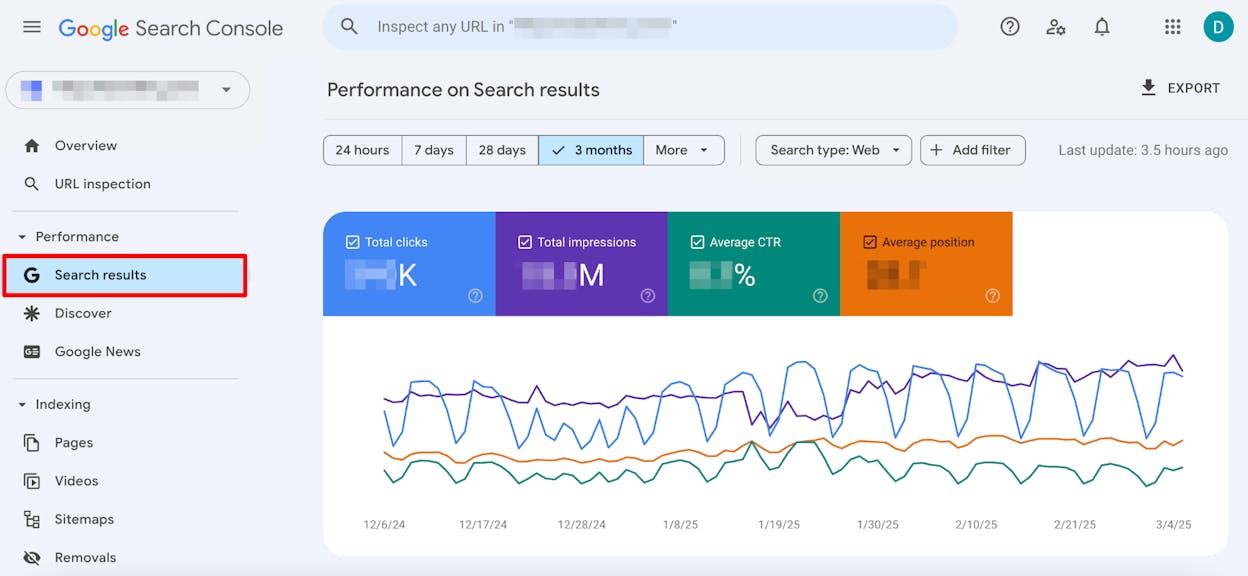
Toggle on Average position at the top. You now see four columns next to every query Google has shown your site for (clicks, impressions, CTR, and average position).
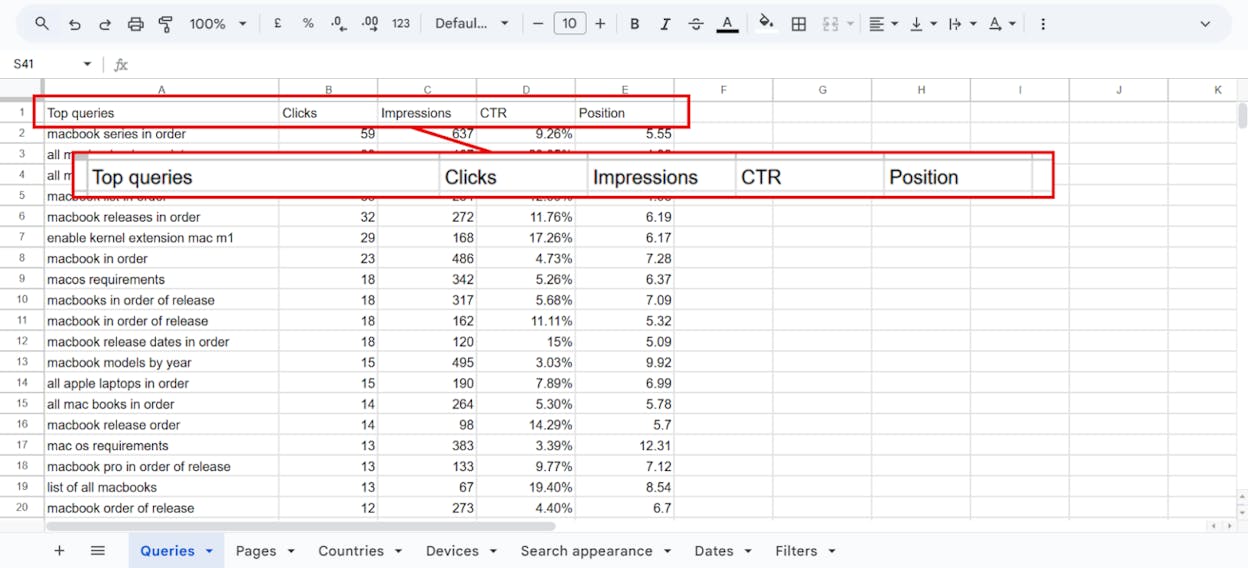
This data comes straight from Google, so it’s the closest thing you have to ground truth. But it has two real limits.
First, GSC caps the queries it shows you at 1,000 per report. If you rank for 5,000 keywords, you only see the top 1,000 by clicks. The rest are invisible. You can work around this by filtering by URL or by date and stitching the reports together, but the cap still hurts at scale.
Second, the position is an average over the date range. If you ranked #1 for half the period and #5 for the other half, GSC reports 3.0. That’s not the same as ranking #3 every day, and the difference matters when you’re trying to figure out whether you’re trending up or down.
The fix for both is to combine GSC with a dedicated rank tracker (Tool 4). For now, treat GSC as your weekly foundation. Sort by impressions to find pages that are showing up but not getting clicked, filter by country to spot regional gaps, and look at the queries report by URL to find pages with keyword cannibalization. Our guide to finding which keywords your site already ranks for walks through the full GSC workflow.
Tool 3: Bing Webmaster Tools
Use this when you want a free GSC equivalent for Bing, plus a side benefit most SEOs miss.
Bing handles a small fraction of total search traffic, so it’s easy to skip. That was a defensible choice in 2022. It isn’t in 2026. ChatGPT search and Microsoft Copilot are both powered by Bing’s index. If your pages aren’t indexed in Bing, you’re invisible to a large slice of AI search before the AI engine even starts reasoning.
Sign up at bingwebmastertools.com, verify your domain (you can import the verification straight from GSC), and open the Search Performance report.
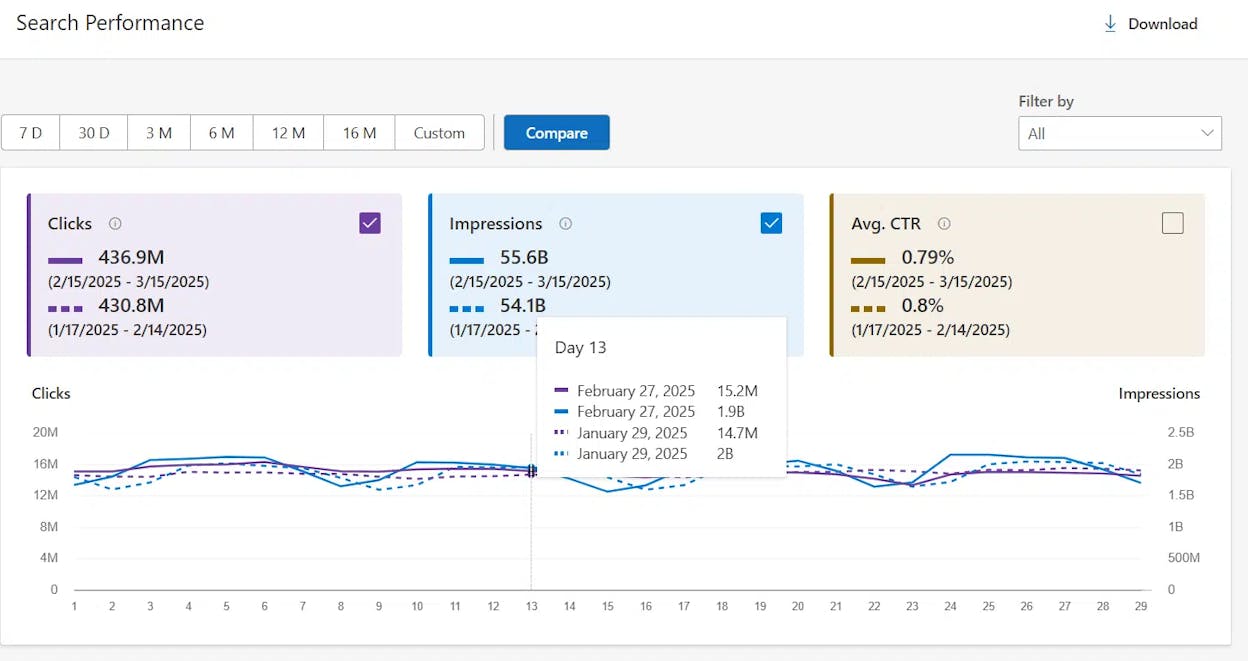
You see the same four metrics GSC shows, but for Bing. Compare your top 10 queries here against your top 10 in GSC. If a keyword ranks well in Google but doesn’t appear in Bing, that’s a flag. It usually points to an indexing issue or a thin page that Bing’s algorithm weighs differently. Fixing those gaps tends to lift your AI search visibility too.
While you’re in there, run a few of your priority URLs through Bing’s URL Inspection tool to confirm they’re indexed. It’s one of the highest-leverage 30-minute audits you can run on a site that’s getting Google traffic but no AI mentions.
Tool 4: A dedicated rank tracker
Use this when you want to monitor a defined list of priority keywords on a schedule, see whether they’re trending up or down, and benchmark yourself against competitors.
Free tools and GSC tell you where you rank now. They don’t track changes over time well. A rank tracker does. You define the keywords you care about (usually the main keyword for each priority page, plus a handful of secondary keywords). The tool checks the SERP for each one on a schedule (daily, weekly, or monthly), stores the history, and surfaces movement.
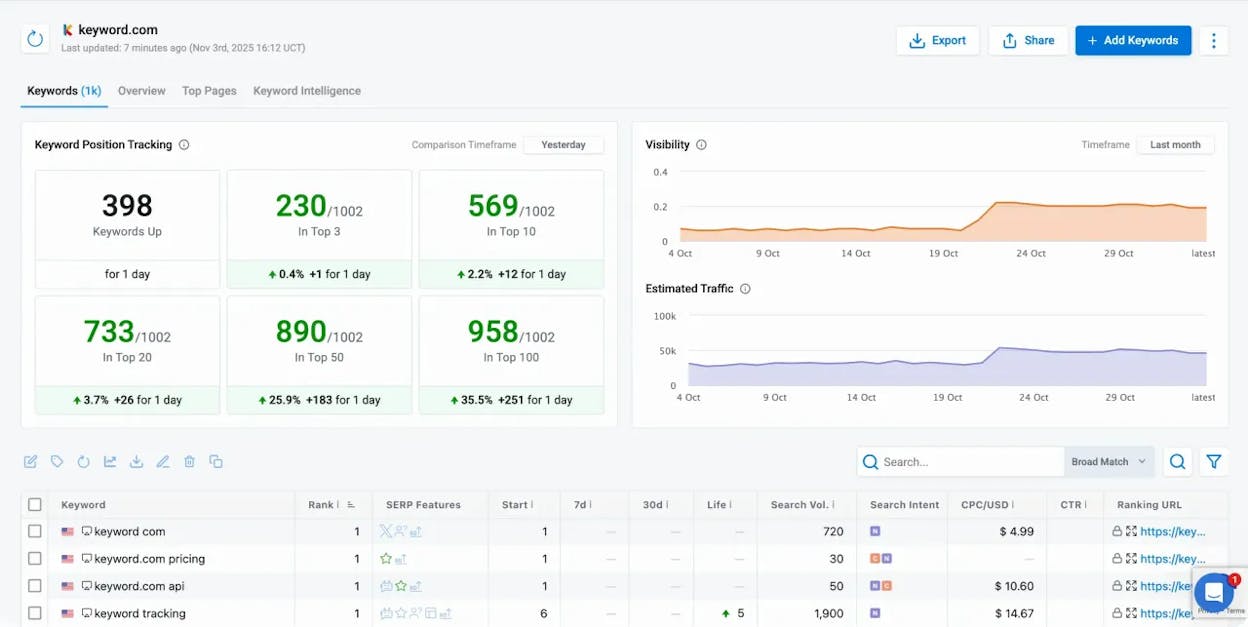
Most paid SEO platforms (Ahrefs, Semrush, SE Ranking, AccuRanker, and others) include rank tracking. Pricing typically runs from $30 to $500 a month depending on keyword volume, location coverage, and update frequency. We’ve reviewed the 11 best keyword tracking tools and the 5 rank tracking tools we actually recommend if you want a side-by-side comparison.
Three things to look for when you pick one.
|
Feature |
Why it matters |
|---|---|
|
Local rank tracking by city or ZIP |
Search results vary by geography. If you’re targeting “plumber Brooklyn,” you need Brooklyn-level data, not US national data |
|
Competitor tracking |
You learn faster from watching what’s working for the brands ranking above you than from staring at your own positions |
|
SERP feature detection |
Featured snippets, People Also Ask, and AI Overviews push organic results down. Knowing which features appear changes what you optimize for |
One thing dedicated rank trackers don’t tell you, no matter how much you pay, is whether your brand is being mentioned or cited inside AI search answers. That’s a different surface, and it needs a different tool.
Tool 5: Analyze AI (for tracking your GEO visibility)
Use this when you want to see how often your brand shows up in ChatGPT, Perplexity, Google AI Overviews, Google AI Mode, and Microsoft Copilot, for the questions your buyers are actually asking.
Google rankings tell you who wins the 10 blue links. They don’t tell you who wins the AI-generated answer that increasingly sits above those links. AI Overviews now appear in roughly 25% of US searches, and brands cited inside them often get more visibility than the #1 organic result. If you’re only tracking Google rankings, you’re tracking half the story. Our breakdown of GEO vs SEO explains the relationship in detail.
Analyze AI is built for the other half. Here’s the workflow.
Set up the prompts buyers actually ask
In the Prompt Tracking module, you add the prompts (questions) you want to monitor. These are not keywords. They’re the full natural-language questions buyers type into ChatGPT or Perplexity, like “best CRM for small SaaS companies” or “Salesforce alternatives for startups.”
If you’re not sure where to start, Analyze AI suggests prompts based on your industry and competitors. You review the list and click Track on the ones worth monitoring.
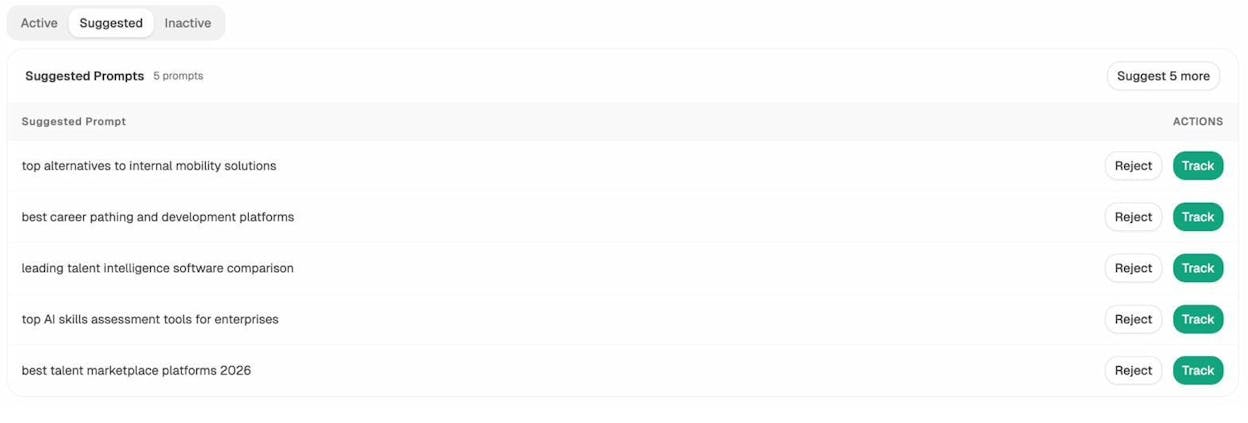
This is the AI-search equivalent of keyword research. The Ahrefs/Semrush playbook of “find keywords with volume and difficulty you can win” maps cleanly onto “find prompts your buyers ask where you don’t yet appear.” The Prompt Discovery feature does the heavy lifting.
See where you rank in AI answers
For every tracked prompt, you see four numbers. Visibility (the percentage of AI responses that mention you), Sentiment (how positive or negative the mention is, scored 0 to 100), Position (your average rank when you’re listed), and Mentions (which competitors share the answer with you).
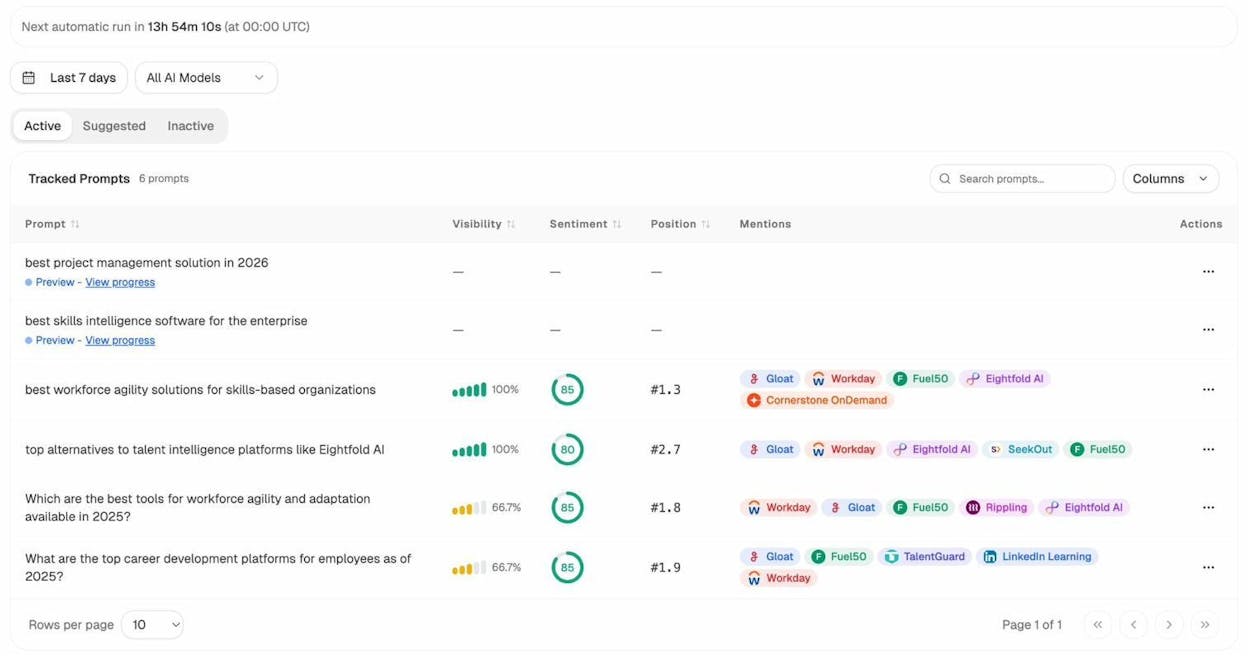
Read this the same way you read GSC’s average position table. Instead of “you rank #3 for [keyword] on Google,” it’s “you appear in 100% of Perplexity answers for [prompt] at average position #1.3, with sentiment 85.”
Compare your visibility against competitors
The Overview rolls up your visibility, sentiment, and position over time, broken out by AI model and by competitor. The summary at the top tells you which engine is your strongest channel and which competitor is closest behind you.
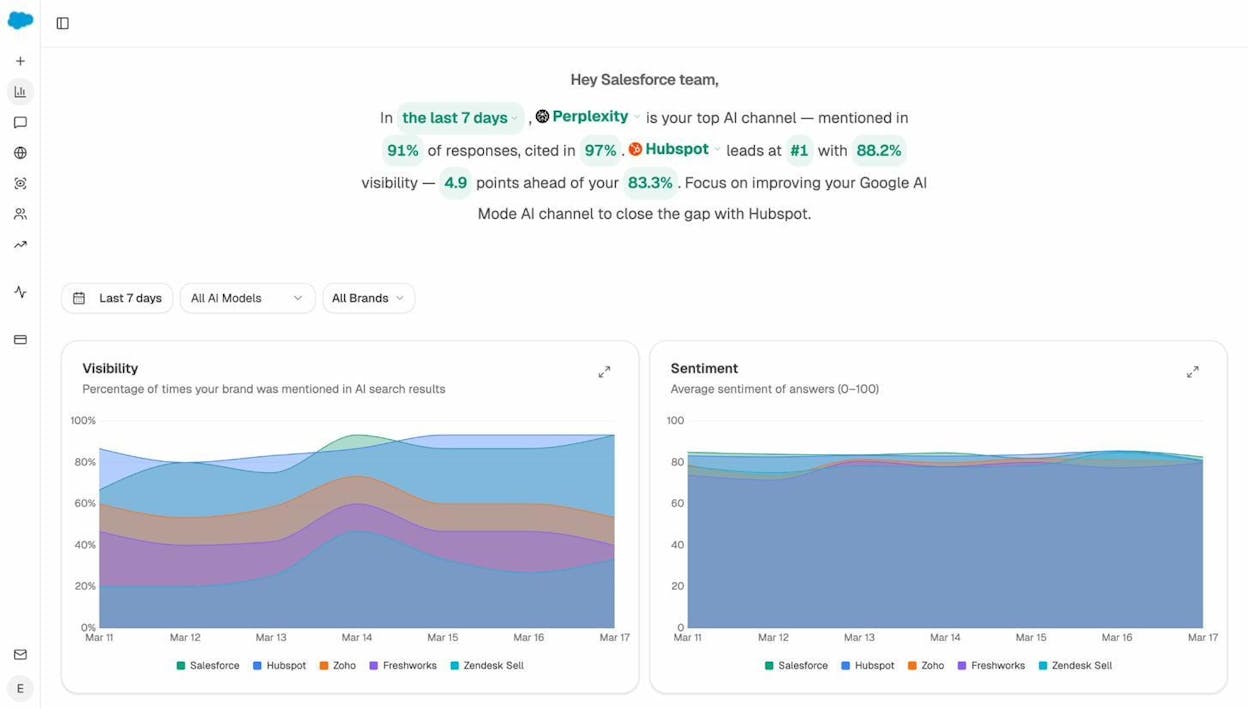
You can see at a glance whether you’re closing the gap on the brand ahead of you, or whether a new entrant is starting to take share.
Find the sources AI engines trust about your category
The Sources view shows every URL that AI engines cite when answering questions about your industry, broken down by content type (blog, product page, review, social) and by domain.
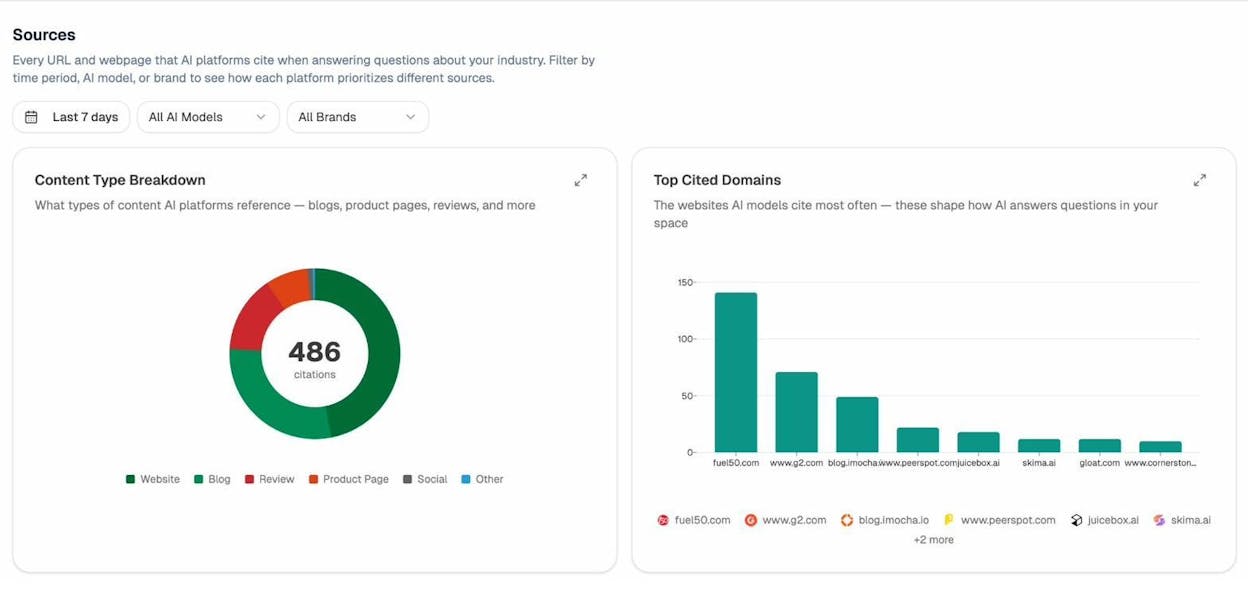
This is the closest thing to a backlinks report for AI search. If G2, Wikipedia, and a handful of industry publications keep showing up as the sources AI cites for your category but your own pages don’t, that’s where your GEO work needs to focus. Our research on 83,670 AI citations across ChatGPT, Claude, and Perplexity breaks down which source types each engine prefers.
Spot competitors AI mentions but you don’t track
The Competitor Intelligence module surfaces brands that keep appearing in AI answers about your category, including ones you weren’t aware of.
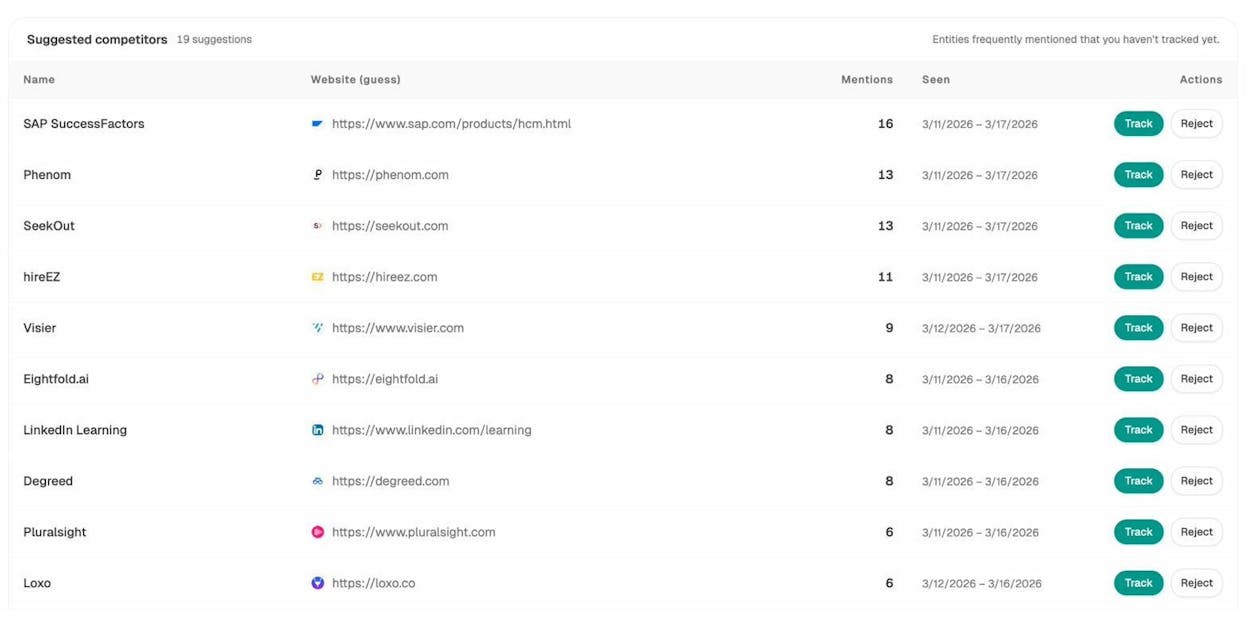
You decide whether to start tracking each one. This is how you discover the new entrant chipping away at your share before they show up in your sales team’s pipeline. We have a longer playbook on this in our piece on how to outrank competitors in AI search.
Watch which pages drive AI traffic and double down on what works
The AI Traffic Analytics view connects to your analytics and shows which pages on your site are getting visits from ChatGPT, Perplexity, Claude, Copilot, and Gemini, plus how those visitors engage.
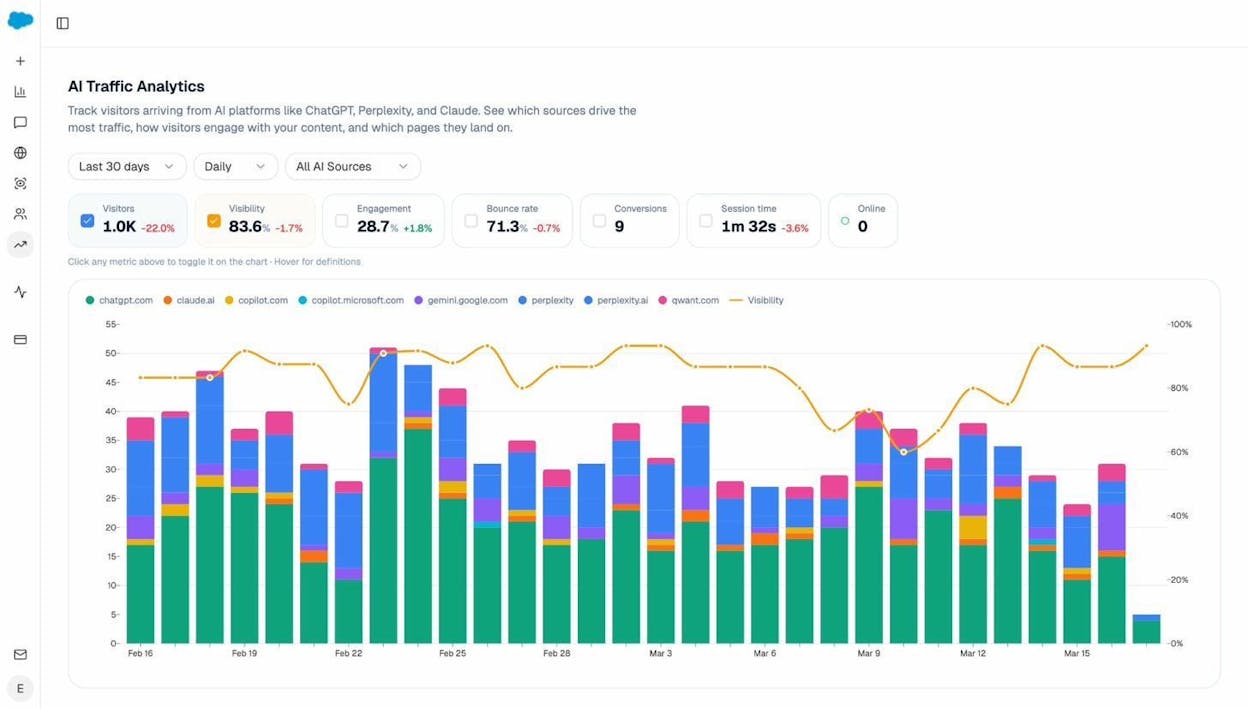
The Landing Pages report drills into which of your URLs have been cited by AI platforms and how those citations correlate with sessions, engagement, and conversions.
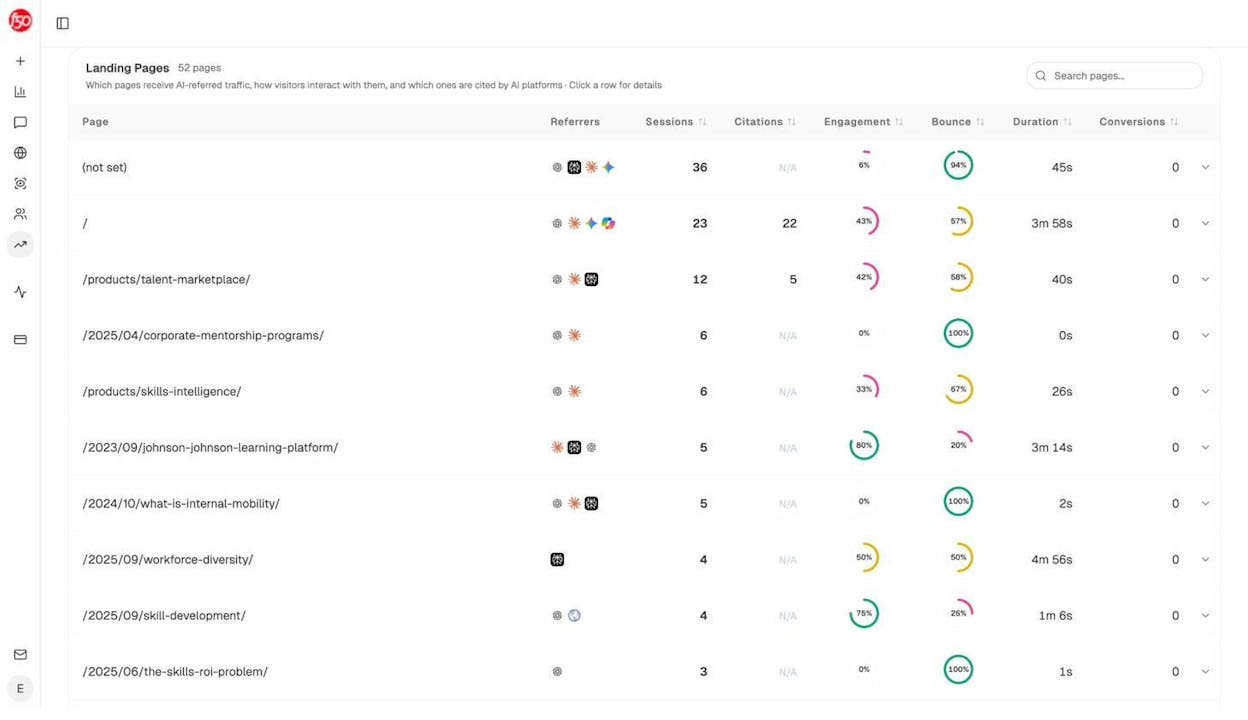
Look for patterns in the pages that earn citations. Are they comparison pages? In-depth guides? Pricing pages? Whatever the pattern, that’s the type of content to invest more in. This is the GEO equivalent of the SEO playbook of “find your top organic pages and create more like them.” Same principle, applied to a different surface.
Get a weekly digest
If you don’t want to log in every day, the Weekly Email Digest summarizes everything that changed (visibility, position, sentiment, new competitors, citation momentum) and tells you what to prioritize that week.
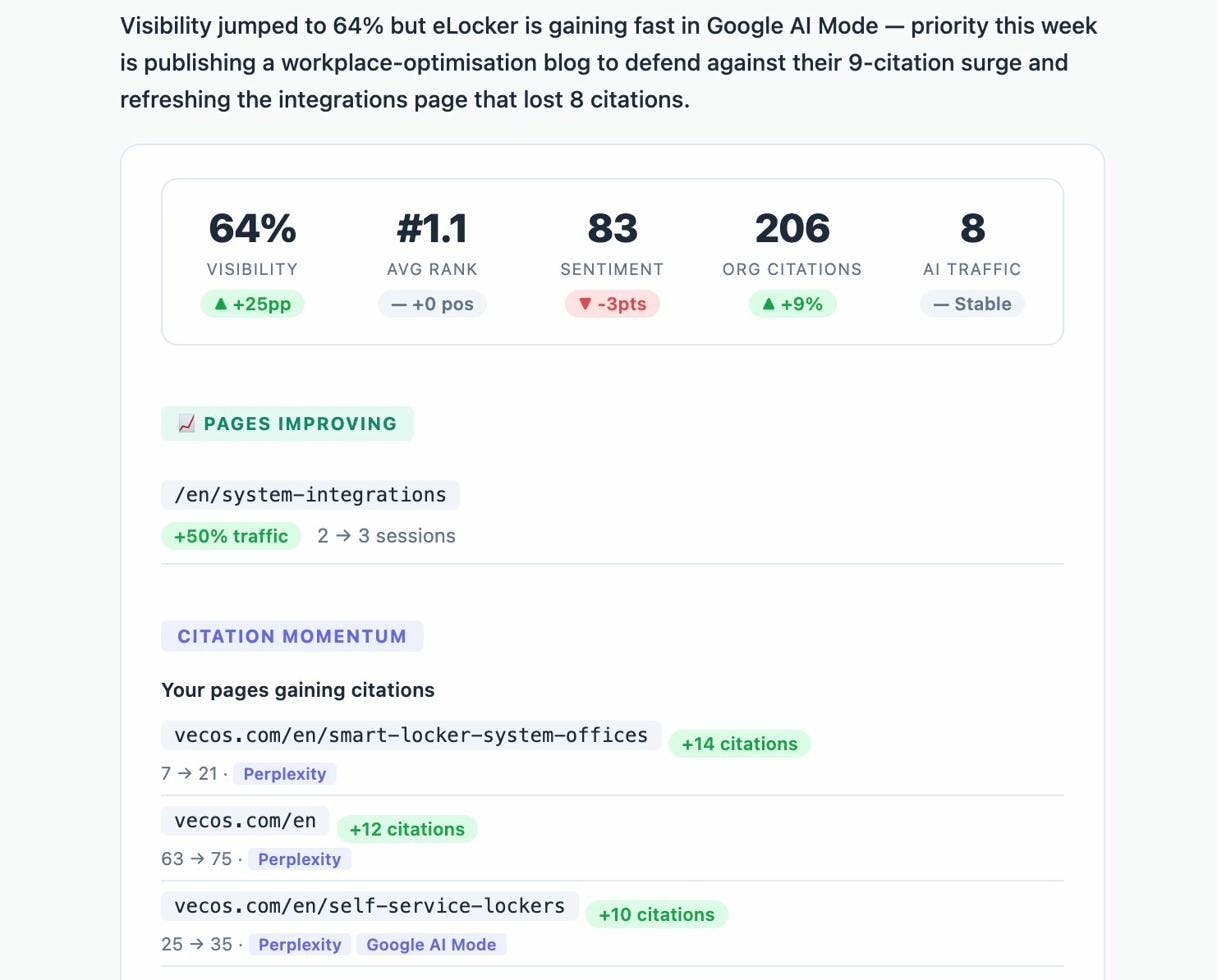
A quick decision matrix
To make this concrete, here’s when to reach for which tool.
|
You want to |
Use |
|---|---|
|
Spot-check one keyword right now |
|
|
See every Google keyword your site already ranks for |
Google Search Console |
|
Make sure you’re indexed in Bing (so you’re visible to ChatGPT search and Copilot) |
Bing Webmaster Tools |
|
Track a list of priority keywords on a schedule and see them trend over time |
A paid rank tracker |
|
Track your brand’s visibility in ChatGPT, Perplexity, Gemini, Copilot, and Google AI Overviews |
You don’t have to pick one. Most teams use all five. GSC and Bing Webmaster Tools are free and should be set up on day one. Add the free Keyword Rank Checker for ad hoc work, a paid rank tracker once you have 20+ priority keywords you check often, and Analyze AI once AI search is a meaningful share of how your buyers find you.
Rank-checking tips that hold up
A few things will save you a lot of wasted hours.
Don’t expect rankings to improve in days. SEO timelines have always been measured in months. Most published research puts the meaningful-results window at three to six months for new content, and longer for competitive keywords. AI search visibility tends to move slightly faster (because LLMs reindex more often than Google rerankings settle), but it still doesn’t move overnight. Set the expectation early, especially if you’re reporting to a CEO who’s used to paid ad timelines.
Don’t expect different tools to agree on the same number. Google itself shows you a different SERP than the one your customer sees, because of personalization. Different rank trackers count SERP features differently. Some count an AI Overview as position 1, others ignore SERP features and only count the 10 blue links. Two tools showing two positions for the same keyword isn’t a bug. It’s a definition difference. Pick one tool as your source of truth and use the others for cross-reference.
Don’t obsess over daily wiggles. A drop from #3 to #5 on one day is noise. The same drop sustained over four weeks is signal. Run a weekly review, not a daily one, and watch the trend line. The same applies to AI visibility. Your visibility for a single prompt can swing 10 to 15 percentage points day to day depending on which sources the AI model retrieves at query time. Look at the seven-day average, not the spot reading.
Cross-reference position with traffic and conversions. Position 3 with no clicks usually means a weak title tag or a SERP feature stealing your clicks. Position 12 with high engaged traffic might mean you’re being cited inside AI answers (which sometimes show up as direct or “unknown” traffic in your analytics, since AI assistants don’t always pass referrer data). Always look at all three numbers (position, traffic, conversion) together. The full story isn’t in any one of them.
FAQ
Why does my Google ranking change every day?
Google updates its index continuously and personalizes results by location, device, and history. Some volatility is normal, especially for keywords outside the top 10. Look for trends over weeks, not days, and use a rank tracker that takes daily snapshots so you can see the trend rather than guessing at it.
Why is my Google ranking different from my AI search visibility?
Different surfaces, different ranking signals. Google ranks pages by relevance, authority, and user behavior. AI engines decide what to cite based on what their underlying retrieval system pulls (often a search index, sometimes their own crawl) and how their model summarizes those sources. A page that ranks #2 on Google might get cited zero times by ChatGPT, and a page that ranks #15 might appear in every Perplexity answer for the same prompt. We unpack the differences in our GEO vs SEO breakdown.
How do I rank higher on Google?
The fundamentals haven’t changed. Match search intent, write content that’s genuinely better than what’s currently ranking, build links from relevant sites, and fix the technical basics (site speed, mobile, internal linking). Our SEO content strategy guide walks through the full process, and our 4 pillars of an effective SEO strategy for AI search shows how those fundamentals translate to the AI era.
How do I get cited in AI search?
Same fundamentals as SEO, plus a few extras. Make sure your content is in the indexes that AI engines pull from (Google, Bing, Brave). Earn citations from the third-party sources AI engines trust for your category (G2, industry publications, Wikipedia where appropriate). And write content that’s structured for retrieval, with clear headings, factual claims with sources, and direct answers up front rather than buried at the end. We have detailed playbooks on how to rank on ChatGPT and how to rank on Perplexity, both built on 65,000 citation data points.
Is GEO replacing SEO?
No. Roughly 95% of Americans still use traditional search engines every month. Most AI engines also rely on search indexes to retrieve fresh information, which means high Google rankings still feed AI visibility. Think of GEO as a parallel channel layered on top of SEO, not a replacement for it. The brands that compound over the next five years will run both with the same discipline.
The takeaway
You don’t have to choose between SEO and GEO. The brands that compound over the next five years will be the ones tracking both, with the same discipline they used to bring to Google rankings alone.
Set up Google Search Console and Bing Webmaster Tools today. Run a quick check on your priority keywords with the free Keyword Rank Checker. Add a paid rank tracker once your keyword list grows past what you can eyeball. And start measuring AI visibility with Analyze AI before your competitors do.
Then come back next quarter and look at the trend lines. That’s where the story actually lives.

Ernest

Ibrahim


