



Summarize this blog post with:


FAQ pages, when done well, are a double win. They give users the clear, concise answers they came looking for—and they give search engines (plus AI models) structured, question-and-answer content that is easy to surface.
But when rushed, FAQ pages become lazy dumps of loosely connected questions with half-baked answers. Nobody wins in that scenario—not your users, not Google, and certainly not the AI engines that are increasingly pulling from FAQ content to generate their own responses.
The difference between a high-performing FAQ page and a forgettable one comes down to research, structure, and execution. This guide covers all three.
In this article, you’ll learn what an FAQ page actually is, why it matters for both traditional search and AI-powered answer engines, five real-world FAQ page formats with examples, three methods for finding the right questions to answer, best practices for building FAQ pages that rank and get cited, how to implement FAQ schema step by step, and how to track the performance of your FAQ content across search and AI channels.
Table of Contents
What Is an FAQ Page (and Why It Matters for SEO)?
An FAQ (frequently asked questions) page is a section on a website where common questions about your product, service, or niche are answered in a clear, direct format.
It often looks like an accordion list on a homepage or product page. But FAQ pages can also take the form of standalone blog posts, dedicated help pages, or sections appended to existing articles.
![[Screenshot: Example of a well-designed accordion-style FAQ section on a SaaS homepage]](https://www.datocms-assets.com/164164/1776873606-blobid1.png?auto=format,compress&w=1248&fit=max)
A good FAQ page does several things at once. It helps potential customers at every stage of the buyer’s journey—from early research to final purchase decision. It reduces the load on your customer support team by preemptively answering the questions your reps hear every day. And it serves as the first point of contact for people who discover your brand through search.
Are FAQ Pages Good for SEO?
The honest answer: it depends entirely on execution.
A page that’s just a keyword dump—questions ripped from a keyword research tool and answered with two sentences—won’t move the needle. Google has gotten much better at evaluating content quality, and thin FAQ pages don’t fool anyone.
But an FAQ page that is optimized for relevant keywords, well designed in terms of user experience, and genuinely useful? That can be a serious SEO asset.
Here’s why: the core goal of an FAQ page is exactly the same as the core goal of SEO. Both exist to provide the best possible answer to a question. When your FAQ content does that job well, it naturally aligns with what search engines reward.
Why FAQ Pages Also Matter for AI Search
There’s a second reason FAQ pages deserve your attention right now, and it goes beyond traditional SEO.
AI-powered answer engines—ChatGPT, Perplexity, Google AI Mode, Claude, Copilot—are increasingly generating answers by pulling from structured, question-and-answer content on the web. FAQ pages are tailor-made for this format.
When a user asks an AI engine something like “What’s the best CRM for small businesses?” or “How long does shipping take with [Brand]?”, the model scans the web for direct, clear, authoritative answers. FAQ pages that provide exactly that format—a question followed by a concise, well-structured answer—are more likely to be cited as sources by these models.
This isn’t a replacement for SEO. It’s an expansion of it. The same content that ranks well in Google often performs well in AI search. The key difference is that AI engines reward structured clarity even more than traditional search does—and FAQ pages naturally deliver that structure.
If you’re already optimizing FAQ content for search, you’re most of the way there for AI search as well. The incremental work is minimal, and the upside—showing up as a cited source in AI-generated answers—is substantial.
Five FAQ Page Examples (With Pros and Cons)
There are several ways to display FAQ content on your site. Each has its own strengths depending on your goals, your audience, and how much content you need to cover.
Here’s a breakdown of the five most common formats:
|
FAQ Format |
Best For |
SEO Benefit |
AI Search Benefit |
|---|---|---|---|
|
Homepage FAQ |
Broad product/service questions |
Adds keyword-rich content to your most authoritative page |
High—homepages are frequently crawled and cited |
|
Product/Service page FAQ |
Offering-specific objections |
Targets long-tail product queries |
Moderate—answers product questions AI users ask |
|
Dedicated FAQ page |
Large question sets across topics |
Can rank for multiple question keywords |
High—comprehensive Q&A format is ideal for AI citation |
|
Standalone FAQ blog post |
Topic-focused question clusters |
Strong for long-tail question keywords |
High—blog posts with clear Q&A pairs are prime citation material |
|
FAQ section in existing post |
Supplementing content with related questions |
Adds internal linking and topical depth |
Moderate—enhances overall page authority for AI engines |
Let’s look at each in detail.
1. Homepage FAQs
This is one of the most common placements: an FAQ section on the homepage, usually just above the footer.
![[Screenshot: Example of an FAQ accordion section placed above the footer on a SaaS or e-commerce homepage]](https://www.datocms-assets.com/164164/1776873613-blobid2.png?auto=format,compress&w=1248&fit=max)
The advantage here is twofold. First, it adds contextual, keyword-rich content to your homepage—which is typically your most authoritative page by domain strength. Second, it creates a natural place to add internal links within the answers. When a user clicks open a question accordion, the answer can link to deeper resources like blog posts, product pages, or help documentation.
![[Screenshot: Close-up of an FAQ accordion answer that includes an internal link to a related blog post]](https://www.datocms-assets.com/164164/1776873613-blobid3.png?auto=format,compress&w=1248&fit=max)
Homepages are also among the most frequently crawled pages by both search engines and AI models. That means your homepage FAQ content has a higher chance of being indexed quickly and cited in AI-generated answers.
When to use this format: You have a small set (5–10) of broad, high-level questions about your brand, product, or service that visitors commonly ask when they first land on your site.
2. Product/Service Page FAQs
Here, the FAQ section is added directly to a product or service page:
![[Screenshot: Example of an FAQ section on a product page, with questions related to pricing, features, or return policies]](https://www.datocms-assets.com/164164/1776873619-blobid4.png?auto=format,compress&w=1248&fit=max)
These questions are typically about the offering itself—pricing, features, compatibility, return policies—and are designed to reduce friction in the buying process. A well-placed FAQ on a product page can address objections before a customer reaches the checkout page.
From an SEO perspective, product page FAQs help you target long-tail question keywords related to your offering. From an AI search perspective, these pages often get cited when users ask comparison or recommendation questions in AI engines.
When to use this format: Your product or service pages already get traffic, and you want to increase conversion by answering common pre-purchase questions on the same page.
3. Dedicated FAQ Page
If you have a lot of questions to cover across multiple topics, a dedicated FAQ page keeps everything organized in one place:
![[Screenshot: Example of a dedicated FAQ page with categories and accordion-style questions, like those from brands such as Magic Spoon or Notion]](https://www.datocms-assets.com/164164/1776873620-blobid5.png?auto=format,compress&w=1248&fit=max)
Dedicated FAQ pages are especially useful for brands with complex products or services. Think SaaS platforms, financial services, e-commerce stores with diverse product lines, or any business where customers have a wide range of questions.
A well-designed dedicated FAQ page can also earn backlinks—design blogs and resource roundups often link to FAQ pages with strong UX and visual design.
The key to making this format work is organization. Group your questions into logical categories so users can find what they need without scrolling through dozens of unrelated items. Search engines also benefit from this structure, as it helps them understand the topical clusters within your content.
When to use this format: You have 20+ questions spanning multiple topics, and you want a single, organized destination for all of them.
4. Standalone Blog Post with FAQs
Instead of creating a dedicated page, you can publish your FAQ content as a blog post. Use subheadings for each question and write fuller, more detailed answers than you’d put in an accordion.
![[Screenshot: Example of an FAQ-style blog post where each H2 or H3 is a question, with a paragraph or two answering it]](https://www.datocms-assets.com/164164/1776873626-blobid6.png?auto=format,compress&w=1248&fit=max)
This format works particularly well when your questions cluster around a single topic. For example, a pet food company could publish “10 Common Questions About Raw Dog Food” as a standalone blog post, targeting the long-tail question keywords within that topic.
The SEO advantage here is clear: blog posts with question-based subheadings naturally align with how people search. And for AI engines, this format provides clean, well-labeled question-and-answer pairs that are easy to parse and cite.
When to use this format: You have a cluster of 5–15 questions on a single topic, and you want the content to rank as a standalone piece in search.
5. FAQ Section at the End of an Existing Post
You don’t always need to create new content. Sometimes the smartest move is to add an FAQ section to an existing blog post that already ranks well.
This approach lets you answer related follow-up questions that the main body of the article doesn’t cover. It also creates natural opportunities for internal linking—each answer can link to a supporting article where you go deeper on the topic.
The result? You strengthen your existing content with additional keyword coverage, you build a topic cluster organically, and you give AI engines more structured Q&A content to pull from.
When to use this format: You have an existing article that ranks well and gets traffic, and there are 3–5 related questions that users commonly ask but the article doesn’t currently address.
Three Ways to Find Questions for Your FAQ Page
The questions you answer on your FAQ page will determine whether it succeeds or fails. Pick the wrong questions—ones nobody is actually asking—and the page won’t attract traffic or help your users.
Here are three methods to find the right questions, starting with the most underrated one.
1. Research What Real People Are Actually Asking
The best FAQ questions don’t come from keyword tools. They come from people—specifically, your audience.
Here’s where to find them:
Customer support and sales teams. Your support reps and salespeople hear the same questions every single day. Ask them to keep a running list of the questions they get asked most. These aren’t speculative. They’re the exact questions real customers have right now.
Site search data. If your website has an internal search function, check what people are searching for. These queries reveal gaps in your content—questions people have that your site isn’t answering clearly enough.
Google Search Console. Go to Performance > Search Results and look at the Queries tab. Filter for question-based phrases (starting with “what,” “how,” “why,” “can,” etc.). These are the questions people are already finding your site for—giving them dedicated FAQ answers strengthens your position.
![[Screenshot: Google Search Console Performance report filtered by queries containing question words like “how,” “what,” “why”]](https://www.datocms-assets.com/164164/1776873626-blobid7.png?auto=format,compress&w=1248&fit=max)
People Also Ask. Type your target keyword into Google and check the People Also Ask boxes. These show you the related questions Google considers most relevant to that search—and they update dynamically as you click through them.
![[Screenshot: Google SERP showing People Also Ask box with expandable question-and-answer dropdowns]](https://www.datocms-assets.com/164164/1776873632-blobid8.png?auto=format,compress&w=1248&fit=max)
Online communities. Check Quora, Reddit, and niche forums for the questions people in your industry keep asking. Sort by “most upvoted” or “most commented” to find the questions with the highest engagement.
2. Use Keyword Research Tools to Find Question Keywords
Once you’ve gathered real-world questions, validate them with data. Keyword research helps you prioritize which questions to answer first based on search volume and competition.
Go to a keyword research tool and enter a seed keyword related to your topic. Then filter for questions.
For example, if you sell pizza ovens, your seed keyword might be “pizza oven.” Apply a questions filter, and you’ll see a list of question-based keywords with search volume, keyword difficulty, and other metrics:
![[Screenshot: A keyword research tool showing a seed keyword like “pizza oven” with a Questions filter applied, displaying results like “how hot does a pizza oven get” and “what is the best pizza oven for home use”]](https://www.datocms-assets.com/164164/1776873632-blobid9.jpg?auto=format,compress&w=1248&fit=max)
If your seed keyword is broad (like “pizza”), you’ll get a massive list. If it’s more specific (like “Ooni pizza oven”), you’ll get fewer but more targeted results.
Use Analyze AI’s free Keyword Generator to generate question keyword ideas around your topic, or the Keyword Difficulty Checker to assess how competitive each question keyword is before you commit to targeting it.
![[Screenshot: Analyze AI Keyword Generator tool interface showing keyword suggestions for a given seed term]](https://www.datocms-assets.com/164164/1776873638-blobid10.png?auto=format,compress&w=1248&fit=max)
The goal isn’t to answer every question with search volume. It’s to find the overlap between what your audience actually needs to know and what has enough search demand to drive traffic.
3. Reverse Engineer Competitor FAQ Pages
Your competitors have already done some of this work for you. Use their sites as a source of question ideas.
Find a competitor’s domain and look at the organic keywords they rank for. Then filter for question-based keywords—anything containing “what,” “where,” “when,” “why,” “which,” “who,” “how,” etc.
![[Screenshot: An SEO tool showing a competitor domain’s organic keywords filtered for question modifiers, with columns for keyword, position, volume, and keyword difficulty]](https://www.datocms-assets.com/164164/1776873638-blobid11.png?auto=format,compress&w=1248&fit=max)
This gives you a list of the question keywords your competitor is already ranking for. From here, you can identify questions they’ve answered that you haven’t—and decide which ones are worth targeting.
You can also use Analyze AI’s SERP Checker to see who’s ranking for specific question keywords, and the Website Traffic Checker to estimate how much traffic a competitor’s FAQ page is generating.
Finding Questions People Ask AI Engines
Here’s where most FAQ guides stop. But if you’re building FAQ content in 2026, you’re leaving value on the table if you only research traditional search queries.
People ask AI engines questions too—and those questions aren’t always the same ones they type into Google. AI queries tend to be longer, more conversational, and more specific. Instead of “best CRM,” a user might ask an AI engine, “What’s the best CRM for a 10-person sales team that integrates with Slack?”
To find out what questions people are asking AI engines in your niche, you can use Analyze AI’s Prompts dashboard. This shows you the exact prompts being tracked in your industry, along with which brands are being mentioned, the sentiment of the AI responses, and your visibility position.
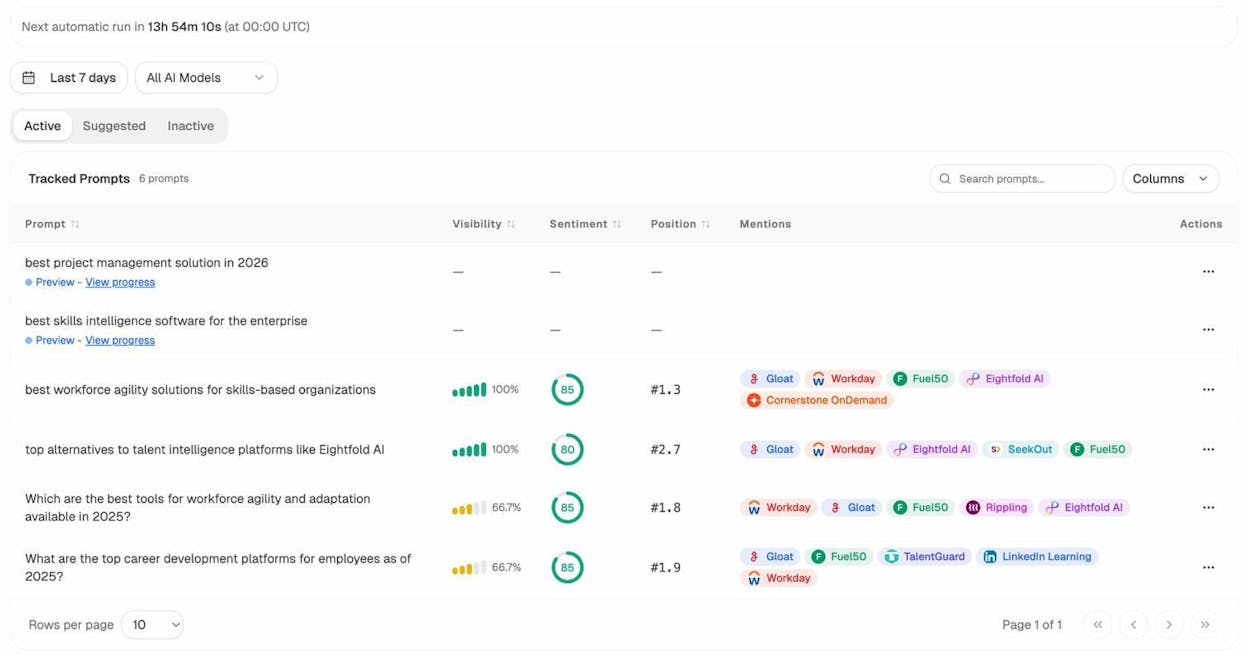
From here, you can see the patterns. What types of questions are AI engines answering about your industry? Which competitors are being mentioned? Where are there gaps—questions where your brand doesn’t appear at all?
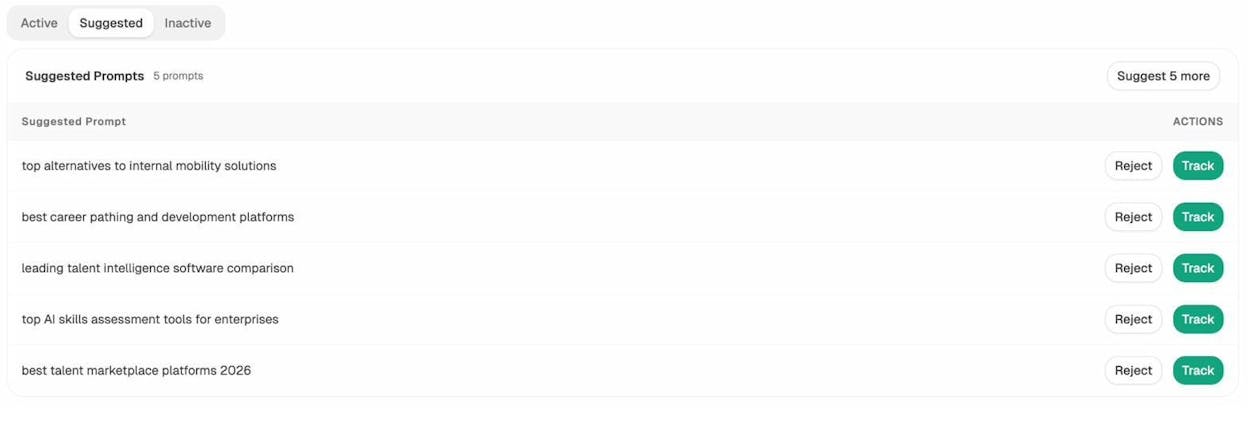
If you’re not sure which prompts to track, Analyze AI also suggests prompts based on your industry and competitors. You can review them and add the relevant ones to your tracked set with a single click.
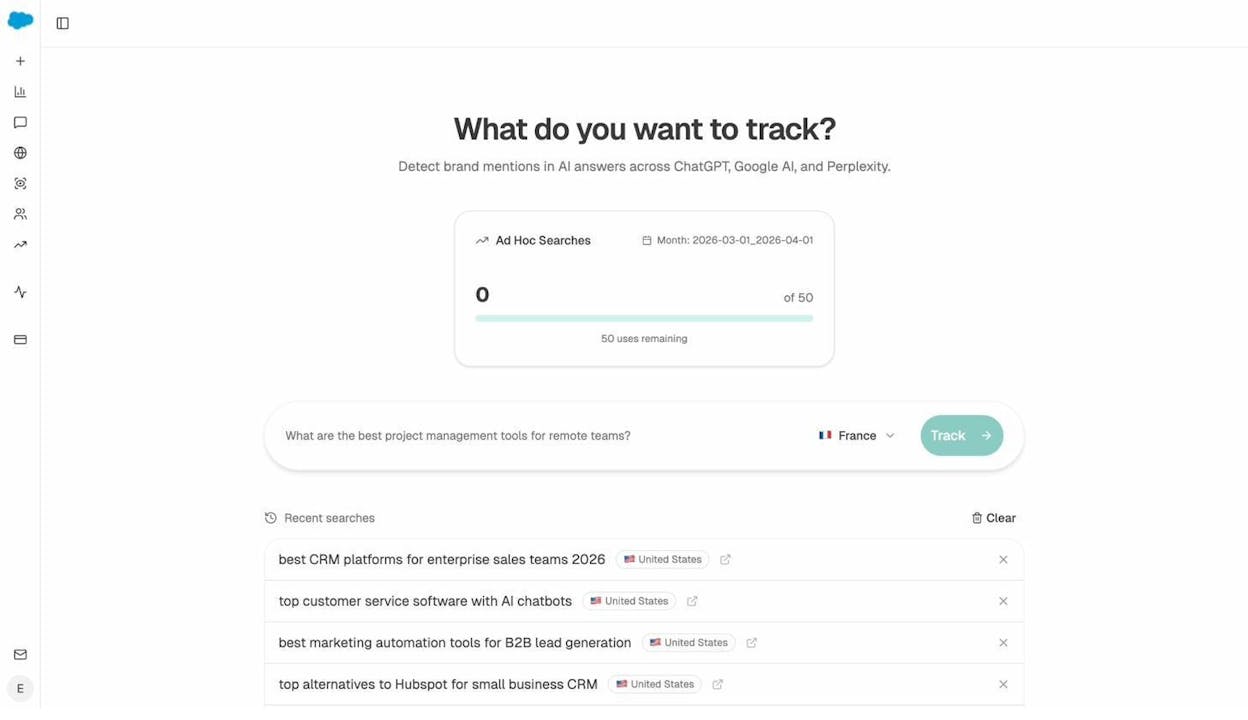
You can also run ad hoc prompt searches to test specific questions and see how AI engines respond to them right now. Type in a question, select a region, and get an instant snapshot of which brands are being cited and how the AI frames its answer.
This research tells you which questions to prioritize on your FAQ page—not just for Google, but for the AI engines that are becoming an increasingly important source of traffic and brand exposure.
Best Practices for SEO-Friendly FAQ Pages
Building an SEO-friendly FAQ page follows the same principles as building any content-heavy page: it needs to be easy to navigate, quick to load, and well optimized for on-page SEO. But there are a few FAQ-specific considerations worth calling out.
Group Your Questions Into Clear Categories
If your FAQ page has more than 10 questions, organize them into categories. This makes it easier for users to find the answer they need, and it helps search engines understand the topical structure of your content.
For example, an e-commerce store might group FAQs into “Shipping & Delivery,” “Returns & Refunds,” “Product Care,” and “Account & Billing.” A SaaS company might use “Getting Started,” “Features,” “Pricing,” and “Integrations.”
![[Screenshot: Example of a well-organized FAQ page with clearly labeled category sections and accordion-style questions under each category]](https://www.datocms-assets.com/164164/1776873650-blobid15.png?auto=format,compress&w=1248&fit=max)
Write in Plain Language
FAQ answers should be written in the language your audience uses. Avoid jargon, internal terminology, or marketing speak. The person reading your FAQ is looking for a clear, direct answer—not a sales pitch.
This is especially important for AI citation potential. AI models tend to pull from content that answers questions directly and clearly. If your answer is buried under filler or overly technical language, it’s less likely to be cited.
Keep Answers Concise—Then Link to Depth
Your FAQ page should answer questions quickly. If an answer requires more than a short paragraph, that’s a sign the question deserves its own blog post or help article.
The best approach: give a concise answer on the FAQ page, then link to a longer resource for users who want more detail. This serves three purposes at once—it keeps the FAQ page scannable, it creates internal links to related content, and it helps build topic clusters that strengthen your overall site authority.
Use Your Brand Voice
An FAQ page is content. It should sound like everything else on your site. If your brand voice is conversational, write conversational FAQ answers. If it’s technical and precise, match that tone here too.
Consistency builds trust. If a user lands on your FAQ page and the tone feels different from the rest of your site, it creates a subtle disconnect that can undermine credibility.
Keep It Updated
FAQ pages are not static. As your product evolves, your market changes, and customer questions shift, your FAQ content needs to keep pace.
Set a recurring calendar reminder—quarterly at minimum—to review your FAQ page. Remove questions that are no longer relevant. Update answers that have changed. Add new questions based on recent customer feedback, support tickets, or new search query data.
Google and AI engines both favor fresh, accurate content. An outdated FAQ page with incorrect answers does more harm than no FAQ page at all.
Optimize Title Tags and Meta Descriptions
Your FAQ page’s title tag and meta description should clearly signal what the page contains. Include the keyword you’re targeting, and make it clear that the page answers common questions about your topic.
For example, instead of a title tag like “FAQ - [Brand Name],” try something like “Frequently Asked Questions About [Topic] | [Brand Name].” The first tells Google nothing about the topic. The second targets a specific keyword and sets clear expectations.
Format for Scanability
Good FAQ pages are visually easy to scan. Use accordion elements (expand/collapse) for pages with many questions. Use clear headings and adequate whitespace. Make sure the page loads fast—especially on mobile, where many FAQ page visits happen.
From an SEO perspective, Google does not penalize hidden content inside accordions as long as it’s one click away from being visible. So using accordions won’t hurt your rankings, and it will improve UX by keeping the page clean.
Add Internal Links to Answers
Every FAQ answer is an opportunity to link to related content. If you’re answering a question about your pricing, link to your pricing page. If you’re answering a question about how a feature works, link to the relevant product documentation or blog post.
Internal links from FAQ pages serve double duty. They guide users deeper into your site (which improves engagement metrics), and they distribute link equity to the pages you link to (which helps those pages rank better).
Use FAQ Schema
Adding schema markup to your FAQ page makes it eligible for rich results in the SERPs—those expandable question-and-answer snippets that appear directly below your listing and take up extra real estate.
This is valuable enough to warrant its own section.
How to Add FAQ Schema (in Three Steps)
FAQ schema markup is structured data that tells search engines your page contains question-and-answer content. When implemented correctly, it can make your pages eligible for FAQ rich snippets on the SERPs—which increase your listing’s visibility and can improve click-through rates.
Here’s how to add it, step by step.
Step 1. Create Your FAQ Content First
Before you write any code, you need actual questions and answers on your page. Create your FAQ section—whether it’s on a homepage, product page, dedicated page, or blog post—and populate it with well-researched, clearly written questions and answers.
One critical rule: the content in your FAQ schema must match the content on your page exactly. If the questions and answers in your markup don’t match what’s visible to users, Google may ignore your schema or flag it as a policy violation.
Follow Google’s guidelines for FAQ structured data:
![[Screenshot: Google’s documentation page showing FAQ structured data guidelines, including valid and invalid use cases]](https://www.datocms-assets.com/164164/1776873655-blobid16.png?auto=format,compress&w=1248&fit=max)
The short version: FAQ schema should only be used for pages where the content is written by the site itself (not user-generated). Each question must have only one answer. And the content can’t be used for advertising purposes.
Step 2. Generate and Validate Your FAQ Schema Code
Google recommends using JSON-LD for structured data. You can write the code manually, but the easiest approach is to use a free online FAQ schema generator.
![[Screenshot: An FAQ schema generator tool showing input fields for questions and answers, with the generated JSON-LD code displayed on the right side]](https://www.datocms-assets.com/164164/1776873656-blobid17.png?auto=format,compress&w=1248&fit=max)
Paste your questions and answers into the generator, and it will produce the JSON-LD code automatically.
Here’s what the output looks like for a simple two-question FAQ:
{
"@context": "https://schema.org",
"@type": "FAQPage",
"mainEntity": [
{
"@type": "Question",
"name": "What is an FAQ page?",
"acceptedAnswer": {
"@type": "Answer",
"text": "An FAQ page is a section of a website where common questions about a product, service, or topic are answered clearly and concisely."
}
},
{
"@type": "Question",
"name": "Are FAQ pages good for SEO?",
"acceptedAnswer": {
"@type": "Answer",
"text": "Yes, when optimized for relevant keywords and designed with good UX, FAQ pages can improve search visibility and drive organic traffic."
}
}
]
}
Before implementing, validate your code by copying it into Google’s Rich Results Test. This will tell you if there are any errors or warnings in your markup.
Pay close attention to formatting. Even a misplaced comma or unclosed bracket will break the entire schema. Test before you ship.
Step 3. Implement on Your Page and Validate Again
Now you need to add the JSON-LD code to your page. You have a few options:
Option 1: Add the script directly to your page’s HTML. Paste the JSON-LD code inside a <script type="application/ld+json"> tag in the <head> section of your page. This is the simplest approach and works on any site.
Option 2: Use a CMS plugin. If you’re on WordPress, plugins like RankMath or Yoast SEO have built-in FAQ schema tools that let you add schema without touching code. Most major CMS platforms have similar options.
Option 3: Use Google Tag Manager. You can deploy FAQ schema through GTM if you manage your tags centrally. This is useful for large sites where you want to control schema deployment across many pages.
Once implemented, run your live page URL through the Rich Results Test again to confirm the schema is working. Also check Google Search Console’s Enhancements report to catch any errors after Google crawls the page.
Two bonus tips for FAQ schema:
First, FAQ schema answers accept HTML. This means you can include internal links inside your schema answers, sending users directly to conversion-focused pages or key content when they click from the SERP.
Second, you can add UTM parameters to those HTML links. This lets you track how many clicks come from your FAQ rich snippets specifically—giving you real data on whether your schema effort is paying off.
How to Track FAQ Performance (in SEO and AI Search)
Building a great FAQ page is only half the work. You also need to track how it performs—and adjust based on what the data tells you.
Tracking FAQ Performance in Traditional Search
The basics of SEO performance tracking apply here. In Google Search Console, monitor the following for your FAQ pages:
Impressions and clicks. Are your FAQ pages appearing in search results? Are people clicking through? A high impression count with low clicks might mean your title tag or meta description needs improvement.
Query data. What specific questions are driving traffic to your FAQ page? Are there new queries appearing that you haven’t addressed yet? These gaps are opportunities to add new FAQ content.
Rich result performance. If you’ve implemented FAQ schema, check whether your rich results are appearing. Google Search Console’s Enhancements report will show you any errors with your structured data.
You can also use Analyze AI’s free Keyword Rank Checker to monitor where your FAQ page ranks for specific question keywords over time.
Tracking FAQ Performance in AI Search
Traditional search metrics only tell half the story. If your FAQ page is being cited by AI engines, you’re getting brand exposure that Google Search Console can’t measure.
With Analyze AI, you can track whether your FAQ content is being cited in AI-generated answers across ChatGPT, Perplexity, Claude, Copilot, and Gemini.
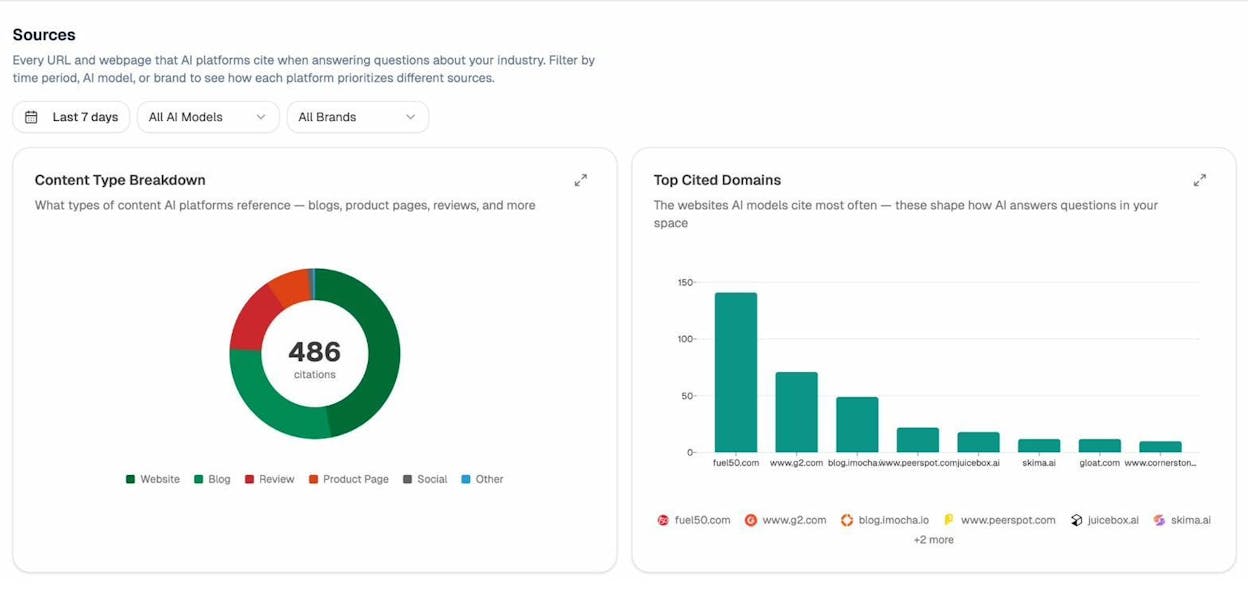
The Sources dashboard shows you every URL and webpage that AI platforms cite when answering questions about your industry. You can see which of your pages are being cited, how often, and by which AI engines.
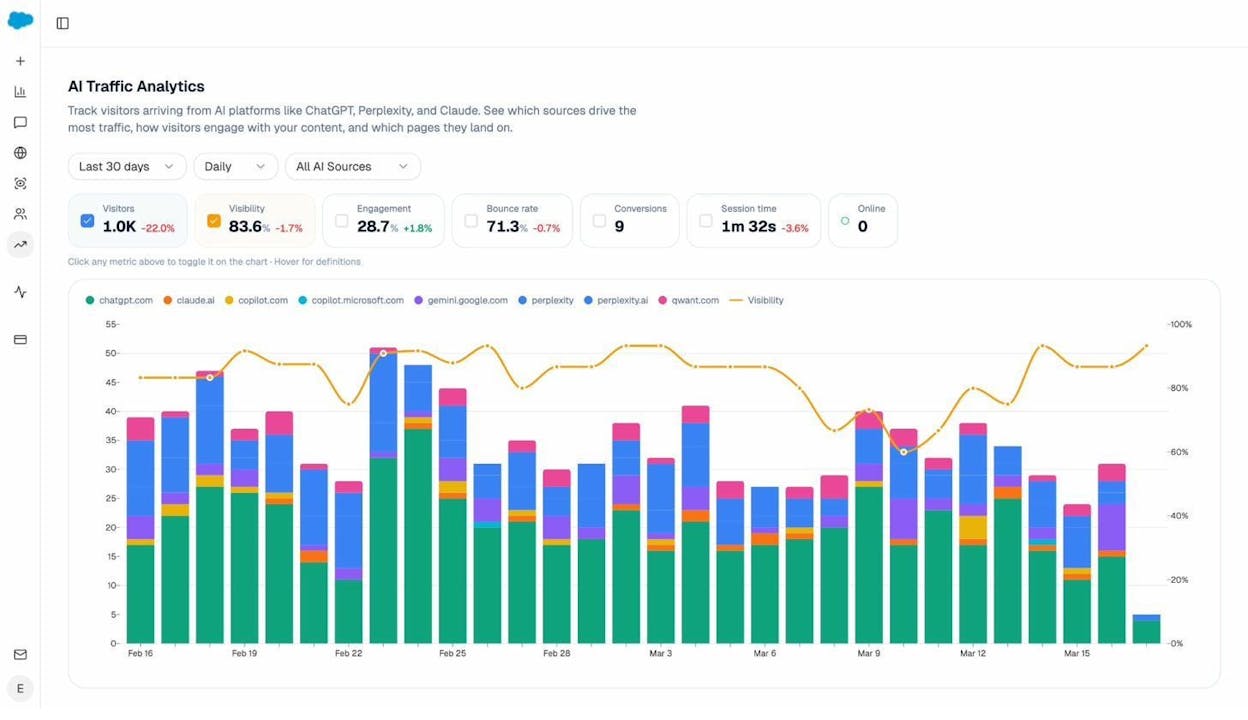
The AI Traffic Analytics report goes a step further. It connects to your Google Analytics and shows you actual sessions from AI platforms—not just citations, but real visitors who arrived at your site because an AI engine recommended your content.
The Landing Pages report shows exactly which pages on your site receive AI-referred traffic. If your FAQ page is among them, you can see which AI engines are sending visitors, how those visitors engage, and whether they convert.
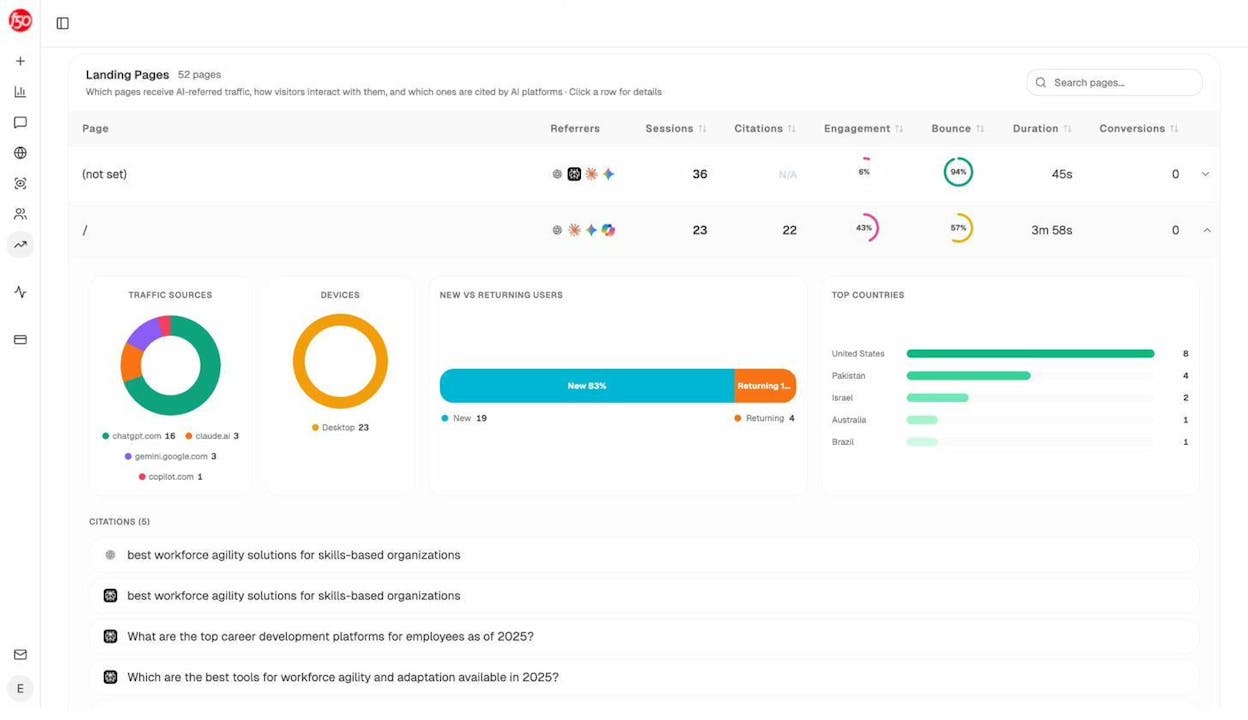
This data lets you make informed decisions. If your FAQ page is getting cited but not driving traffic, the issue might be in how you’ve structured the answers. If it’s driving traffic but not converting, you might need to add better internal links or calls to action within the answers.
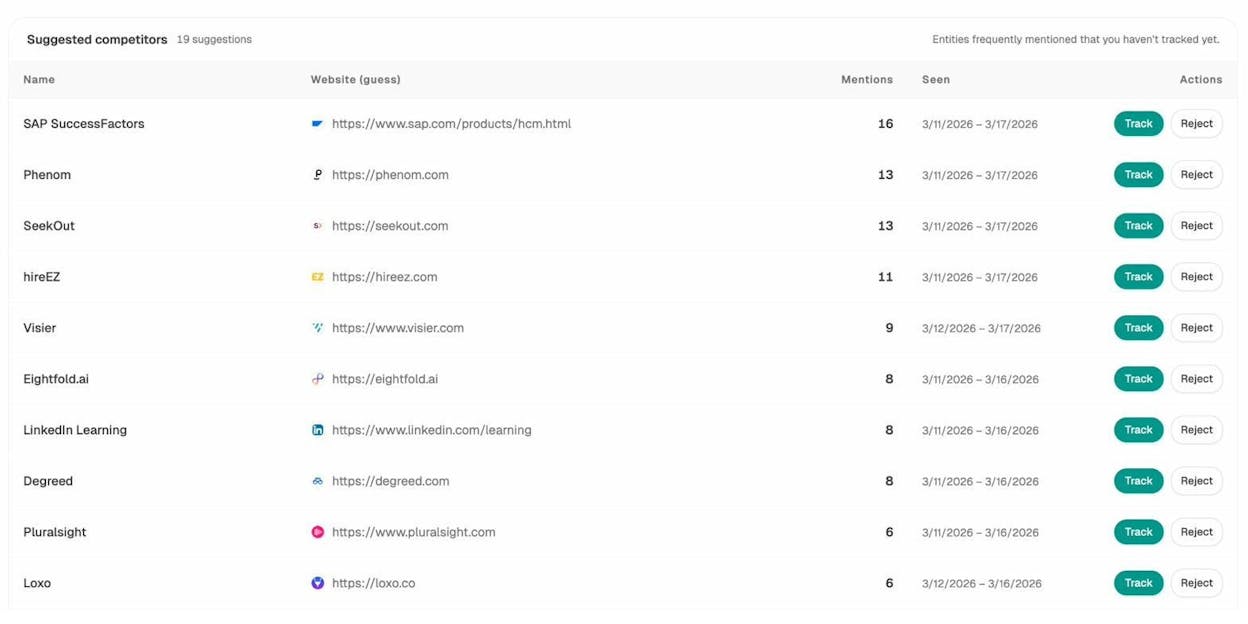
You can also use the Competitors dashboard in Analyze AI to see which of your competitors are being cited for the same questions. If a competitor’s FAQ page is getting more citations than yours, you now know where to focus your optimization efforts.
Using Weekly Reports to Stay on Top of FAQ Performance
Manually checking dashboards every day isn’t practical. That’s where automated reporting comes in.
Analyze AI sends weekly email digests that summarize your visibility, citation momentum, and competitive movements. These reports flag when your pages gain or lose citations, when competitors gain traction, and which pages are improving or declining.
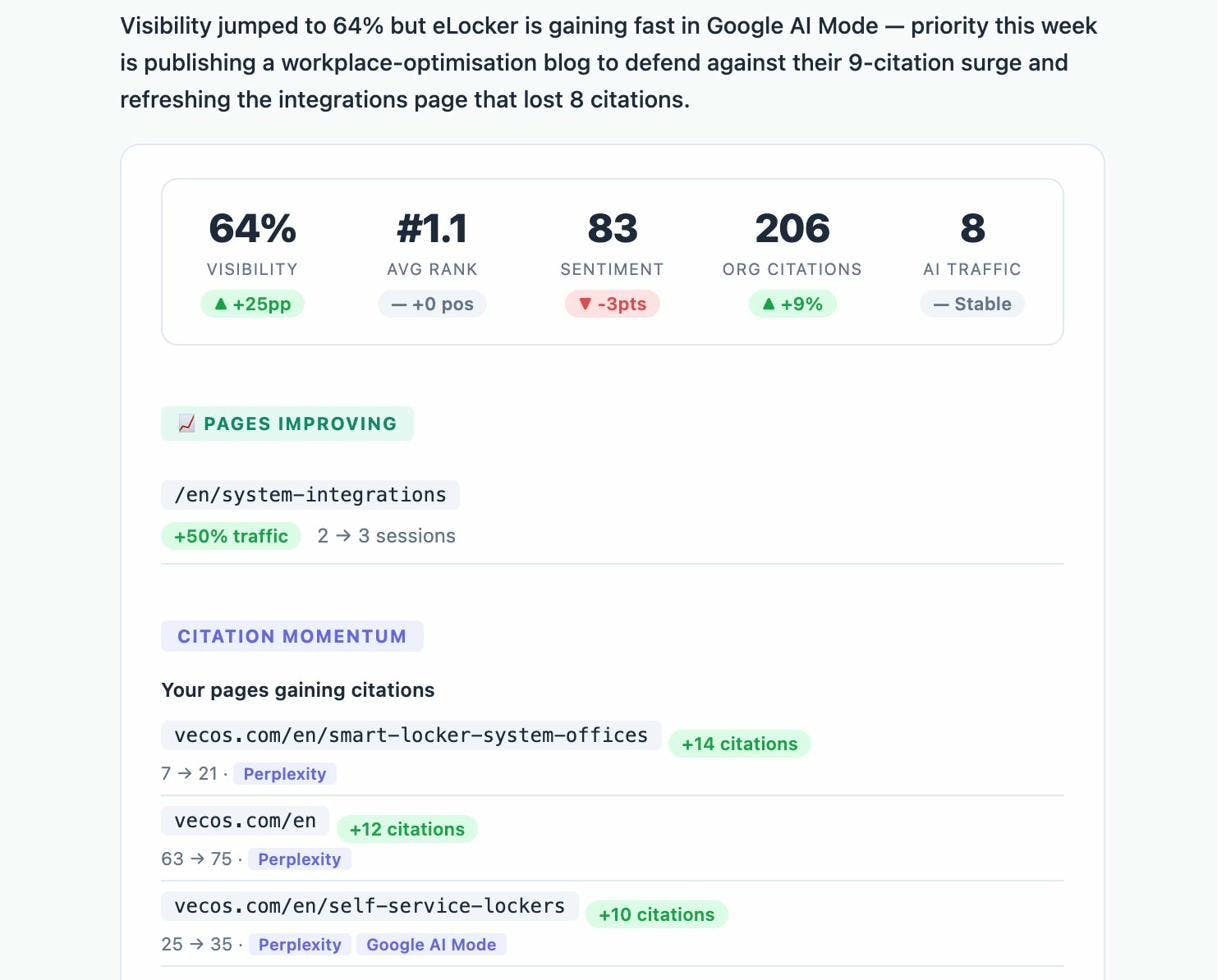
If your FAQ page’s citation count drops, you’ll know about it within a week—not months later. That gives you time to update the content, add new questions, or refresh outdated answers before the decline becomes a trend.
Common Questions About FAQ Pages
How Many Questions Should an FAQ Page Have?
Enough to be genuinely useful—no more, no less. There’s no magic number. A product page FAQ might work perfectly with five well-chosen questions. A dedicated FAQ page for a complex SaaS product might need 50+.
The test is simple: if you have a question that your audience actually asks and you can answer it well, include it. If you’re padding the page with questions nobody cares about just to make it longer, cut them.
Should I Use Accordions or Display All Answers at Once?
If you have more than about 10 questions, accordions are usually the better UX choice. They keep the page clean and let users scan the questions quickly without being overwhelmed by a wall of text.
For fewer than 10 questions, a simple scroll-down format works fine. There’s no SEO penalty for using accordions—Google can crawl and index the hidden content as long as it’s accessible with a single click.
What’s the Difference Between an FAQ Page and a Knowledge Base?
An FAQ page covers the most common questions—the ones most users ask most often. A knowledge base covers everything, including edge cases, troubleshooting, detailed walkthroughs, and technical documentation.
Think of it this way: an FAQ page is the highlight reel. A knowledge base is the full encyclopedia. Many companies have both, with the FAQ linking to the knowledge base for users who need more depth.
Do FAQ Pages Help With AI Search Visibility?
Yes. AI engines like ChatGPT, Perplexity, and Google AI Mode frequently cite FAQ content when generating answers. The structured question-and-answer format makes it easy for models to extract and reference specific answers.
To maximize your chances of being cited, write clear, direct answers, use natural question-based headings, and keep your content updated with accurate information. You can track your AI search visibility using tools like Analyze AI.
Should I Create a Separate FAQ Page or Add FAQs to Existing Pages?
It depends on the scope. If you have a small number of questions related to a specific page (like a product page or blog post), add the FAQ section to that page. If you have a large, diverse set of questions, create a dedicated FAQ page.
Many sites do both—dedicated FAQ pages for broad questions and embedded FAQ sections on specific pages for context-relevant questions.
Can I Use AI to Help Write FAQ Answers?
You can use AI tools as a starting point for drafting FAQ answers. They’re useful for generating initial drafts and identifying common question patterns. But always fact-check, edit for accuracy, and rewrite in your brand’s voice before publishing.
The goal is to combine AI efficiency with human expertise. Use AI to draft, but let subject matter experts review and refine the final answers.
Final Thoughts
A great FAQ page isn’t just a list of questions and answers. It’s a strategic content asset that serves your users, strengthens your SEO, earns citations from AI engines, and drives real business results.
The formula is straightforward: research the questions your audience is actually asking (in search engines and in AI), answer them clearly and concisely, structure the page for good UX, add schema markup, and track performance across both traditional and AI search channels.
The brands that treat FAQ pages as strategic assets—keeping them updated, monitoring their performance in both Google and AI engines, and continuously optimizing based on data—will have a meaningful advantage over competitors who treat them as an afterthought.
That advantage compounds over time. Every question you answer well is another opportunity to rank in search, get cited by AI, build trust with your audience, and convert visitors into customers.
Start with the questions your support team hears every day. Validate them with keyword research. Build a clean, well-structured FAQ page. Add schema. Track performance. Iterate.
That’s the entire playbook.

Ernest

Ibrahim


