



Summarize this blog post with:


In this article, you’ll learn what SEO analytics is, why it matters for every website, and how to set up a simple system to collect, visualize, and act on search data. You’ll also learn how to extend the same analytical approach to AI search—a growing organic channel that most teams ignore entirely.
Table of Contents
What Is SEO Analytics?
SEO analytics is the process of collecting and analyzing raw data to make better decisions about your search engine optimization efforts. It covers everything from keyword rankings and organic traffic to backlink profiles and user engagement.
The goal is not to drown in dashboards. The goal is to answer specific questions—like which pages drive revenue, where you’re losing ground to competitors, and what content deserves more investment—and then act on those answers.
SEO analytics helps you prioritize tasks, justify budget requests, and stop guessing about what’s working. Whether you’re running a personal blog or managing SEO for an enterprise SaaS, the process is the same: collect the right data, understand what it means, and use it to improve performance.
Why Is SEO Analytics Important?
You cannot improve what you do not measure. Without SEO analytics, you’re making decisions based on assumptions—and assumptions are expensive.
Here are the kinds of questions SEO analytics can answer:
-
Which pages bring in the most valuable organic traffic?
-
What content keeps users engaged the longest?
-
Where do your highest-converting visitors come from?
-
What keywords are competitors ranking for that you’re missing?
-
Which content formats attract the most backlinks?
-
What technical issues are hurting your rankings?
-
Which pages are declining in traffic, and why?
Every one of these questions has a data-driven answer. SEO analytics gives you the framework to find it.
But here’s what most guides miss: SEO analytics today is incomplete if it only covers Google. Users increasingly get answers from AI search engines like ChatGPT, Perplexity, and Gemini. These platforms cite sources, send traffic, and shape brand perception—just like Google does. If you’re not measuring your visibility in AI search alongside traditional SEO, you’re missing a growing share of how buyers find you.
We’ll cover both channels in this guide.
How to Get Started with SEO Analytics
Every company will find value in different data points. So instead of prescribing a universal list of metrics, here’s a step-by-step approach to SEO analytics that works for any business.
Step 1. Plan Your Work
It’s easy to fall down a data rabbit hole. Before you touch any tool, start by asking: What do I want to know?
That question determines which tools you’ll use, which reports you’ll build, and which metrics actually matter.
Some examples of well-framed questions:
-
“Which blog posts generate the most product signups from organic search?”
-
“Are we losing rankings for our highest-value keywords?”
-
“What content types attract backlinks in our niche?”
-
“How often does our brand appear in AI-generated answers compared to competitors?”
Map each question to a specific data source and report. This avoids the common trap of building elaborate dashboards that nobody uses.
Don’t skip this step. Planning is the difference between useful analysis and wasted time.
Step 2. Set Up the Right Measurement Tools
Once you know what you need to measure, set up the tools that will collect the data. For SEO analytics, there are three essential starting points—and one additional tool for AI search.
Google Search Console
Google Search Console (GSC) is your window into how Google sees your site. It shows which queries bring up your pages, your average position, click-through rates, and index coverage issues.
Here’s how to set it up:
-
Go to Google Search Console
-
Click Start now
-
Select Add property from the dropdown
-
Enter your domain or URL prefix
-
Choose a verification method (DNS, HTML file, or Google Analytics)
![[Screenshot: Google Search Console property setup screen showing domain vs. URL prefix options]](https://www.datocms-assets.com/164164/1776796079-blobid1.png?auto=format,compress&w=1248&fit=max)
Once verified, GSC starts collecting data immediately. Use the Performance report to see clicks, impressions, CTR, and average position for your organic keywords.
The Pages report in the Performance section shows which URLs get the most clicks from Google. Sort by impressions to find pages that show up in search results but don’t get clicked—these are opportunities to improve your title tags and meta descriptions.
![[Screenshot: GSC Performance report filtered by pages, sorted by impressions]](https://www.datocms-assets.com/164164/1776796088-blobid2.png?auto=format,compress&w=1248&fit=max)
Google Analytics
Google Analytics (GA4) tells you what happens after someone clicks through to your site from search. It tracks engagement, conversions, and user behavior across your entire funnel.
Here’s how to set it up:
-
Go to analytics.google.com
-
Click Start measuring
-
Enter an account name, then click Next
-
Enter a property name, then click Next
-
Click Create
-
Add the GA4 tag to your website (via Google Tag Manager or directly in your site’s <head>)
![[Screenshot: GA4 data stream setup screen]](https://www.datocms-assets.com/164164/1776796091-blobid3.png?auto=format,compress&w=1248&fit=max)
One important note: GA4 is not retroactive. It only collects data from the moment the tag is installed. If your business has long sales cycles or seasonal patterns, you may need to wait weeks before you have enough data for meaningful analysis. Set up tracking early.
An SEO Platform
Google’s free tools are powerful, but they were not built to do everything. You’ll need a dedicated SEO platform to analyze backlink profiles, research keywords, audit technical issues, and monitor competitors.
Popular options include tools that offer keyword research, rank tracking, site audits, and backlink analysis. Choose the one that fits your budget and workflow, then set up a project for your site.
A typical setup looks like this:
-
Create a new project
-
Enter your domain
-
Connect Google Search Console for richer data
-
Schedule regular site audits
-
Add your target keywords for rank tracking
-
Add two to three competitor domains for comparison
![[Screenshot: SEO platform project setup showing keyword tracking and competitor fields]](https://www.datocms-assets.com/164164/1776796098-blobid4.png?auto=format,compress&w=1248&fit=max)
The key is to use these tools together. GSC tells you how Google sees your content. GA4 tells you how users behave on your site. An SEO platform fills in everything else—backlinks, keyword difficulty, competitor analysis, and technical health.
Analyze AI (For AI Search Analytics)
Here’s where the picture gets more complete. Traditional SEO tools measure your presence on Google. But a growing number of users now get answers from AI platforms—ChatGPT, Perplexity, Gemini, Claude, and Copilot. These platforms don’t always send a click, but they do mention brands, cite sources, and shape purchase decisions.
Analyze AI is built to measure this new channel. It tracks how often your brand appears in AI-generated answers, which prompts trigger those mentions, how you compare to competitors, which sources AI models cite, and what AI-referred traffic looks like on your site.
Here’s how to set it up:
-
Go to tryanalyze.ai and create an account
-
Add your brand and domain
-
Add your top competitors
-
Add prompts you want to track (Analyze AI also suggests prompts based on your industry)
-
Connect your website analytics to track AI-referred traffic
Once set up, the Overview dashboard gives you an instant snapshot of your brand’s AI search visibility, sentiment, and competitive positioning.
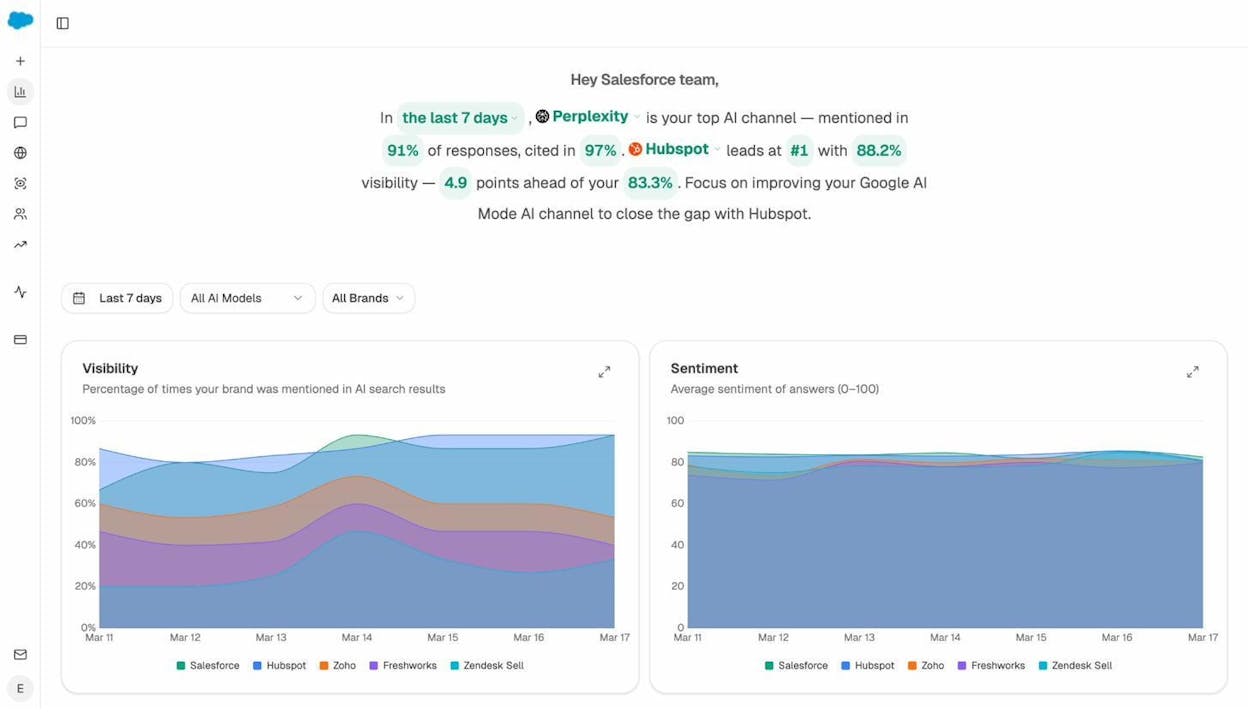
This is the AI search equivalent of checking your Google Search Console. Instead of clicks and impressions on SERPs, you’re seeing how often AI engines mention your brand and what they say about you.
Step 3. Set Up Dashboards and Reports
Now that your measurement tools are collecting data, you need to visualize it in a way that’s easy to understand and act on.
Most SEO tools come with pre-built reports. Google Search Console has its Performance and Coverage reports. GA4 has engagement and conversion reports. SEO platforms offer backlink reports, keyword ranking reports, and site audit summaries.
These built-in reports are a great starting point. But for a complete view of your search performance, you’ll likely need to combine data from multiple sources into a single dashboard.
Building a Custom SEO Dashboard
Google Looker Studio (formerly Data Studio) is the most common free option for building custom SEO dashboards. It connects directly to Google Search Console, Google Analytics, and many third-party SEO tools.
Here’s how to set one up:
-
Go to Looker Studio
-
Click Create > Report
-
Add your data sources (GSC, GA4, etc.)
-
Build widgets for the metrics that matter to your questions from Step 1
![[Screenshot: Looker Studio report with Google Search Console data source connected]](https://www.datocms-assets.com/164164/1776796110-blobid6.png?auto=format,compress&w=1248&fit=max)
Keep it simple. The best dashboards answer specific questions at a glance. A dashboard with 30 widgets is just noise.
For a basic SEO dashboard, focus on these metrics:
|
Metric |
Source |
What It Tells You |
|---|---|---|
|
Organic clicks |
Google Search Console |
How much traffic Google sends you |
|
Top queries by clicks |
Google Search Console |
Which keywords drive the most traffic |
|
Click-through rate (CTR) |
Google Search Console |
How compelling your SERP listings are |
|
Organic sessions |
Google Analytics |
Total organic visits including engagement |
|
Engagement rate |
Google Analytics |
How much users interact with your content |
|
Conversions from organic |
Google Analytics |
How many leads or sales organic traffic generates |
|
Keyword rankings (tracked) |
SEO platform |
Whether you’re moving up or down for target keywords |
|
Backlinks gained/lost |
SEO platform |
Your link-building momentum |
|
Site health score |
SEO platform |
Whether technical issues are hurting you |
This gives you a single place to check the overall health of your SEO program without switching between four different tools.
Adding AI Search to Your Dashboard
For AI search, Analyze AI already provides a unified dashboard that tracks brand visibility, sentiment, competitor comparisons, source citations, and AI-referred traffic—all in one place.
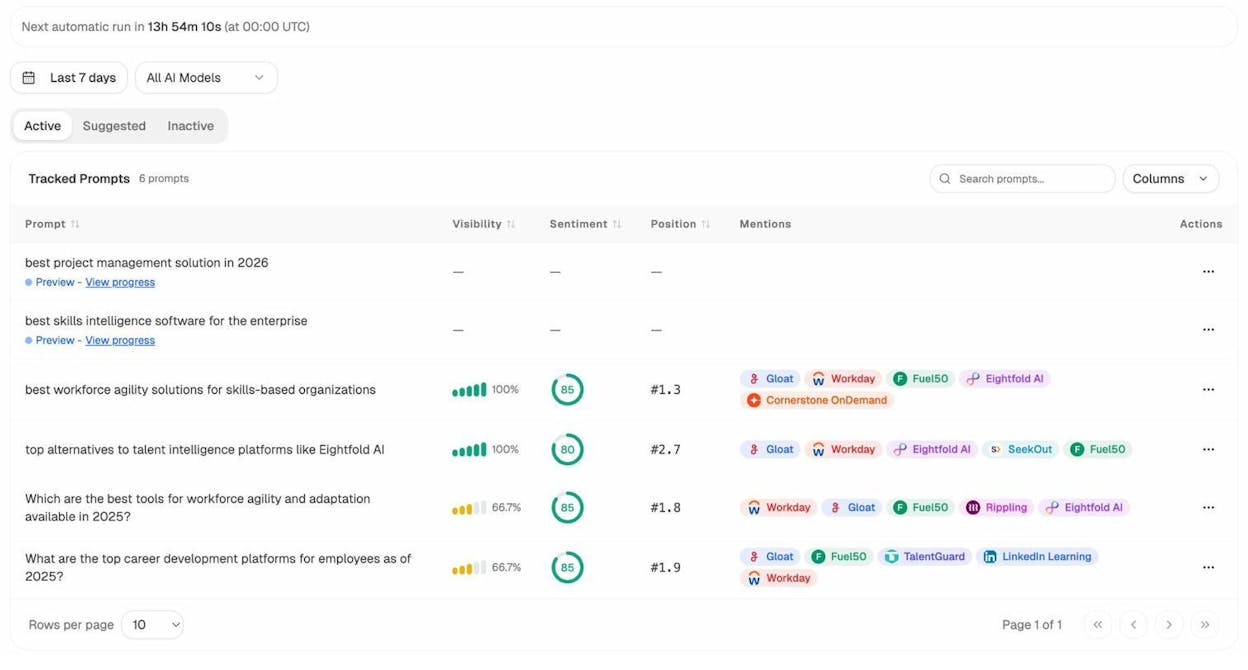
The Prompts dashboard shows exactly which queries trigger AI mentions of your brand, your visibility score for each prompt, and which competitors appear alongside you:
The Competitors view automatically surfaces brands that AI engines mention alongside yours—even ones you hadn’t considered as competitors:
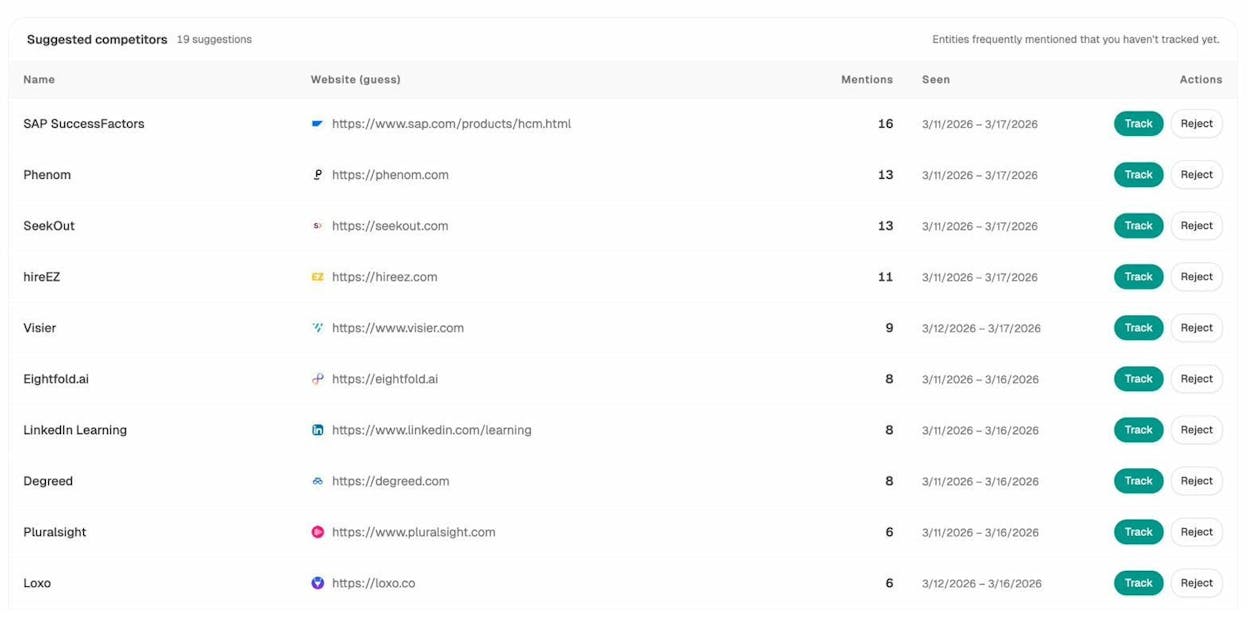
Instead of building a separate Looker Studio report for AI search, you can use Analyze AI as the single source of truth for this channel. It already combines the data you’d need: prompt tracking, citation analysis, competitor visibility, and traffic analytics.
If you want to include AI search metrics in your existing Looker Studio dashboard, the simplest approach is to add a Website Traffic Checker widget or manually track AI-referred traffic from GA4 (filter by referrer domains like chatgpt.com, perplexity.ai, etc.).
Step 4. Review and Act on the Data
Data without action is just trivia. This is where SEO analytics earns its value.
Let’s walk through several common questions that SEO analytics can answer—and how to answer them using the tools you’ve set up.
What Content Is the Most Engaging?
Google’s SEO Starter Guide says that every optimization should be aimed at improving user experience. But how do you know which content your users actually engage with?
GA4’s “Average engagement time” metric helps here. It shows how long users actively interact with each page—not just how long the tab is open, but how long they’re scrolling, reading, and clicking.
Here’s how to find your most engaging organic content:
-
Go to GA4
-
Navigate to Engagement > Pages and Screens
-
Click All users at the top
-
Change the dimension to First User Medium
-
Set the value to organic
-
Sort the table by “Average engagement time” from high to low
![[Screenshot: GA4 Pages and Screens report filtered by organic medium, sorted by average engagement time]](https://www.datocms-assets.com/164164/1776796137-blobid9.png?auto=format,compress&w=1248&fit=max)
Now you’re looking at your most engaging organic pages. Use this data to understand what keeps people reading—and apply those patterns to underperforming content.
A few caveats: short pages will naturally have lower engagement times, so don’t panic about a 300-word glossary entry. And pages with very few visits produce unreliable averages. Focus on pages with statistically meaningful traffic.
How Do I Increase Backlinks?
Backlinks remain one of the strongest ranking signals. A study of over a billion pages found a clear correlation between organic search traffic and the number of referring domains.
To get more backlinks, you first need to understand what content already attracts them. Google Search Console can help:
-
Go to GSC
-
Open the Links report
-
Click More under “Top linked pages” in the “External links” section
-
Sort by “Linking sites” in descending order
![[Screenshot: GSC Top linked pages report sorted by linking sites in descending order]](https://www.datocms-assets.com/164164/1776796137-blobid10.png?auto=format,compress&w=1248&fit=max)
Look for patterns. Are your most-linked pages studies and original research? How-to guides? Free tools? Templates? Once you know what format attracts links in your niche, create more of that content.
For deeper analysis—like evaluating the quality of your backlinks—you’ll need a dedicated SEO platform with backlink analysis capabilities. Look at metrics like the linking page’s traffic, domain authority, and relevance to your niche. A single link from a high-traffic, relevant page is worth more than dozens of links from obscure directories.
Pro tip: Use your SEO tool’s “Best by links” report on competitor domains to find content ideas that attract links in your industry but that you haven’t covered yet.
![[Screenshot: SEO platform “Best by links” report showing competitor’s top linked content]](https://www.datocms-assets.com/164164/1776796145-blobid11.png?auto=format,compress&w=1248&fit=max)
What Keywords Are Competitors Ranking For That I’m Not?
If two or three of your competitors rank for a keyword and you don’t, it’s probably important to your market. A content gap analysis surfaces these opportunities.
Most SEO platforms include a content gap tool. Here’s the general process:
-
Enter your domain
-
Add two to three competing domains
-
Run the analysis
-
Review keywords where competitors rank but you don’t
![[Screenshot: Content gap analysis showing keywords where competitors rank and your site does not]](https://www.datocms-assets.com/164164/1776796154-blobid12.png?auto=format,compress&w=1248&fit=max)
If the list is overwhelming, filter to show only keywords where at least two competitors rank. This narrows the results to the most relevant opportunities.
From there, prioritize keywords by search volume, keyword difficulty, and business value. A keyword with 50 monthly searches but high buying intent is often worth more than one with 5,000 monthly searches and vague informational intent. This is the core principle behind Pain Point SEO—prioritize keywords where the searcher has a problem your product or service solves.
What Is Competitor Activity Telling You?
SEO analytics isn’t just about your own site. Monitoring competitors helps you spot trends early, identify content gaps, and understand what’s working in your market.
Here’s a simple competitive monitoring routine:
-
Track competitor rankings for your shared keywords using your keyword tracking tool
-
Monitor their new content to spot topics they’re investing in
-
Analyze their backlink growth to find link-building opportunities you’re missing
-
Check their technical health using free tools like Analyze AI’s Website Authority Checker
Build a competitor monitoring report that you review monthly. Look for sudden ranking gains (they probably published or updated something), new backlinks from authoritative domains (potential outreach targets for you), and new content topics (market signals you should pay attention to).
Step 5. Extend Your Analytics to AI Search
Everything above covers traditional SEO analytics—measuring and acting on your Google search performance. But search behavior is changing. A growing percentage of users now turn to AI platforms like ChatGPT, Perplexity, and Gemini for answers that used to start on Google.
This doesn’t mean SEO is dead. It means search is evolving, and AI search is becoming an additional organic channel that you should measure and optimize alongside Google. That’s the approach we believe in at Analyze AI—not panic, but practical expansion of your analytics to cover where buyers actually go.
Here’s how to extend each part of your SEO analytics workflow to include AI search.
Track Your Brand’s AI Visibility
In SEO, you track keyword rankings. In AI search, the equivalent is prompt visibility—how often your brand appears when someone asks an AI engine a relevant question.
Analyze AI lets you track this across ChatGPT, Perplexity, Gemini, Claude, and Copilot. You can add prompts manually or use the Suggested Prompts feature, which identifies relevant queries based on your industry and competitors.
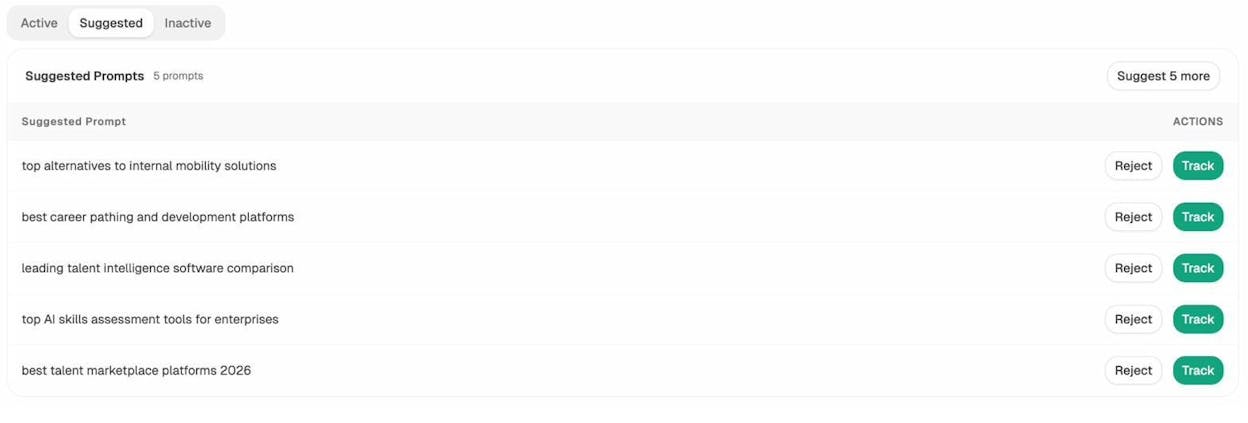
For each tracked prompt, you see your visibility score (what percentage of AI responses mention your brand), your position in the response, the sentiment of the mention, and which competitors also appear.
This is the AI search equivalent of checking your rank tracker in SEO. Do it weekly.
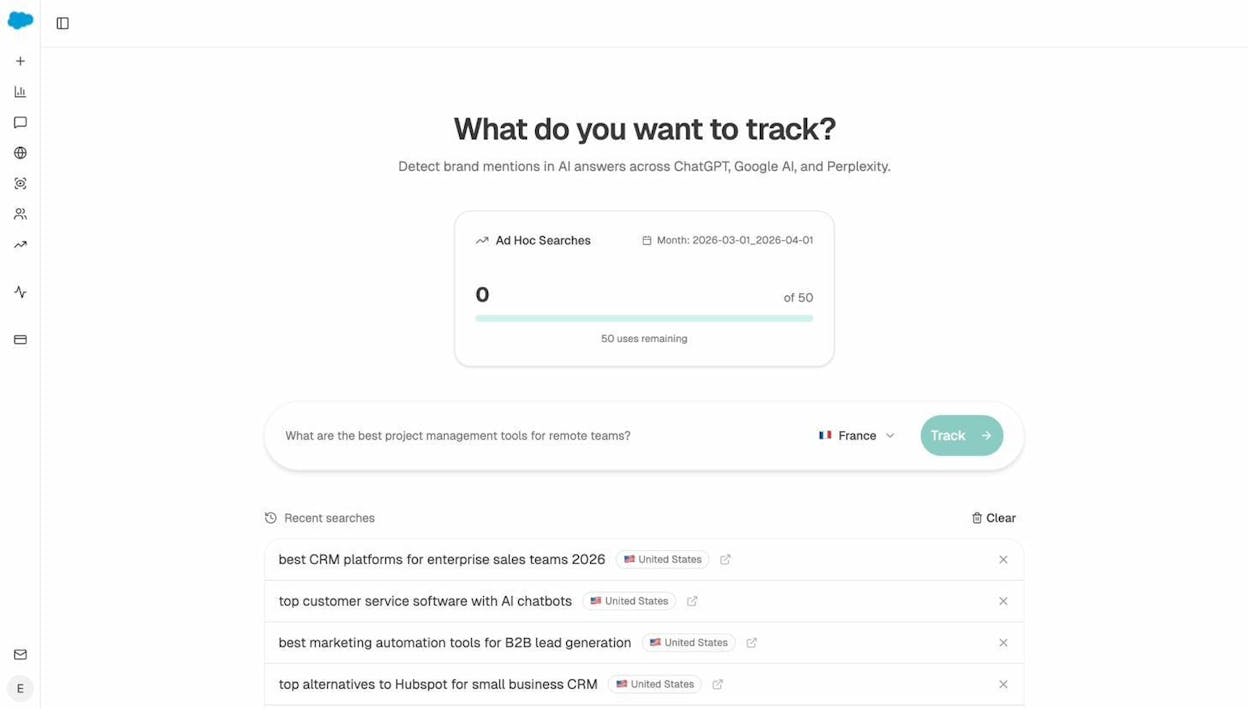
You can also run ad hoc searches to check your brand’s visibility for any prompt, on demand:
Analyze Your AI Search Competitors
In SEO, you use content gap tools to find keywords competitors rank for. In AI search, you need to know which competitors AI engines mention alongside your brand—and where they get mentioned but you don’t.
Analyze AI’s Competitors dashboard shows this. It tracks which brands appear in AI-generated answers for your tracked prompts and surfaces suggested competitors that you may not have been monitoring:
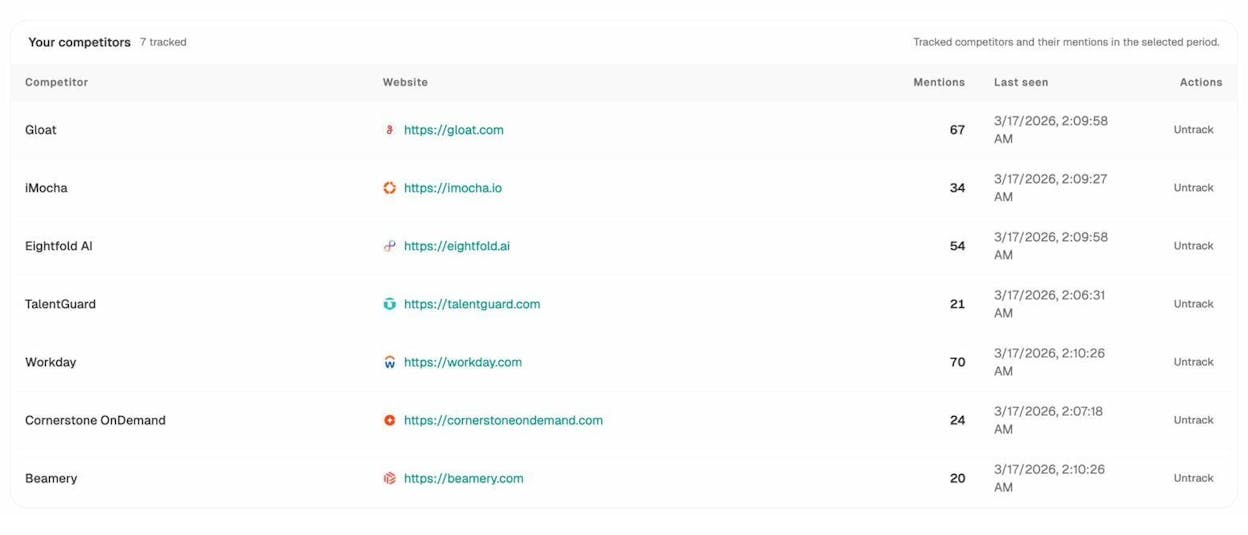
If a competitor shows up in AI answers for prompts that matter to your business and you don’t, that’s an AI search content gap. It means AI models associate that competitor with a topic you want to own.
To close the gap, create clear, original content on those topics. AI models tend to cite brands with consistent, authoritative content—the same content principles that work for SEO also work here.
Understand Which Sources AI Models Cite
One of the most actionable parts of AI search analytics is understanding which sources AI models use to generate their answers. This tells you what content to create, where to publish it, and which formats AI models prefer.
Analyze AI’s Sources dashboard breaks this down. It shows the content types AI models cite most often (blogs, product pages, reviews, etc.), the top cited domains in your industry, and where your competitors’ citations come from:
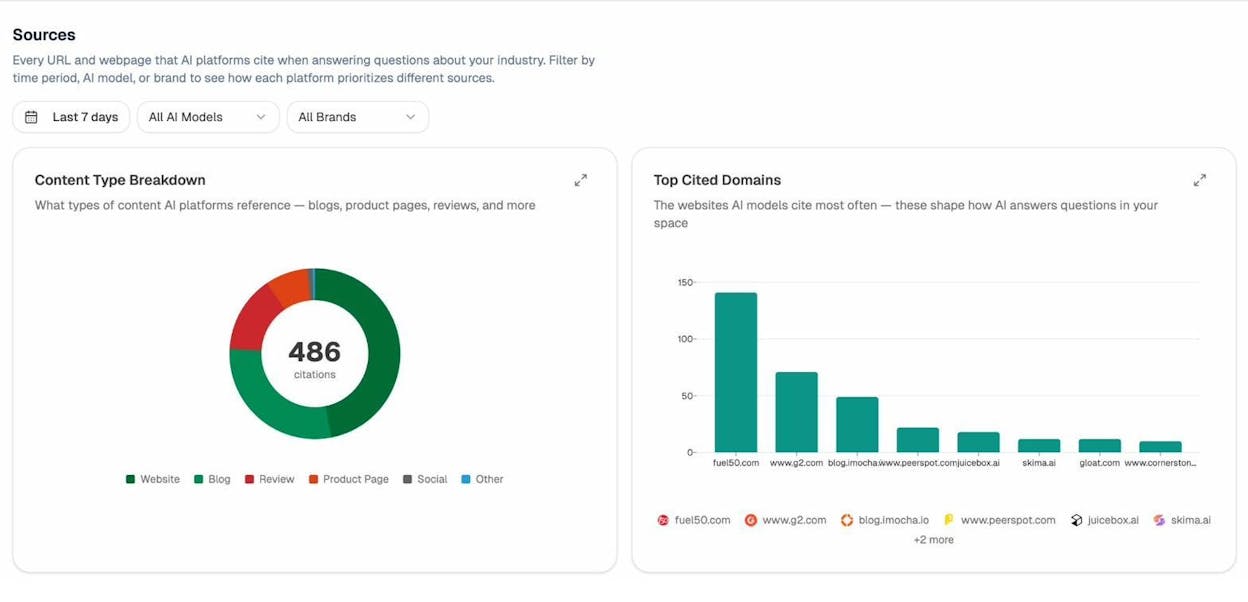
If AI models in your industry heavily cite review sites like G2 or Capterra, that tells you to invest in your presence on those platforms. If blog content dominates citations, that validates your content marketing investment.
This is data you can’t get from Google Search Console or GA4. It’s unique to AI search analytics.
Measure AI-Referred Traffic
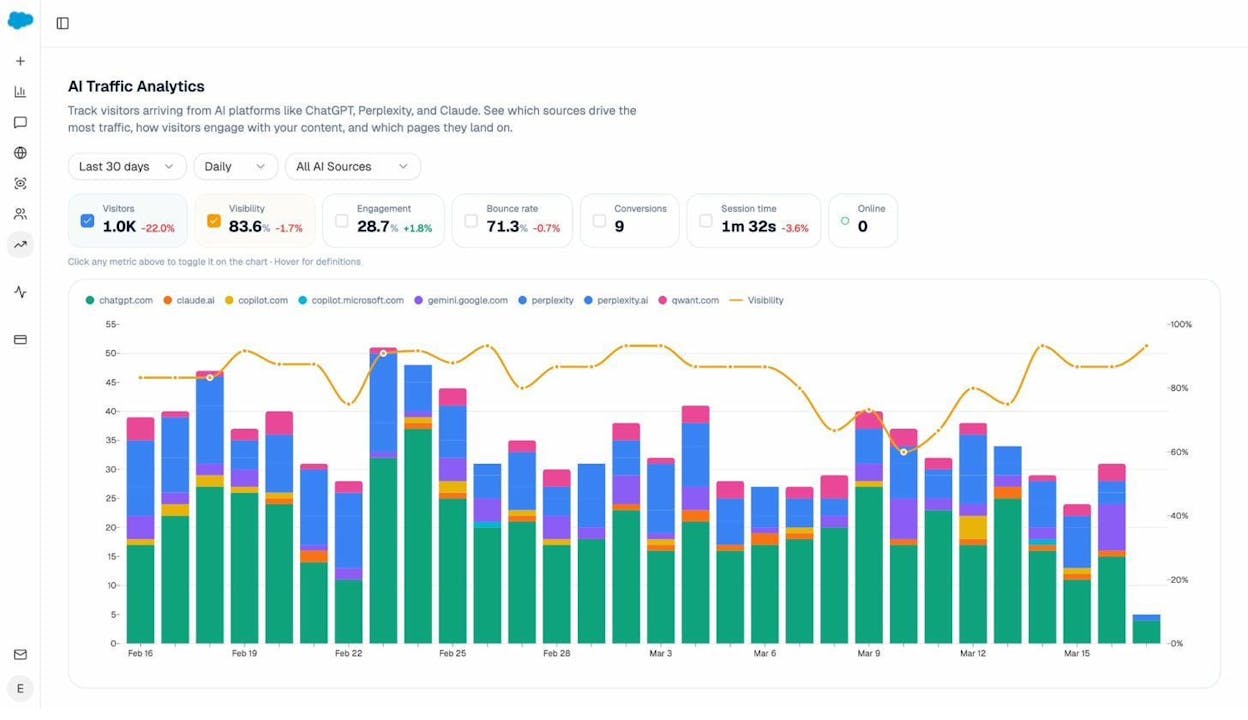
AI platforms are starting to send real traffic. When ChatGPT or Perplexity cite your page, some users click through. This traffic shows up in your analytics under referrer domains like chatgpt.com, perplexity.ai, and others.
Analyze AI’s AI Traffic Analytics dashboard tracks this automatically. It shows visitors from each AI platform, engagement metrics (bounce rate, session time, engagement rate), and which landing pages receive the most AI-referred traffic:
The Landing Pages report is especially useful. It tells you which pages on your site are already performing in AI search:
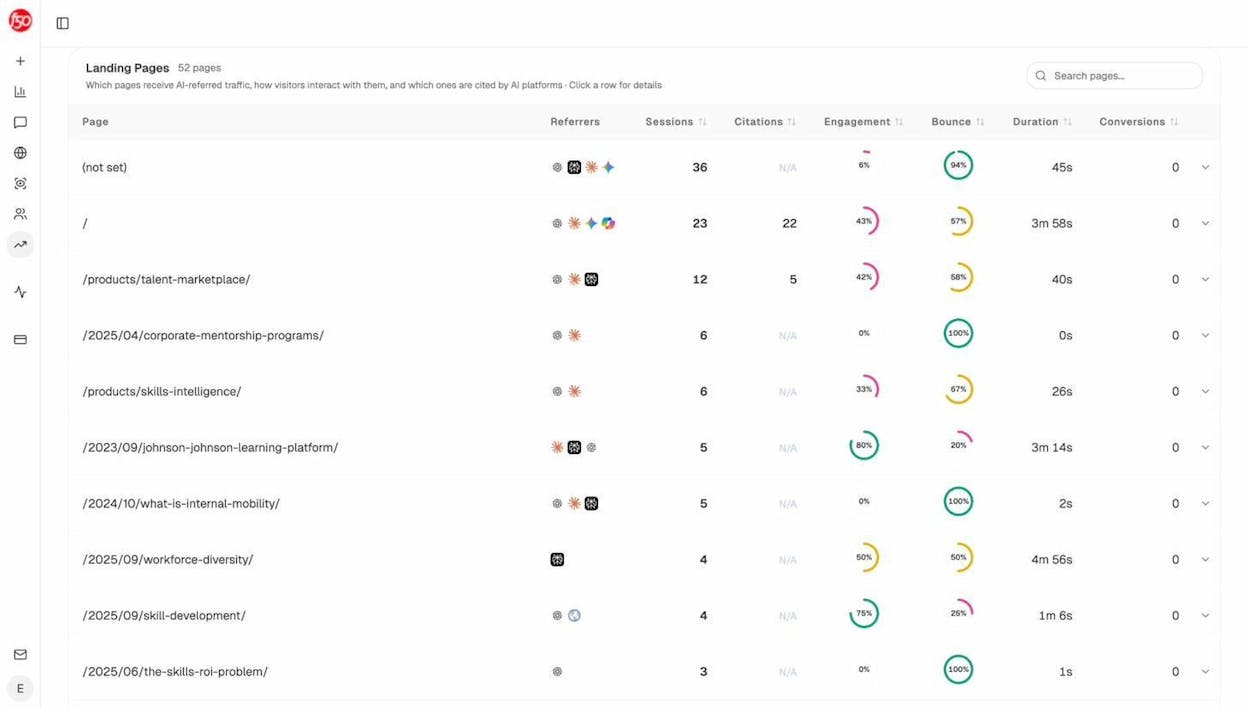
Study the patterns. What do your top AI-traffic pages have in common? Are they long-form guides? Product comparison pages? Pages with structured data? Once you identify what works, double down on that format and structure for other pages.
Monitor Brand Perception in AI Search
In SEO, you can’t easily control what Google’s featured snippets say about you. In AI search, the equivalent challenge is bigger—AI models generate entire paragraphs about your brand based on the information they’ve absorbed.
Analyze AI’s Perception Map gives you a visual representation of how AI models position your brand relative to competitors. It plots brands on two axes: visibility (how often they appear) and narrative strength (how compelling the AI-generated description is):
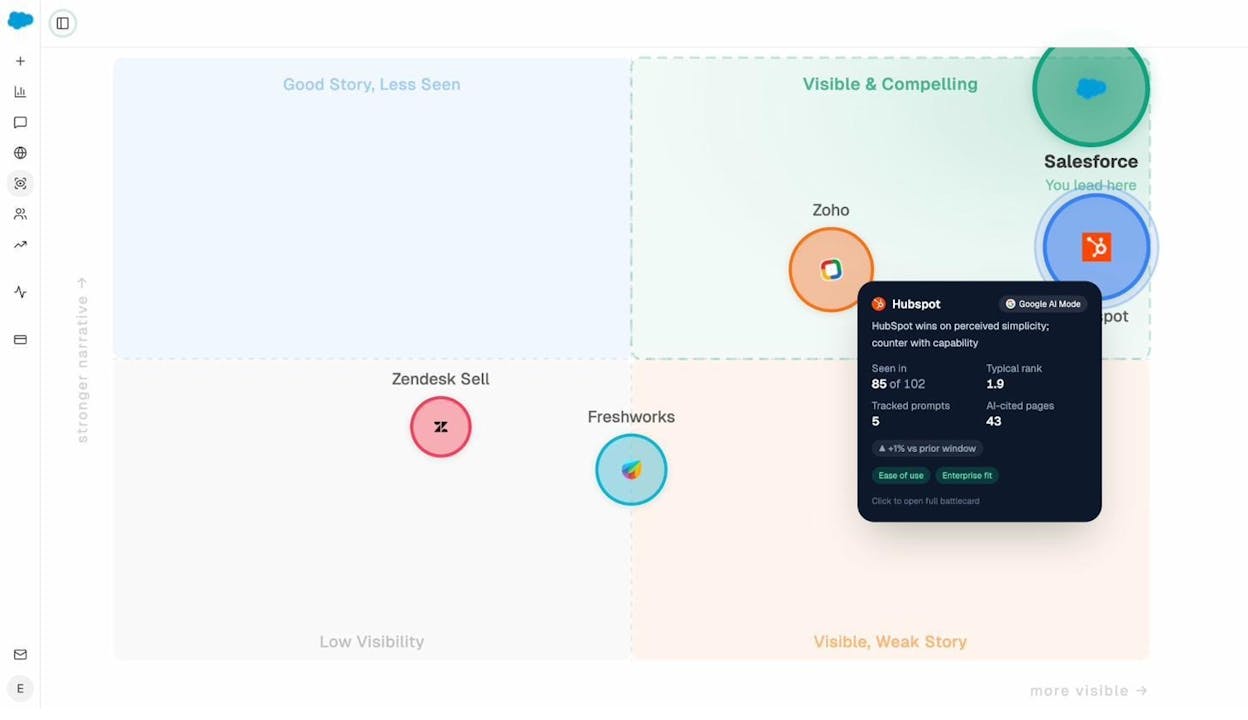
This helps you answer questions like: “Is our brand seen as a leader in AI-generated answers?” and “Which competitors have a stronger AI narrative than we do?”
If your brand appears often but with a weak narrative, focus on creating clearer positioning content. If your brand rarely appears, the priority is broader content coverage.
Set Up Automated AI Search Monitoring
You don’t need to check dashboards manually every day. Analyze AI sends weekly email digests that summarize your AI search performance, flag significant changes, and highlight new competitor activity:
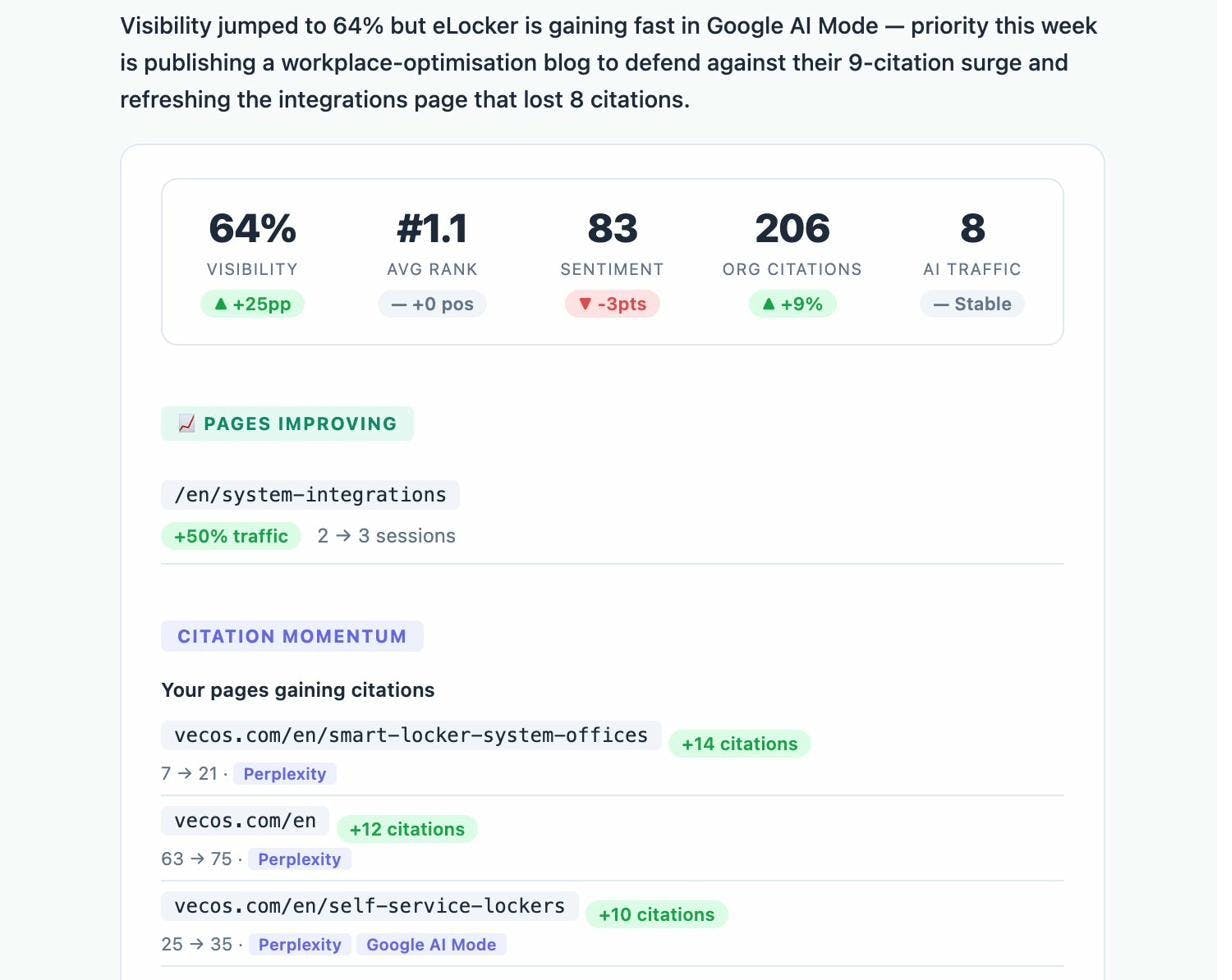
This is the AI search equivalent of scheduled SEO reports—a passive monitoring system that alerts you when something important happens.
Step 6. Build a Unified Search Analytics Routine
The most effective approach to search analytics in 2026 combines traditional SEO and AI search into a single workflow. Here’s a practical routine:
Weekly (15 minutes):
-
Review your Google Search Console performance for any major ranking or traffic changes
-
Check your Analyze AI Overview dashboard for AI visibility trends
-
Review the weekly email digest for flagged changes
-
Scan the Prompts dashboard for any new competitor mentions
Monthly (1 hour):
-
Run a full content gap analysis against your top SEO competitors
-
Review your AI search competitors in Analyze AI for new entrants
-
Check the Sources dashboard for shifts in which content types AI models cite
-
Review AI Traffic Analytics for landing page trends
-
Update your keyword tracking list and prompt tracking list
-
Review and act on the top three opportunities you’ve identified
Quarterly (half day):
-
Conduct a comprehensive SEO competitor analysis
-
Review your site’s technical health via a site audit
-
Analyze the Perception Map to understand how your brand positioning has shifted
-
Update your SEO content strategy based on combined Google and AI search data
-
Use the Keyword Generator and Keyword Difficulty Checker to find new opportunities
-
Audit your internal linking structure
This routine ensures you’re not just collecting data—you’re systematically acting on it across both search channels.
Common SEO Analytics Mistakes to Avoid
After covering the process, here are the mistakes that derail most SEO analytics efforts:
Tracking too many metrics. More data does not mean better decisions. Pick five to ten metrics that directly connect to your business goals and ignore the rest.
Ignoring AI search data. If you’re only measuring Google, you’re missing a channel that’s growing fast. AI search monitoring is no longer optional for brands that want a complete picture of their organic visibility.
Building dashboards nobody uses. A dashboard is only valuable if someone reviews it regularly and acts on what it shows. Start simple and add complexity only when a specific question requires it.
Reacting to noise instead of trends. Rankings fluctuate daily. A single day’s drop doesn’t mean your strategy is broken. Look at trends over weeks and months before making changes.
Skipping the planning step. Jumping straight into tools without defining your questions leads to aimless data exploration. Always start with “What do I want to know?” and work backward.
Treating SEO and AI search as separate programs. The content that ranks well in Google is often the content that gets cited by AI models. A unified approach where you optimize for both channels simultaneously is more efficient than running two disconnected programs.
Final Thoughts
SEO analytics is a means to an end. The point is not to build beautiful reports—it’s to find answers that drive better performance.
The process is straightforward: plan what you need to know, set up tools to collect the right data, visualize it clearly, and act on what you find. And in 2026, that process should extend beyond Google to include AI search—not because SEO is dying, but because search is expanding.
Start with the basics. Set up Google Search Console, Google Analytics, and an SEO platform. Then layer in Analyze AI to cover the AI search channel. Build a simple routine that forces you to review the data and take action on it regularly.
The brands that win in search—both traditional and AI—are the ones that treat analytics as a habit, not a project.

Ernest

Ibrahim


