



Summarize this blog post with:


In this article, you’ll learn what SEO is, why it still matters in 2026, and how to set your website up so both search engines and AI assistants can find it. You’ll get a step-by-step walkthrough of the five pillars of SEO, practical setup tasks you can complete today, and a clear framework for tracking whether your efforts are working — across Google, Bing, ChatGPT, Perplexity, and every other place your customers are searching.
Table of Contents
Part 1: SEO Fundamentals
What Is SEO?
SEO (Search Engine Optimization) is the practice of improving your website so it appears higher in search engine results and gets mentioned by AI assistants like ChatGPT, Gemini, Claude, and Perplexity.
It covers everything from the words on your pages to the way your site is coded, from the links pointing to your domain to how fast your pages load on mobile. The goal is simple: when someone searches for what your business does, your website shows up.
That definition has expanded in the last two years. Search is no longer limited to typing keywords into Google and scanning ten blue links. People now ask AI assistants full questions and expect direct answers. Those answers pull from the same pool of web content that search engines index. If your website is well-optimized for search, it has a much better chance of being cited by AI platforms too.
This is why SEO in 2026 is best understood as organic visibility — your ability to show up wherever your audience is looking, whether that’s a traditional search result, an AI-generated summary, or a voice assistant response.
Why Is SEO Important?
People are actively searching for what you sell, teach, or offer. Google processes roughly 8.5 billion searches per day. Meanwhile, ChatGPT alone has surpassed 400 million weekly active users, and platforms like Perplexity and Gemini are growing fast.
If your site doesn’t appear in these results, your competitors’ sites will.
Unlike paid advertising, where visibility disappears the moment you stop spending, organic visibility compounds over time. A well-optimized page can generate traffic for months or years after it’s published.
The businesses that invest in SEO now are building a durable advantage. The ones that wait are leaving traffic, leads, and revenue on the table across both traditional search and the growing AI search channel.
What Are the Benefits of SEO?
Consistent, compounding traffic. A page that ranks on page one of Google doesn’t stop working when your budget runs out. It continues to attract visitors passively, month after month. And as AI assistants increasingly pull from high-ranking, well-structured content, that same page can generate visibility in AI responses too.
Lower customer acquisition cost over time. The upfront investment in SEO — research, content creation, technical optimization — pays back repeatedly. A single blog post can drive thousands of visits without additional spend. To illustrate: a site generating 50,000 monthly organic visits would need to spend tens of thousands of dollars per month in paid ads to match that volume.
Trust and credibility. People trust organic results more than ads. Appearing at the top of Google signals authority. Being cited by an AI assistant as a source reinforces that trust even further, because the AI is essentially vouching for your content.
Multi-channel visibility. Strong SEO doesn’t just help you rank on Google. Research shows that 73% of websites appearing in Google’s AI Overviews also rank in the top 10 organic results. In other words, the work you do for traditional SEO directly feeds your visibility in AI-generated answers.
Note: No source of traffic is truly free. SEO requires time, effort, and often investment in tools and content. But compared to paid channels, the long-term return on investment is significantly higher.
How Does SEO Work?
SEO involves five main activities. Each one builds on the others, and skipping any of them weakens the whole strategy.
1. Keyword research. This is where you find out what your audience is searching for — the actual words and phrases they type into Google or ask AI assistants. Good keyword research tells you what topics to cover, how competitive those topics are, and what kind of content you need to create to compete. It’s the foundation of every SEO strategy.
2. Content creation. Once you know what people are searching for, you create content that answers their questions better than anything else available. This means in-depth, accurate, well-organized pages that genuinely help the reader. Search engines and AI assistants both prioritize content that demonstrates experience, expertise, authority, and trust (E-E-A-T).
3. On-page SEO. This is how you structure and format each page so search engines (and AI crawlers) can understand it. It includes things like title tags, meta descriptions, header tags, internal links, image alt text, and structured data markup. On-page SEO makes your content machine-readable.
4. Link building. Backlinks — links from other websites to yours — are one of Google’s most important ranking signals. They function as votes of confidence. The more high-quality sites that link to your content, the more authority Google assigns to your pages. In AI search, being cited and linked by trusted sources also increases the likelihood that AI assistants will reference your content.
5. Technical SEO. This is the behind-the-scenes work that ensures search engines and AI crawlers can find, access, and index your content. It includes site speed, mobile-friendliness, crawlability, sitemaps, HTTPS, and structured data. If the technical foundation is broken, none of the other four pillars can work properly.
These five pillars form the backbone of everything you’ll learn in this guide and the more detailed guides linked throughout.
Where AI Search Fits In
Here’s what many beginners (and even experienced marketers) get wrong: they treat AI search as something completely separate from SEO. It’s not.
AI assistants like ChatGPT, Perplexity, and Gemini pull their answers from web content. When ChatGPT uses Bing Search to answer a question, it’s retrieving and summarizing pages that are indexed and ranked — the same pages that traditional SEO helps you optimize. When Perplexity cites a source, it’s linking to a webpage that earned its position through the same signals Google uses: relevance, authority, and quality.
At Analyze AI, we believe GEO (Generative Engine Optimization) isn’t a replacement for SEO — it’s the next transformation of it. Search is expanding from ten blue links to multi-modal, prompt-shaped answers. Quality still governs visibility. Authority still comes from depth, originality, structure, and usefulness. What changes is where that quality must be legible — to crawlers, to models, and to the people asking better questions.
We don’t sell fear-based upsells or “GEO replaces SEO” pitches. We don’t peddle vanity metrics. And we don’t do panic marketing. We believe in strengthening what already works — rigorous content strategy, technical clarity, and measurement that separates signal from noise.
Throughout this guide, we’ll show you how to set up your website for both channels simultaneously, because the work overlaps more than it differs.
Learn more: GEO vs SEO: Key Differences & Similarities Explained
Part 2: Setting Up for SEO Success
Before you start creating content or building links, your website needs a solid foundation. Doing SEO on a poorly set-up site is like painting a house with a cracked foundation — the effort is wasted.
Here’s how to get the basics right.
Choose the Right Domain
If you already have a domain, you’re probably fine. Don’t overthink this. But if you’re still choosing one, keep two things in mind.
Domain name: Short, memorable, and easy to spell. Your business name is almost always the best choice. Avoid hyphens, numbers, or keyword-stuffed domains like “best-seo-tools-2026.com.” Google doesn’t give ranking boosts for keywords in your domain name, and users find these hard to remember and trust.
Top-level domain (TLD): The .com extension is the most recognizable and trusted. If it’s not available, .co, .io, or your country code TLD (.co.uk, .fr, .de) are fine options. Avoid obscure TLDs like .info or .biz — users associate these with spam. Google has confirmed that your TLD choice doesn’t directly affect rankings, but user trust matters.
If you serve a specific country, a country-code TLD like .fr or .es sends a strong signal to search engines about your geographic targeting. This can help with local rankings.
Pick a Website Platform
A website platform (CMS) lets you create and manage your site without writing code from scratch. There are two main types:
Hosted platforms like Wix, Shopify, and Webflow handle hosting, security, and updates for you. They’re great for beginners and small businesses that want simplicity and customer support. Most now include solid SEO features out of the box — sitemaps, meta tag editing, mobile-responsive templates, and more.
Self-hosted platforms like WordPress give you full control over your site’s code, hosting, and functionality. WordPress powers roughly 43% of all websites for a reason: it’s infinitely customizable through plugins and themes, and its SEO ecosystem (Yoast, Rank Math) is the most mature in the industry. The trade-off is that you’re responsible for hosting, security updates, and maintenance.
|
Factor |
Hosted (Wix, Shopify, Webflow) |
Self-Hosted (WordPress) |
|---|---|---|
|
Ease of setup |
Very easy |
Moderate |
|
SEO control |
Good (improving) |
Full control |
|
Customization |
Limited by platform |
Unlimited |
|
Hosting included |
Yes |
No (you choose a host) |
|
Maintenance |
Handled for you |
Your responsibility |
|
Best for |
Beginners, small businesses |
Scaling businesses, content-heavy sites |
For most beginners, a hosted platform is the fastest path to getting online. For businesses that plan to scale their content marketing, WordPress offers more flexibility in the long run.
![[Screenshot: Side-by-side comparison of WordPress dashboard vs. Webflow dashboard showing their respective SEO settings panels]](https://www.datocms-assets.com/164164/1774438994-blobid0.jpg?auto=format,compress&w=1248&fit=max)
Use a Reliable Web Host
If you’re on a self-hosted platform like WordPress, you need a web host. This is the company that stores your website files and serves them to visitors — and increasingly, to AI crawlers like Googlebot, GPTBot, and ClaudeBot.
When evaluating hosts, focus on four factors:
Security. Your host should provide a free SSL/TLS certificate (or support Let’s Encrypt). HTTPS isn’t optional — it’s a ranking factor and a basic trust signal for users.
Server location. Closer servers mean faster load times. If most of your audience is in one country, pick a host with servers there. You can also add a CDN (Content Delivery Network) later to serve your site from locations worldwide.
Support. You want 24/7 live support with fast response times. Before committing, test their support by asking a technical question about SSL setup or CDN integration.
Crawler access. This is the factor most guides skip. Your host should let you configure your robots.txt file and manage your sitemaps. Some hosts auto-generate these or lock you out of editing them, which limits your ability to control what search engines and AI crawlers can access. Make sure your host doesn’t block known AI crawlers like GPTBot or ClaudeBot by default.
Tip: You don’t need to worry about server location too much upfront. If speed becomes an issue later, a CDN like Cloudflare creates copies of your site on servers around the world. Most CDNs have free tiers.
Create a Positive User Experience
Google wants to serve pages that give visitors a good experience. This has been documented extensively in Google’s own guidelines. AI assistants follow the same principle — they prefer to cite content from well-maintained, fast, accessible websites.
Here’s what that means in practice:
Use HTTPS. Always encrypt your site with SSL/TLS. This protects user data and is a confirmed ranking factor. If your site still shows “Not Secure” in the browser, fix this before doing anything else.
![[Screenshot: Browser address bar showing HTTPS padlock icon vs. “Not Secure” warning]](https://www.datocms-assets.com/164164/1774438994-blobid1.png?auto=format,compress&w=1248&fit=max)
Make it mobile-friendly. More than half of all web traffic comes from mobile devices. Google uses mobile-first indexing, meaning it primarily uses the mobile version of your site for ranking. If your site looks broken on a phone, you’re losing both rankings and visitors. Test your site with Google’s Mobile-Friendly Test.
![[Screenshot: Google Mobile-Friendly Test results page showing a passing result]](https://www.datocms-assets.com/164164/1774439000-blobid2.png?auto=format,compress&w=1248&fit=max)
Make it fast. Page speed is a ranking factor on both desktop and mobile. According to Google, pages that take five seconds to load see 90% of visitors leave without interacting. Use PageSpeed Insights to identify what’s slowing your site down, then fix the biggest issues first — usually image compression, code minification, and caching.
![[Screenshot: PageSpeed Insights results showing Core Web Vitals scores]](https://www.datocms-assets.com/164164/1774439002-blobid3.png?auto=format,compress&w=1248&fit=max)
Choose a clean, modern design. First impressions matter. A site that looks outdated erodes trust immediately. You don’t need to redesign your site every quarter, but it should look professional and reflect your brand.
Use a readable font size. People browse on all kinds of devices and screen sizes. Use a base font size of at least 16px for body text. If visitors have to pinch-to-zoom to read your content, your bounce rate will suffer.
Avoid intrusive pop-ups. Google has confirmed that intrusive interstitials — the full-screen pop-ups that block content — can negatively affect rankings. If you use pop-ups for email signups, make them dismissible and non-intrusive on mobile.
Build a Logical Site Structure
Your site structure is the hierarchy of pages and how they connect to each other. A clear structure helps both visitors and search engines understand what your site is about and find specific pages quickly.
Think of it like an outline:
-
Homepage → links to main category pages
-
Category pages → link to individual topic pages
-
Topic pages → link to related pages and back to category pages
Each connection between pages is an internal link — a link from one page on your site to another. Internal links serve three critical SEO functions:
They help search engines discover pages. Google can’t rank a page it hasn’t found. Internal links create pathways for crawlers to discover your content. The same applies to AI crawlers — if a page is deeply buried with no links pointing to it, neither Google nor GPTBot will find it.
They distribute authority across your site. Google’s PageRank algorithm judges page quality partly based on internal and external links. When your high-authority pages link to newer or less-visible pages, they pass some of that authority along.
They provide context through anchor text. The clickable text in a link tells search engines what the linked page is about. This applies to AI systems too — they use anchor text to understand relationships between pages.
![[Screenshot: A simple mind map showing homepage → category pages → individual posts, with arrows representing internal links]](https://www.datocms-assets.com/164164/1774439005-blobid4.png?auto=format,compress&w=1248&fit=max)
Use Clean URL Structures
URLs should be descriptive, readable, and consistent. Both users and search engines use URLs to understand what a page is about before they even click on it.
Good URL: yoursite.com/seo-basics/
Bad URLs: yoursite.com/?p=123, yoursite.com/2026/02/19/seo-basics/, yoursite.com/archives/865
If you’re setting up a new site on WordPress, go to Settings → Permalinks and choose “Post name.” This creates the cleanest URL structure. If you’re on a hosted platform like Webflow or Shopify, clean URLs are usually the default.
![[Screenshot: WordPress Permalink Settings page with “Post name” option selected]](https://www.datocms-assets.com/164164/1774439010-blobid5.png?auto=format,compress&w=1248&fit=max)
If your site already uses a different URL structure, don’t change it without a plan. Changing URLs without proper 301 redirects can break your existing rankings and backlinks. For existing sites, leave the URL structure as-is unless there’s a strong strategic reason to migrate.
Install an SEO Plugin
If you’re on WordPress, install an SEO plugin immediately. Without one, you can’t easily edit title tags, meta descriptions, or generate sitemaps.
Both Yoast SEO and Rank Math are solid choices. They handle the same core functions — meta tag management, XML sitemap generation, schema markup, and on-page SEO analysis. Rank Math tends to offer more features in its free version, while Yoast has a larger user base and more third-party documentation.
Pick one and stick with it. Don’t install both.
![[Screenshot: Yoast SEO plugin interface showing the meta title and description editor for a blog post]](https://www.datocms-assets.com/164164/1774439014-blobid6.png?auto=format,compress&w=1248&fit=max)
For other platforms: Shopify, Wix, and Webflow all handle basic SEO features natively — sitemaps, meta tags, canonical URLs, and redirects. You may not need a separate plugin.
Set Up for Local SEO (If Applicable)
If your business serves a specific geographic area — a restaurant, law firm, dental practice, plumber, or any brick-and-mortar business — you need local SEO.
Local SEO is the practice of optimizing your online presence to appear in geographically relevant searches. This includes Google Maps results, “near me” searches, and increasingly, AI responses to location-specific questions like “best dentist in Austin” or “plumber near me open now.”
Here’s what to do:
Set up your Google Business Profile (GBP). This is the single most important step for local SEO. Claim your business on Google Business Profile, fill out every field — categories, services, hours, photos, Q&A — and post updates regularly. Your GBP is what appears in Maps results and the local pack on Google.
![[Screenshot: Google Business Profile dashboard showing a filled-out business listing with photos, reviews, and business hours]](https://www.datocms-assets.com/164164/1774439017-blobid7.png?auto=format,compress&w=1248&fit=max)
Ensure NAP consistency. NAP stands for Name, Address, Phone number. These details must match exactly across your website, Google Business Profile, and every directory listing (Yelp, Bing Places, Apple Maps, industry-specific directories). Inconsistencies confuse search engines and can suppress your visibility.
Collect and respond to reviews. Reviews are a ranking factor for local search. Ask satisfied customers to leave reviews on Google, then respond to every review — positive and negative. This signals to both search engines and potential customers that you’re active and engaged.
Create locally targeted content. Build location pages, local FAQ pages, and blog posts that address location-specific questions. This is increasingly important for AI search, where users ask questions like “What’s the best Italian restaurant in downtown Denver?” and AI assistants pull from locally-relevant web content to answer.
Make Your Site Accessible to AI Crawlers
This step is new and most beginner SEO guides miss it entirely. In addition to Googlebot and Bingbot, your site now receives visits from AI-specific crawlers: GPTBot (OpenAI), ClaudeBot (Anthropic), PerplexityBot, and others.
These crawlers are how AI assistants learn about your content. If you block them, your site won’t appear in AI-generated answers.
Here’s what to check:
Review your robots.txt file. Go to yoursite.com/robots.txt and look for lines that say “Disallow” next to AI crawler names. If you see entries blocking GPTBot, ClaudeBot, or PerplexityBot, consider whether that’s intentional. For most businesses, you want these crawlers to have access.
![[Screenshot: Example robots.txt file showing User-agent directives for Googlebot, GPTBot, and ClaudeBot]](https://www.datocms-assets.com/164164/1774439020-blobid8.png?auto=format,compress&w=1248&fit=max)
Consider adding an llms.txt file. This is a new standard that helps AI systems understand your site’s structure, key pages, and content hierarchy. Think of it as a sitemap specifically for AI crawlers. Analyze AI offers a free llms.txt generator so you can create one in minutes. It’s not required yet, but early adoption can give you an edge.
Use structured data (schema markup). Schema markup helps both search engines and AI systems understand the context of your content — whether a page is a recipe, a product review, an FAQ, a how-to guide, or an organization profile. Google’s Structured Data Markup Helper is a free tool to get started. You can also run Analyze AI’s free AI Website Audit Tool to check how well your site is structured for AI crawlers.
Part 3: Getting Indexed by Google (and AI Search Engines)
A website that search engines can’t find might as well not exist. The same is true for AI assistants. Before you can rank or get cited, you need to get indexed.
Google usually finds new websites on its own through links. But you can speed the process up by submitting your sitemap directly.
Find or Create a Sitemap
A sitemap is an XML file that lists all the important pages on your website. It tells search engines which pages exist, when they were last updated, and how they relate to each other.
Most website platforms generate sitemaps automatically. Check these URLs to find yours:
-
yoursite.com/sitemap.xml
-
yoursite.com/sitemap_index.xml
If those don’t work, check yoursite.com/robots.txt — the sitemap location is usually listed there.
![[Screenshot: Browser showing a typical XML sitemap with a list of URLs, lastmod dates, and priority values]](https://www.datocms-assets.com/164164/1774439022-blobid9.png?auto=format,compress&w=1248&fit=max)
If you don’t have a sitemap, your platform likely just needs the feature enabled. On WordPress, both Yoast and Rank Math generate sitemaps automatically. On Shopify, it’s generated at yourstore.com/sitemap.xml by default. On Wix, sitemaps are created automatically once your site is published.
Submit Your Sitemap to Google Search Console
Google Search Console (GSC) is a free tool from Google that lets you monitor how your site appears in search results. Setting it up takes less than ten minutes and is one of the highest-impact things you can do as a beginner.
Here’s how:
Step 1: Verify your site. Go to Google Search Console and add your site as a property. Google will ask you to verify ownership — the easiest method is usually the DNS verification or the HTML tag method. Follow the on-screen instructions.
![[Screenshot: Google Search Console property verification screen showing DNS verification method]](https://www.datocms-assets.com/164164/1774439025-blobid10.png?auto=format,compress&w=1248&fit=max)
Step 2: Submit your sitemap. Once verified, go to the “Sitemaps” section in the left sidebar. Enter your sitemap URL (e.g., yoursite.com/sitemap.xml) and click Submit.
![[Screenshot: Google Search Console Sitemaps submission page with the URL field filled in and a “Success” status]](https://www.datocms-assets.com/164164/1774439031-blobid11.png?auto=format,compress&w=1248&fit=max)
Step 3: Check for indexing issues. After a few days, check the “Pages” report in GSC. This shows how many of your pages are indexed and flags any issues preventing indexing — like noindex tags, redirect errors, or crawl blocks.
![[Screenshot: Google Search Console Pages report showing indexed vs. not-indexed pages with reason codes]](https://www.datocms-assets.com/164164/1774439033-blobid12.png?auto=format,compress&w=1248&fit=max)
Once your pages are indexed in Google, they become available for AI assistants to reference too. AI platforms like ChatGPT and Perplexity use search engine indexes (primarily Bing and Google) as part of their retrieval process. Getting indexed in traditional search is the first step to appearing in AI-generated answers.
Submit Your Site to Bing Webmaster Tools
Most people skip this step, but it matters more now than ever. ChatGPT uses Bing’s search index for its web browsing feature. If your site isn’t properly indexed in Bing, it’s invisible to one of the most widely used AI assistants.
Go to Bing Webmaster Tools, verify your site (you can import your Google Search Console verification), and submit your sitemap. The process mirrors Google Search Console almost exactly.
![[Screenshot: Bing Webmaster Tools dashboard showing sitemap submission]](https://www.datocms-assets.com/164164/1774439037-blobid13.png?auto=format,compress&w=1248&fit=max)
Part 4: How to Track SEO and AI Search Performance
You can’t improve what you don’t measure. Before you invest time into keyword research, content creation, or link building, set up tracking so you know what’s working and what isn’t.
Here’s what to track and which tools to use.
Track Organic Traffic
Organic traffic is the number of visitors who find your site through unpaid search results. If organic traffic is increasing over time, your SEO is working.
Google Search Console shows your organic impressions (how often your site appears in results), clicks, and average position for specific queries. It’s free and should be your first stop.
![[Screenshot: Google Search Console Performance report showing clicks, impressions, CTR, and average position over time]](https://www.datocms-assets.com/164164/1774439039-blobid14.png?auto=format,compress&w=1248&fit=max)
Google Analytics 4 (GA4) gives you a broader view of traffic across all channels — organic, paid, social, direct, and referral. Set up GA4 and look at the “Traffic Acquisition” report to see how much of your traffic comes from organic search.
![[Screenshot: Google Analytics 4 Traffic Acquisition report filtering by “Organic Search” channel]](https://www.datocms-assets.com/164164/1774439043-blobid15.png?auto=format,compress&w=1248&fit=max)
If you want a quick estimate before diving into GA4 setup, Analyze AI’s free Website Traffic Checker lets you see any site’s estimated traffic and top pages in seconds — useful for benchmarking your site against competitors before you start optimizing.
It’s worth noting that organic traffic from traditional search has gotten harder to grow as Google displays more AI Overviews, featured snippets, and People Also Ask boxes directly in search results. This gives users answers without clicking through to your site. That doesn’t mean organic traffic is dead — it means you need to track impressions alongside clicks to get the full picture of your visibility.
Track AI Referral Traffic
Here’s what most beginners don’t realize: AI assistants are already sending traffic to websites. When someone asks ChatGPT a question and it cites a source with a link, some of those users click through. The same happens with Perplexity, which cites sources prominently in every response.
This AI referral traffic is small but growing fast. And it’s trackable.
If you connect your Google Analytics 4 account to Analyze AI, you can see exactly how much traffic you’re receiving from AI search engines — broken down by source (ChatGPT, Perplexity, Claude, Copilot, Gemini, and others), by day, and with engagement metrics like bounce rate and session duration.
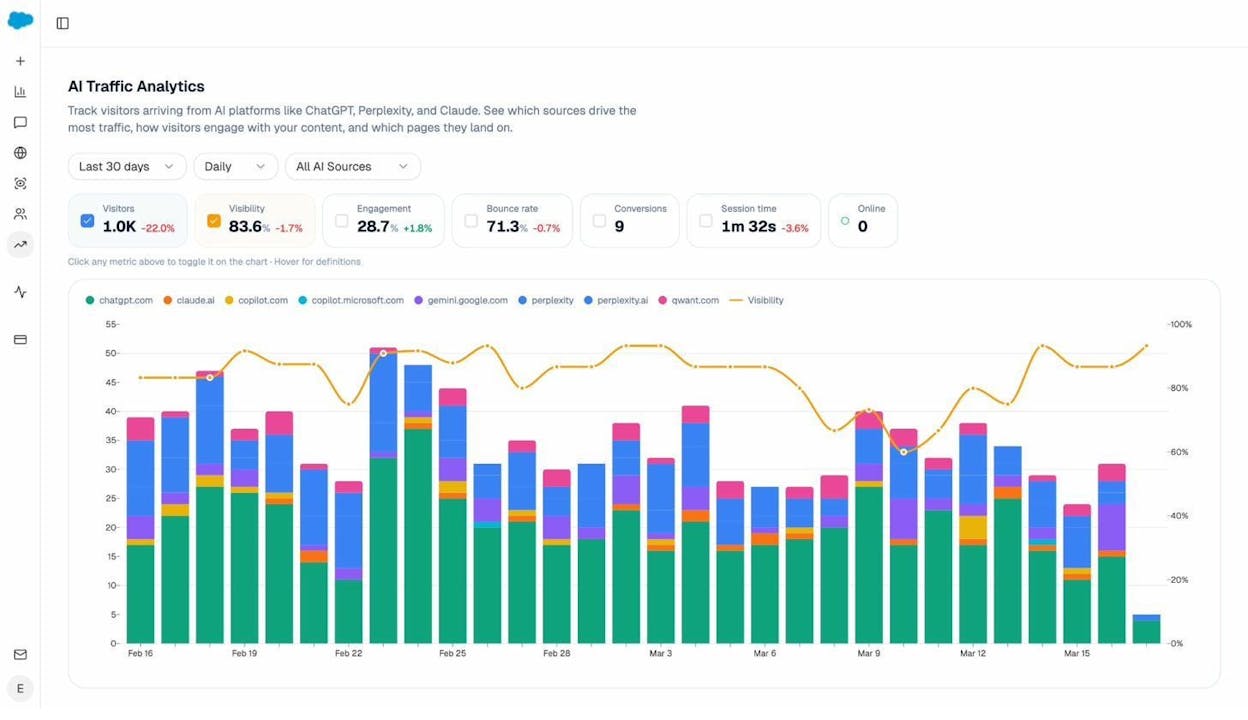
You can also drill down to see which specific pages on your site are receiving AI traffic, from which AI engine, and how visitors are behaving. This is critical for understanding what type of content performs well in AI search so you can create more of it.
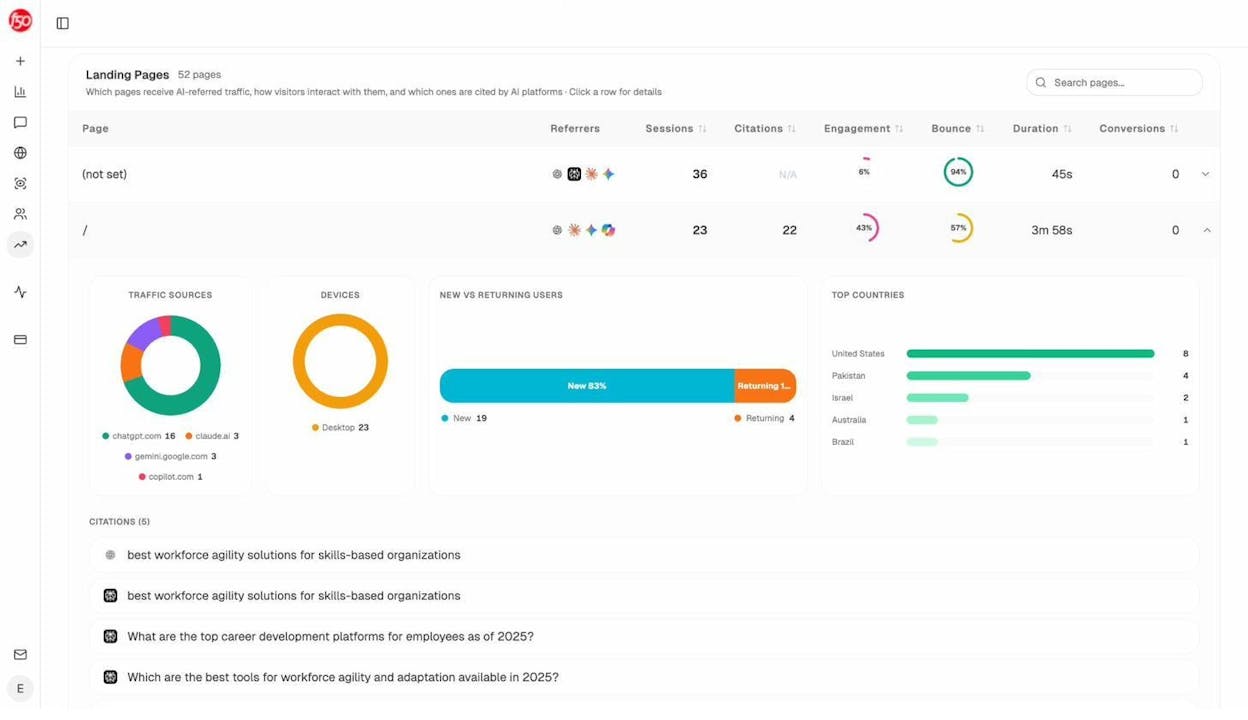
For example, if you notice that your comparison articles and “best of” listicles get significantly more AI referrals than your how-to guides, that’s a signal to invest more in that content format. You can see which pages are being cited, which AI engines are driving the traffic, and whether those visitors are actually engaging — all in one view.
Monitor Keyword Rankings
Keyword rankings tell you how your pages rank for specific search terms. If rankings are climbing, it means your content and optimization work is paying off.
Google Search Console shows average positions for your queries, but the data is aggregated and sometimes delayed.
For more granular tracking — specific keyword positions, historical trends, and SERP features — you’ll need a dedicated rank tracking tool like one of the many keyword tracking tools available.
If you want free starting points, Analyze AI offers two tools for this:
-
Keyword Rank Checker — Enter any keyword and your domain to see where you currently rank. No signup required.
-
SERP Checker — See who currently holds the top positions for any query, along with their domain authority and page features. This tells you exactly what you’re competing against before you invest in creating content.
Rankings matter for AI visibility too. Research shows that the vast majority of websites cited in Google’s AI Overviews also rank in the top 10 organic results. Your organic rankings and your AI visibility are deeply connected — improving one tends to improve the other.
Track AI Visibility
Beyond traffic, you also need to understand how your brand appears in AI-generated answers. Are AI assistants mentioning your brand? Are they recommending your products? Are they citing your content — or your competitors’?
This is a new measurement category that traditional SEO tools don’t cover. Analyze AI lets you track your brand’s visibility across AI engines by monitoring specific prompts that your audience is asking.
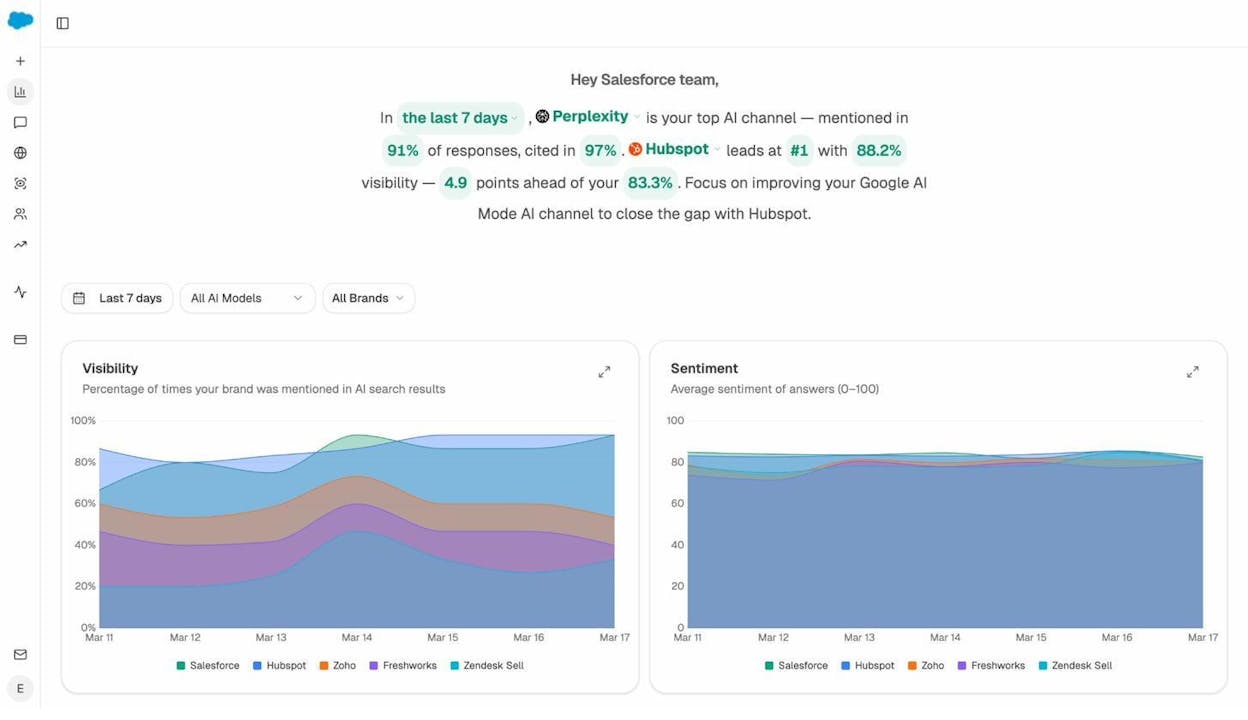
Here’s how it works in practice. When you first open Analyze AI’s dashboard, you see a high-level overview of your brand’s visibility and sentiment across all AI engines — with your top competitors plotted alongside you.
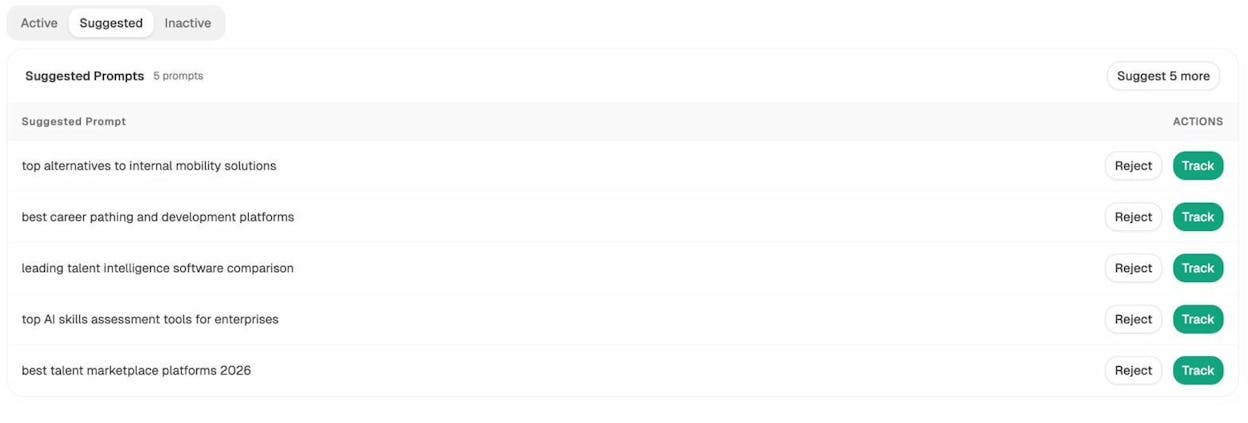
From there, you set up the specific prompts you want to track. These are the questions your customers are actually asking AI assistants. You can add your own prompts or use Analyze AI’s prompt suggestion feature, which analyzes your site and your industry to automatically recommend relevant prompts.
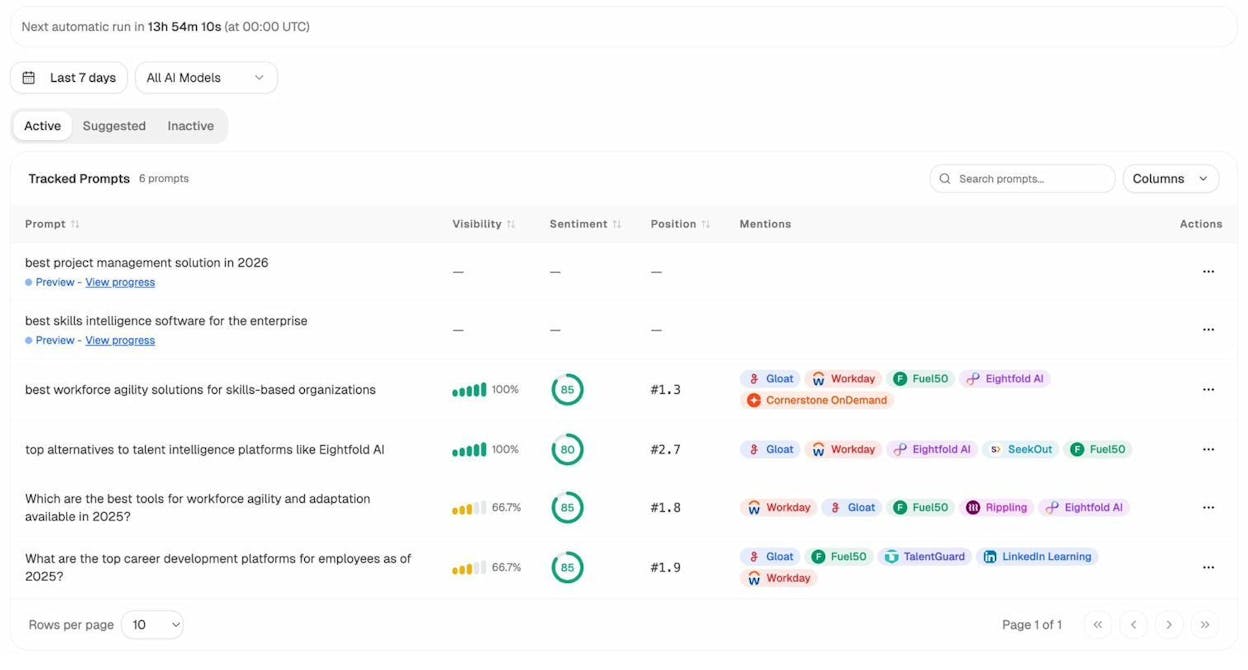
Once your prompts are active, Analyze AI runs them against multiple AI engines daily and shows you the results in a single dashboard. For each prompt, you can see your visibility percentage, sentiment score, position rank, and which competitors are being mentioned.
Click into any individual prompt to see the detailed visibility trend over time — your brand plotted against every competitor, across every AI engine, day by day.
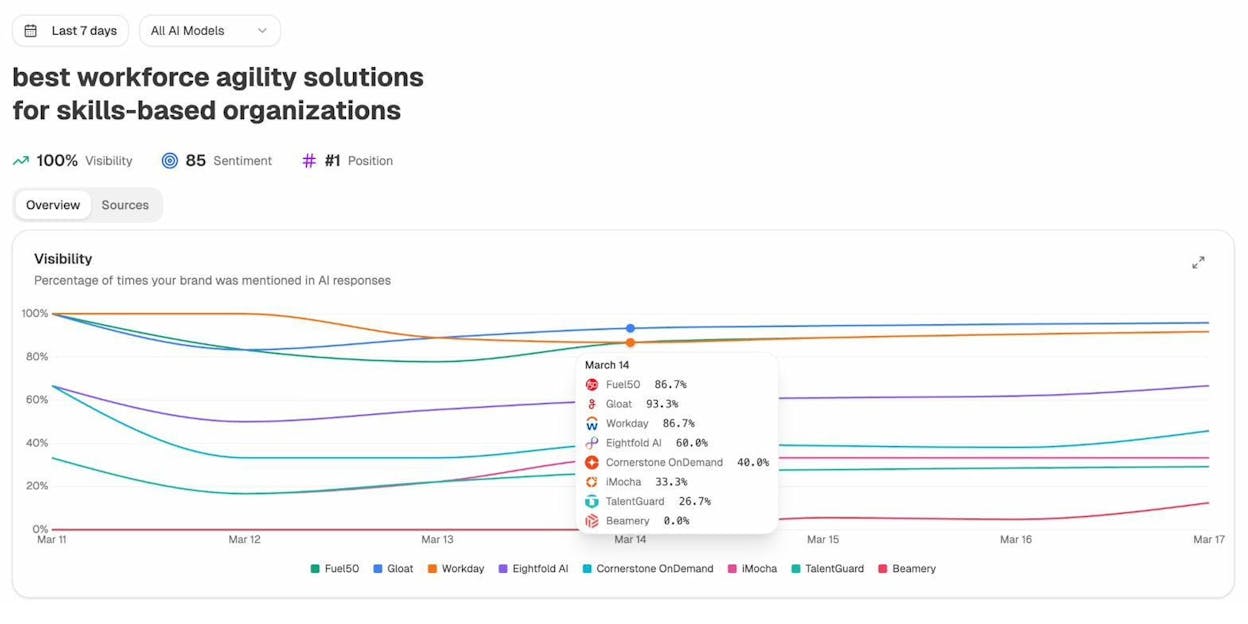
This prompt-level data is what makes AI visibility tracking actionable. Instead of a vague “AI score,” you can see exactly which questions your brand is winning and which ones you’re missing.
Track Competitor Performance
SEO doesn’t happen in a vacuum. You’re competing against other websites for the same keywords and the same AI mentions. Tracking your competitors helps you understand where you’re winning, where you’re losing, and where the biggest opportunities are.
In traditional SEO, tools like Ahrefs, SEMrush, and Moz let you track competitor rankings, backlink profiles, and traffic estimates. You can use Analyze AI’s free Website Authority Checker to quickly compare domain authority scores between your site and your competitors’ — no signup required.
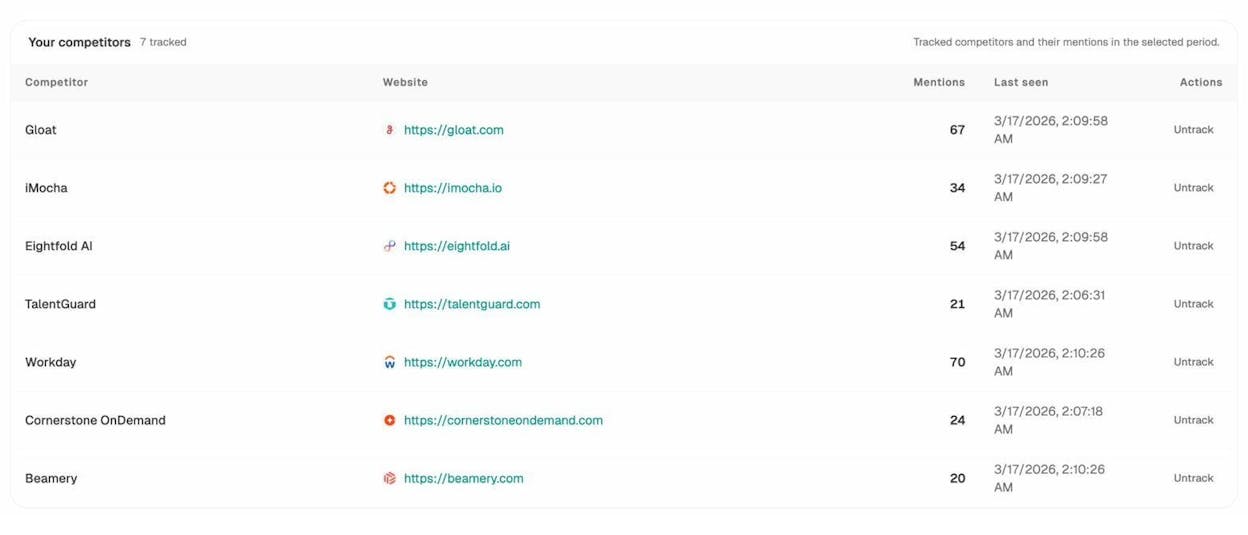
In AI search, Analyze AI’s competitor monitoring shows you which competitors are being mentioned alongside your brand in AI responses — and how frequently.
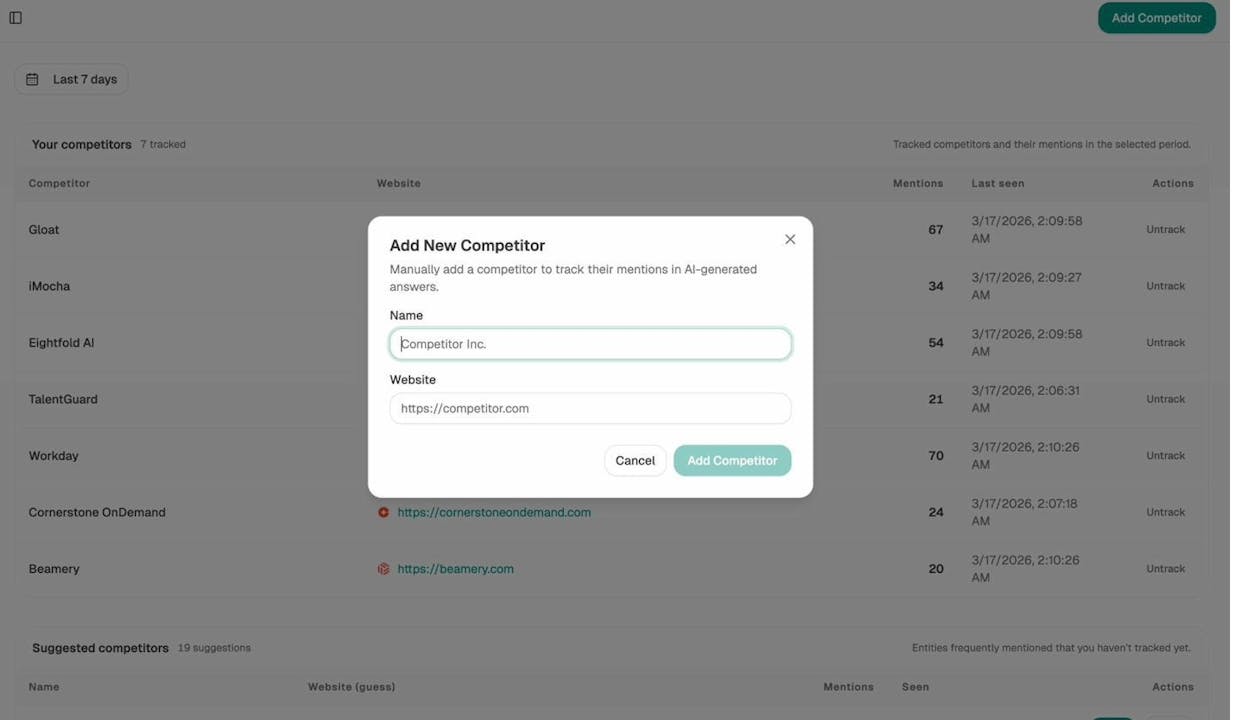
Adding a new competitor takes seconds. Click “Add Competitor,” enter their name and website, and Analyze AI starts tracking their AI mentions immediately.
Analyze AI also provides a competitive perception map that plots every competitor on two axes: visibility (how often they appear in AI responses) and narrative strength (how favorably AI describes them). This helps you see at a glance where your brand stands relative to the competition — and whether you need to focus on appearing more often, or on shaping how AI talks about you.
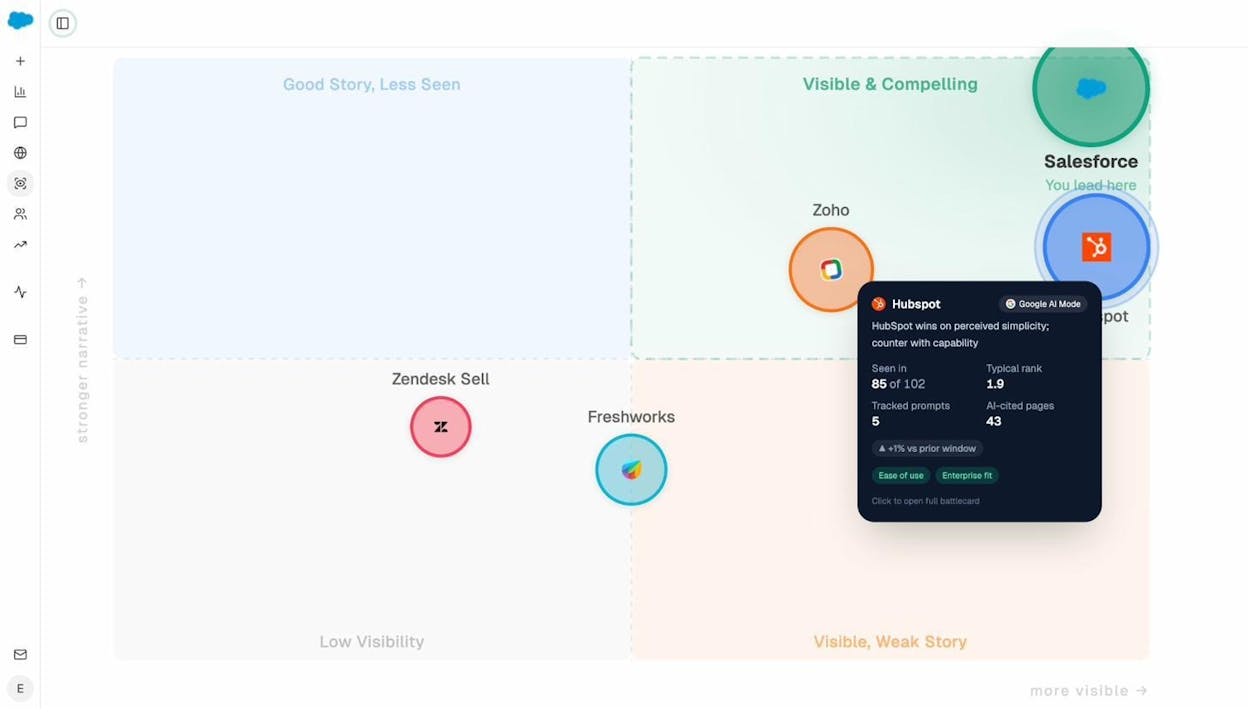
The platform also surfaces “Opportunities” — prompts where your competitors are being mentioned but your brand isn’t. These gaps are your highest-priority targets for new content or content optimization. You can find these in the Prompts section by looking at prompts where your visibility is 0% but competitor mentions are high.
Understand What Drives AI Citations
To improve your AI visibility, you need to understand which sources AI engines are citing when they respond to relevant prompts. This tells you two things: what kind of content gets cited (so you can create more of it), and which specific websites are influencing the AI responses in your space (so you can earn citations from those sources or outperform them).
Analyze AI’s Sources dashboard shows a breakdown of the content types AI engines reference in your industry (blogs, product pages, reviews, social posts) alongside the most-cited domains — so you know exactly which sites shape the narrative in your space.
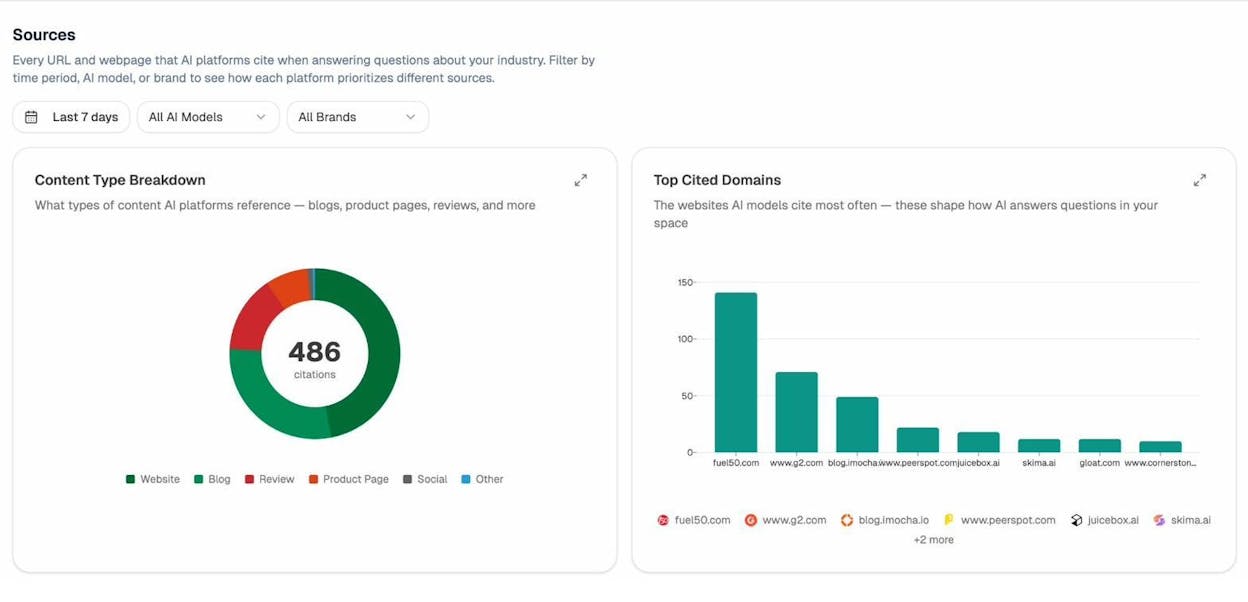
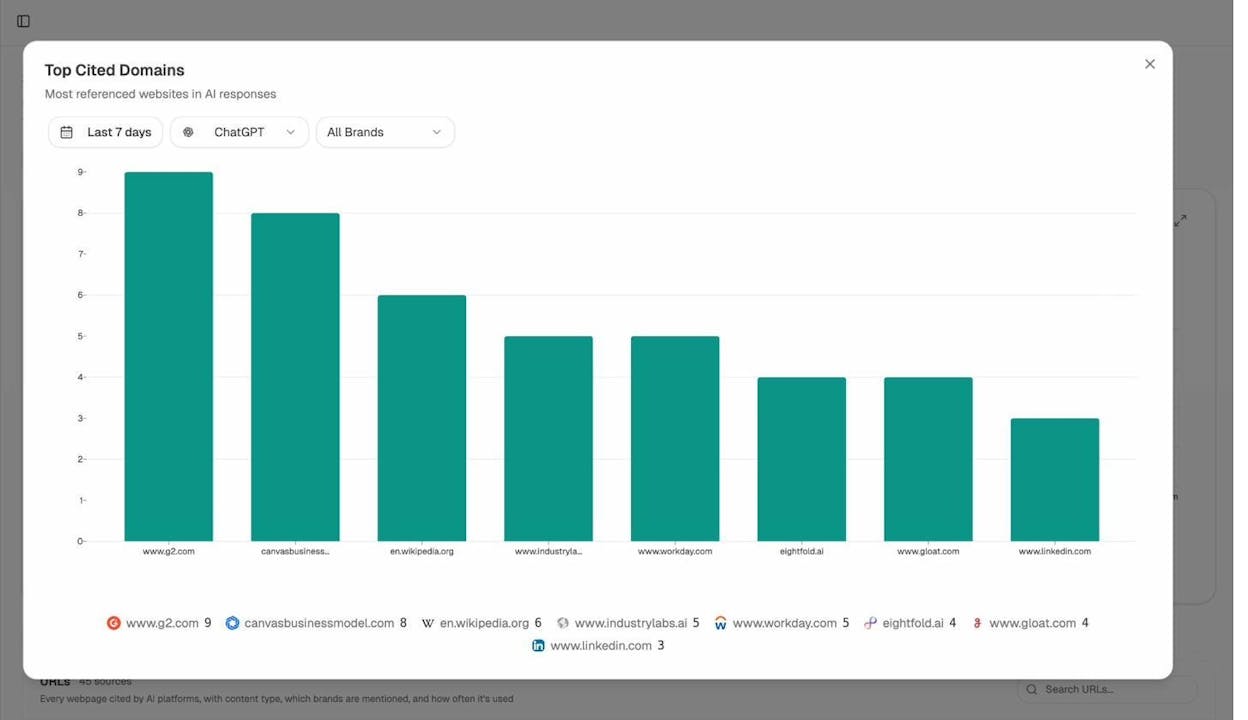
You can filter by AI engine to see which domains each platform relies on most. For example, filtering by ChatGPT reveals a different citation mix than Perplexity or Gemini — which helps you prioritize where to invest your efforts.
You can also see the top sources alongside citation types — revealing whether AI engines prefer citing your competitors’ websites, blog posts, or product pages.
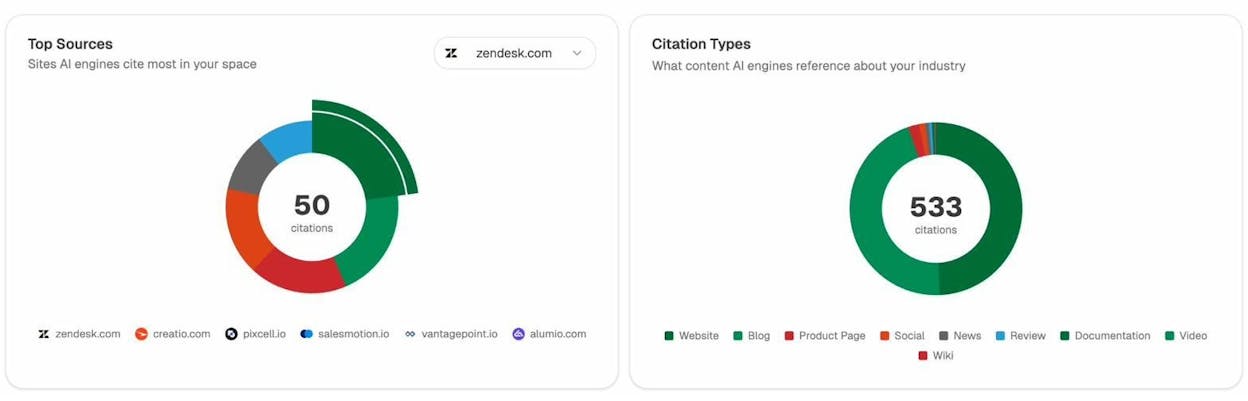
This data is actionable. If a review site consistently gets cited for prompts about your category, earning a mention or review on that site could directly improve your AI visibility. If a competitor’s blog post is the primary citation for a key prompt, you know exactly what content you need to outperform.
Learn more: How Do LLMs Cite Sources? What 83,670 AI Citations Tell Us
Track Sentiment
Rankings and visibility tell you whether AI assistants mention your brand. Sentiment tells you how they talk about it.
Analyze AI provides sentiment scoring (0–100) for your brand and your competitors across AI responses. You can view your Position Trend over time — where your brand ranks among competitors in AI responses, with lower being better.
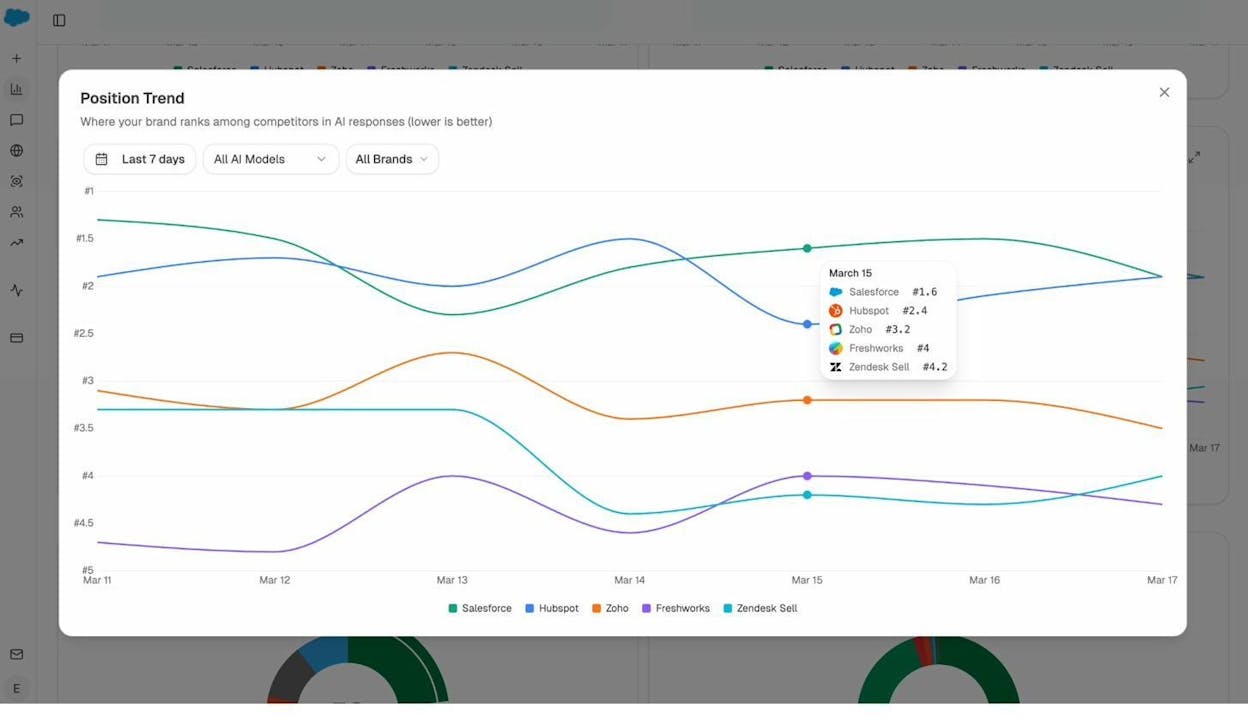
If your sentiment is dropping while a competitor’s is rising, that’s an early warning sign that the AI narrative around your brand is shifting — and you need to investigate why. You might need to update outdated content, address negative reviews, or create new content that reframes the conversation.
Part 5: What to Do Next
Now that your website is set up, indexed, and tracked, you’re ready to start the real work of SEO. Here’s a brief overview of each next step and where to learn more.
Start with Keyword Research
Keyword research is the process of finding the specific words and phrases your audience uses when searching for what you offer. It’s the foundation of your content strategy.
For traditional SEO, start with tools like Google’s free Keyword Planner. Look for keywords with a balance of search volume (enough people searching) and difficulty (realistic chance of ranking).
Analyze AI also offers a suite of free keyword tools to help you get started without any cost:
|
Tool |
What It Does |
Best For |
|---|---|---|
|
Enter a seed topic and get hundreds of related keyword ideas with search volume data |
Brainstorming new topics |
|
|
Check how hard a keyword is to rank for before investing time |
Prioritizing realistic targets |
|
|
Find what people search on Bing — which also powers ChatGPT’s web browsing |
AI search visibility |
|
|
Discover what people search for on the world’s second-largest search engine |
Video content strategy |
|
|
Find high-intent product keywords from Amazon search data |
Ecommerce SEO |
For more tools and deeper workflows, see our guide to 9 Keyword Research Tools to Try or browse our full free tools suite.
For AI search, the “keywords” are actually prompts — the natural language questions people ask AI assistants. Use Analyze AI’s prompt suggestion feature to discover the prompts your audience is asking across ChatGPT, Perplexity, and other AI platforms. These prompts reveal the language and questions your content needs to address.
Learn more: SEO Keywords: How to Find and Use Them to Rank Higher and 22 Keyword Types to Know for SEO and AI Search
Create Helpful, In-Depth Content
Content is what ranks. Every page that appears in search results or gets cited by an AI assistant earned its position because it genuinely helps the reader.
The standard for “helpful content” has never been higher. Google’s Helpful Content guidelines emphasize content written by people with real experience and expertise, content that covers a topic thoroughly, and content that gives the reader everything they need to accomplish their goal.
For AI search, the same principles apply with one addition: structure your content so it’s easy for AI systems to parse and extract. This means clear headings, concise answers to specific questions, and well-organized information hierarchies.
Learn more: 2026 SEO Content Strategy: 10-Step Breakdown and How to Write an Article: Step-by-Step Examples
Optimize Every Page (On-Page SEO)
On-page SEO is the practice of optimizing individual pages so search engines understand what each page is about and rank it appropriately.
This includes optimizing your title tag (the headline that appears in search results), writing a compelling meta description, using header tags (H1, H2, H3) to organize your content, adding alt text to images, and building internal links between related pages.
For AI visibility, pay extra attention to structured data and FAQ sections. AI systems frequently extract information from pages with clear schema markup and well-formatted Q&A content.
Learn more: How to Use Keywords in SEO: 14 Practical Tips and Off-Page SEO: 11 Strategies That Work
Build Backlinks
Backlinks remain one of the strongest ranking signals in Google’s algorithm. A backlink from a high-authority website tells Google that your content is trustworthy and worth ranking.
Effective link building starts with creating content worth linking to — original research, comprehensive guides, useful tools, and unique insights. From there, you can pursue outreach, guest posting, digital PR, and broken link building strategies.
Before you start outreach, use Analyze AI’s free Website Authority Checker to evaluate the authority of sites you’re targeting for backlinks. A link from a high-authority domain carries significantly more weight than a link from a low-authority one. This tool helps you prioritize which sites to pitch.
In AI search, citations function similarly to backlinks. When AI assistants cite your content, it reinforces your authority. And the more your content is linked and cited across the web, the more likely AI systems are to trust and reference it.
Learn more: The 9 Best Backlink Building Tools in 2026
Fix Technical Issues
Technical SEO ensures that your site’s infrastructure supports everything else you’re doing. A technically sound site loads fast, is easy to crawl, renders correctly on all devices, and doesn’t have errors that prevent indexing.
Common technical SEO tasks include fixing broken links, resolving duplicate content issues, implementing canonical tags, optimizing Core Web Vitals, creating and maintaining sitemaps, and ensuring your robots.txt file isn’t blocking important pages. Start by running your site through Analyze AI’s free Broken Link Checker to find and fix dead links that hurt both user experience and crawl efficiency. You can also use our free SEO audit tools to catch broader technical issues.
For AI search, technical SEO also means ensuring your structured data is accurate, your site is accessible to AI crawlers, and your content renders properly when crawled (no JavaScript-dependent content that crawlers can’t see).
Learn more: 4 Pillars of an Effective SEO Strategy for AI Search and What Is Answer Engine Optimization? 8 AEO Strategies
Key Takeaways
-
SEO is the process of improving your website’s visibility across search engines and AI assistants. The fundamentals — keyword research, content creation, on-page optimization, link building, and technical SEO — haven’t changed. What’s changed is the number of surfaces where that visibility shows up.
-
Setting up your website properly is the prerequisite for everything else. A clean domain, a solid CMS, fast hosting, mobile-friendliness, HTTPS, and a logical site structure make every other SEO task more effective.
-
Getting indexed is non-negotiable. Submit your sitemap to Google Search Console and Bing Webmaster Tools. If you want AI assistants to find your content, make sure your site is accessible to AI crawlers too.
-
Track both traditional SEO metrics (organic traffic, keyword rankings) and AI visibility metrics (AI referral traffic, prompt visibility, citation analytics, sentiment). The brands that measure both will outperform the ones that only track one.
-
AI search is not replacing SEO — it’s expanding it. The same content quality and technical standards that help you rank in Google also determine whether AI assistants cite your content. Invest in one, and you strengthen the other.
References
-
“Domain extensions and SEO: What you need to know” Search Engine Land. April 2025.
-
“Using page speed in mobile search ranking” Google. January 2018.
-
“Creating helpful, reliable, people-first content” Google. February 2025.
-
“Mobile-first indexing: Everything you need to know” Search Engine Land. January 2025.
-
“The SEO impact of interstitials, before and after” Search Engine Land. October 2024.
-
“The ABCs of Google ranking signals: What top search engineers revealed” Search Engine Land. May 2025.
-
“Search rankings and AI citations study” Ahrefs. 2025.
-
“Trust, attitudes and use of artificial intelligence: A global study 2025” KPMG. April 2025.

Ernest

Ibrahim


