



Summarize this blog post with:


In this article, you’ll learn the difference between AI workflows and AI agents, why combining them into agentic AI workflows is the highest-leverage move for content and SEO teams, and how to build your first one from scratch without writing a single line of code.
Table of Contents
AI Workflows vs. AI Agents: Why the Difference Matters
Most automation tools fall into one of two camps. Understanding which is which saves you from building the wrong thing.
AI workflows follow a fixed path. You define every step upfront. Step one scrapes a URL. Step two sends the text to an LLM. Step three pushes the output to Notion. If any step encounters something it was not designed for, it breaks.
Tools like Zapier and Make are built around this model. They work well for predictable, repeatable tasks. But they cannot handle edge cases because they have no reasoning layer.
AI agents are the opposite. You give them a goal, access to tools, and a set of instructions. The agent decides which tools to use, in what order, and how to handle unexpected inputs. It reasons through the problem instead of following a rigid recipe.
The tradeoff is that agents can be unpredictable. Without structure, they sometimes hallucinate, skip steps, or go off track.
Agentic AI workflows combine both. You build the structured scaffolding (the workflow with all your integrations and logic) but let an AI agent handle the reasoning at key decision points.
Here is the practical difference:
|
AI Workflow |
AI Agent |
Agentic AI Workflow |
|
|---|---|---|---|
|
Decision-making |
None. Follows preset path. |
Full autonomy. |
Agent reasons at key nodes. |
|
Edge cases |
Breaks |
Adapts (sometimes unpredictably) |
Adapts within guardrails |
|
Best for |
Repeatable tasks |
Exploration and research |
Production operations at scale |
|
Risk |
Rigid, breaks on changes |
Can hallucinate or skip steps |
Low, structured with flexibility |
For content, SEO, and GTM operations, agentic workflows are the right fit. You need the consistency of a workflow (your brand voice, your CMS structure, your publishing cadence) with the flexibility of an agent (reasoning about what to write, which pages to optimize, which competitors to watch).
7 Agentic AI Workflows You Can Build for Content and SEO
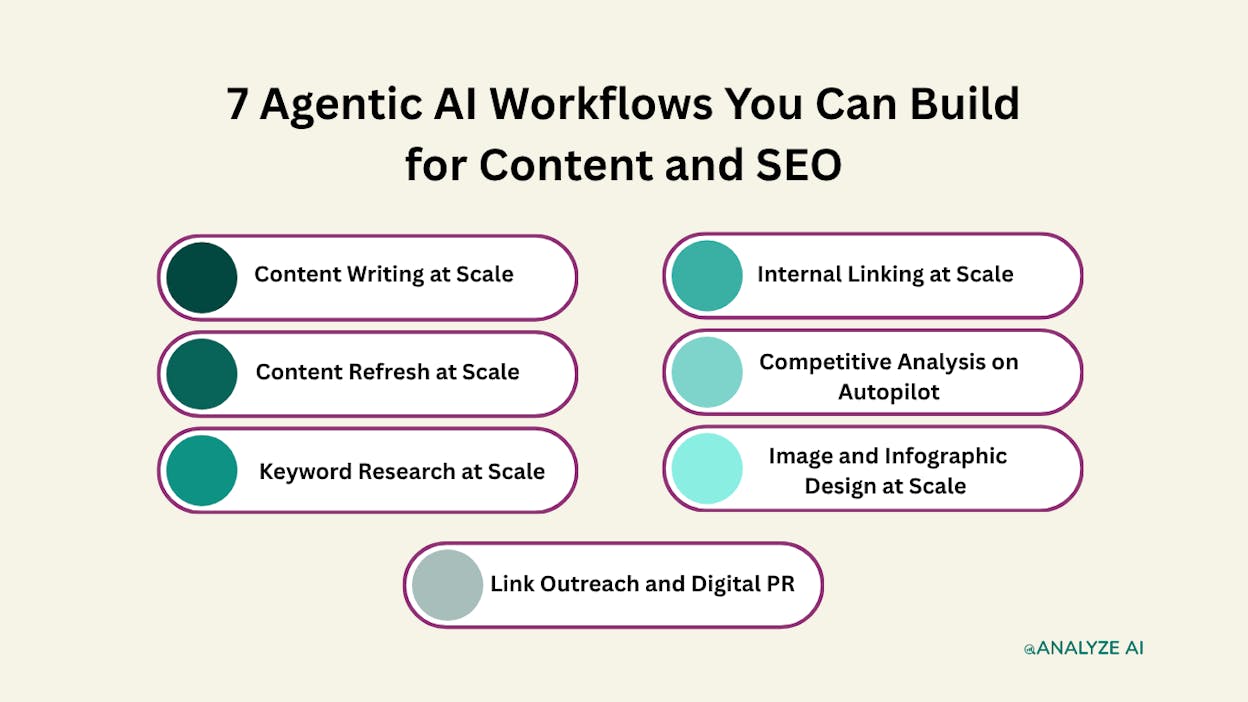
Before walking through the build process, here are real workflows that content and SEO teams run in production. Every one of these can be built inside Analyze AI’s Agent Builder using its 180+ nodes, 34 pre-built data recipes, and 13 input primitives.
1. Content Writing at Scale
The workflow starts with a keyword or competitor URL as the input. It pulls competitor data using the Ranked Keywords and SERP Competitors nodes, runs Parallel Deep Research to gather source material, generates an outline, drafts the full article using the Generate Full Draft node (with your Brand Vault injected for voice consistency), scores it with the AEO Content Scorecard, and publishes to WordPress if the score passes your threshold.
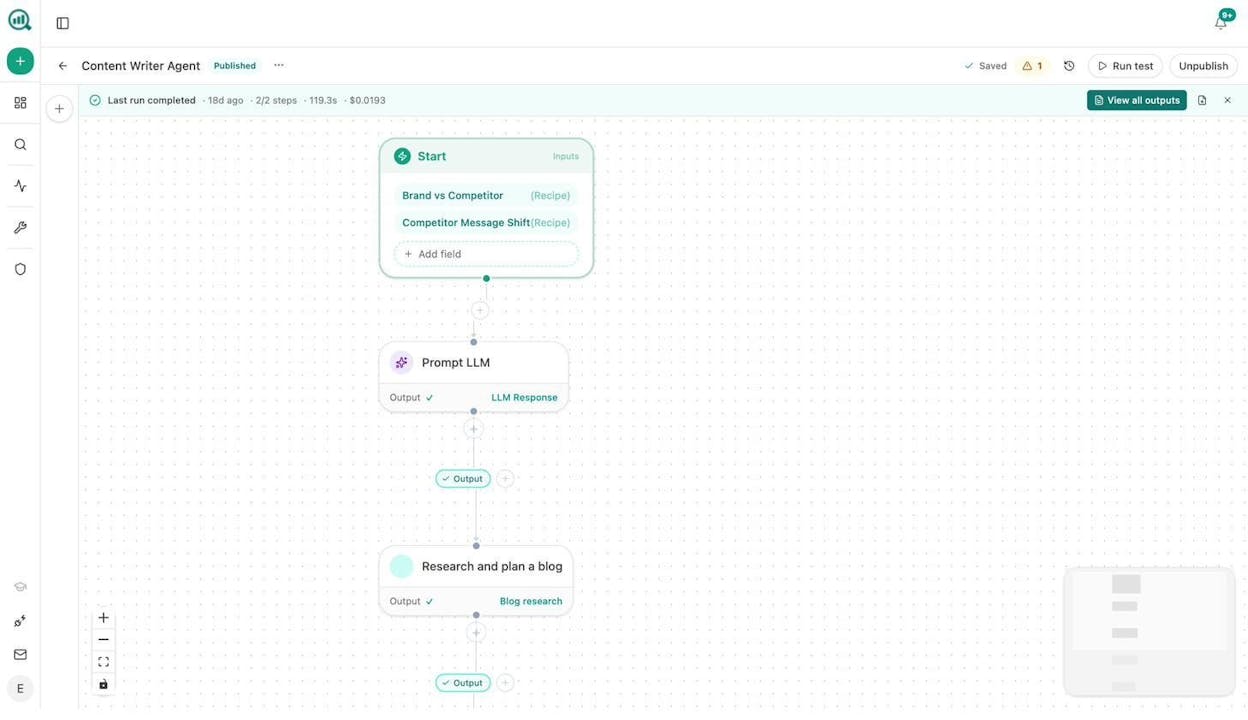
The entire pipeline runs on schedule or via webhook. When a new brief moves to “approved” in Notion, the agent fires automatically. No human touches the process until the draft is ready for review.
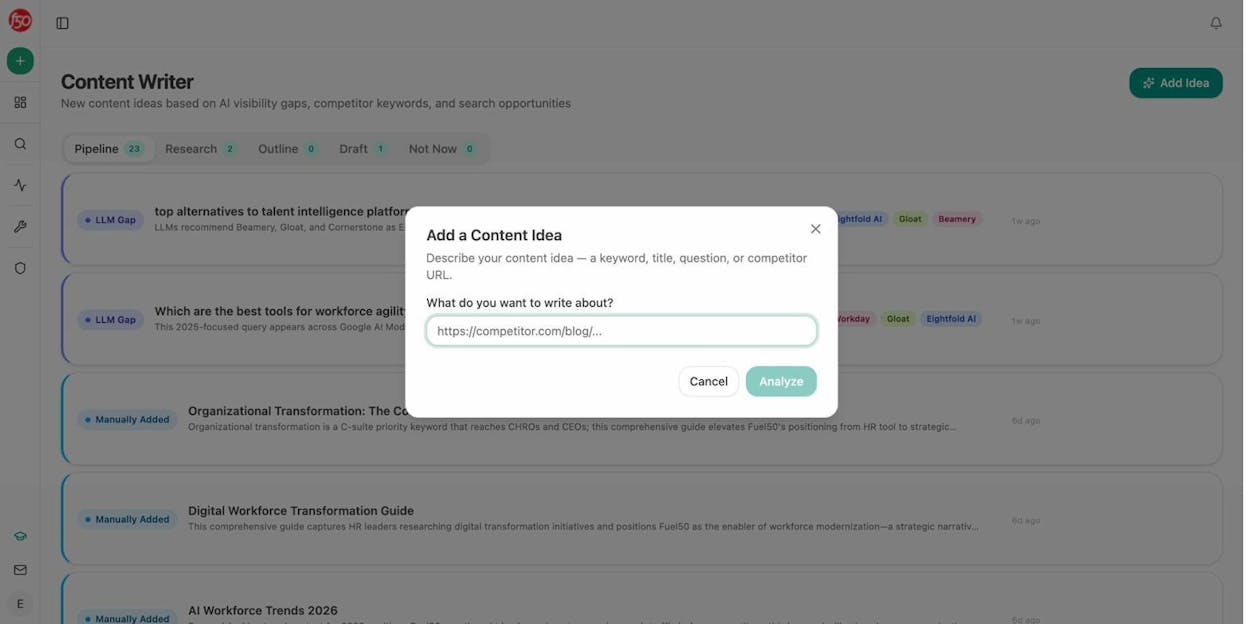
You can also use the standalone Content Writer to generate ideas, research, outlines, and drafts. The writer pulls competitor data, identifies content gaps from AI visibility data, and produces drafts with strategic comments from an AI strategist baked into the outline.
2. Content Refresh at Scale
Stale content is a silent traffic killer. This workflow uses the declining-pages and stale-content data recipes to find pages losing sessions and engagement. It loops through each page, scrapes the current content, sends it to an LLM with your brand voice rules, generates a refreshed version, diffs it against the original, and pushes the update to WordPress if the changes are substantive.
Schedule it weekly. The pages that quietly lose rankings get fixed before you even notice the drop. Analyze AI’s Content Optimizer also handles this with a dedicated audit-to-rewrite pipeline that scores your existing content and suggests specific improvements.
3. Keyword Research at Scale
Instead of manually pulling seed keywords one at a time, build an agent that takes a topic cluster as input, runs it through DataForSEO’s Keyword Ideas, Keyword Difficulty, and Search Volume nodes, cross-references with Semrush’s Domain Organic Keywords for competitor gap data, and outputs a prioritized spreadsheet to Google Sheets or Notion.
Add the keyword-opportunities data recipe to surface high-volume, low-competition terms automatically. You can also use Analyze AI’s free Keyword Generator and Keyword Difficulty Checker for quick one-off research.
4. Internal Linking at Scale
This is the workflow that pays for itself on sites with hundreds of pages. The agent loops through your sitemap using the Get Sitemap node, pulls GSC Top Keywords for each page, runs On-Page SEO Analysis, and prompts an LLM to suggest three internal links per page based on topical relevance and anchor text opportunities.
The output goes to a Notion task board or directly updates your CMS via the Call API node. Run it weekly and your internal linking structure stays tight without anyone manually auditing page by page.
5. Competitive Analysis on Autopilot
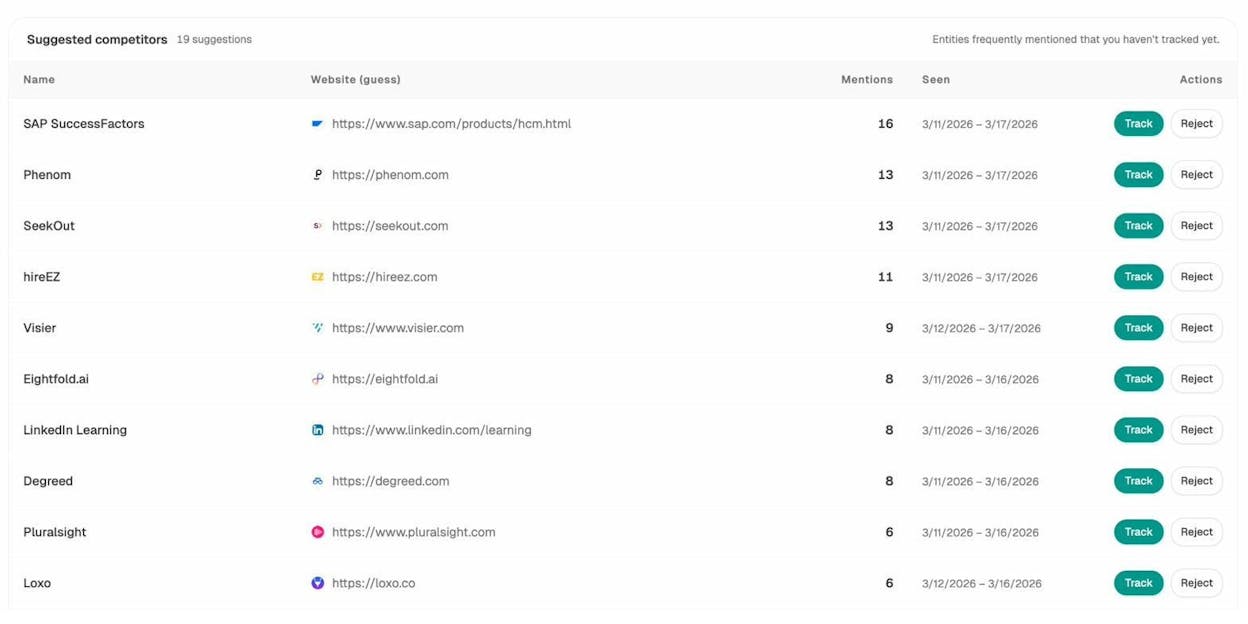
This workflow uses the competitor-gaps, brand-vs-competitor, and competitor-message-shift data recipes. It pulls visibility data across AI search providers, compares your share of voice against tracked competitors, identifies prompts where competitors rank and you do not, and delivers a briefing to Slack or email every Monday morning.
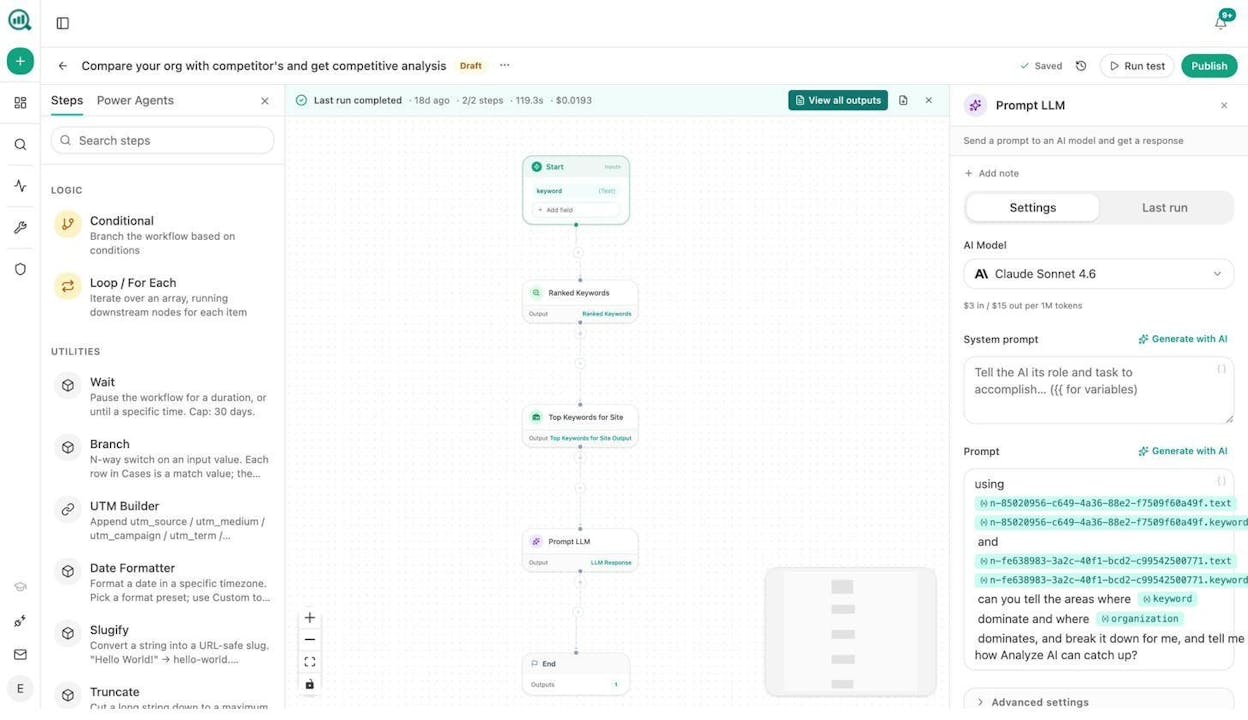
The agent above takes a keyword as input, pulls ranked keywords and top keywords for your site, then uses a Prompt LLM node to analyze where competitors dominate and where you can catch up. The entire run completes in under two minutes and costs less than two cents.
For deeper competitive intelligence, Analyze AI’s Competitors dashboard tracks how your brand performs against competitors across every major AI search provider in real time.
6. Image and Infographic Design at Scale
The Agent Builder includes Blog Featured Image, Infographic Generator, Social Media Image, and Illustrate Any Text nodes. All of them are brand-kit aware, meaning they pull your colors, fonts, and style guidelines from the Brand Vault automatically.
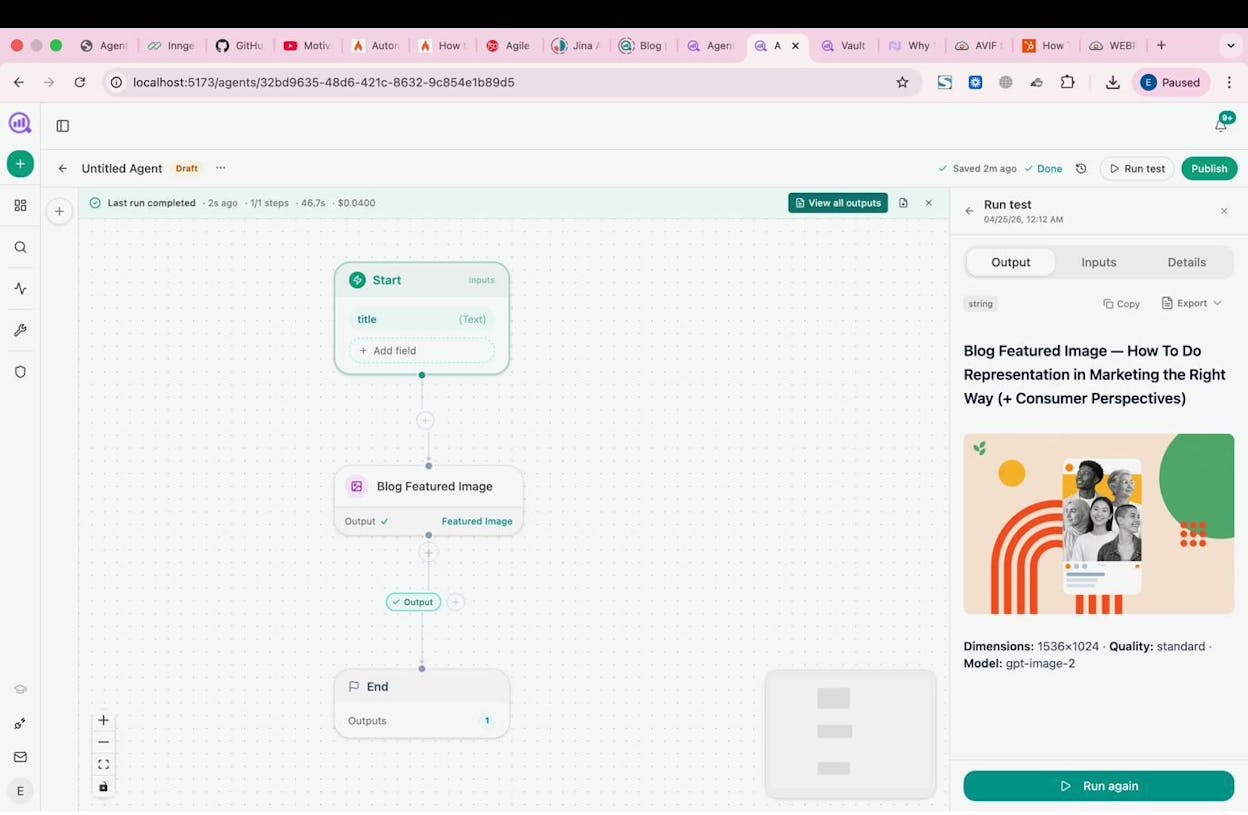
Build an agent that takes an article title as input and generates the featured image, three social media variants (sized for LinkedIn, X, and Instagram), and an infographic summarizing the key points. Schedule it to run after every new article publishes. Your design queue drops to zero.
7. Link Outreach and Digital PR
Connect the Brand Mentions node (with sentiment filtering) to the Tomba Author Finder node to identify journalists and bloggers covering your topic area. The agent enriches each contact, drafts a personalized pitch using your brand voice, and logs the outreach to HubSpot.
For listicle outreach specifically, the agent can scrape target pages, identify where your product fits, and draft custom pitches that reference the exact section of the article. Run this on a weekly schedule and your link building pipeline stays full without manual prospecting.
How to Build Your First Agentic AI Workflow in 4 Steps
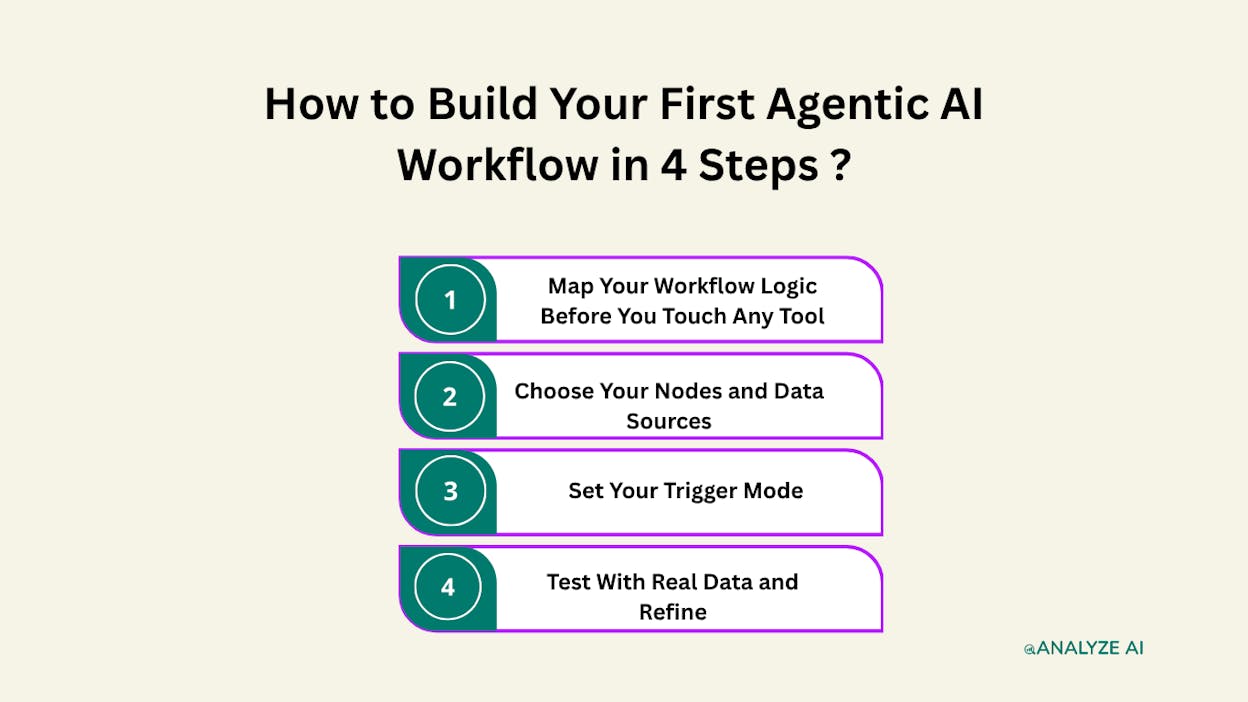
Now that you have seen what is possible, here is how to build one yourself.
Step 1. Map Your Workflow Logic Before You Touch Any Tool
Every failed automation starts the same way. Someone opens a tool, drags a few nodes around, and wonders why the output is garbage.
The fix is simple. Write down your process first.
Pick one task your team repeats weekly. Content briefs, keyword research, competitor reports, social media posts. Write out every step a human takes to complete it. Include the inputs (what data do they need?), the decisions (where do they use judgment?), and the outputs (what does the finished product look like?).
Then mark which steps are rigid (always the same) and which require reasoning (context-dependent decisions). The rigid steps become workflow nodes. The reasoning steps become LLM prompts with instructions.
This is where most people undersell the prompt engineering work. Telling an LLM to “act as an SEO expert” produces generic output. Instead, write a system prompt that codifies your exact process. Explain how you evaluate keywords, what you consider a strong outline, which proof points you always include, and which phrases you never use.
If you use Analyze AI, the Brand Vault handles this automatically. You fill in 12 blocks covering everything from company overview and differentiators to tone rules and disallowed phrases. Every agent that needs brand context pulls from the Vault directly. No copy-pasting style guides into prompts.
Step 2. Choose Your Nodes and Data Sources
Open the Agent Builder and start wiring. The left panel shows every available node organized by category.
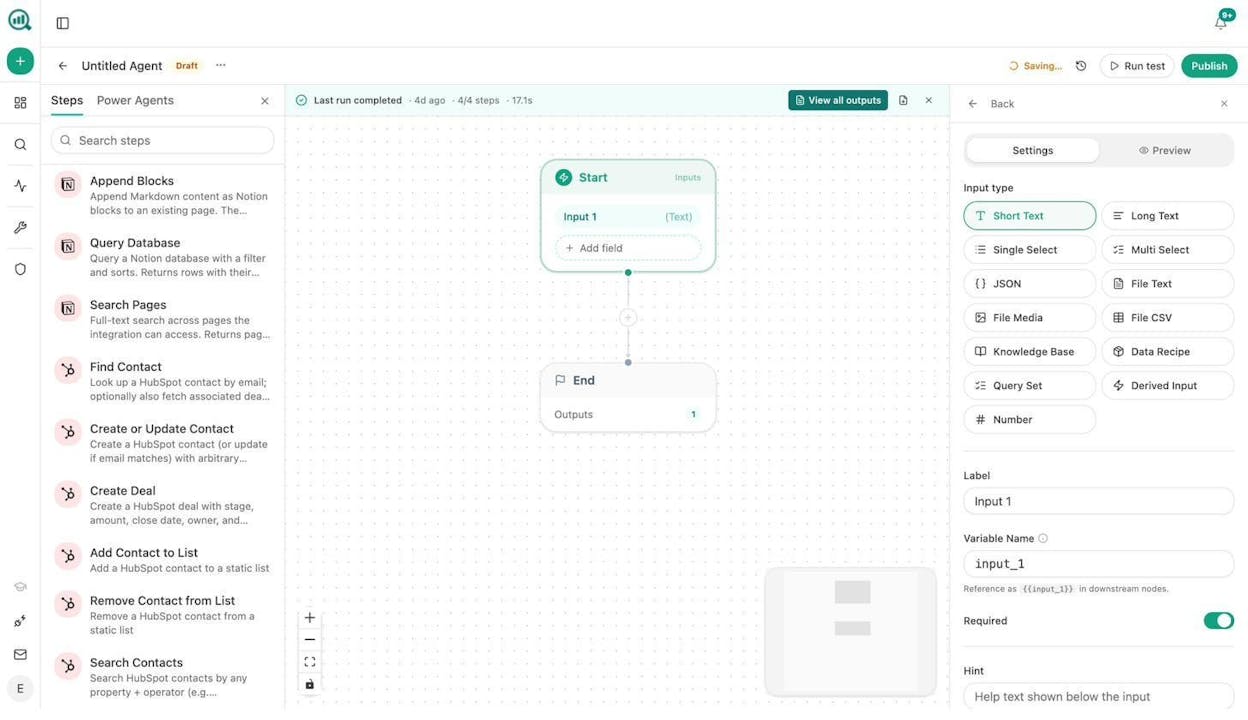
For a content writing workflow, you might wire it like this:
-
Start node with a keyword input (Short Text) and a Brand Vault block (auto-injected)
-
Ranked Keywords node to pull competitor ranking data from DataForSEO
-
Parallel Deep Research node to gather source material from across the web
-
Prompt LLM node to generate a structured outline based on the research
-
Generate Full Draft node to produce the complete article with brand voice applied
-
AEO Content Scorecard node to audit the draft for AI search readiness
-
Conditional node to check the score. If above 80, route to WordPress Create Post. If below, route to Slack notification for the writer
-
End node with the final outputs
Each node connects to the next by dragging from the output dot to the input dot of the downstream node. Variables flow through the chain. The Prompt LLM node can reference any upstream output using double-curly-brace syntax.
Step 3. Set Your Trigger Mode
Analyze AI gives you three trigger options:
Manual for on-demand tasks. Click “Run test” and the agent executes immediately. Best for one-off briefs, ad-hoc competitive analysis, or exploration.
Schedule for recurring operations. Set a cron expression to run the agent daily, weekly, or monthly at a specific time and timezone. This is how content refresh, competitor monitoring, and weekly email digests work.
Webhook for event-driven automation. The agent fires when an external event occurs. A new deal closes in HubSpot, a brief gets approved in Notion, a form submission lands. The lag between event and action drops from hours to seconds.
The combination of all three is where the real leverage sits. Your scheduled agents handle the recurring intelligence (Monday board prep, weekly content refresh, daily visibility alerts). Your webhook agents react to events in real time (brief approved triggers the writing pipeline). Your manual agents handle the one-off requests (research this competitor, rewrite this page).
Step 4. Test With Real Data and Refine
Run the agent on actual data from your business. Not dummy inputs. Not hypothetical scenarios. Real keywords, real pages, real competitors.
If the output misses the mark, the problem is almost always your instructions. Tighten the system prompt. Add examples of what good output looks like. Specify the format, length, tone, and structure you expect.
Then experiment with different LLM models. Analyze AI’s Agent Builder supports Claude (Sonnet, Opus, Haiku), GPT-4, GPT-4o, GPT-5, Gemini, and Perplexity Sonar. Some models are better at research. Others are better at structured output. Swap models on a single node without changing anything else and compare the results.
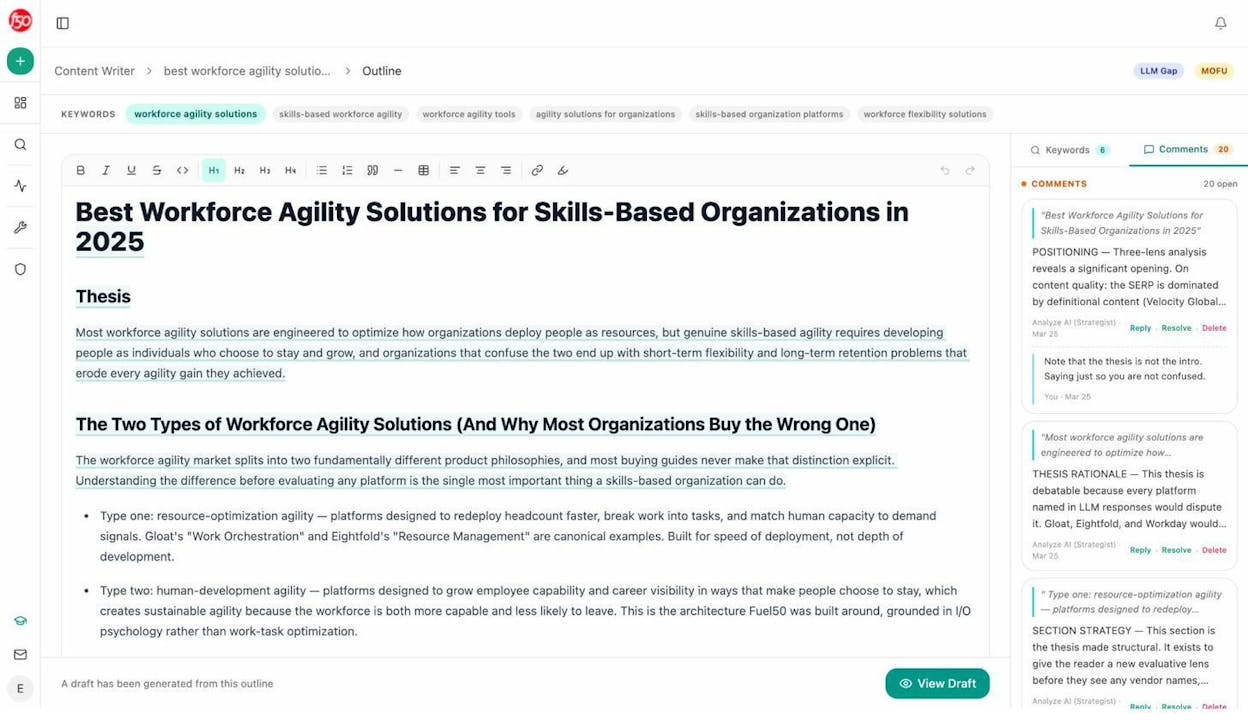
The Content Writer’s outline stage shows how this refinement looks in practice. The AI strategist leaves comments on each section explaining the positioning rationale and structural decisions. This is not a black box. You can see the reasoning, adjust it, and regenerate.
Once the output consistently meets your standard, publish the agent and let it run. You can monitor every run’s cost, duration, and outputs from the agent dashboard. The run-cost-report and failed-steps-log data recipes even let agents inspect their own performance and self-correct over time.
Where AI Search Fits In
Everything above works for traditional SEO. But the landscape is shifting. Buyers now get answers directly from ChatGPT, Perplexity, Gemini, and Google AI Mode. That does not mean SEO is dead. It means AI search is an additional organic channel that your content needs to work for.
Analyze AI was built for this. The same Agent Builder that powers your content and SEO workflows also connects to AI visibility data natively. The share-of-voice recipe tracks your brand mentions across every major AI provider. The competitor-gaps recipe finds prompts where competitors appear and you do not. The AI Traffic Analytics dashboard shows which of your pages actually receive visits from AI search, so you can double down on what works.
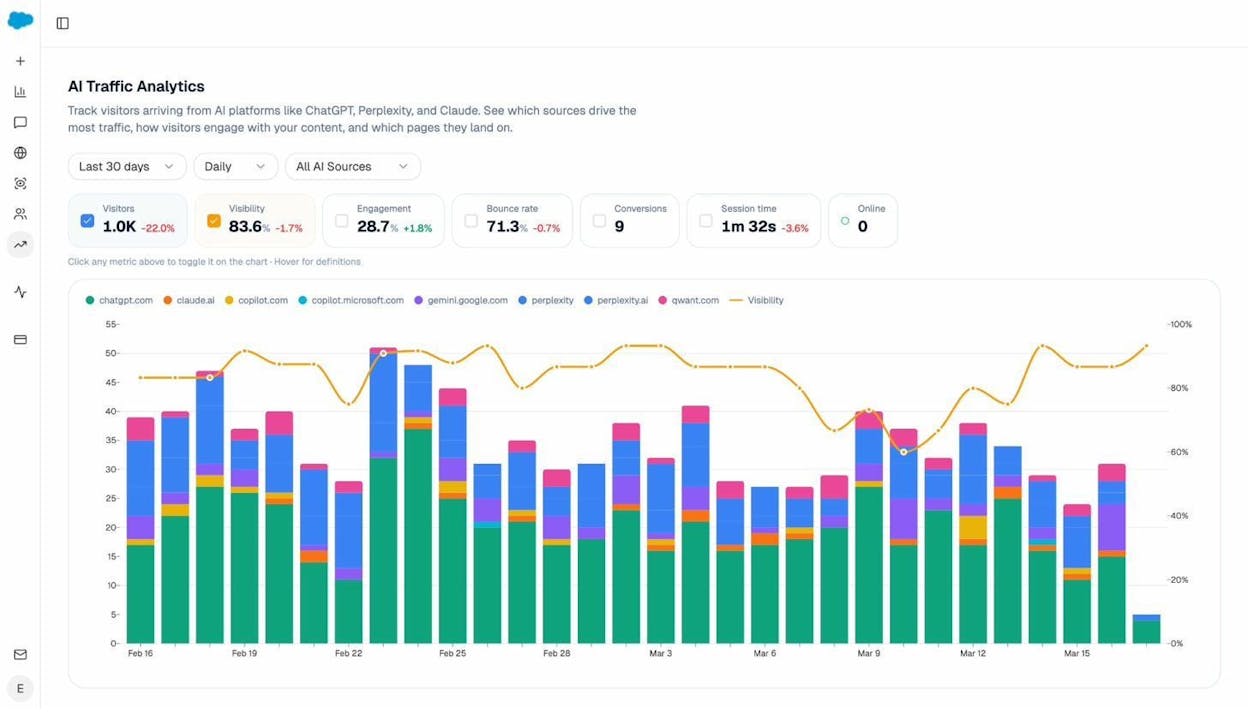
You do not need a separate tool or a separate workflow for AI search. The data is already in the room. When your content writing agent generates a draft, the AEO Content Scorecard audits it for AI search readiness alongside traditional SEO factors. When your competitive analysis agent runs on Monday morning, it pulls visibility data from AI providers alongside Google rankings.
That is the advantage of building on a platform that treats SEO and AI search as parts of the same operation rather than separate disciplines. Your workflows do not double. Your insights compound.
Start Building
You now have the framework, the workflow examples, and the step-by-step process to build agentic AI workflows that actually run in production.
Start with one workflow. Pick the task your team dreads most. Map the logic, wire the nodes, test it with real data, and schedule it. Once it works, build the next one.
Analyze AI offers a free trial so you can test the Agent Builder, Content Writer, Content Optimizer, and the full AI visibility suite before committing. The agent builder supports 180+ nodes across 16 categories, connects to GA4, GSC, Semrush, DataForSEO, HubSpot, Notion, WordPress, Slack, and every major LLM.
The workflows handle the structured, repeatable work. The agents handle the reasoning. Put them together and your content operation runs while you focus on the decisions that actually require a human.

Ernest

Ibrahim


