



Summarize this blog post with:


In this article, you’ll get an honest breakdown of HubSpot AEO based on its actual feature set, pricing structure, and limitations. You’ll learn what it does well, where it falls short for serious AEO work, and how it compares to a purpose-built platform like Analyze AI that covers the full workflow from tracking to content creation to automated execution.
Table of Contents
What Is HubSpot AEO?
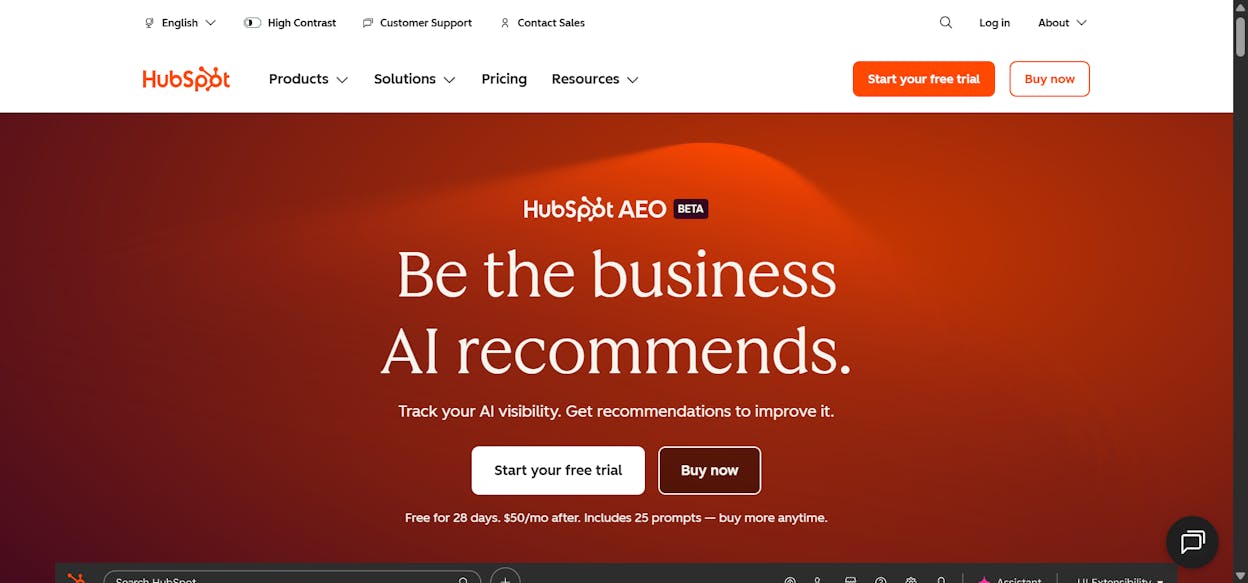
HubSpot AEO is an answer engine optimization tool that tracks how your brand appears in AI-generated answers across ChatGPT, Gemini, and Perplexity. HubSpot launched it in April 2026 as part of its Spring Spotlight, built on technology it acquired from xFunnel earlier that year.
The tool gives you a brand visibility score, sentiment analysis, competitor share of voice, prompt tracking, citation analysis, and a list of recommendations to improve your AI presence.
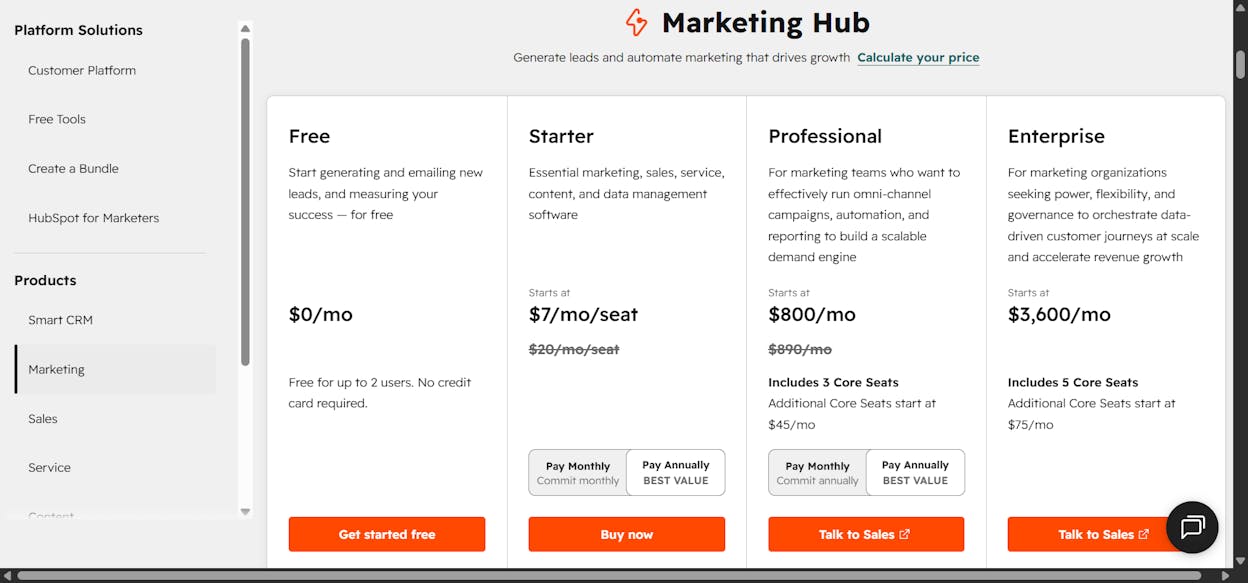
You can use it as a standalone product for $50/month or access it through Marketing Hub Professional and Enterprise plans. HubSpot also offers a free 28-day trial with 25 prompts limited to ChatGPT.
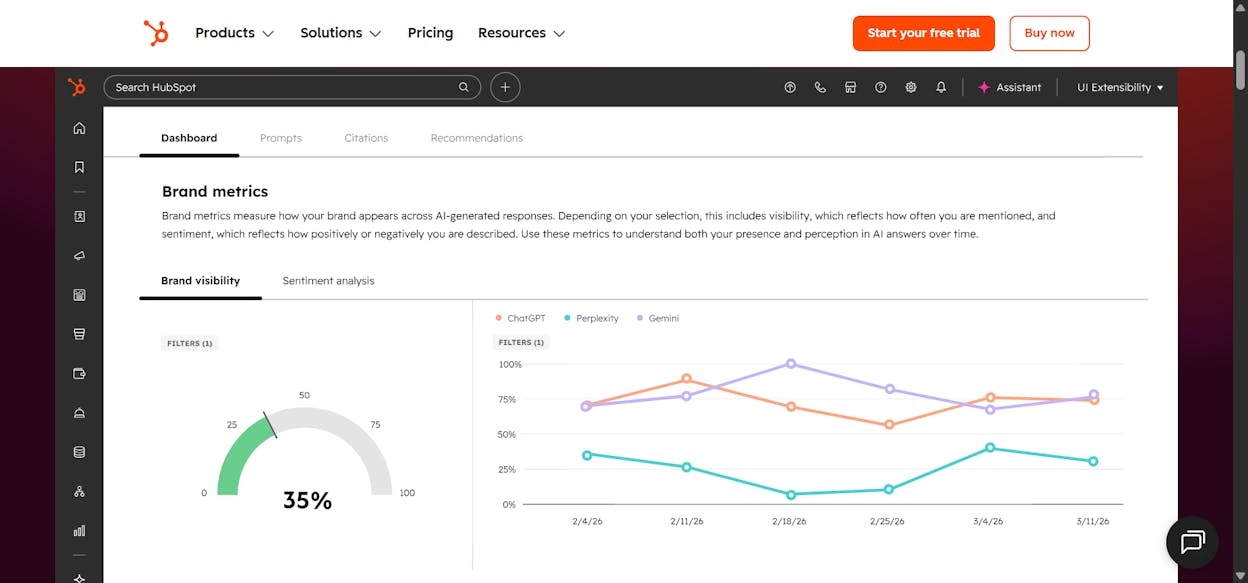
On the surface, this sounds like exactly what marketing teams need as AI search becomes a real channel. But the details matter. And for most teams doing serious AI visibility work, those details reveal a tool that measures the problem without helping you solve it.
What HubSpot AEO Gets Right
Credit where it’s due. HubSpot did a few things well with this launch.
CRM-powered prompt suggestions are genuinely useful. Because HubSpot already knows your business, competitors, and customer segments, its prompt recommendations are more relevant than what you’d get from a generic AEO tool. If you’re a HubSpot CRM customer, you skip the “which prompts should I track?” guessing game that slows down most teams at the start.
The brand visibility score provides a clean, digestible metric that’s easy to bring into leadership conversations. You can show your CMO a single number that represents how often your brand appears when buyers ask AI for recommendations in your category.
Sentiment analysis scored from -100 to +100 gives you directional insight into whether AI describes your brand positively or negatively. For teams that have never tracked AI perception before, this is a meaningful starting point.
And the pricing is accessible. At $50/month standalone, HubSpot lowered the barrier for teams that want to test the waters of AEO without committing to a larger platform investment.
Where HubSpot AEO Falls Short
The problems start when you try to use it as your primary AEO platform.
Only Three AI Engines
HubSpot AEO tracks ChatGPT, Gemini, and Perplexity. That’s it. No Claude, no Copilot, no Grok, no Google AI Overviews, no AI Mode.
This is a significant gap. Claude is the dominant AI assistant for business and technical audiences. Copilot is embedded in Microsoft’s entire product suite, which means every enterprise user running Edge, Office, or Windows has it at arm’s reach. And Google AI Overviews appear directly in the SERP itself, making them the most-seen AI surface on the web. Missing these engines means missing the platforms where a large portion of your buyers actually interact with AI.
Prompt Limits That Hit Fast
The standalone plan gives you 25 prompts. Each prompt runs daily across three engines, which sounds like 2,500 monthly data points. But 25 prompts fill up quickly. Track 5 competitors across 5 buying-stage queries and you’ve used your entire quota.
For any serious monitoring program, 25 prompts is a constraint, not a feature. And if you need more? You either upgrade to Marketing Hub Professional or Enterprise, which brings the total cost far above $50/month.
No Real Traffic Attribution
This is the biggest miss. HubSpot AEO tells you whether your brand appears in AI answers, but it cannot tell you whether anyone actually visited your site because of those answers. It doesn’t connect to GA4. It doesn’t attribute sessions to specific AI engines. It doesn’t show you which landing pages receive AI-referred traffic or whether those visitors convert.
Without traffic attribution, you’re stuck with a visibility score that has no direct line to revenue. You know you were mentioned, but you can’t prove it drove business outcomes. That’s a hard position to defend in a budget conversation.
Static Recommendations
HubSpot surfaces recommendations like “create this page” or “update that post.” But the recommendations are a static list. They don’t update dynamically based on your actual traffic results. They don’t prioritize by revenue impact. And they don’t connect to execution tools beyond HubSpot’s own CMS.
If your content lives in WordPress, Notion, Sanity, or Contentful, HubSpot’s recommendation layer offers you a to-do list with no bridge to where the work actually happens.
No Content Creation or Optimization Engine
HubSpot AEO tells you what content to create but gives you no tools to create it inside the AEO workflow. Content creation is handled separately through HubSpot’s Content Hub, which requires its own subscription. There is no purpose-built AEO content writer that analyzes competitor coverage, surfaces citation gaps, and produces drafts optimized for AI engines from the start.
Agency Economics Don’t Work
For agencies, HubSpot uses per-portal pricing. Each client brand requires its own HubSpot subscription. Five clients at $50/month each means $250/month for 25 prompts per brand, three engines, no Claude, and no consolidated cross-brand reporting. That math breaks fast as your roster grows.
HubSpot AEO Pricing: What You Actually Pay
|
Plan |
Price |
Prompts |
Engines |
Traffic Attribution |
Content Tools |
|---|---|---|---|---|---|
|
Free Trial |
$0 (28 days) |
25 |
ChatGPT only |
No |
No |
|
Standalone |
$50/month |
25 |
3 (ChatGPT, Gemini, Perplexity) |
No |
No |
|
Marketing Hub Pro |
$890/month+ |
25 |
3 |
HubSpot analytics only |
Via Content Hub (separate) |
|
Marketing Hub Enterprise |
$3,600/month+ |
50 |
3 |
HubSpot analytics only |
Via Content Hub (separate) |
The standalone option looks affordable in isolation. But for teams that need real depth, whether that’s more engines, more prompts, traffic data, or content execution, the cost escalates quickly once you layer in Marketing Hub and Content Hub subscriptions.
What a Full AEO Platform Should Do
The AEO category is young, and it’s tempting to settle for whatever dashboard appears first. But if you’re serious about AI search as a channel, here is what to evaluate before committing.
Track all the engines your buyers use. ChatGPT and Gemini are not enough. Your buyer might open Claude for a product comparison, use Copilot inside their browser, or see an AI Overview before they even scroll past Google’s first result. Coverage gaps become intelligence gaps.
Attribute traffic to AI engines. Visibility matters, but traffic and conversions matter more. You need GA4-level attribution that shows sessions, engagement, bounce rate, and conversion by AI engine and by landing page. Without this, you cannot prove ROI.
Provide content creation and optimization tools. Knowing what to fix is the easy part. The hard part is fixing it. A complete platform should take you from insight to published content without switching tools.
Automate recurring work. Competitive intelligence reports, content refreshes, citation monitoring, and narrative drift alerts should run on a schedule. If your team is still manually pulling data every Monday morning, you’re spending analyst hours on work a machine should handle.
Work with your existing stack. Your CMS might be WordPress. Your CRM might be Salesforce. Your project management might live in Notion. A platform locked into one ecosystem limits your operations.
How Analyze AI Covers the Full AEO Workflow
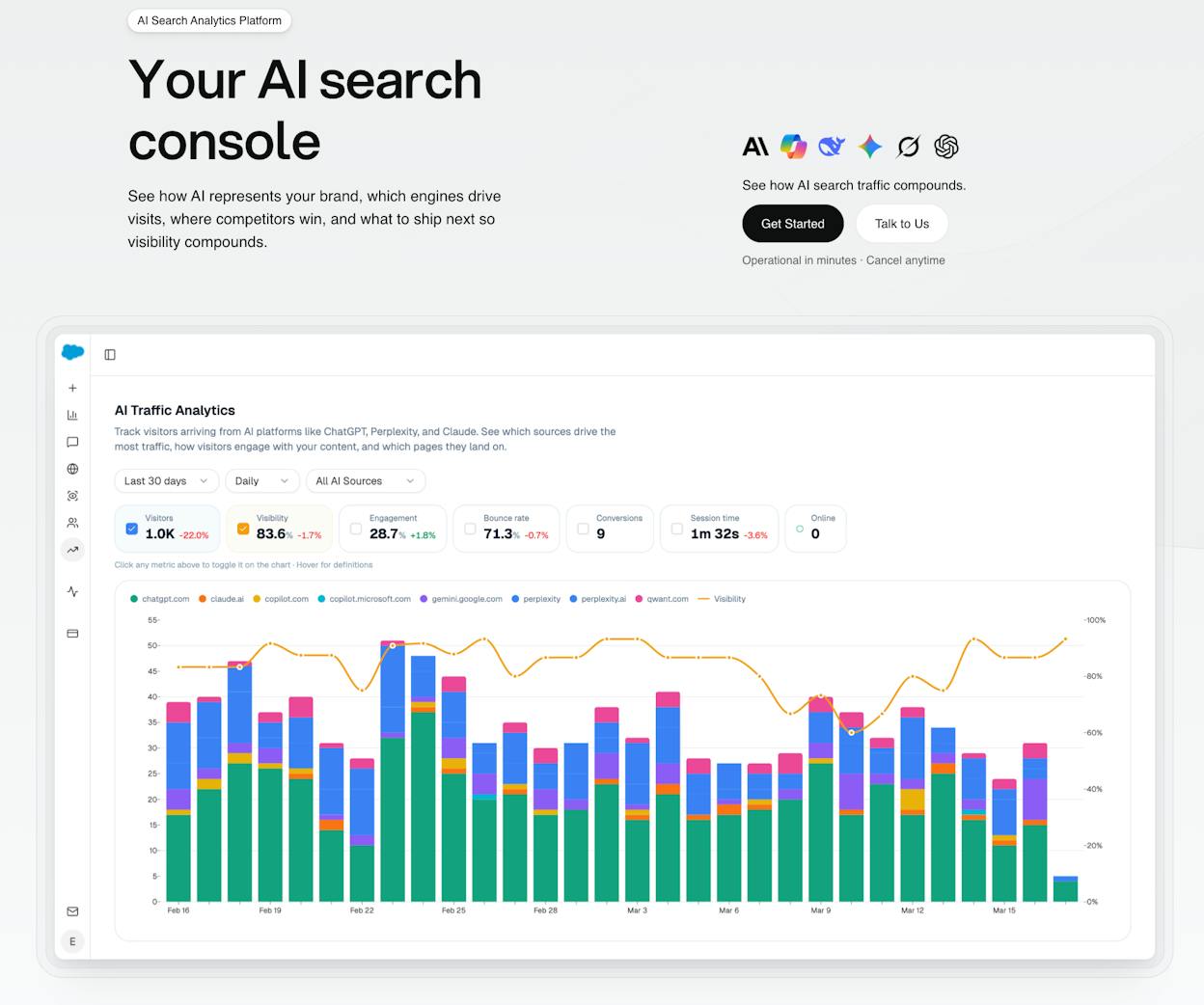
Analyze AI is the agentic platform for SEO, AEO, content, and GTM operations. It’s not just an AI search layer. It covers the complete cycle from discovering what’s happening in AI answers to monitoring your position, improving your content, and governing your brand narrative.
Broader Engine Coverage, No Prompt Cap
Analyze AI tracks ChatGPT, Gemini, Perplexity, Claude, Copilot, Grok, Google AI Overviews, and AI Mode. That is every surface where your buyers interact with AI-generated answers. And there is no daily prompt cap that forces you to ration your monitoring.
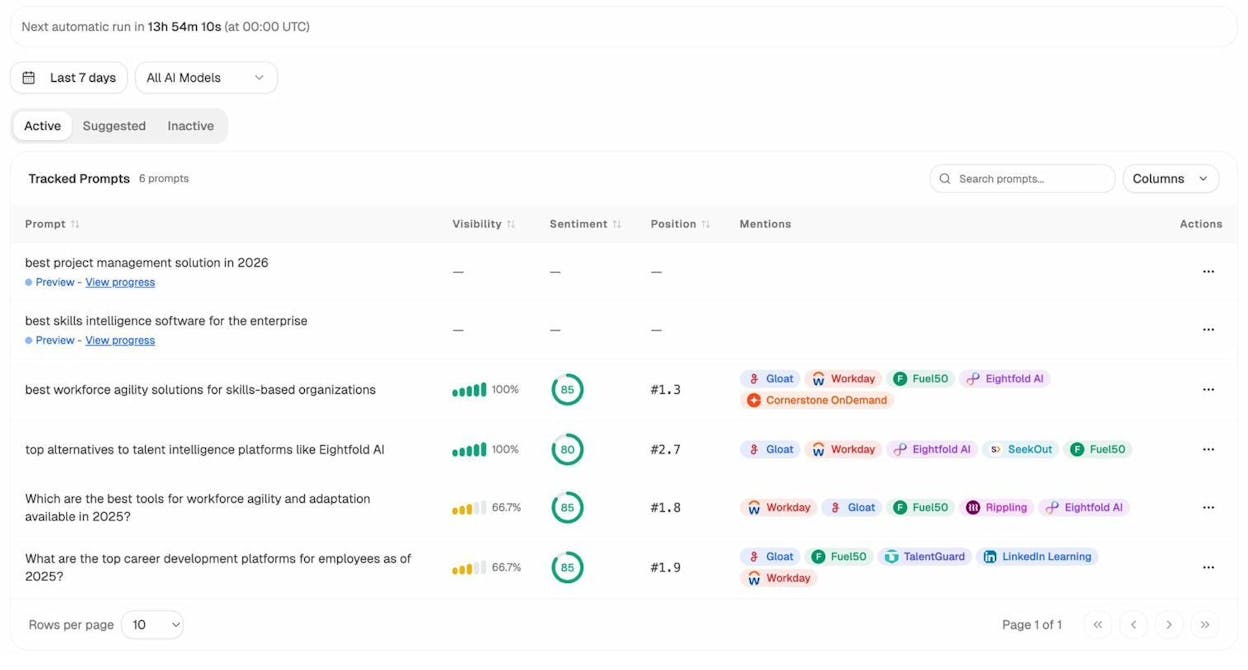
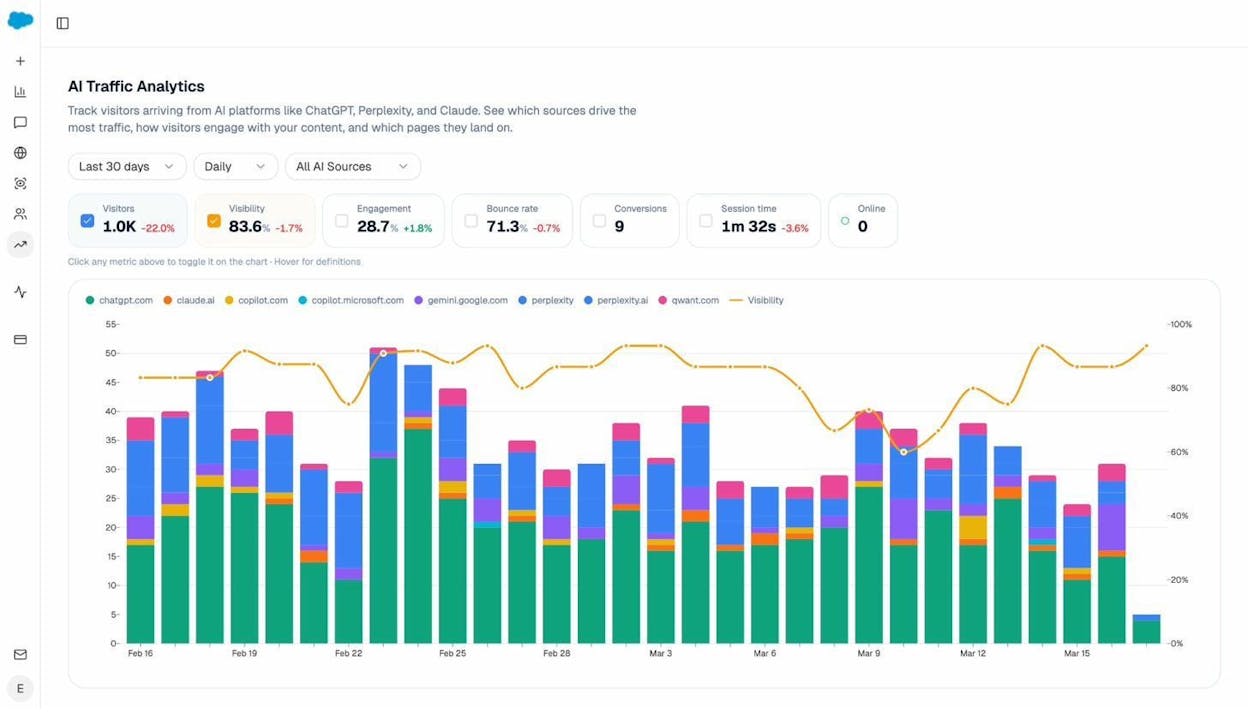
Real Traffic Attribution From GA4
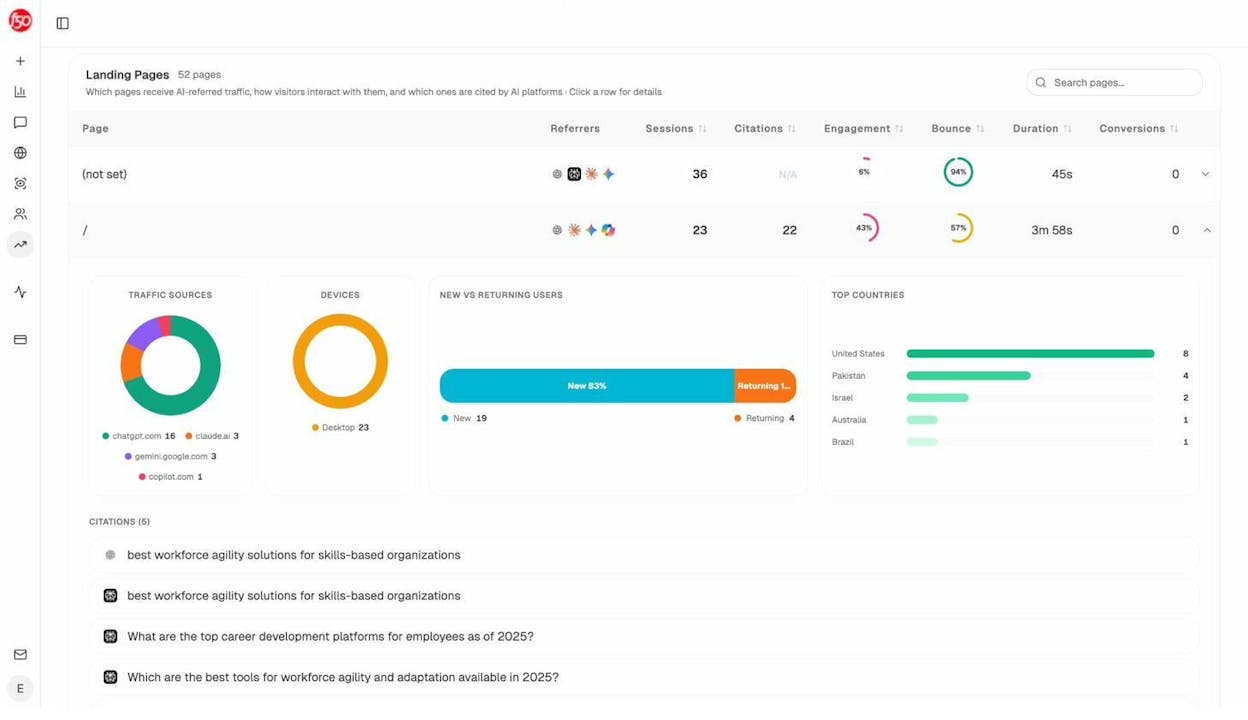
Analyze AI connects directly to your GA4 property and attributes every AI-referred session to its source engine and landing page. You see sessions, engagement rates, bounce rates, duration, and conversions broken down by ChatGPT, Perplexity, Claude, Copilot, and others.
The Landing Pages report shows which pages receive AI traffic, how visitors interact with them, and which ones convert. This is the data your CMO needs to justify investment in AI search as a channel.
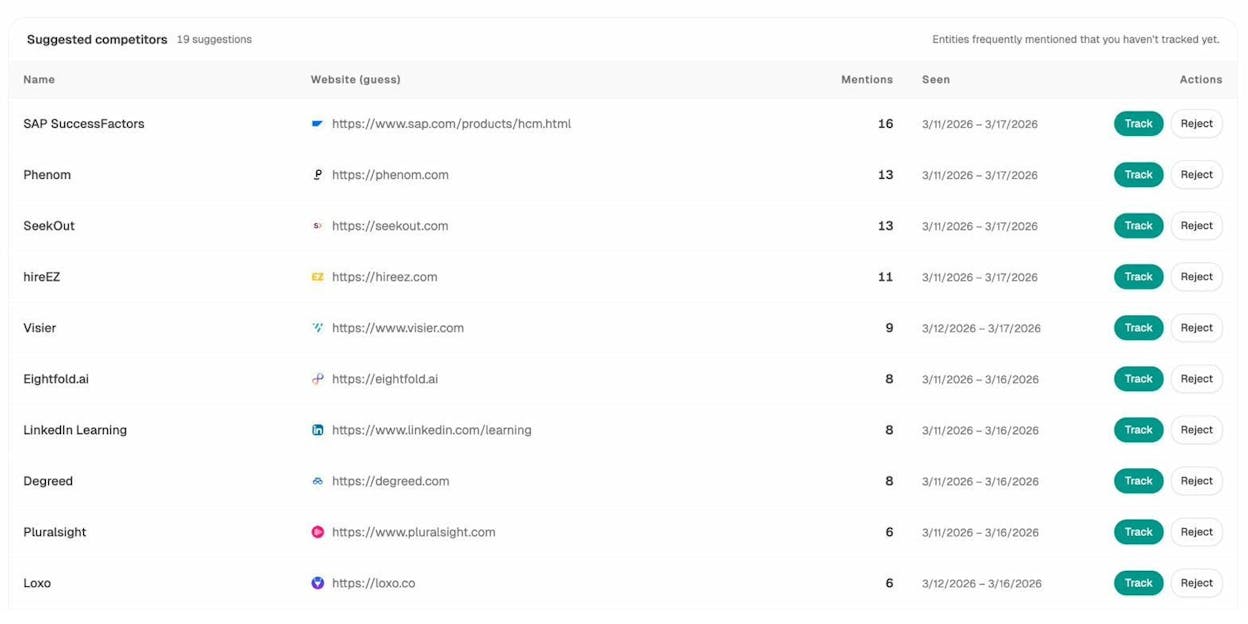
Competitor Intelligence That Shows Why You Lose
Analyze AI doesn’t just show that a competitor outranks you. It shows which prompts they win, which sources AI cites when recommending them, and how their positioning compares to yours. The Competitor Intelligence dashboard gives you a head-to-head view across every tracked engine.
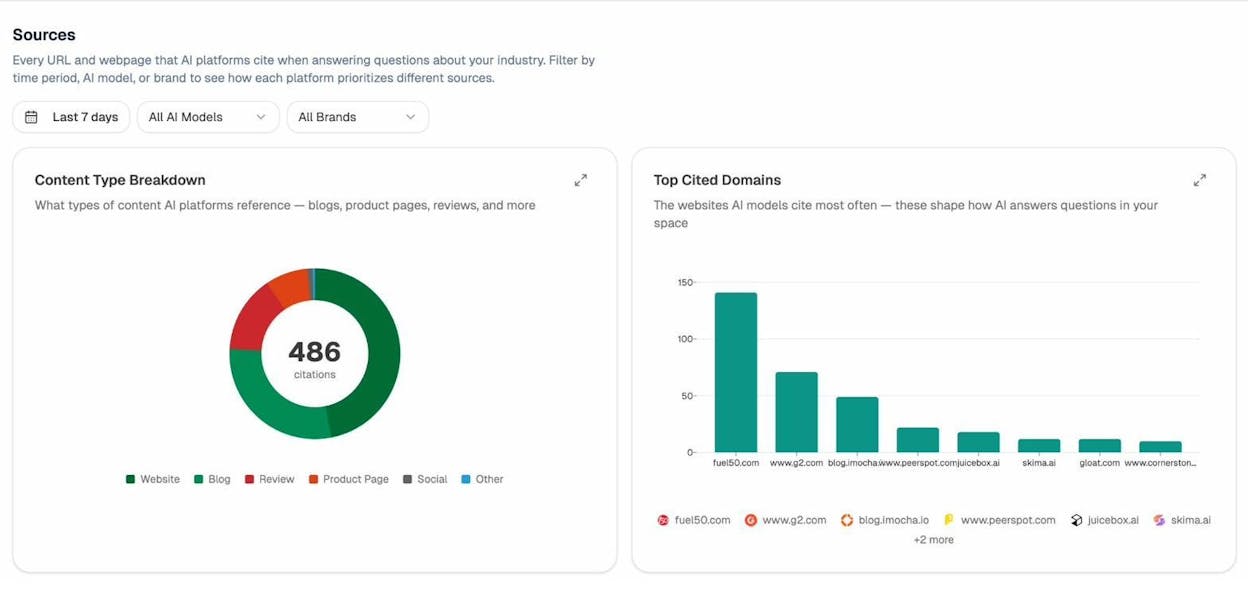
The Sources dashboard takes this deeper by revealing every URL and domain that AI engines cite in your category. You see which content types AI prefers (blogs, reviews, product pages, documentation) and which domains have the most influence.
A Content Writer and Optimizer Built for AI Visibility
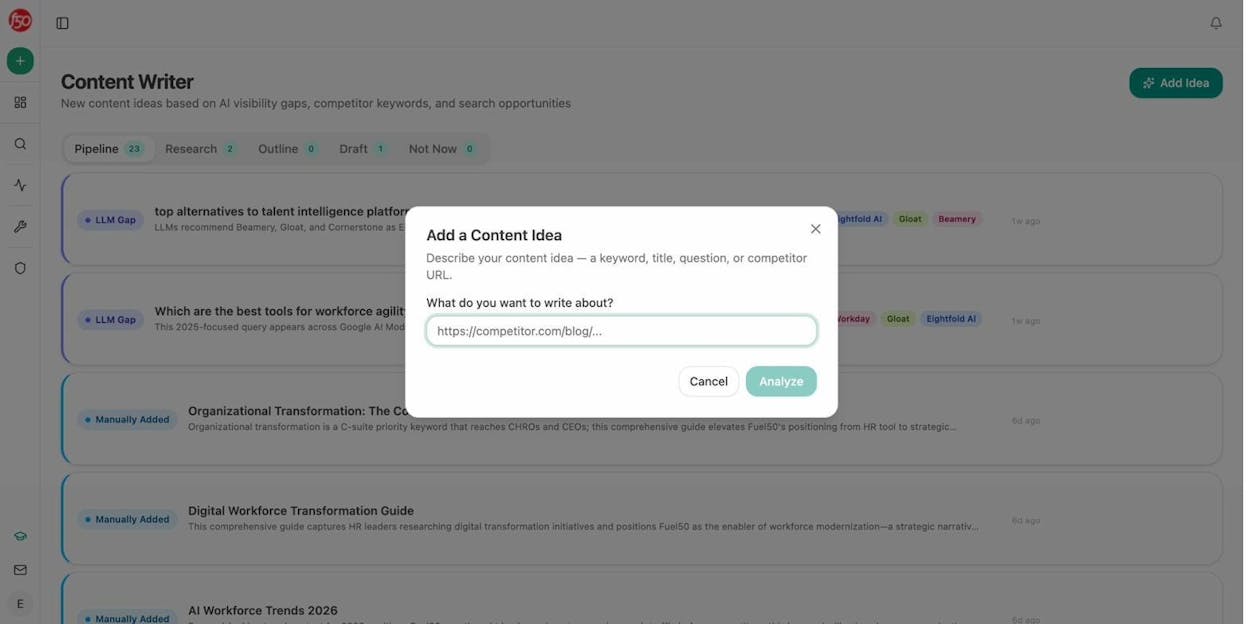
This is where the gap between a dashboard and a platform becomes obvious. Analyze AI’s Content Writer takes you from idea to research to outline to draft. Each step incorporates AI visibility gaps, competitor analysis, and editorial comments. The result is content built to get cited by AI from the first draft.
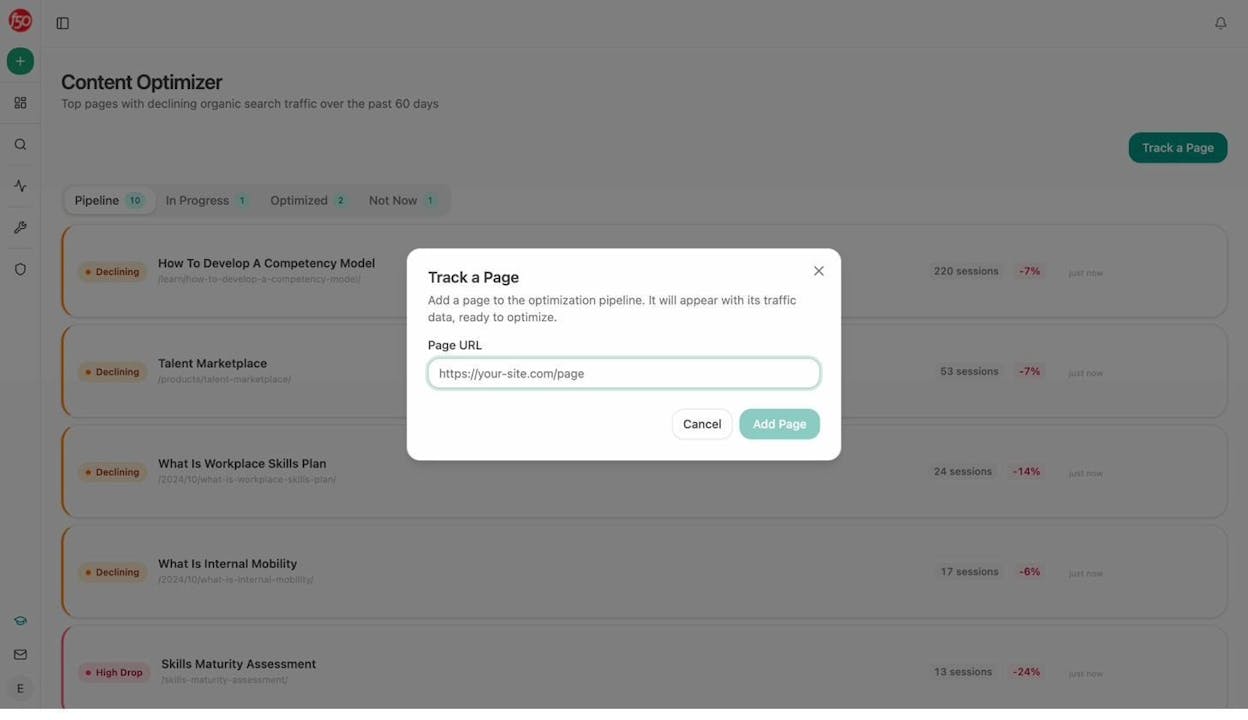
The Content Optimizer audits existing pages for AI search readiness. It scores structure, freshness, claim density, and proof integration, then provides line-by-line suggestions. You paste a URL, get a content score, and see exactly what to fix.
Both tools inject your brand voice automatically through the Knowledge Base, so every output stays on-brand without manual style guide copy-pasting.
An Agent Builder That Runs Your Operations
The Agent Builder is not a simple automation layer. It’s a programmable runtime with 180+ nodes, 34 pre-built data recipes, 13 input primitives, and three trigger modes (manual, scheduled, webhook). It connects directly to GA4, Google Search Console, DataForSEO, Semrush, HubSpot, Notion, WordPress, Salesforce, Mailchimp, Slack, and every major LLM.
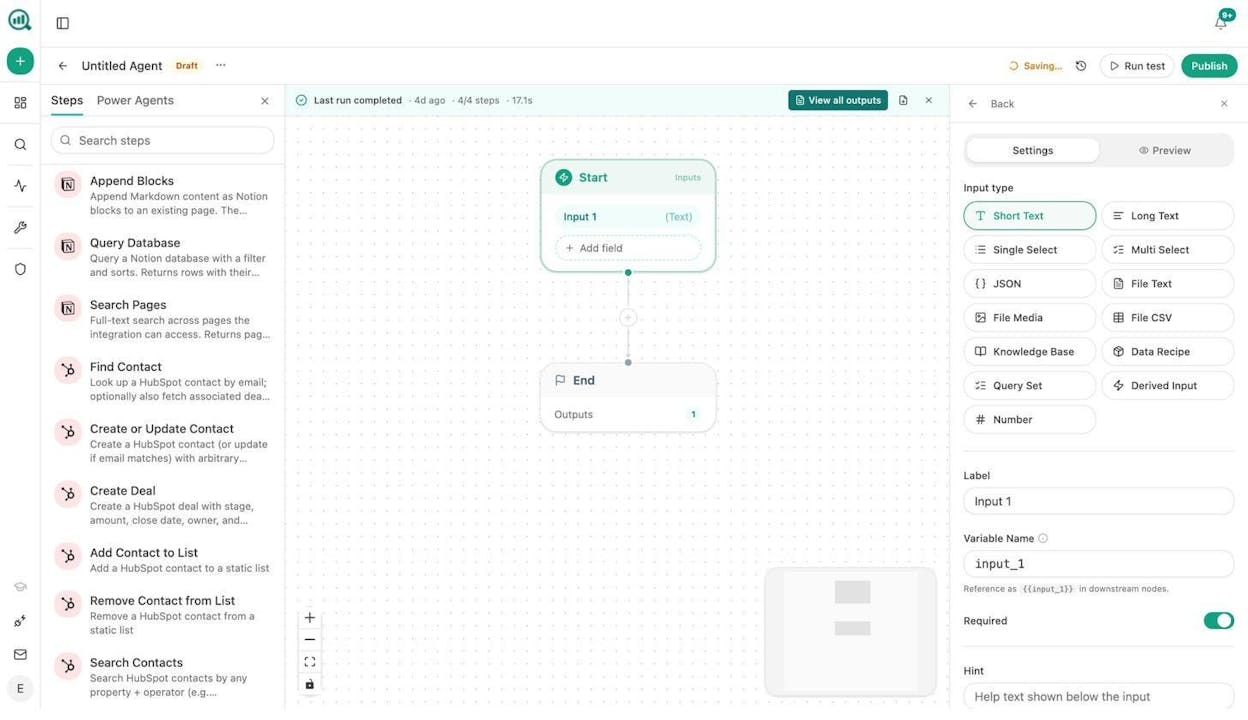
Here is what that means in practice. A content team can build an agent that runs every Monday at 7am, pulls visibility losers from the last week, generates counter-content briefs, and sends them to Slack before the team opens their laptops. An agency can loop one workflow across every client and generate a personalized briefing pack per account, replacing the manual reporting cycle entirely. A PR team can set up a webhook that fires when a media monitoring tool detects negative coverage, triggering a research agent that drafts three response options and posts them to the crisis channel in under a minute.
These are not hypothetical scenarios. They are the kinds of workflows teams build with the Agent Builder every day. The platform was built for AI search visibility, but the agent runtime is the actual product. AI search is one of the things you can do with it.
Brand Governance and Perception Tracking
Analyze AI’s Perception Map positions all tracked brands on a 2D quadrant based on presence and narrative strength. The AI Battlecards give you counter-strategies for every competitor. And Weekly Email Digests deliver prioritized actions, citation changes, and competitor shifts to your inbox every Monday without logging in.
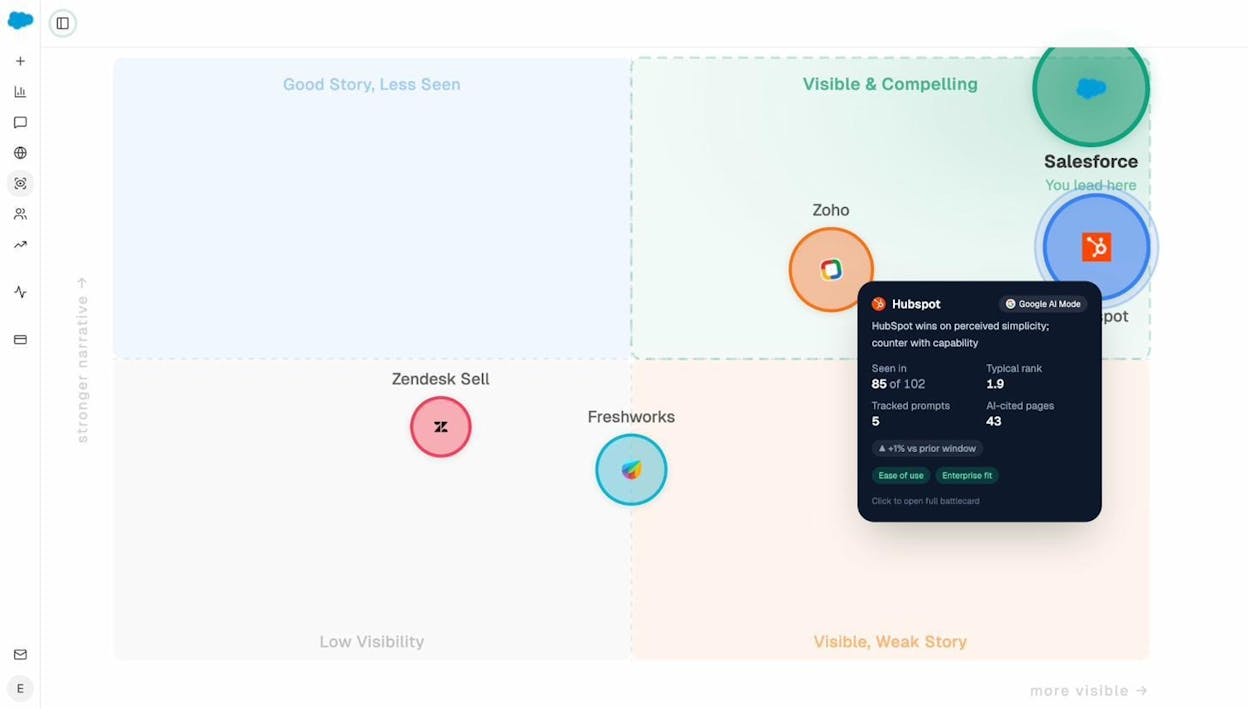
HubSpot AEO vs. Analyze AI: Feature Comparison
|
Feature |
HubSpot AEO ($50/month) |
Analyze AI ($99/month) |
|---|---|---|
|
AI engines tracked |
3 (ChatGPT, Gemini, Perplexity) |
6+ (ChatGPT, Gemini, Perplexity, Claude, Copilot, Grok, AI Overviews, AI Mode) |
|
Daily prompt cap |
25 (standalone) |
No daily cap |
|
GA4 traffic attribution |
No |
Yes |
|
Conversions from AI traffic |
No (HubSpot CRM only) |
Yes |
|
Landing page performance |
No |
Yes |
|
Citation source analysis |
Basic |
Deep (URL-level, domain-level, content type) |
|
Content Writer |
No (requires Content Hub) |
Yes (idea to research to outline to draft) |
|
Content Optimizer |
No |
Yes (URL audit with line-by-line suggestions) |
|
Agent Builder |
No |
Yes (180+ nodes, 34 recipes, 3 triggers) |
|
Brand Vault |
No |
Yes (12 blocks auto-injected into every output) |
|
Sheets (operating tables) |
No |
Yes |
|
CMS integrations |
HubSpot only |
WordPress, Notion, Sanity, Contentful |
|
CRM integrations |
HubSpot only |
HubSpot, Salesforce, Pipedrive |
|
Weekly executive briefings |
No |
Yes |
|
Perception Map |
No |
Yes |
|
AI Battlecards |
No |
Yes |
|
Works without a HubSpot subscription |
Standalone plan only |
Yes |
For a deeper feature-by-feature breakdown, see the full Analyze AI vs. HubSpot AEO comparison.
The Bottom Line: Dashboard vs. Platform
HubSpot AEO is a reasonable first look at AI visibility for teams already inside the HubSpot ecosystem. If you want a quick read on whether your brand appears in ChatGPT, Gemini, and Perplexity, and you’re comfortable with the 25-prompt limit, it will give you that.
But it is not a full AEO solution. It doesn’t track the engines that matter most for business audiences. It doesn’t attribute traffic. It doesn’t help you create content or optimize what you already have. It doesn’t automate reporting, alerting, or execution. And its per-portal pricing punishes agencies.
None of this means SEO is dead or that AI search replaces Google. AI search is an additional organic channel alongside traditional SEO, not a replacement. The brands winning right now are the ones treating both channels seriously, using their existing SEO foundation to fuel AI visibility and tracking the results of both in one place.
If you need a dashboard that tells you the score, HubSpot AEO will do the job. If you need a platform that tracks the score, shows you what’s driving it, helps you fix what’s broken, and automates the work that follows, Analyze AI is built for that.

Ernest

Ibrahim


![7 seoClarity Alternatives That Won’t Lock You Into $2,500/mo Enterprise Contracts [2026]](/_next/image?url=https%3A%2F%2Fwww.datocms-assets.com%2F164164%2F1779457139-blobid0.png&w=3840&q=75)
