



Summarize this blog post with:


In this article, you’ll learn 20 practical SEO tips that can help you rank higher in Google and get more organic traffic. You’ll also learn how to extend each tactic to AI search engines like ChatGPT, Perplexity, and Gemini, so your content shows up wherever your audience is looking.
Table of Contents
1. Target keywords you can actually rank for
Not all keywords are equal. Some are dominated by massive sites with thousands of backlinks. Others are wide open for smaller sites to win.
The trick is finding keywords where the top-ranking pages come from sites similar to yours in authority and link profile. If a page from a DR 25 site ranks in the top five with just a handful of backlinks, that keyword is probably within reach for your site too.
Here is how to find these keywords:
-
Open a keyword research tool and enter a broad topic related to your niche
-
Filter by keyword difficulty (KD) of 10 or lower
-
Check the top five results for the lowest Domain Rating (DR) among ranking sites
-
Look for pages with few referring domains that still rank well
![[Screenshot: Keyword research tool showing low-KD keywords with DR filter applied, displaying results like “ski helmet headphones” with low-DR sites ranking #1]](https://www.datocms-assets.com/164164/1777453578-blobid1.png?auto=format,compress&w=1248&fit=max)
For example, a keyword like “best posture corrector for desk workers” might have a KD of 8 with a DR 22 site ranking at position #2. That is a realistic target for a newer site.
A few more signals that a keyword is easy to rank for:
-
The top-ranking pages have thin content you can easily beat
-
There is no featured snippet, meaning Google has not found a definitive answer yet
-
The SERP has forum results (Reddit, Quora), which usually means purpose-built pages are lacking
You can use the Analyze AI Keyword Generator or the Keyword Difficulty Checker to quickly evaluate whether a keyword is worth pursuing.
How this applies to AI search: Low-competition keywords matter in AI search too. When ChatGPT or Perplexity answers a niche query, they pull from a smaller pool of sources. If your page is one of the few comprehensive answers on a specific topic, AI models are more likely to cite you. The same principle applies: go where the competition is thin, and your chances of being cited go up.
2. Align your content with what searchers actually want
Google has gotten extremely good at understanding what people mean when they search. If someone searches “best running shoes,” they want a list of recommendations, not a product page for a single shoe. If they search “how to tie a bowline knot,” they want a step-by-step tutorial, not a history of knots.
This concept is called search intent, and ignoring it is one of the fastest ways to waste your time creating content that will never rank.
Here is how to figure out search intent for any keyword:
-
Search your target keyword in Google
-
Look at the top five results and note the dominant content type (blog post, product page, tool, video, listicle)
-
Note the content format (how-to guide, comparison, list, definition)
-
Note the angle (beginner-focused, expert-level, budget-oriented)
![[Screenshot: Google SERP for “best project management software” showing listicle results from review sites, indicating comparison/list intent]](https://www.datocms-assets.com/164164/1777453584-blobid2.png?auto=format,compress&w=1248&fit=max)
For example, if the top results for “email marketing platforms” are all comparison lists, you should write a comparison list too. Publishing a single product review for that keyword would be fighting the intent and Google will likely bury it.
Match the dominant pattern. Then beat it with better information, more current data, or a clearer structure.
How this applies to AI search: AI models read intent too. When someone asks ChatGPT “what is the best CRM for small businesses,” the model looks for content that directly compares options and gives recommendations. Pages structured as comparison guides with clear verdicts are more likely to get cited than generic product descriptions. Write content that answers the question the way a helpful expert would, and both Google and AI models will reward you.
3. Boost weak pages with internal links
Internal links pass authority (PageRank) from one page on your site to another. A page that receives lots of internal links from high-authority pages on your site will rank better than an orphan page buried deep in your navigation.
Here is how to find internal linking opportunities:
-
Identify a page you want to rank higher (your target page)
-
Search your own site for mentions of the target page’s topic using site:yourdomain.com [topic] in Google
-
Open each result and look for natural places to add a link to your target page
-
Use descriptive anchor text that includes your target keyword or a close variation
![[Screenshot: Google site search showing pages on a domain that mention “content marketing strategy” but don’t link to the main content marketing strategy page]](https://www.datocms-assets.com/164164/1777453589-blobid3.png?auto=format,compress&w=1248&fit=max)
For example, if your target page is about “email deliverability” and you have a blog post about “email marketing best practices” that mentions deliverability but does not link to your guide, that is a missed opportunity. Add the link.
A few internal linking best practices:
-
Link from high-authority pages (your homepage, pillar content, popular blog posts) to pages you want to boost
-
Use descriptive anchor text, not “click here” or “read more”
-
Do not overdo it. Five to ten relevant internal links per page is a reasonable range
-
Check for broken internal links periodically. A broken link wastes the authority it could be passing
For a deeper look at internal linking strategy, see our guide to internal linking tips for SEO.
4. Add FAQ sections to capture long-tail traffic
FAQ sections answer specific questions related to your main topic. They help your page rank for long-tail keywords that you would not naturally cover in the body of your content.
For example, a guide about “H1 tags” might include an FAQ answering “how long should an H1 tag be.” That single FAQ answer can rank the page for a long-tail keyword that gets hundreds of searches per month.
Here is how to find the right questions to answer:
-
Enter your main topic into a keyword tool and filter for questions
-
Check Google’s “People Also Ask” section for your target keyword
-
Browse forums like Reddit and Quora for common questions in your niche
-
Use the Analyze AI Keyword Generator to surface question-based keywords
![[Screenshot: Google “People Also Ask” section for “technical SEO” showing questions like “What is technical SEO and why is it important?” and “How do I do a technical SEO audit?”]](https://www.datocms-assets.com/164164/1777453590-blobid4.png?auto=format,compress&w=1248&fit=max)
Keep your FAQ answers concise and direct. Two to four sentences per answer is usually ideal. If a question needs a longer answer, it probably deserves its own blog post.
For more on tracking how your content performs in People Also Ask, see our guide on People Also Ask optimization.
How this applies to AI search: FAQ sections are especially valuable for AI search visibility. When someone asks ChatGPT or Perplexity a specific question, the model looks for pages that answer that exact question concisely. A well-structured FAQ gives AI models clean, extractable answers. It is one of the easiest ways to get cited in AI-generated responses.
5. Win featured snippets to jump to position zero
Featured snippets are the answer boxes that appear above the regular search results. They pull content from a page already ranking in the top ten and display it prominently. Winning a featured snippet can catapult you from position five to the very top of the page.
Here is how to find snippet opportunities:
-
Identify keywords where your page already ranks in positions one through five
-
Filter for keywords that trigger featured snippets where your page is not the snippet source
-
Look at what the current snippet shows (a definition, a list, a table, a step-by-step)
-
Add or restructure content on your page to match that format
![[Screenshot: Google featured snippet for “what is domain authority” showing a paragraph definition pulled from a ranking page]](https://www.datocms-assets.com/164164/1777453595-blobid5.png?auto=format,compress&w=1248&fit=max)
For example, if the snippet for “what is a canonical tag” is a paragraph definition and your page explains canonical tags but does not have a clean definition at the top of the section, add one. Make it concise, factual, and formatted as a standalone paragraph right after the relevant H2.
The three most common snippet formats are:
|
Snippet Type |
Best For |
How to Win It |
|---|---|---|
|
Paragraph |
Definitions, explanations |
Write a clear 40-60 word answer directly after your H2 |
|
List |
Steps, rankings, tips |
Use an ordered or unordered list with clear items |
|
Table |
Comparisons, data, specs |
Use an HTML table with clear headers and rows |
6. Fix pages with broken backlinks
Backlinks only help your rankings if they point to live pages. When a page gets deleted or its URL changes without a redirect, the backlinks pointing to it are wasted.
Here is how to find and fix these:
-
Use a backlink checker to find pages on your site that return a 404 error but still have external links pointing to them
-
For each dead page, decide whether to restore the content or redirect the URL to the most relevant live page
-
Set up a 301 redirect so the link authority flows to the new destination
![[Screenshot: Backlink checker tool showing a list of 404 pages sorted by number of referring domains, with the top result having 12 linking websites]](https://www.datocms-assets.com/164164/1777453596-blobid6.png?auto=format,compress&w=1248&fit=max)
You can also use the Analyze AI Broken Link Checker to quickly scan your site for broken links.
The decision tree for handling broken backlinks is simple:
-
The content is still relevant and valuable? Restore the page at the same URL.
-
The content is outdated but a similar page exists? 301 redirect the old URL to the most relevant current page.
-
The content is irrelevant and nothing similar exists? 301 redirect to your most relevant category page or homepage. Do not leave it as a 404 if it has backlinks.
7. Craft title tags that earn clicks
Title tags influence rankings directly (Google confirmed they are a ranking factor) and indirectly (a better title gets more clicks, which sends engagement signals).
Here is how to write titles that work:
-
Include your primary keyword near the beginning of the title
-
Keep it under 60 characters to avoid truncation in search results
-
Match the search intent so searchers know you have what they need
-
Add a compelling modifier like a year, a number, or a benefit (“in 2026,” “Step-by-Step,” “Free Template”)
-
Avoid clickbait because disappointed visitors bounce, and that hurts rankings
![[Screenshot: Google SERP showing three results for “keyword research guide” with title tags of varying quality, highlighting one with a clear, benefit-driven title that includes the year]](https://www.datocms-assets.com/164164/1777453601-blobid7.png?auto=format,compress&w=1248&fit=max)
For example, “Keyword Research: The Beginner’s Guide (2026)” is better than “Everything You Need to Know About Keyword Research.” The first is specific, shows freshness, and addresses a clear audience. The second is vague and overused.
A useful exercise: search your target keyword in Google and look at the titles of the top ten results. What pattern do you see? If every top result uses a number (“10 Best…”), consider using a number too. If they all mention a year, include the year. Match the pattern, then differentiate on clarity and specificity.
8. Refresh content before it decays
Rankings are not permanent. Content decays as information becomes outdated, competitors publish better pages, and search intent shifts over time.
Here is how to find declining content:
-
Open Google Search Console and go to the Search Results report
-
Set the date range to compare the last six months to the previous six months
-
Click the “Pages” tab and sort by “Clicks Difference” from low to high
-
Identify pages with the biggest drops in clicks
![[Screenshot: Google Search Console showing a comparison view with pages sorted by clicks difference, highlighting a blog post that dropped from 2,400 clicks to 1,100 clicks over six months]](https://www.datocms-assets.com/164164/1777453602-blobid8.png?auto=format,compress&w=1248&fit=max)
Once you identify declining pages, figure out why they dropped:
-
Outdated information? Update the data, examples, screenshots, and year references.
-
Competitors published better content? Analyze what they added and improve your page accordingly.
-
Search intent shifted? Check if Google is now showing a different content format for that keyword.
A content refresh does not mean rewriting from scratch. Often, updating a few sections, adding new data points, refreshing screenshots, and adjusting the publication date is enough to recover lost rankings.
How this applies to AI search: Content freshness matters for AI citations too. AI models have training data cutoffs, but real-time search tools like Perplexity pull current results. If your page has a 2023 date and outdated stats, it will lose citations to a competitor’s 2026 version. Keep your best-performing content updated and both Google and AI models will continue to prefer it.
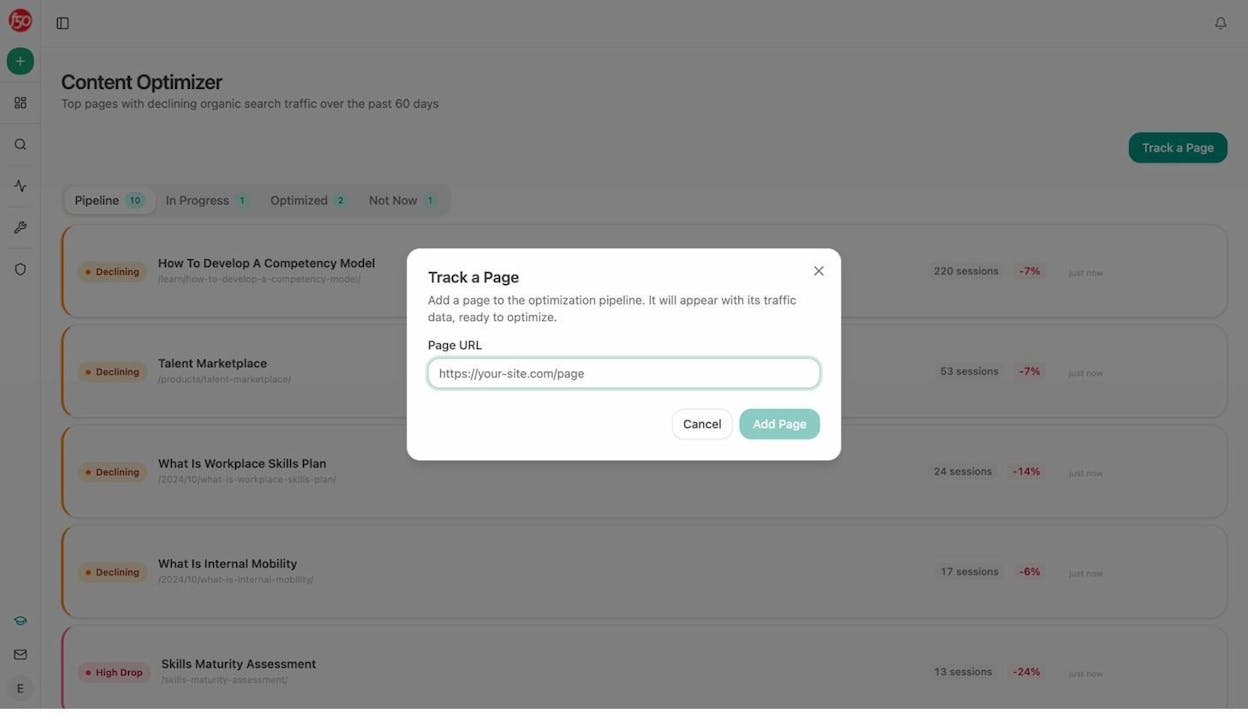
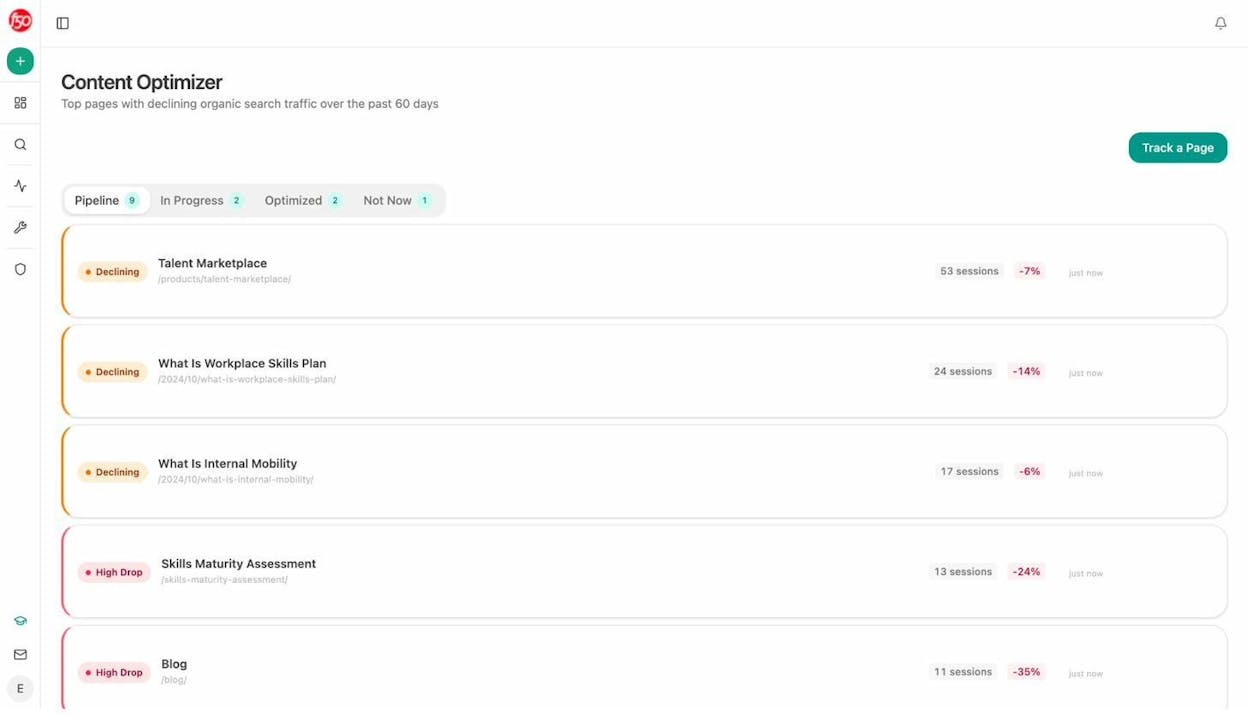
In Analyze AI’s Content Optimizer, you can see which of your pages are declining in organic traffic and prioritize them for a refresh. The tool pulls in your existing content, scores it on argument quality and clarity, and generates specific editorial suggestions.
9. Build backlinks through expert source platforms
Backlinks from high-authority sites remain one of the strongest ranking factors. One of the most accessible ways to earn them is by responding to journalist queries on expert source platforms.
Here are the main platforms to use:
-
Source of Sources (SOS) by Peter Shankman, the original HARO founder. Free to use.
-
Featured acquired the HARO brand and is known for good conversion rates.
-
Qwoted is a premium option at $149/month with access to thousands of journalists.
-
SourceBottle is a free service connecting sources with bloggers and journalists.
You can also monitor journalist requests on X using hashtags like #journorequest and #prrequest.
The key to success is speed and specificity. Journalists receive dozens of responses. The ones that get selected are concise, cite specific experience, and arrive early.
Here is a template for responding to journalist requests:
-
Open with your relevant credential in one sentence
-
Give a direct, quotable answer to their question in two to three sentences
-
Add one specific example or data point to back up your answer
-
Close with your name, title, and a link to your site
For a deeper look at link building tools, check our full guide.
10. Create comprehensive content that covers the full topic
Google rewards pages that thoroughly cover a topic. If your page addresses all the subtopics that searchers care about, it will rank for more queries and attract more traffic.
Here is how to find the right subtopics to cover:
-
Search your main keyword in Google and open the top five ranking pages
-
Note the H2 headings each page covers
-
Look for common themes across all five pages (these are must-cover subtopics)
-
Look for subtopics that only one or two competitors cover (these are opportunities for differentiation)
-
Check “People Also Ask” for related questions you should answer
For the keyword “affiliate marketing,” the top-ranking pages all cover subtopics like “how affiliate marketing works,” “how to get started,” and “best affiliate programs.” If your page skips any of those, you are leaving traffic on the table.
But comprehensiveness does not mean word count for its own sake. Cover every relevant subtopic, but keep each section focused and useful. A 3,000-word article that answers every question is better than a 5,000-word article padded with filler.
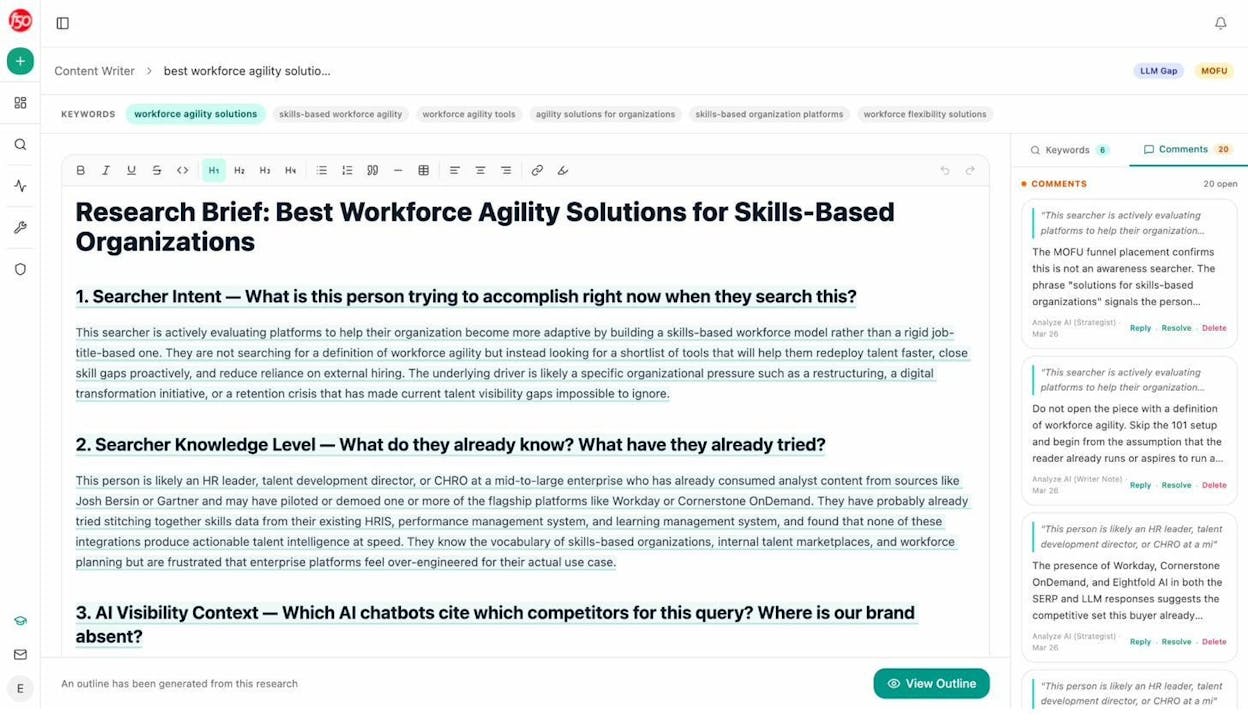
Analyze AI’s Content Writer helps with this. It analyzes the SERP for your target keyword, identifies the subtopics and gaps competitors cover, and builds an outline with LLM gap tags and editorial comments so you know exactly what to include.
11. Combine similar pages to consolidate authority
If you have multiple pages targeting the same or very similar keywords, they compete against each other. Google does not know which one to rank, so it often ranks neither well. This is called keyword cannibalization.
The fix is to consolidate: merge the best parts of both pages into one, then 301 redirect the weaker page to the stronger one.
Here is how to find cannibalization issues:
-
Go to Google Search Console and check the “Search Results” report
-
Filter by a specific keyword
-
Click the “Pages” tab to see if multiple URLs from your site appear
-
If two or more pages share impressions for the same keyword, you likely have a cannibalization issue
![[Screenshot: Google Search Console showing two URLs competing for the same keyword “broken link building guide,” with impressions split roughly 60/40]](https://www.datocms-assets.com/164164/1777453613-blobid11.png?auto=format,compress&w=1248&fit=max)
After merging, you often see a quick ranking boost because all the backlinks and authority are now concentrated on one page instead of split across two.
A common example: many sites have a “/what-is-seo/” page and a “/seo-guide/” page covering the same ground. Merging them into a single, definitive guide almost always outperforms having both.
12. Improve E-E-A-T signals to build trust
E-E-A-T stands for Experience, Expertise, Authoritativeness, and Trustworthiness. Google uses various signals to assess whether your content meets these criteria.
E-E-A-T is not a direct ranking factor you can toggle on or off. It is a framework Google uses to evaluate quality, and it influences rankings through proxy signals like backlinks, brand mentions, and content quality.
Here are concrete ways to strengthen E-E-A-T:
-
Show experience. Include first-hand examples, case studies, original screenshots, and real data from your own work.
-
Demonstrate expertise. Add author bios with relevant credentials. Link to the author’s LinkedIn or professional profiles.
-
Build authority. Earn backlinks from respected sites in your niche. Get quoted or mentioned in industry publications.
-
Establish trust. Use HTTPS. Display clear contact information. Cite reputable sources. Include expert quotes.
Expert quotes are particularly useful. When you quote a recognized authority in your article, it adds credibility. It also increases the chance that the quoted expert will share or link to your article, earning you backlinks.
How this applies to AI search: E-E-A-T matters even more for AI citations. AI models are trained to prioritize authoritative sources. When ChatGPT or Perplexity generates an answer, it favors content from sites with strong reputations, clear authorship, and well-sourced claims. Original data, expert quotes, and first-hand experience make your content more “citable” to AI models.
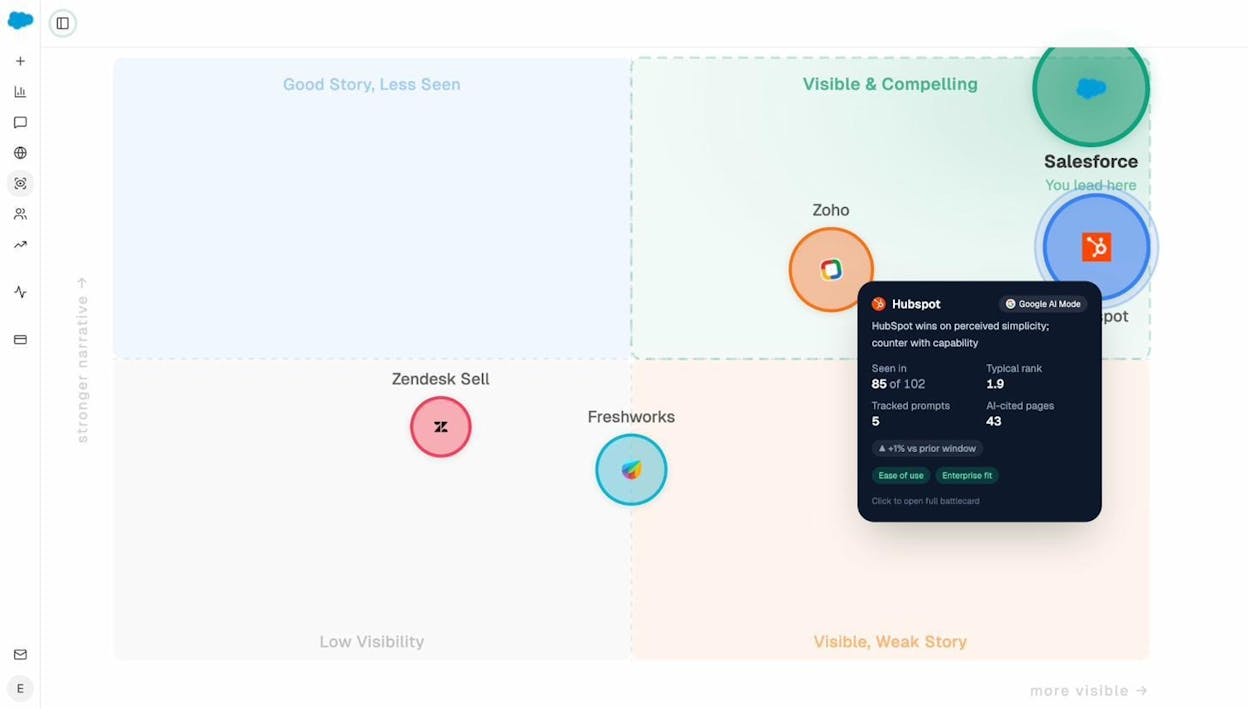
To see how AI models currently perceive your brand’s authority and trustworthiness, you can use Analyze AI’s Perception Map. It shows the exact narrative AI builds about your brand, including what it presents as strengths and weaknesses.
13. Publish statistics pages to earn backlinks passively
Bloggers and journalists constantly search for statistics to cite in their content. If you can be the source they find, you earn backlinks without outreach.
Here is how to execute this strategy:
-
Find statistics-related keywords in your niche by adding “statistics” to your keyword research (e.g., “email marketing statistics,” “remote work statistics”)
-
Curate the most relevant and current stats from reputable sources, citing each one
-
Add your own original data if you have any (this makes your page unique and more link-worthy)
-
Organize the stats into logical categories with clear headings
-
Update the page annually to keep it fresh and maintain rankings
![[Screenshot: Keyword research results showing search volume for “[industry] statistics” keywords like “seo statistics” (600/mo), “content marketing statistics” (900/mo), “ai search statistics” (300/mo)]](https://www.datocms-assets.com/164164/1777453619-blobid13.jpg?auto=format,compress&w=1248&fit=max)
The beauty of this strategy is that it compounds. Once your statistics page ranks, it attracts backlinks automatically. Those backlinks make it rank even higher, which attracts even more backlinks.
For data on how AI search engines cite sources, check our analysis of 83,670 AI citations and the generative engine optimization statistics page.
14. Use short, descriptive URLs
Google recommends using words relevant to your content in your URL. Short, keyword-rich URLs are easier for both users and search engines to understand.
Here are the rules:
-
Set your URL slug to your target keyword. If your keyword is “seo tips,” your slug should be /seo-tips/.
-
Remove stop words like “and,” “the,” “of” when they are unnecessary.
-
Keep subfolders short. If your URL structure is /blog/category/post-title/, make sure each segment is concise.
-
Use hyphens, not underscores. Google treats hyphens as word separators but treats underscores as word joiners.
-
Never change a URL without setting up a 301 redirect from the old URL to the new one.
For example, yourdomain.com/blog/seo-tips/ is better than yourdomain.com/blog/2026/04/20-easy-search-engine-optimization-tips-for-higher-rankings/.
15. Make your content easy to read
If your content is hard to read, visitors will leave. It does not matter how good your information is if people cannot get through it.
Here is what readable content looks like:
-
Short paragraphs. Two to three sentences maximum. Walls of text repel readers.
-
Clear subheadings every 200 to 300 words. Let readers scan and jump to what they need.
-
Simple language. Aim for an eighth-grade reading level. Tools like Hemingway Editor flag complex sentences and passive voice.
-
Front-load key points. Put the most important information at the beginning of each section. Readers (and AI models) look for insights at the top, not buried at the end.
-
Use lists and tables when presenting multiple items or comparisons. They are easier to scan than prose paragraphs.
This is not about dumbing down your content. It is about respecting your reader’s time. The best writers explain complex topics simply. That takes more effort, not less.
How this applies to AI search: Readability directly affects AI citability. When AI models parse your content to generate answers, clear structure and concise language make it easier for them to extract and cite your information. A well-structured H2 followed by a clean paragraph answer is far more likely to get pulled into an AI response than a rambling section with the key point buried in the third paragraph.
16. Write meta descriptions that earn clicks
Meta descriptions do not directly affect rankings, but they influence click-through rate (CTR). A compelling meta description can be the difference between a searcher clicking your result or your competitor’s.
Here is how to write effective meta descriptions:
-
Keep them under 155 characters to avoid truncation.
-
Include your target keyword. Google bolds matching keywords in the snippet, which catches the eye.
-
Add a clear value proposition. Why should someone click your result over the nine others on the page?
-
Match the search intent. If someone wants a tutorial, tell them you have step-by-step instructions. If they want a comparison, mention that you compare the top options.
![[Screenshot: Google search results showing two competing pages for the same keyword — one with a generic meta description and one with a specific, benefit-driven description including a number and clear value proposition]](https://www.datocms-assets.com/164164/1777453620-blobid14.jpg?auto=format,compress&w=1248&fit=max)
Google sometimes rewrites meta descriptions, but having a well-crafted one gives you the best chance of controlling your SERP snippet. Even when Google rewrites it, the effort is not wasted because AI platforms like ChatGPT and Perplexity use page metadata when evaluating relevance.
To find pages on your site that are missing meta descriptions, run a site audit. Most SEO audit tools will flag pages without meta descriptions automatically.
17. Optimize your images for search and speed
Images affect SEO in two ways: they can drive traffic through Google Images, and they affect page load speed (which is a ranking factor through Core Web Vitals).
Here is what to do:
-
Use descriptive file names. Rename IMG_4521.jpg to keyword-research-tool-dashboard.jpg before uploading.
-
Add alt text to every image. Describe what the image shows in plain language. This helps accessibility and gives Google context.
-
Compress images before uploading. Large files slow your page. Use tools like Squoosh, TinyPNG, or ShortPixel to compress without visible quality loss.
-
Use WebP format when possible. It offers better compression than JPG or PNG at the same quality.
-
Set width and height attributes to prevent layout shifts (this helps your CLS Core Web Vital score).
![[Screenshot: Before and after comparison of an image file — original at 1.2MB vs. compressed at 85KB, same visual quality]](https://www.datocms-assets.com/164164/1777453625-blobid15.png?auto=format,compress&w=1248&fit=max)
For product pages, how-to guides, and tutorials, use original screenshots instead of stock photos. Unique images build trust, and they can rank in Google Images for related queries.
18. Improve Core Web Vitals for better user experience
Core Web Vitals (CWV) are three performance metrics Google uses to measure user experience. They are a confirmed ranking factor, though not a strong one. Still, improving them helps with user engagement, which indirectly supports rankings.
The three metrics are:
|
Metric |
What It Measures |
Target |
|---|---|---|
|
LCP (Largest Contentful Paint) |
How fast the main content loads |
Under 2.5 seconds |
|
INP (Interaction to Next Paint) |
How fast the page responds to user input |
Under 200 milliseconds |
|
CLS (Cumulative Layout Shift) |
How much the page layout shifts during loading |
Under 0.1 |
INP replaced the old FID metric in March 2024. It is now the most commonly failed metric, with over 40% of sites not meeting the threshold.
Here are the most impactful fixes:
-
Use a CDN to serve assets from servers close to your visitors.
-
Compress and lazy-load images so the browser does not load offscreen images until the user scrolls to them.
-
Minimize JavaScript by removing unused scripts and deferring non-critical JS.
-
Set explicit image dimensions to prevent layout shifts.
-
Use server-side rendering (SSR) or static generation for content-heavy pages.
Check your Core Web Vitals in Google Search Console under the “Core Web Vitals” report, or use Google’s PageSpeed Insights for page-level diagnostics.
19. Add video to pages where it makes sense
Video can increase time on page, improve engagement, and help you rank in video-specific SERP features. For some keywords, video results dominate the entire first page.
But do not create video for every page. Focus on:
-
How-to content where showing is more effective than telling
-
Product reviews where buyers want to see the product in action
-
Keywords where video already ranks in the SERP (check before creating)
If you already have YouTube videos on relevant topics, embed them in your blog posts. This gives the video more exposure and makes your page more comprehensive.
![[Screenshot: Google SERP for “how to set up Google Analytics 4” showing video results from YouTube prominently displayed in a video carousel above organic results]](https://www.datocms-assets.com/164164/1777453626-blobid16.png?auto=format,compress&w=1248&fit=max)
Keep video loading fast by using lazy loading for embeds. Host on YouTube or Vimeo rather than self-hosting large files. Add a transcript below embedded videos to give search engines (and AI models) crawlable text content.
20. Fix basic technical SEO issues
Technical SEO sounds complex, but most of the impactful fixes are straightforward. Here are the ones that matter most:
Submit your sitemap. Go to Google Search Console, navigate to Sitemaps, and submit your XML sitemap URL. This tells Google about all the pages on your site.
Fix crawl errors. Check the Pages report in Search Console for pages Google cannot access. Common issues include 404 errors, server errors, and redirect loops.
Ensure your site is mobile-friendly. Most search traffic is mobile. Test your pages on different screen sizes and fix layout issues.
Use HTTPS. If you are still on HTTP, get an SSL certificate. Most hosts offer free certificates through Let’s Encrypt. Google has confirmed HTTPS is a ranking signal.
Handle duplicate content with canonical tags. If you have multiple URLs with similar or identical content (common with URL parameters, print versions, or pagination), use rel=canonical to tell Google which version to index.
Check for orphan pages. These are pages with no internal links pointing to them. Google may struggle to discover and rank them. Make sure every important page is linked from at least one other page on your site.
For a broader overview of SEO types and techniques, see our complete guide.
21. Track your AI search visibility (and act on it)
Everything above makes your content better for Google. But in 2026, Google is not the only place people find answers. ChatGPT, Perplexity, Gemini, and Copilot are sending real traffic to websites, and that traffic is growing.
The good news is that the same fundamentals that help you rank in Google also help you get cited by AI models. Clear content, strong authority, comprehensive coverage, and good structure are table stakes for both channels. SEO is not dead. AI search is an additional organic channel that compounds alongside your existing SEO work.
But there is a gap: you cannot improve what you cannot measure. Google Search Console tells you how you perform in Google. You need something equivalent for AI search.
Here is where Analyze AI fits in. It works as your AI search console, showing you:
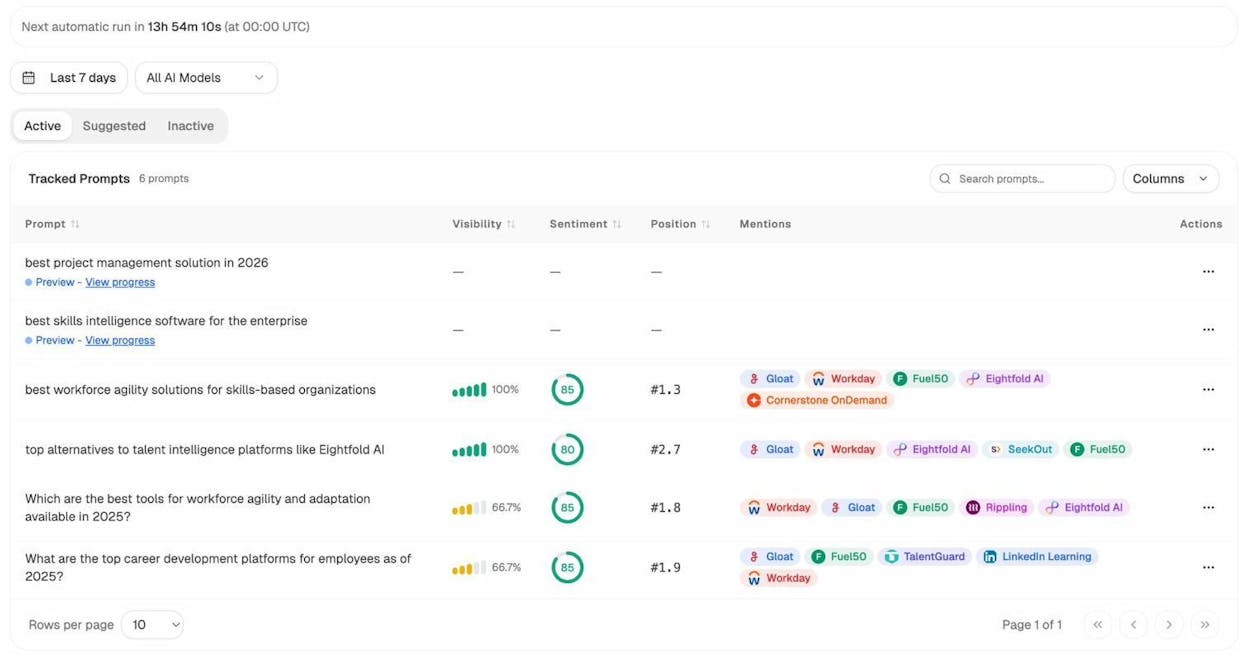
Where you appear (and where you do not). Track which prompts mention your brand across ChatGPT, Perplexity, Gemini, Copilot, and other AI engines. See your visibility percentage, position, and sentiment for each prompt.
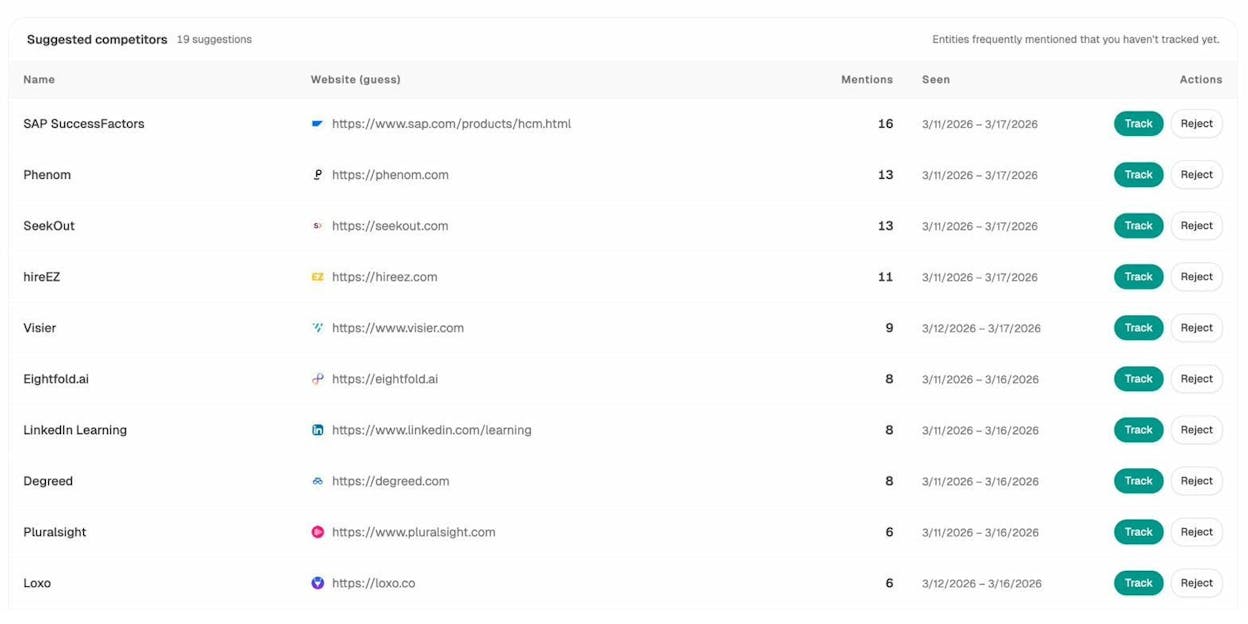
Who you are losing to. The Competitors dashboard surfaces brands that AI engines recommend instead of you. If a competitor appears on a prompt where you are absent, that is a gap you can close with better content.
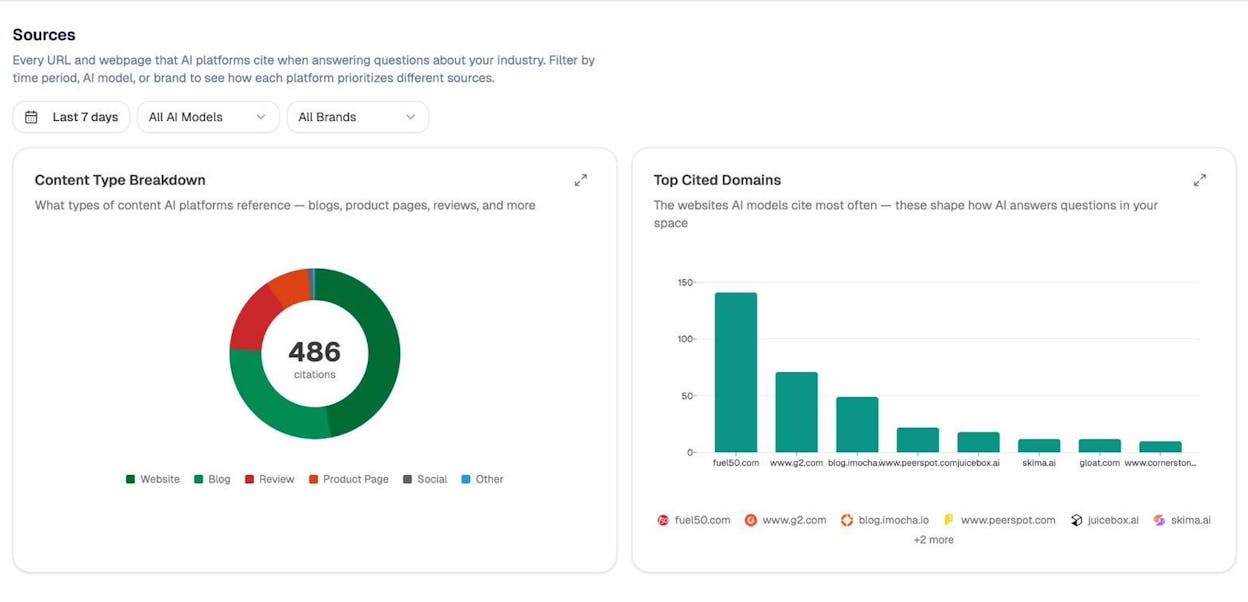
Which sources AI models trust. The Sources dashboard shows every domain and URL that AI engines cite in your space. If a review site or industry blog is getting citations and you are not mentioned there, that is an earned media opportunity.
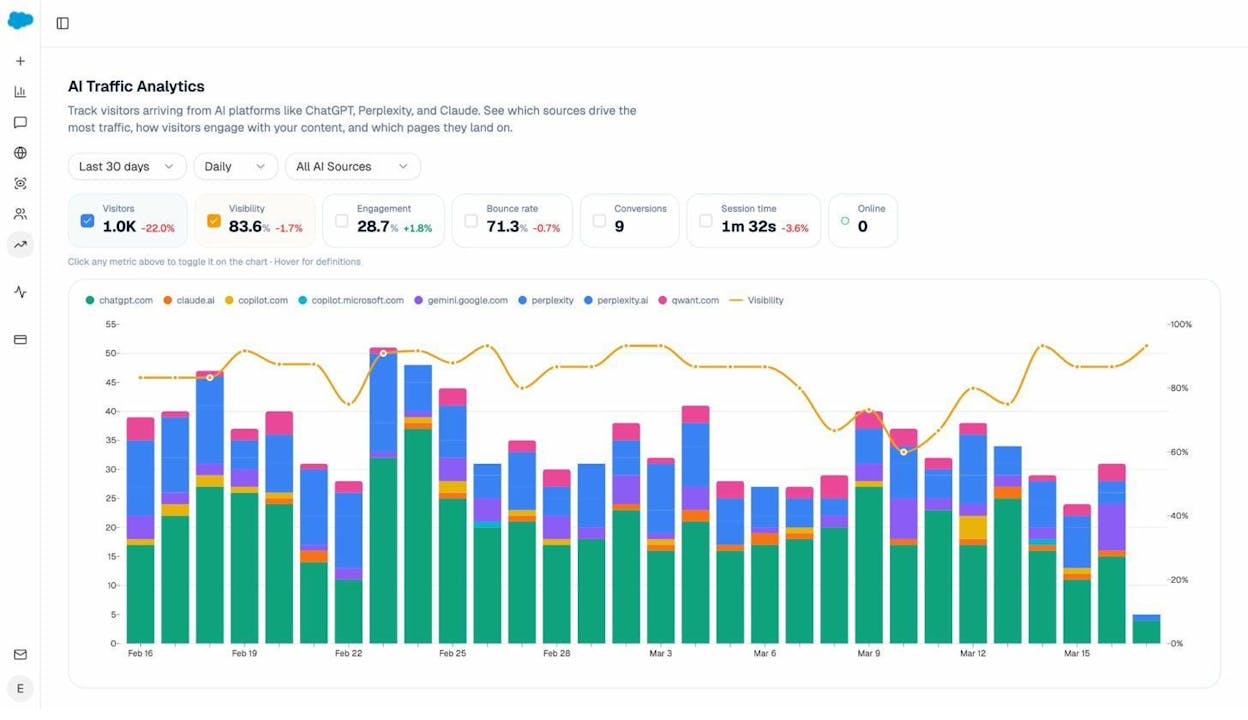
How much AI traffic you actually get. Connect your GA4 account and Analyze AI shows you exactly how many visitors come from each AI engine, which pages they land on, how engaged they are, and whether they convert.
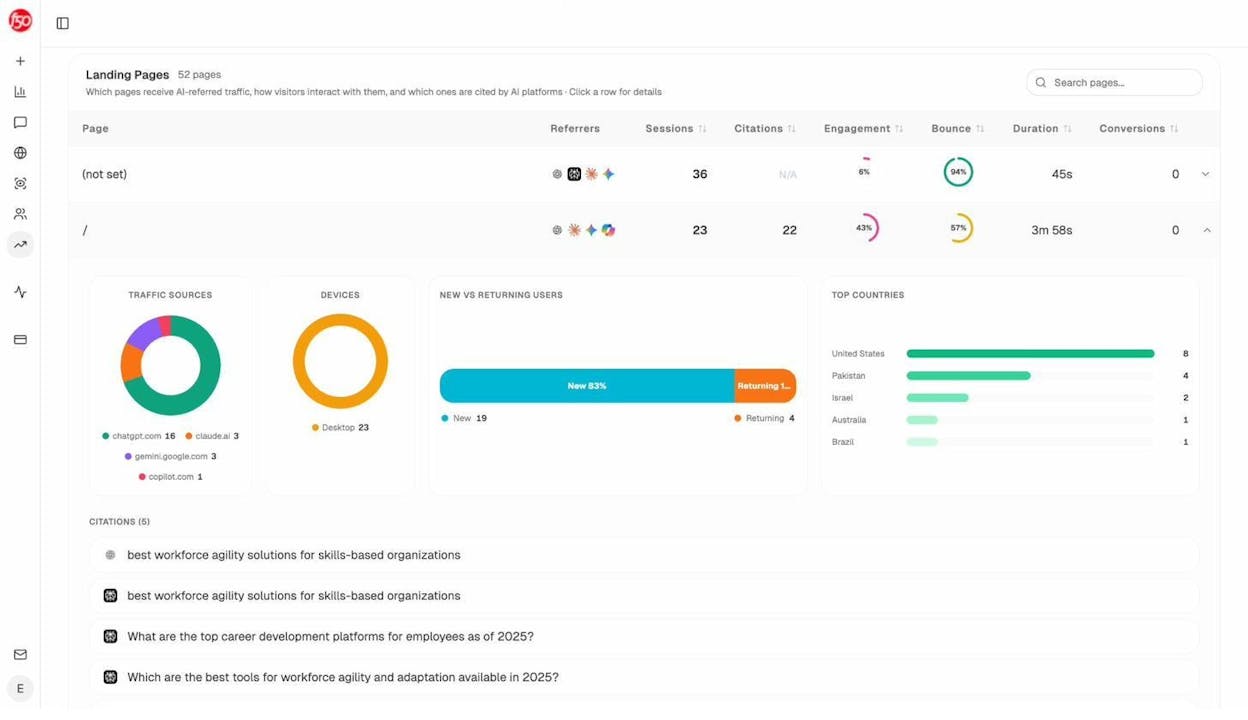
You can drill into individual landing pages to see which specific pages get AI traffic, which prompts drove visitors there, and which AI engine sent them.
What to optimize next. The Content Optimizer surfaces pages with declining traffic and scores them on argument quality and editorial polish. It fetches your existing content, generates AI editorial comments, and produces an optimized draft so you know exactly what to change.
How AI perceives your brand. The Perception Map shows the exact narrative AI builds about your brand, what it frames as strengths, what it frames as weaknesses, and how that narrative compares to competitors.
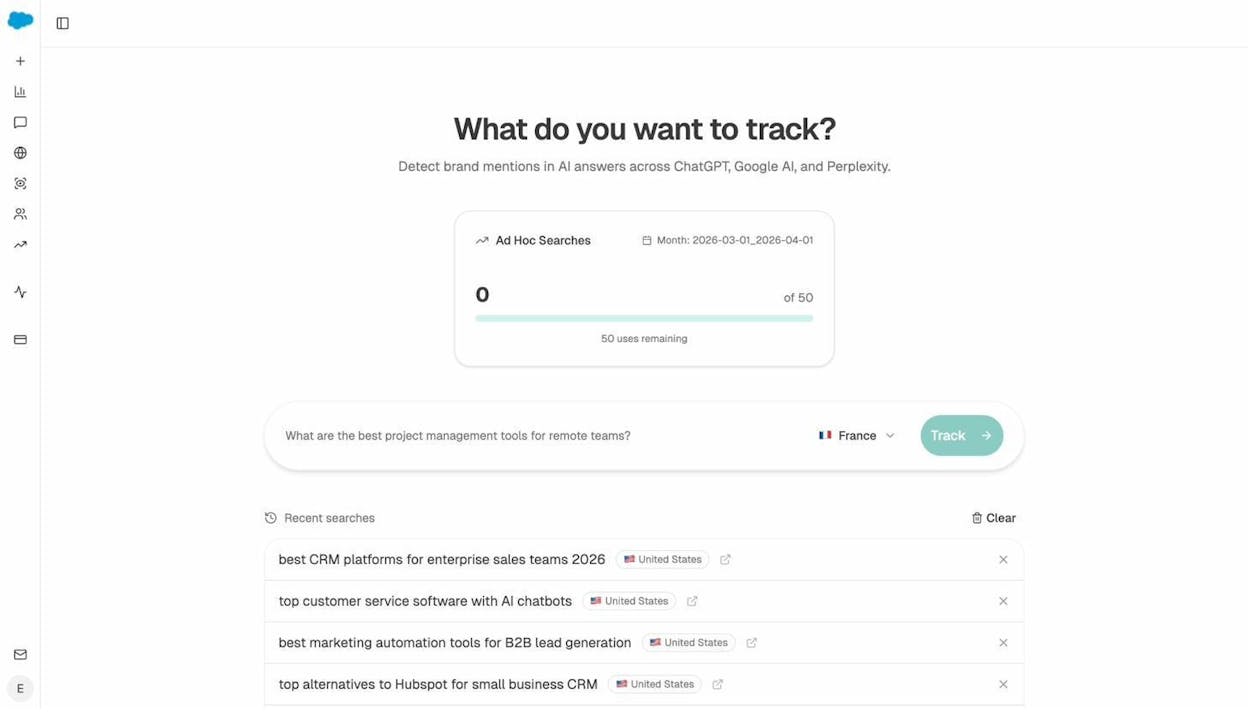
You can also run ad hoc prompt searches to test any question across multiple AI engines at once, before committing to a full tracking campaign.
How to get started
You do not need to tackle all 21 tips at once. Here is a practical order of operations:
Week 1: Fix what is broken. Handle technical issues (tip 20), fix broken backlinks (tip 6), and consolidate cannibalized pages (tip 11).
Week 2: Optimize what you have. Refresh declining content (tip 8), add internal links (tip 3), improve title tags (tip 7) and meta descriptions (tip 16).
Week 3: Create new content. Target low-competition keywords (tip 1), align with search intent (tip 2), and make it comprehensive (tip 10).
Week 4: Expand your reach. Set up expert source platforms for backlink building (tip 9), publish a statistics page (tip 13), and start tracking your AI search visibility (tip 21).
The tips that help you rank in Google, clear structure, comprehensive coverage, strong authority, and fresh content, are the same ones that help you get cited by AI models. The difference is that now you have two channels compounding your organic traffic instead of one.
For a complete SEO content strategy that ties all these pieces together, check our 10-step breakdown.

Ernest

Ibrahim


