



Summarize this blog post with:


In this article, you’ll learn what keyword relevance is, the seven confirmed signals Google uses to judge it, how it works differently in AI search engines like ChatGPT and Perplexity, and a step-by-step process for making your content relevant enough to rank in both traditional and AI-powered search.
By the end, you’ll have a repeatable system for creating content that checks every relevance box. Not just for Google, but for the AI engines that are becoming a growing source of organic traffic.
Table of Contents
What Is Keyword Relevance?
Keyword relevance is how closely a page’s content matches the meaning and intent behind a search query. It is one of the most foundational concepts in SEO. Without it, nothing else matters. Your page could have strong backlinks, fast load times, and perfect technical SEO. If the content does not match what the searcher is looking for, Google will not rank it.
Google explains this simply. When someone searches for something, Google first needs to figure out what they actually want. Then it looks for pages that contain the most relevant information to serve that need. The word “relevant” here is doing a lot of work. It does not just mean “mentions the keyword.” It means the page is about the right topic, in the right format, at the right depth, for the right user.
Think of it this way. A page about dog breeds and a page selling dog food both contain the word “dogs.” But only one of those pages is relevant to someone searching “best dog breeds for apartments.” Keyword relevance is what separates a page that could rank from a page that should rank.
This matters more than ever because Google is getting better at understanding meaning, not just matching words. And AI search engines like ChatGPT, Perplexity, and Gemini take this even further. They do not just match keywords at all. They interpret queries, reason about intent, and select sources that provide the most complete, trustworthy answer.
Why Keyword Relevance Matters More Than You Think
Most SEO guides treat keyword relevance as a checkbox. Find your keyword, put it in the title, sprinkle it through the text, and move on. That approach worked in 2012. It does not work now.
Here is why keyword relevance deserves more attention than it typically gets.
It is the first filter Google applies. Before Google evaluates your backlinks, your domain authority, or your Core Web Vitals, it first asks whether your page is relevant to the query. A page that fails the relevance test never even gets a chance to compete on authority or quality. Relevance is the gate. Everything else is what happens after you get through it.
It directly affects your rankings across multiple queries. A well-structured page that is deeply relevant to its primary keyword will often rank for dozens or even hundreds of related queries. That is because Google can see the page covers the topic thoroughly, which makes it relevant to a wider range of searches on that subject.
It is now the entry ticket for AI search visibility too. AI search engines like ChatGPT and Perplexity do not rank pages the way Google does. They generate answers and cite sources. The sources they choose are the ones that most thoroughly and accurately cover the topic a user is asking about. In other words, keyword relevance is not just a Google ranking factor. It is a citation factor for AI engines too.
7 Confirmed Keyword Relevance Signals Used by Google
Google has confirmed that it uses multiple signals to determine how relevant a page is to a given query. Here are seven of them, each backed by official documentation.
1. The intent behind the query
Google does not just look at the words in a query. It tries to understand what the user actually wants. If someone searches “apple,” Google needs to figure out whether they mean the fruit, the company, or Apple Records. The intent behind the query is the first and most important relevance signal.
This is why you can write a page that is technically “about” a topic but still not rank for it. If your content does not match the reason someone is searching, Google considers it less relevant regardless of how many times you mention the keyword. A product comparison page will not rank for a query where Google has determined users want a how-to guide.
Google has stated that establishing what a user is looking for is the first step in returning relevant results.
2. Exact keyword matches
This is the most basic relevance signal. If your page contains the same words that appear in the search query, Google considers that a relevance indicator. Keywords that appear in the page title, headings, and body text carry more weight than keywords buried in a sidebar or footer.
Google has confirmed that content containing the same keywords as the search query is one of the most basic signals of relevance. But it is just one signal among many. Google does not rely on exact matches alone.
3. Related keywords and supporting content
Beyond exact keyword matches, Google looks for related words, phrases, and media that a comprehensive page on the topic would naturally include. A page about “running shoes” that also discusses breathable materials, arch support, cushioning, and pronation is more relevant than a page that just repeats “running shoes” without covering these related concepts.
Google has explained that its algorithms look for content beyond the primary keyword, including images, videos, and lists of related items. A page about dogs that includes pictures, videos, and a list of breeds is more relevant than a page that simply contains the word “dogs” many times.
This is why secondary keywords and LSI keywords matter. They signal to Google that your page covers the topic with real depth, not surface-level repetition.
4. User behavior data
Google uses aggregated and anonymized interaction data to assess whether search results are relevant to queries. In simple terms, if users consistently click on a result and engage with the page, that is a signal of relevance. If users consistently click back to the search results immediately, that signals the page was not relevant to the query.
Google has confirmed it transforms this behavioral data into signals that help its machine-learned systems estimate relevance more accurately.
This means your content needs to deliver on the promise of your title and meta description. If users land on your page expecting a step-by-step guide and find a thin overview, they will leave. That behavioral signal tells Google your page is less relevant than it appeared.
5. Internal and external links
Links help Google understand what a page is about. Both internal links (links between pages on your own site) and external links (links from other websites) contribute to this understanding. Google examines the anchor text of links and the surrounding text to build context about the linked page.
Google has stated that it uses links as a signal when determining the relevancy of pages and to find new pages to crawl.
If multiple pages on your site link to a page using anchor text related to “keyword research,” Google gets a stronger signal that the linked page is relevant to keyword research queries. The same principle applies to backlinks from external sites.
6. Location and personalization
Search results can vary based on the user’s location, language, device, and search history. A search for “pizza delivery” in New York will return different results than the same search in London. Google explains that relevancy is determined by hundreds of factors, which could include the user’s location, language, and device.
This means keyword relevance is not absolute. The same page can be highly relevant for a user in one location and less relevant for a user in another. This is especially important for local SEO and for businesses that serve specific geographic markets.
7. Content freshness
For topics that change over time, Google may prioritize newer content. A search for “best smartphones 2026” should return current information, not a page from 2023. Google has confirmed that freshness matters for certain types of queries, particularly those where users expect up-to-date information.
This does not mean you need to update every page constantly. Freshness is most relevant for queries about trending topics, current events, product reviews, and rapidly evolving fields. An evergreen guide to “what is keyword relevance” does not need daily updates. But a page about “best SEO tools” should be refreshed regularly.
Summary of Google’s keyword relevance signals
|
Signal |
What Google Looks For |
Your Action |
|---|---|---|
|
Search intent |
Does the page match what the user wants? |
Analyze top-ranking pages for content type, format, and angle |
|
Exact keyword matches |
Does the page contain the query terms? |
Place keywords in title, H1, URL, headings, and intro |
|
Related content |
Does the page cover the topic comprehensively? |
Include secondary keywords, images, and videos |
|
User behavior |
Do users engage with the page? |
Match content to the promise of your title and meta description |
|
Links |
Do links point to this page with relevant anchor text? |
Build internal links and earn topically relevant backlinks |
|
Location and personalization |
Is the page relevant to the user’s context? |
Optimize for local search if serving a geographic market |
|
Freshness |
Is the content current? |
Update content regularly for time-sensitive topics |
How Keyword Relevance Works in AI Search Engines
This is where most guides on keyword relevance stop. They cover Google’s signals and move on. But if you are only optimizing for Google, you are missing a growing channel.
AI search engines like ChatGPT, Perplexity, Gemini, and Copilot now answer millions of queries every day. And they do not use keyword relevance the same way Google does. Understanding the difference gives you an edge that most of your competitors do not have yet.
AI engines do not rank pages. They cite sources.
Google returns a list of ten blue links and lets the user decide which one to click. AI search engines generate a direct answer and cite the sources they pulled information from. Your page does not “rank #3” in ChatGPT the way it ranks #3 in Google. Instead, it either gets cited as a source in the AI-generated response, or it does not.
This changes what “relevance” means. In Google, relevance gets you into the top 10. In AI search, relevance determines whether an AI engine trusts your content enough to use it as a source for its answer.
What makes content relevant to AI engines
Based on analysis of over 65,000 AI citations, several patterns emerge about what makes content relevant to AI engines.
Depth and specificity matter more. AI engines tend to cite content that provides specific, detailed answers rather than surface-level overviews. A page that thoroughly explains a concept with examples, data, and step-by-step instructions is more likely to be cited than a page that briefly defines the same concept.
Structured content gets cited more often. Pages with clear headings, logical organization, and well-defined sections are easier for AI models to parse and cite. The structure of your content signals what each section is about, which helps AI engines pull the right excerpt for the right query.
Entity coverage is a relevance signal. AI models rely heavily on entities (people, products, companies, concepts) when building their answers. If your page thoroughly covers the key entities related to a topic, it is more likely to be considered a comprehensive and relevant source.
Freshness matters here too, but differently. AI engines update their training data periodically and also use real-time web crawling. Content that is consistently maintained and updated signals ongoing authority on a topic. This is different from Google’s freshness signal, which is tied to specific query types.
How to check your AI search relevance
You can check whether your content appears in AI search results using Analyze AI’s AI Search Explorer. Type in any prompt related to your topic and see which brands and sources get cited across ChatGPT, Perplexity, Gemini, and Copilot.
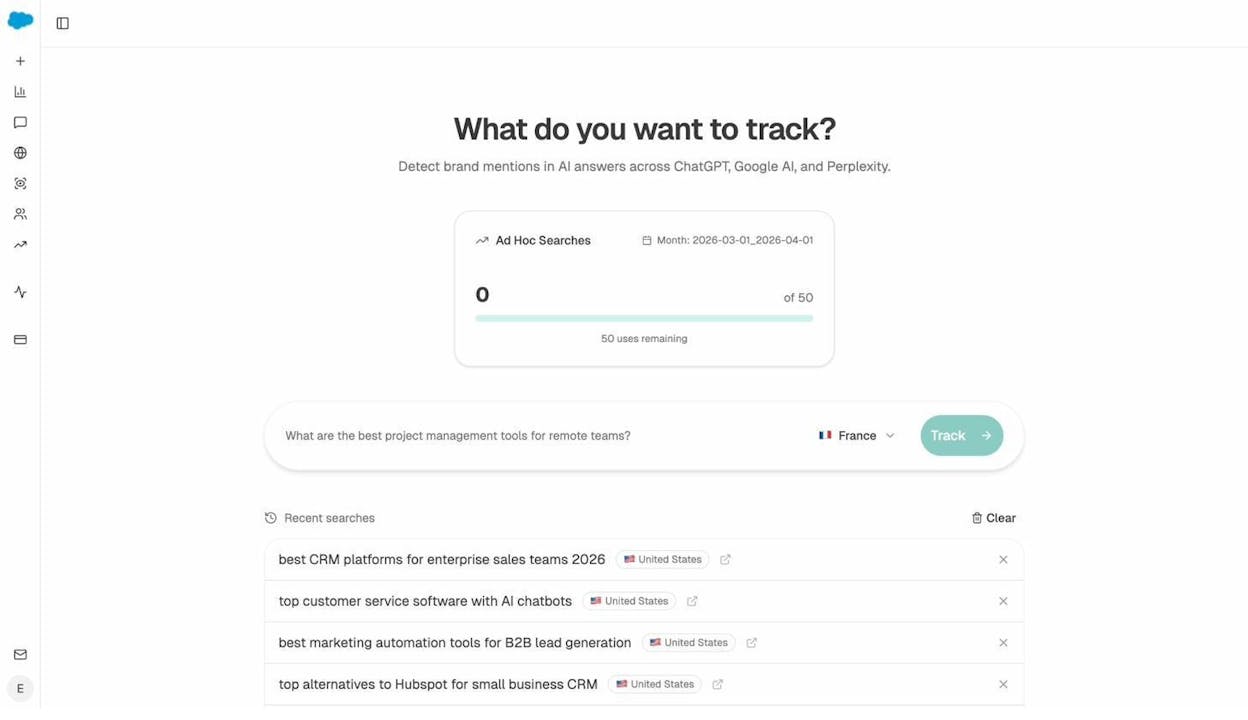
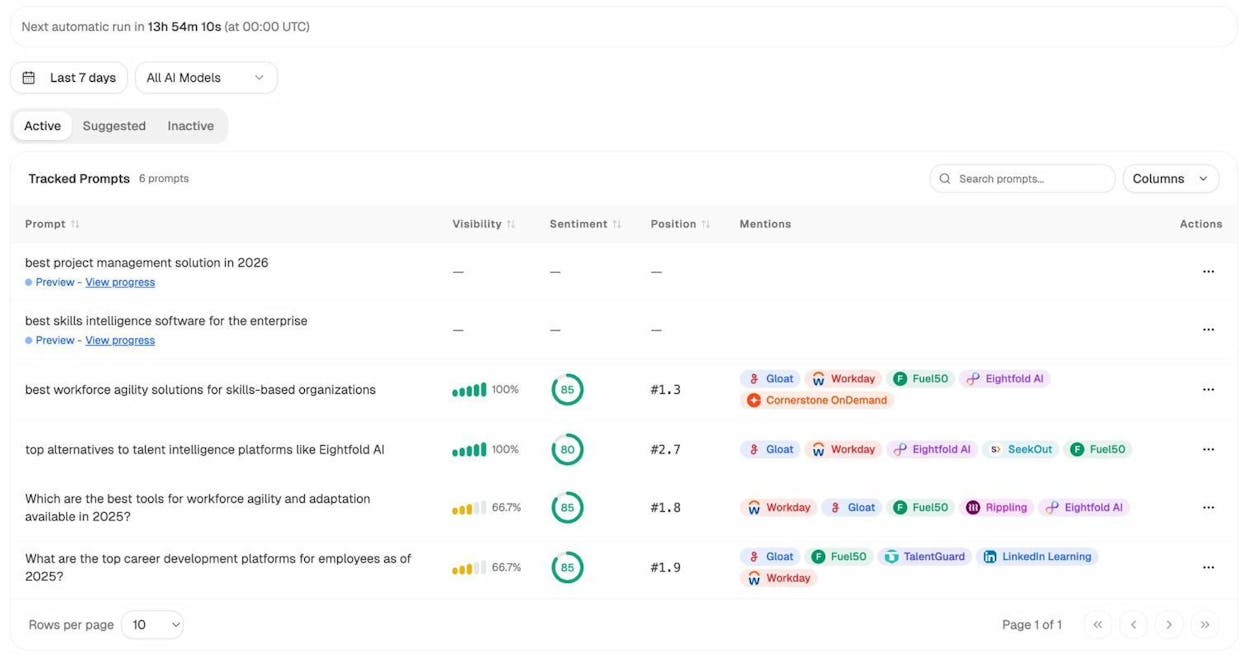
If your competitors show up and you do not, that tells you something about how these engines perceive your content’s relevance compared to theirs. You can then use Prompt Tracking to monitor these results over time and measure whether your optimization efforts are working.
Keyword Relevance in Local SEO and Google Ads
Google applies the concept of keyword relevance differently in local search results and paid ads. If you work in either of these areas, you need to understand the distinction.
Local keyword relevance
Local relevance refers to how well a Google Business Profile matches what someone is searching for. Google considers three factors for local rankings: relevance, distance, and prominence.
Relevance in local search is about your business name, category, attributes, and the content of your Google Business Profile. If someone searches for “Italian restaurant downtown,” Google evaluates whether your business profile contains information that matches that query. A restaurant with “Italian” in its category and “downtown” in its address will have higher relevance than one without these details.
You can improve local keyword relevance by keeping your Google Business Profile complete and accurate, choosing the right primary and secondary categories, adding relevant attributes (outdoor seating, delivery, etc.), and including keywords naturally in your business description.
Ad keyword relevance
In Google Ads, keyword relevance determines your Ad Rank. Google has stated that you can win a higher ad position than someone who bids more than you, simply because your ad and landing page are more relevant to the query.
Ad relevance is measured through your Quality Score, which considers the relevance of your keywords to your ad group, the quality and relevance of your ad copy, and the experience and relevance of your landing page.
This means a well-crafted ad with a highly relevant landing page can outperform a competitor with a bigger budget. The principle is the same as organic search. Give the user what they are looking for, and Google will reward you for it.
How to Create Content That’s Relevant to a Search Query
Understanding the theory behind keyword relevance is useful. But the real value is in the practical application. Here is a step-by-step process for creating content that demonstrates keyword relevance to both Google and AI search engines.
Before you start, make sure you have a target keyword worth pursuing. If you need help with that, read our guide on how to find and use SEO keywords or try our free keyword generator tool.
1. Align with search intent
Search intent is what the user expects to find when they type a query into Google. It is the single most important relevance signal, and getting it wrong makes everything else irrelevant.
The most reliable way to identify search intent is to look at what already ranks for your target keyword. Open Google, search for your keyword, and analyze the results. You are looking for three things.
Content type. Are the results blog posts, product pages, landing pages, category pages, or videos? If the top 10 results are all blog posts, do not create a product page for that keyword.
Content format. Within the content type, what format dominates? For informational queries, common formats include how-to guides, listicles, comparison posts, and definition articles. If every top-ranking page is a listicle, writing a long-form essay will likely miss the mark.
Content angle. What specific framing or focus do the top results share? Look at the titles. If most of them emphasize “for beginners” or “easy,” that tells you the audience for this keyword is not looking for advanced content.
![[Screenshot of Google SERP showing top results for “keyword relevance” to illustrate analyzing content type, format, and angle]](https://www.datocms-assets.com/164164/1777068185-blobid3.png?auto=format,compress&w=1248&fit=max)
For example, if you search “keyword relevance” and see that all top results are blog posts in a “what is + how to” format, you know Google expects an educational article that defines the concept and then walks the reader through how to apply it. That is exactly the format of the article you are reading now.
You can also look at the amount of search traffic each type of result receives to validate your assessment. Tools like the Analyze AI Keyword Difficulty Checker can help you evaluate keyword opportunity alongside intent analysis.
How search intent works in AI search. AI engines interpret intent differently than Google. When someone asks ChatGPT “what is keyword relevance and how do I improve it,” the AI engine does not return a list of pages. It synthesizes an answer by pulling from multiple sources. The sources it chooses are the ones that most directly and thoroughly answer the specific question.
This means your content needs to be structured so that AI engines can easily extract clear, direct answers to specific questions. Leading each section with a direct statement of the main point (a practice called BLUF, or Bottom Line Up Front) helps both users and AI models find the information they need.
2. Place your target keyword in key locations
Google looks for keywords in specific places on a page. These locations carry more weight than others when Google is evaluating relevance.
The five most important places to include your target keyword are your page title (the title tag that appears in search results), your URL, your main heading (H1), at least some of your subheadings (H2s and H3s), and your introductory paragraph.
![[Screenshot of a well-optimized blog post showing the target keyword appearing in the title, URL, H1, a subheading, and the intro paragraph]](https://www.datocms-assets.com/164164/1777068193-blobid4.png?auto=format,compress&w=1248&fit=max)
Here is an example of how this works. For this article, the target keyword is “keyword relevance.” It appears in the title tag, the URL, the H1, and the first paragraph. It also appears naturally in several subheadings throughout the article.
The key word in that last sentence is “naturally.” You are not trying to force the keyword into every heading. You are placing it where it logically fits. Google can tell the difference between natural keyword usage and keyword stuffing, and keyword stuffing can actually hurt your rankings.
A practical tip for new content. Write your content first, then go back and check whether your target keyword appears in these five locations. If it does not appear naturally in any of them, rewrite that section. If it appears too many times, scale it back.
For a deeper guide on keyword placement, read our article on how to use keywords in SEO.
3. Include secondary keywords and related phrases
Your primary keyword tells Google the main topic of your page. Secondary keywords and related phrases tell Google that your page covers the topic comprehensively.
Secondary keywords are terms closely related to your primary keyword that top-ranking pages also rank for. Related phrases (sometimes called “also talk about” terms) are words and concepts that naturally appear in content covering your topic.
For “keyword relevance,” some secondary keywords would include “search intent,” “on-page SEO,” “keyword optimization,” and “content relevance.” Related phrases would include “search query,” “ranking signals,” “related keywords,” “Google ranking factors,” and “content structure.”
How to find secondary keywords and related phrases. There are several approaches.
Look at top-ranking pages manually. Open the top 5 results for your keyword and read through them. Note the terms and phrases that appear consistently across multiple pages. If every top-ranking page for “keyword relevance” mentions “search intent,” “anchor text,” and “content structure,” those are likely related terms Google associates with the topic.
Use Google’s own suggestions. Google Autocomplete, “People Also Ask” boxes, and “Related Searches” at the bottom of the SERP all reveal terms Google associates with your keyword. These are free, built-in keyword research tools.
![[Screenshot of Google’s “People Also Ask” box and “Related Searches” section for the query “keyword relevance”]](https://www.datocms-assets.com/164164/1777068195-blobid5.png?auto=format,compress&w=1248&fit=max)
Use a keyword research tool. Tools like the Analyze AI Keyword Generator or dedicated keyword research tools can show you related terms based on search data. Look specifically for “also rank for” terms (secondary keywords) and “also talk about” terms (related phrases).
Use AI to brainstorm related concepts. Ask ChatGPT or Claude to list all the subtopics, terms, and concepts that a comprehensive article on your keyword should cover. This is not a replacement for the methods above, but it is a useful starting point for brainstorming.
The goal is not to stuff all of these terms into your content artificially. It is to make sure you are covering the topic thoroughly enough that these terms appear naturally. If you write a genuinely comprehensive article about keyword relevance, most of these terms will show up on their own.
For a detailed walkthrough of finding and using secondary keywords, read our complete guide to secondary keywords.
4. Match the content structure of top-ranking pages
Content structure is about putting the most important information first and organizing your subtopics in a logical order. Google uses structure as a relevance signal because a well-structured page demonstrates that the author understands what matters most about the topic.
To get structure right, study the pages that already rank for your keyword. Pay attention to several things.
What information comes first. Top-ranking pages typically lead with the most essential, need-to-know information. For a “what is” keyword, that usually means a clear definition followed by why it matters. For a “how to” keyword, it usually means a quick overview of the process followed by detailed steps.
What subtopics they cover and in what order. If every top-ranking page for your keyword covers subtopics A, B, C, and D in roughly that order, there is a reason. That ordering reflects what users expect. Deviating too far from it risks confusing both users and Google.
How much depth they give to each subtopic. Some subtopics deserve a full section. Others deserve a sentence or two. Looking at how top-ranking pages distribute their depth tells you what Google considers most important within the topic.
What media they include. Google has stated that it considers the presence of images, videos, and other media when assessing relevance. A page about a visual topic that includes no images is less relevant than one that includes helpful screenshots, diagrams, or videos.
Here is where you can go beyond matching the competition. After you have aligned your structure with what already ranks, look for gaps. Is there a subtopic that every top-ranking page mentions briefly but none explains well? Is there a question that users clearly have (based on “People Also Ask”) that no current result answers thoroughly? These gaps are your information gain opportunity. Filling them is how you make your content more relevant than what already exists.
How AI search engines use content structure. AI models parse content by section. When an AI engine is generating an answer about keyword relevance, it scans its source pages and pulls information from the sections most relevant to the specific question it is answering. Clear, well-structured content with descriptive headings makes this process easier for AI models, which increases your chances of being cited.
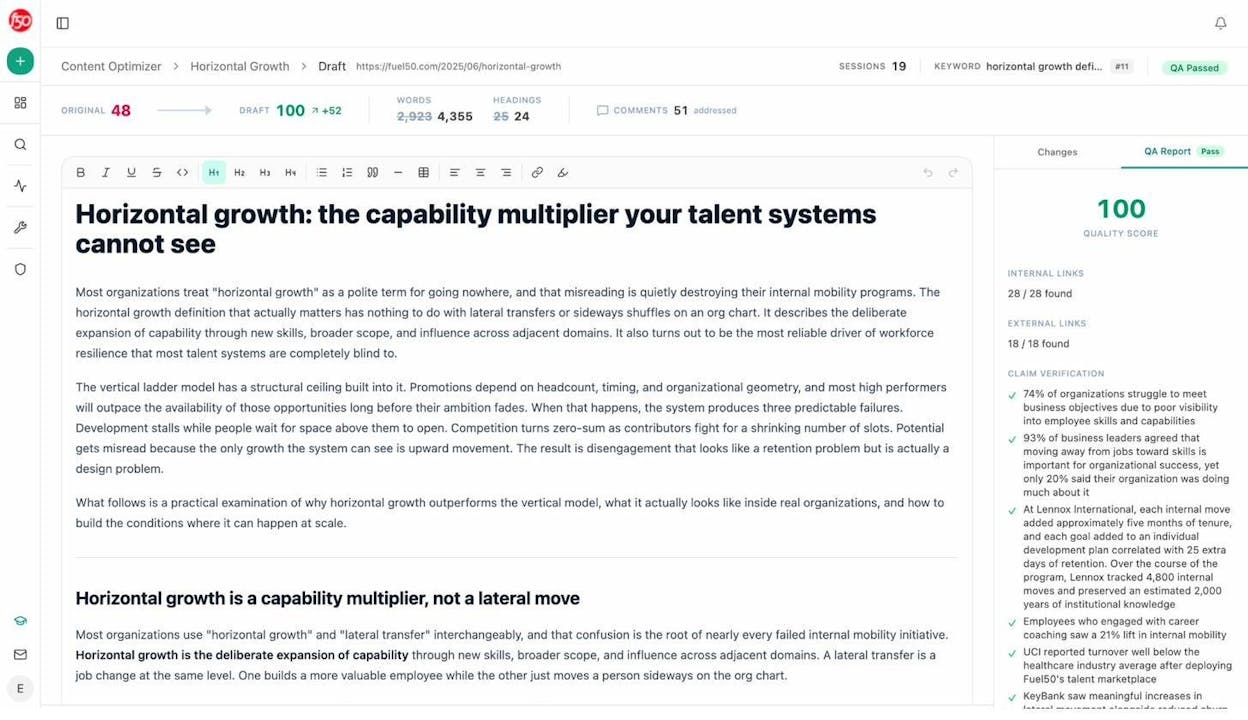
Analyze AI’s Content Optimizer can help with this. Paste any URL and it will score the content based on argument flow, clarity, and structural coherence. It generates editorial comments that show you exactly where your structure breaks down and what to fix.
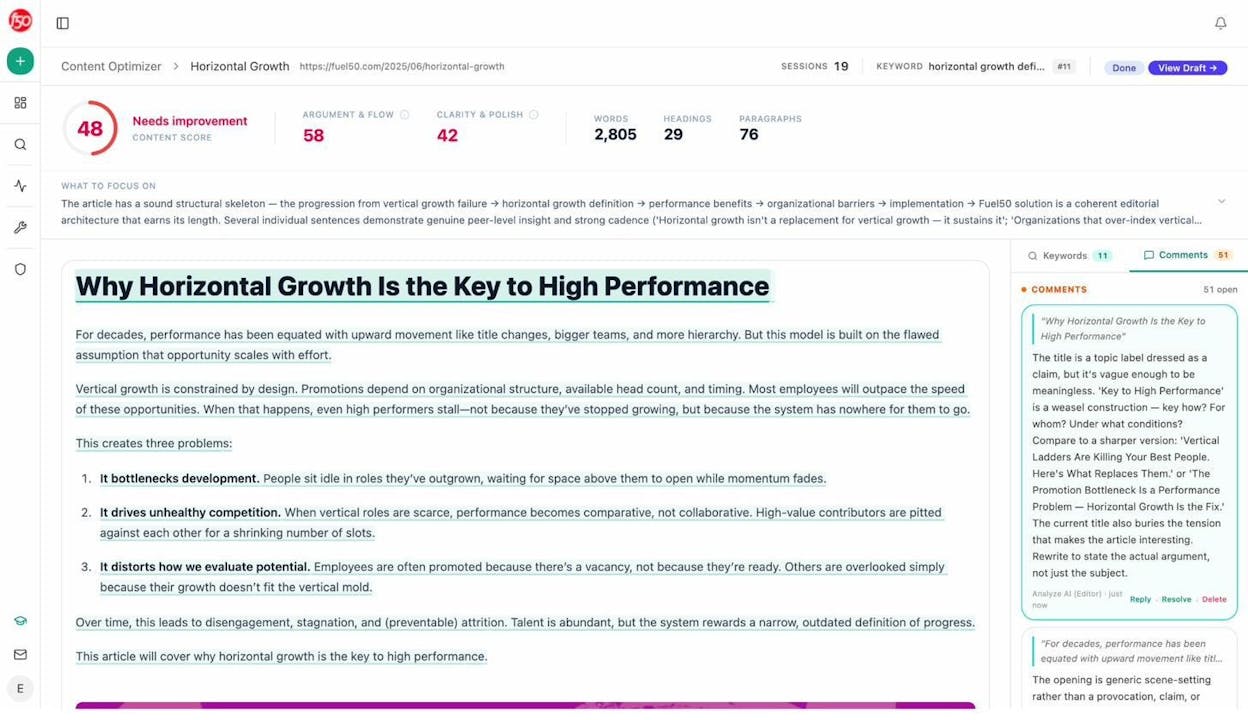
The tool also produces an optimized draft that addresses those structural gaps, so you can see what a higher-scoring version of your content looks like.
5. Look for relevance clues in the SERPs
The search results page itself contains clues about what Google considers relevant for your keyword. Most SEOs overlook these signals, but they can give you a meaningful edge.
Meta descriptions. Google rewrites meta descriptions about 60% of the time. When Google rewrites your meta description, it is telling you which part of your content it considers most relevant to the query. Pay attention to what Google highlights.
Look at the meta descriptions of top-ranking pages for your keyword. What information do they surface? If every meta description mentions a specific concept, statistic, or approach, that is a strong signal of what Google thinks is most relevant.
Featured snippets. If a featured snippet appears for your keyword, it shows you exactly what Google considers the most direct, relevant answer. Study the snippet’s format (paragraph, list, table) and content. Structure a section of your page to provide a similar answer in a similar format.
“People Also Ask” questions. These questions reveal related queries that Google associates with your keyword. Each one represents a subtopic that Google considers relevant to your primary keyword. Answering these questions in your content can increase your topical relevance.
![[Screenshot of “People Also Ask” questions for “keyword relevance” showing related queries users are also searching]](https://www.datocms-assets.com/164164/1777068218-blobid8.png?auto=format,compress&w=1248&fit=max)
Image results. If images appear near the top of the SERP, that tells you Google considers visual content relevant for this query. Make sure your page includes relevant images with descriptive alt text.
SERP features in general. Video carousels, knowledge panels, and “Things to know” boxes all reveal what Google associates with your keyword. Each one is a clue about what “relevant” means for your specific query.
Checking your relevance in AI search results. You can apply a similar analysis to AI search. Use Analyze AI’s AI Search Explorer to enter your target keyword as a prompt and see what the AI engines surface. Look at which sources they cite and what information they include in their answers. This tells you what AI engines consider most relevant for your topic.
Compare the AI search results with Google’s SERP. If there are topics or sources that appear in AI responses but not in Google’s top 10, those represent opportunities where AI search is defining relevance differently.
6. Add relevant internal links
Internal links are hyperlinks between pages on your own site. They serve two purposes for keyword relevance. First, they help Google understand what the linked page is about by using descriptive anchor text. Second, they pass link equity, which helps linked pages rank higher.
How to add internal links as you write. While drafting, keep a mental note of topics you have covered in other content. When you mention a concept that you have a separate page about, link to that page using descriptive anchor text.
For example, in this article, when I mention “secondary keywords,” I link to our guide on secondary keywords. When I mention “keyword clustering,” I link to our keyword clustering guide. Each of these links tells Google that the linked page is relevant to that topic.
A quick trick for finding internal linking opportunities. Use Google’s site search operator to find pages on your own site that mention a specific term. For example, to find pages on tryanalyze.ai that mention “search intent,” you would search:
site:tryanalyze.ai "search intent"
![[Screenshot of Google site search showing how to find internal linking opportunities using the site: operator]](https://www.datocms-assets.com/164164/1777068226-blobid9.png?auto=format,compress&w=1248&fit=max)
This surfaces every page on your site that mentions that phrase, giving you a list of potential internal link targets.
How to add internal links to existing content. If you have a large site, manually checking every page for internal linking opportunities is not practical. Automated tools can scan your content and suggest where to add internal links based on keyword overlap between pages.
For a complete guide on internal linking strategy, read our article on internal linking tips for SEO.
Internal linking for AI search relevance. AI search engines do not follow internal links the way Google does. But internal links still matter indirectly. A strong internal linking structure helps Google index your pages more effectively, which increases the chances that AI engines (which often rely on Google’s index as a data source) will find and cite your content.
Additionally, a well-linked site demonstrates topical authority. If your site has 15 interconnected pages all covering different aspects of keyword research, AI engines are more likely to see your site as an authority on that topic. That authority translates to higher citation rates.
7. Build relevant backlinks
Backlinks are links from other websites to your page. They are one of Google’s strongest ranking signals, and their relevance matters as much as their quantity.
A relevant backlink is one where the linking page is topically related to your content, and the anchor text or surrounding text is related to your target keyword. A link from an SEO blog post that uses “keyword relevance” as the anchor text is more relevant than a link from an unrelated site using generic anchor text like “click here.”
Google’s Matt Cutts has explained that a document can become relevant to a query by having that query included in its backlinks. In other words, backlinks containing your target keyword in the anchor text directly strengthen your page’s relevance for that keyword.
There is also evidence from Google’s Reasonable Surfer patent and research on topic-sensitive PageRank that links from pages on the same topic carry more weight. A backlink from a page about “on-page SEO” to your page about “keyword relevance” is more valuable than a backlink from a page about cooking recipes.
How to find relevant backlink opportunities. There are several practical approaches.
Search for sites in your industry that mention your target keyword and see if they link to any existing resources. If they link to a competitor’s page on the same topic, you can pitch your content as a better alternative.
Look for resource pages, “further reading” sections, and industry roundups in your niche. These are natural places where site owners link to useful content.
You can also use our website authority checker to evaluate potential linking domains before you invest time in outreach. Focus on sites with genuine authority in your topic area.
One important caveat. Do not over-optimize your anchor text. If most of your backlinks contain the exact same keyword as anchor text, it can look like link manipulation to Google. Aim for a natural mix of exact match, partial match, and branded anchor text. For more on link building tools and strategies, check our complete guide.
How backlinks affect AI search relevance. AI search engines consider the authority and trustworthiness of sources when deciding which ones to cite. Pages with strong backlink profiles from authoritative sites are more likely to be treated as credible sources. While AI engines do not use backlinks the same way Google does (they do not calculate PageRank), the overall authority of a source influences whether the AI engine trusts it enough to cite.
You can track which sources AI engines are citing in your industry using Analyze AI’s Citation Analytics. This shows you every URL and domain that AI platforms cite when answering questions in your space, along with which content types (blogs, product pages, reviews, documentation) get cited most often.
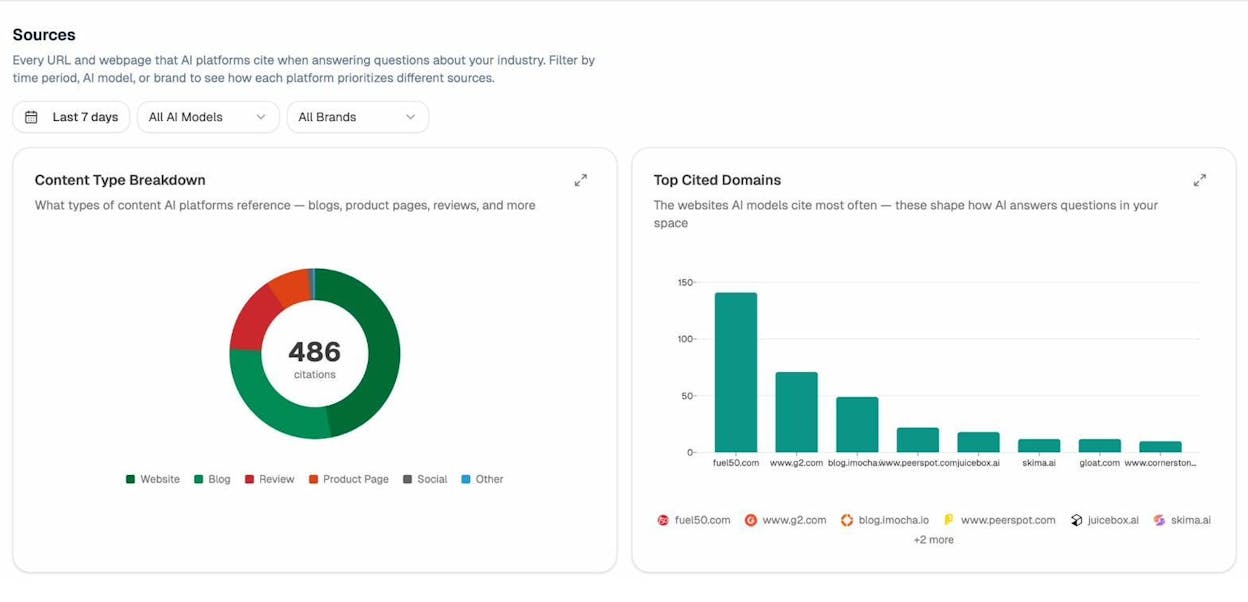
If you see that AI engines frequently cite pages from a domain that you do not have backlinks from, earning a link from that domain could improve both your Google rankings and your AI search visibility.
8. Optimize content specifically for AI search citations
This step goes beyond traditional SEO. If you want your content to be cited by AI search engines, you need to optimize for how those engines work, not just how Google works.
Structure content for extraction. AI engines pull specific sections from pages to answer specific questions. Make each section self-contained, with a clear heading that signals what the section is about and a lead sentence that directly states the main point. This makes it easy for an AI engine to extract the relevant section when answering a related query.
Cover entities thoroughly. AI models build their understanding of topics through entities (brands, products, people, concepts) and the relationships between them. If your article about keyword relevance does not mention Google, search intent, anchor text, and other core entities, AI engines may consider it less comprehensive than competing sources.
Provide unique data and examples. AI engines prefer to cite sources that provide original information rather than rehashing what already exists. If your page includes original data, case studies, or specific examples that do not appear elsewhere, AI engines have a reason to cite you specifically rather than any of the other pages covering the same topic.
Monitor and iterate. Use Analyze AI to track whether your optimizations are working. The platform shows your visibility, sentiment, and position across AI engines like ChatGPT, Perplexity, Gemini, and Copilot. If your visibility is increasing over time, your relevance improvements are working. If not, adjust your approach.
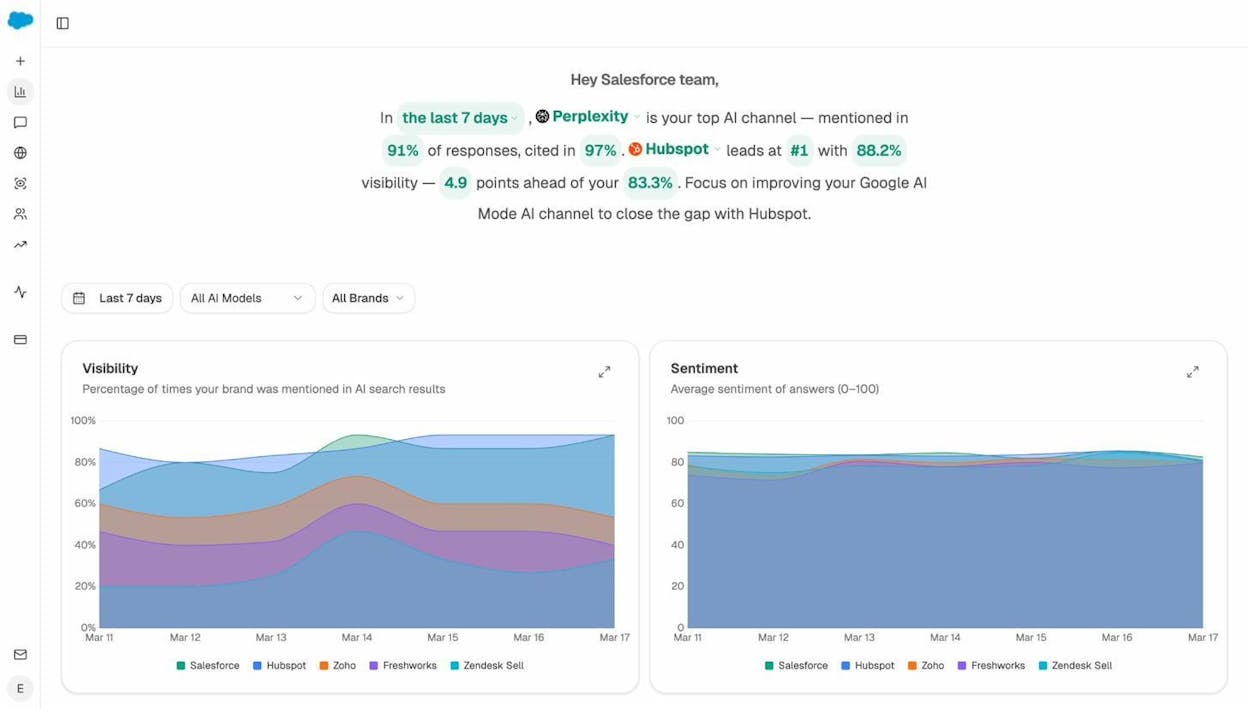
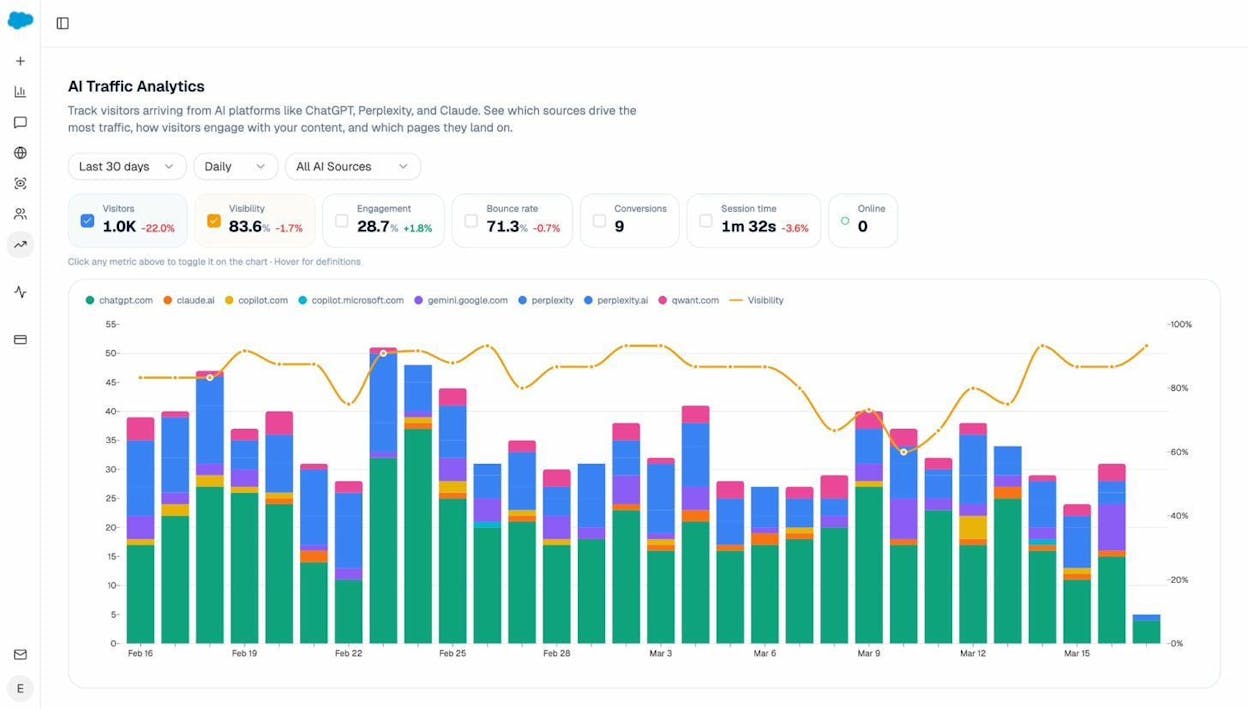
You can even see exactly which pages on your site are receiving AI-referred traffic, which AI engines are sending that traffic, and which prompts are driving it. This data lives in AI Traffic Analytics.
The landing pages report shows which specific pages receive AI-referred traffic, how visitors interact with them, and which citations drove the visits.
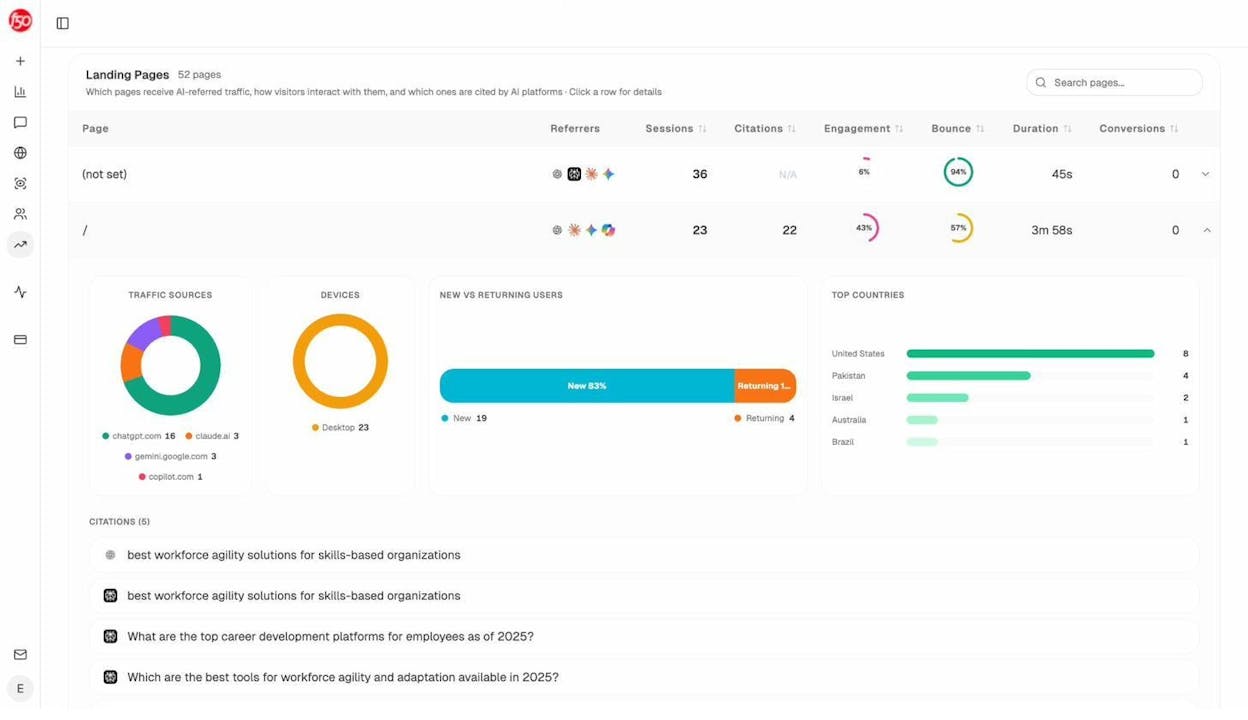
This data tells you which pages are already relevant in AI search, so you can study what they do well and apply those patterns to the rest of your content.
How to Check Whether Your Content Is Keyword-Relevant
After you publish content, you should verify that it is actually relevant for your target keyword. Here are four ways to check.
Check your Google rankings
The most direct way to measure keyword relevance is your ranking position. If your page ranks in the top 10 for your target keyword, Google considers it relevant. If it ranks on page 2 or beyond, your relevance signals may need strengthening.
Use our free keyword rank checker to see where your page currently ranks for your target keyword. Use a SERP checker to see the full competitive landscape for your query.
Check your secondary keyword rankings
If your content is truly relevant and comprehensive, it should rank for secondary keywords in addition to your primary keyword. Check whether your page ranks for related terms using our guide on finding which keywords your site ranks for.
If your page only ranks for the primary keyword and very few secondary keywords, that is a signal that your content may not be comprehensive enough. Review the secondary keywords from step 3 above and see if you can add more depth around those topics.
Check your AI search visibility
Check whether your content appears in AI search results by running your target query through Analyze AI’s AI Search Explorer. If AI engines are not citing your content for relevant queries, your content may lack the depth, structure, or entity coverage that AI models look for.
You can also use Prompt Tracking to monitor your visibility over time. This shows you whether your content is gaining or losing relevance in AI search results week over week.
Audit your content against competitors
Compare your page against the top-ranking competitors. Check whether you cover the same subtopics, whether your content is at least as deep, and whether you provide any unique information they do not.
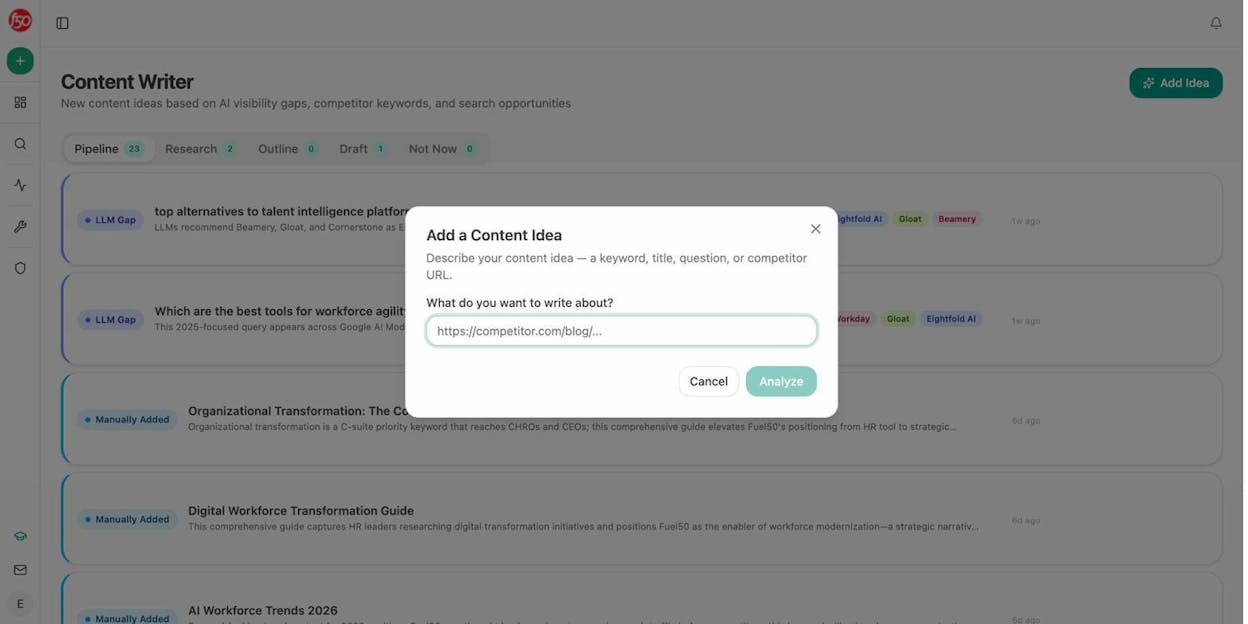
Analyze AI’s Content Optimizer automates this comparison. It scores your content, identifies gaps compared to top-ranking pages, and suggests specific improvements. You can also use the Content Writer to generate new content that is designed from the start to fill the gaps your competitors leave open.
Common Keyword Relevance Mistakes to Avoid
Even experienced SEOs make these mistakes when trying to improve keyword relevance.
Keyword stuffing. Repeating your target keyword excessively does not improve relevance. It hurts it. Google can detect keyword stuffing and may penalize pages that do it. Write naturally, and your keyword will appear where it should.
Ignoring search intent. Creating content in the wrong format is the most common relevance failure. If Google wants a listicle and you write an essay, your content is not relevant regardless of how many times it mentions the keyword.
Targeting the wrong keyword. Sometimes the keyword you want to rank for does not align with the content you have created. Before investing in optimization, make sure your keyword and your content are fundamentally aligned. Use keyword clustering to group related terms and choose the right primary keyword for each page.
Ignoring AI search entirely. Many SEOs still focus exclusively on Google rankings. But AI search engines are driving increasing traffic. Optimizing for keyword relevance in Google while ignoring AI search means leaving traffic on the table. The best approach is to optimize for both simultaneously, since many of the same principles (depth, structure, entity coverage, authority) apply to both.
Neglecting content freshness. Publishing content and never updating it is a silent relevance killer. Search landscapes evolve, new information emerges, and competitors update their content. Set a schedule to review and refresh your most important pages.
Final Thoughts
Keyword relevance is not a single metric or a simple checklist. It is the result of multiple signals working together to tell Google (and AI search engines) that your content is the right answer for a given query.
The path to high keyword relevance follows a clear sequence. Start by aligning with search intent. Place your keyword in the right locations. Include secondary keywords and related phrases. Match the structure of top-ranking pages while adding original insight. Use SERP clues to fine-tune your content. Build internal and external links with relevant anchor text. And optimize for AI search citations, because that is where a growing share of organic traffic comes from.
SEO is not dead. It is evolving. The brands that treat AI search as an additional organic channel alongside traditional SEO, rather than a replacement for it, are the ones that will compound their visibility over time. Keyword relevance is the foundation of that strategy, whether the user finds you through Google, ChatGPT, Perplexity, or any other search engine.
If you want to see where your brand currently stands in AI search, Analyze AI can show you your visibility, citations, and competitive position across every major AI engine. It takes minutes to set up, and it gives you the data you need to make keyword relevance work in both worlds.

Ernest

Ibrahim


