



Summarize this blog post with:


In this article, you’ll learn why brand mentions in AI answers matter more than you think, how to monitor them across ChatGPT, Perplexity, Gemini, and other AI engines, and the exact strategies you can use to get your brand mentioned more often. You’ll also learn how to connect AI mention monitoring with actual traffic data so you can tie visibility to pipeline — not just screenshots.
Table of Contents
Why It Matters When AI Mentions Your Brand
Brand mentions have always happened on social media, forums, news sites, and blogs. But now they happen inside AI-generated responses — and these mentions influence how millions of people discover and evaluate brands.
Right now, AI referral traffic accounts for a small share of total website visits. ChatGPT, the most popular AI assistant, drives roughly 0.21% of overall web traffic. That number looks small until you understand what it represents.
AI Recommendations Reach Millions of People
In mid-2025, OpenAI reported that ChatGPT had more than 700 million weekly active users. Their usage data shows that about 28% of sessions involve practical guidance — how-to advice, product comparisons, and problem-solving. That means brand recommendations could reach at least 74 million people every week through ChatGPT alone.
And brand mentions don’t require a direct product query. Someone asking “how do I do keyword research” might get a response that recommends specific tools by name, even though they never asked for a product recommendation.
![[Screenshot of a ChatGPT response to “how do I do keyword research” showing brand names naturally woven into the how-to steps]](https://www.datocms-assets.com/164164/1776706852-blobid1.png?auto=format,compress&w=1248&fit=max)
Add Perplexity, Gemini, Copilot, and Google AI Overviews to the mix, and the total reach grows further. Each platform pulls from different sources and has different citation preferences, which means your brand’s presence can vary widely across engines.
Nearly Half of People Trust AI Recommendations
A study by the University of Melbourne found that nearly half of respondents trust AI-generated recommendations. The trust partly comes from how personalized and expert-like AI responses feel. Share your requirements in a prompt, and the AI scans dozens of sources to surface what it considers the best option.
That dynamic creates a new competitive pressure. If someone asks “best CRM for small businesses” and your competitor appears but you don’t, that’s a lost opportunity — and it will keep happening every time someone asks a similar question.
AI Mentions Have a Longer Shelf Life Than Social Posts
Social media mentions fade from feeds within hours. A tweet about your product might spike engagement for a day, then disappear. AI mentions work differently.
AI models pull from both historical training data and real-time web searches. A mention of your brand on a high-authority site today could keep influencing AI responses for months or even years. If Perplexity or ChatGPT consistently recommends your competitor for a specific query, that recommendation doesn’t just appear once — it reinforces itself every time someone asks a similar question.
This persistence is why AI search is becoming an organic channel worth optimizing for, alongside traditional SEO — not a replacement for it.
How AI Brand Mention Monitoring Differs from Social Monitoring
If your first instinct is to hand this to your social media manager, pause. AI brand mention monitoring is a fundamentally different discipline from social media monitoring, and it likely belongs on a different team’s plate.
Social media mentions are reactive. They spike overnight after a viral post and fade just as fast. You respond, engage, and move on. AI mentions are structural. When ChatGPT recommends a competitor instead of you, that’s not a passing trend. It reflects the long-term signals AI has learned from authoritative content across the web.
You can’t reply to an AI response. You can’t comment on it, retweet it, or issue a correction in real time. The only way to change how AI talks about your brand is to change the underlying content landscape — the pages, reviews, comparisons, and how-to guides that AI models learn from.
That’s why monitoring AI mentions is closer to competitive analysis than customer service. You’re tracking visibility trends, identifying positioning gaps, and deciding what content to create next.
Here’s how the two approaches compare:
|
Aspect |
Traditional Brand Monitoring (Social Media/Forums) |
AI Brand Mention Monitoring |
|---|---|---|
|
Owner |
Social media managers, community managers |
Content marketing, brand marketing, or SEO teams |
|
Frequency |
24/7 monitoring with real-time alerts |
Weekly visibility checks, monthly strategic reviews |
|
Purpose |
Crisis prevention, customer service, engagement |
Market positioning, content strategy, competitive intelligence |
|
Response |
Direct replies, immediate damage control |
Strategic content creation, PR outreach, improving cited sources |
|
Mindset |
Reactive firefighting |
Proactive market research |
How to Monitor and Understand AI Brand Mentions
AI mentions are invisible to Google Alerts, Mention, and most social monitoring tools. These platforms scan the open web and social feeds — they don’t query ChatGPT, Perplexity, or Gemini to see if your brand appears in their responses.
To track what AI engines say about your brand, you need a purpose-built AI search monitoring tool. A good one should track mentions across multiple AI engines, show you which prompts trigger those mentions, and ideally connect that data to actual traffic so you can measure impact.
Analyze AI does this across ChatGPT, Perplexity, Gemini, Copilot, Claude, Google AI Mode, DeepSeek, and others. Here’s how to use it to navigate the data.
Track Brand Visibility and Sentiment Over Time
The first thing you want to know is whether your brand is gaining or losing ground in AI responses. In Analyze AI’s Overview dashboard, you get a clear snapshot: your visibility percentage (how often AI engines mention you), your average rank, sentiment scores, and how you compare to tracked competitors — all filterable by time period, AI model, and brand.
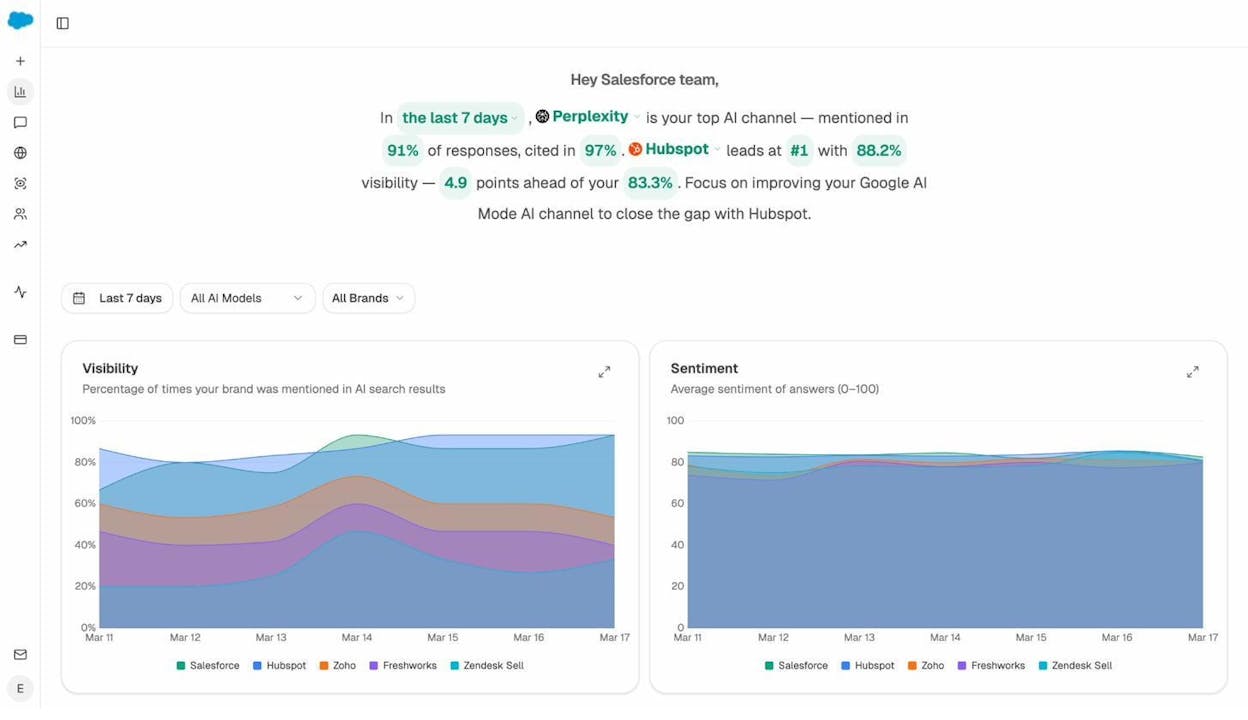
You’ll notice spikes after a big content push or product launch, and you’ll catch drops that could signal a competitor gaining ground or a content gap opening up.
The visibility trend line is especially useful. It overlays your mention rate against competitors over time, so you can see whether your marketing efforts are moving the needle — or whether a rival is pulling ahead.
See What Prompts AI Engines Associate With Your Brand
Knowing that your brand gets mentioned is useful. Knowing which prompts trigger those mentions is actionable. In Analyze AI’s Prompts dashboard, you see every tracked prompt along with your visibility, sentiment, position, and which competitors appear alongside you.
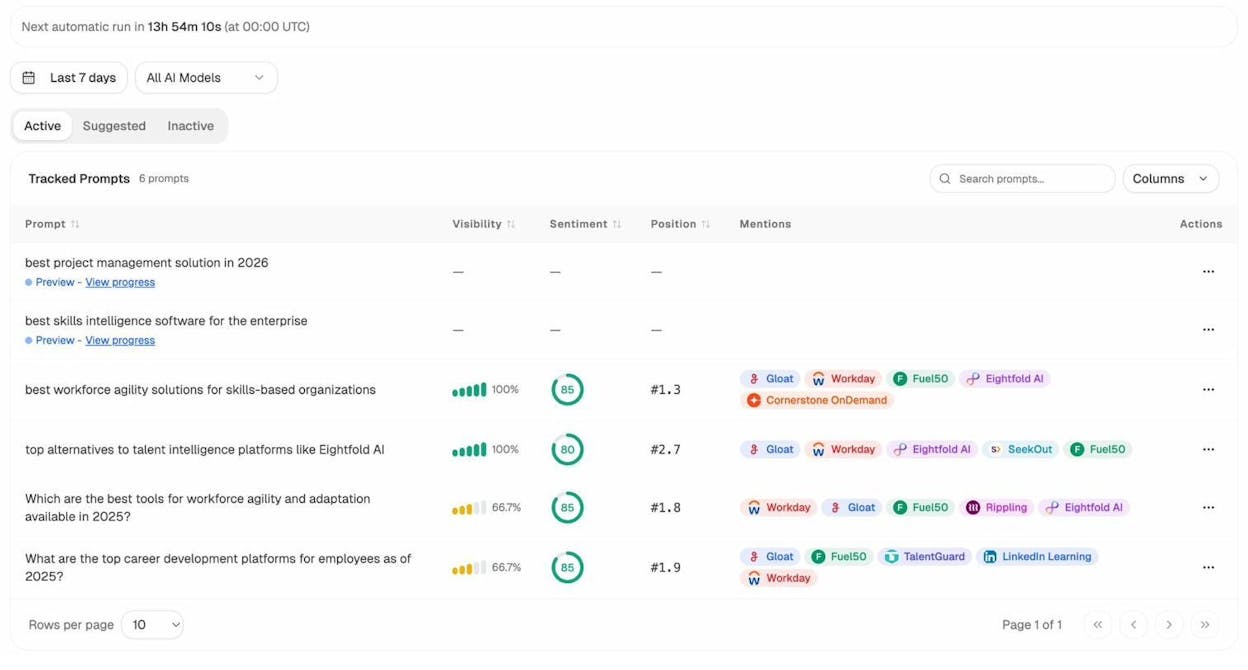
For example, if you’re tracking “best workforce agility solutions for skills-based organizations,” you can see that your brand shows up at position #1.3 with 100% visibility and a sentiment score of 85 — and that Gloat, Workday, and Eightfold AI appear as competitors in the same responses.
This data tells you exactly which questions drive brand mentions and which ones you’re losing. You can then focus content efforts on the prompts where you’re absent or ranked low.
Analyze AI also surfaces Suggested Prompts — prompts related to your industry that you aren’t tracking yet but probably should be. These are new opportunities to expand your monitoring coverage.
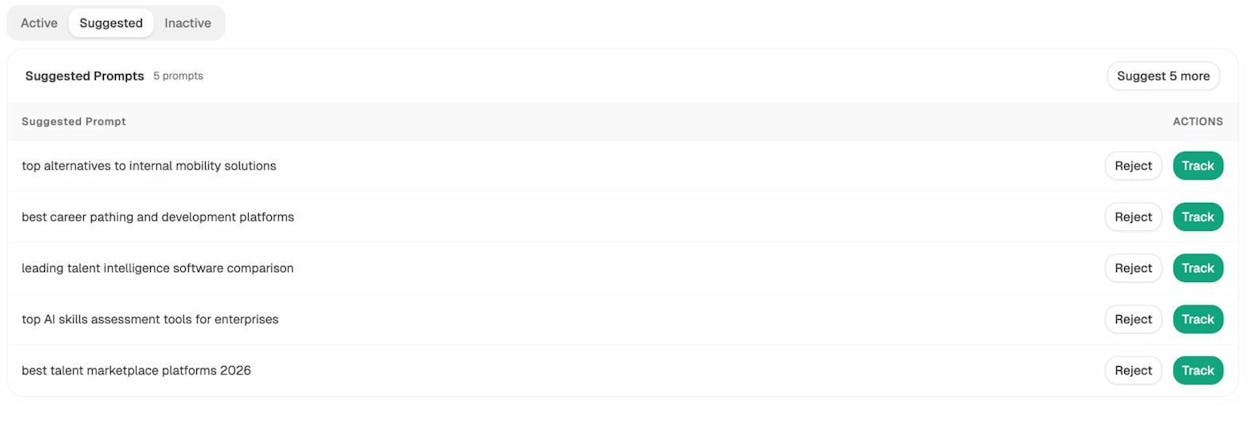
Test Any Prompt Before Committing to Tracking
Before adding a prompt to your tracking list, you can test it with an Ad Hoc Search. Type any question — like “What are the best project management tools for remote teams?” — choose a region, and see how ChatGPT, Google AI, and Perplexity respond in real time.
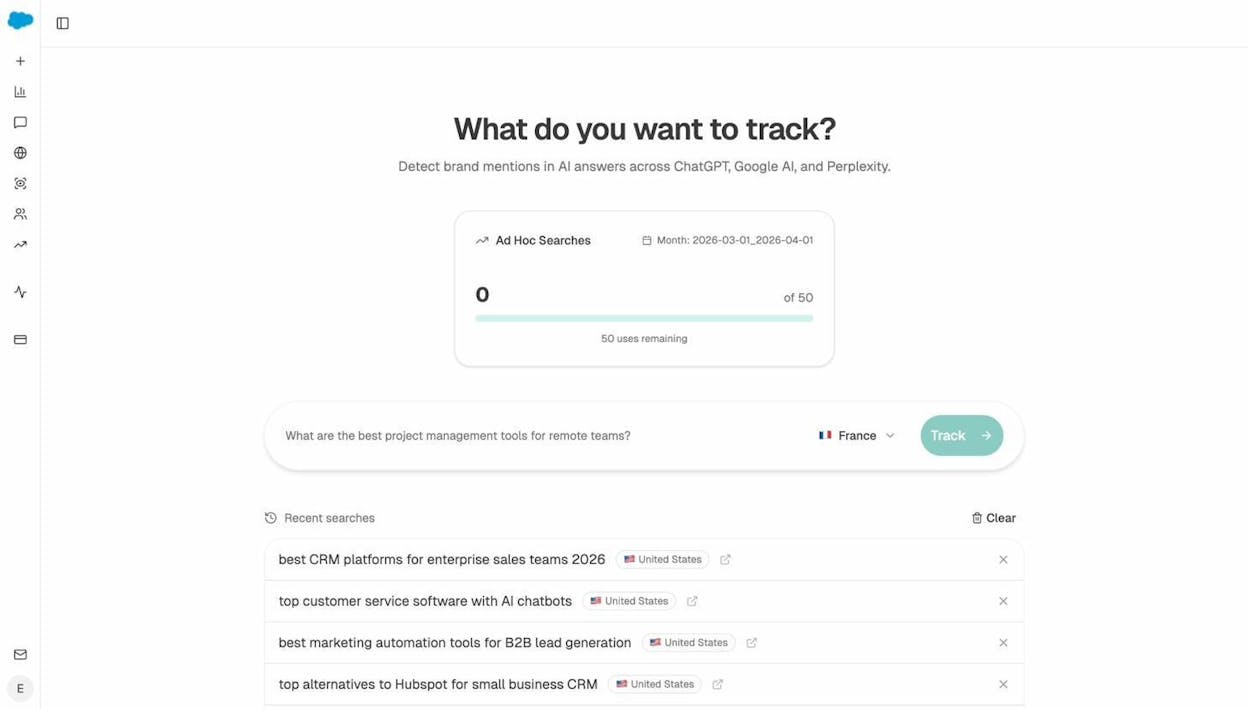
This is useful for validating content ideas before you invest in them. If you’re considering writing a comparison page or a new how-to guide, run the target prompt first. See who currently appears, what sources get cited, and where the gaps are. Then decide whether the opportunity is worth pursuing.
See Which Sources AI Engines Cite in Your Space
AI models don’t just mention brands — they cite specific pages as sources. The Sources dashboard in Analyze AI breaks this down in two ways: content type breakdown (website pages, blogs, reviews, product pages, social) and top cited domains.
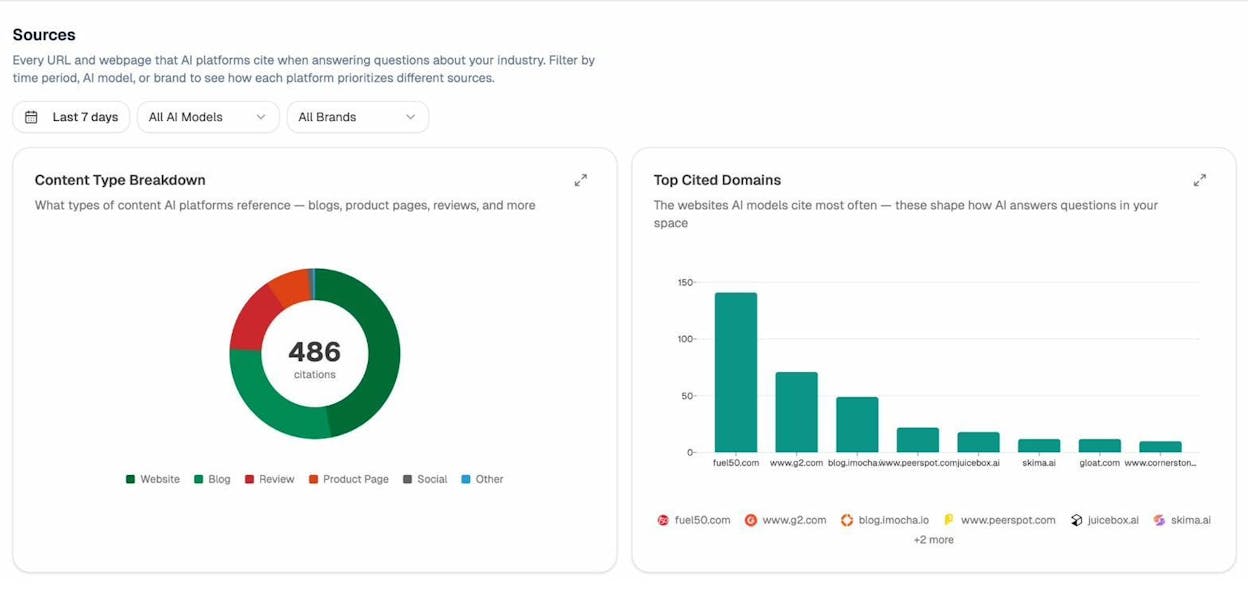
This tells you what kind of content AI engines prefer in your space. If blogs dominate the citations, you know where to invest. If review sites like G2 or PeerSpot appear frequently, earning reviews on those platforms becomes a priority.
You also see which specific domains get cited most often. This is the digital equivalent of knowing which publications matter in your industry — except these publications are the ones AI trusts and cites when answering questions about your category.
Understand How AI Frames Your Brand vs. Competitors
Not all visibility is equal. A brand can be highly visible but poorly perceived. Analyze AI’s Perception Map plots your brand and competitors on two axes: visibility (how often you appear) and narrative strength (how compelling AI’s framing of your brand is).
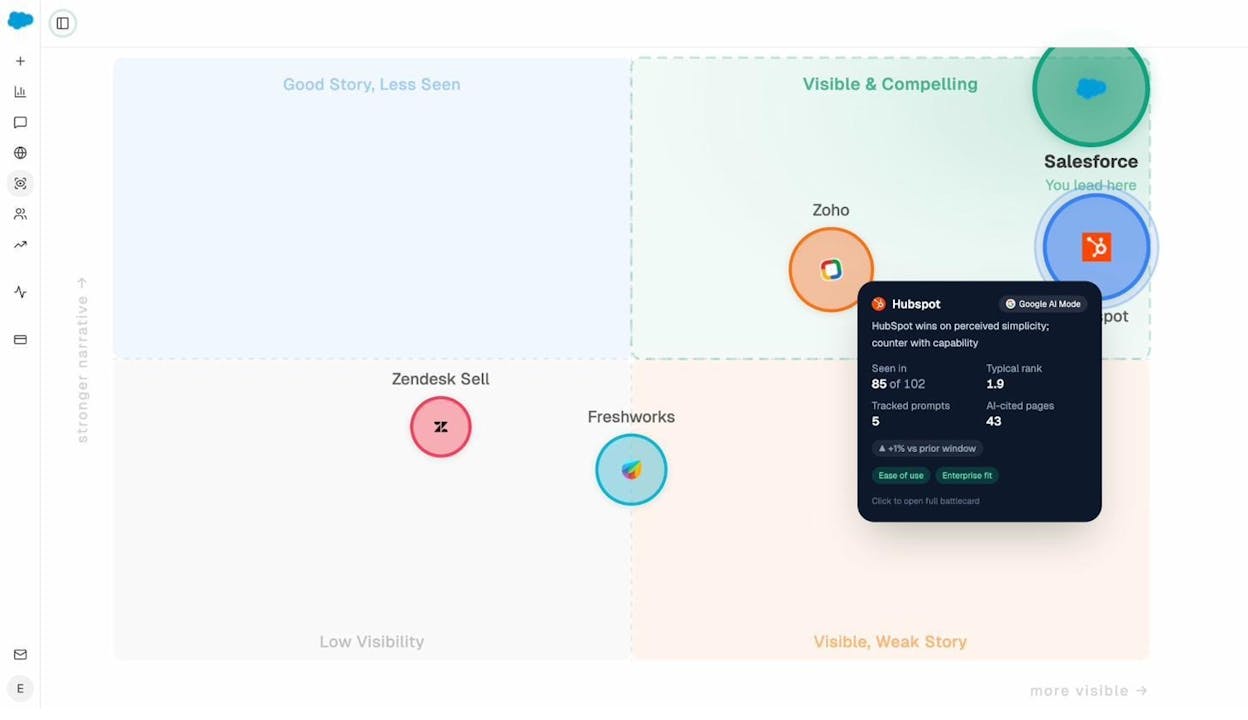
Each brand bubble is clickable. Hover over a competitor and you see their visibility percentage, typical rank, number of tracked prompts, and AI-cited pages — plus the key themes AI associates with them (like “Ease of use” or “Enterprise fit”).
This view helps you answer the question: “Are we being seen, and is what AI says about us helping or hurting?” If your brand sits in the “Visible, Weak Story” quadrant, that means AI mentions you but doesn’t position you compellingly. That’s a content and messaging problem you can fix.
Find Where Competitors Win and You Don’t
The Competitors dashboard in Analyze AI shows which brands appear alongside yours in AI responses — and, more importantly, which ones get suggested when you don’t.
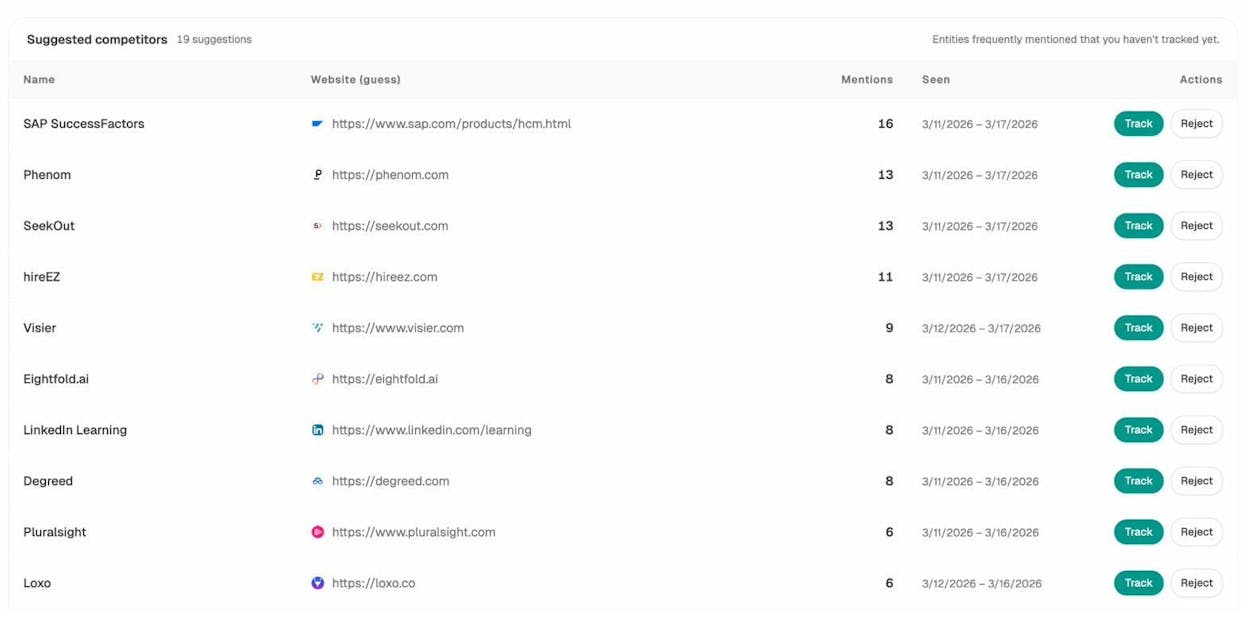
Analyze AI automatically surfaces Suggested Competitors — brands that appear frequently in your space’s AI responses but that you haven’t started tracking yet. Each suggestion shows the number of mentions and the date range, so you can quickly assess whether a new entrant is gaining traction.
Beyond discovery, the competitor view lets you run gap analysis. If a competitor appears in prompts where your brand is absent, those are immediate content opportunities. You can either create new content to fill the gap or earn mentions on the third-party pages that AI already cites for those prompts.
Connect AI Visibility to Actual Traffic
This is where AI search monitoring moves beyond vanity metrics. Analyze AI’s AI Traffic Analytics dashboard connects to your GA4 data and shows how many visitors arrive from AI platforms — broken down by source (chatgpt.com, claude.ai, perplexity.ai, copilot.microsoft.com, gemini.google.com), by day, and by engagement metrics like bounce rate, session time, and conversions.
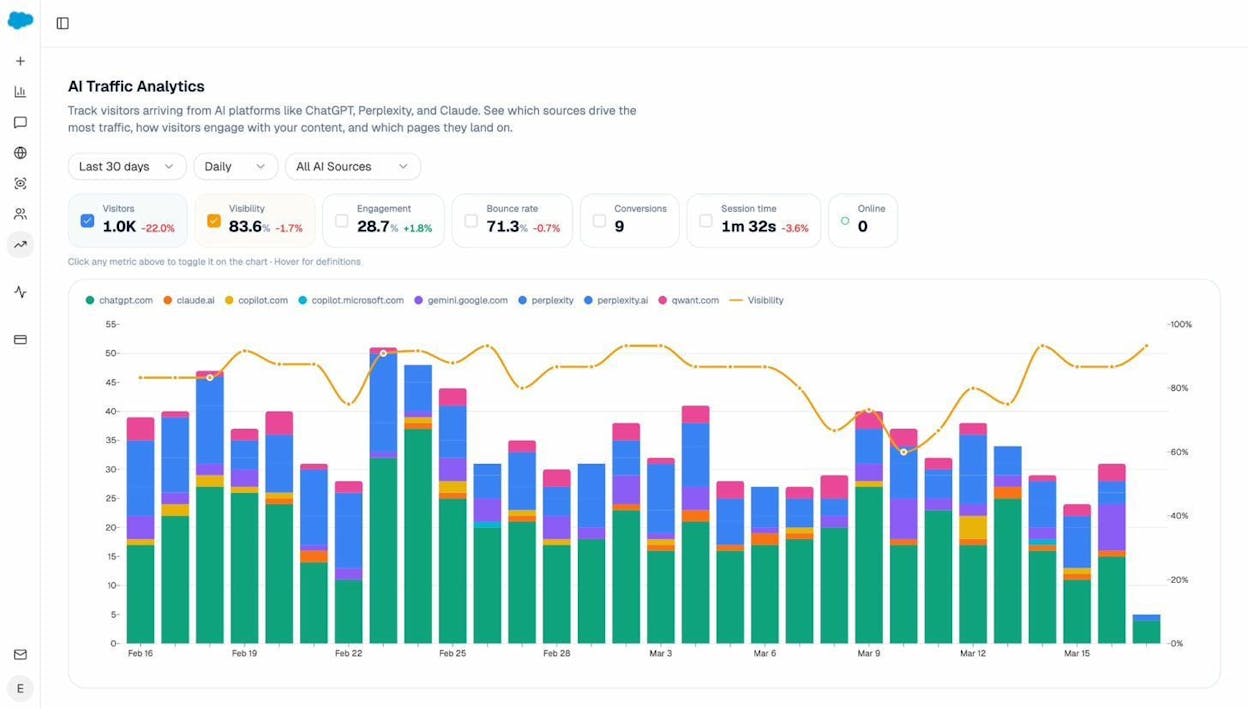
You can see exactly which AI engines drive real visits, which pages they land on, how long those visitors stay, and whether they convert. This closes the loop that most monitoring tools leave open: from AI mention → to website visit → to measurable business outcome.
The Recent AI Visitors view takes this further. You see individual sessions: the AI source, the landing page, the visitor’s location, session duration, and whether they engaged or bounced.
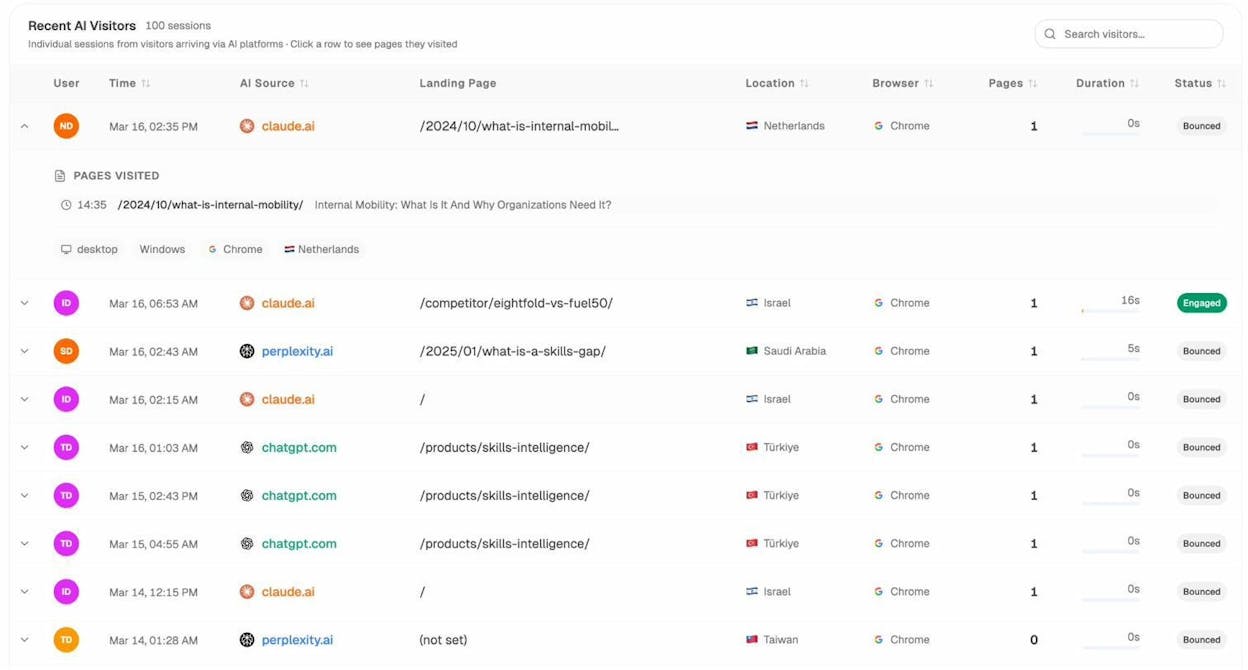
This level of detail is useful for identifying patterns. If visitors from Perplexity consistently land on your pricing page and engage, that tells you something about buyer intent from that channel. If visitors from ChatGPT consistently bounce off your homepage, you may need to optimize that page for the kinds of queries ChatGPT sends traffic for.
Wake Up to Weekly Priorities Without Logging In
Not everyone has time to check a dashboard daily. Analyze AI sends weekly email digests that summarize your visibility, rank, sentiment, citation changes, and which pages are gaining or losing traction — all in one glance.
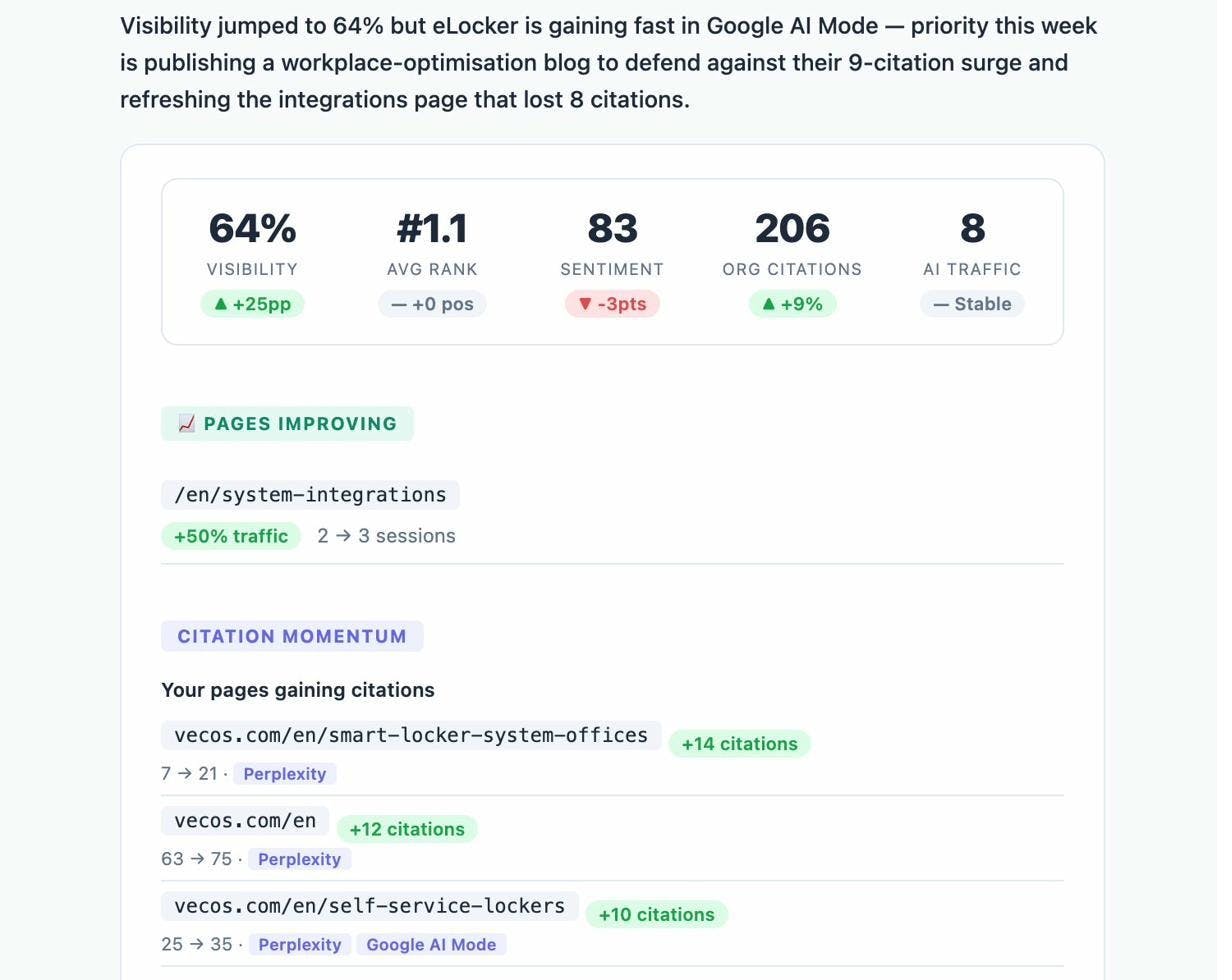
The email includes a natural-language summary at the top (for example: “Visibility jumped to 64% but eLocker is gaining fast in Google AI Mode — priority this week is publishing a workplace-optimisation blog to defend against their 9-citation surge”). Below that, you get the numbers: visibility percentage, average rank, sentiment score, org citations, and AI traffic.
It also highlights Pages Improving (with traffic change) and Citation Momentum (which of your pages are gaining or losing citations, and on which AI engines). This turns a complex dataset into a Monday morning action list.
Manual AI Monitoring (Free but Limited)
If you’re not ready for a dedicated tool, start with manual checks. Spend 30 minutes each month asking different AI assistants questions related to your industry:
-
“What are the best [your product category] tools?”
-
“How do I choose between [your brand] and [competitor]?”
-
“What should I know about [your industry] solutions?”
Ask the same question a few times across different sessions to see if your brand appears consistently or only occasionally.
This approach is free but limited. You’ll only cover a handful of prompts, and you’ll miss the thousands of daily conversations where your brand could (or should) appear. It’s a reasonable starting point, but not a substitute for systematic tracking.
5 Key Strategies to Influence and Increase AI Brand Mentions
Monitoring tells you where you stand. The strategies below tell you what to do about it.
The foundational truth here is simple: the best way to get AI to mention your brand is to build something worth mentioning. A great product generates reviews, social posts, forum discussions, and editorial coverage. That content becomes the training data and retrieval source that AI engines pull from.
But beyond building a great product, there are specific actions you can take to increase your brand’s presence in AI responses.
1. Create Comprehensive Brand Information on Your Own Site
AI assistants need clear, structured information about who you are, what you do, and how you differ from alternatives. If your website doesn’t answer these questions well, AI has to piece together your story from third-party sources — and it may get things wrong.
FAQ pages and knowledge bases are high-impact. When someone asks an AI engine “What is [your brand]?” or “How does [your brand] compare to [competitor]?”, AI models look for pages that directly answer those questions. Dedicated FAQ pages, help docs, and use-case pages give AI clear, citable answers.
“Versus” comparison pages are another opportunity. When AI responds to “Which is better, [Brand A] or [Brand B]?”, it often cites comparison pages. If you have your own “vs” pages, you get to control how the comparison is framed. Without them, the comparison comes entirely from third-party review sites — which may not highlight your strengths.
Clean up outdated content. AI models learn from your entire web presence, including old pages you’ve forgotten about. If outdated blog posts describe your product inaccurately, or old landing pages reference discontinued features, AI may cite that information. Audit your site and redirect or update pages that no longer reflect your current positioning.
Common Room shared a practical example of this approach. They cleaned up outdated high-authority content, removed irrelevant G2 and LinkedIn categories, reorganized YouTube videos to reflect their current positioning, and aligned external signals so third-party sites reflected their updated messaging. The result was clearer, more accurate representation across AI platforms.
How to Find Brand Information Gaps Using Analyze AI
Before creating new pages, check what AI already says about you. In Analyze AI’s Prompts dashboard, filter for prompts that mention your brand name. Review the AI responses to spot inaccuracies, outdated information, or missing context.
For example, if AI consistently describes your product using language from three years ago — or cites the wrong pricing — those are immediate content fixes. Create or update the relevant pages, make the information as clear and structured as possible, and give AI engines a better source to cite.
You can also use the Ad Hoc Search feature to test specific branded queries before deciding what content to create. Type “What is [your brand]?” or “[your brand] vs [competitor]” and see what AI currently says. Then build the page that answers that question better than any existing source.
2. Get Featured on Third-Party Sites That AI Trusts
When you look at where AI citation data actually comes from, one pattern dominates: most citations come from third-party websites, not from the brand’s own pages.
This makes sense. AI models are designed to look for consensus across multiple sources. If several authoritative, independent sites agree that your brand is a strong solution, AI is far more likely to echo that consensus in its responses. A single mention on your own site doesn’t carry the same weight as five mentions across industry publications, review platforms, and comparison articles.
The types of third-party content that drive AI mentions include industry rankings and “best of” lists, product review sites (G2, Capterra, PeerSpot), expert roundups, PR coverage in trade publications, case studies hosted on partner sites, and influencer content.
How to Prioritize Third-Party Outreach Using Analyze AI
The Sources dashboard shows you which domains AI engines cite most often in your space. If g2.com, peerspot.com, and zapier.com appear frequently, those are the platforms where your presence matters most.
Cross-reference this with the Competitors view. If a competitor gets cited through a Zapier integration guide or a G2 comparison page and you don’t appear in those sources, that’s a specific gap to close. You can pitch the publication, contribute a guest article, or earn a product review on that platform.
You can also use the Analyze AI Website Authority Checker to evaluate a site’s authority before investing time in outreach. Higher authority sites tend to carry more weight in AI citation patterns.
3. Build Free Tools and How-To Guides
One of the clearest patterns in AI citation data is that free tools and instructional content get cited heavily. When someone asks “how do I check my website’s broken links?” or “what’s a good keyword research tool?”, AI engines often point to free tools that directly solve the problem.
This works because AI models are answering a question about how to do something, and a free tool is a direct answer. It’s not just content about the solution — it is the solution. That makes it a strong candidate for citation.
How-to guides work similarly. Step-by-step content that walks someone through a process gives AI a clear, structured source to pull from. Guides with screenshots, specific examples, and actionable steps tend to get cited more than high-level overview articles.
If you’re a SaaS company, consider building free tools that relate to your core product. Analyze AI’s own free tools — including a Keyword Generator, Keyword Difficulty Checker, SERP Checker, Website Traffic Checker, and Broken Link Checker — serve this purpose. Each tool answers a specific question, which increases the likelihood of AI citation.
How to Find Proven Ideas for Free Tools and Content
Use the Analyze AI AI Traffic Analytics dashboard to see which of your existing pages already receive AI referral traffic. If certain how-to guides or tool pages are already getting visits from ChatGPT or Perplexity, that’s a strong signal to create more content like them.
Look at the landing page breakdown in the Recent AI Visitors view. If a blog post about “internal mobility” consistently attracts visitors from Claude and Perplexity, create related guides that expand on that topic. Double down on what’s already working.
You can also use keyword research to find topics with strong search demand, then cross-reference those topics against your Prompts dashboard to see which ones also trigger AI mentions. Topics that have both search volume and AI mention potential are the highest-value opportunities.
4. Increase Your Presence on YouTube, Reddit, and Quora
AI engines cite user-generated content platforms at a disproportionately high rate. YouTube, Reddit, and Quora consistently rank among the top-cited domains across all major AI engines.
This happens for a reason. These platforms host authentic, experience-based content. Reddit threads include real user opinions. YouTube videos demonstrate products in action. Quora answers provide detailed explanations from practitioners. AI models treat this kind of content as a strong trust signal.
The specific dynamics vary by platform. YouTube and Reddit perform well across all AI engines. Quora has a particularly strong presence in Google AI Overviews but appears less frequently in ChatGPT and Perplexity responses.
For YouTube: Create video content that addresses the questions your target audience asks. Product walkthroughs, comparison videos, and how-to tutorials all give AI engines citable material. Make sure your video titles and descriptions include the queries you want to rank for.
For Reddit: Engage authentically in relevant subreddits. Answer questions, share genuine insights, and provide helpful resources. Overt self-promotion tends to get downvoted and won’t generate the kind of organic mentions that AI engines trust. Focus on being genuinely helpful, and brand mentions will follow naturally.
For Quora: Answer questions in your domain with detailed, well-structured responses. Include data, specific examples, and references to your product where it’s a genuine answer to the question. Quora answers that are thorough and well-cited tend to rank in Google’s AI Overviews.
How to Find Platform-Specific Opportunities
In Analyze AI’s Sources dashboard, filter by domain to see how often YouTube, Reddit, and Quora get cited in your space. If reddit.com appears as a top-cited domain but your brand rarely appears in Reddit discussions, that’s a gap.
You can also use the Competitors view to find specific threads, videos, or Quora answers where competitors get mentioned but you don’t. These are the specific conversations you need to join.
5. Monitor Sentiment and Correct Inaccuracies
AI doesn’t just mention your brand — it tells a story about you. And sometimes that story is wrong.
AI engines can get basic facts wrong, including your founding date, pricing, feature set, or competitive positioning. They may cite your pricing page while displaying the wrong prices. They may describe your product using outdated language from a blog post you published three years ago.
These inaccuracies matter because they reach millions of users and, once embedded in AI responses, they tend to persist. The sooner you catch them, the faster you can fix the underlying content that AI is pulling from.
In Analyze AI, the Perception Map and the prompt-level sentiment scores help you spot these issues. If your sentiment score drops on a specific prompt, click in to see what the AI actually said. If it’s inaccurate, you now have a specific content task: update the relevant page on your site, correct the information, and ensure AI engines have a better source to cite.
For persistent inaccuracies that AI pulls from third-party sites, you may need to reach out to those publishers directly and request corrections. This is slower, but it’s the only way to fix misinformation at the source level.
How to Find AI Content Opportunities Using SEO Research
AI search and SEO are not separate channels — they’re two expressions of the same underlying principle: create the most helpful, comprehensive content on a topic, and platforms that serve answers (whether Google or ChatGPT) will surface it.
The best content strategies treat AI search as an additional organic channel, not a replacement for SEO. Here’s how to use SEO research to find content opportunities that also improve your AI visibility.
Start With Keyword Research
Every piece of content starts with understanding what your audience is searching for. Use a keyword research tool to identify topics with meaningful search demand in your space.
![[Screenshot of a keyword research tool interface showing search volume, keyword difficulty, and related keywords for a target query]](https://www.datocms-assets.com/164164/1776706892-blobid12.png?auto=format,compress&w=1248&fit=max)
Look for topics where you have genuine expertise and can provide a more complete answer than what currently exists. The Keyword Difficulty Checker helps you assess whether a keyword is within reach given your site’s current authority.
Use the SERP Checker to analyze what currently ranks for your target keywords. Look at the top results and ask: What do they cover? What do they miss? Where can you provide more depth, more specific examples, or more practical steps?
Cross-Reference SEO Keywords With AI Prompts
Here’s where the two channels connect. A keyword like “best CRM for small businesses” often maps directly to an AI prompt like “What’s the best CRM for small businesses?” The difference is that in SEO, you’re optimizing a page to rank in Google’s organic results. In AI search, you’re optimizing to get mentioned and cited in ChatGPT’s and Perplexity’s responses.
In Analyze AI, add the keywords you’re targeting as tracked prompts. Then compare: does your content rank well in Google and get cited in AI responses? Or does it rank in one channel but not the other?
If your page ranks in Google but doesn’t appear in AI answers, look at what AI is citing instead. The pages that AI favors may have different characteristics — more structured data, more specific examples, clearer product comparisons — that you can incorporate into your own content.
Use AI Traffic Data to Double Down on What Works
Once you’ve connected GA4 to Analyze AI, check the AI Traffic Analytics dashboard regularly. Look for pages that already attract AI referral traffic and ask: what do these pages have in common?
You may find that your how-to guides drive more AI traffic than your thought leadership pieces. Or that comparison pages attract more engaged visitors from Perplexity than from ChatGPT. These patterns tell you where to invest next.
The Kylian AI case study illustrates this well. By using Analyze AI’s dashboard to identify which pages converted AI visitors at the highest rates (7–8%, compared to a typical blog benchmark of 1–2%), the team was able to double down on those content formats and scale AI referral traffic from 200 sessions per month to over 1,000.
Traditional Brand Mention Tracking Is Still Important
AI monitoring doesn’t replace traditional brand monitoring — it adds a new layer to it.
At minimum, set up Google Alerts for your brand name. Check your social media platforms for mention notifications. If your audience is active on social, consider a tool like Mention or Brand24 for real-time monitoring, sentiment analysis, influencer identification, and crisis detection.
Traditional monitoring handles the reactive side: someone tweets about your product, a forum post surfaces a customer complaint, a news article mentions your company. These require fast responses — direct replies, clarifications, and engagement.
AI monitoring handles the strategic side: how your brand is represented in the AI-generated answers that millions of people see every day. These require deliberate, content-driven responses — creating better pages, earning more authoritative third-party mentions, and ensuring AI engines have accurate, up-to-date information about your brand.
The two work together. Positive brand mentions on social media, forums, and review sites eventually feed into AI training data and retrieval sources. A strong traditional brand presence makes it more likely that AI engines will mention and recommend you.
Final Thoughts
AI brand mention monitoring is a new discipline, but it’s built on a familiar foundation: understand where your brand appears, identify the gaps, and create content that fills them.
The difference is that AI mentions are more persistent, harder to track without the right tools, and influence buyer decisions in ways that traditional brand monitoring can’t capture. Investing in this channel now — while many competitors still aren’t tracking it — gives you a compounding advantage.
If you want to go deeper, these resources can help:

Ernest

Ibrahim


