



Summarize this blog post with:


In this article, you’ll get a complete, battle-tested SEO API stack that covers keyword data, backlink analysis, performance tracking, indexing, content optimization, and more. You’ll also learn how each API works, when to use it, and how to extend your automation into AI search so you are not just tracking Google but also tracking how ChatGPT, Perplexity, and Gemini represent your brand.
Table of Contents
1. Google Search Console API: For tracking how Google sees your site
The Google Search Console API gives you direct access to the same data you see inside GSC, but without the 1,000-row export limit and the clunky interface.
You can pull clicks, impressions, CTR, and average position broken down by query, page, device, country, or date. The real power is that you can store this data yourself and build whatever views you need.
What you can automate with it:
-
Pull daily ranking data for every keyword your site ranks for, with no row limits
-
Track cannibalization by finding queries where multiple URLs compete for the same keyword
-
Build custom dashboards that combine GSC data with GA4 conversions, so you can tie rankings to revenue
-
Monitor index coverage issues and submit URLs for indexing programmatically via the URL Inspection API
![[Screenshot: Google Search Console API request in a code editor showing a cURL request pulling search analytics data by query and page]](https://www.datocms-assets.com/164164/1777128217-blobid1.png?auto=format,compress&w=1248&fit=max)
Practical example: Say you want a weekly report that shows every keyword where your CTR is below 3% but your average position is in the top 5. That gap usually means your title tag or meta description needs work. With the API, you can automate that report and send it to Slack every Monday.
POST https://www.googleapis.com/webmasters/v3/sites/
https%3A%2F%2Fexample.com/searchAnalytics/query
{
"startDate": "2026-03-01",
"endDate": "2026-03-31",
"dimensions": ["query", "page"],
"dimensionFilterGroups": [{
"filters": [{
"dimension": "position",
"operator": "lessThan",
"expression": "5"
}]
}],
"rowLimit": 25000
}
The API is free but subject to usage limits. The biggest limitation is the 16-month data retention window. Once data ages past 16 months, it is gone from GSC entirely. If historical performance matters to you (and it should), start pulling and storing this data now.
How to extend this to AI search: GSC tells you how Google ranks your pages. But it says nothing about how ChatGPT, Perplexity, or Gemini recommend your brand. To close that gap, you need a second layer of AI search monitoring that tracks your visibility across AI answer engines. Tools like Analyze AI sit alongside your GSC data and show you where AI models mention you, where they don’t, and which competitors get recommended instead.
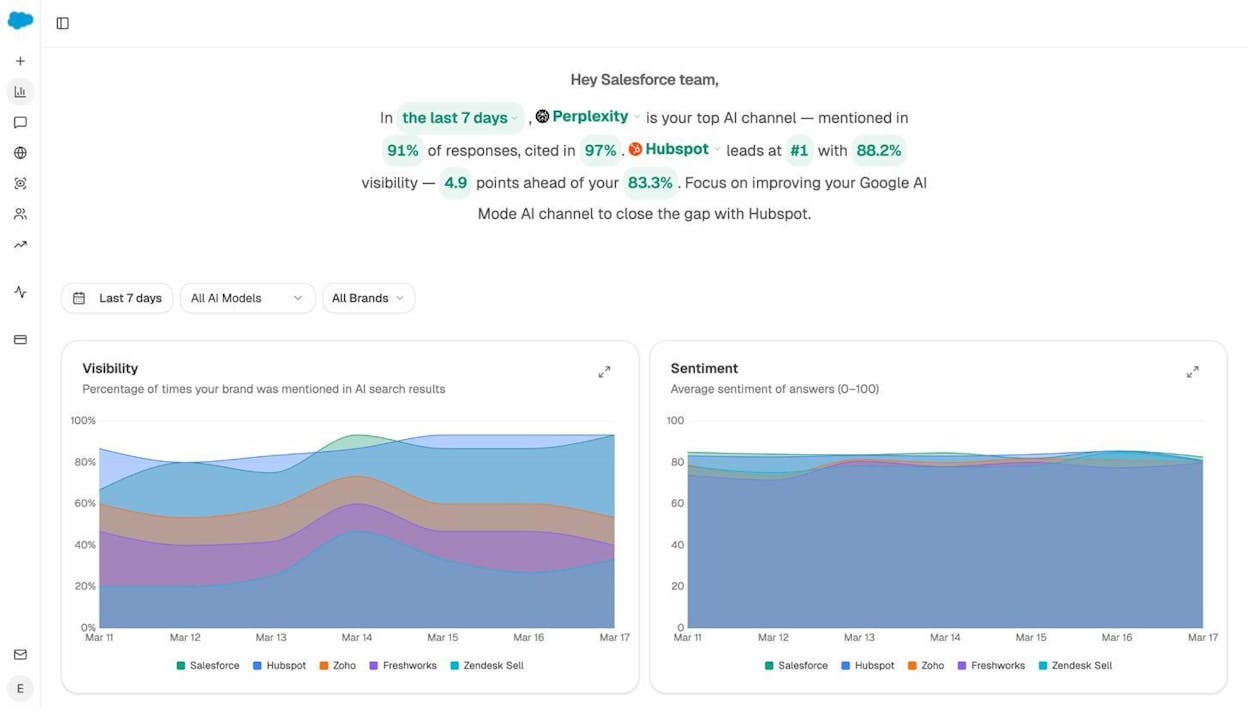
When you combine GSC performance data with AI visibility data, you get a full picture of how your content performs across both traditional and AI search channels.
2. Google Analytics Data API: For connecting traffic to business outcomes
The Google Analytics Data API (GA4) gives you programmatic access to your website’s acquisition, behavior, and conversion data. Where the Search Console API tells you how people find you, the Analytics API tells you what they do after they arrive.
What you can automate with it:
-
Pull organic session data alongside conversion events to calculate the actual revenue impact of SEO
-
Run batch reports across multiple properties with a single API call
-
Connect website behavior data to CRM or sales tools for lead scoring
-
Export audience segments and engagement metrics into custom dashboards
Practical example: You can use the API to pull organic conversion data from GA4, then feed it into a lead-scoring model. If a visitor came from an organic search, visited three product pages, and spent more than four minutes on site, your sales team knows that lead is worth following up with. Without the API, you are asking your sales team to manually check GA4 for every lead.
The API also supports the Measurement Protocol, which lets you send server-side events to GA4. This is useful for tracking offline conversions, point-of-sale transactions, or events from devices where client-side tracking does not work.
The Analytics Data API is free but subject to quota limits. Most teams will never hit these limits unless they are running reports across hundreds of properties.
The AI search angle: GA4 already captures traffic from AI sources. When someone clicks a link inside a ChatGPT or Perplexity response, that visit shows up in GA4 as referral traffic from chatgpt.com, perplexity.ai, or similar domains. But GA4 does not break this down in a useful way. You will not see which prompts triggered the visit, which AI engine sent the most engaged traffic, or which landing pages convert best from AI referrals.
Analyze AI’s AI Traffic Analytics connects to your GA4 property and layers this context on top. You get a dedicated dashboard that shows AI-referred sessions by engine, landing page performance, engagement metrics, and conversions, all in one place.
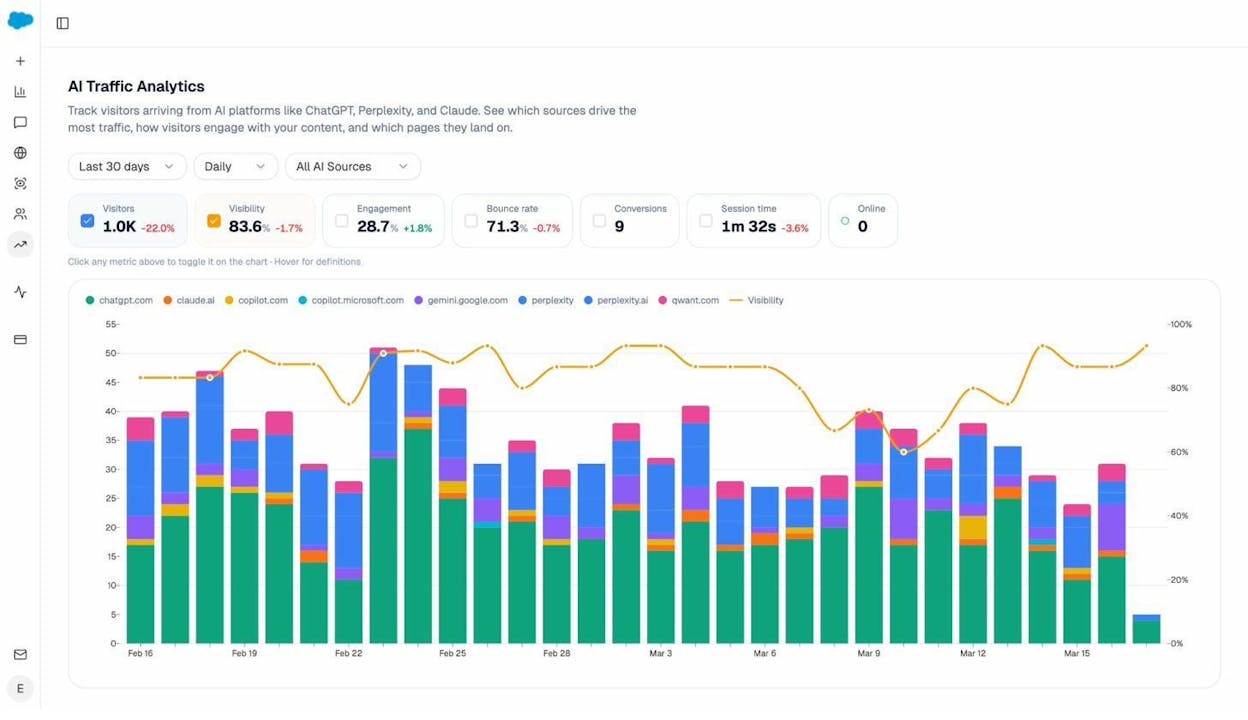
You can even drill into specific landing pages to see which of your pages receive AI traffic, how visitors interact with them, and which AI engines are sending the most valuable sessions.
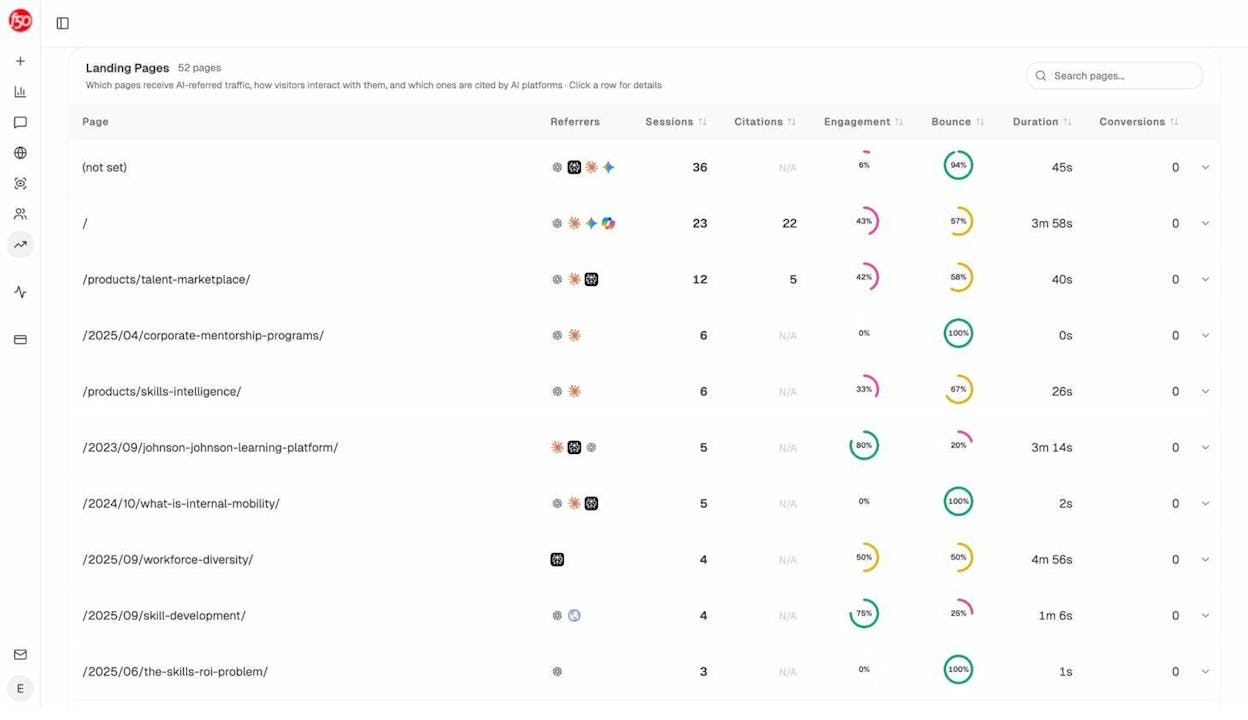
This is the kind of data that helps you figure out what is working in AI search and double down on it.
3. DataForSEO API: For bulk keyword, SERP, and backlink data
DataForSEO is a data provider that offers APIs for keyword research, SERP tracking, backlink analysis, and on-page auditing. It is one of the most popular choices for teams building custom SEO tools or dashboards because it provides raw data without locking you into a specific UI.
What you can automate with it:
-
Pull search volume, CPC, competition, and trend data for thousands of keywords at once
-
Get live or cached SERP results for any keyword in any location, including featured snippets, People Also Ask, and local packs
-
Analyze backlink profiles, referring domains, and anchor text distributions
-
Monitor on-page elements like title tags, meta descriptions, and heading structures across your site
![[Screenshot: DataForSEO API response in JSON format showing keyword search volume, CPC, and competition data for a list of keywords]](https://www.datocms-assets.com/164164/1777128236-blobid5.png?auto=format,compress&w=1248&fit=max)
Practical example: Suppose you manage SEO for an ecommerce store with 50,000 product pages. You need to identify which product categories have high search volume but low competition, so you can prioritize content creation. With DataForSEO, you can send a batch request with all your target keywords, get volume and difficulty data back in minutes, and programmatically sort the results by opportunity score.
DataForSEO uses a credit-based pricing model. You pay per API call, and pricing varies by endpoint. Keyword data is relatively cheap. SERP data and backlink data cost more. Check their pricing page for current rates.
If you do not need the granularity of a raw API, Analyze AI offers a set of free tools that cover many of the same use cases. The Keyword Generator helps you find new keyword ideas. The Keyword Difficulty Checker shows how hard a keyword is to rank for. The SERP Checker lets you preview search results for any query. And the Website Traffic Checker gives you estimated traffic for any domain.
4. IndexNow API: For getting your content indexed faster
IndexNow is a protocol that tells search engines when you add, update, or remove a page. Instead of waiting for crawlers to discover changes on their own schedule, you notify them directly.
Bing, Yandex, and several other search engines support IndexNow. Google has been testing it but has not fully adopted it yet.
What you can automate with it:
-
Notify search engines the moment you publish or update a page
-
Push bulk URL updates when you do a site migration or large content refresh
-
Reduce crawl waste by telling search engines exactly which pages changed, so they stop recrawling pages that haven’t
How to set it up:
-
Generate a free API key from indexnow.org
-
Host the key file in your site’s root directory (e.g., yourdomain.com/your-key.txt)
-
Send a POST request with the URLs you want indexed
POST https://api.indexnow.org/IndexNow
{
"host": "www.example.com",
"key": "your-api-key",
"keyLocation": "https://www.example.com/your-api-key.txt",
"urlList": [
"https://www.example.com/new-page",
"https://www.example.com/updated-page"
]
}
![[Screenshot: Terminal showing a successful IndexNow API submission with HTTP 200 response and URL count confirmation]](https://www.datocms-assets.com/164164/1777128245-blobid6.png?auto=format,compress&w=1248&fit=max)
Many CMSs and CDNs already support IndexNow natively. WordPress has plugins for it. Cloudflare supports it through their dashboard. If your stack already handles this automatically, you may not need to touch the API directly.
Why this matters for AI search too: Faster indexing means your updated content gets into search engine indexes sooner. And since AI models often pull from indexed web content when generating answers, getting your freshest content indexed quickly can influence how AI engines respond to prompts in your space. This is especially important after major content updates or when you publish something designed to earn AI citations.
5. PageSpeed Insights API: For monitoring Core Web Vitals at scale
The PageSpeed Insights API gives you access to performance data from both lab tests (Lighthouse) and field data (Chrome User Experience Report). It covers Core Web Vitals like Largest Contentful Paint, Interaction to Next Paint, and Cumulative Layout Shift.
What you can automate with it:
-
Run bulk performance audits across hundreds or thousands of URLs
-
Track Core Web Vitals trends over time and catch regressions before they affect rankings
-
Pull field data from CrUX to see how real users experience your pages
-
Set up alerts when a page drops below performance thresholds
![[Screenshot: PageSpeed Insights API JSON response showing LCP, INP, CLS metrics for a URL, with both field and lab data]](https://www.datocms-assets.com/164164/1777128250-blobid7.png?auto=format,compress&w=1248&fit=max)
Practical example: After a site redesign, you want to make sure performance has not degraded. Instead of manually testing pages one by one in the PageSpeed Insights tool, you can script a batch test that runs every page through the API, compares results to your pre-redesign baseline, and flags any page where LCP has increased by more than 500ms.
GET https://www.googleapis.com/pagespeedonline/v5/runPagespeed
?url=https://example.com/page
&strategy=mobile
&category=performance
The API is free with a daily quota. For most use cases, the quota is generous enough that you will not need to worry about hitting limits.
Workflow tip: Combine the PageSpeed Insights API with IndexNow for a powerful quality loop. When your monitoring detects a performance regression, fix the issue, then ping IndexNow to tell search engines the page has been updated. This way, search engines recrawl the improved version quickly instead of remembering the slow version.
6. Google Natural Language API: For semantic analysis and entity extraction
Google’s Natural Language API uses machine learning to analyze text for sentiment, entities, syntax, and content classification. It is particularly useful for semantic SEO and content auditing at scale.
What you can automate with it:
-
Extract entities from your content and your competitors’ content to find entity gaps
-
Analyze sentiment across customer reviews, social mentions, or support tickets
-
Classify content into Google’s taxonomy to see how Google categorizes your pages
-
Tag parts of speech in keyword lists to identify patterns (e.g., which modifiers drive volume)
Practical example: Say you want to run a content audit across your blog. You can feed each article into the Natural Language API, extract the entities it identifies, and compare them against the entities present in top-ranking competitor pages. If competitors consistently mention entities that your content lacks, that is a concrete signal for what to add.
![[Screenshot: Google Natural Language API demo showing entity extraction from a paragraph of text, with entity types, salience scores, and Wikipedia links]](https://www.datocms-assets.com/164164/1777128254-blobid8.png?auto=format,compress&w=1248&fit=max)
You can also use the API to programmatically build website taxonomies. If you have thousands of products for an ecommerce store and need to create categories and tags, the entity extraction and classification endpoints can get you most of the way there.
The API is available on a freemium model with up to 5,000 free requests per month.
The AI search connection: Entity coverage matters for both traditional SEO and AI search. Research on how LLMs cite sources shows that AI models favor content with clear entity coverage, structured arguments, and comprehensive depth. When you use the Natural Language API to close entity gaps in your content, you are making that content more useful to both Google and AI answer engines.
7. OpenAI and Anthropic APIs: For leveraging generative AI in your SEO workflows
The APIs from OpenAI and Anthropic let you programmatically access large language models for text generation, classification, and analysis. The main benefit is automating tasks that previously required manual effort at every step.
What you can automate with it:
-
Generate meta descriptions, title tag variations, or schema markup in bulk
-
Classify and tag thousands of pages or keywords by intent, topic, or funnel stage
-
Summarize competitor content or extract key themes from large datasets
-
Build chain-prompting workflows for digital PR ideation, content outline generation, or internal linking suggestions
Practical example: You have 2,000 product pages that all have the same generic meta description template. You can feed the product name, category, and top features into the API and generate unique, keyword-relevant meta descriptions for every page in a single batch run. What used to take a content team weeks now takes an afternoon.
![[Screenshot: Python script using the OpenAI API to generate meta descriptions in bulk, showing the prompt template and a sample JSON response]](https://www.datocms-assets.com/164164/1777128260-blobid9.png?auto=format,compress&w=1248&fit=max)
Another powerful use case is classifying images. If you run a large ecommerce store or marketplace, you can use GPT-4’s vision capabilities to sort, tag, and classify product images in bulk, generating alt text and image descriptions at the same time.
Both OpenAI and Anthropic use usage-based pricing. Costs vary by model and token count, but for most SEO automation tasks (short prompts, structured outputs), the per-request cost is low.
A word of caution: Programmatic content generation can go wrong fast. Google’s spam policies are clear about mass-produced content that adds no value. Use these APIs to augment human judgment, not replace it. Generate drafts, not final versions. Automate the tedious parts (meta tags, structured data, classification) and keep human oversight on anything that touches your published content strategy.
8. Wayback Machine APIs: For historical page analysis
The Wayback Machine captures visual snapshots of web pages over time. Its Save Page Now 2 API and CDX Server API let you automate snapshot capture and historical analysis.
What you can automate with it:
-
Benchmark a website before you start work on a project, creating a visual record of its state
-
Analyze expired domains by reviewing their content history before acquiring them
-
Map redirects during large migrations by pulling archived URLs and their content
-
Track competitor website changes over time, from messaging shifts to A/B tests
Practical example: You are migrating a site with 10,000 pages. Some of the old URLs had valuable content that was later removed. You can use the CDX Server API to pull archived versions of every URL, extract the body text, and programmatically create redirect mappings from old URLs to the most relevant current pages.
![[Screenshot: Wayback Machine showing historical snapshots of a website, with the calendar view highlighting capture dates]](https://www.datocms-assets.com/164164/1777128265-blobid10.png?auto=format,compress&w=1248&fit=max)
Both APIs are free. The CDX Server API is especially useful for programmatic access to archived data without going through the visual Wayback Machine interface.
Use case for competitive intelligence: You can monitor how competitors’ websites evolve over time by scheduling regular snapshots. Track when they change their messaging, launch new products, or redesign key landing pages. Then cross-reference those changes with their search performance to see what worked.
9. Schema.org and Structured Data APIs: For richer search results
Schema.org provides the vocabulary for structured data markup. Google’s Rich Results Test API and the Schema Markup Validator let you validate and test your structured data programmatically.
What you can automate with it:
-
Validate structured data across your entire site in a single batch run
-
Detect when schema markup breaks after a deploy or CMS update
-
Generate structured data templates (FAQ, HowTo, Product, Article) for new pages programmatically
-
Monitor competitors’ schema usage to find rich result opportunities you are missing
Practical example: You run an ecommerce store with 5,000 product pages. Each page should have Product schema with price, availability, and review data. Instead of manually checking each page, you can crawl your sitemap, extract the structured data from each URL, validate it against Google’s requirements, and flag any page with missing or invalid markup.
GET https://searchconsole.googleapis.com/v1/urlTestingTools/
mobileFriendlyTest:run
{
"url": "https://example.com/product-page",
"requestScreenshot": false
}
![[Screenshot: Google Rich Results Test showing valid Product schema markup with star ratings, price, and availability data]](https://www.datocms-assets.com/164164/1777128267-blobid11.jpg?auto=format,compress&w=1248&fit=max)
Structured data does not guarantee rich results, but it is a prerequisite. Pages with valid schema are eligible for enhanced SERP features like FAQ dropdowns, review stars, and product carousels. These features increase click-through rates significantly.
10. Screaming Frog and Crawl APIs: For site auditing at scale
Screaming Frog is the industry-standard website crawler. While it is not a traditional API, it offers a command-line interface that lets you automate crawls and export data programmatically. For a true API-based approach, tools like Sitebulb and Lumar (formerly DeepCrawl) offer cloud-based crawling with API access.
What you can automate with it:
-
Schedule weekly crawls to catch broken links, redirect chains, missing meta tags, and duplicate content
-
Export crawl data into your reporting pipeline so technical SEO issues show up alongside performance data
-
Monitor changes between crawls to detect regressions after deployments
-
Audit internal linking structures to find orphaned pages or thin link equity distribution
Practical example: You set up a weekly Screaming Frog crawl via the command line. The output gets piped into a Python script that compares this week’s crawl against last week’s, then sends a Slack notification listing any new 404 errors, broken redirects, or pages that lost their canonical tags.
# Run Screaming Frog from command line
/path/to/ScreamingFrogSEOSpider --crawl https://example.com \
--output-folder /reports/weekly/ \
--export-tabs "Internal:All,Response Codes:All"
![[Screenshot: Screaming Frog crawl results showing a summary of pages crawled with status code distribution, redirect chains, and canonical issues]](https://www.datocms-assets.com/164164/1777128276-blobid12.jpg?auto=format,compress&w=1248&fit=max)
The command-line approach is free for sites up to 500 URLs. Larger sites require a paid license. Cloud-based alternatives like Lumar offer API access with no crawl limits but at a higher price point.
How to combine these APIs into a single workflow
Having individual APIs is useful, but the real value comes from connecting them into automated workflows. Here is an example of how these APIs work together in practice:
The weekly SEO and AI search monitoring workflow:
-
Crawl your site with Screaming Frog CLI to catch technical issues
-
Pull GSC data via the Search Console API to get ranking and CTR changes
-
Pull GA4 data via the Analytics Data API to see which organic pages are converting
-
Run PageSpeed tests on your top 50 pages to catch performance regressions
-
Check AI search visibility in Analyze AI to see where your brand appeared (or disappeared) in AI answers this week
![[Screenshot: A simple diagram showing the workflow between GSC API, GA4 API, PageSpeed API, crawl tools, and AI search monitoring, all feeding into a central dashboard]](https://www.datocms-assets.com/164164/1777128276-blobid13.png?auto=format,compress&w=1248&fit=max)
The combination of steps 1-4 covers traditional SEO. Step 5 adds the AI search dimension that most teams are still missing.
Adding AI search to your monitoring stack
This is the part most “SEO API stack” articles skip entirely. And it is the part that will matter most over the next few years.
AI search engines like ChatGPT, Perplexity, and Gemini are already sending meaningful traffic to websites. Research from Analyze AI found that AI models cite specific sources in their responses, and the domains they cite influence what millions of users see and trust.
The problem is that none of the APIs listed above tell you anything about how AI models represent your brand. Google Search Console does not track AI mentions. GA4 captures some AI referral traffic but without the context you need. DataForSEO does not cover AI answers.
This is where a dedicated AI search analytics platform fills the gap.
What you can monitor with Analyze AI:
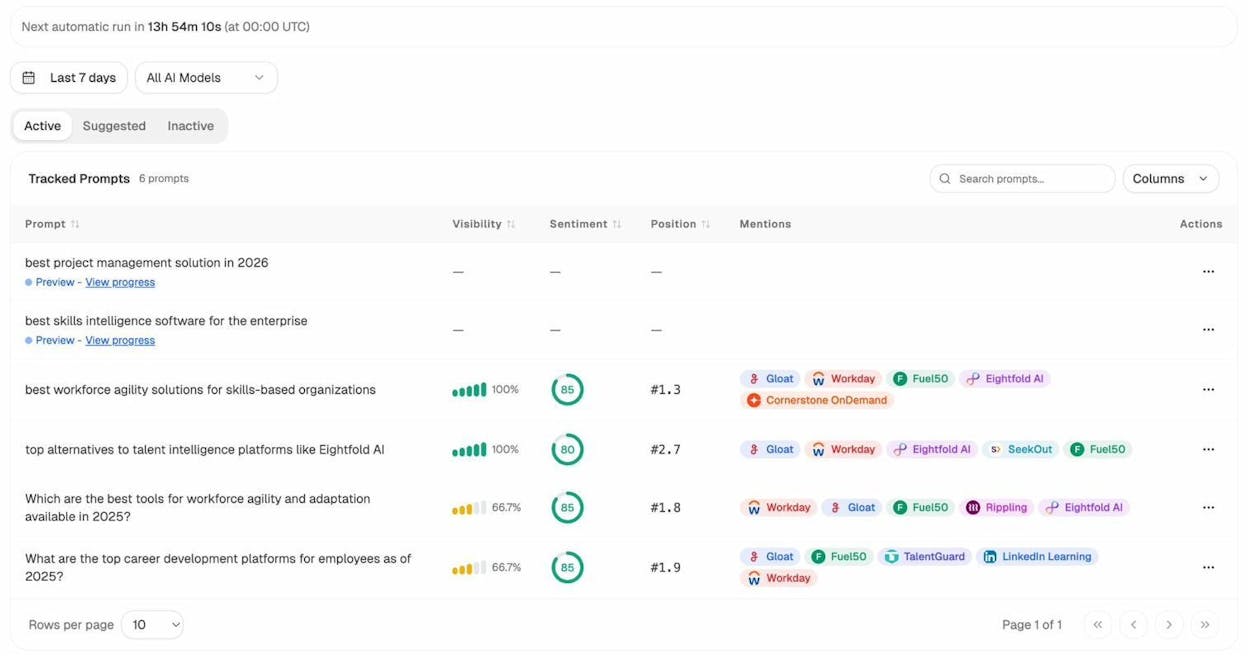
Prompt tracking. Track specific prompts across AI engines (ChatGPT, Perplexity, Gemini, Copilot, Claude) and see your brand’s visibility, position, and sentiment over time. This is the AI search equivalent of keyword rank tracking.
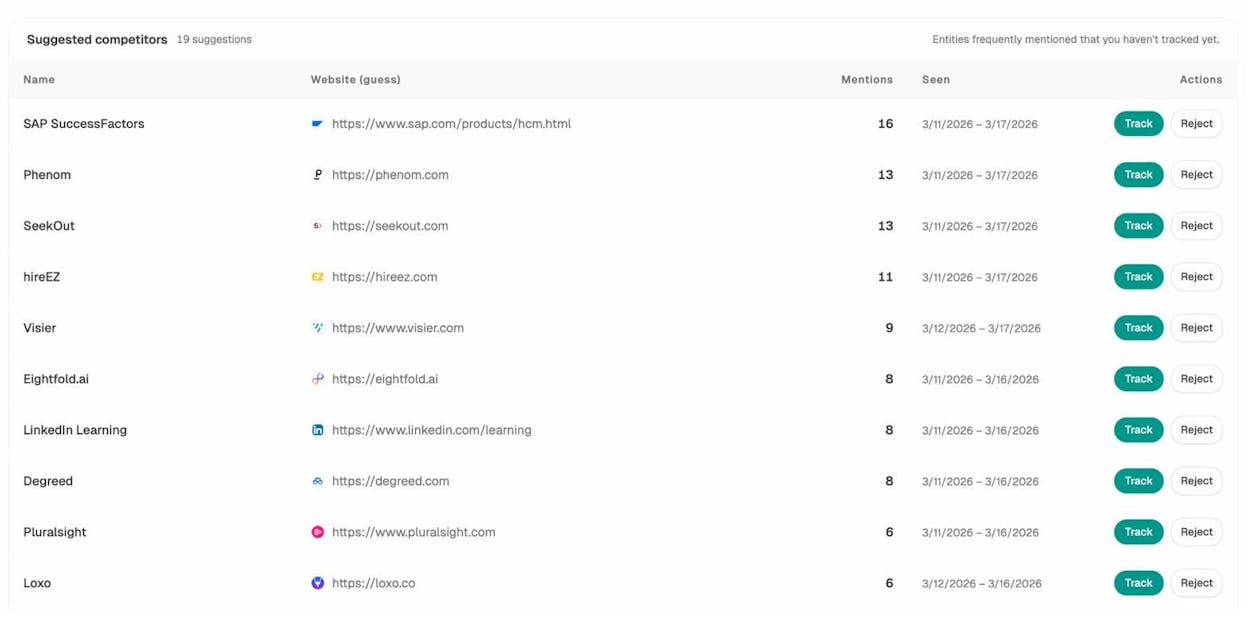
Competitor intelligence. See which brands AI engines recommend instead of you. Analyze AI automatically discovers competitors mentioned alongside your brand and shows you exactly where they win and where you have an opening.
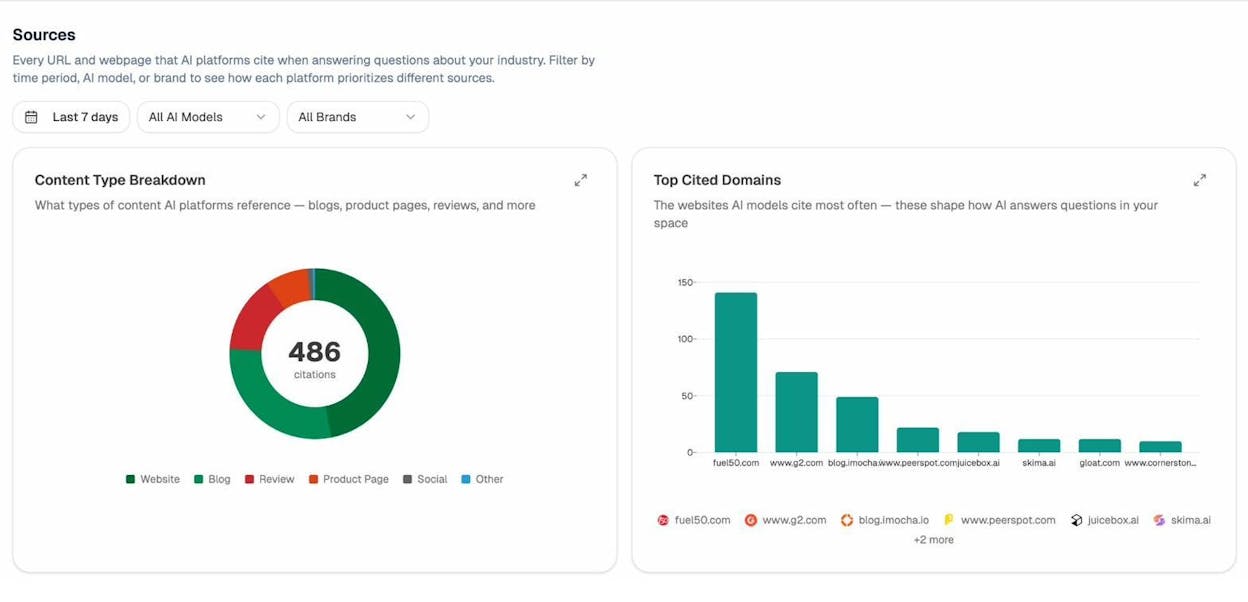
Source analysis. Understand which websites and content types AI models cite most often in your space. If review sites and blog posts earn the most citations, that tells you where to focus your content and PR efforts.
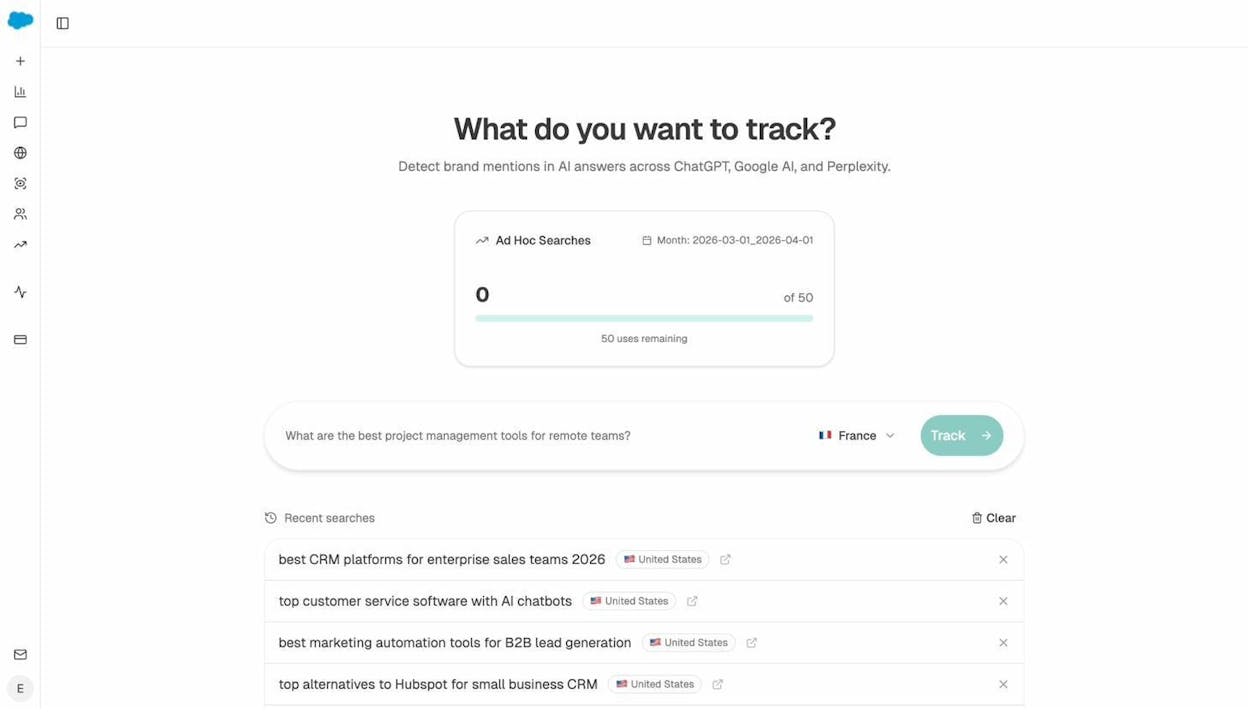
Ad hoc prompt searches. Before committing to tracking a new prompt, run a one-off search across multiple AI engines to see who shows up. This is like running a quick SERP check before investing in a keyword.
AI traffic attribution. Connect GA4 to Analyze AI and see exactly how much traffic AI engines send to your site, which pages receive it, and how those visitors behave compared to organic search visitors.
Weekly digests. Get a prioritized summary every Monday with citation changes, competitor movements, and recommended actions, so you do not need to log in to stay informed.
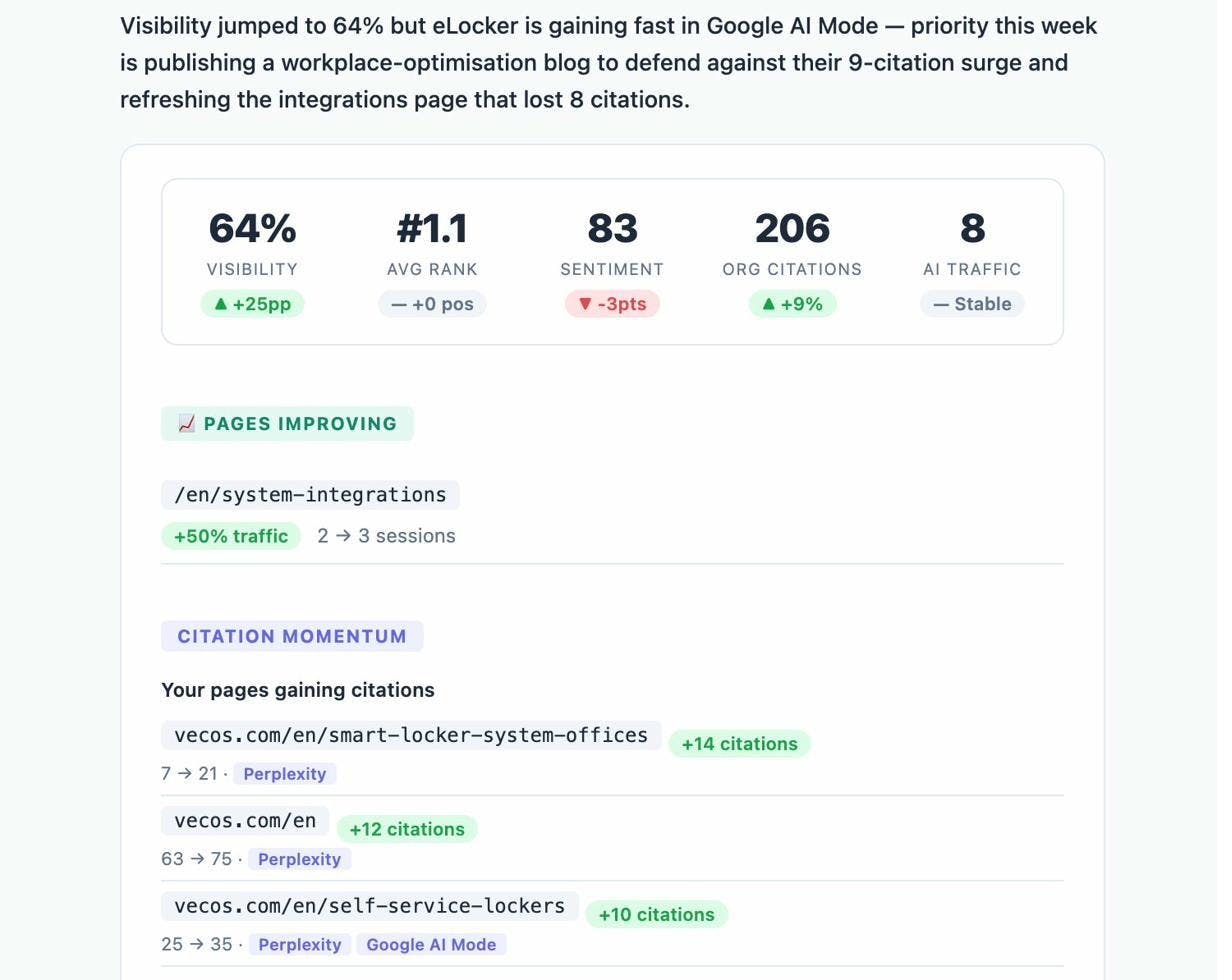
The point is not to replace your existing SEO stack. It is to add the AI search layer on top. SEO is not dead. It is evolving. AI search is an additional organic channel that complements traditional SEO, and your monitoring stack should reflect that.
Quick comparison: What each API covers
|
API |
Cost |
Best for |
Covers AI search? |
|---|---|---|---|
|
Google Search Console API |
Free |
Ranking, CTR, index coverage |
No |
|
Google Analytics Data API |
Free |
Traffic, behavior, conversions |
Partial (referral data only) |
|
DataForSEO API |
Paid (credits) |
Bulk keyword and SERP data |
No |
|
IndexNow API |
Free |
Faster indexing |
No |
|
PageSpeed Insights API |
Free |
Core Web Vitals, performance |
No |
|
Google Natural Language API |
Freemium |
Entity extraction, semantic analysis |
No |
|
OpenAI / Anthropic APIs |
Paid (usage) |
Content generation, classification |
No |
|
Wayback Machine APIs |
Free |
Historical snapshots, migrations |
No |
|
Schema.org / Rich Results API |
Free |
Structured data validation |
No |
|
Screaming Frog CLI |
Free (up to 500 URLs) |
Technical auditing, crawling |
No |
|
Paid |
AI visibility, citation tracking, AI traffic |
Yes |
Notice the pattern. Every traditional SEO API gives you data about Google. None of them give you data about how AI answer engines represent your brand. If you want full coverage of how people discover your business through search today, you need both layers.
Final thoughts
The right API stack automates the repetitive parts of SEO so your team can focus on strategy, content, and competitive positioning.
Start with the free APIs. Google Search Console, GA4, IndexNow, and PageSpeed Insights cover the core of what most teams need. Add DataForSEO or a similar provider when you need bulk keyword or backlink data. Bring in OpenAI or Anthropic when you are ready to automate content workflows.
And add an AI search monitoring layer. The brands that start tracking their AI visibility now will have months of baseline data when AI search traffic becomes impossible to ignore. The ones that wait will be starting from zero.
If you want to see how Analyze AI fits into your stack, start a free trial or talk to our team. You will have your first AI visibility baseline within minutes.

Ernest

Ibrahim


