


Summarize this blog post with:


SEO metrics are indicators that tell you whether your optimization efforts are producing results. Some are essential for making real decisions. Many are popular but misleading. A few are brand new—born from AI search engines like ChatGPT, Perplexity, and Google AI Mode reshaping how people find information.
The challenge isn't finding metrics to track. It's knowing which ones actually connect to business growth and which ones just make dashboards look busy.
In this article, you'll learn the 10 SEO metrics worth tracking to measure whether your strategy is working—and the 4 popular ones that waste your time. You'll also learn how to track each metric step by step, why it matters for your business, and how AI search is creating new metrics that complement everything you already do.
Table of Contents
10 SEO Metrics Worth Tracking
1. Organic Traffic
Organic traffic represents all non-paid clicks that come from search engines.
Why it matters
Organic traffic is the most direct indicator that people are finding your website through search. If the number trends upward over months, your content and optimization work is paying off.
But organic traffic alone doesn't tell you much. A spike from a single viral post is different from steady growth across dozens of pages. Traffic from informational keywords like "what is SEO" has a different business impact than traffic from commercial keywords like "best SEO tools for agencies."
That's why organic traffic is your starting point, not your finish line.
How to track it
Google Search Console gives you the most accurate view of your organic search performance. Head to the Performance tab to see total clicks, impressions, average CTR, and average position over any date range.
![[Screenshot: Google Search Console Performance tab showing clicks over time]](https://www.datocms-assets.com/164164/1781566959-blobid0.png?auto=format,compress&w=1248&fit=max)
Pro tip: If you're an established brand, filter out branded traffic to get a clearer picture of your SEO performance. A surge in organic traffic might just mean more people searched for your company name after a press mention—not that your SEO strategy improved. In GSC, add a query filter to exclude queries containing your brand name.
For a quick competitive estimate, Analyze AI's free website traffic checker lets you see estimated organic traffic for any domain.
How organic traffic looks in AI search
Organic traffic no longer comes exclusively from Google.
ChatGPT, Perplexity, Claude, Google AI Mode, and Copilot all send referral traffic to websites. If you're only tracking organic traffic through Google Search Console and Google Analytics, you're missing a growing channel.
In Analyze AI's AI Traffic Analytics dashboard, you can see exactly how many visitors arrive from each AI platform, broken down by day, week, or month.
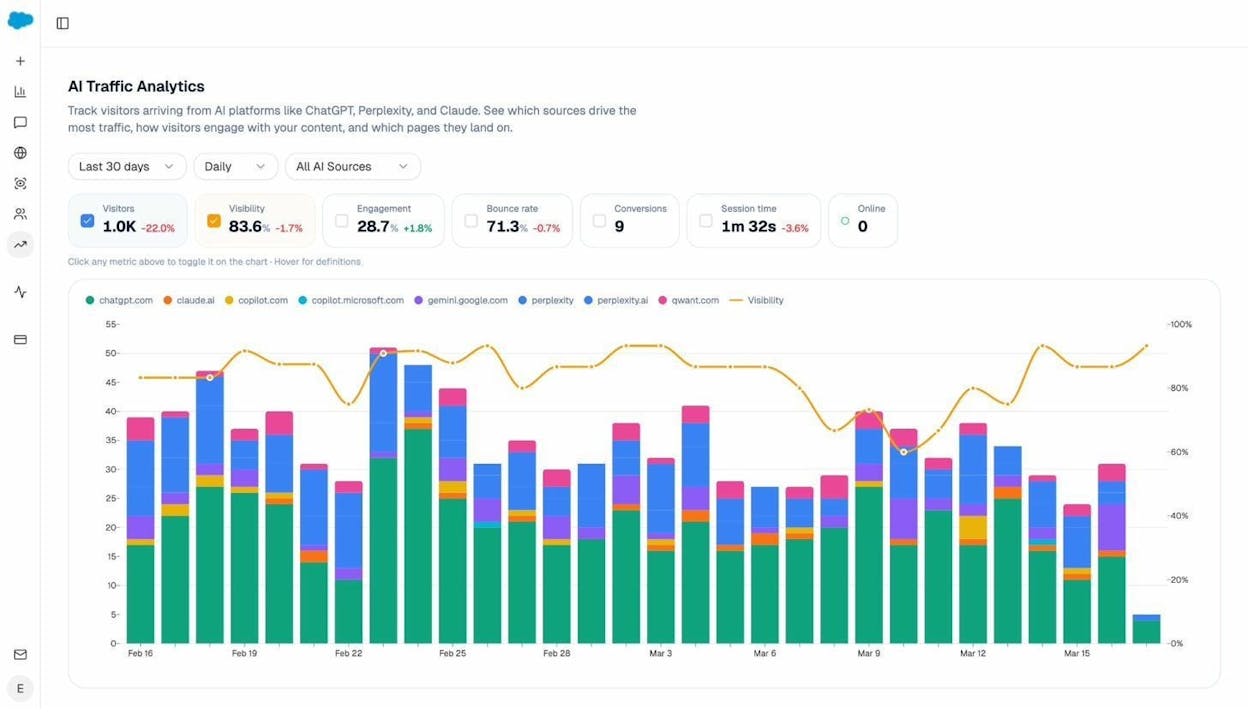
This matters because AI referral traffic often behaves differently from traditional organic traffic. It tends to have higher engagement rates and different landing page patterns. Tracking it separately lets you understand what content AI engines prefer to cite—and double down on it.
2. Keyword Rankings
Keyword rankings refer to where your pages appear in search engine results for specific queries.
Why it matters
Not all keywords carry the same weight. Ranking #1 for a high-volume keyword with clear purchase intent is worth far more than ranking for dozens of low-intent informational queries.
Tracking rankings for your most important keywords—the ones tied directly to revenue—gives you an early warning system. If your position drops from #3 to #8, you know to investigate and act before traffic loss compounds.
Rankings also help you spot opportunities. If a page sits at position #11 (top of page two), a small optimization push could move it to page one and dramatically increase clicks.
How to track it
Use a rank tracking tool to monitor your target keywords automatically. Set up a project for your domain, paste the keywords you want to monitor, and the tool will check your positions daily.
![[Screenshot: A rank tracker showing keyword positions with daily movement indicators]](https://www.datocms-assets.com/164164/1781566965-blobid2.png?auto=format,compress&w=1248&fit=max)
You can also use Analyze AI's free keyword rank checker for quick, one-off position checks without setting up a full project.
What keyword tracking looks like in AI search
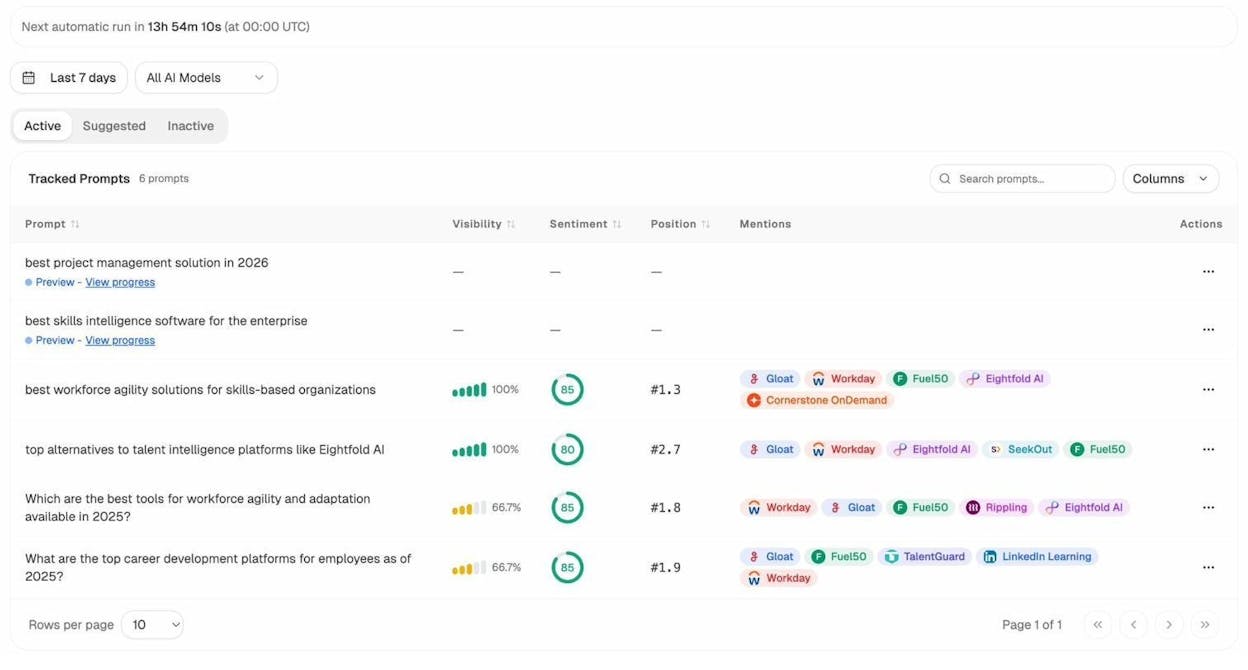
In traditional SEO, you track where your page appears on a numbered results page. In AI search, the concept is different. AI engines don't return a list of 10 blue links—they generate answers and sometimes mention or cite brands within those answers.
Analyze AI lets you track this. You add the prompts (think of them as the AI search equivalent of keywords) that matter to your business, and the platform runs those prompts across ChatGPT, Perplexity, Claude, Gemini, and Google AI Mode daily.
Learn more: How to Rank on ChatGPT (Based on 65,000 Citation Data)
3. Search Visibility (Share of Voice)
Search visibility—also called Share of Voice (SOV)—is the percentage of all clicks for your tracked keywords that land on your website.
Why it matters
Search visibility is arguably the single most important SEO metric. There's a strong, well-documented relationship between SOV and market share. The higher your share of voice, the bigger your slice of the market.
What makes SOV more useful than raw organic traffic is that it's a relative metric. If the entire market grows, your organic traffic might increase even if your competitive position weakens. SOV accounts for this by measuring your visibility against competitors.
This makes SOV the best metric for executive reporting. Executives don't care about keyword positions. They care about market share. SOV translates SEO performance into language the C-suite understands.
How to track it
To calculate search visibility, identify your core non-long-tail keywords, add them to a rank tracker, add your top 3–5 competitors, and check the Share of Voice or Visibility column.
Use Analyze AI's free SERP checker to quickly see who ranks for any keyword before adding it to your tracking project.
Share of Voice in AI search
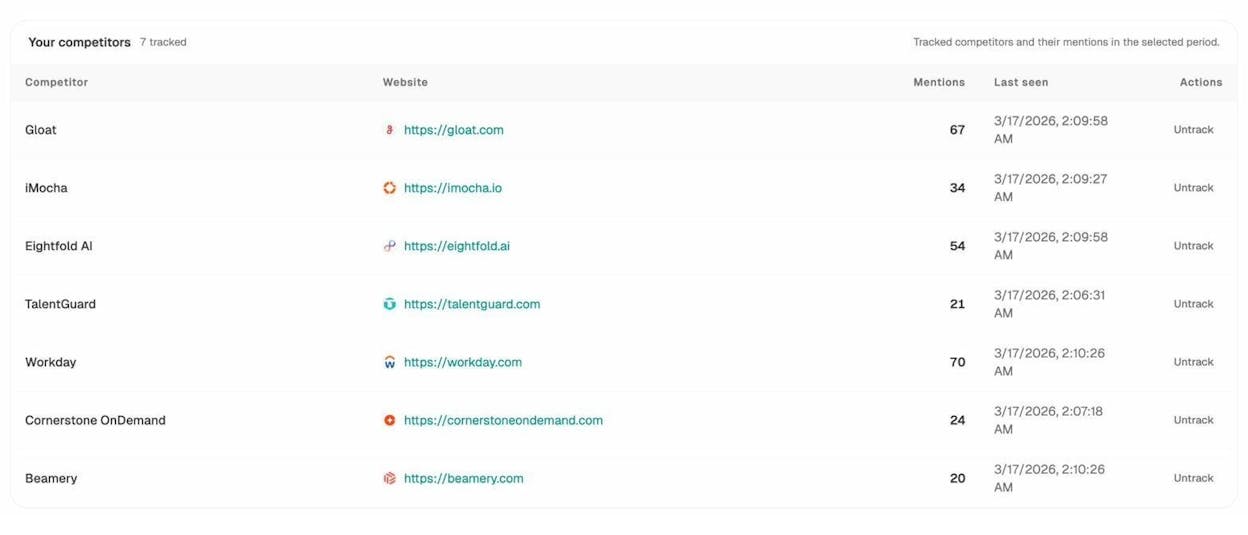
Just as SOV measures your visibility relative to competitors on Google, you can measure the same thing in AI search.
In Analyze AI, the Competitor Overview shows you exactly how your brand's visibility compares to competitors across AI engines.
Learn more: GEO vs SEO: Key Differences & Similarities Explained
4. Traffic Value
Traffic value is how much you'd have to pay for all your organic clicks if they came from PPC search ads instead.
Why it matters
Traffic value puts a dollar amount on your organic search presence by multiplying estimated traffic from each keyword by that keyword's CPC in Google Ads. This helps you prioritize commercially valuable pages and demonstrate SEO's ROI in terms executives understand.
Instead of saying "we grew organic traffic by 20%," you can say "our organic traffic now delivers the equivalent of $85,000/month in paid search spend." That's a much more compelling way to justify SEO investment.
How to track it
Most SEO tools estimate traffic value at the domain, subdomain, and page level. Plug your domain into a site explorer tool and look for the traffic value metric. Then sort your Top Pages report by traffic value to see your most commercially valuable content.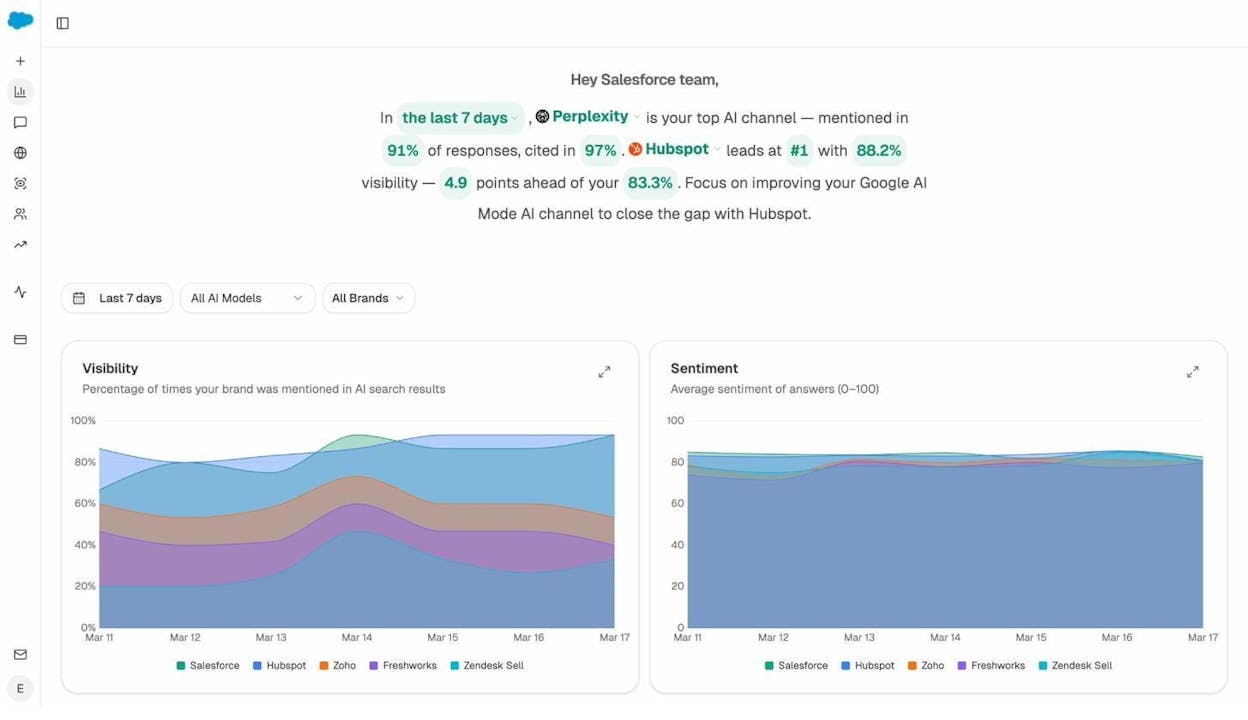
![[Screenshot: Site Explorer showing traffic value and Top Pages sorted by traffic value]](https://www.datocms-assets.com/164164/1781566975-blobid6.png?auto=format,compress&w=1248&fit=max)
5. Organic Traffic Conversions
A conversion is an important action a visitor takes on your website—checking out, signing up for a trial, subscribing, requesting a demo, or any other goal that ties to revenue.
Why it matters
Conversion tracking is where SEO meets the bottom line. Your CEO doesn't care about keyword positions. Your CFO doesn't celebrate rising organic traffic. They both care about how many leads, signups, or purchases came from search.
How to track it
Set up conversion tracking in Google Analytics 4 (GA4). For ecommerce, use Enhanced Ecommerce tracking. For SaaS, track trial signups and paid conversions. For lead gen, track form submissions and demo requests.
Important caveat: GA4 uses last-click attribution by default, which understates SEO's contribution. Consider using data-driven attribution or reviewing assisted conversions for a more accurate picture.
Conversions from AI search traffic
AI search traffic converts too—and often at different rates than traditional organic. In Analyze AI's Landing Pages report, you can see which pages receive AI-referred traffic, sessions, engagement metrics, and conversions.
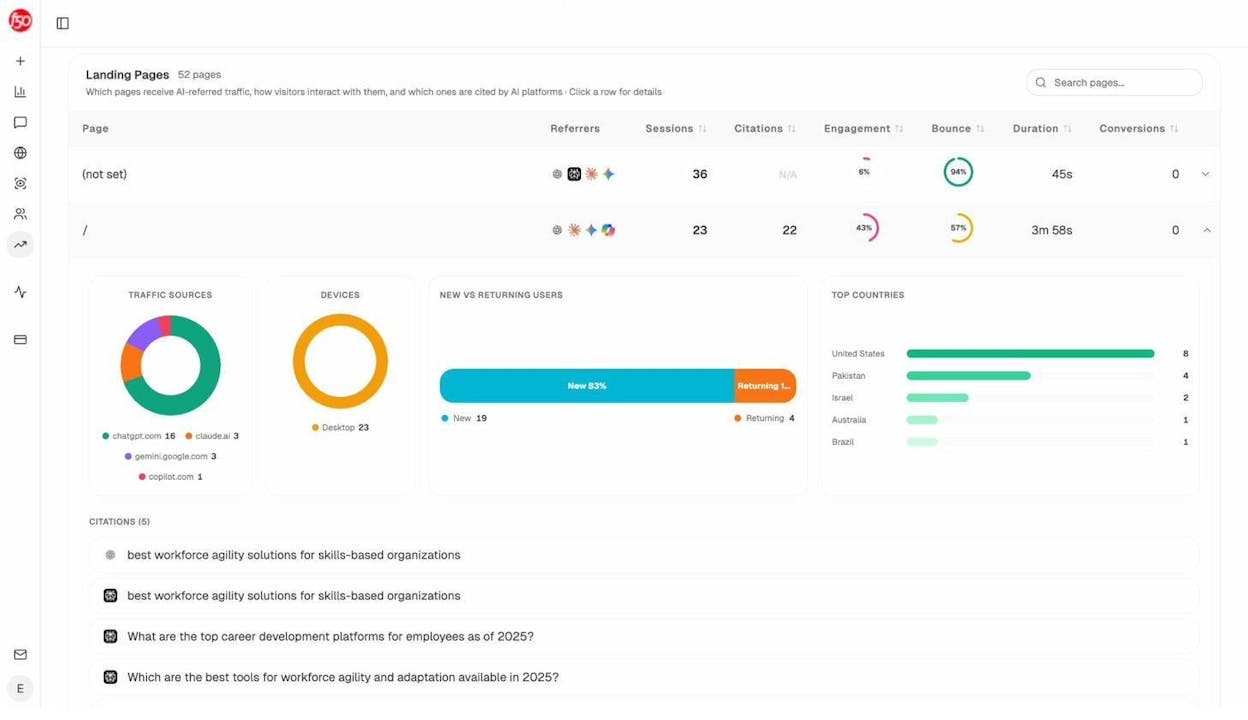
This lets you identify patterns—for example, that comparison pages receive disproportionate AI traffic with higher conversion rates, signaling you should create more comparison content.
6. Referring Domains
Referring domains are the number of unique websites that link to your site.
Why it matters
Backlinks remain one of Google's strongest ranking signals. 100 links from one website count for much less than 10 links from 10 different websites. Each new referring domain is a new "vote of confidence" from a unique source.
Use Analyze AI's free website authority checker to quickly evaluate the authority of any domain linking to you.
What links look like in AI search
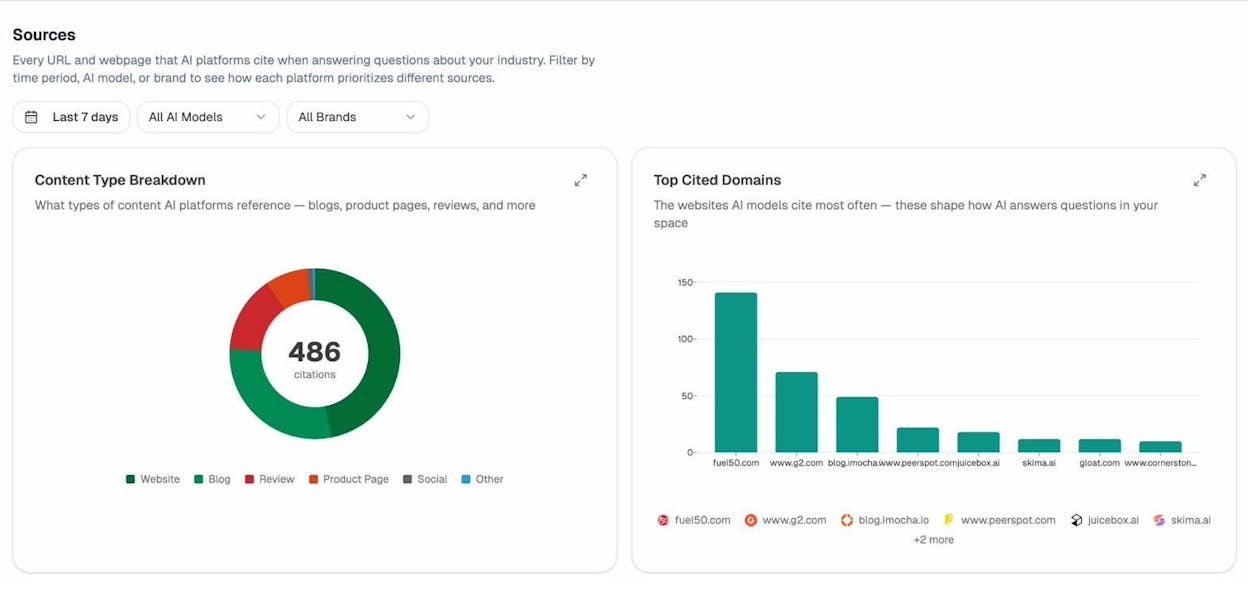
AI search engines also have their own version of "sources." When ChatGPT, Perplexity, or Google AI Mode generates an answer, it often cites specific URLs. These citations are the AI equivalent of backlinks.
Learn more: How Do LLMs Cite Sources? What 83,670 AI Citations Tell Us
7. Number of Indexed Pages
The number of indexed pages tells you how many of your URLs a search engine has stored in its index.
Why it matters
A page can't rank if it's not indexed. You want this number growing steadily as you publish new content. Sudden drops are red flags for technical issues. Numbers much higher than expected may indicate duplicate or thin content bloating your index.
How to track it
Use the site: search operator in Google for a quick check, or review the Pages report in Google Search Console for detailed breakdown. Schedule regular checks—monthly for smaller sites, weekly for large ones.
8. Index Coverage Errors
Index coverage errors are specific issues preventing Google from indexing your pages when you didn't intentionally exclude them.
Why it matters
Coverage errors reveal problems you don't know about—misconfigured canonical tags, intermittent server errors, accidental robots.txt blocks. The key is separating intentional exclusions from unintentional ones.
How to track it
Google Search Console's Pages report shows all coverage errors with specific reasons. Click into each error type to see affected URLs and fixes.
|
Error |
Common Cause |
Fix |
|
Server error (5xx) |
Server overload or misconfiguration |
Check server logs; increase capacity |
|
Redirect error |
Redirect chains or loops |
Point directly to the final URL |
|
Blocked by robots.txt |
Overly broad robots.txt rules |
Audit robots.txt; remove unintended blocks |
|
Soft 404 |
Thin content treated as 404 |
Add content or return a proper 404 |
|
Duplicate without canonical |
Multiple URLs serving same content |
Add rel=canonical to preferred version |
Use Analyze AI's free broken link checker to find broken links that contribute to crawl errors.
9. Core Web Vitals
Core Web Vitals (CWV) are three performance metrics that measure your website's loading speed and user experience: LCP (loading), INP (interactivity), and CLS (visual stability).
Why it matters
Google has used CWV as a ranking factor since June 2021. It's a minor factor, but in competitive SERPs, it can be the tiebreaker. More importantly, poor CWV directly hurts conversion rates regardless of rankings.
How to track it
Google Search Console has a dedicated Core Web Vitals report. PageSpeed Insights (pagespeed.web.dev) gives individual URL scores with prioritized recommendations. Focus on mobile CWV first—Google uses mobile-first indexing.
|
Metric |
Problem |
Fix |
|
LCP (>2.5s) |
Large images, slow server |
Compress images; use CDN; improve TTFB |
|
INP (>200ms) |
Heavy JavaScript blocking main thread |
Defer non-critical JS; reduce third-party scripts |
|
CLS (>0.1) |
Images without dimensions; dynamic content |
Set width/height on images; reserve space for ads |
10. AI Search Visibility
AI search visibility measures how often and how prominently your brand appears in AI-generated responses across platforms like ChatGPT, Perplexity, Claude, Google AI Mode, Copilot, and Gemini.
Why it matters
This is the newest metric on this list—and it's here because AI search represents a genuine shift in how people discover products, services, and information. AI search visibility is not a replacement for traditional SEO metrics. It's a complementary measurement for a complementary channel. SEO isn't dead—it's evolving.
How to track it
Here's how to track AI search visibility in Analyze AI, step by step:
Step 1: Set up your prompts. Prompts are the AI search equivalent of keywords. Add them to Analyze AI, and the platform runs them across all major AI engines daily.
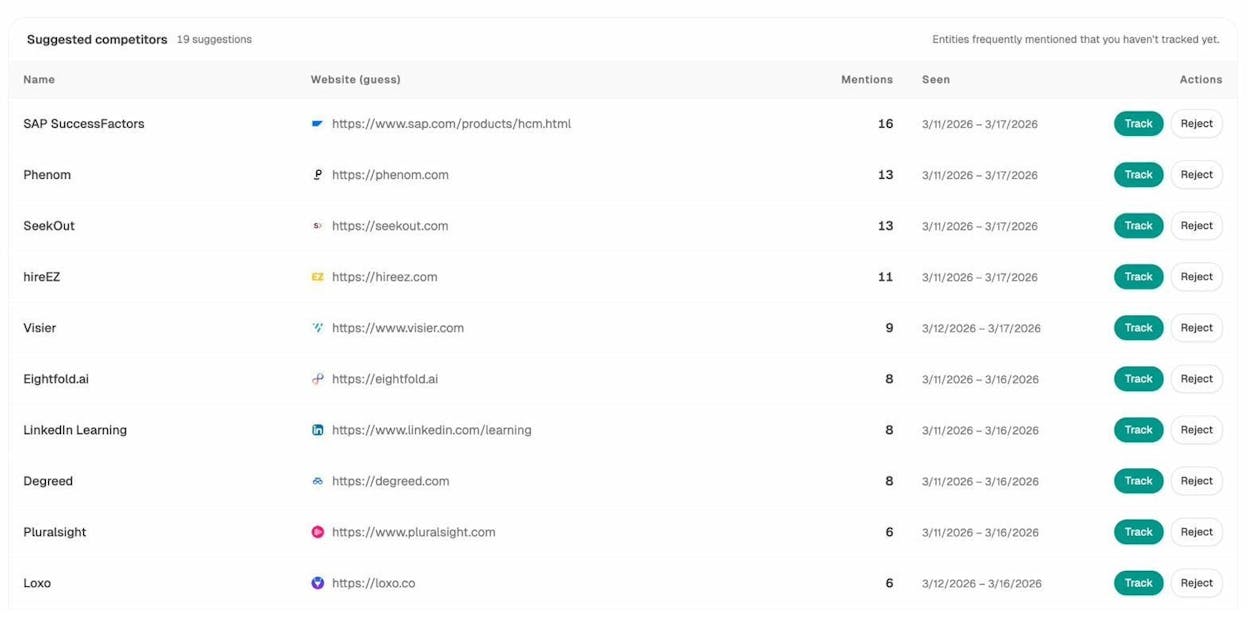
Step 2: Add competitors. Analyze AI automatically surfaces suggested competitors—brands that frequently appear alongside yours in AI responses.
Step 3: Monitor visibility trends. The Overview dashboard shows your visibility percentage, sentiment score, and competitive position over time.
Step 4: Understand what shapes AI answers. The Sources dashboard reveals which URLs and domains AI engines cite most often.
Step 5: Connect AI visibility to traffic. Connect your GA4 to see actual visitors from AI engines with engagement and conversion data.
Step 6: Identify best-performing landing pages. The Landing Pages report shows which pages AI engines send traffic to. Double down on what works.
Learn more: What Is Answer Engine Optimization? 8 AEO Strategies
4 Popular SEO Metrics That Don't Matter
The metrics below are popular, but they share a common problem: they're too ambiguous to drive action. A metric only matters if it tells you what to do next. These four don't.
1. Bounce Rate
Bounce rate is the percentage of sessions where a visitor viewed only one page and triggered no additional events. It's misleading because it doesn't distinguish between satisfaction and frustration—a satisfied reader who gets their answer and leaves registers the same as someone who bounces in frustration. There's also no "good" benchmark: 70% is excellent for a blog but terrible for a checkout page.
2. Exit Rate
Exit rate shows the percentage of sessions ending on a particular page. A high exit rate on a "Thank You" page or FAQ is exactly what you want. Without session recordings or scroll depth data, exit rate alone tells you almost nothing actionable.
3. Pages Per Session
Pages per session counts page views in a session. But if someone reads one blog post that completely answers their question and leaves, is that a failure? Too many variables make this metric unreliable, and optimizing for it can lead to counterproductive tactics like excessive pagination.
4. Average Session Duration / Time on Page
Google Analytics measures session duration by comparing timestamps when users load pages. If a user visits only one page (a bounce), GA records 0 seconds—even if the person spent 15 minutes reading. Since bounced sessions are common, time-based metrics are systematically underreported. GA4's engagement time improves on this, but it's still too noisy for primary decision-making.
How to Build Your SEO Metrics Dashboard
Tier 1: Business metrics (report monthly to leadership)
Organic traffic conversions, traffic value, search visibility (SOV).
Tier 2: Performance metrics (review weekly as an SEO team)
Organic traffic, keyword rankings, AI search visibility, referring domains.
Tier 3: Health metrics (check monthly or after site changes)
Number of indexed pages, index coverage errors, Core Web Vitals.
For SEO reporting tools to build these dashboards, see our guide to 8 free SEO reporting tools.
Final Thoughts
The gap between teams that measure well and teams that measure poorly compounds over time. Teams that focus on the right metrics make better decisions, allocate resources more effectively, and catch problems before they escalate.
The 10 metrics in this article give you complete coverage: from the foundational (organic traffic, rankings) to the strategic (SOV, traffic value, conversions) to the technical (indexed pages, coverage errors, CWV) to the emerging (AI search visibility).
As search continues to evolve—with AI engines becoming a genuine complementary channel alongside Google—the metrics you track need to evolve too. The best time to start measuring AI search visibility alongside traditional SEO metrics was six months ago. The second-best time is now.
Start with the metrics that connect most directly to your business goals. Build from there. And if you want to add AI search visibility to your measurement stack, Analyze AI lets you track how AI engines represent your brand, which pages they send traffic to, and how that traffic converts—all in one platform.

Ernest

Ibrahim


