



Summarize this blog post with:


In this article, you’ll learn what SEO testing is, why it matters, which types of tests exist, and how to run one step by step. You’ll also learn how to extend your testing practice to AI search, where platforms like ChatGPT, Gemini, and Perplexity are becoming a growing source of organic traffic. We’ll walk through real test examples, cover the tools you need, and flag the mistakes that waste time so you can avoid them.
Table of Contents
What Is SEO Testing?
SEO testing is the process of making a controlled change to your website and measuring whether it improves, hurts, or has no effect on organic search performance. That performance is usually measured by organic traffic, rankings, or clickthrough rate (CTR).
The emphasis is on “controlled.” Random changes without measurement are not tests. They are guesses. A proper SEO test isolates one variable, tracks its impact against a baseline, and produces a result you can act on.
Think of it like this. You suspect that adding “Free Shipping” to your product page title tags will improve CTR. Instead of rolling that change across every product page and hoping for the best, you apply it to a sample of pages, leave the rest untouched, and compare what happens. That is an SEO test.
The same logic now applies to AI search. AI engines like ChatGPT, Perplexity, and Gemini pull from your content to generate answers, cite your pages, and refer traffic to your site. Testing how changes to your content affect AI visibility, citations, and AI-referred traffic is a natural extension of SEO testing, and one that most teams have not started doing yet.
Why Should You Run SEO Tests?
There are four good reasons to make testing part of your SEO workflow.
1. Find Out What Actually Works on Your Site
SEO advice is full of “it depends” scenarios. Just because another site saw a 15% traffic lift from adding FAQ schema does not mean you will see the same result. Your niche, your domain authority, your audience, and your content mix are all different. Testing lets you find answers specific to your site instead of borrowing someone else’s conclusions.
2. Justify Where You Spend Time and Budget
Rolling out an SEO change across hundreds of pages absorbs developer time, content team hours, and sometimes paid tools. If that change does not move the needle, all of that effort is wasted. Testing on a small sample first tells you whether the full rollout is worth the investment. That makes it easier to get buy-in from leadership and allocate resources to changes that have evidence behind them.
3. Replace Opinions with Data
Every SEO team has internal debates. Should we rewrite title tags? Should we consolidate thin pages? Should we add more internal links to blog posts? Without testing, the person with the loudest voice or the most seniority wins the argument. Testing replaces opinion with evidence and settles disputes fast.
4. Limit Downside Risk
The worst outcome in SEO is not a change that does nothing. It is a change that causes rankings to drop. If you roll out a sitewide change and it backfires, you have a sitewide problem. If you test it on 50 pages first, the damage is contained and reversible.
Types of SEO Tests
There are four types of SEO tests. Only one is worth your time for most situations.
1. Serial Testing (Avoid This)
Serial testing means changing every page on your site at once and watching what happens. This is problematic for three reasons.
First, if the change hurts performance, it hurts everything. There is no safe subset. Second, sitewide changes take more time to implement and even more time to reverse. Third, you cannot separate the effect of your change from other factors like seasonality, algorithm updates, or competitor activity, because there is no control group to compare against.
2. Time-Based Testing (Avoid This Too)
Time-based testing means changing one page and comparing its performance before and after the change. The problem is that you have a sample size of one. Any movement in rankings or traffic could be caused by dozens of other factors. It is nearly impossible to draw a reliable conclusion from a single page.
3. Split Testing (Recommended)
Split testing, also called A/B testing, is the approach that produces usable results. You take a group of similar pages, apply the change to some of them (the variant group), and leave the rest unchanged (the control group). Then you compare outcomes between the two groups.
Split testing works because it controls for external variables. Seasonality, algorithm updates, and market trends affect both groups equally, so any difference in performance between them is more likely caused by your change.
4. Multivariate Testing (Advanced)
Multivariate testing applies multiple changes at once to see which combination performs best. For example, you might test different title tag formulas alongside different meta descriptions. This is powerful but requires significantly more traffic to produce statistically meaningful results. Most sites should stick with split testing unless they have millions of monthly organic visits.
|
Test Type |
Changes |
Control Group |
Best For |
|---|---|---|---|
|
Serial |
All pages at once |
None |
Never recommended |
|
Time-based |
One page |
Same page, earlier period |
Quick directional checks only |
|
Split (A/B) |
Sample of pages |
Remaining pages |
Most SEO tests |
|
Multivariate |
Multiple variables |
Remaining pages |
High-traffic sites testing combinations |
Is SEO Testing Right for You?
SEO testing is not for every website. You need two things before it makes sense.
Enough organic traffic. Your site should receive at least tens of thousands of organic visits per month. Without sufficient traffic, the results of your test will not be statistically significant. If you asked five people to name their favorite coffee brand and three said the same one, you would not conclude that brand is universally preferred. You need a large enough sample to trust the result. If your site is still in the early stages of growth, your time is better spent on building a content strategy, doing keyword research, and earning backlinks.
Enough similar pages. Split testing requires groups of pages that share a common template or structure, like blog posts, product category pages, or landing pages. If every page on your site is unique, it is hard to create control and variant groups that are comparable.
If your site meets both criteria, even a small improvement can have a big impact. A 3% improvement in organic CTR across 500 product pages can translate to thousands of additional visits per month.
How to Run an SEO Test
Follow these seven steps to run a clean, reliable SEO test.
Step 1: Form a Hypothesis
Start with a prediction. A good hypothesis has three parts: what you will change, what effect you expect, and which pages you will test it on.
Use this formula:
[Change] will lead to [effect] on [page type]
Here is an example:
Adding the current year to title tags will lead to a 5% increase in organic CTR on blog posts.
Your hypothesis should be an educated guess based on something you have observed, not a random experiment. Maybe you noticed that competitors with the year in their title tags consistently outrank your content. Maybe you saw lower-than-expected CTR on pages with evergreen titles. Ground your hypothesis in data or observation.
![[Screenshot of Google Search Console showing a page’s CTR performance over time, with a low CTR highlighted]](https://www.datocms-assets.com/164164/1777550380-blobid1.png?auto=format,compress&w=1248&fit=max)
Step 2: Choose Your Pages
Only test with pages that receive meaningful organic traffic. Pages with little or no traffic will not give you enough data to learn from, and they will skew your results.
To find qualifying pages in Google Search Console:
-
Go to Performance > Search Results
-
Filter by page type using URL prefixes (for example, pages containing “/blog/”)
-
Sort by impressions or clicks
-
Select pages that receive at least 100 clicks per month
![[Screenshot of Google Search Console filtered to show blog pages sorted by clicks]](https://www.datocms-assets.com/164164/1777550386-blobid2.png?auto=format,compress&w=1248&fit=max)
You can also use Google Analytics or a rank tracking tool to identify pages with consistent organic traffic. The key is choosing pages that get enough visits to make your test results meaningful.
If you use a keyword tracking tool, you can filter for pages that rank in positions 3 through 10 for their target keywords. These are the pages with the most room for improvement and the most to gain from a successful test.
Step 3: Split Into Control and Variant Groups
You need two groups of pages: the control group (no changes) and the variant group (where you apply your change).
The simplest way to create a random split is with Google Sheets:
-
Export your qualifying page URLs into a spreadsheet
-
Highlight all the data
-
Right-click and select “Randomize range”
![[Screenshot of Google Sheets showing the “Randomize range” option in the right-click menu]](https://www.datocms-assets.com/164164/1777550386-blobid3.png?auto=format,compress&w=1248&fit=max)
The first half of the randomized list becomes your variant group. The second half is your control group. Aim for at least 50 pages in each group if possible. The more pages, the more reliable the results.
Keep a clean record of which pages are in which group. You will need this later.
Step 4: Decide How Long to Run the Test
There is no universal answer for test duration, but here are guidelines that help.
Minimum: run the test long enough for Google to re-crawl the changed pages. You cannot attribute any outcome to your change if Google has not seen it yet. Check Google Search Console’s crawl stats or use the URL Inspection tool to confirm re-crawling.
Recommended: run the test for at least two to four weeks. Shorter tests are more vulnerable to noise from daily traffic fluctuations, weekday/weekend patterns, and random variation. Longer tests give you more data points and more confidence.
Maximum: do not run tests longer than three months. If you have not seen a clear signal after 90 days, the change probably does not have a meaningful impact.
If you are not sure, start with 30 days. You can always extend if you need more data.
Step 5: Set Up Tracking Before Making Changes
This step comes before you touch anything on your site. Set up your measurement tools first so you have clean before-and-after data.
For tracking organic traffic changes, use Google Search Console or Google Analytics. Record the baseline traffic for both your control and variant groups for the 30 days before the test starts.
For tracking CTR changes, use Google Search Console. Export CTR data for both groups before you make any changes.
For tracking ranking changes, use a rank tracking tool. Add the target keywords for both groups and tag them as “control” and “variant” so you can compare movement later.
Create a simple spreadsheet with these columns: URL, Group (control or variant), Baseline Metric (traffic, CTR, or ranking), and Post-Test Metric. This gives you a clean framework for evaluating results.
![[Screenshot of a simple spreadsheet setup with columns for URL, Group, Baseline Traffic, and Post-Test Traffic]](https://www.datocms-assets.com/164164/1777550392-blobid4.png?auto=format,compress&w=1248&fit=max)
Step 6: Make the Changes
Now implement your test. Follow these rules to keep it clean:
Change one variable only. If you change the title tag and the meta description at the same time, you will not know which one caused the result. Isolate a single variable per test.
Do not touch the control group. The control group is your baseline. Any changes to it invalidate the comparison.
Document everything. Record what you changed, when you changed it, and the exact before-and-after versions. This documentation is critical if you need to roll back or replicate the test.
Have a rollback plan. If results are negative, you need to be able to undo the changes quickly. Keep the original versions saved and accessible.
Skip tests for obvious best practices. If fixing a broken canonical tag or adding missing alt text is clearly the right thing to do, just do it. Do not waste test cycles on changes that have well-established benefits.
Step 7: Analyze the Results
After the test period ends, compare performance between your control and variant groups.
For traffic tests, calculate the percentage change in organic sessions for each group. If the variant group improved by 12% while the control group improved by 3%, the net effect of your change is roughly 9%.
For CTR tests, compare the average CTR change for each group. Use Google Search Console to pull this data.
For ranking tests, compare the average position change for tracked keywords in each group. A rank tracking tool makes this much easier than doing it manually in Search Console.
If the variant group clearly outperforms the control group, your test is a success and you can consider rolling the change out to more pages. If performance is flat or worse, revert the changes and move on to the next hypothesis.
![[Screenshot of a rank tracking tool showing average position changes for control vs. variant keyword groups over a 30-day test period]](https://www.datocms-assets.com/164164/1777550392-blobid5.png?auto=format,compress&w=1248&fit=max)
How to Extend Testing to AI Search
Most SEO testing guides stop at Google. But buyers increasingly find brands through AI search engines like ChatGPT, Perplexity, and Gemini. If you are already testing traditional SEO changes, extending those tests to AI search visibility is a logical next step.
The concept is the same: make a change, measure the impact, and decide whether to scale it. The difference is in what you measure.
In traditional SEO, you measure rankings, traffic, and CTR. In AI search, you measure visibility (how often your brand appears in AI answers), position (where you rank in the AI response), sentiment (how positively the AI describes your brand), citations (whether the AI cites your domain as a source), and AI-referred traffic (how many visitors arrive at your site from AI platforms).
Track AI Visibility Before and After Changes
Before running any test that might affect AI search, establish a baseline. Use Analyze AI’s prompt tracking to monitor how your brand appears across AI engines for your target prompts.
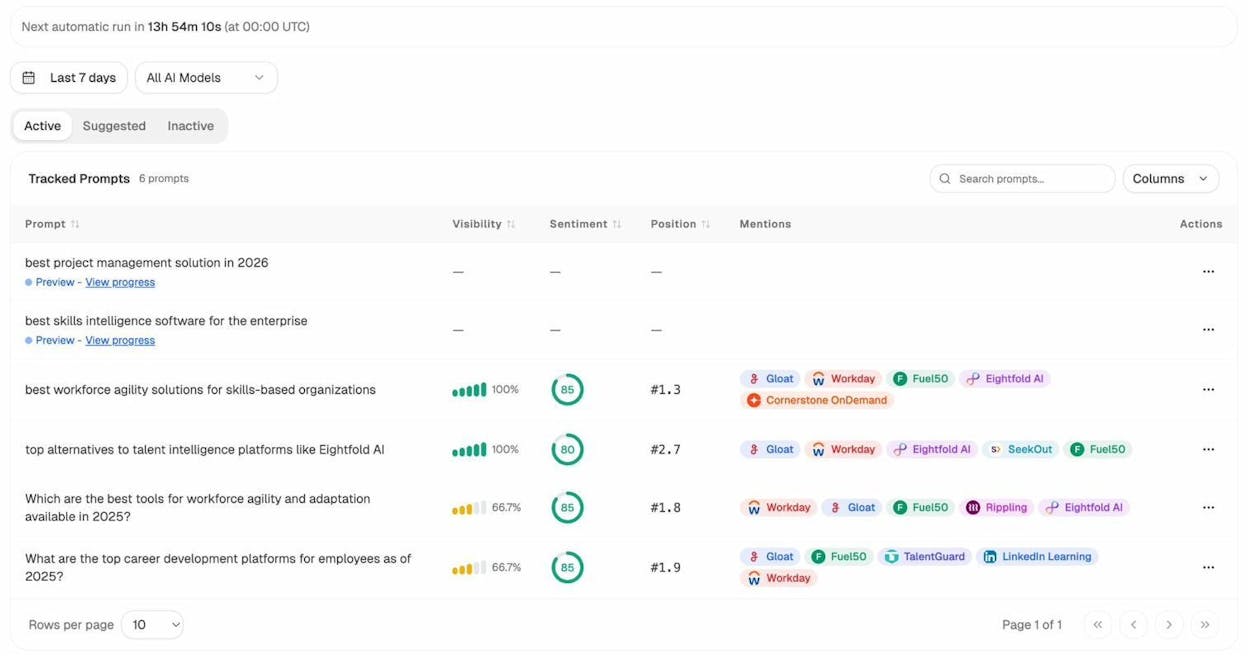
For each tracked prompt, Analyze AI records your visibility percentage, average position, sentiment score, and which competitors appear alongside you. This gives you a clear “before” snapshot to compare against once you make changes.
Measure AI Traffic Impact
Analyze AI’s AI Traffic Analytics connects to your GA4 account and shows exactly how many visitors arrive from each AI platform, which pages they land on, and how they engage.
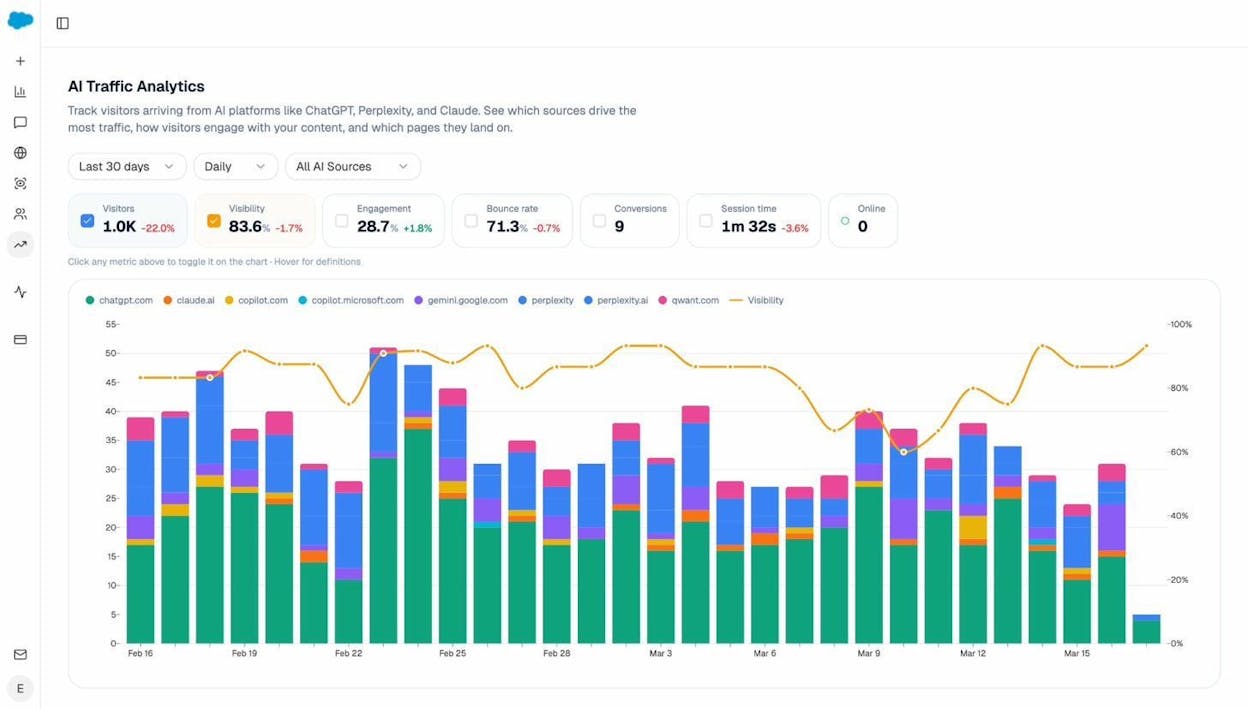
This is the AI search equivalent of checking Google Analytics during a traditional SEO test. If you optimize a group of pages and AI traffic to those pages increases while traffic to your control pages stays flat, that is a strong signal that your changes are working.
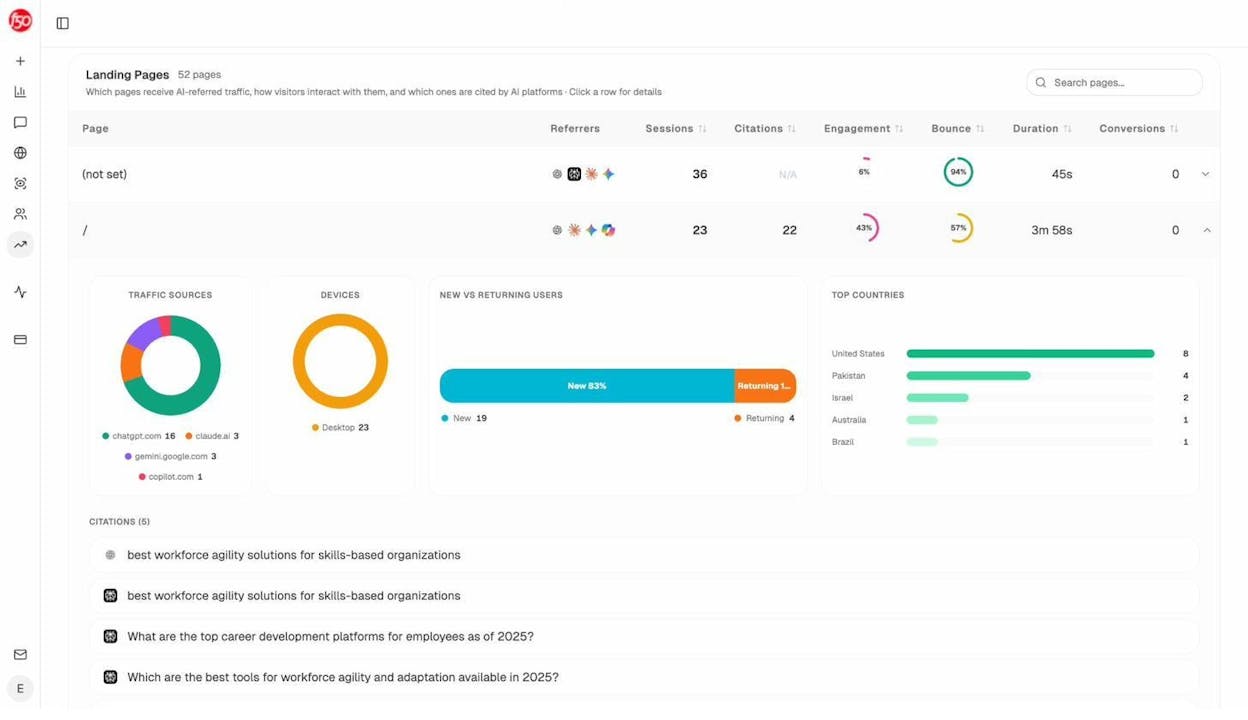
You can also drill into landing page data to see exactly which pages receive AI-referred traffic, broken down by engine and engagement metrics.
Test Prompt Visibility with Ad Hoc Searches
Not every test requires a full tracking campaign. Analyze AI’s AI Search Explorer lets you run ad hoc searches across ChatGPT, Google AI, and Perplexity to quickly check whether your brand shows up for specific prompts.
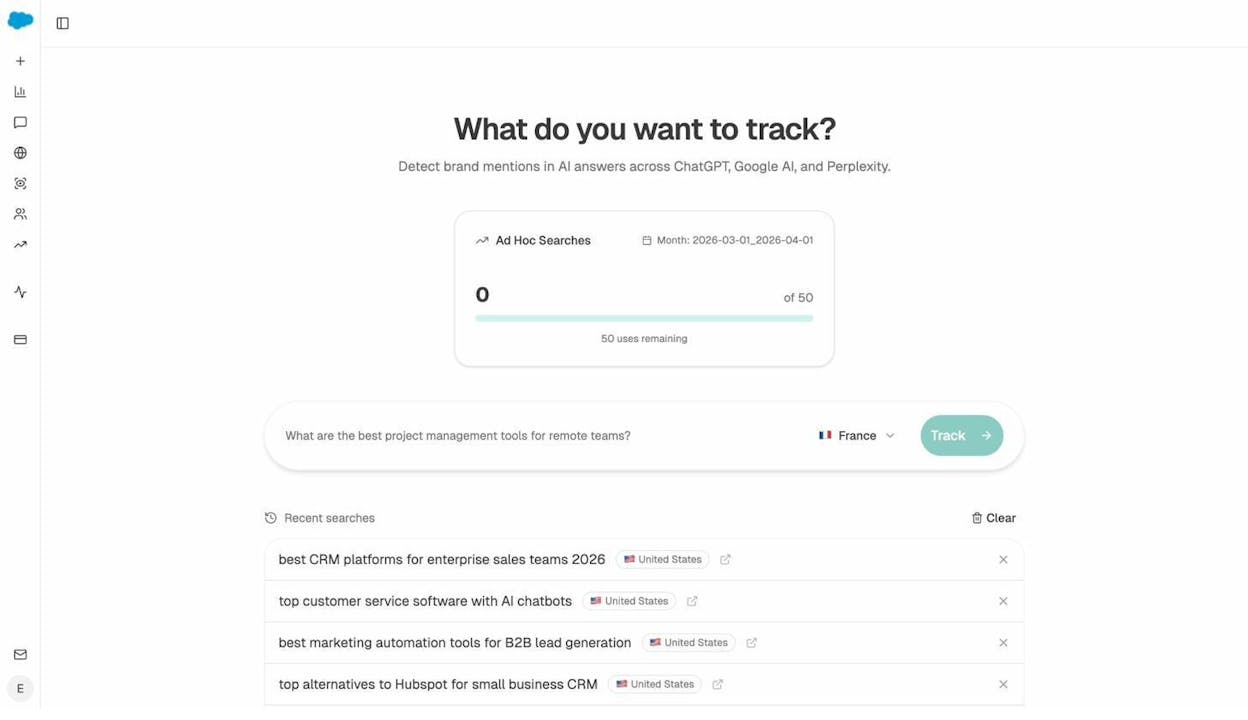
This is useful for fast directional checks. For instance, after optimizing a product page with better entity coverage and structured data, you can search relevant prompts to see if AI engines now mention your brand where they did not before. It is the AI search version of manually checking Google to see where your page ranks.
What AI Search Tests Look Like in Practice
Here are a few examples of how traditional SEO tests can be extended to AI search:
Title tag test: You are testing whether adding “2026” to blog post title tags improves CTR. While measuring CTR in Google Search Console, also track whether those updated posts start appearing more frequently in AI answers. AI engines often favor content that signals freshness.
Content optimization test: You are testing whether optimizing blog posts with a content optimization tool improves rankings. In parallel, use Analyze AI to track whether those optimized posts gain more AI citations. AI models tend to cite content that is comprehensive and well-structured.
Schema markup test: You are testing whether adding FAQ schema to category pages drives more featured snippets. Check whether pages with FAQ schema also get cited more frequently by AI engines, since structured content is easier for models to parse and reference.
The point is not to run separate AI search tests. It is to measure AI search impact alongside your existing SEO tests. This takes minimal extra effort and gives you a much fuller picture of how your changes affect organic visibility across all channels.
Examples of SEO Tests
Here are five SEO tests worth running, along with the methodology for each.
1. Testing Title Tag Changes on CTR
Title tags appear in search results and directly affect whether people click. If your site uses a consistent title tag formula across product or category pages, testing a different formula is straightforward.
How to test: Take 100 e-commerce category pages with at least 500 monthly impressions each. Randomly assign 50 to the variant group. Change the title tag formula on the variant pages.
For example, your current formula might be:
[Product Category] | [Brand Name]
You could test:
[Product Category] - Free Shipping | [Brand Name]
Or:
Best [Product Category] in 2026 | [Brand Name]
How to measure: Use Google Search Console to compare average CTR for pages in both groups over a 30-day period before and after the change. Export the data to a spreadsheet for clean comparison.
![[Screenshot of a spreadsheet comparing pre-test and post-test CTR for control and variant page groups]](https://www.datocms-assets.com/164164/1777550410-blobid10.png?auto=format,compress&w=1248&fit=max)
2. Testing Content Optimization on Rankings
Content optimization tools score your content against top-ranking pages and suggest improvements like adding missing subtopics, improving readability, or increasing word count. But do they actually improve rankings?
How to test: Find 60 blog posts that rank in positions 4 through 15 for their target keywords and receive at least 200 monthly organic clicks each. Randomly assign 30 to the variant group. Optimize those 30 posts using a content optimization tool. Leave the control group untouched.
How to measure: Use a rank tracking tool to compare the average position of tracked keywords in each group over a 30 to 60-day period.
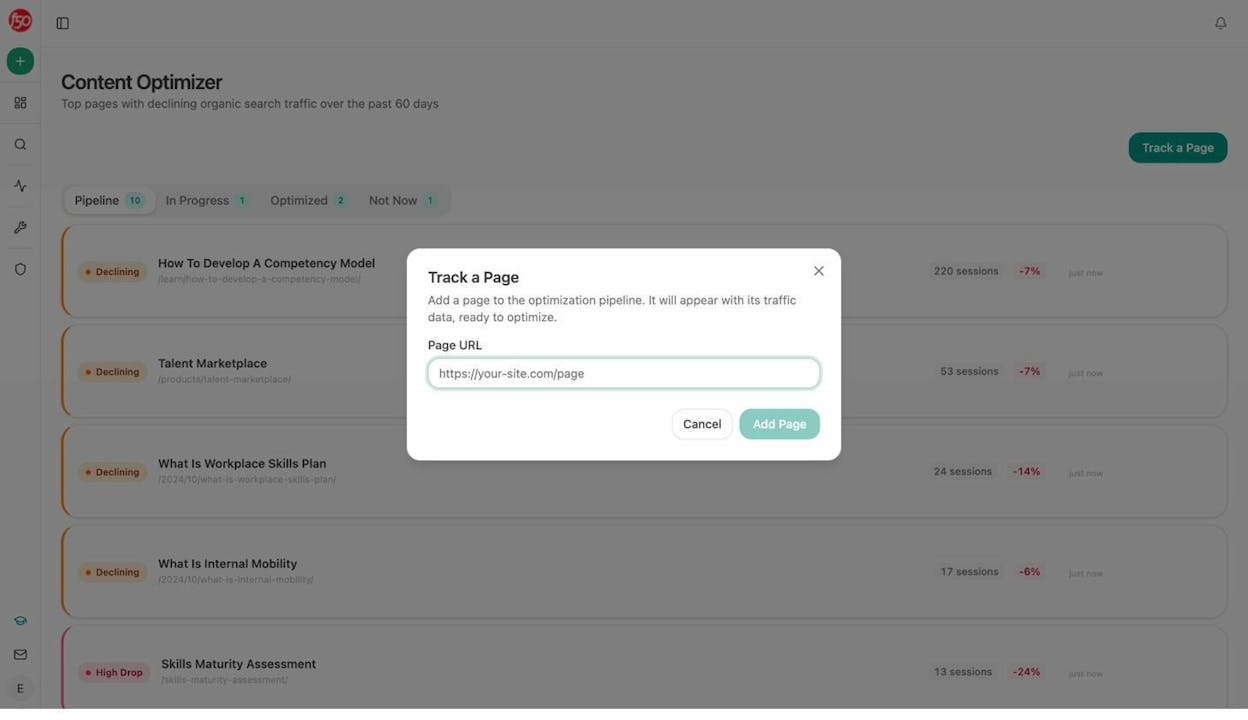
You can also track this in Analyze AI’s Content Optimizer, which identifies pages with declining organic traffic and provides AI-driven editorial suggestions for improvement. After optimizing, track whether the pages recover traffic and start gaining AI citations.
3. Testing Snippet-Friendly Content on Featured Snippet Rankings
Featured snippets sit above the regular organic results and typically earn higher CTR. If you have blog posts ranking in the top 10 for keywords that trigger featured snippets, testing your ability to win them is worth the effort.
How to test: Find 40 blog posts that rank in the top 10 for keywords that trigger featured snippets but where you do not currently own the snippet. Randomly assign 20 to the variant group. Add snippet-friendly content to those posts, such as concise paragraph-style answers, numbered lists, or comparison tables directly below the relevant H2.
How to measure: Use a rank tracking tool to compare the number of featured snippets owned by each group before and after the changes. Check the variant group weekly to see if snippets are being won over the test period.
4. Testing Internal Linking on Page Authority and Rankings
Internal links distribute authority across your site and help search engines understand content relationships. Testing whether adding strategic internal links to underperforming pages improves their rankings is a high-value experiment.
How to test: Identify 40 blog posts that rank in positions 6 through 20 for their primary keyword. Randomly assign 20 to the variant group. Add three to five relevant internal links pointing to each variant page from high-authority pages on your site. Keep the control pages unchanged.
How to measure: Track average keyword position changes for both groups over 30 to 60 days. Also monitor organic traffic to the variant pages for any uplift.
5. Testing Structured Data on Rich Result Eligibility
Adding structured data (schema markup) can qualify your pages for rich results like FAQs, how-tos, product ratings, and review stars. These rich results take up more visual space in SERPs and can improve CTR.
How to test: Take 50 eligible pages (product pages, recipe pages, or FAQ pages) that do not currently have structured data. Randomly assign 25 to the variant group. Add the appropriate schema markup to those pages. Validate with Google’s Rich Results Test before deploying.
![[Screenshot of Google’s Rich Results Test tool showing a valid FAQ schema implementation]](https://www.datocms-assets.com/164164/1777550416-blobid12.png?auto=format,compress&w=1248&fit=max)
How to measure: Use Google Search Console’s search appearance filters to compare the number of rich results earned by each group. Track CTR changes for both groups over a 30 to 60-day period.
Tools for SEO Testing
Here are the tools you need to run SEO tests, along with what each one is best for.
Google Search Console is free and gives you the raw data you need for most tests: impressions, clicks, CTR, and average position. The main limitation is that its filtering and export options are clunky. You will likely need to export data to a spreadsheet for proper analysis.
Google Analytics (or alternatives) tracks organic sessions at the page level, which is essential for traffic-based tests. If you are looking for an alternative to Google Analytics, tools like Plausible or Fathom offer simpler interfaces with privacy-friendly tracking.
Rank tracking tools like Ahrefs Rank Tracker, AccuRanker, or other keyword tracking tools let you monitor daily ranking positions for tagged keyword groups, making it easy to compare control and variant performance over time.
Dedicated SEO testing tools like SearchPilot or SplitSignal handle the statistical analysis and test management for you. They connect to Google Search Console, automate randomization, and calculate statistical significance. These are worth the investment for enterprise teams running multiple tests simultaneously.
Analyze AI extends testing to AI search by tracking AI visibility, citations, prompt rankings, AI-referred traffic, and sentiment across ChatGPT, Perplexity, Gemini, and Copilot. For teams that already run traditional SEO tests, Analyze AI adds the AI search measurement layer without requiring a separate workflow.
Free keyword and SEO tools can help during the hypothesis formation stage. Use tools like the keyword difficulty checker, SERP checker, or keyword rank checker to gather data that informs which tests are most likely to move the needle.
Common SEO Testing Mistakes
Avoid these mistakes to save time and get results you can trust.
Testing Without Enough Traffic
If your test pages receive fewer than a few hundred organic clicks per month combined, the results will not be statistically meaningful. You are drawing conclusions from too small a sample. Wait until you have enough traffic, or use larger page groups to compensate.
Changing Multiple Variables at Once
If you change the title tag, add schema markup, and rewrite the intro paragraph all in the same test, you will not know which change caused the result. Isolate one variable per test. Run separate tests for each change you want to evaluate.
Running Tests Too Short
Ending a test after one week because you saw an early positive signal is a common mistake. Short-term fluctuations in rankings and traffic are normal. Give the test at least two to four weeks to account for crawling delays, daily variance, and weekday/weekend cycles.
Ignoring Seasonal Patterns
If you start a test in October and end it in December, holiday-related traffic surges could make your results look better than they actually are. This is why having a control group matters. But you should also avoid starting tests during periods of known traffic volatility if possible.
Testing Things That Do Not Matter
Do not test trivial changes like swapping “and” for “&” in a title tag or changing a period to an exclamation point. Focus on changes that have a plausible mechanism for affecting search performance. Good test candidates include title tag formulas, content depth, internal linking patterns, structured data, page speed improvements, and content freshness.
Forgetting About AI Search
If you run SEO tests but never check how those changes affect AI visibility, you are only seeing half the picture. As AI search grows as an organic channel, changes that improve Google rankings often improve AI citations too. And sometimes changes that do not help Google rankings do help AI visibility. Measuring both gives you a complete view of your organic performance.
A Note on Statistical Significance
Statistical significance is a way to determine whether your test results are reliable or whether the observed difference could have happened by chance.
Here is the simple version: the larger the difference between your control and variant groups, and the more data you have, the more confident you can be that the result is real. A 15% improvement across 10,000 clicks is much more convincing than a 15% improvement across 100 clicks.
Most dedicated SEO testing tools calculate statistical significance for you. If you are running tests manually, aim for a minimum of 95% confidence before making decisions based on your results. Free online A/B test significance calculators can help you check this.
When in doubt, run the test longer or increase your sample size. It is always better to wait for reliable data than to make decisions based on noise.
Final Thoughts
SEO testing turns guesswork into evidence. Instead of debating whether a change will help or hurt, you test it, measure it, and know.
The process itself is simple. Form a hypothesis, split your pages, make the change, track the results, and decide. The hard part is patience and discipline: waiting for enough data, isolating one variable at a time, and accepting when a test shows that your idea did not work.
And as AI search becomes a bigger part of how people discover brands and products, the testing mindset matters even more. The teams that test their way into better performance across both Google and AI engines will have a compounding advantage over those who guess.
Start with one test. Pick the change you are most curious about, run it for a month, and see what happens. The worst outcome is that you learn something.

Ernest

Ibrahim


