



Summarize this blog post with:


In this article, you’ll see the 5 rank tracking tools worth keeping in your stack in 2026, what each one does well, and where each one falls short. You’ll also see how rank tracking has shifted now that buyers research through AI answers as much as Google, and how to set up a tracking workflow that covers both channels without doubling your tool spend.
Table of Contents
Rank tracking isn’t one job anymore
For years, rank tracking meant one thing. You picked a keyword, set the geo and device, and watched the position number on Google move. Every tool was built around that motion.
Buyers don’t search like that anymore. Around 40% of US adults now use AI tools at least once a month, and 20% use them ten or more times. Many of those sessions replace a Google search. Your “position” in that flow has nothing to do with the blue links. It’s whether your brand shows up in the answer, how the model talks about you, and which of your pages it cites as the source.
Rank tracking in 2026 is really three jobs:
-
Classic SERP position. Where you sit in Google (and Bing) by keyword, geo, and device.
-
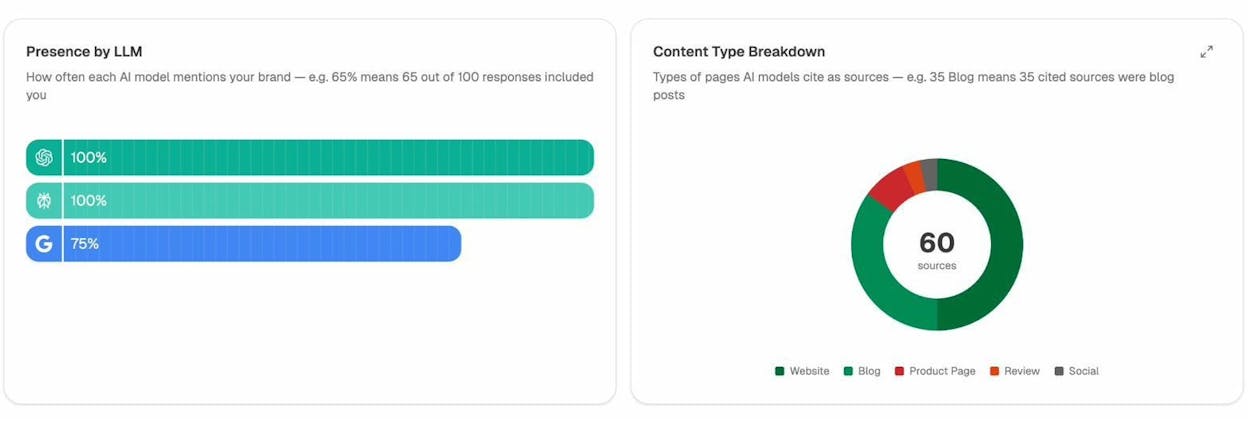
AI answer presence. How often you appear inside answers from ChatGPT, Perplexity, Gemini, Claude, Copilot, and Google AI Mode for the prompts your buyers run. And in what tone.
-
Citation share. Which of your URLs the models cite as the source, and how often, relative to competitors.
A tool that only does the first leaves you blind to a channel buyers use to build a shortlist. A tool that only does the second leaves you flying without the Google data your team has trusted for a decade.
One more thing before the list. At Analyze AI we don’t believe SEO is dead, and we’ve written about that in our manifesto. Rankings inside AI answers correlate closely with what already ranks in Google. The teams winning now treat AI search as an additional organic channel next to SEO, not its replacement.
TL;DR: the five tools at a glance
|
Tool |
Best for |
Tracks AI answers |
Tracks Google SERP |
Starting price |
|---|---|---|---|---|
|
Analyze AI |
Teams treating AI search as a measurable channel and tying rankings to revenue |
Native, prompt-level across 6 engines |
Through Agent Builder (GSC, DataForSEO, Semrush nodes) |
See pricing |
|
SE Ranking |
Solo SEOs and small agencies who want one main SEO hub |
AI Search add-on ($89+/mo) |
Native, strong local coverage |
$52/mo (Essential, annual) |
|
AccuRanker |
Enterprise SEO teams that need speed and very large keyword sets |
Partial via AI Overview tracking |
Native, near real-time updates |
$224/mo (Professional, monthly) |
|
Semrush |
Teams that want rank tracking inside a full SEO suite |
AI Visibility Toolkit add-on ($99-$745/mo) |
Native (Position Tracking) |
$139.95/mo (Pro) |
|
Mangools SERPWatcher |
Small sites and solo creators on a budget |
AI Search Watcher (bundled) |
Native, simple daily updates |
$29.90/mo (Basic, annual) |
Prices verified on each vendor’s site in April-May 2026.
1. Analyze AI: the agentic platform for SEO, AEO, content, and GTM ops
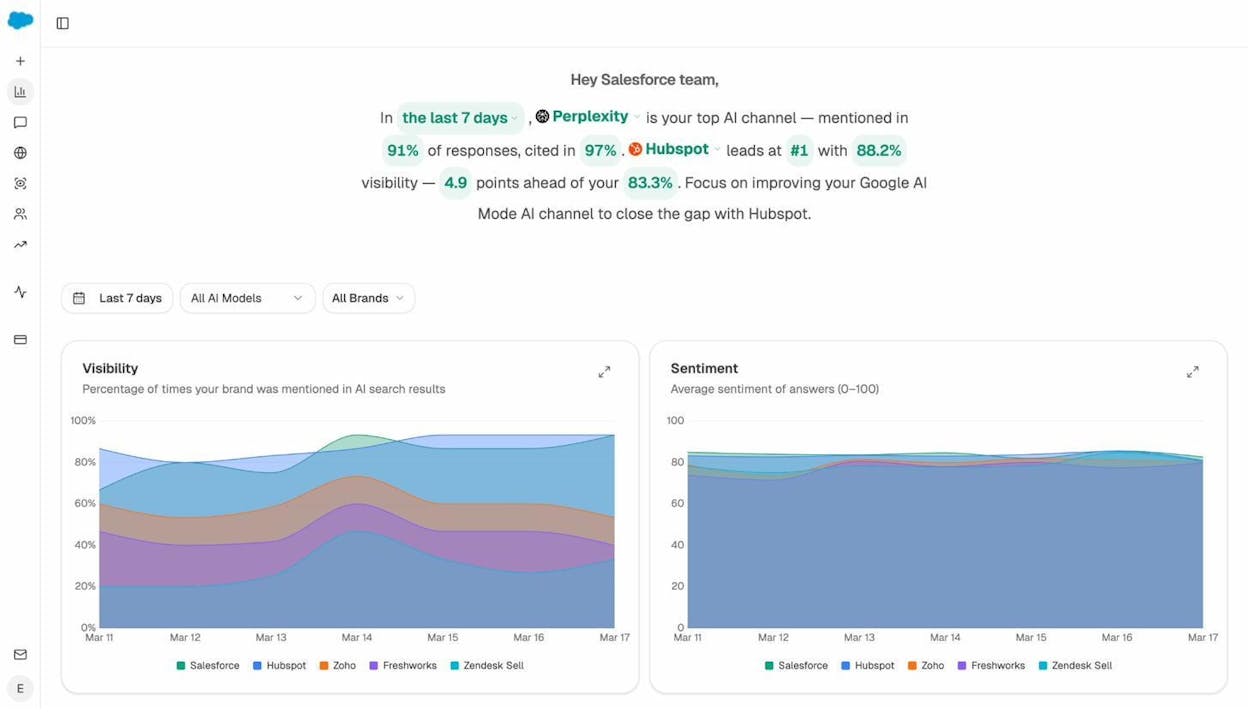
Analyze AI is the agentic platform for SEO, AEO, content, and GTM ops. It tracks how often your brand appears across prompts and models, how those appearances translate into sessions and pipeline, and which pages and outside sources the models cite. Then it lets you act on what it finds inside the same workspace through a Content Writer, a Content Optimizer, and an Agent Builder that pulls from GA4, Google Search Console, DataForSEO, Semrush, HubSpot, Notion, WordPress, Slack, and the major LLMs.
Most tools on this list are read-only dashboards. Analyze AI is also a programmable substrate that runs the workflows on top of the data.
Track your rank inside AI answers
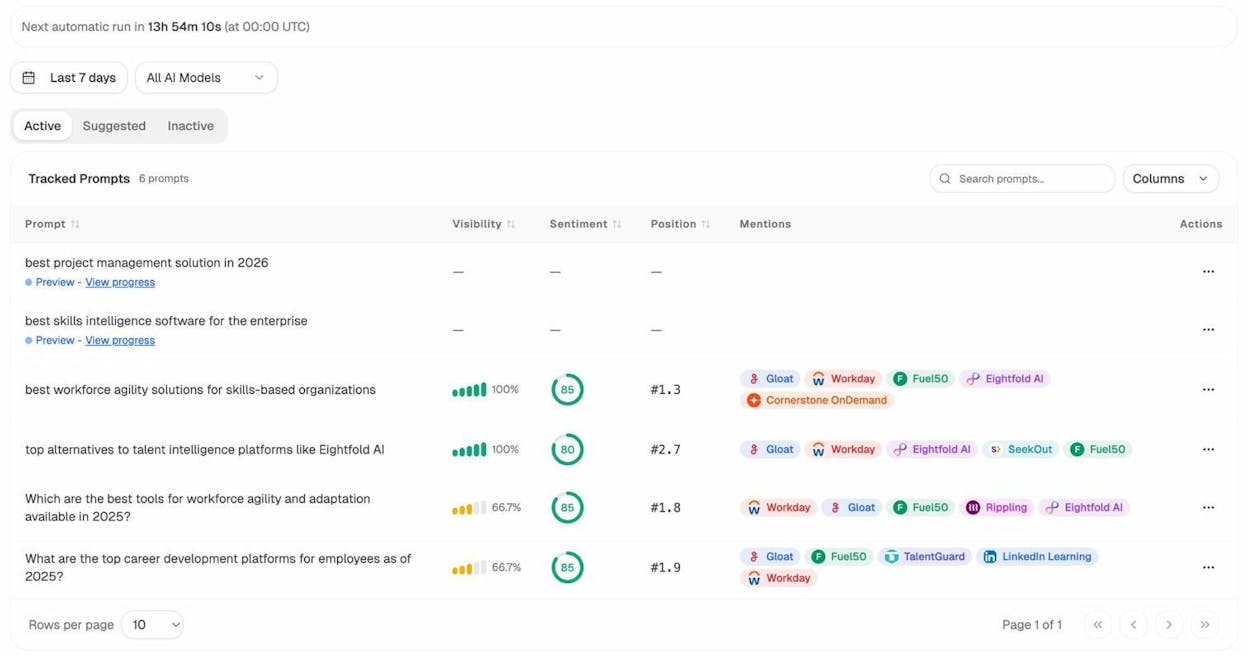
You pick the prompts you want to defend (“best CRM for B2B SaaS,” “alternatives to HubSpot for mid-market”) and Analyze AI runs them daily across ChatGPT, Perplexity, Claude, Gemini, Copilot, and Google AI Mode. For each prompt you get visibility percentage, position against competitors, and sentiment score per model. If you don’t know which prompts to track, Prompt Discovery surfaces the bottom-of-funnel prompts buyers in your category run.
Tie those AI ranks to real sessions and revenue
Visibility on its own is a vanity metric. So every AI session that lands on your site gets attributed back to the engine and landing page that earned it, through AI Traffic Analytics. When ChatGPT sends 248 sessions to your alternatives page and Perplexity sends 142 to your pricing page, you stop optimizing for impressions and start optimizing for pages that convert.
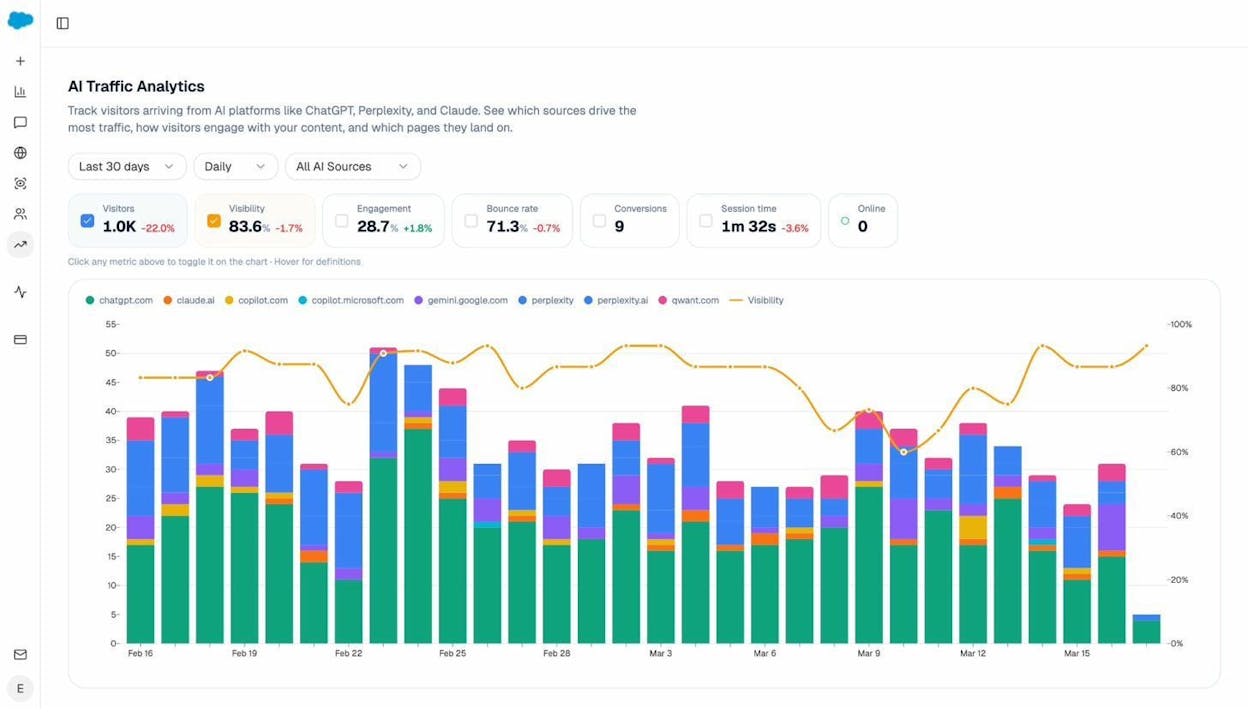
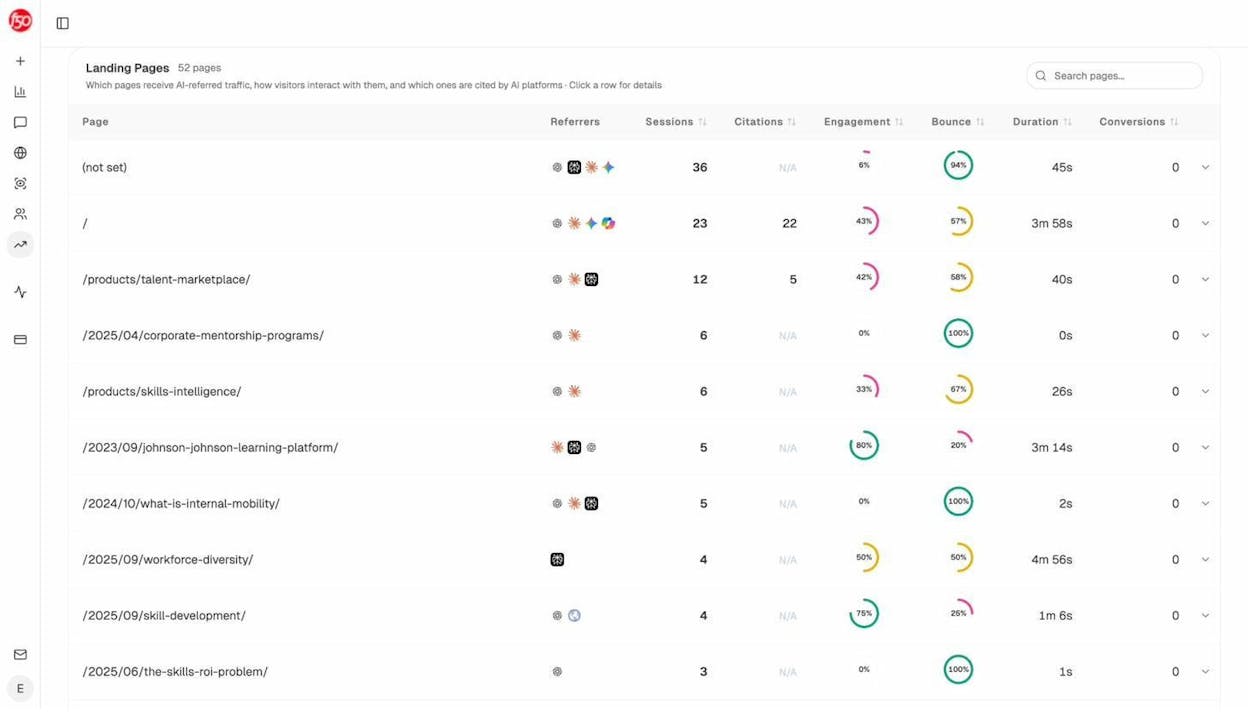
The Landing Pages report shows which URLs receive AI traffic, the engine that sent each session, and the conversion events those visits trigger.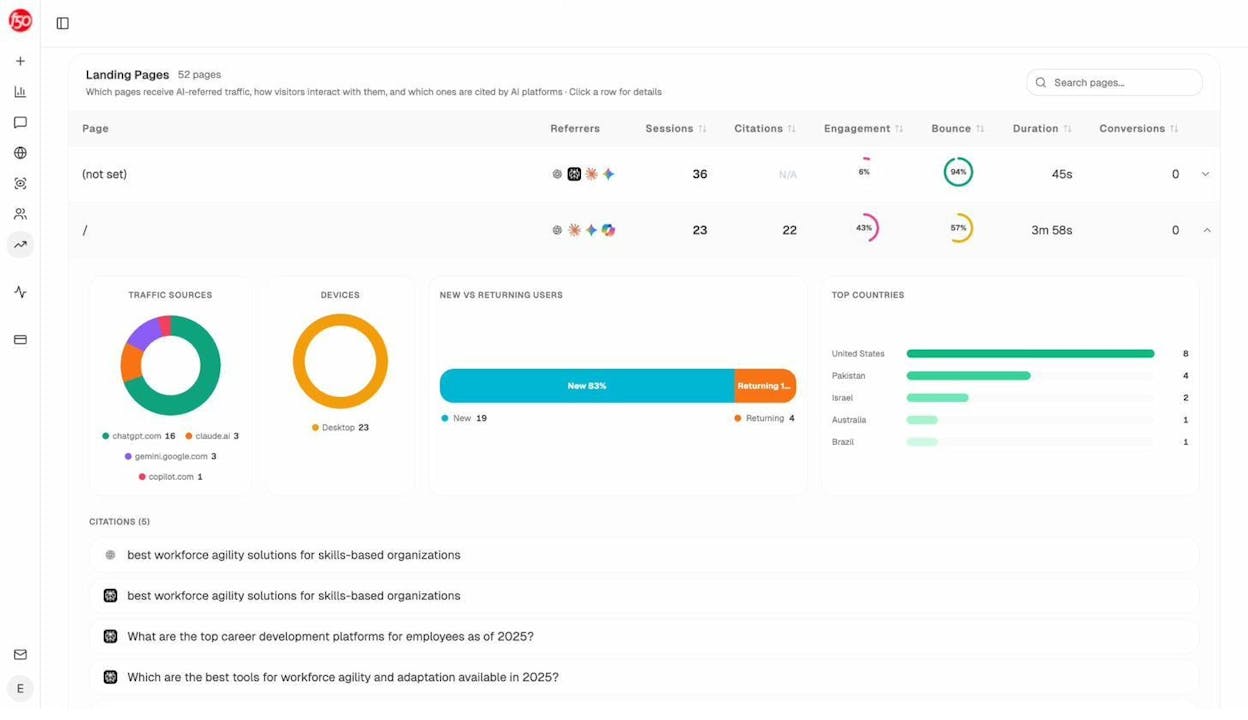
See which sources the models trust
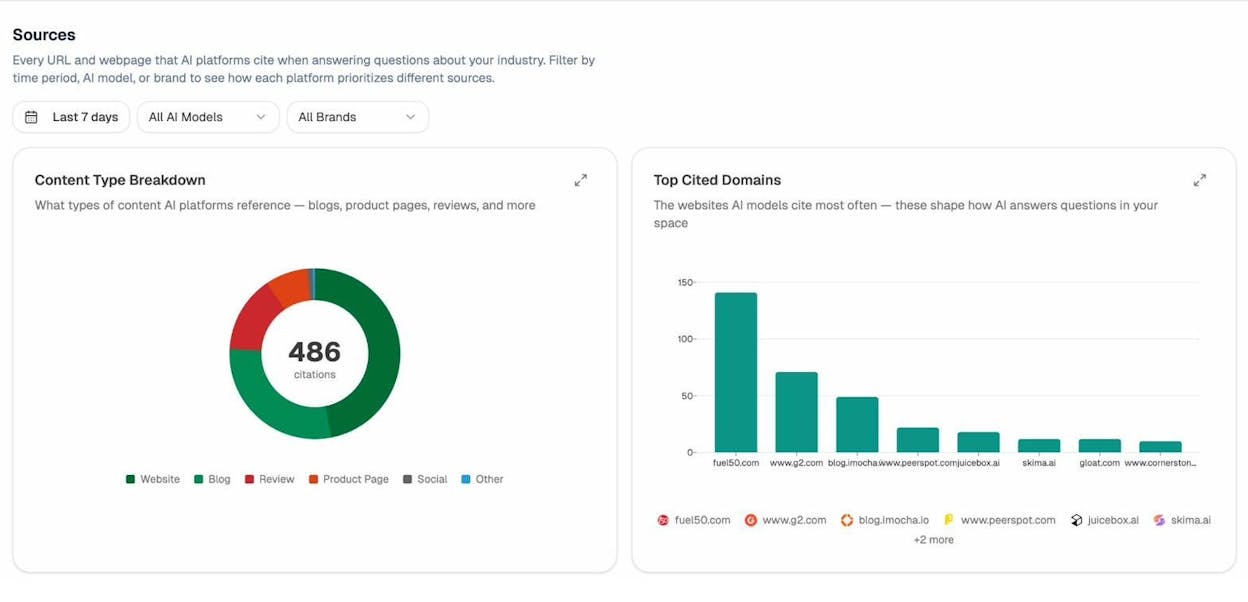
Citation Analytics shows the domains and URLs the models pull from when answering questions in your category. You see citation count per source, which models reference each domain, and when each citation first appeared. Instead of generic link building, you target the specific outlets, review sites, and comparison pages that already shape AI answers in your space.
Read the competitive map at a glance
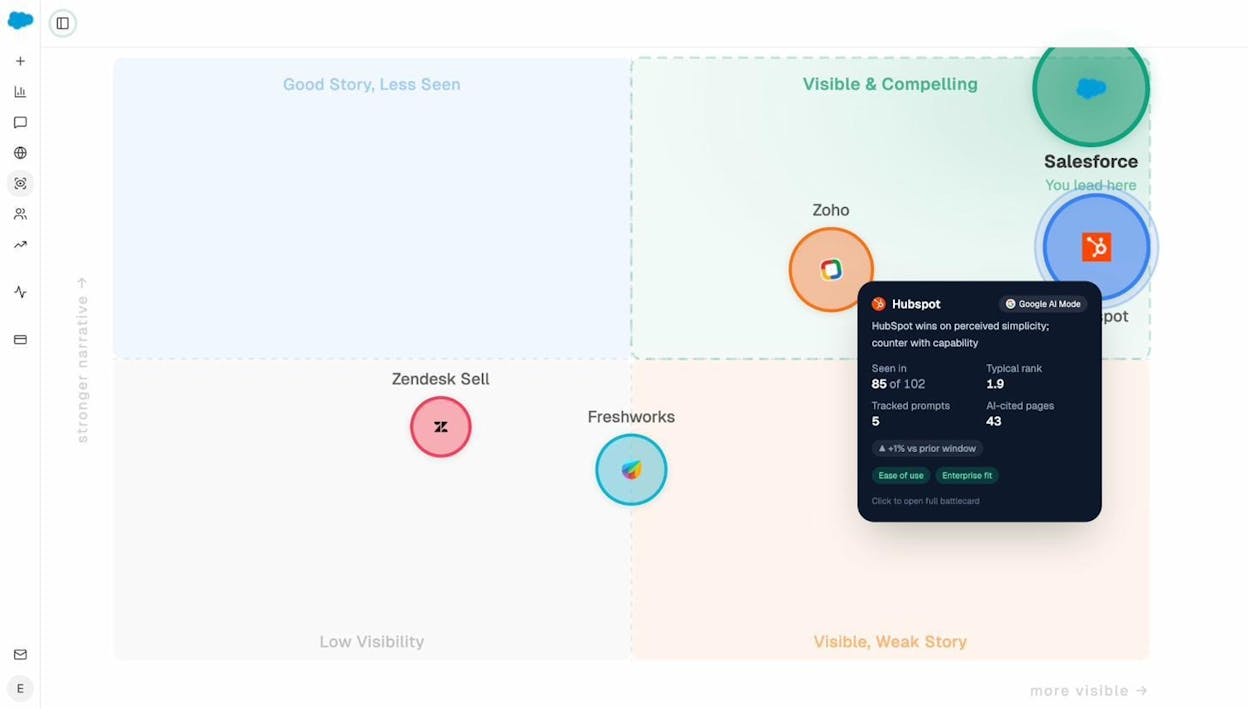
Competitor Intelligence tracks the prompts where competitors win and you don’t. The Perception Map plots every tracked brand on a quadrant by presence and narrative strength, so you see who’s gaining, who’s stalling, and where you sit relative to incumbents.
Build any workflow you can describe with Agent Builder
This is the part most people miss when comparing Analyze AI to other tools. Under the visibility dashboards sits a programmable substrate with 180+ nodes, 34 pre-built data recipes, and three trigger modes (manual, scheduled, webhook).
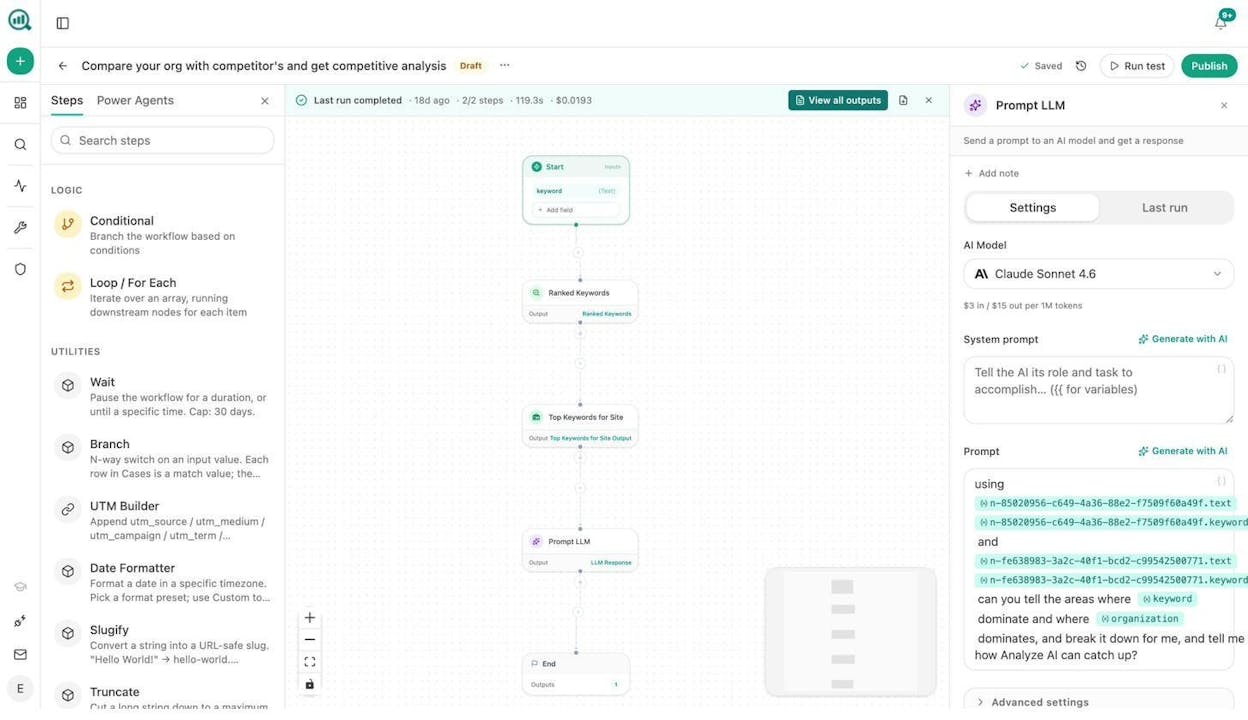
The nodes are pre-wired to GA4, Google Search Console, DataForSEO (27 nodes covering ranked keywords, keyword difficulty, SERP competitors, on-page audits), Semrush (7 nodes), HubSpot, Notion, WordPress, and every major LLM. A “rank tracking workflow” stops meaning “look at a dashboard once a week” and starts meaning whatever the job actually needs:
-
Weekly competitor diff. AI visibility deltas, GSC top pages, new backlinks per tracked competitor, dropped in Slack every Monday at 7am.
-
Citation decay alert. Flags pages losing AI citations faster than traffic, so you refresh them before the erosion shows up in revenue.
-
Brief-to-publish pipeline. Takes a prompt cluster from “uncovered queries,” generates research and outline, drafts with the brand vault, runs an AEO score check, and publishes to WordPress only if the score clears your threshold.
There’s no “rank tracking” toggle in any of these. The rank data is one input. The workflow is the product.
Close the loop with Writer and Optimizer
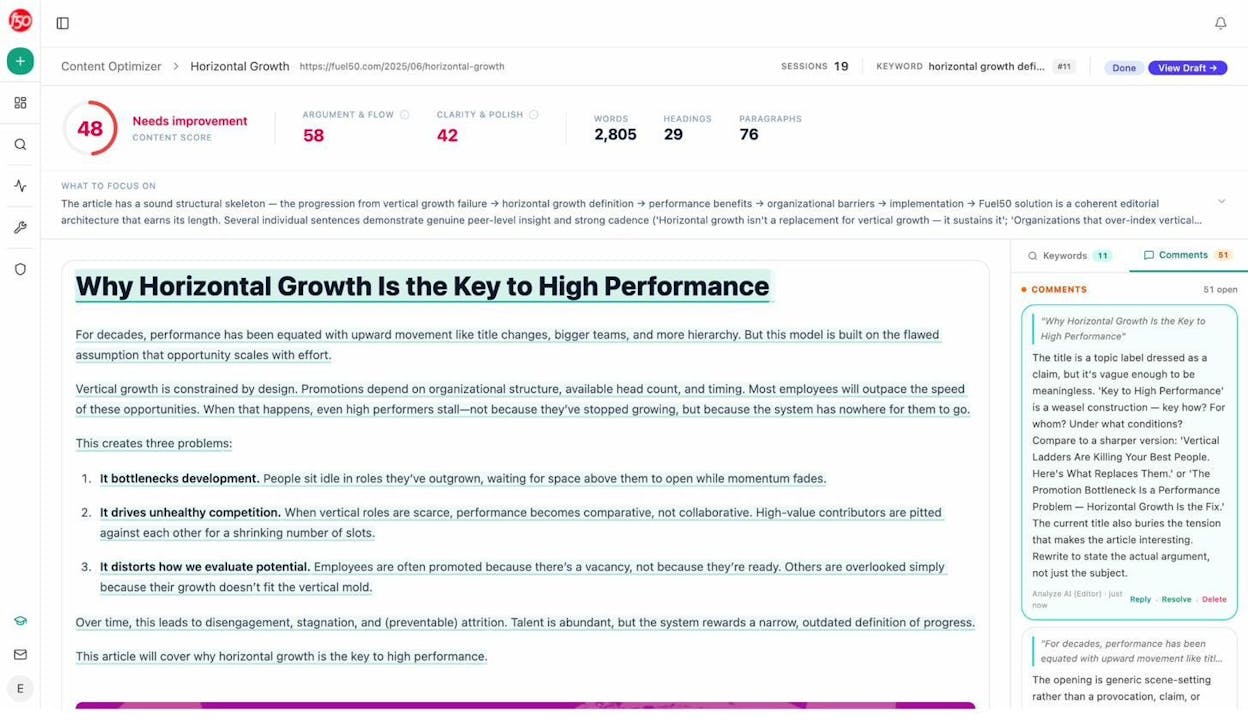
The AI Content Writer and AI Content Optimizer close the loop. When the visibility dashboards flag an underperforming page, the Optimizer fetches the live URL, scores it against the gap, leaves inline editorial comments, and produces a rewritten version you can publish through WordPress.
Pick Analyze AI when AI search is a real channel for you (or about to be) and you want one workspace that tracks rankings, ties them to revenue, and lets your team build the recurring workflows on top of the data.
2. SE Ranking: the budget all-rounder for solo SEOs and small agencies
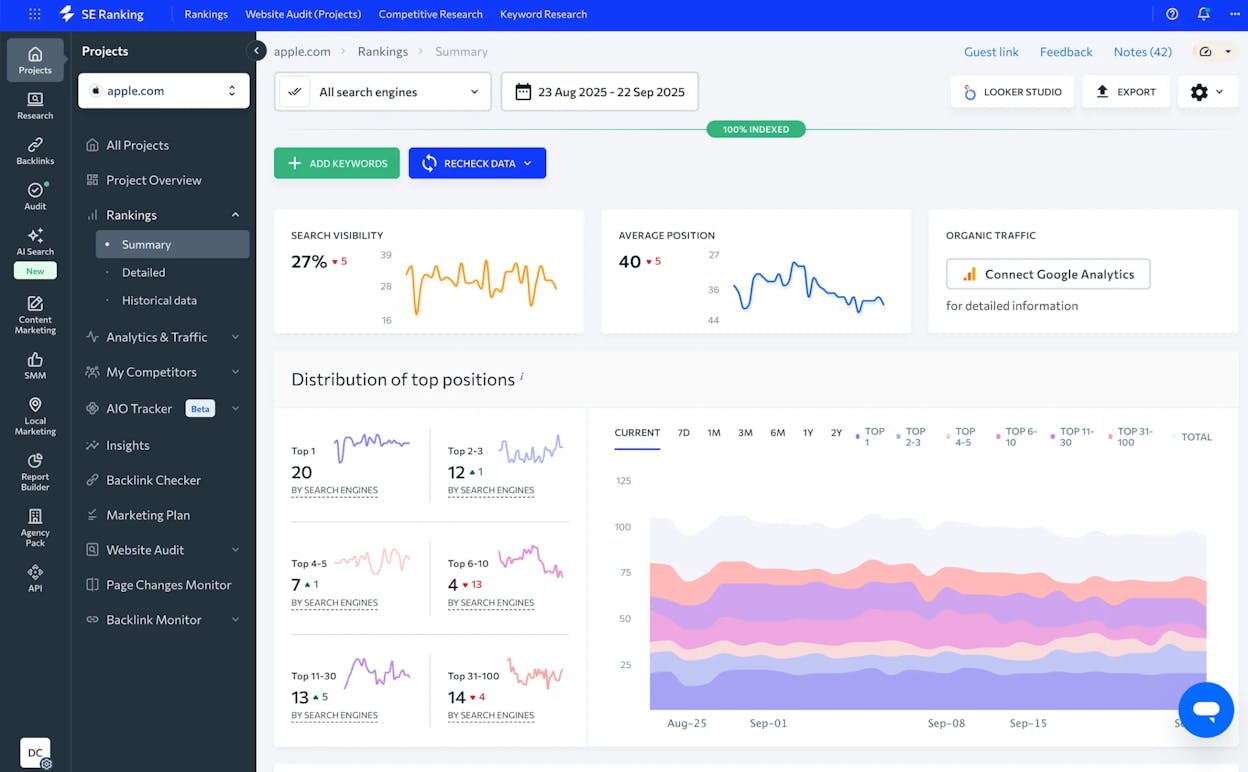
SE Ranking started as a rank tracker and grew into a tool that handles most daily SEO jobs in one workspace. Position tracking sits alongside site audits, backlink monitoring, and on-page checks. So instead of switching between tools when a ranking moves, you stay in one place to see what changed on the page and in the link profile.
The local angle is what most reviewers point to first. You can track desktop and mobile rankings across more than 65,000 locations, including map pack and other SERP features. For agencies serving local businesses, that coverage is hard to find at the price.
Where SE Ranking stands out
-
Rank tracking across 188 countries with city-level targeting
-
Local pack and map result tracking inside the same keyword report
-
White-label client reports without a higher-tier upgrade
-
AI Search add-on that monitors visibility across Google AI Overviews, AI Mode, ChatGPT, Gemini, and Perplexity
-
14-day free trial with no credit card
Where it falls short
The keyword limit math catches new buyers off guard. SE Ranking calculates daily limits as keywords multiplied by search engines tracked. A 2,000-keyword Pro plan tracking across Google Desktop, Google Mobile, and Bing gives you roughly 667 effective keywords. Exceed the limit and the platform blocks your account until you delete keywords or upgrade. The backlink index also lags behind the larger players, and the Agency Pack white-label module sits behind a separate $50/mo fee.
Pricing (verified April-May 2026)
|
Plan |
Annual |
Monthly |
Keywords tracked daily |
|---|---|---|---|
|
Essential |
$52/mo |
$65/mo |
750 |
|
Pro |
$95.20/mo |
$119/mo |
2,000 |
|
Business |
$207.20/mo |
$259/mo |
5,000+ |
Pick SE Ranking when you want one cheap SEO hub for a few client sites, your work depends on local rankings, and you can live with the keyword multiplier math.
3. AccuRanker: precision rank tracking for enterprise SEO teams
![AccuRanker dashboard showing near real-time rank tracking, on-demand keyword refresh, share of voice graph, and competitor comparison view.]](https://www.datocms-assets.com/164164/1778830436-blobid10.png?auto=format,compress&w=1248&fit=max)
AccuRanker focuses on doing one job extremely well. You set up keywords, AccuRanker tracks them, and the data updates faster and more accurately than almost anything else on this list. Most rank trackers update daily. AccuRanker offers on-demand refresh, so you can see ranking impact within hours of pushing a page change.
The other thing AccuRanker handles well is scale. The platform doesn’t slow down at 10,000+ keywords the way some all-in-ones do. You can group keywords by intent, market, device, or campaign, and build reports that surface ranking patterns without dumping everything into a spreadsheet.
Where AccuRanker stands out
-
On-demand rank refresh (the only tool on this list that offers it as a core feature)
-
Near real-time updates that show ranking shifts the same day you ship a change
-
Unlimited domains and users on every plan (you pay for keywords, not seats)
-
Strong API for piping rank data into Looker, BigQuery, or an internal dashboard
-
AI Overview tracking included on all plans
Where it falls short
AccuRanker is a focused rank tracker, not a suite. There’s no real keyword research, no content optimization, no backlink tracking, and no AI prompt-level monitoring. You’ll need other tools for everything that isn’t a ranking number.
The bigger surprise for most buyers is the new pricing. The widely-quoted “$129/month for 1,000 keywords” plan is gone. The entry Professional tier starts at $224/mo for 2,000 keywords (or $201/mo annual). Solo SEOs and small agencies tracking 500-1,500 keywords pay for capacity they don’t use. Cancellation also requires phone contact, which some users on Trustpilot have flagged as friction.
Pricing (verified April-May 2026)
|
Plan |
Monthly |
Annual |
Keywords |
|---|---|---|---|
|
Professional |
$224/mo |
$201/mo |
2,000-5,000 |
|
Expert |
~$849/mo |
~$764/mo |
10,000-35,000 |
|
Enterprise |
$2,409+/mo |
Custom |
40,000-100,000+ |
Pick AccuRanker if you run enterprise SEO with thousands of keywords, you need rank refresh speed to validate experiments, and you already have a separate tool stack for content, links, and AI visibility.
4. Semrush: the full SEO suite where rank tracking is one feature among many
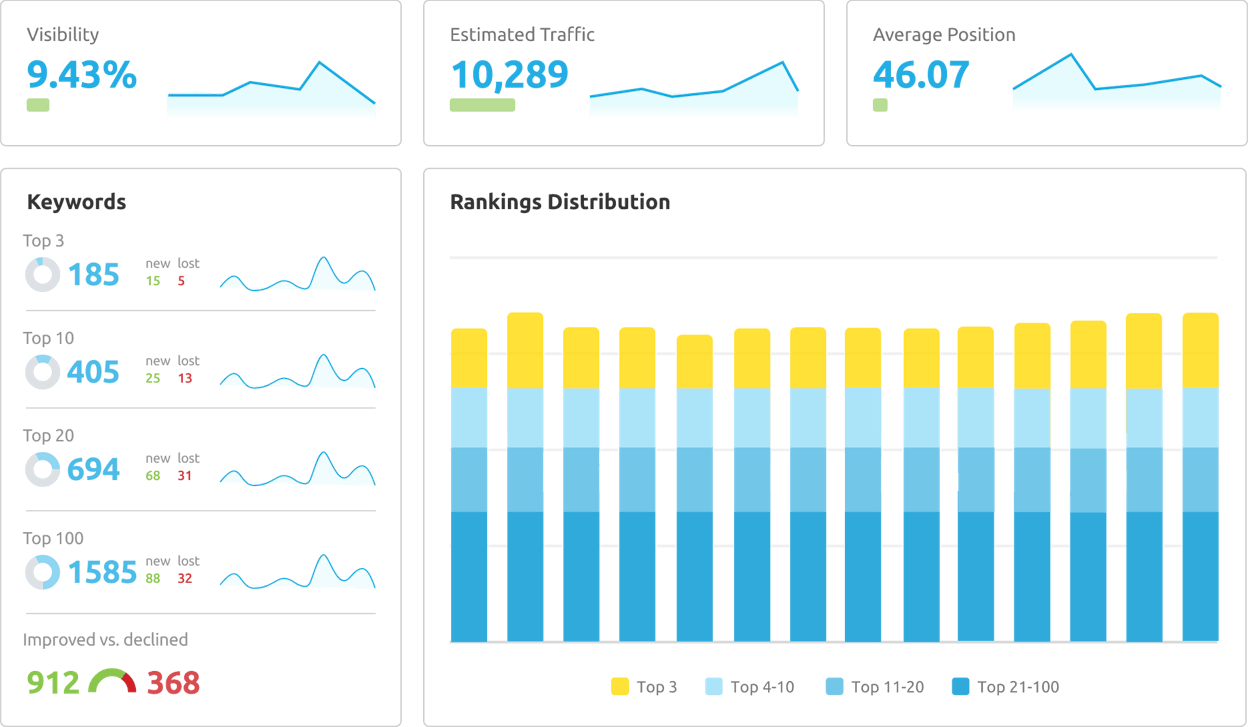
Semrush is the platform most SEO teams already use for something. Rank tracking lives inside Position Tracking, sitting alongside keyword research tools, site audits, backlink analysis, and a Content Marketing Toolkit. If your team already pays for Semrush, Position Tracking is essentially “free” in the sense that you’re not adding a new tool.
Where Semrush stands out
-
Position Tracking with device, location, and SERP feature breakdown across 5,000+ keywords on Business
-
Largest keyword database in the market (25B+ keywords)
-
Share of Voice metric on Business that aggregates rankings into a single category-level number
-
Content Marketing Toolkit on Guru+ that ties ranking opportunities to briefs
-
Semrush One bundle ($199-$549/mo) that adds AI Visibility tracking to the classic SEO toolkit
Where it falls short
Semrush’s surface area is its biggest friction. The dashboard shows everything, which means a new user needs hours of learning before basic position tracking feels fast. The Pro plan only includes 500 tracked keywords across 5 projects, so freelancers managing 4 client sites plus their own hit the ceiling almost immediately.
The bigger watch-out for 2026 is the Adobe acquisition, announced in November 2025 and expected to close in H1 2026. Adobe has historically raised prices after acquisitions, so teams signing annual contracts should confirm renewal terms in writing. The AI Visibility Toolkit also ranges from $99/mo for 25 daily prompts to $745/mo for higher limits, on top of the base SEO plan.
Pricing (verified April-May 2026)
|
Plan |
Annual |
Monthly |
Keywords tracked |
|---|---|---|---|
|
Pro |
$117.33/mo |
$139.95/mo |
500 |
|
Guru |
$208.33/mo |
$249.95/mo |
1,500 |
|
Business |
$416.66/mo |
$499.95/mo |
5,000 |
Pick Semrush when you want rank tracking as part of a wider SEO operation, you already run keyword research and competitor analysis inside the platform, and the Pro plan ceiling on keywords still fits your scope.
5. Mangools SERPWatcher: the clean, affordable pick for small sites
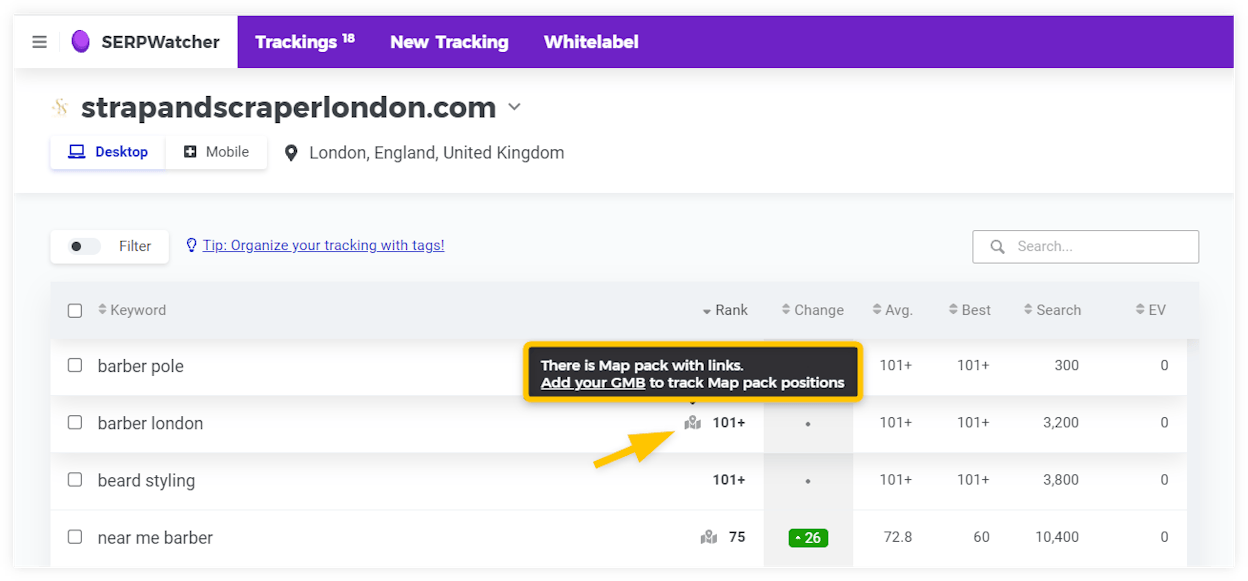
SERPWatcher is the rank tracker inside the Mangools toolkit, which also includes KWFinder for keyword research, SERPChecker for SERP analysis, LinkMiner for backlinks, and SiteProfiler for domain metrics. The whole bundle is built around being simple, fast, and affordable. Setup takes under five minutes.
The standout metric is the Performance Index, which rolls all your tracked keywords into a single 0-100 score. Most rank trackers show you a wall of numbers. SERPWatcher gives you one number to watch and the keyword-by-keyword breakdown when you need it.
Where SERPWatcher stands out
-
Daily desktop and mobile rank updates on every paid plan
-
Performance Index that summarizes overall ranking health at a glance
-
Local rank tracking across 65,000+ locations
-
AI Search Watcher bundled in, which monitors brand mentions across ChatGPT, Gemini, Claude, Grok, Llama, and Mistral
-
Lowest entry price on this list at $29.90/mo (annual) on the Basic plan
Where it falls short
SERPWatcher is built for small projects and stays small by design. The Basic plan caps you at 100 tracked keywords. The Agency plan tops out at 1,500 keywords for $89.90/mo annual, which is below where most multi-client agencies need to land. There’s no API access. If you grow past one or two sites and need competitor benchmarking or large keyword sets, you’ll outgrow SERPWatcher.
Pricing (verified April-May 2026)
|
Plan |
Annual |
Monthly |
Keywords tracked |
|---|---|---|---|
|
Entry |
$19.90/mo |
$29/mo |
50 |
|
Basic |
$29.90/mo |
$49/mo |
100 |
|
Premium |
$44.90/mo |
$69/mo |
700 |
|
Agency |
$89.90/mo |
$129/mo |
1,500 |
Pick SERPWatcher when you run one or two small sites, you want clean daily tracking without learning a complex platform, and your budget for SEO tools is under $50/month.
How to set up rank tracking that covers Google and AI search
Picking a tool is half the work. The other half is wiring it into a workflow you’ll actually run every week. Here’s the path teams use to get from “we bought a rank tracker” to “rankings inform what we ship next.”
Step 1: Build your two keyword lists
You need two lists, not one.
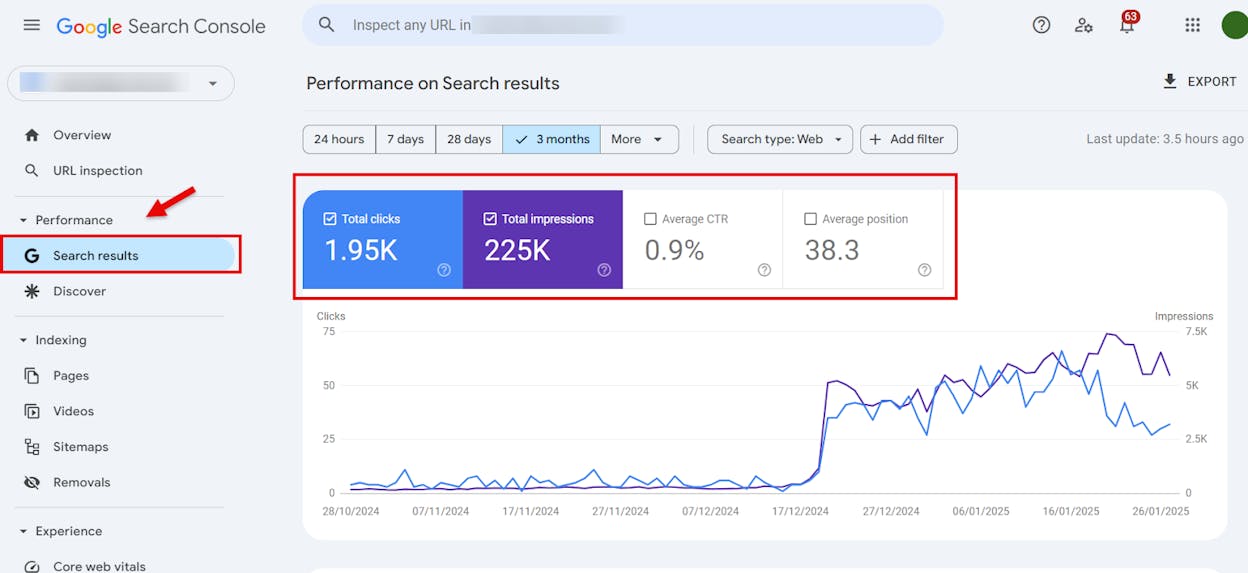
The first is your classic Google keyword list. Pull your top 50-200 keywords from Google Search Console (Performance > Search results > top queries). Add the head terms you want to rank for but currently don’t, then 2-3 long-tail variants for each. Tag every keyword by funnel stage (TOFU, MOFU, BOFU) so you can sort rankings by commercial intent later. The free Analyze AI keyword generator helps you find related terms.
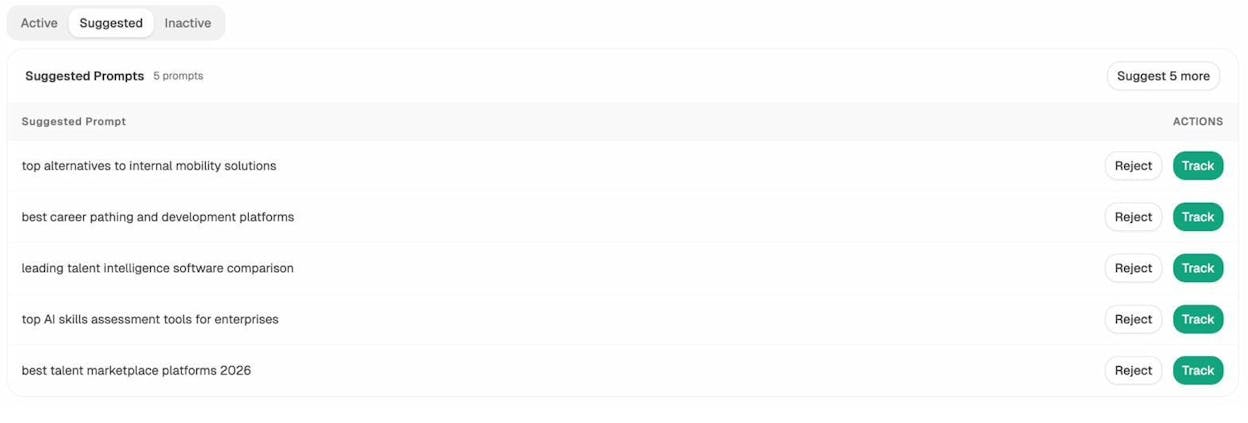
The second is your AI prompt list. These are full natural-language questions a buyer would type into ChatGPT, like “Best CRM for B2B SaaS,” or “HubSpot vs Salesforce for a 50-person team.” If you’re starting from scratch, Prompt Discovery in Analyze AI generates the bottom-of-funnel prompts for your category automatically.
Step 2: Set baseline positions on both
Inside your rank tracker, set up the Google list with the right country, language, and device split. If you serve local markets, add cities. Run it for at least 14 days before drawing conclusions, since daily noise on a single keyword is normal.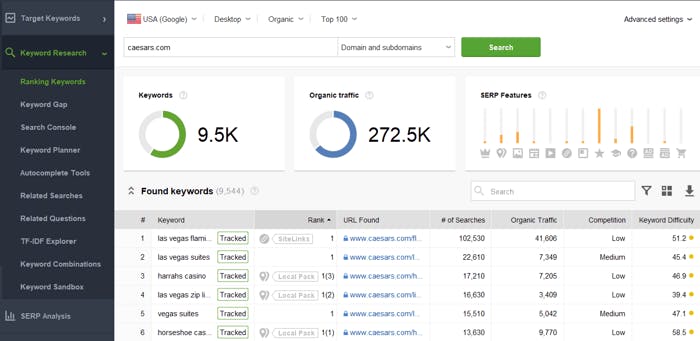
In parallel, set up your AI prompt list in Analyze AI. For each prompt, record visibility percentage, sentiment, and current rank against the top 3-5 competitors you compete with.
Step 3: Tie rankings to traffic and conversions
A ranking number on its own is incomplete. Connect both lists to GA4 so you can answer two questions every week.
For Google, track which keywords moved, which landing pages received the traffic, and which conversions those visits drove. Most rank trackers integrate with GA4 in two clicks.
For AI search, track which engines sent sessions, which landing pages received them, and how many converted. AI Traffic Analytics handles this natively, with separate breakdowns for ChatGPT, Perplexity, Claude, Gemini, and Copilot referrers.
Step 4: Run a weekly triage
Every Monday, look at three things and pick one action from each.
-
Top movers (Google). Pick the keyword that moved the most. Pull the page that ranks for it. Decide if the move was a content change, a link change, a SERP feature change, or a Google update. Plan the response.
-
Top movers (AI search). Pick the prompt where visibility shifted most. Look at the cited sources in the AI answer. If a competitor’s comparison page is cited and yours isn’t, refresh yours this week.
-
Citation decay. Identify any page losing AI citations faster than Google traffic. This is the earliest warning that an asset is going stale. Refresh it before the Google decline shows up.
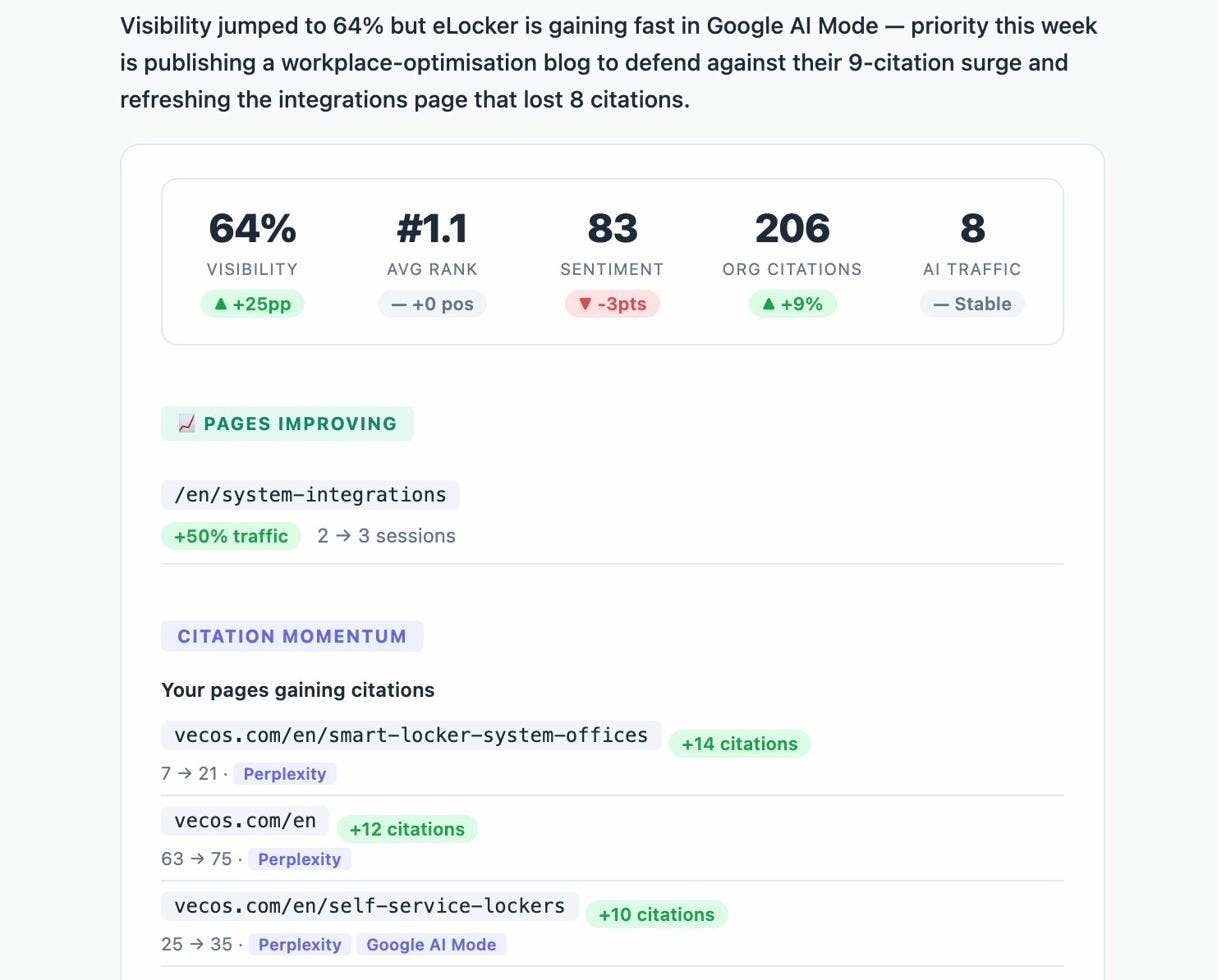
In Analyze AI you can wire this entire triage into a scheduled Agent Builder run that fires every Monday at 7am, drafts the action list, and drops it in Slack or your inbox.
Step 5: Ship and watch the response
Most teams stop at “we have rankings.” The teams that grow ship a change every week and measure the response in the same dashboard. Tracking becomes the loop that drives everything else.
The honest summary
If your team only cares about Google rankings and you’re not seeing meaningful AI traffic yet, SE Ranking and AccuRanker do the job. SE Ranking if you want a cheaper hub with audits and reports included. AccuRanker if you need speed and very large keyword sets.
If you want rank tracking inside a wider SEO platform you might already pay for, Semrush is the obvious pick. Price out the AI Visibility add-on or Semrush One bundle if AI search is on your roadmap, and read the Adobe acquisition fine print.
If you run one or two small sites and your budget is tight, Mangools SERPWatcher does the basics well and bundles AI Search Watcher for the same price.
If AI search is already a real channel for you (or about to be), and you want to track rankings, tie them to revenue, and run the workflows that act on the data without leaving the workspace, Analyze AI is the pick. The Agent Builder is the part most teams miss in the first comparison, and it’s also the part that compounds.

Ernest

Ibrahim
![50 GEO Statistics From Tracking 83,670 AI Citations [2026 Data]](/_next/image?url=https%3A%2F%2Fwww.datocms-assets.com%2F164164%2F1779314907-blobid0.png&w=3840&q=75)


![7 seoClarity Alternatives That Won’t Lock You Into $2,500/mo Enterprise Contracts [2026]](/_next/image?url=https%3A%2F%2Fwww.datocms-assets.com%2F164164%2F1779457139-blobid0.png&w=3840&q=75)

