Summarize this blog post with:


In this article, you’ll learn what unlinked brand mentions are, the different types worth pursuing, six practical methods to find them, how to prioritize the best opportunities, and how to craft outreach that converts mentions into links. You’ll also learn how to track and convert brand mentions happening inside AI search engines like ChatGPT, Perplexity, and Claude—a growing source of visibility that most link builders ignore entirely.
Table of Contents
What Are Unlinked Brand Mentions?
Unlinked brand mentions are online references to your brand, products, services, or key people that don’t include a hyperlink back to your website.
Here’s a simple example. Imagine a blogger writes a roundup of project management tools and says: “Asana is great for teams that need timeline views.” The brand name is right there. The reader knows exactly what the writer is talking about. But there’s no clickable link to asana.com anywhere in that sentence or paragraph.

That’s a missed opportunity. The author already knows your brand, already thinks it’s worth mentioning, and already put it in front of their audience. You’re halfway to earning a backlink—the author just forgot (or chose not) to add the link.
This matters because backlinks remain one of the strongest ranking signals in SEO. A link from a high-authority page passes PageRank, sends referral traffic, and signals to Google that your site is a credible source on the topic. An unlinked mention does none of that.
John Mueller from Google confirmed this directly in a Google Office Hours session: unlinked brand mentions don’t pass SEO value the way a proper backlink does. They’re more like a billboard—visible, but not clickable. That’s exactly why converting them into real links is one of the most efficient link building tactics available. The author already trusts your brand. You just need to ask.
Why Unlinked Mentions Are a Goldmine for Link Building
Before we get into how to find unlinked mentions, it’s worth understanding why this tactic works so well compared to other link building approaches.
-
The pitch is easy. When you cold-email someone asking for a link, you’re essentially asking a stranger for a favor. With unlinked mentions, the author has already done the hard part—they’ve chosen to reference your brand in their content. You’re not asking them to add something new. You’re asking them to make an existing reference more useful for their readers by making it clickable.
-
Conversion rates are high. According to case study data from Hunter.io, their team reclaimed 53 unlinked mentions on high-authority sites over three months. BuzzStream’s data shows that response rates improve significantly when you reach out within 24-48 hours of the mention going live. Compare that to a typical cold link-building campaign where response rates sit in the single digits.
-
The links are natural. Since the author already mentioned your brand voluntarily, a link from that mention is the definition of an editorial, earned backlink. There’s nothing manipulative about it. Google’s guidelines are clear that links should add value for the reader, and a link on an existing brand mention almost always does.
-
It scales with brand awareness. The more well-known your brand becomes, the more unlinked mentions appear. Nike generates hundreds of new unlinked mentions every single week. Even smaller B2B companies with moderate brand awareness will find dozens of opportunities if they look.
The Types of (Unlinked) Brand Mentions You Should Pursue
Not all brand mentions are created equal. Before you start searching, build a list of every “branded” term that someone might mention online without linking. This gives you a much larger pool of opportunities than searching for just your company name alone.
Here are the categories to cover:
Your brand name and common variations. This is the obvious starting point. If your company is “Analyze AI,” also search for “AnalyzeAI,” “tryanalyze,” and “tryanalyze.ai.” People misspell and abbreviate brand names constantly.
Product and feature names. If you have named features or products, search for those too. For example, at Analyze AI, features like Citation Analytics, Competitor Overview, and Prompt Level Analytics all get mentioned independently in industry discussions.
Key people at your company. Founders, executives, and subject matter experts often get mentioned by name in interviews, podcasts, roundups, and citations without a link back to your company site. If your CEO is quoted in an article about AI search trends but the article doesn’t link to your website, that’s a missed opportunity.
Branded slogans or taglines. If your brand has a recognizable tagline that gets repeated in industry coverage, add it to your list.
Data or research you’ve published. If your company has produced original research—like an analysis of AI citation patterns or a study on how LLMs cite sources—people will reference that data without linking back to the source page. These are some of the highest-value unlinked mentions because the linking page is typically content-rich and authoritative.
Here’s a simple table to build your branded terms list:
|
Category |
Example (Analyze AI) |
Example (Generic SaaS) |
|---|---|---|
|
Brand name |
Analyze AI, tryanalyze.ai |
[Your company name] |
|
Common misspellings |
AnalyzeAI, Analyze.ai |
[Common typos] |
|
Product/feature names |
Citation Analytics, Prompt Level Analytics |
[Named features] |
|
Key people |
[CEO name], [Head of Content] |
[Founders, public-facing execs] |
|
Original research |
“83,670 AI citations study” |
[Report or study titles] |
One more thing: when pursuing unlinked mentions, prioritize links from high-quality pages. PageRank is calculated at the page level, not the domain level. So even if you already have a link from elsewhere on a domain, it’s still worth pursuing an unlinked mention on a different, high-authority page on that same site.
1. Find Unlinked Mentions with a Content Explorer Tool
The fastest way to find unlinked brand mentions at scale is with a content explorer—a tool that searches a massive index of web pages for any mention of a term you specify.
Ahrefs Content Explorer, for example, indexes nearly a billion pages. You can search for your brand name, exclude results from your own domain, and instantly see thousands of pages that mention you.
Here’s how to do it step by step:
Step 1: Search for your brand name. Enter your brand name in the content explorer and append -site:yourdomain.com to exclude your own pages from the results.
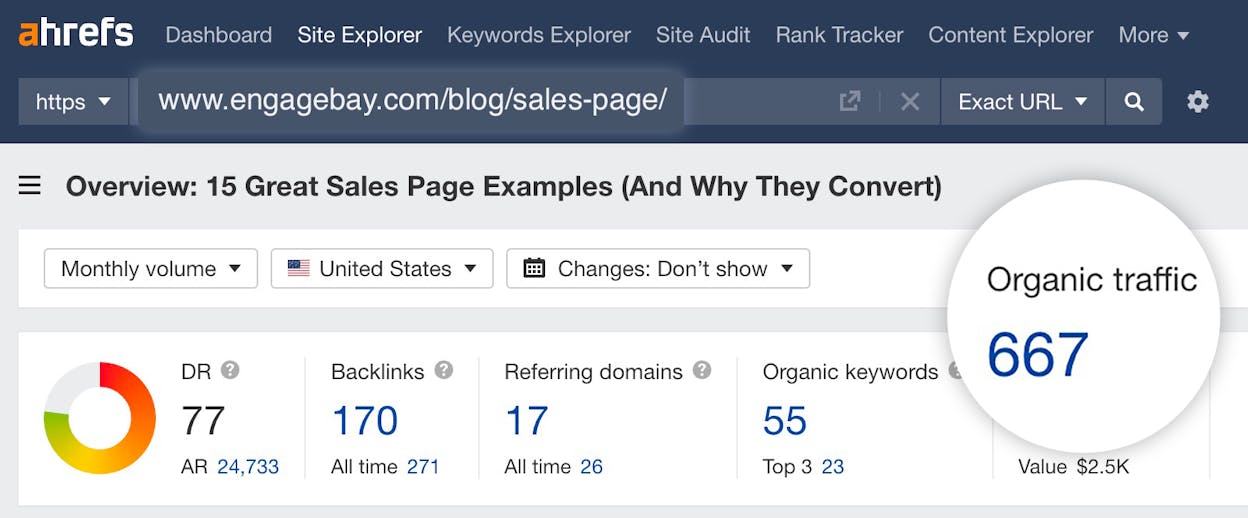
Step 2: Filter for quality. You’ll likely see thousands of results. Narrow them down by setting filters for language (English), minimum Domain Rating (30+), and minimum organic traffic (50+ monthly visits). There’s no point pursuing unlinked mentions on pages that nobody reads or that live on low-authority domains.
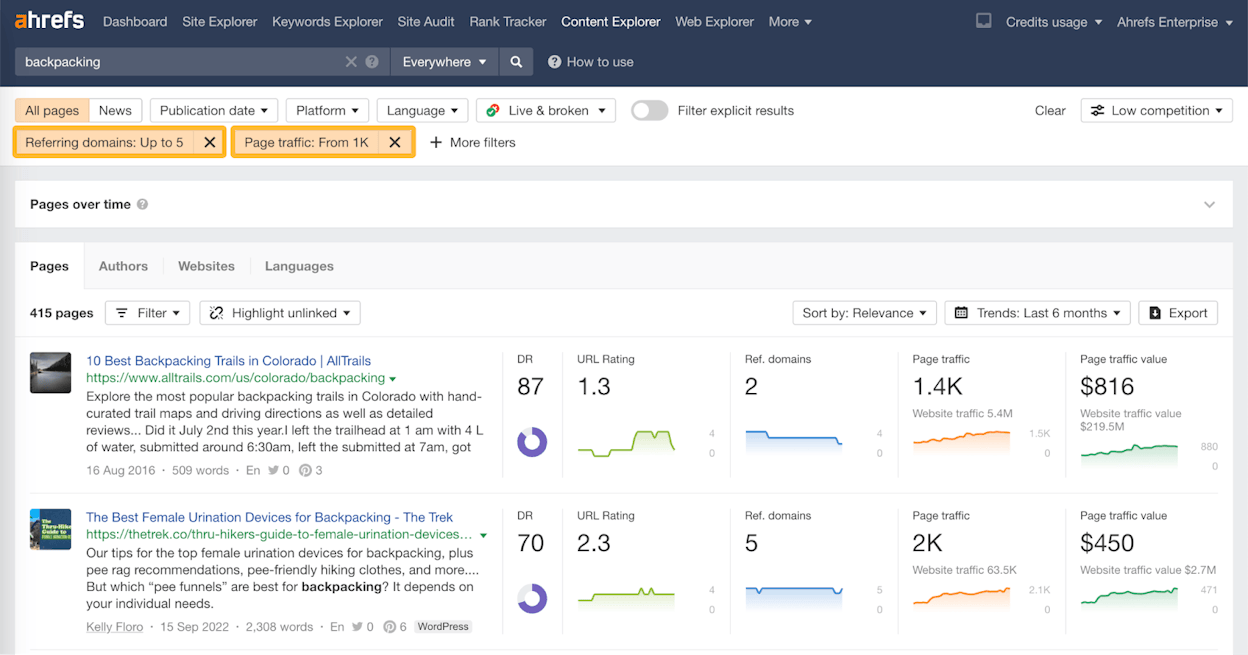
Step 3: Export and check for existing links. Not every page in these results is actually unlinked—many of them already link to you. Export the results to CSV, then use a tool like Screaming Frog SEO Spider to crawl through the list and check which pages contain a link to your domain and which don’t.
In Screaming Frog, go to Configuration > Custom > Search. Use the “Does not contain” search and enter this regex pattern (replacing yourdomain.com with your actual domain):
<a [^>]*\bhref\s*=\s*"([^"]*yourdomain.com[^"]*)
Don’t worry if that looks complicated—you just need to swap in your domain name. This tells Screaming Frog to flag any page that doesn’t contain a hyperlink pointing to your site.
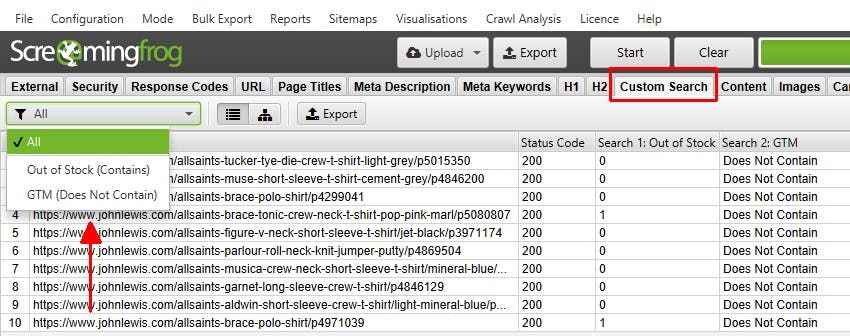
Step 4: Paste your URLs and crawl. Copy the content URLs from your export, paste them into Screaming Frog’s list mode, and run the crawl. Set crawl depth to 0 and uncheck everything under the “Basic” tab in Spider Configuration to speed things up.
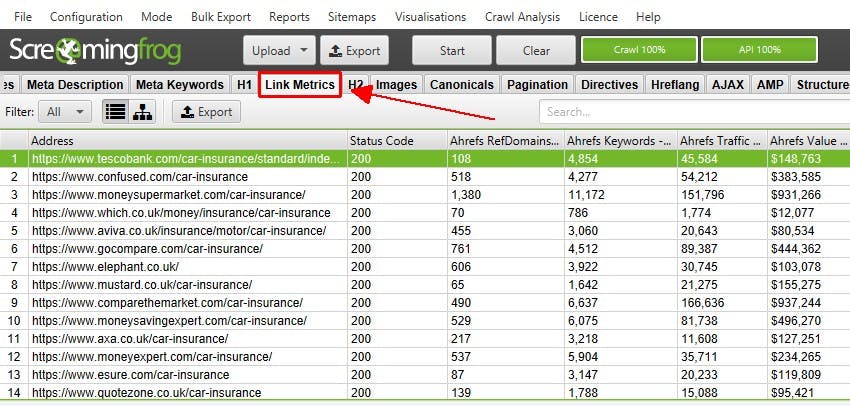
Step 5: Filter for unlinked mentions. After the crawl finishes, go to the Custom tab and select your “Does not contain” filter from the dropdown. This shows you only the pages that mention your brand but don’t link to you.
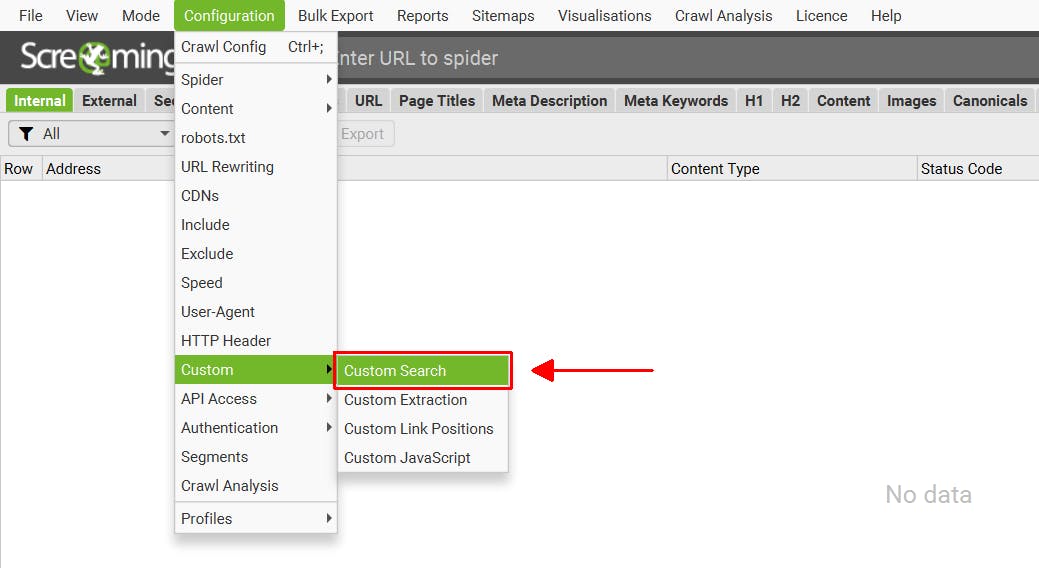
A typical result might show that roughly 25-35% of pages mentioning your brand don’t actually link to you. That’s a significant number of link opportunities from a single search.
Step 6: Prioritize. Sort the unlinked mentions by a quality metric—URL Rating, Domain Rating, or estimated organic traffic. Start outreach with the highest-value pages first.
Pro tip: If you want to focus specifically on getting links from brand-new referring domains (rather than additional links from sites that already link to you), use the “Highlight unlinked domains” feature in Content Explorer. This highlights pages on sites that have never linked to you at all, which is useful because Google’s algorithm values links from unique referring domains.
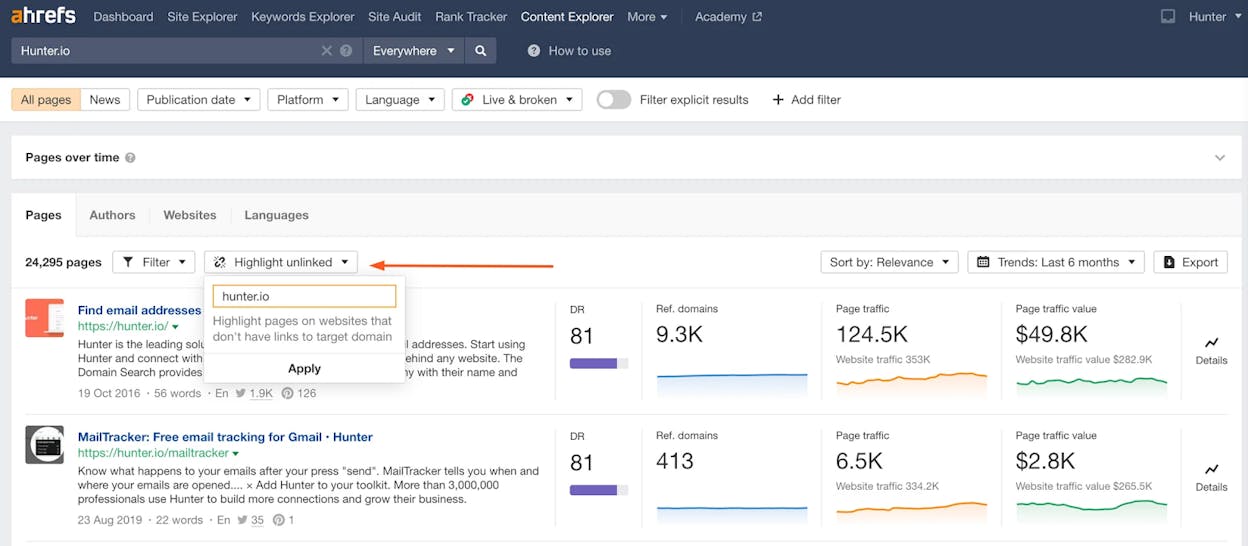
Repeat this entire process for every branded term on your list—product names, key people, research titles, and variations.
2. Find Unlinked Mentions with Google Search
If you don’t have access to a content explorer tool, Google itself offers a free alternative. It’s more manual and less convenient, but it works.
Step 1: Build your search query. Use the intext: operator to search for pages that mention your brand in the body text, then exclude your own domain and major social media platforms (which aren’t useful for link building).
Here’s the format:
intext:"your brand name" -yourdomain.com -twitter.com -facebook.com -pinterest.com -youtube.com -linkedin.com -reddit.com
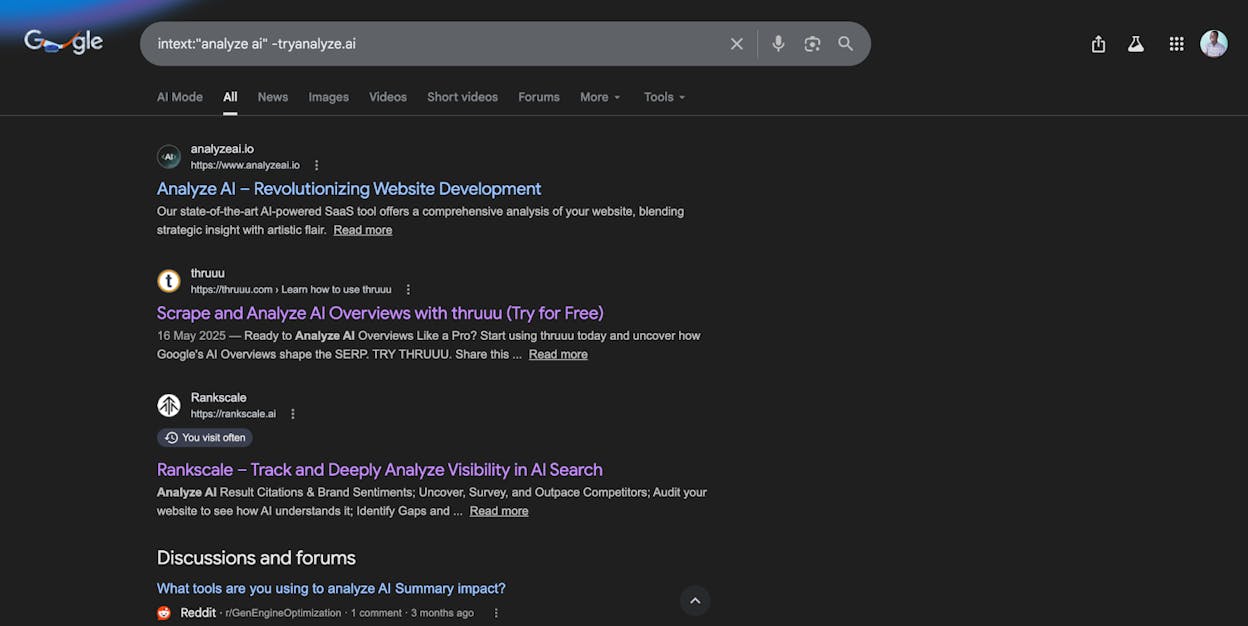
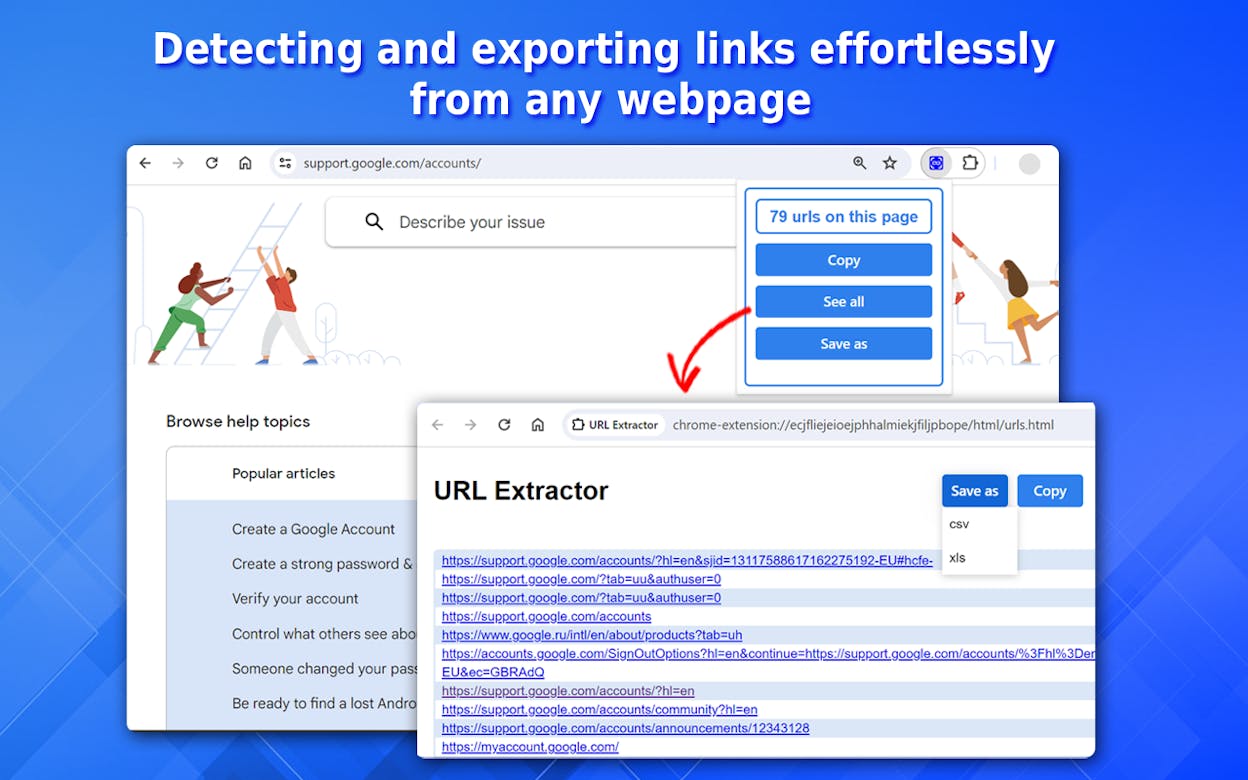
Step 2: Extract the results. Google will cap visible results at roughly 500 URLs (5 pages × 100 results per page, if you change your Google search settings to show 100 results). Use a Chrome extension like Chris Ainsworth’s SERP scraper to extract all visible URLs into a spreadsheet.
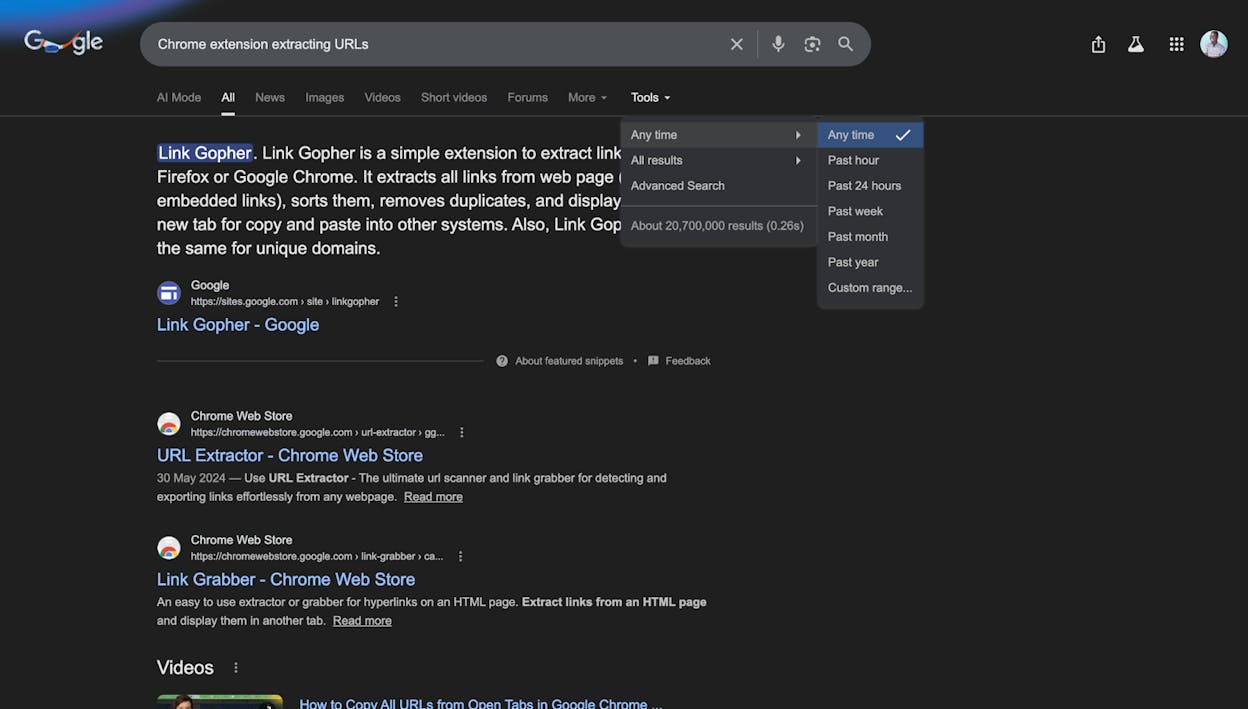
Step 3: Use date filtering to find more. If you need more than 500 results, use Google’s built-in date filter. Restrict results to the past 24 hours, past week, or a custom date range, scrape each set separately, then combine them in one spreadsheet. This is tedious but effective for brands with thousands of mentions.
Step 4: Check for existing links. Just like with the content explorer method, paste these URLs into Screaming Frog and run the regex check to isolate pages that mention you but don’t link to you.
Step 5: Pull quality metrics. Copy the unlinked URLs into a batch analysis tool (like Ahrefs Batch Analysis or the Analyze AI Website Authority Checker) to see Domain Rating, URL Rating, and estimated traffic. Sort by quality and prioritize your outreach accordingly.
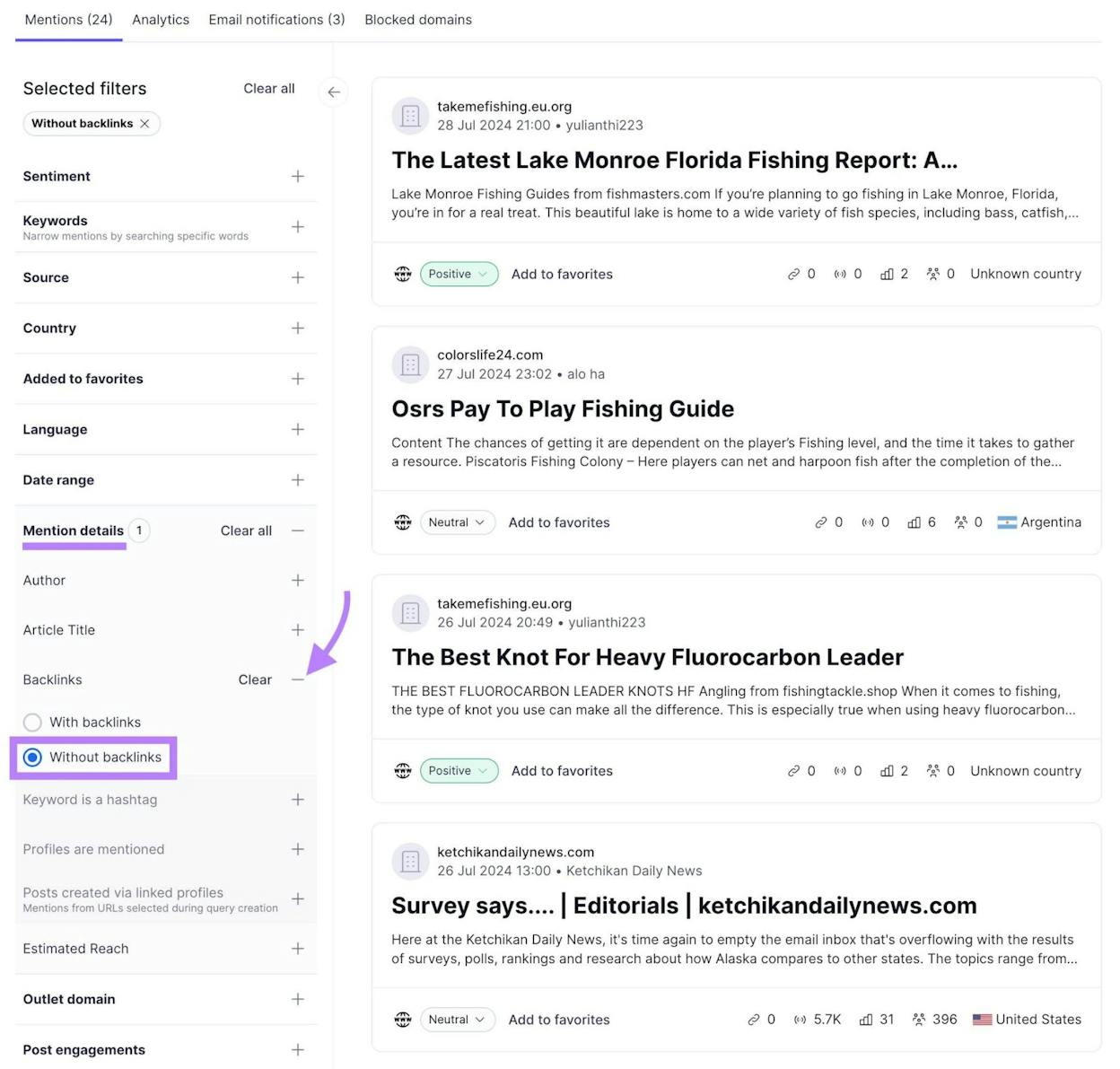
3. Find Unlinked Mentions by Reverse-Engineering Your Social Profiles
Here’s a tactic most people miss: authors sometimes link to your Twitter, LinkedIn, or other social profiles instead of your actual website. This happens for a few reasons—Google Docs auto-suggests social URLs when you type a brand name, some authors are nervous about linking to external sites (SEO misinformation about “link penalties”), or it’s simply a copy-paste error.
Either way, a link to your Twitter profile doesn’t benefit your website’s SEO at all. But it’s an easy fix.
Step 1: Check backlinks to your social profiles. Paste your Twitter URL (e.g., twitter.com/yourbrand) into a backlink checker tool like Ahrefs Site Explorer or the Analyze AI Website Authority Checker. Look at the Backlinks report.
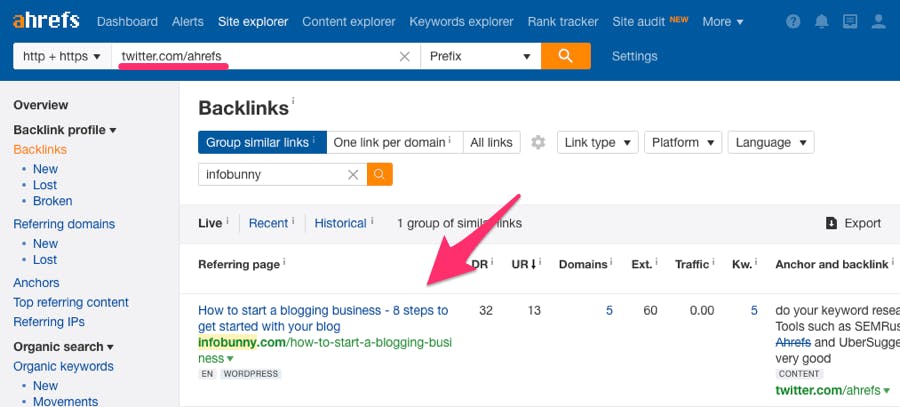
Step 2: Export and filter. Export the referring pages, remove any from your own domain, and run them through Screaming Frog to check which ones also link to your main website. Many won’t—those are your opportunities.
Step 3: Reach out. If the context clearly calls for a link to your website (not your Twitter), contact the author and suggest swapping the social link for your actual domain. These are some of the easiest conversions because you’re fixing a genuine mistake.
In one typical analysis, over 50% of pages linking to a brand’s Twitter profile don’t also link to the brand’s main website. That’s a substantial pool of opportunities.
4. Find Domain Name Misspellings
People misspell domain names all the time, especially brands with unusual spellings. When an author links to “aherfs.com” instead of “ahrefs.com,” or “analyzeai.com” instead of “tryanalyze.ai,” the link sends authority to a domain you don’t own. That’s wasted value.
These are some of the quickest wins in link building because the author clearly intended to link to you—they just got the URL wrong. A polite “heads up” email almost always results in a fix.
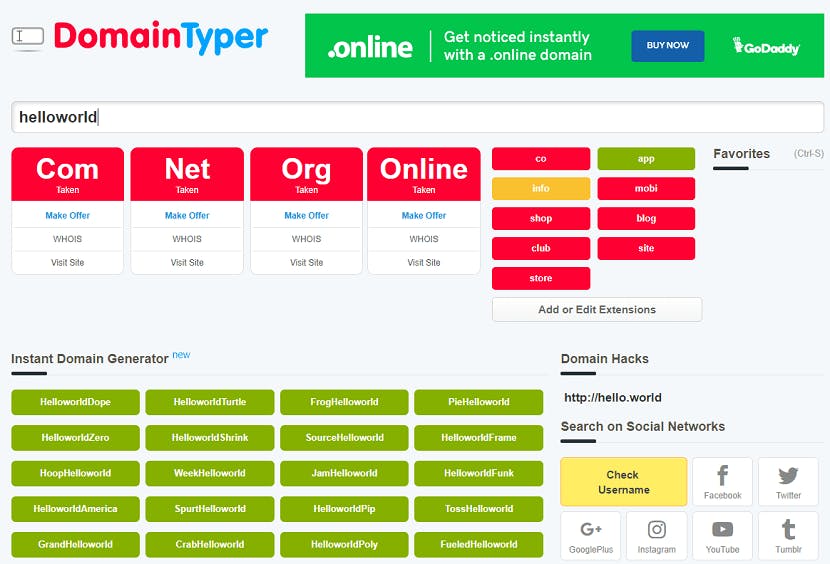
Step 1: Generate typo variations. Use a free domain typo generator tool (like domaincheckplugin.com/typo) to create a list of common misspellings of your domain. This typically generates dozens of variations by swapping adjacent characters, dropping letters, or adding extra characters.
Step 2: Check which misspellings have backlinks. Paste all typo domains into a batch analysis tool and sort by referring domains (descending). Any misspelled domain with referring domains has pages linking to the wrong URL.
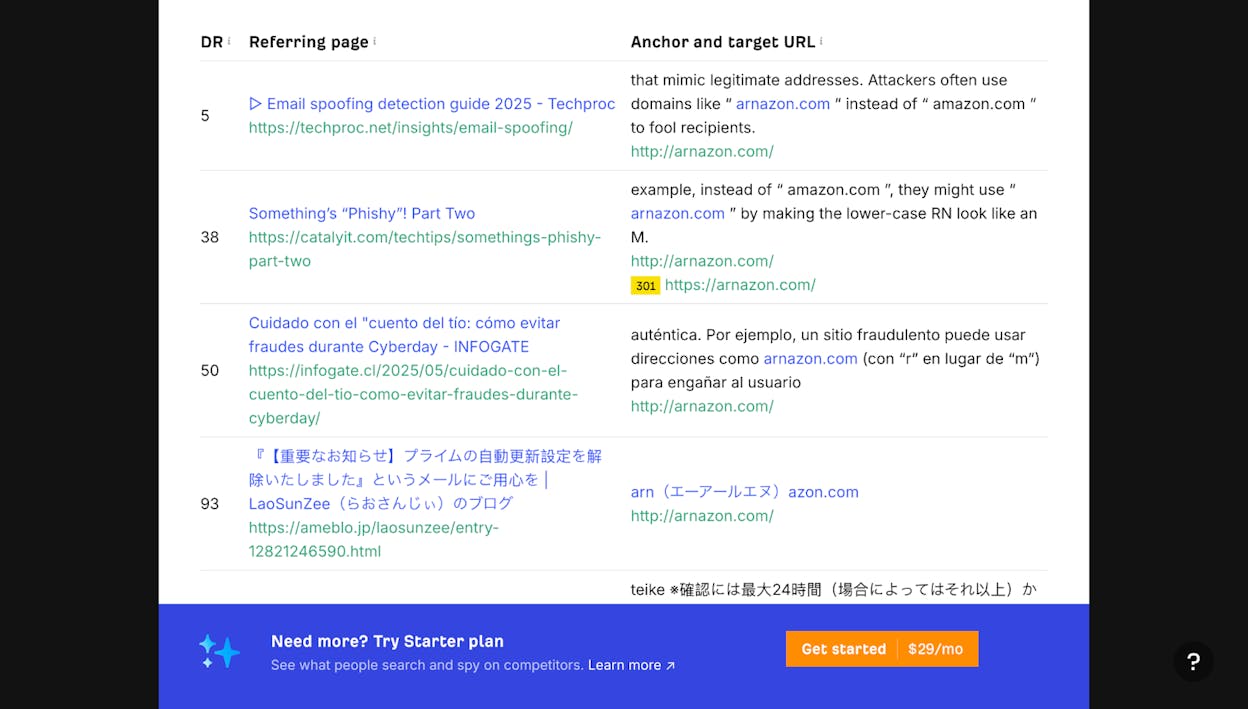
Step 3: Find the specific linking pages. For each misspelled domain with backlinks, use a backlink checker to see the specific pages linking to it. Search within those results for your correct brand name—this helps confirm that the link was intended for you and not for an unrelated site that happens to own the misspelled domain.
Step 4: Request corrections. Email the site owners with a short, friendly message pointing out the typo and providing the correct URL. Nine out of 10 authors will appreciate the heads-up and fix it immediately.
5. Find Stolen Images with Reverse Image Search
If your brand produces original visual assets—infographics, data visualizations, custom illustrations, charts, or diagrams—other sites will embed them without attribution. Each unattributed image embed is an unlinked mention waiting to be claimed.
Step 1: Identify your most “stealable” images. Infographics, original charts, data visualizations, and branded diagrams are the most commonly embedded without credit. Start with your most widely shared visual assets.
Step 2: Run a reverse image search. In Chrome, right-click on the image and select “Search Google for Image.” Alternatively, upload the image to TinEye, which often finds more results than Google’s image search.
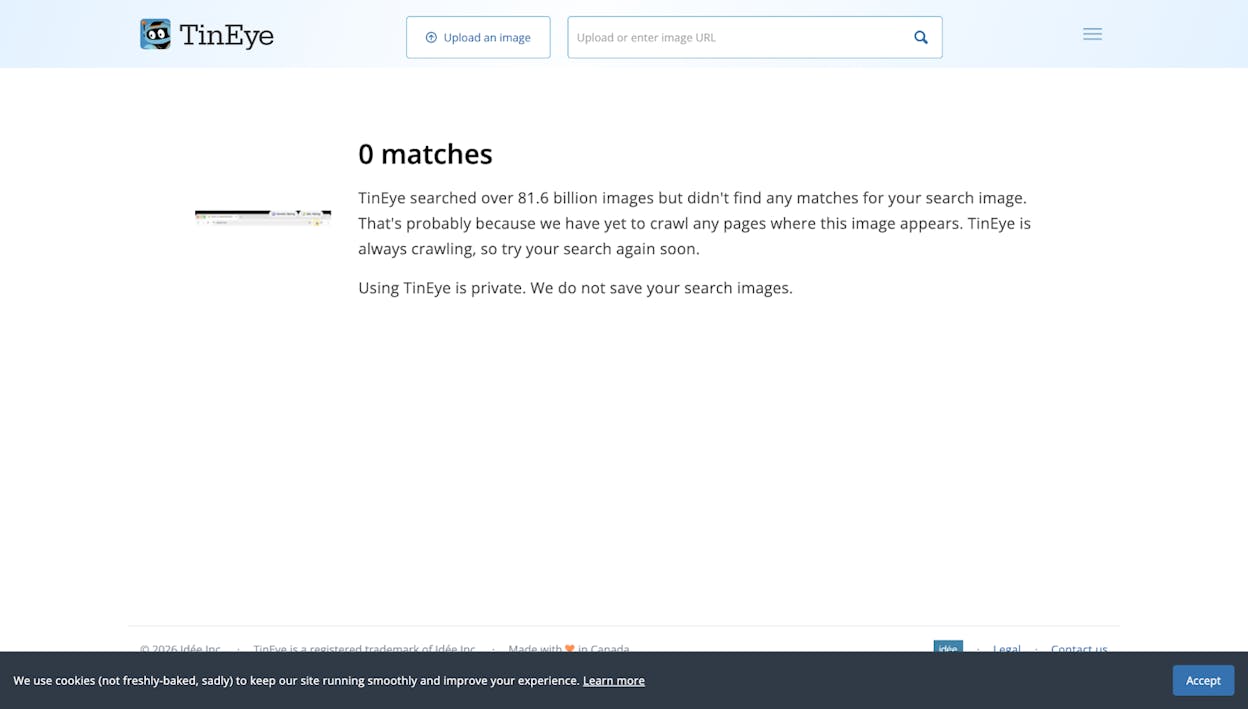
Step 3: Scrape and check for links. Extract the URLs from the search results, then run them through Screaming Frog to check which pages embed your image but don’t link back to you.
Step 4: Prioritize and reach out. Sort by page quality. Contact site owners and request proper attribution with a link to the original source page on your site. Most publishers have editorial policies requiring image attribution, so your request aligns with their own standards.
TinEye also offers an alerts service that monitors the web for new uses of your images—useful if you produce visual content regularly and want to automate the discovery process.
6. Monitor New Brand Mentions with Alerts
The methods above help you find existing unlinked mentions. But new mentions appear every day, especially as your brand grows. You need a system to catch them as they happen.
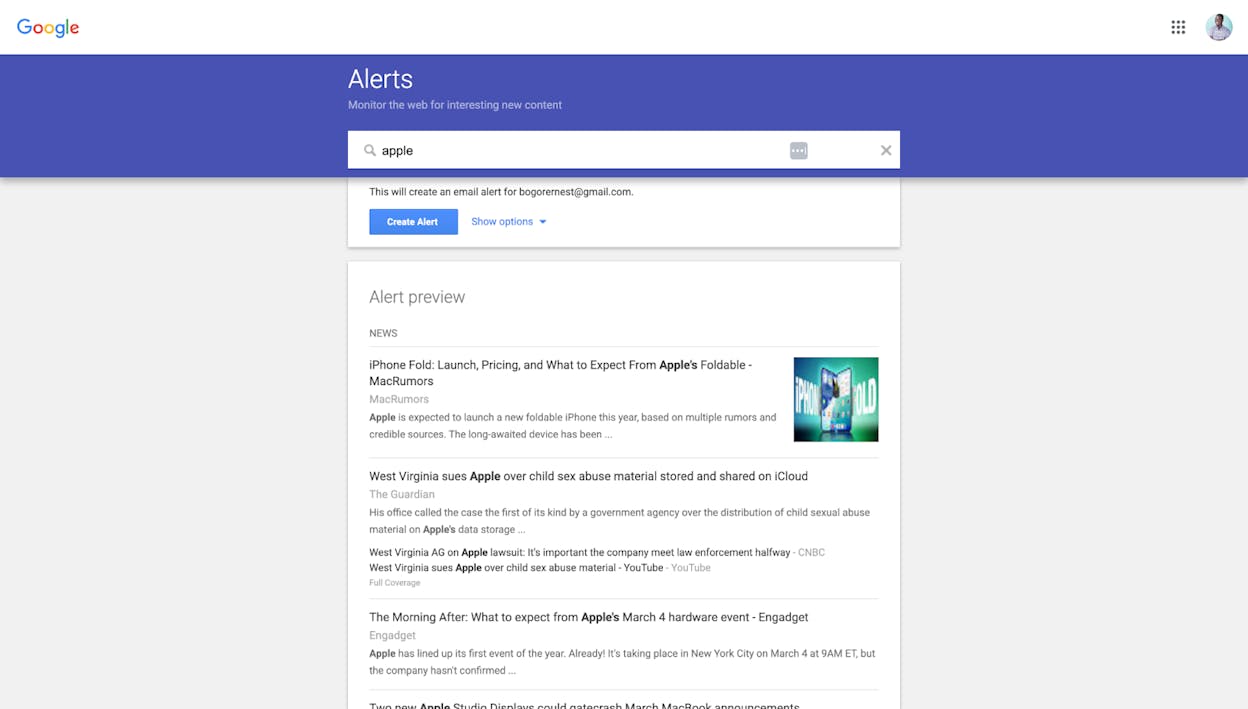
Set up Google Alerts. Go to google.com/alerts and create an alert for your brand name (and each branded term on your list). Set the frequency to “as-it-happens” or “once a day,” and choose “Only the best results” to reduce noise. Google Alerts is free and takes 30 seconds to set up.
Use Ahrefs Alerts for richer data. If you have Ahrefs, set up a Mentions alert. This monitors Ahrefs’ content index for new pages mentioning your brand and emails you on a schedule you choose. The advantage over Google Alerts is that you can filter by Domain Rating and language, and you can combine multiple branded terms with OR operators (e.g., “Analyze AI” OR “tryanalyze” OR “AnalyzeAI”).
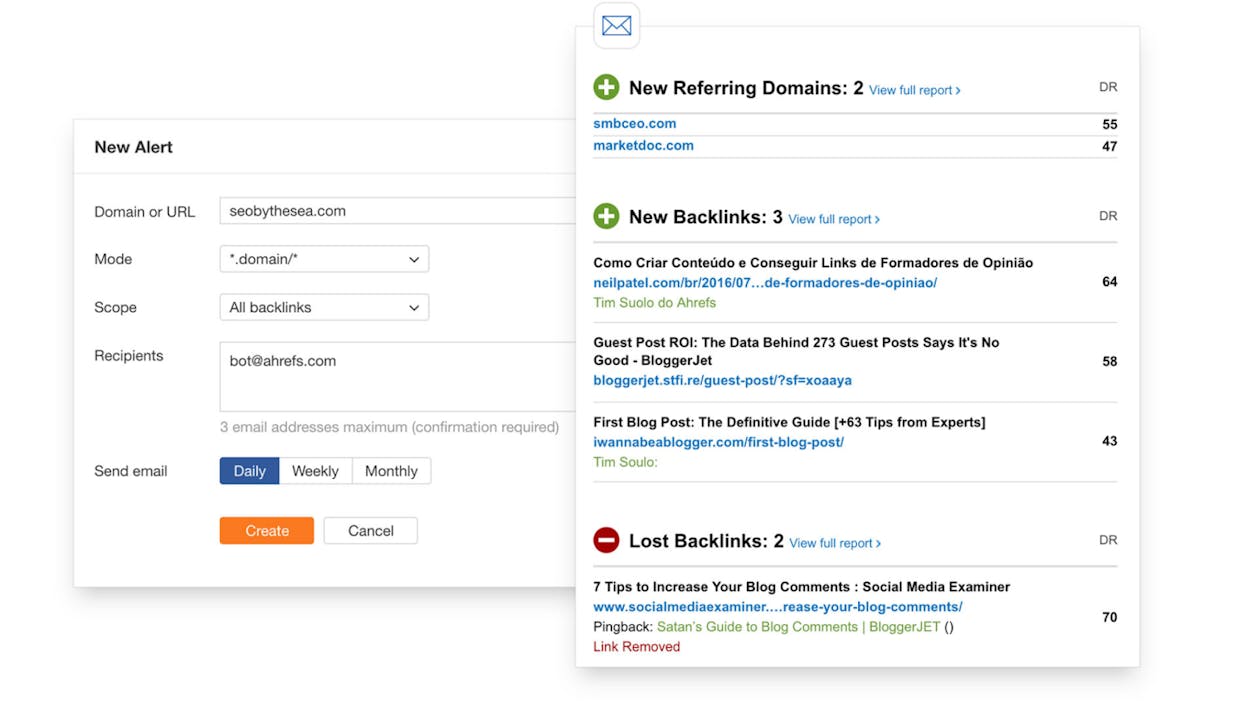
Use Brand24 or Mention.com for broader coverage. These dedicated brand monitoring tools scan websites, blogs, social media, forums, and news sites. They’re particularly useful if you want to monitor sentiment alongside mentions.
Act fast. BuzzStream’s data shows that outreach response rates drop sharply after 48 hours for news sites and after about a week for blogs. The sooner you reach out after a mention goes live, the more likely the author is to add your link—they’re still thinking about the content and are more willing to make a quick edit.
The key insight: don’t treat brand monitoring as a one-time project. Build it into your regular workflow. Set your alerts, check them weekly, and process new unlinked mentions in batches.
How to Track and Convert Brand Mentions in AI Search
Everything above covers traditional web-based brand mentions. But there’s a growing channel where your brand gets mentioned constantly without any link at all: AI search engines.
When someone asks ChatGPT, Perplexity, Claude, or Gemini a question like “What are the best project management tools?”, the AI generates an answer that often names specific brands. Sometimes these answers include clickable citations. More often, they don’t. And even when citations are present, research shows that only 17% come from the brand’s own website—the rest point to third-party sources like review sites, blogs, and news articles.
This creates a new category of unlinked brand mentions that’s fundamentally different from traditional web mentions, and it’s growing fast.
Why AI Brand Mentions Matter
Traditional unlinked mentions on websites can be converted into backlinks through outreach. AI mentions work differently—you can’t email ChatGPT and ask it to add a link. But AI mentions still drive real business outcomes:
They influence purchasing decisions. When an AI engine recommends your brand in response to a “best tools for X” prompt, that’s a direct product recommendation to a potential buyer. Analyze AI’s research across 83,670 citations shows that the top 10 brands capture 30% of all AI mentions. If you’re not being mentioned, your competitors are.
They drive measurable traffic. AI search engines increasingly send referral traffic back to websites. Perplexity includes numbered citation links. ChatGPT’s browse mode links to sources. Google’s AI Overviews cite web pages. This traffic is trackable, and for some brands, it’s growing at 15-30% month over month.
They compound over time. AI models learn from web content. The more authoritative your presence across the web, the more likely AI engines are to mention and cite you in future responses. This creates a compounding effect: stronger web presence leads to more AI mentions, which drives more traffic, which builds more authority.
How to Monitor Your Brand’s AI Mentions
You can’t find AI brand mentions through Google search or content explorer tools. You need a platform built specifically for AI search monitoring.
Analyze AI tracks your brand’s visibility across ChatGPT, Perplexity, Claude, Gemini, Copilot, and other AI engines. Here’s how to use it to find and act on AI-based brand mentions:
Track the prompts that mention your brand (and your competitors). Analyze AI’s Prompt Level Analytics shows you every tracked prompt where your brand appears—or doesn’t appear—in AI-generated answers. You can see your visibility score, sentiment, and position for each prompt, along with a timeline of how responses change over time.
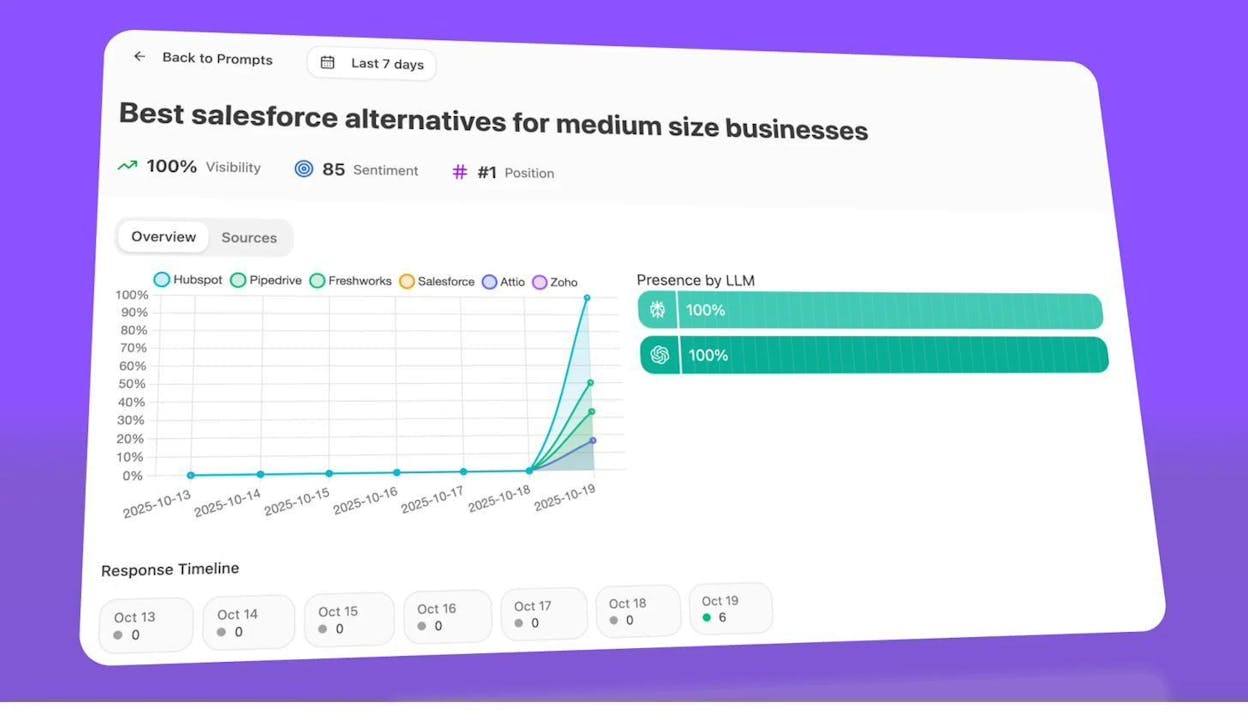
This is the AI equivalent of checking which pages mention your brand on the traditional web. Except instead of web pages, you’re looking at AI-generated responses to real user prompts.
Identify where competitors get mentioned and you don’t. The Opportunities dashboard in Analyze AI shows prompts where your competitors are mentioned but your brand is absent. These are the AI search equivalent of unlinked mentions—the conversation is happening, your competitors are benefiting, and you’re missing out.
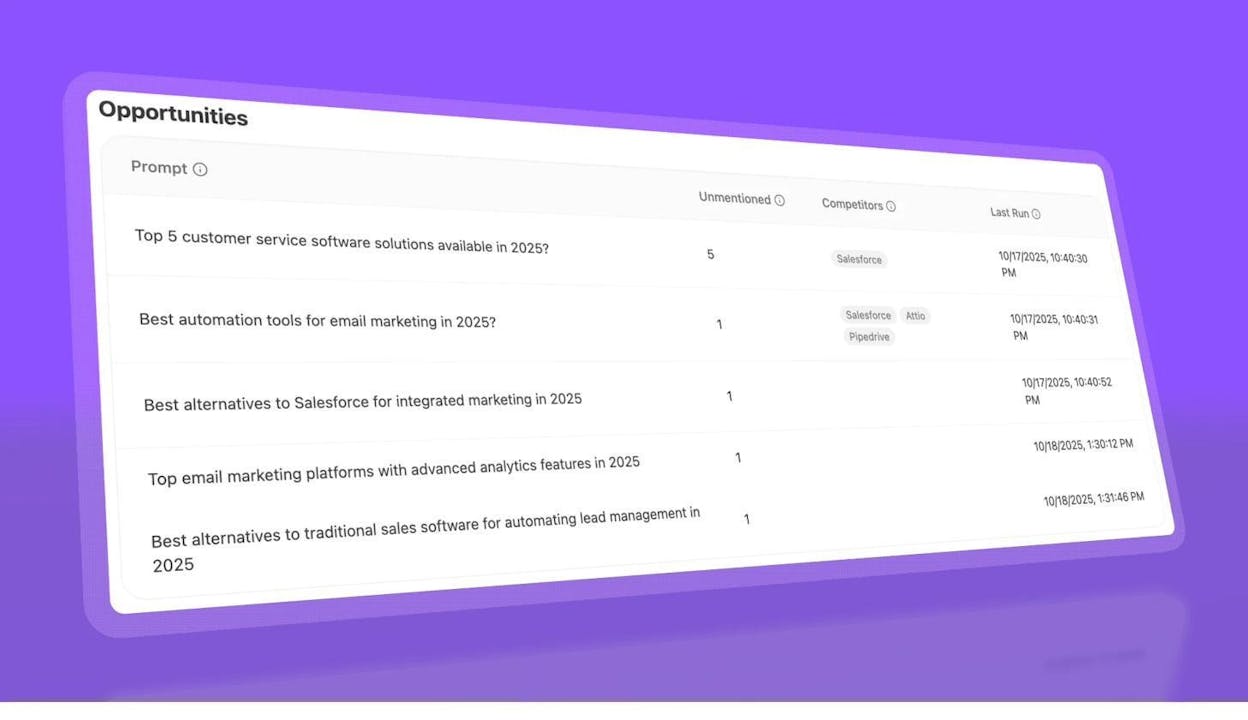
For example, if you sell CRM software and Salesforce, HubSpot, and Pipedrive all appear in responses to “best CRM for small businesses”—but your brand doesn’t—that’s a gap you need to close. You can’t “outreach” an AI model the way you’d outreach a blogger, but you can take specific actions to improve your chances of being mentioned (more on this below).
See which sources AI engines cite when mentioning your competitors. Analyze AI’s Citation Analytics and Top Sources reports show you exactly which URLs and domains get cited in AI responses. This reveals the third-party content that influences AI answers about your category.
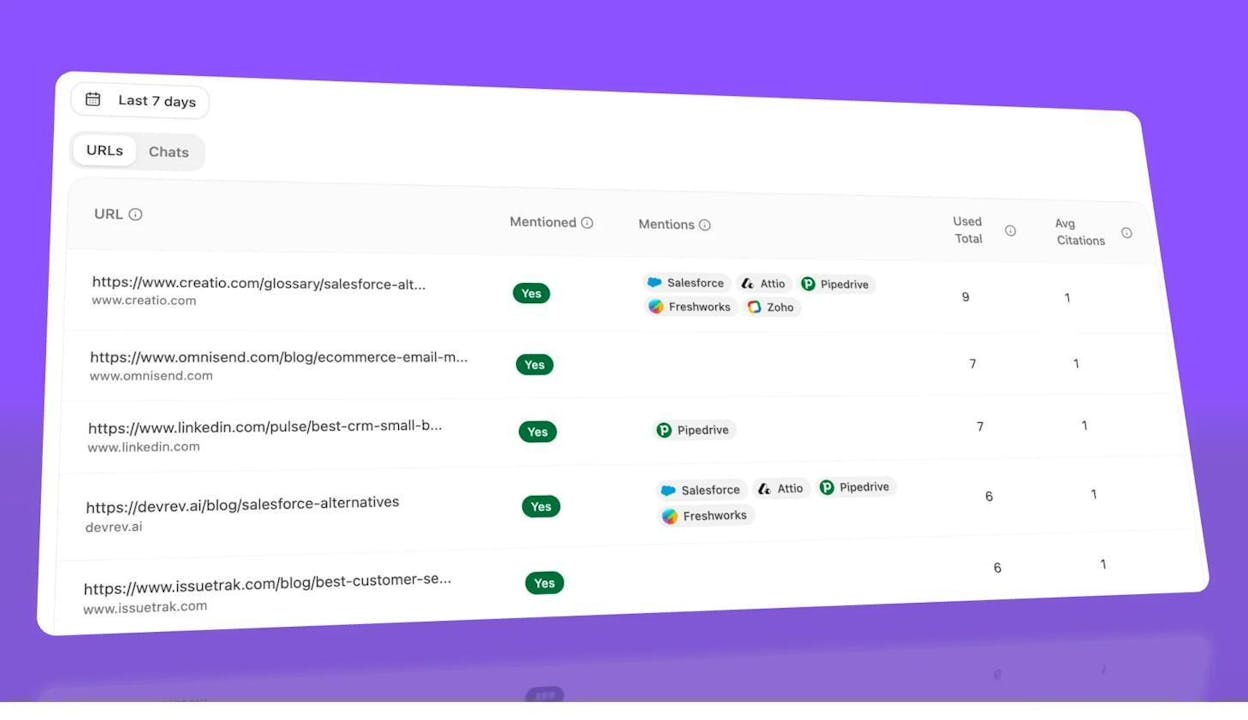
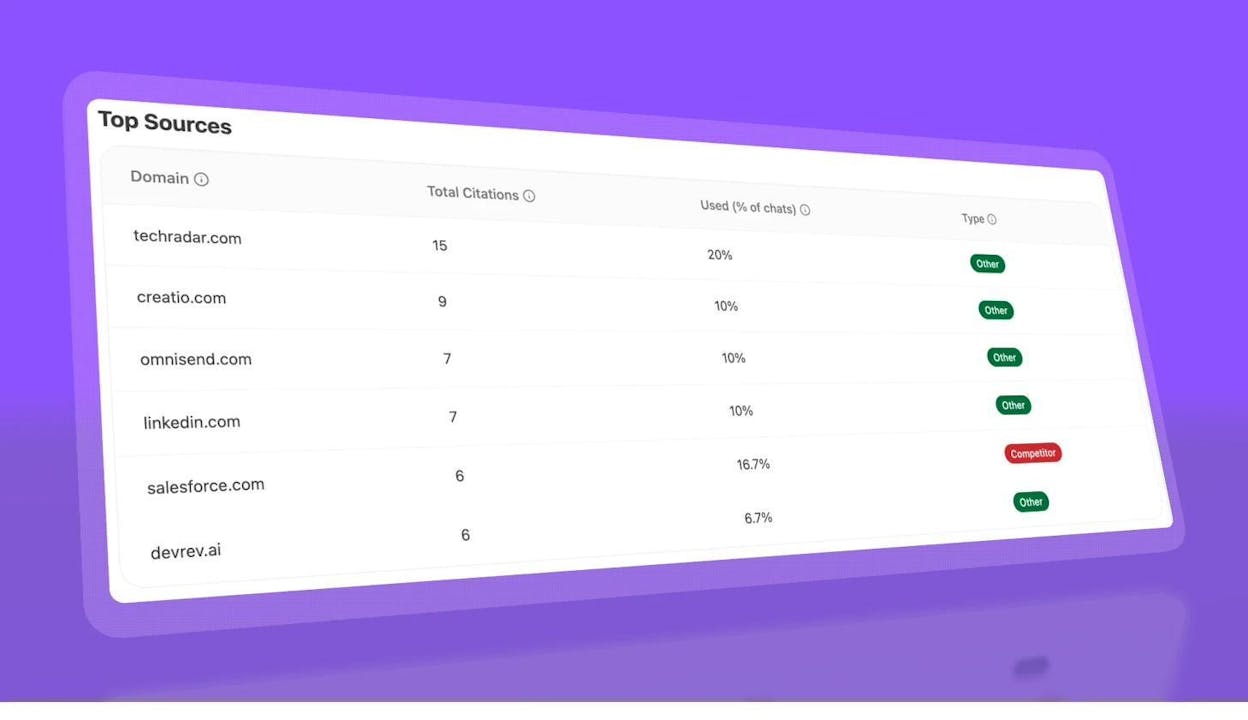
This is a direct parallel to traditional SEO competitor analysis. On the web, you study which sites link to your competitors. In AI search, you study which sources AI engines cite when recommending your competitors. Both tell you where to focus your efforts.
Measure the actual traffic AI mentions drive. Connect your Google Analytics 4 to Analyze AI to see exactly how many sessions AI engines send to your site, which pages they send traffic to, and how that traffic converts.
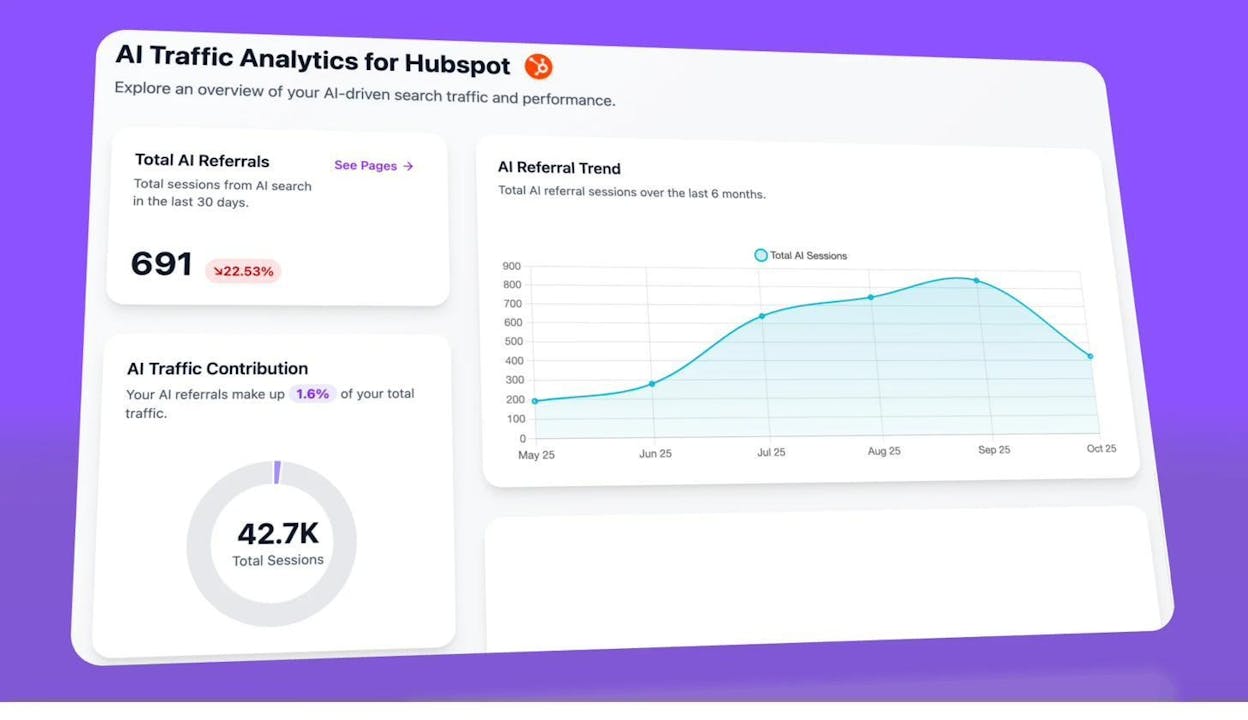
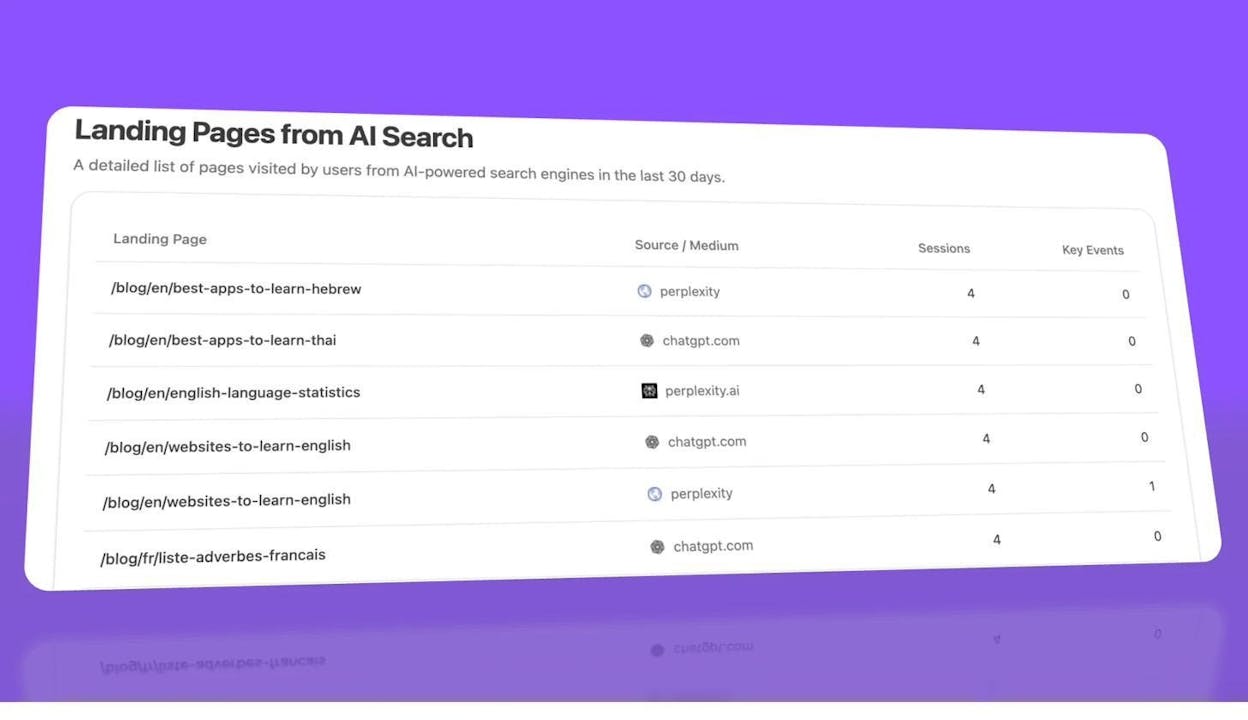
This closes the loop. Traditional unlinked mentions on websites are worth pursuing because backlinks drive organic traffic. AI mentions are worth pursuing because AI engines drive direct referral traffic. Both are measurable, and both compound over time.
How to Convert AI “Unlinked Mentions” into Cited Mentions
Unlike web-based unlinked mentions where you email the author, AI mentions require a different approach. You can’t directly ask an AI model to cite you. But you can influence what AI models recommend by strengthening the signals they rely on.
Earn mentions on the sources AI engines trust. Analyze AI’s Top Sources report shows which domains get cited most frequently. If you notice that AI engines cite specific review sites, industry blogs, or publications when answering prompts in your category, you should prioritize earning coverage (and backlinks) from those exact sources. This is where traditional link building and AI visibility directly intersect—getting featured on a source that AI engines cite frequently improves both your backlink profile and your AI visibility.
Create content that directly answers the prompts where you’re missing. If the Opportunities dashboard shows that competitors get mentioned for prompts like “best tools for tracking AI brand visibility,” create a definitive page on your site that thoroughly addresses that query. Ensure it’s technically sound, well-structured, and includes the entity signals AI models look for (like structured data, clear product descriptions, and topical authority markers).
Strengthen your third-party presence. Analyze AI’s research shows that 83% of AI citations come from third-party sources rather than the brand’s own website. That means the content other people write about you matters enormously for AI visibility. This brings us full circle: traditional unlinked mention link building—getting bloggers, journalists, and reviewers to mention and link to your brand—directly feeds the third-party signals that AI models use to decide which brands to recommend.
Monitor changes across engines. Different AI engines behave differently. Analyze AI’s engine-level analytics let you compare your visibility across ChatGPT, Perplexity, Claude, Gemini, and Copilot. You might be well-represented in Perplexity (which relies heavily on live web search) but invisible in ChatGPT (which leans more on training data).
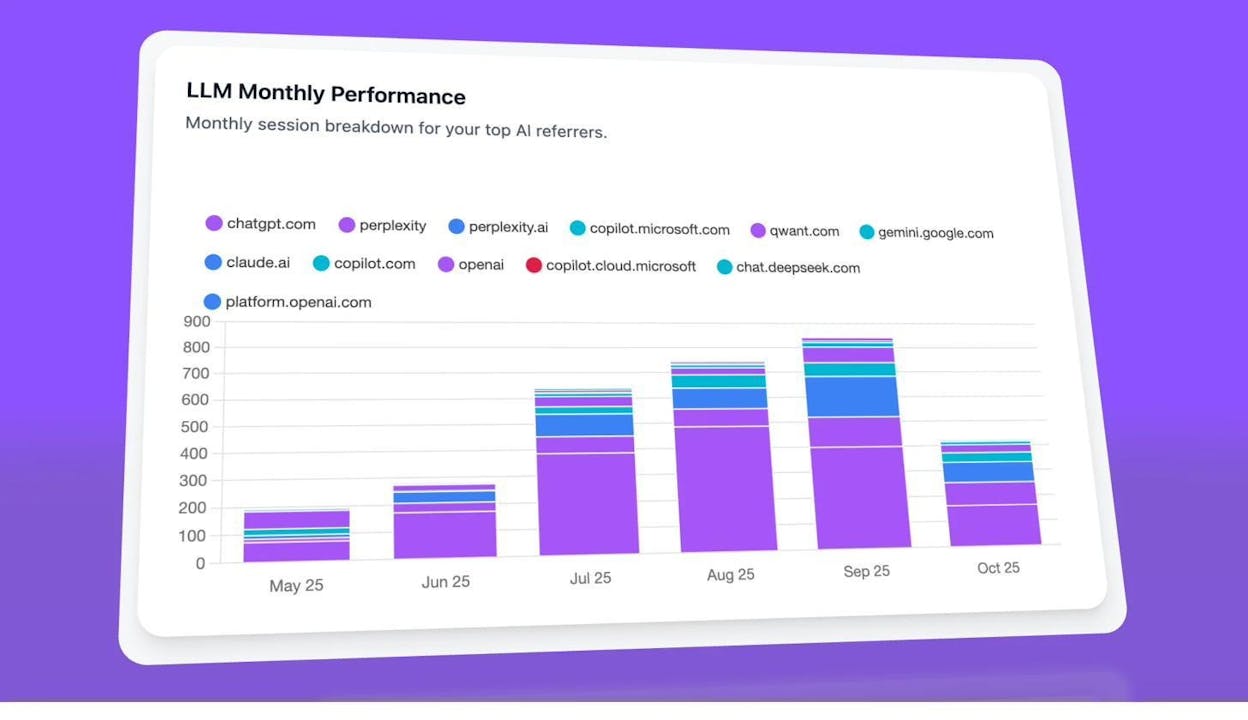
Use this data to tailor your strategy by engine. If Perplexity cites review sites heavily, earn review coverage. If ChatGPT favors authoritative domain sources, focus on building domain authority through backlinks. If Claude cites company blogs more often than other engines, invest in your own content.
Use Smart Prompt Suggestions to Expand Coverage
One of the challenges with AI search monitoring is knowing which prompts to track in the first place. Analyze AI solves this with its Prompt Suggestion feature, which recommends high-relevance prompts based on your tracked clusters. You can one-click “Track” any suggested prompt to add it to your daily monitoring.
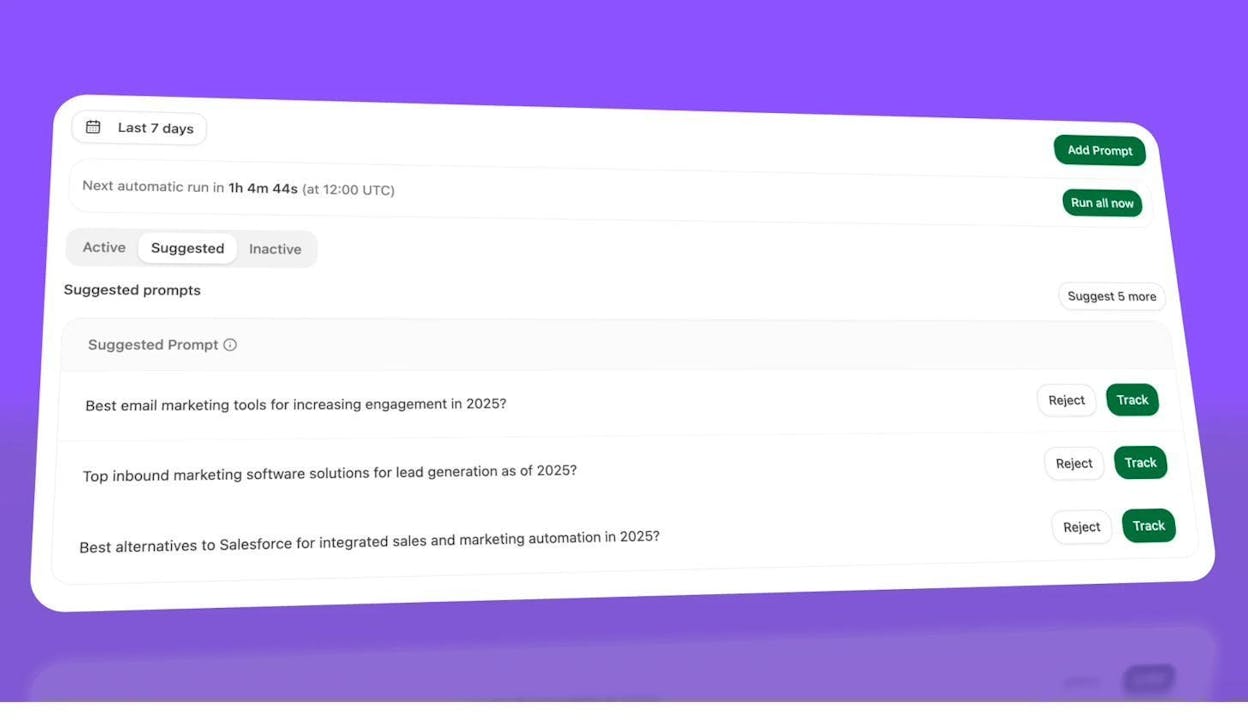
Think of this as the AI search equivalent of keyword research. In traditional SEO, you use a keyword generator to find search terms worth targeting. In AI search, you use prompt suggestions to find the conversations worth monitoring and winning.
Outreach: How to Actually Convert Unlinked Mentions into Links
Finding unlinked mentions is only half the job. The other half is outreach—reaching out to the site owner and convincing them to add a link. Here’s how to do it well.
Find the Right Contact
Your first challenge is finding who to email. Here are the most reliable methods:
Check the author byline. Most blog posts include an author name. Search for that person on LinkedIn or Twitter to find their email or a way to message them directly.
Use an email finder tool. Tools like Hunter.io, Voila Norbert, or FindThatLead let you search for email addresses associated with a domain. Paste in the website URL and pull up any available contacts.
Check the site’s contact or about page. Many smaller sites list editorial contact information directly. For larger publications, look for the specific editor responsible for the section where your mention appeared.
Write an Effective Outreach Email
The best outreach emails for unlinked mentions share a few traits: they’re short, polite, specific about what you’re asking for, and they explain why adding the link benefits the reader.
Here’s a framework that works:
Subject line: Keep it short and specific. Something like “Quick suggestion for your [topic] article” or “Small fix for [article title].”
Opening: Reference the specific article and compliment something specific about it. Don’t be generic—mention a point the author made that you found genuinely useful.
The ask: Explain that your brand is mentioned but not linked, and that adding a link would help their readers find the resource being discussed. Frame it as helpful to their audience, not as a favor to you.
Additional value: If you noticed any other issues on the page—broken links, outdated information, typos—mention them. This makes you look helpful rather than self-serving, and it increases the likelihood the author will edit the page.
Close: Keep it simple. Thank them and let them know you’re happy to help if they need anything.
Here’s what this looks like in practice:
Subject: Quick note about your [topic] post
Hi [Name],
I was reading your article on [topic] and really liked [specific point]. One small thing I noticed—you mentioned [your brand] in the section about [context], but there’s no link for readers to find us.
Would you mind adding a link to [your URL]? I think it would help readers who want to check out what you’re referencing.
I also noticed a broken link in the [section]—it looks like [URL] might have moved. Just a heads up in case you want to fix that too.
Thanks! [Your name]
A few rules to follow:
Don’t be pushy. If the mention exists in a context where a link wouldn’t naturally make sense, leave it alone. Not every mention deserves a link.
Don’t request links that don’t add reader value. If someone mentions your brand in a negative review (“Here’s why [brand] disappointed me”), asking for a link isn’t worth it—and it looks tone-deaf.
Do offer something in return. If you can share the article on your social channels, mention the author in your newsletter, or provide a quote for a future piece, offer it. Reciprocity makes outreach more effective.
Do reach out quickly. The faster you contact the author after the mention is published, the higher your conversion rate. Authors who published yesterday are far more willing to make a quick edit than authors who published six months ago.
Track Your Outreach
Keep a simple spreadsheet tracking each unlinked mention you’ve found, the URL, the contact person, the date you reached out, their response, and whether the link was added. This helps you measure your conversion rate, spot patterns in what works, and avoid reaching out to the same person twice.
|
URL |
Contact |
Date Sent |
Response |
Link Added? |
|---|---|---|---|---|
|
example.com/article |
2026-02-15 |
Replied, will add |
Yes |
|
|
blog.site.com/post |
2026-02-16 |
No response |
— |
|
|
news.pub.com/review |
2026-02-17 |
Declined |
No |
For broken links found during your mention audit, Analyze AI’s free Broken Link Checker can help you identify additional value you can offer in your outreach emails. Finding and reporting broken links on the same page as your unlinked mention gives the author a reason to edit the page—and while they’re at it, they can add your link too.
Building a Repeatable Unlinked Mentions Workflow
Unlinked mention link building isn’t a one-time project. It’s an ongoing process that should be built into your regular marketing workflow. Here’s a monthly cadence that works:
Week 1: Run a content explorer search for all branded terms. Filter, export, and check for existing links. Add new unlinked mentions to your outreach spreadsheet.
Week 2: Run a Google search for branded terms with date filters for the past 30 days. Check for new mentions that the content explorer might have missed.
Week 3: Check social profile backlinks and misspelled domains. Run a reverse image search on your most shared visual assets. Add new opportunities to your spreadsheet.
Week 4: Process outreach. Send emails for all new unlinked mentions found during the month. Follow up on non-responses from the previous month.
Ongoing: Monitor alerts. Check your Google Alerts, Ahrefs Alerts, and Analyze AI’s AI search monitoring dashboard weekly. Process new mentions as they appear.
This cadence ensures you’re catching mentions across both traditional web and AI search channels. Over time, the compounding effect is powerful—each converted mention adds a backlink that strengthens your domain authority, which in turn improves your visibility in both organic search and AI-generated answers.
SEO and AI Search Work Together Here
If there’s one takeaway from this entire guide, it’s this: traditional link building and AI search visibility are not separate strategies. They reinforce each other.
Every backlink you earn from converting an unlinked mention strengthens your domain authority, which improves your organic search rankings. That stronger authority also signals to AI models that your brand is credible and worth recommending. Meanwhile, appearing in AI search responses drives referral traffic and brand awareness that leads to more people mentioning you on their websites—creating more unlinked mentions to convert.
This is exactly the approach we advocate at Analyze AI. GEO isn’t a replacement for SEO—it’s the next evolution of it. Search is expanding from ten blue links to multi-modal, prompt-shaped answers. The fundamentals haven’t changed. Quality still governs visibility. Authority still comes from depth, originality, and usefulness.
What has changed is where that quality needs to be visible—to crawlers, to AI models, and to the people asking better questions across both traditional and AI search engines.
Start finding and converting your unlinked mentions today. And if you want to see where your brand stands in AI search, check your AI rankings with Analyze AI.

Ernest

Ibrahim