



Summarize this blog post with:


In this article, you’ll find ten specific workflows that turn Analyze AI from a dashboard you check once a week into the operating system behind your AI search strategy. Most articles about AI visibility tools list features. This one is different. We’ve ordered the ten use cases in the sequence we recommend running them, so the output of one feeds the next. Each section maps to a discrete part of the product, includes a concrete decision you’ll be able to make after running it, and explains how the workflow plugs into your traditional SEO process rather than replacing it.
Table of Contents
How Analyze AI works in one paragraph
Analyze AI runs prompts daily across ChatGPT, Perplexity, Gemini, Google AI Mode, Claude, and Copilot, then aggregates every response, citation, and brand mention into one console. Most AI search tools track a list of prompts you give them. Analyze AI does that, and also discovers prompts you did not think to track, surfaces the competitors AI keeps recommending instead of you, and ties the whole picture to actual sessions and pipeline through GA4. The product is organized into four pillars (Discover, Monitor, Improve, Govern), and the ten workflows below cut across all four.
1. Benchmark your current AI search visibility
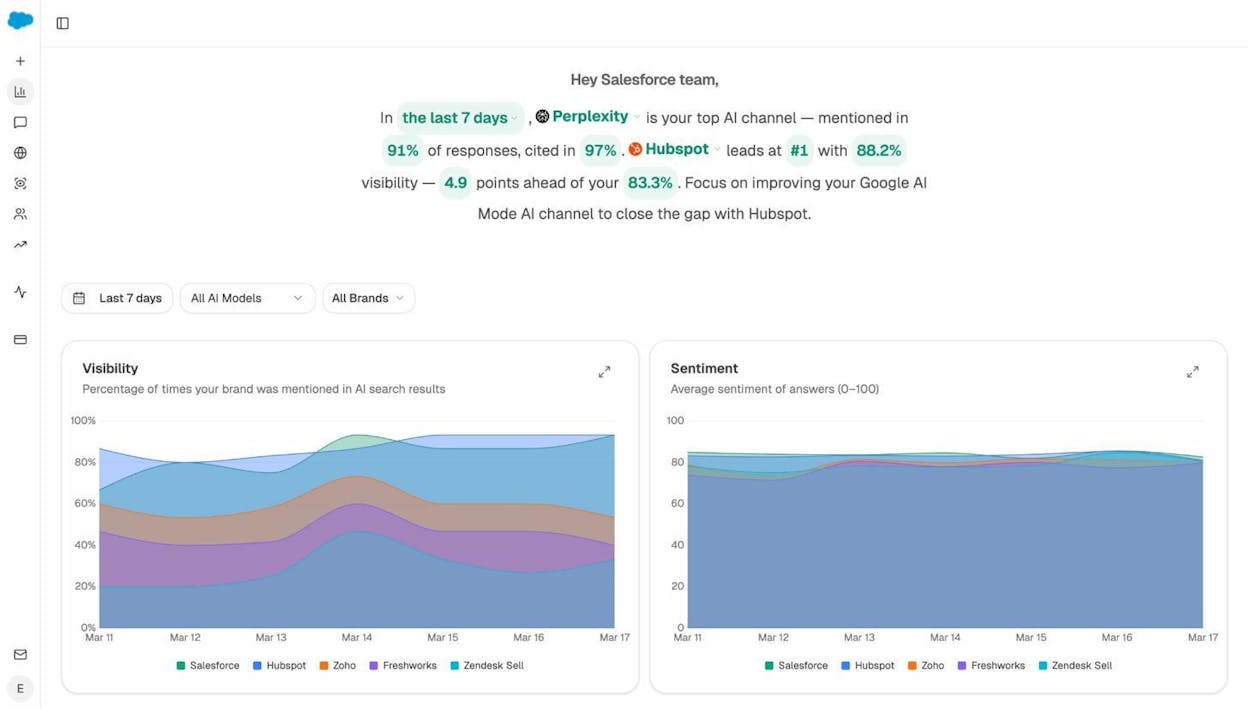
Before you change anything, you need a number to beat. The Overview dashboard gives you that number across all engines you care about, in one view, in under a minute.
Open the AI Visibility Tracking report and add your brand. The dashboard surfaces four metrics that matter for an AI baseline.
-
Visibility, the percentage of tracked AI responses where your brand appears at all
-
Average rank, the typical position you hold when you do appear
-
Sentiment, a 0 to 100 score on how AI describes you when you are mentioned
-
AI Share of Voice, your share of all branded mentions across the prompts and competitors you track
Filter by engine to see if you are stronger on Perplexity than on ChatGPT, or invisible on Gemini. The asymmetry across engines is almost always larger than people expect, and that asymmetry is where most of your near-term gains come from.
The Overview also gives you a one-line takeaway at the top of the dashboard. It tells you which engine drives more share than the others, which competitor leads, and how far behind you sit.
If you already track keyword rankings in a traditional rank tracker, treat this dashboard as the AI equivalent. The same way keyword rank tracking tells you where you sit on a Google SERP, the Overview tells you where you sit inside an AI answer.
2. Audit how AI describes you and fix what is wrong
Visibility is not enough. AI can mention you and still describe you in ways that lose deals.
Open the AI Sentiment Monitoring report. You will see how each engine frames your brand, the themes it associates with you, and the risk terms that come up most often (pricing complaints, reliability concerns, integration limits).
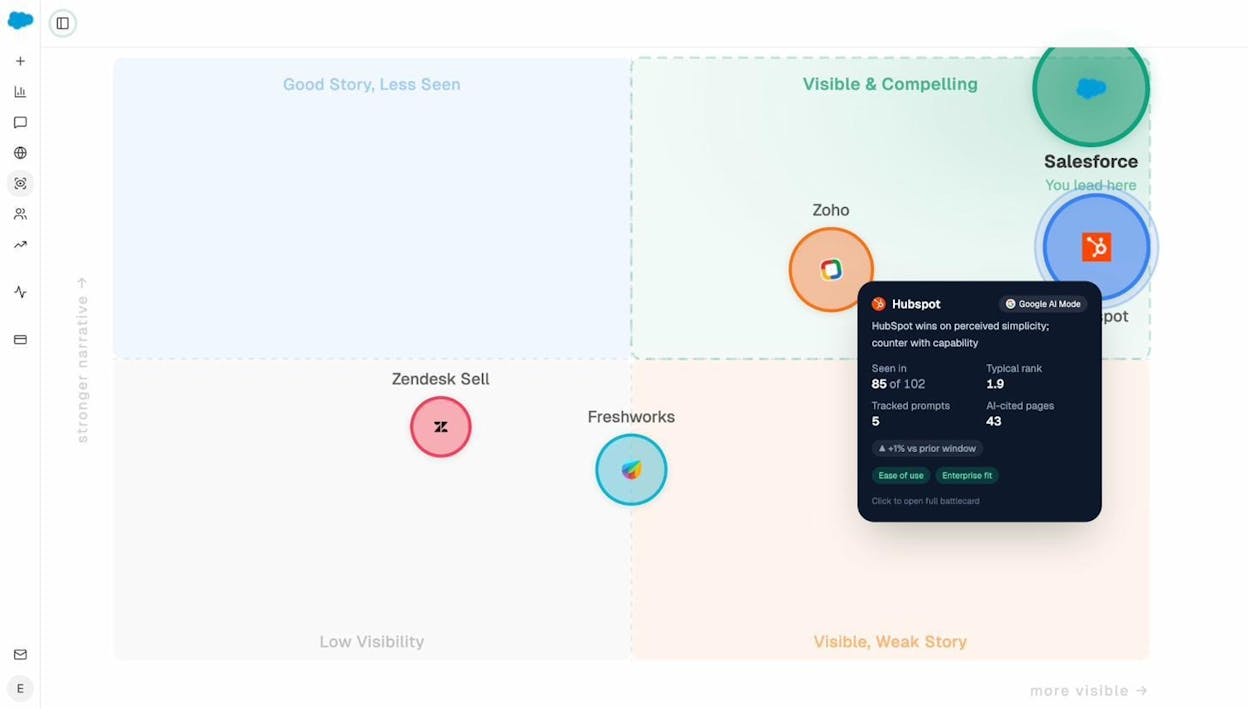
Then move to the Perception Map. It plots every brand AI mentions on two axes (visibility and narrative strength) so you can see whether you are visible and compelling, visible with a weak story, good story but rarely seen, or low visibility on both. Each quadrant implies a different fix.
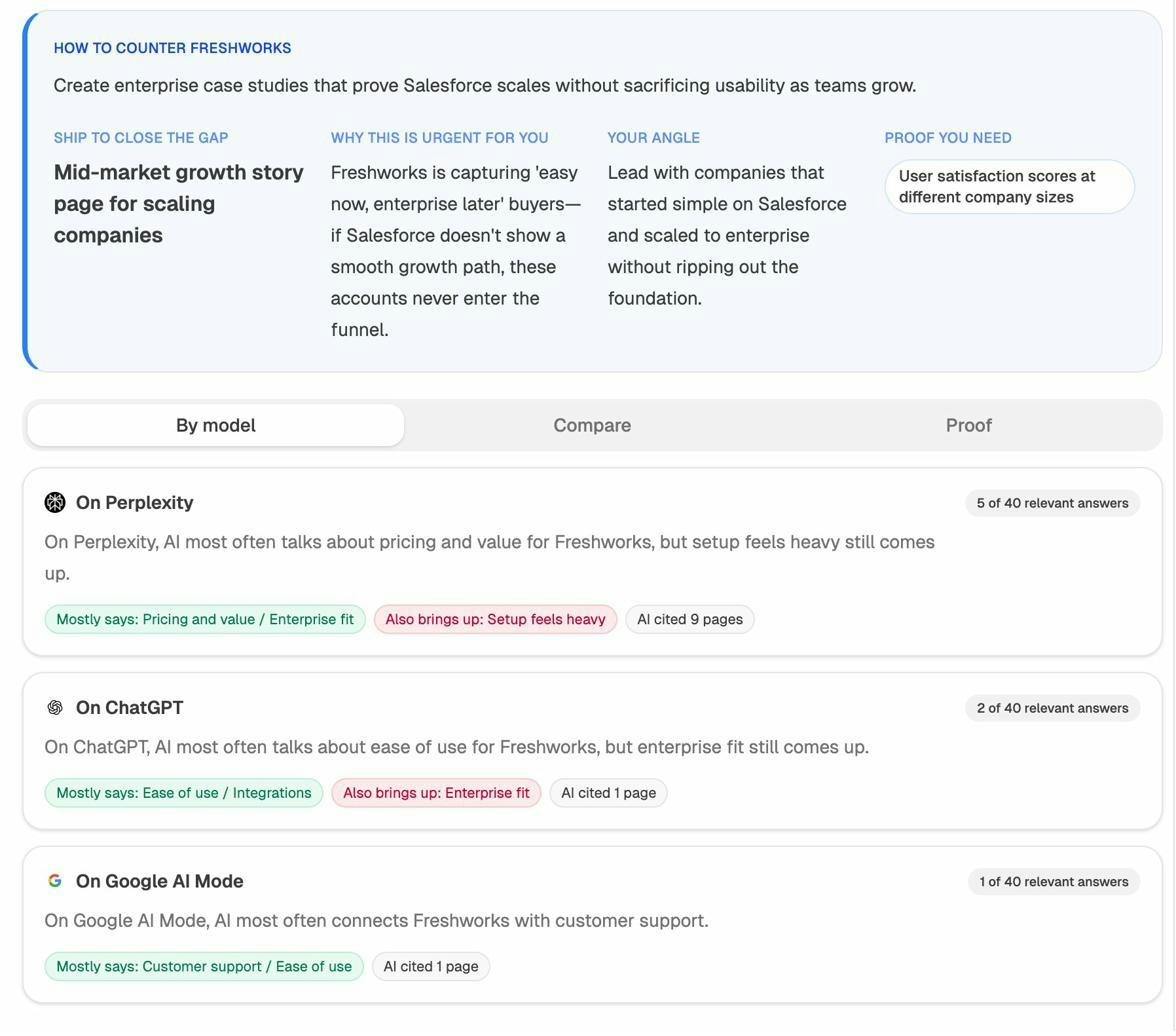
For competitors that AI praises more than it praises you, open the AI Battlecards view. Each battlecard tells you what AI says about that competitor, why their narrative is winning, and what content angle would close the gap.
This is where most teams underestimate the work. Fixing how AI describes you is rarely about begging AI to change its mind. It is about updating the third-party sources AI is reading. The Sources report (covered in use case 6) tells you exactly which pages those are.
3. See which topics AI already connects to your brand
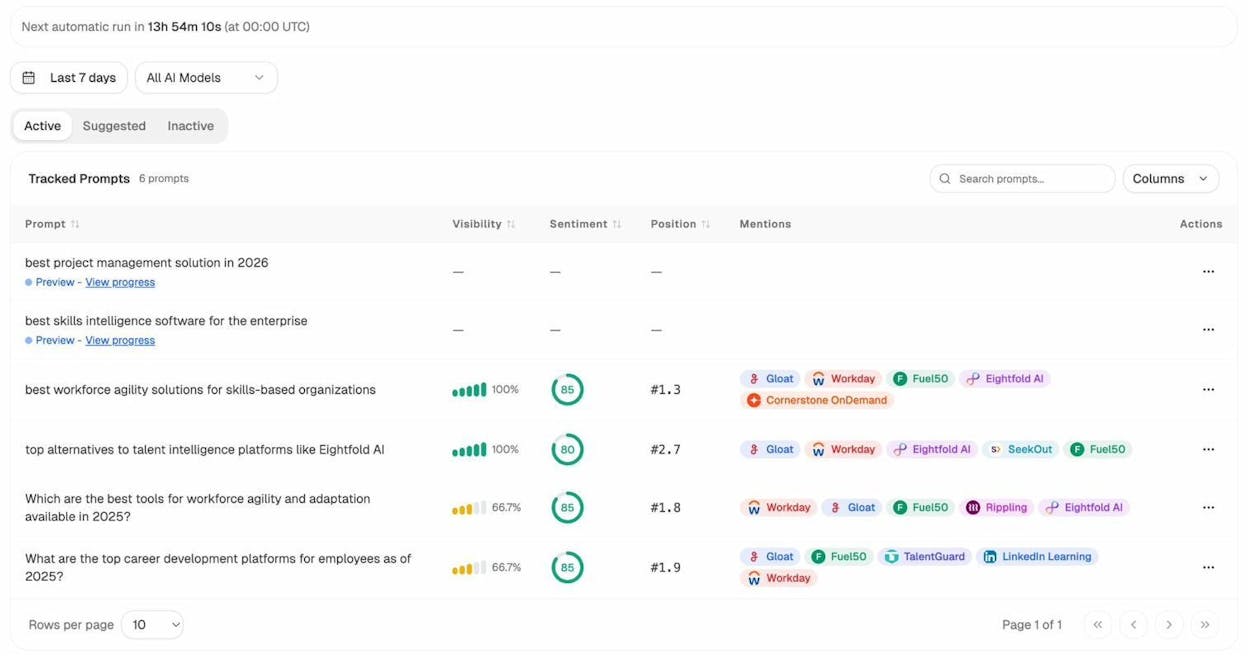
You are probably stronger on some topics than you realize, and weaker on others than you fear. The Prompt Discovery report shows you both at once.
It works in two passes.
First, run a brand search and look at every unbranded prompt where you appear. These are topics AI already associates with you. Write them down, because they are the topics where defending and expanding take the least effort.
Second, run a topic search (like “best CRM for small teams” or “open source feature flag tools”) and look at the responses. If your brand shows up consistently, you have topical authority. If it does not, but a competitor does, that gap is a content brief.
Pair this with traditional keyword research. The free Analyze AI keyword generator and SERP checker help you understand the search-volume side of the same topics. The two together (which prompts AI runs in your space, and which keywords humans type into Google) are how you build a content roadmap that compounds across both channels. Our breakdown of GEO vs SEO goes deeper on how the two stack.
4. Benchmark against competitors at the prompt level
Most competitor analysis tools tell you which competitor outranks you on average. That number is too aggregated to act on. The Competitor Intelligence report does the opposite. It tells you the exact prompts your competitor wins, on which engine, and by how much.
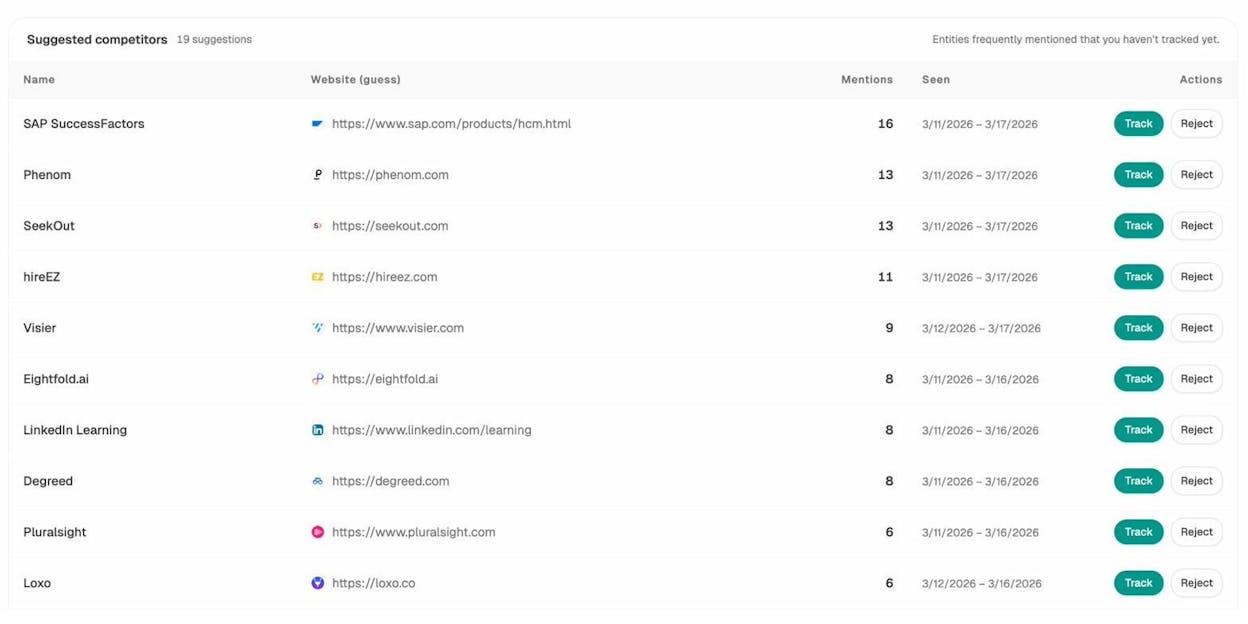
Start by adding three to five direct competitors. If you are not sure who to add, the Suggested competitors panel is automatically populated based on the brands AI keeps mentioning alongside or instead of you across your tracked prompts. The list is usually more accurate than the one you would write from memory.
Once you have your competitor set, open the prompt-level breakdown. Each row is a prompt. Each cell is the brand AI cites first on that engine.
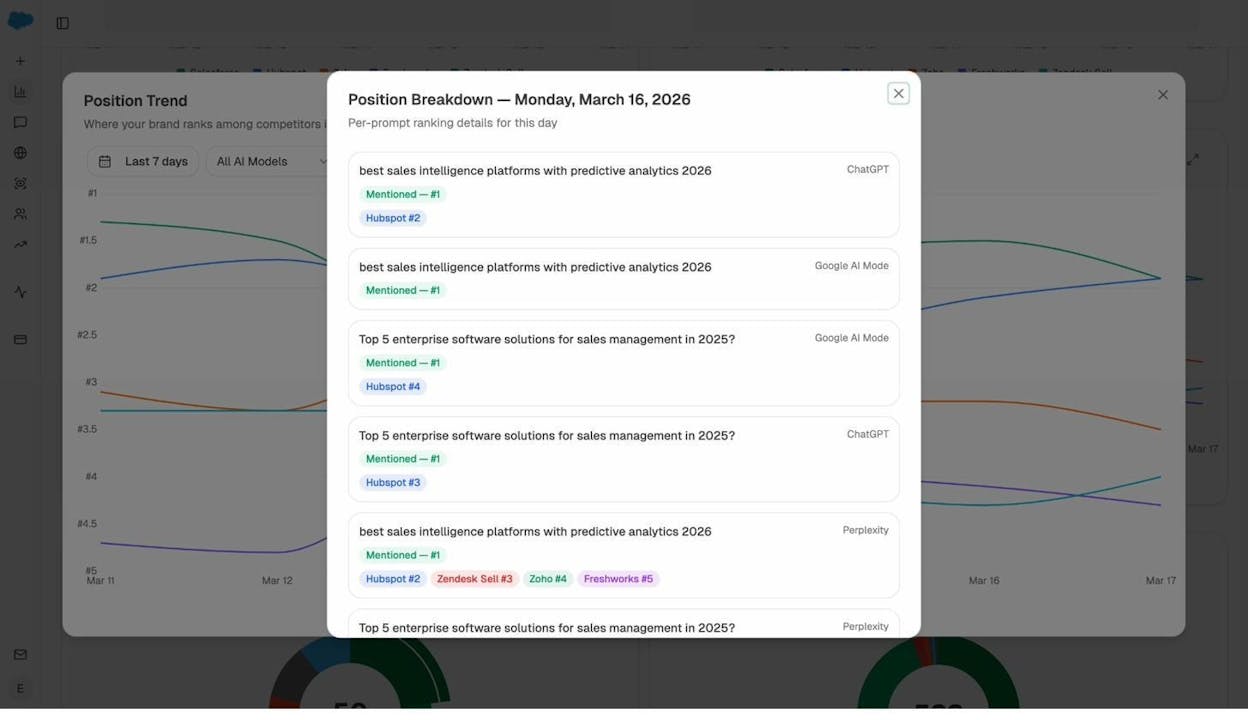
The view that matters most is prompts where competitors appear and you do not. Filter for those, then sort by search volume or citation count. The top of that list is your week-one priority list.
A common mistake here is treating every loss equally. Some prompts are bottom-of-funnel comparison queries (“best Salesforce alternatives”), where being absent costs you pipeline. Others are upper-funnel definitional queries, where being absent is mostly a brand awareness issue. Sort by intent, not by total losses, and you will spend your effort on the right ones. Our guide on SEO competitor analysis covers the same prioritization for organic search.
5. Find the prompts you should be tracking (but are not)
You cannot track every prompt in your category. The trick is finding the right twenty to thirty.
Analyze AI gives you three input streams for this.
Tracked prompts are the ones you have already added. They run daily and feed your visibility, sentiment, and rank metrics.
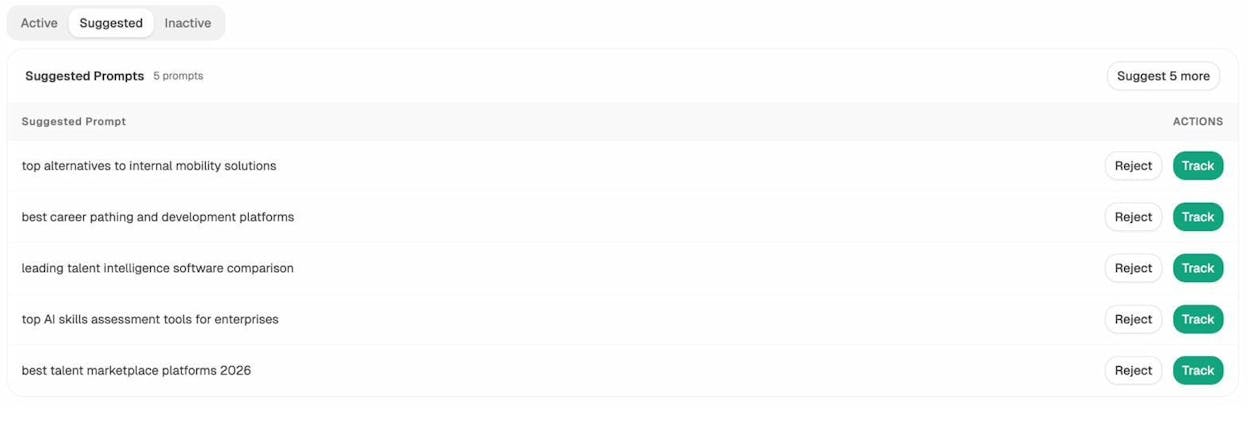
Suggested prompts are queries Analyze AI has discovered through Prompt Discovery and recommends you start tracking. They are typically prompts where you appear inconsistently, where a competitor wins, or where the topic clusters with prompts you already track.
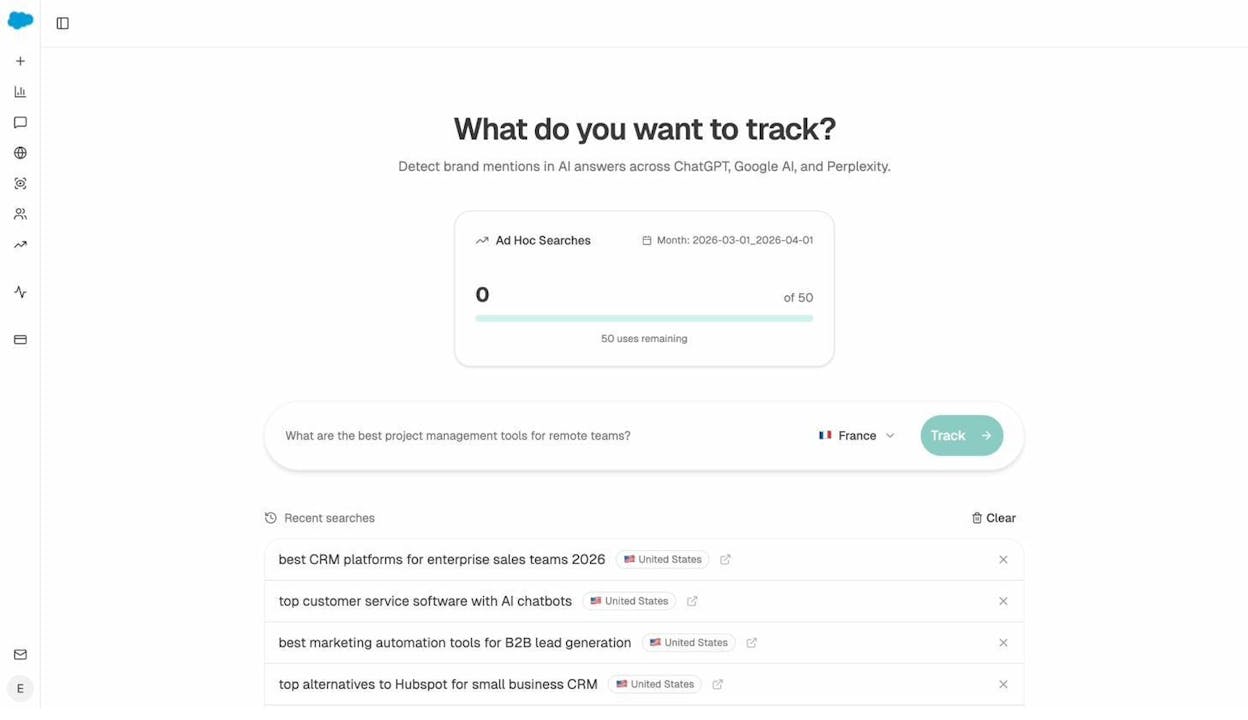
Ad hoc prompt searches let you run a one-off search across ChatGPT, Perplexity, and Gemini before committing to track it. Use this when a sales rep or a customer success conversation surfaces a query you have never heard before. If your brand appears, add it to tracking. If it does not, it goes into the content brief queue.
If you want a structured way to choose your initial tracked prompts, our framework on outranking competitors in AI search is the right starting point.
6. Find the citation gaps that explain your invisibility
An under-used report in the platform is Citation Analytics.
It answers a question most teams never ask. Which third-party domains is AI reading to write its answer about your category, and how often does each one mention you versus a competitor?
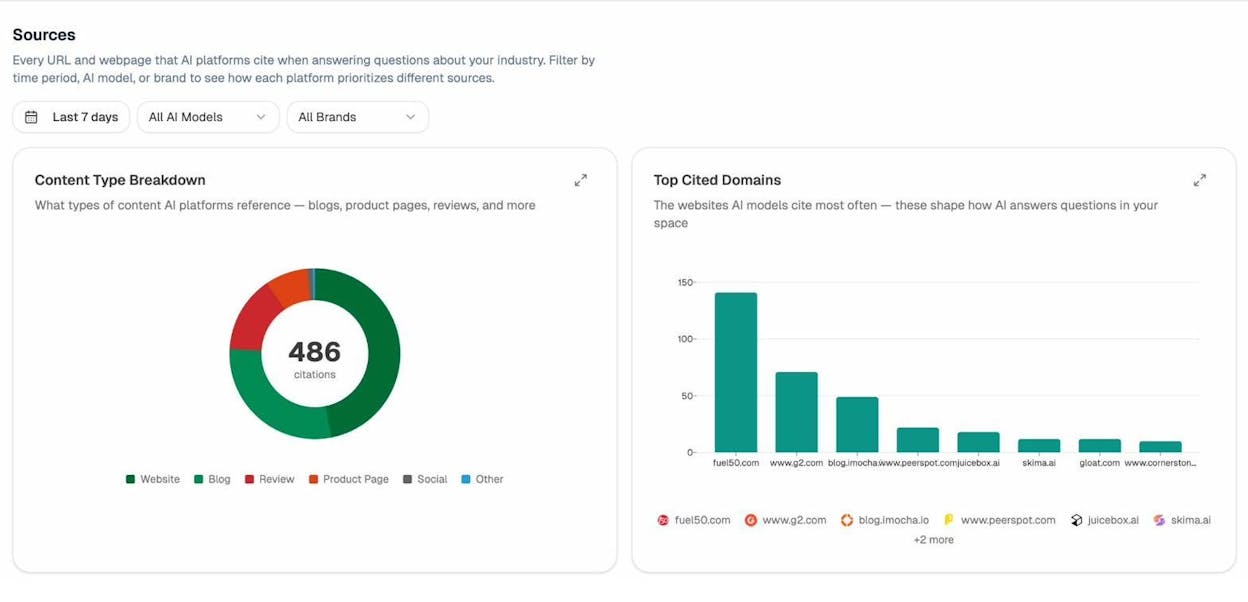
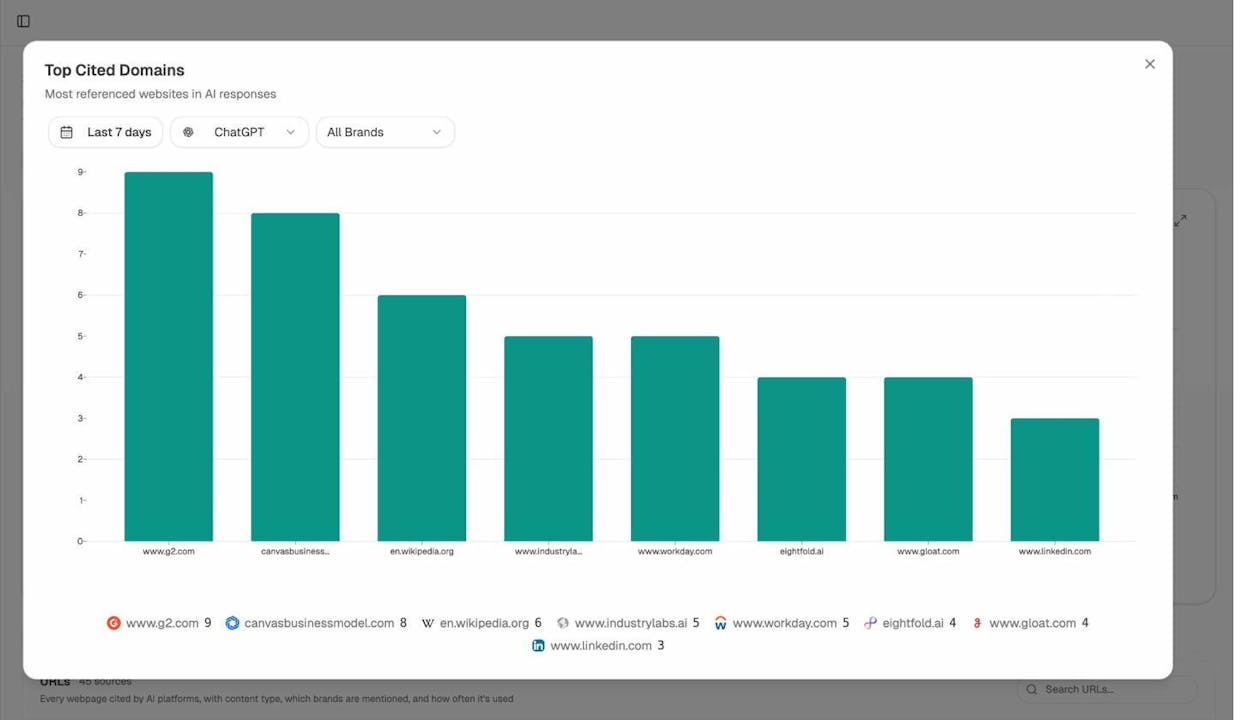
Open the Sources view, filter by engine, and sort the Top Cited Domains chart. You will see which review sites, blogs, forums, and publications shape the AI narrative in your space. Almost always, three to five domains do most of the work.
Then drill into the URL list. Each row tells you which page is cited, which content type it is (review, blog, product page, social), which brands it mentions, and how many AI responses use it as a source.
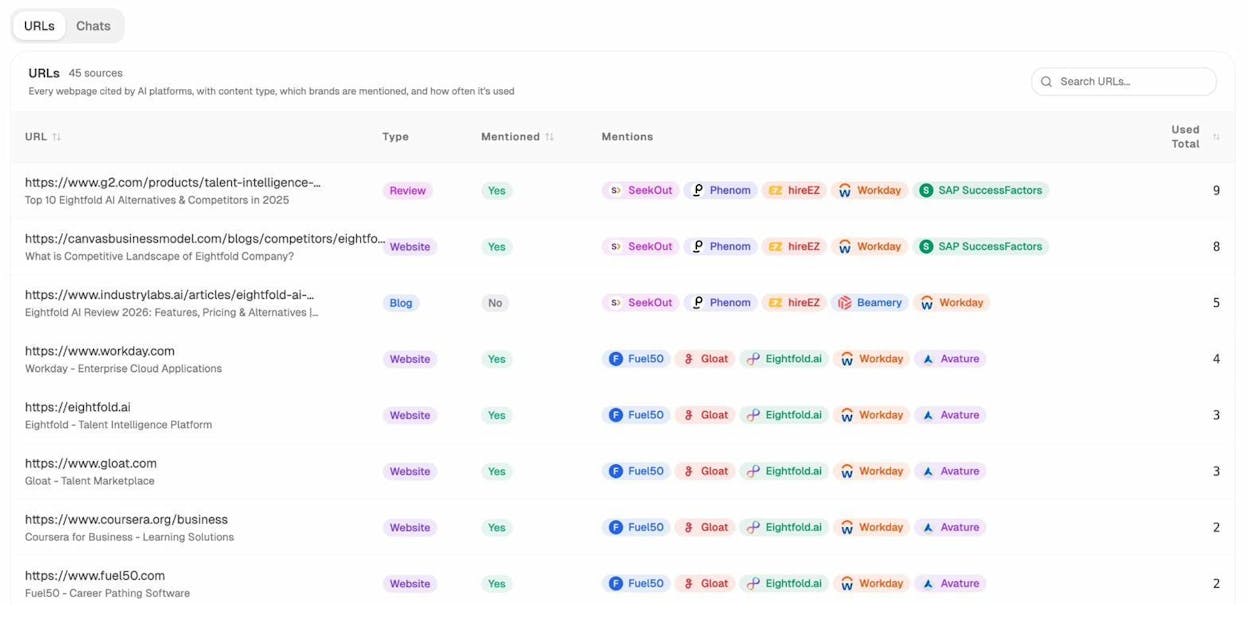
Two patterns matter most here.
Pages cited frequently that do not mention you are your strongest outreach targets. A single update to a G2 listicle or a missing entry on a comparison post can move your visibility on a dozen prompts at once.
Pages cited frequently that mention you with outdated information are why AI keeps repeating wrong messaging. Updating those is faster than trying to publish more content of your own.
This use case bridges directly to traditional link building and digital PR. The Sources report essentially gives you a prioritized prospecting list, ranked not by traditional domain authority (which you can still check with our free website authority checker) but by AI citation frequency, which is a much better proxy for what AI will read tomorrow.
7. Discover the content formats AI prefers in your category
Different categories reward different content formats. In some niches, AI cites G2 listicles relentlessly. In others, it leans on documentation, original research, or Reddit threads. The Sources report has a Content Type Breakdown chart that shows you the mix for your space, broken out by engine.
If 40 percent of citations in your category come from review platforms, your content strategy needs a review-platform plan, not just a blog plan. If 30 percent come from blogs, look at which blogs and what they have in common (length, depth, structured data, presence of comparison tables).
A useful exercise is to pull the top ten cited pages for your topic, and inventory their structural patterns. Almost all of them will share three or four traits (a summary section near the top, a comparison table, structured headings, a clear author bio). Those traits are the spec for your next piece of content. Our answer engine optimization guide covers the structural choices in more depth.
8. Use AI traffic data to double down on what works
The previous seven use cases are about visibility (whether AI mentions you). This one is about traffic (whether people who see those mentions actually click through).
Open AI Traffic Analytics. Once GA4 is connected, you will see every session that arrived from an AI engine, broken down by source, landing page, engagement, bounce, and conversions.
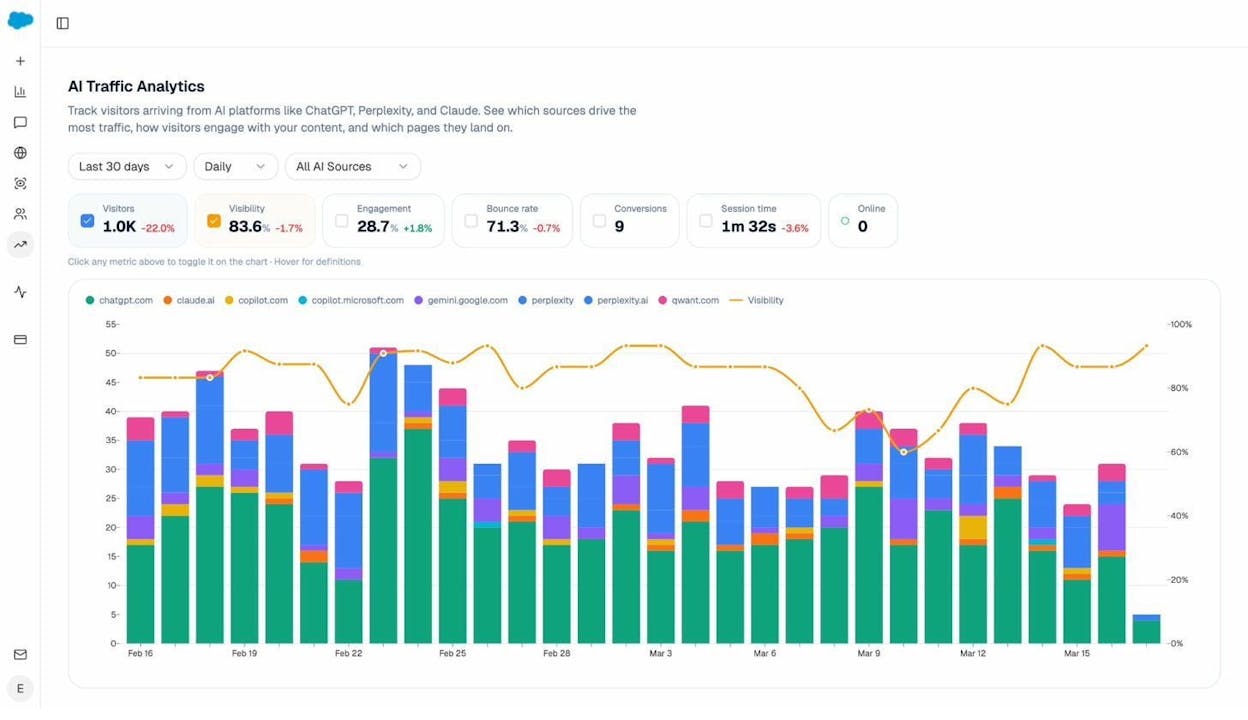
The view to focus on here is Landing Pages. It tells you which pages on your site are pulling traffic from AI, how those visitors engaged, and how many converted.
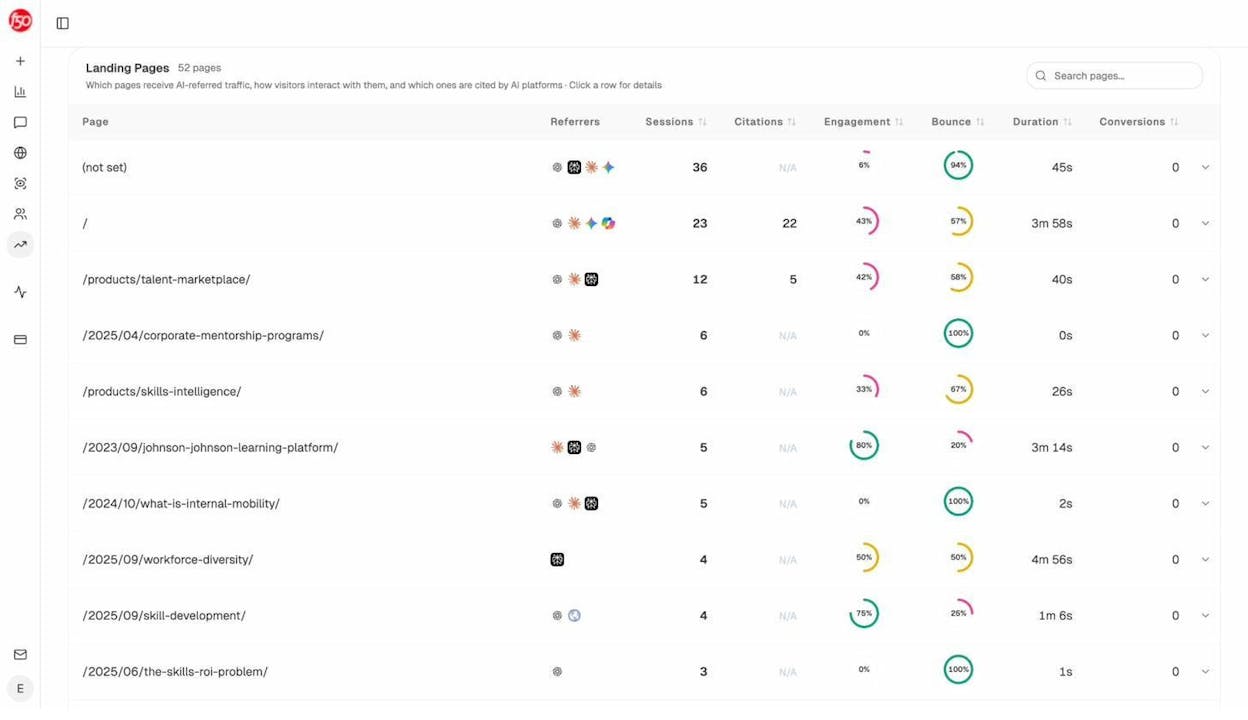
Most teams discover two surprises when they open this report.
The first is that the pages getting cited and the pages getting traffic are often not the same pages. Some pages get cited but no one clicks. Others get cited rarely but convert well when someone does. Both insights change what you ship next.
The second is that AI traffic converts at a different rate than search traffic. We have seen conversion rates of 5 to 8 percent on AI-referred traffic, which is meaningfully above the typical 1 to 2 percent on blog traffic from Google. That delta is your case for investing more.
The pattern to look for is simple. Identify the three pages that drive the most AI sessions. Read them. Identify the structural and topical traits they share. Apply those traits to ten more pages. Watch the traffic compound.
9. Optimize and create content that gets cited
Once you know which prompts to chase (use case 5), which gaps to fill (use case 6), and which formats to write in (use case 7), the next step is the writing itself. Two tools handle this.
The AI Content Optimizer starts with pages you already have. Paste a URL, and it pulls the live content, scores it on argument and flow, clarity and polish, and surfaces the gaps that are preventing it from getting cited. You see line-by-line editorial comments and a list of specific changes ranked by impact.
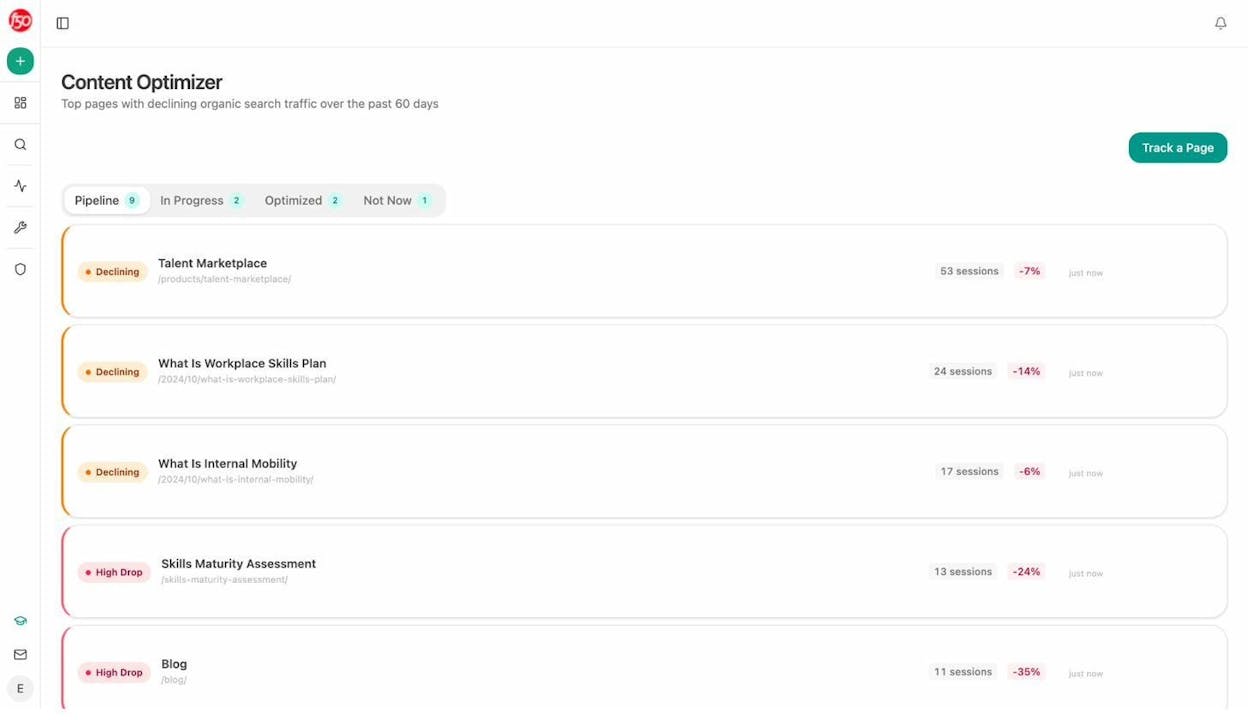
The optimizer is built for the boring but high-yield work. Most pages on most sites do not need to be rewritten from scratch. They need a clear opening, an expanded middle, structured headings, and a comparison table. The optimizer tells you which of those is missing on each page.
The AI Content Writer handles the other side, where the page does not exist yet. It takes a content idea (a prompt you want to win, a competitor URL you want to beat, or a keyword from your existing research), runs research, builds an outline that addresses the AI search angles you are targeting, and produces a first draft with editorial comments throughout.
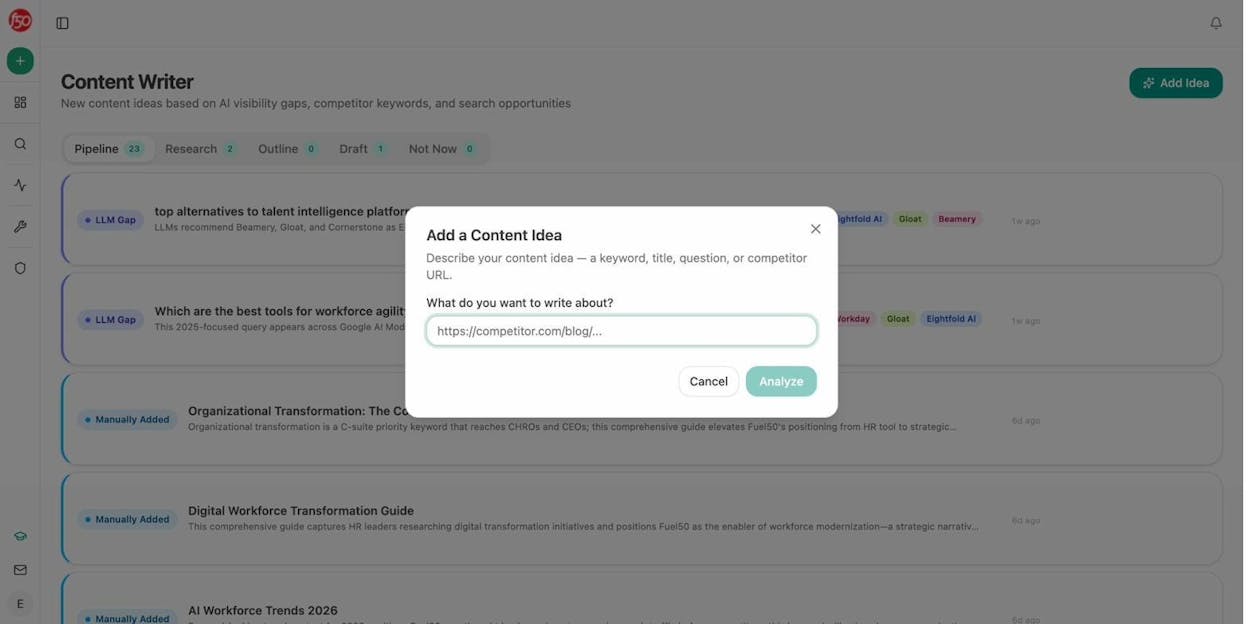
Both tools are designed around the same principle as our content optimization guide. Quality, depth, and structural clarity are still what wins. The tools just make the gap analysis explicit.
10. Operationalize the workflow with weekly digests
The final use case is the one most teams skip and then regret.
Visibility decays. Competitors ship new content. Citations move. If you only check Analyze AI when something feels off, you will catch issues weeks late. The Weekly Email Digests feature is designed to fix that.
Every Monday, the digest summarizes what changed in the last seven days (visibility movement, rank changes, new citations, lost citations, sentiment shifts, the actions to take this week, and the watchlist of new domains starting to cite you).
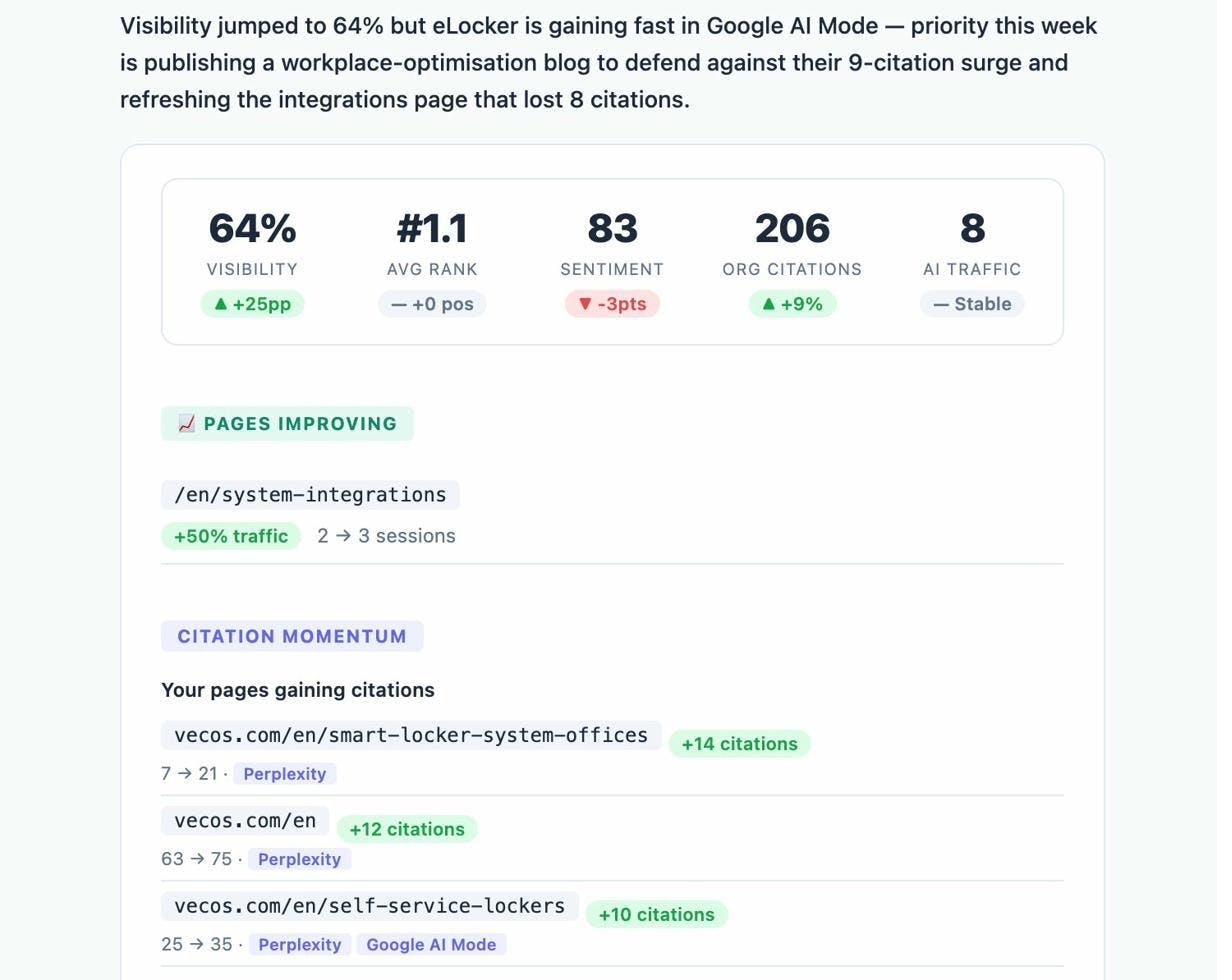
The section that matters is Actions This Week. It is a short, ranked list of moves the system has flagged as priority work, each tied to a specific page or prompt. You do not have to log in. You read the email, assign two or three actions to your team, and move on.
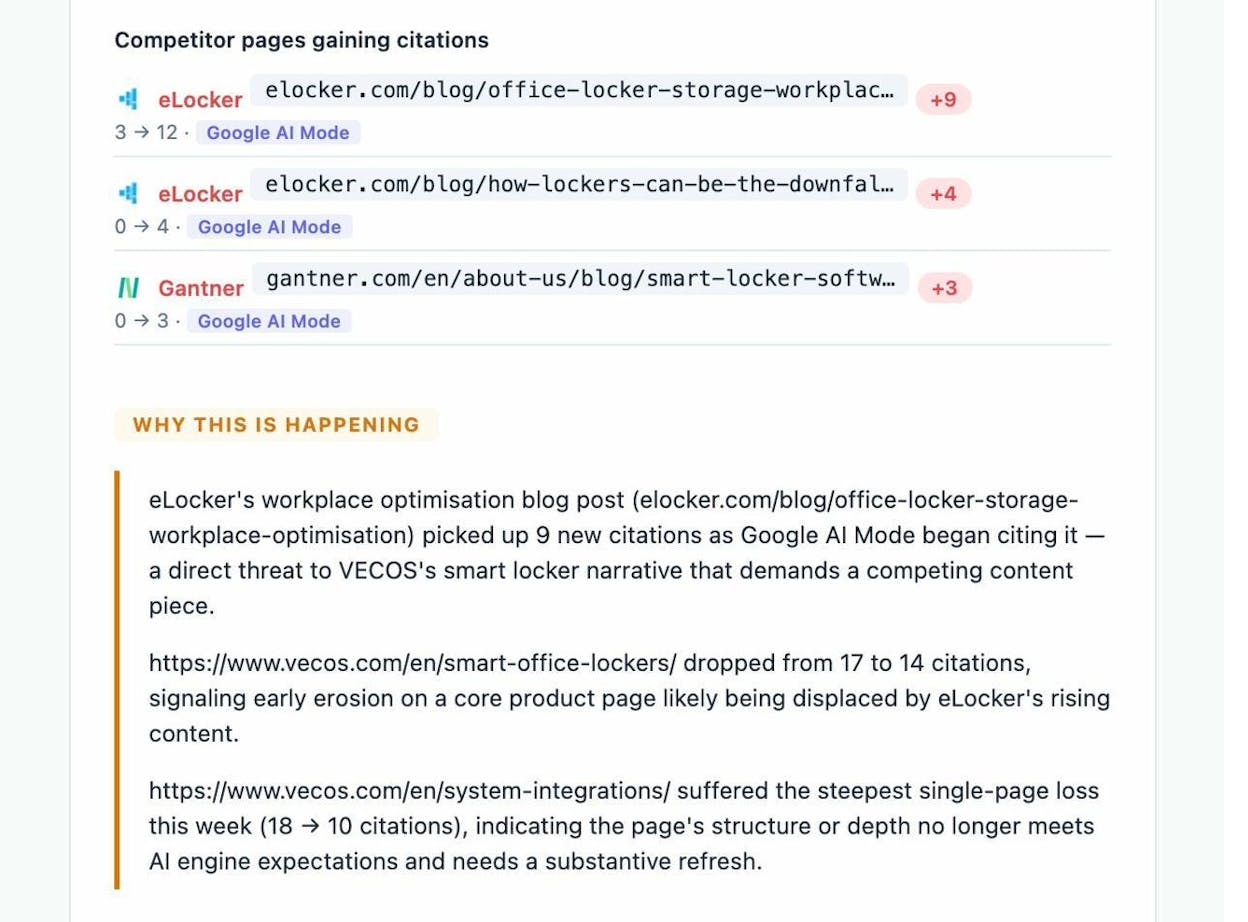
This is also the report to share with leadership. The narrative is already written, the metrics are already framed, and the actions are already prioritized. Most marketing leads we work with forward the digest to their CMO without edits.
How to run these ten in sequence
Reading ten use cases at once is overwhelming. Running them in sequence is not. Here is the cadence we recommend.
|
Week |
Use cases |
Outcome |
|---|---|---|
|
Week 1 |
1, 2, 3 |
A baseline. You know your visibility, sentiment, and topical positioning. |
|
Week 2 |
4, 5 |
A target list. You know which competitors and prompts to focus on. |
|
Week 3 |
6, 7 |
A content brief. You know which third-party citations to chase and which formats to write in. |
|
Week 4 |
8 |
A traffic baseline. You know which pages already work and why. |
|
Ongoing |
9, 10 |
A production loop. You ship content the optimizer scored, and the digest keeps the loop honest. |
Four weeks to go from a blank dashboard to a working AI search program. That is the realistic timeline, and the one we have seen Kylian, Nebor, and other teams use to build AI traffic that compounds.
The brands that win in AI search will not be the ones that panicked first. They will be the ones who treated AI search the same way they treated SEO ten years ago. As another organic channel, measured carefully, fed steadily, and operated with the same discipline as everything else they ship.
If you want to see what your current baseline looks like, one way to do that is to start a free Analyze AI project and run use cases 1 through 3 today.

Ernest

Ibrahim


