Analyze AI - AI Search Analytics Platform

14 Best Writing Tools to Increase Your Efficiency in 2026

Written by

Ernest Bogore

Ernest Bogore

CEO

Reviewed by

Ibrahim Litinine

Ibrahim Litinine

Content Marketing Expert

14 Best Writing Tools to Increase Your Efficiency in 2026

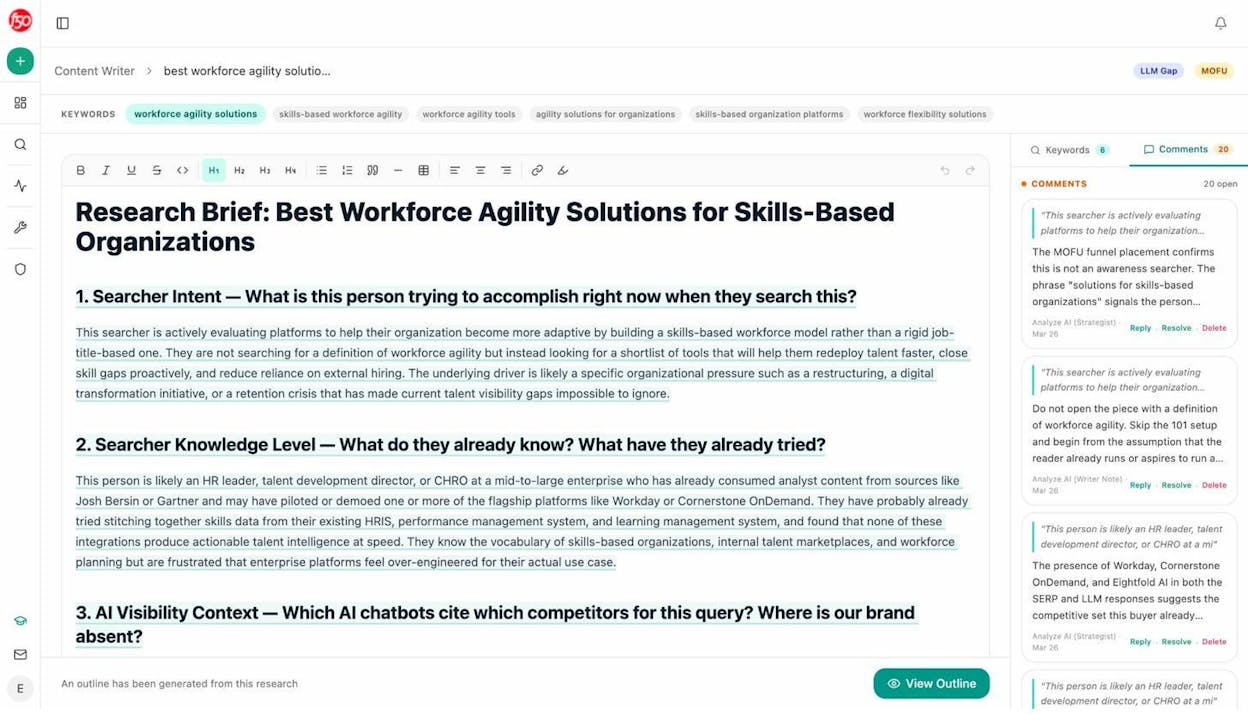
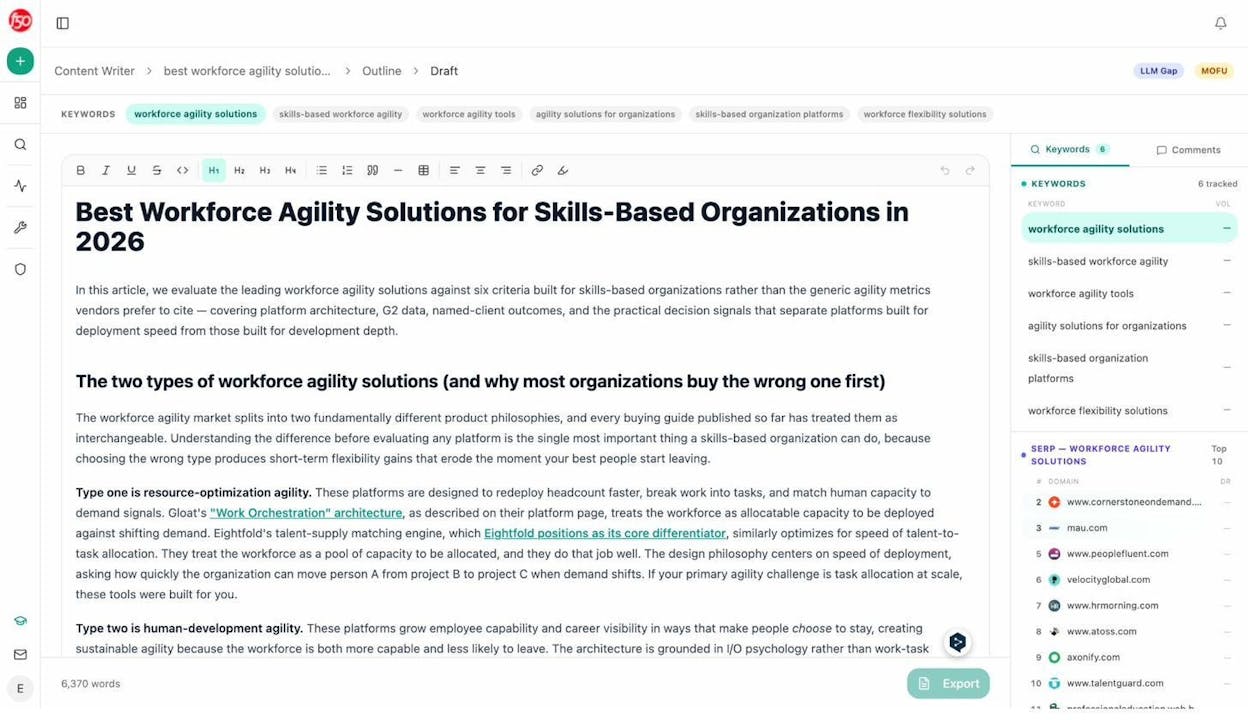
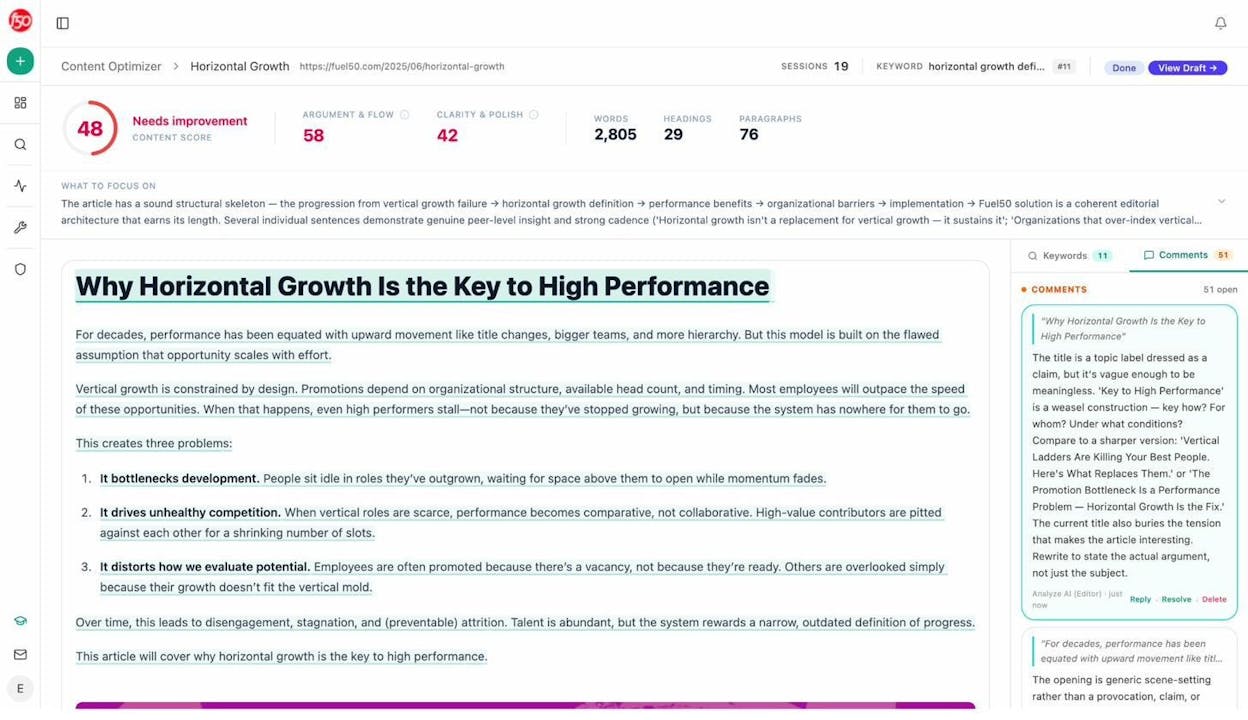
We tested and analyzed fourteen writing tools that actually improve output with features that shorten drafting time, raise clarity, reduce rework, and keep your workflow consistent across channels.

And for anyone ready to go further, the final section highlights one more tool that helps teams monitor how their brand appears across AI search engines — a bonus for writers and marketers who want visibility beyond content creation.

Table of Contents

TL;DR

Tool

Best For

Core Strengths

Key Limitations

Why It Matters for Efficiency

ChatGPT (OpenAI)

Fast, flexible drafting across formats

Handles brainstorming → drafting → rewriting; adaptable tone; long-context support

Can hallucinate; verbosity; must fact-check

Reduces blank-page time and accelerates full writing cycles

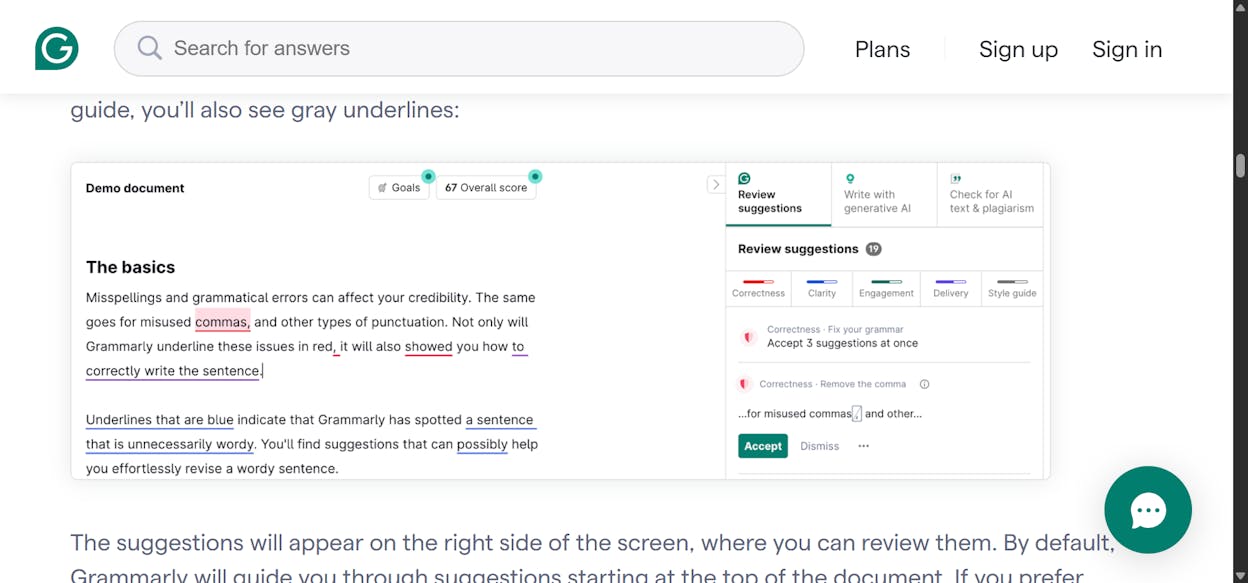
Grammarly / Superhuman

Clean, clear, consistent writing

Real-time clarity fixes; tone suggestions; integrated across apps; automation agents

Advanced features behind paywall; broader system adds complexity

Cuts editing time and keeps writing polished everywhere

Jasper

Structured marketing content

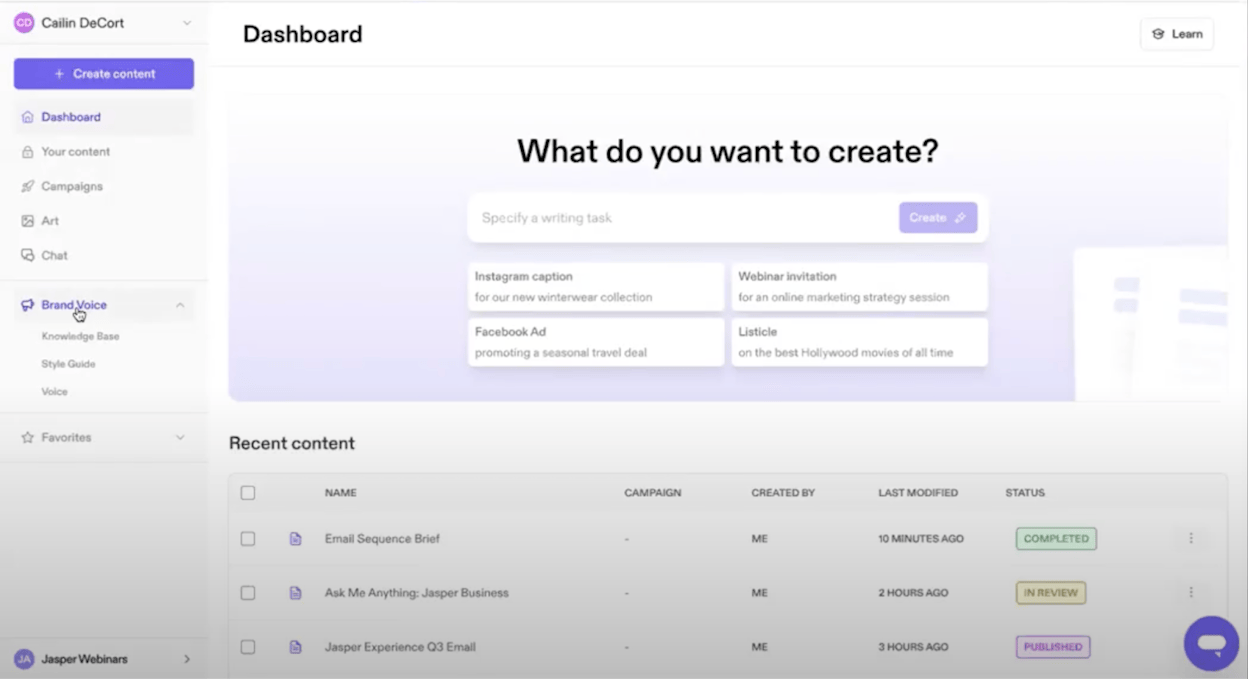
Templates, Brand Voice, SEO workflows, team collaboration

Higher pricing; learning curve; best for marketing only

Speeds up campaign content while keeping brand consistency

Copy.ai

Quick short-form marketing copy

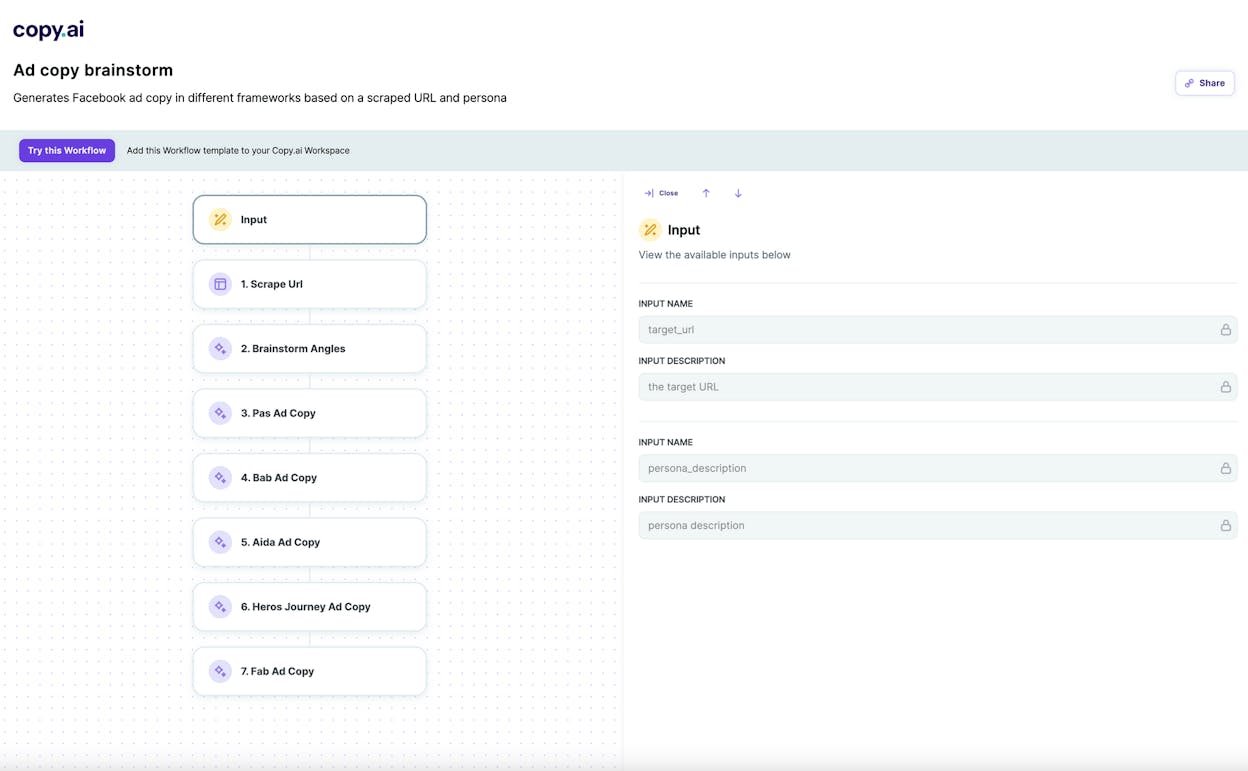
Huge template library; fast variations; non-writer friendly

Generic output; weak for long-form or deep research

Rapidly produces usable copy for tests and iterations

Writesonic

SEO-driven long-form drafts

Multiple AI engines; SEO planning; outline → draft workflow; team tools

Output needs editing; higher plans cost more

Faster creation of structured, search-focused articles

Claude (Anthropic)

Structured, thoughtful long-form writing

Deep reasoning; long-context; clean logic; safe tone

Not very creative; slower for simple tasks

Produces clear, coherent writing that reduces structural rewrites

Anyword

Data-driven, conversion-focused copy

Predictive scoring; audience modes; CTA optimization; brand rules

Marketing-only; higher cost; needs data for best insights

Improves messaging by predicting what will perform before launch

Sudowrite

Fiction, worldbuilding, storytelling

Scene expansion; creative brainstorming; Story Bible; prose enhancement

Niche to fiction; credits required; not for business writing

Speeds up creative drafting and overcomes narrative blocks

Wordtune

Polishing sentences for clarity

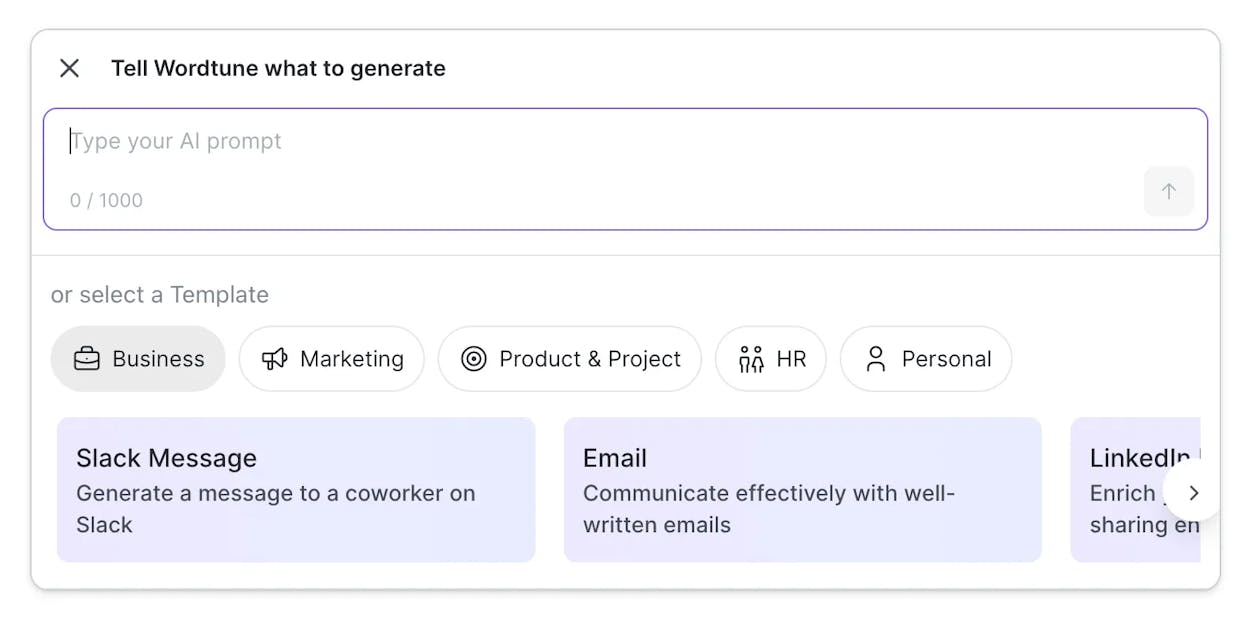
Strong rewriting; tone shifts; shorten/expand; in-app editing

Not for drafting; context limited; free tier restrictive

Quickly refines existing text for clarity and tone consistency

Notion AI

Organized notes & team content workflows

Lives inside Notion; summary + outline tools; strong for collaboration

No advanced SEO; requires workspace setup; slower on large pages

Streamlines writing, planning, and documentation in one place

Headline Studio

High-performing titles & hooks

Data-backed scoring; instant suggestions; multi-format headline support

Narrow tool; suggestions can be formulaic

Improves CTR and SEO by strengthening first-impression copy

Rytr

Fast, low-cost short-form writing

Very affordable; simple interface; templates for quick tasks

Weak for long-form; repetitive output; limited customization

Generates quick usable drafts for small teams on tight budgets

QuillBot

Paraphrasing & academic rewriting

Multiple rephrase modes; grammar polish; citations; summaries

Not for drafting; meaning may shift; free limits

Raises clarity and correctness of existing text with minimal effort

Lindy AI

Business proposals, sales comms & workflow automation

AI agents; no-code automation; CRM/email integrations; templates

Not creative; setup required; cost scales

Automates repetitive business writing, saving time at scale

ChatGPT (OpenAI): best writing tool for fast, flexible drafting

best writing tools

Key ChatGPT standout features

  • Chat-based workspace where you can ask for almost any kind of text

  • Can brainstorm ideas, draft long pieces, and rewrite rough notes into clear writing

  • Switches tone and style on request, from formal reports to friendly posts

  • Holds long context, so you can work on big projects without losing the thread

  • Handles many tasks beyond pure writing, like outlines, summaries, and quick research-style overviews

ChatGPT helps writers move from blank page to solid draft much faster because it turns vague thoughts into words you can see and refine. You can bring half-formed ideas, scattered notes, or messy briefs, then ask for clear versions that follow simple rules you give. This flow makes you spend less time starting from scratch and more time shaping the message. Many tools help with single steps like editing or paraphrasing, while ChatGPT can support almost every stage of writing from early ideation to final framing.

Another strength comes from how well it adapts to your own process as you keep using it. You can build small systems with repeatable prompts that turn into templates for future work. You can also teach it your voice, share examples, and ask it to match that tone across posts, emails, and scripts. This mix of memory, pattern learning, and flexible output helps you build a writing workflow that grows more efficient over time, instead of depending on a tool that only solves isolated tasks.

writing tools 2026

Still, this power has limits that matter for any serious writer. ChatGPT can present incorrect details with confidence, so anything involving facts or research requires human review. The tool also tends to write more words than needed, and without clear guidance, drafts can feel too smooth or too broad. You often need to ask for tighter language, stronger detail, or firmer reasoning to meet your exact standards.

Quality and control can also shift when models evolve. Some writers prefer stable outputs, yet ChatGPT updates can change tone or phrasing in small ways. Its cloud-based system also means teams must be careful with private or sensitive text. These tradeoffs do not erase the value, yet they require guidelines for when you rely on the tool and when you add your own oversight.

Metric we track

Why it matters for writing efficiency

Writing speed boost

Faster drafting frees time for deeper thinking and editing.

Clarity and quality lift

The tool structures ideas so you can improve nuance and accuracy.

Versatility across formats

One place handles blogs, scripts, emails, and reports without switching tools.

Ease of use and adoption

Natural chat means you become productive without long setup or training.

Control and reliability

Human review keeps tone consistent and facts correct.

Best-fit use cases for ChatGPT

  • Turning rough notes, calls, or briefs into clear first drafts

  • Brainstorming angles, titles, or outlines for content or campaigns

  • Rewriting existing content into new formats, tones, or lengths

  • Drafting emails, replies, and internal docs that sound clear and human

Takeaway

Use ChatGPT as your fast draft builder and idea partner while you focus on truth, tone, and the final call.

Grammarly (Superhuman): best writing tool for clean, clear, and consistent text

AI writing tools

Key Grammarly standout features

  • Real-time grammar, spelling, tone, and clarity checks across major writing apps

  • Browser and app integrations that work inside Google Docs, email clients, Slack, and more

  • Tone-shaping suggestions that help messages sound confident, warm, or direct

  • Superhuman Go agents that automate tasks like drafting emails or preparing meeting notes

  • Privacy controls that let users decide how their data trains or does not train the model

Grammarly’s strength begins with its ability to clean messy writing without slowing you down. It works in the background while you write, showing small nudges that tighten sentences, adjust tone, and remove confusion before it grows into real friction. Writers use it because it delivers clarity with almost no effort, and the tool applies the same level of polish across long reports, short emails, or rushed chat replies. You get a consistent writing style even when your day is chaotic, which helps you move through tasks faster.

The shift into the broader Superhuman platform gives Grammarly a wider role in your workflow. Instead of fixing sentences after you write them, the new agents can help draft messages, prepare notes, or manage recurring writing tasks. This means you gain speed not only from cleaner writing, but from tasks that start already structured and clear. Many writing tools stop once the sentence is corrected, while Grammarly now steps into the earlier steps of thinking, planning, and organizing, creating a smoother path from intention to finished text.

content writing software

There are still tradeoffs to consider as your workflow grows. Many of the deeper automation features sit behind paid plans, which means casual users see only part of what the platform can do. You may also need time to adjust to the larger system because it now touches email, documents, and task flows rather than only fixing grammar. People who liked the simple Grammarly plugin may find the new ecosystem more complex at first.

Privacy questions also matter since the tool runs across many apps and sees broad context. Even though settings let you manage how data is used, teams handling sensitive topics often stay cautious. Some users also note that the new “Superhuman” brand is less clear than the old Grammarly name, especially when they want a writing tool rather than a full productivity suite. These issues do not erase the value, yet they shape how you decide when and where to use the tool.

Metric we track

Why it matters for writing efficiency

Writing speed boost

You fix issues as you write, so editing time drops.

Clarity and quality lift

Your text becomes easy to read and understand without deep rewrites.

Versatility across formats

Works inside documents, emails, chats, and browsers, so your style stays consistent.

Ease of use and adoption

The tool sits in your workflow and guides you without slowing you down.

Control and reliability

Privacy settings and tone controls help you shape how the tool behaves.

Best-fit use cases for Grammarly

  • Cleaning drafts and tightening text during everyday writing

  • Ensuring consistent tone across reports, emails, and team communication

  • Speeding up editing for writers who ship high-volume content

  • Helping non-native speakers produce polished and confident writing

Takeaway

Use Grammarly when you want clear, steady writing quality across your day without heavy editing or complex tools.

Jasper: best writing tool for fast, structured marketing content

writing productivity tools

Key Jasper standout features

  • Large library of templates for blogs, ads, emails, and social posts

  • Brand Voice system that learns tone, style, and messaging rules

  • Built-in SEO and campaign-focused workflows for content teams

  • Workspace tools that support collaboration, asset sharing, and organized drafts

  • Multilingual writing support for campaigns in many markets

Jasper helps marketing teams move from loose ideas to structured content because it gives them ready-made frameworks that guide each step. Templates reduce hesitation at the start of a task by giving you a format that fits the job, whether you need a blog intro, a product blurb, or a social caption. The Brand Voice feature supports teams that work across channels by keeping tone and language steady, which helps brands sound the same in every message. These tools help people produce more content with less back-and-forth since the structure is already in place.

Its value grows even more when you look at how it supports large content programs. Jasper’s workspace and collaborative tools give teams a shared space where drafts, brand rules, and campaign notes stay together. The Canvas mode lets you expand or refine long pieces without losing direction, and the SEO workflows help writers shape text toward search intent. Many tools can draft words, but Jasper focuses on building a repeatable system that scales across a team. This makes it useful for marketers who want content to follow brand rules without constant manual edits.

tools for writers

Jasper still presents hurdles that you need to weigh carefully. Pricing sits higher than many writing tools, and the best features live behind paid plans, which makes it harder for solo writers or small teams to adopt. Users also mention that the platform takes time to master since templates, tones, and workflows work best with clear instructions. It may take practice before you find the approaches that produce consistent results.

The tool also fits certain kinds of writing better than others. It shines in marketing settings but offers less support for open-ended creative work or deep research tasks. You must still edit and refine content because Jasper can miss nuance or produce broad statements that need sharpening. This means the tool saves time on structure and speed, yet accuracy and depth still depend on you.

Metric we track

Why it matters for writing efficiency

Writing speed boost

Templates and workflows help writers move from idea to draft quickly.

Clarity and quality lift

Brand Voice and structure keep content clear and consistent across channels.

Versatility across formats

Supports ads, blogs, emails, product pages, and social posts within one system.

Ease of use and adoption

The system is strong but requires learning how templates and tones work.

Control and reliability

Teams maintain brand control, while human editing ensures correctness.

Best-fit use cases for Jasper

  • Producing consistent marketing content across many channels

  • Running high-volume blog or SEO programs with shared brand rules

  • Supporting teams that need templates, tone control, and structured workflows

  • Creating campaign assets that match a single voice across markets

Takeaway

Use Jasper when you want a structured system that speeds up marketing content and keeps brand voice steady across every message.

Copy.ai: best writing tool for fast, template-based marketing copy

copywriting tools

Key Copy.ai standout features

  • Large library of templates for ads, emails, product pages, and social posts

  • Quick idea tools that turn rough thoughts into many usable variations

  • Over ninety short-form frameworks that guide headlines, bullets, hooks, and calls-to-action

  • Simple interface that helps non-writers create clean, structured marketing copy

  • Fast multi-variation output that supports testing across channels

Copy.ai helps teams who need steady volumes of short marketing content because it gives them ready structures for almost every type of message. Templates remove the slow part of starting from scratch and make it easy to turn a seed idea into many options you can compare. This helps teams test hooks, angles, and headlines without losing time on deep rewrites. The tool works well for people who want quick pieces they can shape further rather than long essays or detailed reports.

Its strength shows up most in fast-moving campaigns where writers and marketers need a constant flow of fresh lines. The ease of use is another advantage because non-writers can follow templates that pull them toward strong copy patterns. This reduces the gap between experts and beginners, which is useful in small teams that handle social posts, ads, or product updates. It also fits teams that run many A/B tests since the tool creates many variants at once, which pushes experimentation rather than guesswork.

Copy.ai still comes with limits you need to consider. The tool can sound generic when you ask for longer pieces because it relies heavily on templates that guide tone and shape. This means you often need to add depth yourself, especially for anything that demands detail or research. The strength it shows in short content becomes a weakness when you expect it to produce long, complex pages with strong reasoning.

It also depends strongly on the quality of your prompt. Vague instructions lead to vague writing, and template-heavy drafts need tailoring if your brand has a refined voice. Many users find that the tool gives a quick start but still requires manual edits to remove broad statements or add unique angles. You gain speed, but you must step in to keep the content sharp and true to your message.

Metric we track

Why it matters for writing efficiency

Writing speed boost

Templates and variations give quick options for campaigns and tests.

Clarity and quality lift

Frameworks keep short messages clean and structured without extra effort.

Versatility across formats

Supports ads, emails, product blurbs, and social posts in one place.

Ease of use and adoption

Simple interface helps teams without strong writing skills.

Control and reliability

Output still needs human edits to match brand voice and add depth.

Best-fit use cases for Copy.ai

  • Creating ad copy, social posts, or email lines for rapid marketing cycles

  • Producing many variations for A/B testing across channels

  • Helping non-writers shape content into clear, usable short-form assets

  • Speeding up simple campaign tasks that do not need deep research

Takeaway

Use Copy.ai when you want fast, structured short-form copy that sparks ideas and fuels campaigns without slowing your team down.

Writesonic: best writing tool for SEO-driven long-form drafts

writing assistant software

Key Writesonic standout features

  • Access to multiple AI engines, including GPT-4, Claude, and custom models

  • Strong support for SEO outlines, search-focused drafts, and topic planning

  • Integrations with SEO platforms like Ahrefs and SEMrush

  • Clean interface with many templates for articles, ads, and product content

  • Team-friendly workflow tools for planning, editing, and publishing

Writesonic helps writers who want to build long articles with clear structure because it blends writing tools with SEO planning. Its engines give you different ways to shape drafts depending on the tone, depth, or style you want. You can start with a keyword or topic, build an outline, and then turn that outline into a full draft without switching tools. This makes the platform useful for writers who want to match search intent from the first idea onward. The integration with SEO tools helps you stay aligned with ranking goals while you write.

It becomes especially valuable for teams that produce many articles month after month. The interface is simple to follow, and the templates guide you through steps that make big projects feel less heavy. Agencies and content teams use it because everyone can work inside the same system, from research to editing to final export. When you combine this with engines like GPT-4 and Claude, you gain flexibility that lets you refine tone, adjust length, and shift style as your project grows.

AI content tools

Writesonic still brings challenges worth noting. Many drafts need refining because the tool can miss nuance or feel flat when you expect expert-level accuracy. You often need to tighten language, fix repetition, or add detail that the system cannot provide. The tool helps you start fast, but you remain responsible for clarity and truth. This is common in long-form writing tools, yet it means you should expect to edit with care.

Cost is another point to consider. The strongest features sit in higher plans, and heavy users may reach limits that push them toward more expensive tiers. Reviews also note that credit-based pricing can feel confusing until you learn how each feature consumes resources. Some workflows require practice, especially if you want to make the most of SEO tools or advanced long-form settings. Teams that invest time in understanding these pieces get more value, yet the learning period is real.

Metric we track

Why it matters for writing efficiency

Writing speed boost

Engines and templates help you build long drafts without losing time.

Clarity and quality lift

SEO planning tools guide structure and keep content on target.

Versatility across formats

Supports blogs, ads, product content, and outlines in one system.

Ease of use and adoption

Templates simplify work, though long-form settings require practice.

Control and reliability

Human editing ensures accuracy, while multiple engines offer style control.

Best-fit use cases for Writesonic

  • Creating SEO-focused long-form blog posts or guides

  • Building outlines and drafts that align with specific search intent

  • Supporting teams that produce high volumes of content each month

  • Writing with multiple AI engines to match tone or depth needs

Takeaway

Use Writesonic when you need a strong starting point for SEO-driven articles that benefit from structure, multiple engines, and a unified writing workflow.

Claude: best writing tool for structured, thoughtful long-form content

blog writing tools

Key Claude standout features

  • Models built for clear reasoning, layered thinking, and well-structured writing

  • Strong long-context handling that keeps arguments consistent across long pieces

  • Reliable performance on coding, logic, and analytical workflows

  • Safer and more careful tone that avoids risky or unclear outputs

  • Stable choice for essays, research planning, and multi-step writing tasks

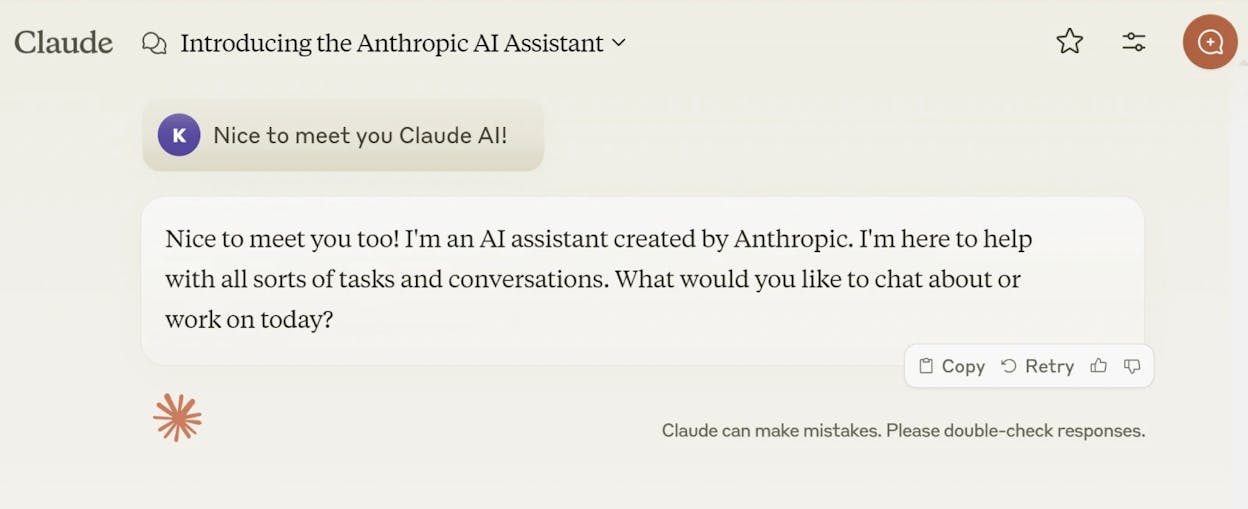
Claude supports writers who want deep, organized content because it focuses on logic and sequence rather than speed. Its design helps you build arguments that stay coherent across many paragraphs, which is useful when drafting essays, research notes, or detailed explanations. You can explore ideas step by step without losing the thread, and the tool will often highlight missing links or unclear jumps in reasoning. This makes Claude a strong companion for any task where clarity matters more than style.

It becomes even more useful when you need writing that holds steady over long stretches. The large context window and extended thinking features help Claude analyze long documents or plan complex work. Writers, educators, and technical teams often choose it when the goal is to understand information, compare sources, or build structured frameworks. While many AI tools can draft content quickly, Claude stands out because it treats writing as a thinking process and gives you outputs that mirror careful thought.

SEO writing tools

Claude still has limits that shape how you use it. Its tone leans conservative, and it may not match the creative range that tools like ChatGPT deliver. This means that lively or playful writing sometimes needs extra editing. When you want imaginative angles or varied styles, you may find its responses too restrained. The tool focuses on being safe and precise, which helps in some cases but reduces flexibility in others.

Speed can also become an issue. Claude’s detailed reasoning makes simple tasks feel slower because it tries to explain more than you might need. Some users also point out limits in the free version, especially for long chats or complex tasks. While the tool fits deep work well, it may not suit quick drafts or broad use cases that demand constant fluidity. Many writers combine Claude with a more versatile tool to cover both ends of the writing spectrum.

Metric we track

Why it matters for writing efficiency

Writing speed boost

Supports thoughtful writing rather than fast output.

Clarity and quality lift

Produces clean, logical content that reduces major rewrites.

Versatility across formats

Best for essays, research, and structured tasks; less for creative work.

Ease of use and adoption

Simple to start, though deep reasoning may slow basic tasks.

Control and reliability

Safe tone and strong logic support high-trust writing needs.

Best-fit use cases for Claude

  • Building essays, research notes, or argument-driven content

  • Planning complex writing tasks that need clear structure

  • Working through detailed reasoning or multi-step analysis

  • Drafting careful content where accuracy and tone matter

Takeaway

Use Claude when you want writing that thinks with you, offering structure and clarity for tasks that need depth rather than speed.

Anyword: best writing tool for data-driven marketing and conversion-focused copy

editing and proofreading tools

Key Anyword standout features

  • Predictive scoring that estimates how well each copy variation may perform

  • Tools that tailor tone, style, and CTAs to specific audiences

  • Workflows made for ads, landing pages, emails, and other performance content

  • Brand rules that keep messaging steady across channels

  • Fast multi-variant generation for teams that test many ideas at once

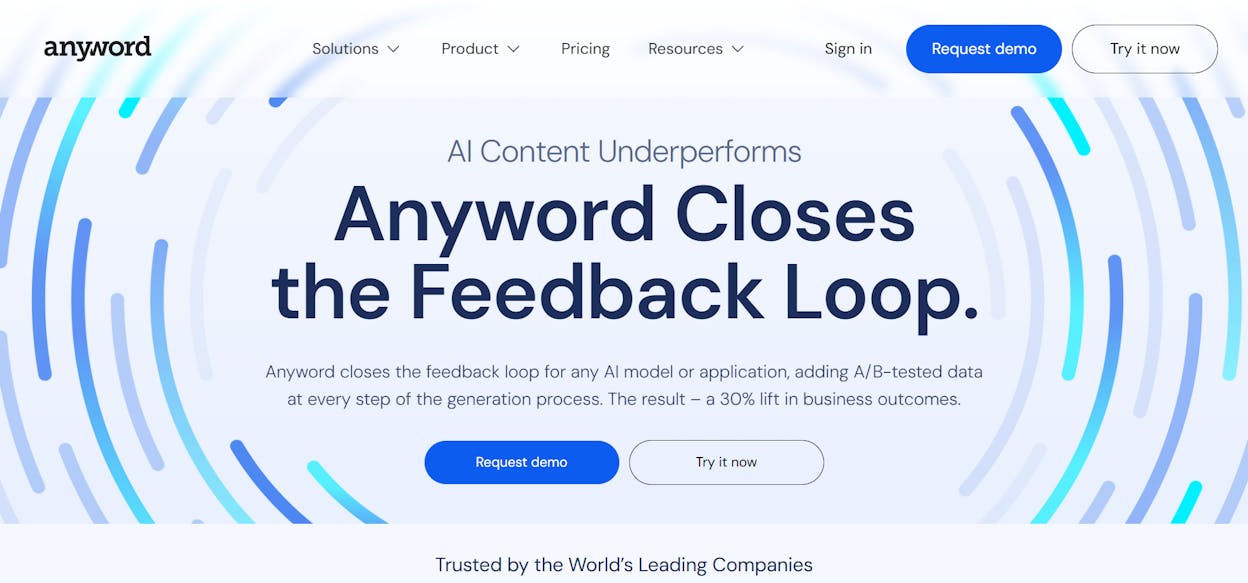
Anyword gives marketers a clear edge because it ties writing to real performance signals rather than simple text generation. You can see how different lines may engage an audience before you publish anything, which reduces guesswork in campaigns. This lets teams choose strong messages early and adjust copy for tone, length, or audience segments with more confidence. It is built for people who want measurable outputs and who treat content as a lever for growth, not just a set of words.

Its structure works well for teams that run constant tests across many platforms. You can create several variations of a headline, email subject line, or CTA and compare them through scores or audience modes. This makes your content pipeline more predictable because you start with copy that has already been shaped by data. Many writers appreciate how the brand tools help maintain consistency when several people contribute to the same campaign.

grammar checker tools

Anyword does come with limits that shape how you use it. The tool focuses almost entirely on marketing tasks, so it does not support open-ended writing or deep creative work as well as general AI assistants. People who want story-driven or research-heavy writing may find the structured approach too narrow. You also need to prepare for higher subscription costs if you rely on advanced scoring or analytics. These features sit behind paid plans that may not be practical for solo users or small budgets.

Another important factor is how much data you bring into the system. Predictive features work best when you have enough historical performance to guide the model. New teams or brands without past campaign data may see weaker insights at first. Some users also note that complex features take time to understand, especially when setting up audience segments or detailed brand rules. Once you learn the flow, it becomes powerful, but the learning stage can be slow.

Metric we track

Why it matters for writing efficiency

Writing speed boost

You create many variants fast, which helps campaigns move without delay.

Clarity and quality lift

Predictive scoring highlights stronger messages before you publish.

Versatility across formats

Best for ads, landing pages, emails, and CTAs across platforms.

Ease of use and adoption

Simple for basic tasks, deeper features require learning.

Control and reliability

Brand rules and audience modes give more control over tone and outcomes.

Best-fit use cases for Anyword

  • Creating ads, landing pages, and CTA-heavy content that must convert

  • Running multi-variant tests to find strong messages before campaigns launch

  • Keeping tone and style consistent across marketing channels

  • Supporting teams that rely on performance data to guide copy decisions

Takeaway

Use Anyword when your copy must drive results, and you want data to guide which message you choose, not guesswork.

Sudowrite: best writing tool for fiction, worldbuilding, and creative storytelling

content marketing tools

Key Sudowrite standout features

  • Tools for brainstorming plot ideas, twists, characters, and worlds

  • A fiction-focused model built to understand pacing and narrative flow

  • Scene-building functions that turn short prompts into rich passages

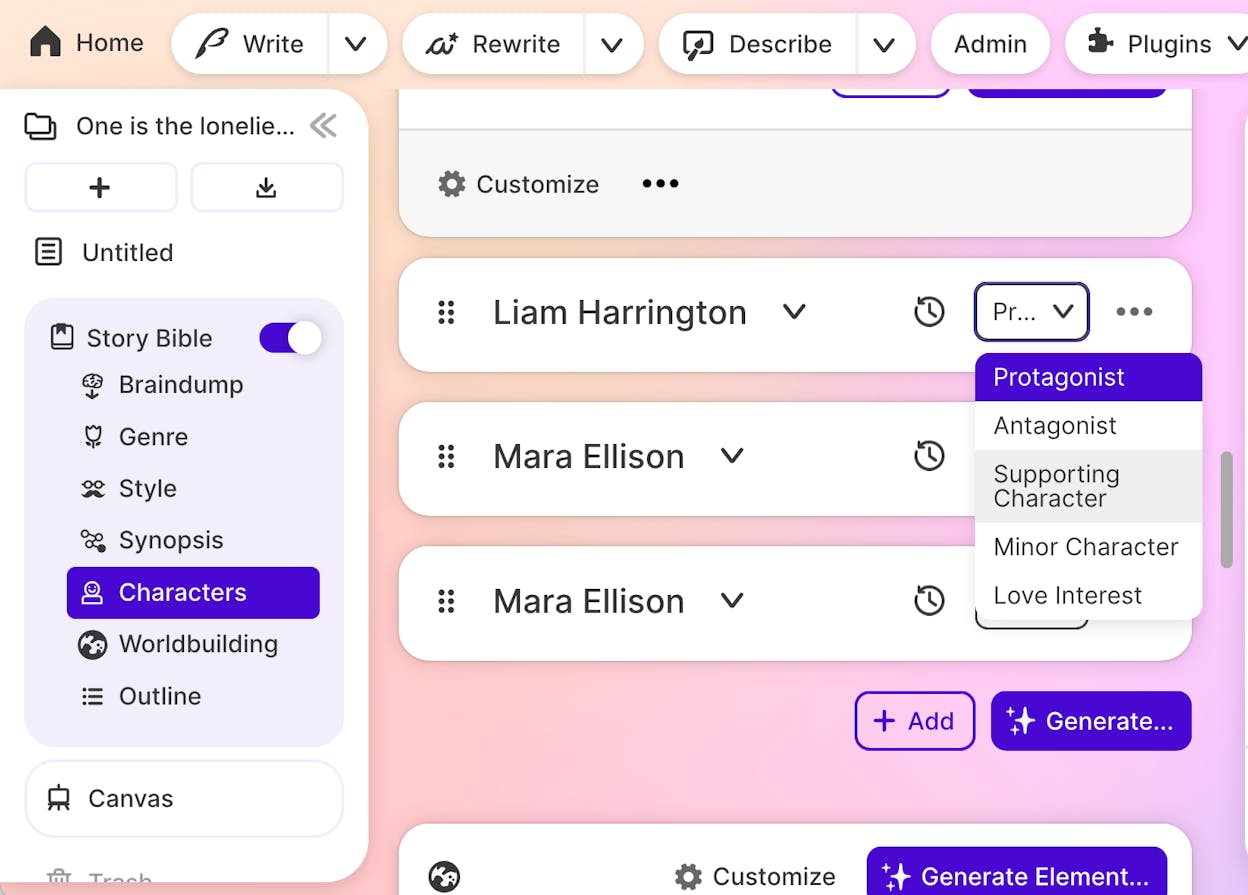
  • Long-form organization tools like Story Bible and Canvas for continuity

  • A creative engine that helps writers recover from blocks and stalled chapters

Sudowrite supports storytellers by giving them tools built around narrative craft rather than general writing. Its Muse model understands the rhythm and shape of fiction, which helps writers move from early ideas to scenes with more life and detail. You can sketch a rough moment, and the system expands it into a fuller scene with tone, tension, or emotion, which makes the early drafting phase easier to manage. Many writers use it to break through moments where they feel stuck because it offers sparks that point the story forward.

Its strength becomes clear when you work on long projects that require steady worldbuilding and character continuity. The Story Bible and Canvas features let you keep track of details that matter in novels or scripts, helping you avoid contradictions as your world grows. Sudowrite is one of the few tools that handles both micro-level creative tasks, like rewriting a line for mood, and macro-level planning, like shaping arcs across chapters. This combination gives fiction writers a space where ideas stay connected, even when the draft gets large.

writing automation tools

Sudowrite also has limits that make it less suited for broad writing needs. Its deep focus on fiction means it struggles with non-fiction tasks, business writing, or anything that requires clear factual structure. You may find the tools heavy if you do not work within a story, since many features assume a plot, cast, and world. This can overwhelm new users who expect a simple drafting tool but instead meet a full creative environment.

The credit system is another factor to consider, especially for writers working on long chapters. Scene expansion and multiple rewrites use more credits, which can add cost over time. Reviewers also note that anyone who needs straightforward copy for emails, blogs, or reports will not get the best value from Sudowrite. Its strength lies in creativity, and users seeking productivity or business-focused writing should look toward more general assistants.

Metric we track

Why it matters for writing efficiency

Writing speed boost

Expands scenes quickly and helps break creative blocks.

Clarity and quality lift

Tools improve prose detail, mood, and flow within stories.

Versatility across formats

Strong for fiction; limited outside storytelling work.

Ease of use and adoption

Powerful tools can feel heavy for beginners or non-authors.

Control and reliability

Story Bible tools keep characters and plots consistent.

Best-fit use cases for Sudowrite

  • Building scenes, dialogue, or chapters for novels and screenplays

  • Expanding worldbuilding, character backstories, and plot lines

  • Supporting writers who need fresh ideas when stuck

  • Managing long fiction projects that need continuity

Takeaway

Use Sudowrite when you want richer stories, stronger scenes, and a creative engine that understands how fiction works from the inside out.

Wordtune: best writing tool for polishing sentences and improving clarity

digital writing tools

Key Wordtune standout features

  • Rewriting tools that offer clearer or smoother versions of your sentences

  • Tone controls that let you shift writing between formal and casual styles

  • Options to shorten or expand text to match space, flow, or detail needs

  • Browser extensions that edit text directly inside Gmail, Docs, Slack, and other apps

  • Quick suggestions that help refine awkward lines and unlock clearer phrasing

Wordtune supports writers who already have text on the page but want it to sound sharper and more natural. Its rewriting engine gives several options for each sentence, which helps you choose the version that best fits your intent. The tool focuses on clarity and tone, so you can take a rough line and turn it into something smoother without losing your original meaning. This makes everyday writing feel easier because you fix problems without rewriting everything from scratch.

It also works well for people who need writing to match different audiences. Tone controls help you switch between formal and friendly language with one click, and the shorten or expand features help you adjust pacing. Because it runs inside common apps through extensions, you can refine text wherever you write. Many users rely on it when small edits matter, like emails, reports, or instructions that must be easy to read. Wordtune helps give these moments more polish without slowing your workflow.

professional writing software

Wordtune also has limits that make it less suitable for full drafting. It shines at improving what you already wrote, not at generating long pieces or complex sections. If you need something structured or research-heavy, the tool will not guide you far because it works one sentence at a time. This can make bigger projects harder to manage since the context remains narrow. You often need a drafting tool to build the base content before using Wordtune to clean it.

Another point to consider is access to features. The free plan limits how many rewrites you can make each day, and some advanced suggestions require a paid subscription. Writers who edit often may reach those limits quickly. Wordtune also cannot match the range of general AI assistants when starting from a blank page, so users who want both drafting and editing usually combine it with a broader tool.

Metric we track

Why it matters for writing efficiency

Writing speed boost

Helps clean sentences quickly without rewriting the whole piece.

Clarity and quality lift

Strong rewriting options improve tone, flow, and readability.

Versatility across formats

Works across apps but focuses mainly on sentence-level editing.

Ease of use and adoption

Simple interface with easy tone controls and rewrite buttons.

Control and reliability

You choose rewrites manually, keeping full control over style.

Best-fit use cases for Wordtune

  • Polishing emails, reports, and instructions for clarity

  • Rewriting sentences to improve tone or flow

  • Fixing awkward lines that need smoother phrasing

  • Enhancing drafts created with another writing tool

Takeaway

Use Wordtune when you want clean, sharp sentences and quick clarity improvements without changing your original message.

Notion AI: best writing tool for organized notes, team workflows, and structured project content

writing efficiency tools

Key Notion AI standout features

  • AI that works directly inside Notion pages, databases, and project spaces

  • Strong organization tools for knowledge hubs, team documents, and shared workflows

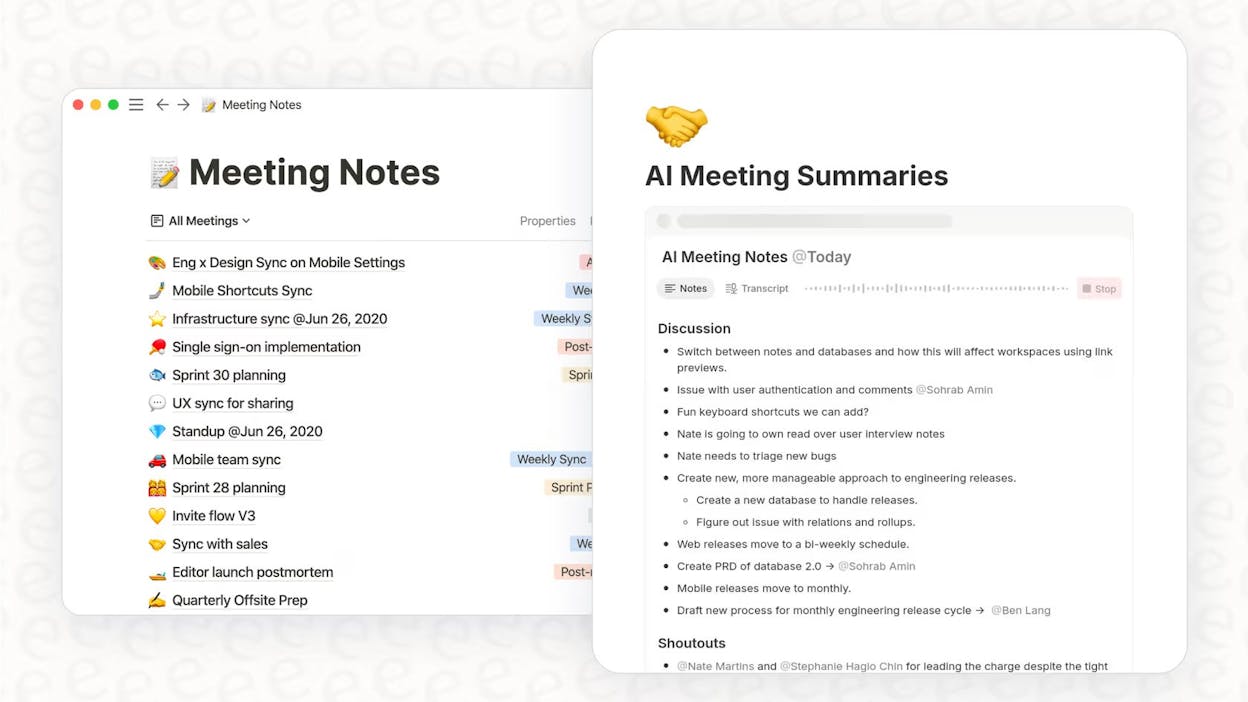
  • Features that summarize meetings, generate outlines, and enhance team collaboration

  • Drafting, rewriting, and summarizing tools built into existing workspace content

  • A central system that blends writing, planning, and documentation in one place

Notion AI helps writers and teams by improving the content they already store inside their workspace. Its value comes from living inside Notion, where notes, tasks, documents, and databases all connect. This means you draft content, refine ideas, or summarize long information without switching tools. It supports everything from meeting notes to project docs, helping teams find structure where things often become scattered. Writers gain clarity because their ideas sit inside organized pages that the AI can access, rewrite, or summarize.

It also fits teams that rely heavily on collaboration. Notion AI can point to related documents, surface earlier notes, or create outlines from long pages. This reduces time lost searching for information across tools. When you pair writing support with the planning and tracking systems that Notion already offers, you get a workspace that supports both content and decision-making. This is why teams use it for agendas, briefs, research summaries, and shared documentation that needs consistent upkeep.

content workflow tools

Notion AI has limitations that matter depending on the work you do. It does not provide advanced SEO templates or deep content strategy tools, so marketers who need search-focused frameworks will not find everything they need here. Its AI is meant to help structure and refine content, not to replace specialized writing platforms. The workspace setup can also feel complex for new users, since Notion requires planning and organization to run smoothly. Large databases may slow performance, especially when AI actions pull from many linked pages.

Another limitation is its drafting power. Notion AI handles outlines and summaries well, but it does not match the creativity or depth of more advanced writing models. It works best when cleaning up or expanding notes already placed in a system. Teams that need heavy drafting or detailed SEO content usually combine Notion AI with a separate writing tool. This keeps Notion AI in its strongest role—organizing, summarizing, and connecting information across a workspace—without forcing it to do tasks that exceed its design.

Metric we track

Why it matters for writing efficiency

Writing speed boost

Summaries and outlines remove manual prep work.

Clarity and quality lift

AI rewrites strengthen notes and shared documents.

Versatility across formats

Works inside pages, databases, docs, and team spaces.

Ease of use and adoption

Helpful once set up, though the system has a learning curve.

Control and reliability

Keeps information structured and consistent across teams.

Best-fit use cases for Notion AI

  • Summarizing long notes, meeting docs, and research pages

  • Drafting outlines and refining content inside project databases

  • Supporting team knowledge hubs and shared documentation

  • Organizing writing workflows alongside planning and tasks

Takeaway

Use Notion AI when you want writing support that strengthens your workspace, helping you organize ideas, refine notes, and collaborate without leaving Notion.

Headline Studio (CoSchedule): best writing tool for headline scoring and click-through improvement

AI copywriting software

Key Headline Studio standout features

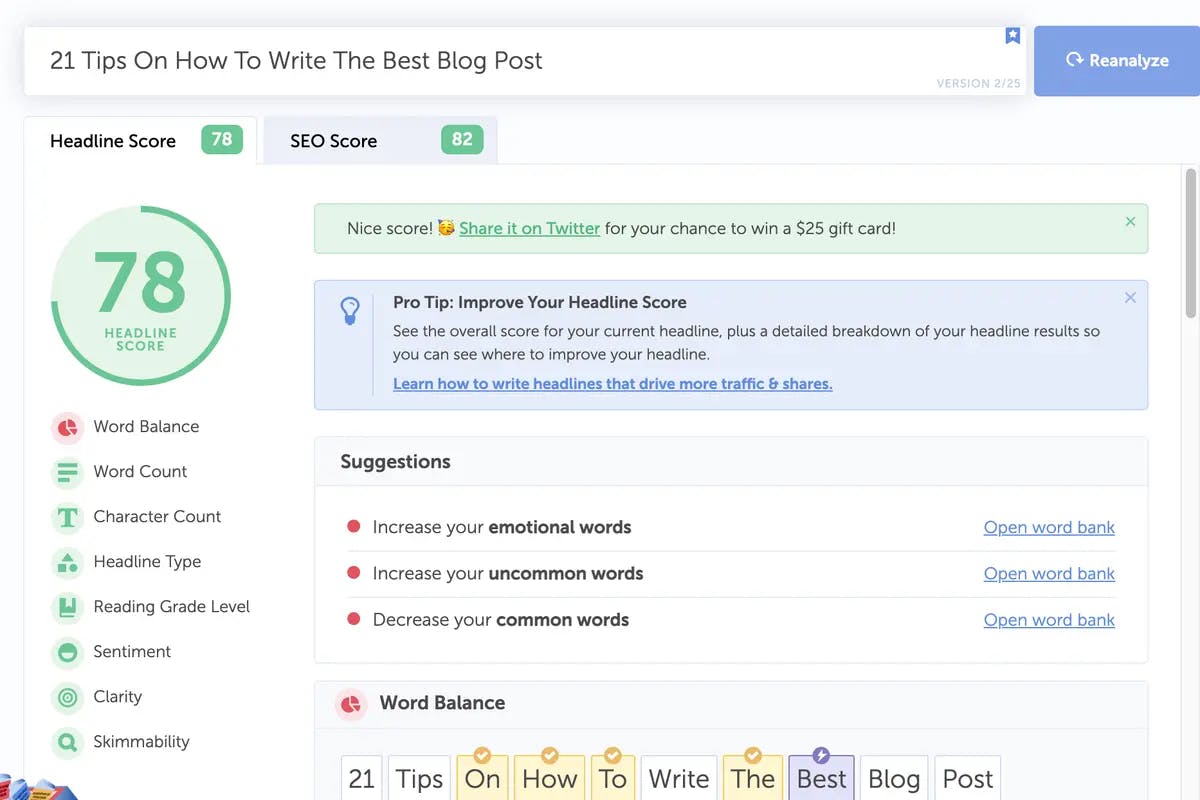
  • Data-backed scoring that analyzes word balance, sentiment, clarity, and keyword strength

  • Support for headlines across blogs, emails, ads, podcasts, and social channels

  • Instant suggestions that highlight stronger phrasing and SEO-friendly wording

  • Integrations with WordPress and browser tools for real-time optimization

  • Focus on improving CTR and search visibility through tested headline formulas

Headline Studio helps writers strengthen the part of content that readers see first: the headline. Its scoring system breaks down structure, tone, and keyword use to reveal how well a title might perform before publishing. The tool gives writers a clear direction for tightening or re-framing titles so they feel more engaging and more aligned with search behavior. This process is quick, making it a dependable way to refine headlines without slowing down content production.

It also fits easily into existing writing workflows. With browser extensions and a WordPress plugin, writers can refine headlines on the spot while working on a blog post or social caption. This prevents the back-and-forth that often happens when adjusting titles after drafting. The real benefit comes from the data behind the tool—millions of analyzed headlines—which shapes suggestions that tend to increase clarity and click-through potential. Writers who rely on strong hooks can benefit from this tight, focused support.

online writing tools

Headline Studio has limits that shape how you use it. It concentrates solely on headlines, so it cannot help you draft articles or build content outlines. Many writers treat it as a supplemental tool rather than part of their daily writing workflow. Some users note that recommendations can feel formulaic, especially when the tool pushes longer phrases or certain word types. This makes the insights helpful but not always a perfect fit for every brand voice.

It also does not serve as a full content strategy tool. If your work involves creating long-form articles or managing content pipelines, you will still need dedicated writing platforms. Headline Studio plays a narrow but important role—optimizing the first impression—but should be paired with broader tools when writing complex content. When used in that narrow context, it delivers strong value through data-driven feedback.

Metric we track

Why it matters for writing efficiency

Writing speed boost

Fast, actionable headline improvements without heavy editing.

Clarity and quality lift

Data-backed scoring highlights stronger structures and word choices.

Versatility across formats

Works for blog titles, ads, email subject lines, and social posts.

Ease of use and adoption

Simple interface with plug-and-play integration into workflows.

Control and reliability

Offers specific, measurable suggestions rooted in headline data.

Best-fit use cases for Headline Studio

  • Improving blog titles or social hooks before publishing

  • Optimizing email subject lines for higher open rates

  • Testing multiple headlines for SEO and engagement

  • Supporting content teams that want consistent, data-guided titles

Takeaway

Use Headline Studio when you want sharper, higher-performing headlines backed by data, without needing a full drafting or strategy tool.

Rytr: best writing tool for fast, low-cost short-form content

writing apps for teams

Key Rytr standout features

  • Simple interface that helps beginners create content without friction

  • Low-cost plans that appeal to small businesses and solo creators

  • Templates for emails, social posts, product descriptions, and quick promotional copy

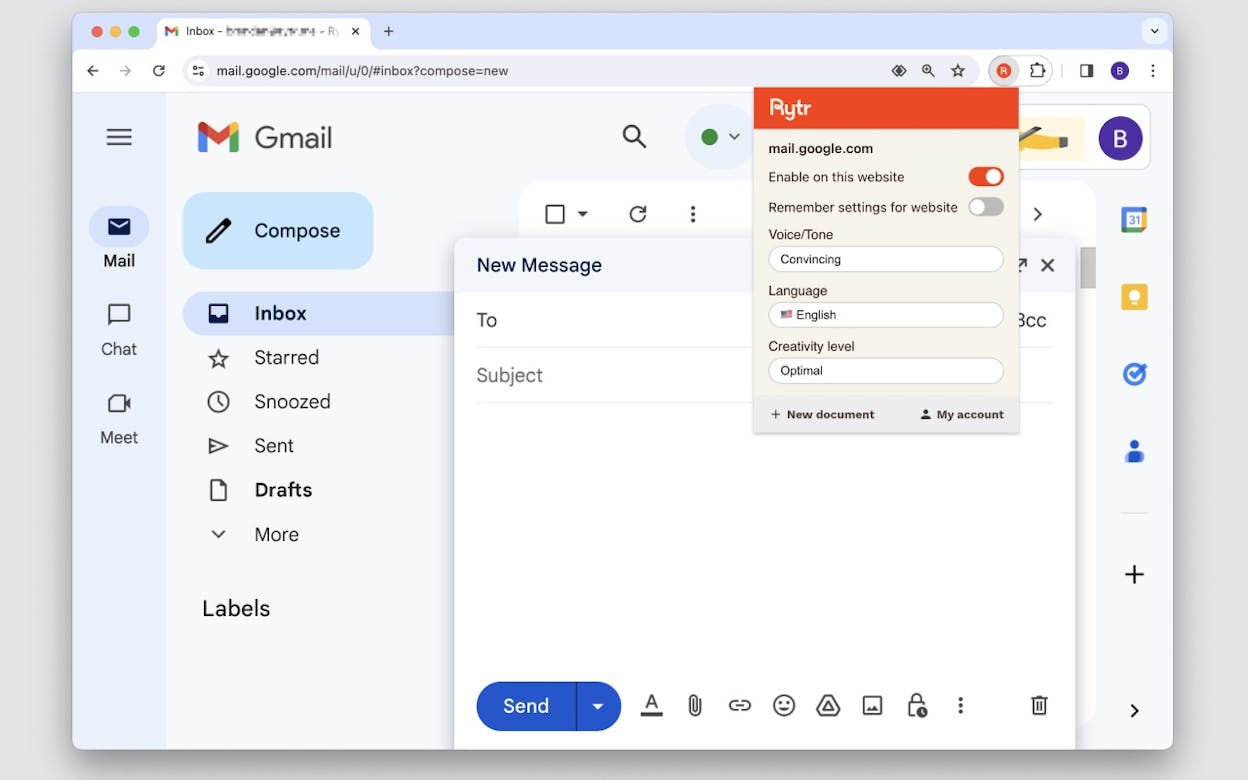
  • Support for many tones and over thirty languages

  • Quick generation for short messages that do not require deep research

Rytr helps users who need affordable, fast content for everyday communication. Its strength lies in reducing the effort required to produce simple messages, whether that’s a customer reply, a social caption, or a short promotional line. The interface is clean enough for beginners to understand immediately, which makes the tool practical for small businesses that need to move quickly without onboarding complexity. With broad tone support and multiple templates, Rytr gives teams a starting point they can refine in minutes, not hours.

It also fits creators who work across different formats but do not need heavy customization. The tool handles small tasks well because it focuses on speed rather than deep nuance. When writers want short content that feels serviceable and easy to edit, Rytr offers enough options to get them moving. Its multilingual features help users reach varied audiences without extra tools, and the low learning curve keeps the process straightforward even for non-writers.

collaborative writing tools

Rytr does come with limits that matter when you need complex work. Long-form pieces tend to feel repetitive or thin because the system lacks the depth found in more advanced models. Users who want detailed reasoning, rich narratives, or structured articles often need to rewrite the output themselves. This makes Rytr less suitable for content that requires research, unique insights, or consistency across large projects.

The tool also falls short on advanced customization. Larger teams may find its feature set too narrow for full content operations because it does not integrate deeply with enterprise tools or offer robust editing controls. Users must refine tone and style manually to fit their brand, and those producing content at scale may outgrow Rytr quickly. It remains helpful for small tasks, but heavier workflows usually require stronger platforms.

Metric we track

Why it matters for writing efficiency

Writing speed boost

Generates quick drafts for short tasks, reducing manual effort.

Clarity and quality lift

Helps produce readable content, though deeper edits may be needed.

Versatility across formats

Works well for emails, social posts, and light marketing copy.

Ease of use and adoption

Very simple interface suited for beginners and small teams.

Control and reliability

Basic outputs require human refinement to match brand needs.

Best-fit use cases for Rytr

  • Writing quick emails, social captions, and short marketing messages

  • Supporting small businesses with everyday communication

  • Helping beginners produce content without a steep learning curve

  • Drafting multilingual short-form content at low cost

Takeaway

Use Rytr when you need fast, simple content on a tight budget and don’t require the depth or power of advanced writing tools.

QuillBot: best writing tool for paraphrasing, academic clarity, and polished rewrites

content optimization tools

Key QuillBot standout features

  • Multiple paraphrasing modes that reshape text while keeping meaning intact

  • Grammar and clarity tools that smooth phrasing and strengthen sentences

  • Academic-friendly functions for essays, assignments, and non-native writers

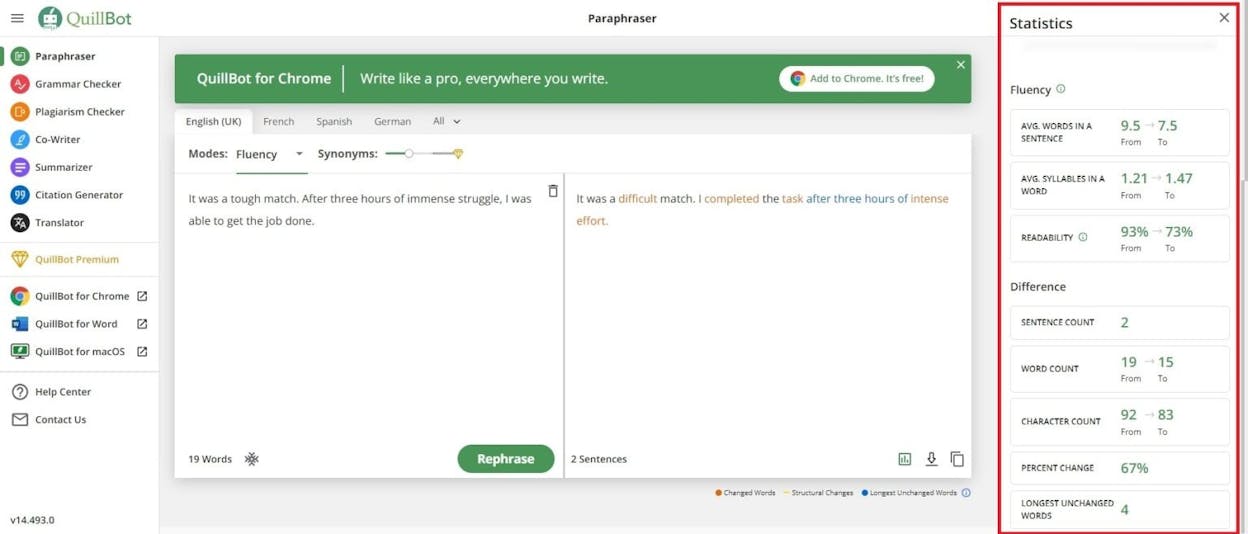
  • Options like Standard, Fluency, and Creative to control how much a sentence changes

  • A full suite including summarization, citations, and plagiarism detection

QuillBot helps writers who need to refine existing text rather than create long drafts from scratch. Its paraphrasing modes offer different levels of rewording, so the tool works well when you want clearer, more concise language without shifting the original idea. This makes it useful for improving essays, academic reports, and any writing that must sound polished while staying accurate. Students often rely on it to reduce repetition and strengthen arguments across paragraphs.

It also serves users who want support beyond simple paraphrasing. The grammar tools help fix small errors, the citation features assist with academic formatting, and the summarizer helps condense long sections into shorter notes. Together, these tools save time for anyone working on research-heavy writing or formal documents. QuillBot’s ability to adjust tone and structure gives users a way to refine text quickly without rewriting everything by hand.

writing tools for marketers

QuillBot does have limits that define when to use it. It is not built for drafting new content, so starting a full article or story with it will feel restrictive. The system sometimes alters meaning when rewriting, which means users must check the output carefully. Its free version also caps features and word counts, so heavy users may need to upgrade to access everything.

The tool is less suited for creative writing or complex long-form content that requires deeper reasoning. It works best on sentences and smaller sections rather than full narratives or argument-driven pieces. Writers tackling big projects often combine QuillBot with a more generative AI assistant to handle the initial drafting before using QuillBot to polish the text.

Metric we track

Why it matters for writing efficiency

Writing speed boost

Quickly rewrites sentences and condenses text to save time.

Clarity and quality lift

Improves readability and grammar without changing core ideas.

Versatility across formats

Best for academic, professional, and structured rewriting tasks.

Ease of use and adoption

Simple interface with clear paraphrasing modes.

Control and reliability

Users choose modes that influence how much the tool rewrites.

Best-fit use cases for QuillBot

  • Paraphrasing essays, reports, and academic assignments

  • Refining grammar and clarity in professional documents

  • Summarizing long sections into shorter notes

  • Polishing text drafted with another AI writing tool

Takeaway

Use QuillBot when you want stronger, clearer rewrites that keep your original meaning but raise the quality of the writing.

Lindy AI: best writing tool for proposal, sales, and business workflow automation

business writing tools

Key Lindy AI standout features

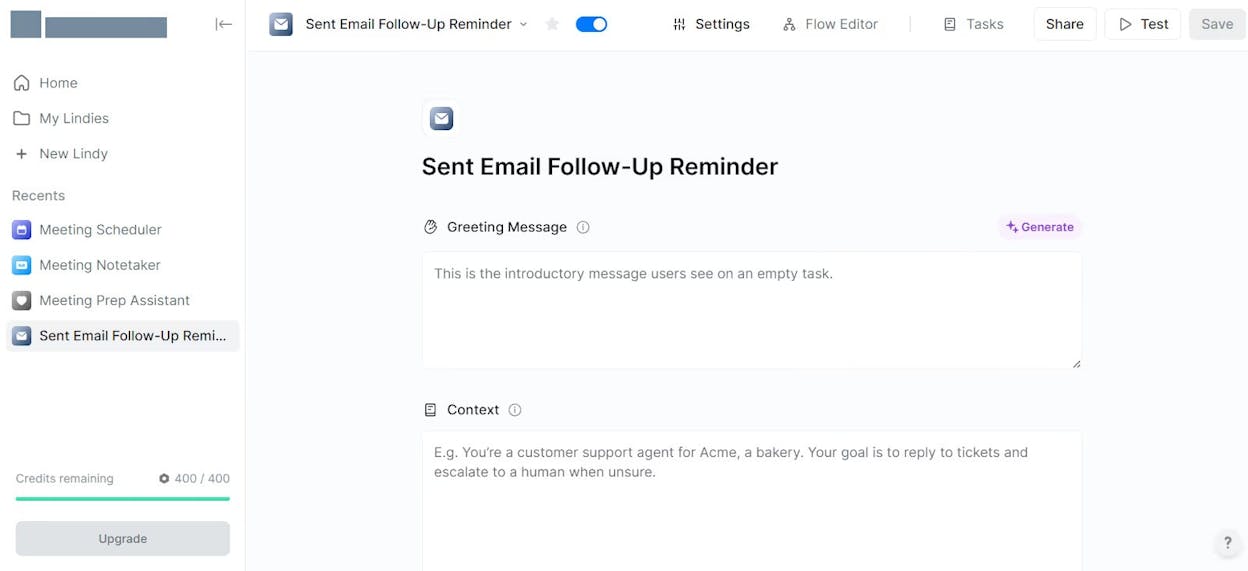
  • Custom AI agents that automate proposal writing, follow-ups, and email responses

  • No-code builder that helps non-technical teams design complex workflows

  • Integrations with CRM, email, calendars, and communication apps

  • Templates that speed up sales and administrative documentation

  • Automated task execution across apps for smoother business operations

Lindy AI supports teams that manage frequent business communication and repetitive coordination tasks. Its agent-based system gives users a way to automate writing moments that often slow down workflow, such as follow-up emails, proposal updates, and internal summaries. Because agents work across many connected apps, they take actions the moment a trigger appears, which helps teams operate faster without switching tools. This makes Lindy valuable for sales, operations, and customer support teams that depend on clear and timely communication.

The platform also helps users reduce manual effort on tasks that would normally take significant time, like assembling proposals or responding to lead inquiries. Its no-code builder lowers the barrier for automation, so complex sequences become easier to run at scale. These agents follow structure and business rules defined by the team, which helps maintain consistency across messages and keeps workflows predictable. This kind of support is most useful in environments where repetitive writing tasks are part of daily operations.

creative writing tools

However, Lindy’s focus on business tasks means it is not suited for creative writing, narrative work, or SEO-driven content. It performs well in structured, transactional messaging but struggles when the writing requires style variation or deeper subject expertise. Users seeking help with storytelling or long-form content will need a more general-purpose writing tool.

Lindy also carries a learning curve when teams build multi-step workflows. More complex automations demand careful setup, and maintaining these agents can take time. Its cost can be a concern for companies that rely heavily on automated flows because advanced plans become expensive as usage grows. For many teams, Lindy works best when paired with a general writing assistant to cover broader content needs.

Metric we track

Why it matters for writing efficiency

Writing speed boost

Reduces time spent on proposals, follow-ups, and routine emails.

Clarity and quality lift

Ensures consistent tone across business communication.

Versatility across formats

Strong for proposals and outreach, limited for creative or SEO tasks.

Ease of use and adoption

Simple workflows for small tasks; complex flows require setup effort.

Control and reliability

Agents follow structured rules, keeping messaging consistent.

Best-fit use cases for Lindy AI

  • Drafting proposals, follow-ups, and business emails

  • Automating sales and operations communication

  • Reducing admin workload through agent-based workflows

  • Managing CRM-linked communication tasks at scale

Takeaway

Use Lindy when you want automated, structured business writing and workflow support, especially for proposals and sales communication.

technical writing tools

Best-fit use cases for Analyze AI

  • Content teams that need to prioritize updates based on AI-driven conversions instead of generic visibility scores.

  • SEO and growth teams that want to measure which AI engines deserve investment, and which “wins” are not driving meaningful traffic.

  • Brand and product marketing teams tracking how positioning and sentiment shift across answer engines over time.

  • Teams building an AI search strategy who need prompt, citation, and conversion data in one place to keep execution grounded.

Key Analyze AI features

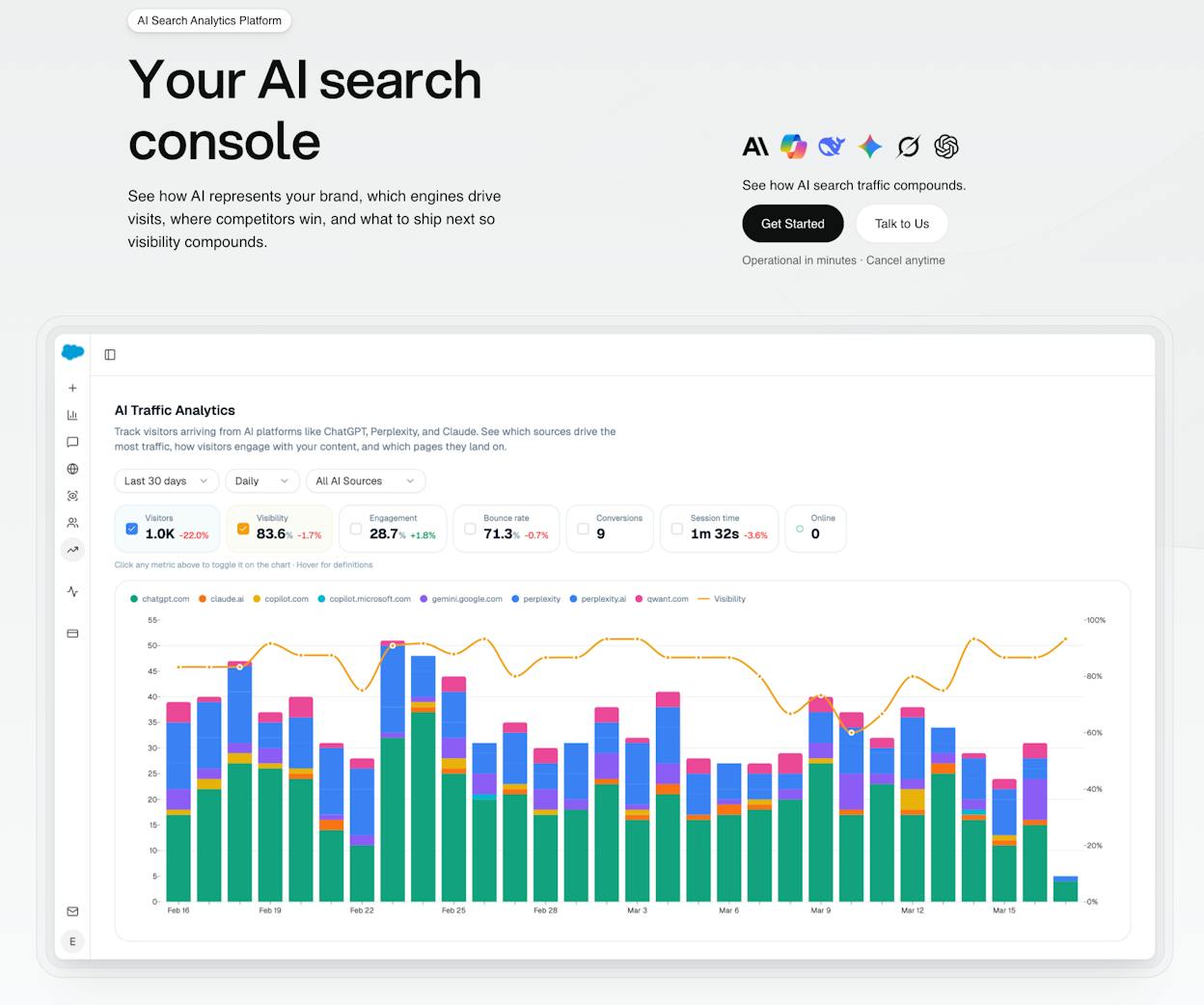
  • AI traffic attribution (not just mentions): Track sessions from ChatGPT, Perplexity, Claude, Copilot, Gemini, and other answer engines, with referrer-level visibility.

  • Conversion and revenue mapping: See which pages convert AI-driven visits, and measure assisted conversions and revenue impact where applicable.

  • Prompt-level performance: Understand which prompts surface your brand, where you win or lose, and what topics drive qualified traffic.

  • Citation and source analysis: Identify which sources models trust in your category, then spot authority gaps that block you from being cited.

  • Competitive benchmarking and prioritization: Compare visibility across brands and prompts, then prioritize fixes based on likely impact rather than guesswork.

Here are in more details how Analyze AI works:

See actual traffic from AI engines, not just mentions

content scaling tools

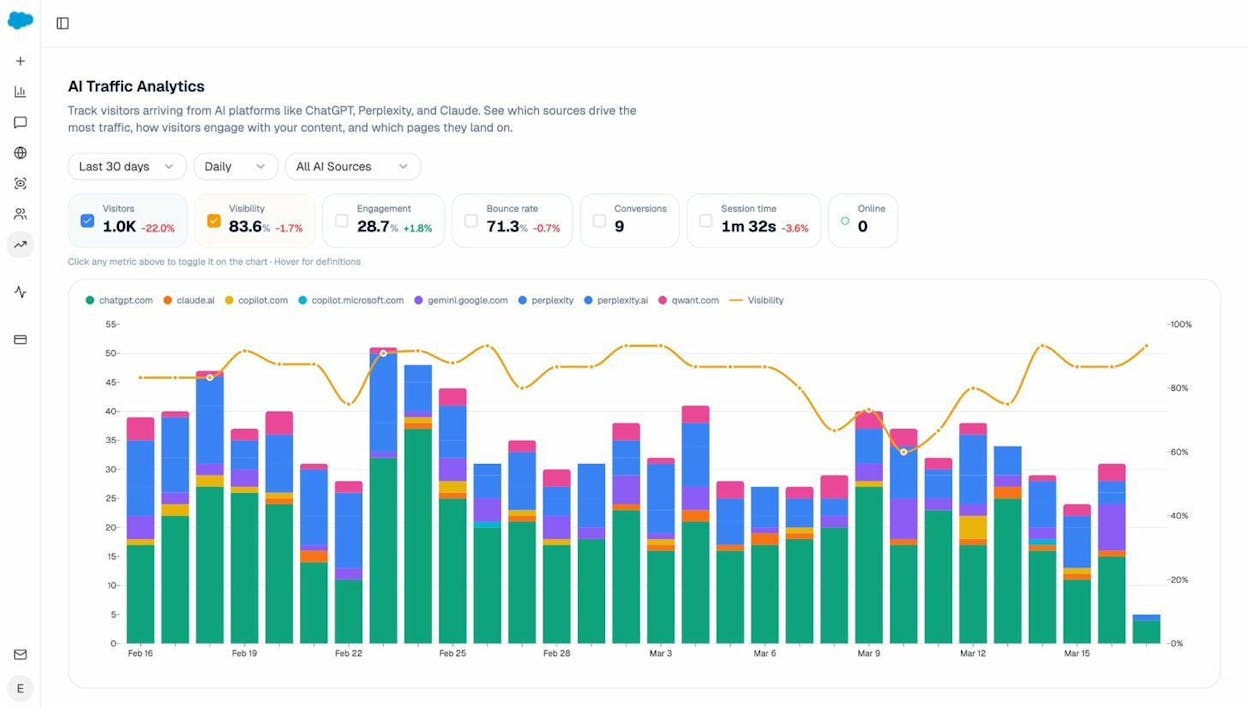
Analyze AI attributes every session from answer engines to its specific source—Perplexity, Claude, ChatGPT, Copilot, or Gemini. You see session volume by engine, trends over six months, and what percentage of your total traffic comes from AI referrers. When ChatGPT sends 248 sessions but Perplexity sends 142, you know exactly where to focus optimization work.

writing tools comparison

Know which pages convert AI traffic and optimize where revenue moves

best tools for content writers

Most tools stop at "your brand was mentioned." Analyze AI shows you the complete journey from AI answer to landing page to conversion, so you optimize pages that drive revenue instead of chasing visibility that goes nowhere.

The platform shows which landing pages receive AI referrals, which engine sent each session, and what conversion events those visits trigger. 

For instance, when your product comparison page gets 50 sessions from Perplexity and converts 12% to trials, while an old blog post gets 40 sessions from ChatGPT with zero conversions, you know exactly what to strengthen and what to deprioritize.

Track the exact prompts buyers use and see where you're winning or losing

AI-powered writing tools

Analyze AI monitors specific prompts across all major LLMs—"best Salesforce alternatives for medium businesses," "top customer service software for mid-sized companies in 2026," "marketing automation tools for e-commerce sites." 

writing software reviews

For each prompt, you see your brand's visibility percentage, position relative to competitors, and sentiment score.

You can also see which competitors appear alongside you, how your position changes daily, and whether sentiment is improving or declining.

writing tools for productivity

Don’t know which prompts to track? No worries. Analyze AI has a prompt suggestion feature that suggests the actual bottom of the funnel prompts you should keep your eyes on.

Audit which sources models trust and build authority where it matters

content editing tools

Analyze AI reveals exactly which domains and URLs models cite when answering questions in your category. 

You can see, for instance, that Creatio gets mentioned because Salesforce.com's comparison pages rank consistently, or that IssueTrack appears because three specific review sites cite them repeatedly. 

AI text generation tools

Analyze AI shows usage count per source, which models reference each domain, and when those citations first appeared.

writing tools for SEO

Citation visibility matters because it shows you where to invest. Instead of generic link building, you target the specific sources that shape AI answers in your category. You strengthen relationships with domains that models already trust, create content that fills gaps in their coverage, and track whether your citation frequency increases after each initiative.

Prioritize opportunities and close competitive gaps

marketing writing tools

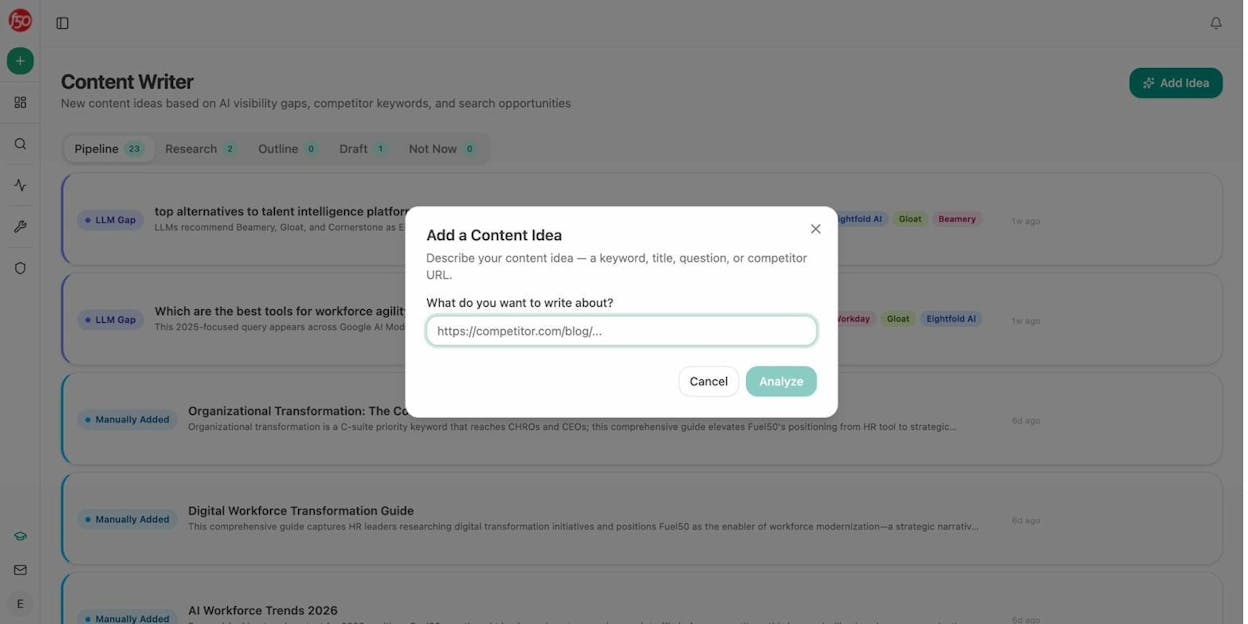
Analyze AI surfaces opportunities based on omissions, weak coverage, rising prompts, and unfavorable sentiment, then pairs each with recommended actions that reflect likely impact and required effort. 

For instance, you can run a weekly triage that selects a small set of moves—reinforce a page that nearly wins an important prompt, publish a focused explainer to address a negative narrative, or execute a targeted citation plan for a stubborn head term. 

Tie AI visibility toqualified demand.

Measure the prompts and engines that drive real traffic, conversions, and revenue.

Covers ChatGPT, Perplexity, Claude, Copilot, Gemini

Similar Content You Might Want To Read

Discover more insights and perspectives on related topics

© 2026 Analyze AI. All rights reserved.