



Summarize this blog post with:


A pillar page is a high-level page that covers a broad topic and links out to more detailed pages about subtopics. Together, these pages form a content hub (also called a topic cluster).
![[Screenshot of a simple content hub diagram showing a pillar page in the center with cluster pages branching outward]](https://www.datocms-assets.com/164164/1776796097-blobid1.png?auto=format,compress&w=1248&fit=max)
The format has been around since 2017, but it still works because it solves a fundamental problem: it helps search engines (and now AI models) understand that your site has deep expertise on a topic. That depth is what earns rankings, backlinks, and now citations in AI answers.
Not all pillar pages look the same, though. Some are custom-designed landing pages. Others are long-form blog posts. Some are just well-organized link directories.
In this article, you’ll see 10 real pillar page examples from brands that are winning organic traffic with this format. You’ll learn what makes each one effective, what format it uses, and the key takeaway you can apply to your own content. You’ll also learn why pillar pages matter for AI search visibility — not just Google — and how to build one from scratch.
Table of Contents
1. Ahrefs — SEO: The Complete Guide for Beginners
![[Screenshot of the Ahrefs SEO beginner’s guide showing its custom-designed pillar page with chapter cards]](https://www.datocms-assets.com/164164/1776796113-blobid2.png?auto=format,compress&w=1248&fit=max)
Estimated organic traffic: 1,200/mo Referring domains: 899 Backlinks: 6,900
Ahrefs built a custom-designed landing page for the topic of SEO. It breaks the subject into six chapters — from basics to technical SEO — and links each one to a detailed guide.
What makes it work
Three things stand out.
First, it has a completely custom design. It doesn’t look like a standard blog post, which makes it feel like a premium resource. The chapter cards have hover animations, and there’s a custom illustration of the SERPs with clickable elements. That level of polish attracts backlinks.
Second, it doesn’t try to cover everything on one page. Each chapter is a separate guide that goes deep on its subtopic. The pillar page is the entry point — a table of contents for a much larger body of work.
Third, it links to an SEO glossary as a secondary hub, creating a layered content architecture.
Takeaway
A custom design signals quality. If you have the resources, building a dedicated landing page for your pillar — rather than a blog post — makes it more linkable and more memorable. This doesn’t need to be expensive. Even a clean layout with good typography and visual hierarchy can set your page apart.
2. Diet Doctor — A Ketogenic Diet for Beginners
![[Screenshot of the Diet Doctor keto guide showing sections and internal links to video resources]](https://www.datocms-assets.com/164164/1776796117-blobid3.jpg?auto=format,compress&w=1248&fit=max)
Estimated organic traffic: 92,200/mo Referring domains: 1,700 Backlinks: 21,600
Diet Doctor’s keto guide is one of the highest-traffic pillar pages on this list. It covers the ketogenic diet from every angle: what it is, what to eat, benefits, risks, meal plans, and recipes.
What makes it work
On the surface, this page looks like a regular blog post. There’s no flashy custom design. But that’s the point — you don’t need a custom layout to make a pillar page work.
The page is split into 10 sections, and each section links to deeper content. What’s unusual is the variety of content types it links to: blog posts, video courses, recipe collections, and downloadable guides. This makes the hub feel comprehensive rather than repetitive.
It also goes into enough standalone detail that someone researching the keto diet casually could get everything they need from this one page. It doesn’t force you into the cluster content. It lets you choose your own depth.
Takeaway
Your pillar page should link to more than just blog posts. Think videos, tools, downloadable resources, and templates. The more content types your hub connects, the more useful it becomes — and the more reasons people have to link to it.
3. Atlassian — What is Agile?
![[Screenshot of Atlassian’s agile pillar page showing the sticky table of contents and card widgets]](https://www.datocms-assets.com/164164/1776796123-blobid4.png?auto=format,compress&w=1248&fit=max)
Estimated organic traffic: 115,200/mo Referring domains: 860 Backlinks: 3,200
Atlassian makes project management tools like Jira and Trello. Its pillar page on agile development is one of the best-performing content assets on its site.
What makes it work
Atlassian uses two navigation systems on this page. There’s a sticky sidebar table of contents that follows you as you scroll, and there are card-style widgets after the introduction that link to each subtopic. Both do the same job — help you find what you need — but the dual navigation means nobody misses the next step.
There’s also an “Up Next” feature at the bottom of the page. This turns the pillar page into something that feels like an online book, guiding you through the content in sequence rather than leaving you to figure out where to go.
From a product positioning standpoint, this is smart. Atlassian makes agile tools. By owning the definitive guide to agile, it captures everyone from curious beginners to teams evaluating software. The content pre-qualifies leads before they ever hit the pricing page.
Takeaway
A sticky table of contents makes long pillar pages usable. And an “Up Next” feature at the bottom keeps readers moving through your cluster content rather than bouncing.
4. Yoga Journal — A-Z Directory of Yoga Poses
![[Screenshot of Yoga Journal’s A-Z yoga pose directory in table format with pose names, Sanskrit names, and pose types]](https://www.datocms-assets.com/164164/1776796127-blobid5.jpg?auto=format,compress&w=1248&fit=max)
Estimated organic traffic: 11,100/mo Referring domains: 457 Backlinks: 3,400
Yoga Journal’s pillar page is an alphabetical directory of every yoga pose. Each pose links to a dedicated page with instructions, images, and tips.
What makes it work
This is the simplest pillar page on the list. No custom design. No long-form writing. Just a table with three columns: pose name, Sanskrit name, and pose type. Each row links to a detailed page.
The table format works because the topic demands it. There are hundreds of yoga poses. Nobody wants to read a 10,000-word essay listing them all. A directory is the right format.
The extra column for pose type is a nice touch. If you click on “Standing” or “Balance,” you’re taken to a category page that groups similar poses together. This creates a second layer of internal linking that helps both readers and search engines.
Takeaway
If your topic involves a large number of items — think recipes, exercises, templates, tools — a directory-style pillar page is often the best format. Don’t force a long-form guide when a well-organized table does the job better.
5. Tofugu — Learn Japanese: A Ridiculously Detailed Guide
![[Screenshot of Tofugu’s Learn Japanese pillar page showing the progress-based structure and CTA buttons]](https://www.datocms-assets.com/164164/1776796134-blobid6.jpg?auto=format,compress&w=1248&fit=max)
Estimated organic traffic: 39,100/mo Referring domains: 308 Backlinks: 1,100
Tofugu is a site about learning Japanese. Its pillar page walks you through every stage of learning the language, from zero knowledge to intermediate proficiency.
What makes it work
Most pillar pages give you a surface-level overview and then link out. Tofugu does the opposite. It goes ridiculously deep — covering each stage of learning with explanations of what to do, why it matters, how long it takes, and what resources to use.
The result is a page that works as both a pillar page and a standalone guide. You could use it without ever clicking a single internal link.
What’s also clever is how the CTAs are structured. Instead of generic “Read more” buttons, the links encourage action: “Go learn Hiragana” or “Start practicing Kanji.” This turns the page into a learning path, not just a content index.
Takeaway
Two lessons here. First, pillar pages can be comprehensive. Don’t hold back content just because it’s a hub page — depth earns links and trust. Second, action-oriented CTAs are more effective than generic “Read more” links.
6. Zapier — The Ultimate Guide to Remote Work
![[Screenshot of Zapier’s remote work pillar page showing its simple hub-and-spoke layout]](https://www.datocms-assets.com/164164/1776796137-blobid7.png?auto=format,compress&w=1248&fit=max)
Estimated organic traffic: 890/mo Referring domains: 1,100 Backlinks: 4,100
Zapier’s remote work guide is a straightforward hub-and-spoke page. It breaks remote work into subsections, adds a couple of sentences of context, and links to more detailed guides on each subtopic.
What makes it work
This page proves that pillar pages don’t need to be complex. Zapier already had dozens of articles about remote work. The pillar page simply organizes them into a logical structure.
The page has an impressive backlink profile relative to its traffic, which tells you something important: pillar pages attract links even when they’re simple. People link to well-organized resources, not just comprehensive ones.
Takeaway
If you already have a library of content on a topic, you can create a pillar page by organizing existing articles into a clean hub. You don’t always need to write new content. Sometimes, the highest-impact content move is making your existing work easier to find.
7. HubSpot — The Ultimate Guide to Marketing
![[Screenshot of HubSpot’s marketing pillar page showing its chapter-based layout with custom design]](https://www.datocms-assets.com/164164/1776796142-blobid8.png?auto=format,compress&w=1248&fit=max)
Estimated organic traffic: 24,000/mo Referring domains: 600+ Backlinks: 5,000+
HubSpot is one of the companies that popularized the topic cluster model in 2017. Its marketing pillar page is a case study in how the approach scales.
What makes it work
HubSpot’s pillar pages look different from its blog posts. They have a distinct visual identity — custom illustrations, no sidebar, no navigation menu. This separation makes them feel like definitive resources rather than one blog post among thousands.
The internal linking is dense but natural. Every section of the pillar page links to multiple cluster posts, and those cluster posts all link back to the pillar. HubSpot reported that this approach led to a 25% year-over-year increase in traffic after implementing topic clusters across its blog.
What’s worth noting is the conversion integration. HubSpot uses its pillar pages to capture leads — with CTAs for tools, templates, and free courses embedded throughout. The page serves double duty as a traffic driver and a lead generator.
Takeaway
Pillar pages are not just for ranking. Build in conversion opportunities — email capture, tool demos, downloadable templates — so that the traffic you earn also drives business results.
8. Wine Folly — Wine 101: Beginner’s Guide to Wine
![[Screenshot of Wine Folly’s beginner wine guide showing section links and a book CTA]](https://www.datocms-assets.com/164164/1776796152-blobid9.jpg?auto=format,compress&w=1248&fit=max)
Estimated organic traffic: 5,600/mo Referring domains: 247 Backlinks: 2,800
Wine Folly is a content site about wine. Its pillar page covers the basics — how to taste wine, types of wine, serving temperatures, food pairings — and links to deeper guides on each topic.
What makes it work
This is a classic hub-and-spoke layout. Each section includes a short paragraph of context and then links to a dedicated guide. What makes it slightly different is the product CTA embedded in the middle of the page: a pitch for Wine Folly’s physical book.
That’s clever because the audience reading a beginner’s wine guide is exactly the audience that would buy a wine book. The pillar page doubles as a sales funnel.
Takeaway
If you sell a product that’s directly relevant to your pillar topic — a book, a course, a tool — embed a CTA in the pillar page itself. The traffic is already qualified.
9. Muscle & Strength — Workout Routines Database
![[Screenshot of Muscle & Strength’s workout database showing its grid-based category layout]](https://www.datocms-assets.com/164164/1776796154-blobid10.png?auto=format,compress&w=1248&fit=max)
Estimated organic traffic: 114,400/mo Referring domains: 592 Backlinks: 2,900
Muscle & Strength’s pillar page is less of a page and more of a mini-site. It organizes over 1,000 free workout plans into categories: by gender, body part, goal, and experience level.
What makes it work
This is a content database. The pillar page links to category pages, which link to individual workout plans. It’s a three-tier architecture that would be overwhelming as a single long-form page but works beautifully as a structured directory.
The page ranks for an enormous number of keywords because each category and subcategory targets its own search terms. The pillar page captures the head term (“workout routines”), and the category pages capture mid-tail terms (“bicep workouts,” “workout routines for men”).
This format works for topics where content is ever-growing. You can keep adding workouts indefinitely without restructuring the page.
Takeaway
If your topic has a large, growing body of sub-content — think recipes, templates, tools, or exercises — consider a database-style pillar page with category pages as an intermediate layer.
10. Search Engine Land — What Is SEO?
![[Screenshot of Search Engine Land’s SEO pillar page showing its chapter-based structure with links to separate articles]](https://www.datocms-assets.com/164164/1776796161-blobid11.png?auto=format,compress&w=1248&fit=max)
Estimated organic traffic: 43,000/mo Referring domains: 1,200+ Backlinks: 12,000+
Search Engine Land’s SEO guide is one of the oldest and most-linked pillar pages on the internet. It covers SEO comprehensively, with chapters on how search engines work, ranking factors, content strategy, link building, and technical SEO.
What makes it work
The page uses a straightforward chapter-based structure. Each chapter is a separate article, and the pillar page links to all of them from a single index. The design is plain — no custom illustrations, no fancy layouts. But the content is thorough, and the site’s authority in the SEO space makes the page a natural link magnet.
What’s interesting about this example is that each chapter lives on its own URL. This means each chapter can independently rank for its own keywords while still benefiting from the pillar page’s internal link structure.
Takeaway
You don’t need all your cluster content on one URL. Separate chapter pages can target distinct keywords independently while the pillar page acts as the organizing hub.
What Patterns Do the Best Pillar Pages Share?
After studying these 10 examples (and dozens more), a few patterns become clear.
They match format to topic. Tofugu’s topic (learning Japanese) demands a step-by-step guide. Yoga Journal’s topic (yoga poses) demands a directory. Atlassian’s topic (agile methodology) demands a conceptual overview. The best pillar pages pick the format that makes the content most useful — not the format that’s easiest to produce.
They don’t force depth where it’s not needed. Some pillar pages are long (Tofugu). Others are short (Zapier). Length should follow usefulness, not a target word count.
They link to varied content types. The strongest pillar pages link to blog posts, videos, tools, templates, downloadable guides, and product pages. A pillar page that only links to blog posts is leaving value on the table.
They use clear navigation. Whether it’s a sticky sidebar, a table of contents, card widgets, or an A-Z table, every effective pillar page makes it easy to find what you’re looking for.
They serve a business purpose. Wine Folly sells a book. Diet Doctor sells a meal plan. HubSpot captures leads. Atlassian sells project management software. None of these pillar pages exist only for traffic — they all connect to revenue.
Why Pillar Pages Matter for AI Search (Not Just Google)
Most articles about pillar pages focus exclusively on SEO. But here’s what’s changed: AI search engines like ChatGPT, Perplexity, Gemini, and Copilot are now answering questions that people used to type into Google. And the way AI models decide which brands to recommend looks a lot like how Google evaluates topical authority.
AI models pull their answers from sources that demonstrate expertise across a topic. A website with a pillar page and 15 cluster pages about “content marketing” signals broader expertise than a competitor with five scattered blog posts on the same topic. That’s why topic clusters and pillar pages aren’t just an SEO tactic — they’re an AI search visibility strategy.
Here’s what this means in practice:
AI models cite structured content more often. When your content is organized into clear topic clusters, AI models can more easily identify your site as an authoritative source on a topic. Random, disconnected blog posts don’t send the same signal.
Pillar pages create the kind of content AI models prefer to cite. Comprehensive, well-organized pages that cover a topic from multiple angles are exactly the format that earns AI citations. Short, thin posts rarely get picked up.
Your competitors are already being tracked. If you want to know whether AI models are citing your pillar content — or your competitors’ — you need visibility data.
This is where Analyze AI comes in. Analyze AI tracks how your brand appears across AI answer engines and shows you exactly where competitors are winning prompts that should be yours.
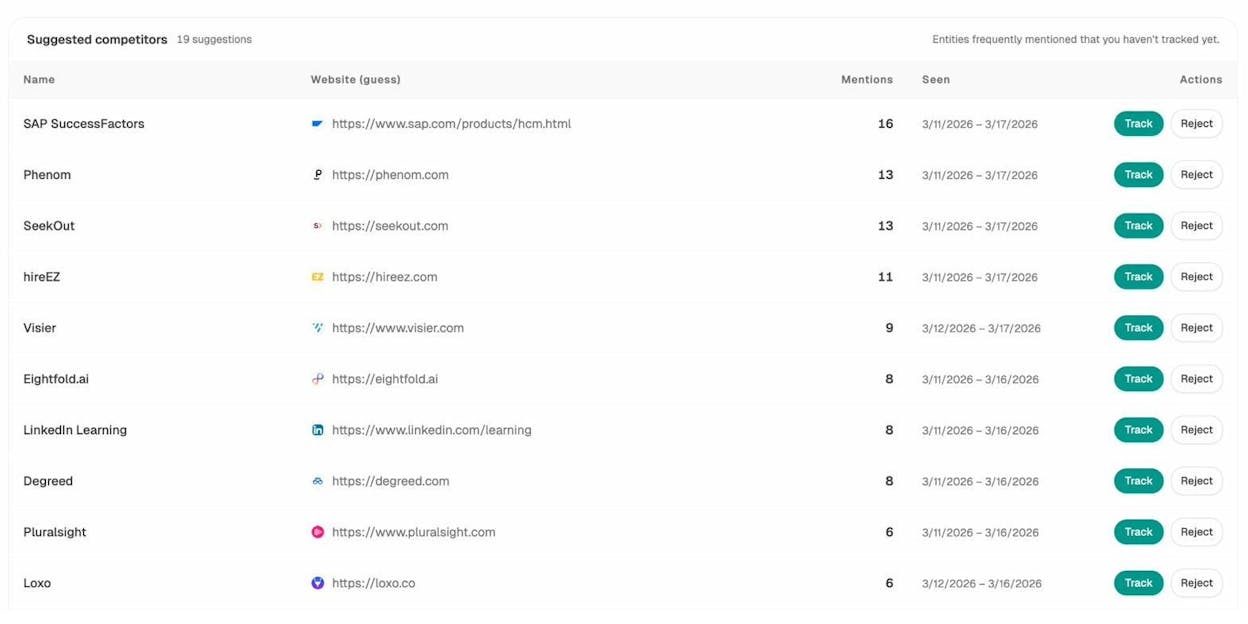
For example, if you’ve built a pillar page about “project management,” you can use Analyze AI’s competitor tracking to see which brands AI models recommend for that topic — and where you’re absent.
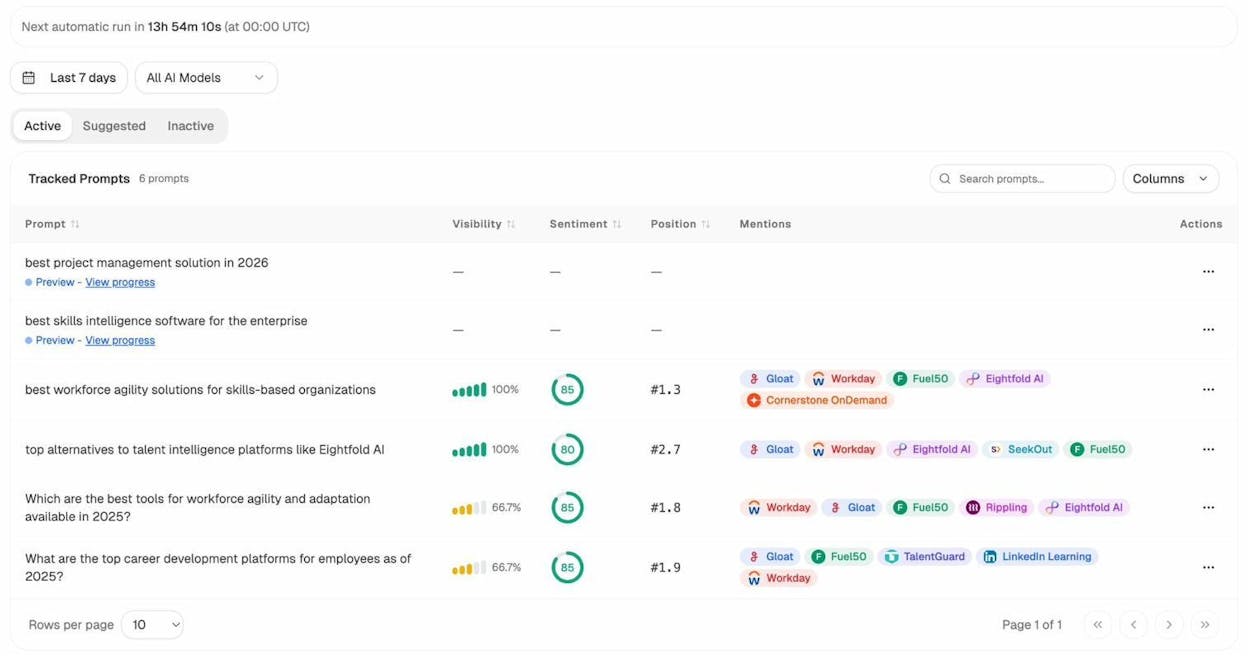
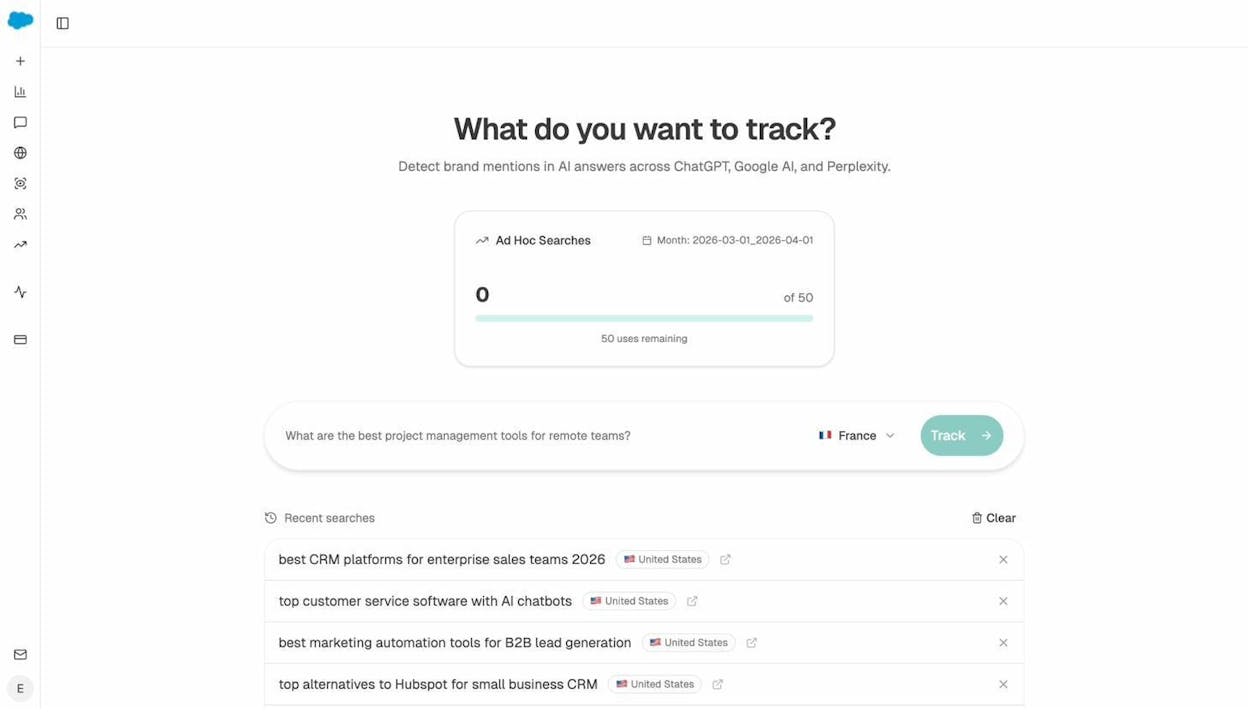
You can also run ad hoc prompt searches to test how AI models answer specific questions related to your pillar topic, before you invest in building the content.
The bottom line: building a pillar page today means optimizing for two channels, not one. Google still matters. But AI search is growing fast, and the brands that build topic authority now will compound that advantage as adoption increases. SEO is not dead — it’s evolving, and AI search is the next organic channel to add to your strategy.
How to Build Your Own Pillar Page (Step by Step)
Inspired by these examples? Here’s how to create your own pillar page, from topic selection to publication.
Step 1: Choose a topic you can own
Your pillar page topic should be broad enough to support 10-20 subtopics but specific enough that you can realistically compete. “Marketing” is too broad for most sites. “Content marketing for B2B SaaS” is more realistic.
Start with your business. What’s the core problem your product solves? What topic does your team have genuine expertise in? The best pillar pages are built by teams that actually know the subject — not teams chasing keyword volume.
Use a keyword research tool to validate demand. Check the search volume for your broad topic, and then look at the long-tail keywords underneath it. If you can find 10+ subtopics with meaningful search volume, you have a viable pillar page topic.
![[Screenshot of keyword research tool showing search volume for a broad topic and related subtopics]](https://www.datocms-assets.com/164164/1776796201-blobid15.png?auto=format,compress&w=1248&fit=max)
Step 2: Map your subtopics
Once you’ve chosen your topic, list every subtopic a reader might want to learn about. Think about it from the reader’s perspective: if someone is completely new to this topic, what questions would they have?
For example, if your pillar topic is “email marketing,” your subtopics might include: what is email marketing, how to build an email list, email marketing platforms, how to write email subject lines, email segmentation, email deliverability, email automation, and email marketing metrics.
Use tools like Google’s “People Also Ask” feature, autocomplete suggestions, and keyword tools to find subtopics you might have missed. Group related keywords into clusters using keyword clustering techniques.
![[Screenshot of Google People Also Ask results for a broad topic showing related questions]](https://www.datocms-assets.com/164164/1776796218-blobid16.png?auto=format,compress&w=1248&fit=max)
Step 3: Audit your existing content
Before creating new content, check what you already have. You may already have blog posts that cover some of your subtopics. If so, you can incorporate those into your cluster instead of starting from scratch.
Look for content gaps — subtopics you haven’t covered yet. These are the pieces you’ll need to create before (or shortly after) launching your pillar page.
A content audit helps you avoid duplicating work and ensures that your cluster content covers the full scope of your topic.
Step 4: Decide on your format
Based on the examples above, you have several format options:
|
Format |
Best for |
Examples |
|---|---|---|
|
Hub-and-spoke (short overview + links) |
Topics where you have lots of existing content |
Zapier, Wine Folly |
|
Comprehensive guide (deep standalone content + links) |
Competitive topics requiring depth |
Tofugu, Diet Doctor |
|
Directory / database |
Topics with many individual items |
Yoga Journal, Muscle & Strength |
|
Custom-designed landing page |
High-priority topics where design matters |
Ahrefs, HubSpot |
|
Chapter-based index |
Topics that work as a sequential learning path |
Atlassian, Search Engine Land |
Pick the format that best serves your reader’s intent. If your audience wants quick answers, a directory works. If they want comprehensive guidance, a long-form guide is better.
Step 5: Write your pillar page
Write the pillar page first. It should introduce the topic, cover each subtopic at a high level, and link to your cluster content.
Keep these principles in mind:
Lead with usefulness. Every section should give the reader something actionable, even if you’re linking to a deeper guide. Don’t write empty intro paragraphs just to fill space before the link.
Use clear headings. Your headings should be descriptive enough that a reader scanning the page can find what they need. “Chapter 3” is unhelpful. “How to Build an Email List” is clear.
Include visual elements. Tables, diagrams, images, and videos break up the text and make the page more engaging. The pillar pages that earn the most backlinks tend to include original visuals.
Add navigation. A table of contents or sticky sidebar helps readers jump to the section they care about. This is especially important on longer pages.
![[Screenshot of a pillar page with a sticky table of contents sidebar]](https://www.datocms-assets.com/164164/1776796228-blobid17.png?auto=format,compress&w=1248&fit=max)
Step 6: Build your cluster content
Write the detailed guides for each subtopic. Each cluster page should:
-
Cover one subtopic in depth
-
Link back to the pillar page using the pillar topic as anchor text
-
Link to other relevant cluster pages where it makes sense
-
Target its own specific keyword
The internal linking structure is what makes the whole system work. The pillar page links to each cluster page, and each cluster page links back to the pillar. This sends a clear signal to both search engines and AI models that your site covers this topic comprehensively.
Step 7: Check your visibility across both channels
After publishing, monitor how your pillar page performs in two places: traditional search and AI search.
For traditional search, track your keyword rankings and organic traffic using tools like Google Search Console or a keyword rank checker.
For AI search, use Analyze AI to track whether your pillar content is being cited in AI answers. Check which prompts trigger mentions of your brand, and identify gaps where competitors are being recommended instead.
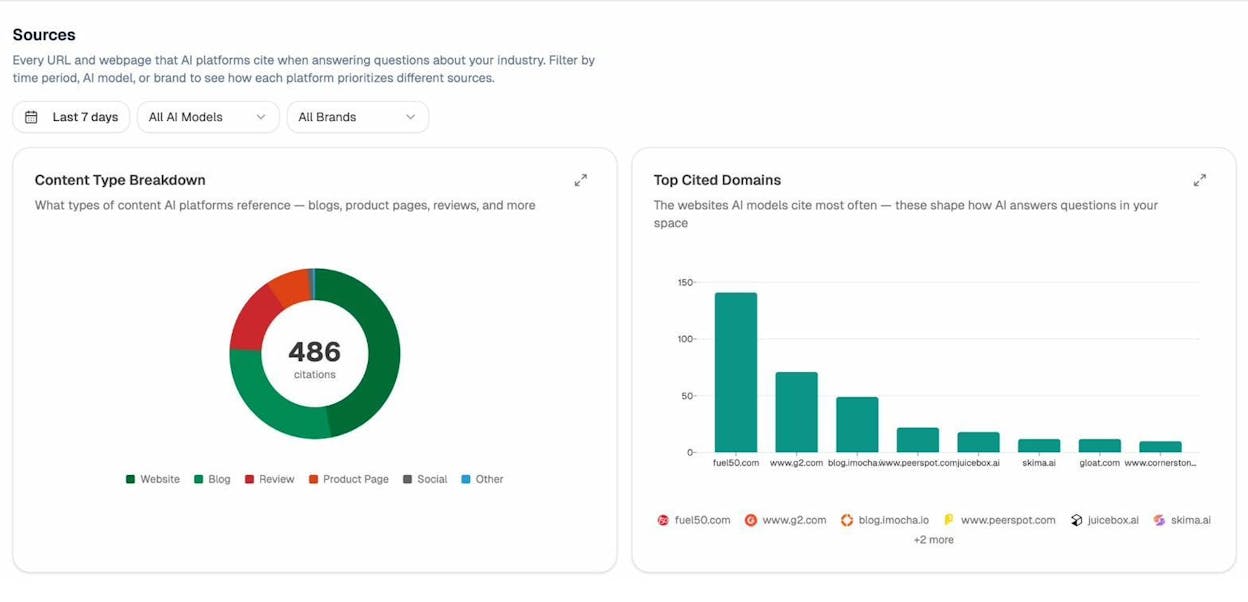
The Sources dashboard in Analyze AI shows you exactly which URLs AI models are citing for your topic. If your pillar page isn’t showing up, you know where to focus your optimization.
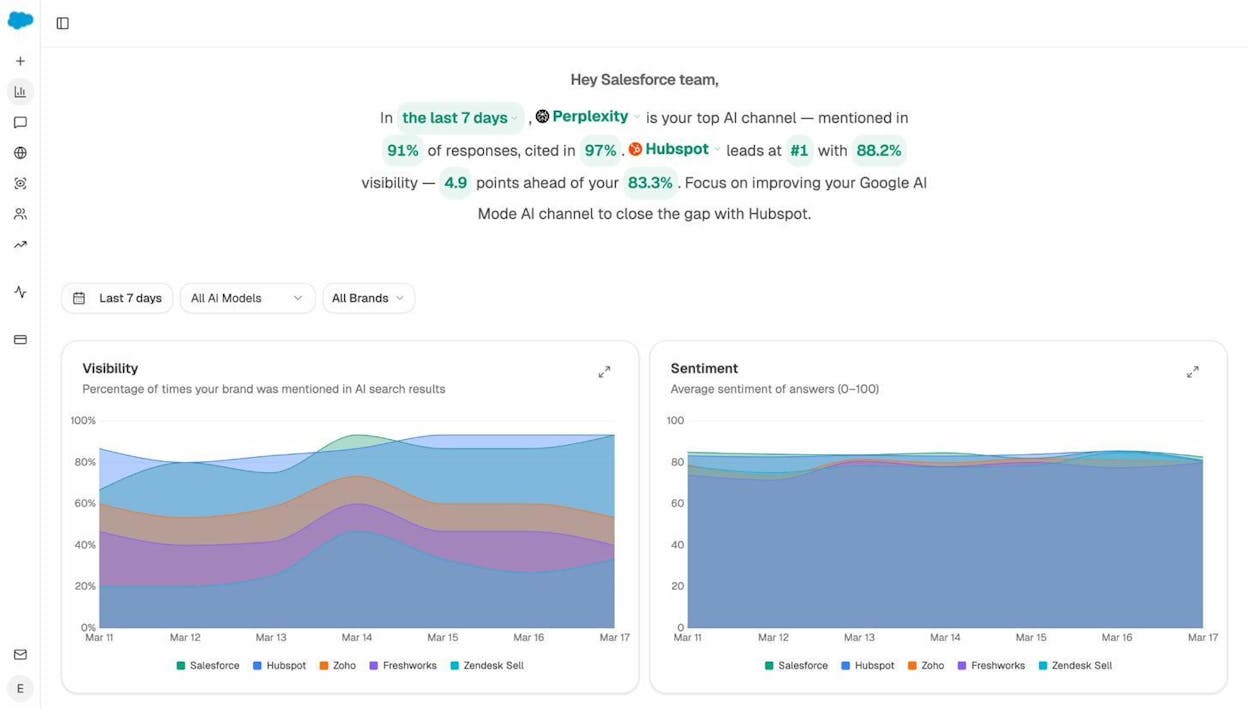
You can also track your overall AI visibility over time to see whether your pillar page strategy is compounding — which is exactly how the best content strategies work.
Step 8: Update and expand
Pillar pages are not one-and-done projects. The best ones are updated regularly:
-
Add new cluster content as you publish it
-
Update statistics, links, and examples
-
Refresh the design if it looks dated
-
Monitor search intent changes for your pillar keyword
The pillar pages with the most traffic and backlinks on this list have been maintained for years. Consistency compounds.
Start Building
Pillar pages are one of the few content formats that work for SEO, AI search, user experience, and lead generation simultaneously. They organize your content, signal topical authority, attract backlinks, and give AI models a clear picture of your expertise.
Pick a topic your team knows well. Study the examples above. Choose the format that fits your topic. And then build something useful.
If you want to track how your pillar content performs across AI engines — and see where competitors are winning the prompts that matter to your business — try Analyze AI.
Further reading:

Ernest

Ibrahim


