



Summarize this blog post with:


In this article, you’ll learn nine AI agent use cases that solve real marketing problems, from content production bottlenecks to competitive intelligence gaps. You’ll see how each one works, what to look for in the tools that power them, and where AI search visibility fits into the picture. By the end, you’ll have a clear playbook for putting agents to work across your content, SEO, and GTM operations.
Table of Contents
What is an AI agent (and why should marketers care)?
Before jumping into use cases, it helps to understand what separates an AI agent from the automated workflows you might already use.
An automated workflow is a linear chain of steps. If X happens, then do Y, then do Z. Tools like Zapier and Make are built for this. They are predictable, affordable, and good for repetitive tasks with consistent inputs. But when one step fails, everything stops.
An AI agent is an autonomous system that can reason, make decisions, and adapt. You give it tools (integrations), instructions (a prompt), and access to data. It figures out the best path to the output you want. If one approach fails, it tries another.
An agentic workflow combines both. You build a structured pipeline but place specialized agents at key steps. One agent researches, another writes, another fact-checks. You get the reliability of a workflow with the reasoning power of agents.
For marketing teams, the distinction matters because your work is rarely linear. A content refresh is not just “change the date and republish.” It requires pulling traffic data, checking which keywords dropped, reading competitor pages, rewriting sections, and re-optimizing. That is agent territory.
9 AI agent use cases for marketing teams
1. Content writing at scale
Best for: Content teams, agencies managing multiple clients
The problem: Writing one blog post per week is manageable. Writing ten per week while maintaining quality, brand voice, and SEO best practices is a staffing problem that most teams solve by hiring more freelancers. The output is inconsistent.
How agents solve it: A content writing agent can take a topic, pull keyword data from DataForSEO or Semrush, research the top-ranking pages, generate a research document, build an outline with strategic comments, and produce a draft that follows your brand voice rules, all in a single run.
In Analyze AI, the Content Writer pipeline does exactly this. It moves through five stages (idea, research, outline, draft, and QA). Each stage builds on the last, and the platform injects your Brand Vault (tone, style, differentiators, proof points) automatically so the output sounds like your team wrote it, not a generic LLM.
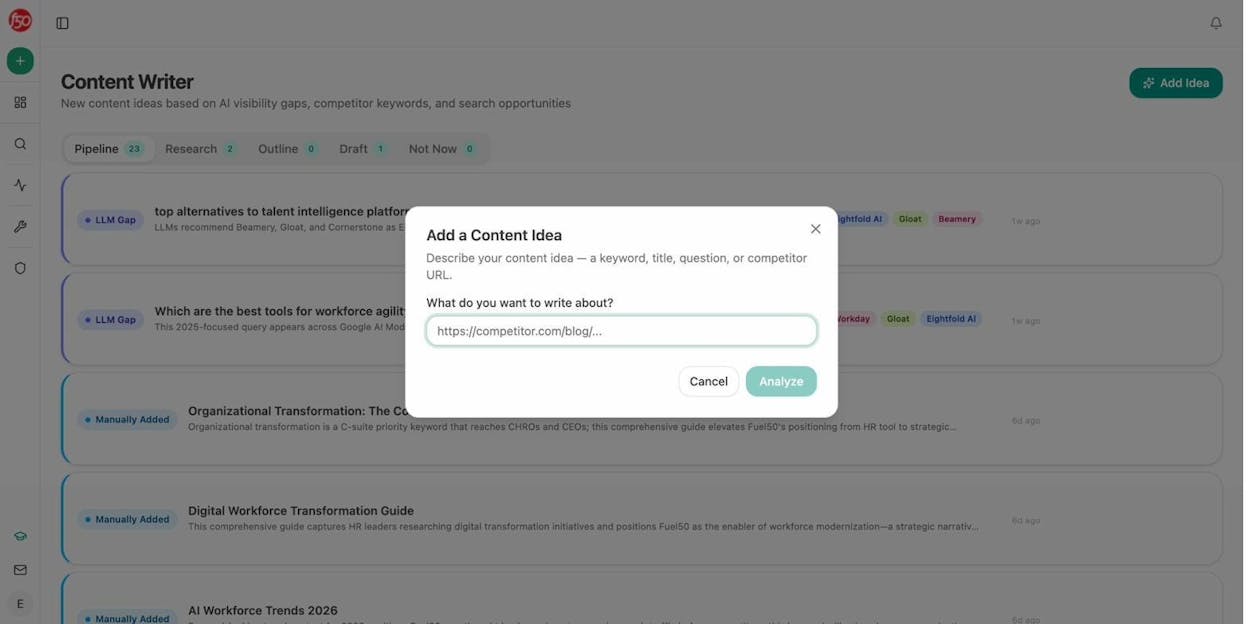
The difference between this and asking ChatGPT to “write a blog post about X” is structural. The agent pulls real search data, references your competitors, layers your proof points, and scores the output against an AEO Content Scorecard before publishing. If the score is below threshold, it sends the draft back to a writer with specific gaps flagged.
For agencies, you can loop this across clients. One agent, multiple brand vaults, separate content calendars. The margin lives in the loop.
2. Content refresh at scale
Best for: SEO teams managing 100+ published pages
The problem: Your older content decays. Traffic drops, information goes stale, competitors publish better versions. You know you should update these pages, but auditing and refreshing them manually takes hours per post.
How agents solve it: A content refresh agent can run on a weekly schedule, pull your declining pages from GA4, cross-reference them with keyword ranking drops in GSC, scrape the current top-ranking competitor pages, and generate optimized rewrites that match your brand voice.
With Analyze AI’s Agent Builder, this is a scheduled workflow. Every Monday, the agent checks declining-pages and stale-content data recipes, loops through each page, fetches the original content, and runs it through the Content Optimizer pipeline. If the optimized version scores above 80 on the AEO Scorecard, it pushes directly to WordPress. If not, it sends the gaps to Slack for a human review.
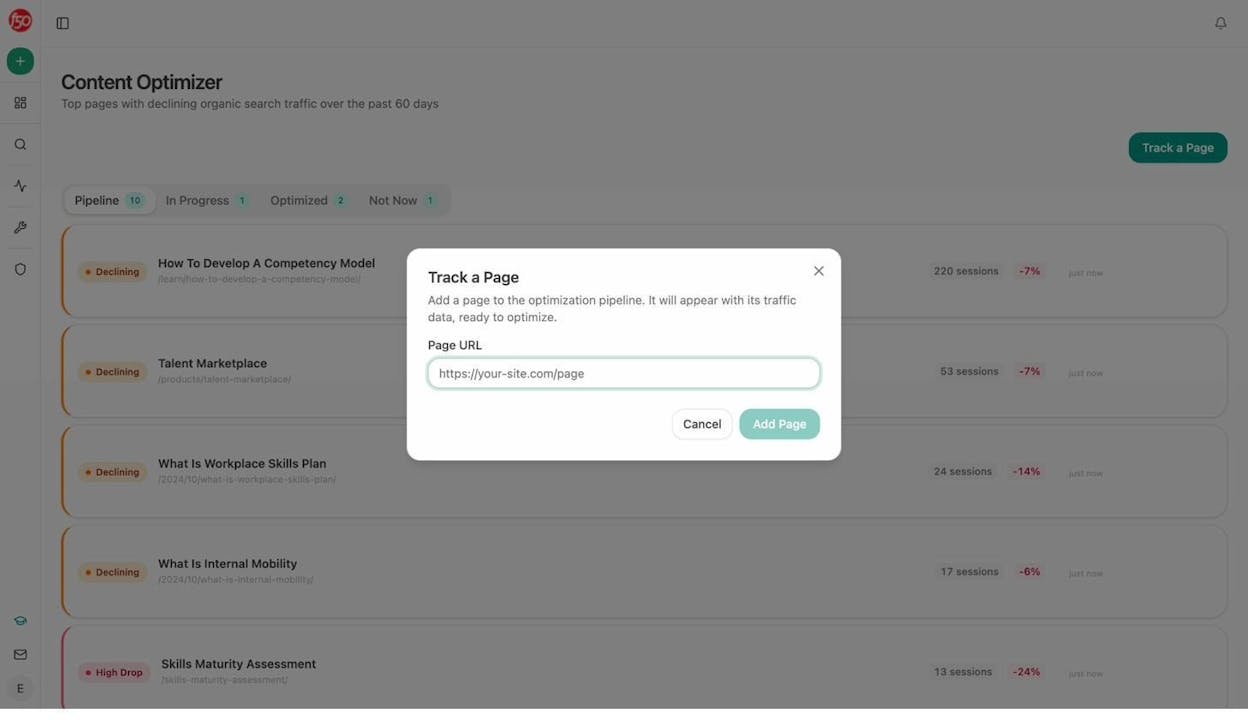
The key detail here is that this agent does not just rewrite for keywords. It checks claim density, proof integration, freshness signals, and how well the content maps to the queries AI models actually pull from. That last part matters because a page can rank well in Google but get zero AI citations if it is not structured for LLM consumption.
3. Keyword research at scale
Best for: SEO leads, content strategists
The problem: Traditional keyword research involves pulling seed lists, checking volumes, analyzing difficulty, grouping by intent, and mapping to content. For a single topic cluster, this can take a full day. Multiply that across every product line or client, and keyword research becomes the bottleneck for your entire content calendar.
How agents solve it: A keyword research agent takes a seed topic, fans it out across DataForSEO and Semrush for related keywords, keyword ideas, search volumes, difficulty scores, and SERP competitor analysis. It groups results by intent, identifies gaps where competitors rank and you do not, and outputs a prioritized brief.
Analyze AI’s Agent Builder comes pre-wired with 27 DataForSEO nodes and 7 Semrush nodes. You do not need to wire up API credentials or parse JSON responses. The data recipes for keyword-opportunities, content-suggestions, and competitor-topics are ready to drop into any agent.
You can also use the free Keyword Generator Tool and Keyword Difficulty Checker for quick spot checks before building a full research agent.
The AI search layer: Here is where most keyword research stops, and where it should not. Traditional keyword tools tell you what people search on Google. They tell you nothing about what people ask ChatGPT, Perplexity, or Gemini. Analyze AI’s Prompt Discovery shows you the actual prompts being asked about your category in AI search. You can see which prompts your brand shows up for, which ones your competitors own, and which ones nobody has claimed yet.
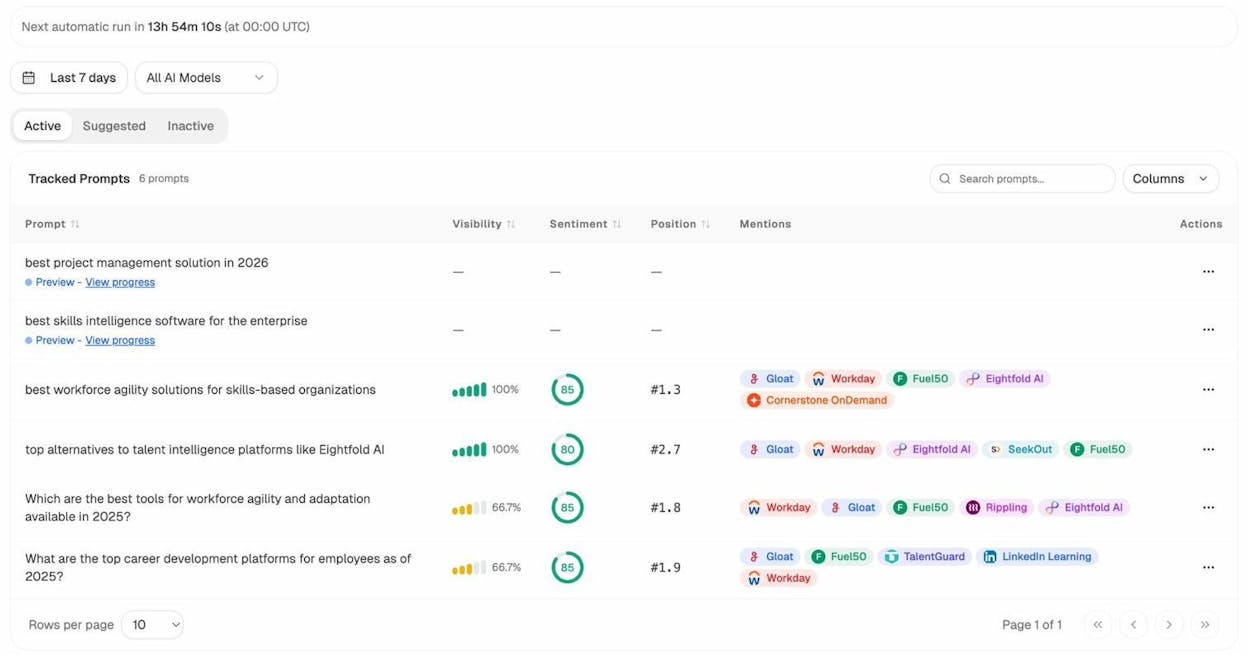
That changes your content strategy. Instead of only building pages for Google keywords, you are also building pages that answer the exact prompts AI models pull from.
4. Internal linking at scale
Best for: SEO teams, content operations
The problem: Internal linking is one of the highest-leverage SEO activities, but it is also one of the most tedious. For a site with 500+ pages, manually finding relevant link opportunities is impractical. Most teams either ignore it or do it inconsistently.
How agents solve it: An internal linking agent loops through your sitemap, pulls the top GSC keywords for each page, uses On-Page SEO analysis to understand each page’s topic, and then matches pages to each other based on semantic relevance. The output is a list of three to five suggested internal links per page, with anchor text recommendations.
In Analyze AI, you can build this as a scheduled agent that runs weekly. The agent uses the GSC Top Keywords for Page node, the On-Page SEO node, and a Prompt LLM step that evaluates semantic fit. Results go to Notion as tasks or directly to WordPress via the platform’s CMS integration.
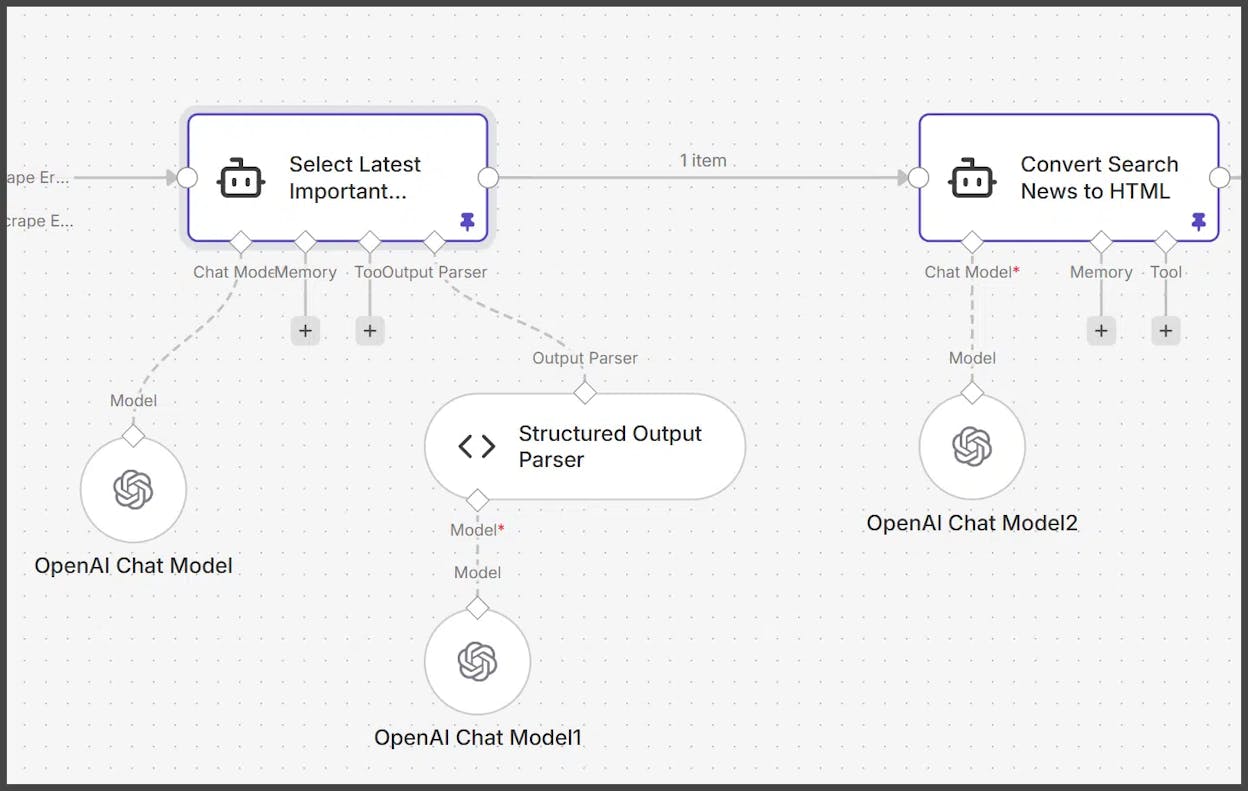
For sites with 2,000+ pages, this is not optional. It is how you keep your site architecture healthy without dedicating a full-time resource to it.
5. SEO blog optimization
Best for: Content teams, solo marketers
The problem: You published a post six months ago. It ranks on page two. You know it needs optimization, but you are not sure what to change. Traditional tools like Clearscope or Surfer SEO give you a content score and a list of terms to add. That helps, but it is surface-level.
How agents solve it: An optimization agent reads your content, pulls the top-ranking competitor pages for your target keyword, compares structure, keyword coverage, depth, and evidence quality, and generates specific rewrite recommendations.
Analyze AI’s Content Optimizer goes further. It fetches your original content, adds 51 strategic comments (not just keyword suggestions but structural, argument-quality, and proof-gap feedback), and produces a rewritten version that scores against both traditional SEO signals and AEO readiness.
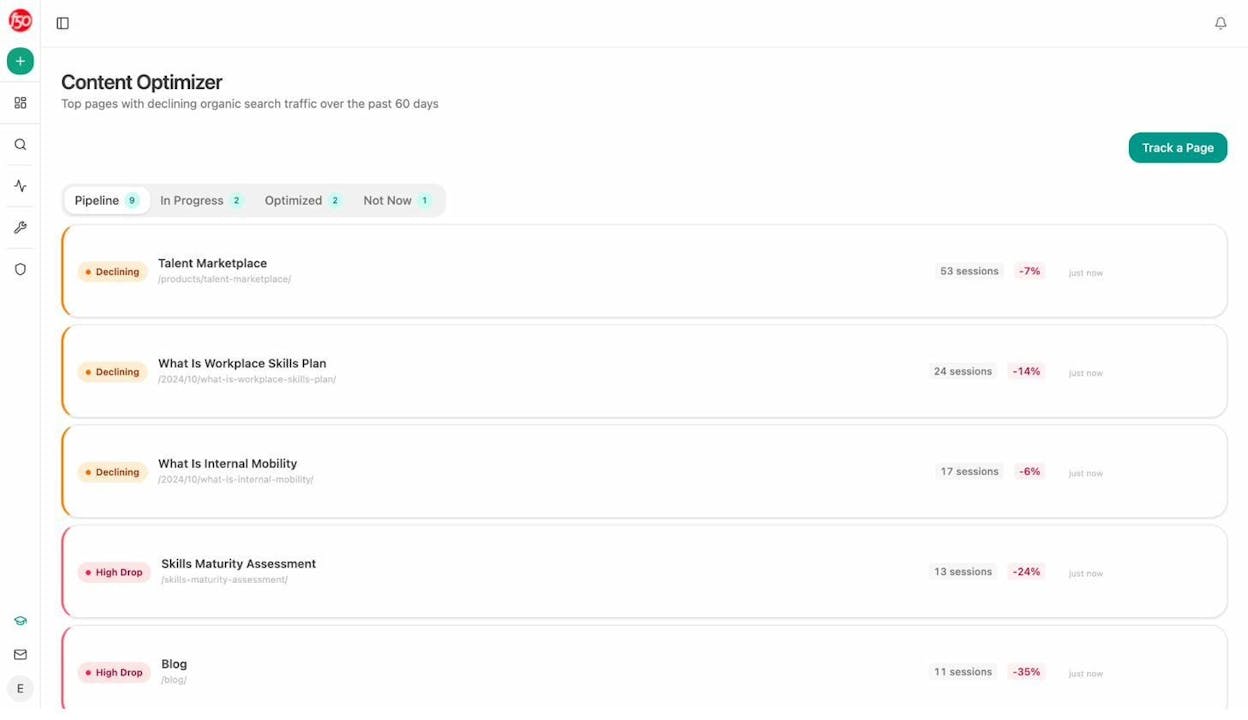
The AEO Scorecard checks structure, freshness, claim density, proof integration, and claim-to-source mapping. This matters because the same page that ranks on Google needs to be structured for AI models to cite it accurately. The optimizer handles both in one pass.
6. Competitor intelligence agent
Best for: Marketing leads, CMOs, agency account managers
The problem: Knowing what your competitors are doing used to mean checking their blog once a month and skimming their social feeds. That does not cut it when you also need to know how they show up in AI search results, what narratives AI models associate with them, and which of your prompts they are winning.
How agents solve it: A competitor intelligence agent tracks competitor visibility across both traditional search and AI engines. It surfaces prompts where competitors rank and you do not, identifies the URLs that AI models cite for your competitors, and monitors narrative shifts (new messaging, new proof points, repositioning).
Analyze AI’s Competitors dashboard shows this at a glance. You can see side-by-side visibility percentages, prompt-level gaps, and the exact sources AI models use to inform their answers about your competitor.
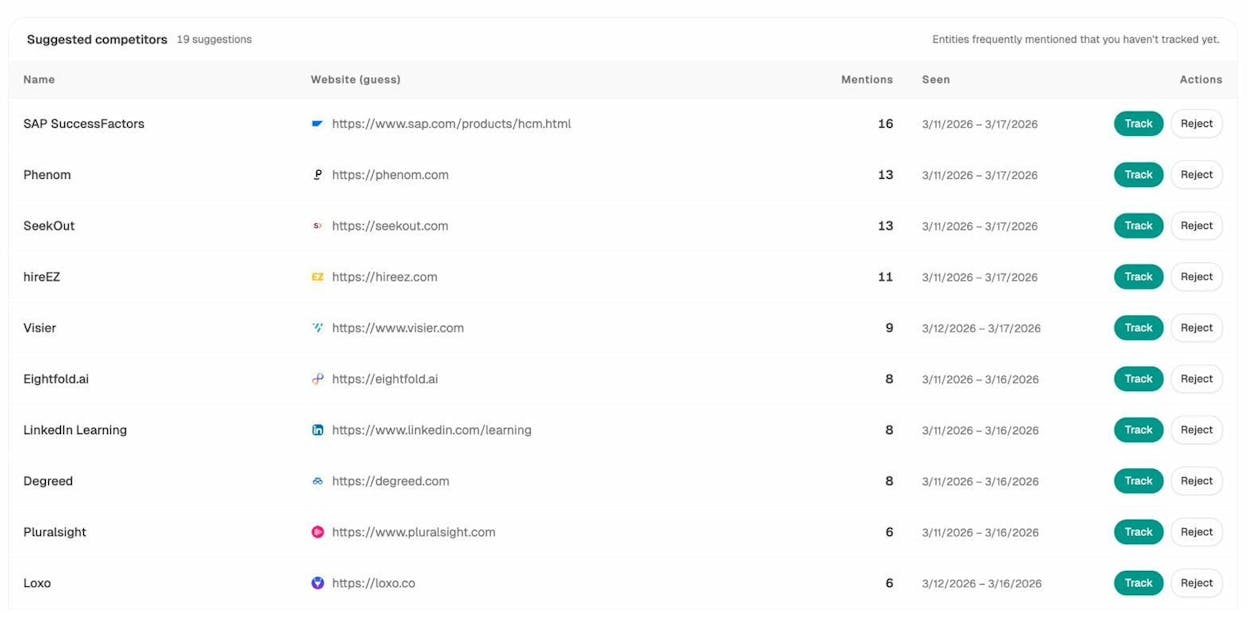
With the Agent Builder, you can set this up as a daily scheduled agent that pipes competitor-gaps and competitor-message-shift data recipes into a Slack alert. When a competitor gains visibility on a prompt you track, you know about it the same morning, not the next quarter.
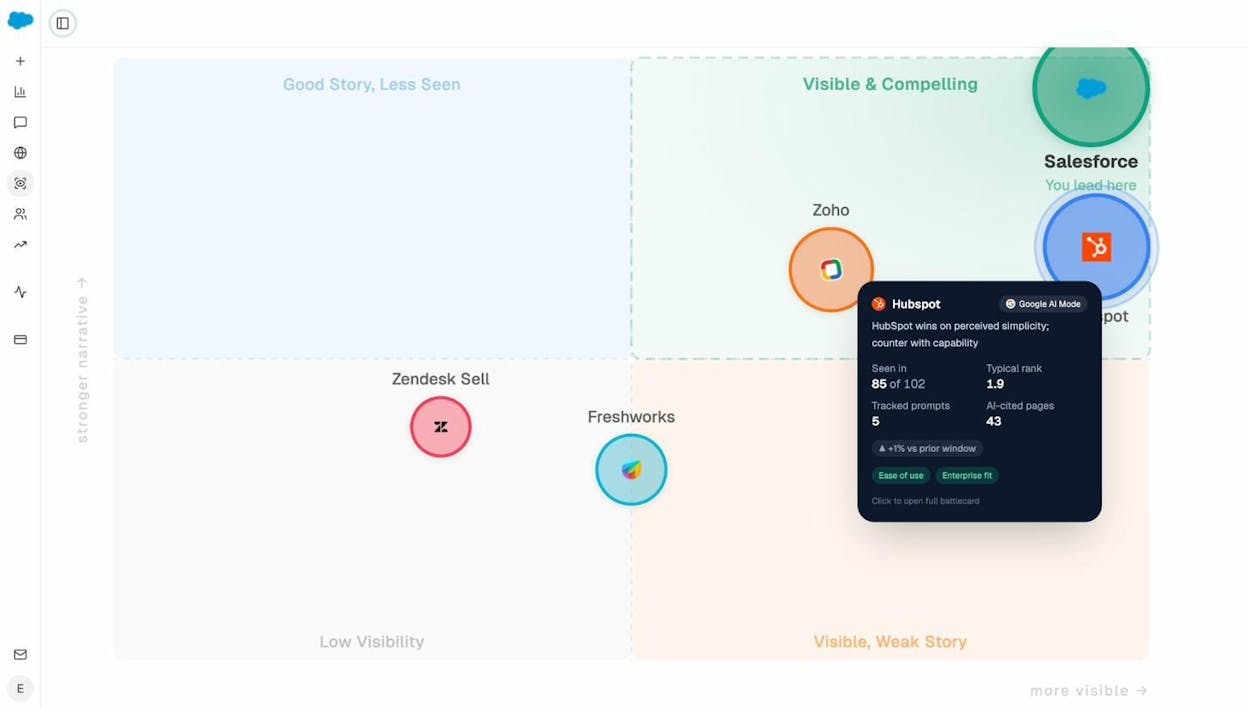
The Perception Map adds another layer. It positions every tracked brand on a quadrant based on visibility, rank, sentiment, and proof signals. You can see whether you are in the “high visibility, weak narrative” quadrant (meaning AI knows about you but does not say the right things) or the “low visibility, strong narrative” quadrant (meaning your story is good but nobody hears it).
7. Link outreach and digital PR agent
Best for: Digital PR teams, link builders, agencies
The problem: Link outreach involves finding relevant sites, identifying the right contact, personalizing the pitch, and following up. Each step is manual, time-consuming, and has a low conversion rate. Most teams send generic emails and wonder why response rates are below 3%.
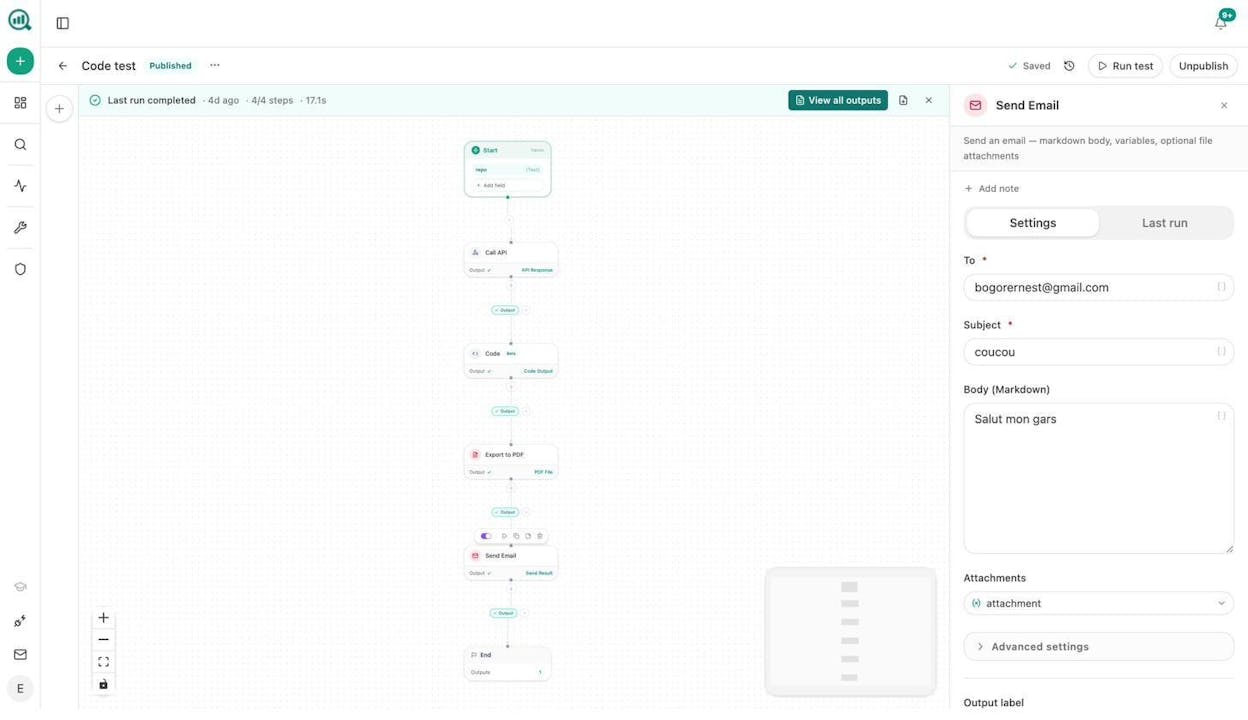
How agents solve it: A link outreach agent can research target domains using DataForSEO’s Domain Overview, find journalist and author emails using Tomba’s Author Finder, enrich contacts with Hunter.io verification, generate personalized pitches using your Brand Vault context, and send emails through your connected email service.
In Analyze AI, this is a multi-step agentic workflow. The Agent Builder includes nodes for Tomba (5 nodes including Author Finder and LinkedIn Finder), Hunter.io (3 nodes), DataForSEO Brand Mentions with sentiment analysis, and News Research. You can build a pipeline that finds journalists who cover your space, checks their recent articles, and drafts pitches that reference their actual work.
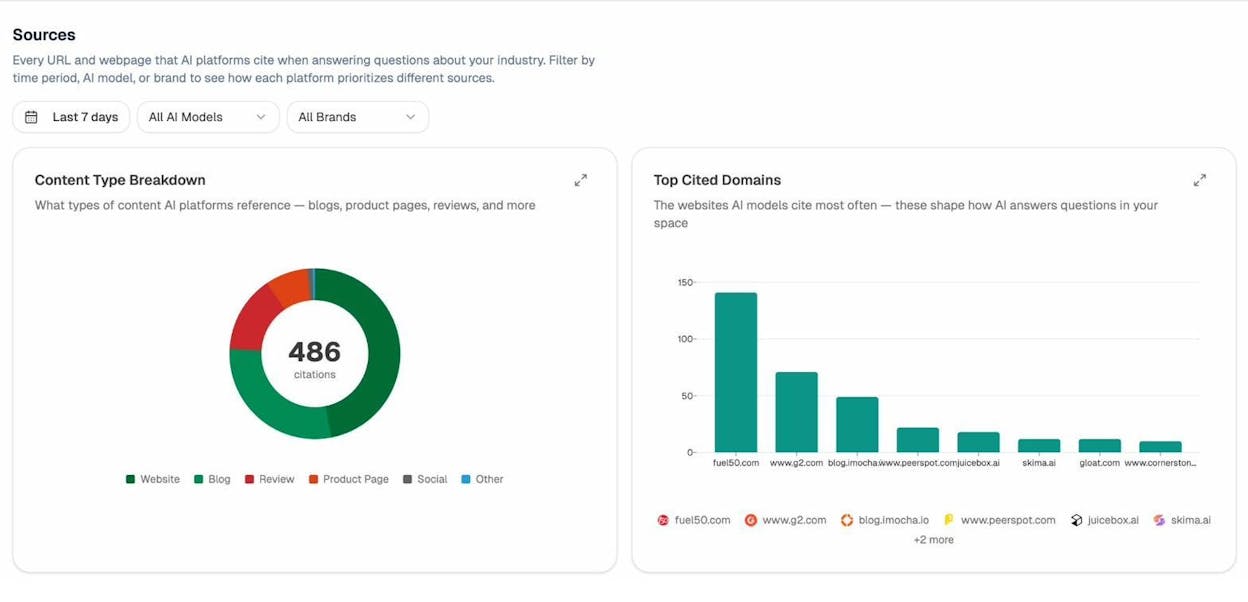
The Sources dashboard also helps here. It shows which domains AI models cite most in your category. If a domain frequently appears as a source in AI answers but has never linked to you, that is a high-value outreach target, because a link from that domain could improve both your traditional SEO authority and your AI citation share.
8. Reporting and data analysis agent
Best for: CMOs, marketing ops, agency leads
The problem: Every Monday morning starts with the same scramble. Pull data from GA4, GSC, HubSpot, and your AI visibility dashboard. Paste it into slides. Write commentary. Send to leadership. This takes four hours and produces a report that is outdated by Tuesday.
How agents solve it: A reporting agent pulls all of this data automatically on a schedule and delivers a formatted executive summary to your inbox or Slack before you finish your coffee.
Analyze AI’s Agent Builder has dedicated GA4 nodes (5 of them, including AI Traffic Overview, AI Landing Pages, and Realtime AI Users), 8 GSC nodes, and 26 HubSpot nodes. The exec-one-pager data recipe assembles a pre-shaped executive summary with insights and risks. Combine that with the Prompt LLM node for narrative generation and the DOCX export node for formatting, and you have a Monday board prep that runs itself.
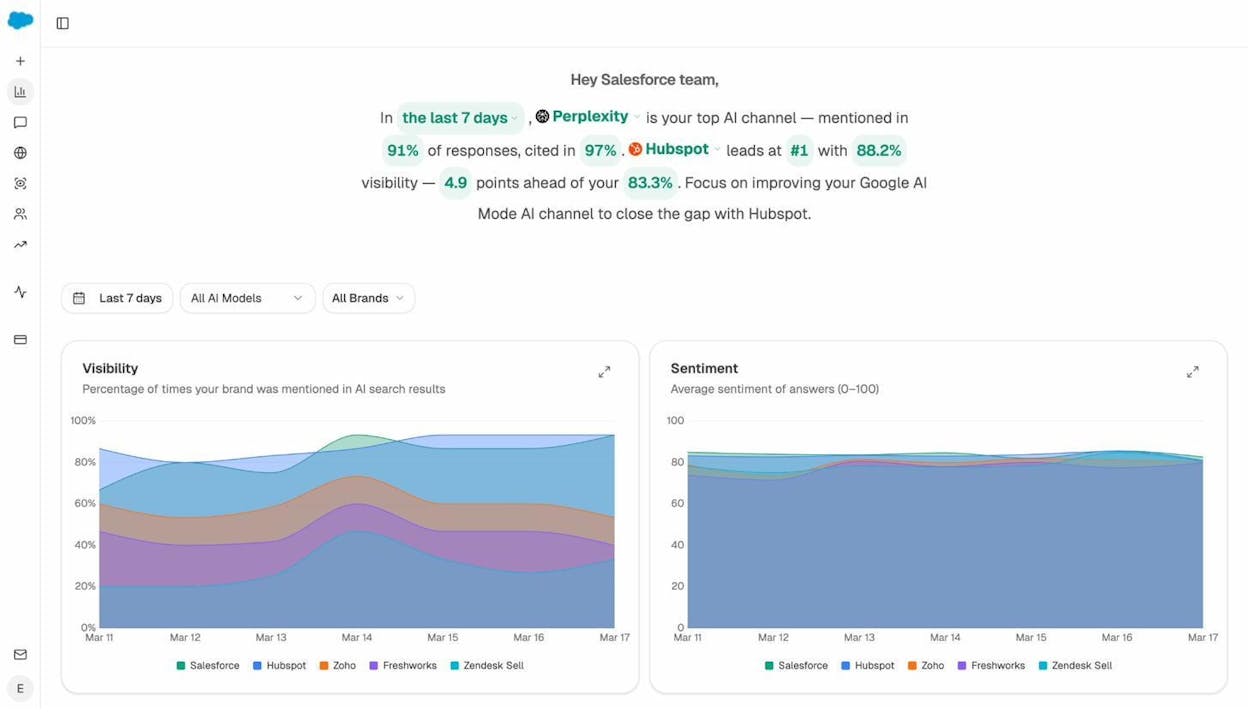
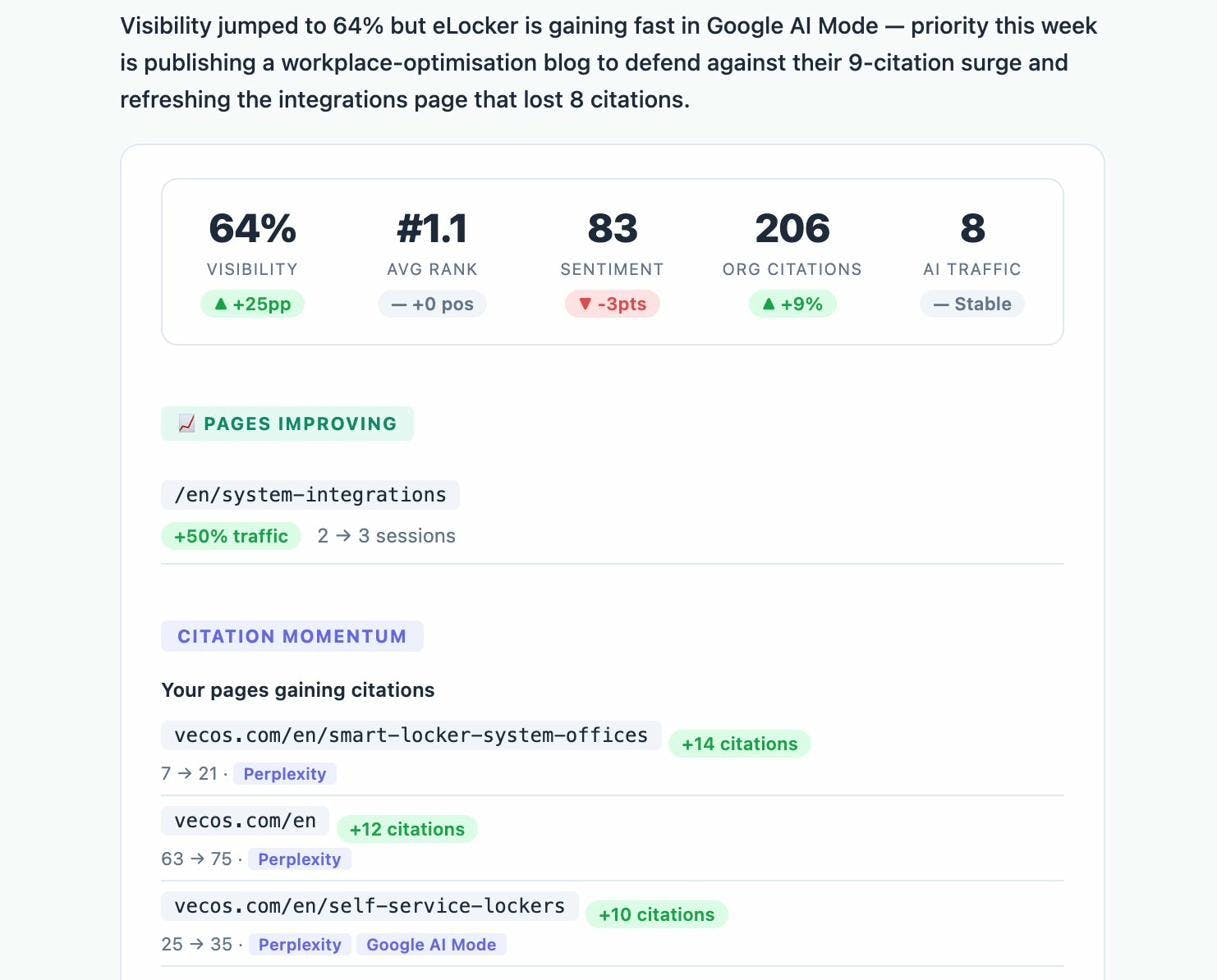
You can also set up a Weekly Email Digest that arrives automatically with your key metrics, visibility changes, and action items. No agent setup required for this one. It is a built-in feature.
9. AI search visibility monitoring
Best for: Any marketing team investing in organic growth
The problem: You are optimizing for Google. But your buyers are also asking ChatGPT, Perplexity, Gemini, and Google AI Mode for recommendations. You have no idea whether your brand shows up in those answers, what it says about you when it does, or which competitors are winning the prompts that matter most.
How agents solve it: An AI visibility monitoring agent tracks your brand mentions, sentiment, and citation share across every major AI engine. It alerts you when visibility drops, when competitors gain ground, and when new prompts emerge in your category.
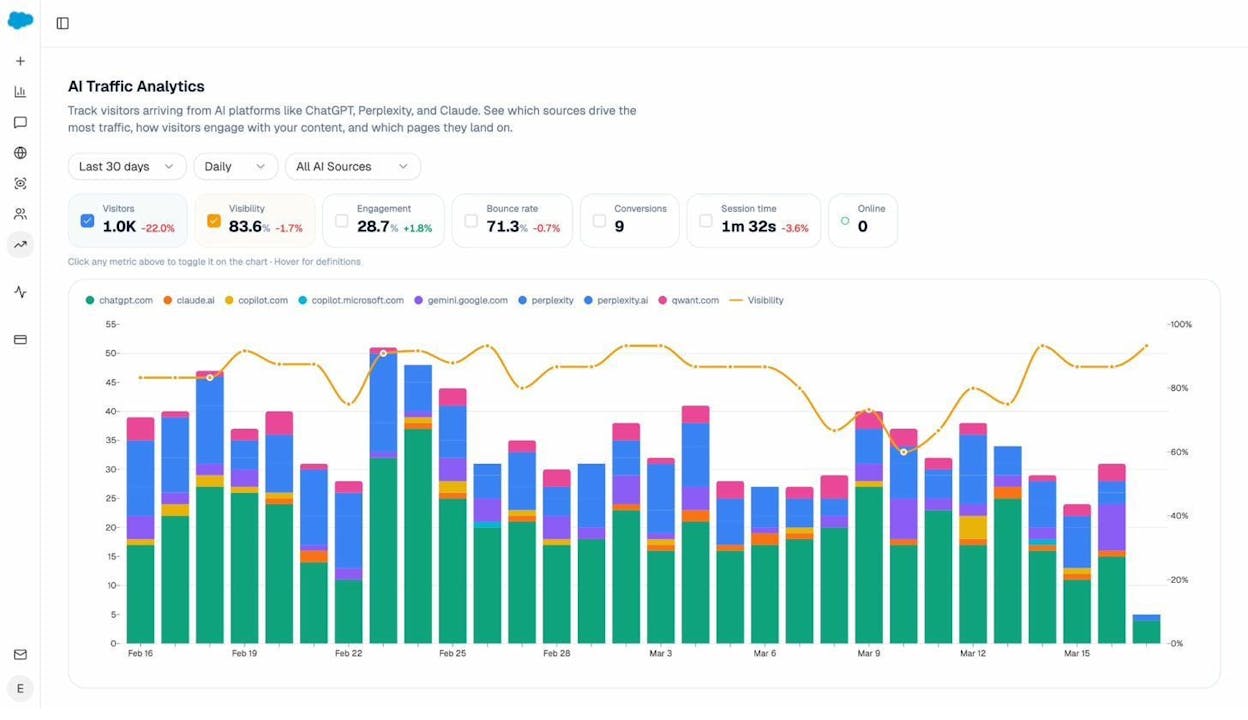
Analyze AI was built for this. The AI Traffic Analytics feature connects to your GA4 and shows exactly how much traffic comes from AI engines, which landing pages receive it, and what visitors do after they arrive.
The Prompt Tracking feature monitors hundreds of prompts across ChatGPT, Perplexity, Gemini, Copilot, Meta AI, and more. You see your visibility score, how it changes over time, and which specific prompts drive or lose visibility.
With the Agent Builder, you can set up a daily visibility-losers alert that fires when your brand drops on any tracked prompt. The agent identifies the prompt, the engine, and the competitor who took your spot, then drafts a counter-content brief and sends it to your content team via Slack. That is the difference between finding out about a visibility drop in your next quarterly review and fixing it the same week.
Why marketing teams need purpose-built agents, not general automation
The use cases above share a common thread. They all need marketing data already in the room. Your keyword rankings, your AI visibility scores, your brand voice rules, your competitor list, your CMS credentials.
General automation tools like Zapier, Make, n8n, or Gumloop can connect apps and run linear workflows. They are great for trigger-based tasks (new form submission, send a Slack message). But they do not come with 34 pre-built data recipes for competitive intelligence, content performance, and AI perception. They do not have 27 DataForSEO nodes or 8 GSC nodes pre-wired. They do not inject your Brand Vault into every agent run automatically.
Analyze AI’s Agent Builder has 180+ nodes across 16 categories, including AI, web research, SEO research, content creation, content optimization, image generation, B2B enrichment, CRM, CMS, email, and logic/control flow. It supports three trigger modes (manual, scheduled, webhook), 13 input primitives, and exports to CSV, Excel, Markdown, HTML, DOCX, and PDF.
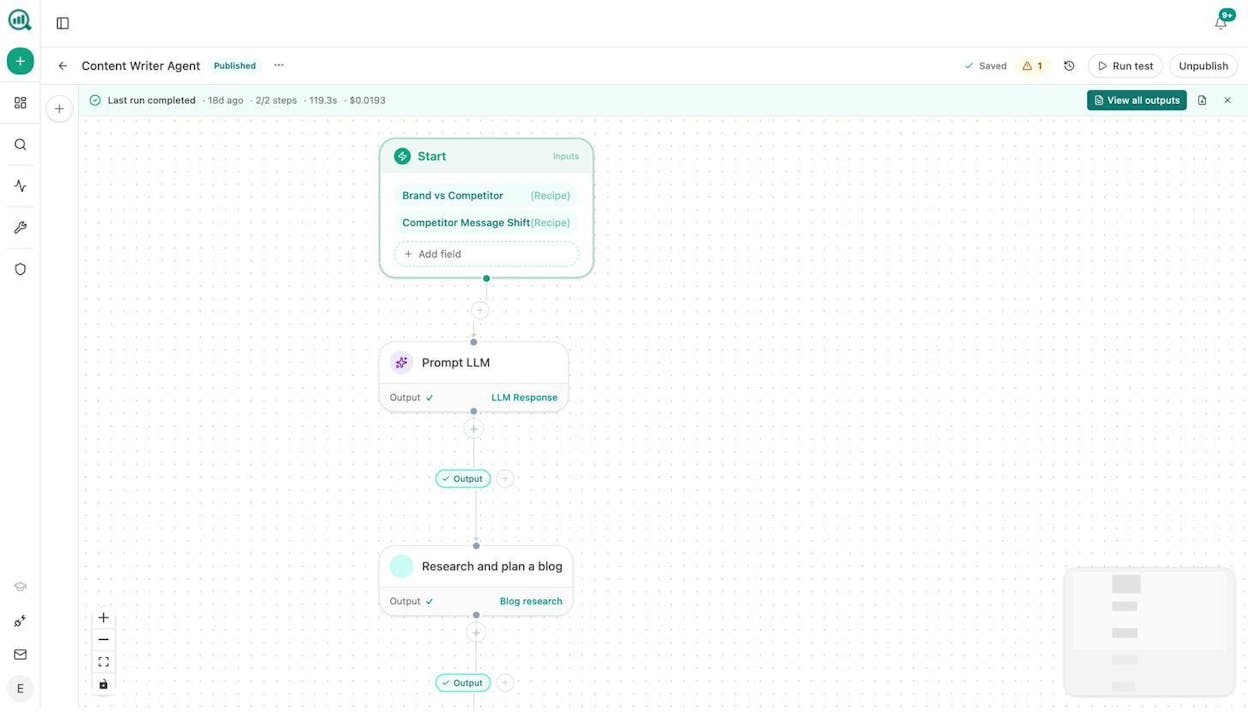
That is not an automation layer. It is a programmable substrate for marketing operations. The same surface area as Zapier, Retool, Make, and n8n combined, but pre-wired to the SEO, content, and AI search data you are already paying for.
And unlike credit-based pricing models where each AI response costs a credit and your budget becomes unpredictable, Analyze AI offers straightforward pricing with a free trial so you can test every feature before committing.
What to do next
Pick one use case from this list. Start with the one that solves your biggest bottleneck. If your team spends four hours every Monday building reports, start with the reporting agent. If you have 200 blog posts that have not been updated in a year, start with content refresh at scale.
The tools exist. The data recipes are built. The nodes are pre-wired. The only thing left is to connect your data sources and hit run.
Start your free trial of Analyze AI and build your first agent in minutes, not days.

Ernest

Ibrahim


