



Summarize this blog post with:


In this article, you’ll learn how to speed up your SEO results using eight proven methods that cut through the typical months-long waiting game. You’ll also learn how to apply several of these same tactics to AI search, which is quickly becoming the second organic channel every brand needs to pay attention to.
Table of Contents
Start with a strategic framework
To accelerate SEO results, you need to be honest about what you can and cannot control.
You can control how much time you spend on analysis. So make it focused. Five hours of unfocused keyword research will produce fewer results than 30 minutes of targeted opportunity hunting.
You can control which pages you prioritize for updates. So start with the pages that are closest to ranking well rather than building new ones from scratch.
You cannot always control how fast Google crawls and re-indexes your pages. But you can push updates faster with tools like IndexNow and Google Search Console.
You cannot control how fast backlinks accumulate. But you can reclaim broken ones and earn new ones from existing brand mentions.
The key is to focus your effort on the highest-leverage, lowest-resistance activities first. Here’s a simple way to think about it.
![[Screenshot description: A 2x2 matrix illustration with “Effort” on the Y-axis (Low to High) and “Reward” on the X-axis (Low to High). The bottom-right quadrant (Low Effort, High Reward) is highlighted in green and labeled “Start Here.” The top-right quadrant (High Effort, High Reward) is labeled “Plan For Later.” The bottom-left (Low Effort, Low Reward) is labeled “Skip.” The top-left (High Effort, Low Reward) is labeled “Avoid.”]](https://www.datocms-assets.com/164164/1777550092-blobid0.png?auto=format,compress&w=1248&fit=max)
Now, let’s walk through the eight specific methods that deliver the fastest results.
1. Use IndexNow to push website updates in seconds
One of the biggest barriers to quick SEO is the crawl lag. You make changes to your site, then wait days or even weeks for search engines to notice.
Google’s own documentation says it can take a few weeks to re-crawl pages. If you’re trying to move fast, that delay alone can kill your momentum.
IndexNow solves this. It’s an open-source protocol that lets you notify search engines the moment you update a page. Instead of waiting for Googlebot to eventually find your changes through your XML sitemap, you push the update directly.
How to set up IndexNow
The setup depends on your CMS, but the general process looks like this.
Step 1. Generate an IndexNow API key from indexnow.org.
![[Screenshot description: The IndexNow.org homepage showing where to generate an API key]](https://www.datocms-assets.com/164164/1777550092-blobid1.png?auto=format,compress&w=1248&fit=max)
Step 2. Upload the key file to your website’s root directory. The file name should match your API key (for example, abc123.txt placed at yoursite.com/abc123.txt).
Step 3. Submit your updated URLs via the IndexNow API. Most SEO plugins for WordPress, Wix, and other CMS platforms now support IndexNow natively.
![[Screenshot description: A WordPress SEO plugin settings page showing the IndexNow toggle enabled with a green checkmark]](https://www.datocms-assets.com/164164/1777550103-blobid2.png?auto=format,compress&w=1248&fit=max)
Step 4. Verify the submission is working by checking your Bing Webmaster Tools account, which logs all IndexNow submissions.
![[Screenshot description: Bing Webmaster Tools showing the IndexNow submission log with successfully submitted URLs]](https://www.datocms-assets.com/164164/1777550123-blobid3.png?auto=format,compress&w=1248&fit=max)
One important note. Google does not yet support IndexNow directly. So after pushing updates via IndexNow for Bing, Yandex, and other engines, you should also resubmit your updated pages through Google Search Console.
Open Google Search Console, go to the URL Inspection tool, paste in the URL you updated, and click “Request Indexing.”
![[Screenshot description: Google Search Console URL Inspection tool with the “Request Indexing” button highlighted]](https://www.datocms-assets.com/164164/1777550126-blobid4.png?auto=format,compress&w=1248&fit=max)
Between IndexNow and Google Search Console, you’ve covered the two main search ecosystems. Your changes should start showing up in days instead of weeks.
What about AI search engines?
AI search engines like Perplexity, ChatGPT, and Gemini pull data from the web in real time (Perplexity) or through periodic training data updates (ChatGPT, Gemini). There’s no equivalent of IndexNow for AI search yet.
But there is something you can do right now. You can track whether AI engines are citing your updated content using Analyze AI’s Citation Analytics. It shows every URL and webpage that AI platforms cite when answering questions about your industry. Filter by time period, AI model, or brand to see how each platform prioritizes different sources.
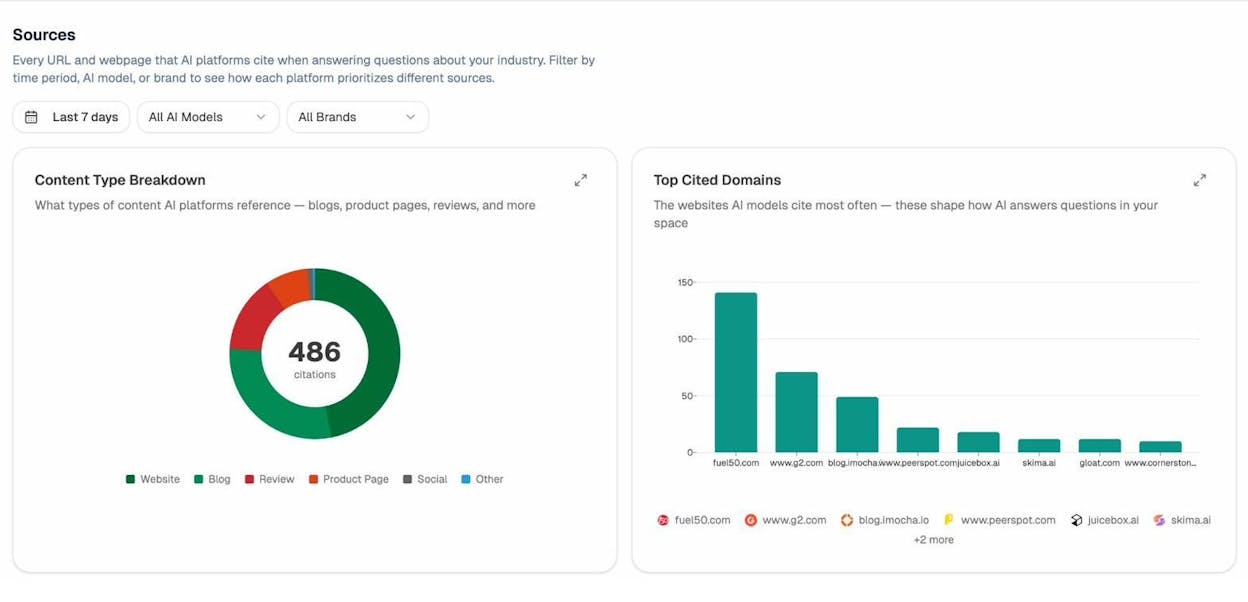
If you update a page and want to know whether AI engines are picking it up, check your citation data over the following days. If the old version of the page is still being cited, that tells you the model hasn’t refreshed its data yet. If the new version appears, you know your update is working.
2. Target keywords with low difficulty and high traffic potential
If you need organic traffic fast, the worst thing you can do is go after competitive keywords. A keyword with a difficulty score of 80+ might take a year of link building before you crack the top 10. That’s not quick SEO.
Instead, target keywords that offer high traffic potential with low competition. These are the battles you can win fast.
How to find low-difficulty, high-traffic keywords
Open any keyword research tool and start with a broad seed keyword related to your niche. Then apply these filters.
Keyword Difficulty (KD): Set the maximum to 20 or lower. This ensures you’re only seeing keywords where the competition is thin enough to rank without an aggressive link building campaign.
Traffic Potential (TP): Set the minimum to 500 or higher. Traffic potential matters more than search volume because it accounts for all the related keywords a single page can rank for.
![[Screenshot description: A keyword research tool (like Ahrefs Keywords Explorer) showing the KD filter set to max 20 and TP filter set to min 500, with a list of keyword results displayed below]](https://www.datocms-assets.com/164164/1777550138-blobid6.png?auto=format,compress&w=1248&fit=max)
Here’s an example. Say you run a project management SaaS. The keyword “project management” has a KD of 80+ and would take years to rank for. But the keyword “project management for remote freelancers” might have a KD of 5 and a traffic potential of 2,000. That’s a battle you can win in weeks, not months.
Go one step further with the Lowest DR filter. Some keyword tools let you filter by the lowest Domain Rating in the current top 10. If a DR 15 site is ranking on page one, that’s a strong signal that the SERP is weak enough for a smaller site to compete.
![[Screenshot description: A keyword research tool showing the Lowest DR filter set to 15 or below, revealing keywords where low-authority sites are already ranking in the top 10]](https://www.datocms-assets.com/164164/1777550139-blobid7.png?auto=format,compress&w=1248&fit=max)
You can use Analyze AI’s Keyword Generator to brainstorm seed keywords, then check their difficulty with the Keyword Difficulty Checker. Run a quick SERP check to see who’s ranking and whether the competition is within reach.
Find the same opportunities in AI search
Low-competition keywords in traditional SEO don’t always match what performs well in AI search. But there’s a parallel concept. In AI search, the “low competition” equivalent is finding prompts where your competitors get mentioned but you don’t.
In Analyze AI’s Competitor Intelligence dashboard, you can track which competitors are being mentioned across ChatGPT, Perplexity, and Gemini. The platform even suggests competitors you might have missed based on entities that show up frequently alongside your brand.
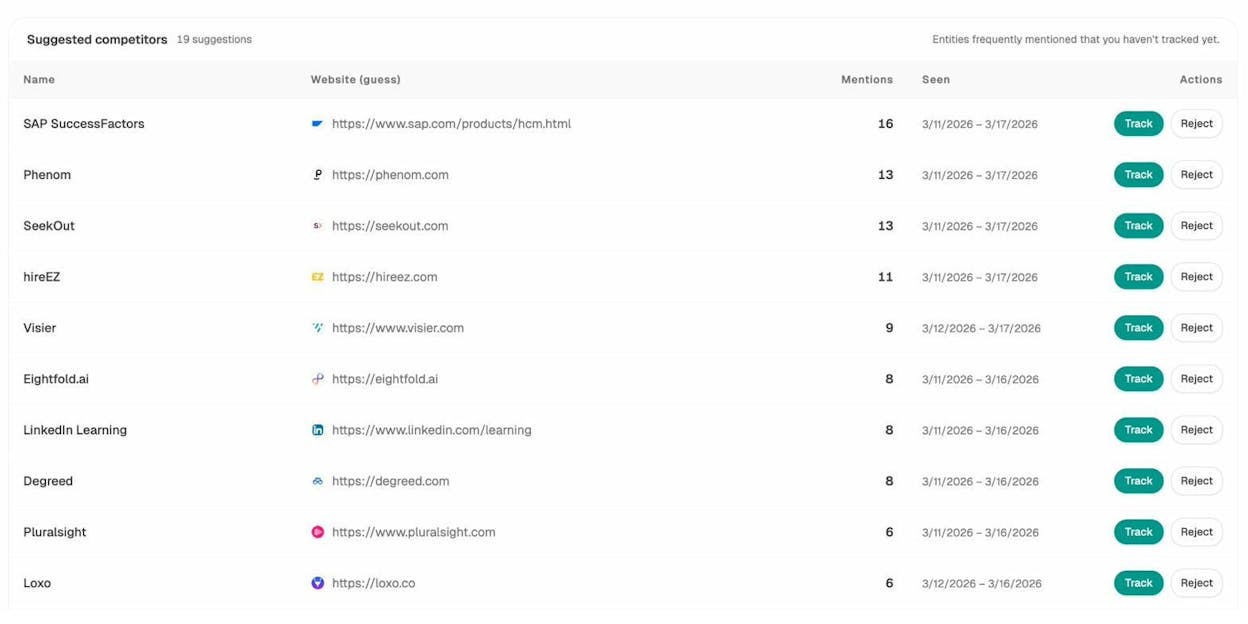
Once you’ve set up your tracked competitors, use the Prompt Tracking feature to monitor specific prompts. Look for prompts where competitors show up but your brand doesn’t. Those gaps are your “low difficulty” AI search opportunities.
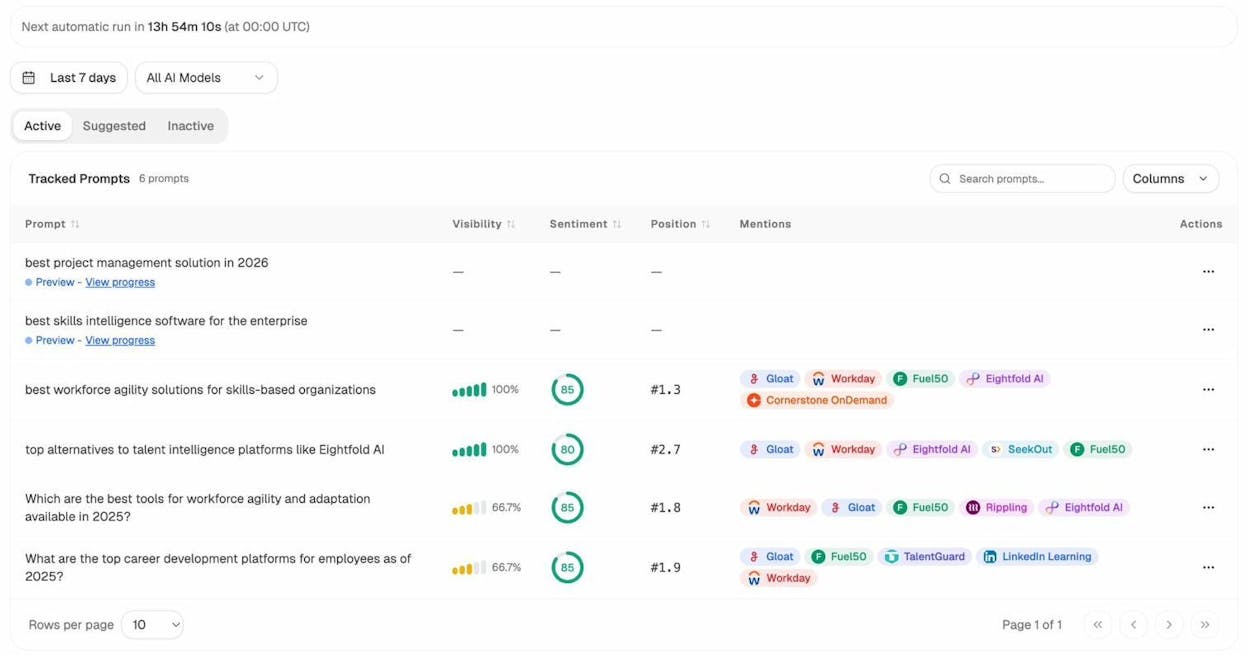
If a competitor ranks #1 for “best project management tools for remote teams” across three AI models and you’re nowhere to be found, that tells you exactly what content to create next.
3. Update underperforming content
Writing a new article from scratch takes time. You need to research, write, publish, wait for indexing, and then wait for Google to evaluate it. That cycle can easily take two to three months before you see any traffic.
Updating existing content skips most of those steps. The page is already indexed. Google already has an opinion about it. You just need to give it a reason to rank higher.
How to identify content worth updating
Look for pages that meet one of these criteria.
Pages that used to rank well but have declined. These are your biggest opportunities. Google already decided the page was good enough to rank. Something changed, and you need to figure out what.
Open Google Search Console and look at your pages sorted by click change over the last six months. Any page that lost 30%+ of its clicks is a candidate. You can also plug individual URLs into a rank tracking tool and check performance over time.
![[Screenshot description: Google Search Console Performance report filtered to show pages with the largest decline in clicks over the past 6 months, sorted by “Clicks Difference”]](https://www.datocms-assets.com/164164/1777550153-blobid10.jpg?auto=format,compress&w=1248&fit=max)
Pages ranking on positions 4 through 15. These pages are close to the first page but haven’t broken through yet. A content refresh and a few internal links could push them over the edge.
Use the Keyword Rank Checker to find where your pages currently sit. If a page is sitting at position 8 for a keyword with 5,000 monthly searches, a targeted update could move it to position 3 or 4 and triple your traffic overnight.
What to change when you update
Don’t just slap a new date on the article. That doesn’t work. Focus on these changes.
Add new information or subtopics. Search the SERP for your target keyword and compare your article to the top three results. What are they covering that you’re not? Add those subtopics. This is sometimes called a content gap analysis.
Improve the depth of existing sections. If your “how to” section has three sentences, expand it to three paragraphs with a step-by-step walkthrough. Thin sections are one of the most common reasons good articles lose rankings over time.
Update outdated data, statistics, and examples. If your article cites a 2022 study, find the 2025 version. Search engines favor freshness, and readers trust up-to-date information.
Consolidate similar articles. If you have two articles targeting overlapping keywords, consider merging them into one stronger piece. More on this in the next section.
After you make your updates, resubmit the page to Google Search Console and push it through IndexNow. In many cases, you can see traffic improvements within 24 to 48 hours.
Update your content for AI search too
Here’s where most brands miss an opportunity. When you refresh an article for traditional SEO, you should also check whether that content is being cited by AI engines.
Use Analyze AI’s AI Traffic Analytics to see which of your pages receive traffic from AI platforms like ChatGPT, Perplexity, Claude, and Copilot.
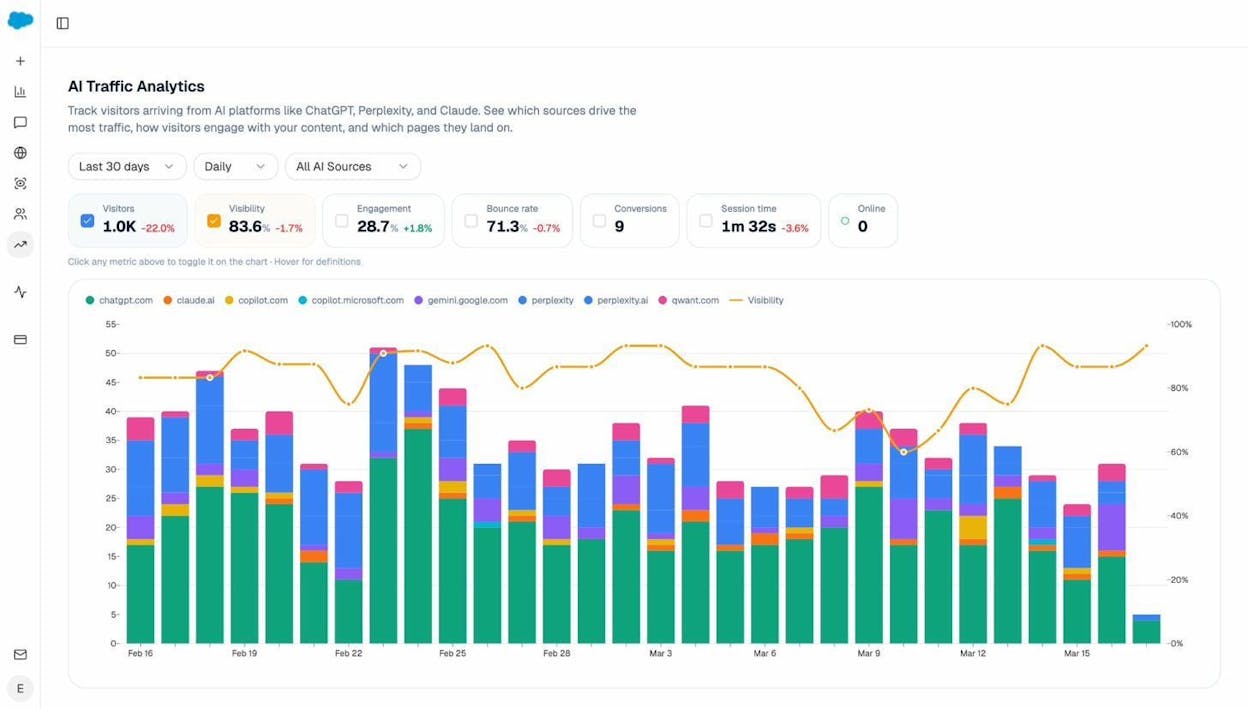
The Landing Pages report inside AI Traffic Analytics shows you exactly which pages are getting AI-referred traffic, how many sessions they generate, and what the engagement looks like.
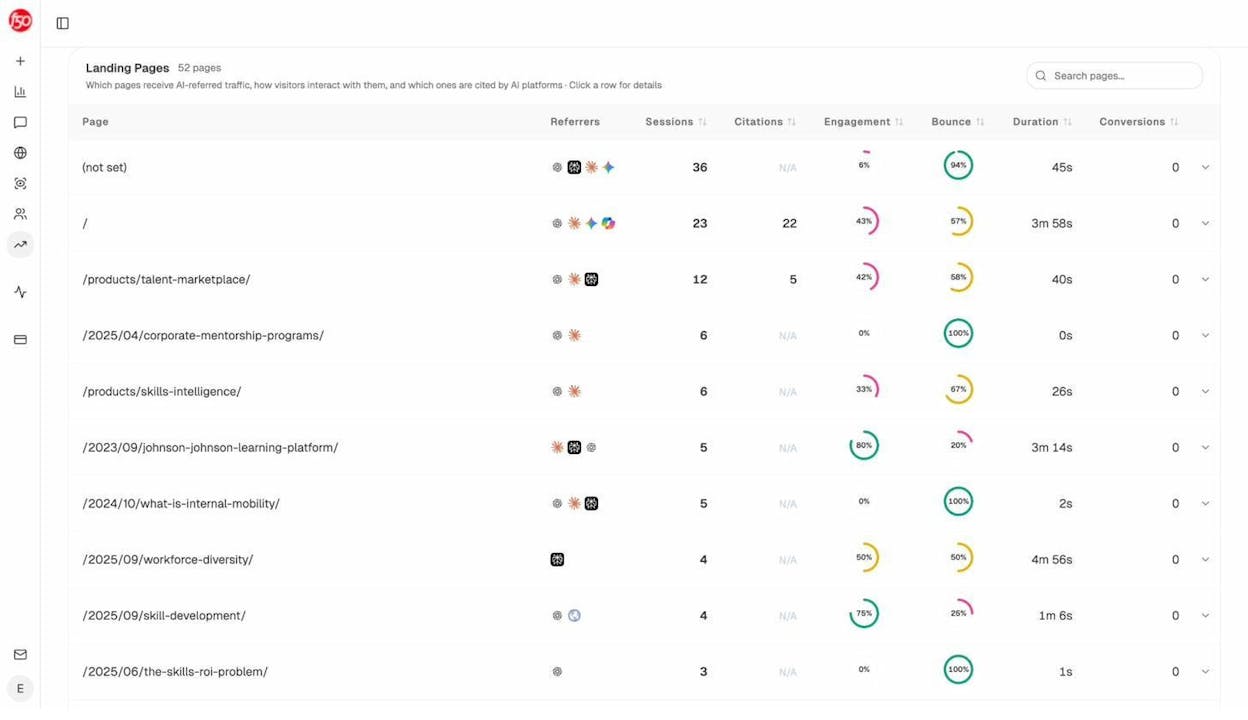
If a page is already getting AI traffic, prioritize it for your content refresh. When you update it, make sure the content is structured in a way that AI models can easily parse. That means clear headings, direct answers to common questions, and well-organized data.
If a page is getting traditional search traffic but zero AI traffic, that’s also useful data. It tells you the page isn’t being picked up by AI models yet. Adding structured, question-and-answer style content to that page could help it start earning AI citations.
4. Reduce keyword cannibalization
Keyword cannibalization happens when two or more pages on your site compete for the same keyword with the same intent. Instead of one strong page ranking well, you end up with two weak pages splitting authority and confusing Google about which one to show.
This is one of the fastest fixes you can make because the solution is usually straightforward. Redirect the weaker page to the stronger one with a 301 redirect.
How to find cannibalization issues
Method 1: Google Search Console. Go to the Performance report and filter by a specific query. Then check the “Pages” tab. If multiple URLs are showing impressions for the same query, you likely have a cannibalization issue.
![[Screenshot description: Google Search Console Performance report filtered by a single query, showing the “Pages” tab with two different URLs receiving impressions for the same keyword]](https://www.datocms-assets.com/164164/1777550162-blobid13.png?auto=format,compress&w=1248&fit=max)
Method 2: Site search operator. Type site:yoursite.com "target keyword" into Google. If two or more of your pages show up, they could be cannibalizing each other.
![[Screenshot description: Google search results page showing a site: search operator query with two results from the same domain appearing for the same topic]](https://www.datocms-assets.com/164164/1777550169-blobid14.png?auto=format,compress&w=1248&fit=max)
Method 3: Rank tracking tools. Many keyword tracking tools have cannibalization reports built in. These show you keywords where multiple URLs from your site are ranking, and they flag cases where the ranking URL keeps switching back and forth.
How to fix it
Once you’ve confirmed cannibalization, you have a few options.
|
Situation |
Fix |
|---|---|
|
One page is clearly stronger and more comprehensive |
301 redirect the weaker page to the stronger one |
|
Both pages have unique value |
Merge them into a single, more comprehensive article |
|
The pages target slightly different intents |
Differentiate the content so each page serves a distinct purpose |
|
One page is outdated and no longer useful |
Delete it and set up a 301 redirect to the most relevant alternative |
After consolidating pages, remember to update your internal links so they point to the surviving page. Then resubmit the updated URL to Google Search Console.
Check for cannibalization in AI search
Cannibalization in AI search looks different. AI models don’t rank multiple URLs from your site against each other the way Google does. Instead, they might cite one of your pages for a query where a different page would be a better fit.
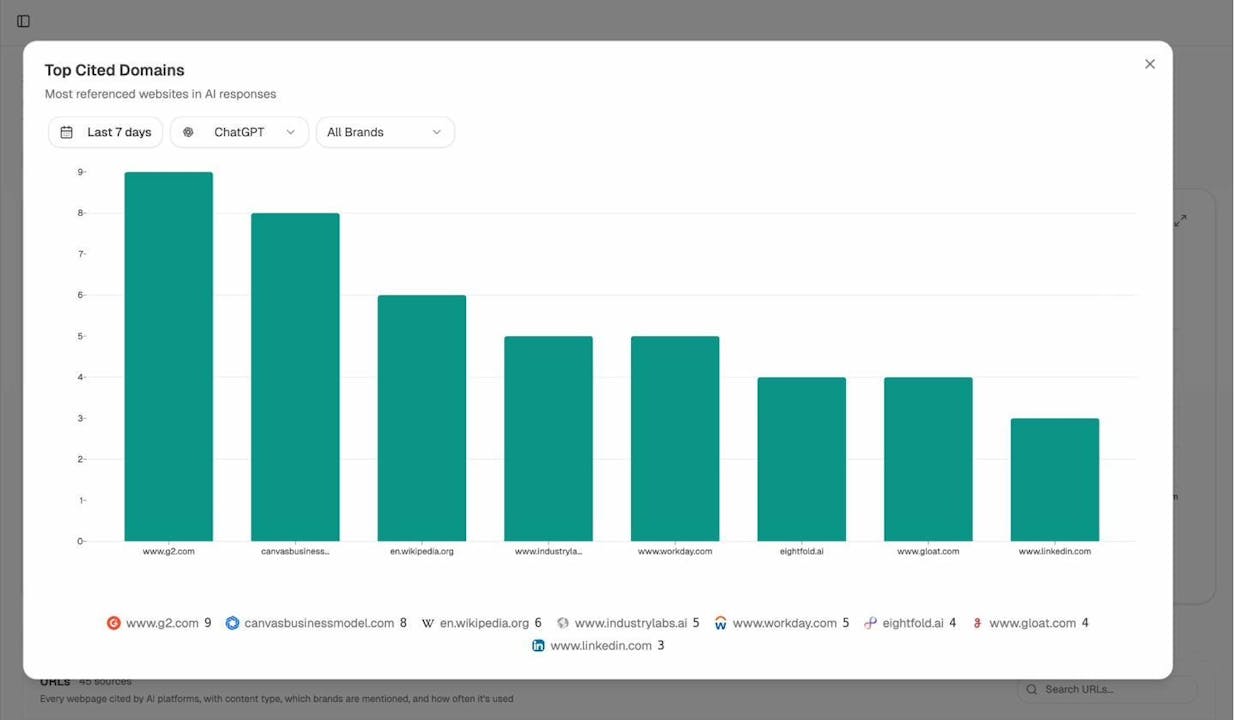
Use Analyze AI’s Citation Analytics to see which of your pages are being cited and for which topics. If your homepage is getting cited for a technical topic where your detailed blog post would be a much better source, that’s a signal your content structure needs work.
The Sources report shows every URL that AI platforms cite when answering questions in your space. You can filter by your own domain to see which of your pages are doing the heavy lifting in AI responses and which ones are being ignored.
5. Build strategic internal links from important pages to lesser-known ones
Internal linking is one of the most underrated quick SEO wins. It costs nothing, takes minutes to implement, and helps both human visitors and search engine crawlers find your most important content.
The principle is simple. Your high-authority pages (homepage, popular blog posts, product pages) pass link equity to the pages they link to. If you have a new blog post sitting in obscurity with no internal links pointing to it, Google will have a harder time finding and ranking it.
How to build internal links strategically
Step 1. Find your highest-authority pages. Open Google Search Console and sort your pages by clicks or impressions. Your top 20 pages are your link equity powerhouses.
![[Screenshot description: Google Search Console Performance report sorted by clicks (highest to lowest), showing the top 20 pages by traffic]](https://www.datocms-assets.com/164164/1777550177-blobid16.png?auto=format,compress&w=1248&fit=max)
Step 2. Identify orphan or under-linked pages. Run a site audit using any SEO audit tool. Look for pages with fewer than three internal links pointing to them. These are your priority targets for new links.
![[Screenshot description: An SEO audit tool showing a list of pages with the “Internal Links” column sorted from lowest to highest, highlighting pages with 0-2 internal links]](https://www.datocms-assets.com/164164/1777550178-blobid17.png?auto=format,compress&w=1248&fit=max)
Step 3. Find natural linking opportunities. Read through your high-authority pages and look for places where you can naturally reference your under-linked content. The anchor text should be descriptive and relevant to the target page.
For example, if your highest-traffic blog post is about “SEO content strategy” and you recently published a post about “keyword clustering,” find a sentence in the strategy post where keyword clustering comes up naturally and add a link.
Step 4. Don’t overdo it. Adding 50 internal links to a single page dilutes the value of each link and creates a bad reading experience. Aim for 3 to 10 relevant internal links per article, depending on length.
Internal linking for AI search visibility
Internal links don’t directly affect how AI models cite your content. AI engines like ChatGPT and Perplexity evaluate content quality, not link equity.
But here’s the indirect benefit. Pages with strong internal linking tend to get crawled more frequently by all bots, including AI crawlers. And pages that get crawled more frequently are more likely to appear in AI training data and retrieval indexes.
Check which of your pages are already performing well in AI search using Analyze AI’s AI Traffic Analytics. Then build more internal links to those pages from related content. You’re reinforcing the pages that AI models already trust.
6. Tweak your on-page SEO to perfection
Small on-page changes can produce fast results. Unlike link building, which takes months, you can update a title tag, meta description, or heading structure in five minutes and see ranking changes within days.
Title tag optimization
Your title tag is the single most impactful on-page element you can change. A better title tag can improve both your rankings and your click-through rate.
Here’s what to focus on.
Include your primary keyword near the beginning. Google gives more weight to keywords that appear early in the title.
Keep it under 60 characters. Anything longer gets truncated in search results.
Make it compelling. The title tag is your ad copy in the search results. Adding numbers, brackets, or a clear benefit statement can increase clicks.
For example, a title like “Link Building Guide” is generic and forgettable. But “Link Building: 9 Strategies That Actually Work in 2026” gives the reader a reason to click. The number sets an expectation, and the year signals freshness.
Meta description optimization
Meta descriptions don’t directly affect rankings, but they influence click-through rate. A well-written meta description can increase your CTR by 5-10%, which sends positive engagement signals back to Google.
Write meta descriptions that answer the searcher’s question in one or two sentences and give them a reason to click through for more detail. Avoid stuffing keywords or writing vague summaries.
Heading hierarchy
Most people don’t read articles top to bottom. They scan headings first, then decide whether to read the full section. If your headings are vague or poorly structured, readers will bounce.
Use a clear hierarchy. Your H1 should match the page’s primary keyword. H2s should cover the main subtopics. H3s should break down each subtopic into actionable steps.
![[Screenshot description: A side-by-side comparison showing a poorly structured heading hierarchy (all H2s, no H3s, vague labels) versus a well-structured one (H1 > H2 > H3, descriptive labels, logical flow)]](https://www.datocms-assets.com/164164/1777550187-blobid18.png?auto=format,compress&w=1248&fit=max)
Use schema markup for faster SERP features
One thing the original quick SEO guides often miss is structured data. Adding schema markup to your pages can help you win rich results like FAQ snippets, how-to cards, and review stars. These SERP features increase your visibility and click-through rate without requiring any new content or links.
The most impactful schema types for quick wins include FAQ schema (for pages that answer common questions), HowTo schema (for step-by-step guides), and Article schema (for blog posts).
![[Screenshot description: Google search results showing a page with FAQ rich results expanded below the main listing, taking up significantly more screen real estate than competing results]](https://www.datocms-assets.com/164164/1777550189-blobid19.png?auto=format,compress&w=1248&fit=max)
After making any on-page changes, resubmit the page through Google Search Console and IndexNow.
7. Fix broken backlinks to your website
Link building is slow. But fixing broken backlinks is fast because the hard work has already been done. Someone already linked to you. The link just happens to be pointing at a page that no longer exists.
Every broken backlink is wasted authority. Instead of flowing link equity to your live pages, that authority is landing on a 404 error page and doing nothing.
How to find broken backlinks
Step 1. Use a backlink analysis tool and navigate to your site’s broken backlinks report. Filter for “dofollow” links only, since these are the ones that pass authority.
![[Screenshot description: A backlink analysis tool showing the Broken Backlinks report filtered to Dofollow links, with columns for Referring Page, DR, Anchor Text, and HTTP Status]](https://www.datocms-assets.com/164164/1777550194-blobid20.png?auto=format,compress&w=1248&fit=max)
Step 2. Sort by the referring domain’s authority (DR or DA). Fixing a broken link from a DR 70 site is much more valuable than fixing one from a DR 10 site. Prioritize accordingly.
Step 3. Check the anchor text. This tells you what the linking site expected to find. It helps you decide where to redirect the broken URL.
You can also use Analyze AI’s Broken Link Checker for a quick scan of any domain.
How to fix broken backlinks
You have two options.
Option A: Reinstate the page. If the content used to exist and is still relevant, bring it back. This is the fastest fix because the backlink will start working again immediately.
Option B: 301 redirect the broken URL. If the original page is no longer relevant, redirect it to the most relevant existing page on your site. The link equity will flow to the new destination instead.
|
Scenario |
Best Fix |
|---|---|
|
Original content is still relevant |
Reinstate the page at its original URL |
|
Original content is outdated but a similar page exists |
301 redirect to the most relevant alternative |
|
The broken link used the brand name as anchor text |
301 redirect to the homepage |
|
No relevant page exists |
Create a new page covering the topic, then redirect |
Check AI citation accuracy too
In AI search, broken links show up differently. AI models might cite a URL that no longer exists on your site, which means users clicking through from Perplexity or ChatGPT land on a 404 page.
Check Analyze AI’s Citation Analytics to see which URLs are being cited by AI platforms. Cross-reference that list with your live pages. If AI models are citing a dead URL, set up a redirect so those visitors land somewhere useful.
This is a quick win that most brands overlook entirely.
8. Find unlinked brand mentions and reclaim them
An unlinked brand mention is when another website writes about your brand or product but doesn’t include a link back to your site. These are some of the easiest links to earn because the hard part (convincing someone to mention you) is already done. All you need to do is ask for the link.
How to find unlinked brand mentions
Method 1: Google search operators. Search for your brand name while excluding your own domain.
Type "your brand name" -site:yourdomain.com into Google. This returns pages that mention your brand but aren’t on your website. Then manually check each result to see if they linked to you or not.
Method 2: Web monitoring tools. Set up Google Alerts for your brand name and product names. Every time a new mention appears, check if it includes a link. If not, reach out.
Method 3: Content explorer tools. Use a content explorer or web explorer to search for your brand name, then filter out pages that already link to your domain. What’s left is your list of unlinked mentions.
How to reclaim unlinked mentions
Once you have your list, send a short, friendly email to the author or webmaster. Something like this.
“Hey [Name], I noticed you mentioned [Brand] in your article about [Topic]. Thanks for the shout-out! Would you mind adding a link to our website so readers can learn more? Here’s the best URL to link to: [URL]. Cheers, [Your name].”
Keep it brief. Don’t write a novel. Most webmasters will add the link without any fuss because they already think well enough of your brand to mention it.
Prioritize by domain authority. A link from a DR 60+ site is worth chasing. A link from a brand-new blog with no authority probably isn’t worth the email.
Track brand mentions in AI search
Here’s where things get interesting. In AI search, brand mentions work differently. When ChatGPT or Perplexity mentions your brand in a response, there may or may not be a link. But the mention itself matters because it influences how AI models perceive your brand in future responses.
Analyze AI’s Perception Map shows you how AI models perceive your brand across different themes and attributes. You can see which topics AI associates with your brand, what sentiment it assigns, and how your perception compares to competitors.
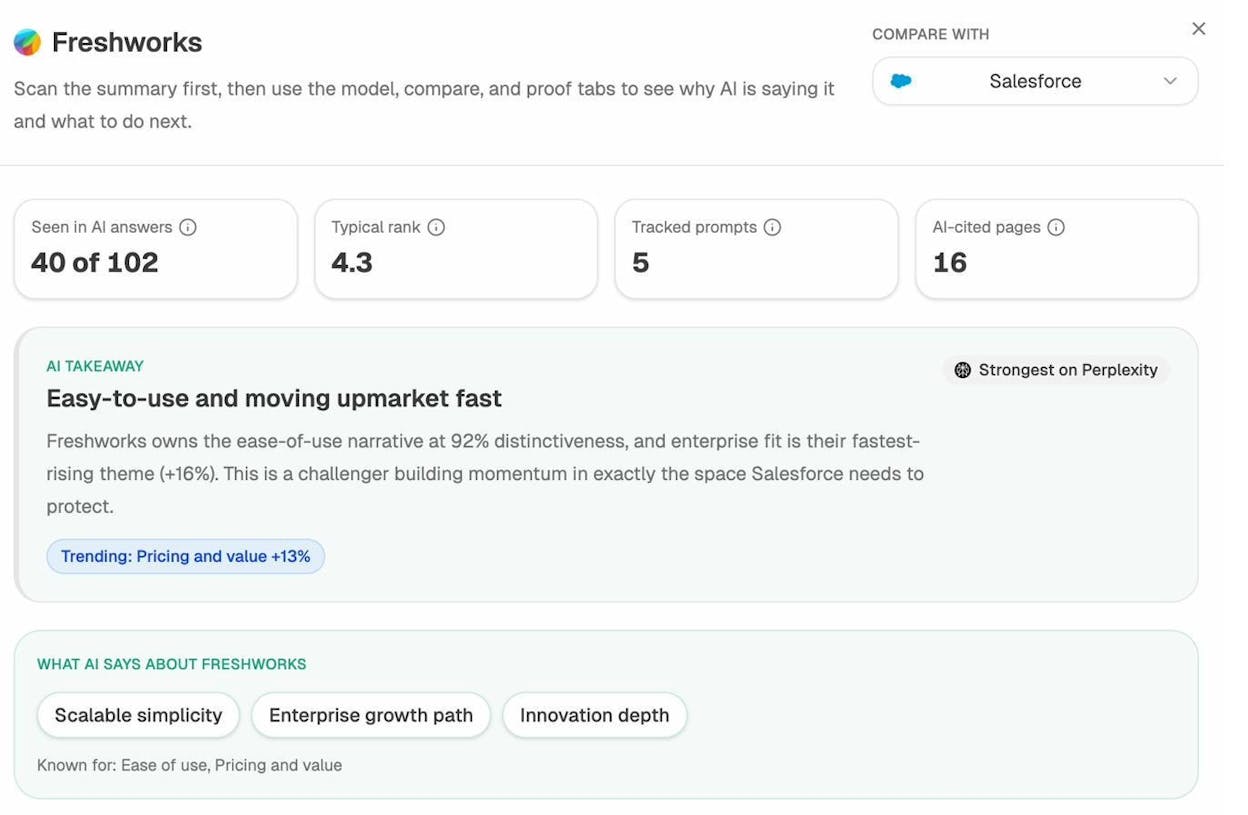
If AI models are mentioning your competitors in contexts where your brand should appear, that’s the AI search equivalent of an unlinked mention gap. You can use the Competitor Intelligence dashboard to find prompts where competitors win and your brand doesn’t.
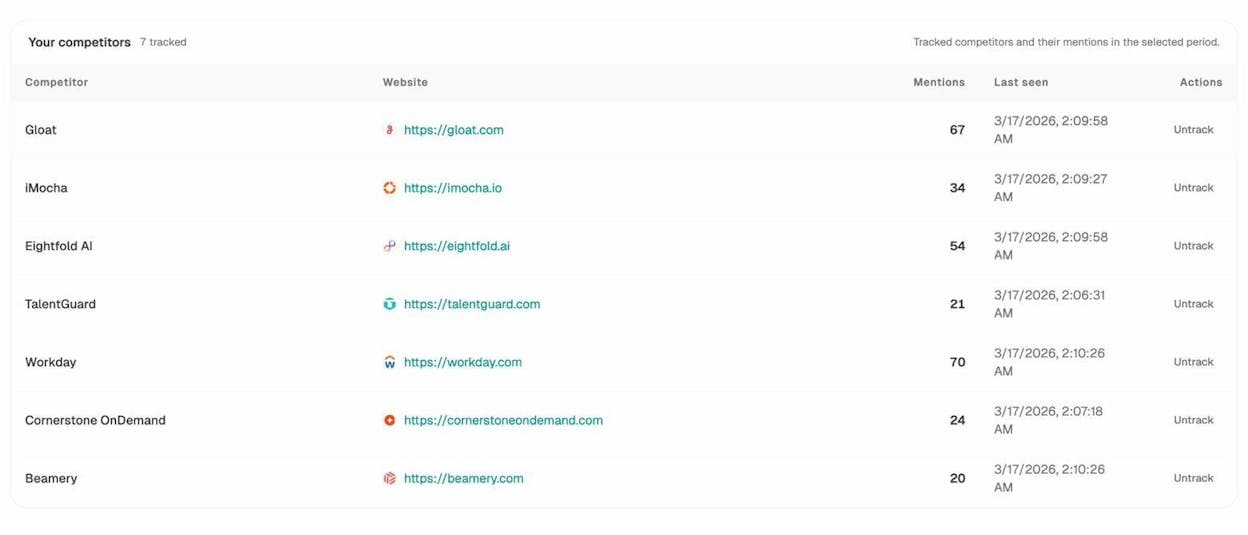
From there, you can create targeted content to fill those gaps. Write the definitive article on the topic where your competitor is getting mentioned. Over time, AI models will start associating your brand with that topic too.
Bonus: Monitor everything with weekly digests
Quick SEO is about speed, but it also requires consistency. You can’t optimize once and forget about it. Rankings shift, competitors publish new content, and AI models update their data regularly.
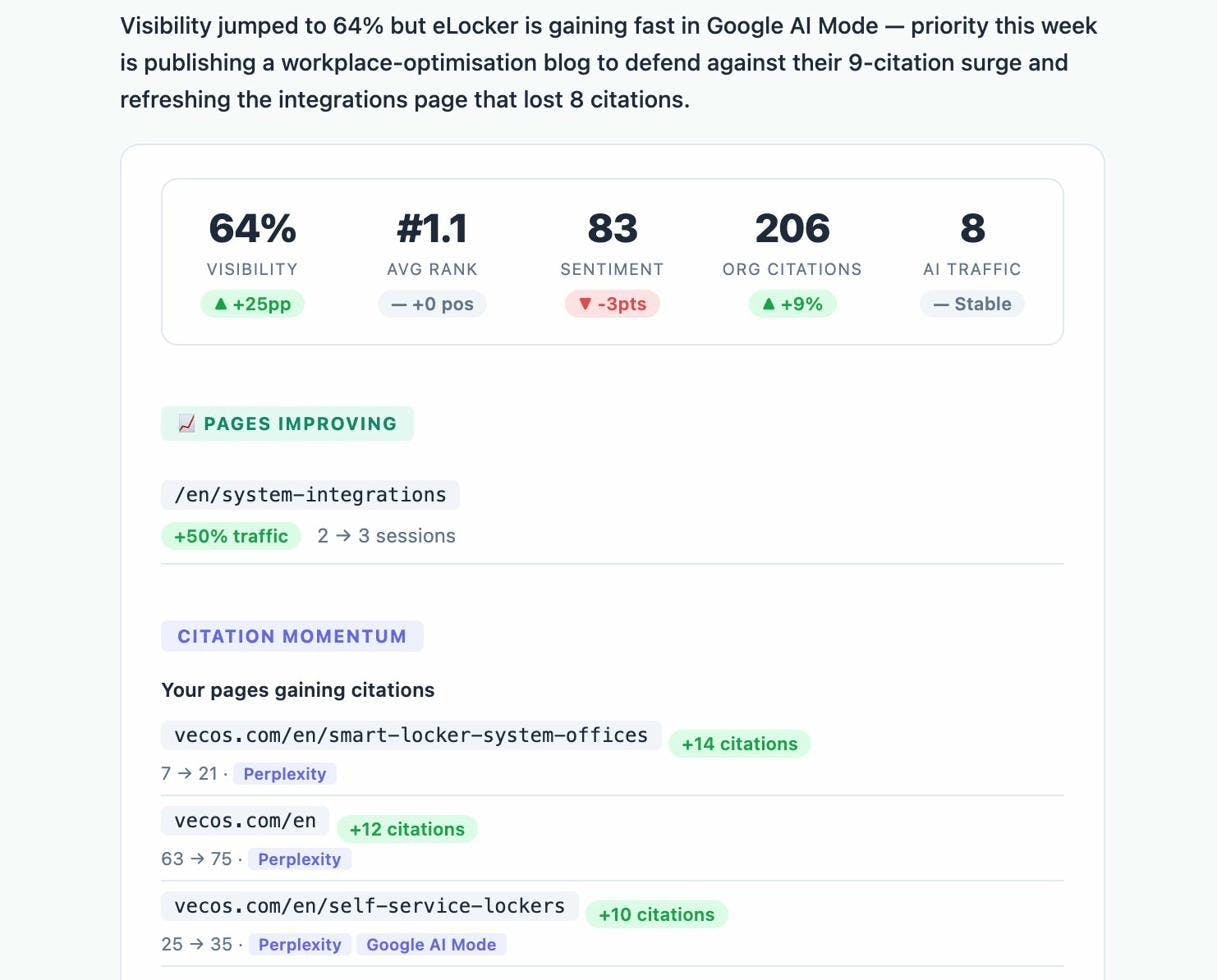
Set up automated monitoring so you catch changes early and respond fast. Analyze AI’s Weekly Email Digests send you a summary of your AI visibility, competitor movements, and citation changes every week. No logging into dashboards. No manual checks. Just a quick scan of what changed and what needs your attention.
For traditional SEO, set up email alerts in Google Search Console for major indexing issues and connect your rank tracking tool to send weekly reports.
Final thoughts
Quick SEO works when you focus on the activities with the highest leverage and the lowest resistance. Fix broken links before you build new ones. Update existing content before you write from scratch. Target low-difficulty keywords before you chase competitive ones.
And don’t treat AI search as a separate project. It’s another organic channel that rewards the same fundamentals: useful content, strong authority, and clear structure. The brands that compound their efforts across both traditional SEO and AI search will be the ones that grow the fastest.
If you want to start tracking your brand’s AI search visibility alongside your traditional SEO performance, try Analyze AI and see how the two channels connect.

Ernest

Ibrahim


