



Summarize this blog post with:


In this article, you’ll see the 10 SEO automation tools we lean on the most, what each one is good at, and exactly which repetitive task it removes from your week. You’ll also see where to draw the line between “automate” and “still do by hand,” and how to extend the same habit into AI search so you’re not running two parallel workflows. By the end, you should be able to pick two or three tools, set them up today, and free up real hours every week.
Table of Contents
Before you automate, decide what’s worth automating
The first mistake people make with SEO automation is trying to automate everything. The second is trying to automate nothing.
A simple test works for both. If a task is repetitive, time-bound, and judgment-light, automate it. Things like nightly site crawls, rank checks, finding 404s with backlinks, or pulling email addresses for an outreach list. None of these need a human in the loop the first time.
If a task is strategic, judgment-heavy, or only happens a few times a year, leave it alone. Picking the topics on your editorial calendar. Deciding whether to merge two cannibalizing pages. Writing the actual outreach pitch. These look like they could be automated, but the quality drop is usually larger than the time saved.
With that filter in mind, here are the 10 tools we use, grouped by the task they take off your plate.
|
Tool |
What it automates |
Best for |
|---|---|---|
|
Ahrefs Keywords Explorer |
Seed keywords, intent, clustering |
Keyword research at scale |
|
Ahrefs Site Explorer |
Finding low-hanging keywords, dead links, declining pages |
Opportunity hunting |
|
Hunter.io |
Email lookups, in bulk |
Outreach prospecting |
|
Pitchbox |
Outreach campaigns end to end |
Link building at scale |
|
Ahrefs Site Audit |
Recurring technical SEO crawls |
Catching technical issues early |
|
Little Warden |
Page-level monitoring |
Catching SEO mistakes before they hurt you |
|
Ahrefs Rank Tracker |
Daily keyword rank checks |
Keyword performance tracking |
|
Analyze AI |
AI search visibility, citations, prompts, traffic |
AI search as an organic channel |
|
ChatGPT |
One-off SEO writing tasks |
Title tags, metas, code, drafts |
|
Zapier |
Connecting tools into custom workflows |
Stitching everything together |
Now let’s go through each one.
1. Ahrefs Keywords Explorer for keyword research
Keyword research is one of the most automatable parts of SEO. The hard part is having the right ideas. The boring part is the rest. Tools like Ahrefs Keywords Explorer cover the boring part well.
Generate seed keywords with AI
Seed keywords are the words you put into a research tool to get more keyword ideas back. If you know your industry, you can list them in five minutes. If you don’t, you stare at a blank screen.
Inside Keywords Explorer there’s an AI assistant that takes a topic and returns niche seeds you would never think of. Enter “pizza” and it surfaces things like “deep dish,” “00 flour,” “Detroit-style,” and “biga.” From there, the keyword ideas reports will pull thousands of long-tail variations you would have missed.
![[Screenshot: Ahrefs Keywords Explorer AI seed keyword generator with the input “pizza” and the AI-generated niche seed list]](https://www.datocms-assets.com/164164/1777921796-blobid1.png?auto=format,compress&w=1248&fit=max)
If you don’t have a paid Ahrefs account, our free Keyword Generator does the same thing for the seed-to-ideas step.
Identify search intent automatically
Search intent is just “what the searcher actually wants.” Match it and you can rank. Get it wrong and even great content stays buried.
In Keywords Explorer, click “Identify intents” in the SERP overview. The tool reads the top results and tells you whether searchers want information, a comparison, a product page, or something else.
![[Screenshot: Ahrefs Keywords Explorer SERP overview with the “Identify intents” button highlighted, then the AI-generated intent breakdown for a sample keyword]](https://www.datocms-assets.com/164164/1777921801-blobid2.png?auto=format,compress&w=1248&fit=max)
Cluster keywords by parent topic
Clustering is grouping keywords that should live on the same page. Done by hand it takes hours. In Keywords Explorer, the “Clusters by Parent Topic” tab does it instantly by looking at which keywords share the same #1 ranking page. If you want a deeper walkthrough of clustering logic, our guide to keyword clustering breaks it down step by step.
![[Screenshot: Keywords Explorer “Clusters by Parent Topic” tab with sample clusters expanded]](https://www.datocms-assets.com/164164/1777921805-blobid3.png?auto=format,compress&w=1248&fit=max)
2. Ahrefs Site Explorer for finding low-hanging opportunities
Most SEO wins come from fixing what’s already half-working, not from starting from zero. Site Explorer’s Opportunities report lists those wins for you in pre-formatted filters.
![[Screenshot: Site Explorer Opportunities report landing view with the list of opportunity types]](https://www.datocms-assets.com/164164/1777921808-blobid4.png?auto=format,compress&w=1248&fit=max)
Find low-hanging fruit keywords
These are keywords you already rank for in positions 4 to 15. A small push usually moves them into the top three, where the traffic actually lives. Click “Low-hanging fruit keywords” and Ahrefs filters your Organic Keywords report down to exactly those.
![[Screenshot: Site Explorer Organic Keywords report filtered to positions 4-15]](https://www.datocms-assets.com/164164/1777921811-blobid5.png?auto=format,compress&w=1248&fit=max)
Find pages with declining traffic
Rankings decay. Pages that ranked well a year ago may now be losing ground because the SERP moved on without them. The “Content with declining traffic” link surfaces your biggest losers from the last six months. Update those pages first. We’ve covered the editorial side of this in our SEO content strategy guide.
Find easy link reclamation opportunities
Old URLs on your site that 404 but still have backlinks are free wins. The “Redirects to implement” link shows you exactly which dead URLs still pull link equity, so you can redirect them to a live, relevant page in a few minutes. Our free Broken Link Checker gives you the same view if you don’t use a paid tool.
The same idea, applied to AI search
Opportunity hunting is not a Google-only habit. You can run the same play across ChatGPT, Perplexity, Gemini, and Google AI Mode. The questions are different but the logic is the same. Where do my competitors get cited and I don’t? Which prompts almost mention me? Which prompts mention me with weak sentiment?
Inside Analyze AI, the Competitor Intelligence view auto-detects competitors from AI answers about your category. You don’t seed the list. The product surfaces brands it sees showing up next to you (or instead of you), and you decide which ones to track.
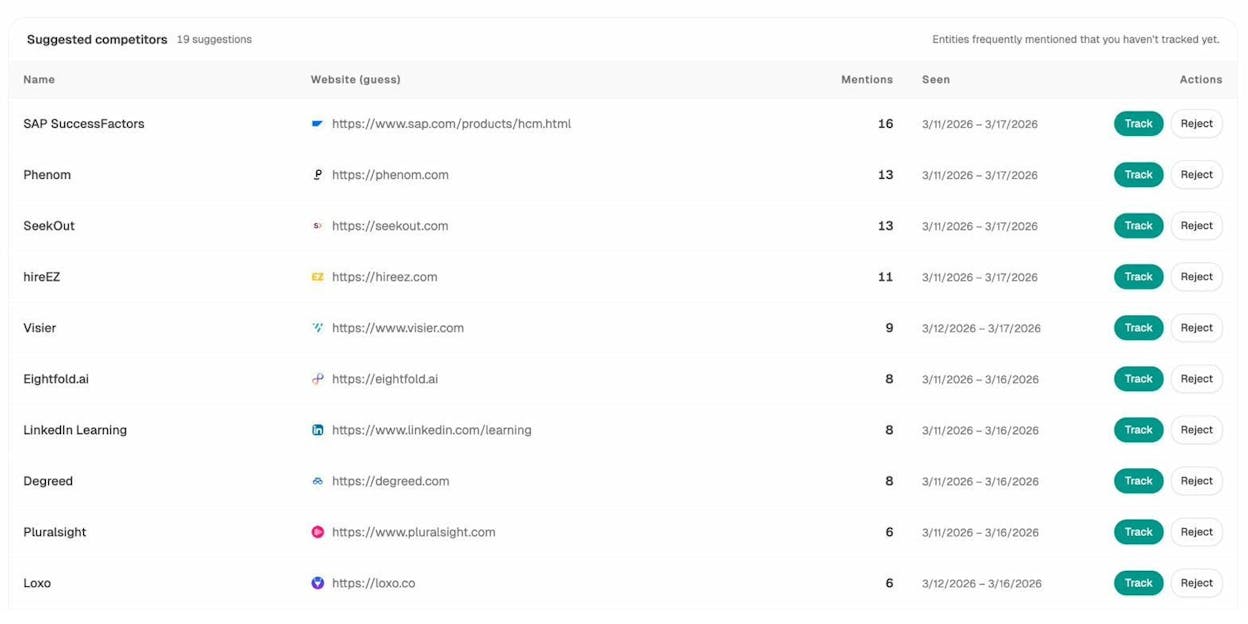
From there, Prompt Discovery suggests prompts your buyers are asking that you’re not yet visible for. Treat each suggestion the way you’d treat a low-hanging-fruit keyword. Track it, write or update content for it, and watch the visibility move.
3. Hunter.io for finding email addresses
Outreach starts with knowing who to email. Hunter.io takes a name and a company domain and returns the most likely email address along with a confidence score.
![[Screenshot: Hunter.io search interface with a name and domain entered, showing the returned email and confidence score]](https://www.datocms-assets.com/164164/1777921817-blobid7.png?auto=format,compress&w=1248&fit=max)
For one-off lookups the web app is fine. The real time saver is the Google Sheets add-on. Export a list of authors from Site Explorer’s Backlinks report, split first and last names into columns, point Hunter at the sheet, and let it fill in emails for the whole list at once.
![[Screenshot: Hunter Sheets add-on running across a column of names and domains, populating the email column]](https://www.datocms-assets.com/164164/1777921819-blobid8.png?auto=format,compress&w=1248&fit=max)
This single workflow can build an entire outreach list in the time it used to take to find ten emails by hand.
4. Pitchbox for end-to-end link outreach
Pitchbox automates the parts of link building that most people quit at, including prospecting, follow-ups, and campaign tracking.
Pick a campaign type, enter your keywords, and Pitchbox pulls a list of relevant sites for you, complete with Ahrefs metrics so you can filter by Domain Rating before you waste a single email.
![[Screenshot: Pitchbox prospect filtering screen with Domain Rating and other quality filters set]](https://www.datocms-assets.com/164164/1777921823-blobid9.png?auto=format,compress&w=1248&fit=max)
Once you approve a list, Pitchbox sends the first email, schedules follow-ups, pauses on reply, and reports on open and reply rates. You can set send windows so emails only go out during business hours in the recipient’s time zone.
![[Screenshot: Pitchbox automated follow-up sequence editor]](https://www.datocms-assets.com/164164/1777921826-blobid10.png?auto=format,compress&w=1248&fit=max)
The whole campaign runs without you touching it daily. You just review replies and approve new prospects. For more on the link outreach side, our link building tools roundup compares Pitchbox against the alternatives.
5. Ahrefs Site Audit for technical SEO
Technical SEO is mostly a monitoring job. You don’t fix the same broken redirect twice. You fix it, then watch for new ones. Site Audit does the watching.
Schedule a daily or weekly crawl of your site, and Ahrefs checks for 170+ technical issues every cycle. When the crawl finishes, you get an email summarizing what’s new and what’s fixed.
![[Screenshot: Email digest from Site Audit showing new issues and resolved issues since the last crawl]](https://www.datocms-assets.com/164164/1777921828-blobid11.jpg?auto=format,compress&w=1248&fit=max)
You spend ten minutes reading the email, click through to the issues that matter, and fix them. If a desktop crawler is overkill for your site, our SEO audit tools comparison covers lighter options.
6. Little Warden for catching SEO mistakes early
Little Warden monitors specific URLs for changes that hurt SEO. Broken redirects, indexing flips, content edits, schema removed, robots tag changes, you name it.
The reason this matters is that most SEO disasters are silent. A developer ships a release, a meta robots tag goes from “index” to “noindex” on your top page, and you find out three weeks later when traffic falls off a cliff. Little Warden tells you the same day.
![[Screenshot: Little Warden rule editor showing a custom check for noindex tag on a list of priority pages]](https://www.datocms-assets.com/164164/1777921831-blobid12.png?auto=format,compress&w=1248&fit=max)
You can write rules that go beyond defaults. For example, “alert me if any external link is added to my top 50 pages by traffic.” That single rule catches editors quietly selling links from your site.
![[Screenshot: Little Warden Slack notification of a triggered rule]](https://www.datocms-assets.com/164164/1777921835-blobid13.png?auto=format,compress&w=1248&fit=max)
It’s not a glamorous tool. It just stops bad things from getting worse.
7. Ahrefs Rank Tracker for keyword positions
Rank Tracker checks where you rank for a list of keywords on a schedule (daily, every three days, weekly) and stores the history. You can track up to 10,000 keywords per project and see Share of Voice trends against your competitors.
![[Screenshot: Ahrefs Rank Tracker dashboard showing keyword positions over time and Share of Voice percentage]](https://www.datocms-assets.com/164164/1777921838-blobid14.jpg?auto=format,compress&w=1248&fit=max)
If you only need to spot-check a handful of keywords, our free Keyword Rank Checker does that without a subscription. For ongoing tracking across hundreds or thousands of keywords, our roundup of keyword tracking tools walks through the trade-offs.
The same principle, that you can’t improve what you don’t measure, holds for AI search. Rank tracking your keywords on Google tells you half the story now. The other half is which prompts your buyers are typing into ChatGPT, Perplexity, and Gemini, and whether your brand shows up in the answer. That’s the next tool.
8. Analyze AI for AI search visibility automation
AI search is not replacing SEO. It’s a new organic channel sitting next to it. The teams winning right now are the ones treating it as additive: keep doing real SEO, then layer AI search visibility on top with the same automation discipline. Our manifesto goes deeper on why we believe this.
Analyze AI automates the core AI search workflows the way Ahrefs automates the core SEO ones. Five things in particular are worth setting up.
Track prompts the way you’d track keywords
Add the prompts your buyers actually type into ChatGPT, Perplexity, Gemini, Claude, and Google AI Mode. The product runs them on a schedule and reports your visibility, sentiment, average position in the answer, and which competitors got mentioned alongside you.
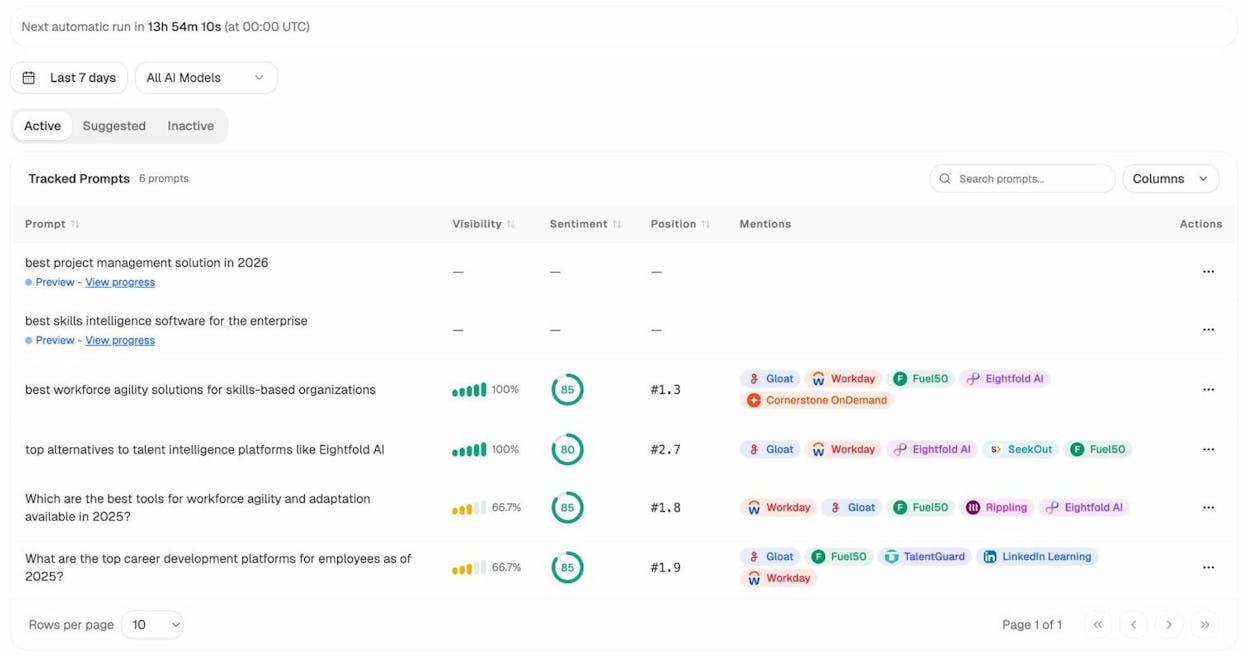
If you don’t yet know which prompts to track, Prompt Discovery suggests them based on your category and competitor mentions. Approve the ones that fit, reject the rest. It’s the AI search equivalent of finding seed keywords automatically.
Watch your citations the way you’d watch your backlinks
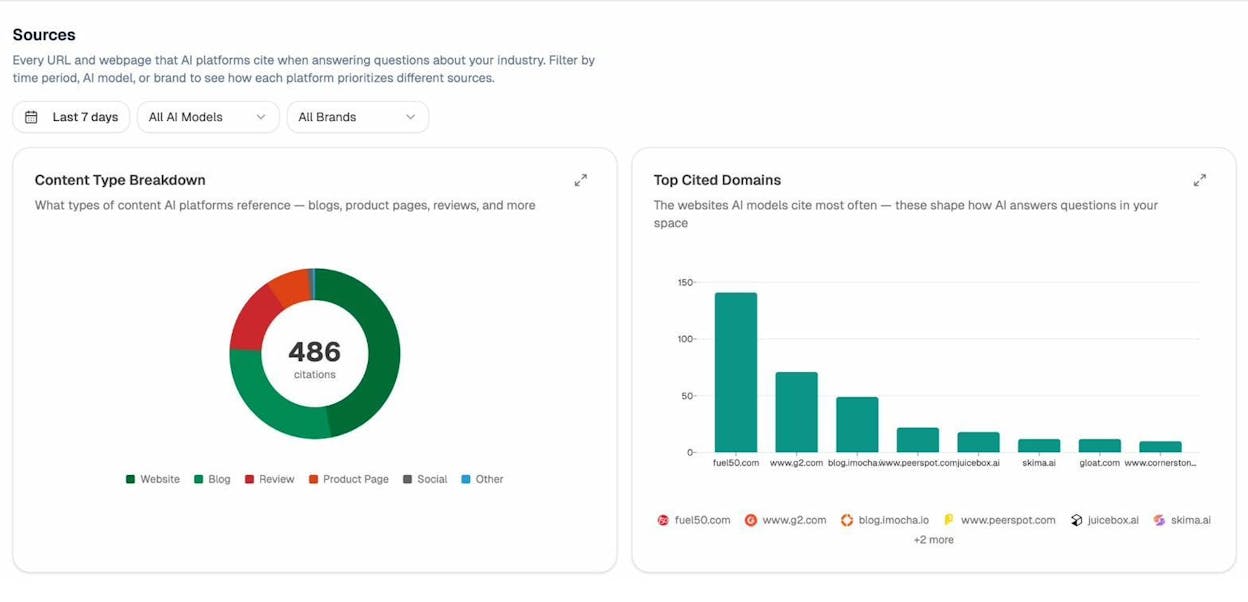
In SEO, backlinks are the currency. In AI search, the currency is citations. Every time an AI engine pulls a fact from a page and credits it in the answer, that’s a citation. The Citation Analytics view shows you which of your pages are getting cited, by which engine, and for which prompts. It also shows the top cited domains in your category, so you can see who AI engines treat as authoritative and reverse-engineer why.
Identify which pages are pulling AI traffic
Tracking visibility is upstream. Tracking actual visits is downstream. AI Traffic Analytics shows which of your landing pages receive sessions from ChatGPT, Perplexity, Gemini, Claude, and Copilot. You can see traffic source, location, engagement, and which prompts cited each page.
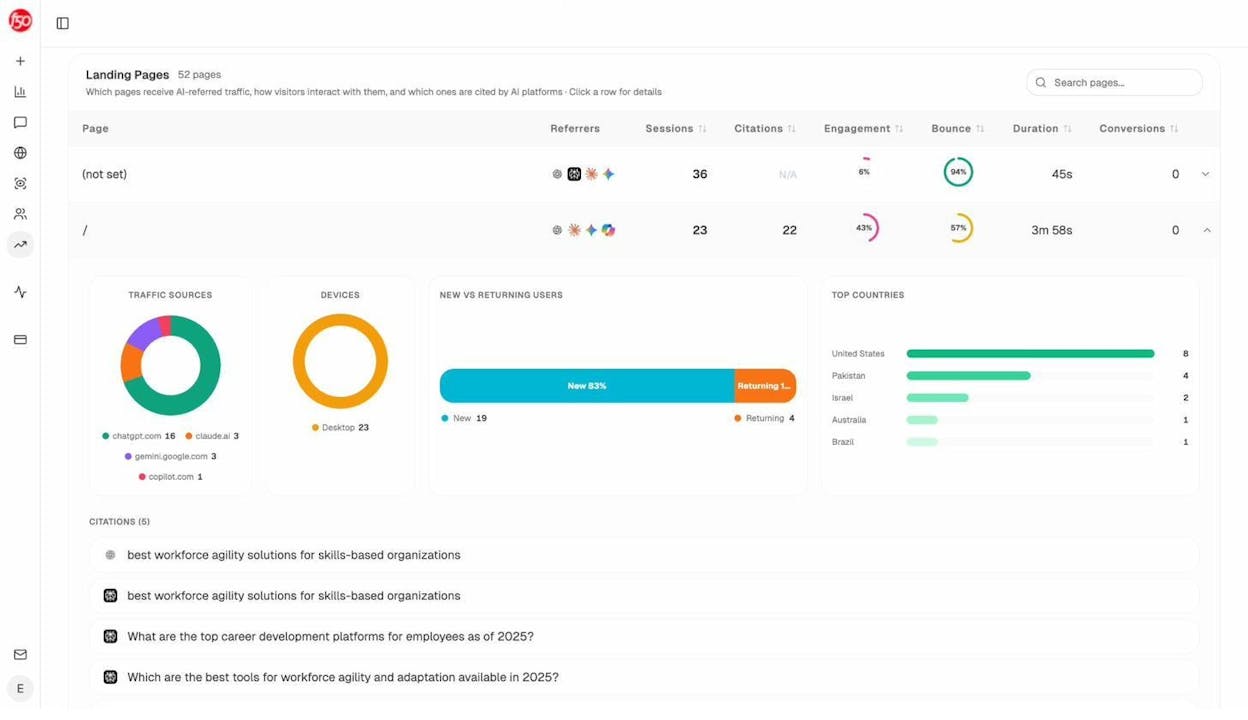
This is the part that’s genuinely new. Patterns emerge fast. You’ll see, for example, that long product comparison pages pull most of your Perplexity traffic, while definition-style blog posts pull ChatGPT sessions. Once you see the pattern, you double down on what works, the same way you’d double down on a content cluster that ranks.
Get a weekly digest instead of checking dashboards
The dashboards are useful, but you don’t want to live in them. The Weekly Email Digest summarizes what changed since last week. Visibility up or down, sentiment shifts, new competitor pages getting cited, your pages gaining or losing citations, and a one-line priority for the week.
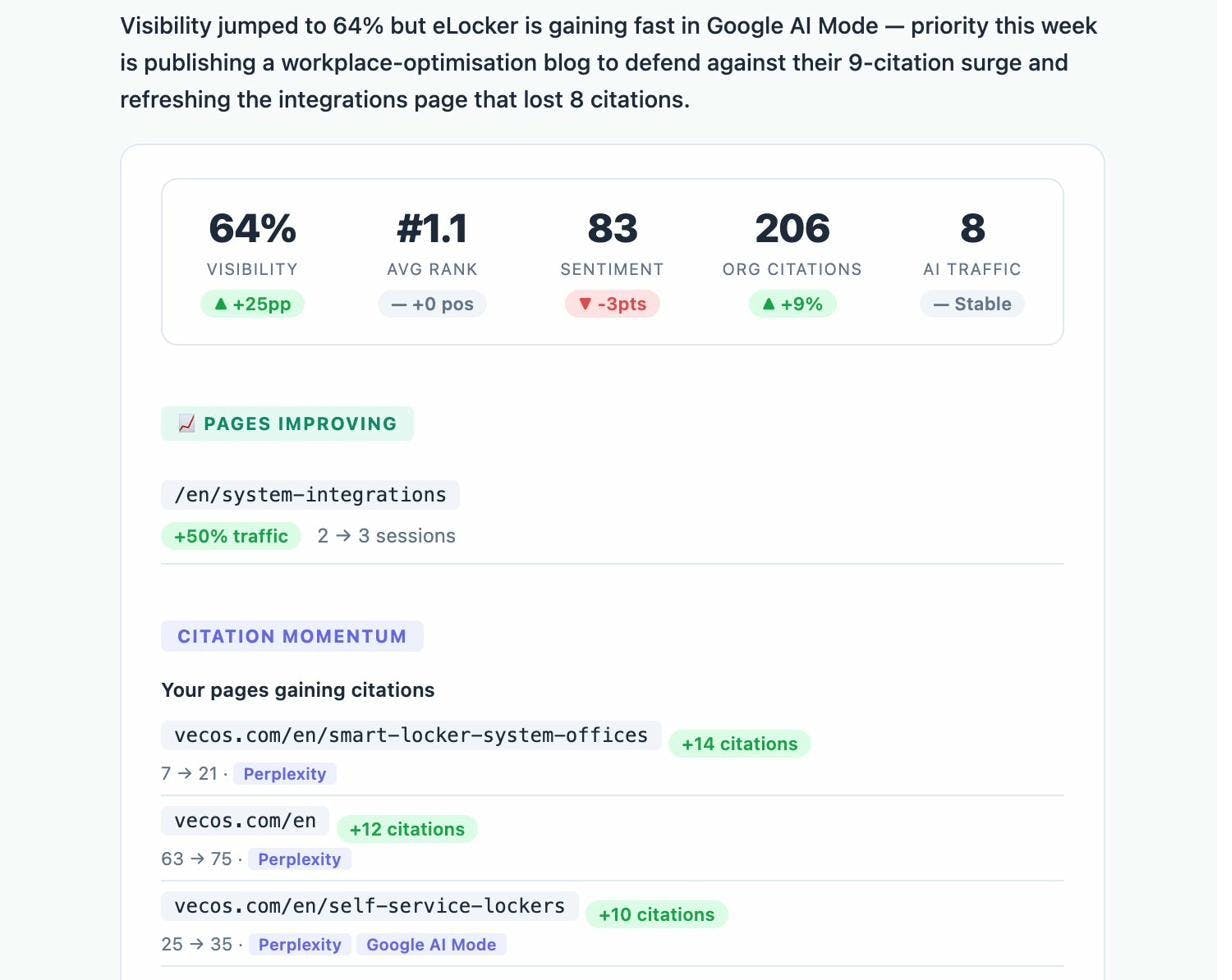
This single email covers most of what a manual weekly check would surface in 30 minutes.
Automate content production for AI search
The other half of AI search visibility is publishing the right content. The AI Content Writer takes a topic, runs research, suggests an outline, and produces a draft. The AI Content Optimizer fetches a page you’ve already published, scores it, and recommends specific edits to improve how AI engines cite it. Our piece on how to rank on ChatGPT covers the underlying tactics in more depth.
Together, these five workflows replace what would otherwise be a daily dashboard-checking habit across five different AI engines.
9. ChatGPT for one-off SEO tasks
ChatGPT is not really an “automation” tool in the scheduled, runs-without-you sense. It’s a productivity tool that turns 30-minute writing tasks into 30-second ones.
A few prompts we use weekly:
-
“Write 10 click-worthy title tags under 60 characters for a blog post titled ‘X.’”
-
“Write 10 meta descriptions under 150 characters for a blog post titled ‘X.’ Include a hook in the first eight words.”
-
“Write a Google Apps Script that pulls keyword positions from the Ahrefs API into the active sheet.”
![[Screenshot: ChatGPT generating 10 title tag variations from a single prompt]](https://www.datocms-assets.com/164164/1777921853-blobid19.png?auto=format,compress&w=1248&fit=max)
The output is rarely final. It’s almost always a 70% starting point that you trim and sharpen. That alone is enough to compound across a week. For SEO use cases beyond writing, our AI marketing tools roundup covers more workflows.
10. Zapier for stitching everything together
Zapier is what turns the nine tools above into a single system. It listens for an event in one tool and triggers an action in another.
Here’s a simple example. Every time you add a new prospect to a Google Sheet, Zapier sends the name and domain to Hunter.io, gets the email back, writes it to the same row, then pushes the full record into a Pitchbox campaign. You spend three minutes pasting names. Zapier does the rest.
![[Screenshot: Zapier multi-step workflow connecting Google Sheets, Hunter.io, and an outreach platform]](https://www.datocms-assets.com/164164/1777921855-blobid20.jpg?auto=format,compress&w=1248&fit=max)
Once you start thinking in terms of “trigger plus action,” most of your weekly SEO checklist starts to look automatable. New URL published in your CMS? Trigger a Site Audit crawl. New backlink detected in Ahrefs? Send a Slack notification to the link building channel. New prompt added to Analyze AI? Refresh the AI search dashboard you’ve built in Looker Studio.
The setup takes a couple of hours. The payoff lasts forever. For broader workflow inspiration, our list of marketing automation tools goes into more orchestration patterns.
What to do next
Pick two tools, not ten. Trying to deploy all of these at once is the fastest way to deploy none of them.
Start with whatever is currently eating the most of your time. If it’s keyword research, set up Keywords Explorer this week. If it’s catching technical issues late, set up Site Audit and Little Warden. If you’re still treating AI search as a manual side project, set up Analyze AI and let the prompt tracking, citation analytics, and weekly digest run in the background.
The point of automation is not to replace SEO judgment. It’s to give you back the hours you currently spend on the parts that don’t need it.

Ernest

Ibrahim


