



Summarize this blog post with:


In this article, you’ll get an honest breakdown of Daydream, the full-service SEO agency that pairs dedicated experts with proprietary agents. You’ll learn what it does well, where it falls short, what the pricing actually looks like, and why a self-serve platform like Analyze AI gives you more control, more data, and better economics for teams that want to run SEO and AI search from one place.
Table of Contents
What Is Daydream?
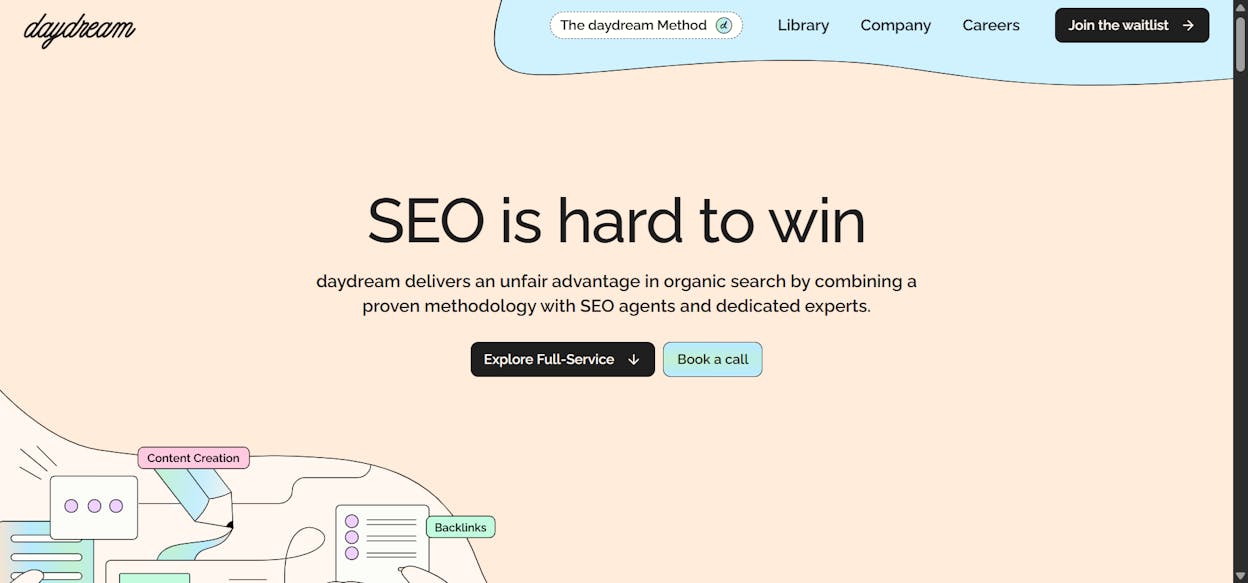
Daydream (withdaydream.com) is a full-service SEO agency for B2B SaaS companies. It combines senior SEO strategists with internal SEO agents to deliver keyword strategy, technical audits, on-page optimization, programmatic SEO, off-page link building, AI visibility tracking, and performance reporting.
The company works with growth-stage startups like Twingate, Final Round AI, and Piktochart. Their model follows a clear pattern. They hire top SEO talent, build proprietary agents that handle repeatable execution, and let the experts focus on strategy and judgment calls.
This is not a self-serve tool. You do not log in and run reports. You hire Daydream the way you would hire a fractional SEO team, and they operate inside your growth org.
Three Things Daydream Does Well
1. Programmatic SEO at Scale
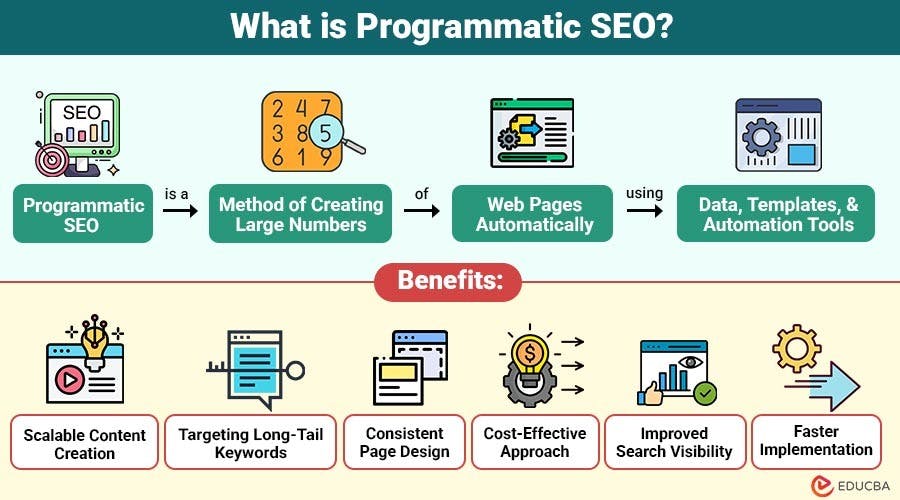
Daydream identifies repeatable keyword patterns across your product’s use cases, integrations, and segments, then builds templates that generate hundreds of pages from structured data. If you sell to 40 industries and have 12 features, that is 480 potential landing pages, each targeting a specific long-tail query.
Their agents handle the template logic, data mapping, and initial QA. The human strategists review the output before anything goes live. This combination works because programmatic SEO at scale requires both speed and editorial judgment.
]
2. Expert-Led Strategy with Agent Execution
Most agencies sell you junior account managers who follow playbooks. Daydream hires senior SEOs and gives them proprietary agents to handle the tedious parts of execution, things like crawl audits, keyword clustering, content gap analysis, and ranking reports.
This means your strategist spends time on decisions (what to build, what to cut, where to invest) instead of pulling data from five tabs and formatting a spreadsheet. The result is faster turnaround and fewer “we’ll get back to you next week” delays.
3. AI Visibility Tracking as Part of the Retainer
Daydream also tracks your brand’s citations across ChatGPT, Google AI Overviews, and other AI surfaces. This is bundled into their full-service engagement, not sold as a separate product. For teams that want a single vendor handling both traditional SEO and AI search, that simplicity has value.
Three Real Limitations You Should Know
1. No Self-Serve Access
You cannot log into Daydream and run your own analysis. Everything flows through your dedicated team. If you want to check a keyword at 9 PM on a Sunday, you wait until Monday. If you want to pull a quick competitor comparison before a board meeting, you ask your strategist.
This model works for companies that want a fully managed service. It does not work for marketers, content leads, or agency owners who need hands-on access to their own data.
2. Pricing Starts at $15K/Month
According to Daydream’s own content, their minimum retainer starts at $15,000 per month for senior-led engagement. More complex programs with programmatic builds, authority outreach, and multi-market expansion push into the $25K to $60K/month range.
There is no free trial. There are no public pricing tiers. You go through a sales call and a strategy audit before you get a quote. That is typical for agencies at this level, but it means smaller teams and solo operators are priced out before they even start.
3. You’re Buying a Service, Not Building a System
When you stop paying Daydream, the work stops. The agents, the workflows, the reporting cadence, all of it lives inside their infrastructure. You keep the content they created and the rankings they earned, but you lose the operating system that produced them.
Compare that to a platform you own. With a platform, your team builds workflows, learns the data, and develops institutional knowledge over time. The investment compounds. With an agency, you rent capability month to month.
Daydream Pricing: Is the Cost Justified?
Here is how the economics break down based on Daydream’s published pricing guides:
|
Engagement Type |
Typical Range |
What’s Included |
|---|---|---|
|
Strategy diagnostic |
$10K - $25K (one-time) |
Audit, keyword roadmap, competitive analysis |
|
Monthly retainer (minimum) |
$15K/month |
Lead strategist, agent execution, reporting |
|
Full-service with programmatic |
$25K - $60K/month |
Everything above plus programmatic builds, link building, AI visibility |
|
Project-based (migration, pSEO build) |
$30K - $250K |
Scoped deliverable with defined acceptance criteria |
For a Series B SaaS company with $5M+ ARR, a $15K/month retainer can generate 3 to 5x better CAC efficiency than paid channels over 12 months, according to Daydream’s own benchmarks. If you have the budget and want someone else to own the execution, the pricing makes sense.
For everyone else, the math gets harder. A content team of three people using the right SEO tools and an AI search platform can cover more ground for less spend, and they keep the knowledge when the budget tightens.
Analyze AI: The Platform You Operate Yourself
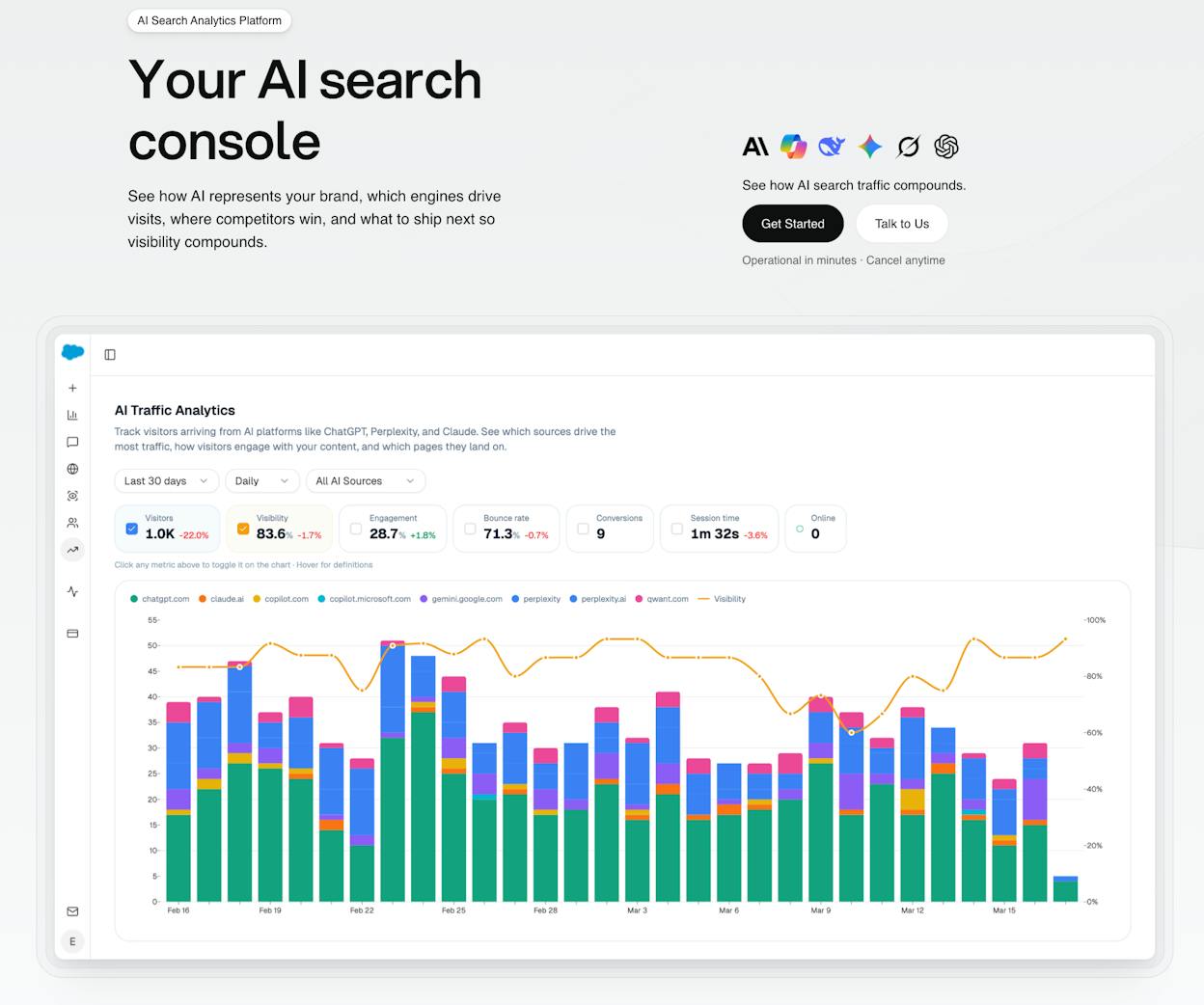
Analyze AI is the agentic platform for SEO, AEO, content, and GTM ops. It is not an AI search layer you bolt onto your stack. It is the operating system where your team discovers opportunities, monitors performance across Google and every major AI engine, writes and optimizes content, and governs how AI models perceive your brand.
The difference from Daydream is structural. You own the platform, you run the workflows, and you build the institutional knowledge. There is no $15K/month retainer. There is no waiting for a strategist to pull your data. You log in, and everything is there.
Here is what that looks like in practice.
Track AI Traffic Down to the Landing Page
Most AI visibility tools tell you whether your brand got mentioned. Analyze AI shows you which AI engines actually send traffic, which pages those visitors land on, and which visits convert.
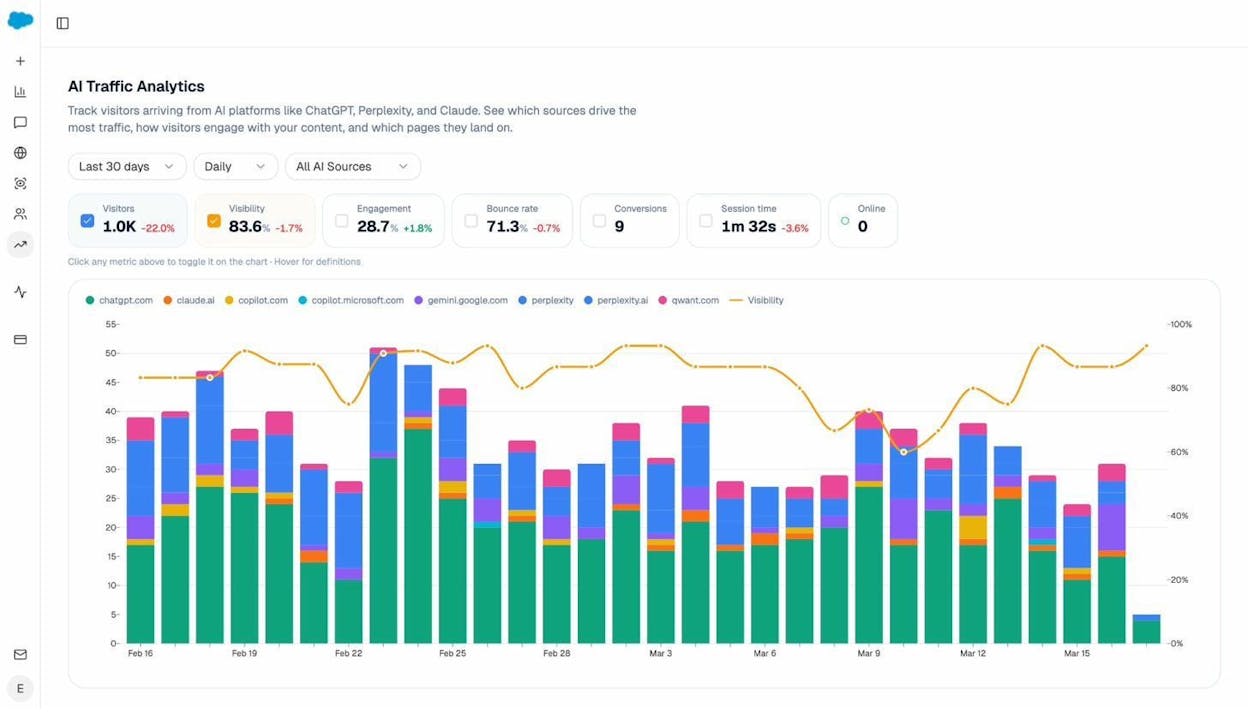
The AI Traffic Analytics dashboard breaks down sessions by engine (ChatGPT, Perplexity, Claude, Gemini, Copilot), shows trends over time, and connects to your GA4 data so you see real sessions, not estimated mentions.
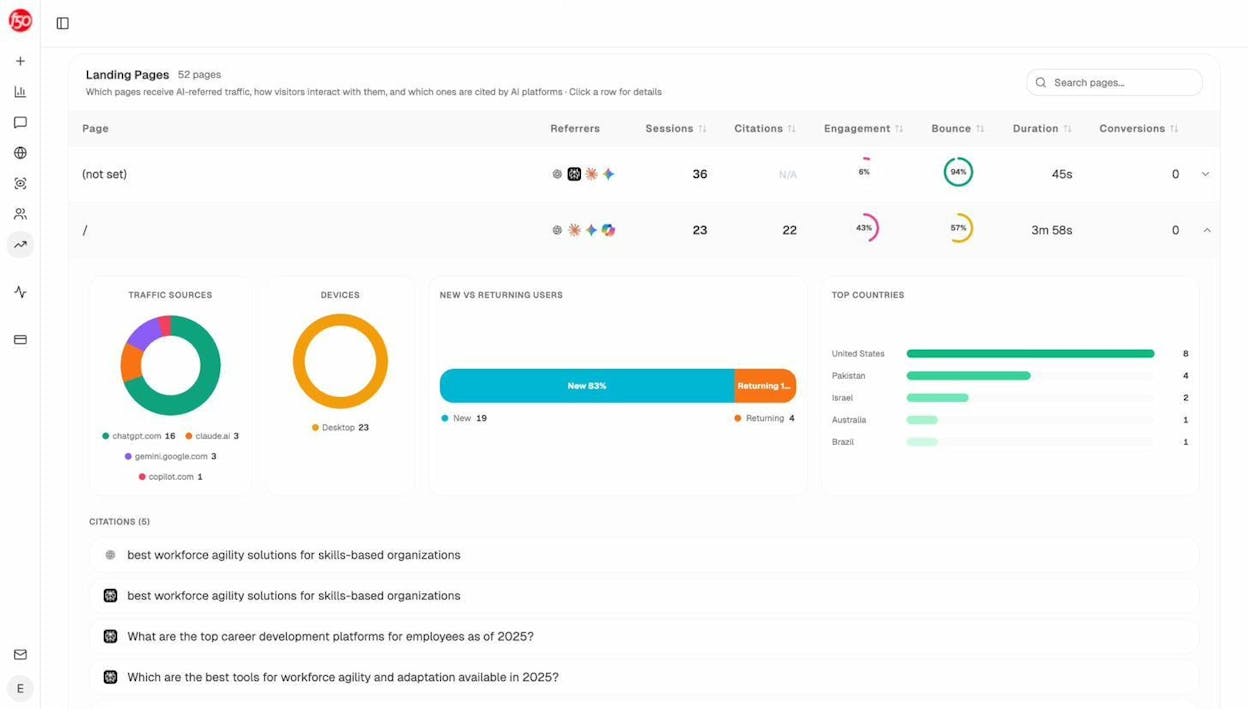
The Landing Pages report is where this gets actionable. You see exactly which URLs receive AI traffic, from which engine, and what those visitors do next. If your comparison page converts at 12% from Perplexity but your blog post converts at 0% from ChatGPT, you know where to double down and what to deprioritize.
Monitor Prompts Across Every Major AI Engine
Daydream tracks AI citations as part of their retainer. Analyze AI lets you track the specific prompts buyers use and see your visibility, position, and sentiment across every response, in real time.
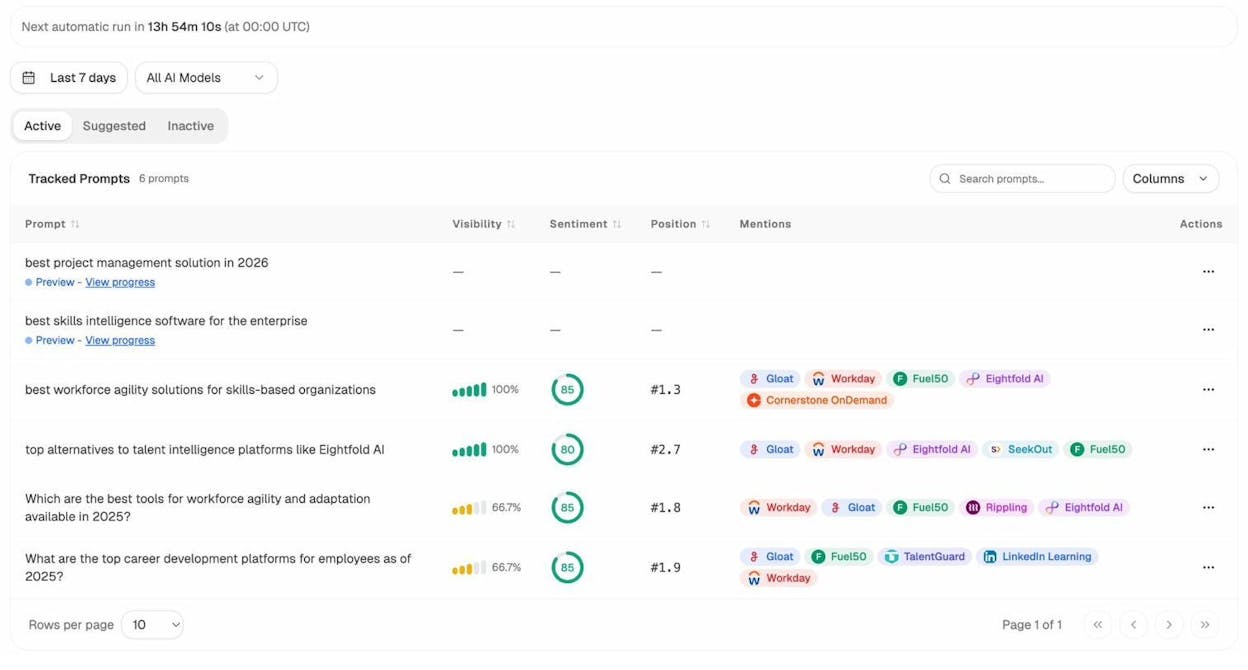
You can track prompts like “best CRM for mid-market companies” or “top project management tools for remote teams” and see exactly where you rank, which competitors appear alongside you, and whether your sentiment is improving or declining. The prompt suggestion feature even recommends high-intent prompts you should be tracking based on your industry and competitive landscape.
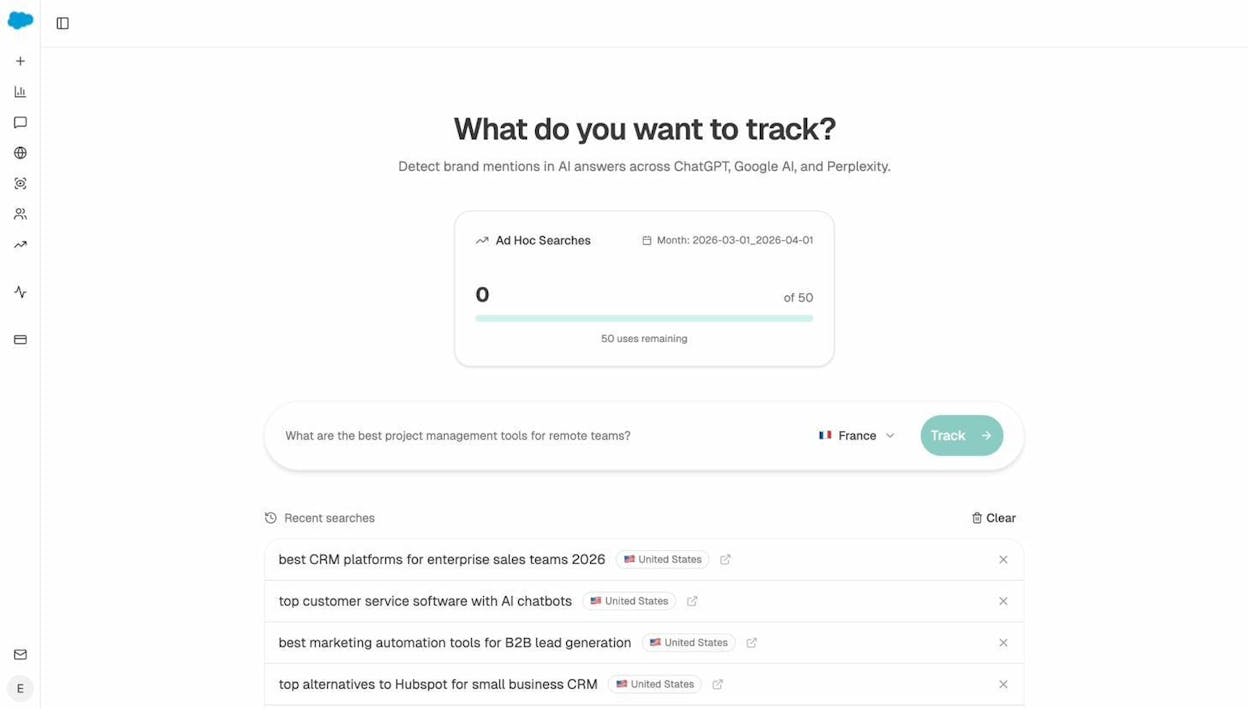
Need a quick check? The Ad Hoc Prompt Search lets you run any prompt across all engines instantly and see where you stand without setting up a full tracking campaign.
See Which Sources AI Models Trust
When a model recommends your competitor, it is pulling from specific sources. Analyze AI’s Citation Analytics show you exactly which domains, URLs, and content types get cited in your category.
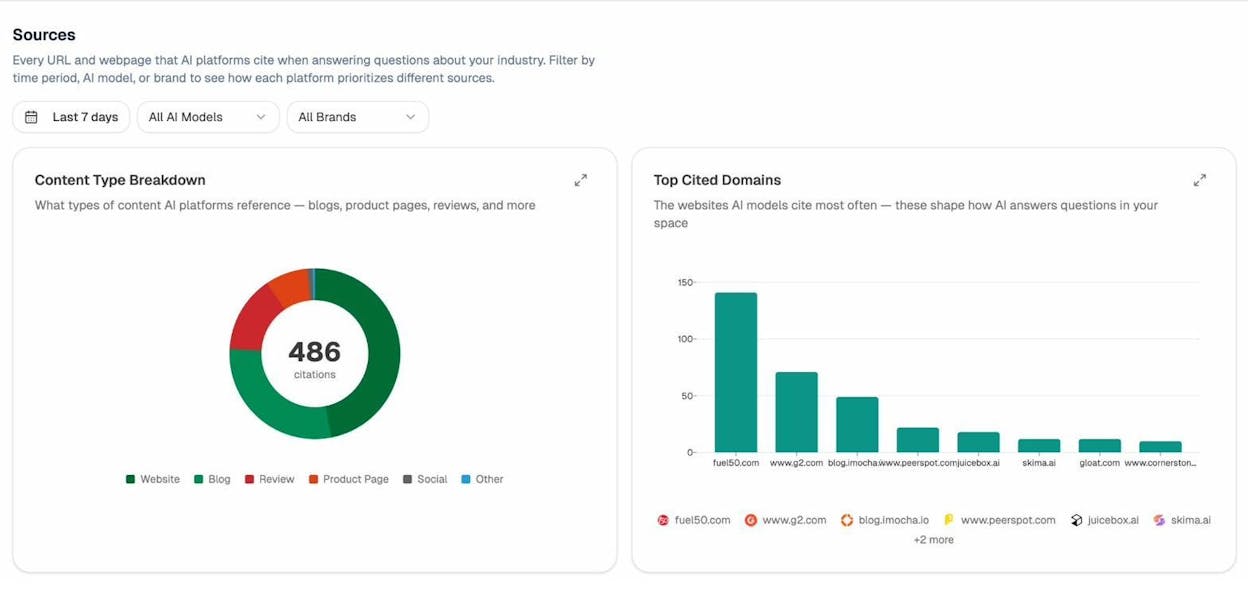
This changes how you think about link building and content strategy. Instead of chasing generic backlinks, you target the specific sources that shape AI answers. You create content that fills gaps in their coverage. You build relationships with the domains that models already trust.
Write and Optimize Content That Ranks in Both Google and AI
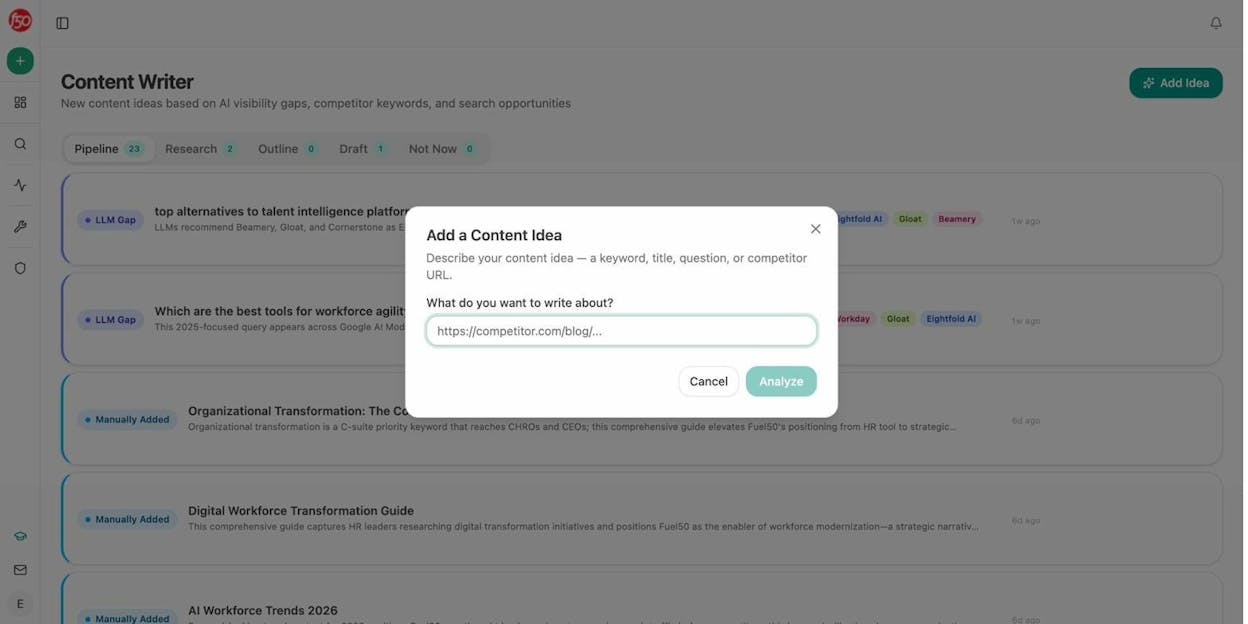
The AI Content Writer does not just generate drafts. It runs a full research pipeline: AI visibility gaps, keyword opportunities, competitor analysis, then produces an outline and a draft that is built to perform in both traditional search and AI engines.
The AI Content Optimizer takes your existing pages and scores them against both SEO and AEO criteria. It shows you exactly what to improve, with specific recommendations for structure, argument flow, proof points, and clarity.
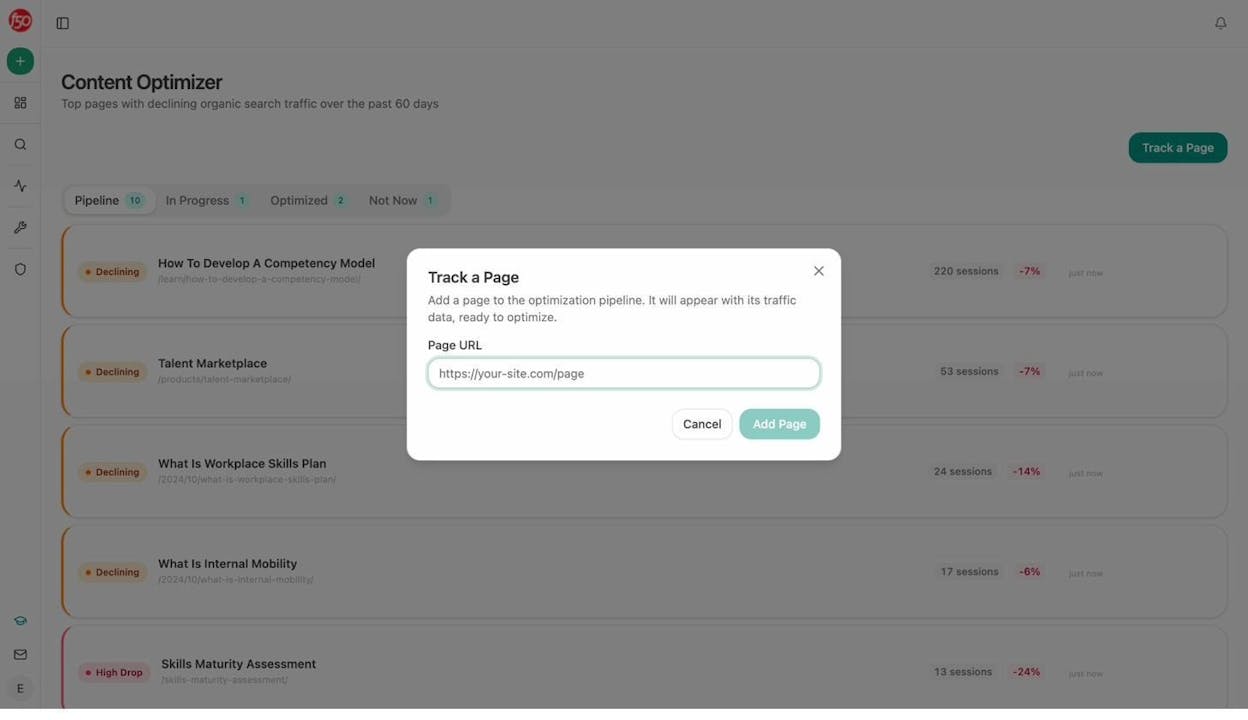
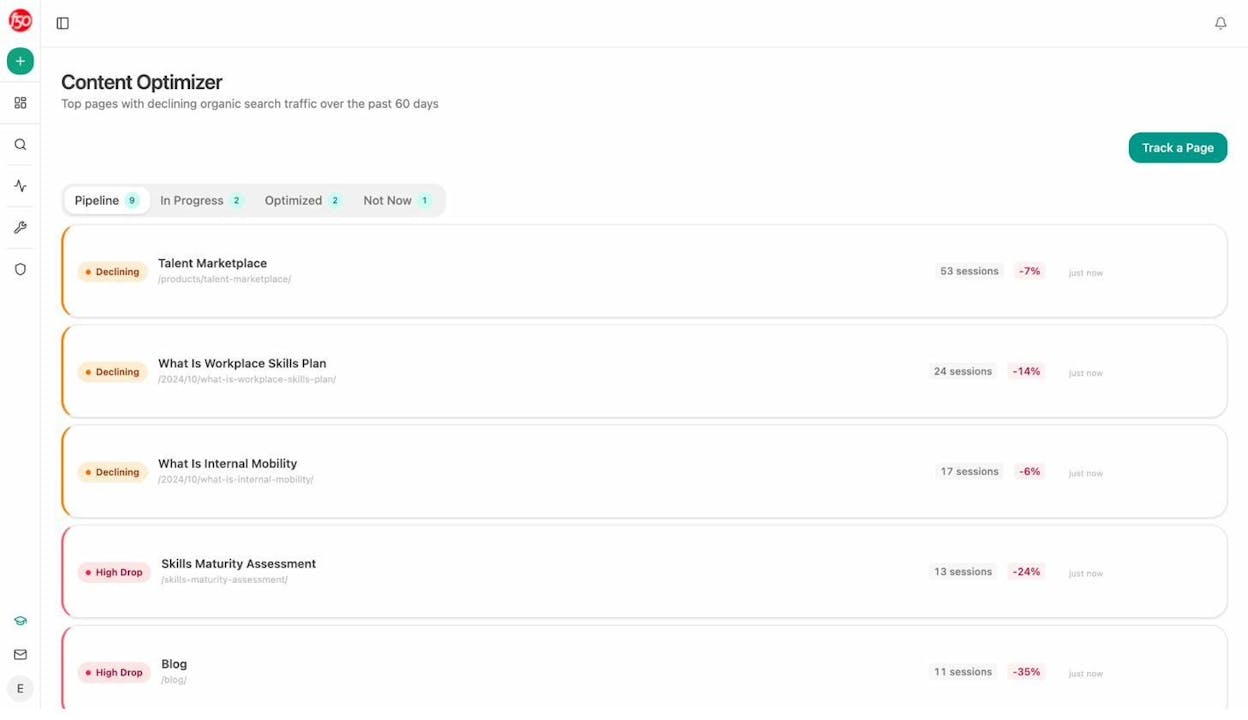
Daydream writes content for you as part of their retainer. Analyze AI gives you the tools to write better content yourself, or to QA the content your team and freelancers produce. One model costs $15K/month. The other costs a fraction of that and builds your team’s capability over time.
Understand How AI Perceives Your Brand
The Perception Map shows you the narrative themes AI models associate with your brand, how those themes compare to competitors, and whether sentiment is shifting.
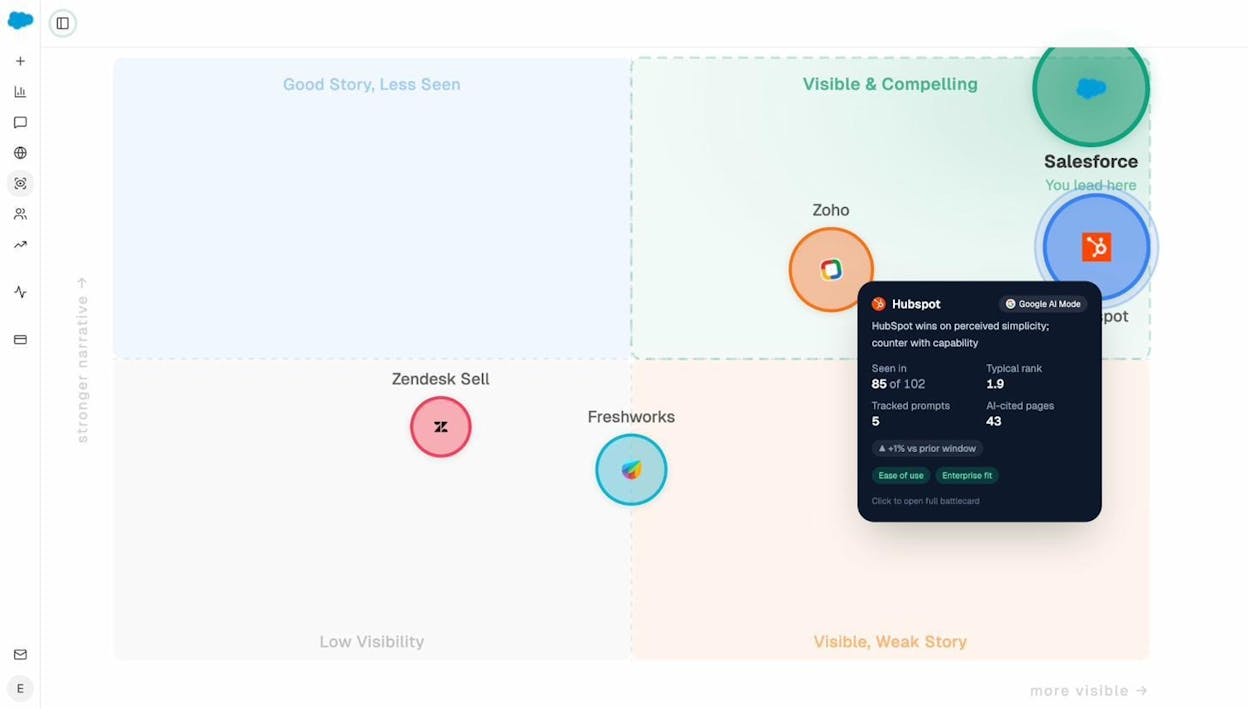
This is the layer that most tools skip entirely. You can see that AI models describe your product as “easy to use” and “affordable” but rarely mention “enterprise-ready.” That is a signal to update your content, your case studies, and your product pages to shift the narrative.
The AI Battlecards take this further by generating competitive positioning insights based on how AI models compare you to specific competitors. Your sales team gets talking points grounded in real AI responses, not guesses.
Automate Anything with the Agent Builder
This is where Analyze AI becomes something entirely different from an analytics tool or an agency retainer.
The Agent Builder gives you 180+ nodes, 34 pre-built data recipes, 13 input primitives, and three trigger modes (manual, scheduled, webhook). It connects directly to GA4, Google Search Console, DataForSEO, Semrush, HubSpot, Notion, WordPress, Slack, and every major LLM.
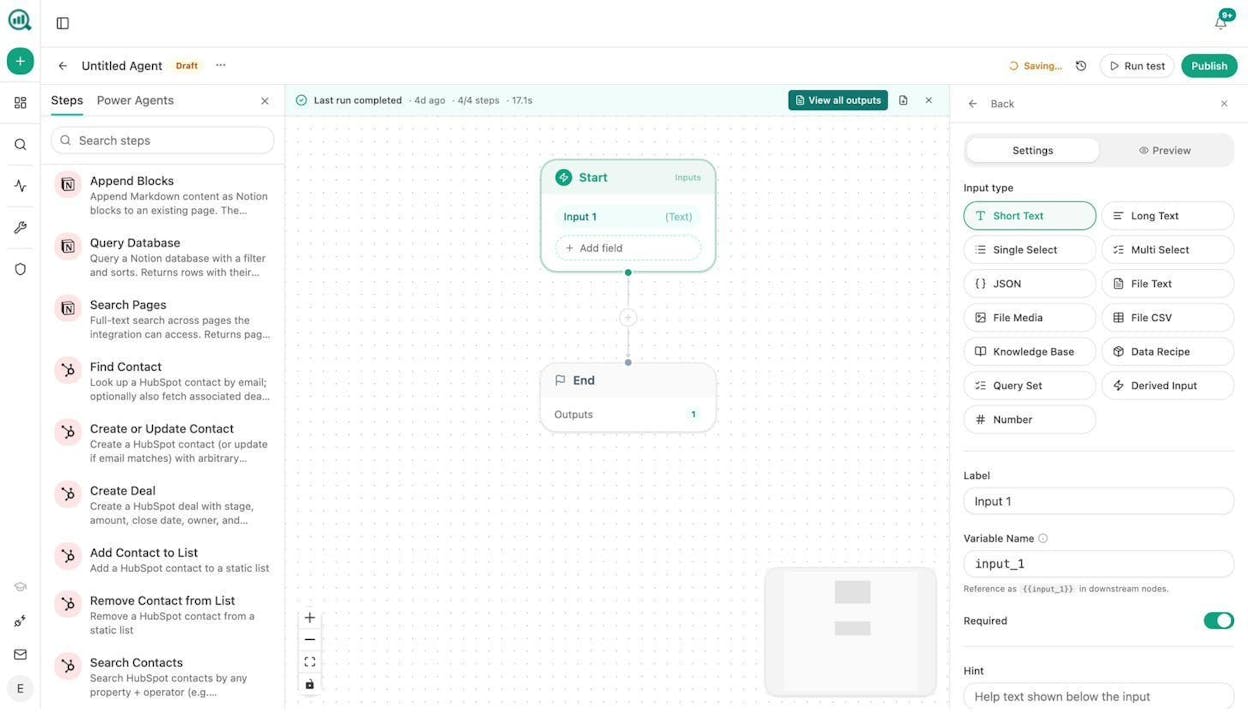
This is not an automation layer you bolt on. It is a programmable substrate that can run any workflow your marketing, content, sales, or PR team needs. Here are real examples:
For content teams: Build a brief-to-publish pipeline where a Notion status change triggers research, outline, draft, AEO scoring, and WordPress publishing, all gated by quality thresholds. Your team reviews the output instead of building it from scratch.
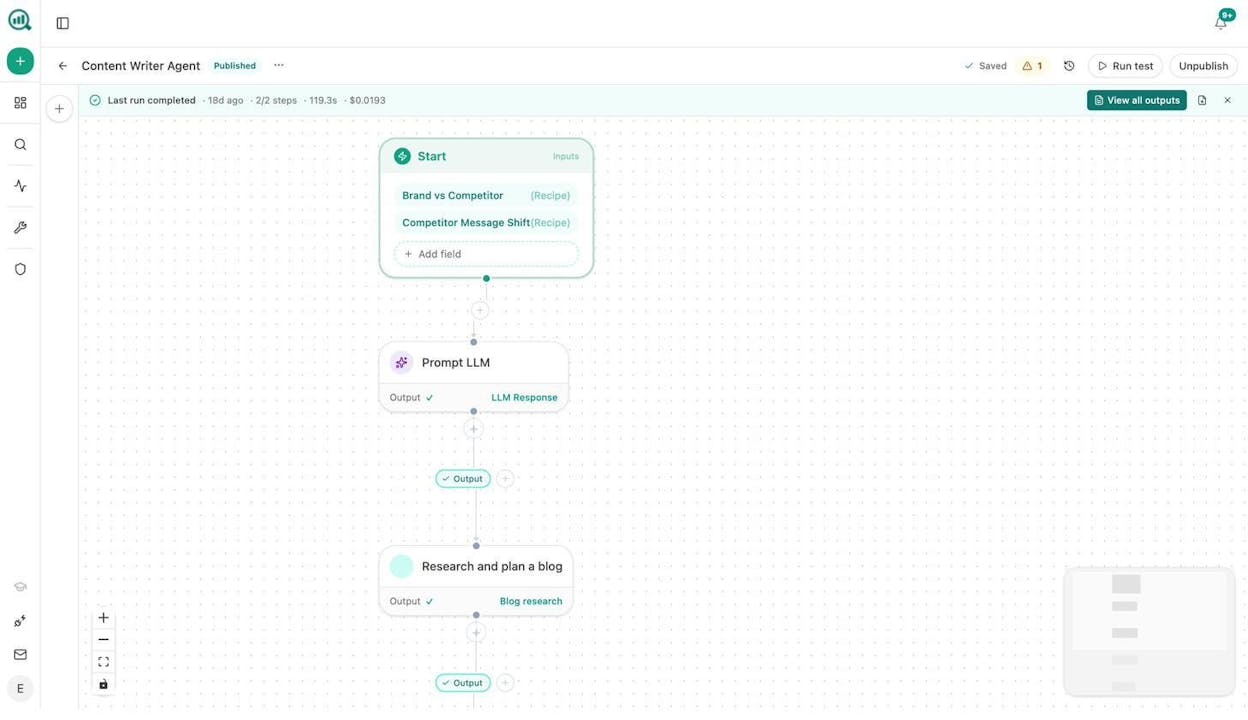
For agencies: Run a single agent that generates Monday briefing packs for every client. One workflow, looped over your client list, pulling AI visibility data, GSC rankings, backlink changes, and competitor movement into a branded report emailed to each account team. Reporting day stops existing.
For CMOs: Schedule a weekly executive one-pager that pulls share-of-voice, sentiment shifts, competitive gaps, and citation trends into a board-ready summary. No analyst needed. No 4-hour manual pull. It runs at 7 AM on Monday and lands in your inbox.
For PR teams: Set up a webhook that fires when a media monitoring tool flags negative coverage. The agent researches the article, identifies the journalist, and drafts three response options (statement, counter-narrative, silence) in Slack within 20 seconds.
For sales: Trigger an agent when a HubSpot deal changes stage. It researches the prospect, pulls their SEO profile, checks their AI visibility, and attaches a briefing doc to the deal before the AE picks up the phone.
The point is this: Daydream gives you access to agents that their team operates. Analyze AI gives you the agents themselves. You build what you need, run it on your schedule, and keep it when your strategy changes.
Quick Comparison: Daydream vs. Analyze AI
|
Capability |
Daydream |
Analyze AI |
|---|---|---|
|
Model |
Full-service agency (done-for-you) |
Self-serve platform (do-it-yourself) |
|
AI traffic attribution (by engine + landing page) |
Included in retainer reports |
Real-time dashboard with GA4 integration |
|
Prompt tracking across ChatGPT, Perplexity, Claude, Gemini, Copilot |
Yes (agency-managed) |
Yes (self-serve, real-time) |
|
Citation analytics |
Yes (agency-managed) |
Yes, with source-level detail |
|
Content writing |
Done by Daydream’s team |
AI Content Writer with research pipeline |
|
Content optimization |
Done by Daydream’s team |
AI Content Optimizer with AEO scoring |
|
Brand perception monitoring |
Bundled in reporting |
Perception Map, Battlecards, Sentiment Monitoring |
|
Agent/workflow builder |
Proprietary (not user-accessible) |
180+ nodes, 34 data recipes, GA4/GSC/HubSpot/Semrush integrations |
|
Programmatic SEO |
Core service offering |
Agent Builder can generate and publish at scale |
|
Starting price |
~$15,000/month retainer |
Self-serve pricing (see plans) |
|
Free tools |
None |
12+ free SEO tools including Keyword Generator, SERP Checker, Broken Link Checker |
|
Weekly email digests |
Via agency reporting |
The Bottom Line
Daydream is a good agency for funded B2B SaaS companies that want a fully managed SEO service. Their combination of senior strategists and proprietary agents can move fast, and their programmatic SEO work has produced real results for clients like Twingate.
But the model has a ceiling. You do not own the system. You do not control the data. You do not build workflows that compound over time. And you pay $15K/month or more for the privilege.
Analyze AI gives you the entire operating layer: discovery, monitoring, content creation and optimization, brand governance, and a fully programmable Agent Builder that can automate anything from editorial calendars to crisis response to lead enrichment.
SEO is not dead. AI search is an additional organic channel, not a replacement. The teams that win will be the ones that run both channels from one platform, with full control over their data, their workflows, and their strategy.
That is what Analyze AI was built for.

Moïse

Ernest


![50 GEO Statistics From Tracking 83,670 AI Citations [2026 Data]](/_next/image?url=https%3A%2F%2Fwww.datocms-assets.com%2F164164%2F1779314907-blobid0.png&w=3840&q=75)


