



Summarize this blog post with:


In this article, you’ll learn how to monitor and track every meaningful change on a website. You’ll get step-by-step methods for catching content edits, technical issues, SEO shifts, and competitor moves before they hurt your traffic. You’ll also learn how to extend your monitoring to AI search, so you can track how ChatGPT, Perplexity, and Gemini reference your brand and your competitors over time.
Table of Contents
Why You Need to Monitor Website Changes
Most SEO advice focuses on building. Write more content. Build more links. Optimize more pages. But protecting what you already have matters just as much.
Here is what can go wrong when you are not monitoring your website.
Unauthorized content edits. Someone on your team changes a high-ranking page title from something keyword-optimized to something “cleaner” without checking search performance. Rankings drop within days.
Broken links and redirects. A site migration creates redirect chains or removes pages entirely. Internal links that once passed authority now lead to 404 errors. External links that pointed to trustworthy sources now lead to dead pages or, worse, domains that have been purchased by spammers.
Technical regressions. A plugin update adds render-blocking JavaScript. Page speed drops from 2 seconds to 6 seconds. Core Web Vitals fail. Google demotes you quietly.
Security breaches. Someone injects hidden links or text into your pages. This happens more often than people think, especially on WordPress sites with outdated plugins. If you are not monitoring your outgoing links, you may not catch it for months.
Competitor moves. A competitor publishes a better version of your top-ranking article. They update their pricing page. They launch a new landing page targeting your best keyword. If you are not watching, you are reacting instead of planning.
And now there is a new dimension. AI search engines like ChatGPT, Perplexity, Google AI Mode, and Claude pull answers from websites and present them directly to users. If your content changes in a way that makes it less useful to these models, you lose AI search visibility without any warning.
Monitoring is not optional. It is the difference between catching problems in hours and discovering them in months.
What Types of Changes Should You Monitor?
Before you pick tools or set up alerts, you need to know what to watch for. Website changes fall into six categories.
|
Change Type |
What to Watch |
Why It Matters |
|---|---|---|
|
Content changes |
Title tags, meta descriptions, body text, headings, images |
Directly affects rankings and click-through rates |
|
Technical changes |
Page speed, Core Web Vitals, mobile usability, schema markup |
Google uses these as ranking signals |
|
Link changes |
New outgoing links, broken internal links, lost backlinks |
Affects authority, user experience, and security |
|
SEO changes |
Keyword rankings, indexation status, crawl errors |
Early warning system for traffic drops |
|
Competitor changes |
New pages, content updates, pricing changes, new features |
Keeps your strategy current |
|
AI search changes |
Brand mentions, citations, prompt visibility, AI-referred traffic |
Protects a growing traffic channel |
Most teams only monitor one or two of these. The ones who monitor all six catch problems faster and find opportunities sooner.
How to Monitor Content Changes on Your Website
Content changes are the most common source of unexpected ranking drops. A title tag rewrite, a paragraph deletion, or a heading restructure can shift how search engines understand your page.
Monitor Title Tag Changes
Your title tag is the single most important on-page SEO element. When it changes without a clear reason, you need to know.
Using Google Search Console. Go to the Performance report. Filter by page. Look for sudden drops in click-through rate on pages where impressions stayed flat. A CTR drop with stable impressions often means your title tag changed and became less compelling.
![[Screenshot: Google Search Console Performance report filtered by a single page, showing CTR drop with stable impressions]](https://www.datocms-assets.com/164164/1777501148-blobid1.png?auto=format,compress&w=1248&fit=max)
This method is reactive. You will only notice after the change has had an impact. For proactive monitoring, you need a crawler.
Using a site crawler. Tools like Screaming Frog, Sitebulb, or ContentKing can crawl your site on a schedule and compare the results to previous crawls. Set up a crawl schedule (weekly at minimum, daily for large sites) and configure alerts for title tag changes.
In Screaming Frog, run a crawl and export your title tags. Run the same crawl a week later. Use the “Compare” feature to spot differences.
![[Screenshot: Screaming Frog crawl comparison showing title tag differences between two crawls]](https://www.datocms-assets.com/164164/1777501160-blobid2.jpg?auto=format,compress&w=1248&fit=max)
Using a change detection tool. Tools like Visualping or ChangeTower let you monitor specific elements on specific pages. Set them to watch your title tag element and get email alerts when it changes.
![[Screenshot: Visualping dashboard showing a monitored page with a detected title change highlighted]](https://www.datocms-assets.com/164164/1777501166-blobid3.png?auto=format,compress&w=1248&fit=max)
For high-traffic pages (your top 20 by organic sessions), set up individual page monitoring. For everything else, scheduled crawl comparisons are enough.
Monitor Body Text and Page Content Changes
Body text changes are harder to catch because they happen more frequently and are often intentional. The challenge is separating routine updates from harmful edits.
Using ContentKing (now part of Conductor). ContentKing monitors your pages in real time and flags changes as they happen. It tracks body text, headings, word count, and more. It also shows you exactly what changed, with a diff view comparing the old version to the new one.
![[Screenshot: ContentKing change tracking dashboard showing a diff view of body text changes on a page]](https://www.datocms-assets.com/164164/1777501167-blobid4.png?auto=format,compress&w=1248&fit=max)
Using Screaming Frog with scheduling. If you do not want to pay for a real-time monitoring tool, Screaming Frog’s scheduled crawls work. Export your page content hashes from each crawl, then compare. Pages where the hash changed have been edited.
Using the Wayback Machine for spot checks. The Internet Archive’s Wayback Machine stores historical snapshots of web pages. If you suspect a page changed but do not have monitoring in place yet, search for the URL and compare recent snapshots.
![[Screenshot: Wayback Machine calendar view showing available snapshots for a URL, with two dates selected for comparison]](https://www.datocms-assets.com/164164/1777501175-blobid5.png?auto=format,compress&w=1248&fit=max)
Monitor Meta Description Changes
Meta descriptions do not directly affect rankings, but they heavily influence click-through rate. A bad meta description rewrite can drop your CTR by 20% or more even if your ranking stays the same.
Monitor meta descriptions the same way you monitor title tags. Include them in your scheduled crawl comparisons and set up change alerts on your most important pages.
How to Monitor Technical Changes
Technical issues are sneaky. They often do not show symptoms for days or weeks, and by the time you notice a ranking drop, the root cause is buried under other changes.
Monitor Page Speed and Core Web Vitals
Google’s Core Web Vitals (Largest Contentful Paint, Interaction to Next Paint, and Cumulative Layout Shift) are confirmed ranking signals. A page speed regression can directly hurt your rankings.
Using Google Search Console. Go to the Core Web Vitals report under Experience. Google groups your URLs into “Good,” “Needs Improvement,” and “Poor.” Check this weekly. If URLs start moving from Good to Needs Improvement, investigate immediately.
![[Screenshot: Google Search Console Core Web Vitals report showing URL distribution across Good, Needs Improvement, and Poor]](https://www.datocms-assets.com/164164/1777501182-blobid6.jpg?auto=format,compress&w=1248&fit=max)
Using PageSpeed Insights API with scheduled monitoring. For automated tracking, set up a scheduled job that runs your key URLs through the PageSpeed Insights API and logs the results. Tools like DebugBear or Calibre do this out of the box.
Monitor Broken Links
Broken links hurt user experience and waste crawl budget. They also signal to search engines that your site is not well maintained.
Using Analyze AI’s free Broken Link Checker. Run your domain through the Analyze AI Broken Link Checker to find all broken internal and external links on your site. Repeat this monthly or after any major site update.
![[Screenshot: Analyze AI Broken Link Checker showing results with broken internal links and their HTTP status codes]](https://www.datocms-assets.com/164164/1777501187-blobid7.png?auto=format,compress&w=1248&fit=max)
Using Screaming Frog. Crawl your site and filter by response codes. Look for 404s, 500s, and redirect chains (301 > 301 > 200). Fix broken internal links immediately. For broken external links, either remove the link or replace it with a working alternative.
Using Google Search Console. The Pages report (under Indexing) shows crawl errors including “Not found (404)” pages. Check this weekly.
Monitor Redirect Changes
Redirect problems are one of the most common technical SEO mistakes. During migrations, redesigns, or URL restructures, redirects can break, chain, or loop.
Watch for redirect chains (A redirects to B, B redirects to C). Each hop in the chain loses a small amount of link equity and adds latency. Chains of three or more hops should be fixed immediately.
![[Screenshot: Screaming Frog redirect chain report showing a chain of 301 redirects across 4 hops]](https://www.datocms-assets.com/164164/1777501188-blobid8.png?auto=format,compress&w=1248&fit=max)
Monitor Indexation Status
If Google stops indexing your pages, your traffic drops to zero regardless of how well those pages are optimized.
Using Google Search Console. The Pages report shows you how many pages are indexed and why certain pages are excluded. Watch for sudden increases in “Crawled - currently not indexed” or “Discovered - currently not indexed.”
Common causes of indexation drops include accidental noindex tags, robots.txt blocks added during development and never removed, and canonical tags pointing to the wrong URL.
![[Screenshot: Google Search Console Pages report showing indexation status breakdown with categories like “Crawled - currently not indexed”]](https://www.datocms-assets.com/164164/1777501195-blobid9.jpg?auto=format,compress&w=1248&fit=max)
Set up a weekly check. If your indexed page count drops by more than 5% in a single week, treat it as urgent.
How to Monitor Outgoing Link Changes
This is the change type most teams ignore, and it is one of the most dangerous.
Outgoing links matter for two reasons. First, they pass signals to search engines about the sites you endorse. Linking to a spammy or hacked domain can hurt your own site’s trustworthiness. Second, they are a common target for hackers. Injected links are often invisible to visitors but fully visible to crawlers.
How to Catch Unauthorized Outgoing Links
Run regular outgoing link audits. Use Screaming Frog to crawl your site and export all external outgoing links. Compare this list to your previous audit. Any new external links that you did not add yourself should be investigated.
![[Screenshot: Screaming Frog external links report showing all outgoing links sorted by target domain]](https://www.datocms-assets.com/164164/1777501198-blobid10.png?auto=format,compress&w=1248&fit=max)
Set up alerts for new outgoing links. If you use ContentKing, you can configure alerts specifically for new outgoing links added to existing pages. This catches both intentional additions and injected links.
Check your site’s source code. For WordPress sites, view the source of a few random pages each month and search for unfamiliar domains. Injected links are often placed in footer divs, hidden spans, or inside comment sections.
Monitor your competitors’ outgoing links too. If a competitor’s site starts linking out to questionable domains, it could indicate a hack. You can use this intelligence to understand changes in their authority over time. Read more about competitor monitoring tools that help with this.
How to Monitor SEO Changes
SEO monitoring is the practice of tracking the metrics that directly influence your search traffic. Rankings, backlinks, and indexation status are the big three.
Track Keyword Rankings
Use a rank tracking tool to monitor your target keywords daily. A sudden ranking drop on a page that has not changed usually means something else changed. Maybe a competitor published better content. Maybe Google updated its algorithm. Maybe a technical issue is preventing crawling.
Tools like the Analyze AI Keyword Rank Checker let you check your current ranking for any keyword quickly. For ongoing monitoring, dedicated keyword tracking tools automate this at scale.
![[Screenshot: Analyze AI Keyword Rank Checker showing ranking positions for a domain across multiple keywords]](https://www.datocms-assets.com/164164/1777501200-blobid11.png?auto=format,compress&w=1248&fit=max)
Monitor Backlink Changes
Backlinks are one of Google’s strongest ranking signals. When you lose backlinks from high-authority domains, your rankings can drop.
Use the Analyze AI Website Authority Checker to keep tabs on your domain’s overall authority score. For detailed backlink monitoring, set up weekly alerts in your backlink tool of choice to catch lost links early.
Watch for Algorithm Updates
Google releases thousands of algorithm updates each year. Most are small, but several times a year, a core update reshuffles the rankings significantly.
Follow industry trackers like Search Engine Roundtable and Google’s own Search Status Dashboard to stay aware of confirmed updates. When you see ranking volatility across many keywords at once, check whether a core update is rolling out before making changes to your site.
How to Monitor Competitor Website Changes
Monitoring your own site is only half the equation. Your competitors are constantly updating their sites, publishing new content, and adjusting their strategies. If you are not watching, you are flying blind.
Track Competitor Content Changes
Set up Visualping or ChangeTower to monitor your competitors’ key pages. Watch their homepage, pricing page, and their top 5 ranking articles. When they make changes, you will get an alert with a visual diff showing exactly what changed.
![[Screenshot: Visualping comparison showing before/after view of a competitor’s pricing page with changes highlighted]](https://www.datocms-assets.com/164164/1777501208-blobid12.png?auto=format,compress&w=1248&fit=max)
This is useful for spotting pricing changes, new feature announcements, messaging shifts, and content updates that could affect your shared keyword rankings.
Track Competitor SEO Performance
Use the Analyze AI SERP Checker to see who ranks for your target keywords. Run this monthly for your top 50 keywords to spot when competitors gain or lose ground. For a deeper dive, follow our guide on SEO competitor analysis.
How to Monitor Your Website’s Visibility in AI Search
Here is where most monitoring guides stop. But in 2026, monitoring only Google is no longer enough.
AI search engines like ChatGPT, Perplexity, Google AI Mode, and Claude are sending real traffic to websites. When someone asks ChatGPT “what is the best CRM for small businesses,” it generates an answer and often cites sources. If your website is one of those sources, you get a click.
The challenge is that AI search is a different channel with different rules. Your Google ranking does not guarantee AI visibility. A page that ranks #1 on Google might never appear in ChatGPT’s answers. And a page that ranks #15 on Google might be cited by Perplexity in every response about your topic.
This means you need a separate monitoring layer for AI search. SEO is not dead. AI search is an additional organic channel alongside traditional SEO, not a replacement. The teams that monitor both will have a significant advantage.
Track AI Mentions and Visibility
The first step is knowing whether AI search engines mention your brand at all, and how often.
Analyze AI tracks your brand’s visibility across ChatGPT, Perplexity, Google AI Mode, Claude, and Copilot. The dashboard shows your visibility percentage (how often your brand is mentioned in AI responses), your average position, and your sentiment score over time.
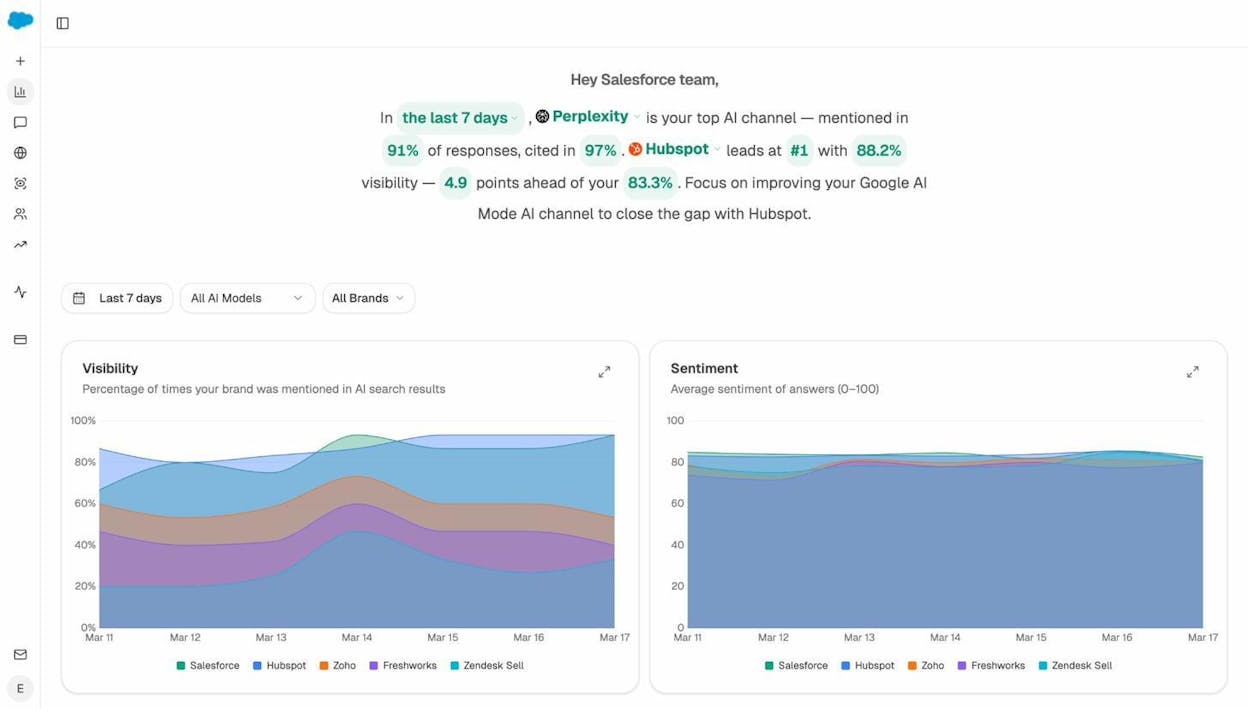
You can filter by AI model to see which engines mention you most. This matters because different AI engines have different content preferences. If Perplexity cites you heavily but ChatGPT does not, that tells you something about your content’s structure and the sources each model prefers.
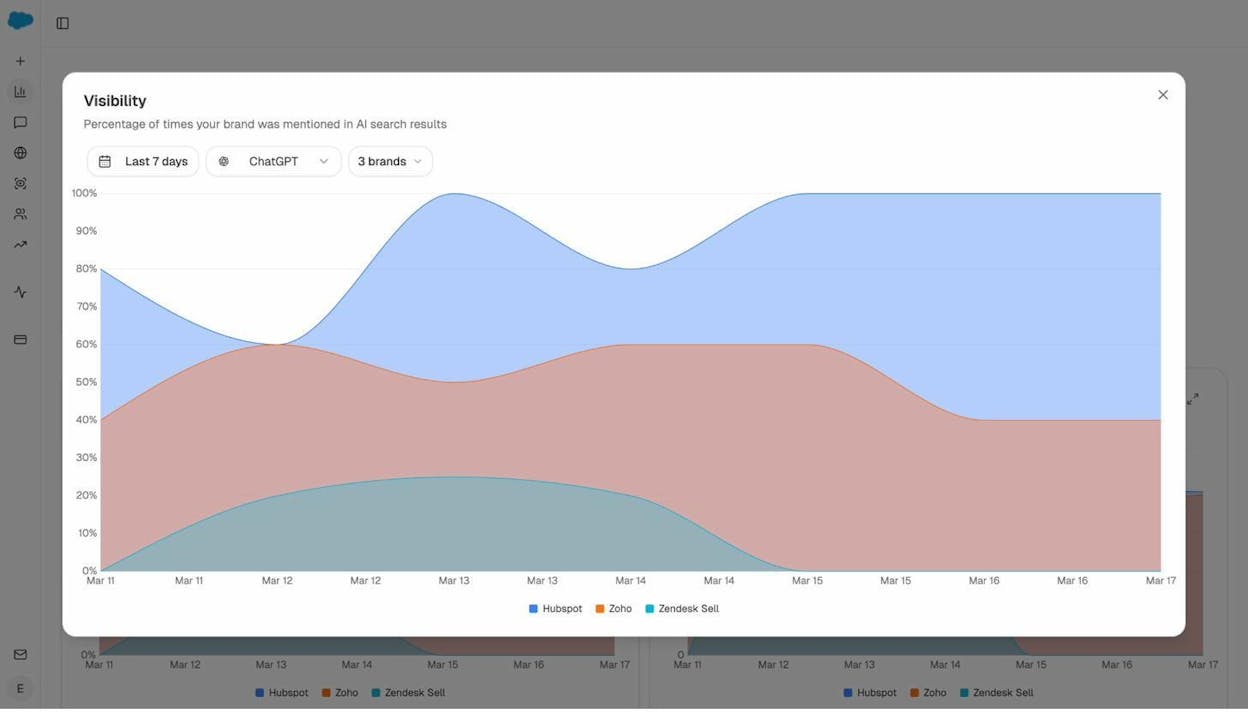
Track Which Prompts Mention Your Brand
Traditional SEO tracks keywords. AI search monitoring tracks prompts.
A prompt is the actual question someone types into an AI search engine. “Best project management software for remote teams” is a prompt. “Top alternatives to Hubspot CRM” is a prompt.
With Analyze AI’s prompt tracking, you can monitor specific prompts to see whether your brand appears in the AI response, what position you rank in, what the sentiment is, and which competitors also appear.
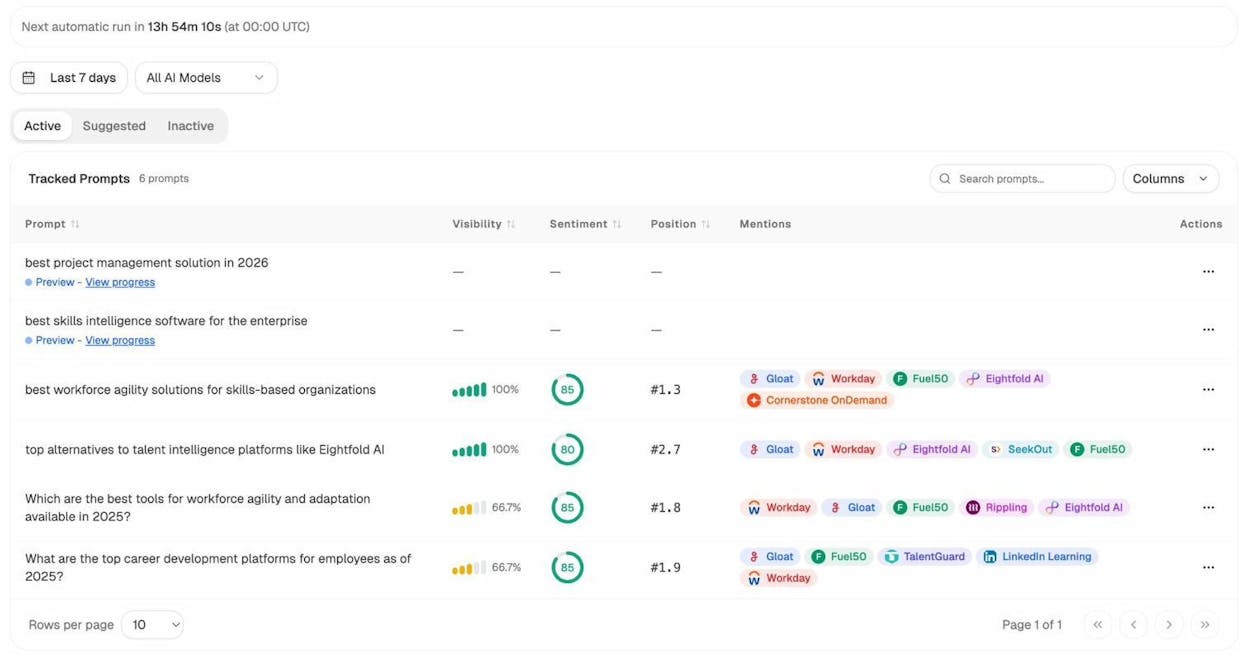
This is the AI search equivalent of rank tracking. Set up the prompts that matter most to your business and monitor them weekly.
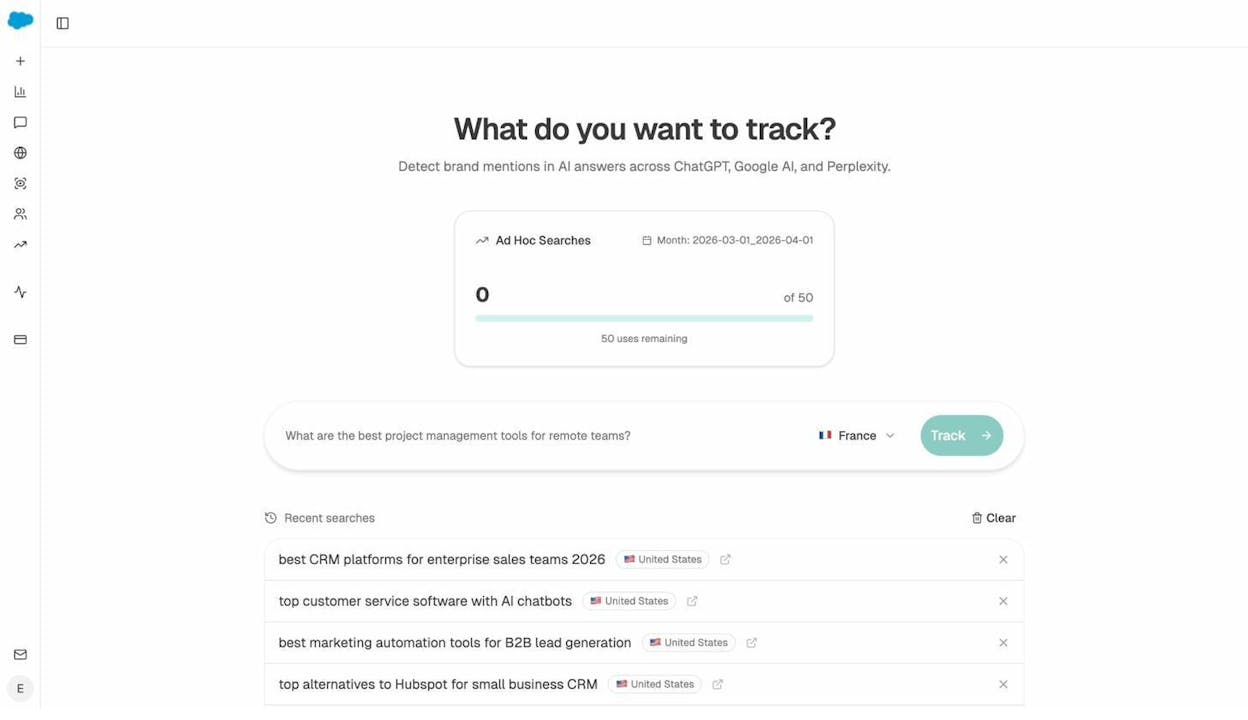
You can also run ad hoc prompt searches to quickly test any prompt across multiple AI engines and see the live results.
Monitor AI-Referred Traffic
Knowing that AI engines mention your brand is valuable. Knowing that those mentions drive actual traffic to your site is even better.
Analyze AI’s AI Traffic Analytics connects to your analytics and shows you exactly how many visitors arrive from AI sources like ChatGPT, Perplexity, Claude, and Copilot. You can see visitors, engagement, bounce rate, session duration, and conversions broken down by AI source.
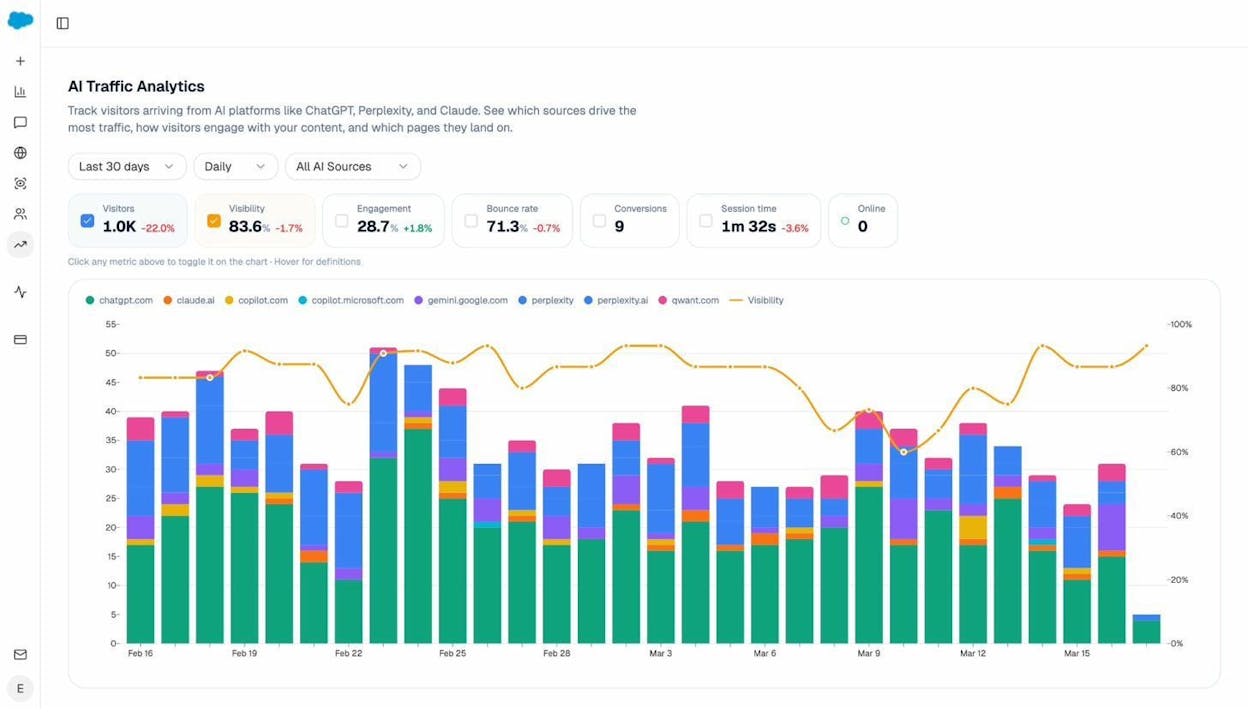
The Landing Pages report shows which of your pages receive AI-referred traffic. This is powerful because it reveals which content formats and topics work in AI search. If your blog post on “corporate mentorship programs” gets 6 visits from AI sources while your product page gets 12, that tells you AI engines favor your product pages for commercial queries and your blog for informational ones.
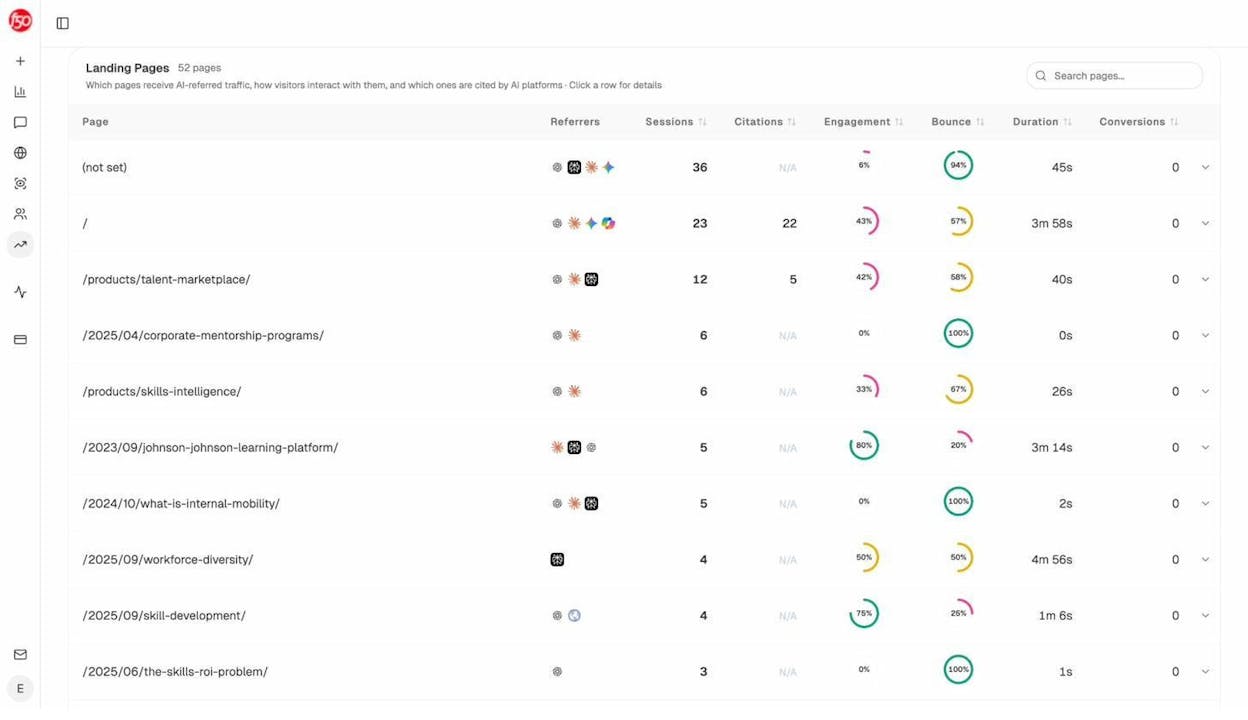
Use this data to double down on what works. If certain page types consistently attract AI traffic, create more pages like them.
Track Your Competitors in AI Search
Just like you monitor competitors in Google search, you should monitor them in AI search.
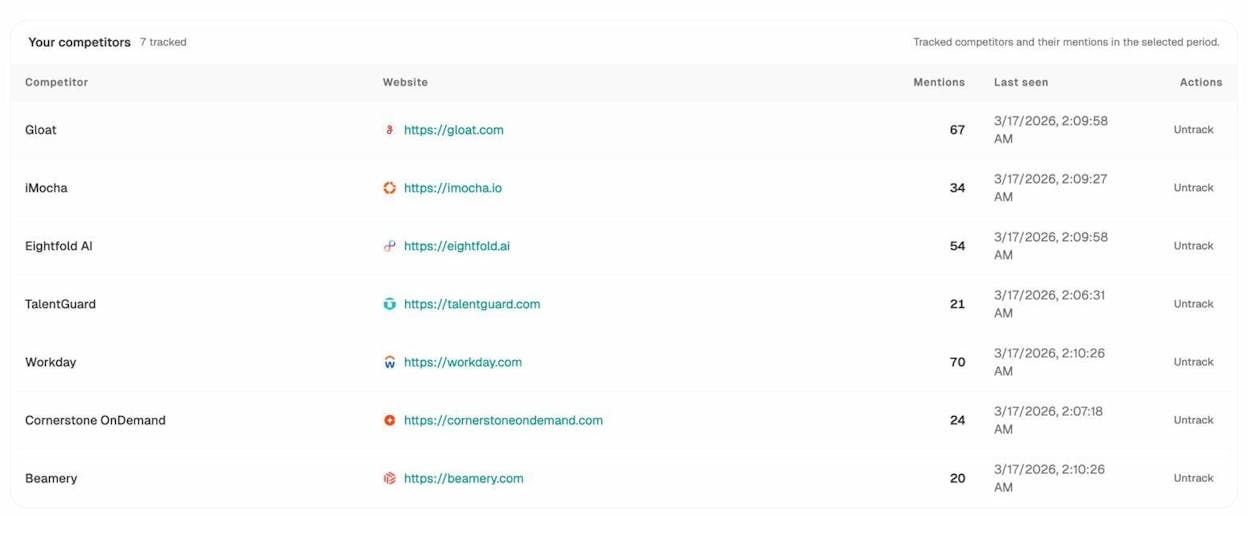
Analyze AI automatically detects your competitors based on which brands appear alongside yours in AI responses. It shows you suggested competitors (brands that AI engines frequently mention but you have not tracked yet) and lets you add them with one click.
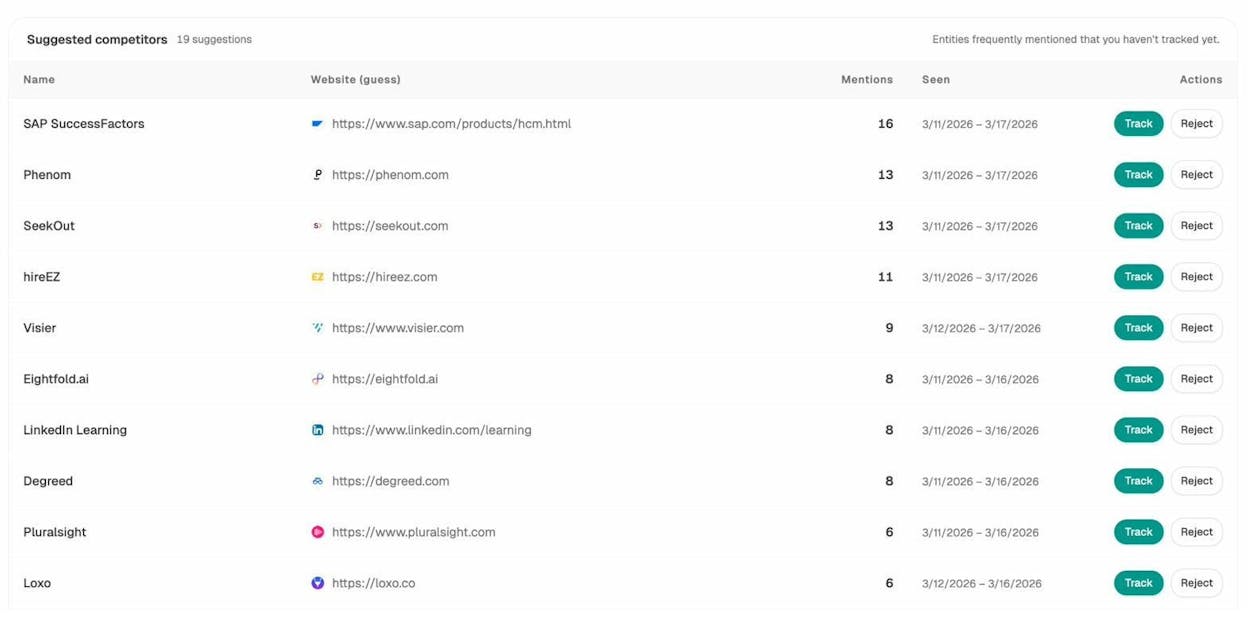
Once tracked, you can see each competitor’s mention count and compare their visibility to yours over time.
Monitor Which Sources AI Engines Cite
When AI engines answer questions about your industry, they cite specific sources. These citation analytics tell you which websites shape the AI’s understanding of your space.
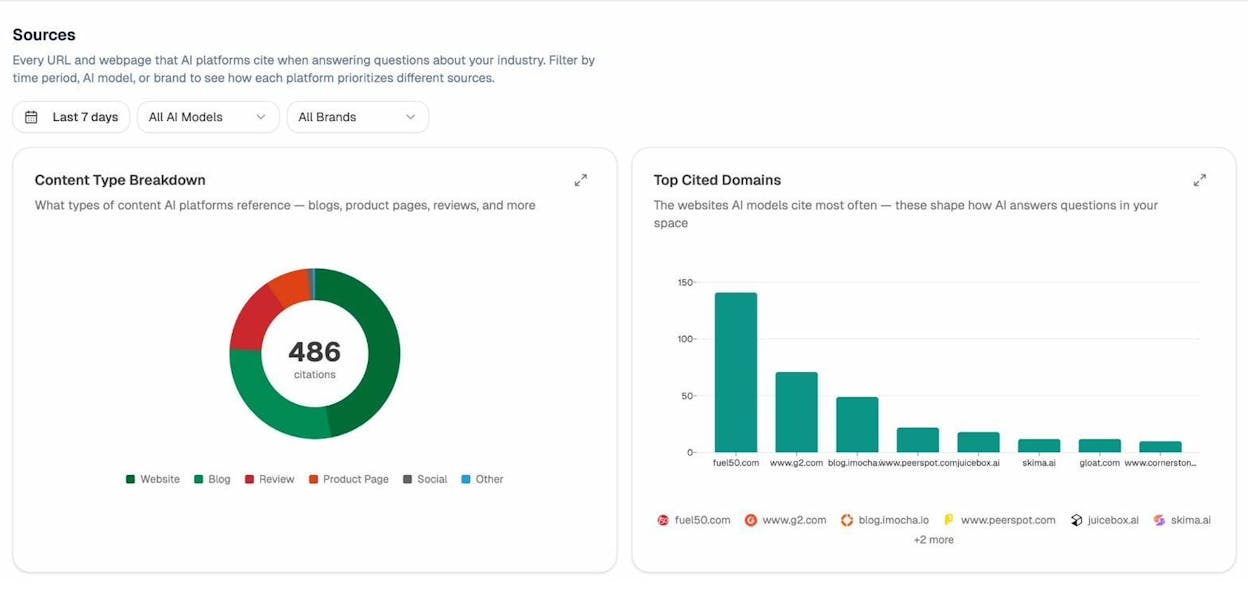
If a competitor’s blog is getting cited 150 times while yours is getting cited 20 times, you know where the gap is. You can then examine their cited pages to understand what AI engines prefer, whether that is data-rich content, structured guides, or authoritative product pages.
Monitor Brand Perception in AI Search
AI engines do not just mention your brand. They describe it. And the way they describe you matters.
Analyze AI’s Perception Map plots your brand and competitors on a 2x2 grid based on visibility and narrative strength. Brands in the top right (Visible and Compelling) are mentioned often with strong, positive descriptions. Brands in the bottom left are barely visible and have weak narratives.
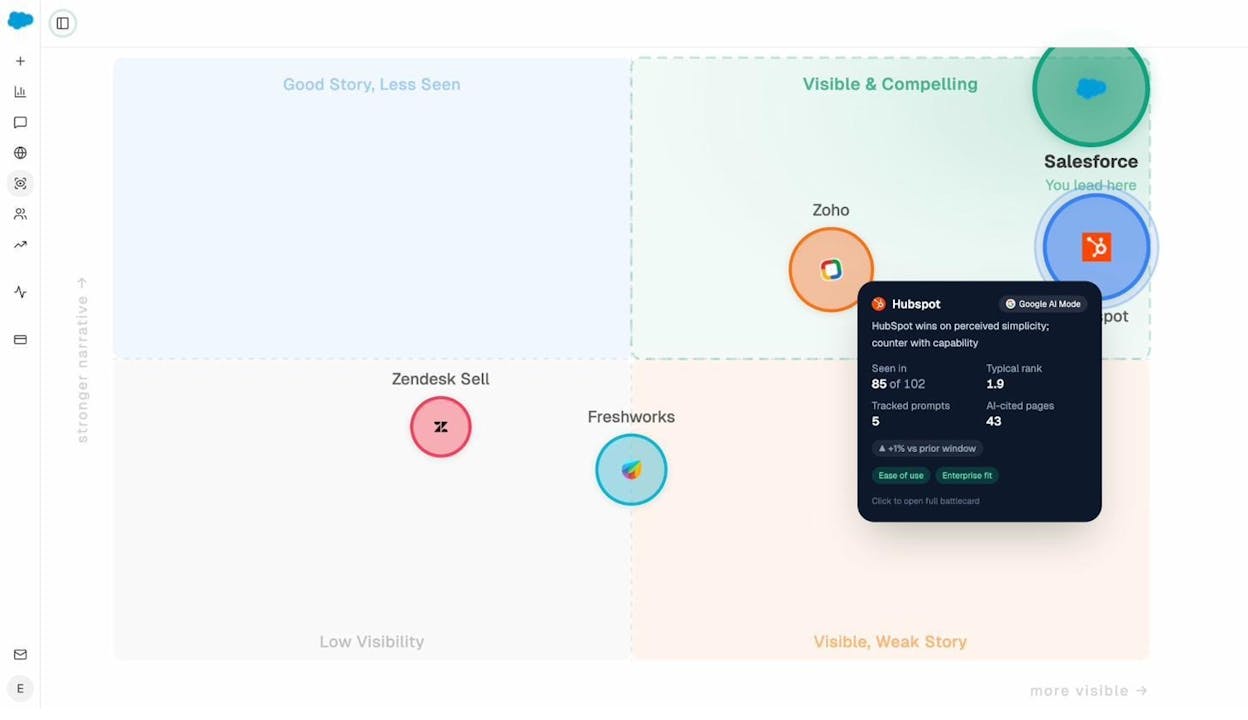
Click on any competitor to see detailed metrics including how many prompts they appear in, their typical rank position, and the specific themes AI engines associate with them. Use this to identify AI sentiment monitoring opportunities where you can strengthen your brand’s narrative.
Set Up Automated Weekly Digests
The most practical way to monitor AI search is through automated email digests.
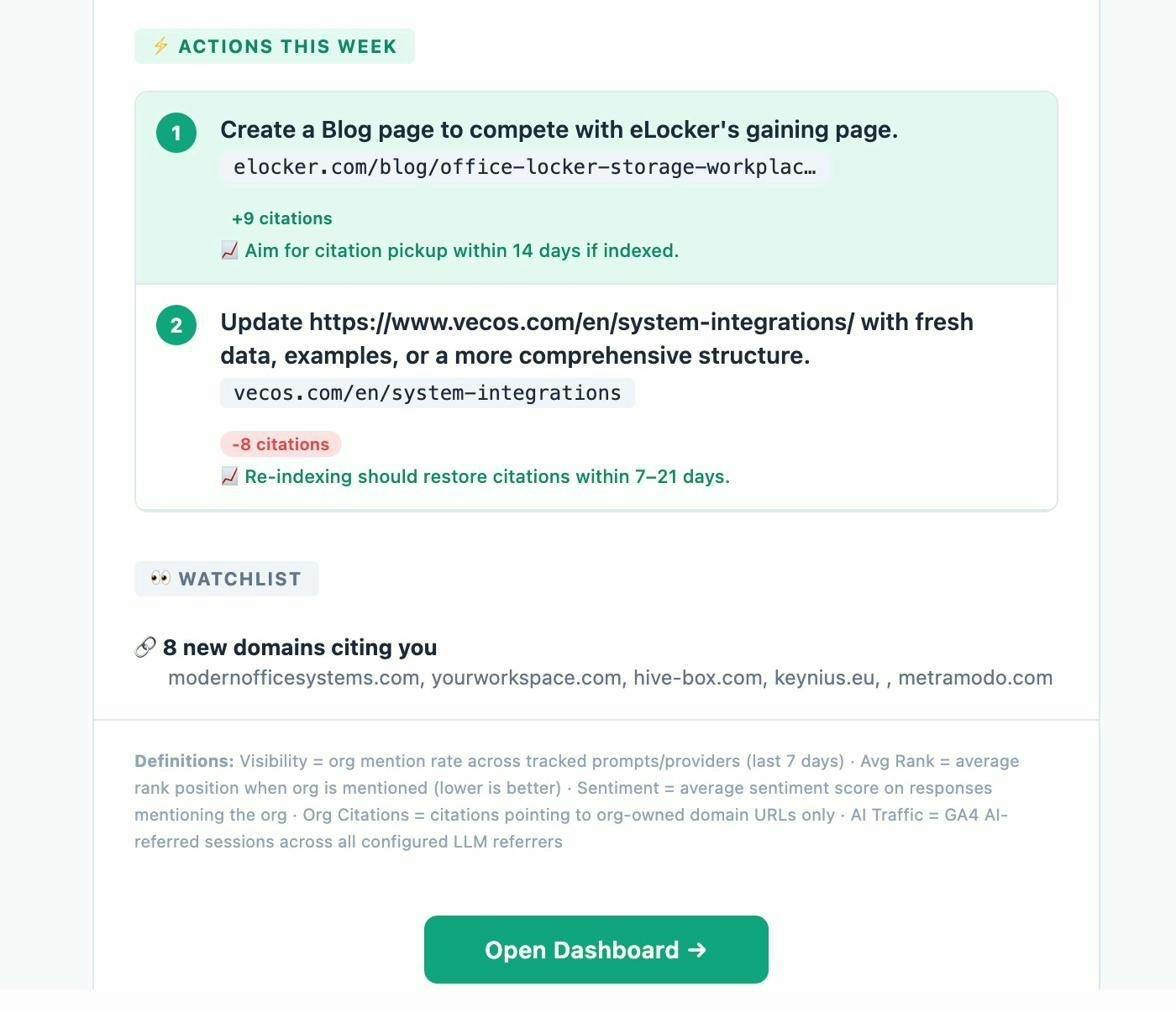
Analyze AI’s weekly email digests send you a summary every week with your key metrics (visibility, average rank, sentiment, citations, AI traffic), pages that are gaining or losing citations, competitor pages that are gaining citations, an explanation of why these changes are happening, and specific action items for the week.
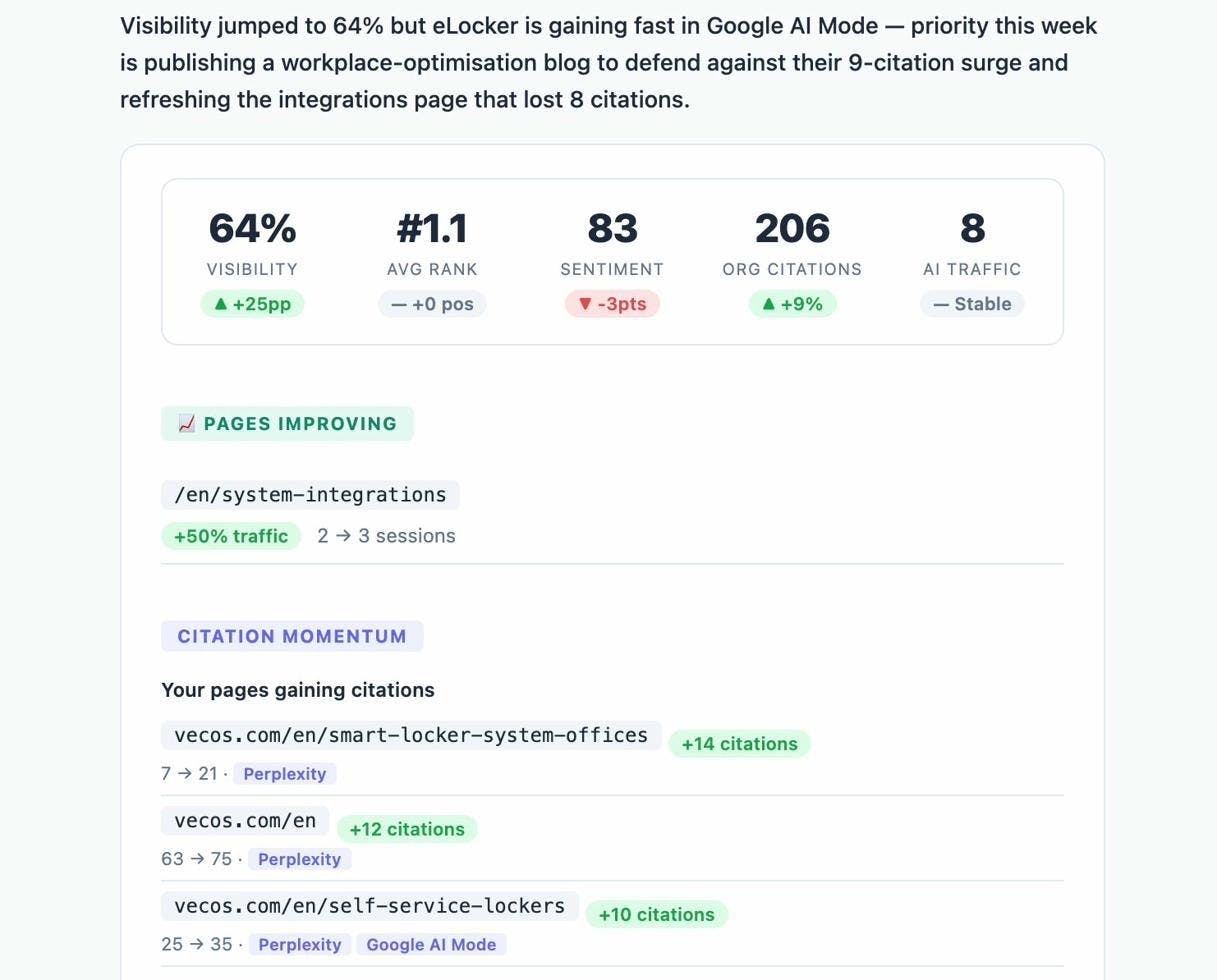
The digest also surfaces competitor threats. If a competitor’s blog post just picked up 9 new citations in Google AI Mode while your related page dropped, the digest tells you exactly what happened and what to do about it.
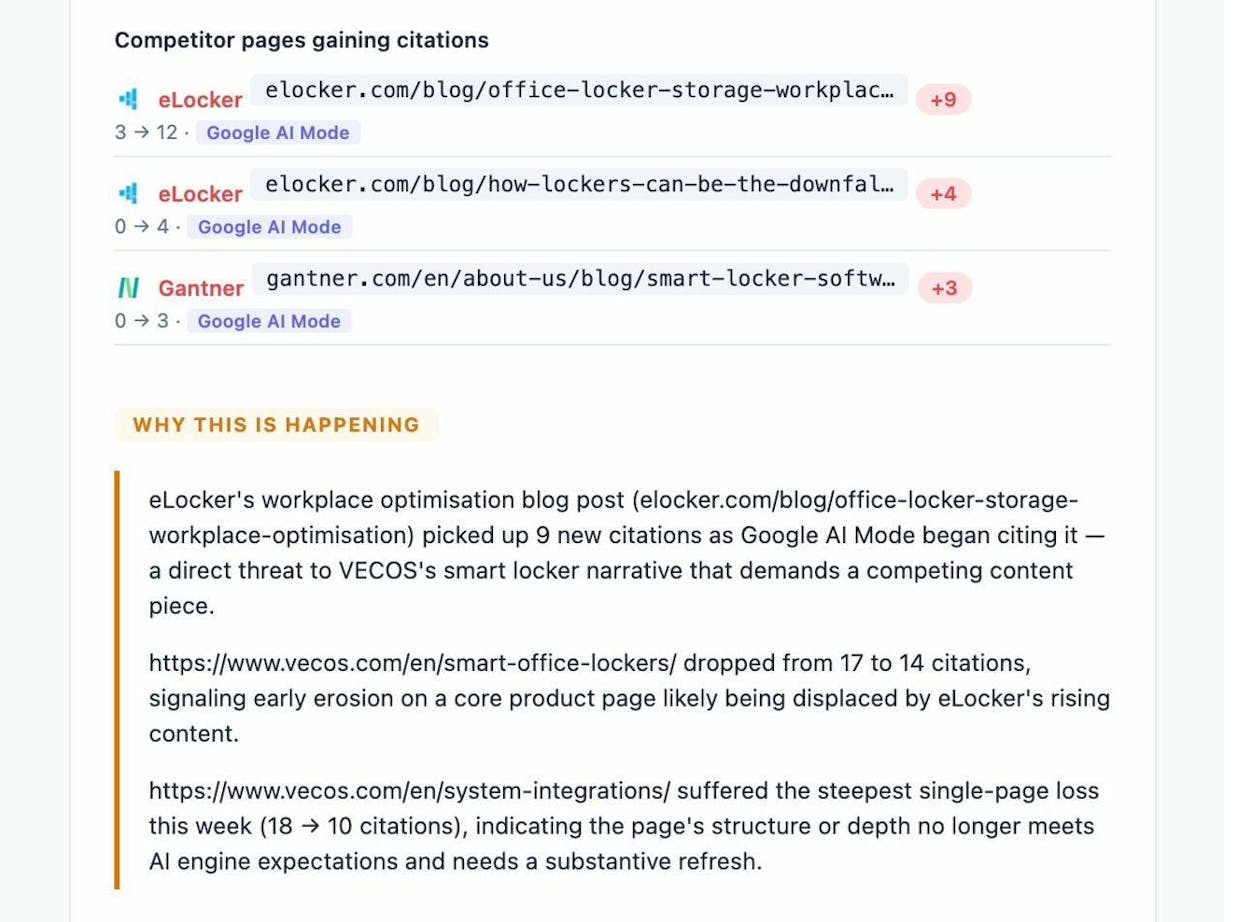
Each email ends with specific, prioritized actions for the week. “Create a blog page to compete with eLocker’s gaining page” or “Update your system integrations page with fresh data.” These are not generic suggestions. They are based on real changes in your AI search landscape.
Best Tools for Monitoring Website Changes
Here is a breakdown of the tools mentioned in this guide, organized by what they monitor.
|
Tool |
Best For |
Free Option? |
|---|---|---|
|
Google Search Console |
Rankings, indexation, Core Web Vitals, CTR |
Yes, fully free |
|
Screaming Frog |
Content changes, broken links, redirect audits, technical SEO |
Free for up to 500 URLs |
|
ContentKing (Conductor) |
Real-time content change monitoring |
No, paid only |
|
Visualping |
Visual change detection on specific pages |
Free for up to 5 pages |
|
ChangeTower |
Website change monitoring with screenshots and diffs |
Limited free plan |
|
Finding broken internal and external links |
Yes, fully free |
|
|
Checking current keyword rankings |
Yes, fully free |
|
|
Monitoring domain authority over time |
Yes, fully free |
|
|
Estimating website traffic |
Yes, fully free |
|
|
AI search visibility, citations, prompts, competitor intelligence |
Free trial available |
For a more complete list, see our guide to the best website monitoring tools.
How to Set Up a Monitoring Workflow
Knowing what to monitor is one thing. Building a consistent workflow is another. Here is a schedule you can follow.
Daily
Check Google Search Console for sudden crawl errors or indexation drops. These require immediate attention because every day your page is deindexed is a day you lose 100% of that page’s traffic.
Weekly
Review your rank tracking data. Look for keywords that dropped 5 or more positions. Cross-reference with your site change log to see if anything was updated on those pages.
Check your Analyze AI weekly digest. Review your AI visibility changes, competitor moves, and citation shifts. Act on the prioritized recommendations.
Run a quick check of your Core Web Vitals in Google Search Console. Flag any URLs that moved from “Good” to “Needs Improvement.”
Monthly
Run a full site crawl with Screaming Frog or your crawler of choice. Compare to the previous month’s crawl. Look for title tag changes, new broken links, redirect chain growth, and page speed regressions.
Audit your outgoing links. Export all external links from your crawl. Flag any new domains you did not add. Investigate any links pointing to suspicious or dead domains.
Review your AI search sources in Analyze AI. Check which domains AI engines are citing most. If a new competitor domain appears in the top cited sources, investigate what content they published.
Run your top 20 keywords through the Analyze AI SERP Checker to see if the competitive landscape has shifted.
Quarterly
Do a comprehensive content audit. Check all pages that lost traffic in the quarter. Determine whether the cause was a content change, a technical issue, a competitor improvement, or an algorithm update.
Review your AI search visibility trends. Are you gaining or losing visibility across ChatGPT, Perplexity, and Google AI Mode? If one channel is dropping, dig into the prompts where you lost position and examine what changed.
Assess your competitor intelligence data. Review which competitors gained the most AI citations in the quarter. Analyze their top-cited pages to understand what content strategy is working for them in AI search.
Common Mistakes to Avoid
Monitoring too many pages manually. You cannot manually check every page on your site for changes. Use automated tools and only do manual spot checks on your top revenue-driving pages.
Reacting to every small change. Not every ranking fluctuation requires action. Rankings move up and down by a few positions constantly. Focus your attention on changes of 5+ positions that persist for more than a week.
Ignoring AI search entirely. If your brand is not being mentioned by ChatGPT or Perplexity today, that does not mean it will not matter tomorrow. AI search traffic is growing fast. Start monitoring now so you have baseline data when it becomes a significant channel for your business. Read more about AI search monitoring tools to get started.
Not logging your own changes. Keep a simple change log (a shared spreadsheet works fine) where your team records every intentional change to the website. Date, page URL, what changed, who changed it, and why. When rankings drop, the first thing you check is your own change log.
Only monitoring Google. Google is still the dominant search engine. But Bing drives AI searches through Copilot. Perplexity has its own index. ChatGPT pulls from web data. Monitoring only Google rankings gives you an incomplete picture. The best SEO reporting tools now include AI search data alongside traditional metrics.
Final Thoughts
Website monitoring is not a one-time project. It is an ongoing practice that protects your traffic, catches problems early, and keeps you ahead of competitors.
The good news is that the tools exist to automate most of it. Google Search Console handles the basics. A crawler like Screaming Frog catches content and technical changes. And Analyze AI adds the AI search layer that most teams are still ignoring.
Start with the weekly workflow above. Expand to the monthly and quarterly checks as you build the habit. And do not forget about AI search. It is not replacing SEO, but it is absolutely an additional channel worth monitoring.

Ernest

Ibrahim


