



Summarize this blog post with:


In this article, you’ll learn what programmatic SEO is, why companies like Zapier and Zillow use it to generate millions of pageviews, and how to get started—even without a developer. You’ll also learn how to find “scalable” keywords, source the right data, build page templates, avoid Google spam penalties, and measure whether your programmatic pages actually drive results. And because AI search engines like ChatGPT, Perplexity, and Gemini now surface programmatic content in their answers, we’ll cover how to track and optimize your visibility there, too.
Table of Contents
What Is Programmatic SEO?
Programmatic SEO is the process of creating keyword-targeted web pages at scale, using data and templates instead of writing each page by hand.
Here’s the core idea: instead of manually crafting a unique page for every keyword you want to rank for, you build one page template and populate it with different data—automatically generating hundreds or thousands of pages from a single design.
Think of Amazon’s product pages. Every product page follows the same template: title, images, price, reviews, description, and related products. But there are millions of them, each targeting a unique product keyword. Amazon didn’t hire a million writers—they built a template and plugged in product data.
The same principle applies to smaller companies. If your business serves multiple locations, offers many products, or provides data that varies by category, programmatic SEO lets you capture search demand at a scale that manual content creation can’t match.
What makes it different from regular SEO content? A comparison helps:
|
Traditional SEO Content |
Programmatic SEO |
|
|---|---|---|
|
Creation method |
Each page is written individually |
Pages are generated from a template + data |
|
Scale |
Tens to hundreds of pages |
Hundreds to millions of pages |
|
Keyword targeting |
One unique keyword per page |
One keyword pattern across many variations |
|
Time to publish |
Hours or days per page |
Minutes per batch of pages |
|
Content depth |
Deep, editorial, nuanced |
Structured, data-driven, consistent |
|
Best for |
Topics requiring expert opinion |
Topics with repeatable data patterns |
Programmatic SEO is not a replacement for editorial content. It works best as a complement—covering large keyword territories that would be impossible to address manually, while your editorial content handles topics that require depth, nuance, and original thinking.
Real Examples of Programmatic SEO
Programmatic SEO is not a new idea. If you’ve visited Amazon, Yelp, TripAdvisor, or Zillow, you’ve browsed programmatic pages. But you don’t need to be a tech giant to use this strategy. Here are examples across different company sizes and industries.
Zapier’s App Directory
URL: zapier.com/apps
Estimated pages: 800,000+
Estimated monthly organic traffic: 306,000
Zapier is a workflow automation tool that connects software products. They’ve programmatically created landing pages for each of the thousands of apps they integrate with. Every page follows the same layout—app description, available triggers and actions, and popular workflows—but the data changes for each app.
What makes it work: each page provides real, functional value. Visitors can actually set up automations directly from the page, making it more than just a keyword-targeting exercise.
![[Screenshot: Zapier’s app directory page showing the consistent template structure with app-specific data for each integration]](https://www.datocms-assets.com/164164/1774966424-blobid1.png?auto=format,compress&w=1248&fit=max)
Wise’s Currency Conversion Pages
URL: wise.com/us/currency-converter/
Estimated pages: 14,000+
Estimated monthly organic traffic: 4.6 million
Wise offers international banking services and generates millions of monthly pageviews by programmatically creating pages for every currency pair—US Dollars to Indian Rupees, Euros to Brazilian Reals, and so on.
What makes it work: beyond basic conversion, each page includes historical exchange rate charts, comparisons with other providers, and the ability to actually send money through Wise. The data is unique, timely, and directly tied to their product.
![[Screenshot: Wise’s currency conversion page showing exchange rates, historical data charts, and the “Send money” CTA]](https://www.datocms-assets.com/164164/1774966428-blobid2.png?auto=format,compress&w=1248&fit=max)
NomadList’s Location Pages
URL: nomadlist.com/chiang-mai
Estimated pages: 25,000+
Estimated monthly organic traffic: 41,000
NomadList helps digital nomads choose cities to live and work from. Each city page follows the same template—internet speeds, average temperatures, cost of living, safety scores, and community ratings—but the data is unique per location.
What makes it work: the data combines public sources with proprietary, community-generated data (reviews, coworking space ratings, neighborhood scores) that no other site has.
![[Screenshot: NomadList location page showing the consistent grid of data points like internet speed, cost, and temperature for a specific city]](https://www.datocms-assets.com/164164/1774966437-blobid3.jpg?auto=format,compress&w=1248&fit=max)
Webflow’s Template Directory
URL: webflow.com/made-in-webflow/website
Estimated pages: 31,000+
Estimated monthly organic traffic: 27,600
Webflow is a no-code website builder. They built programmatic pages for thousands of user-created templates. Each page includes a preview, category tags, and a clone button.
What makes it work: the pages serve a clear commercial purpose—visitors discover templates and become Webflow users by cloning them. The user-generated content (the templates themselves) provides natural uniqueness.
![[Screenshot: Webflow’s template directory showing template cards with previews and clone buttons]](https://www.datocms-assets.com/164164/1774966437-blobid4.jpg?auto=format,compress&w=1248&fit=max)
G2’s Software Review Pages
URL: g2.com/products/
Estimated pages: 150,000+
Estimated monthly organic traffic: 5.6 million
G2 creates programmatic review pages for software products across hundreds of categories. Each page follows the same structure—star rating, pros and cons summaries, user reviews, pricing, and comparison widgets—but the data is unique per product.
What makes it work: G2 has built a moat of proprietary review data that can’t be easily replicated. Their programmatic pages are essentially databases of structured user opinions, which is exactly what searchers want.
![[Screenshot: G2 product review page showing the structured layout with ratings, reviews, and comparison data]](https://www.datocms-assets.com/164164/1774966443-blobid5.png?auto=format,compress&w=1248&fit=max)
What These Examples Have in Common
Every successful programmatic SEO example shares three traits:
Relevant, unique data. Each page contains information that is genuinely different from the next. Currency rates change by pair. City data changes by location. Reviews change by product.
A useful template. The page design actually helps users accomplish something—compare currencies, evaluate cities, find templates, read reviews. It’s not just a keyword-stuffed shell.
Product alignment. The content naturally connects to what the company sells. Zapier’s app pages lead to automation setups. Wise’s conversion pages lead to money transfers. This makes the pages commercially valuable, not just traffic generators.
Programmatic SEO… or Spam?
Before you start dreaming about publishing thousands of pages, consider this: Google’s John Mueller has publicly called programmatic SEO “often a fancy banner for spam.”
He’s not wrong. For every Zapier or Wise that does programmatic SEO well, there are hundreds of sites publishing thousands of near-identical pages stuffed with thin, auto-generated text that helps no one.
Here’s how to tell the difference:
|
Signal |
Likely Helpful |
Likely Spam |
|---|---|---|
|
Data source |
Proprietary or licensed data that adds real value |
Scraped or generic data available everywhere |
|
Page uniqueness |
Substantial content differences between pages |
Only a city name or keyword swapped out |
|
User intent |
Page directly answers what the searcher needs |
Page exists only to capture the keyword |
|
Functionality |
Interactive tools, calculators, or actions available |
Static text with no utility |
|
Template quality |
Well-designed, easy to use, includes visualizations |
Basic text blocks with keyword insertions |
Google’s spam policies explicitly call out “automatically generated content” as a violation when the pages are created primarily to manipulate search rankings rather than help users. Your programmatic pages need to pass the same quality bar as your editorial content.
A practical test: would someone searching for this keyword find your page more helpful than a blank page? If the honest answer is “barely,” you’re building spam.
How AI Search Engines Treat Programmatic Content
Here’s something the SEO community hasn’t fully reckoned with yet: AI search engines like ChatGPT, Perplexity, Claude, and Gemini also cite and reference programmatic pages—but with different criteria than Google.
AI models tend to prioritize pages that are:
-
Data-rich and structured. Pages with clear data points, tables, and structured information get cited more frequently than walls of text. This actually favors well-built programmatic pages.
-
Authoritative sources. AI models weight domain authority and topical relevance heavily. A programmatic page on a trusted domain (like Wise for currency data) gets cited. The same page on an unknown domain may not.
-
Uniquely informative. If your programmatic page contains data that’s available nowhere else, AI models are more likely to cite it as a source. Generic, scraped data is less useful to models than it is to Google’s index.
This creates an interesting opportunity: programmatic pages built around proprietary data may actually perform better in AI search than in traditional search, because AI models value unique, structured information highly.
To track how your programmatic pages perform across AI engines, you can use Analyze AI to monitor which pages get cited, by which AI platforms, and how often. This is especially useful for programmatic content because you may have hundreds of pages—and knowing which template variations AI models prefer can guide your optimization.
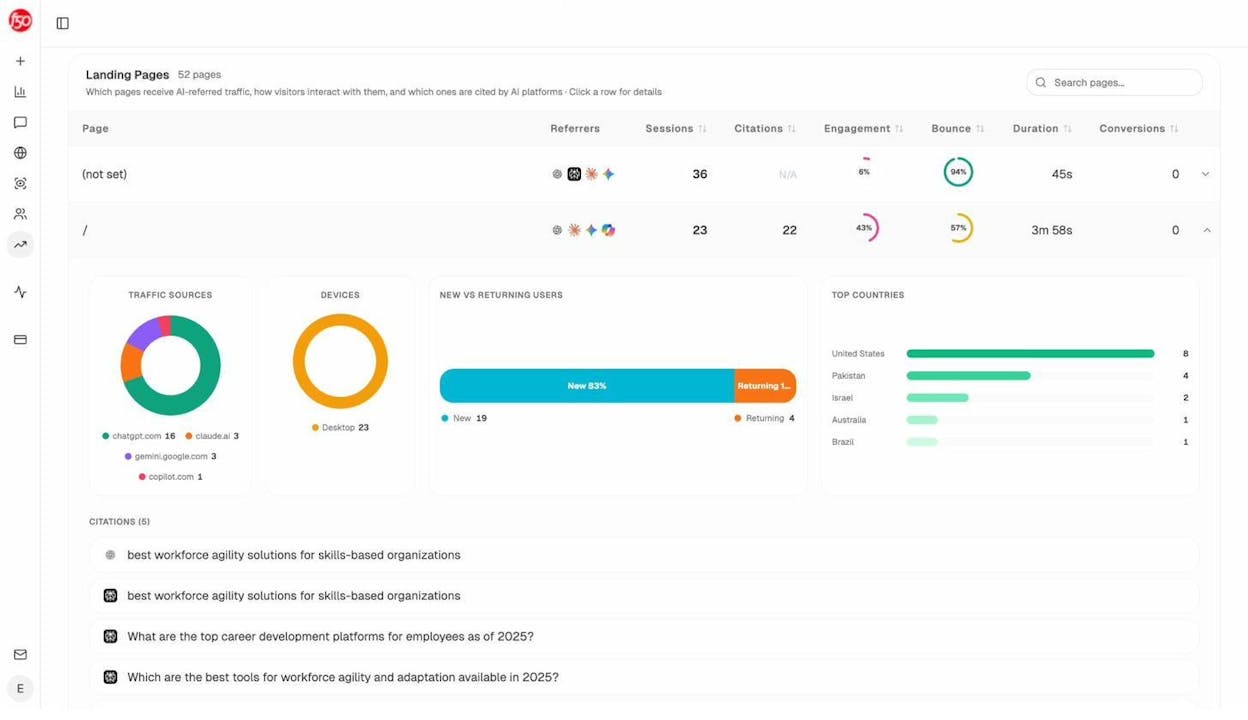
The Landing Pages view in Analyze AI shows exactly which of your pages receive AI-referred traffic, what AI engines send that traffic, and how visitors engage. For programmatic content, this data is gold—it tells you which template variations resonate with AI models, so you can refine your approach.
How to Get Started with Programmatic SEO
True programmatic content at the scale of Zapier or Wise requires developers. But you can start smaller—targeting a few hundred or a few thousand pages—using no-code tools and spreadsheets.
Here’s a step-by-step process to go from zero to published programmatic content.
Step 1: Find Keywords That Scale
Programmatic SEO only works with keywords that follow a repeatable pattern with hundreds or thousands of variations. You need to find keyword “families” where the search intent is identical, but one variable changes.
Common scalable keyword patterns include:
-
[Topic] in [Location] — “cost of living in Texas,” “cost of living in California”
-
[Product] vs [Product] — “Slack vs Teams,” “Notion vs Coda”
-
Best [Product] for [Use Case] — “best CRM for startups,” “best CRM for real estate”
-
[Product] integrations — “Salesforce integrations,” “HubSpot integrations”
-
[Topic] statistics — “email marketing statistics,” “ecommerce statistics”
-
[Tool/Product] alternatives — “Asana alternatives,” “Monday.com alternatives”
How to find these patterns:
Start with a keyword research tool. Enter seed keywords relevant to your business—terms your audience already searches for. Then look at keyword reports to spot repeating structures.
![[Screenshot: Keyword research tool showing matching terms report with keyword patterns visible—cost of living keywords with location variations]](https://www.datocms-assets.com/164164/1774966449-blobid7.png?auto=format,compress&w=1248&fit=max)
For example, a personal finance site might enter “cost of living” and discover over 1,000 keywords following the pattern “cost of living in [state/city]”—with a combined monthly search volume exceeding 100,000.
You can use Analyze AI’s free Keyword Generator to uncover keyword ideas for your seed terms. Pair this with the Keyword Difficulty Checker to filter for keywords where your site has a realistic chance of ranking.
Filtering for realistic targets:
Not every keyword pattern is worth pursuing. Filter your list by:
-
Keyword difficulty (KD) under 30. If you’re a newer or smaller site, target keywords that don’t require hundreds of backlinks to rank.
-
Domain Rating (DR) of top-ranking sites under 50. If the SERP is dominated by high-authority sites, your programmatic pages will struggle.
-
Monthly search volume above 50 per keyword. Below this, the traffic payoff per page may not justify the effort.
Once you’ve identified a scalable keyword pattern, export your keyword list. You’ll use it to build your data model and page template.
Finding scalable keyword patterns for AI search:
Here’s where things get interesting. Beyond traditional keyword patterns, you should also research the types of prompts people ask AI search engines. These prompts often follow patterns too—and they’re not always the same as Google keywords.
For instance, someone might search Google for “best CRM for startups” but ask ChatGPT “what CRM should a 5-person startup use in 2026?” The intent overlaps, but the phrasing differs—and AI models may surface different pages for each.
Analyze AI’s prompt tracking feature lets you monitor which prompts mention your brand (and your competitors). By reviewing the Prompts dashboard, you can identify prompt patterns that align with your programmatic keyword strategy, then optimize your pages to be cited in those responses.
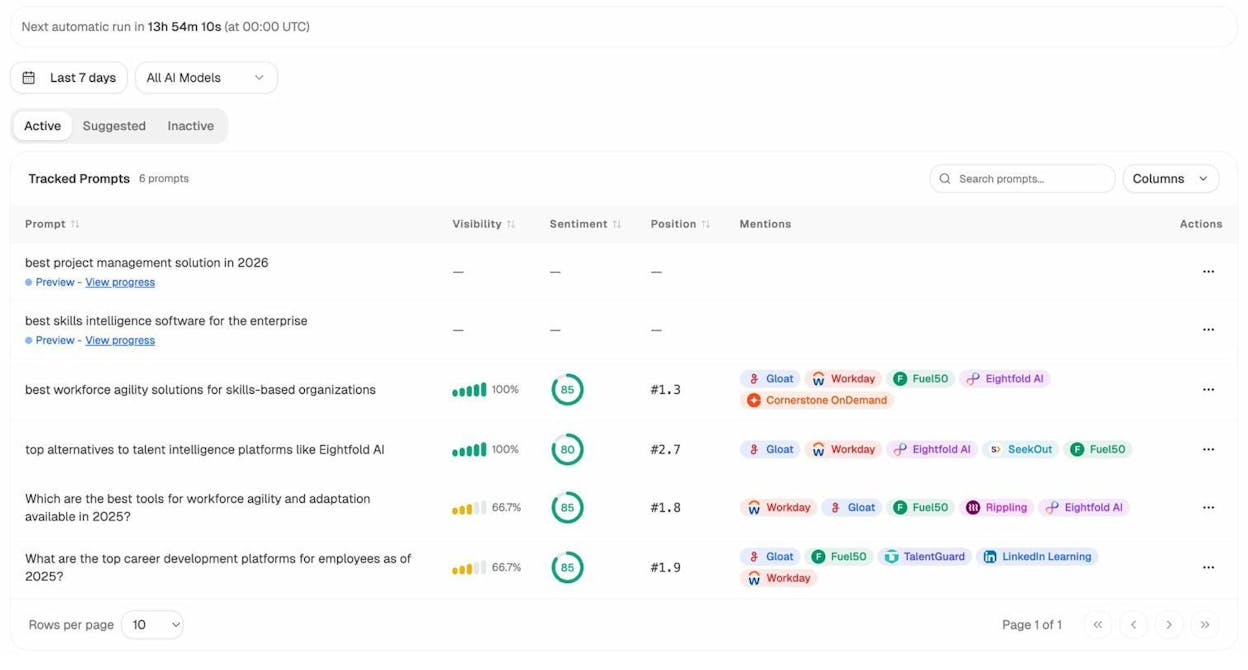
You can also use the Suggested Prompts tab to discover new prompt patterns you haven’t tracked yet. If you notice a cluster of prompts following a pattern like “best [tool] for [use case]” and you have programmatic pages targeting those keywords, you’ll want to monitor whether AI engines cite them.
Step 2: Analyze Search Intent
Once you have your keyword pattern, you need to understand what content would actually help someone searching for these terms.
The fastest way: search for 5–10 variations of your keyword and study the top-ranking pages. Look for commonalities in:
-
Content format. Are the top results listicles, data pages, comparison tables, or guides?
-
Data points included. What specific information does every top-ranking page contain?
-
Page structure. How is the information organized? What headings do they use?
-
Interactive elements. Do top pages include calculators, filters, or visualizations?
For the “cost of living in [state]” example, the top-ranking pages consistently include:
-
A cost of living index score (usually on a 0–100 scale)
-
Comparison with the national average and neighboring states
-
Breakdown by category—housing, food, transportation, healthcare, utilities
-
Average salary data for the state
-
A summary verdict: is this state expensive or affordable?
These data points become the requirements for your page template. Every page you generate should include all of these elements—because that’s what searchers expect to find.
![[Screenshot: A top-ranking “cost of living” search result showing the standard data layout with index scores, category breakdowns, and comparison tables]](https://www.datocms-assets.com/164164/1774966455-blobid9.png?auto=format,compress&w=1248&fit=max)
Use the SERP Checker to quickly see what’s ranking for your target keywords and study the content format that dominates the results.
Pro tip: Don’t just match the existing top results—beat them. If every top result shows a cost of living index and category breakdown, your page should also include interactive comparison tools, historical trend data, or localized salary information. This is the information gain that separates rank-worthy programmatic pages from commodity content.
Step 3: Source Your Data
Data is the lifeblood of programmatic SEO. Without relevant, accurate data, your pages will be empty shells that Google (and users) will ignore.
There are four types of data you can use:
Proprietary data — original data that only your company has. This is the strongest type because no competitor can replicate it. Examples: your product’s usage analytics, customer reviews, performance benchmarks from your platform.
Public data — government databases, academic research, open data portals. High quality but available to anyone. Examples: Census data, BLS statistics, public health records, weather data. Sites like Data.gov, Kaggle, and the World Bank Open Data portal offer thousands of usable datasets.
Licensed data — paid data from commercial providers. Higher quality and less commonly used than public data. Examples: financial market data, real estate valuations, industry benchmarks.
Scraped data — extracted from other websites using web scraping tools. Useful but legally risky—check the source site’s terms of service and applicable copyright laws before scraping.
How to evaluate your data source:
|
Criteria |
Strong Data |
Weak Data |
|---|---|---|
|
Uniqueness |
Only available from your source |
Same data used by every competitor |
|
Freshness |
Updated regularly (daily, weekly, monthly) |
Static, one-time snapshot |
|
Completeness |
Covers all keyword variations |
Gaps that leave some pages empty |
|
Accuracy |
Verified, sourced from trusted providers |
Unverified, potentially outdated |
|
Structure |
Clean, consistent format across records |
Messy, inconsistent, requires heavy cleaning |
The best programmatic SEO strategies combine multiple data sources. Wise doesn’t just show one conversion rate—they show real-time rates, historical trends, and bank comparisons. NomadList combines public weather data with proprietary community scores. Layering data sources creates pages that are genuinely more useful than any single source alone.
Organizing your data:
Once you’ve identified your data sources, centralize everything in a structured format. The simplest approach is a spreadsheet (Google Sheets or CSV) with one row per page and one column per data point.
For the “cost of living in [state]” example, your spreadsheet might look like:
|
State |
Overall Index |
Housing Index |
Food Index |
Transport Index |
Healthcare Index |
Avg Salary |
National Rank |
|---|---|---|---|---|---|---|---|
|
California |
142.2 |
196.5 |
105.1 |
132.9 |
107.5 |
$68,510 |
48/50 |
|
Texas |
92.1 |
84.3 |
93.4 |
97.5 |
95.6 |
$56,390 |
14/50 |
|
Ohio |
89.5 |
67.2 |
96.1 |
98.3 |
91.4 |
$51,240 |
8/50 |
Each row contains everything needed to generate one page. When you combine this data with a page template, you can create all 50 state pages in minutes.
Step 4: Design Your Page Template
Your page template is the blueprint that turns raw data into a finished page. It defines the structure, layout, and user experience for every page you generate.
A strong template has three layers:
Layer 1: Static elements — content that stays the same across all pages. Your site navigation, footer, sidebar, and boilerplate explanations (“What is cost of living?” or “How we calculate these scores”).
Layer 2: Dynamic data — the variables that change per page. For cost of living, this includes the state name, index scores, salary data, and rankings. These are pulled from your spreadsheet.
Layer 3: Contextual content — generated or semi-generated text that adapts based on the data. For example, a sentence like “California’s cost of living is 42% above the national average, making it one of the most expensive states” is contextual—it’s dynamically generated based on the data, but reads like human-written text.
Building a no-code prototype:
If you don’t have developer resources, you can prototype your template using Google Sheets formulas. Here’s how:
-
Create a “Keywords” tab with your target keywords, slugs, and page titles.
-
Create a “Data” tab with all your data points, one row per page.
-
Create a “Template” tab that uses VLOOKUP or INDEX/MATCH formulas to pull data into a text template.
For example, a formula like:
="The cost of living in "&A2&" is "&IF(B2>100,"above","below")&" the national average, with an overall index of "&B2&". Housing costs are "&IF(C2>100,"higher","lower")&" than average at "&C2&"."
This generates unique body copy for each state by combining your template text with dynamic data points. When you drag the formula down, every row produces a different paragraph.
![[Screenshot: Google Sheets template showing the formula structure with Keywords tab, Data tab, and Template tab generating unique body copy for each state variation]](https://www.datocms-assets.com/164164/1774966455-blobid10.png?auto=format,compress&w=1248&fit=max)
Important: The text generated by this approach will be thin on its own. To create truly helpful pages, you’ll need to add:
-
Data visualizations (charts comparing your state to others)
-
Interactive elements (calculators, filters, comparison tools)
-
Unique editorial context (written summaries that go beyond the data)
-
Related internal links (connecting to deeper editorial content)
Step 5: Add Unique Value to Avoid Thin Content
This is the step most people skip—and it’s why most programmatic SEO projects fail.
Google’s helpful content guidelines apply to programmatic pages just as much as editorial ones. A page with nothing but a few swapped data points and boilerplate text won’t rank for long, even if it technically targets a unique keyword.
Here’s how to add real value to each programmatic page:
Include data visualizations. A chart comparing cost of living across states is more useful than a table of numbers. Visualization makes your data easier to understand and harder for competitors to copy.
![[Screenshot: Example of a data visualization on a programmatic page—a bar chart comparing cost of living index scores across several states]](https://www.datocms-assets.com/164164/1774966461-blobid11.jpg?auto=format,compress&w=1248&fit=max)
Add interactive tools. If you’re building cost of living pages, include a calculator that lets users compare two states side by side. If you’re building product comparison pages, include a feature matrix that users can filter. Interactivity transforms a static data page into a tool.
Write unique contextual summaries. Use your data to generate genuinely informative text—not just “The cost of living in [State] is [X].” Instead, provide analysis: “Texas offers a cost of living 8% below the national average, with housing costs particularly low compared to coastal states. However, healthcare costs have risen 12% year over year, narrowing the gap.”
Interlink within your programmatic section. If you have 50 state cost of living pages, each page should link to related states (neighboring states, states with similar costs). This creates a natural internal linking structure that helps both users and search engines navigate your content. For more on this, see our guide on SEO internal linking.
Add editorial content connections. Link your programmatic pages to relevant editorial content on your blog. A “cost of living in Texas” page should link to your article on “how to budget for a move to Texas” or “best cities in Texas for remote workers.” This creates depth that pure programmatic pages lack.
Step 6: Build and Publish
Once your template and data are ready, it’s time to publish. The method depends on your content management system:
For WordPress sites: Use WP All Import to bulk-import pages from your spreadsheet. It supports custom fields, featured images, and most page builders.
For Webflow sites: Set up a CMS Collection and connect it to your spreadsheet via Zapier or Make. New rows automatically create new pages.
For custom sites: Export your spreadsheet as a CSV or JSON file and use your CMS’s API to programmatically create pages. Most modern CMSs (Strapi, Contentful, Sanity) support bulk imports.
For static site generators: Tools like Next.js or Gatsby can generate pages from data files at build time, creating static pages that load quickly and scale well.
Publishing checklist:
Before you publish, verify each page against this list:
-
☐ Each page has a unique title tag and meta description
-
☐ The URL slug is clean and descriptive (e.g., /cost-of-living/california)
-
☐ All data points render correctly (no empty fields or broken formulas)
-
☐ Internal links work and point to relevant pages
-
☐ The page loads quickly (under 3 seconds)
-
☐ Mobile layout renders properly
-
☐ Schema markup is present (more on this below)
Step 7: Add Schema Markup
Structured data (schema markup) tells search engines exactly what your page contains. For programmatic pages, this is especially important because search engines need to understand your data format across hundreds of similar pages.
Common schema types for programmatic content:
-
Product schema — for product comparison and review pages
-
LocalBusiness schema — for location-based pages
-
FAQPage schema — for pages with Q&A sections
-
Dataset schema — for data-heavy pages
-
BreadcrumbList schema — for navigation structure
You can template your schema markup the same way you template your content—using variables that pull from your data source. For example, a product comparison page template might include:
{
"@context": "https://schema.org",
"@type": "Product",
"name": "{{product_name}}",
"description": "{{product_description}}",
"aggregateRating": {
"@type": "AggregateRating",
"ratingValue": "{{rating}}",
"reviewCount": "{{review_count}}"
}
}
Schema markup also plays a role in how AI engines understand and cite your pages. Well-structured data makes it easier for AI models to extract specific facts from your pages, increasing the likelihood of being cited in AI search results.
How to Measure the Performance of Programmatic Pages
Publishing your pages is just the beginning. You need a measurement framework to understand what’s working, what’s not, and where to invest your optimization effort.
Track Traditional SEO Metrics
At a minimum, monitor these metrics across your programmatic page set:
Indexed pages. Use Google Search Console’s Index Coverage report to confirm that Google has indexed your pages. If a large percentage of your programmatic pages aren’t indexed, it’s a signal that Google considers them thin or duplicative.
![[Screenshot: Google Search Console index coverage report showing the ratio of indexed vs. excluded pages for a programmatic content section]](https://www.datocms-assets.com/164164/1774966461-blobid12.png?auto=format,compress&w=1248&fit=max)
Organic traffic per template. Group your programmatic pages by template type and measure total organic sessions. If one template consistently outperforms another, double down on what works.
Average position by keyword pattern. Track whether your pages rank for their target keywords. If the average position is declining, your content may be losing relevance or getting outcompeted.
Bounce rate and engagement. Programmatic pages often have higher bounce rates than editorial content. Monitor whether users interact with your data, click internal links, or convert—or whether they immediately leave.
Use the Keyword Rank Checker to spot-check rankings for your most important programmatic keywords.
Track AI Search Visibility
This is where most programmatic SEO guides stop. But traditional search metrics only tell half the story in 2026.
AI search engines now account for a growing share of traffic and brand visibility for many businesses. If your programmatic pages contain structured, authoritative data, AI models may cite them—driving traffic you won’t see in Google Analytics’ standard organic reports.
Analyze AI tracks this for you. By connecting your Google Analytics 4 account, Analyze AI’s AI Traffic Analytics dashboard shows:
-
Total sessions from AI search engines — broken down by ChatGPT, Perplexity, Claude, Copilot, Gemini, and others
-
Which landing pages receive AI-referred traffic — so you can see which programmatic templates AI models prefer
-
Engagement and conversion data — proving whether AI traffic actually converts or just bounces
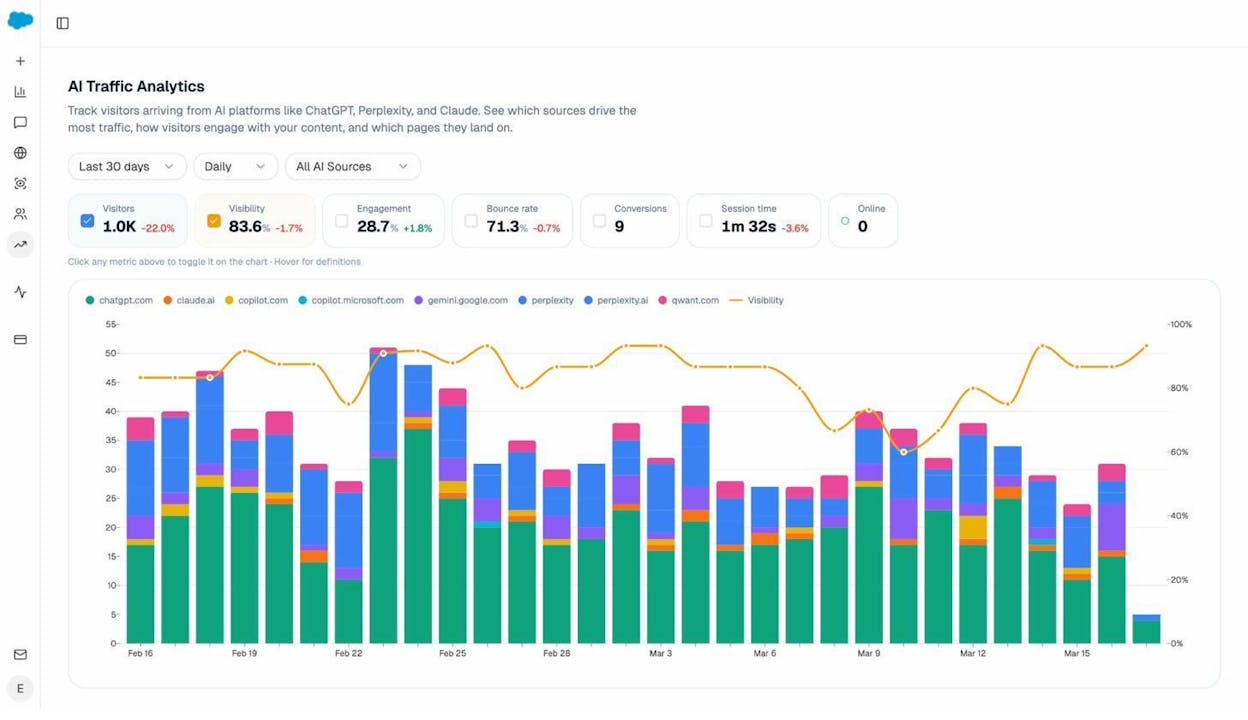
This data is critical for programmatic SEO because it answers a question that Google Analytics alone can’t: are AI search engines treating your programmatic pages as authoritative sources?
If you see certain template variations getting more AI citations than others, you can study what makes those pages different—then apply those patterns across your entire programmatic page set.
Monitor Competitor Visibility in AI Search
Programmatic SEO is inherently competitive. You’re rarely the only company building pages around a keyword pattern—especially popular ones like “[product] alternatives” or “[service] in [city].”
Analyze AI’s Competitors dashboard shows which brands AI models mention alongside yours for the same prompt patterns. This tells you who you’re competing against in AI search, how often they’re mentioned versus you, and where they win that you don’t.
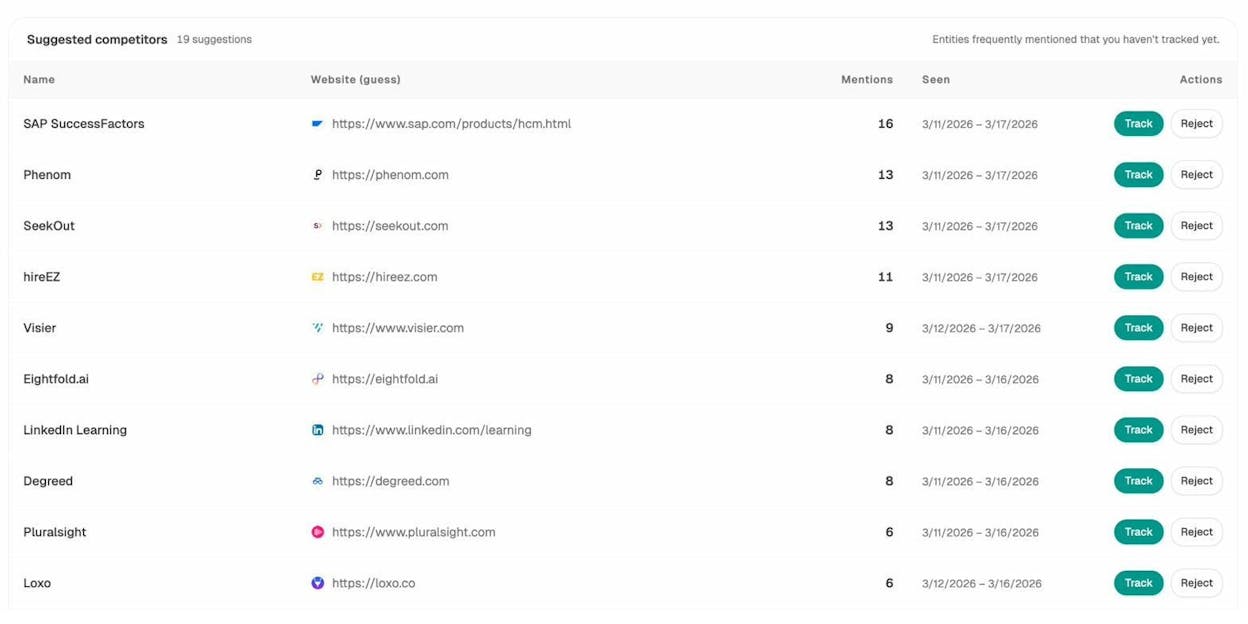
For programmatic content specifically, this intelligence is valuable because it reveals whether your competitors have built similar programmatic pages—and whether AI models prefer theirs over yours. If a competitor’s location pages consistently outperform yours in AI citations, you can study their data sources, page structure, and schema markup to find improvement opportunities.
You can also use the Opportunities view in Analyze AI to see prompts where competitors appear but you don’t—then create or optimize programmatic pages to fill those gaps.
Common Programmatic SEO Mistakes (and How to Avoid Them)
After analyzing hundreds of programmatic SEO projects, these are the patterns that consistently lead to failure:
Mistake 1: Publishing Pages with No Unique Data
If your “cost of living in California” page contains the exact same data that’s available on 20 other websites, you haven’t created a programmatic page—you’ve created a copy. Google has no reason to rank a copy.
Fix: Layer at least one proprietary or uncommon data source on top of any public data you use. Even something as simple as adding user-generated reviews, calculator tools, or comparison widgets creates differentiation.
Mistake 2: Building Too Many Pages Too Fast
Publishing 10,000 pages overnight is a red flag for Google. It signals low-quality, mass-generated content—which is exactly what Google’s SpamBrain algorithm is designed to detect.
Fix: Roll out pages gradually. Start with 50–100 pages, measure performance, refine your template, then scale. This also lets you catch data errors or template bugs before they affect thousands of pages.
Mistake 3: Ignoring Index Bloat
Thousands of thin pages don’t just fail to rank—they can actively harm your site’s overall SEO performance. Google has a limited crawl budget for your site, and if it’s spending time on thousands of low-value programmatic pages, it may crawl and index your important editorial content less frequently.
Fix: Use noindex tags on programmatic pages that don’t meet your quality threshold. Only index pages that have sufficient data and uniqueness to provide real value. Use our Website Authority Checker to monitor whether your site’s overall authority is affected as you scale.
Mistake 4: No Internal Linking Strategy
Programmatic pages often exist in isolation—disconnected from the rest of your site. Without internal links connecting them to your editorial content (and to each other), search engines struggle to understand their context and relevance.
Fix: Build internal links in three directions: 1. Between programmatic pages (e.g., “cost of living in California” links to “cost of living in Oregon” and “cost of living in Nevada”) 2. From programmatic pages to editorial content (e.g., “cost of living in California” links to your guide on “how to budget for living in California”) 3. From editorial content to programmatic pages (e.g., a blog post on “most affordable states” links to relevant state pages)
For more internal linking strategies, see our internal linking guide.
Mistake 5: Not Updating Data
Programmatic pages built on stale data lose their value over time. If your cost of living data is from 2022 and a competitor updates theirs monthly, Google will prefer the fresher source.
Fix: Build data refresh cycles into your process. Automate data pulls where possible, and schedule manual updates for data sources that can’t be automated. Display “last updated” dates on your pages to signal freshness to both users and search engines.
When Programmatic SEO Is Not the Right Approach
Programmatic SEO is powerful, but it’s not a universal solution. Here are situations where it’s the wrong call:
Your keyword pattern has too few variations. If there are only 10–20 keyword variations, just write 10–20 individual pages. The overhead of building a programmatic system isn’t worth it for small scale.
The topic requires original analysis or opinion. “Best CRM for startups” might look like a programmatic keyword, but searchers expect thoughtful, opinionated comparisons—not auto-generated feature matrices. Topics requiring editorial judgment are better served by traditional SEO content.
You don’t have access to good data. Without relevant, structured data, your programmatic pages will be hollow. If you can’t find or create data that’s genuinely useful to searchers, don’t build programmatic pages.
Your site doesn’t have enough authority. Very new or low-authority sites may find that Google doesn’t index thousands of programmatic pages. Build authority through editorial content and link building first, then expand into programmatic content.
The SERP is dominated by editorial content. If every top-ranking result for your keyword pattern is a 2,000-word editorial guide, a data-only programmatic page may not match search intent. Study the SERP before committing.
Tools for Programmatic SEO
You don’t need custom development to get started. These tools cover the major steps in a programmatic SEO workflow:
Keyword research: Use Analyze AI’s free Keyword Generator to find keyword patterns. Pair it with the Keyword Difficulty Checker to filter for realistic opportunities.
Search intent analysis: The SERP Checker shows what’s currently ranking for your target keywords, helping you understand the content format and data points that searchers expect.
Data sourcing: Kaggle, Data.gov, and Google Dataset Search are free data repositories. For scraped data, tools like Apify and Octoparse handle extraction without code.
Page building: WP All Import for WordPress, Whalesync for syncing data to multiple platforms, and Softr for building websites directly from Airtable or Google Sheets.
AI search tracking: Analyze AI tracks how your pages perform across ChatGPT, Perplexity, Claude, Gemini, and other AI search engines—showing which pages get cited, which engines drive traffic, and where competitors outperform you.
Site health monitoring: Use the free Broken Link Checker to catch broken links across your programmatic page set, and the Website Traffic Checker to monitor traffic trends.
How to Optimize Programmatic Pages for AI Search
Traditional SEO optimization (title tags, meta descriptions, keyword placement) still matters for programmatic pages. But to maximize visibility in AI search—a growing channel that now drives measurable traffic for many businesses—there are additional optimizations to consider.
Structure Data for Easy Extraction
AI models extract facts from pages by parsing structured content. The easier you make it for models to find and extract your data, the more likely they are to cite your pages.
Practical steps:
-
Use tables for comparative data instead of embedding numbers in paragraphs
-
Include clear headings that describe the data below them (e.g., “Housing Costs in California” not just “Housing”)
-
Use schema markup to label data points explicitly
-
Keep one topic per section—don’t mix unrelated data on a single page
Optimize for Prompt Patterns, Not Just Keywords
AI search users ask questions in natural language prompts, not keyword strings. While your programmatic pages target traditional keywords like “cost of living in California,” AI users might ask “Is California expensive to live in compared to Texas?”
To capture these prompts, include natural language Q&A sections on your programmatic pages. An FAQ section with questions like “Is [State] expensive to live in?” and “How does [State] compare to the national average?” gives AI models ready-made answers to cite.
You can track which prompt patterns trigger citations to your pages using Analyze AI’s prompt tracking. When you see a prompt pattern that frequently mentions your programmatic content, you can optimize your template to answer that prompt more directly—then apply the improvement across all pages.
Monitor Citations and Sources
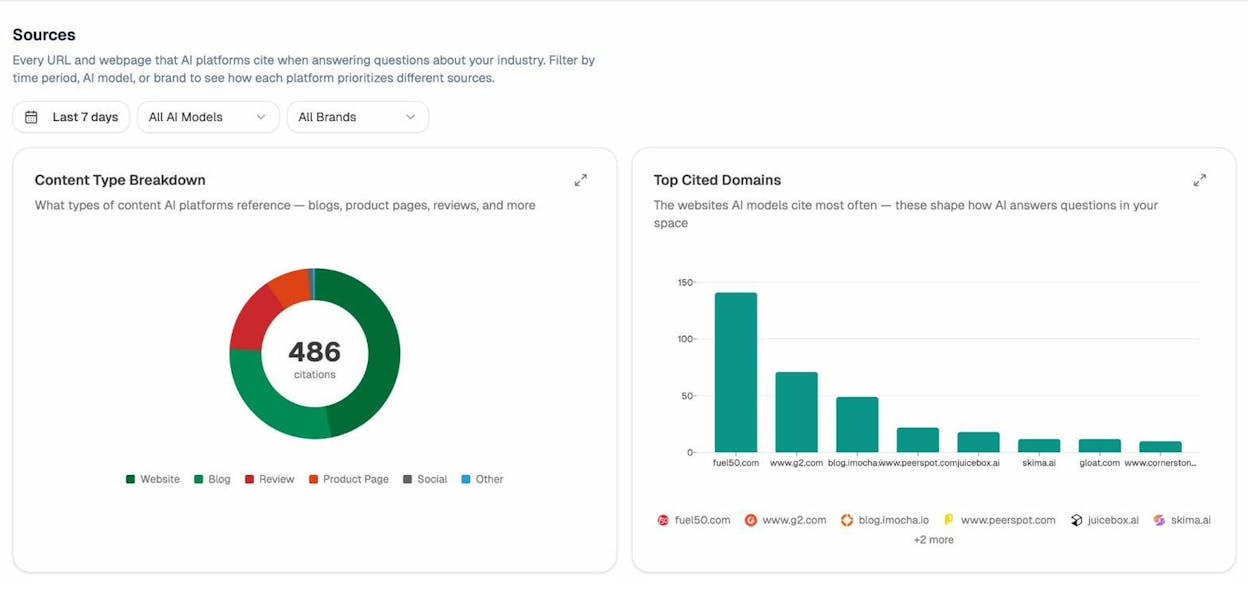
AI models cite sources when they reference data in their answers. Understanding which of your pages get cited—and which external sources compete for the same citations—helps you prioritize improvements.
Analyze AI’s Sources dashboard shows the top-cited domains in your space, broken down by content type (blogs, product pages, reviews, etc.) and AI model. If a competitor’s programmatic pages are getting cited more than yours for the same topic, you can study their content to identify what you’re missing.
Track Sentiment Alongside Visibility
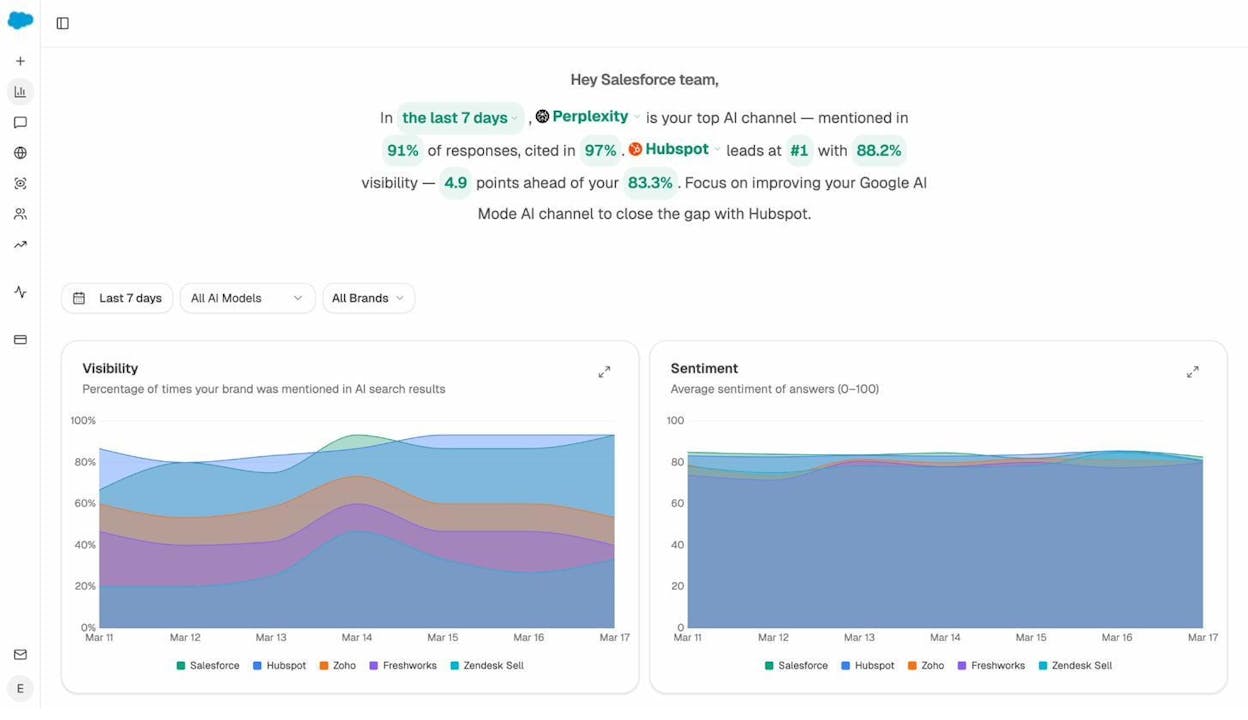
Unlike traditional search, AI models don’t just show your pages—they describe your content in their own words. This means AI responses can frame your data positively, neutrally, or negatively.
Analyze AI tracks sentiment across all AI models, so you can see whether your programmatic content is being described favorably. If AI models consistently summarize your data with caveats or negative framing, it may indicate data quality issues or competitor content that positions your data as outdated or incomplete.
Programmatic SEO and AI Search: Complementary Channels
SEO is not dead—it’s evolving. AI search is not replacing traditional search. These are complementary organic channels, and programmatic SEO is uniquely positioned to benefit from both.
Here’s why: programmatic pages built around structured, authoritative data perform well in traditional search (because they match keyword intent at scale) and in AI search (because AI models prefer structured, factual sources they can cite).
The companies that win at programmatic SEO in 2026 and beyond will be the ones that optimize for both channels simultaneously—tracking rankings in Google and citations in ChatGPT, monitoring organic traffic and AI referral traffic, and building pages that satisfy human readers and AI models.
That requires measurement across both channels. For traditional SEO, tools like Google Search Console and Analyze AI’s Keyword Rank Checker cover the basics. For AI search, Analyze AI’s platform provides the visibility, citation, and traffic data you need to understand how AI engines treat your content.
Programmatic SEO is not a shortcut. It requires real data, thoughtful templates, and ongoing measurement. But when done right, it remains one of the most efficient ways to capture search demand at scale—across both traditional and AI search.

Ernest

Ibrahim


