



Summarize this blog post with:


In this article, you’ll learn how to track your search rankings without paying for a tool. You’ll get a short list of free tools that actually work, a simple workflow to use them together, and a section most guides skip — how to track your rankings inside AI search engines like ChatGPT, Perplexity, and Google AI Mode.
By the end, you’ll know what to check every week, where to check it, and what to do when the numbers move.
Table of Contents
What SERP tracking actually is (and why it matters more now)
SERP tracking is the practice of monitoring where your pages appear in the search engine results page (SERP) for the keywords you care about. The goal is to catch ranking drops early, spot opportunities to climb, and understand which content is doing the work for your business.
For most of the last decade, “SERP” meant the ten blue links Google showed below a search box. That has changed. A typical SERP today is a mix of organic results, AI Overviews, “People Also Ask” boxes, video carousels, and local packs. And next to Google, you now have a parallel set of search engines (ChatGPT, Perplexity, Claude, Gemini, Copilot) that answer questions directly without sending the click.
We don’t think AI search is replacing traditional search. People still run roughly 5 billion Google searches a day, and the brands that get cited inside AI answers are usually the same ones ranking on page one. The shift is that organic visibility now lives in two places, and your tracking has to follow.
This guide covers both. You’ll find proven free tools for the classic Google SERP, and a short toolkit for tracking your visibility inside AI engines.
The four free tools you actually need
You don’t need a stack to get started. Three or four free tools will give you everything a beginner needs to track rankings, spot issues, and benchmark against competitors. We’ll cover each one below, in the order you should use them.
1. Google Search Console: your source of truth for traffic and clicks
Google Search Console (GSC) is a free tool from Google that shows you which queries your site ranks for, where you rank, and how often people click. If you only set up one tool from this list, set up this one. It’s the only tool that pulls data directly from Google.
To start, sign up at search.google.com/search-console and verify your domain. Once Google has gathered enough data, open Performance > Search results.
![[Screenshot description: Google Search Console “Performance > Search results” page showing the four main tabs at the top — Queries, Pages, Countries, Devices — along with the impressions, clicks, average CTR, and average position metrics graph above]](https://www.datocms-assets.com/164164/1777921116-blobid1.png?auto=format,compress&w=1248&fit=max)
A few high-value things to do here:
Filter by the Queries tab to see every keyword you rank for, sorted by clicks or impressions. This is the fastest way to find pages that are close to page one and need a small push.
Switch to the Pages tab to see which URLs drive your search traffic. If your homepage is doing all the work, that tells you something about your content depth.
Use the Search type filter to track rankings in image, news, and video results. No other free tool gives you this data.
Finally, watch your CTR. A page ranking #3 with a 1% click-through rate often has a fixable title or description. Our SEO reporting tools guide walks through how to spot these patterns at scale.
GSC has one well-known limit. It only stores 16 months of data, and it doesn’t tell you how your competitors rank. You’ll need other tools for both.
2. SERP Checker: see who ranks before you publish
Before you write a piece of content (or try to outrank someone), you want to see what’s already on page one. That’s what a SERP checker is for.
Analyze AI’s free SERP Checker returns the top results for any keyword in any country, with no login required. Type in your keyword, set the location, and you get a clean snapshot of who you’re up against.
![[Screenshot description: Analyze AI SERP Checker tool homepage showing the search input field, country selector dropdown, and “Check SERP” button]](https://www.datocms-assets.com/164164/1777921124-blobid2.png?auto=format,compress&w=1248&fit=max)
![[Screenshot description: SERP Checker results page showing the top 10 organic results for an example keyword, each with URL, title, and basic SEO metrics displayed]](https://www.datocms-assets.com/164164/1777921125-blobid3.png?auto=format,compress&w=1248&fit=max)
Use it for three things:
-
Audience-fit check. Are the ranking pages a good match for your audience, or are they written for a different intent? If every result is a listicle and you planned a deep tutorial, that’s a signal.
-
Competition check. If page one is dominated by Forbes, HubSpot, and Wikipedia, that’s a hard SERP for a new site. A SERP filled with smaller blogs is a softer target.
-
Title and angle research. Patterns in the top titles tell you what searchers expect to see. The best new piece is often a “+1” on the dominant pattern, not a copy of it.
We pair this with our free Keyword Difficulty Checker when scoping a new article. The two together give you a fast read on whether a keyword is worth chasing.
3. Keyword Rank Checker: track positions for the keywords you care about
Once you have content live, you need to watch where it ranks. The free Keyword Rank Checker by Analyze AI does exactly that. You enter a domain and a keyword, and it returns your current position on Google.
![[Screenshot description: Analyze AI Keyword Rank Checker showing input fields for keyword and domain, country selector, and the resulting position number with the ranking URL]](https://www.datocms-assets.com/164164/1777921129-blobid4.png?auto=format,compress&w=1248&fit=max)
The simple workflow:
-
List your top 10 to 20 priority keywords in a spreadsheet.
-
Check each one weekly and log the position next to the date.
-
Watch for two patterns. A steady drop over multiple weeks usually means a content issue. A sudden 5+ position drop in a single week often points to an algorithm update or a new SERP feature.
For a more complete view of which keywords your pages rank for (without needing to know them in advance), GSC is still the better tool. The Keyword Rank Checker is best for monitoring a specific shortlist.
If you want to compare a few free rank trackers side by side, our keyword tracking tools guide has a longer list.
4. Website Authority Checker: read the rest of the SERP
The last tool to add to your free stack is a Website Authority Checker. It tells you how strong any domain is in Google’s eyes, on a 0 to 100 scale.
![[Screenshot description: Analyze AI Website Authority Checker showing input field for domain and the resulting authority score number with backlink count]](https://www.datocms-assets.com/164164/1777921133-blobid5.png?auto=format,compress&w=1248&fit=max)
Why this matters for SERP tracking: most ranking shifts are not random. When a new page leapfrogs yours, the question is usually “what changed?” Authority is one of the first things to check. If a new entrant is on a much stronger domain, the lift you need is bigger than a content edit.
You can use this checker on: - Your own site (to set a baseline). - Competitors you outrank (to see how much headroom you have). - New pages that show up on page one (to understand the threat).
Pair it with a Broken Link Checker if you want to find link building opportunities at the same time.
How to track AI search results (the part most guides skip)
Now to the part that didn’t exist in beginner toolkits two years ago. AI search engines have become a meaningful slice of organic discovery. A buyer asks ChatGPT for “the best CRM for small B2B teams” and gets an answer with three brand names and a few citations. That answer is the new SERP, and you need to know if your brand is in it.
The good news is you can start tracking this for free with a single tool.
Run on-demand checks with Ad Hoc Prompt Searches
Analyze AI has a free feature called Ad Hoc Prompt Searches that works like a SERP checker for AI engines. You type in any prompt, pick a country, and it shows you exactly how ChatGPT, Google AI Mode, and Perplexity answer that question, including which brands they mention and which sources they cite.
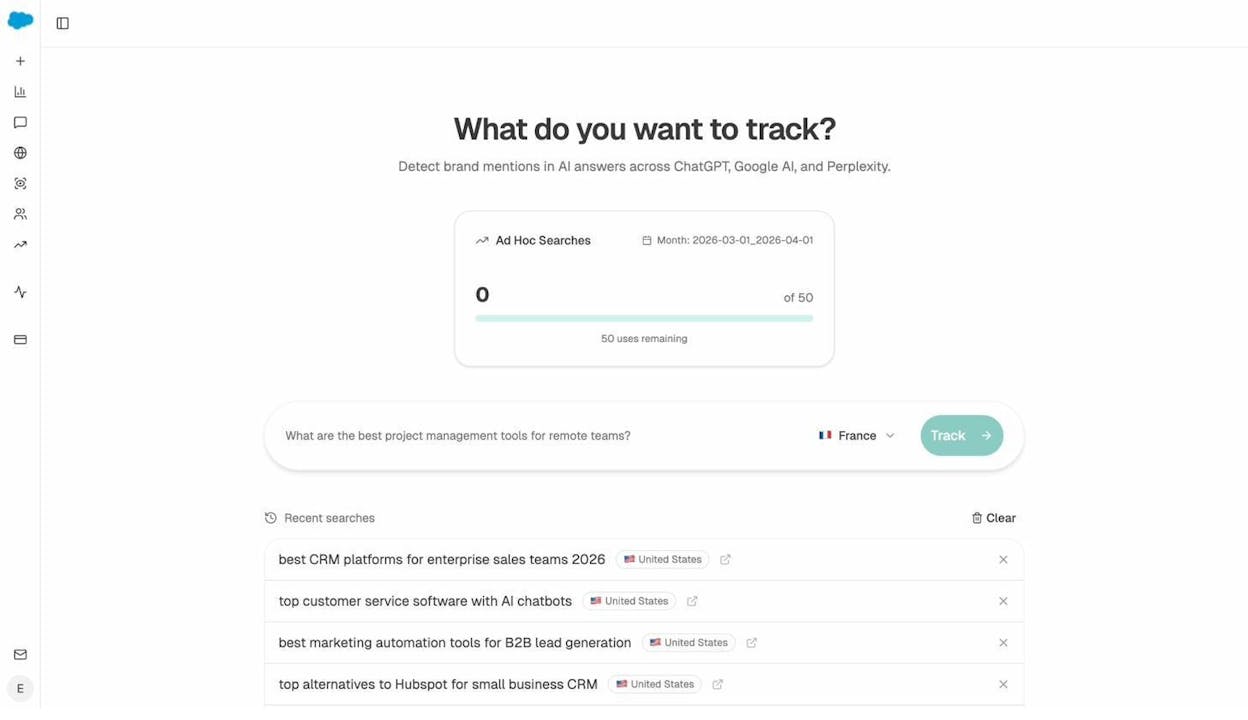
This is the single fastest way to start tracking AI visibility. Use it to:
-
Check how AI engines answer your top branded queries.
-
Test the prompts your buyers actually use (“best [category] for [use case]”).
-
See which competitors are getting cited and which sources are feeding the answers.
You get 50 ad hoc searches a month for free. That’s enough to cover the most important prompts in your category.
Track prompts on a schedule, not just on demand
A one-off check is useful, but visibility moves day to day. To know whether your brand is gaining or losing ground, you need to monitor the same prompts over time. That’s what prompt tracking is for.
Once you’ve added prompts you want to monitor, Analyze AI runs them across the major AI engines on a schedule and logs your visibility, sentiment, average position, and which competitors share the answer.
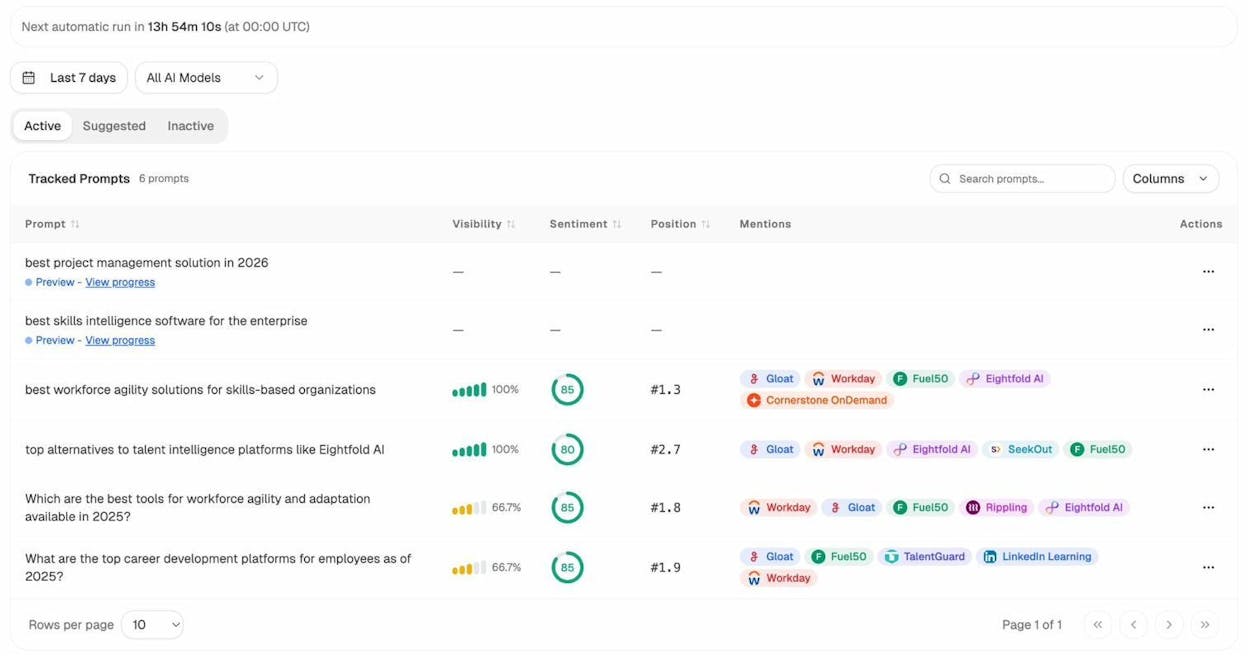
The visibility column tells you what percentage of answers mention your brand. Position is your average rank inside those answers. Mentions are the other brands that show up alongside you. Together, they give you a complete picture of one prompt the same way GSC gives you a complete picture of one keyword.
Don’t have a list of prompts yet? Use prompt suggestions
Most teams hit the same wall when they start tracking AI search. They don’t know which prompts to track. Analyze AI’s Prompt Discovery feature solves this by analyzing your category and proposing prompts your buyers are likely asking.
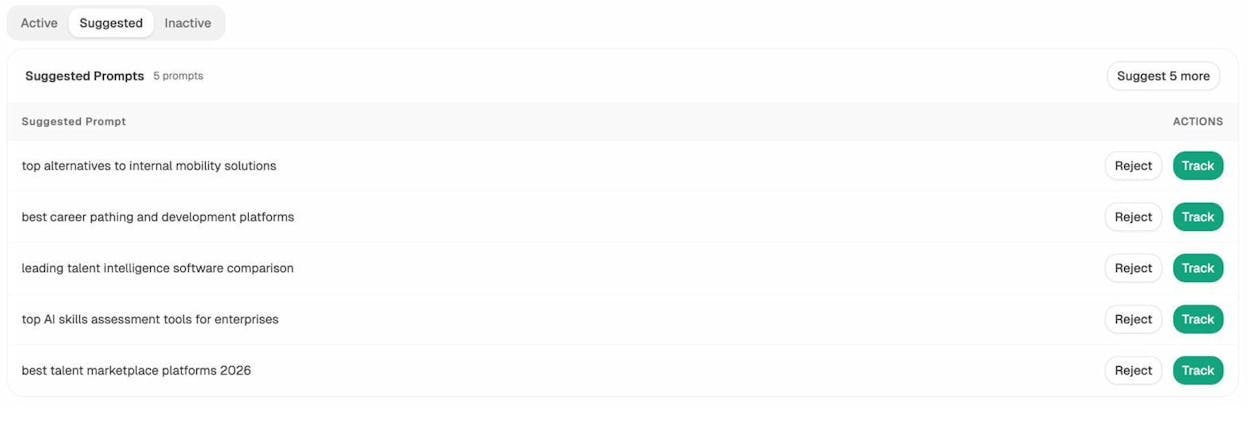
You can accept, reject, or edit each one before adding it to tracking. We recommend starting with 10 to 20 prompts that map to the buying journey: “best [category]” prompts at the top of the funnel, “[competitor] alternatives” in the middle, and “is [your brand] good for X” at the bottom.
This is the AI search equivalent of seed keyword research, and it’s the step that turns prompt tracking from a hobby into a system.
Going deeper: what to track and how to act on it
A list of tools is not a tracking program. The leverage comes from knowing which signals to watch and what each one tells you. Here are the four most useful, and how to act on each.
Share of voice against your real competitors
Share of voice is the percentage of search demand a brand captures, and it’s the cleanest way to compare yourself to competitors regardless of search volume changes.
In Google, you can approximate it with GSC impressions plus the SERP Checker. In AI search, Analyze AI’s Competitor Intelligence shows you exactly which competitors are mentioned alongside (or instead of) you, and how often.
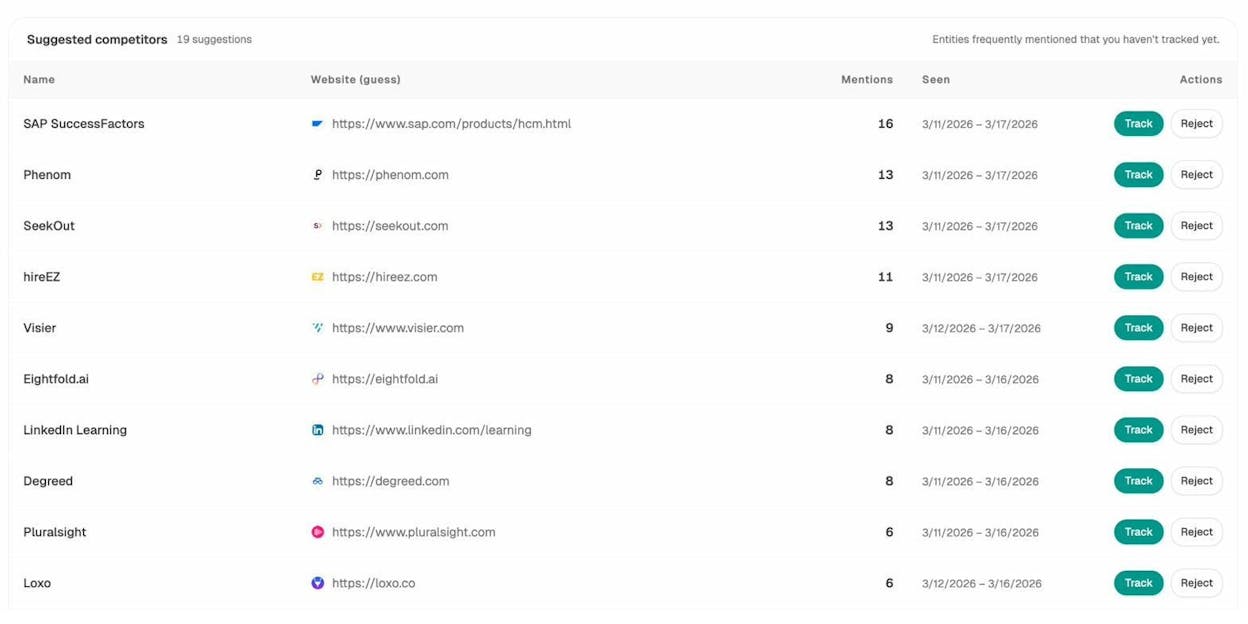
The actionable read: if a competitor is mentioned in 70% of category prompts and you’re in 30%, the gap is probably a content gap, an authority gap, or both. Map their top-cited pages, see what topics they cover that you don’t, and prioritize those for your editorial calendar.
For a structured way to run this analysis, see our guide on SEO competitor analysis with AI search tracking.
Engine breakdown: which AI engine sends you traffic
In classic SEO, all your organic traffic came from one source (Google). That’s no longer true. ChatGPT, Perplexity, Claude, Gemini, and Copilot each behave like their own search engine, and your performance can vary wildly across them.
The Engine Breakdown view in Analyze AI shows your visibility split by engine, so you can spot where you’re strong and where you’re losing.
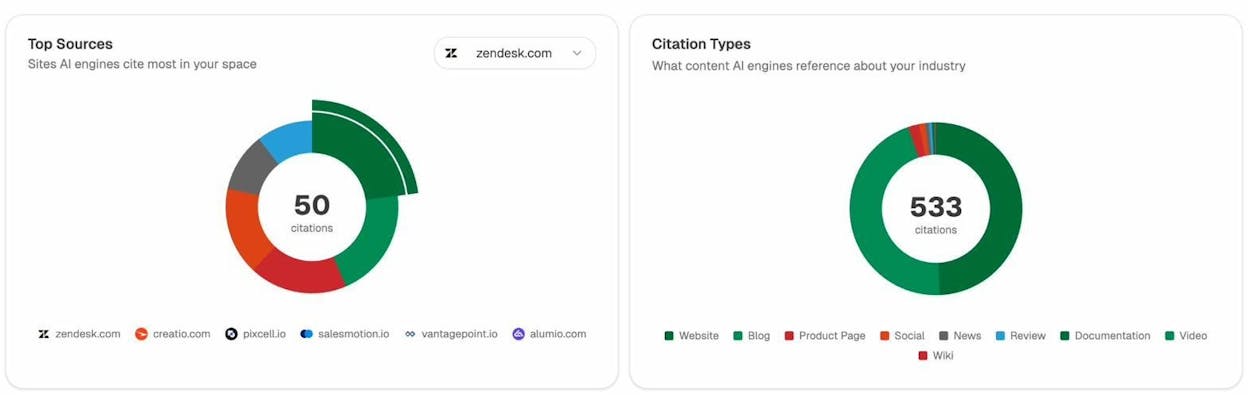
Here’s a simple framework for what to do with the data:
|
If you’re strong in… |
The likely reason |
What to do |
|---|---|---|
|
Perplexity |
Strong content, good citations from indexed pages |
Press the advantage. Add more linkable assets to similar topics. |
|
ChatGPT |
Brand authority and high-quality mentions |
Pursue more PR and unlinked brand mentions on tier-1 sites. |
|
Google AI Mode |
Strong traditional SEO, indexed deep pages |
Refresh and expand your top organic pages so they keep feeding AI Mode. |
|
Copilot / Gemini |
Bing visibility and structured data |
Audit your Bing Webmaster Tools and schema. |
If you want to go deep on any engine specifically, our How to Rank on ChatGPT and How to Rank on Perplexity guides are based on a 65,000-citation dataset.
Citations: the AI search version of “who’s ranking”
In Google, the top-ranking URLs are the data points you study. In AI search, the equivalent is citations — the links AI engines reference when generating an answer.
Analyze AI’s Citation Analytics gives you the full picture of which domains are being cited in your category, and how often.
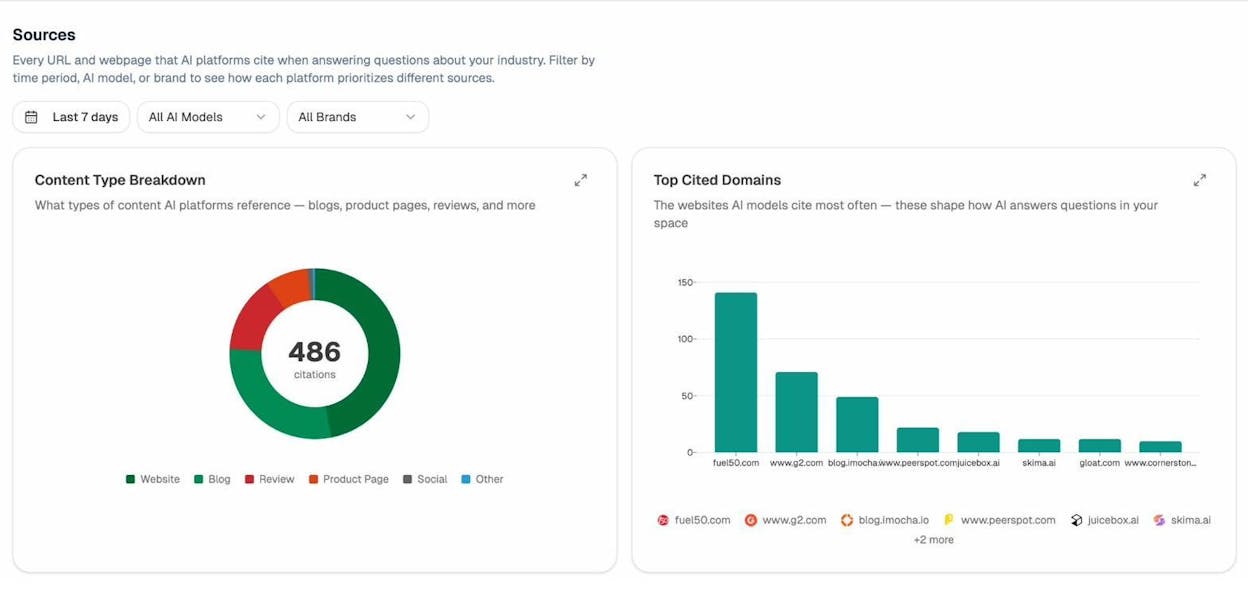
Two patterns are worth looking for:
The content type breakdown tells you what AI engines prefer to cite (blog posts, product pages, reviews, documentation). If reviews are 30% of citations in your space and you don’t have any, that’s a clear gap to close.
The top cited domains list tells you which sites have outsized influence over AI answers in your category. If G2, Reddit, or a specific publication shows up at the top, your link building and PR plan should reflect it.
Pages winning AI traffic (so you can do more of what works)
GSC tells you which pages drive Google traffic. Analyze AI’s AI Traffic Analytics does the same for AI engines, by detecting referrers from chatgpt.com, perplexity.ai, claude.ai, and the rest.
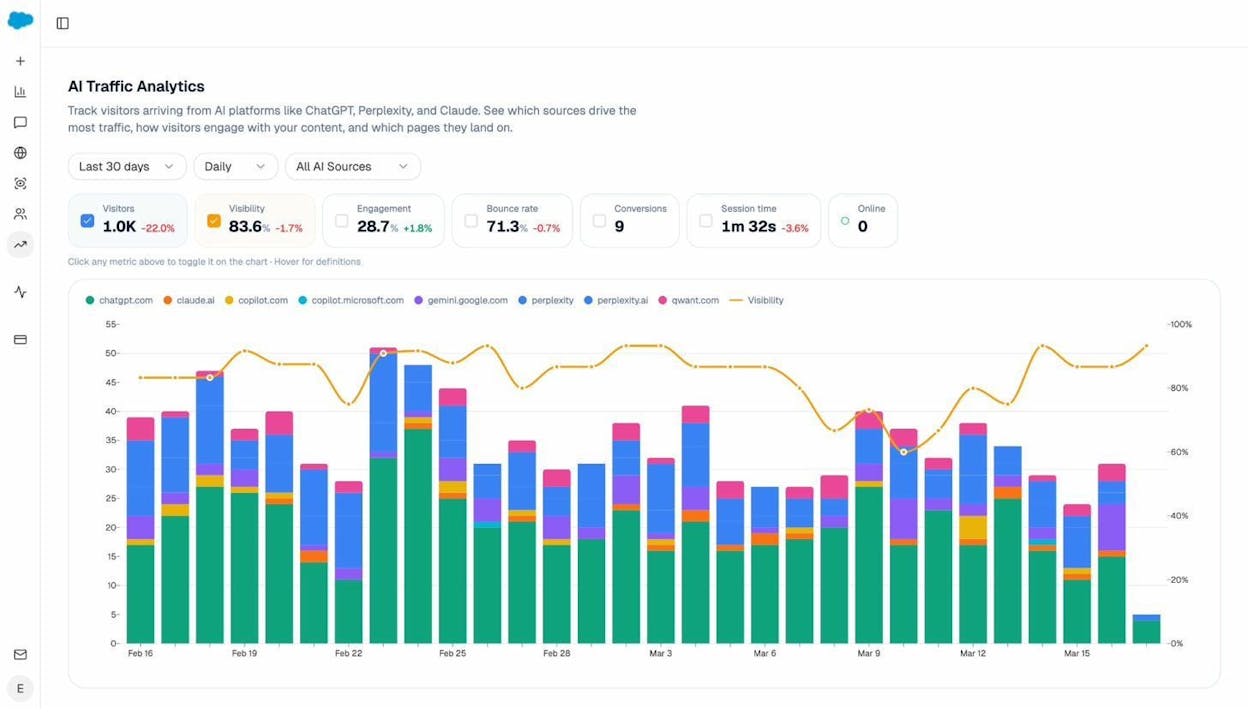
Drill down on a single landing page and you’ll see the full picture: which AI engines sent traffic, the prompts that surfaced your page, engagement, and conversion data.
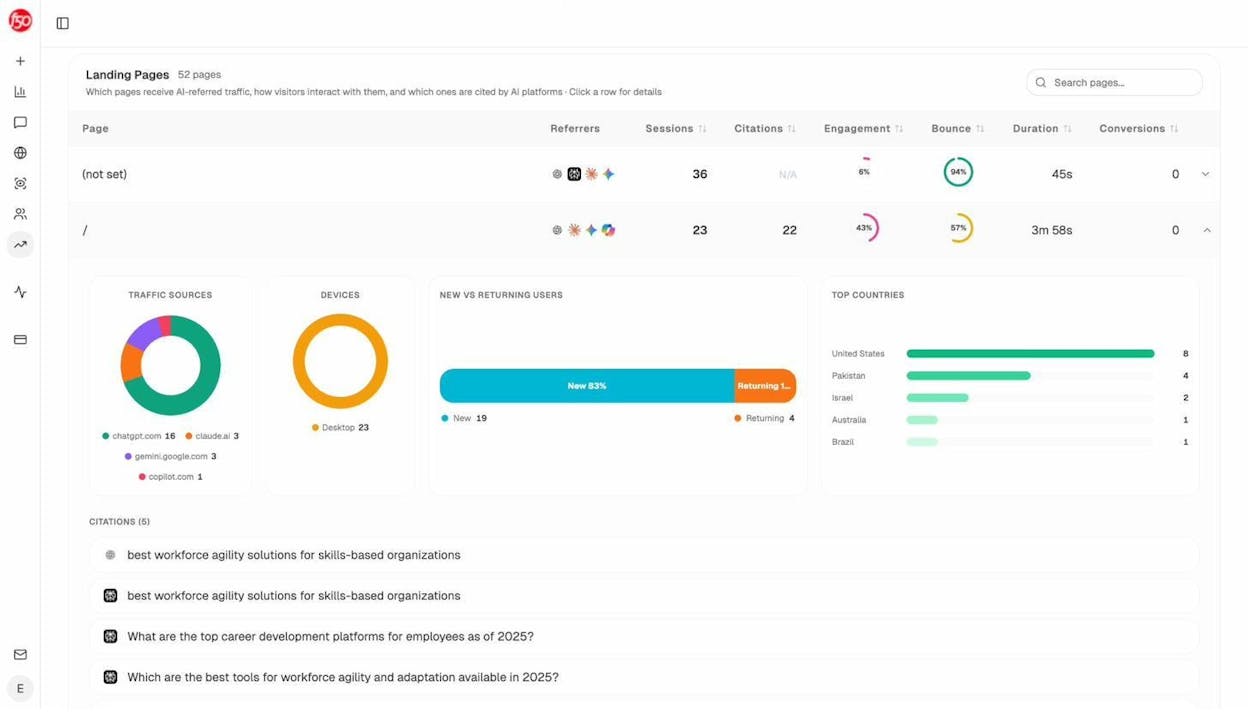
The actionable read: find the three or four pages that consistently win AI traffic and study them. They share a pattern. Once you know the pattern, double down on it for your next batch of content.
This is the AI search equivalent of “look at your top organic pages and produce more like them.” The mechanics are the same. Only the source has changed.
Putting it all together: a simple weekly workflow
Tracking gets easier when it’s a habit, not a project. Here’s a 30-minute workflow you can run every Monday with the free tools above.
-
Open GSC. Filter the last 7 days vs the previous 7 days. Note any queries that lost or gained more than 20% of clicks.
-
Run a Keyword Rank Check on your top 5 priority keywords. Log the positions in your tracker.
-
Open Ad Hoc Prompt Searches. Run two or three of your most important AI prompts. Note any new competitors in the answer.
-
Check your Engine Breakdown. If one engine dropped sharply this week, dig into the prompts driving it.
-
Glance at Citations. Look for any new domain that started getting cited in your category. That’s your next outreach target.
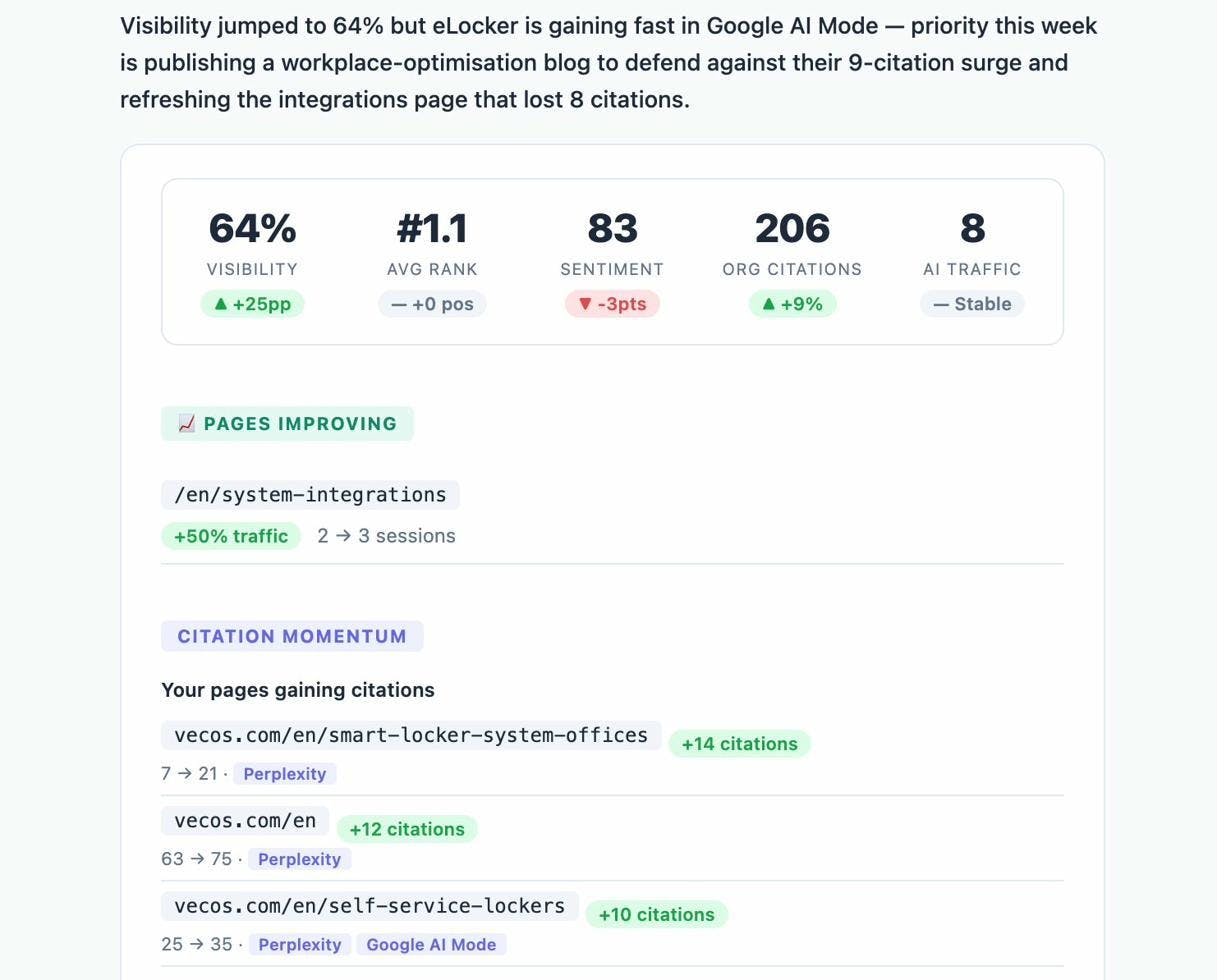
For deeper reporting, Analyze AI’s Weekly Email Digests summarize all of this in a single email, so the routine becomes “open the digest and act on the alerts.”
When to upgrade from free tools
Free tools cover most of what a beginner needs. You’ll outgrow them when one of three things happens.
The first is volume. Tracking 20 keywords manually is fine. Tracking 200 across multiple countries and devices is not. At that point, a paid rank tracker pays for itself in time saved. Our free SEO tools roundup and rank tracking tools list cover the upgrade path.
The second is depth. When you need daily ranking updates, share-of-voice charts, cannibalization alerts, or per-zip-code tracking, you’ve crossed the line from monitoring into program management.
The third is AI search at scale. Once you’re tracking 50+ prompts across 5 AI engines, you need a proper AI search visibility platform to keep up. The free Ad Hoc Prompt Searches will tell you what’s possible. The platform is what makes it operational.
The shortest possible summary
Use Google Search Console to see what’s already working. Use a free SERP Checker, Keyword Rank Checker, and Website Authority Checker to track and benchmark. Add Ad Hoc Prompt Searches to cover the AI search side of your visibility.
Run the workflow weekly. Act on the patterns, not the noise. And remember that ranking on Google and getting cited in ChatGPT are now the same job, viewed from two angles.
That’s SERP tracking in 2026.

Ernest

Ibrahim


