



Summarize this blog post with:


In this article, you’ll learn how to build nine Slack AI agents that handle the work marketing teams spend hours on every week. From content writing and keyword research to AI visibility tracking and competitor intelligence, each agent runs inside your Slack workspace, pulls live data from tools like GA4, Google Search Console, Semrush, and HubSpot, and delivers results without leaving the channel. You will also see how Analyze AI’s Agent Builder makes this possible with 180+ nodes, 34 pre-built data recipes, and zero code required.
Table of Contents
What Is a Slack AI Agent?
A Slack AI agent is a bot that sits inside your Slack workspace and acts like a specialist on your team. You message it a question or trigger it on a schedule, and it reads data from your tools, reasons through it with an LLM, and sends the answer back to a channel or thread.
The difference between a Slack AI agent and a traditional Slackbot is the reasoning layer. Old bots moved data from point A to point B. An AI agent reads context, makes judgment calls, and produces outputs that would normally take a human 20 to 60 minutes.
For marketing teams, that means a Slack agent can research keywords, draft articles, audit pages for AI search visibility, generate social images, or compile performance reports. All from a Slack message or a scheduled trigger.
Here are the nine agents you can build today, along with what each one does.
|
Use Case |
What It Does |
|---|---|
|
Content writing at scale |
Researches, outlines, and drafts full articles with brand voice and AI visibility data baked in |
|
Content refresh |
Identifies stale pages losing traffic, rewrites them for freshness and AEO readiness |
|
Keyword research at scale |
Pulls keyword ideas, search volumes, and difficulty scores across hundreds of seeds in one run |
|
Internal linking |
Crawls your sitemap, matches pages by topic, and suggests three internal links per page |
|
Link outreach |
Finds relevant journalists and bloggers, verifies emails, drafts personalized pitches |
|
Social media content creation |
Turns blog posts into platform-specific social copy with branded images |
|
Competitive intelligence |
Tracks competitor rankings, messaging shifts, and citation share across AI engines |
|
AI visibility monitoring |
Sends daily alerts when your brand drops in ChatGPT, Perplexity, or Gemini results |
|
Campaign reporting |
Pulls GA4, GSC, and HubSpot data into a weekly performance summary delivered to Slack |
9 Slack AI Agents for Marketing Teams
1. Content Writing at Scale Agent
Most content teams can produce three to five articles per week before quality starts dropping. The bottleneck is rarely the writing. It is the research, the outlining, and the back-and-forth between writers, editors, and strategists that eats the clock.
This agent handles the full content pipeline. You send a topic or keyword to your #content Slack channel. The agent runs a multi-step workflow that generates research from web sources and your AI visibility data, builds a structured outline with editorial comments, and produces a full draft with your brand voice injected from the Knowledge Base.
Here is what the agent workflow looks like in Analyze AI:
Start (keyword input + Brand vs Competitor recipe + Competitor Message Shift recipe) → Prompt LLM (strategic analysis) → Generate Research → Generate Outline → Generate Full Draft (with brand vault injected) → AEO Content Scorecard → Conditional (if score > 80, publish to WordPress. If below, send gaps to Slack).
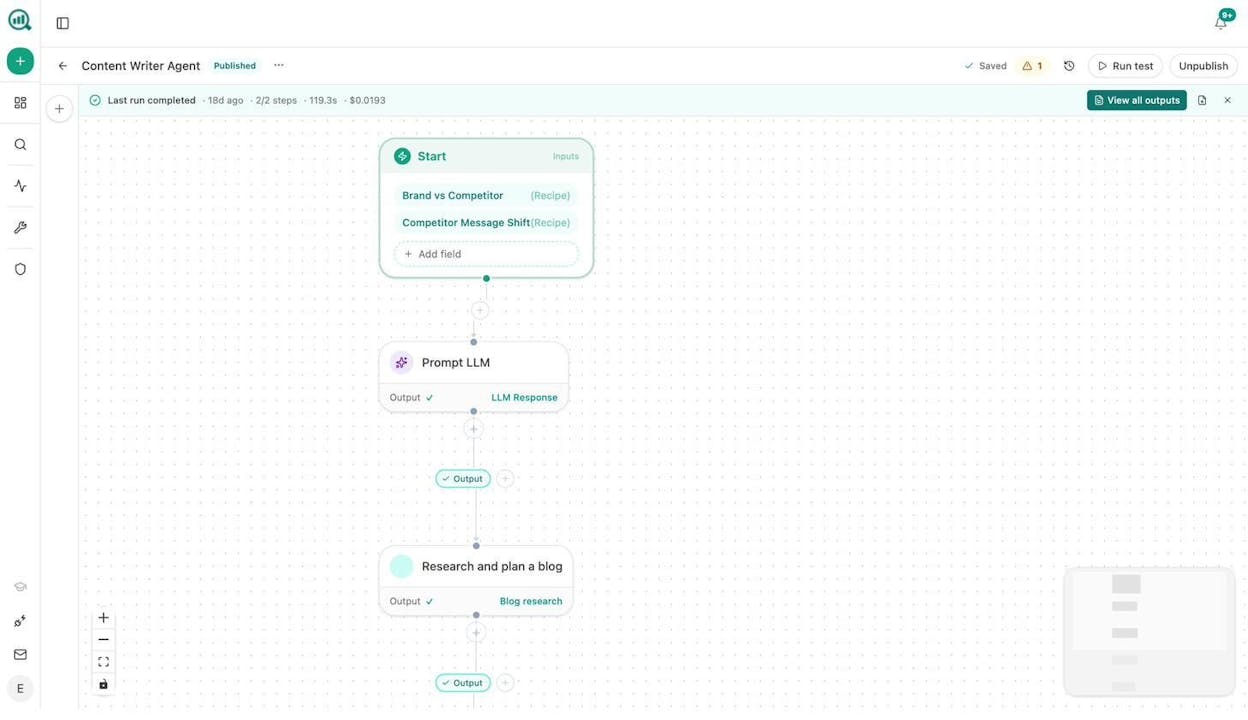
The key nodes involved are Generate Research, Generate Outline, Generate Full Draft, AEO Content Scorecard, Inject Brand Context, and WordPress Create Post. Each step feeds the next, and the Brand Vault ensures every draft matches your tone, messaging rules, and disallowed phrases. The Content Writer pipeline is not a generic “write me an article” prompt. It runs research, builds evidence, structures arguments, and checks the draft for AI engine optimization readiness before publishing.
What makes this different from a standalone AI writing tool is the data layer. The agent starts with your competitor visibility data and AI prompt gaps, so every article is aimed at topics where you are missing coverage in both search engines and AI answer engines.
2. Content Refresh Agent
Pages lose rankings quietly. By the time you notice the drop in Google Search Console, you may have lost months of compounding traffic. The same applies to AI search. A page that ChatGPT used to cite can stop appearing without warning.
This agent runs on a weekly schedule. It pulls your declining pages from GA4, cross-references them with the stale-content and citation-decay-alert data recipes, and loops through each page. For every page, it scrapes the current content, rewrites it for freshness and AEO readiness using your brand voice, and either pushes the update to WordPress or sends a diff to your #content-updates Slack channel for review.
Agent workflow: Schedule (weekly) → stale-content recipe + declining-pages recipe + citation-decay-alert recipe → Loop (for each page) → Web Page Scrape → Prompt LLM (rewrite for freshness, inject brand voice) → AEO Content Scorecard → Conditional (if score passes, WordPress Update Post. If not, Slack with gaps).
The result is that content refreshing becomes a background process. Your team focuses on new pieces while the agent keeps existing ones healthy across both Google and AI engines.
3. Keyword Research at Scale Agent
Running keyword research for one seed term is straightforward. Running it for 200 seed terms across multiple tools is a full day of manual work.
This agent takes a CSV of seed keywords as input and runs each one through DataForSEO’s Keyword Ideas, Semrush’s Keyword Research, and DataForSEO’s Get Search Volumes nodes. It clusters the results by topic, scores them by difficulty versus search volume, and exports everything to a spreadsheet or Notion database. It posts a summary to your #seo Slack channel with the top 20 opportunities.
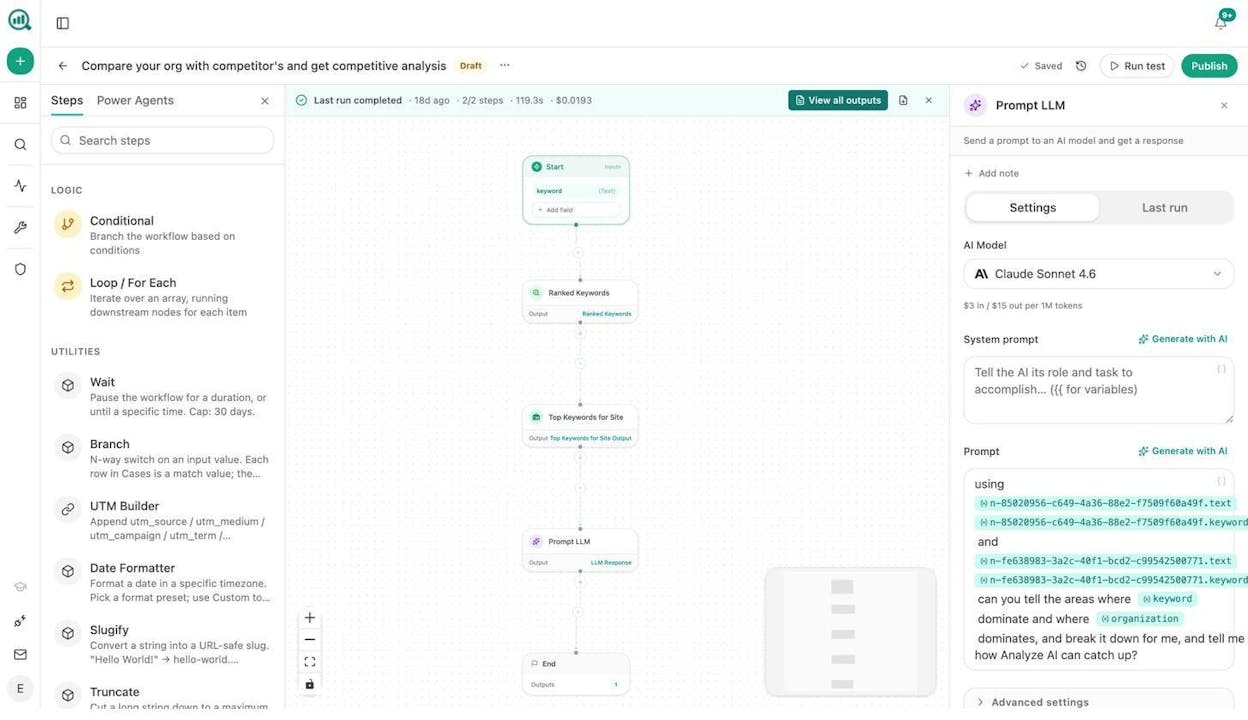
Agent workflow: Start (CSV of seed keywords) → Loop → DataForSEO Keyword Ideas + Semrush Keyword Research + DataForSEO Get Search Volumes → Prompt LLM (cluster and score) → Export to Excel → Slack summary.
On top of traditional keyword research, this agent can also pull from Analyze AI’s prompt-cluster-brief and unmentioned-prompts recipes. These show you the prompts where AI engines discuss your category but never mention your brand. That gives you a second layer of opportunity that pure SEO keyword tools miss entirely.
You can also run this with Analyze AI’s Sheets feature for bulk processing without building a full agent, which is useful for quick exploratory runs.
4. Internal Linking Agent
Internal linking is one of the highest-leverage SEO activities, and it is the one most teams neglect once their site passes a few hundred pages. Manually reviewing each page for link opportunities does not scale.
This agent runs weekly. It crawls your sitemap, pulls GSC Top Keywords for each page, runs On-Page SEO analysis, and uses an LLM to suggest three internal links per page based on topical relevance. The suggestions go to a Notion task board or directly to Slack for your editor to implement.
Agent workflow: Schedule (weekly) → Get Sitemap → Loop (for each page) → On-Page SEO + GSC Top Keywords for Page → Prompt LLM (suggest 3 internal links from the sitemap with anchor text) → Notion Create Task or Slack message.
This is one of those workflows where Analyze AI’s agent substrate makes a real difference. Because the Agent Builder has native access to GSC data, DataForSEO’s On-Page SEO node, and your full sitemap, you do not need to export data from three different tools and paste it into a spreadsheet. The agent reads it all in one run.
5. Link Outreach Agent
Link building outreach is tedious because it combines research, email finding, personalization, and sending into one workflow that repeats hundreds of times.
This agent automates the research and personalization steps. It starts with a topic or keyword, runs DataForSEO News Research and Brand Mentions to find recent articles in your space, uses Tomba Author Finder to get the journalist’s email, and drafts a personalized outreach email using your brand context and the specific article they wrote. The drafted emails land in your #outreach Slack channel for a human to review and approve before sending.
Agent workflow: Start (topic or keyword) → DataForSEO News Research + Brand Mentions → Loop (for each article) → Tomba Author Finder → Prompt LLM (draft personalized pitch, inject brand context) → Slack message with draft email + send link.
The human stays in the loop for approval. The agent handles the 80% that is research and drafting. This same approach works for listicle outreach, digital PR, and guest post pitching.
6. Social Media Content Creation Agent
Turning a blog post into social media content sounds simple until you need five platform-specific versions with images for each one. Most teams either skip this step or do it inconsistently.
This agent takes a published blog URL, scrapes the content, and generates platform-specific social copy for LinkedIn, X, and Instagram. It then uses the Social Media Image and Blog Featured Image nodes to create branded visuals for each post. Everything lands in your #social Slack channel, ready for scheduling.
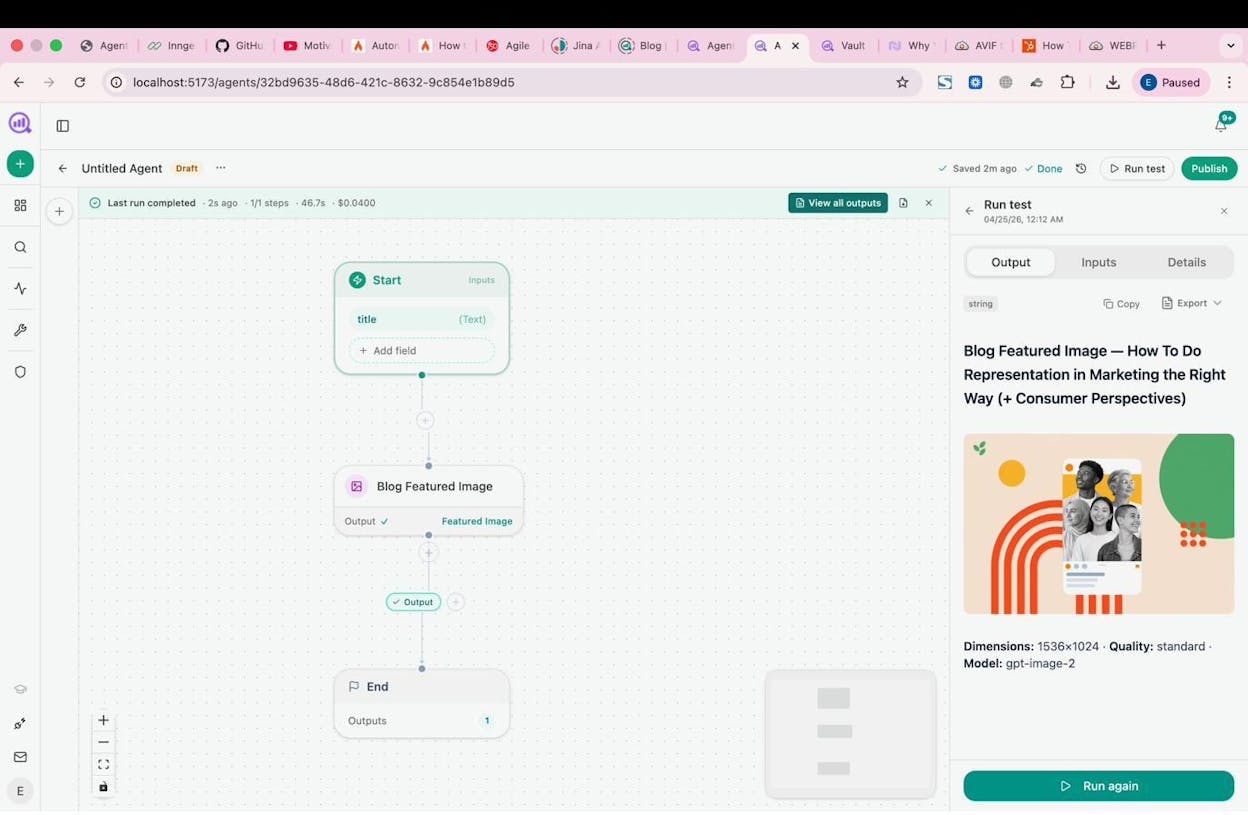
Agent workflow: Start (blog URL) → Web Page Scrape → Prompt LLM (generate social copy per platform, inject brand voice) → Social Media Image (per platform) → Slack message with copy + images.
The image generation nodes are brand-kit-aware, meaning they pull your colors, fonts, and logo automatically. You can also use the Infographic Generator node to turn data-heavy sections of a blog post into shareable infographic images.
7. Competitive Intelligence Agent
Knowing what competitors are doing in Google is only half the picture. You also need to know how AI engines frame them versus you. Are they getting cited more on Perplexity? Is ChatGPT recommending them over you for certain prompts?
This agent runs daily. It pulls from Analyze AI’s competitor-gaps, competitor-message-shift, and rising-threats data recipes. When a competitor overtakes you on a tracked prompt or gains significant visibility, the agent posts an alert to your #competitive-intel Slack channel with the prompt, the competitor, the shift, and a suggested response.
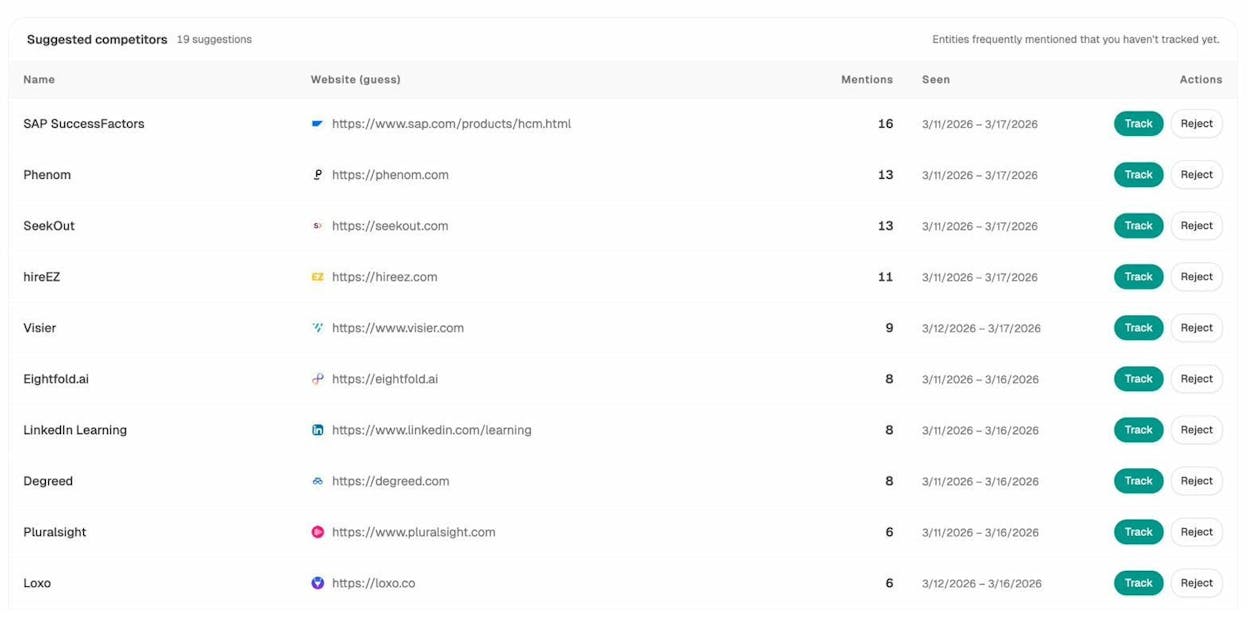
Agent workflow: Schedule (daily) → competitor-gaps + competitor-message-shift + rising-threats recipes → Conditional (if new threats or losses detected) → Prompt LLM (summarize shift and suggest response) → Slack alert.
This goes beyond what traditional SEO competitive analysis tools offer. You are not just tracking keyword rankings. You are tracking how AI models narrate your category and where competitors win the prompts that drive buying decisions.
8. AI Visibility Monitoring Agent
AI search traffic is growing fast for many brands, but most teams have no daily monitoring in place. They check manually once a week, if at all.
This agent runs every morning. It pulls your AI visibility score, checks for drops using the visibility-losers recipe, and cross-references with citation-decay-alert. If your visibility dropped on any tracked prompt or provider, the agent posts a detailed alert to #ai-visibility with the prompt, the engine, the drop percentage, and a link to the affected content.
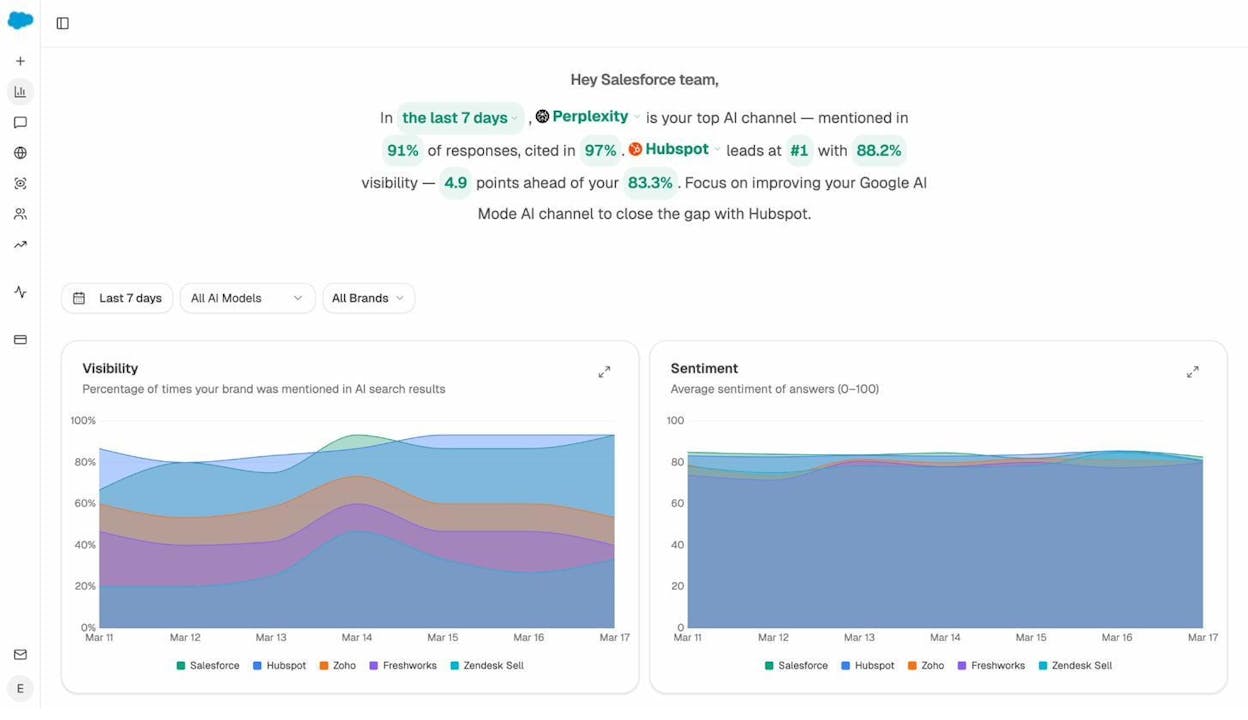
Agent workflow: Schedule (daily 8am) → visibility-losers (24h) + citation-decay-alert → Conditional (if any drops) → Prompt LLM (summarize drops with recommended actions) → Slack alert.
Pair this with the Weekly Email Digests feature for a full monitoring stack. The daily Slack alerts catch regressions in real time. The weekly digest gives your leadership team a clean summary without logging in. The combination means you catch drops before they compound.
9. Campaign Reporting Agent
Marketing reporting is a weekly time sink. Someone has to log into GA4, pull the numbers, cross-reference with GSC and HubSpot, format everything, and send it to the team. That cycle repeats every Monday.
This agent handles all of it. On a schedule, it pulls GA4 AI Traffic Overview, GSC Top Pages, and HubSpot deal data from the last seven days. It uses the exec-one-pager recipe to generate an executive summary, formats it as a DOCX report, and posts it to your #marketing-dashboard Slack channel.
Agent workflow: Schedule (Monday 7am) → GA4 AI Traffic Overview + GSC Top Pages + HubSpot Deals (last 7d) + exec-one-pager recipe → Prompt LLM (executive summary, brand-voice-injected) → Export to DOCX → Send Email to leadership + Slack post.
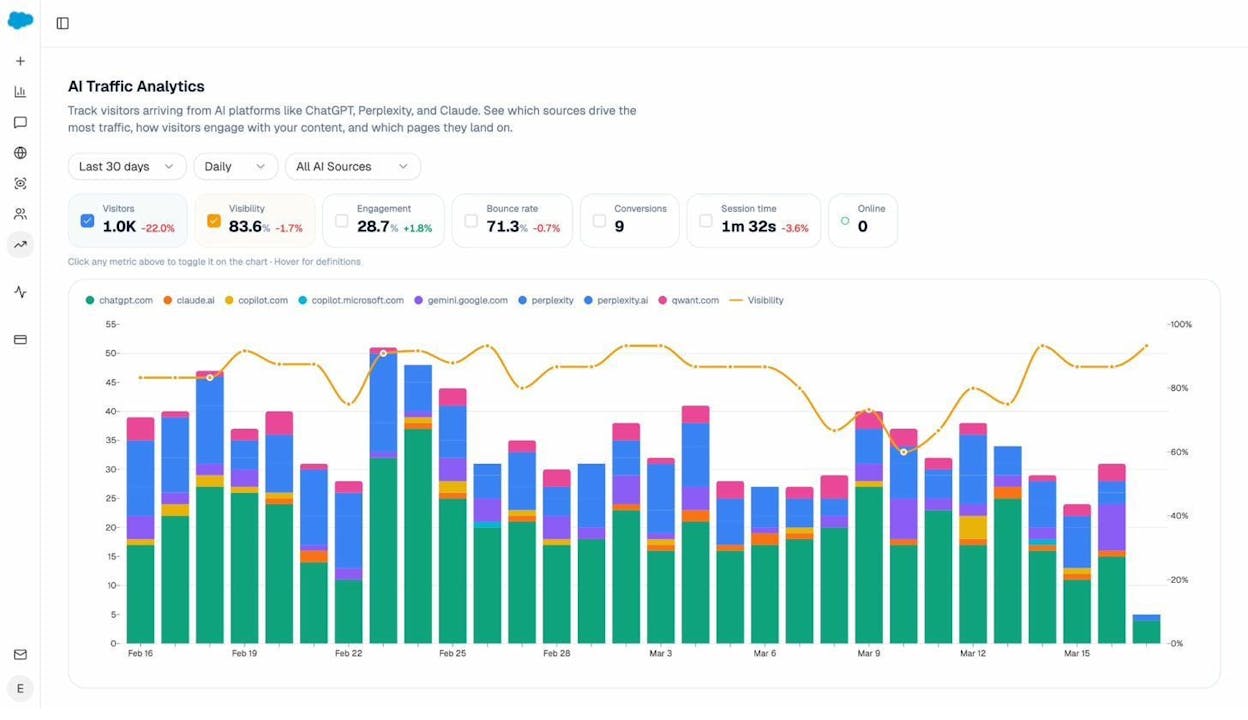
This is the same pattern the Agent Builder capabilities document describes for CMO board prep. The difference is that this version also includes AI traffic analytics, so your report does not just show Google performance. It shows how many sessions came from ChatGPT, Perplexity, Gemini, and Copilot, which pages they landed on, and what converted.
How to Build a Slack AI Agent With Analyze AI
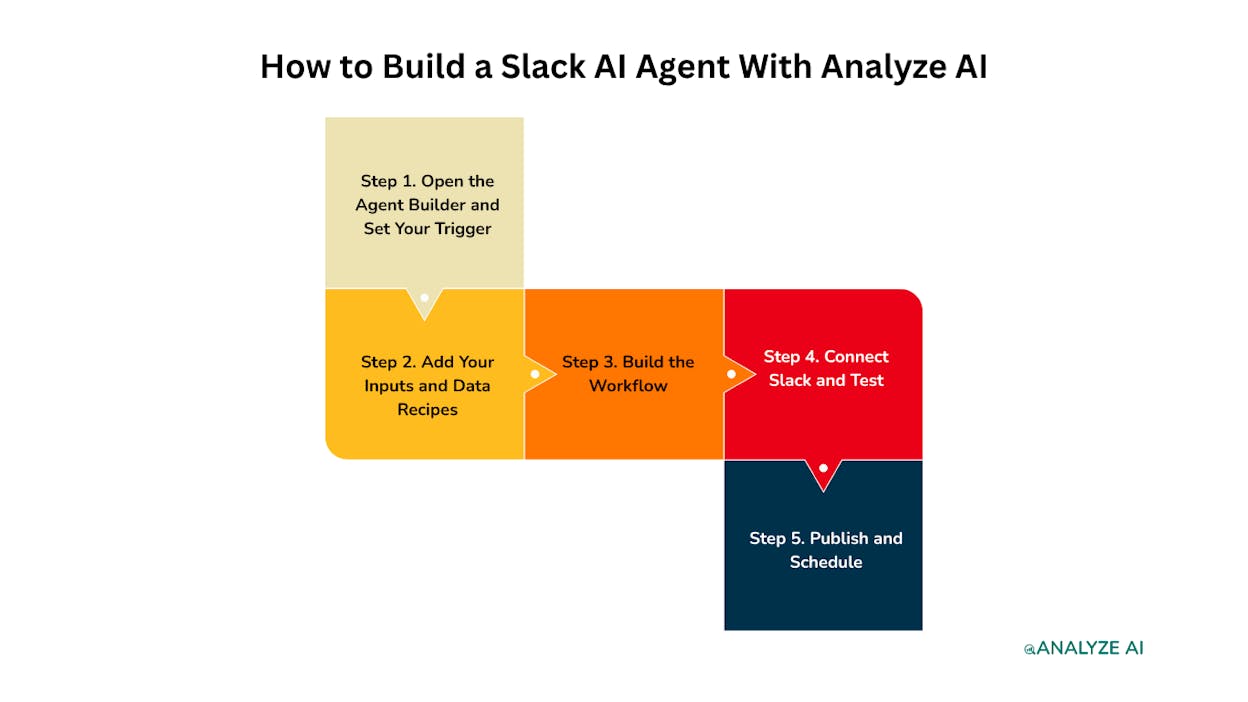
Building these agents does not require writing code. Here is the process.
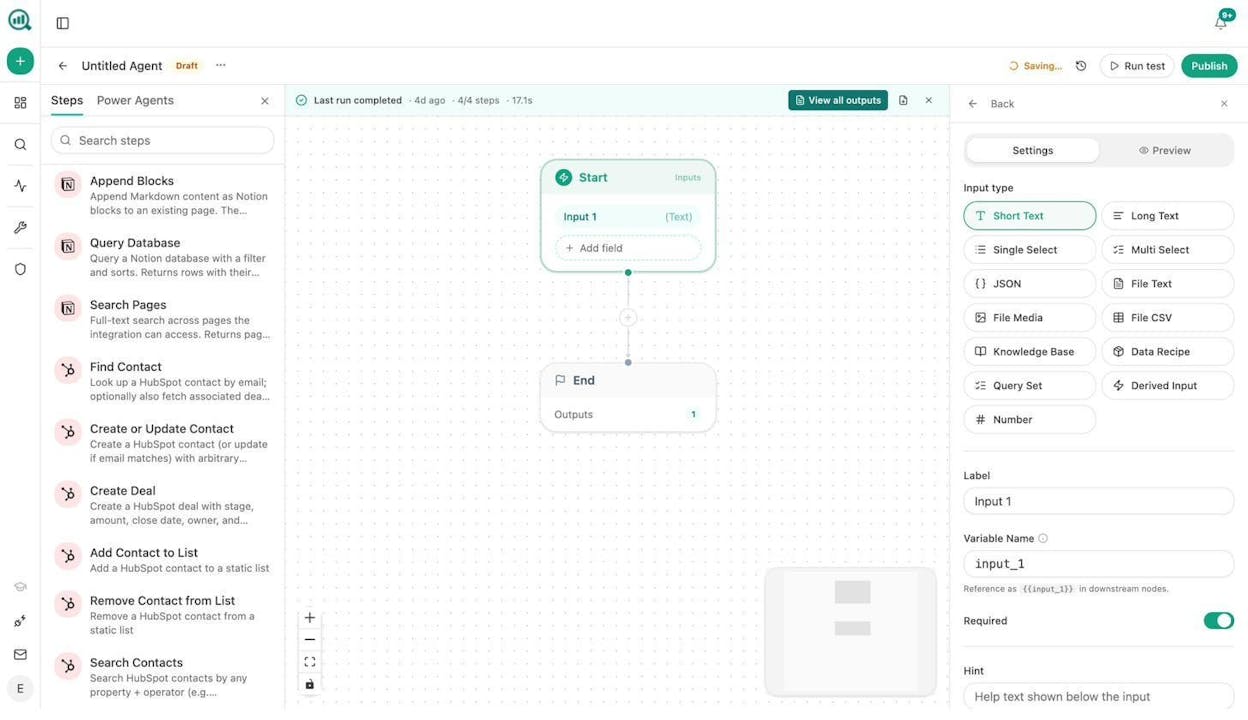
Step 1. Open the Agent Builder and Set Your Trigger
Go to the Agent Builder in your Analyze AI workspace. Create a new agent and choose your trigger type.
Use Manual for on-demand agents like keyword research or outreach drafting. Use Schedule for recurring agents like daily monitoring or weekly reports. Use Webhook for event-driven agents that fire when something happens in HubSpot, a CMS, or another tool.
Step 2. Add Your Inputs and Data Recipes
Define what the agent needs to run. For a keyword research agent, the input is a text field for the seed keyword. For a competitive intelligence agent, the inputs are data recipes like competitor-gaps and rising-threats that auto-resolve at runtime. No manual entry needed.
The 34 data recipes are pre-built pipelines that pull from your AI visibility data, GA4, GSC, DataForSEO, Semrush, and Brand Vault. Drop one into the start node and it handles the query, caching, and formatting for you.
Step 3. Build the Workflow
Drag nodes from the left sidebar and connect them. Each node does one thing. Prompt LLM sends a prompt to Claude, GPT, or Gemini. Web Page Scrape fetches a URL. DataForSEO Keyword Ideas pulls keyword data. WordPress Create Post publishes an article.
Use Conditional nodes to add logic (if the AEO score is above 80, publish. If below, send to Slack for review). Use Loop nodes to process multiple items (loop through 50 pages and check each one for internal linking opportunities).
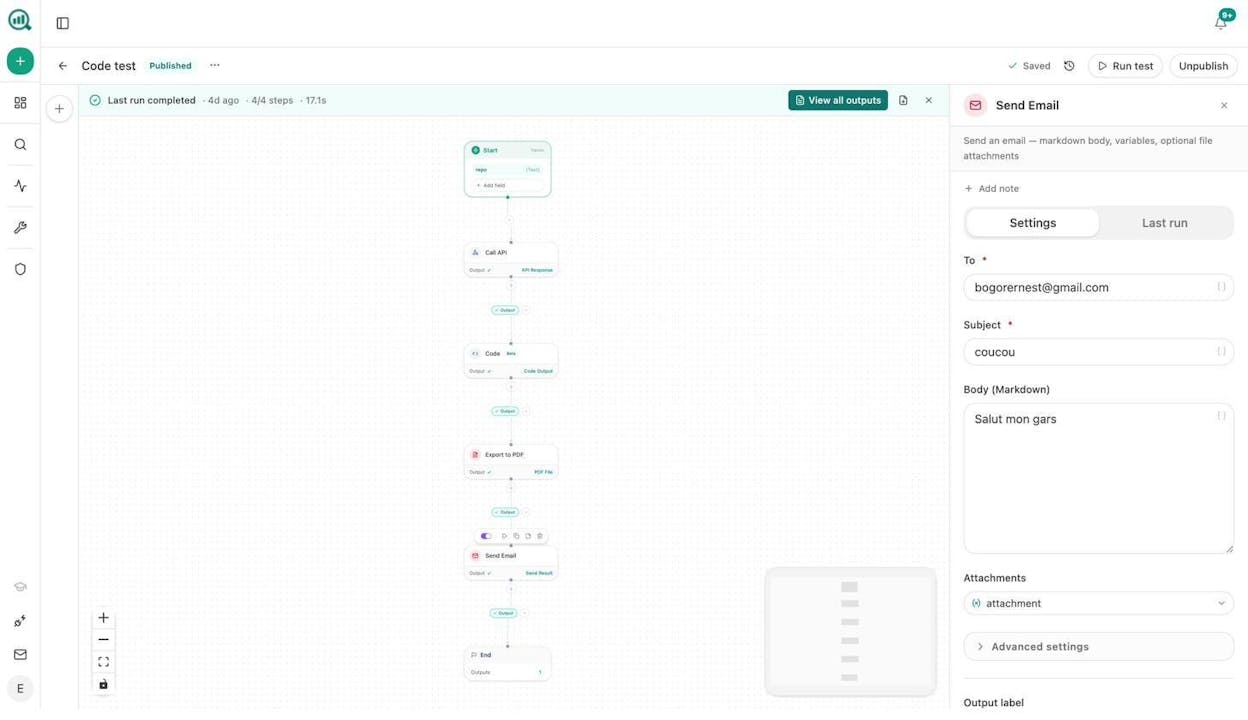
Step 4. Connect Slack and Test
Connect your Slack workspace and choose which channel the agent posts to. You can send results as a message, a file attachment, or a threaded reply.
Run a test with sample data. Review the outputs. Adjust your prompts and logic.
Step 5. Publish and Schedule
Click Publish. If the agent uses a schedule trigger, it runs automatically at the times you set. If it uses a webhook, it fires whenever the event occurs. If it is manual, your team runs it from the Analyze AI interface or triggers it from a Slack slash command.
Every run logs its inputs, outputs, cost, and duration. You can inspect any run, see where it succeeded or failed, and iterate.
Why This Works Better Than Generic Automation Tools
Generic workflow tools like Zapier, Make, or n8n give you triggers and connectors. What they do not give you is a substrate that already understands your SEO data, your AI visibility scores, your brand voice, and your competitive landscape.
With Analyze AI’s Agent Builder, the data is already in the room. You do not need to export a CSV from one tool, import it to another, and paste it into a prompt. The agent reads your GA4, GSC, Semrush, DataForSEO, HubSpot, WordPress, Notion, and AI visibility data natively through 180+ nodes and 34 data recipes.
It also comes with a Content Writer that runs research, outlines, and drafts through an evidence-based pipeline, and a Content Optimizer that audits any URL for both SEO and AI engine readiness. These are not generic LLM prompts. They are multi-step processes that check structure, evidence gaps, entity coverage, and citation likelihood.
Analyze AI offers a free trial so you can build and test your first agent before committing.
Start With One Agent and Build From There
You do not need to build all nine agents on day one. Pick the one that solves your most painful weekly bottleneck. If your team spends every Monday pulling reports, build the campaign reporting agent first. If content production is the bottleneck, start with the content writing agent.
Once the first agent is running, you will see where the next one fits. The agents share the same data layer, the same brand vault, and the same node library. Building the second one takes half the time.
The marketing teams that are pulling ahead in 2026 are not hiring more people. They are building systems that do the repetitive work so their team can focus on strategy, positioning, and creative work that AI cannot replace.
These nine Slack AI agents are that system.

Ernest

Ibrahim


